Empathy Mapping

Your constantly-updated definition of Empathy Mapping and collection of videos and articles.
Be a conversation starter: Share this page and inspire others!

493 Shares

What is Empathy Mapping?

Empathy mapping is the visual representation of users’ thoughts, feelings and actions. User Experience (UX) designers use empathy maps to organize user research data to gain a deeper, shared understanding of users’ needs and make decisions.

“Nobody cares how much you know, until they know how much you care.”—Theodore Roosevelt

Designers who choose an empathetic approach build stronger connections with their users. This gives their product a competitive advantage.

Empathy helps designers learn the underlying emotions and motivations that drive their users’ behavior. Designers can develop innovative solutions that meet users’ expectations when they understand what it is users truly want and need.

Let's look at some examples of good design and poor design in airports to understand why empathy is considered to be one of the most powerful tools in a designer’s toolbox.

Transcript

Teams create empathy maps at the beginning of a project and use them throughout the design process. These maps shed light on hidden insights and keep the user front and center.

For example, a mobile productivity app team conducts user interviews and then creates empathy maps for different user segments, such as students, remote workers, and busy parents. Each empathy map includes details like user thoughts, feelings, needs and pain points related to task management.

As the team assembles the map, they notice students crave recognition and a sense of accomplishment. The team then works this need into their design ideation, testing ideas like leaderboards and productivity streaks.

Is Empathy Mapping Important?

Empathy mapping is an essential skill for designers:

  • Empathy is a powerful catalyst for ideation and creative problem-solving in Design Thinking. The deep understanding of the user gained through the empathy mapping process sparks ideas that go well beyond surface-level solutions.

  • Empathy maps reveal gaps in user research. For example, does the research reveal what users truly feel?

  • Teams develop a shared understanding of who the user is, and their needs and pain points. Empathy maps based on real quotes capture unfiltered perspectives and avoid the distortion of individual biases about the user.

  • Empathy maps help designers easily communicate their user research findings to stakeholders.

  • Empathy map canvases offer a quick visual summary of qualitative research data. This means that the team doesn’t have to go through all research data collected to understand their users.

An empathy map is a simple tool that helps keep the design process user-focused. The empathy mapping process allows designers to gain a deep understanding of users’ wants and needs. The team can then further develop these insights to identify potential opportunities in the product.

Get started with Empathy Mapping today. Download and share this template with your team.
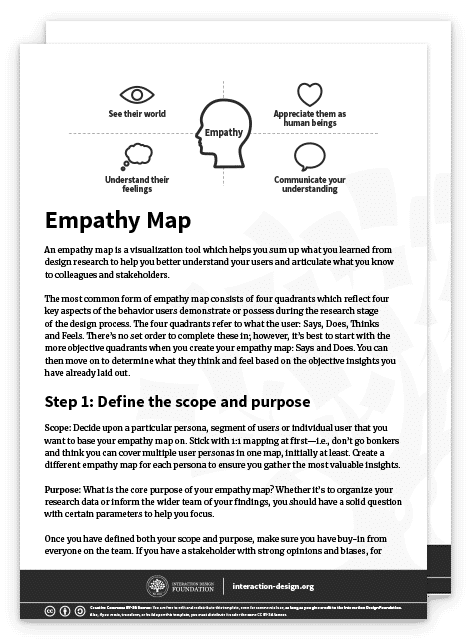
Advance Your Career With This Free Template for “Empathy Map”
Empathy Map
We respect your privacy
Get 1 powerful email each week: Design a life you love!

Empathy Map: What the User Said, Did, Thought, Felt

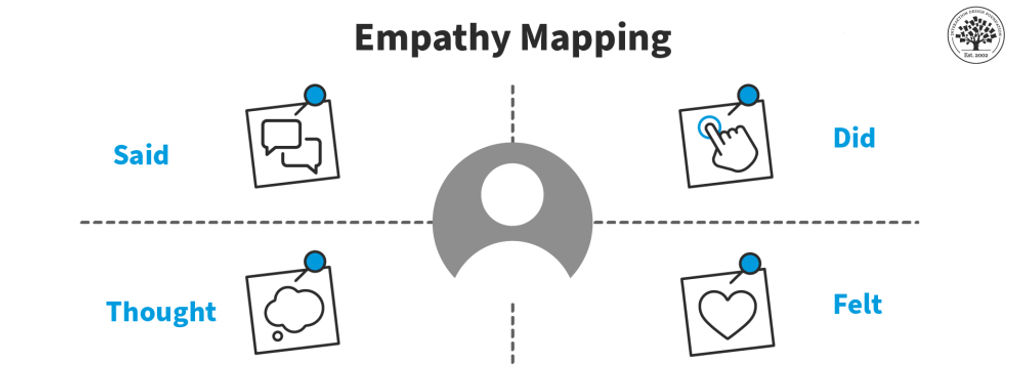
The four quadrants of an empathy map typically organize different aspects of a user's experience.
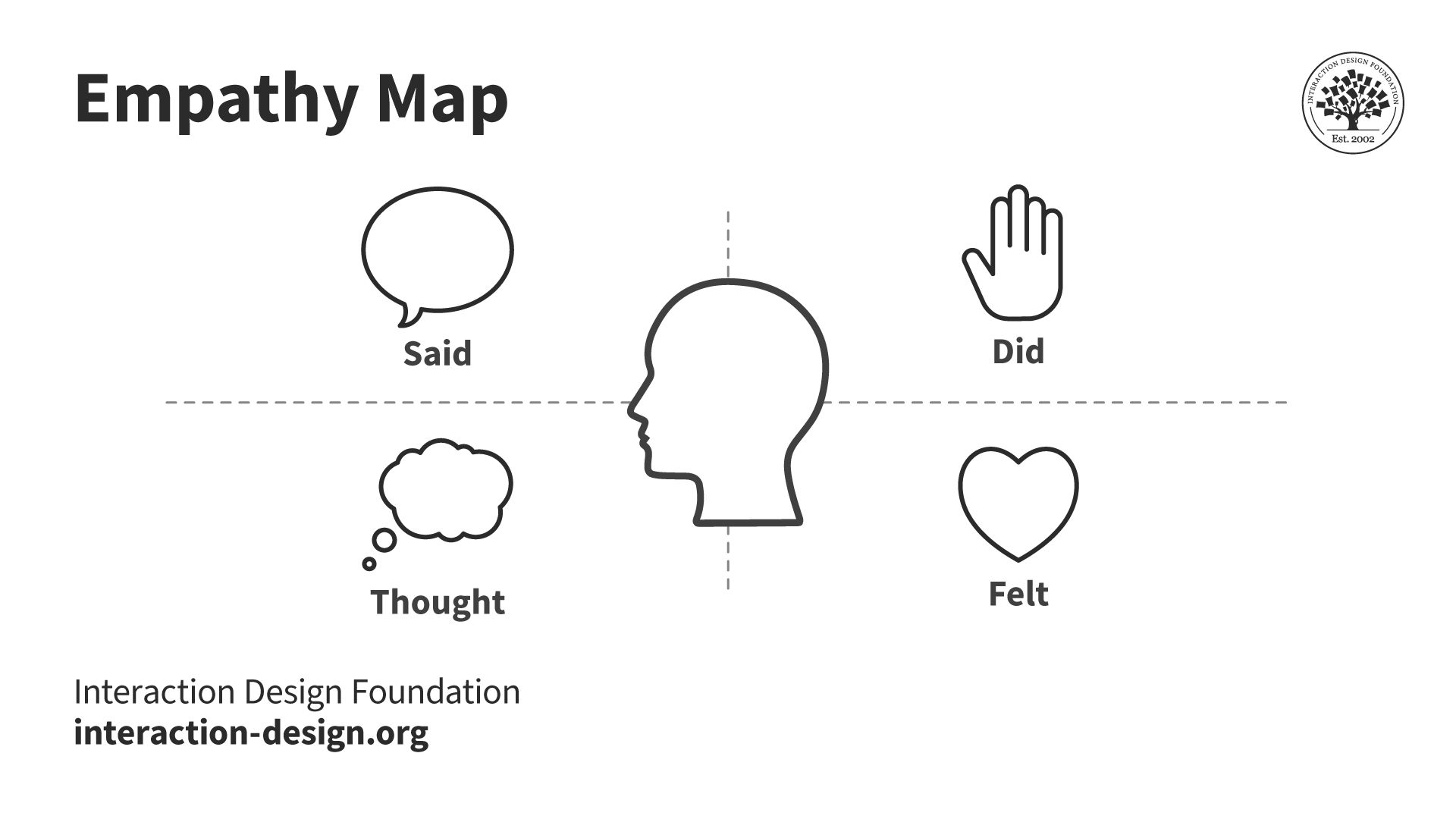
An ​​empathy map with four sections: Said/Says, Thought/Thinks, Did/Does, and Felt/Feels.

Most empathy maps help designers look at a user's experience through four lenses: what they say, think, do, and feel.

© Interaction Design Foundation, CC BY-SA 4.0

The four quadrants of an empathy map are:

1. Said/Says: This is usually the easiest section to complete. The “Said/Says” section is for what you hear your users say out loud. You gain valuable insights into their expectations, concerns, needs and preferences by listening to their words. Place direct quotes from users in this section.

For example, this section might include:

  • “Entering all the tasks’ due dates this way is stressing me out.”

  • “Is my profile public?”

  • “This page takes really long to load.”

2. Did/Does: The "Did/Does" section is for your users’ actions and behaviors. This will help you understand how users interact with your product. You can analyze the users’ actions to identify pain points and opportunities for improvement.

For example:

  • “The user spends the first 10 minutes customizing the app aesthetic.”

  • “The user screenshots motivational quotes and shares them on their Instagram story.”

  • “The user lists the different student societies they belong to in their bio.”

3. Thought/Thinks: The "Thought/Thinks" section is for your users’ thoughts, beliefs and assumptions. It looks at the underlying motivations that drive user behavior and this allows you to align your product with your users’ mental models.

For example, the “Thought/Thinks” section might include:

  • “The signup process is confusing.”

  • “I have so much on my plate. Will this app actually help me or is it just another thing that will take up precious time?”

  • “My tuition fees are overdue as it is. I hope this app has a free option. I’m on such a tight budget.”

4. Felt/Feels: This can be the hardest section to complete. The "Felt/Feels" section is for the users’ emotional state. Its purpose is to clearly articulate their fears, frustrations and desires. Watch how people move and listen to the tone of their voice to understand how they feel. You can create engaging experiences that connect with users in an unforgettable way once you master this skill.

For example, this section might include:

  • “Impatient with the amount of time it takes to complete an action in the app.”

  • “Overwhelmed by the amount of on-screen text.”

  • “Excited by the pop-up prompting them to connect with their friends on the app.”

The team will need to interpret all available data to fill out the “thinks” and “feels” sections. They may need to rely on more observational notes as people may not readily share what they think and feel.

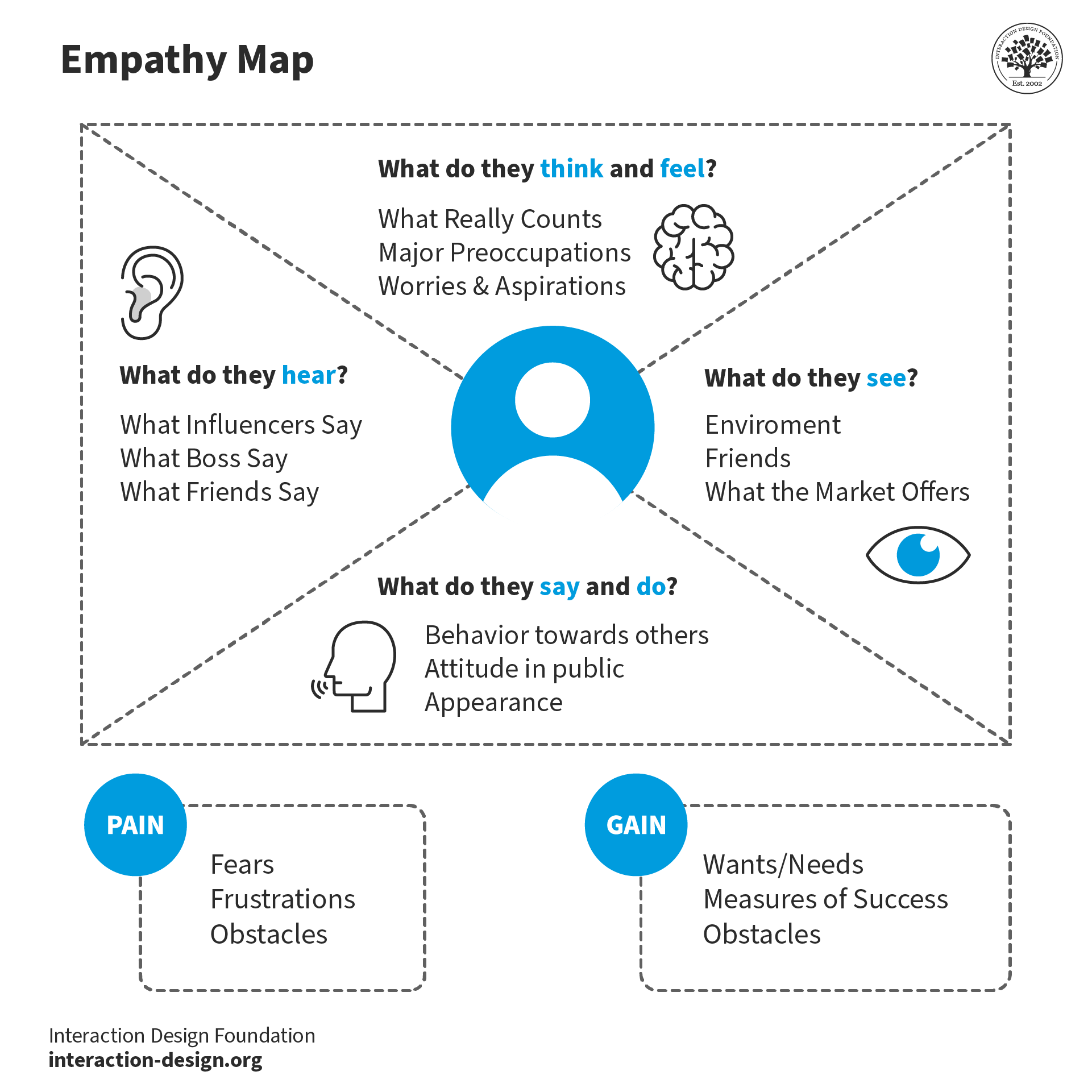
5. Additional sections: The latest variations of the canvas include extra sections for further analysis. These are Goals, Pains, Gains, Sees and Hears.

The “Goals” section details who the team empathizes with and what they need to do. The “Pains” section lists the user’s problems and pain points. The “Gains” section is where you’ll organize the users’ wants, needs and what they dream to achieve. The “Sees” section lists what the user sees in their immediate environment and relevant digital visual stimuli. The “Hears” section does the same for their auditory experience.
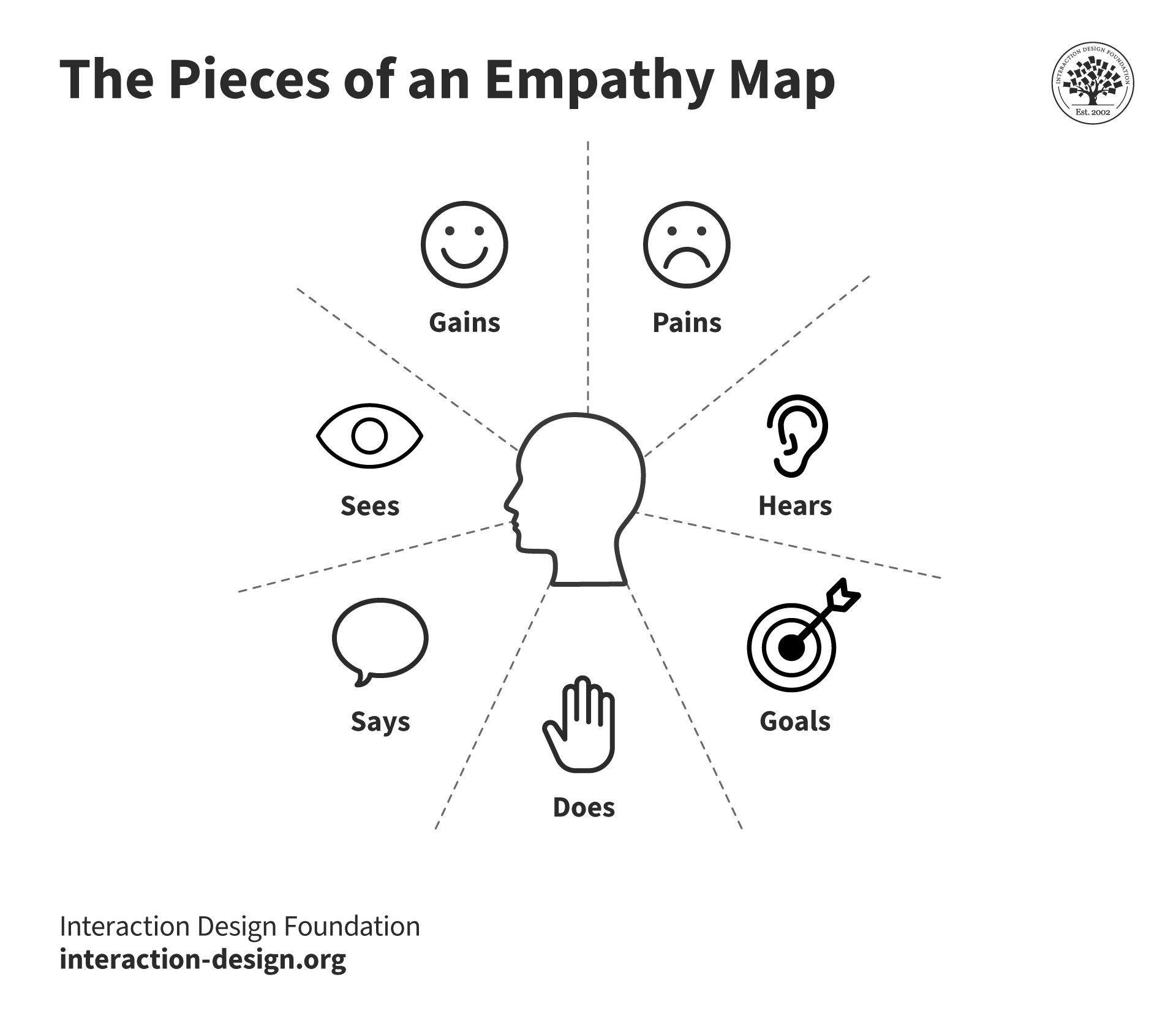
The updated version of the Empathy Mapping Canvas by creator Dave Grey is made up of the sections: Goals, Does, Says, Sees, Hears, Gains, and Pains.

Dave Gray's updated empathy map canvas includes additional sections for the user's goals and what they see, hear, desire and struggle with.

© Interaction Design Foundation, CC BY-SA 4.0

How to Create an Empathy Map

Step-by-step breakdown of how to create an effective empathy map:

Step 1: Define Scope and Purpose

Clearly define the scope, purpose and target audience. This could be existing users, potential users or a specific segment of the target market.

Step 2: Gather and/or Conduct Research

Collect as much information as possible about your target audience. This can include customer surveys, interviews, observations and social media data.

Customer surveys are ideal for reaching a large audience quickly to gather general opinions and preferences.

Interviews let you dig deeper. You should choose this route when detailed, personal user experiences and stories are needed to understand specific aspects of user behavior.

Prof. Ann Blandford, Professor of Human-Computer Interaction at University College London, shares what’s the best way to approach the interview situation.

Transcript

Sometimes, what people do reveals more than what they say. Observations will help you see the things they don't say. If you need to see how users naturally interact with a product in their own environment then this type of user research will be the best fit.

You can tap into live user feedback and trends with social media data. This approach is best when the team looks for real-time reactions and opinions about a product from a diverse user base.

More data will help you and your team to create a more accurate and reliable empathy map.

Step 3: Fill in the Empathy Map Quadrants

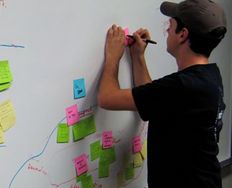
Choose a comfortable and collaborative environment to conduct an in-person empathy mapping session. Provide stakeholders with sticky notes, markers and a whiteboard or a large sheet of paper divided into four quadrants.

Create a Post-It (paper or digital) for each meaningful insight identified in the user research data. Next, add the Post-It to the relevant quadrant.

Start by filling in the "Says" quadrant with direct quotes from your users. These reflect your users’ needs, desires, and concerns. Then, move on to completing the "Does," "Thinks" and "Feels" quadrants. Remember to encourage your team to brainstorm and share their insights.

Stand back and identify any knowledge gaps once you’ve populated all four quadrants. Is there a specific quadrant that needs more user research data?

Step 4: Analyze

Encourage a discussion among your team. Open up the floor to team members to share their observations and identify patterns. The goal of this analysis is to look for opportunities to tackle pain points and help users.

You and your team should:

  1. Identify patterns and trends: Look for commonalities and recurring themes in the empathy maps. These can help you understand your users’ behaviors, needs and desires.

  2. Identify pain points and the opportunities they offer: Hone in on the pain points that have the biggest impact on the users’ experiences.

  3. Identify user segments: Use the insights you and your team have collected during the empathy mapping process to segment your users further. The team will then be able to create more personalized experiences in the future.

  4. Align with business goals: The insights collected from empathy mapping should be in alignment with the business objectives. Empathy maps help inform product development, user experience and marketing initiatives.

Step 5: Identify Your Users’ Needs

To identify your users' needs, go through the empathy map and look for:

  • verbs—i.e. activities and desires,

  • user traits,

  • contradictions and inconsistencies.

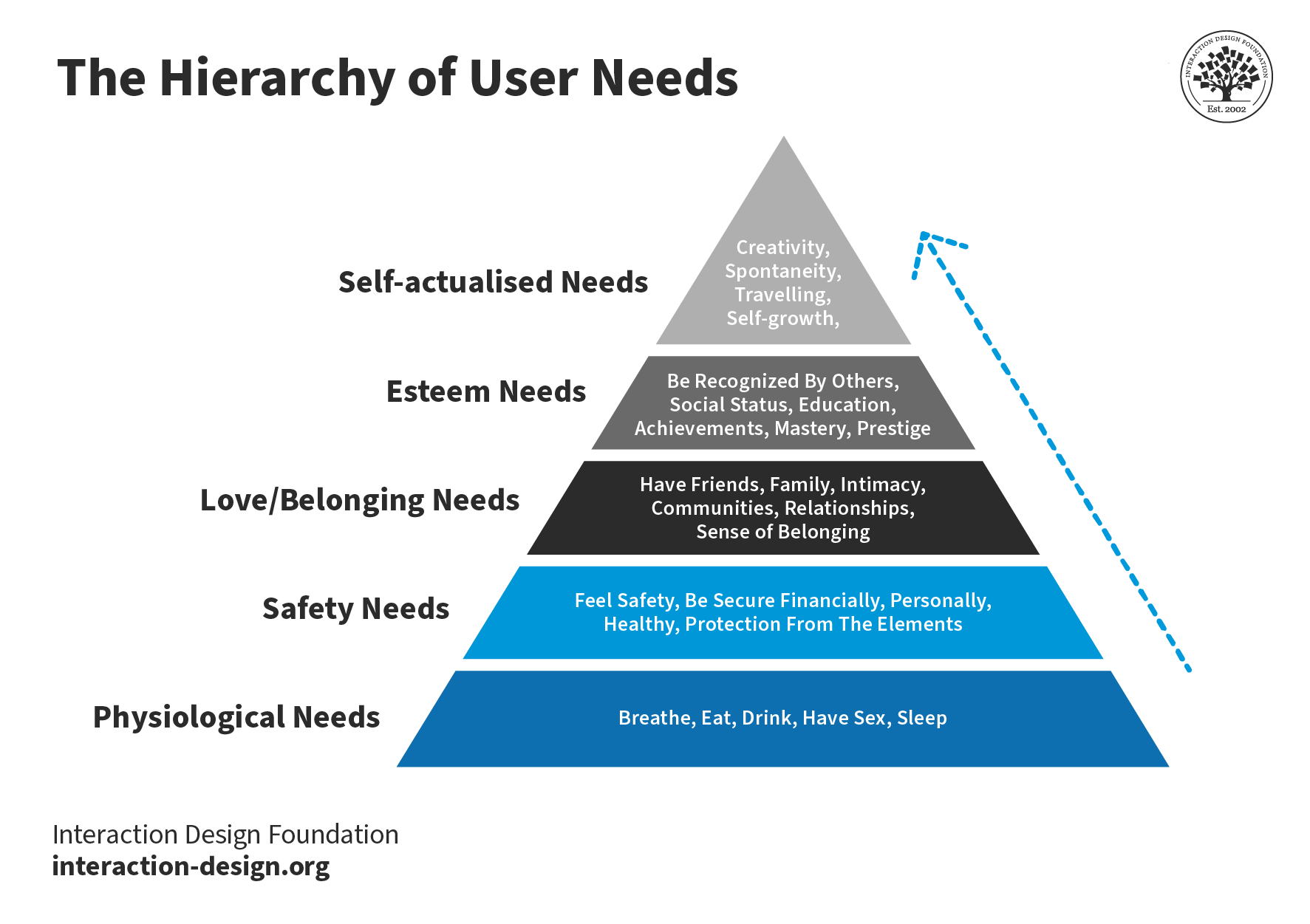
It also helps to refer to all five levels of Maslow's Hierarchy of Needs. This pyramid, developed by psychologist Abraham Maslow in 1943, can help your team pinpoint how your product can meet the needs of the user.

Maslow’s framework helps designers understand the basic, functional needs the product meets (like safety) as well as how it can fulfill higher-level emotional needs.
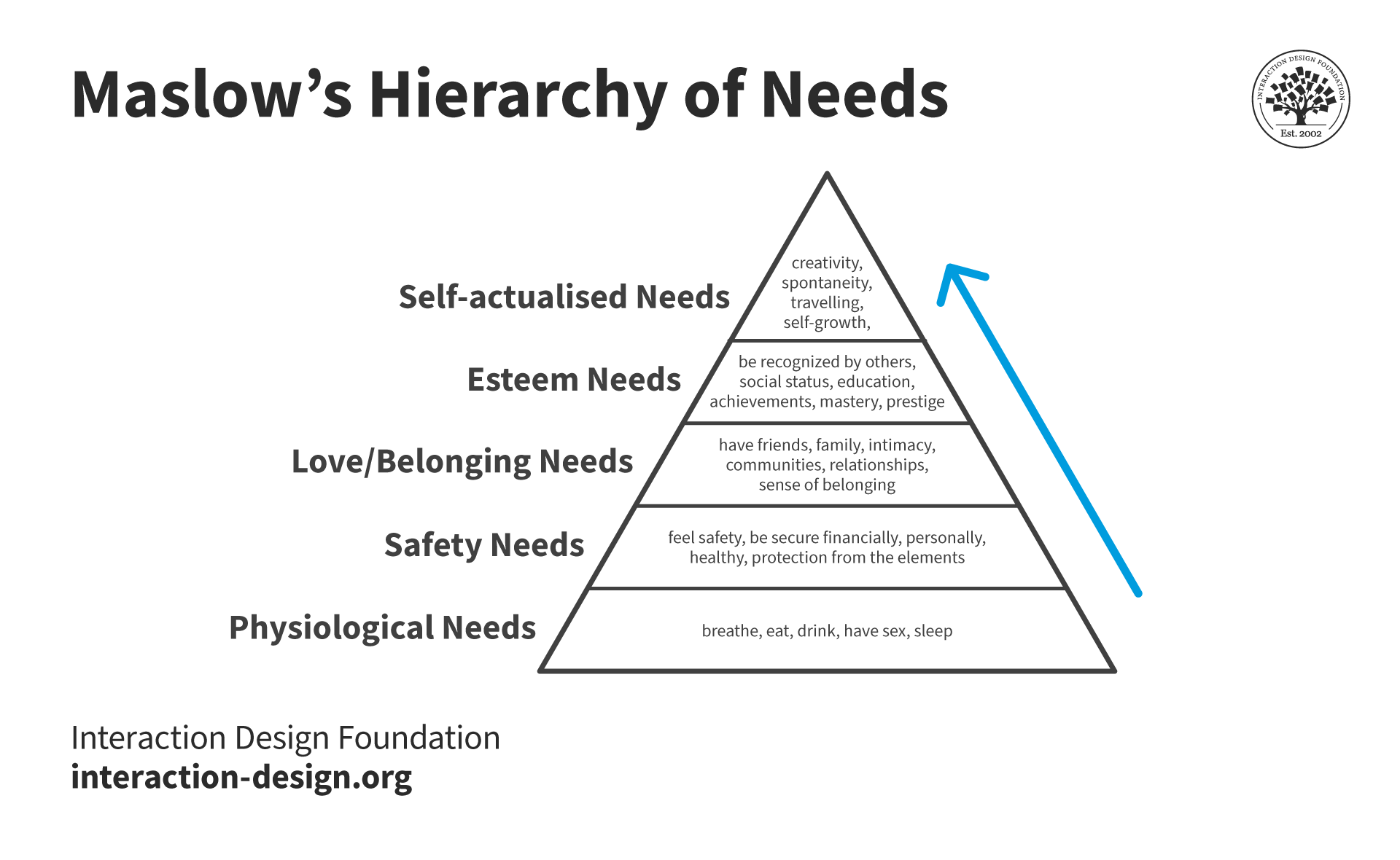
Maslow's Hierarchy of Needs has physiological needs as the base of the pyramid, followed by safety, love and belonging, esteem and self-actualization needs on the top.

Designers use Maslow's hierarchy to define and prioritize user motivations and come up with user-centric solutions.

© Interaction Design Foundation, CC BY-SA 4.0

Empathy Maps vs Personas: What’s the Difference?

Empathy maps and personas are both valuable tools in user-centric design, but they serve different purposes. A persona is a detailed, semi-fictional character that represents different user types. Personas include demographic information, behaviors, goals, and provide a holistic understanding of the target user. Empathy maps are visualizations that focus on the users’ emotions, thoughts, actions, and words in a specific context.

User Experience (UX) Strategist William Hudson explains how personas help designers develop empathy.

Copyright
Transcript

Empathy mapping is exceptionally helpful when it comes to persona development. Empathy maps help shed light on the feelings and thoughts that personas might not fully show. It enriches personas with a deeper understanding of user motivations and pain points. Ultimately, empathy maps make personas more realistic which helps the design team to be more empathetic.

The decision of whether to create an empathy map or persona first depends on the project's goals. If you need quick insights into user experiences, which can then inform persona development, then start with an empathy map.

If the team has already created personas, you can use empathy mapping to add layers of emotional understanding to them.

Personas and empathy maps are symbiotic tools. Both contribute to a deeper understanding of users in the design process.

When to Use Empathy Maps

Design teams often create empathy maps at the beginning of the design process. However, once created, teams should continue to refer to the maps to keep users at the center of the design process.

The design process is not linear, and it’s likely the team will conduct interviews even after a product launch. Designers should always update these maps with new insights.

Empathy maps play several important roles during the design process:

Research Phase: Begin using empathy maps at the outset of a project, during the research and exploration phase.

Use empathy maps to collect and organize data from user interviews, observations, and surveys. This early understanding lays the groundwork for informed design decisions later.

For example, an empathy map created during the research phase may reveal that users feel frustrated with or intimidated by complex apps. This insight tells the design team to focus on simplifying the user experience.

Idea Generation: Use empathy maps during ideation and brainstorming as a springboard for creative thinking. UX designers can use the visual mapping process to identify solutions that hit the mark with users every time.

The idea generation phase is about turning empathetic insights into tangible design ideas that can improve user satisfaction. For example, if an empathy map shows that users are looking for quicker ways to complete tasks, designers might brainstorm features like shortcuts or predictive text.

Iterative Design and Prototyping: Continuously use empathy maps during the iterative design process. As prototypes evolve, empathy maps ensure the user’s emotional journey is consistently considered.

This phase is about bridging the gap between user needs and the product’s functionality. For example, if an updated empathy map indicates that users are annoyed by a lengthy signup process, the design team might prioritize a shorter signup flow in the next iteration of the app.

3 Common Challenges Designers Face when Empathy Mapping and How to Deal with Them

There are a few challenges to overcome when creating an empathy map:

Mistake 1: A Generic User Profile

Often, designers create empathy maps based on generic user profiles. There are many nuances and insights that can only be obtained through real user experiences. If you skip the research and rely on generic user profiles only, then you could end up with a one-size-fits-all design that doesn't really connect with anyone.

To avoid this, designers should create different empathy maps for insights from different groups.

For example, let’s consider an app for public transit users. If the team only looks at the perspective of a 9-to-5 office worker, they’ll miss the needs of night shift workers, students, or parents with school-age children. To remedy this, designers can make a different empathy map for each group to understand what each type of user wants. This will help the team tailor their product to meet specific user needs.

Mistake 2: Disregarding Users’ Emotions

Some designers rely only on what users do and say when they create empathy maps. Emotions drive behavior, and ignoring how users feel can likely lead to a superficial understanding of them.

How can designers avoid this misstep? They should pay close attention to emotional responses during user research.

Designers should ask questions about how users feel during certain tasks or experiences and observe their emotional cues. This is a skill that will take some practice but the more you observe and learn to interpret users’ emotional cues, the easier it will get. This deeper emotional understanding will lead to more intuitive and user-centered designs.

For example, a user of a fitness app might say they use it for exercise tracking. But engage with them a little more, and they might reveal they're also seeking motivation and community because they struggle with accountability. You can transform your product from simply tracking metrics to creating an engaging, supportive user experience when you learn to recognize and design for these emotional needs.

Mistake 3: Treat Empathy Mapping as a One-Off Task

Empathy mapping is not just a box to check at the beginning of a project, never to revisit. User needs and contexts change over time, and so should the designer’s understanding of them.

Designers should revisit and update their empathy maps regularly. As the project progresses, they should keep in touch with users. This ongoing conversation will keep the design relevant and user-focused.

For example, let’s look at a mobile streaming app’s empathy map. Initially, the insights gained might focus on entertainment and a user-friendly user interface (UI). As other streaming apps come to market, competition grows, and user preferences change. Revisiting the empathy mapping process could help the team identify untapped opportunities around unique content and personalized recommendations.

Mistake 4: Look to Prove Assumptions

Teams can make the mistake of only seeing what they expect while looking at data. This is called confirmation bias. They might pick out information that supports their ideas and stereotypes, which defeats the purpose of empathy maps.

Prof. Ann Blandford of University College London explains confirmation bias and other common analysis pitfalls.

Transcript

Empathy mapping is more art than science. Only through practice will designers learn how to best manage the delicate balance of research, intuition, and user engagement needed.

If you keep these common mistakes in mind while empathy mapping then you'll be able to create designs that don't just look good on paper but actually hit the mark with the people they're meant for.

Remember, the heart of UX design is learning to understand the human experience—and there's no shortcut to that.

Questions About Empathy Mapping?
We've Got Answers!

What are some highly cited scientific research about empathy mapping?

Dive into the science behind empathy mapping with these two studies:

1. Kouprie, M & Sleeswijk Visser, F (2009). A Framework for Empathy in Design: Stepping into and Out of the User's Life. ResearchGate.

Kouprie and Sleeswijk Visser propose a framework for empathy in design, emphasizing the importance of understanding and addressing users' needs while stepping into and out of their lives.

2. Cairns P, Pinker I, Ward A, Watson E & Laidlaw A. (2021) Empathy maps in communication skills training. Clin Teach.

This study explores the usefulness, applicability, and attitudes toward empathy maps as part of medical student's communication skills training.

Learn more about empathy in UX design with these book recommendations:

1. Brown, T. (2009). Change by Design: How Design Thinking Transforms Organizations and Inspires Innovation. HarperBusiness.

This book by Tim Brown, CEO of the renowned design firm IDEO, delves into how design thinking, deeply rooted in empathy, can drive organizational change and innovation.

2. Weinschenk, S. (2011). 100 Things Every Designer Needs to Know About People. New Riders.

Susan Weinschenk combines insights from psychology and design, providing an extensive list of things designers should know about people, fostering a deeper empathic connection with users.

3. Disabato, N. (2010). Cadence & Slang. Two Pens Media.

Nick Disabato's book offers a fresh perspective on interaction design, focusing on simplicity and empathy in design practices.

4. Norman, D. A. (2013). The Design of Everyday Things: Revised and Expanded Edition. Basic Books.

Donald A. Norman explores the psychology behind good and bad design, emphasizing the need for empathy in understanding how users interact with objects in their everyday lives.

What is empathy vs sympathy in UX design?

Many UX designers sympathize with users when their intention is to empathize.

Empathy is the ability to put yourself in your users’ shoes to gain a deep understanding of their thoughts, feelings, and behaviors. Sympathy is the feeling of compassion for another. You might wish to see them better off but lack the shared emotional experience that comes with empathy.

To empathize with users, you must step into their emotional experiences. This is the only way you’ll learn to understand their underlying motivations, challenges, fears and pain points. Empathy is more actionable than sympathy in UX design because it provides a more nuanced understanding of the user.

Professor Brené Brown, author of six New York Times bestselling books, explains the difference between empathy and sympathy.

You can read What Is Empathy and Why Is It So Important in Design Thinking to find out more.

How can empathy mapping be integrated into agile development processes?

How designers include empathy mapping in agile development processes to adapt quickly to user feedback and ensure your product meets user needs:

1. Include empathy mapping at the beginning of your sprint planning.

2. Use the insights from empathy maps to create user stories.

3. Use the empathy maps to inform design decisions.

4. Test prototypes against the empathy maps to ensure they align with user expectations.

5. Use agile retrospectives to review the efficacy of the empathy maps and update them based on your findings.

CEO of Syntagm, William Hudson shares practical strategies for incorporating empathy effectively in agile processes in his Master Class webinar, User Stories Don't Help Users: Introducing Persona Stories.

Transcript

To learn more about research and design techniques like continuous discovery, enroll in the IxDF Agile Methods for UX Designers course.

What is the difference between an empathy map and an affinity map?

While you can use both empathy and affinity maps to help sort through data, affinity maps have a broader application.

Empathy maps focus on understanding individual user experiences while affinity maps aim to identify patterns across multiple data points. You can use empathy maps to gain insight into users’ experiences and affinity maps to consolidate research findings.

Empathy maps are divided into sections like Says, Does, Thinks, Feels, Goals, Pains, Gains, Sees, and Hears. Affinity maps offer more flexibility. Designers can name and sort data into hierarchies as needed when using affinity mapping.

You can learn more about these and other practical design thinking tools in the IxDF Design Thinking online course.

How does empathy mapping relate to customer journey mapping?

Designers use empathy maps to tap into the user's mindset. This helps them to make informed design decisions more likely to resonate with their users.

Designers use customer journey maps to visualize the entire journey a customer experiences when they interact with a product. They offer a broader perspective.

You can use empathy maps and customer journey maps together for design solutions deeply rooted in the users' emotional and psychological experiences.

If you’d like to learn more about customer journey maps, experience maps and service blueprints, the IxDF Journey Mapping online course is a great place to start.

Transcript

Can empathy mapping be applied to B2B (Business-to-Business) design projects?

Designers use empathy mapping to explore what Business-to-Business (B2B) clients really need and struggle with. They tap into these insights to create designs that provide real value to businesses.

B2B designers work with stakeholders that include a variety of individuals with different roles and perspectives. They use empathy maps to explore the concerns and motivations of various personas like decision-makers and end-users within the client's company.

Learn how to price your B2B services or how to set up a successful freelance business with the IxDF How To Become A Freelance Designer online course.

How do you gather data for an empathy map?

Designers can collect data for empathy mapping in the following ways:

1. Existing in-house data such as customer feedback, customer support interactions, and usage analytics.

2. User interviews. If you want deep insights into your users’ thoughts and feelings then ask open-ended questions as much as possible.

3. Usability tests where users interact with the product while sharing their thoughts aloud.

4. User comments and posts on forums and social media.

5. Online user reviews.

You can use the data collected and lead an empathy mapping workshop with the design team and other stakeholders. Remember to include team members from various departments for a holistic understanding of users.

Can empathy mapping be done remotely?

Designers can perform empathy mapping remotely using digital collaboration tools and virtual interviews or surveys. You can adapt traditional in-person workshops with flip charts and sticky notes to suit the virtual workplace.

The process of empathy mapping helps designers distill user knowledge into one place so they can categorize and understand qualitative research, discover gaps in current knowledge, and pinpoint the types of research needed to address them. It's ideal for remote teams who need to stay user-centric.

You can learn more about how to move design and research online in the IxDF online Master Class “Remote UX” with Frank Spillers.

Earn a Gift Earn a Gift, Answer a Short Quiz!

1
2
3
4
1
2
3
4
Question 1
Question 2
Question 3
Get Your Gift
Interaction Design Foundation logo

Question 1

What is the main purpose of empathy mapping in UX design?

1 point towards your gift

  • To create aesthetic guidelines
  • To document designers thoughts, feelings, and behaviors towards a project
  • To gain a deeper understanding of users' thoughts, feelings and behaviors
Interaction Design Foundation logo

Question 2

Which quadrant of an empathy map captures users' direct quotes and verbal expressions?

1 point towards your gift

  • Does
  • Feels
  • Says
Interaction Design Foundation logo

Question 3

When should design teams use empathy maps?

1 point towards your gift

  • After they complete the project
  • Only at the beginning of a project
  • Throughout the design process

Learn More About Empathy Mapping

Make learning as easy as watching Netflix: Learn more about Empathy Mapping by taking the online IxDF Course Design Thinking: The Ultimate Guide.

Why? Because design skills make you valuable. In any job. Any industry.

In This Course, You'll

  • Get excited when you discover that you don't need to start from scratch to use the secret recipes that empower companies like Apple and Google to shape the future. You just need a structure and proven methods to optimize what you already do. As AI becomes part of your day-to-day workflows, your ability to guide it with timeless human-centered skills such as strategic thinking, creativity, and empathy for real users is what turns AI into your superpower and delivers meaningful results.

  • Build on your existing creativity, problem-solving, and people skills to learn the powerful 5-stage method called Design Thinking. It's one of the key drivers behind Apple and Google's continuous innovation and provides a clear, structured way to solve real-world problems. You've already got the instincts, so it's easy to learn the method. 

  • Make yourself invaluable with hands-on skills in Design Thinking. Design Thinking can help you break into User Experience Design, product design, and tech. It's widely applicable, impactful, and fun! Use your skills to improve customer support processes, create new products, and even tackle big challenges like climate change. This human-centered approach is a key driver of business success because it guides you to systematically understand and address what your users really need and want. That's why Design Thinking skills can help you increase sales, keep customers loyal, and turn them into powerful advocates for your company.

  • Gain confidence and credibility as you effortlessly apply methods from all five stages of the Design Thinking process. You'll be guided to build empathy and gather insights into people's habits through user interviews. 

  • Use our downloadable templates to create affinity diagrams, empathy maps, and actionable "How Might We" questions. Develop solutions as you apply ideation and innovation methods. Create a paper prototype early and fast, then test and optimize your prototype to ensure that your users love it. More love, more impact, greater salary potential. 

  • Apply your new skills in an optional project where you'll design and test a user-centered experience that's perfect for your portfolio and career growth. Master Design Thinking to amplify your uniquely human strengths like empathy, intuition, and creativity, and confidently stay in demand as AI reshapes how teams work.

It's Easy to Fast-Track Your Career with the World's Best Experts

Master complex skills effortlessly with proven best practices and toolkits directly from the world's top design experts. Meet your experts for this course:

  • Don Norman: Father of User Experience (UX) Design, author of the legendary book “The Design of Everyday Things,” and co-founder of the Nielsen Norman Group.

  • Alan Dix: Author of the bestselling book “Human-Computer Interaction” and Director of the Computational Foundry at Swansea University.

  • Mike Rohde: Experience and Interface Designer, author of the bestselling “The Sketchnote Handbook.”

Get an Industry-Recognized IxDF Course Certificate

Increase your credibility, salary potential and job opportunities by showing credible evidence of your skills.

IxDF Course Certificates set the industry gold standard. Add them to your LinkedIn profile, resumé, and job applications.

Course Certificate Example

Be in distinguished company, alongside industry leaders who train their teams with the IxDF and trust IxDF Course Certificates.

Our clients: IBM, HP, Adobe, GE, Accenture, Allianz, Phillips, Deezer, Capgemin, Mcafee, SAP, Telenor, Cigna, British Parliament, State of New York

All Free IxDF Articles on Empathy Mapping

Read full article
Stage 2 in the Design Thinking Process: Define the Problem and Interpret the Results - Article hero image
Interaction Design Foundation logo

Stage 2 in the Design Thinking Process: Define the Problem and Interpret the Results

An integral part of the Design Thinking process is the definition of a meaningful and actionable problem statement, which the design thinker will focus on solving. This is perhaps the most challenging part of the Design Thinking process, as the definition of a problem (also called a design challenge

Social shares
1.4k
Published
Read Article
Read full article
Methods to Help You Define Synthesise and Make Sense in Your Research - Article hero image
Interaction Design Foundation logo

Methods to Help You Define Synthesise and Make Sense in Your Research

So you’ve got piles of data gathered from the inspiring empathy research activities you’ve undertaken, and you’re blankly staring at the data thinking, “Where to from here …?” and “What do I do with all this information?” It’s time to bring all the research you’ve collected together and make sense o

Social shares
821
Published
Read Article
Read full article
Empathy Map – Why and How to Use It - Article hero image
Interaction Design Foundation logo

Empathy Map – Why and How to Use It

Here’s an interesting fact you may—or may not—know: users are more likely to choose, buy, and use products that meet their needs than products that just meet their wants. And an Empathy map will help you understand your user’s needs while you develop a deeper understanding of the persons you’re desi

Social shares
1.4k
Published
Read Article
Read full article
How to Visualize Your Qualitative User Research Results for Maximum Impact - Article hero image
Interaction Design Foundation logo

How to Visualize Your Qualitative User Research Results for Maximum Impact

When thinking about visualization of research results, many people will automatically have an image of a graph in mind. Do you have that image, too? You would be right in thinking that many research results benefit from a graph-like visualization, showing trends and anomalies. But this is mainly tru

Social shares
966
Published
Read Article
Read full article
Transform Your Creative Process with Design Thinking - Article hero image
Interaction Design Foundation logo

Transform Your Creative Process with Design Thinking

Think about a new user experience (UX) design project at work that your team needs fresh ideas for—you want to create a winning digital product for your users, one that’s desirable, economically viable, and technologically feasible. To start with, you try to understand market trends and consumer beh

Social shares
521
Published
Read Article

Empathy Map – Why and How to Use It

Empathy Map – Why and How to Use It

Here’s an interesting fact you may—or may not—know: users are more likely to choose, buy, and use products that meet their needs than products that just meet their wants. And an Empathy map will help you understand your user’s needs while you develop a deeper understanding of the persons you’re designing for. There are many techniques you can use to create this kind of understanding. An Empathy Map is just one tool that can help you empathize, synthesize your observations from the research phase, and draw out useful insights about your user’s needs.

An Empathy Map lets us sum up our learning from engagements with people in design research. The map provides four significant areas to focus our attention on, thus providing an overview of a person’s experience. Empathy maps are also great as a background for the construction of the personas that you will often want to create later.

An Empathy Map consists of four quadrants, and these reflect four key traits which the user demonstrated—or possessed—during the observation/research stage. These four quadrants refer to some pretty important points—namely, what the user Said, Did, Thought, and Felt. Sure, it’s relatively easy to determine what the user said and did, but how about working out what they thought and felt? Do you need to have preternatural skills—like a psychic—to tell what’s going on with those? Well, don’t worry; it’s based on careful observations and analysis of how the user behaved and responded to certain activities, suggestions, conversations, and the like.

Visual Example of an Empathy map

An empathy map typically includes four quadrants of information about the user.

© Interaction Design Foundation, CC BY-SA 4.0

What are the Best Practices to Create an Empathy Map?

Step 1: Fill out the Empathy Map

  • Set the four quadrants out on a table and draw them on paper or a whiteboard, as you see them laid out above.

  • Review your notes, pictures, audio, and video from your research/fieldwork and then fill out each one of the four quadrants while you’re defining and synthesizing.

  • What did the user SAY? Write down significant quotes and keywords that the user said.

  • What did the user DO? Describe which actions and behaviors you noticed or insert pictures or drawings.

  • What did the user THINK? Dig deeper. What do you think that your user might be thinking? What are their motivations, their goals, their needs, their desires? What does this tell you about their beliefs?

  • How did the user FEEL? What emotions might your user be feeling? Take into account subtle cues like body language and their choice of words and tone of voice.

Step 2: Synthesize NEEDS

  • Synthesize the user’s needs based on your Empathy Map. This’ll help you define your design challenge.

  • Needs are verbsi.e., they’re activities and desires—and remember that needs aren’t nouns, which will instead lead you to define solutions.

  • Identify needs directly from the user traits you’ve noted. Spot needs based on contradictions between two attributes—such as a disconnect between what a user says and what the user actually does.

Pyramid diagram showing various types of needs.

© Interaction Design Foundation, CC BY-SA 3.0

Step 3: Synthesize INSIGHTS

  • An “Insight” is the realization that can help you solve your current design challenge—think “Eureka” or “Aha! moment” here.

  • Look to synthesize significant insights—and that’s especially so from contradictions between two user attributes. You’ll be able to find this within one quadrant or in two different quadrants. You can synthesize insights by asking yourself a question, too—and that’s “Why?”—whenever you notice strange, tense, or surprising behavior.

  • Now it’s time to write down your insights.

You can download and print the Empathy Map template here:

Advance Your Career With This Free Template for “Empathy Map”
Empathy Map
We respect your privacy
Get 1 powerful email each week: Design a life you love!

What Are the Benefits of Empathy Maps?

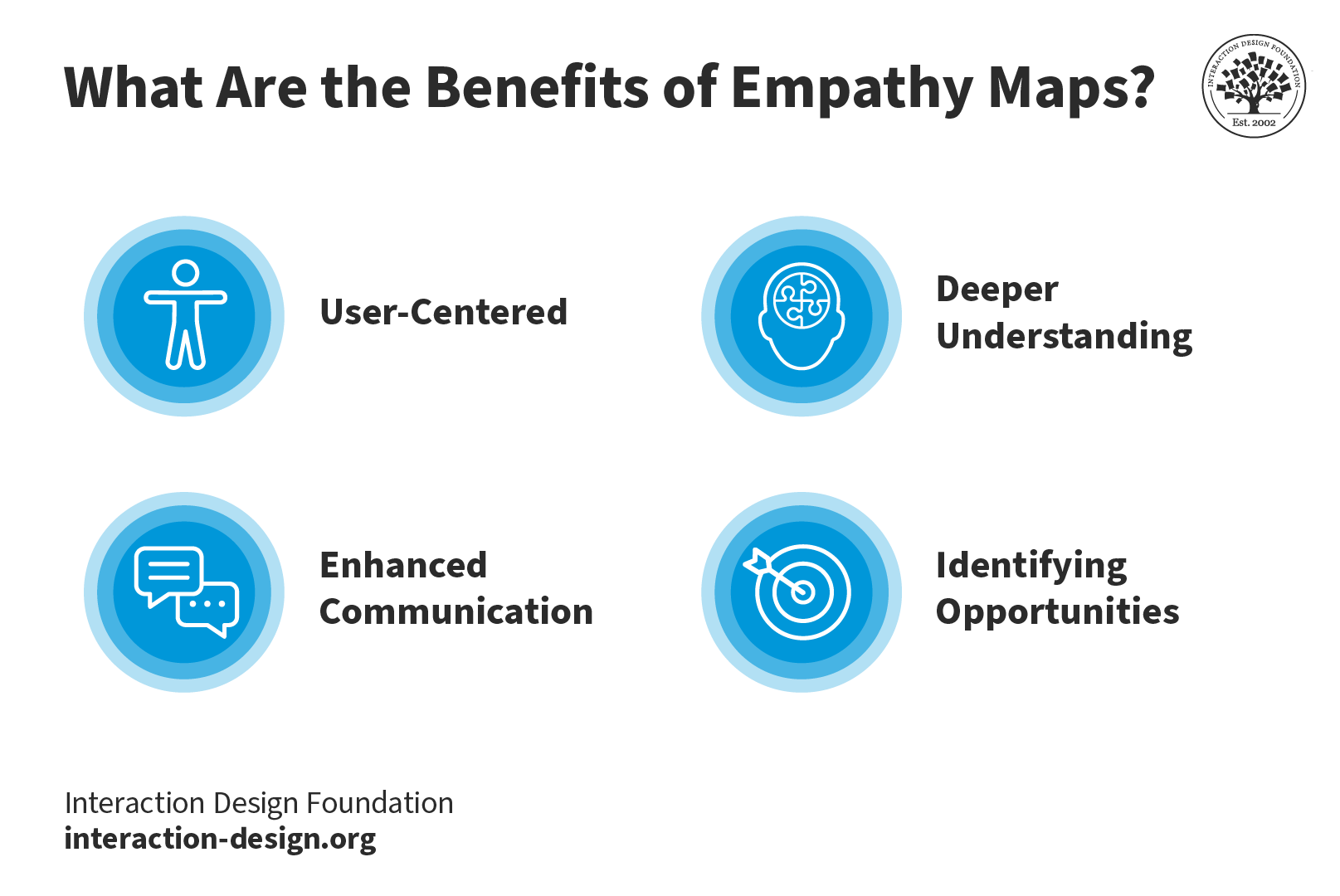
What makes empathy maps so useful for design thinking and product development is the way they delve into the user’s thoughts, feelings, words, and actions and so can offer a holistic view of the user’s experience. Here, we’re going to get right into the key benefits of empathy mapping.

An illustration showing the key benefits of empathy maps.

Key Benefits of Empathy Maps: they’re user-centered, they foster a deeper understanding of the user, they improve communication, and they help identify opportunities.

© Interaction Design Foundation, CC BY-SA 4.0

1. User-Centered 

The design process has got to address the user's needs and emotions and, happily, empathy maps make sure that there’s a user-centric approach in place, and it’s something that makes it more likely that you’ll create products that truly connect with users.

2. Deeper Understanding 

Empathy mapping goes beyond what users explicitly state and manages to unearth hidden motivations, desires, and pain points—all of which are valuable nuggets that deliver on a deeper understanding that helps you design solutions that address unspoken needs.

3. Enhanced Communication

These maps visually and concisely represent user insights so that everyone on the team gets to see the same information. And it’s something that makes it so much easier to communicate findings within cross-functional teams. Brands that stick to this process can work that magic where they lubricate things and nurture better collaboration among stakeholders and team members.

4. Identifying Opportunities

Empathy maps highlight potential areas for improvement and innovation, and that’s because they focus on user needs. The insights that come out of all this become the foundation for brands to refine existing products or develop new, user-focused solutions that can resonate that much better with the target audience.

Drawbacks of Empathy Maps

To be sure, empathy maps are valuable tools; saying that, though, they’ve got a few drawbacks inherent to them; let’s look at these now:

1. Limited perspective: One drawback is that teams often have got to interpret research data that mightn’t always accurately represent the user’s thoughts and feelings. It means that—at least, potentially—a skewed understanding of the user can come out of this.

2. Lack of context: Because empathy maps tend to focus on an individual user’s interaction with a product or service, they can often miss the bigger picture, or larger context. A great deal of a user’s thoughts and behaviors are things that come down to environmental factors, and they’re elements that you just can’t capture in an empathy map.

3. Incomplete information: Another risk is that if a brand takes the empathy map as their only user research tool, they may end up with gaps in their understanding of the full user experience. A map is a handy tool to have, to be sure, but it doesn’t replace other user research methods like interviews, usability testing, or surveys.

4. Static Nature: Because empathy maps are static representations, there’s a risk that they mightn’t capture the dynamic nature that’s involved in user emotions and thoughts—and they’re things that change over time and in response to different situations. So, teams have got to treat the empathy map as an evolving, living document and update it—continually—so they make sure it stays relevant.

It’s wise to always use empathy maps together with other research and design methods so you can get a more holistic understanding of users.

What Is the Difference Between a Journey Map and an Empathy Map?

While empathy maps focus on a specific moment or interaction, journey maps are what give a broader view of the user experience. Empathy mapping focuses on the user's thoughts and emotions during a scenario; meanwhile journey maps outline the user's end-to-end experience, and that includes a whole variety of touchpoints and stages.

Empathy maps offer a great deal of depth, and they get into dissecting specific instances. Journey maps, though, will provide you with breadth, capturing the entire user journey. What the benefit of using them together is, is that both tools complement each other and help design teams understand the user experience—and comprehensively so.

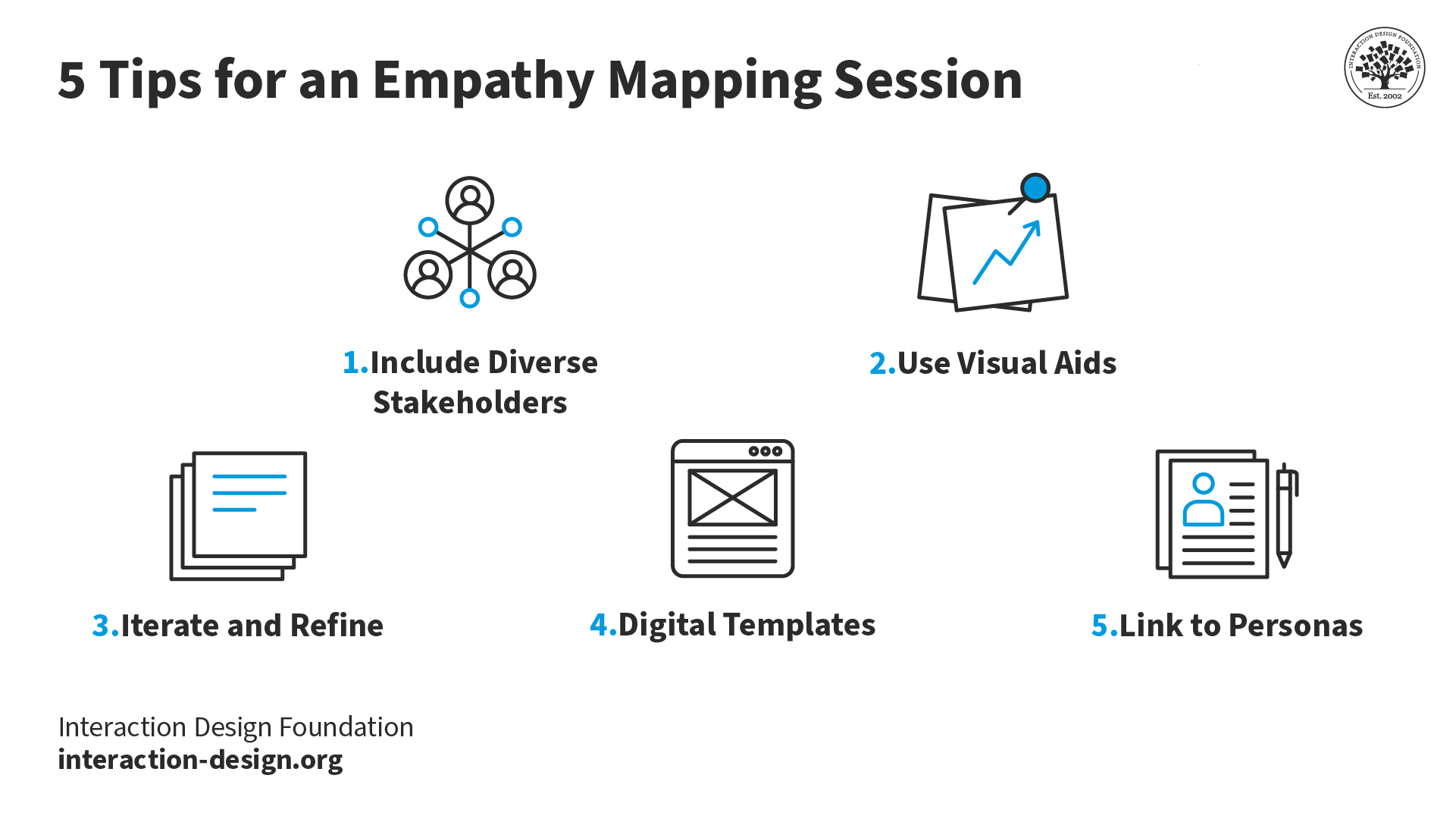
5 Tips for an Empathy Mapping Session

5 tips for an empathy mapping session.

Top 5 tips for you and your team and stakeholders to enjoy a successful empathy mapping session.

© Interaction Design Foundation, CC BY-SA 4.0

1. Include diverse stakeholders: It’s really vital to get in the perspectives of various team members and stakeholders. And the richness that comes from having this difference is that it’s going to ensure the team gets a well-rounded understanding of the user. What’s more, when the team builds the empathy map together, they’re more likely to adopt the map in their work process.

2. Use visual aids: These will be vital sources of help to bring ideas to life and empower team members and stakeholders to understand things better.

3. Iterate and refine: Empathy maps aren’t static—they’re “living” documents. So, it’s important to regularly revisit and update them as new insights come up on the horizon and into focus. This iterative process really makes sure that the design stays aligned with evolving user needs—pretty much underlining the point that these maps are great aids for looking ahead with.

4. Digital templates: Use digital tools and templates for remote collaboration—and how important it is to work well with team members remotely is impossible to overstate—and create a centralized database of user insights. It’ll facilitate easy sharing and accessibility for team members to enjoy and make the most of.

5. Link to personas: Connect empathy maps to how you and your design team create user personas. The insights from these maps form the foundation for developing rich and realistic user personas—vital tools to have on board your design process.

In this video, HCI Expert Professor Alan Dix offers an overview of personas.

Transcript

Watch this video to learn more about Personas.

References & Where to Learn More

Needs Before Wants in User Experiences – Maslow and the Hierarchy of Needs

Abraham Maslow, A Theory of Human Motivation, 1943

Stephen Bradley’s original piece on the hierarchy of needs can be found at Smashing Magazine.

You can read Maslow’s original paper “A Theory of Human Motivation” online.

d.school, Bootcamp Bootleg, 2010.

Learn how to improve empathy in your team.

Hero Image: Author/Copyright holder: Teo Yu Siang and Interaction Design Foundation. Copyright terms and licence: CC BY-NC-SA 3.0

Feel Stuck?
Want Better Job Options?

AI is replacing jobs everywhere, yet design jobs are booming with a projected 45% job growth. With design skills, you can create products and services people love. More love means more impact and greater salary potential.

At IxDF, we help you from your first course to your next job, all in one place.

See How Design Skills Turn Into Job Options
Privacy Settings
By using this site, you accept our Cookie Policy and Terms of Use.
Customize
Accept all

Be the One Who Inspires

People remember who shares great ideas.

Share on:

Academic Credibility — On Autopilot

Don't waste time googling citation formats. Just copy, paste and look legit in seconds.