Usability

Your constantly-updated definition of Usability and collection of videos and articles.
Be a conversation starter: Share this page and inspire others!

5,131 Shares

What is Usability?

Transcript

Usability is a measure of how well a specific user in a specific context can use a product/design to achieve a defined goal effectively, efficiently and satisfactorily. Designers usually measure a design’s usability throughout the development process—from wireframes to the final deliverable—to ensure maximum usability.

“Usability is about human behavior. It recognizes that humans are lazy, get emotional, are not interested in putting a lot of effort into, say, getting a credit card and generally prefer things that are easy to do vs. those that are hard to do.”

— David McQuillen, ex-Swiss banker and founder of Sufferfest cycling workout resources

Transcript

Usability Elements For Exceptional Experiences

People often confuse usability with user experience and ease of use. Usability is a component of user experience (UX) design. According to the Nielsen Norman Group—a leader in the UX field—usability is the second level in user experience. It comes after utility and before desirability and brand experience. So, after you’ve determined that your item can solve users’ problems, you must address its usability. A design’s usability depends on how well its features accommodate users’ needs and contexts. Therefore, you are responsible for your design’s usability. It should contain these elements:

  1. Effectiveness—It supports users in completing actions accurately.

  2. Efficiency—Users can perform tasks quickly through the easiest process.

  3. Engagement—Users find it pleasant to use and appropriate for its industry/topic.

  4. Error Tolerance—It supports a range of user actions and only shows an error in genuine erroneous situations. You achieve this by finding out the number, type and severity of common errors users make, as well as how easily users can recover from those errors.

  5. Ease of Learning—New users can accomplish goals easily and even more easily on future visits.

When they first encounter an interface, users should be able to find their way about easily enough to achieve objectives without relying on outside/expert knowledge. A design with high usability guides users through the easiest and least labor-intensive route. So, you must leverage a deep understanding of users’ contexts. To do that, you must accommodate their limitations, such as their environment, likely distractions and cognitive load.

How to Design for Optimum Usability

You should first focus on how well your design will flow in context. That means you focus on it as a whole—not on its parts (e.g., individual webpages)—and make content simple. Therefore, ensure you:

  1. Work with a clear understanding of users’ goals and show it in your design.

  2. Mimic the real world regarding concepts, icons and language.

  3. Present instantly understandable, jargon-free messages and actions users can takeone chief action per screen.

  4. Limit options to give a strong information scent on an uncluttered display—show essential information for completing tasks.

  5. Keep content consistent.

  6. Follow established norms regarding function and layout (e.g., logo positioning, tappable buttons).

  7. Use proper font size, color, contrast, whitespace, etc. to:

    1. combine aesthetic appeal with scanning readability,

    2. present a clear, logical information hierarchy,

    3. design for accessibility.

  8. Use chunking and emphasize key information at the beginning and end of interactive sequences.

  9. Offer informative feedback about system status.

  10. Include helpful navigation systems and search functionality.

  11. Allow for customizable controls, including shortcuts.

  12. Avoid disruptions – e.g., forced logins/pop-ups.

  13. Make forms easy to complete.

  14. Include warnings and autocorrect features to minimize errors.

  15. Make errors easy to diagnose.

  16. Offer easy-to-understand help documentation.

  17. Show clear contact options.

  18. Provide a back button to undo actions.

  19. Include ALT tags to show more information about images.

  20. Consider server abilities regarding page-loading time and downtime.

  21. Beware of in-app browsers and restrictions (e.g.,scrolling) in mobile design.

  22. Make links active.

  23. Describe links accurately.

  24. Use user personas.

  25. Do thorough usability testing

In this video, William Hudson, User Experience Strategist and Founder of Syntagm Ltd, explains how you can use heuristic evaluations to help identify usability issues efficiently, while noting that real user testing remains the most reliable way to validate designs.

Transcript

Users should feel immersed and in control of products/designs that predict their actions and help them get things done properly and fast. If they stop to think about what you’re showing them, they’ll start losing trust. Overall, they should find it all satisfying—if not pleasing.

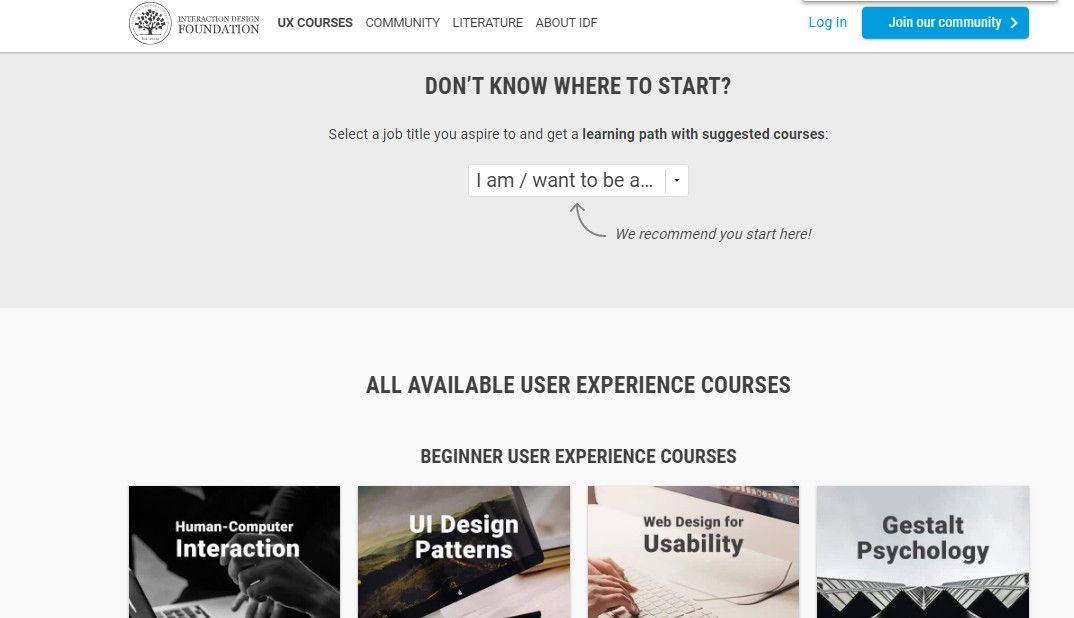
Our course-selection page anticipates users’ needs by clearly guiding towards goals via filters.

Questions About Usability?
We've Got Answers!

What is an example of usability?

Usability focuses on how intuitive and user-friendly a design is. Taking an e-commerce site as an example:

- Is it effective? Can users find what they are looking for and place an order? Does it meet their expectations?

- Is it efficient? Is it relatively quick and easy to carry out tasks? Do users end up backtracking on the site or wasting time in numerous layers of navigation?

- Is the experience satisfying? Are users happy or frustrated? Are they confident that their order has been successful?

Transcript

What are the 3 factors of usability?

Usability encompasses three core factors: effectiveness, efficiency, and satisfaction. Effectiveness refers to a user's ability to complete a task using the product. Efficiency focuses on the speed and resources used to achieve the task. Lastly, satisfaction measures how pleasant and satisfactory the user experience is when interacting with the product. Ensuring these factors are optimized contributes to a user-friendly design and a positive user experience.

Transcript

What is desirability vs usability?

Desirability and usability are distinct aspects of user experience. Usability focuses on how easy and intuitive a product is, ensuring users can complete tasks efficiently. On the other hand, desirability relates to the emotional response a product evokes, encompassing its aesthetics, appeal, and the pleasure users derive from using it. While usability prioritizes functionality and user-friendliness, desirability emphasizes creating a memorable and enjoyable user experience. Explore Interaction Design Foundation's article on "Usability vs. Desirability."

Is usability the same as usefulness?

No, usability and usefulness are distinct concepts in design. Usability refers to how easily and effectively users can interact with a product, and how satisfied they are with that interaction. On the other hand, usefulness addresses whether the product fulfills a specific need or solves a meaningful set of problems for users. A product can be usable (easy to use) but not useful (doesn't meet user needs). For a deeper dive into their differences and importance, consult the Interaction Design Foundation's article, "Useful, Usable, and Used: Why They Matter to Designers."

Is usability the same as accessibility?

No, usability and accessibility are related but distinct concepts. As Don Norman points out, accessibility is about making things easier for everyone, especially those with reduced abilities. Think of accessibility as usability's close cousin. Usability aims to ensure that a product is straightforward and efficient for everyone, whereas accessibility ensures that even those with disabilities can use the product. While optimizing for accessibility often improves usability, enhancing usability doesn't necessarily make something accessible. For example, an optimized website for accessibility might include features like video transcriptions, image captioning, Alt attributes, and semantic HTML. Both usability and accessibility aim for a more user-friendly experience, but accessibility places special emphasis on inclusivity for all user types.

Transcript

Is usability the same as user experience?

No, usability is a facet of user experience (UX), but they aren't synonymous. Usability focuses on the ease of use and effectiveness of a product. It evaluates how user-friendly and efficient a product is for its users. In contrast, user experience encompasses a broader range of factors, including the emotions, perceptions, preferences, and responses of users when interacting with a product. While usability is crucial, UX considers the entire journey and holistic experience. For a comprehensive understanding, refer to the Interaction Design Foundation's article, "Usability: A Part of the User Experience."

How do you analyze usability?

Transcript

To analyze usability, evaluating how effectively users can interact with a product is crucial. Simply conducting evaluations without implementing improvements can lead to inefficiencies. Think of it like manufacturing: if a product has flaws, merely ramping up quality checks doesn't address the root issues. While usability testing is invaluable, there are other answers. The goal is to pinpoint and correct design shortcomings, optimizing the overall user experience. Check out our usability testing course for a deeper dive into this subject.

Transcript

Where to learn more about usability?

For an in-depth understanding of usability, consider two courses from Interaction Design Foundation. Firstly, The Practical Guide to Usability offers a comprehensive overview of usability principles and techniques. Secondly, delve into Conducting Usability Testing for hands-on insights into user-centric evaluations. These courses equip you with the expertise to create user-friendly designs and analyze their effectiveness. Dive in and enhance your usability knowledge today!

Transcript

Earn a Gift Earn a Gift, Answer a Short Quiz!

1
2
3
4
1
2
3
4
Question 1
Question 2
Question 3
Get Your Gift
Interaction Design Foundation logo

Question 1

Which of the following is a key component of usability?

1 point towards your gift

  • Aesthetic appeal
  • Efficiency in completing tasks
  • Branding consistency
Interaction Design Foundation logo

Question 2

How does usability fit within the broader concept of user experience (UX)?

1 point towards your gift

  • Usability is a small part of UX focused on ease of use.
  • Usability is the same as user experience.
  • Usability is not related to user experience.
Interaction Design Foundation logo

Question 3

How does a product’s usability address user errors?

1 point towards your gift

  • It prevents users from making mistakes.
  • It helps users recover easily from errors.
  • It hides error messages from users.

Learn More About Usability

Make learning as easy as watching Netflix: Learn more about Usability by taking the online IxDF Course Interaction Design for Usability.

Why? Because design skills make you valuable. In any job. Any industry.

In This Course, You'll

  • Get excited about designing products, services, and experiences people love. Interaction Design for Usability improves careers and transforms your life and the lives of the people you serve. Every tap, click, and swipe matters. Whether you design websites, apps, or physical products, you'll build trust, loyalty, and satisfaction. It's easy because you already have transferable skills like empathy, logical thinking, and problem-solving. As AI becomes part of how products are built, you stay in demand when you understand how people actually interact with interfaces and what makes interactions feel clear and predictable. These timeless human-centered interaction design skills help you turn AI from a tool into your superpower to ensure that faster production still leads to usable, ethical, and meaningful outcomes for real people.

  • Make yourself invaluable with design skills that save time, reduce costs, and create experiences people value. Did you know companies prioritizing usability achieve greater loyalty, less churn, and better Return on Investment (ROI)? Create work you're proud of when users praise your products for usability, accessibility, and elegance. Whether you use Agile workflows, design intuitive interfaces, manage products, develop content, or optimize customer experiences, these skills benefit any industry—including tech, healthcare, finance, education, and retail.

  • Gain confidence and credibility as you master the usability frameworks behind the world's most beloved designs—all in bite-sized, easy-to-follow lessons. You'll learn step-by-step techniques like card sorting, heuristic evaluation, and paper prototyping. No matter your background, you'll easily master Interaction Design for Usability. With clear guidance and real-world examples, you'll apply your skills immediately. Understand the psychology of persuasion and confidently advocate for usability within cross-functional teams. Get ready to make products better for people, businesses, and society, and make a meaningful impact in your industry. If you want more meaning, more impact, and greater earning potential, this course is perfect for you. 

It's Easy to Fast-Track Your Career with the World's Best Experts

Master complex skills effortlessly with proven best practices and toolkits directly from the world's top design experts. Meet your expert for this course:

  • William Hudson: User Experience Strategist and Founder of Syntagm.

Get an Industry-Recognized IxDF Course Certificate

Increase your credibility, salary potential and job opportunities by showing credible evidence of your skills.

IxDF Course Certificates set the industry gold standard. Add them to your LinkedIn profile, resumé, and job applications.

Course Certificate Example

Be in distinguished company, alongside industry leaders who train their teams with the IxDF and trust IxDF Course Certificates.

Our clients: IBM, HP, Adobe, GE, Accenture, Allianz, Phillips, Deezer, Capgemin, Mcafee, SAP, Telenor, Cigna, British Parliament, State of New York

All Free IxDF Articles on Usability

Read full article
What are the Five Elements of UX Design? - Article hero image
Interaction Design Foundation logo

What are the Five Elements of UX Design?

When you think about user experience design (UX design) and what the ingredients for users to enjoy great experiences are—and so, what you need to think about presenting to them in innovative and delightful ways they can hit the ground running with—does it seem a little overwhelming sometimes? Does

Social shares
760
Published
Read Article
Read full article
Stand on the shoulders of giants and follow international standards - Article hero image
Interaction Design Foundation logo

Stand on the shoulders of giants and follow international standards

Design can be very subjective. This leads UX practitioners facing criticism and a lack of credibility when dealing with other more scientific disciplines. Fortunately, you can rely on international standards to refer to and easily bridge the gap. The ISO 9241 Standard for the Ergonomics of Human-Sy

Social shares
674
Published
Read Article
Read full article
Dressing Up Your UI with Colors That Fit - Article hero image
Interaction Design Foundation logo

Dressing Up Your UI with Colors That Fit

As designers, we have a powerful ally in color. It can let us work towards a number of different goals. You can use it to reinforce or highlight an idea, to provoke an emotional response from the user or to draw attention to a specific part of your website. This is, of course, in addition to making

Social shares
846
Published
Read Article
Read full article
Accessibility: Usability for all - Article hero image
Interaction Design Foundation logo

Accessibility: Usability for all

Let’s examine a topic we often take for granted to understand what it’s really about. Doing so, you’ll be able to proceed with a broader appreciation of how users engage your designs.The Overlooked, Misunderstood Nature of Accessibility© WhisperToMe, Public DomainA design is only useful if it’s acce

Social shares
925
Published
Read Article
Read full article
Functionality and Mobile Design – Don’t Shrink the Screen, Focus on the Tasks - Article hero image
Interaction Design Foundation logo

Functionality and Mobile Design – Don’t Shrink the Screen, Focus on the Tasks

Designing for mobile devices is not the same as designing for laptops or desktops. It's about creating a unique user experience that focuses on what matters to mobile users. To achieve this, it's important to focus on the tasks that users want to accomplish and ensure they can be executed efficientl

Social shares
781
Published
Read Article
Read full article
Usability: A part of the User Experience - Article hero image
Interaction Design Foundation logo

Usability: A part of the User Experience

This subject may seem incredibly “big” for a single article, but it’s about the specific nature of usability that we often overlook or confuse. With this appreciation, you’ll be able to design more effectively, and your website’s users will be able to grow, too.Usability replaced the outmoded label

Social shares
1.2k
Published
Read Article

Usability: A part of the User Experience

Usability: A part of the User Experience

This subject may seem incredibly “big” for a single article, but it’s about the specific nature of usability that we often overlook or confuse. With this appreciation, you’ll be able to design more effectively, and your website’s users will be able to grow, too.

Usability replaced the outmoded label “user-friendly” in the early 1990s. “Usability” has had trouble finding the definition we use now. Different approaches to what made a product “usable” splintered between looking at it with the view of the product in mind (i.e., the ergonomic design, such as a curved keyboard); looking at it from the point of view of the user (how much work and satisfaction/frustration he/she experiences using it); and the view of the user’s performance, which involves how easy the product is to use if it’s to be used in the real world.
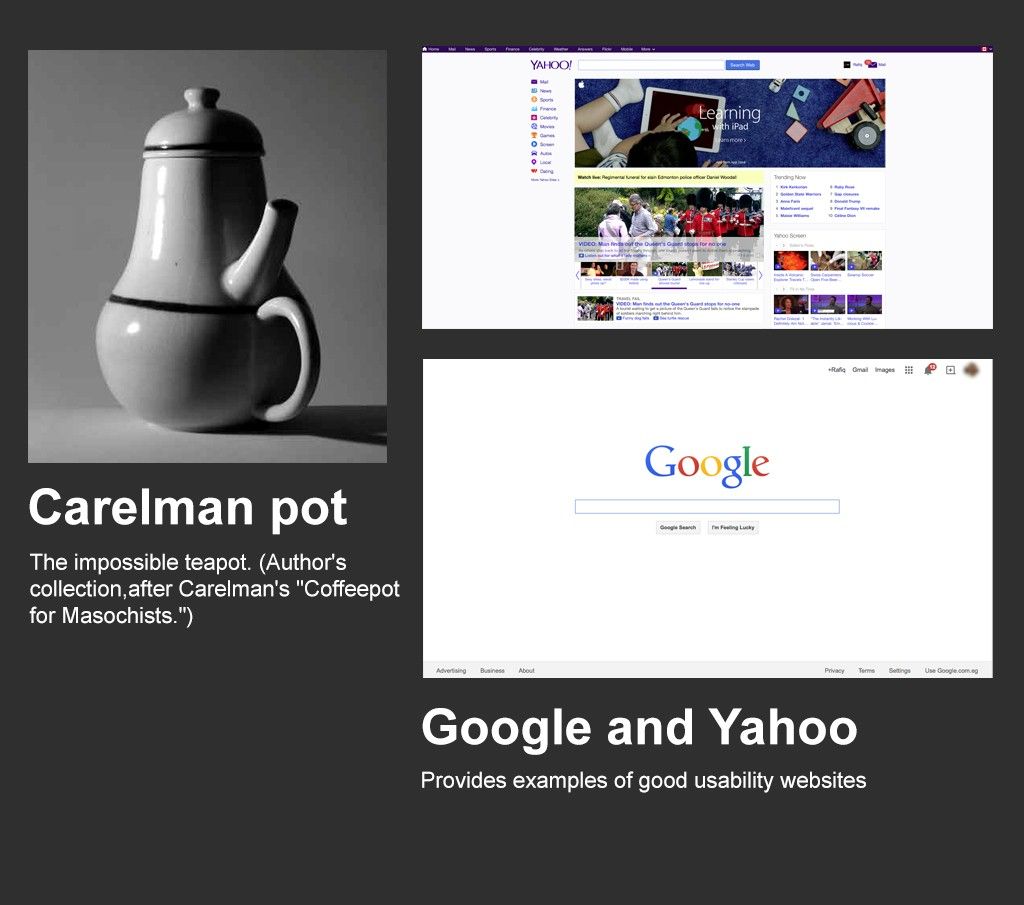
“Usability” refers to the ease of access and/or use of a product or website. It’s a sub-discipline of user experience design. Although user experience design (UX Design) and usability were once used interchangeably, we must now understand that usability provides an important contribution to UX; however, it’s not the whole of the experience. We can accurately measure usability.

A design is not usable or unusable per se; its features, together with the user, what the user wants to do with it, and the user’s environment in performing tasks, determine its level of usability. A usable interface has three main outcomes:

  • It should be easy for the user to become familiar with and competent in using the user interface on the first contact with the website. If we take a travel agent’s website that a designer has made well, the user should be able to move through the sequence of actions to book a ticket quickly.

  • It should be easy for users to achieve their objective through using the website. If a user has the goal of booking a flight, a good design will guide him/her through the easiest process to purchase that ticket.

  • It should be easy to recall the user interface and how to use it on subsequent visits. So, a good design on the travel agent’s site means the user should learn from the first time and book a second ticket just as easily.

This isn’t the only set of requirements for usability. For example, a usable interface will be relatively error-free when used.

We can measure usability throughout the development process, from wireframes to prototypes to the final deliverable. Testing can be done with paper and pencil but also remotely when we have higher-fidelity prototypes.

It’s important to analyze the users’ performance and concerns with a web design as early as possible. From there, we can apply a set of guidelines with a grain of salt; because they tend to be general, we need to adapt them to our specific area. Guidelines show a product’s features proven to improve usability. We can fine-tune design revisions according to these guidelines, as long as we look at all the dimensions. Sometimes, it might just involve tweaking a menu layout; or, it might involve looking much higher.

We have to consider the user at all points when determining usability. If our designs are to be “usable”, they have to pass the test with a minimum number of criteria. If our product were a mouse and not a website, we’d have to ensure that it conformed to standards (to receive that all-important “CE” imprint). For a website, it might be easier to explore how our design ranks alongside a competitor’s. Let’s go back to the travel agents and see where we might improve our design.

Our design

  • Users can navigate to “buy” button in 294 seconds, on average.

  • Returning users navigate to “buy” button in 209 seconds, on average.

  • 18% of users bought a ticket on finding landing page.

  • 42% of users went no further than the landing page.

Happy Huzzah’s Getcha There, Inc.

  • Users can navigate to “buy” button in 198 seconds, on average.

  • Returning users navigate to “buy” button in 135 seconds, on average.

  • 32% of users bought a ticket on finding landing page.

  • 12% of users went no further than the landing page.

Glancing at these metrics tells us something. We need to check out what “Happy Huzzah’s Getcha There, Inc.” is doing because something’s certainly working there!

Usability Elements
Author/Copyright holder: yukti.io Copyright terms and license: CC BY-SA 3.0

In addition to content, we have web development and design considerations for usability. These are (mainly) outlined as follows:

Server

Servers used to host websites are a usability consideration. Two major factors to consider when selecting servers are:

  • Speed - Google ranks by usability to some extent. How quickly your page loads is one of the ranking factors — so, speed to load is also a Search Engine Optimization (SEO) concern. A website that’s slow to load and slow to respond turns users off. Servers influence how fast a page will load depending on their capacity, specialization, etc. Naturally, it’s not just servers that influence the speed of a page — the web designer has a lot of influence over this in the way he/she serves images, graphics, etc., too.

  • Downtime - During downtime, a website is completely inaccessible. It’s fair to say that most websites will experience the occasional moment of downtime when a server falls offline. However, some suffer more than most; choosing a reliable server enables the delivery of a better user experience. One bad experience might have a user shrug and come back later. But more than one bad experience and that user may go somewhere else.

HTML

Focus the HTML you use on delivering a better user experience. While, to date, only mobile websites benefit from user experience ranking on Google, it’s probably fair to infer that in the future this will also be true on all platforms. Some key considerations for your HTML include:

  • Use ALT tags - ALT tags are used in conjunction with images; they let you convey additional information about the image that isn’t displayed as part of the main text. ALT tags assist with indexing in search engines (they let you tell the search engine about the content of the image). They also help with screen-reader narration for visually impaired users.

  • 404 Not Found Page - Broken links happen, particularly on large websites. While ideally, you should test all links on a regular basis and repair any broken ones, it’s a good idea to have a plan for when users encounter a broken link. That plan is the “404 Not Found Page” — a well-designed 404 page will try to assist the user in returning to a positive experience. The default 404 page isn’t helpful in this respect. Clunky and primitive, it gives users the impression that they’ve come to the end of an escalator that isn’t attached to a floor. They don’t want to fall off and land on an archaic message. As a designer, never lose sight of that. That little courtesy goes a long way.

Visual Factors

The visual factors that impact the overall user experience are the factors where, normally, you the designer have the most control. That means paying careful attention to:

  • Font Size and Color - Choose fonts that are easy to read. That means high levels of contrast with the background and font sizes large enough for users to read easily. If some of your user base is elderly or visually impaired, make fonts larger.

  • Branding - Branding, in particular the company logo, helps users know where they are online. Based on eye movement patterns, the ideal place for the logo is the top-left corner of the screen. This is where users who read from left to right are most likely to look when first arriving on the site.

  • Layout Colors - Colors need to be consistent in order to convey branding and also to develop an aesthetic appeal. In addition, they must deliver readability. Often, they need to convey a hierarchy of information, too.

  • Navigation - For users to get the most from a website, they need to get from point A (the entry point) to point B (where they want to be) as quickly and easily as possible. That means providing useful navigation systems, including (for larger websites) search functions, to facilitate that transition.

  • Content - The web designer may or may not be responsible for creating the website copy, but there are design elements in the way you display that copy for user experiences:

    - Headings - Organize content into manageable chunks through the use of headings, sub-headings, etc. This means developing a scheme for consistent display of each type of heading throughout the website, ensuring a consistent experience as users navigate around the site.

    - Paragraphs - Make paragraphs clear and easily recognizable to help prevent the user from being overwhelmed by a “wall of text”. You can also apply Gestalt principles to paragraphs to help better illustrate the relationships between blocks of content.

Website Usability Tools

Testing your website is easy, thanks to a lot of tools. Many are free; some are freemium, others premium. Get one that works for your website, then let it gather the data about usability. Many let you test on your existing users; you can tell from the data what they’re experiencing, what’s going right and not-so-right. Here’s a list of some:

Usabilla is a usability testing tool that can provide information based on the actual usage of your current site.

WebPage FX is a tool for testing the readability of content on a website.

Pingdom offers an insight into the speed of response from your website.

An Element of User Experience
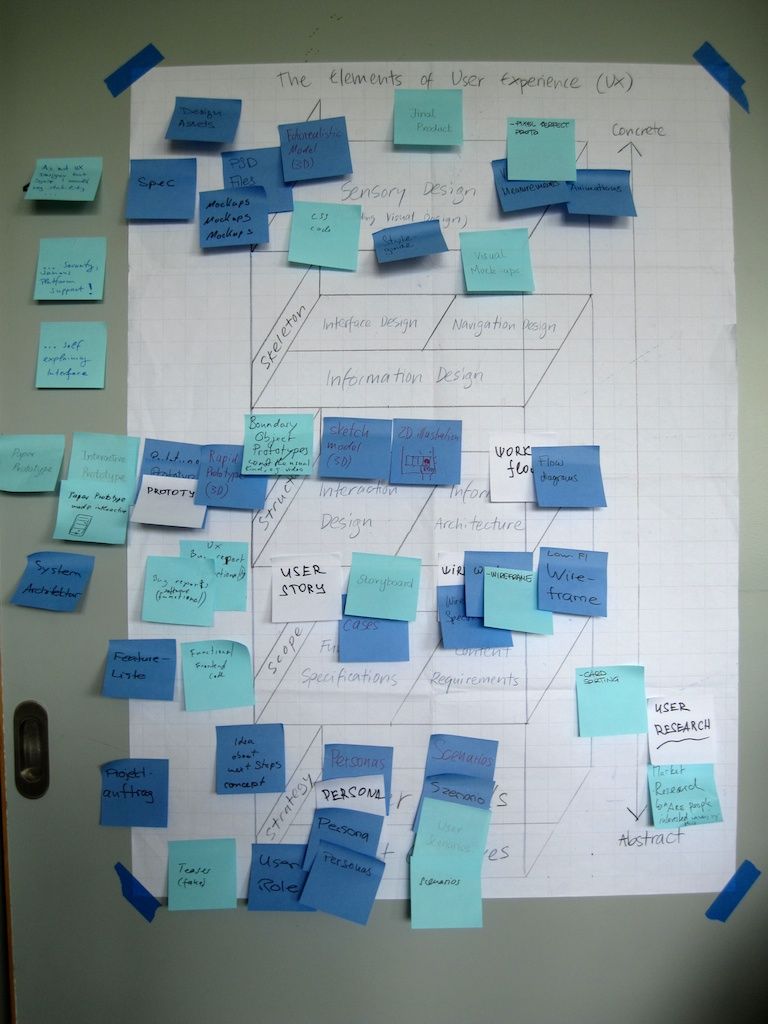
Author/Copyright holder: visualpun.ch. Copyright terms and license: CC BY-SA 2.0

It would be wonderful if we could draw the borders of user experience as if it were a country on a map. Unfortunately, the reality is fuzzier. As much as we like making sense of phenomena and applying frameworks, we must remember that users are people. As such, they make decisions steered by logic and emotions.

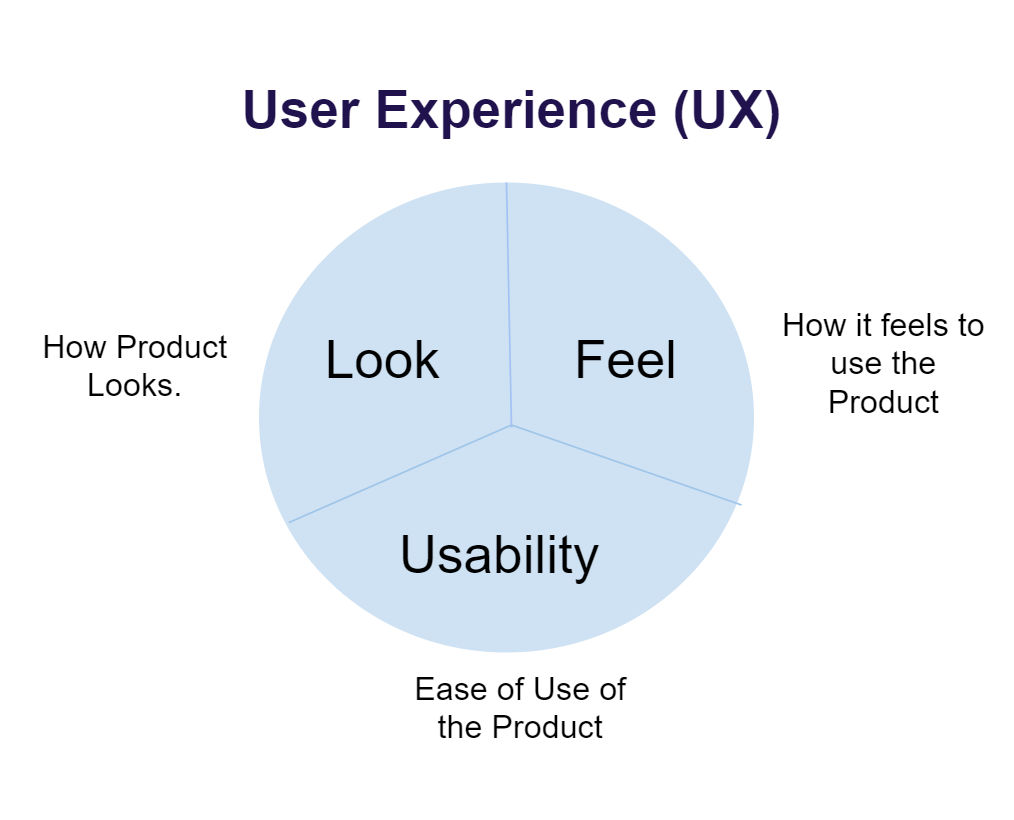
As we saw above, many designers get confused at the difference between usability and the larger branch of user experience. Core areas of the user experience include (Usability, 2014):

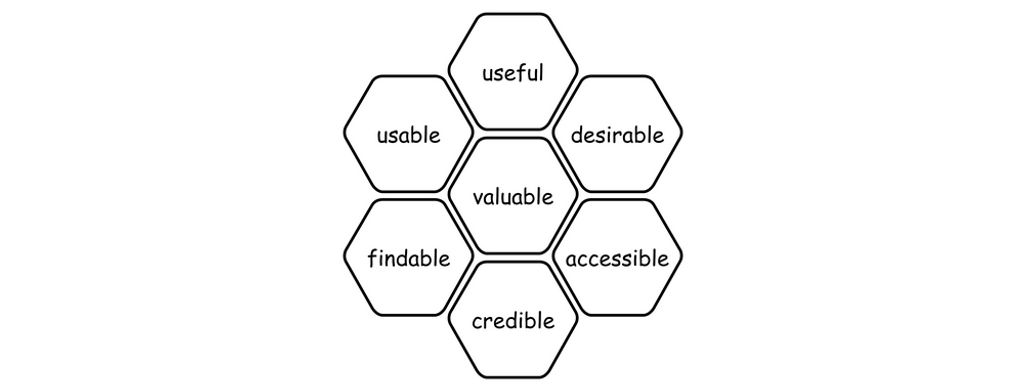
  • Usability: A measure of a user’s ability to arrive on a site, use it easily, and complete the desired task. Remember, we’re designing websites, where there is flow, rather than focusing on page design and assuming everything will flow later.

  • Useful content: The website should include enough information in an easily digestible format that users can make informed decisions. Keep Hick’s Law in mind here: streamline your design to be simple. Use restraint.

  • Desirable/Pleasurable Content: The best user experiences come when the user can form an emotional bond with the product or website. That means moving beyond usable and useful and on to developing content that creates that bond. Emotional design is a huge part of the user experience. An English grammar website that offers daily tips might prove itself useful. But if that tip is funny, users won’t only remember the rule; they may return for more!

  • Accessibility: For people with different levels of disability, online experiences can be deeply frustrating. There are a set of accessibility standards with which sites should conform to assist the visually impaired, the hearing impaired, the motion impaired, etc. Content for the learning disabled needs careful consideration in order to provide a more complete user experience, too.

  • Credibility: The trust that your website engenders in your users also plays a part in the user experience. One of the biggest concerns users have online is security (in many cases, they worry about privacy, too). Addressing these concerns through your design, for example by showing security features and having easily accessible policies regarding these concerns, can help create a sense of credibility for the user.

Naturally, the usability of a design is important. However, we need to consider usability alongside these other concerns to create a great user experience. The UX comes as much from graphical design, interactive design, content, etc. as it does from usability alone.

The Take Away

Usability refers to how easily a user interacts with a website or product. It comes under the heading of UX design but is not the whole story of user experience design. In usability, we designers have to focus on three aspects in particular:

  • Users should find it easy and become proficient when using a design interface.

  • They should be able to achieve their goal easily through using that design.

  • They should be able to learn the interface easily, so that return visits are just as, if not more, easy.

We should analyze our web design when determining usability, taking into account everything from accessibility and usefulness of content to credibility and designing content users will enjoy. That means thinking ahead. Who are your users? Might they have trouble reading your text? Can you make them smile or laugh by adopting a fun tone (e.g., edutainment—entertainment and education—is useful when teaching)? Users will want to feel reassured that they are navigating securely. Make them feel so.

You also should consider the realities of the web. Finding a reliable server for your site that loads quickly is crucial. At the HTML level, you should use ALT tags and design a helpful catch page in case a link is broken.

Visual factors, including layout colors and content formatting, are important, too. Having a good-looking site is all very well, but can users navigate easily?

Finally, test, test, and test. A plethora of website usability tools exist. Never underestimate the value of testing from an early stage. By working out where users click, for example, you’ll be well on track to learning their ways and how usable your site is.

Where To Learn More

Course: The Practical Guide to Usability

Leavitt, M. O., &Shneiderman, B. (2006): Research-based Web Design &Usability Guidelines. US Department of Health and Human Services.

Alscher, D. (2019). Color Contrast: For the Sake of Aesthetic and Accessibility.

Bevan, N. (1992). “What is Usability”. Proceedings of the 4th International Conference on HCI, Stuttgart, September 1991.

The Smashing Editorial (2012). “Usability and User Experience”. Smashing Magazine.

Chapman, C. (2011). “Comprehensive Review of Usability And User Experience Testing Tools”. Smashing Magazine.

Reference

Hero Image: Author/Copyright holder: Peter Morville. Copyright terms and license: CC BY-NC 2.0
Feel Stuck?
Want Better Job Options?

AI is replacing jobs everywhere, yet design jobs are booming with a projected 45% job growth. With design skills, you can create products and services people love. More love means more impact and greater salary potential.

At IxDF, we help you from your first course to your next job, all in one place.

See How Design Skills Turn Into Job Options
Privacy Settings
By using this site, you accept our Cookie Policy and Terms of Use.
Customize
Accept all

Be the One Who Inspires

People remember who shares great ideas.

Share on:

Academic Credibility — On Autopilot

Don't waste time googling citation formats. Just copy, paste and look legit in seconds.