Your constantly-updated definition of Heuristic Evaluation (HE) and collection of videos and articles. Be a conversation starter: Share this page and inspire others!
Heuristic evaluation is a process where experts use rules of thumb to measure the usability of user interfaces in independent walkthroughs and report issues. Evaluators use established heuristics (e.g., Nielsen-Molich’s) and reveal insights that can help design teams enhance product usability from early in development.
“By their very nature, heuristic shortcuts will produce biases.”
— Daniel Kahneman, Nobel Prize-winning economist
Transcript
Transcript loading ...
Autoscroll
Learn how to guide effective designs using heuristic evaluation.
Heuristic Evaluation: Ten Commandments for Helpful Expert Analysis
In 1990, web usability pioneers Jakob Nielsen and Rolf Molich published the landmark article “Improving a Human-Computer Dialogue”. It contained a set of principles—or heuristics—which industry specialists soon began to adopt to assess interfaces in human-computer interaction. A heuristic is a fast and practical way to solve problems or make decisions.
In user experience (UX) design, professional evaluators use heuristic evaluation to determine a design’s/product’s usability systematically. As experts, they go through a checklist of criteria to find flaws that design teams overlook. The Nielsen-Molich heuristics state that a system should:
Keep users informed about its statusappropriately and promptly.
Show informationin ways users understand from how the real world operates, and in the users’ language.
Offer users control and let them undo errors easily.
Be consistent so users aren’t confused over what different words, icons, etc. mean.
Prevent errors – a system should either avoid conditions where errors arise or warn usersbefore they take risky actions (e.g., “Are you sure you want to do this?” messages).
Have visible information, instructions, etc. to let users recognize options, actions, etc. instead of forcing them to rely on memory.
Be flexible so experienced users find faster ways to attain goals.
Have no clutter, containing only relevant information for current tasks.
Provide plain-language help regarding errors and solutions.
List concise steps in lean, searchable documentation for overcoming problems.
Heuristic Evaluation: Pros and Cons
When you apply the Nielsen-Molich heuristics as an expert, you have powerful tools to measure a design’s usability. However, like any method, there are pros and cons:
Pros of Heuristic Evaluation
Heuristics can help highlight potential usability issues early in the design process.
It is a fast and inexpensive tool compared with other methods involving real users.
Cons of Heuristic Evaluation
Heuristic evaluation depends on the knowledge and expertise of the evaluators. Training the evaluators or hiring external evaluators might increase the time and money required for conducting the evaluation.
Heuristic evaluation is based on assumptions about what “good” usability is. As heuristics are based on research, this is often true. However, the evaluations are no substitute for testing with real users. These are, as the name suggests, only guidelines, and not rules that are set in stone.
Heuristic evaluation can end up giving false alarms. In their article, “Usability testing vs. heuristic evaluation: A head-to-head comparison,” Robert Bailey, Robert Allan and P. Raiello found that 43% of 'problems' identified by experimental heuristic evaluations were not actually problems. Furthermore, evaluators could only identify 21% of genuine usability problems in comparison with usability testing.
A vital point is that heuristic evaluation, however helpful, is no substitute for usability testing.
How to Conduct a Heuristic Evaluation
To conduct a heuristic evaluation, you can follow these steps:
Know what to test andhow – Whether it’s the entire product or one procedure, clearly define the parameters of what to test and the objective.
Know your usersand have clear definitions of the target audience’s goals, contexts, etc. User personas can help evaluators see things from the users’ perspectives.
Select 3–5 evaluators, ensuring their expertise in usability and the relevant industry.
Define the heuristics (around 5–10) – This will depend on the nature of the system/product/design. Consider adopting/adapting the Nielsen-Molich heuristics and/or using/defining others.
Brief evaluators on what to cover in a selection of tasks, suggesting a scale of severity codes (e.g., critical) to flag issues.
1st Walkthrough – Have evaluators use the product freely so they can identify elements to analyze.
2nd Walkthrough – Evaluators scrutinize individual elements according to the heuristics. They also examine how these fit into the overall design, clearly recording all issues encountered.
Debrief evaluators in a session so they can collate results for analysis and suggest fixes.
Questions About Heuristic Evaluation (HE)? We've Got Answers!
How to write a heuristic evaluation report?
When writing a heuristic evaluation report:
Start with a brief overview of the product or interface assessed and list the applied heuristics.
For each usability issue identified, explicitly state the violated heuristic, describe where it occurs in the interface, and explain its impact on user experience.
Provide specific recommendations to address each issue and prioritize them based on their severity to user experience.
Include visual aids like screenshots to help clarify the location and nature of the problems found.
For comprehensive insights and detailed instructions on conducting heuristic evaluations and writing practical reports, refer to How to Conduct a Heuristic Evaluation.
How is heuristic evaluation different from usability testing?
Heuristic evaluation differs from usability testing as it involves experts evaluating a product's user interface against established heuristics pinpointing usability issues, while usability testing involves real users completing tasks and identifying issues within the product. Heuristic evaluations are quicker and cost-effective, providing early insights, while usability testing offers an in-depth understanding of user interactions and experiences. For a comprehensive overview of usability testing, watch this video:
Transcript
Transcript loading ...
Autoscroll
Why is heuristic evaluation important?
Heuristic evaluation is vital as it efficiently identifies usability problems in the design phase of product development, saving time and resources. Employing experts to review products against usability principles helps enhance user satisfaction and interaction and ensures a product's design is intuitive and user-friendly. This method is cost-effective and quick, making it a fundamental step in achieving optimal user experience and interface design.
What is an example of heuristic evaluation?
An example of heuristic evaluation is when usability experts assess a website or application against established usability principles, or heuristics, to identify potential user experience issues. For instance, experts might evaluate the system's visibility of system status, user control, and freedom or match between the system and the real world. These evaluations help in uncovering usability problems early in the design process. For a detailed procedure for conducting a heuristic evaluation, refer to this article: How to Conduct a Heuristic Evaluation.
How effective is heuristic evaluation?
Compared to other methods, heuristic evaluation is a cost-effective and efficient way to determine design usability issues.
Transcript
Transcript loading ...
Autoscroll
However, as discussed in the video, it may not be as effective as testing with real users when it comes to understanding the user experience fully. Heuristic evaluations, performed by experts, assess whether solutions conform to established usability guidelines, providing critical insights, especially in the early stages of design. Nonetheless, optimal outcomes usually result from combining this method with user testing, allowing designers to address expert opinions and real user experiences effectively.
How do you conduct a heuristic evaluation in UI?
To conduct a heuristic evaluation in UI, select a set of heuristics or guidelines like Jakob Nielsen’s 10 usability heuristics. Next, assemble a group of usability experts and assign them to evaluate the interface independently, identifying issues that violate the chosen heuristics. Compile the found issues, prioritize them based on severity, and generate a report detailing the problems and suggested improvements. This article, How to Conduct a Heuristic Evaluation, provides a comprehensive guide on effectively performing heuristic evaluations in UI design.
Start conducting your own heuristic evaluations with the help of this template:
Advance Your Career With This Free Template
for “How to Conduct Your Own Heuristic Evaluation”
What is a weakness of heuristic analysis?
A weakness of heuristic analysis is its reliance on experts’ judgments, which may not accurately reflect user experiences and can overlook user-centric issues. While cost-effective, this method might miss problems identified through user testing, leading to unresolved potential usability issues. The subjective nature of heuristic evaluation can result in varied findings among evaluators, necessitating thorough analysis to discern the most critical usability concerns. Despite these limitations, heuristic analysis remains a valuable tool in the early design stages to identify glaring usability issues efficiently.
What is a heuristic checklist?
A heuristic checklist is a structured tool used in heuristic evaluation to assess the user interface design against established usability principles or "heuristics." This checklist helps identify usability issues in a product, focusing on areas like user control, consistency, and error prevention. It's employed by experts to quickly spot potential problems in the early stages of design, aiding in the refinement of the user experience. For a more in-depth understanding and to explore the components of a heuristic checklist, refer to this article: How to Conduct a Heuristic Evaluation.
Start conducting your own heuristic evaluations with the help of any (or all!) of the different sets of heuristics:
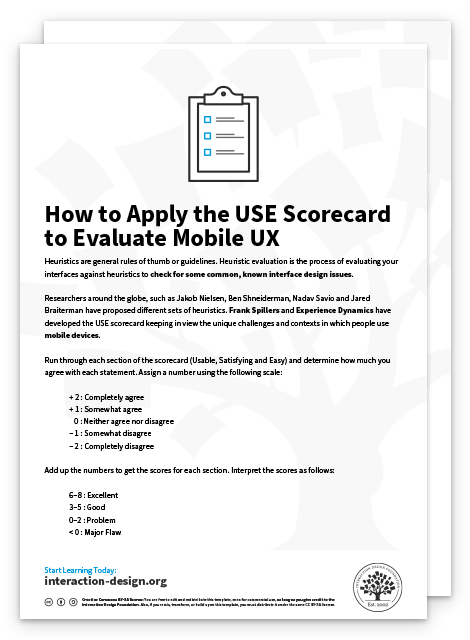
Frank Spillers and Experience Dynamics’ USE Scorecard:
Advance Your Career With This Free Template
for “How to Apply the USE Scorecard to Evaluate Mobile UX”
Jakob Nielsen and Rolf Molich’s universal usability heuristics:
Advance Your Career With This Free Template
for “Heuristic Evaluation Sheet for General Use”
Enrico Bertini, Silvia Gabrielli and Stephen Kimani’s modified heuristics for mobile:
Advance Your Career With This Free Template
for “Heuristic Evaluation Sheet for Mobile Designs”
What is the most common heuristic tool?
The most common heuristic tool is Jakob Nielsen’s “10 Usability Heuristics for User Interface Design.” It’s widely recognized and utilized for its effectiveness in identifying usability issues in user interface (UI) design.
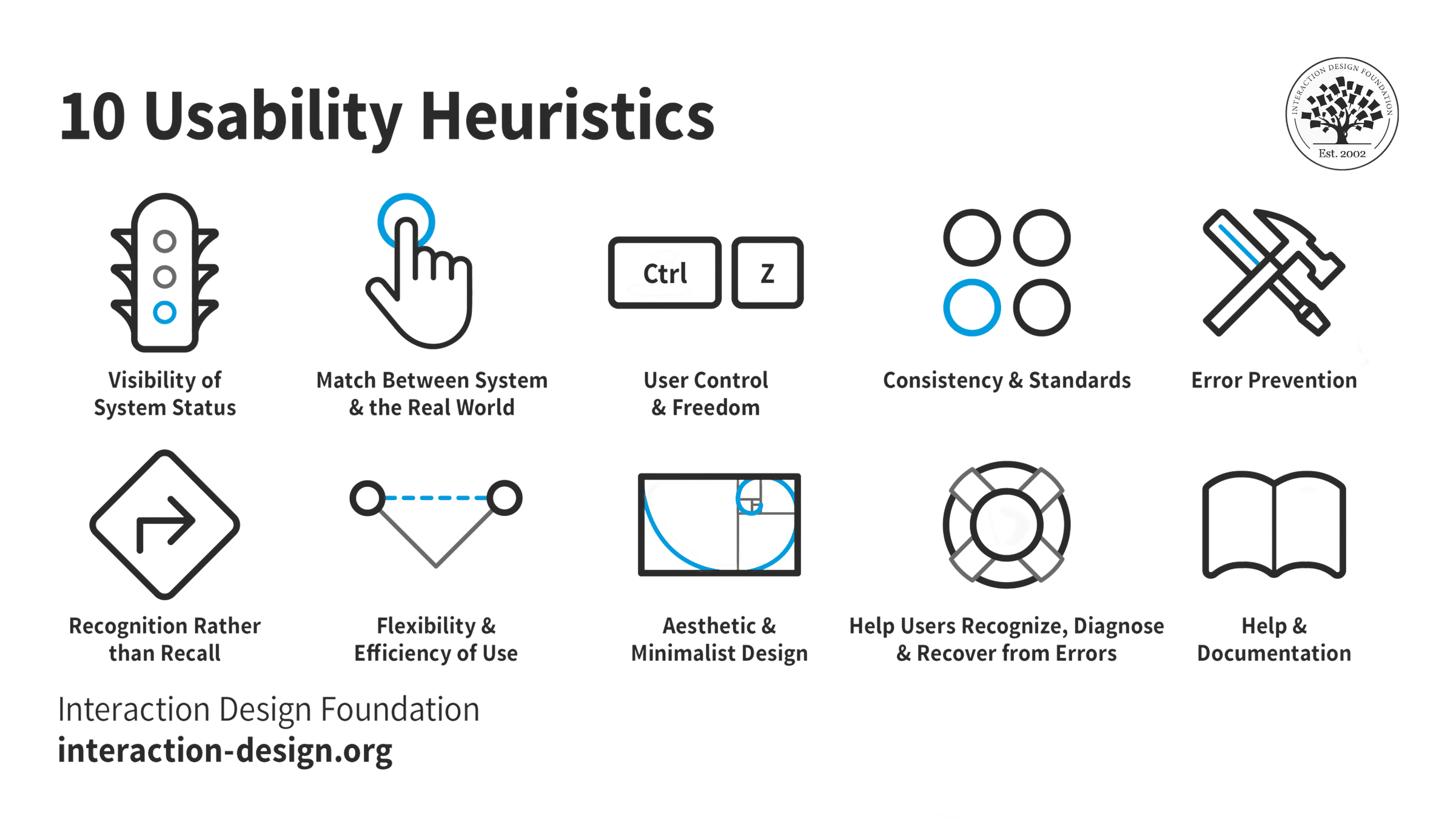
An illustration depicting Jakob Nielsen's 10 Usability Heuristics for User Interface Design. They’re called "heuristics" because they are broad rules of thumb and not specific usability guidelines.
Visibility of System Status: Keep users informed about what's going on through appropriate feedback within a reasonable time.
Match between System and the Real World: Use words and concepts familiar to the user, rather than system-oriented terms.
User Control and Freedom: Provide ways for users to easily reverse actions and exit from unintended states.
Consistency and Standards: Avoid user confusion by being consistent and following platform conventions.
Error Prevention: Eliminate error-prone conditions and confirm users' actions that have severe consequences.
Recognition Rather Than Recall: Minimize users' memory load by making objects, actions, and options visible and easily accessible.
Flexibility and Efficiency of Use: Allow users to tailor actions and provide shortcuts to accelerate experienced users’ interaction.
Aesthetic and Minimalist Design: Avoid unnecessary elements that can diminish the overall user experience.
Help Users Recognize, Diagnose, and Recover from Errors: Provide clear and plain-language error messages to help users understand, diagnose, and recover from errors.
Help and Documentation: Make help and documentation accessible, focused on the user's task, list concrete steps to be carried out, and not be overly large.
This set focuses on essential principles such as user control, error prevention, and consistency, offering a straightforward approach to improving user experience by addressing the most prevalent and impactful aspects of interface design.
Where to learn heuristic evaluation?
To learn heuristic evaluation, take with the User Experience: The Beginner’s Guide course. This course provides detailed insights and practical knowledge on heuristic evaluation, enabling learners to enhance user experience effectively. Additionally, explore comprehensive articles and literature on heuristic evaluation on the IxDF website to deepen your understanding and skills in this area. Both resources are invaluable for anyone looking to master heuristic evaluation techniques in user interface design.
Earn a Gift! Answer a Short Quiz at the End of This Page
Earn a Gift, Answer a Short Quiz!
1
2
3
4
1
2
3
4
Question 1
Question 2
Question 3
Get Your Gift
2
3
4
2
3
4
Question 1
Question 2
Question 3
Get Your Gift
3
4
3
4
Question 1
Question 2
Question 3
Get Your Gift
4
4
Question 1
Question 2
Question 3
Get Your Gift
Try Again! IxDF Cheers for You!
0 out of 3 questions answered correctly
Remember, the more you learn about design, the more you make yourself valuable.
Improve your UX / UI Design skills and grow your career! Join IxDF now!
Learn More About Heuristic Evaluation (HE)
Make learning as easy as watching Netflix: Learn more about Heuristic Evaluation (HE) by taking the
online IxDF Course The Practical Guide to Usability.
Why? Because design skills make you valuable. In any job. Any industry.
In This Course, You'll
Get excited to turn complexity and frustration into intuitive, functional products people love to use. In this course, you'll build practical skills in usability and simplicity, user interface design, and the cognitive psychology that shapes how people use and abandon products. Usability isn't a nice-to-have, it's your competitive advantage. Baymard UX research institute found better checkout design alone can lift conversion rates by roughly 35%. You'll see why a single confusing checkout step is enough to make a shopper give up, and why the iPhone keeps just four icons in its dock. You already practice usability intuitively when you arrange apps for easy access or label folders clearly to remember later. In this course, you'll build on your foundation with proven evaluation methods and research-grounded reasoning, whether you're new to design or already in a senior role.
Make yourself invaluable when you can design products that turn users into loyal customers, increase profits, and cut support costs. You'll start with Ben Shneiderman's Eight Golden Rules of Interface Design and Jakob Nielsen and Rolf Molich's ten usability heuristics, and see how these usability essentials are reflected in the interfaces of Apple, Google, and Adobe. You'll learn to narrow Don Norman's "gulf of execution," design around the limits of human memory, and use Norman's three levels of emotional design and Marc Hassenzahl's principle of putting the experience before the product. Throughout the full user-centered design process, from requirements through to evaluation, you'll learn to keep the focus on real users and apply research-based personas to make those users concrete. AI can generate interfaces faster than any human, but it can't tell you which ones actually work well for the people who'll use them. This course gives you the timeless human-centered skills you need to judge: the heuristics, evaluation methods, and understanding of user behavior to make the choices only a human can.
Gain confidence and credibility with the ability to look at any interface and explain what's working, what isn't, and how to fix it. You'll learn to run a heuristic evaluation, conduct a cognitive walkthrough, and anchor your judgment in recognized standards like ISO 9241-11 and Whitney Quesenbery's five dimensions of usability. Optional hands-on activities let you put each method to work, from evaluating a real website to running your own usability test. And with ready-to-use, downloadable templates like the external-cognition worksheet, you'll be ready to apply your new skills from day one.
Learn From Industry Leaders
Master complex skills with proven best practices and toolkits directly from industry leaders. Meet your experts for this course:
Marc Hassenzahl: Professor of Ubiquitous Design/Experience & Interaction in the Department of Business Computing at the University of Siegen.
William Hudson: User Experience Strategist and Founder of Syntagm.
Earn Industry-Recognized Certificates
Industry giants trust our courses to train their teams, and prestigious universities integrate our content into their curricula. Add your certificates to your LinkedIn profile, résumé, and job applications.
All Free IxDF Articles on Heuristic Evaluation (HE)
Principle of Consistency and Standards in User Interface Design
Learn to design with consistency and standards in mind and understand the reasons why they’re important to incorporate them into your work. Derived from Jakob Nielsen and Rolf Molich’s Ten User Interface (UI) Guidelines, ‘Consistency and Standards’ are evident in many of the widely-used produc
Heuristic Evaluation: How to Conduct a Heuristic Evaluation
Heuristic evaluation is the activity of using a set of guidelines (heuristics) to evaluate if an interface is user-friendly. Let’s look at what heuristics are and how you can conduct a heuristic evaluation to improve the usability of your designs.What are Heuristics?“Heuristics” simply means guideli
Mobile Usability Research – The Important Differences from the Desktop
It’s important to remember that while we may use the same methods for mobile usability research as we use for other types of usability research; the mobile environment is different to the environment at the desktop. This means being aware of the context and adapting research to take advantage of tha
How to Handle Non-Disclosure Agreements (NDAs) When You Write Your UX Case Study
Most designers are familiar with non-disclosure agreements. Usually, your employer asks you to sign such an agreement to prevent you from revealing confidential information. But when you write your UX case studies, your NDAs suddenly seem like an obstacle. How should you write about your design proj
Stand on the shoulders of giants and follow international standards
Design can be very subjective. This leads UX practitioners facing criticism and a lack of credibility when dealing with other more scientific disciplines. Fortunately, you can rely on international standards to refer to and easily bridge the gap.
The ISO 9241 Standard for the Ergonomics of Human-Sy
Heuristic Evaluation: How to Conduct a Heuristic Evaluation
Heuristic evaluation is the activity of using a set of guidelines (heuristics) to evaluate if an interface is user-friendly. Let’s look at what heuristics are and how you can conduct a heuristic evaluation to improve the usability of your designs.
What are Heuristics?
“Heuristics” simply means guidelines. In user experience design, it is nearly impossible to define rigid rules. There is no fool-proof way to create experiences that are guaranteed to work. Instead, you can refer to principles to guide you in your design process, to help you evaluate your work before you test it with real users.
Several researchers and leaders have proposed different sets of guidelines for user interface design. Let’s look at one of the most popular guidelines proposed by Jakob Nielsen and Rolf Molich.
Nielsen and Molich's 10 User Interface Design Heuristics
Jakob Nielsen, a usability consultant and partner in the Nielsen Norman Group, and Rolf Molich, usability engineer and founder of DialogDesign, established a list of ten user interface design guidelines in the 1990s.
In this video, William Hudson explains each of these heuristics, along with illustrative examples.
Transcript
Transcript loading ...
Autoscroll
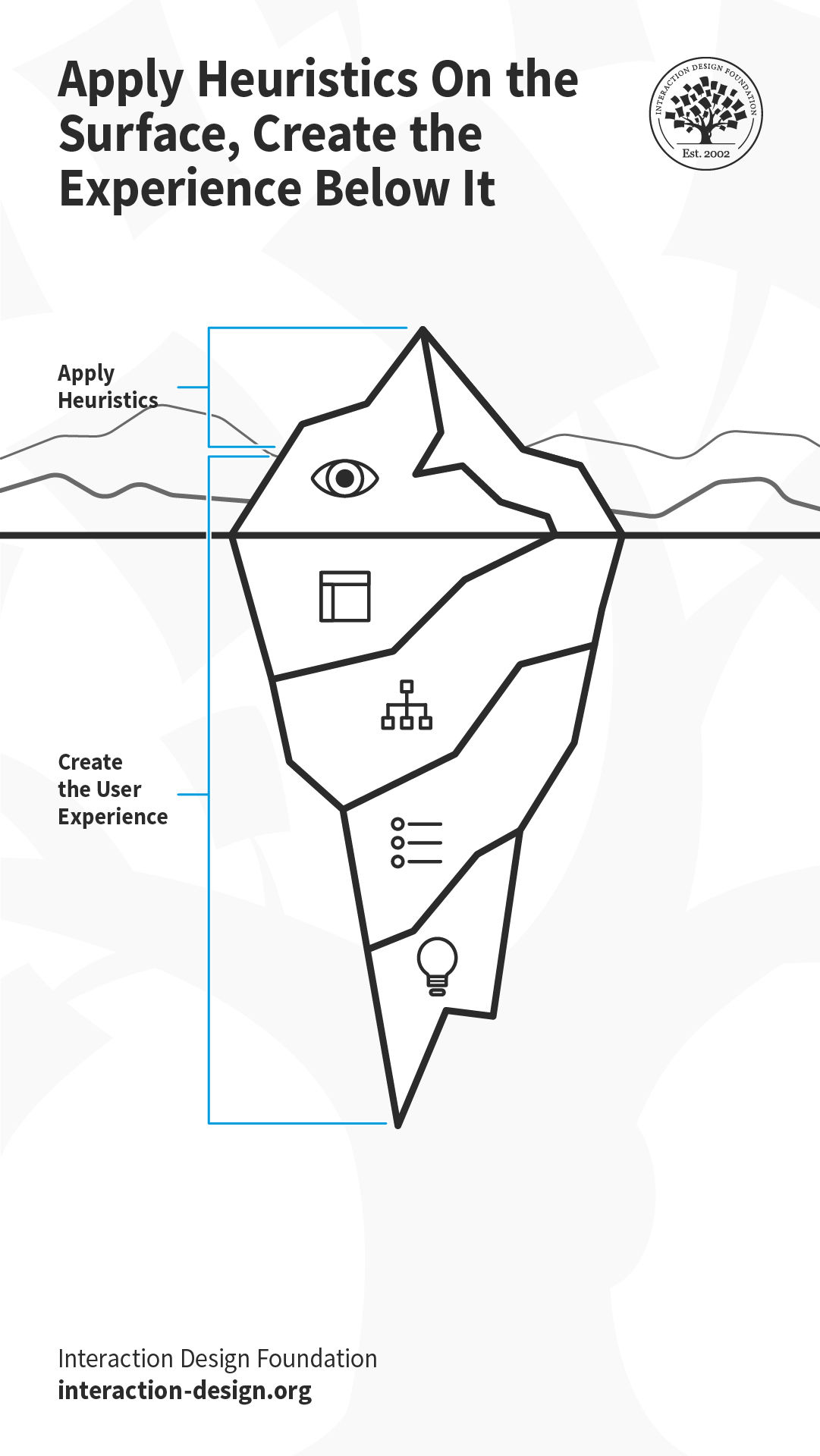
These heuristics are applied at the “Surface” element of the user’s experience. However, user experience is created by design decisions taken at the strategy (why and for whom are you building the solution?), scope (what is it that you’re building?) and the structure and skeleton (how does the solution work?) levels. So, it is helpful to keep heuristics in mind throughout the design process. Let’s say you are creating the user flow for a task in a mobile application (the structure). If you map the task flow close to the real-world task that users are already familiar with (heuristic #2: match between system and the real world), your interface (the surface) will be more likely to adhere to this heuristic.
What the user sees at the surface is only the tip of the metaphorical iceberg, which is influenced by the decisions taken below the “surface of the ocean.”
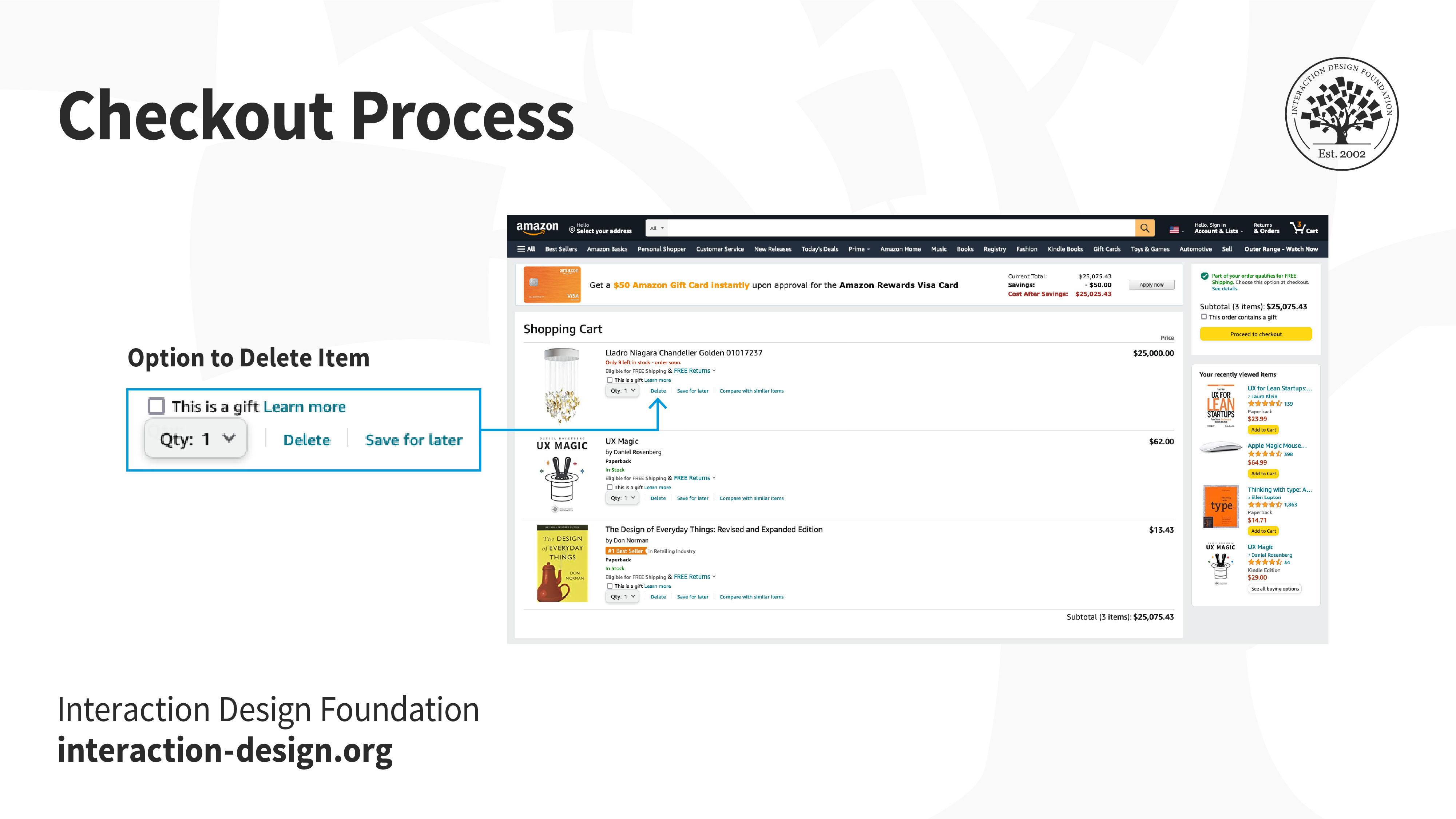
When you go shopping at the grocery store, sometimes you realize you’ve added extra items that you can do without, and take them out before reaching the checkout counter. Or, perhaps you request the cashier to remove an item even after they have billed it, realizing it is far too expensive. When designing the online version of the checkout process, your architecture should therefore support the back-and-forth movement between the different parts of the checkout process and the interface will need to as well.
Amazon’s information architecture allows users to remove items at any point before and during the checkout process, even after the user has entered the payment method and shipping information, which is reflected in the interface.
Technology has changed drastically since Nielsen and Molich first wrote the heuristics. For example, mobile devices and voice-based smart devices demand more context-specific heuristics. That said, Nielsen and Molich’s principles have stood the test of time and continue to be relevant. For example, on a voice-based interface, the heuristic “visibility of the system status” continues to be relevant; what changes is how you implement it (perhaps through a flickering light, or a dedicated sound effect). As new technology continues to emerge, you must learn how to adapt these heuristics to the new technologies, and if required, extend or add to the heuristics. For instance, ergonomics and judicious use of screen real estate are heuristics specific to mobile devices.
How to Conduct a Heuristic Evaluation
Establish an appropriate list of heuristics. You can choose Nielsen and Molich's 10 heuristics or another set, such as Ben Shneiderman’s 8 golden rules as inspiration and stepping stones. Make sure to combine them with other relevant design guidelines and market research.
Select your evaluators. Make sure to carefully choose your evaluators. Your evaluators should not be your end users. They should typically be usability experts and preferably with domain expertise in the industry type that your product is in. For example, an evaluator investigating a Point-of-Sale system for the restaurant industry should have at least a general understanding of restaurant operations.
Brief your evaluators so they know exactly what they are meant to do and cover during their evaluation. The briefing session should be standardized to ensure the evaluators receive the same instructions; otherwise, you may bias their evaluation. Within this brief, you may wish to ask the evaluators to focus on a selection of tasks, but sometimes they may state which ones they will cover based on their experience and expertise.
First evaluation phase. The first evaluation generally takes around two hours, depending on the nature and complexity of your product. The evaluators will use the product freely to gain a feel for the methods of interaction and the scope. They will then identify specific elements that they want to evaluate.
Second evaluation phase. In the second evaluation phase, the evaluators will carry out another run-through, whilst applying the chosen heuristics to the elements identified during the first phase. The evaluators would focus on individual elements and look at how well they fit in the overall design.
Record problems. The evaluators must either record problems themselves or you should record them as they carry out their various tasks to track any problems they encounter. Be sure to ask the evaluators to be as detailed and specific as possible when recording problems.
Debriefing session. The debriefing session involves collaboration between the different evaluators to collate their findings and establish a complete list of problems. They should then be encouraged to suggest potential solutions for these problems based on the heuristics.
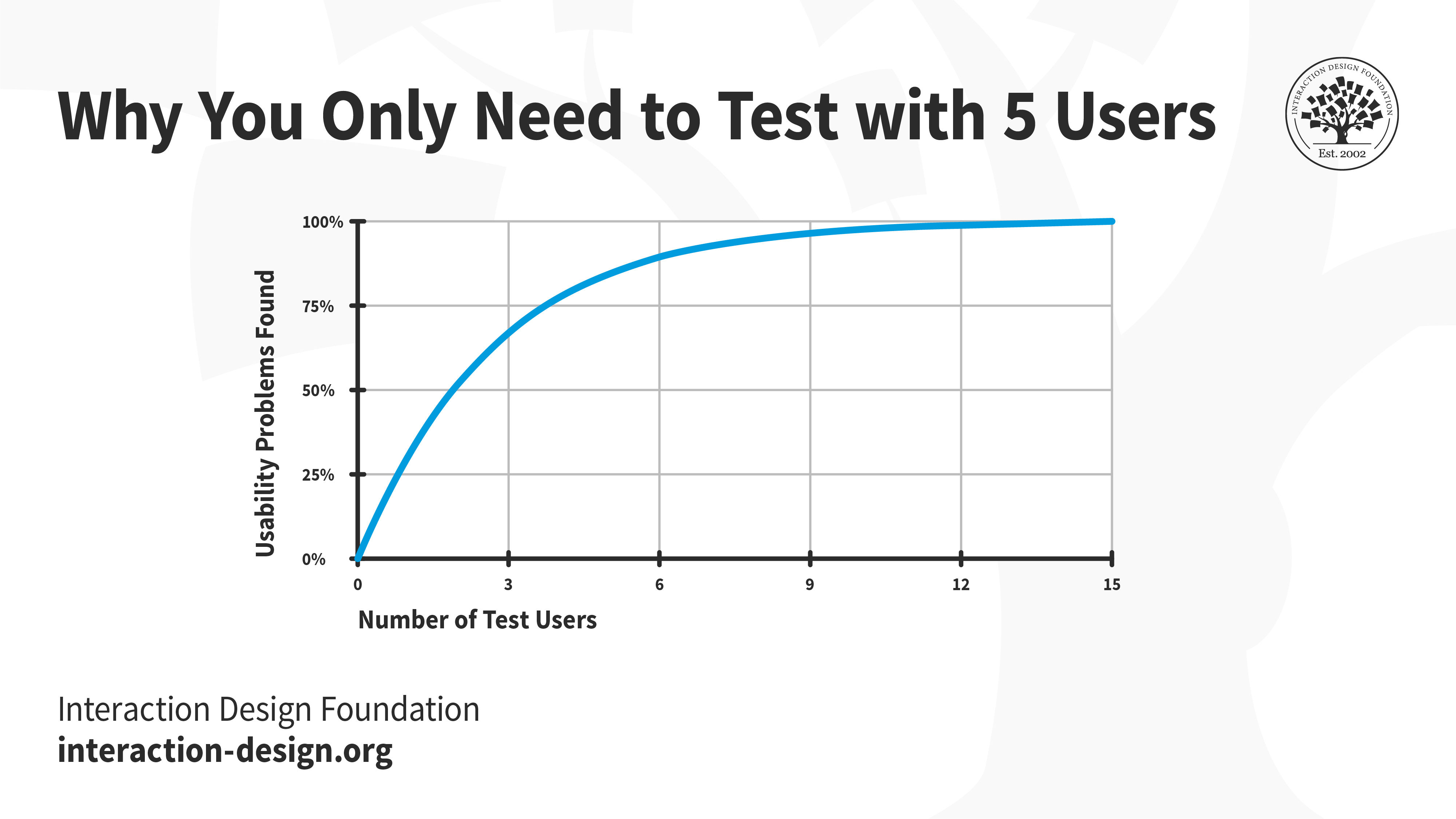
In general, the more evaluators you have, the more usability issues you will unearth, especially when the evaluators have different skill sets. However, Jakob Nielsen suggests that between three and five evaluators is sufficient. With five evaluators, you should be able to identify up to 75% of all issues. While increasing the number of evaluators will help you find more issues, it may not be worth the time and effort.
Jakob Nielsen’s research indicates that five evaluators can help you discover about 75% of the usability issues. Beyond five, with every additional evaluator, the proportion of new usability issues will be much smaller and usually not worth the extra resources.
Like any suggested method in research and design, there are both pros and cons in the usability inspection method of heuristic evaluation. Let’s examine a few of them:
Pros of Heuristic Evaluation
Heuristics can help highlight potential usability issues early in the design process.
It is a fast and inexpensive tool compared with other methods involving real users.
Cons of Heuristic Evaluation
Heuristic evaluation depends on the knowledge and expertise of the evaluators. Training the evaluators or hiring external evaluators might increase the time and money required for conducting the evaluation.
Heuristic evaluation is based on assumptions about what “good” usability is. As heuristics are based on research, this is often true. However, the evaluations are no substitute for testing with real users. These are, as the name suggests, only guidelines, and not rules that are set in stone.
Heuristic evaluation can end up giving false alarms. In their article, “Usability testing vs. heuristic evaluation: A head-to-head comparison,” Robert Bailey, Robert Allan and P. Raiello found that 43% of 'problems' identified by experimental heuristic evaluations were not actually problems. Furthermore, evaluators could only identify 21% of genuine usability problems in comparison with usability testing.
Start conducting your own heuristic evaluations with the help of this template:
Advance Your Career With This Free Template
for “How to Conduct Your Own Heuristic Evaluation”
The Take Away
In user experience design, there are no hard rules that guarantee success. Instead, there are general guidelines, principles, or rules of thumb that you use to inform and evaluate your work. These guidelines are called heuristics, and when you evaluate your (or your competitor’s) work against these heuristics, it is called heuristic evaluation.
One of the most popular sets of heuristics are those created by Jakob Nielsen and Rolf Molich. These are:
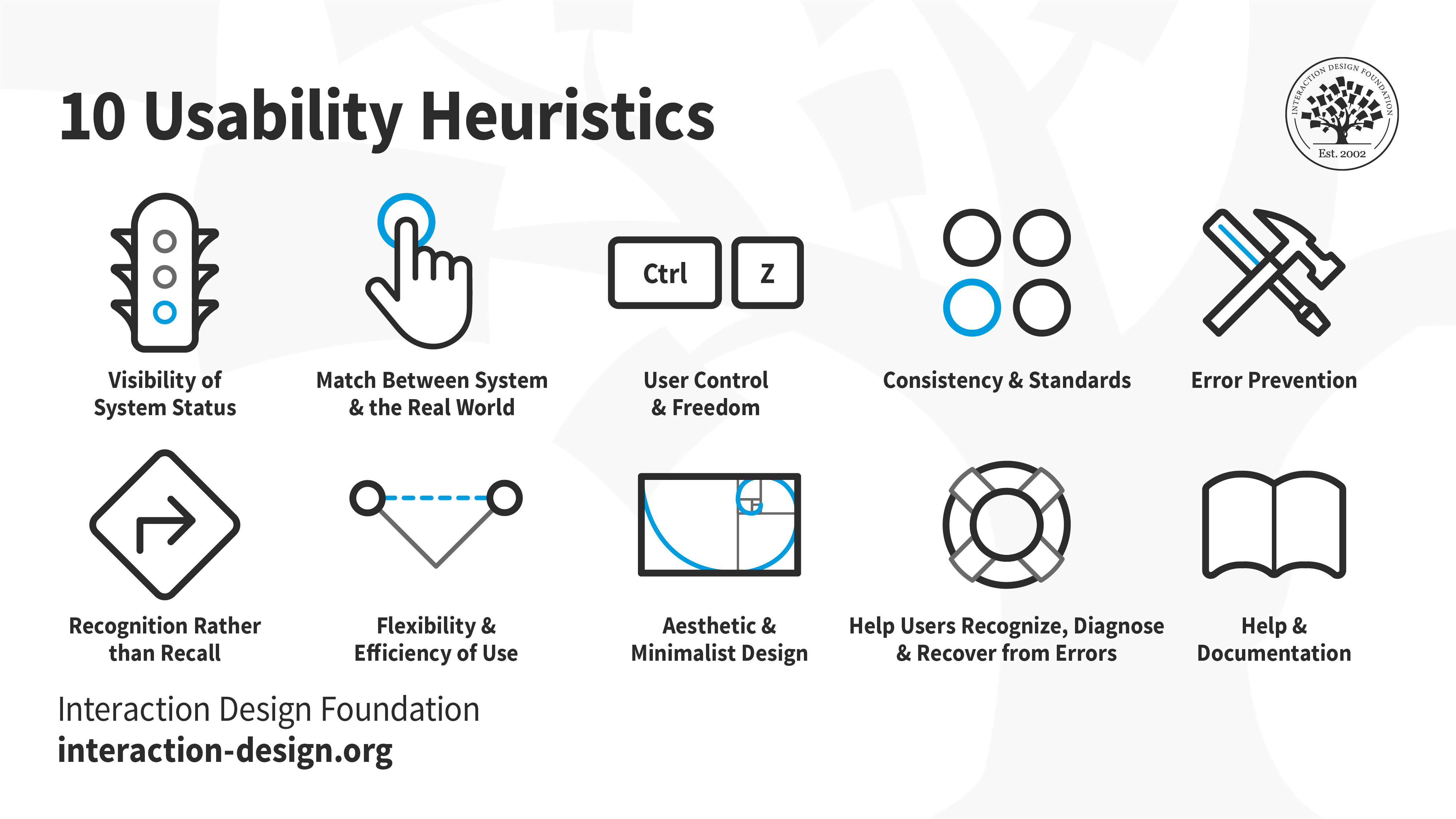
Visibility of system status: Keep the user informed about what is happening behind the scenes.
Match between system and the real world: Ensure the conventions you use match what the user is already familiar with in the real world.
User control and freedom: Allow users to step back, undo and redo their actions.
Consistency and standards: Ensure interface elements like labels and icons behave consistently throughout the product.
Error prevention: Anticipate, and plan for errors. Where possible, eliminate them; and for other cases, ensure users can easily recover from errors.
Recognition rather than recall: Do not expect users to remember or recall information. It is always easier to recall information when we have clues to point us towards it. For example, it is easier for us to pick (i.e., recognize) the right answer from a list of options, rather than attempting to answer from memory (recall). Make sure your interface has cues to help users recognize information.
Flexibility and efficiency of use: Allow users to customize or tailor the interface to suit their needs so that they can perform frequent actions more easily.
Aesthetic and minimalist design: Remove clutter and any superfluous information so that users can focus on achieving their goal, instead of getting confused or overwhelmed.
Help users recognize, diagnose and recover from errors: Avoid technical jargon. Write error messages in plain language and ensure nothing gets lost in translation.
Help and documentation: Provide easily accessible and searchable documentation.
An illustration depicting Jakob Nielsen's 10 Usability Heuristics for User Interface Design. They’re called "heuristics" because they are broad rules of thumb and not specific usability guidelines.
Heuristic evaluation can be a useful inspection method; however, some experts have identified issues with evaluators reporting false alarms, rather than genuine problem elements within designs. To limit the effect misreporting has on the applicability of findings from heuristic evaluation, it helps to use a number of different evaluators, collate their problems and carry out a debriefing session to root out false alarms at various stages in the design process.
Heuristic evaluation is one of the many tools to guide your design process. However, it is not the only one that you should rely on. Make sure you conduct user research and test your designs with real users to continually refine your work.