User control in user experience design refers to the principle where designers let users have autonomy and independence in their interaction with a digital interface through such features as undo buttons. This user-centric design approach makes sure the user has the freedom to navigate, interact and make choices within a system or interface according to their preferences and needs.

While users should have a great degree of freedom and control—including to press Enter—how much control to give users, and how, is a significant design consideration.
© Fernando Arcos, Fair Use
Why is User Control Vital in UX Design?
User control is a vital part of user experience (UX) design—something that’s primarily due to its potential to enhance user autonomy in good designs. A high degree of user control translates to a user interface (UI) that adapts to the user's preferences and needs—an interface that helps deliver a good user experience.
When designers give users control, they give them essential affordances, comforts and adaptability—rather than dictate a rigid pathway for them. This adaptability gives users the freedom to interact with the interface, and does it in a way that suits their unique personal style or cognitive process. It helps alleviate pain points while a user interacts with a digital product, too. So, the overall user experience is far better and much more in line with user-centered design. The user really gets a sense of empowerment and satisfaction while they encounter the product brand.
User Control and Jakob Nielsen's Usability Heuristic
The concept of "User Control and Freedom" is a key heuristic—one which usability expert Jakob Nielsen, of the Nielsen-Norman Group, proposed. It’s third in his list of ten Usability Heuristics—and heuristics are rule-of-thumb strategies that come from previous experiences with similar problems. “User Control and Freedom” underlines just how important it is to give users the flexibility to navigate the system freely—and reverse their actions whenever they have to.
According to Nielsen, designers should create interfaces so that users can undo and redo actions without anything keeping them back. This heuristic is all about the need for product designers to provide "emergency exits" so that users can leave—and effortlessly so—any unintended state without going through an extended process. When designers stick to this heuristic among their design principles, they can really improve system usability and user satisfaction.
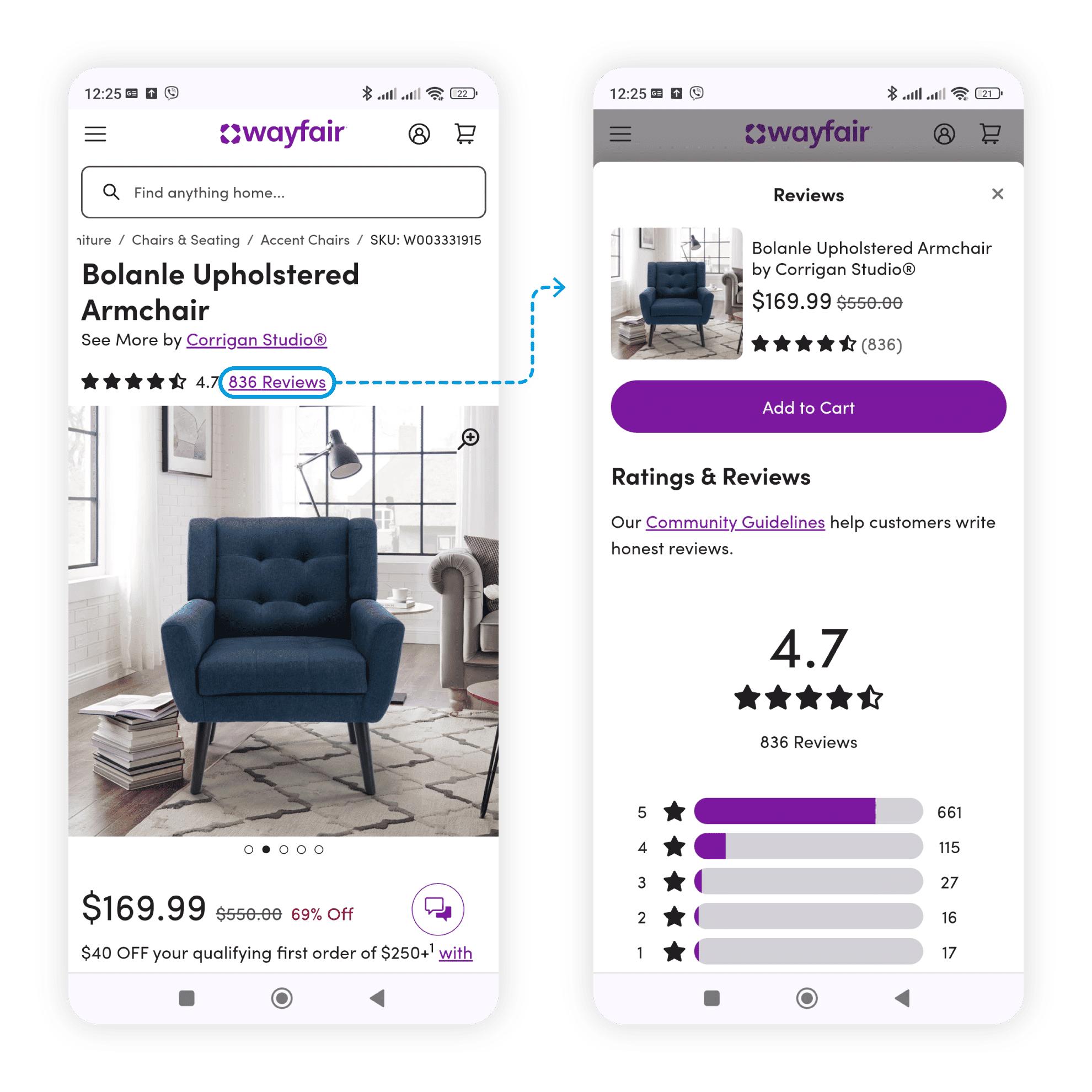
When users on Wayfair.com click on the Reviews link, a drawer opens and expands to the full screen. Both the site’s and browser’s Back buttons return users to the initial product overview page, as users expect. They can also swipe from left to right to close the drawer.
© Maria Rosala, Fair Use
User Control: A Catalyst for User Satisfaction and Trust
User control plays a critical role, too, since it helps nurture and build up user satisfaction and trust. A digital interface that lets users navigate freely and reverse actions really gives the people who use it a sense of reliability and assurance. Users feel confident to use the product—and they’re much more likely to return, something that ends up in the form of higher user retention rates. What’s more, user trust builds on the perception users have of the product's credibility. This fact is something that can greatly impact the product's market reputation—and, naturally, its longevity overall.
User Control: An Antidote to User Anxiety
User anxiety is a common issue in UX design. Understandably, it often comes from the fear users have of making irreversible errors. So, when designers offer them a high degree of user control, they can mitigate this anxiety a great deal. The knowledge that they’re easily able to reverse actions and they can navigate freely within the interface alleviates users' apprehensions—and encourages them to explore the product fearlessly.
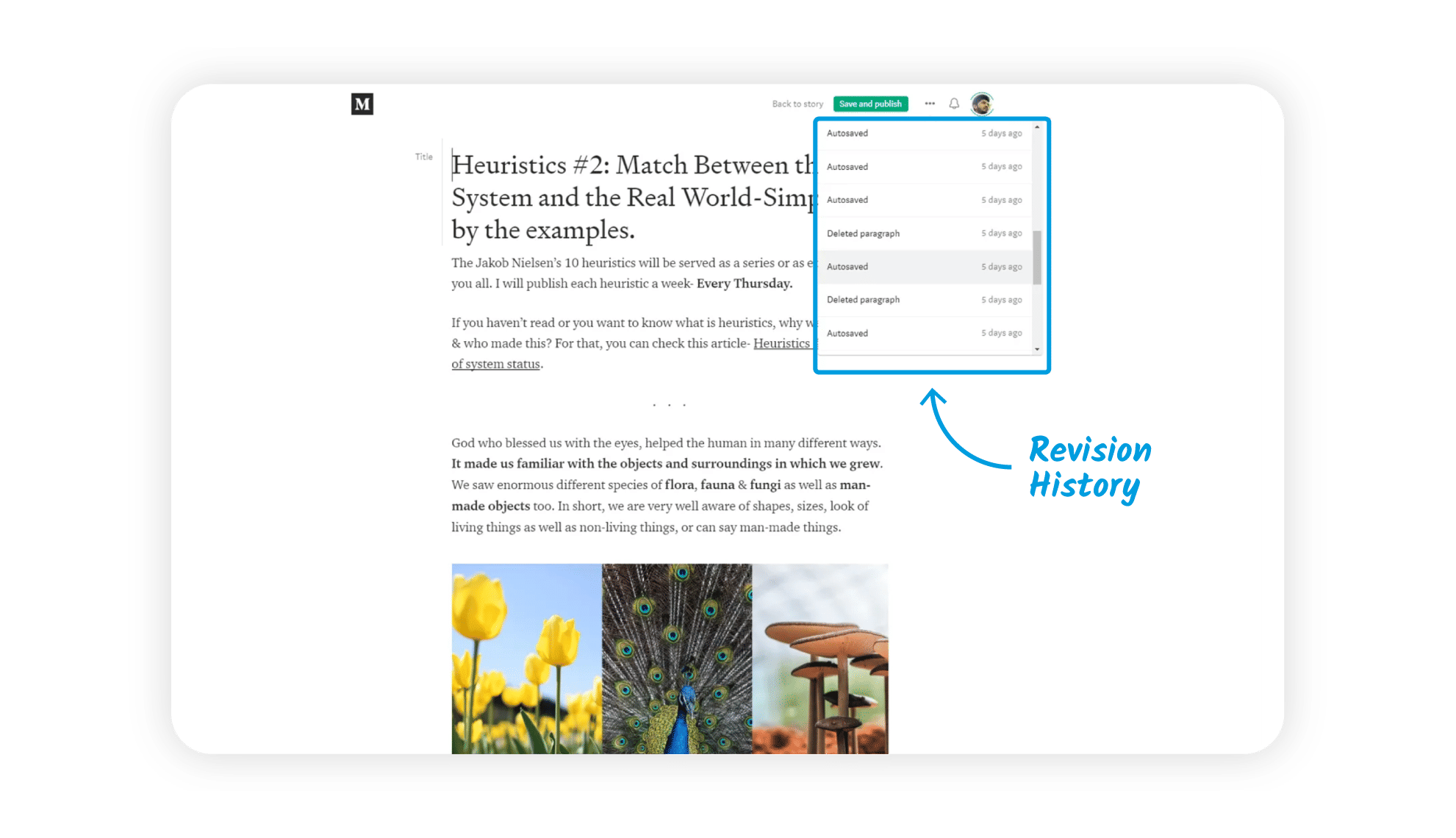
Medium’s revision history lets users check their article’s progress.
© Harsh Gorasia, Fair Use
What are the Challenges to Design for User Control?
To design for optimal user control can lead to more difficult design decisions throughout iterations in the design and development process. The primary concerns for designers come down to how they:
1. Balance User Control and Simplicity
One of the main challenges that designers face whenever they try to incorporate user control is to keep things simple. And to maintain simplicity is a huge part—and challenge—of getting things right for users. While users appreciate having control, they also value simplicity and ease of use. For example, if software designers offer too many options or flexibility in an app, it can overwhelm users—and lead them to decision paralysis. So, the challenge is—for designers—to strike a balance between how they provide user control and maintain a minimalist and intuitive interface.
2. Prevent Unintended Consequences
While it's an essential thing to let users undo actions, designers have got to make sure that these functionalities don't compromise the integrity of the system or lead to data loss, too. This calls for careful planning throughout the UX design process and robust system design as the product develops for the target audience.
3. Adhere to Standard Conventions
To design for user control—and do it well—means to follow standard conventions, too. Users often have deep-held expectations about how certain functions should work. And these notions come from their previous experiences with other products. So, if designers deviate from these conventions, they can confuse users and work against their product’s usability. So, while designers innovate and add unique elements, they’ve got to make sure that they keep to established norms and design patterns.
Watch our video on UI design patterns to understand more about what users can expect to encounter in mobile apps, website designs and more:
What are Examples of User Control in UX Design?
Various elements in UX design exemplify user control. Here are important elements that really highlight how designers can incorporate user control into their products—and do it effectively:
1. Undo and Redo Options
Most digital interfaces provide undo and redo options. This feature is a prime example of user control—and it lets users easily reverse their actions. For instance, text editors often have undo and redo buttons that let users revert their changes or reapply them—respectively.
A user on this Trustpilot page can select Undo and Redo to go back to a previous mode or return to the latest mode of text.
© Interaction Design Foundation, CC BY-SA 4.0
2. Customizable Settings
Customizable settings are another very important aspect of user control in UX design. Many applications and websites let users tailor the interface according to their preferences. Users can modify display settings, choose themes or rearrange the layout. They—therefore—can enjoy a great deal of control over the interface.
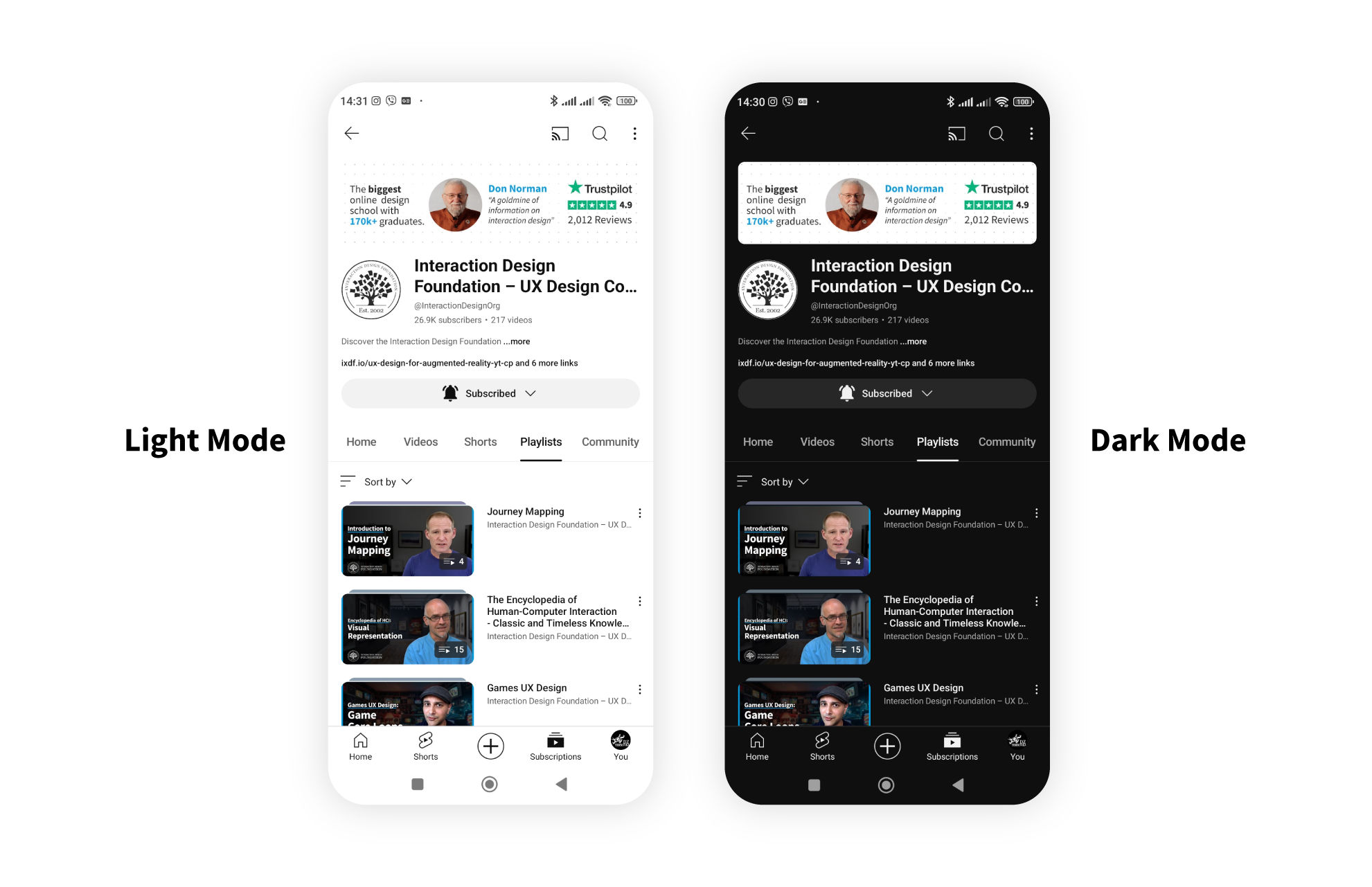
Users can control the light intensity on their smartphone screens to suit their tastes or the time of the day.
© Interaction Design Foundation, CC BY-SA 4.0
3. Navigation Freedom
Navigation freedom is an aspect of user control that’s absolutely critical. A well-designed interface should let users navigate freely across different sections. Consistent and visible navigation menus, breadcrumb trails and back buttons are common elements that provide navigation freedom.
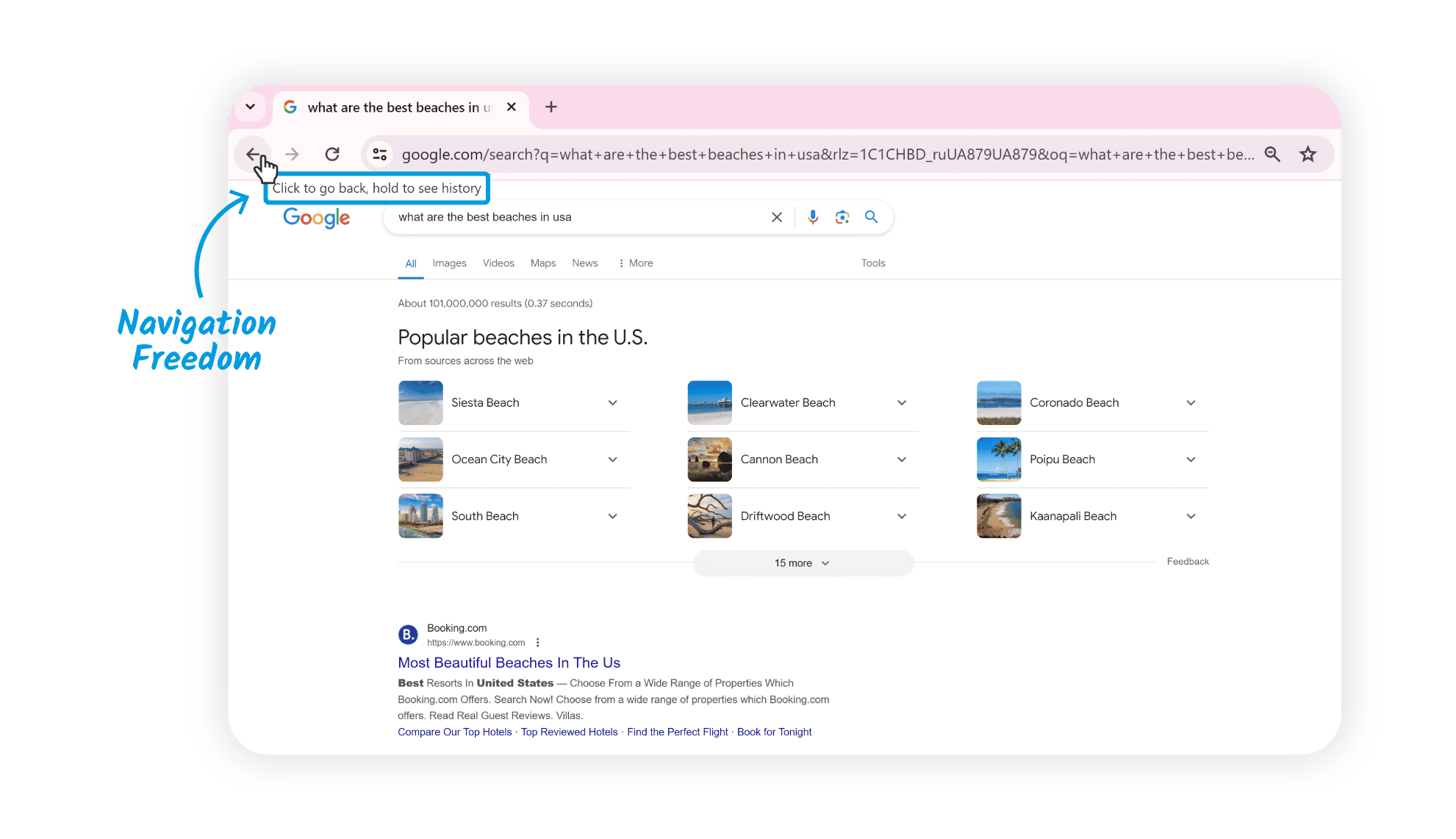
This partial screenshot (from the top left of a Google.com results web page) shows Google Chrome’s back button—including the functionality to hold and see the history.
© Google, Fair Use
4. Confirmation Dialogs
Confirmation dialogs are common in interfaces where users perform significant or irreversible actions. Before users execute such actions, the system prompts a confirmation dialog that asks the user to verify their intent. This feature makes sure that users get the final say in important system changes—and so enhances user control.
Note how this dialog box can grab the user's attention, also featuring a red button to proceed.
© Interaction Design Foundation, CC BY-SA 4.0
5. Input Controls
Text fields, checkboxes, dropdown menus and sliders give users control over both input and interaction. These features let them input information or make selections as they move through their user flow to get what they want to do done.
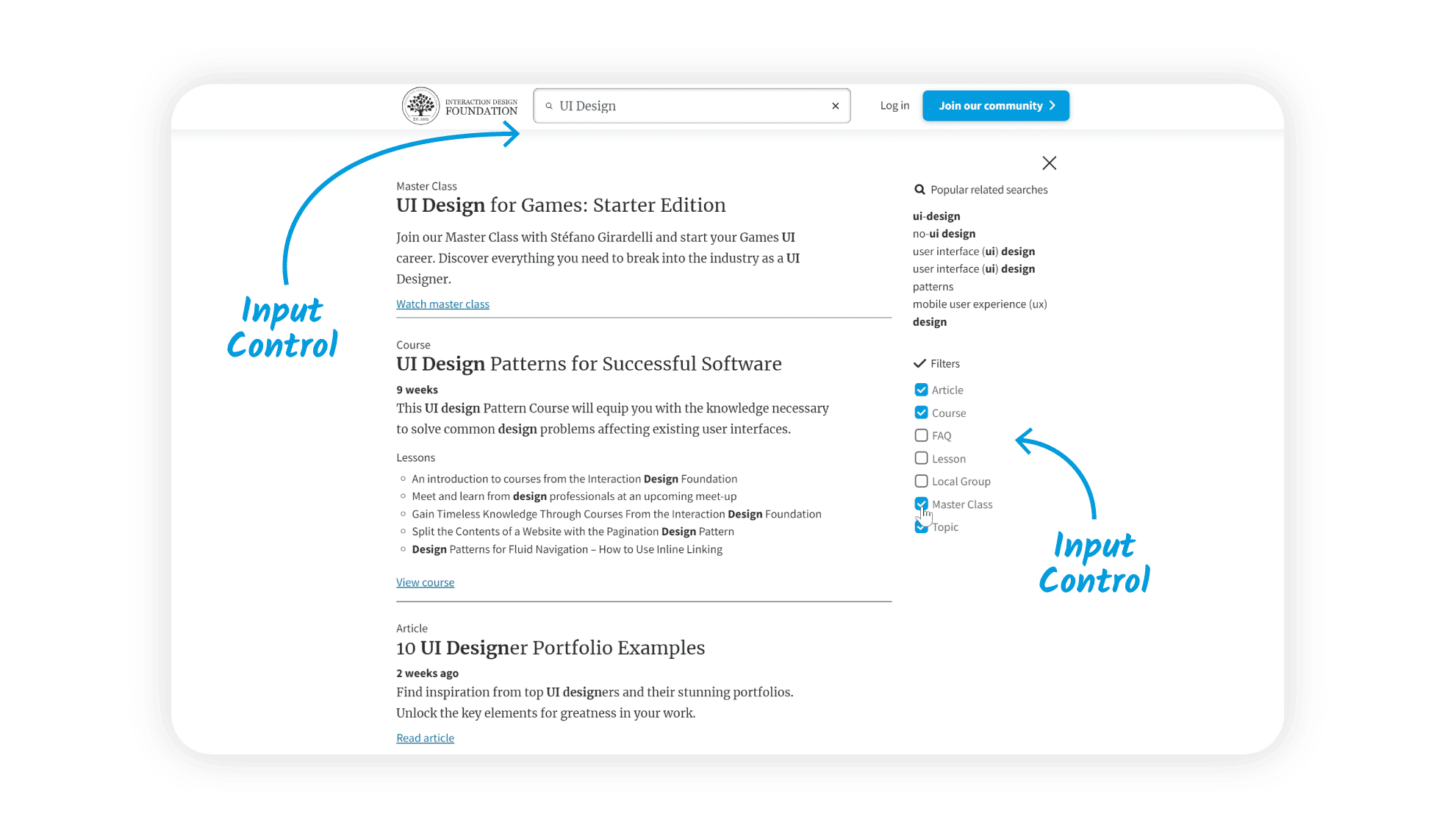
Users can exert control in several ways, such as in text fields and through buttons.
© Interaction Design Foundation, CC BY-SA 4.0
6. Accessibility Features
Accessibility features—such as screen reader compatibility, keyboard navigation and adjustable font sizes—help make sure that users with disabilities have equal control and access to the interface. Features that support accessibility are mandatory in many jurisdictions, too.
This video explains the need for any design team to design with accessibility in mind:
What are Risks and Considerations of User Control?
While design for user control is generally beneficial, it's not without its risks. Among the points to bear in mind is that if designers give too much—or too little—control, it’s something that can lead to various issues.
1. Overwhelm for Users
To provide too much control can overwhelm users. When users have too many options or settings in front of them, it’ll raise their cognitive load—and they may feel confused and even anxious. That’s the sort of scenario that can lead to decision paralysis and a poor user experience.
2. Compromise of Functionality
On the other hand, if designers give users too little control, it can make them feel constrained—and likely very frustrated. To give users full control over all aspects of the system, though, could jeopardize the product's primary functionality. Users might alter critical settings without realizing it—or perform actions that harm the system's functioning. That’s a vital balance to strike in human-centered design systems.
3. Violation of Standard Conventions
When they try to provide user control features that are unique, designers might feel tempted to deviate from both standard conventions and effective design patterns. This can confuse users and lead to usability issues. Designers might inconsistently place controls, labels or more and frustrate their users as they try to proceed in flow through their tasks.
4. Poor Discoverability
Unless designers mark available control options clearly with obvious cues or instructions, users may not be aware of all these options or how to access them.
Watch as Product Design Lead at Netflix, Niwal Sheikh explains Netflix’s application of discoverability for users:
5. Technical Limitations
Technical limitations or platform restrictions may restrict user control. If designers don’t work closely enough with developers, the latter may not implement the desired user control features effectively.
What are Best Practices to Design for User Control?
To design for optimal user control means to follow certain best practices. These practices are a great help that can guide designers to make interfaces that effectively empower users, prevent errors—and more.
1. Understand User Needs and Preferences
The first step is to understand the users themselves. Designers should do UX research—and do it thoroughly—to understand users' needs, preferences and expectations. This knowledge can guide the decisions designers must make regarding the degree and form of control to give their product’s users.
UX Strategist and Consultant, William Hudson explains why it’s so important to conduct solid user research in this video:
2. Prioritize Essential Controls
Designers should put a great deal of focus on providing controls that are essential for users to accomplish their tasks and meet their goals. Don’t overwhelm users with complex controls or ones that aren’t necessary. Undo and redo options are fundamental to user control—and these options give users the confidence to perform actions. That’s because they know they can easily reverse their choices if they need to.
3. Use Familiar UI Patterns and UI Elements
Designers who use familiar UI patterns and visual design elements can really give user control a boost—and so make the interface that much more intuitive. These include buttons, sliders, checkboxes, dropdown menus and other elements that users are used to finding. Consistency in the use of these elements across different sections of the interface is something that can enhance user control, too. And when users find consistent controls, cues and more, they can quickly understand their purpose and how to use them effectively.
Author and Human-Computer Interaction Expert, Alan Dix explains critical considerations when designers create screens for target users:
4. Provide Clear Navigation
Clear and intuitive navigation is a crucial thing for user control. Users should be able to easily navigate through the interface, find what they're looking for and know where they are at any time. Designers can achieve this through clear labels, consistent layout and visible navigation menus. Again, established conventions are crucial keys to provide user control in this way. Designers should—therefore—follow common UI patterns to help reduce the learning curve and make the interface a great deal more intuitive.
5. Give Contextual Guidance
Contextual guidance is a vital way for users to understand how to navigate and interact with the interface very effectively. So, it’s good to provide tooltips, onboarding tutorials or contextual help that can help users make informed decisions and use the available controls. Apart from assisting users properly, when designers provide good contextual guidance, they show they’ve got empathy with their users.
Watch this video to understand the importance of empathy in design:
6. Provide Clear Feedback, Validations and Error Handling
It’s vital to provide real-time, clear feedback in user control. Whether it's a success message after a form submission or a loading indicator during a data fetch, timely and clear feedback is ultra-important. It keeps users informed about what’s going on—the system status. Input validations and error handling mechanisms are crucial ways to keep user errors from happening. Designers can guide users towards correct actions—and prevent mistakes—by validating inputs and giving users clear error messages.
7. Allow Customization
To permit customization is a very effective way to make user control that much better. Users should have the option to customize the interface according to what they prefer—and it’s something that can greatly improve the user experience and give users a real sense of ownership over the interface.
Users should be able to customize many aspects of their experience with a brand.
© Interaction Design Foundation, CC BY-SA 4.0
8. Test and Iterate
Regularly test the interface with users in the real world to get and collect their feedback—and find areas for improvement. From usability testing, iterate and refine the design based on these user insights to optimize user control. Designers who conduct user testing well can fine-tune such vital areas as information architecture and visual elements—and these improvements can afford their users a better sense of control in the next iteration.
9. Consider Accessibility
Always design with accessibility in mind. It’s often a legal requirement to follow accessibility guidelines and give options for users with disabilities. For example, users with low vision abilities won’t likely be able to appreciate visual or graphic design features—and so their screen readers will need to tell them about a web page’s content. To give users of all ability levels control and access to the interface is a sign of empowerment that brings many benefits, both for users of all abilities and for the brand itself.
10. Balance User Control and System Control
It’s important to strike the right balance between user control and system control. Still, this can be quite a challenge. On the one hand, it's vital to give users the freedom to interact and make choices. Even so, the system has got to guide and assist users through automation, defaults and error prevention as well. When designers balance these two aspects—and do it well—they address a crucial need as users can enjoy a smooth and effective user experience.
Remember, a great UX design is something that empowers users through thoughtful products or services. And it gives them control and freedom while balancing it with system control in an interface that’s responsive to user input—one that provides meaningful feedback and allows for error recovery and undo actions. To design best for users’ control is to create an environment where users feel in control both of their actions and of the resulting outcomes.
Overall, users should have the liberty to make choices within a digital product, and they’ve got to enjoy the freedom to navigate and explore without feeling restricted or trapped. Designers afford user control best when they create interfaces that are responsive, intuitive and adaptable to individual user preferences. The digital products that meet users’ needs and expectations in seamless, enjoyable experiences where users feel they’re in the driver’s seat are ones that can enjoy greater chances of soaring high in the marketplace.