Information Architecture (IA)

Your constantly-updated definition of Information Architecture (IA) and collection of videos and articles.
Be a conversation starter: Share this page and inspire others!

394 Shares

What is Information Architecture (IA)?

Information architecture (IA) is the discipline of making information findable and understandable. It includes searching, browsing, categorizing and presenting relevant and contextual information to help people understand their surroundings and find what they’re looking for online and in the real world.

Transcript

IA is used in physical spaces like museums or department stores, as well as in websites and applications. For instance, in a natural history museum, you will find fossils from the Jurassic period exhibited together, just as your favorite packet of chips will always be in the snack aisle of your supermarket.  

Information architecture operates from two perspectives:

  1. People perceive information, products and services as places made of language

  2. These places or information environments can be arranged for optimal findability and understandability.

Language in this instance means visual elements, labels, descriptions, menus, content. We can arrange this language so that it works together to facilitate understanding. 
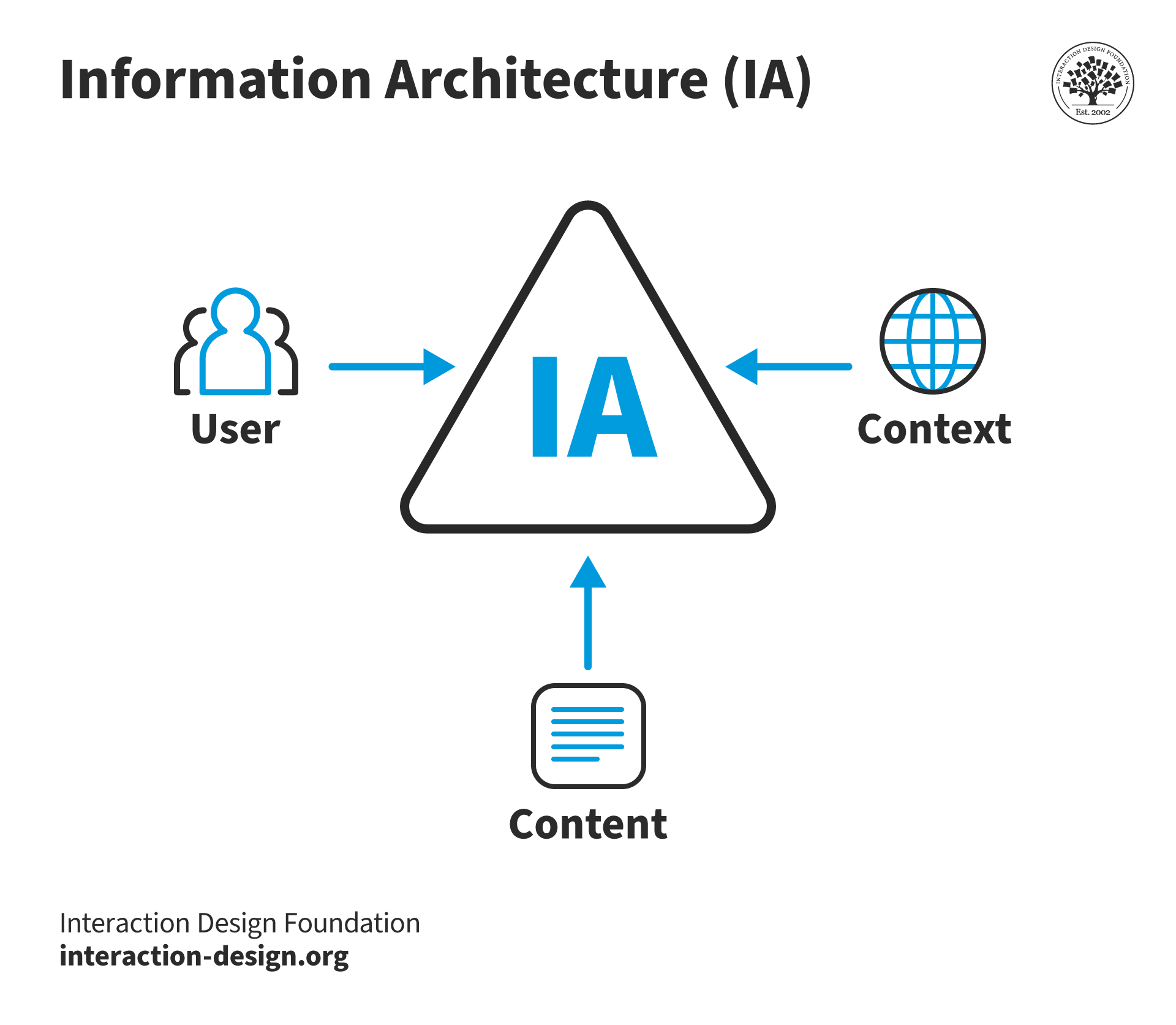
Diagram showing the breakdown of information architecture between content, context and users

© Interaction Design Foundation, CC BY-SA 4.0

Good IA is informed by content, context and users. 

Content

  • What kind of information is available?

  • What relevance does it have to the user?

Context

  • Where is the user seeking out the content?

  • When, why and how is the user engaging with the content?

User

  • Who is consuming the content?

  • What value does it provide?

  • What preexisting expectations do they have?

In the book Information Architecture for the World Wide Web, Louis Rosenfeld, Peter Morville, and Jorge Arango describe the concept of “information ecology” which comprises users, content, and context “to address the complex dependencies” that exist “in information environments”. The Venn diagram above illustrates the nature of these relationships. “The three circles illustrate the interdependent nature of users, content, and context within a complex, adaptive information ecology.” 

Context relates to business goals, funding, culture, technology, politics, resources and constraints. Content consists of the document or data types, content objects, volume and existing structures. Users comprise the audience, tasks, needs, experiences and how they seek information. 

Good information architecture is informed by all three areas, all of which are in flux depending on the information environment. 

IA and UX design

As with all aspects of UX design, information architecture starts with understanding people—namely, their reasons to use a product or service. A methodical and comprehensive approach to structuring information is needed to make it findable and understandable irrespective of the context, channel, or medium employed by the user.

Once you understand how a user behaves and seeks information, you can design a successful sitemap (like the one shown below), website navigation, user flows and so on. 
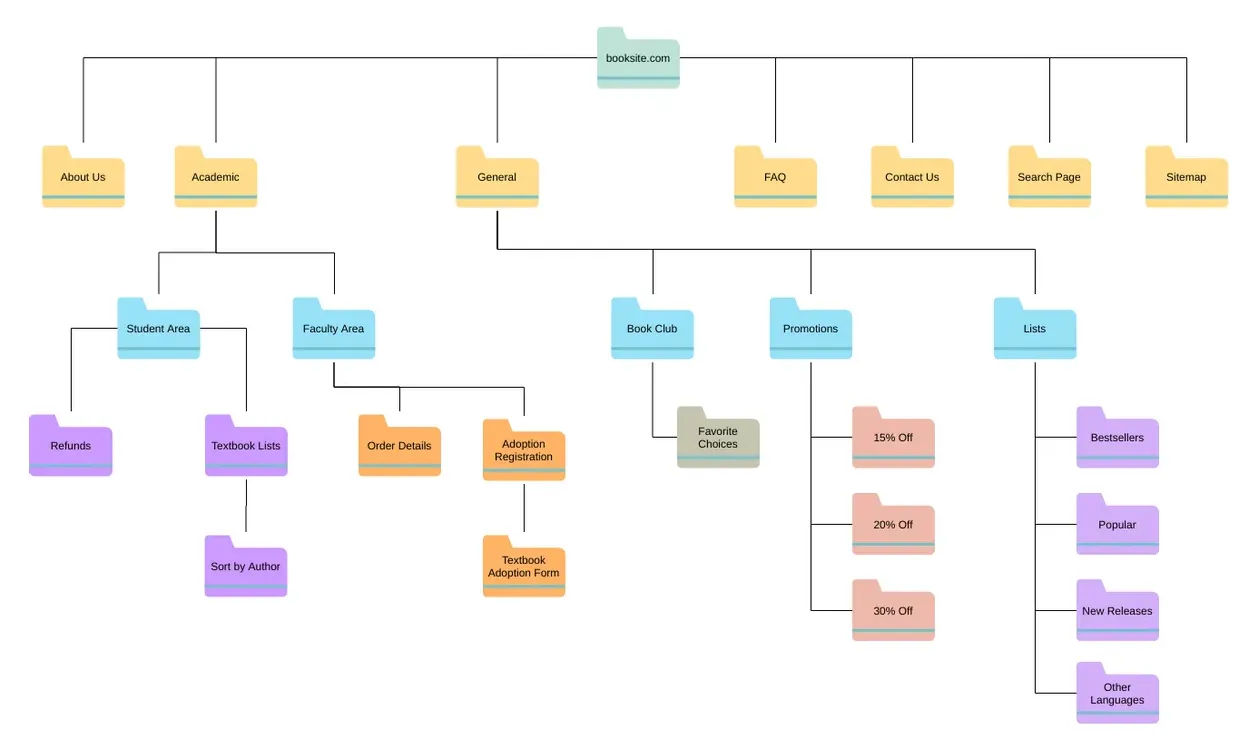
diagram showing the sitemap of a bookstore's website

A bookstore’s sitemap

© Visual Paradigm, Fair Use

Designers need to understand the following when designing websites and applications:

  • the information needs of users

  • the site or app’s content

  • the business goals of the website, app, or organization

An information architect’s deliverables typically include:

  • site maps

  • wireframes

  • hierarchies 

  • navigation

  • and metadata. 

Information architecture should be a holistic process, so when a new product or service is being designed, it’s important to start with IA. Good IA serves as the foundation of effective user experience design. 

Questions About Information Architecture (IA)?
We've Got Answers!

Why is information architecture important for user experience?

Information architecture (IA) significantly enhances user experience by structuring digital products in a user-friendly manner. It ensures users can find information and complete tasks efficiently which directly influences their ability to navigate and interact with websites, apps, and other interfaces intuitively. A well-designed IA reduces users' cognitive load and prevents them from feeling overwhelmed and helps them locate what they need without frustration. This ease of navigation boosts user satisfaction and engagement, making it more likely for users to return. By improving accessibility, IA also makes digital products usable for a wider range of people, further solidifying its importance in creating positive user experiences. 

Watch the Master Class, Design for Adaptability: Component-Driven Information Architecture, to learn more. 

What are some highly cited scientific research on information architecture?

Dekkers, T., Melles, M., & W Vehmeijer, S. B. (2021). Effects of Information Architecture on the Effectiveness and User Experience of Web-Based Patient Education in Middle-Aged and Older Adults: Online Randomized Experiment. Journal of Medical Internet Research, 23(3). https://doi.org/10.2196/15846 

Danaher, B. G., McKay, H. G., & Seeley, J. R. (2005). The Information Architecture of Behavior Change Websites. Journal of Medical Internet Research, 7(2). https://doi.org/10.2196/jmir.7.2.e12  

Guizani, M. (2022). A Decade of Information Architecture in HCI: A Systematic Literature Review. ArXiv. /abs/2202.13412 

 Lacerda, F., Lima-Marques, M. & Resmini, A. An Information Architecture Framework for the Internet of Things. Philos. Technol. 32, 727–744 (2019). https://doi.org/10.1007/s13347-018-0332-4  

What are some well-regarded and influential books on information architecture?

Morville, P., & Rosenfeld, L. (2015). Information Architecture: For the Web and Beyond (4th ed.). O'Reilly Media.  

Van Dijck, P. (2003). Information Architecture for Designers: Structuring Websites for Business Success. Rotovision.  

Covert, A. (2014). How to Make Sense of Any Mess: Information Architecture for Everybody. CreateSpace Independent Publishing Platform.  

How do you start the process of information architecture design?

Designers initiate the information architecture design process by first understanding user needs and evaluating the content available. They conduct user research to gain insights into the audience's behaviors, preferences, and goals. Following this, designers assess the content to identify what exists, its relevance, and how it should be organized to align with user expectations. This foundational step ensures the development of a user-centric information architecture, enhancing navigation and interaction efficiency.  

Learn more about how to get started with IA in this Master Class, How To Use Card Sorting For Better Information Architecture. 

What tools are used for creating information architecture?

Designers use a variety of tools for creating information architecture, including: 

 Card sorting tools: These help in understanding how users categorize information, facilitating the creation of a structure that matches user expectations. Examples include OptimalSort and UXPin. 

Sitemap tools: Tools like XMind and Lucidchart assist designers in visualizing the structure of websites or applications, making it easier to organize content hierarchically. 

Wireframing tools: Applications such as Sketch and Adobe XD enable designers to create low-fidelity mockups that outline the basic structure of web pages or app screens, incorporating the planned information architecture. 

User flow tools: These applications help in mapping out the paths users will take within the website or app, ensuring a logical flow from one piece of content to another. Examples include FlowMapp and Microsoft Visio.  

Learn more in the Master Class, How To Use Card Sorting For Better Information Architecture. 

What are the main components of information architecture?

The main components of information architecture include: 

 Organization systems: These dictate how information is categorized and structured, allowing users to predict where to find information. 

Labeling systems: They involve the way information and navigation options are represented to make them understandable and findable. 

Navigation systems: These systems guide users through the information architecture, helping them understand their location within the website or app and how to reach their desired information. 

Search systems: Implemented to allow users to find specific information quickly, especially in content-rich applications or websites. 

 These components work together to create a coherent, user-friendly experience and ensure that users can find the information they need efficiently and intuitively. 

Learn more in the Master Class, Design for Adaptability: Component-Driven Information Architecture. 

How does card sorting help with information architecture?

Card sorting allows designers to understand how users categorize and perceive information. Through this method, participants organize content into categories that make sense to them, revealing insights into user expectations and mental models. This feedback helps designers create an intuitive structure for the website or application, ensuring that the navigation and organization of information align with user perspectives. Card sorting can be conducted either in person or using online tools, providing valuable data that inform the development of a user-centric information architecture, enhancing usability and the overall user experience. 

Learn more in the Master Class, How To Use Card Sorting For Better Information Architecture. 

What is the difference between information architecture and content strategy?

The difference between information architecture and content strategy lies in their focus and scope. Information architecture primarily deals with the organization and structure of information, which makes it easier for users to navigate and find what they need within a digital product. It focuses on the layout of content, categorization, and the design of intuitive navigation systems. 


Content strategy, on the other hand, concerns itself with the creation, delivery, and governance of content. It involves planning the content's lifecycle, including how it's created, maintained, and eventually archived or updated. Content strategy aims to ensure that content meets both user needs and business goals, focusing on the quality, relevance, and management of content. 

While IA provides the framework for how information is organized, content strategy deals with what content is presented and how it is managed over time. Both are crucial for creating a cohesive and effective user experience, but they address different aspects of the user's interaction with digital products. 

Learn more in the NN Group article, Information Architecture vs. Sitemaps: What’s the Difference?  

Earn a Gift Earn a Gift, Answer a Short Quiz!

1
2
3
4
1
2
3
4
Question 1
Question 2
Question 3
Get Your Gift
Interaction Design Foundation logo

Question 1

What is the primary goal of information architecture (IA) in UX design?

1 point towards your gift

  • To create visually appealing designs
  • To improve the search feature of a website only
  • To make information findable and understandable
Interaction Design Foundation logo

Question 2

Which of the following is a main part of information architecture?

1 point towards your gift

  • Graphic design
  • Journey mapping
  • Navigation systems
Interaction Design Foundation logo

Question 3

How does good information architecture benefit user experience directly?

1 point towards your gift

  • It increases the loading speed of the website.
  • It lowers users' cognitive biases.
  • It reduces users' cognitive load.

Learn More About Information Architecture (IA)

Make learning as easy as watching Netflix: Learn more about Information Architecture (IA) by taking the online IxDF Course User Experience: The Beginner's Guide.

Why? Because design skills make you valuable. In any job. Any industry.

In This Course, You'll

  • Get excited when you experience how easy it is to transition into tech and land your dream job with User Experience (UX) design skills. No design background? No problem. You already have transferable skills, so it's easy to fast-track your career

  • Learn to combine logical thinking with creativity. Do you enjoy creativity and structure? Do you communicate ideas clearly? UX designers turn ideas into services, experiences, and products. This course helps you structure your existing skills and apply them in an innovative, creative context. You'll use hands-on methods that empower you to continuously test and optimize your products and services from idea to delivery.

  • Make yourself invaluable when you use the very fabric of being human, such as empathy and intuition, to make users and customers smile. More smiles, more impact, greater salary potential. You'll find out what your users need and want, and you'll build products, experiences, and services that help them succeed. You can benefit from UX design in any job, any industry. As AI becomes part of everyday work, timeless human-centered UX design skills help you decide what problems are worth solving and how solutions should actually work for people. This approach turns AI from a tool into your new superpower, keeping your work useful, relevant, and centered around peoples’ needs, even as technologies change.

  • Gain confidence and credibility when you master a range of powerful, real-world UX design skills such as user research, user interviews, personas, customer journey maps, sketching, task analysis, low-fidelity paper prototyping, and usability testing. It's easy with downloadable templates

  • Craft your personal portfolio with step-by-step guidance. It's completely optional. Your portfolio is your gateway to transition into a career in tech or design. You'll be able to apply your new skills immediately in your current job. If you're new to UX design, this course is the best place to start. Your path to tech starts here. UX design is your way in.

It's Easy to Fast-Track Your Career with the World's Best Experts

Master complex skills effortlessly with proven best practices and toolkits directly from the world's top design experts. Meet your experts for this course:

  • Don Norman: Father of User Experience (UX) design, author of the legendary book “The Design of Everyday Things,” and co-founder of the Nielsen Norman Group.

  • Rikke Friis Dam and Mads Soegaard: Co-Founders and Co-CEOs of IxDF. 

  • Mike Rohde: Experience and Interface Designer, author of the bestselling “The Sketchnote Handbook.”

  • Stephen Gay: User Experience leader with 20+ years of experience in digital innovation and coaching teams across five continents.

  • Alan Dix: Author of the bestselling book “Human-Computer Interaction” and Director of the Computational Foundry at Swansea University.

  • Ann Blandford: Professor of Human-Computer Interaction at University College London.

  • Cory Lebson: Principal User Experience Researcher with 20+ years of experience and author of “The UX Careers Handbook.”

Get an Industry-Recognized IxDF Course Certificate

Increase your credibility, salary potential and job opportunities by showing credible evidence of your skills.

IxDF Course Certificates set the industry gold standard. Add them to your LinkedIn profile, resumé, and job applications.

Course Certificate Example

Be in distinguished company, alongside industry leaders who train their teams with the IxDF and trust IxDF Course Certificates.

Our clients: IBM, HP, Adobe, GE, Accenture, Allianz, Phillips, Deezer, Capgemin, Mcafee, SAP, Telenor, Cigna, British Parliament, State of New York

All Free IxDF Articles on Information Architecture (IA)

Read full article
The Heart of the Matter, Information Architecture in the Mobile Age - Article hero image
Interaction Design Foundation logo

The Heart of the Matter, Information Architecture in the Mobile Age

Content is the key ingredient in so many user experiences. So how does it change when it comes to planning a mobile user experience? Should you rewrite your content for each platform or do you need a different strategy to make the most of your content on all platforms? Handling content on mobile doe

Social shares
809
Published
Read Article
Read full article
Flow Design Processes - Focusing on the Users' Needs - Article hero image
Interaction Design Foundation logo

Flow Design Processes - Focusing on the Users' Needs

It can be really tempting to start a design project by leaping into the deep end and starting to sketch out pages and work on the information architecture of the final product. However, it’s almost certainly the wrong approach to take. To create great user experiences – designers must focus on the u

Social shares
1k
Published
Read Article
Read full article
How to Prevent Negative Emotions in the User Experience of Your Product - Article hero image
Interaction Design Foundation logo

How to Prevent Negative Emotions in the User Experience of Your Product

Learn to prevent negative emotions in the user experience of your product. As a User Experience (UX) designer, you want users to enjoy using your product by eliminating negative experiences and inducing positive emotion in your users. This article will teach you how to prevent anger and frustration

Social shares
894
Published
Read Article

The Heart of the Matter, Information Architecture in the Mobile Age

The Heart of the Matter, Information Architecture in the Mobile Age

Content is the key ingredient in so many user experiences. So how does it change when it comes to planning a mobile user experience? Should you rewrite your content for each platform or do you need a different strategy to make the most of your content on all platforms? Handling content on mobile doesn’t need to be a chore but it does take planning.

Author/Copyright holder: Peter Morville. Copyright terms and licence: CC BY 2.0

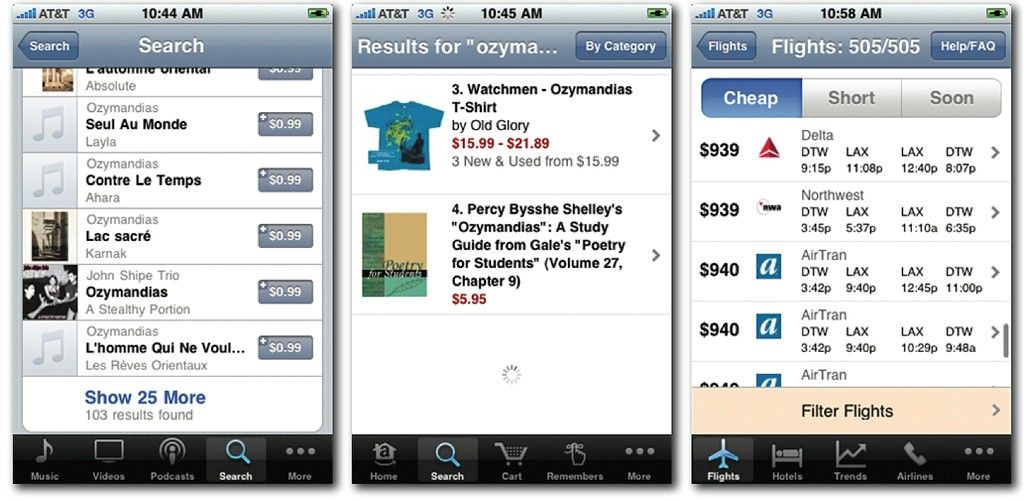
In general terms the way you design information architecture (IA) for the mobile environment is very similar to the way that you design the IA for the desktop. The approach you use is near identical in fact but there are some important things to bear in mind when you do so:

  • Deliver what’s important on the mobile platform – that means you should focus on what’s important to the user when they’re using a smartphone. That doesn’t mean that your users will necessarily be using your app when they’re on the move or on the street – you need to research the way that they will use the app. That, in turn, lets you focus on the content that’s of value to the user and cut down the volume of data that you present on mobile.

  • Content should be focused on mobile – that’s smaller, simpler and easier to handle content than on the desktop. The limit of screen real estate makes large volumes of content more confusing on mobile than on a larger monitor.

  • Navigation should be simple – that means limiting the number of menu options and keeping things focused on what’s important to the user.

Information Architecture Design for Mobile

The process then follows a simple process:

Consider Click Investment

You want to build your information architecture hierarchy so that the minimum number of clicks is used to reach the most popular content. Less popular content can be farther away but not too far away. If people abandon a desktop website in seconds because of poor loading times – it seems likely that they would abandon a mobile website if they’re forced to wait and load multiple screens to get to the content they most value.

You can reduce levels of frustration with click investment by ensuring that you communicate the process clearly throughout the task. That means setting user expectations as to what will happen after each click before they make it.


Keep it Simple Stupid (KISS)

This comes up a lot in design and there’s no exception when creating information architecture for mobile. The simpler things are – the fewer issues with the overall experience.

So limit user choice; if your user research shows there are areas of your content that aren’t valued by mobile users – eliminate that content. You can always offer it via a desktop experience on mobile for the occasional user that really wants that content. The simpler your IA – the less chance that the user becomes frustrated with it.

Then plan your app’s IA – use a simple drill-down structure and nest content into clear, easy to understand and well-defined categories. Make sure that you understand the path from top-level information to sub-levels.

We’ve got some tips for this:

  • Keep categories to a minimum – again the simpler things are, the better the UX on mobile. That doesn’t mean abandon useful data but do think about the fact that people get lost more often the farther they drill down for information. 5 levels is enough on the desktop, with mobile you almost certainly want to aim for less.

  • Keep content and categories together – no empty pages, no empty links. If a user clicks on a navigation item, it must deliver some relevant content too.

  • Keep links to a sensible number too – don’t overwhelm the user with dozens of links. Ideally, keep the number of links displayed to fewer than 10.

  • Prioritize by popularity – “deck placement” is vital to controlling the simplicity of the experience. The more popular something is within the app or site; the more vital it is that you make it easy to get to. However, this can have an impact on the success of new features or content; as it will be placed lower in the deck and become harder to find. You may need to strike a careful balance between the two.

  • Label navigation items clearly and concisely – this applies to links as well as menu options; this is very important on phones with very small screens.

Think About Input Devices

Not all smartphones are touch screens. You need to ensure that you maintain the “tap worthiness” of navigation items (minimum 30 pixels) whilst still providing quick methods for non-touch screen users to get to data (0 to 9 as shortcut keys will be better than 1 to 10 as they match the numeric keys on the phone).

Author/Copyright holder: Asim18. Copyright terms and licence: CC BY 3.0

Provide Clear Navigational Cues

Navigation on mobile is more complicated than it is for desktop. Make your “breadcrumbs” explicit – if you use a back button, put a label on it to tell the user where it takes them. Make sure you have a home page icon that is clear and distinct and will take the person back to the beginning of their interaction.

The Take Away

Information architecture design for mobile doesn’t differ dramatically from information architecture design for the desktop. It’s important to research what’s useful on the mobile platform to your users and to try to keep things as simple and manageable as possible. This is true for both the IA and the navigation which directs the user through the IA.

References & Where to Learn More:

You can find this excellent guide to information architecture in general: The Ultimate Guide to Information Architecture.

We’ve treated navigation and IA as interchangeable in this article. However, strictly speaking, they aren’t. The Nielsen Norman Group explains why not.

Usability First explores information architecture in a succinct way.

Hero Image: Author/Copyright holder: murdocke23. Copyright terms and licence: CC BY-NC-SA 2.0

Feel Stuck?
Want Better Job Options?

AI is replacing jobs everywhere, yet design jobs are booming with a projected 45% job growth. With design skills, you can create products and services people love. More love means more impact and greater salary potential.

At IxDF, we help you from your first course to your next job, all in one place.

See How Design Skills Turn Into Job Options
Privacy Settings
By using this site, you accept our Cookie Policy and Terms of Use.
Customize
Accept all

Be the One Who Inspires

People remember who shares great ideas.

Share on:

Academic Credibility — On Autopilot

Don't waste time googling citation formats. Just copy, paste and look legit in seconds.