The Heart of the Matter, Information Architecture in the Mobile Age

• 8 min read

809 Shares

Content is the key ingredient in so many user experiences. So how does it change when it comes to planning a mobile user experience? Should you rewrite your content for each platform or do you need a different strategy to make the most of your content on all platforms? Handling content on mobile doesn’t need to be a chore but it does take planning.
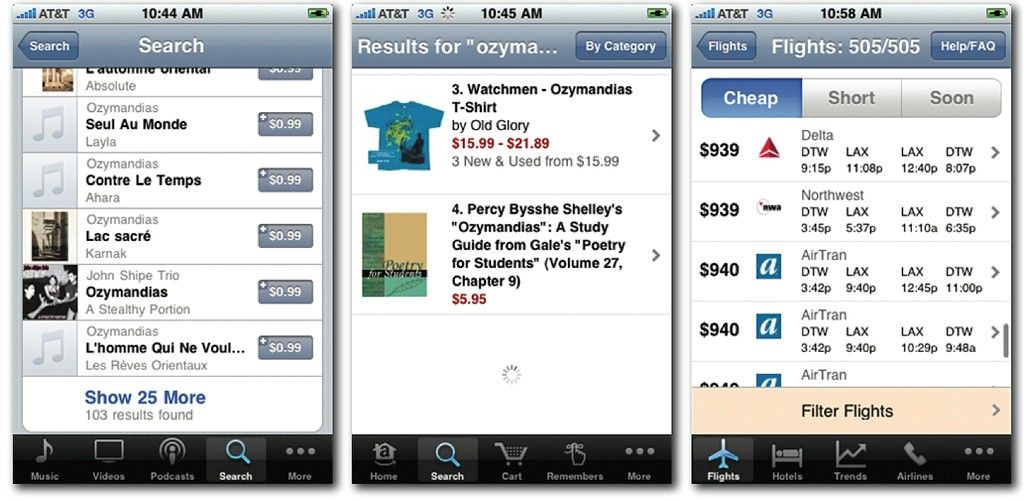
Author/Copyright holder: Peter Morville. Copyright terms and licence: CC BY 2.0

In general terms the way you design information architecture (IA) for the mobile environment is very similar to the way that you design the IA for the desktop. The approach you use is near identical in fact but there are some important things to bear in mind when you do so:

  • Deliver what’s important on the mobile platform – that means you should focus on what’s important to the user when they’re using a smartphone. That doesn’t mean that your users will necessarily be using your app when they’re on the move or on the street – you need to research the way that they will use the app. That, in turn, lets you focus on the content that’s of value to the user and cut down the volume of data that you present on mobile.

  • Content should be focused on mobile – that’s smaller, simpler and easier to handle content than on the desktop. The limit of screen real estate makes large volumes of content more confusing on mobile than on a larger monitor.

  • Navigation should be simple – that means limiting the number of menu options and keeping things focused on what’s important to the user.

Information Architecture Design for Mobile

The process then follows a simple process:

Consider Click Investment

You want to build your information architecture hierarchy so that the minimum number of clicks is used to reach the most popular content. Less popular content can be farther away but not too far away. If people abandon a desktop website in seconds because of poor loading times – it seems likely that they would abandon a mobile website if they’re forced to wait and load multiple screens to get to the content they most value.

You can reduce levels of frustration with click investment by ensuring that you communicate the process clearly throughout the task. That means setting user expectations as to what will happen after each click before they make it.


Keep it Simple Stupid (KISS)

This comes up a lot in design and there’s no exception when creating information architecture for mobile. The simpler things are – the fewer issues with the overall experience.

So limit user choice; if your user research shows there are areas of your content that aren’t valued by mobile users – eliminate that content. You can always offer it via a desktop experience on mobile for the occasional user that really wants that content. The simpler your IA – the less chance that the user becomes frustrated with it.

Then plan your app’s IA – use a simple drill-down structure and nest content into clear, easy to understand and well-defined categories. Make sure that you understand the path from top-level information to sub-levels.

We’ve got some tips for this:

  • Keep categories to a minimum – again the simpler things are, the better the UX on mobile. That doesn’t mean abandon useful data but do think about the fact that people get lost more often the farther they drill down for information. 5 levels is enough on the desktop, with mobile you almost certainly want to aim for less.

  • Keep content and categories together – no empty pages, no empty links. If a user clicks on a navigation item, it must deliver some relevant content too.

  • Keep links to a sensible number too – don’t overwhelm the user with dozens of links. Ideally, keep the number of links displayed to fewer than 10.

  • Prioritize by popularity – “deck placement” is vital to controlling the simplicity of the experience. The more popular something is within the app or site; the more vital it is that you make it easy to get to. However, this can have an impact on the success of new features or content; as it will be placed lower in the deck and become harder to find. You may need to strike a careful balance between the two.

  • Label navigation items clearly and concisely – this applies to links as well as menu options; this is very important on phones with very small screens.

Think About Input Devices

Not all smartphones are touch screens. You need to ensure that you maintain the “tap worthiness” of navigation items (minimum 30 pixels) whilst still providing quick methods for non-touch screen users to get to data (0 to 9 as shortcut keys will be better than 1 to 10 as they match the numeric keys on the phone).

Author/Copyright holder: Asim18. Copyright terms and licence: CC BY 3.0

Provide Clear Navigational Cues

Navigation on mobile is more complicated than it is for desktop. Make your “breadcrumbs” explicit – if you use a back button, put a label on it to tell the user where it takes them. Make sure you have a home page icon that is clear and distinct and will take the person back to the beginning of their interaction.

The Take Away

Information architecture design for mobile doesn’t differ dramatically from information architecture design for the desktop. It’s important to research what’s useful on the mobile platform to your users and to try to keep things as simple and manageable as possible. This is true for both the IA and the navigation which directs the user through the IA.

References & Where to Learn More:

You can find this excellent guide to information architecture in general: The Ultimate Guide to Information Architecture.

We’ve treated navigation and IA as interchangeable in this article. However, strictly speaking, they aren’t. The Nielsen Norman Group explains why not.

Usability First explores information architecture in a succinct way.

Hero Image: Author/Copyright holder: murdocke23. Copyright terms and licence: CC BY-NC-SA 2.0

Learn More in This Course:

AI for Designers

12 days
13 % booked
View Course

What You Should Read Next

  • Read full article
    What is Interaction Design? - Article hero image
    Interaction Design Foundation logo

    What is Interaction Design?

    Interaction design is an important component within the giant umbrella of user experience (UX) design. In this article, we’ll explain what interaction design is, some useful models of interaction design, as well as briefly describe what an interaction designer usually does.A simple and useful unders

    Social shares
    1.5k
    Published
    Read Article
  • Read full article
    Apple’s Product Development Process – Inside the World’s Greatest Design Organization - Article hero image
    Interaction Design Foundation logo

    Apple’s Product Development Process – Inside the World’s Greatest Design Organization

    Apple’s Product Development Process may be one of the most successful design processes ever implemented. With a valuation that exceeds $2 trillion, there’s a lot that designers can learn from Apple and introduce into their own design environments.Apple is a notoriously secretive business. In Steve J

    Social shares
    1.4k
    Published
    Read Article
  • Read full article
    Shneiderman’s Eight Golden Rules Will Help You Design Better Interfaces - Article hero image
    Interaction Design Foundation logo

    Shneiderman’s Eight Golden Rules Will Help You Design Better Interfaces

    Follow Ben Shneiderman’s 'Eight Golden Rules of Interface Design' if you want to design great, productive and frustration-free user interfaces. Apple, Google and Microsoft are among some of the highly successful companies whose well-designed products reflect Shneiderman’s rules. The characteristics

    Social shares
    1.4k
    Published
    Read Article
  • Read full article
    How to Change Your Career from Graphic Design to UX Design - Article hero image
    Interaction Design Foundation logo

    How to Change Your Career from Graphic Design to UX Design

    If there’s an occupation that is 100% linked with the public’s idea of what design is all about, it’s graphic design. From the familiar golden arches of the McDonald’s brand to the typography and colors of movie posters, graphic designers create some of the most iconic and ubiquitous designs around

    Social shares
    1.4k
    Published
    Read Article
  • Read full article
    The Grid System: Building a Solid Design Layout - Article hero image
    Interaction Design Foundation logo

    The Grid System: Building a Solid Design Layout

    Now that we’ve seen some grids at work in the Rule of Thirds article, let’s examine them a little more deeply. As a concept that deals so fundamentally with the fabric and background of our work as designers, it’s easy to overlook the power of grids and think more about the elements we want to creat

    Social shares
    1.4k
    Published
    Read Article
  • Read full article
    The Principles of Service Design Thinking - Building Better Services - Article hero image
    Interaction Design Foundation logo

    The Principles of Service Design Thinking - Building Better Services

    Service design is all about taking a service and making it meet the user’s and customer’s needs for that service. It can be used to improve an existing service or to create a new service from scratch. In order to adapt to service design, a UX designer will need to understand the basic principles of

    Social shares
    1.4k
    Published
    Read Article
  • Read full article
    A Simple Introduction to Lean UX - Article hero image
    Interaction Design Foundation logo

    A Simple Introduction to Lean UX

    Lean UX is an incredibly useful technique when working on projects where the Agile development method is used. Traditional UX techniques often don’t work when development is conducted in rapid bursts – there’s not enough time to deliver UX in the same way. Fundamentally Lean UX and other forms of UX

    Social shares
    1.3k
    Published
    Read Article
  • Read full article
    Dieter Rams: 10 Timeless Commandments for Good Design - Article hero image
    Interaction Design Foundation logo

    Dieter Rams: 10 Timeless Commandments for Good Design

    Let’s pay a virtual visit to a famous industrial designer’s workshop. By examining the principles of his winning approach, we can incorporate vital elements into our designs in the “less is more” age.As user experience practitioners, most of us have worked with Nielsen and Molich’s 10 heuristics or

    Social shares
    1.3k
    Published
    Read Article
  • Read full article
    The 7 Factors that Influence User Experience - Article hero image
    Interaction Design Foundation logo

    The 7 Factors that Influence User Experience

    User Experience (UX) is critical to the success or failure of a product in the market but what do we mean by UX? All too often UX is confused with usability which describes to some extent how easy a product is to use and it is true that UX as a discipline began with usability – however, UX has grown

    Social shares
    1.3k
    Published
    Read Article
  • Read full article
    10 Free-to-Use Wireframing Tools for UX Designers in 2026 - Article hero image
    Interaction Design Foundation logo

    10 Free-to-Use Wireframing Tools for UX Designers in 2026

    Wireframes help you quickly ideate and test your ideas. While paper wireframes are the fastest to create, digital wireframes look more polished and presentable. If you are looking for a pocket-friendly wireframing tool, look no further.Whether you prefer browser-based apps or offline desktop tools,

    Social shares
    1.3k
    Published
    Read Article

Top Articles

Top Topic Definitions

Feel Stuck?
Want Better Job Options?

AI is replacing jobs everywhere, yet design jobs are booming with a projected 45% job growth. With design skills, you can create products and services people love. More love means more impact and greater salary potential.

At IxDF, we help you from your first course to your next job, all in one place.

See How Design Skills Turn Into Job Options
Privacy Settings
By using this site, you accept our Cookie Policy and Terms of Use.
Customize
Accept all

Be the One Who Inspires

People remember who shares great ideas.

Share on:

Academic Credibility — On Autopilot

Don't waste time googling citation formats. Just copy, paste and look legit in seconds.

Feel Stuck? Want Freedom?

Join 326,020+ designers who get one powerful email each week. Learn to design a life you love.

Next email in
1
day
15
hrs
52
mins
25
secs

Free forever. No spam. Unsubscribe anytime.