A diagram of the lean UX methodology. Validation and prototyping continously cycle with cycles of presentation, critique and sketching between them.

A Simple Introduction to Lean UX

• 8 min read

1,334 Shares

Lean UX is an incredibly useful technique when working on projects where the Agile development method is used. Traditional UX techniques often don’t work when development is conducted in rapid bursts – there’s not enough time to deliver UX in the same way. Fundamentally Lean UX and other forms of UX all have the same goal in mind; delivering a great user experience it’s just that the way you work on a project is slightly different. So let’s take a look at how that might work.

Lean UX – What is It?

Lean UX is focused on the experience under design and is less focused on deliverables than traditional UX. It requires a greater level of collaboration with the entire team. The core objective is to focus on obtaining feedback as early as possible so that it can be used to make quick decisions. The nature of Agile development is to work in rapid, iterative cycles and Lean UX mimics these cycles to ensure that data generated can be used in each iteration.
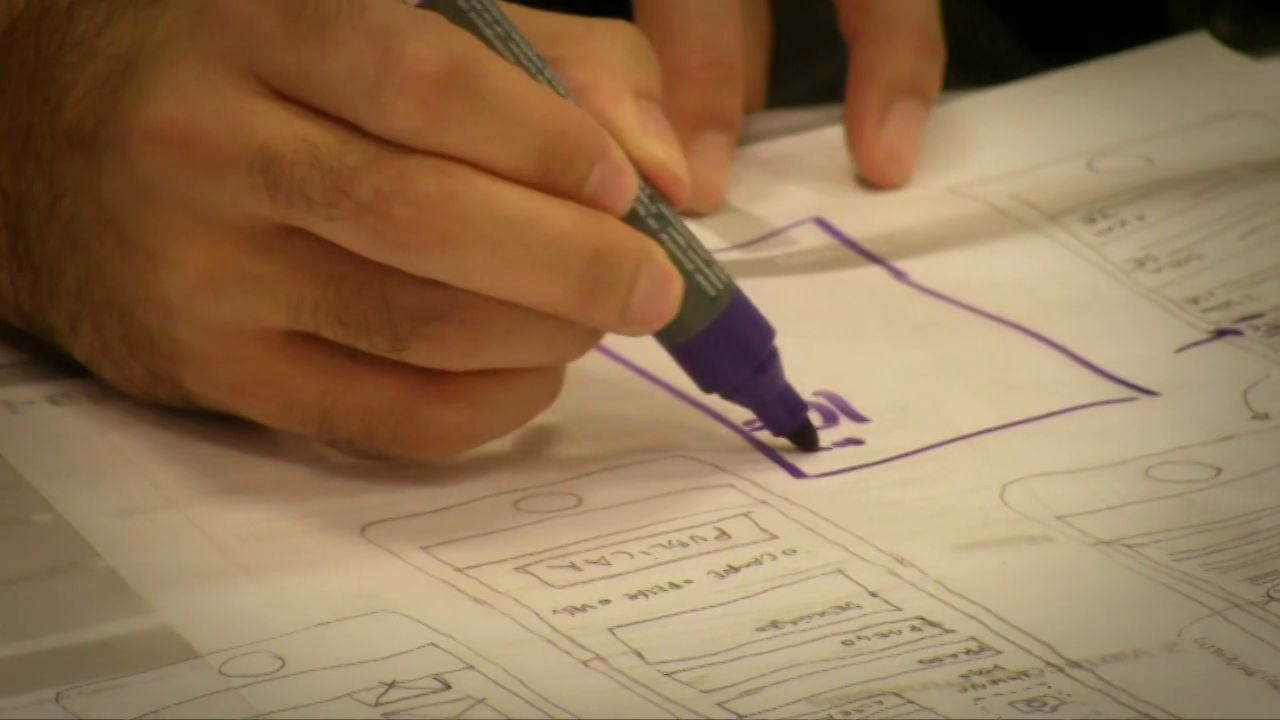

Author/Copyright holder: Vimeo. Copyright terms and licence: Public Domain

The Need for Assumptions in Lean UX

In traditional UX the project is built upon requirements capture and deliverables. The objective is to ensure that deliverables are as detailed as possible and respond adequately to the requirements that are laid down at the start of the project.

Lean UX is slightly different. You aren’t focused on detailed deliverables. You are looking to produce changes that improve the product in the here and now – essentially to mould the outcome for the better.

This works in practice by ditching “requirements” and using a “problem statement” which should lead to a set of assumptions that can be used to create hypotheses.

What is an assumption? An assumption is basically a statement of something that we think is true. They are designed to generate common understanding around an idea that enables everyone to get started. It is fully understood that assumptions may not be correct and may be changed during the project as a better understanding develops within the team.

Assumptions are normally generated on a workshop basis. You get the team together and state the problem and then allow the team to brainstorm their ideas for solving the problem. In the process you generate answers to certain questions that form your assumptions.

Typical questions might include:

  • Who are our users?

  • What is the product used for?

  • When is it used?

  • What situations is it used in?

  • What will be the most important functionality?

  • What’s the biggest risk to product delivery?

There may be more than one answer to each question. That leaves us with a greater number of assumptions than it might be practical to handle. If this is the case, the team can prioritize their assumptions quickly following their generation. In general you would prioritize your assumptions by the risk they represent (what are the consequences of this being badly wrong? The more severe the consequence the higher the priority) and the level of understanding of the issue at hand (the less you know, the higher the priority).
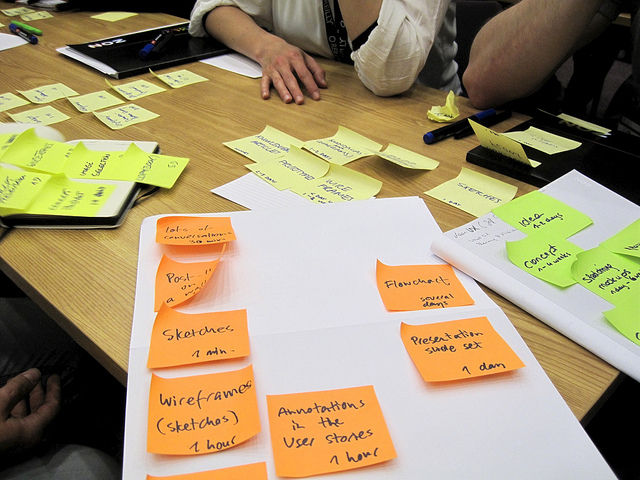
Author/Copyright holder: visualpun.ch. Copyright terms and licence: CC BY-SA 2.0


Creating a Hypothesis in Lean UX

The hypotheses created in Lean UX are designed to test our assumptions. There’s a simple format that you can use to create your own hypotheses, quickly and easily.

An example:

We believe that enabling people to save their progress at any time is essential for smartphone users. This will achieve a higher level of sign up completions. We will have demonstrated this when we can measure an improvement of the current completion rate of 20%.

We state the belief and why it is important and who it is important to. Then we follow that with what we expect to achieve. Finally, we determine what evidence we would need to collect to prove that our belief was true.

If we find that there’s no way to prove our hypothesis – we may be heading in the wrong direction because our outcomes are not clearly defined.

One of the big advantages of working like this is it removes much of the “I don’t think that’s a good idea” and political infighting from the UX design process. Every idea is going to be tested and the evidence criteria clearly determined. No evidence? Then it’s time to drop the idea and try something else.

If everyone can understand a hypothesis and the expectations from it, they tend to be happy to wait to see if it’s true rather than passionately debating their own subjective viewpoint.

The Minimum Viable Product and Lean UX

The Minimum Viable Product (MVP) is a core concept in Lean UX. The idea is to build the most basic version of the concept as possible, test it and if there are no valuable results to abandon it. The MVPs which show promise can then be incorporated into further design and development rounds without too much hassle.

This is a great way of maximizing your resources and one of the reasons that it works so well with Agile development – it allows for a lot of experimentation with no “sacred cows”.
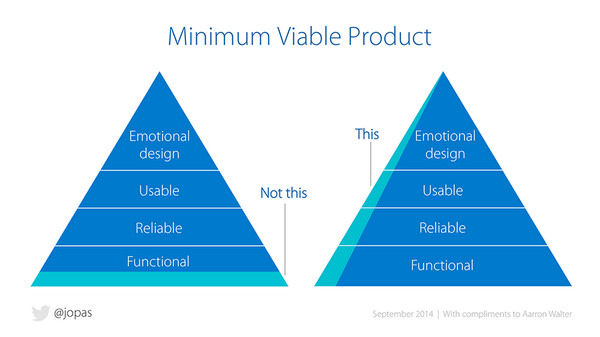

Author/Copyright holder: Jussi Pasanen. With acknowledgements to Aarron Walter, Ben Tollady, Ben Rowe, Lexi Thorn and Senthil Kugalur. Copyright terms and license: All rights reserved


User Research and Testing in Lean UX

User research and testing, by the very nature of Lean UX, are based on the same principles as used in traditional UX environments. However, the approach tends to be “quick and dirty” – results need to be delivered before the next Agile Sprint starts; so there’s much less focus on heavy-duty, meticulously document outputs and more focus on raw data.

Responsibilities for research also tend to be spread more widely across the whole team so that there’s no “bottleneck” created by having a single UX design resource trying to get the whole job done in tight timescales by themselves. This often gets development resources to do “hands on” UX work and increases the level of understanding and support for UX work within the development team too.

Summary

This is a very high-level overview of Lean UX and, of course, there’s a lot more to it than you can cover in a short(ish) article. However, these basic concepts should enable you to start heading in the right direction when it comes to implementing Lean UX in your Agile environment.

References & Where to Learn More

Header Image: Author/Copyright holder: Rosenfeld Media. Copyright terms and licence: CC BY 2.0

Course: UX Management: Strategy and Tactics

Learn More in This Course:

Personas and User Research: Design Products and Services People Need and Want

0
6
40
30
98 % booked
View Course

What You Should Read Next

  • Read full article
    What is Interaction Design? - Article hero image
    Interaction Design Foundation logo

    What is Interaction Design?

    Interaction design is an important component within the giant umbrella of user experience (UX) design. In this article, we’ll explain what interaction design is, some useful models of interaction design, as well as briefly describe what an interaction designer usually does.A simple and useful unders

    Social shares
    1.5k
    Published
    Read Article
  • Read full article
    Apple’s Product Development Process – Inside the World’s Greatest Design Organization - Article hero image
    Interaction Design Foundation logo

    Apple’s Product Development Process – Inside the World’s Greatest Design Organization

    Apple’s Product Development Process may be one of the most successful design processes ever implemented. With a valuation that exceeds $2 trillion, there’s a lot that designers can learn from Apple and introduce into their own design environments.Apple is a notoriously secretive business. In Steve J

    Social shares
    1.4k
    Published
    Read Article
  • Read full article
    Shneiderman’s Eight Golden Rules Will Help You Design Better Interfaces - Article hero image
    Interaction Design Foundation logo

    Shneiderman’s Eight Golden Rules Will Help You Design Better Interfaces

    Follow Ben Shneiderman’s 'Eight Golden Rules of Interface Design' if you want to design great, productive and frustration-free user interfaces. Apple, Google and Microsoft are among some of the highly successful companies whose well-designed products reflect Shneiderman’s rules. The characteristics

    Social shares
    1.4k
    Published
    Read Article
  • Read full article
    How to Change Your Career from Graphic Design to UX Design - Article hero image
    Interaction Design Foundation logo

    How to Change Your Career from Graphic Design to UX Design

    If there’s an occupation that is 100% linked with the public’s idea of what design is all about, it’s graphic design. From the familiar golden arches of the McDonald’s brand to the typography and colors of movie posters, graphic designers create some of the most iconic and ubiquitous designs around

    Social shares
    1.4k
    Published
    Read Article
  • Read full article
    The Grid System: Building a Solid Design Layout - Article hero image
    Interaction Design Foundation logo

    The Grid System: Building a Solid Design Layout

    Now that we’ve seen some grids at work in the Rule of Thirds article, let’s examine them a little more deeply. As a concept that deals so fundamentally with the fabric and background of our work as designers, it’s easy to overlook the power of grids and think more about the elements we want to creat

    Social shares
    1.4k
    Published
    Read Article
  • Read full article
    The Principles of Service Design Thinking - Building Better Services - Article hero image
    Interaction Design Foundation logo

    The Principles of Service Design Thinking - Building Better Services

    Service design is all about taking a service and making it meet the user’s and customer’s needs for that service. It can be used to improve an existing service or to create a new service from scratch. In order to adapt to service design, a UX designer will need to understand the basic principles of

    Social shares
    1.4k
    Published
    Read Article
  • Read full article
    Dieter Rams: 10 Timeless Commandments for Good Design - Article hero image
    Interaction Design Foundation logo

    Dieter Rams: 10 Timeless Commandments for Good Design

    Let’s pay a virtual visit to a famous industrial designer’s workshop. By examining the principles of his winning approach, we can incorporate vital elements into our designs in the “less is more” age.As user experience practitioners, most of us have worked with Nielsen and Molich’s 10 heuristics or

    Social shares
    1.3k
    Published
    Read Article
  • Read full article
    The 7 Factors that Influence User Experience - Article hero image
    Interaction Design Foundation logo

    The 7 Factors that Influence User Experience

    User Experience (UX) is critical to the success or failure of a product in the market but what do we mean by UX? All too often UX is confused with usability which describes to some extent how easy a product is to use and it is true that UX as a discipline began with usability – however, UX has grown

    Social shares
    1.3k
    Published
    Read Article
  • Read full article
    How to Do a Thematic Analysis of User Interviews - Article hero image
    Interaction Design Foundation logo

    How to Do a Thematic Analysis of User Interviews

    You have been in the field talking to users and you now find yourself with a massive amount of audio, notes, video, pictures, and interesting impressions. All that information can be overwhelming, and it’s difficult to know where to start to make sense of all the data. Here, we will teach you how to

    Social shares
    1.3k
    Published
    Read Article
  • Read full article
    10 Free-to-Use Wireframing Tools for UX Designers in 2026 - Article hero image
    Interaction Design Foundation logo

    10 Free-to-Use Wireframing Tools for UX Designers in 2026

    Wireframes help you quickly ideate and test your ideas. While paper wireframes are the fastest to create, digital wireframes look more polished and presentable. If you are looking for a pocket-friendly wireframing tool, look no further.Whether you prefer browser-based apps or offline desktop tools,

    Social shares
    1.3k
    Published
    Read Article

Top Articles

Top Topic Definitions

Feel Stuck?
Want Better Job Options?

AI is replacing jobs everywhere, yet design jobs are booming with a projected 45% job growth. With design skills, you can create products and services people love. More love means more impact and greater salary potential.

At IxDF, we help you from your first course to your next job, all in one place.

See How Design Skills Turn Into Job Options
Privacy Settings
By using this site, you accept our Cookie Policy and Terms of Use.
Customize
Accept all

Be the One Who Inspires

People remember who shares great ideas.

Share on:

Academic Credibility — On Autopilot

Don't waste time googling citation formats. Just copy, paste and look legit in seconds.

Feel Stuck? Want Freedom?

Join 326,000+ designers who get one powerful email each week. Learn to design a life you love.

Next email in
1
day
18
hrs
40
mins
31
secs

Free forever. No spam. Unsubscribe anytime.