UX Design Processes

Your constantly-updated definition of UX Design Processes and collection of videos and articles.
Be a conversation starter: Share this page and inspire others!

690 Shares

What are UX Design Processes?

User experience (UX) design processes are systematic approaches to create meaningful and relevant experiences for users. They usually involve research, ideation, prototyping, testing and implementation. Designers seek to understand user needs and behaviors—and craft intuitive and user-friendly interfaces that enhance user satisfaction and loyalty via optimal usability, accessibility and more. 

Author and Human-Computer Interaction Expert, Professor Alan Dix explains the stages of an interaction design process in this video: 

Transcript
 

Why an Effective UX Design Process is Vital

An effective UX design process isn’t just a sequence of steps to create an appealing interface of visual design. It’s a comprehensive approach that makes sure that the final product is user-centric and functional—and that it’s successful in the market. And when designers and design teams follow a structured series of steps, they can: 

  • Create successful interfaces that meet organizational quality standards.  

  • Integrate prototyping with UI components. 

  • Ensure that the design process remains focused and efficient.   

What’s so vital about the essence of a UX design process is its adaptability across projects. Design teams use varied research methods, define a project’s scope and get to work with prototyping tools to refine their solutions.  

Here are several reasons why it’s so critically important to follow a well-defined UX design process:   

1. User-Centric Solutions

At the heart of UX design is empathy—that’s how designers understand and address the real needs and problems of users. And in a robust UX process, designers and design teams commit to thorough research and solid testing. Designers and design teams depend on these to collect deep insights into user behaviors and preferences. It’s this close examination of users—as they move through their user flows and journeys—that helps expose accurate scenarios and problem statements. Teams can then use these as a kind of compass to guide the design of solutions that aren’t just aesthetically pleasing but functional and easy to use, too.  

This video explains why empathy must be at the heart of all design: 

Transcript
 

2. Quality and Consistency

A standardized UX design process is something that helps keep the quality high and keep things consistent across a product's interface. This uniformity is essential—and it’s vital not just for the user's intuitive interaction with the product but to reinforce the brand's identity and reliability, too.   
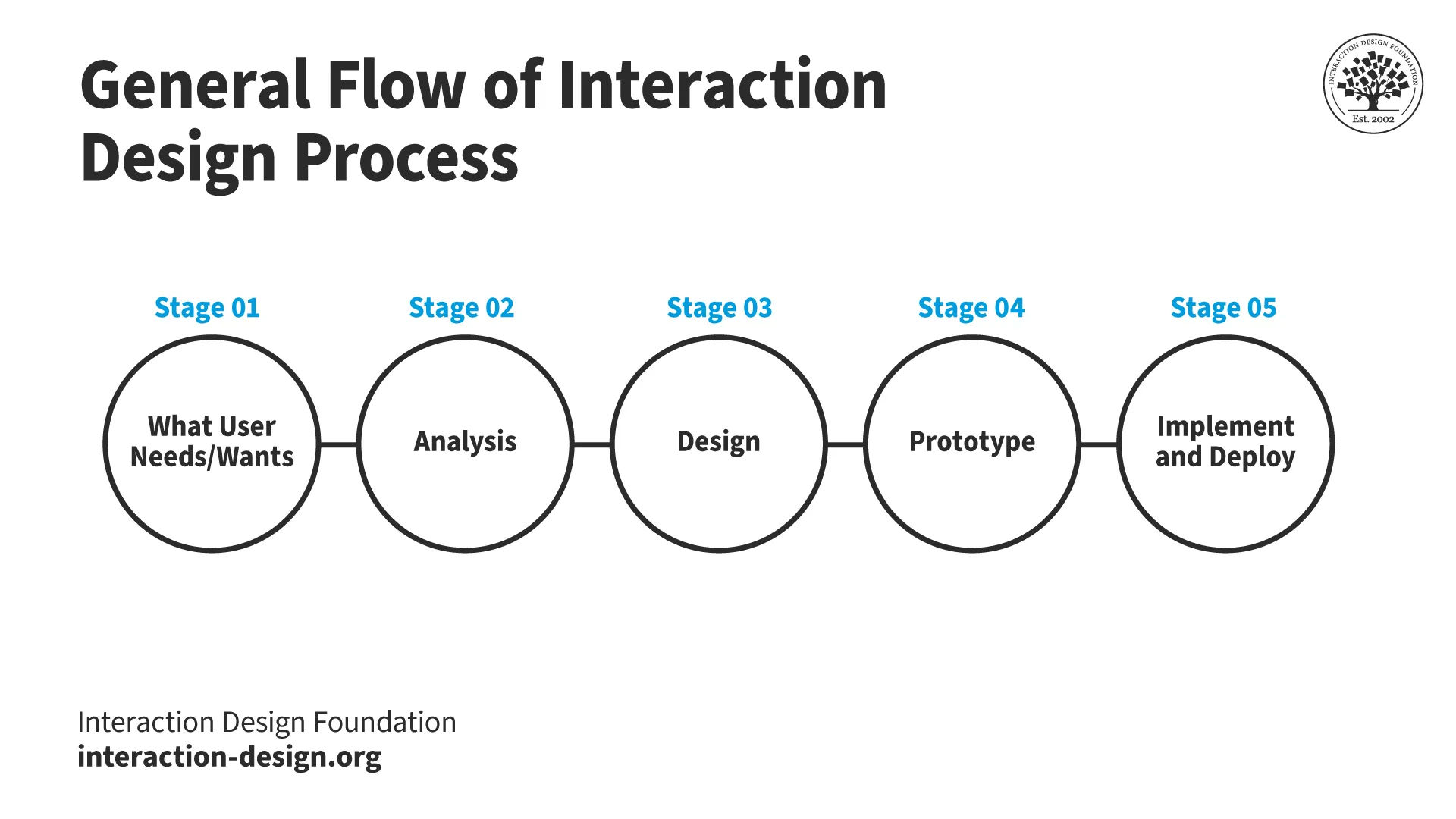
A diagram showing the general flow of the interaction design process.

This is the Interaction Design Process, as Professor Alan Dix explained.

© Interaction Design Foundation, CC BY-SA 4.0

3. Collaboration and Communication

A good UX design process nurtures strong collaboration among various teams—and these include design, development and marketing. As teams work together from the early stages of a design process, this cross-functional approach is a major plus. It’s something that can make sure that the product really aligns with business goals and user expectations. 

UX Designer and Author of Build Better Products and UX for Lean Startups, Laura Klein explains the value of cross-functional teams: 

Transcript
 

4. Economic Efficiency

As organizations integrate UX design early—and throughout the project lifecycle—they can find potential usability issues before these grow into expensive problems. So, brands and project managers can cut down on the risk of costly revisions and rework later in the development cycle—and so save on future redesign and development costs.   

5. Risk Reduction

UX design process steps include rigorous usability testing and feedback loops—vital items that help refine the product iteratively. This makes sure that the final version meets user needs—and effectively so—and lessens how likely it will be that the product fails post-launch.   

6. Enhanced User Satisfaction and Engagement

It may sound obvious, but a well-designed, user-friendly interface means higher levels of user engagement—and satisfaction. They’re crucial metrics for the success of any digital product.   

7. Brand Loyalty and Trust

Positive user experiences that are consistent really build trust and loyalty towards the brand. Good experiences encourage repeat business and word-of-mouth recommendations—and they’re invaluable for long-term business success. This applies to products that UX design teams create, but it’s just as valid for services as well. 

AI Product Designer, Ioana Teleanu explains important points about how to design for trust with AI in this video: 

Transcript
 

8. Increased Conversion Rates

Effective UX design simplifies user interactions, and it’s what’s behind how easy it is for users to navigate and perform desired actions. Such interactions include making a purchase or signing up for a newsletter—things that translate to higher conversion rates.   

9. SEO and Visibility

Search engines favor websites that offer a good user experience—and that includes fast load times, mobile responsiveness and easy navigation. A meticulous UX design process helps teams tick all these boxes. What’s more, it improves search engine rankings and visibility, too.  

10. Inclusive and Accessible Design

A comprehensive UX design process helps keep brands, designers and design teams on track regarding considerations for accessibility—and it’s a vital aspect of modern and responsible design. When they follow a solid design process, brands can make sure their products really are usable for people with a wide range of disabilities—and abilities. This inclusivity doesn’t just expand the market reach; it’s something that complies with legal standards and ethical practices in many regions, too. 

Watch this video to understand the need for accessibility in design: 

Transcript
 

When designers and design teams start a UX design process, they make a strategic investment—one that pays dividends in customer satisfaction, brand loyalty and overall business success. Whether it’s to revisit existing products so they can add the best improvements or to start from scratch in the problem and solution space, teams rely on their design process to structure the way forward. 
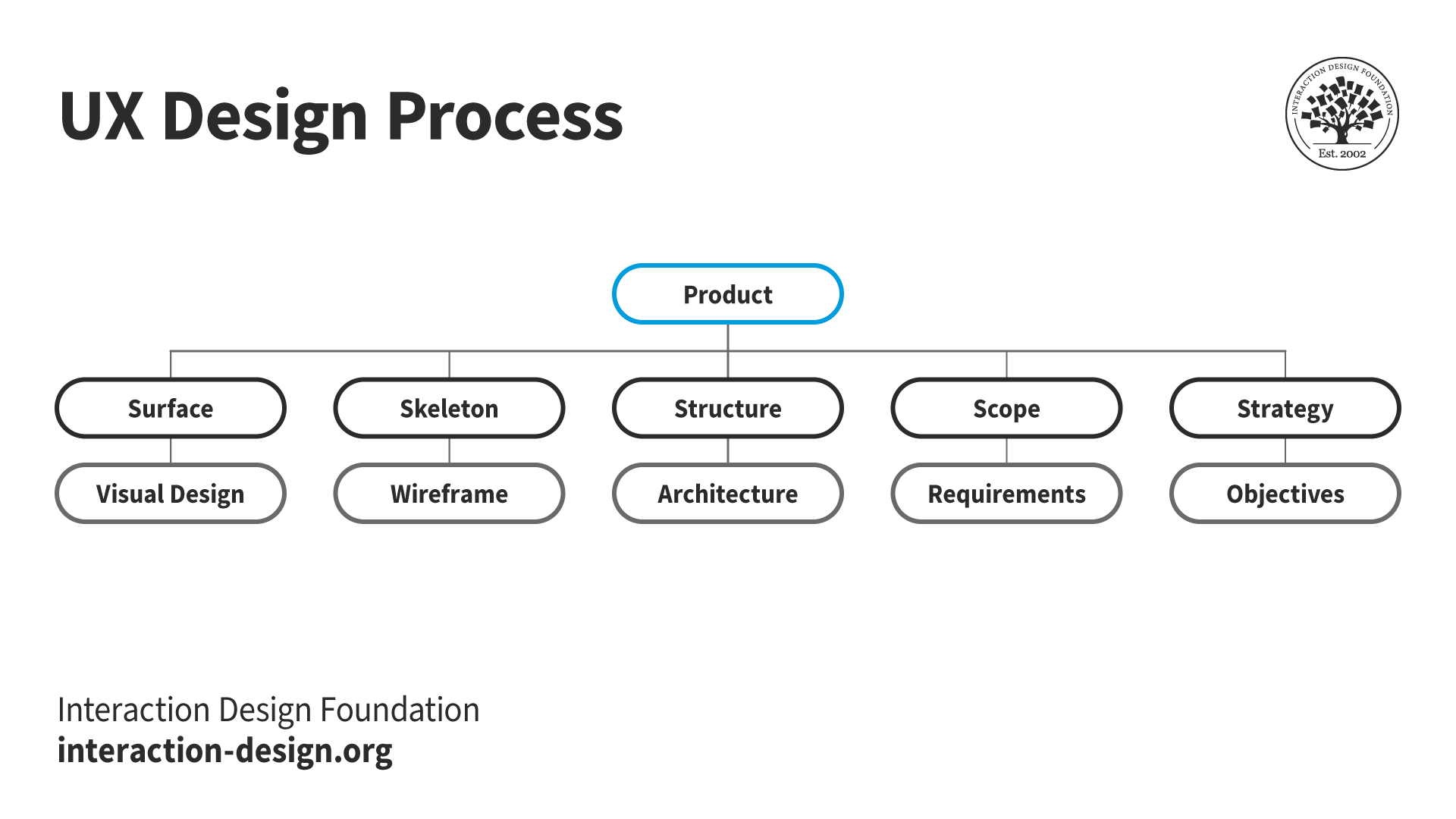
A diagram of an overview of a UX design process.

This is an overview of what a UX design process involves.

© Interaction Design Foundation, CC BY-SA 4.0

What Types of UX Design Processes are there?

It’s common to find mention of the UX/UI design process, product design UX process, UX design process for websites, or mobile app UX design process—for example. Similarly, an end-to-end UX design process tends to include four, five or six steps, such as: understand, define, create, prototype, test and implement.   

However, there’s more than just a single UX design process. Several common processes are widely recognizable—and they feature consistently across the industry. The process of UX design can vary a great deal. It’s something that depends on the project, the team and the goals of the design initiative. Here—in no particular order—are some of the most notable processes:  

1. The Design Thinking Process
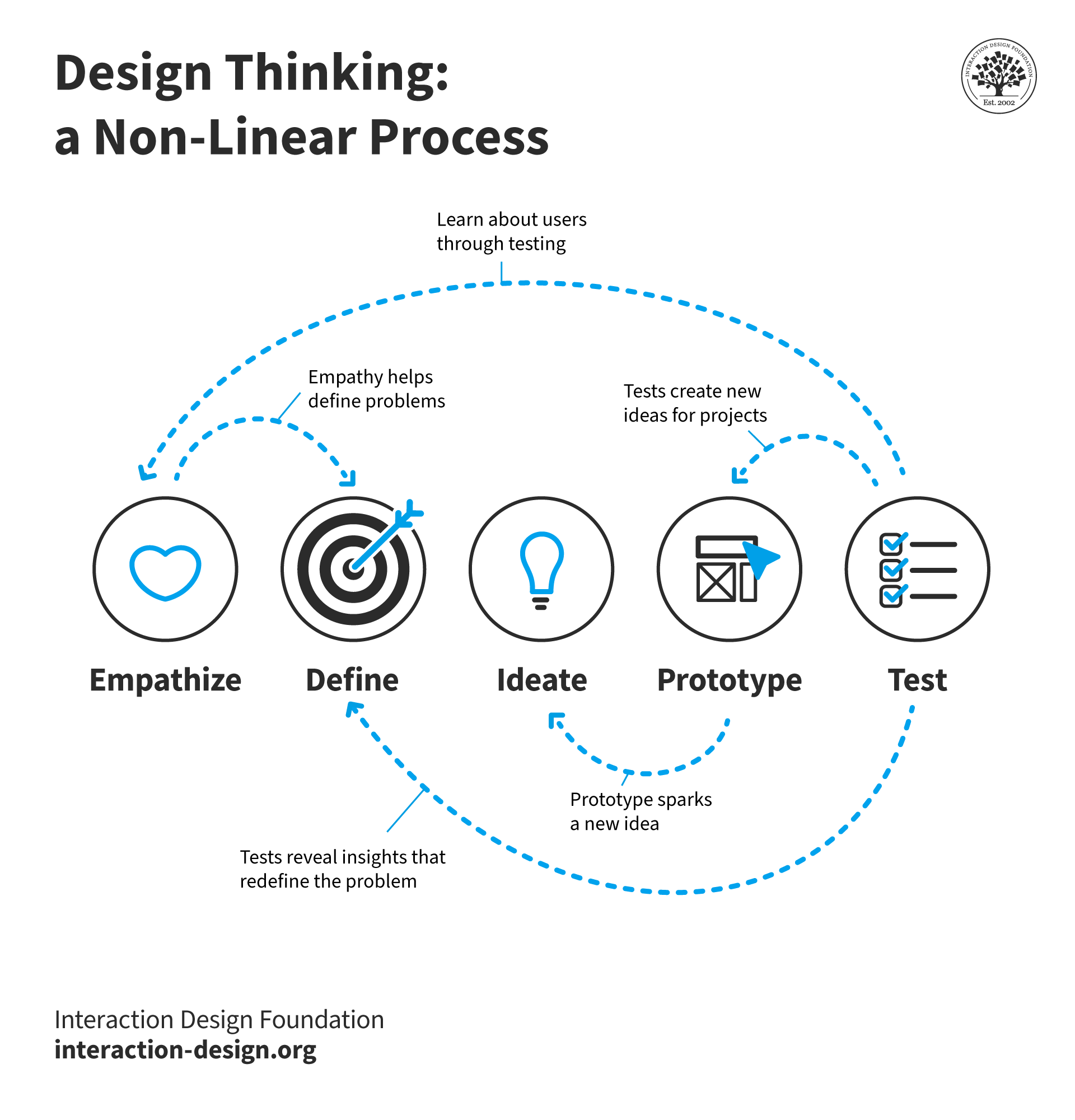
A diagram showing the Design Thinking process.

© Interaction Design Foundation, CC BY-SA 4.0

Design Thinking is a user-centered approach—and it’s a well-known one that emphasizes understanding the user's needs, ideating solutions, prototyping, testing and implementing solutions. The design thinking process for UX has five phases in it, where designers:  

●  Empathize: Understand the users and their problems deeply—through research.  

●  Define: Clearly articulate what the users’ needs and problems are.  

●  Ideate: Brainstorm a range of creative solutions to these.  

●  Prototype: Build a version of the solutions—going from paper prototyping to high-fidelity versions.  

●  Test: Test the solutions with users and tweak and refine them.  

Watch this video on Design Thinking for more insights into this process: 

Transcript
 

2. The Double Diamond Process

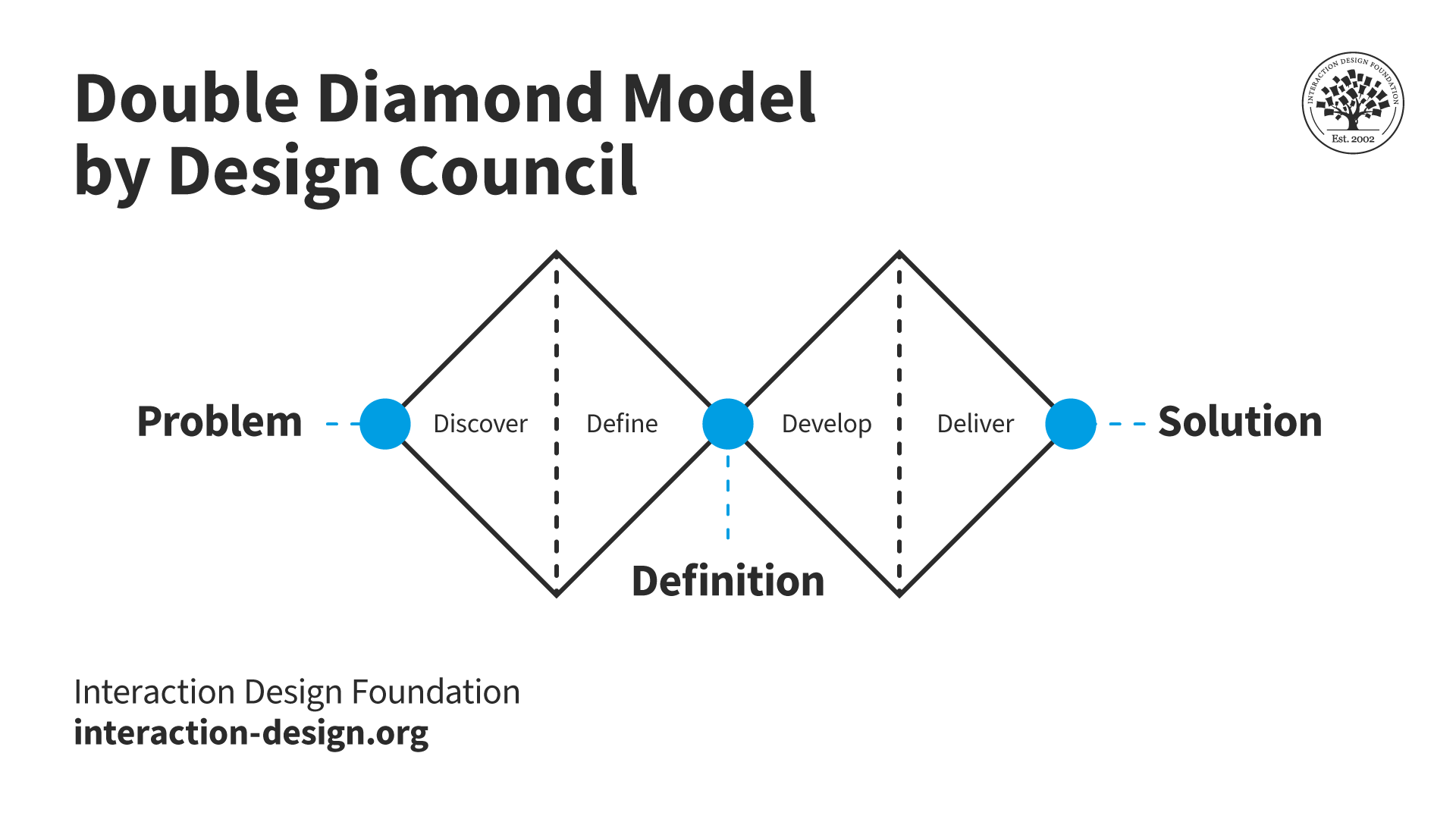
A diagram showing the Double Diamond design process.

© Daniel Skrok and the Interaction Design Foundation, CC BY-NC-SA 3.0

The Double Diamond UX design process is a visual representation of the design process—and it splits into four distinct phases where designers:  

●  Discover: Research the problem space.  

●  Define: Define the area they’ll focus on.  

●  Develop: Develop potential solutions to choose from.  

●  Deliver: Finalize and launch the solution they’ve picked.  

3. User-Centered Design (UCD)
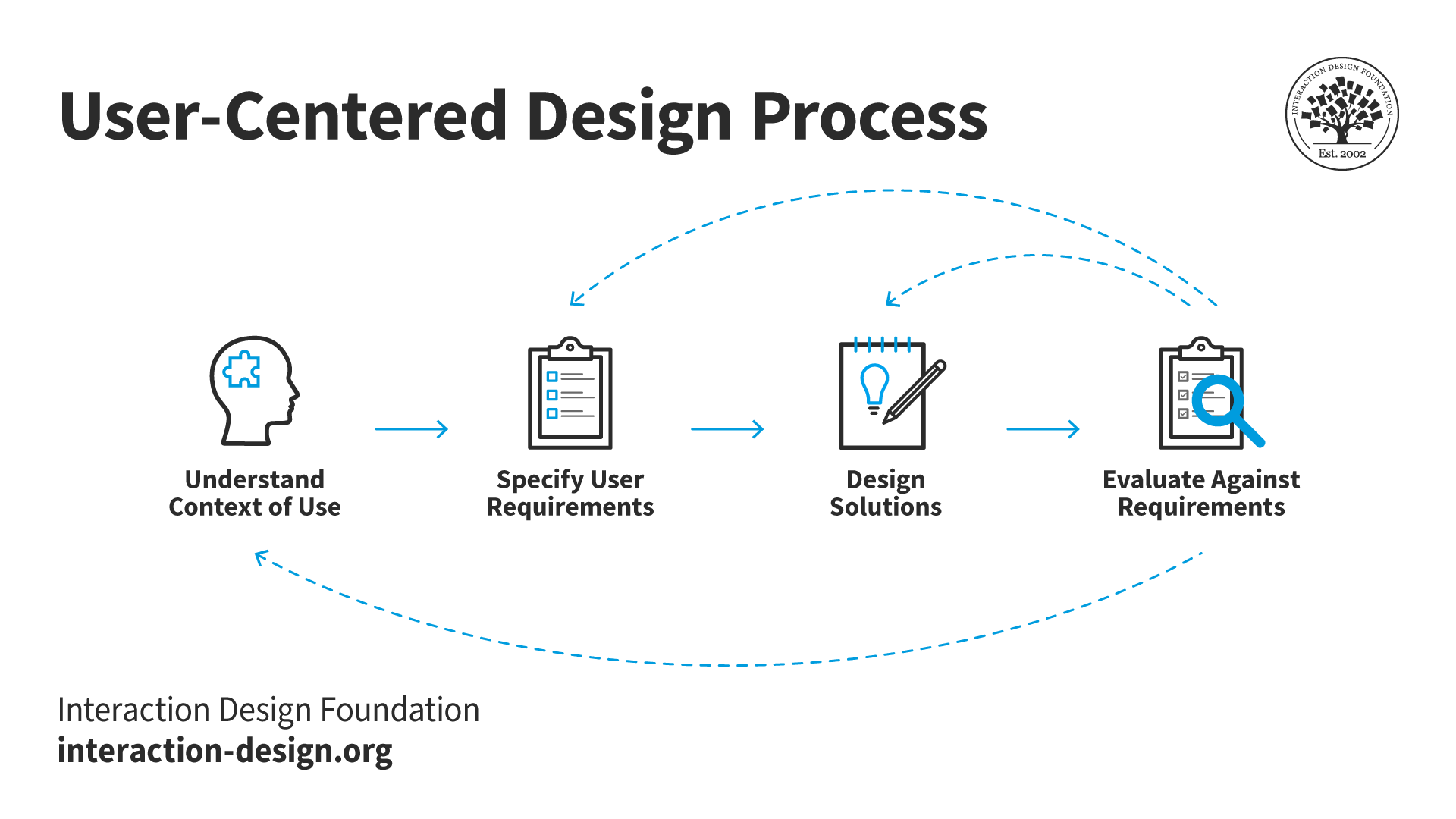
A diagram showing the User-Centered Design process.

The User-Centered Design Process

© Interaction Design Foundation, CC BY-SA 4.0

User-centered design is a framework of processes in which design teams give usability goals, user characteristics, environment, tasks, and workflow of a product, service or process extensive attention at each stage of the design process. UCD follows several steps—and in it, design teams:  

●  Establish the context of use: Understand the users, their tasks and the environments users are in.  

●  Gather requirements: Define the actual users’ needs and requirements.  

●  Design solutions: Develop design solutions for them.  

●  Evaluate: Test the designs with users—real users.  

Don Norman, often known as the Father of UX Design, explains user-centered design: 

Transcript
 

4. Lean UX

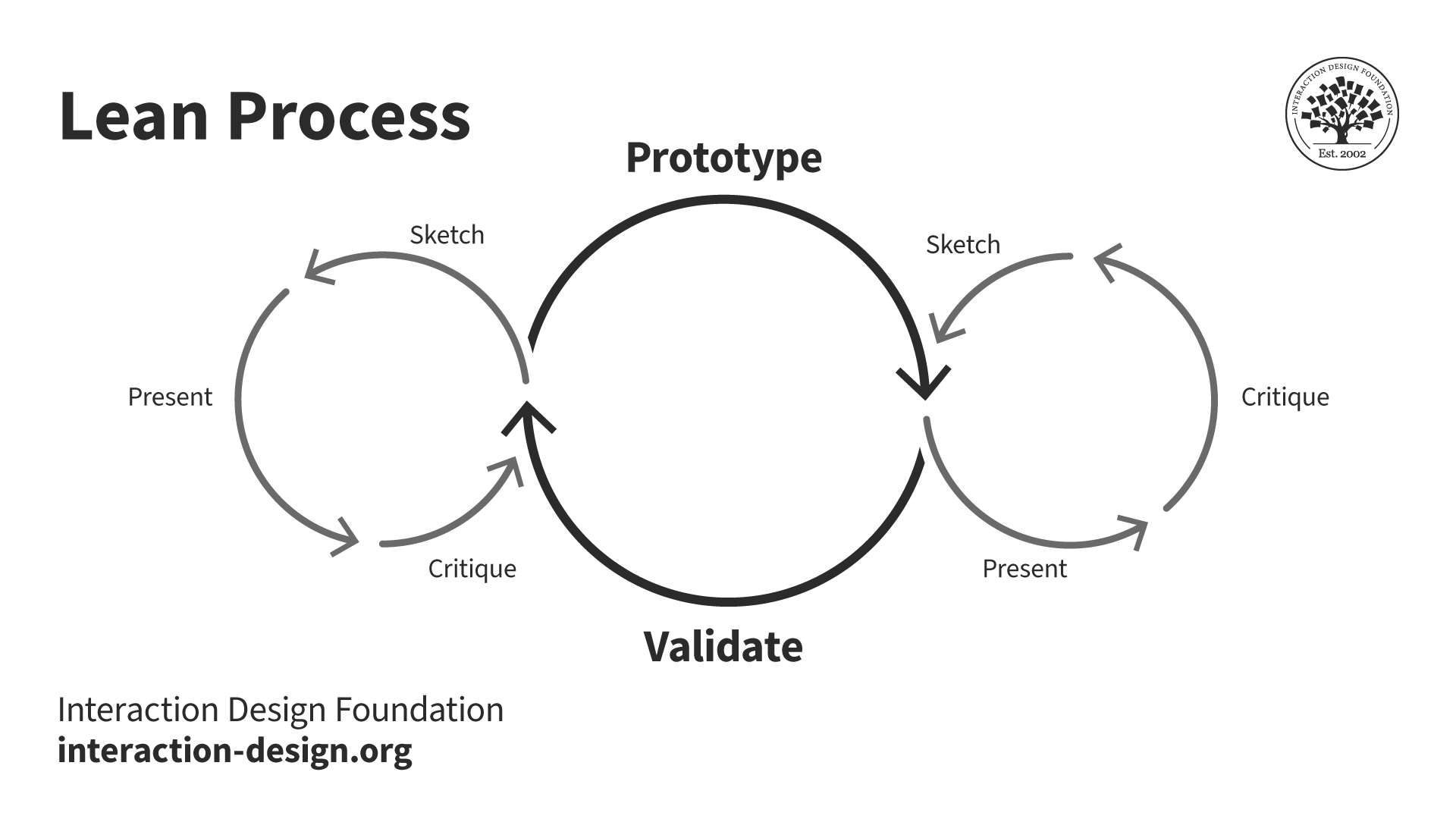
A diagram of the Lean UX design process.

The Lean UX Design Process

© Interaction Design Foundation, CC BY-SA 4.0

The Lean UX design process focuses on a rapid cycle of design iteration on the basis of user feedback and minimal design to test concepts—and the emphasis here is that designers:  

●  Build a Minimum Viable Product (MVP): It’s the simplest version of a product that they can release.  

CEO of Experience Dynamics, Frank Spillers explains points about an MVP in this video:

Transcript
 

●  Learn: Collect data and insights from how users interact with the MVP.  

●  Build: Make improvements based on users’ feedback.  

5. Agile UX
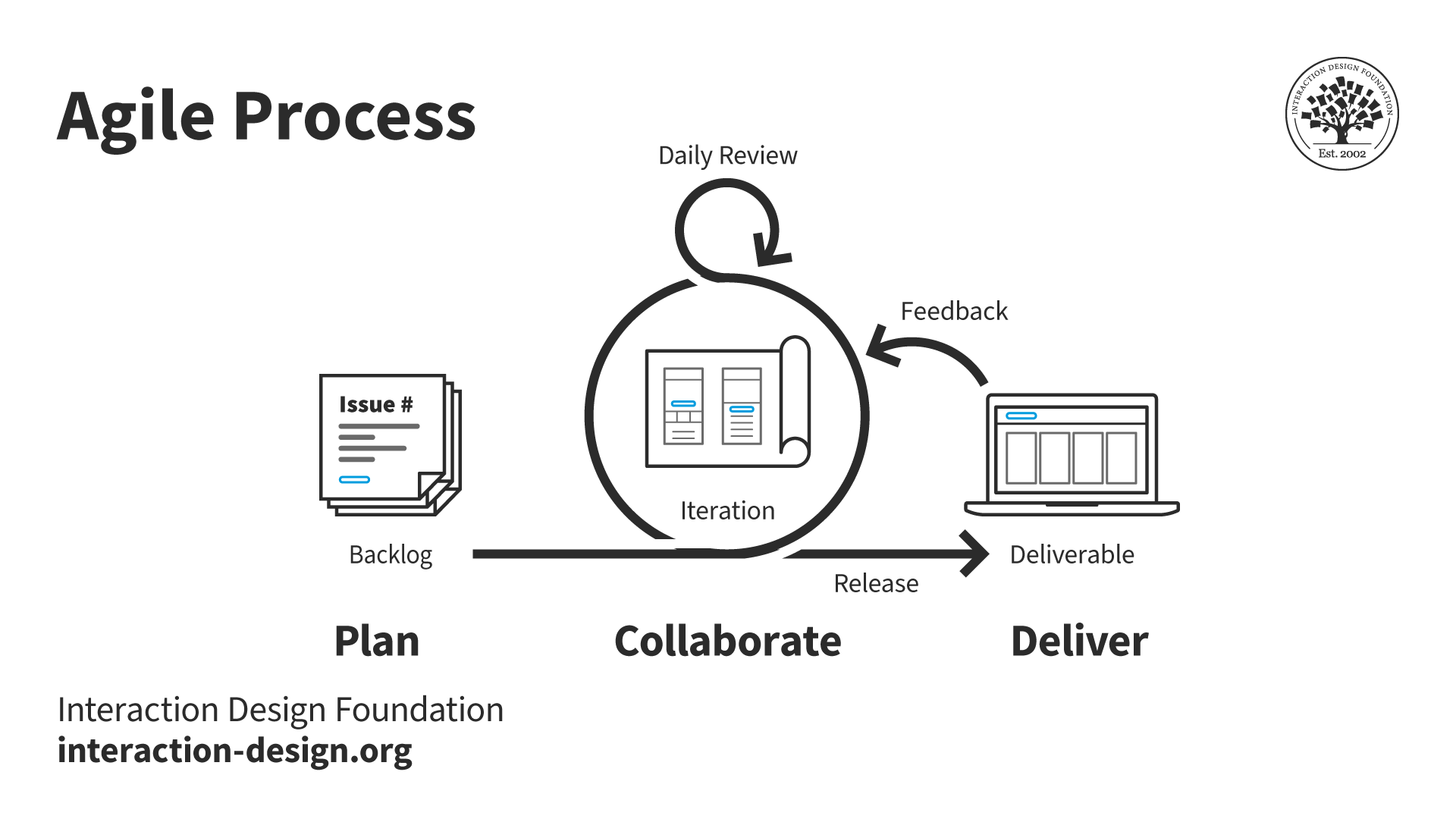
A diagram of the Agile design process.

© Interaction Design Foundation, CC BY-SA 4.0

Agile UX integrates UX design into Agile methodologies—which typically feature in software development. In the Agile UX design process, design teams tend to:  

●  Collaborate: Among cross-functional teams.  

●  Do iterative design: Short, iterative cycles of design and feedback.  

●  Gather user feedback: Constant collection of user feedback to guide design decisions.  

UX Designer and Author of Build Better Products and UX for Lean Startups, Laura Klein explains the nature of Agile UX: 

Transcript
 

6. Goal-Directed Design

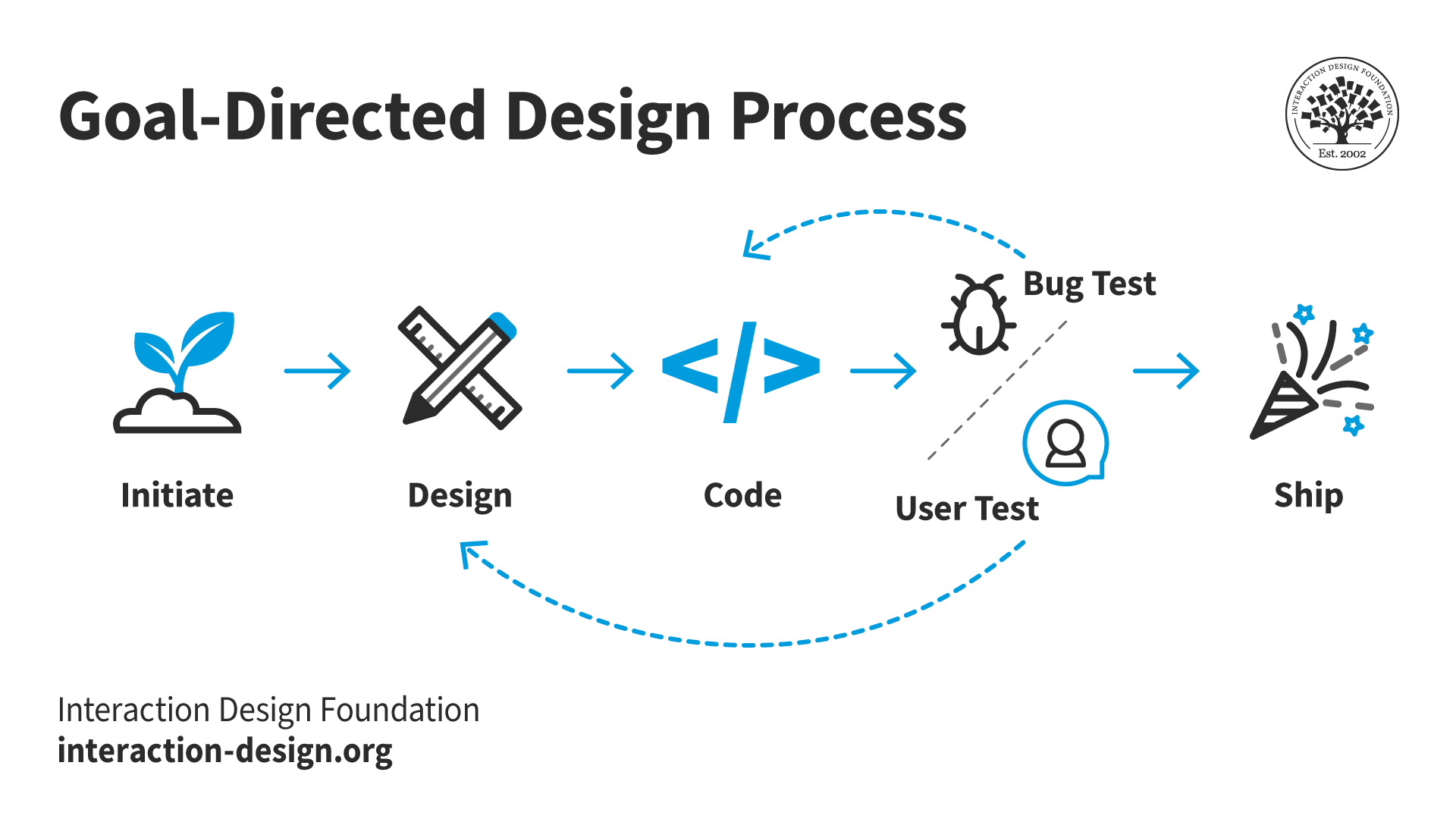
An image of the Goal-Directed design process.

The Goal-Directed Design Process

© Interaction Design Foundation, CC BY-SA 4.0

Goal-directed design—as put forward by Alan Cooper, the “Father of Visual Basic”—focuses on satisfying specific needs and desires of the end-user. It involves:  

●  Create personas: Develop detailed personas that represent user types.  

●  Develop scenarios: Make scenarios that outline how personas interact with the solutions.  

●  Do prototyping and validation: Develop prototypes—and then validate them with target users.  

Each UX design process has its own unique approach—but there’s a common goal in all of them: to put the user's needs and experiences at the forefront of the design effort. The choice of process often depends on what the specific requirements of the project are, the team's working style and the project timeline.  

The Steps in a Typical UX Design Process

Any UX design process is a meticulous journey that goes through several stages. Each stage is a crucial thing for teams to deliver a user-centric product. The first step of a UX design process tends to be all about discovery, understanding or research. Likewise, iterative UX design processes indicate how important continued improvements are.  

Brands or design teams may select which process they’ll follow, and processes vary as to where and how they start, the order of the steps they take and which steps they include. Even so, here are generally fundamental design process steps—they’re typically common to UX projects:   

Step 1: Define Project and Scope

●  Objective: Establish the project's goals and boundaries.   

●  Activities:   

  • Engage stakeholders from business, design, product and technical teams.   

  • Find what the problem, project scope, deliverables and timeline are.   

  • Conduct stakeholder meetings and create the initial low-fidelity concept sketches.   

Step 2: Perform UX Research

●  Objective: Understand the users and the market environment.   

●  Activities:        

  • Do comprehensive user research—using interviews, surveys and focus groups.   

  • Perform market analysis—and that includes industry trends and competitive landscape.   

  • Analyze user behavior, needs and motivations—items to process through ethnographic studies. 

Watch as UX Strategist and Consultant, William Hudson explains the importance of UX research

Transcript
 

Step 3: Analyze & Plan

●  Objective: Plan the approach to meet user needs effectively.   

●  Activities:   

  • Develop user personas and user stories to capture the essence of the target audience.   

  • Create wireframes and high-level project roadmaps.   

  • Outline the user journey to envision the complete user experience.   

Watch as Professor Alan Dix explains user personas and why they’re important: 

Transcript
 

Step 4: Design

●  Objective: Design the interface—and keep a tight focus on user interaction.   

●  Activities:   

  • Sketch interface layouts—including information architecture and navigation plans.   

  • Design detailed UI elements like microcopy, color schemes and typography.   

  • Make sure that accessibility and usability are integral parts of the designs—or wireframes at this stage.   

William Hudson explains wireframing in this video: 

Transcript
 

Step 5: Prototype

●  Objective: Transform designs into interactive prototypes.   

●  Activities:   

  • Develop both low-fidelity and high-fidelity prototypes—using various tools.   

  • Prototypes should enable stakeholders and testers to review the look and feel of the product.   

Watch as Professor Alan Dix explains prototyping: 

Transcript
 

Step 6: Test

●  Objective: Validate the design—and its functionality—with real users.   

●  Activities:   

  • Do usability testing to get feedback in and spot pain points.   

  • Perform iterative tests to refine interfaces based on the user feedback.   

  • Make absolutely sure that the product does meet the required accessibility standards.   

William Hudson explains valuable aspects about user testing

Transcript
 

Step 7: Launch 

●  Objective: Deploy the product to the market.   

●  Activities:   

  • Collaborate with the development team to make sure that it’s an accurate implementation.   

  • Monitor the launch process—being ready to address any immediate issues.  

Co-founder of Hype4, Szymon Adamiak explains how designers can communicate better with developers: 

Transcript
 

Step 8: Iterate

●  Objective: Improve the product post-launch—and continuously.   

●  Activities:   

  • Collect and analyze user data and feedback.   

  • Make incremental changes to improve the product’s functionality and its user experience.   

Each of these steps reflects a phase that’s critical in the UX design process. And every step helps make sure that the final product doesn’t just meet user expectations but exceeds them, too. If teams stick to this structured approach, they’ll be able to deliver high-quality user interfaces that are both functional and appealing—time and again.   

Laura Klein explains how Agile teams iterate: 

Transcript
 

Who Does What in a UX Design Process?

If empathy is the heart of UX design, collaboration—quite simply—is the lifeblood. The number of roles and departments will vary between brands and across industries. This also applies to the scopes and sizes of these roles and departments.  

Outside of stakeholders and non-design-related areas, such as marketing, these are the roles that larger brands with more resources might have on board: 

  • UX designers make low- and high-fidelity prototypes, wireframes, mockups and more. They’re also responsible for the user flows and layout of the finished product. 

  • UX researchers conduct user testing, analyze data and communicate findings. They create user personas, journey maps and affinity diagrams. Researchers also test prototypes and live products that require improvement. 

  • UX writers make sure the UI says the right things in the right way to users. They’re in charge of microcopy—the text that features in menus, error messages, buttons and more. 

  • UI designers (along with web developers) transform prototypes into the final products users will encounter. The people—who typically come from technical backgrounds—leverage their expertise to maintain the live product after release. 

Note: UX designers who work for smaller brands and startups will be more likely to perform some—or even all—of these functions. 
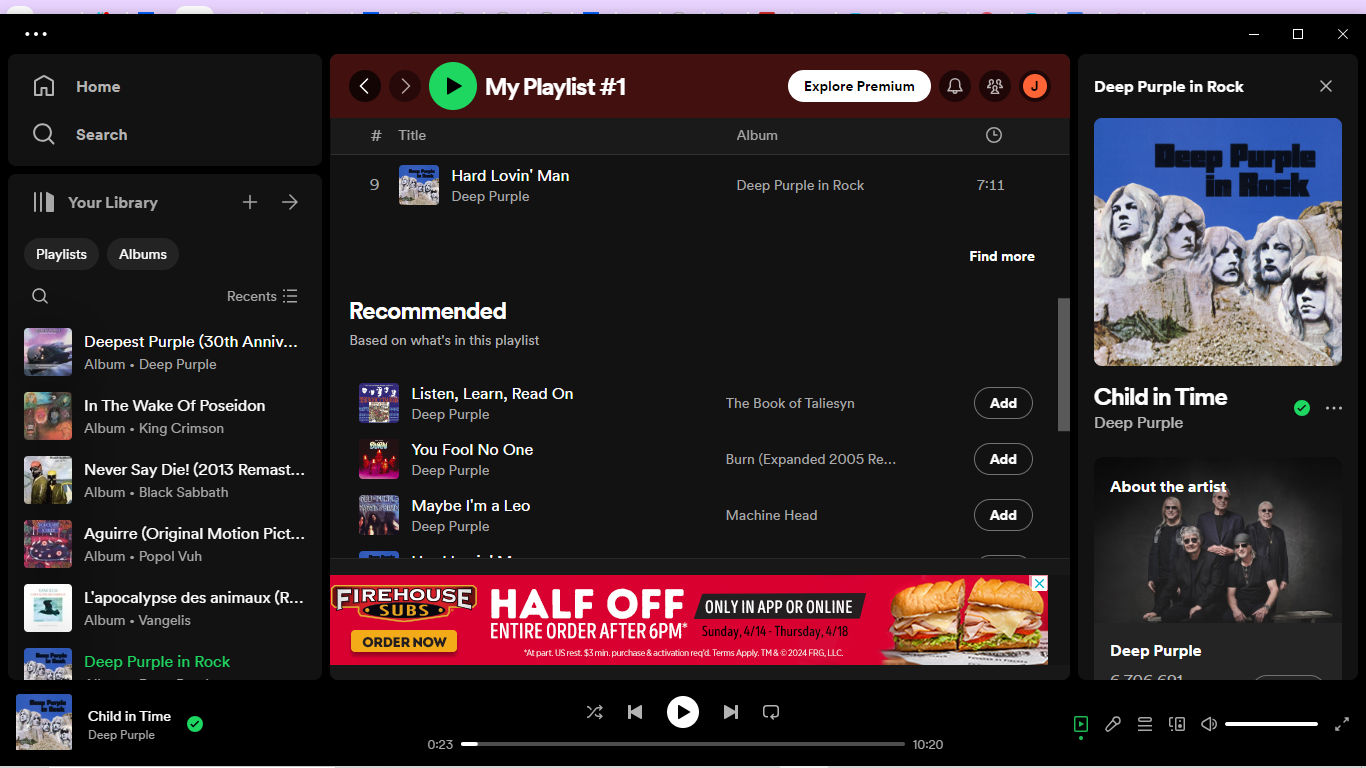
A screenshot from a Spotify page.

For example, Spotify's UX design process features the use of personalized content recommendations ("Recommended" in the center of this screenshot).

© Spotify, Fair Use

What are UX Design Process Best Practices?

It takes a series of best practices for designers—and design teams—to implement a successful step-by-step UX design process. These can help make sure that the design doesn’t just meet the users’ needs but aligns with business objectives, too. Here are some practices that are vital:   

1. Apply User-Centric Thinking and Empathy

●  Do user research well: Conduct thorough research—it’s the only way to understand the users deeply. This includes their behavior and preferences—and the challenges they face. Use quantitative and qualitative research methods—like interviews, surveys and usability testing.   

●  Design with empathy: Understand and address the actual needs of users. It’s something that might involve creating personas and empathy maps to better represent and address the user's perspective. Design thinking is particularly useful here—it’s because empathize is the first step of the UX design thinking process.   

2. Build and Maintain a Design System

●  Consistency: Establish—and follow or use—design patterns and use consistent branding elements—like typography, color schemes and UI components—across all platforms. This helps with keeping the “magic” of a seamless user experience.   

●  Design libraries: Develop—and maintain—comprehensive libraries and pattern systems that are reusable. This doesn’t just speed up the design process—but makes sure that consistency and reliability are in place across different parts of the product as well. 

Watch this video to learn more about UI design patterns: 

Transcript
 

3. Have Effective Communication and Collaboration

●  Work in cross-functional teams: Collaborate with developers, marketers and other stakeholders throughout the design process—and work closely together with them. This makes sure that everyone who’s involved in production can think about—as well as integrate—all aspects of the user experience into the final product.   

●  Incorporate regular feedback: Work with regular feedback loops with stakeholders and users—and continually tweak and improve the design. This collaboration should be an ongoing part of the design process—and it shouldn’t just happen at set milestones. 
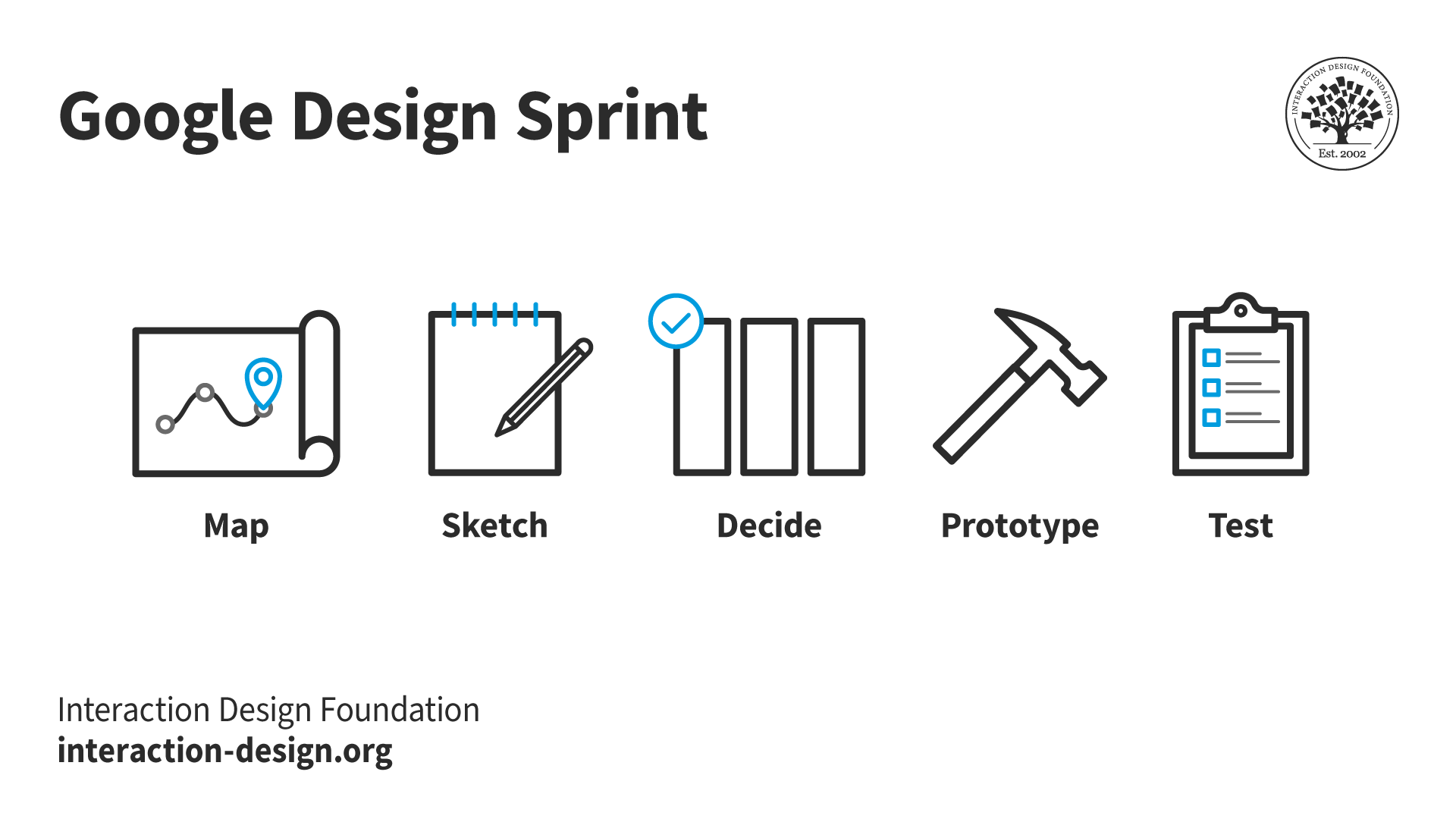
A diagram showing Google's Design Sprint.

Google’s Design Sprint captures a highly successful approach.

© Interaction Design Foundation, CC BY-SA 4.0

4. Implement UX Best Practices Strategically

●  Progressive disclosure: Use progressive disclosure to reveal information progressively—and keep the user's cognitive load low and encourage continued interaction without overwhelming them. 

●  Simplified interfaces: Design interfaces that cut down on the number of elements—with a focus on core functionalities to boost the usability and reduce clutter.   

●  Accessibility and inclusivity: Make sure that all users—including those with disabilities—can use the product effectively. This means to adhere to accessibility standards like WCAG, too, and integrate features that enhance usability—for everyone. 

Vitaly Friedman, Senior UX Consultant, European Parliament, and Creative Lead, Smashing Magazine explains progressive disclosure in this video: 

Transcript
 

5. Test and Iterate

●  Usability testing: Do extensive usability testing during—and after—the design process. This will find any issues with the design that users might run into—and it’ll allow for adjustments before the final release.   

●  Design iteratively: UX design should mean that there’s an iterative design process that’s dynamic. And—after launching—continue to test and refine the product, from what the user feedback and behavior indicate.     

What are Additional Practical Tips to Implement UX Design?

●  Ensure clear and intuitive navigation and layout: Users should be able to easily understand how to navigate the site or app—with clear paths to follow. So, it’s ultra-important to apply UI patterns and design principles in the best ways. 

●  Optimize for mobile: An extremely large proportion of web traffic comes from mobile devices—that’s why it's crucial to make sure that UX design is fully optimized for mobile usage.   

Frank Spillers delivers some helpful tips about mobile UI patterns in this video: 

Transcript
 

●  Seek engagement through gamification: Work elements of gamification into the design to make the interaction more engaging. This can include rewards, leaderboards or interactive elements—all of which can encourage user participation and retention.   

The key is to remain focused on the user's needs—while balancing technical constraints and business goals. It’s a holistic approach that doesn’t just enhance the user experience but contributes to the overall success of the product in the market, too.   
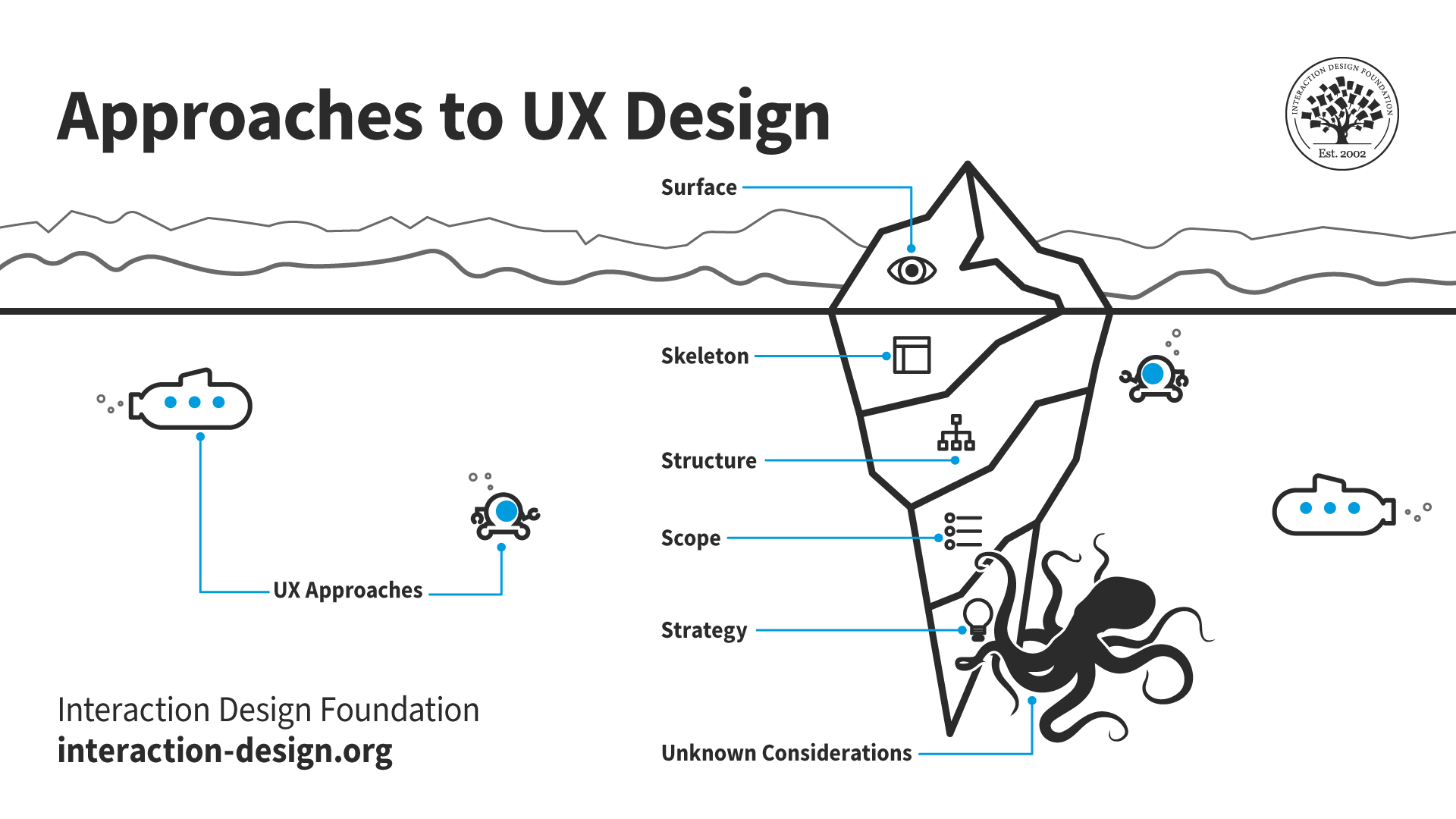
A diagram showing approaches to UX design.

How a brand approaches a project—and which design process it uses—can depend on various factors. So, it’s vital to leverage the chosen design process to the best advantage and reveal unknown considerations early on.

© Interaction Design Foundation, CC BY-SA 4.0

Which is the Best UX Design Process for which Project?

Many organizations will be familiar with a favored design process. Still, to select the most suitable UX design process for a project depends heavily on how well designers or design teams understand the project's unique context, goals, user needs and constraints. 

Budget plays a crucial role as to how to determine the extent—and depth—of which UX design process a brand uses. A larger budget naturally will permit for more extensive user research and testing; meanwhile, a tighter budget might call for teams to focus on core functionalities—with limited user testing. 

An important point is that designers should be aware of the gulf there can be between stakeholders and design team members. And a brand’s level of UX maturity can have a big bearing on what a designer does—and how—within a design process. Sometimes, a designer might even be the entire design team, in that their role is a UI-UX designer and they have more to do from a design perspective than they would in a larger organization. 

It’s important to be able to advocate for users and explain points about design to other project personnel, some of whom may need to understand what UX design involves. 

Design Director at Societe Generale, Morgane Peng explains some of the issues that designers can face when they work with people who don’t understand the intricacies of design: 

Transcript
 

By understanding these aspects, teams can choose a UX design process that best fits their specific project, and ensure the design is effective, user-friendly and successful in achieving its intended goals.   

Overall, it’s important for designers to think about the benefits of each type of process—rather than approach a generic or basic “UX design process” and methodology. The decision can have a massive impact on exactly what they manage to achieve—as they strive to solve problems best, plus realize the key factors of UX for their users and their brand. 
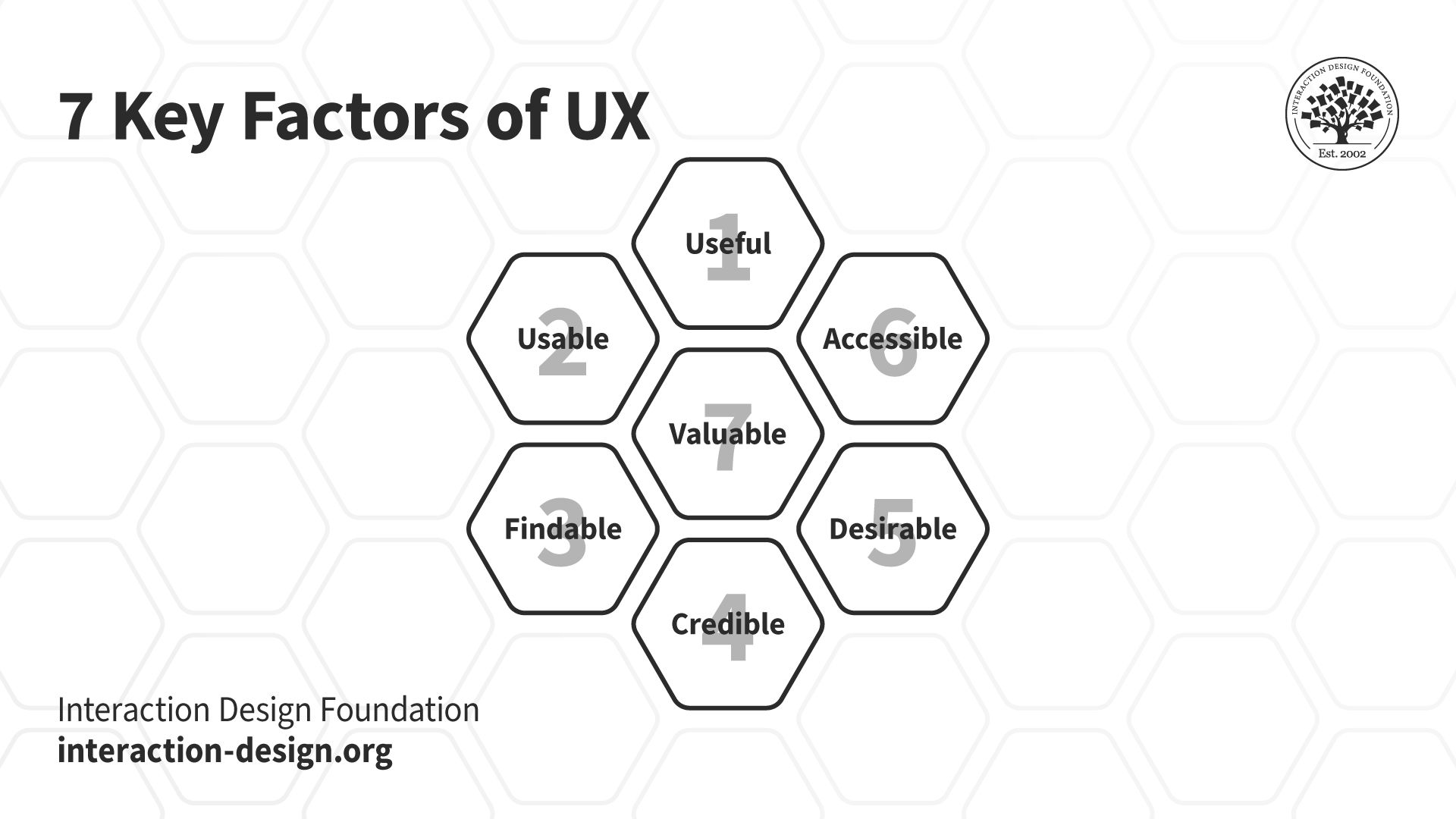
A diagram showing the seven key factors of UX.

© Interaction Design Foundation, CC BY-SA 4.0

Questions About UX Design Processes?
We've Got Answers!

What common challenges arise in UX design processes, and how can you address them?

Here are several common ones that might come up, and how to work with them.  

First, make sure there’s consistent user involvement throughout the design process. Have regular testing sessions and get in the feedback to understand user needs and preferences.  

Second, prioritize comprehensive research. Before you begin designing or defining the problem, get extensive data on the user environment, behaviors and expectations.  

Third, align the UX design process with broader business objectives. Communicate regularly with stakeholders to make sure that the design really does run in line with business goals.  

Last—but not least—manage scope creep proactively. Define clear project boundaries and deliverables from the start. Regularly review project progress and adjust as necessary—and make sure that changes don’t derail the project's timeline or budget. 

Take our User Research – Methods and Best Practices course. 

How does UX design integrate with Agile methodologies?

UX design effectively integrates with Agile methodologies—by focusing on user needs and rapid iteration. Agile methodologies prioritize flexible planning, early delivery and continuous improvement—items that align it closely with the iterative nature of UX design. In this integration, UX designers work in sprints—similar to software developers—to continuously refine and evolve design elements based on the user feedback and testing results. 

For practical application, UX teams can start each sprint by focusing on user stories that define target user needs and expected functionalities. Regular stand-up meetings and collaborative sessions between UX designers and developers help maintain a unified vision, streamline communication, and adapt quickly to any changes or new insights. 

Take our Agile Methods for UX Design course. 

What distinguishes UX from UI in the design process?

The key distinction lies in their scope.   

UX designers look at the bigger picture: how all elements of the product work together to deliver a seamless user experience. UI design, though, is more focused on the aesthetics and the interactive elements of a product's interface. UI designers make sure that the interface is visually appealing—and that each visual element gets the right message across to the user. They also focus on making sure that users can actually interact with the product intuitively. And while UX is about the overall feel of the experience, UI is about how the product's surfaces look and function. Both roles are essential—and they often overlap; great product design really depends on both seamless UX and appealing UI. 

Our video explains the differences between UX and UI design: 

Transcript
 

Take our Mobile UI Design course. 

Read our piece, UX vs UI: What’s the Difference?  

How do I ensure accessibility in UX design?

Here are practical steps: 

●  Use accessible color schemes: Make sure text contrasts well with background colors—and tools such as the Web Content Accessibility Guidelines (WCAG) provide standards for visual contrast. 

●  Enable keyboard navigation: Design your interface so that users can navigate it using a keyboard. 

●  Provide text alternatives for non-text content: Offer captions or descriptions for images, videos and other visual content.  

●  Ensure your design works with screen readers: Use semantic HTML and ARIA labels to help screen reader software interpret the elements of your interface right. 

●  Create content that’s easy to understand: Use clear, simple language and provide explanations for complex terms.  

Take our Master Class Introduction to Digital Accessibility with Elana Chapman, Accessibility Research Manager at Fable. 

Take our Accessibility: How to Design for All course. 

What are the main stages in a UX design process?

The UX design process typically involves five main stages: 

●  Research: Understand user needs, motivations and behaviors through interviews and surveys—and observing potential users. This stage is what helps spot the problems that need solving. 

●  Define: Synthesize the research data to define the core user problems. Designers often create personas, user stories, and scenarios to keep the users' needs at the forefront. 

●  Ideate: Generate a range of creative ideas to solve the defined user problems—and techniques like brainstorming, sketching and ideation workshops are common. 

●  Prototype: Build a testable version of the product—and this can range from paper sketches to interactive digital prototypes. Prototyping is a crucial part of testing design concepts without committing to final development. 

●  Test: Evaluate the prototype with real users to collect their feedback. Testing can show up usability problems—or areas for improvement. Iterative testing allows designers to refine the product until it meets user needs effectively. 

Take our Design Thinking: The Ultimate Guide course to understand that design process in full. 

How do wireframes fit into the UX design process?

Wireframes really serve as a blueprint for the layout and functionality of a website—or application. Designers create wireframes in the early stages—typically during or right after the ideation phase—and these give a clear, visual structure of the user interface, before any detailed design or development begins. 

Wireframes focus on what elements will appear on key pages and how users will interact with them. They’re usually without stylistic choices—such as color and typography—to concentrate on usability and function.  

Wireframes are—therefore—essential tools, and ones that help bridge the gap between conceptual design and actual user experience. They’re a big part of ensuring the final product is both user-friendly and aligned with the project's goals. 

William Hudson explains wireframing in this video: 

Transcript
 

Read our piece on How to Create Wireframes: An Expert’s Guide

What metrics are useful for evaluating UX?

Several metrics are particularly useful to evaluate UX: 

Usability: This includes success rate, error rate and the time it takes to complete tasks—they’re metrics that help work out how easily users can interact with a product and complete their intended tasks. 

User satisfaction: Surveys and feedback forms measure how satisfied users are with a product—and tools like the System Usability Scale (SUS) give a standardized way to assess how satisfied users are. 

Engagement: Metrics such as the number of user sessions, session duration and frequency of use indicate how engaging a product is.  

Conversion rates: This measures how effectively the design leads users to take desired actions—like signing up, purchasing or subscribing. 

Retention rate: It’s the percentage of users who return to a product over time.  

These metrics—when teams monitor them regularly—give valuable insights into user behavior and preferences, and help UX designers improve the product iteratively. 

Watch our video on usability for a better understanding of what it involves: 

Transcript
 

Take our Master Class Survival Metrics: Getting Change Done In An Agile and Data-Informed Way with Adam Thomas, Product Management Expert and Technologist. 

What is the relationship between service design and UX?

Service design and UX design share a close relationship—that’s because both focus on optimizing and enhancing user interactions.  

The main goal of service design is to make sure that service interfaces are efficient and usable—and that they meet user needs. It involves mapping out the entire journey of a user, considering every interaction they might have with a service—from start to finish. This could include visiting a website, interacting with staff or using a product directly. 

UX design—on the other hand—often dives deeper into the specifics of user interaction with a particular interface, and it focuses on elements like usability, accessibility and how engaging the interface is. 

CEO of Experience Dynamics, Frank Spillers explains the service design process in this video: 

Transcript
 

Take our Service Design: How to Design Integrated Service Experiences course. 

How can you tailor a UX design process to different types of products?

Try taking some steps: 

  1. Define the product's goals and the target audience: A tech gadget aimed at young adults will have different user expectations than a healthcare app for seniors—for example. 

  2. Adapt your research methods based on the product type: For physical products, you might focus more on ergonomics and user interactions with the product. For digital products—though—usability and interface design become more critical. Choose research techniques that’ll give you deep insights into how users will interact with the product. 

  3. Adjust the prototyping phase to suit the product: For software, you can use wireframes and interactive digital prototypes. And for hardware, you may need 3D models or physical mockups to evaluate the design's practical aspects. 

  4. Customize the testing phase to the product's nature: Make sure that the testing environment mimics real-world use cases—and as closely as possible—so you spot any design flaws or user experience issues before the final product actually gets into the marketplace. 

Watch our video on product design for valuable insights: 

Transcript
 

How can remote teams collaborate effectively on UX design projects?

First, use collaboration tools such as Slack for communication, Figma or Adobe XD for design sharing, and Asana or Trello for project management. They’re tools that let team members communicate in real-time, share progress and track tasks efficiently. 

Second, establish regular check-ins and updates. Daily or weekly meetings via video conferencing platforms—like Zoom—can help team members discuss their progress, brainstorm ideas and address challenges. These regular interactions really build a sense of team unity—and keep everyone aligned with the project goals. 

Third, create shared documentation. Google Drive or Confluence can host project files where all team members can access and contribute to UX research, design specifications and user feedback. This shared resource makes sure that everyone’s got the latest information at their fingertips. 

Last—but not least—embrace asynchronous communication. Since team members may be in different time zones, it's important to keep a workflow going where individuals can contribute at their own pace—without delaying the project. Clear documentation and updates in shared tools help greatly with this asynchronous work. 

When remote UX design teams integrate these strategies, they can maintain productivity, foster collaboration and deliver successful projects. 

Take our Master Class How To Balance Remote and In-Person UX Work with Cory Lebson, Principal and Owner of Lebsontech LLC. 

How do UX designers collaborate with developers and product managers?

The collaboration starts with a shared understanding of the user needs and business objectives. UX designers often lead this discussion by presenting research findings that highlight user behaviors and needs—and the problem areas that the product aims to address, too. 

Throughout the design process, UX designers work closely with product managers to keep the design well in line with overall product strategies and timelines—and make sure that each design decision supports the product's goals and delivers real value to users. 

With developers, UX designers make sure that their designs are technically feasible. They give detailed design specifications and work alongside developers to translate these designs into functional software. Regular meetings between UX designers and developers help address any technical challenges that may arise, too. 

Feedback plays a crucial role in this collaboration—and UX designers bring feedback on board from both product managers and developers to refine the product. This iterative process of testing and feedback helps improve the design—continuously—until it meets all functional requirements and user expectations. 

UX Designer and Author of Build Better Products and UX for Lean Startups, Laura Klein explains the value of cross-functional teams and Agile collaboraton: 

Transcript
 

Take our Master Class A Guide To Hassle-Free Designer-Developer Collaboration with Szymon Adamiak, Co-Founder, Hype4 Mobile. 

What does user testing involve, and how do you integrate it into the UX process?

To do user testing well, UX designers or researchers have got to evaluate a product by observing real users as they interact with it.  

Begin by defining some clear objectives. Decide what aspects of the product you’ll need to test—such as the effectiveness of its navigation or the clarity of its content.  

Next, recruit participants—participants that represent your target audience. They’ll use the product while you watch their interactions and listen to their feedback. Prepare tasks for the users to complete while the testing session’s going on. These tasks should reflect common actions users would perform with the product. And—as users engage with the product—take notes on their behavior, any difficulties they encounter and their feedback.  

Work user testing into the UX process at multiple stages. Initially, test early prototypes to catch major usability issues early on. This preliminary testing prevents costly redesigns later. Keep on testing throughout the development cycle—bringing insights in from earlier tests to refine the design. 

Finally, conduct tests on the near-complete product—to make sure it really does meet all user needs and expectations.  

Take our Conducting Usability Testing course for more details.  

Transcript
 

How do you evaluate the success of a UX design process?

First, measure user satisfaction through surveys and feedback tools immediately after they interact with the product—and ask specific questions about the ease of use, aesthetic appeal and overall satisfaction with the product.  

Second, analyze user behavior data—and metrics like time on task, error rates and completion rates for key actions provide insight into how well users can navigate and use the product.  

Third, do usability tests at various stages of the design process—and watch users as they interact with different versions of the product.  

Fourth, consider the achievement of business objectives—and if the UX design runs in line with and supports broader business goals like increased sales and more. 

Last—but not least—ongoing feedback from real-world use after the product launches can give you even more insights. 

When you use these methods, you can accurately assess the effectiveness of a UX design process. 

Take our Master Class How to Get Started with Usability Testing with Cory Lebson, Principal and Owner of Lebsontech LLC. 

Also, users can sometimes reveal additional important insights. Watch as Product Design Lead at Netflix, Niwal Sheikh discusses some valuable dimensions of discoverability: 

Transcript
 

What are some highly cited scientific articles about UX design processes?

1. Holtzblatt, K., & Beyer, H. (1993). Making customer-centered design work for teams. Communications of the ACM, 36(10), 92-103.  

This publication is highly influential—and it introduced the concept of contextual inquiry, a user-centered design method that involves observing and interviewing users in their natural environment. It’s become a cornerstone of the UX design process, helping teams develop a deep understanding of user needs and behaviors. 

2. Kujala, S. (2003). User involvement: a review of the benefits and challenges. Behaviour & information technology, 22(1), 1-16.  

This paper has been influential in highlighting the importance of user involvement throughout the UX design process. It reviews the benefits of involving users—such as improved usability and user satisfaction—as well as the challenges—such as the time and resources required. The insights from this publication have shaped best practices in user-centered design. 

3. Gould, J. D., & Lewis, C. (1985). Designing for usability: key principles and what designers think. Communications of the ACM, 28(3), 300-311.  

This publication is influential for its early recognition of the importance of usability in the design process. It outlines three key principles of user-centered design: early focus on users and tasks, empirical measurement and iterative design. These principles have become foundational to the UX design process. 

What are some highly regarded books about UX design processes?

1. Hartson, R., & Pyla, P. S. (2012). The UX Book: Process and Guidelines for Ensuring a Quality User Experience. Elsevier.  

This book provides a comprehensive, practical guide to the UX design process. It distills human-computer interaction techniques into an easy-to-understand format—equipping readers with a solid understanding of UX methods and principles. The book covers the entire UX life cycle, from research and ideation to prototyping and testing. It serves as an invaluable resource for UX and interaction designers at all experience levels, and helps them create engaging and user-friendly digital experiences. 

2. Gothelf, J., & Seiden, J. (2013). Lean UX: Applying Lean Principles to Improve User Experience. O'Reilly Media.  

This book introduces a Lean UX framework that encourages a more iterative, outcomes-focused approach to UX design. It explains how to apply Lean principles, such as removing waste, improving team efficiency and shifting away from relying on a single expert. The book equips designers with the tools and strategies to create effective user experiences while optimizing their design process for speed and flexibility. 

3. Yablonski, J. (2024). Laws of UX: Using Psychology to Design Better Products & Services. Rockport Publishers.  

This book presents a collection of key psychological principles that UX designers can leverage to create more intuitive, user-centered products and services. It covers foundational concepts like Fitts' Law, Hick's Law, and the Pareto Principle, providing both the theory and practical applications of these principles. By understanding the underlying human psychology, designers can make more informed decisions and build experiences that better meet the needs and expectations of their users. 

4. Allen, J., & Chudley, J. (2012). Smashing UX Design: Foundations for Designing Online User Experiences. John Wiley & Sons.  

This book serves as an excellent introduction to user experience design, providing a solid outline of popular UX processes, tools and techniques. It guides readers through the entire design life cycle, from research and ideation to prototyping and testing. The book features real-life project examples—helping novice designers understand how to apply UX principles in practical, meaningful ways. It is a valuable resource for anyone new to the field of UX design. 

5. Ratcliffe, L., & McNeill, M. (2011). Agile Experience Design: A Digital Designer's Guide to Agile, Lean, and Continuous. John Wiley & Sons.  

This book helps designers transition from a traditional waterfall approach to an agile project workflow. It outlines strategies for integrating UX design into an agile process, making sure that user needs and experiences do remain a top priority. The book equips designers with the tools and techniques to collaborate effectively with cross-functional teams, iterate quickly, and deliver user-centric digital products in an Agile environment. 

6. Norman, D. A. (2013). The Design of Everyday Things. Basic books.  

This influential book explores how design shapes our interactions with the world around us, providing insights that are applicable to digital product design as well. It examines the psychology of everyday objects and experiences, and highlights the importance of user-centered design. When UX professionals understand how people perceive and engage with the designed world, they can create more intuitive, meaningful and satisfying digital experiences. 

Earn a Gift Earn a Gift, Answer a Short Quiz!

1
2
3
4
1
2
3
4
Question 1
Question 2
Question 3
Get Your Gift
Interaction Design Foundation logo

Question 1

What is the primary objective of a UX design process?

1 point towards your gift

  • To create visually appealing interfaces.
  • To develop user-centered, functional, and successful designs.
  • To reduce development time for engineers.
Interaction Design Foundation logo

Question 2

Why is empathy crucial in the UX design process?

1 point towards your gift

  • It helps designers focus on business goals.
  • It allows designers to deeply understand and solve user problems.
  • It replaces the need for usability testing.
Interaction Design Foundation logo

Question 3

How does a well-defined UX design process enhance collaboration?

1 point towards your gift

  • By involving only designers in decision-making.
  • By promoting cooperation between design, development, and marketing teams.
  • By eliminating the need for developer feedback.

Learn More About UX Design Processes

Make learning as easy as watching Netflix: Learn more about UX Design Processes by taking the online IxDF Course User Experience: The Beginner's Guide.

Why? Because design skills make you valuable. In any job. Any industry.

In This Course, You'll

  • Get excited when you experience how easy it is to transition into tech and land your dream job with User Experience (UX) design skills. No design background? No problem. You already have transferable skills, so it's easy to fast-track your career

  • Learn to combine logical thinking with creativity. Do you enjoy creativity and structure? Do you communicate ideas clearly? UX designers turn ideas into services, experiences, and products. This course helps you structure your existing skills and apply them in an innovative, creative context. You'll use hands-on methods that empower you to continuously test and optimize your products and services from idea to delivery.

  • Make yourself invaluable when you use the very fabric of being human, such as empathy and intuition, to make users and customers smile. More smiles, more impact, greater salary potential. You'll find out what your users need and want, and you'll build products, experiences, and services that help them succeed. You can benefit from UX design in any job, any industry. As AI becomes part of everyday work, timeless human-centered UX design skills help you decide what problems are worth solving and how solutions should actually work for people. This approach turns AI from a tool into your new superpower, keeping your work useful, relevant, and centered around peoples’ needs, even as technologies change.

  • Gain confidence and credibility when you master a range of powerful, real-world UX design skills such as user research, user interviews, personas, customer journey maps, sketching, task analysis, low-fidelity paper prototyping, and usability testing. It's easy with downloadable templates

  • Craft your personal portfolio with step-by-step guidance. It's completely optional. Your portfolio is your gateway to transition into a career in tech or design. You'll be able to apply your new skills immediately in your current job. If you're new to UX design, this course is the best place to start. Your path to tech starts here. UX design is your way in.

It's Easy to Fast-Track Your Career with the World's Best Experts

Master complex skills effortlessly with proven best practices and toolkits directly from the world's top design experts. Meet your experts for this course:

  • Don Norman: Father of User Experience (UX) design, author of the legendary book “The Design of Everyday Things,” and co-founder of the Nielsen Norman Group.

  • Rikke Friis Dam and Mads Soegaard: Co-Founders and Co-CEOs of IxDF. 

  • Mike Rohde: Experience and Interface Designer, author of the bestselling “The Sketchnote Handbook.”

  • Stephen Gay: User Experience leader with 20+ years of experience in digital innovation and coaching teams across five continents.

  • Alan Dix: Author of the bestselling book “Human-Computer Interaction” and Director of the Computational Foundry at Swansea University.

  • Ann Blandford: Professor of Human-Computer Interaction at University College London.

  • Cory Lebson: Principal User Experience Researcher with 20+ years of experience and author of “The UX Careers Handbook.”

Get an Industry-Recognized IxDF Course Certificate

Increase your credibility, salary potential and job opportunities by showing credible evidence of your skills.

IxDF Course Certificates set the industry gold standard. Add them to your LinkedIn profile, resumé, and job applications.

Course Certificate Example

Be in distinguished company, alongside industry leaders who train their teams with the IxDF and trust IxDF Course Certificates.

Our clients: IBM, HP, Adobe, GE, Accenture, Allianz, Phillips, Deezer, Capgemin, Mcafee, SAP, Telenor, Cigna, British Parliament, State of New York

All Free IxDF Articles on UX Design Processes

Read full article
What are the Five Elements of UX Design? - Article hero image
Interaction Design Foundation logo

What are the Five Elements of UX Design?

When you think about user experience design (UX design) and what the ingredients for users to enjoy great experiences are—and so, what you need to think about presenting to them in innovative and delightful ways they can hit the ground running with—does it seem a little overwhelming sometimes? Does

Social shares
760
Published
Read Article
Read full article
UX Roles: The Ultimate Guide – Who Does What and Which One You Should Go For? - Article hero image
Interaction Design Foundation logo

UX Roles: The Ultimate Guide – Who Does What and Which One You Should Go For?

Do you have the ambition and enthusiasm for a career in UX design but don’t know where to start? You’ll be pleased to know there are many paths you can take. Even as a relatively new field, user experience (UX) design has both general and specialist job roles. This variety means there is a role wait

Social shares
1.2k
Published
Read Article
Read full article
How to Write the Perfect Middle Part of Your UX Case Study - Article hero image
Interaction Design Foundation logo

How to Write the Perfect Middle Part of Your UX Case Study

The middle is the longest part of your UX case study, where you bring a recruiter through your design process. After you’ve gotten the recruiter hooked with your introduction, you then have to tell your story in a satisfying way. Let’s go through what you should show in the middle part of your case

Social shares
558
Published
Read Article
Read full article
How to Write the Perfect Conclusion to Your UX Case Study - Article hero image
Interaction Design Foundation logo

How to Write the Perfect Conclusion to Your UX Case Study

If you nail your case study’s conclusion, you’re much likelier to get called to an interview, because employers tend to recall the last parts of a case study the most. Let’s see how you can craft the perfect ending to your UX case study.So, you’ve written a great introductory hook to your UX case st

Social shares
763
Published
Read Article
Read full article
How to Get Meaningful Design Feedback from Your Clients - Article hero image
Interaction Design Foundation logo

How to Get Meaningful Design Feedback from Your Clients

Meaningful design feedback is essential to the collaborative and iterative design process, and it’s equally important for UX/UI designers, graphic designers, product managers and most creative professionals. However, getting design feedback from clients can be one of the most painful aspects of the

Social shares
679
Published
Read Article
Read full article
What is the UX Design Process?  5 Steps to Success - Article hero image
Interaction Design Foundation logo

What is the UX Design Process? 5 Steps to Success

UX designers design every interface to be as intuitive and easy to use as possible, and to do this, and they rely on “design thinking,” a step-by-step guide to the UX design process. Let's explore the UX design process and look at common tasks in each UX design phase and which roles are responsible

Social shares
939
Published
Read Article

UX Roles: The Ultimate Guide – Who Does What and Which One You Should Go For?

UX Roles: The Ultimate Guide – Who Does What and Which One You Should Go For?

Do you have the ambition and enthusiasm for a career in UX design but don’t know where to start? You’ll be pleased to know there are many paths you can take. Even as a relatively new field, user experience (UX) design has both general and specialist job roles. This variety means there is a role waiting for you that fits you perfectly based on your passions and experience. However, UX roles can sometimes be confusing—you may find the same position at different companies but with different names. Here, we’ll look at eight common UX roles and how they contribute to the design process. Soon, you’ll clearly understand which job role is the right fit for you.

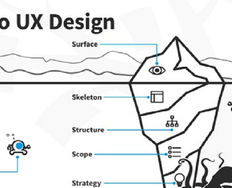
A common misconception is that UX is just what you see in the final product. However, the tangible elements of a product are just the tip of the UX iceberg, as explained in this video:

Transcript

UX design is still a relatively new industry. The first job to include the term “user experience” was Don Norman’s role as User Experience Architect at Apple in 1993. New UX roles and specializations are appearing constantly, and the field continues to evolve as technology and user needs change. For this reason, user experience is an incredibly exciting industry to be a part of—a fact that has likely brought you here.

Unravel UX Roles and Find Your Perfect Fit

Kate Conrick, a designer working for the Australian government, aptly sums up the sometimes-confusing state of UX roles:

“I built on my background in tech and design, picked up some solid research skills, added some business process and a sprinkle of marketing, and voila! A user experience designer. Or a Service Designer? A UX Researcher? A digital strategist? An experience analyst? Design thinker? Stuff tinkerer? Unicorn? Power ranger? You tell me. Because I’m not sure I know the answer.”

—Kate Conrick

If you’re confused about UX roles, you’re not alone. But don’t worry; you’ll soon have a strong grasp of the different UX roles available and which one you’d like to pursue. With your destination in hand (i.e., the role you aspire to), you can plot your course to becoming a UX extraordinaire. Eight of the most common UX roles are:

  • UX Designer.

  • UI Designer.

  • Product Designer.

  • UX Researcher.

  • UX Engineer.

  • UX Writer.

  • Service Designer.

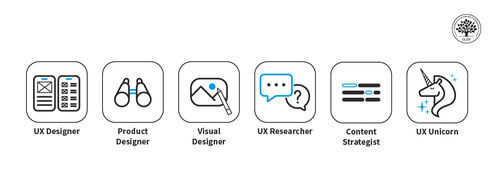
  • UX Unicorn (yes, this is a real job title!)

Once you’ve chosen your role, one of the primary stepping stones on your journey is to build your UX/UI design portfolio—an essential asset for your UX career. In this video, Morgane Peng, Design Director at Societe Generale CIB, explains what a portfolio is and its purpose:

Transcript

For each UX role, you’ll learn the expected tasks and deliverables and get a rough idea of whether you’ll like the role. Ready to make sense of UX roles?

Forget The Semantics and Focus on the Design Process

With all these job titles, it’s essential to contextualize their collective purpose—all UX roles exist to serve the design process. A great way to understand UX roles is to examine how they contribute to the design process. UX professionals perform a whole slew of UX tasks as they go through a design process to create a final design.

For instance, designers usually start by understanding users before they create designs and test them. Different UX roles simply take charge of various subsets of these UX tasks.

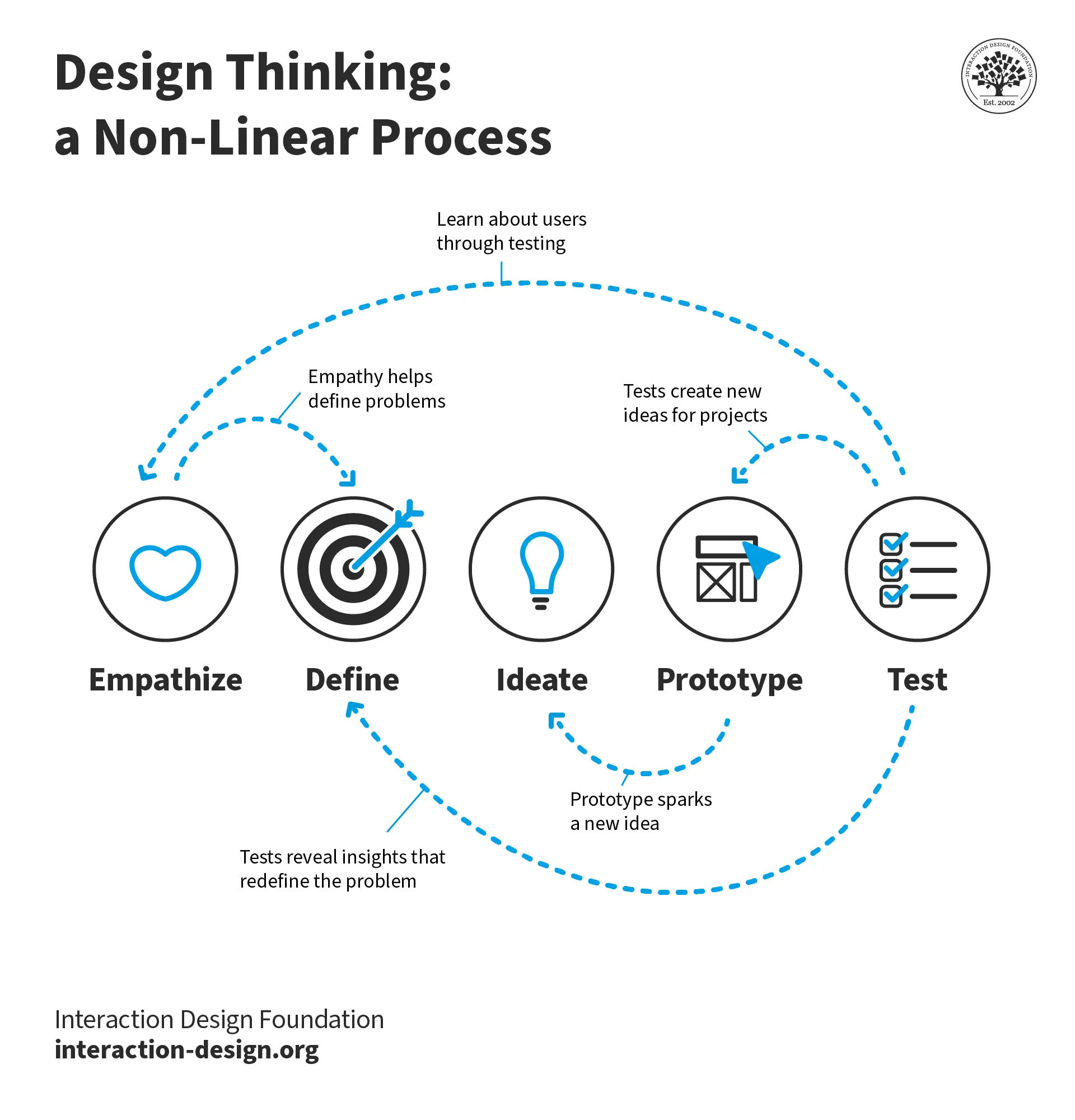
A diagram of the design thinking process. It shows the five stages which are empathize, define, ideate, prototype, and test. Dotted arrows connect each of the stages to each other in a non-linear order.

Design thinking is one of the most common design methodologies and helps illustrate where each UX role fits. As you can see, the stages are closely connected; they overlap and are iterative by nature. This overlap is partly why job roles are often so difficult to define and separate completely.

© Interaction Design Foundation, CC BY-SA 4.0

The design thinking process involves 5 phases that feed into one another:

  • Empathize: Where you learn about your users.

  • Define: Where you identify problems and user needs.

  • Ideate: Where you generate design ideas to solve the problems.

  • Prototype: Where you create mockups and, eventually, the final product.

  • Test: Where you test your designs with users to improve them.

These are some of the key UX tasks designers perform in each of the phases:


Example task 1

Example task 2

Example task 3

Empathize

User interviews

Contextual inquiry

Survey

Define

Persona creation

Journey mapping

Affinity diagramming

Ideate

Brainstorming

Worst possible idea

Storyboarding

Prototype

Paper prototyping

Wireframing

Hi-fi prototyping

Test

Usability testing

User testing

Heuristic evaluation

Each UX role explained below performs a slightly different range of these key UX tasks. For instance, a UX Designer is a generalist who takes charge of all the UX tasks, while a UX Researcher focuses on the empathize and test phases.

If you frame each role within the design process, it will help you see the big picture. That way, when a new job title pops up, you’ll be able to understand it in the context of the design process.

On top of that, companies might define UX roles differently. However, once you understand UX roles as “how they contribute to the design process,” you’ll be less confused when you go job hunting and portfolio building. In other words, you’ll focus less on the job title and more on what you’ll be doing.

The design process will also aid in your portfolio, as you’ll be able to target specific roles based on the stages you include in your UX case studies. For example, if you want to become a UX Researcher, you will want to focus on the empathize, define, and test stages in your case studies.

Enough talk; let’s look at the eight most common UX roles!

UX Designer: The All-Rounder

The role of a UX Designer is an exciting one! UX Designers cover the entire design process. This means you’ll get the satisfaction of seeing products or features go from a user problem to a final solution. As a UX Designer, you’ll:

  • Deeply understand your users, their needs, and what they want to achieve.

  • Generate and ideate ideas to solve your users’ problems.

  • Prototype designs and test them with users.

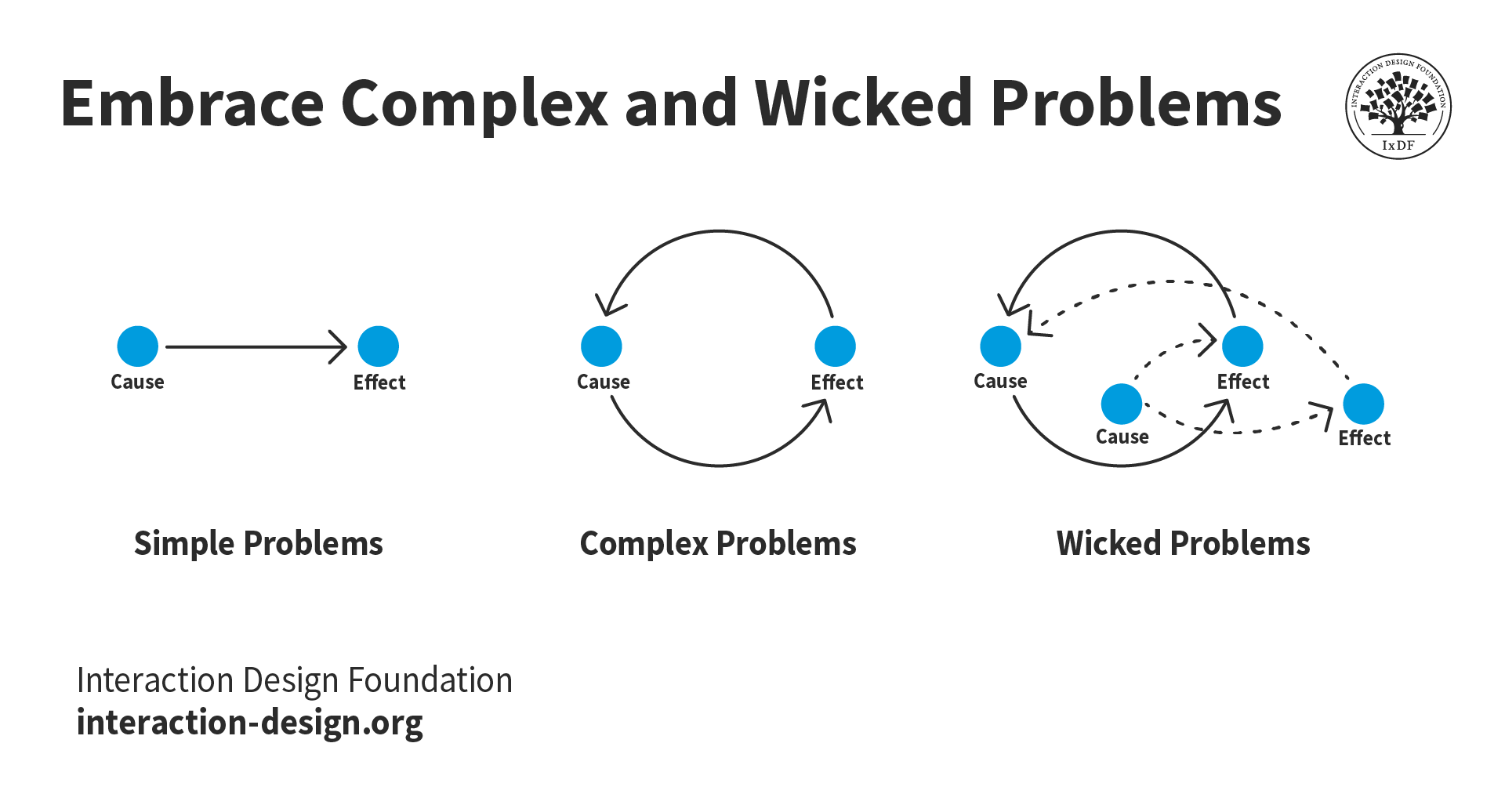
Illustration of different types of problems. Simple problems consist of a single cause and effect. Complex problems consist of a continuous loop of cause and effect. Wicked problems consist of multiple causes and multiple effects that all influence each other.

Do you have excellent problem-solving abilities? Then you’re in the right place! UX design is all about problem solving, from simple problems that have a single cause and effect to wicked problems that require a little more thought and ingenuity to solve.

© Interaction Design Foundation, CC BY-SA 4.0

The role of a UX Designer can look different depending on the size of the company. In large companies, a UX Designer typically works in a dynamic team with other UX professionals, including UX Researchers and UI Designers. In smaller companies like start-ups, UX Designers tend to handle all the design work. This means there’s a UX Designer role out there for you, whether you love to collaborate with specialists or own the whole design process.

UX Designers Are Also Known as...

  • UI/UX or UX/UI Designers (a User Interface (UI) Designer with some UX skills or vice-versa).

  • Experience Designers.

What Tasks Will You Perform as a UX Designer?

A UX Designer conducts all kinds of UX activities as part of their role. As a UX Designer, you will:

  • Conduct user research through interviews, observations, and other research methods.

  • Based on your user research, analyze and identify pain points from the users’ perspective.

  • Generate ideas through ideation techniques, such as brainstorming and worst possible idea. These techniques help to solve the users’ needs in a way that provides value to the company.

  • Select the most promising idea(s) based on their feasibility, desirability, and viability.

  • Prototype designs, which can range from simple paper sketches to high-fidelity digital mockups.

  • Provide and solicit feedback on your designs as well as the designs of your teammates.

  • Conduct usability and user tests to determine if you can improve your design(s) further.

  • Push a design solution out into the world that will benefit both your company and your users.

What UX Deliverables Will You Produce as a UX Designer?

While each company—and indeed, each team within a company—expects different deliverables from a UX Designer, the most common ones are:

  • User research reports.

  • Personas.

  • User journey maps.

  • “How might we” statements that capture a problem that your design aims to solve.

  • Paper prototypes.

  • Wireframes.

  • High-fidelity, pixel-perfect mockups.

  • Usability reports.

  • Heuristic evaluation reports.

  • User testing reports.

  • Design pattern libraries, style guides or design systems.

You’ll Love Being a UX Designer if you...

  • Want to be involved in the entire design process, from the initial stage of understanding users to the final stage of producing a high-fidelity prototype.

  • Love to learn and master a wide range of topics and skills, including:

  • Are fulfilled by analyzing complex data to produce design goals that you then work towards.

  • Thrive on creating intuitive and useful solutions that solve the problems users face in their lives.

UI Designer: Where Aesthetics and Usability Meet

UI Designers combine usability with visual design to build intuitive user interfaces. This role is an excellent fit if you’re a creative person who wants to incorporate psychology, user behavior analysis, and visual storytelling into your work.

Since a UI is a significant component of a product, it requires research, ideation, prototyping, and testing. Therefore, as a UI Designer, you have the chance to get involved in all five stages of the design thinking process.

Many UX Designers also take on UI design responsibilities, but it's important to remember that UI design is a component of UX design—they are not synonymous. Discover more about UI vs UX in this video:

Transcript

UI Designers Are Also Known as...

  • Interface Designer.

  • UX/UI or UI/UX Designer.

What Tasks Will You Perform as a UI Designer?

As a UI Designer, you will:

  • Use your visual design skills to create attractive interfaces that align with brand guidelines and meet user needs. Color, typography, graphics, and Gestalt principles all play a role in UI design.

  • Design layouts with well-organized, consistent, and accessible content across all devices.

  • Develop and maintain product design systems. Design systems include components like buttons, icons, and typography styles.

  • Apply accessibility standards and cultural considerations to produce inclusive designs.

  • Collaborate with UX Designers to turn wireframes and prototypes into refined, high-fidelity designs.

  • Provide detailed design specifications and assets to front-end developers.

What UX Deliverables Will You Produce as a UI Designer?

As with UX design, UI design deliverables vary from company to company. However, the most common deliverables include:

  • High-fidelity UI designs.

  • Interactive prototypes that showcase animations and transitions.

  • Design systems, including components like buttons, icons, and other reusable elements.

  • Visual style guides that include typography, color palettes, spacing rules, and more.

  • Responsive design layouts for various screen sizes and devices (such as mobile and tablet devices).

  • Documentation and design files for developers.

You’ll Love Being a UI Designer if you...

  • Relish the challenge of perfecting the balance between aesthetics and usability.

  • Are passionate about visual design and its principles, such as typography, color theory, and layout.

  • Thrive in the structure that comes from design systems and clear rules for branding, but know when to break the rules.

  • Are ready for the challenge of making complex information easy to navigate through thoughtful design.

  • Aspire to collaborate with UX Designers and developers to bring high-fidelity designs to life.

  • Have excellent attention to detail and get obsessed with the minutia of a design.

Product Designer: Upgrade to Business Class

Are you excited about becoming a UX Designer, but wish you could incorporate your business acumen into the role? Well, you’re in luck! Product Designers pay special attention to the product as a whole on top of the user’s experience.

As a Product Designer, you will contribute to the creation and management of the product’s designs, goals, and roadmap. A product roadmap is a high-level strategic summary of the direction of the product’s offerings and features.

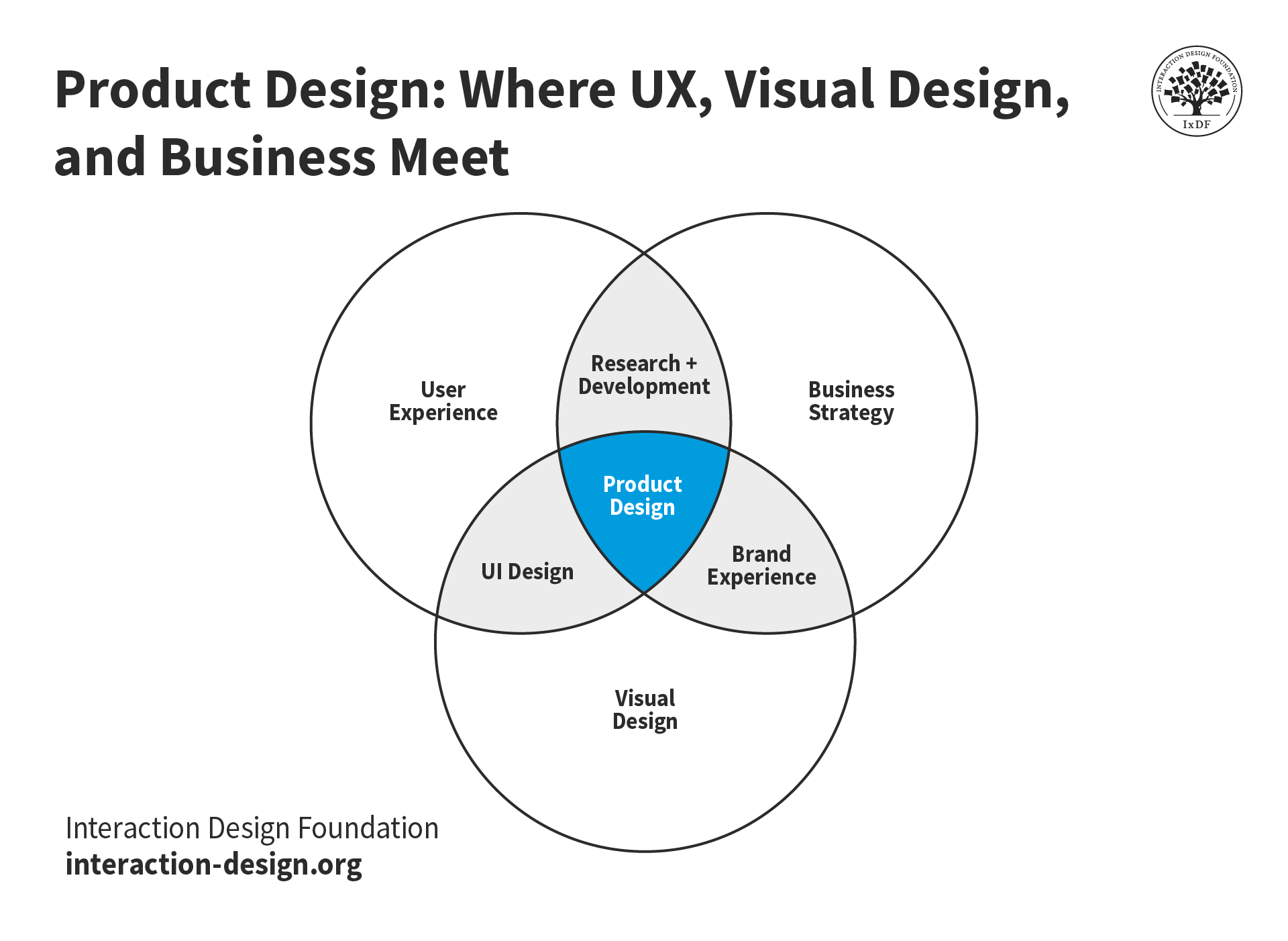
A venn diagram demonstrating the disciplines involved in product design.

Product design lies at the intersection of UX, visual design, and business strategy. While all UX designers consider business goals when designing user experiences, product designers must consider not only today’s business goals but also those of the long term.

© Interaction Design Foundation, CC BY-SA 4.0

Product Designers Are Also Known as...

There aren’t any synonyms for Product Designers. Some companies define Product Designers as identical to UX Designers. Other companies view Product Designers as senior UX Designers who have the added responsibility of charting a product’s goals and roadmap.

What Tasks Will You Perform as a Product Designer?

All the tasks listed under “UX Designer” above, plus:

  • Inform and plan the product’s roadmap 6–12 months into the future.

  • Collaborate closely with development to ensure they can successfully implement designs.

  • Work with marketing teams to communicate and plan product launches.

What UX Deliverables Will You Produce as a Product Designer?

Product Designers produce all the deliverables listed under “UX Designer” above, in addition to product roadmaps. You will likely co-develop roadmaps with stakeholders such as team leaders, the product manager and the CEO.

You’ll Love Being a Product Designer If You…

  • Are passionate about design and business.

  • Are excited by developing and integrating business goals into design and product decisions.

  • Want to participate in the entire design process.

  • Are ready to develop a deep knowledge of design and a good understanding of business.

  • Have a knack for analyzing data and reaching conclusions that balance business goals with user needs.

UX Researcher: The User’s Champion

UX Researchers bring the voice of the user into every part of the design process. They spend their days talking with users, analyzing data, and using their findings to influence design decisions. As a UX Researcher, you’ll participate in the empathize, define, and testing phases:

  • You’ll empathize with users to really get to know them and their needs.

  • You’ll define the problems that the product should solve.

  • Once the design team has created a prototype, you will test it with users and help validate and improve designs.

Discover more about UX research in this video:

Transcript

UX Researchers Are Also Known as...

  • User Researchers.

  • Researchers.

What Tasks Will You Perform as a UX Researcher?

As a UX Researcher, you will:

  • Gain a rich and complete understanding of users through qualitative user research methods. Methods include user interviews, user observations, and field studies.

  • Conduct quantitative user research using methods like surveys and card sorting. This research will confirm your qualitative research outcomes and inform design decisions.

  • Analyze the data you’ve gathered on users to synthesize key findings and make design proposals.

  • Advocate for users’ needs and perspectives within the design team.

  • Help inform product goals by presenting your research findings to stakeholders.

  • Test and improve designs by conducting evaluative research, such as usability and user testing.

What UX Deliverables Will You Produce as a UX Researcher?

These are the main deliverables you’ll create as a UX Researcher:

  • User research reports (for various qualitative and quantitative research methods).

  • User personas.

  • User stories.

  • User journey maps.

  • “How might we” statements.

  • Usability/user testing reports.

  • Heuristic evaluation reports.

You’ll Love Being a UX Researcher If You…

  • Have a strong passion for human psychology and the study of people.

  • Enjoy stepping into users' shoes to empathize with them and build a rich and deep picture of their perspectives and problems.

  • Are well-versed in psychology or interested in learning deeply about it.

  • Get excited about generating and analyzing complex data.

UX Engineer: A Bridge Between Design and Development

UX Engineers exist in the gap between design and development teams. If you’re a developer who understands and advocates for user experience, then you might have just found your perfect role. You can find UX Engineer positions at large companies with strong UX maturity. Given their coding and UX abilities, a typical responsibility of UX Engineers is to build high-fidelity prototypes that closely resemble the final product.

In this video, Syzmon Adamiak, Co-Founder of Hype4, explains the importance of good communication when designers hand off designs to developers:

Transcript

UX Engineers Are Also Known as...

  • Creative Technologists.

  • Product Design Engineers.

  • Design Technologists.

What Tasks Will You Perform as a UX Engineer?

  • Build high-fidelity, functioning prototypes using your UX and coding skills.

  • Package designs and communicate them in a developer-friendly format.

  • Work across research, design, development, and product management teams.

  • Front-end development tasks such as implementing UIs and new features.

What UX Deliverables Will You Produce as a UX Engineer?

Many of the same deliverables as a UX Designer, plus:

  • Polished and final prototypes.

  • Component libraries.

  • Code documentation.

You’ll Love Being a UX Engineer if you...

  • Perform best with a varied and multidisciplinary workload.

  • Have the desire to utilize both coding and UX skills.

  • Enjoy a fast-paced work environment where you will build rapid but functioning prototypes.

UX Writer: The Master Communicator

If you’re passionate about words and user-centered design, then you will make an excellent UX Writer. Copy is one of the most essential parts of a design, and it requires a specialist touch to optimize it for the best results.

As a UX Writer, you’ll write instructional text, onboarding content, and microcopy for buttons, error messages, and tooltips. You’ll contribute to the prototype phase of the design process, and you are crucial in finalizing the product before launch.

Torrey Podmajersky, UX Writer, explains how to get into UX writing:

Transcript

UX Writers Are Also Known as...

  • Copywriters.

  • Content Strategists.

  • Content Designers.

What Tasks Will You Perform as a UX Writer?

As a UX Writer, you will:

  • Write copy for user interfaces so people can easily navigate, use, and troubleshoot the product.

  • Create compelling page titles and navigation menu item names for optimal usability.

  • Write error messages that are simple, effective, and blame-free. In the unfortunate event of an error, users should feel assured rather than annoyed.

  • Craft effective emails and newsletters to achieve product goals (such as account signups).

  • Weave a cohesive narrative throughout the product. Users should experience a consistent tone of voice and direction no matter which screen or page they access.

  • Define and maintain a vision for the product’s language that other stakeholders will use.

  • Test your copy for performance and improvements.

What UX Deliverables Will You Produce as a UX Writer?

As a UX Writer, most of your work will be directly incorporated into the product itself, so it often won’t appear as a standalone deliverable. As a result, your most common deliverables are:

  • Copy, which you will incorporate into the product itself.

  • Editorial guidelines or product language guidelines that set the tone and content style for the product.

You’ll Love Being a UX Writer if you...

Have a strong desire to help users achieve their goals with the least cognitive load.

  • Can strongly empathize with your users and understand their goals.

  • Are passionate about achieving product and business goals.

  • Possess deep knowledge in writing and a solid understanding of UX design.

  • Enjoy using empathy, data, business goals, and logic to inform your writing.

Service Designer: People, Processes, and Places

Service Designers create cohesive, end-to-end solutions for services. This role is for you if you’re passionate about UX but want to take a wider view and design a service holistically. Service Designers focus on every touchpoint a customer or user interacts with and the internal processes that support the service. For example, a UX Designer may focus on the design of an ordering screen at a fast-food restaurant. However, a Service Designer will consider the entire customer journey, from how they find the restaurant to when they pick up their order.

Service Designers are involved in every stage of the design process, from research to testing. They cover multiple disciplines, including UX, customer experience (CX), and operations. In this video, Frank Spillers, CEO of Experience Dynamics, explains what service design is and isn’t:

Transcript

Service Designers Are Also Known as...

  • Experience Designers.

  • Customer Experience Designers.

What Tasks Will You Perform as a Service Designer?

Service Designers have a broad remit and carry out many tasks. They:

  • Map the entire service journey, including both customer-facing and behind-the-scenes processes.

  • Visit competitors, analyze their services, and discover what works and what doesn’t.

  • Conduct research with customers and employees to understand pain points and moments of delight.

  • Design service blueprints to outline how all parts of the service interact.

  • Collaborate with UX Designers, CX professionals, and operations teams to optimize service delivery.

  • Prototype and test solutions with customers and employees.

  • Align digital and physical service touchpoints for a consistent and immersive experience.

What UX Deliverables Will You Produce as a Service Designer?

Many of the same deliverables as a UX Designer, plus:

  • Service blueprints.

  • Customer journey maps.

  • Business model canvases.

  • Value proposition canvases.

  • Ecosystem maps.

  • Experience prototypes.

  • Employee experience maps.

You’ll Love Being a Service Designer if you...

  • Enjoy solving complex, system-wide challenges that cover multiple touchpoints and interactions.

  • Thrive on designing holistic, end-to-end experiences that benefit customers and service providers.

  • Are passionate about improving not only the user experience but the operational efficiency of services.

  • Love working at the intersection of UX, CX, and business strategy.

  • Enjoy collaborating with various stakeholders, from customers to frontline employees and business leaders.

  • Have a keen interest in research with both customers and employees to gain actionable insights.

UX Unicorn: The Mythical Start-up Beast

You will typically find UX Unicorns in the world of tech start-ups. If you’re someone who possesses the usual set of skills required for a role and additional skills in another domain, then you might just be one of them. These additional skills multiply the value a unicorn contributes to a business—hence the legendary name.

A UX Unicorn is similar to a UX Engineer and typically refers to a UX Designer proficient in design and front-end or even full-stack development. Where UX Engineers and unicorns differ, however, is that the engineer is part of a team, whereas the unicorn often is the team. However, UX Unicorns that can achieve results comparable to those of a designer and developer team are extremely rare.

What Tasks Will You Perform as a UX Unicorn?

All the tasks listed under “UX Designer” above, plus:

  • Develop live front-end prototypes to test with users for more realistic results than a static prototype.

  • Implement the front-end code of a design. In exceptional circumstances, the unicorn may also implement the back-end code.

What UX Deliverables Will You Produce as a UX Unicorn?

All the deliverables listed under “UX Designer” above, plus:

  • Front-end prototypes.

  • Front-end code that is ready for launch.

You’ll Love Being a UX Unicorn if you...

Excel at both UX design and development, and have a desire to take on both roles. A UX Unicorn is the sort of phenomenon that happens if, for instance, you have been an active hobbyist for years. If you’ve got a strong passion for and deep knowledge of front-end development, this might just be the role for you.

Take Your Pick: Which UX Role Should You Go For?

Which of these eight UX roles speaks to you the most? If you cannot decide, Stephen Gay’s advice might help you. Stephen Gay is the UX Lead of Google One, and he recommends that you choose your design role based on your passion and skills:

Copyright
Transcript

If you’re still unsure, know that many people start their UX journey with the UX Designer role. This allows you to experience the different specializations, and if you find you especially like one of them, you can dive deeper into it.

UX Roles Are Ever-Changing

UX roles are in flux—and likely always will be. After all, designers seem to have a limitless amount of creativity that makes them reinvent and redefine roles every few years. For example, artificial intelligence and voice interaction are two areas where the demand for new UX practices is rapidly growing.

When you go job-hunting, remember that different companies might define roles differently. Large companies, for instance, tend to hire specialist designers, so they often have specific roles such as “User Researcher” and “UI Designer.” Small and medium-sized companies, on the other hand, tend to prefer generalists and will have roles such as “UX Designer” or even “UI/UX Designer.” Always carefully read the job description of an opening before you apply, and check the requirements to see where they fit within the design process.

Next Steps: Build a Standout Portfolio

Once you’ve chosen your role, your next course of action is to build your UX portfolio. And you can get started right away! You can use student projects, hobby projects, hypothetical projects, and more to create case studies that will get you hired.

Remember that each case study is a story, and you’re in complete control of how it is told. For example, if you start as a UX Designer and realize you are most engaged with UI design, you can translate any project into a focused UI design case study.

You can even reframe your past non-design experiences into the UX role you’re aiming for, as Morgane Peng explains in this video:

Transcript

The Take Away

UX roles can be confusing and overlap in some ways, but all exist to serve different parts of the design process. A great way to understand UX roles is to identify which phases of the design process they contribute towards.

“The only way to be truly satisfied is to do what you believe is great work, and the only way to do great work is to love what you do. If you haven't found it yet, keep looking, and don't settle. As with all matters of the heart, you'll know when you find it.”

—Steve Jobs

Here’s a quick summary of the eight common UX roles:

  • UX Designers take charge of the whole design process and work on all five phases of the design thinking process.

  • UI Designers focus specifically on a product’s UI and combine visual design with usability.

  • Product Designers are like UX Designers but also help chart a vision of the product’s mid-to-long-term roadmap.

  • UX Researchers focus on understanding and advocating for users. They participate in the empathize, define, and test phases.

  • UX Engineers fill the gap between designers and developers and use both UX and developer skills.

  • UX Writers are all about crafting persuasive, clear, consistent copy that contributes to the prototype phase.

  • Service Designers take a holistic approach when they design services and cover the disciplines of UX, CX, and operations.

  • UX Unicorns are rare people who handle both UX design and front-end development, typically by themselves.

Aim for a role that matches your passion and skills. If you’re still working out what excites you about UX, get started as a UX Designer to allow you to experience different areas of the field. You can then narrow your focus as you discover what you truly enjoy doing.

Finally, once you’ve chosen a role, you can get started on your portfolio, and you’ll be preparing for interviews in no time!

References and Where to Learn More

Want to create a portfolio that gets you hired? Take our course, Build a Standout UX/UI Portfolio: Land Your Dream Job, and learn how to showcase your skills, tell compelling project stories, and impress employers.

If you don’t have any UX experience, discover 3 Ways to Find Projects for Your UX/UI Design Portfolio Case Studies.

Find out How to Use Visuals to Elevate Your UX/UI Design Portfolio Case Studies, regardless of the role you choose.

Learn more about the following disciplines in our topic definitions:

For a robust foundation in UX, take our courses, Design Thinking: The Ultimate Guide and User Experience: The Beginner’s Guide.

Discover How Much You Can Earn as a UI & UX Designer.

Read Kate Conrick’s thought-provoking article on UX roles, We Need to Talk About UX Roles.

Find out why Jakob Nielsen’s believes that AI may bring about more UX Unicorns.

Images

Hero image: © Interaction Design Foundation, CC BY-SA 4.0

Feel Stuck?
Want Better Job Options?

AI is replacing jobs everywhere, yet design jobs are booming with a projected 45% job growth. With design skills, you can create products and services people love. More love means more impact and greater salary potential.

At IxDF, we help you from your first course to your next job, all in one place.

See How Design Skills Turn Into Job Options
Privacy Settings
By using this site, you accept our Cookie Policy and Terms of Use.
Customize
Accept all

Be the One Who Inspires

People remember who shares great ideas.

Share on:

Academic Credibility — On Autopilot

Don't waste time googling citation formats. Just copy, paste and look legit in seconds.