You might see the "UX/UI designer" job title and think UX and UI are interchangeable. There’s overlap, for sure, but in spite of all the things that do carry over between the UX and UI spheres, the two are definitely separate disciplines.
This video breaks down the differences between UX and UI design; what’s more, it explores why both are essential things for a successful user experience.
"UX design" stands for "User Experience design," and UX teams study how users interact with a product—or service—to understand the users' needs, and these insights let designers create a product that’s really intuitive and efficient—and one that people will want to use.
"UI" is short for "User Interface." UI focuses on the screens, icons, buttons, visual elements, and interfaces in a user experience—so, all the display-related items. We’re going to get into and explore both disciplines, how they’re different, and how to know which career you should go for.
What is UX design?
UX designers have got an admirable goal to attain, and to boil it down to one that’s common to all of them: They aim to create products—and services—that give their users relevant, meaningful, usable, and pleasurable experiences. They look at a product in a holistic way and focus on meeting the users' needs best, and that’s hence why UX designers can—and do—use a process called "user-centered design." UX design is the discipline behind what—or rather, who—ensures that a product is easy to use and enjoyable for the people who access, use, and are (hopefully) delighted at what brands produce for them.
At this point, let’s step back and think of it in this way: Have you ever been tied up in a bureaucratic process and been left utterly frustrated—and maybe even discouraged—for your trouble? Consider filling out a form, for example, and how a badly designed one can confuse people—and frustrate them as they’re not just slowed down but now also have to worry that they mightn’t get what they want if they complete the form incorrectly. Well, UX design practices could make that process pleasurable (and we can mention here the well-designed forms are one of the objectives in UX design).
We can take UX across many trades and industries; but, for the best comparison here, interior designers and architects create physical spaces that are comfortable and easy to navigate—well, UX designers do the same for digital spaces. As they’re out to make the best user experience, designers have got to consider the context in which users will actually use the product they’re designing for them (for instance, do they use it while on the move?). But there are other factors, too, like how they design around the device the product appears on or what time of day the product gets the most usage from the users themselves.
Accessibility, information hierarchy, responsive design, and navigation flows are part of UX—and they’re big considerations that call for frequent collaboration with the UI designers so they can make sure that the product works for the most users possible. The goal here is to reduce "friction"—and that’s a term for unnecessary difficulty or stress when someone’s using a product, and here we might think back to that trickily-worded, hypothetical form we discussed earlier.
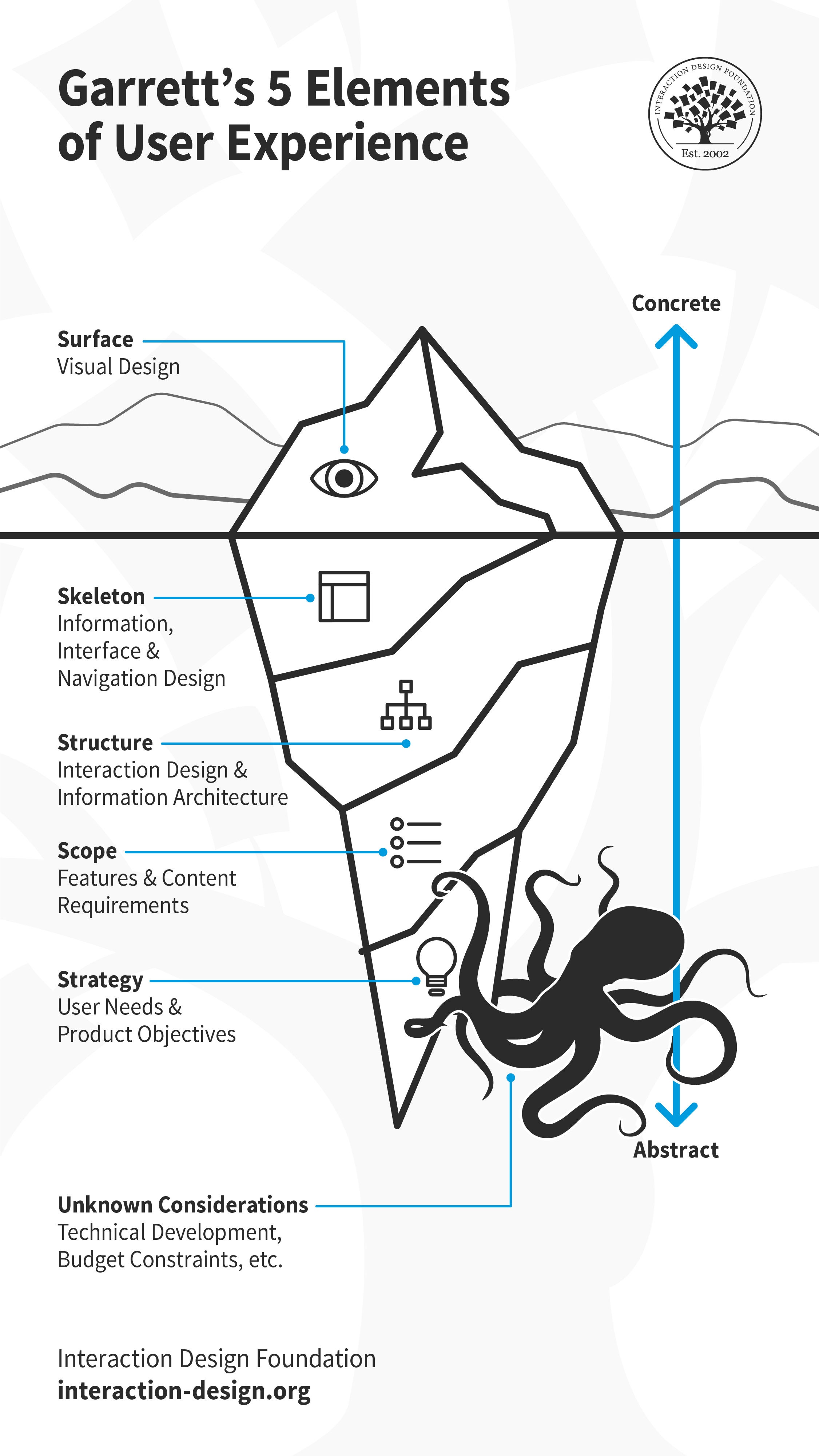
Much like an iceberg, visual design is only the surface of user experience. Underneath, there is so much more including skeleton, structure, scope and strategy. These layers are by no means standalone, and influence each other. Decisions taken at one plane can cascade up or down the layers. There will likely be other considerations that emerge later, which might impact the experience. For example, if the team encounters technical challenges or budgetary constraints during development, they might have to revisit some design decisions.
© Interaction Design Foundation, CC BY-SA 3.0
What is UI Design?
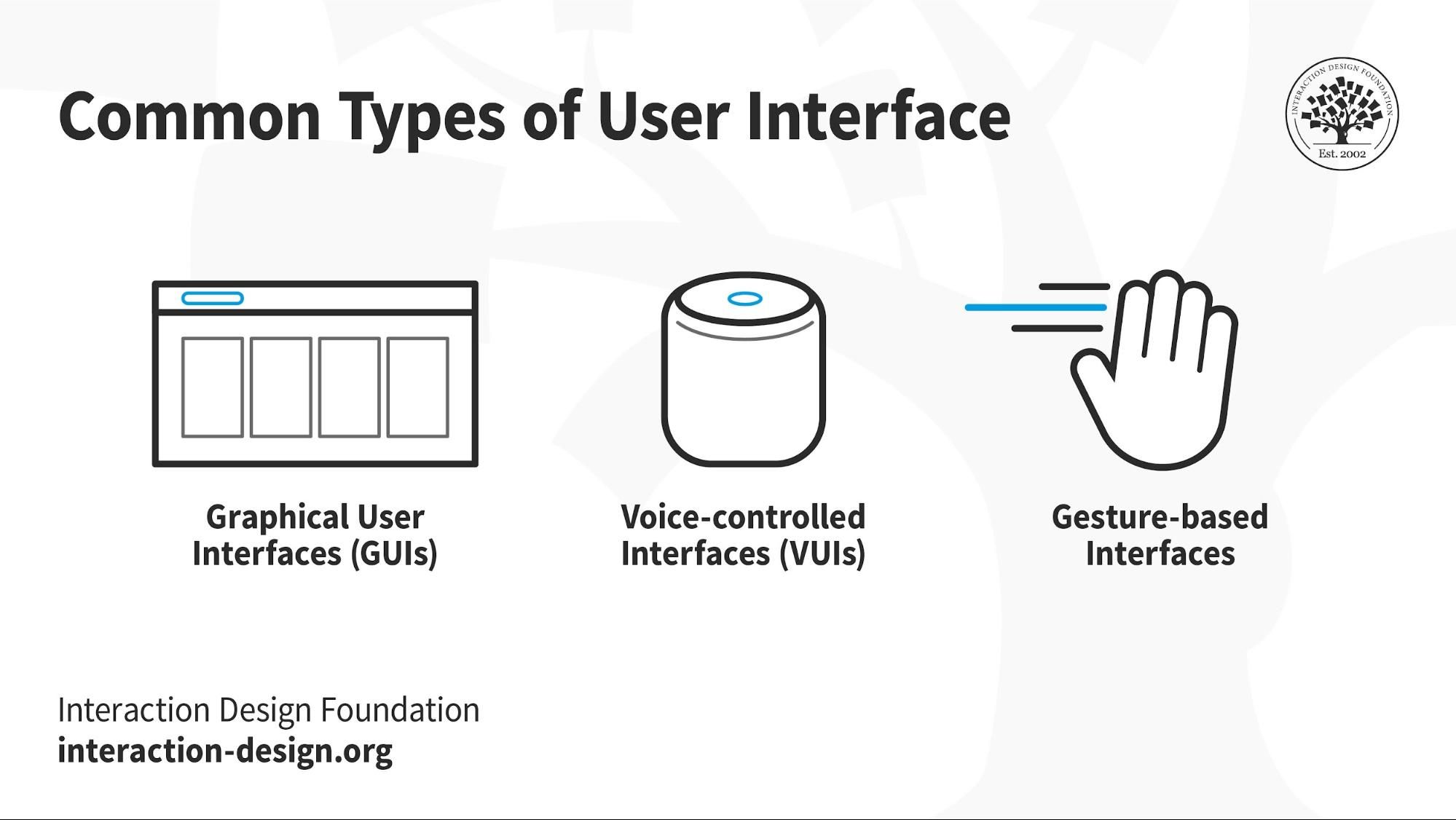
UI designers build interfaces—namely, “user interfaces”—for digital products or services that are centered on detailed interaction. UI is more specialized than UX design, and that’s because it focuses—as in, exclusively focuses—on the elements that users know, such as buttons and icons. UI elements do tend to be visual, to be sure; that said, though, there are other types of UI, such as voice- and gesture-based interfaces.
In this video, Vitaly Friedman, Senior UX Consultant, European Parliament, and Creative Lead, Smashing Magazine, explains how effective UI design patterns solve recurring interface problems. This shows how thoughtful interaction choices enhance usability and create smoother, more user-friendly experiences.
A point that can often muddy the waters is how UI stands in relation to graphic design—and there's often a misconception that UI design is virtually the same as graphic design. There are similarities and they apply some of the same skills, sure, but despite that, UI designers create interactive visual elements (as in, buttons, screen animations, layouts), and graphic designers make static elements (think logos and header images here). A user experience contains several user interfaces that go into making a whole product, and after the UI designer creates the interactions for a website, a front-end developer steps in to focus on the coding of the website’s visual aspect.
© Interaction Design Foundation, CC BY-SA 4.0
Why Is it Important to Know Both UX and UI?
In product design, good UX (user experience) design is what’s behind the effect when the end-user finds value in what the brand has to offer them, while good UI (user interface) design has efficiency, effectiveness, and satisfaction as its focal points in that brand’s product—say, a mobile app. Let’s keep thinking about mobile apps for a moment, because in successful ones there’s a harmonious blend of UX and UI that translates to smooth user flows and an appealing interface for users to enjoy—and hopefully find delightful.
A designer who understands UX can avoid bad UX—and how they keep themselves safe from stumbling into bad UX territory is they create intuitive user paths.
For example, in an e-commerce app, good UX makes navigation easy through product categories; UI knowledge, on the other hand, is what makes sure that you use effective visual elements that are the most appropriate to each task so you give the overall experience a big boost.
Key Difference Between UX and UI With Example
© Interaction Design Foundation, CC BY-SA 4.0
Look deeply into digital design and you’ll see that the roles that UX and UI have are different but they’re things that complement each other. User experience is a “big deal,” and that’s principally since it spans a wide range of things which the user sees and feels along the way—and it’s that overarching holistic experience which is so vital.
What does UX concentrate on—as in, as a discipline or area? Well, we’ve got user psychology, cognitive flow, and task completion, and—as to where we’re going with the goals of it—it aims for an intuitive interaction between the user and the product, and that’s most of the “secret sauce” behind the magic of a seamless experience.
The UI side of things, though, is all about the “screeny stuff,” as in those actual elements that make up the interface, and so it’s about all those wonderful items that go on screens—like buttons, lists, and text fields. The emphasis with UI is on the ease of interaction that a user gets to have so it enhances the user's journey, and that journey gets charted by UX.
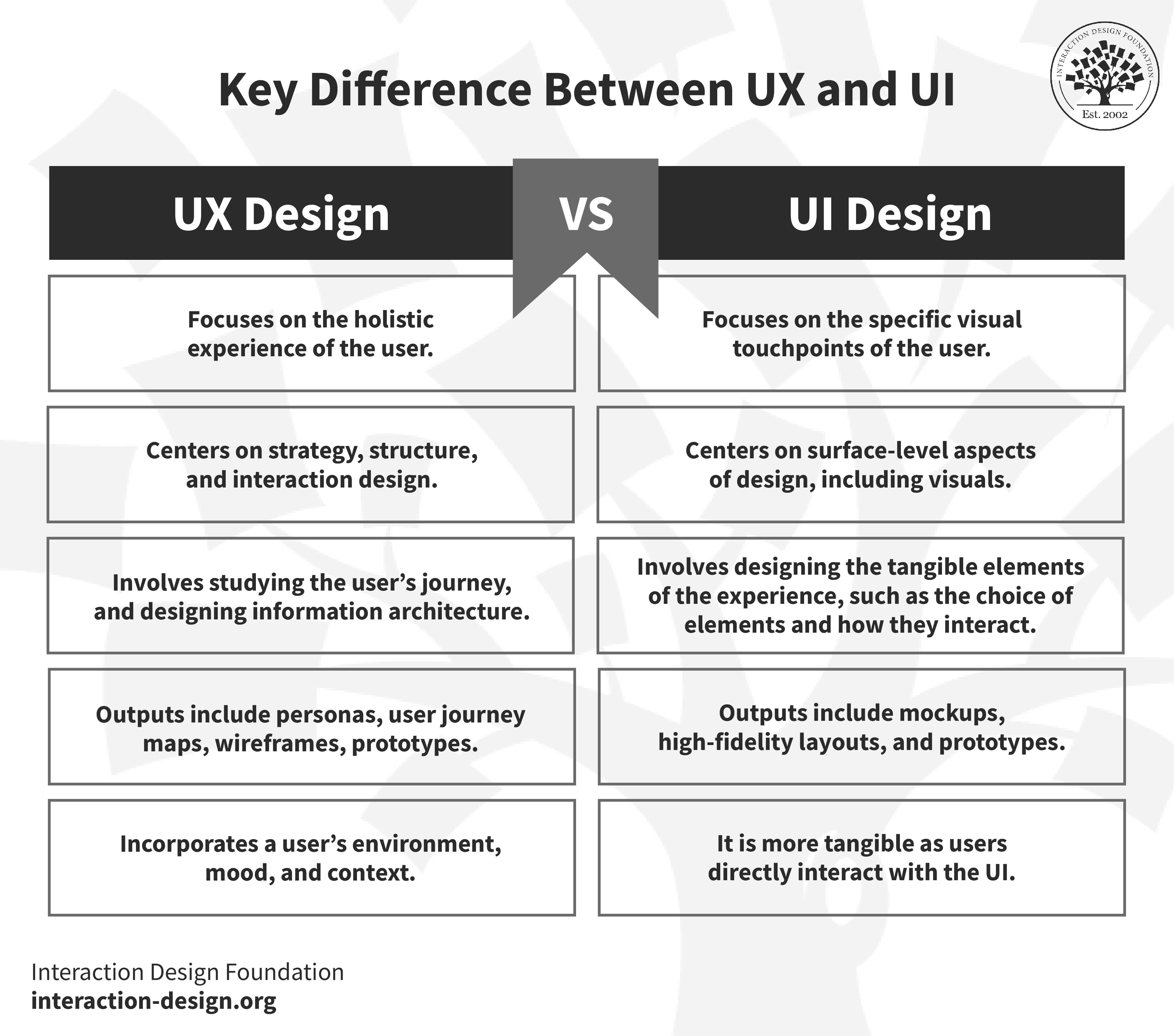
Look at the table below and you’ll see what the most important differences between UX and UI design are.
UX Design | UI Design |
Focuses on the holistic experience of the user. | Focuses on the specific visual touchpoints of the user. |
Centers on strategy, structure, and interaction design. | Centers on surface-level aspects of design, including visuals. |
Involves studying the user’s journey, and designing information architecture. | Involves designing the tangible elements of the experience—e.g., the choice of elements and how they interact. |
Outputs here include personas, user journey maps, wireframes, prototypes. | Outputs here include mockups, high-fidelity layouts, and prototypes. |
It incorporates a user’s environment, mood, and context. | It’s more tangible as users directly interact with the UI. |
These are the main differences that we have between UX and UI, to boil it down a bit more:
The goal of UX design is to find out what user problems are and then solve those things.
The goal of UI design is to create interfaces that are attractive, interactive, and intuitive.
Example of UX vs UI
UX design is the part of things that decides what features are going to go in the app, let’s say for example a mobile app for users to complete a purchase they want or need to make. For instance, is it going to have a loyalty program where you gain points for each purchase you make? Will the user be able to track the points on the app? Perhaps the app allows you to shop online or see the current specials on offer—all of that’s part of the user experience, the UX.
UI then selects the interactive elements to guide that path, and here’s where that juicy display stuff gets to come into fruition. And here’s how we can see the beauty of the mix—namely, how when you employ both UX and UI design effectively, it leads to better user engagement, retention, and, ultimately, conversion.
In the main, UX designers are the ones who handle the first steps in the product development process—first mapping out the skeleton of the user journey—and then the UI designers come in and make the visual and interactive elements, and both have a product manager overseeing them, to get to a successful product delivery that’s on time.
If you've got the store's app on your phone or visit its website, then that’s part of the user experience. To fully enjoy that experience, the user interacts with the interface and gets the most out of it.
UX and UI Design: How Do They Work Together?
Let's take a look at Shazam—and Shazam is a popular brand that identifies music that’s playing around you—and we’ll see how this user experience solves the specific problem of how to find out what that cool tune on the radio, at a bar, or in a shop is—and the artist who’s behind it. All of this helps many music lovers around the world skip the detective work they’d otherwise have to put into working out what the name of that tune is, who sang it, what album it’s from, and so on.
Now, you can not only identify the song but store that song for future reference, too. Shazam connects to music streaming apps like Apple Music or Spotify, and it creates a playlist of all the tracks you’ve ‘Shazamed.’ The UI is simple and clean because that’s what the user needs it to be.
Now, imagine you’ve just turned on the radio, and the song that’s playing is trailing off—a track you like, but it’s coming to an end and suddenly you’ve got just a few seconds to get your phone out. Well, happily, the app caters to this exact issue—as the interface is pared back—with just one large button on the screen. That animated button signals the user to press it, with a line of text that says, nice and simply, “Tap to Shazam.”
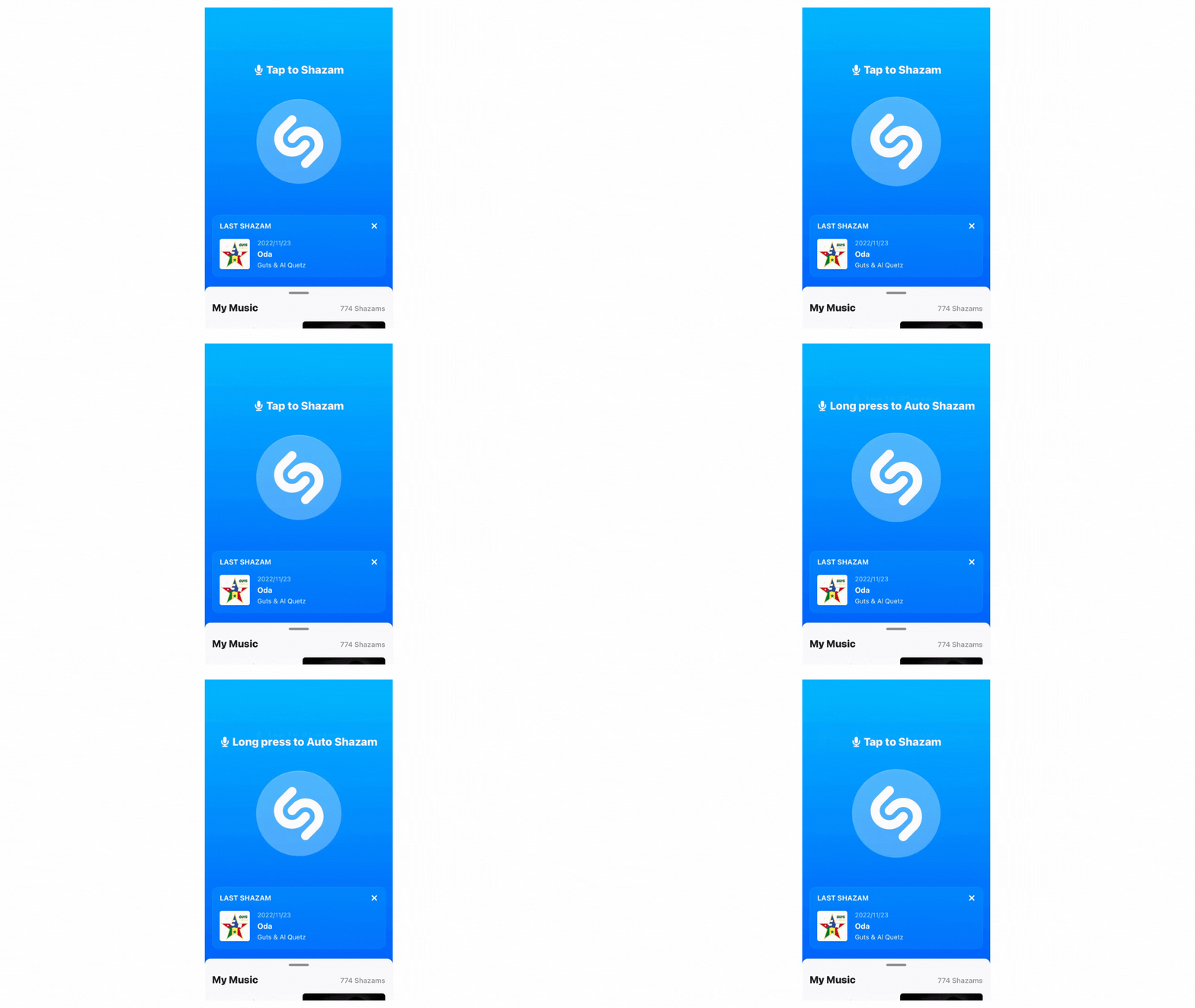
The animation, the icon, and the text are all part of the visual design, and the UI designer makes sure they all work together and really add to the positive user experience. It demonstrates how UX and UI can—and should—work together.
© Shazam, Fair Use
UX vs UI Design: Which Career Path Should I Take?
UX and UI are intertwined, and that’s why so many job ads are for a UX/UI designer. If you’re doing UX design, it’d be helpful to have some UI skills—and that’s especially the case for projects with low time and resources to hand. Another point is that “UX/UI Designer” doesn’t necessarily mean the individual or organization who penned the ad hasn’t a clue about the fineries involved in the two positions and has just, from being confused, mashed the two together without further thought. In an ideal world, though, the jobs would be separate, and the UX designer and UI designer would collaborate rather than be one and the same.
It’s a real plus to have UX and UI design skills, sure, but you don’t have to master both—really. Better to decide which path you’d like to take and focus on building your skills and experience in that area. You’ll be pretty much likely to pick up something about the other, anyway—as they're interconnected. UX and UI design are in high demand, in any case—and they’re generally well-paid—so you’ve got an opportune moment to look into a career in either one of these disciplines.
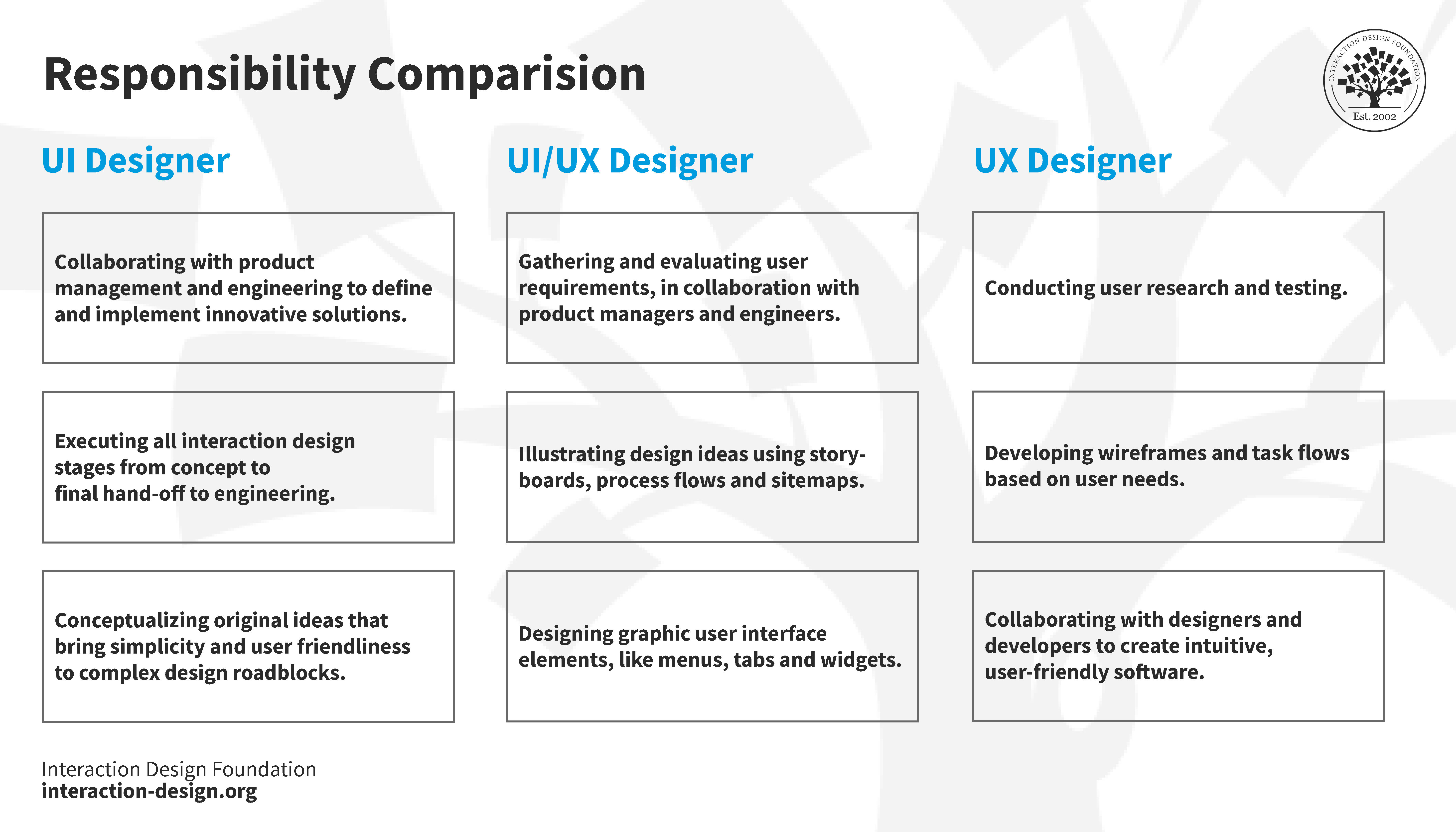
Let's take a good look at what you'd be responsible for in each role—in our comparison table below—to put yourself in the best position to decide which path you’d like to take.
© Interaction Design Foundation, CC BY-SA 4.0
The soft skills you need for both roles are pretty much the same, and they’d be a handy benefit to have in both jobs, although—sure—the hard skills are more distinct for each role. Note that this list isn’t exhaustive, but it does highlight some key soft and hard UX and UI design skills.
UX Design
Soft skills | Hard skills |
Communication | User research techniques |
Strategy | Analysis |
Problem-solving | |
Collaboration | |
UI Design
Soft skills | Hard skills |
Prototyping | |
Communication | Animation |
Adaptability | |
Collaboration | Design patterns |
Part of what makes UX and UI design so appealing is the many transferable skills, and here we go with some of them, below:
Graphic design
Research
Customer service
What Does a UX Designer Actually Do?
UX design is varied and multi-disciplinary—and it’s pretty broad in this regard. You'll conduct user research through interviews, usability tests, and card sorting—among other methods—to discover user behavior, needs, and pain points (the users’ problems), and you can learn more about being a UX designer in this article.
What Does a UI Designer Actually Do?
Now, if you’re more into a design’s visual and creative aspects and all the “screen stuff” that turns up in exciting and popular apps, then UI design will be more your thing. As a UI designer, you’ll work with a developer—closely—so your designs get to come to life in the way you pictured them, and you’ll have to prepare a UI style guide, too, with all the documentation, UI components, UX components, and references to make it easer to collaborate with various stakeholders.
UX vs UI Salary: Who Gets Paid More?
As with any career, various factors influence salaries—such as location, experience level, industry, project type, and education, to say nothing of economic factors—and that’s why it’s helpful to use brands such as Glassdoor and Indeed so you’ll be able to know what to expect.
In the main, UX and UI designers get paid almost the same, so it’s really a matter of which role you prefer. As we mentioned earlier, you might well see a position for “UI/UX designer” advertised, which means that you may find yourself doing both at some point.
How Do I Start Specializing in UX or UI?
Suitably intrigued? Well, that’s great—and we can help you get started on your journey.
The Interaction Design Foundation—or IxDF—has got the world's most extensive open-access design library, and you’ll find an article on pretty much every aspect of UX design. Here are some to get you going:
UX Design:
UI Design:
Now that you’ve got even more knowledge under your belt, why not proceed to something more substantial? An IxDF membership gives you access to over 35 UX and UI design courses. Simply head to the course page and choose your path.
The Take Away
UX and UI design do pretty much go hand in hand; saying that, though, they’re separate entities, or disciplines, too. UI is concerned with those interactive elements that appear on the surface—the “screen stuff,” as it were. What UX refers to is far broader; really it runs the gamut across all aspects that are in a product, a service, or an experience. A great deal of overlap exists between UX and UI designers, but each role does have its distinct skills and tasks and responsibilities—an important reason to make sure you read the job description carefully, and see if it matches your interests and skill set. Money-wise, there’s similar remuneration in store for “UXers” and “UIers,” and there’s certainly a wealth of free resources to help get you on your way if you’re serious about a career in either area of what’s certainly an exciting field.