Card Sorting

Your constantly-updated definition of Card Sorting and collection of videos and articles.
Be a conversation starter: Share this page and inspire others!

295 Shares

What is Card Sorting?

Card sorting is a user research method that helps designers understand how users categorize and organize information. Participants categorize content on index cards, physically or digitally. Designers use card sorting in the information architecture (IA) phase to build structures that align with users’ mental models.

In this video, Design Consultant and author Donna Spencer states, “The most important thing about this [card sorting] is that you learn about how people think about the ideas under question. You understand what things people think go together. You learn a lot about what people call those things…” 

Transcript

Why Is Card Sorting Important in Design?

Card sorting is important because it helps designers understand user mental models, improves IA, and is a key part of a user-centered design approach. It contributes to the overall success of a design because it integrates the final product with user expectations and behaviors.

Card sorting impacts design in the following ways: 

  1. User-Centered Design: Card sorting allows designers to understand users’ unique perspectives and helps to design interfaces that align with users' mental models.

  2. Informs Information Architecture: It helps designers organize information and content in the most intuitive way. When designers analyze how users categorize content, they can create IAs that represent user expectations which, in turn, improves navigation and usability.

  3. Content Relevance: Card sorting helps identify and prioritize what content or features users consider most important so they are easily accessible.

  4. Usability Improvement: When designers understand how users expect information to be organized and presented, they can make informed decisions to improve the overall usability of a design. Usability enhances the user experience and reduces cognitive load.

  5. Validation of Design Decisions: Card sorting can validate existing IAs or test proposed structures. This ensures that design decisions are grounded in user preferences and allows for more effective designs.

  6. Iterative Design Process: Design is an iterative process, and card sorting fits into this since it provides feedback that can be used to refine designs. Continuous testing and adjustment based on user input lead to designs that continually improve over time.

  7. Collaborative Decision-Making: Card sorting can involve stakeholders, including clients and team members, in the decision-making process. It facilitates collaboration and considers diverse perspectives.

  8. Optimizing Navigation: Designers can use the insights from a card sort workshop to optimize navigation paths—crucial for websites or applications with a large amount of content. 

  9. Enhancing Findability: Card sorting helps designers with discoverability. Users can find relevant information more easily when the design aligns with their mental models.

  10. Adapting to User Diversity: Different user groups have different ways to cluster and label information. Card sorting allows designers to accommodate the diverse needs and preferences of various user segments.

A pair of hands arranging a set of different colored post it notes, in the manner of a card sort

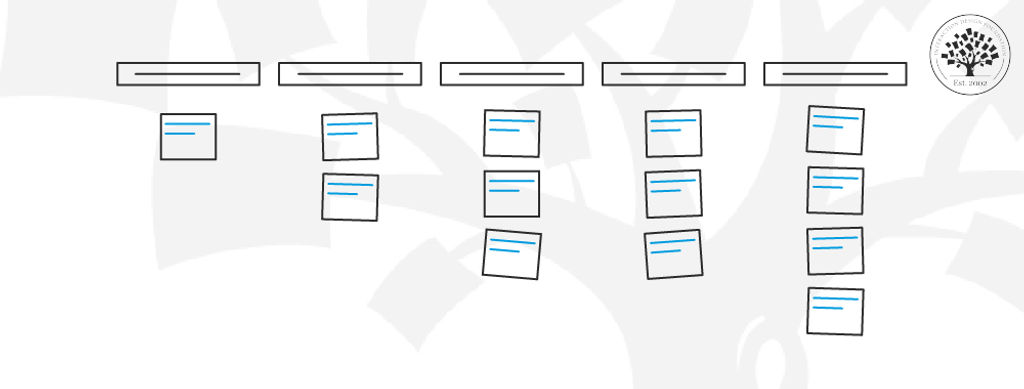
Use plain index cards or post-it notes for an in-person card sort. Card sorting helps identify and group patterns naturally and can inform a website or app’s IA and overall design. Put the process to use from the design research phase and beyond.

© UX Indonesia, Unsplash License

Types of Card Sorting

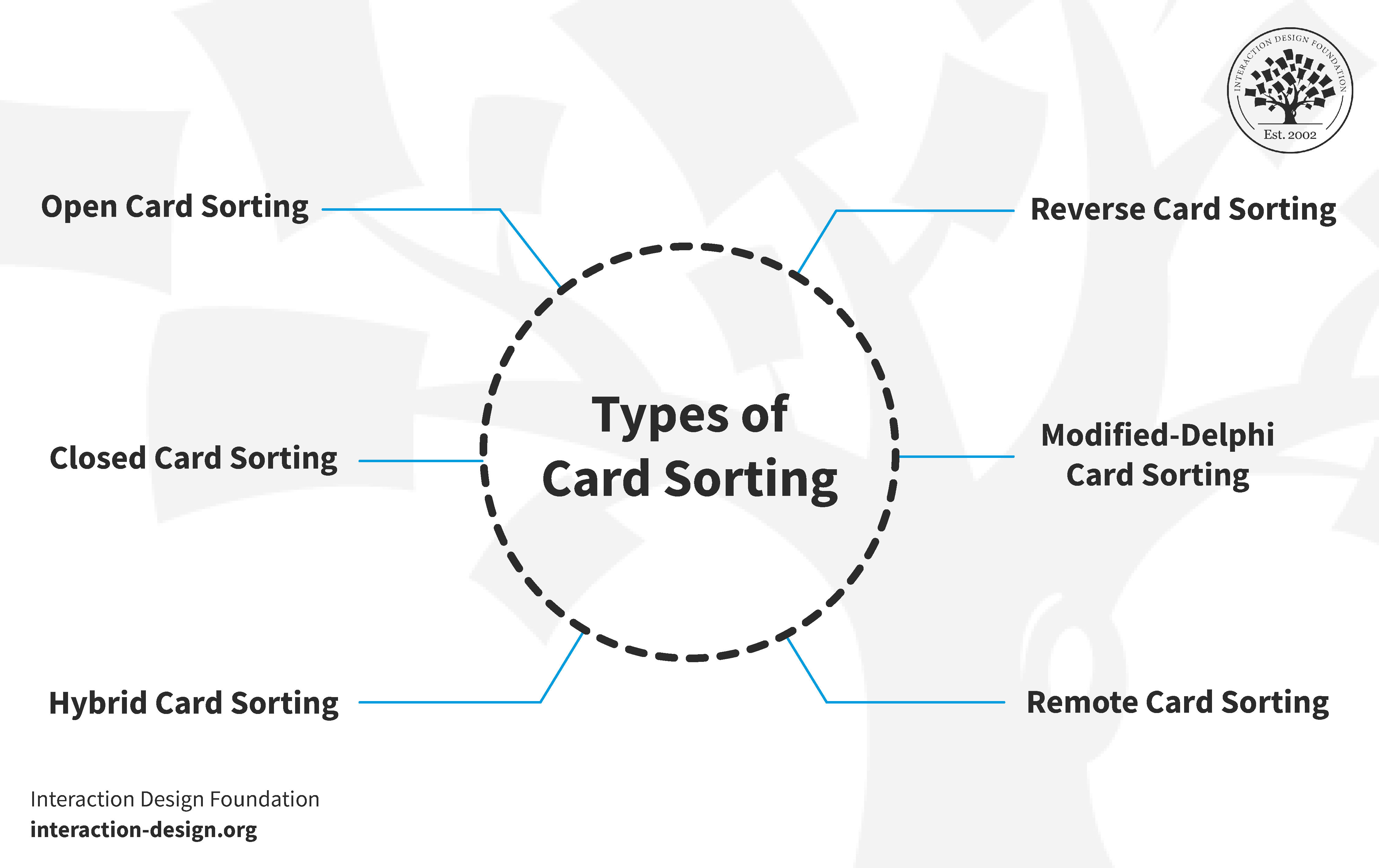
There are several types of card sorting: 
© Interaction Design Foundation, CC BY-SA 4.0

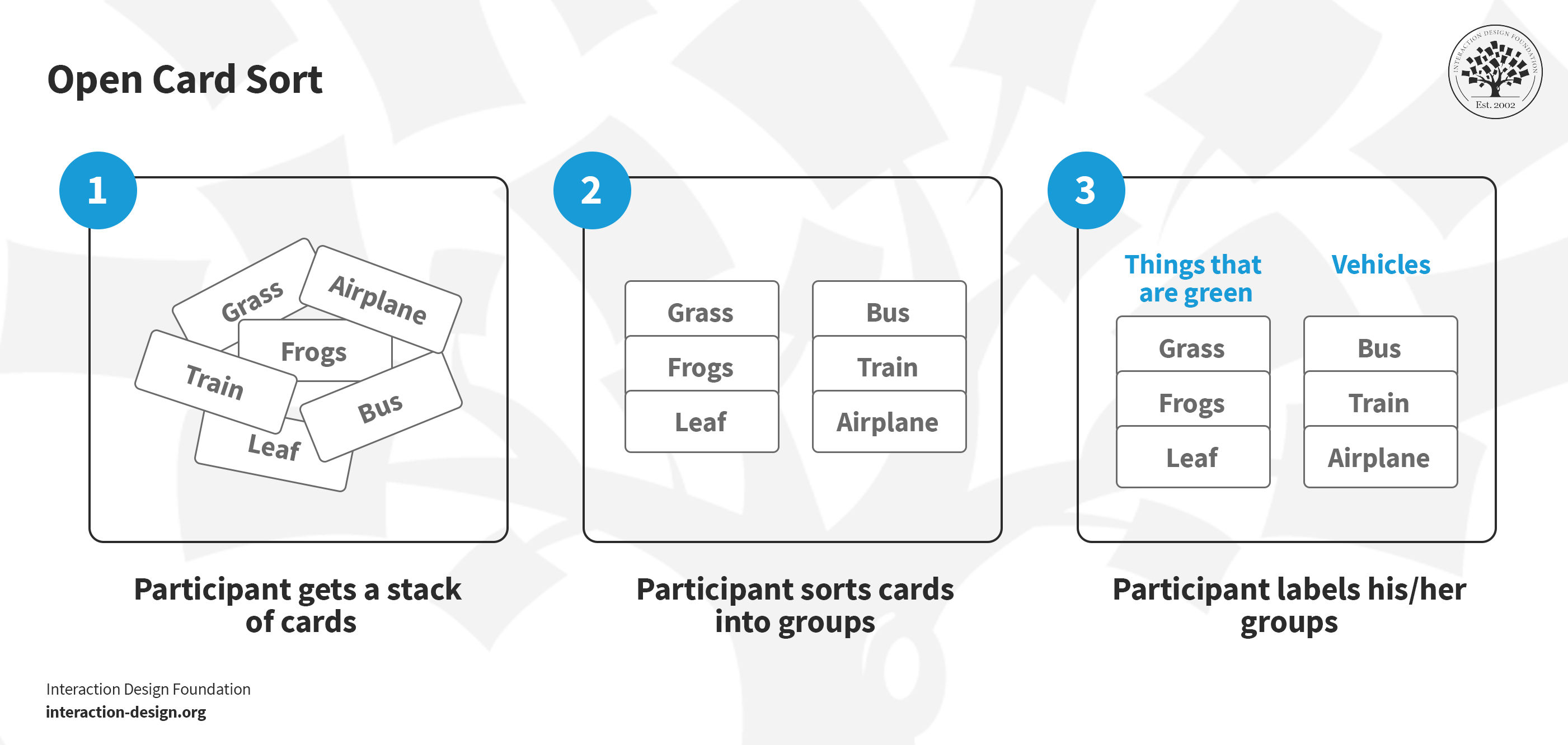
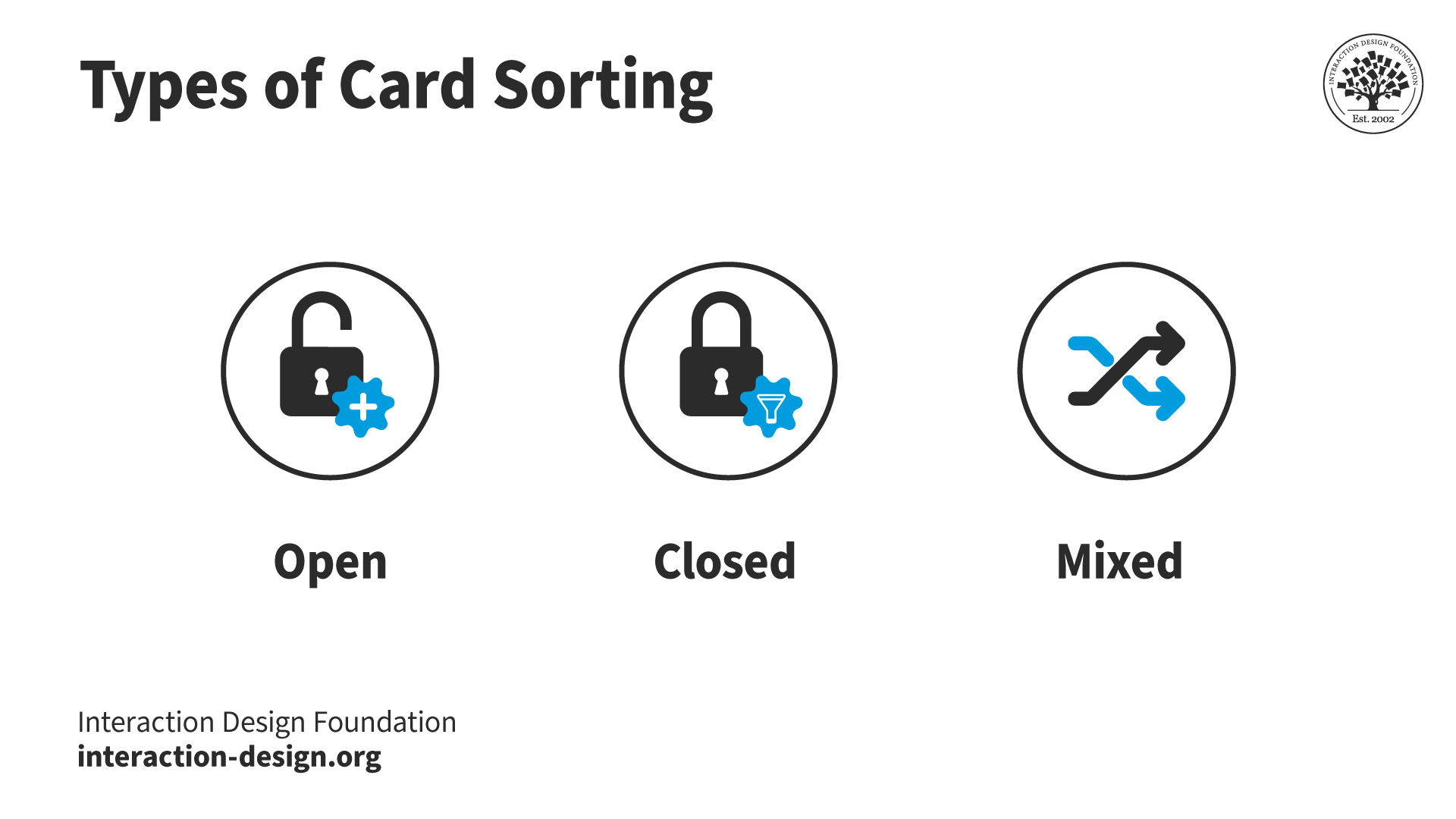
  • Open Card Sort: Participants organize website content into groups based on their understanding and name each group to reflect its content accurately. Designers opt for an open card sort to see how users naturally label and group content without predefined categories. This method is beneficial in the early stages of a project.

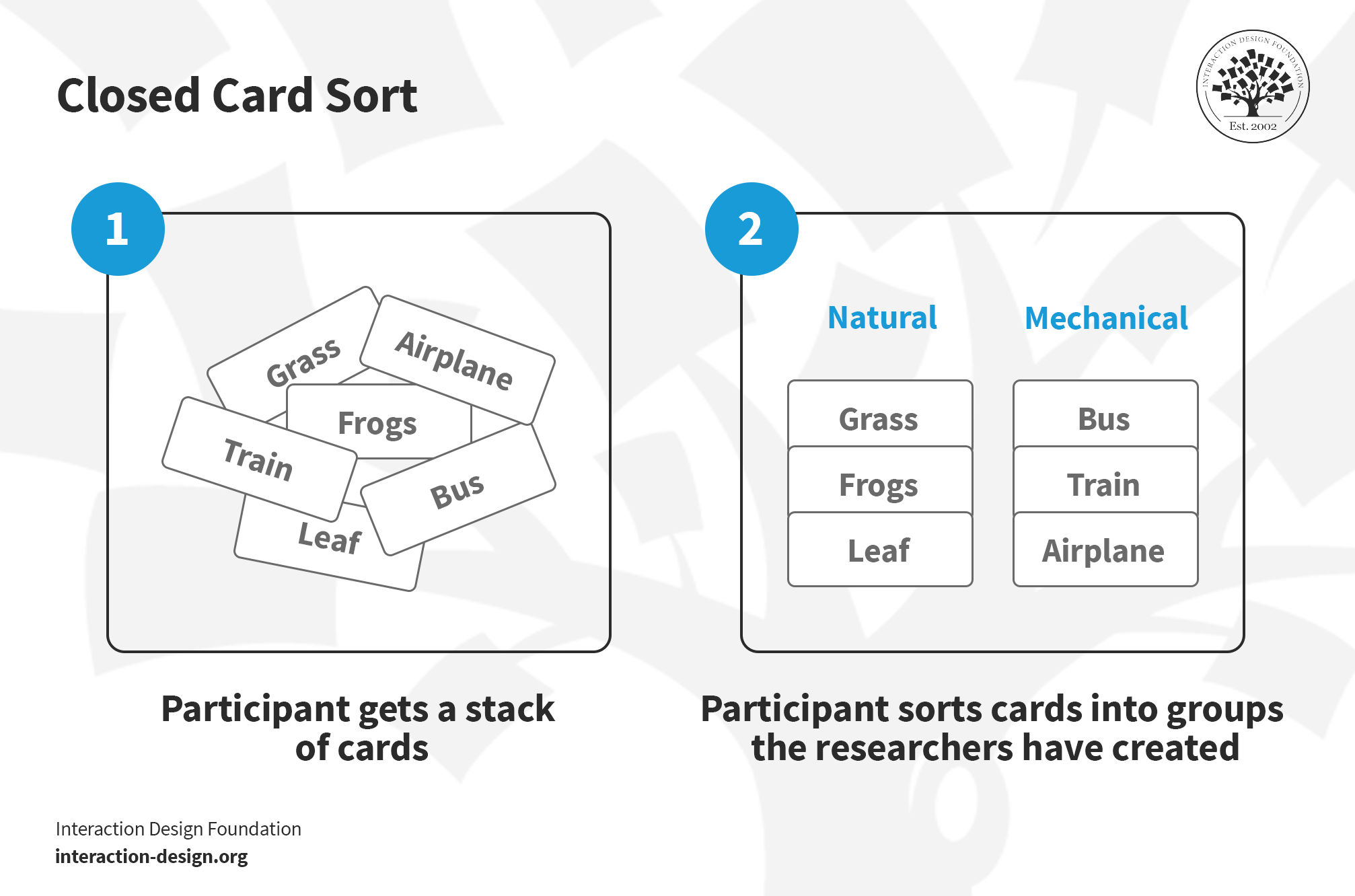
  • Closed Card Sort: Participants categorize website content into predetermined groups. This method is suitable when working with a set of pre-established categories and aims to understand how users sort content items into each.

  • Mixed Card Sort: Designers can combine open and closed card sorting when they have some established categories but want to explore new ones. This hybrid approach lets participants use provided categories and create new ones. It's useful to expand or restructure a partially established IA.

Designers should choose different types of card sorting depending on the project’s specific requirements. 

How to Run a Card Sort

Here are some guidelines to successfully run a card sort.

Set Objectives

For any research methodology, it's crucial to clearly define the objectives and determine whether card sorting is the most effective approach to gain the intended insights. 

Example:

Consider a card sorting session which focuses on improving a community-based platform that connects volunteers with local service opportunities.

The organization wants to revamp its website. The current platform is complex, and users find it challenging to discover relevant volunteer opportunities.

In this case, an objective could be “Enhance the website's menu and navigation structure to make it more user-friendly for volunteers seeking community service opportunities.”

Select Tools

Designers can use plain index cards or sticky notes for in-person card sorting, with a range of a few to about 100 cards or more, depending on the project. For a virtual workshop, however, limit the number of cards to around 50.

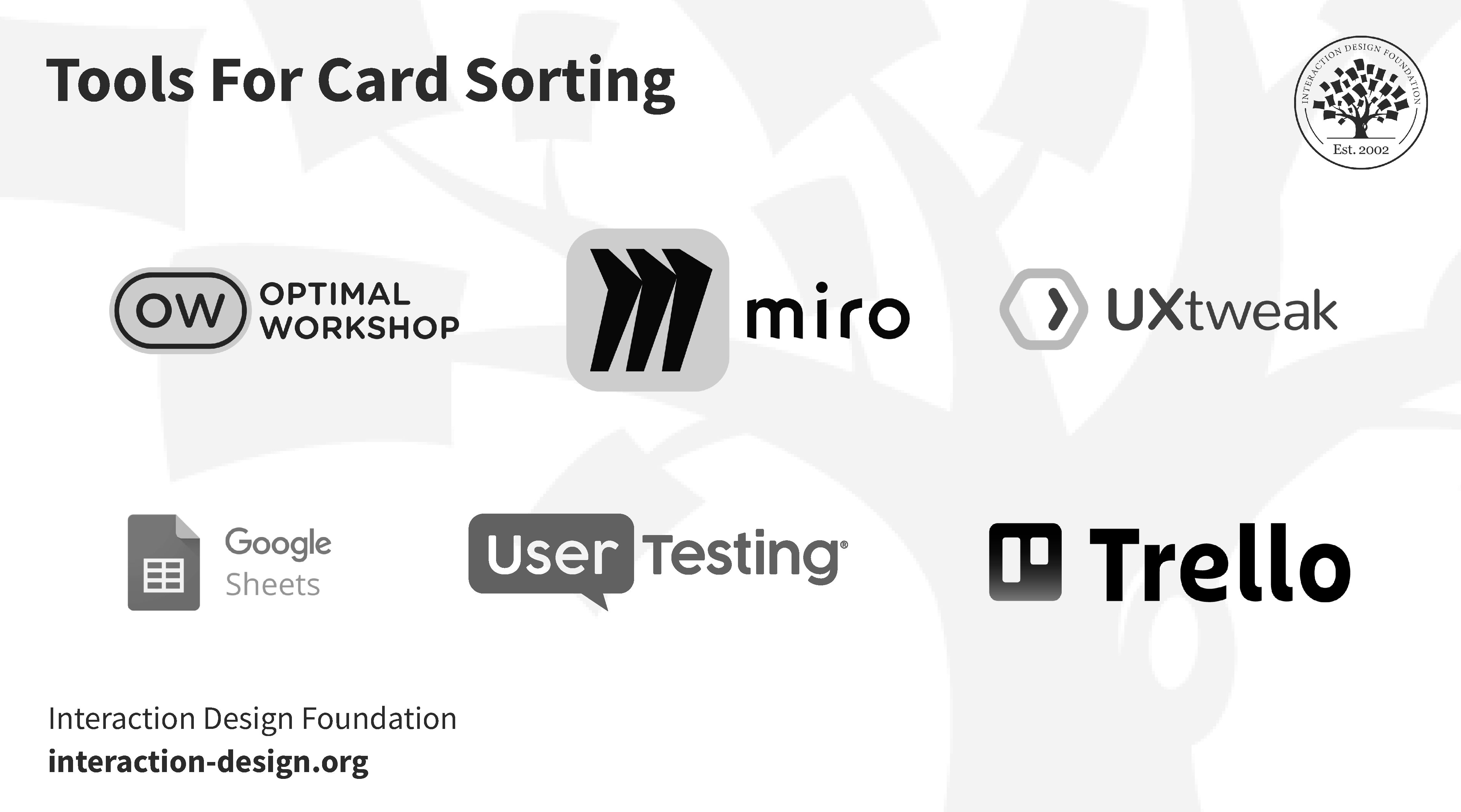
Various online card sorting tools exist, and they offer a key advantage—they’re readily available and easily facilitate analysis without the need to transfer results from cards to a spreadsheet.

Prepare Instructions 

Meticulous preparation of instructions is essential. The instructions must be clear to ensure participants comprehend the task at hand. This becomes particularly crucial in an online card sort.

Designers should anticipate potential questions participants might pose. If the card sort is online, incorporate answers within the instructions. For an in-person card sort, prepare responses in advance.

Potential participant questions may include:

  • Can a card be placed in more than one group?

  • Can I exclude a card if I don't understand it?

  • Am I allowed to add a card if I sense content is missing?

Example:

For the volunteer platform, participants organize the cards into groups based on how they would expect to find volunteer opportunities on a community service platform.

The designer should encourage participants to vocalize their thought process and share any specific preferences.

They should also answer any questions the potential users might have. 

Select Participants 

It’s important to select the right people for the card sort. Determine the ideal number of participants—this is typically more straightforward for in-person sessions due to space and time constraints; 3 to 5 participants is ideal. 

Transcript

In online card sorting, it's recommended to involve only a select few individuals initially. Handling an extensive volume of responses can be overwhelming during the analysis phase. Begin by distributing the card sorting exercise to a small group, providing space for refinement and adjustment. If necessary, consider expanding the participant pool to a larger audience in subsequent rounds or phases.

Example: 

For the volunteer card sort, the designer or researcher running the session should recruit participants with varying levels of experience in volunteering, including newcomers and frequent volunteers. They should limit the number of participants to 3-5 per card sort.

Incentive

As with most research activities, incentivize the participants to ensure they are motivated to participate. This is especially true for online card sorts.

Example: 

The volunteer platform could offer a year of free access to the platform or $10 gift cards to a charitable organization, etc. 

Content Preparation 

It’s essential to evaluate the content thoroughly before the card sort. The content participants receive will determine the quality of the results.

Transcript

For a larger content set, divide the process into multiple card sorts for the best results. Avoid using jargon, as unclear content can negatively impact effective card grouping. When individuals can't understand the information, they tend to force connections that aren't genuine. To achieve the best outcome, ensure the content is clear and direct.

Example: 

In the volunteer website example, the lead designer creates physical or digital cards for categories like "Education," "Environmental Projects," "Health and Wellness," etc. They leave a few cards blank with markers available in case participants have an idea they’d like to add to the sort.

The designer prepares a set of sample volunteer opportunities within each category and identifies key tasks users often perform, such as finding tutoring opportunities or environmental cleanup projects.

Workshop

Prepare the note cards in advance and spread them out on a table before the participants arrive. Explain the instructions clearly and answer any questions that arise, then let the sorting begin! Don’t forget to take detailed notes throughout the process.

© Interaction Design Foundation, CC BY-SA 4.0

It’s important to provide participants with context and explain the instructions. In physical card sorts, communicate verbally; for virtual sessions, written instructions are essential.

Avoid excessive explanations or over-assistance. Participants may seek guidance, but refrain from delving into extensive detail. Encourage them to proceed independently for optimal results.

Refrain from telling participants that they’ll label the groups they create during the workshop. While impractical for online card sorts, this ensures the users focus on categories rather than being influenced by predefined labels, preserving the organic card sorting process.

Throughout the card sort, make note of participant comments. Maintain distance to facilitate natural participant conversation without disruption. 

Example:

In the case of the volunteer site, the designer should explain the purpose of the session and emphasize that there are no right or wrong answers.

They can provide a brief overview of the current platform and its challenges in connecting volunteers with opportunities.

The lead designer presents specific tasks to participants, such as finding a tutoring opportunity or discovering environmental cleanup projects, and asks them to locate the relevant category in their card groups.

The designer observes and takes notes on how participants group the cards, the labels they assign to each group, and any specific comments they make.

After the sorting, the designer should ask participants about why they made certain choices, what terms they find most intuitive, and if they encountered any difficulties.

Analysis

“The first thing you want to do is just poke around… What did people do? What’s kind of interesting? What ways did they do things?”

—Donna Spencer

In the video, Donna Spencer speaks about how to analyze the data of a card sorting workshop and pinpoint what’s most interesting or relevant to reveal the final results. 

Transcript

First, get an initial overview. It’s more convenient to analyze an online card sorting session since results are directly available on your computer. However, for in-person card sorts it’s best to streamline the process with numbers and a spreadsheet. Assign a number to each card and enter it into the spreadsheet along with the card's content to simplify data input.

Then delve deeper into the analysis—scrutinize the participants' results for detailed comparisons and identify those similarities and differences. Examine variations to extract valuable insights. Note instances where similar groupings contain different cards. Additionally, evaluate specific cards and their placement by each participant.

This is a qualitative research method—focus on the discovery of interesting aspects within the results that align with the card sort’s objectives.

Finally, integrate your findings into the project, preferably along with other research methods.

Example:

Following the volunteer organization, the designer analyzes the collected data to identify common patterns, groupings, and potential improvements for the website's menu and navigation.

They present the results to the design team and relevant stakeholders.

From there, the designer can recommend changes for the menu structure based on user insights to improve the volunteer experience.

If the design team has completed all of the above, they should be be able to establish the following outcomes after their analysis:

  • Insights into how volunteers naturally categorize and expect to find community service opportunities.

  • Identification of intuitive groupings and potential improvements for the website's menu structure.

  • Greater understanding of user preferences in the platform’s navigation which adds to a more effective and user-friendly community service hub.

Card Sorting: Benefits and Drawbacks

Card sorting provides valuable insights into information organization and user preferences. Designers everywhere praise the practice because it improves usability, coordinates designs with how users think, and makes it easier to prioritize content. However, like any methodology, card sorting is not without its limitations. 

Benefits

Card sorting offers several benefits, including but not limited to:

  • Information Organization: Card sorting helps organize and structure information and enhances accessibility and user understanding.

  • User-Centered Design: Facilitates a user-centric approach by involving participants in the categorization process; it helps to align the design with user mental models.

  • Content Prioritization: Identifies which content is most relevant or important to users during design and development.

  • Navigation Design: Card sorting informs the design of intuitive navigation systems that are aligned with how users naturally group and categorize information.

  • Reduced Cognitive Load: It minimizes cognitive load through logical content groupings and intuitive navigation.

Drawbacks

While card sorting is a valuable strategy, it does have some drawbacks:

  • Limited Quantitative Data: Card sorting provides qualitative insights but lacks quantitative data, which makes the prioritization of results objectively a challenge.

  • Time-Consuming: Sessions can be time-intensive, especially when they involve a lot of content to process or a large number of participants.

  • Difficulty with Divergent Thinking: Some participants may struggle with open-ended categorization tasks. This limits the effectiveness of capturing diverse perspectives.

  • Not Suitable for All Content: Card sorting may not be the best fit for highly complex or technical content; other methods like tree testing or mind mapping may be more appropriate.

  • Dependency on Participants: Participants’ knowledge, backgrounds, or cognitive biases can influence results and potentially lead to skewed outcomes. Too many participants also presents a problem, as does too few.
Questions About Card Sorting?
We've Got Answers!

How do I choose between open, closed, and hybrid card sorting?

Depending on your project goals, development stage, and the information you want, you can choose between open, closed, or hybrid card sorting.

Early in the project, choose open card sorting. Participants organize topics into categories without predefined labels. It helps understand users' mental models, especially when creating a new system.

For established categories, use closed card sorting. This method clarifies how users sort items into predefined groups, useful to validate or redefine existing structures like website navigation.

Explore a hybrid approach by starting with an open card sort to identify content categories, then transition to a closed card sort to evaluate the effectiveness of those category labels.

Transcript

You can learn more about open and closed card sorting in Donna Spencer’s Master Class, “How To Use Card Sorting For Better Information Architecture.

What tools do you need to conduct a card sorting session?

To conduct a card sorting session effectively, you need a combination of physical or digital tools. Here’s a breakdown:

Index cards or post-it notes are tools of the UX trade. It’s always beneficial to have them on hand.  
© Interaction Design Foundation, CC BY-SA 4.0 

  • Cards: In a physical session, use index cards or sticky notes. Each card should represent a concept, function, or item relevant to your information architecture (IA). For a digital session, use online card sorting tools that allow virtual card manipulation.

  • Labels: Clearly label each card. In digital tools, you can type the labels; in physical sessions, write legibly on the cards.

  • Recording Tools: For in-person sessions, use a camera or smartphone to record the final sorted groups for analysis. Digital tools automatically record this data.

  • Space: For a physical session, a large table or wall space is necessary to spread out and organize cards. Digital sessions require a reliable internet connection and a platform for participants to access the sorting tool.

  • Participants: Recruit a diverse group of participants who represent your target user base. Make sure they understand the scope and purpose of the session.

  • Instructions: Prepare clear instructions explaining the task to ensure participants understand their objective.

  • Note-taking Materials: For in-person sessions, have pens and paper for participants to jot down their thoughts. Digital sessions might allow for notes within the sorting tool.

  • Consent Forms: If recording the session, prepare consent forms in compliance with privacy and data protection laws.

  • Analysis Tools: Post-session, use tools like spreadsheets or specialized software to analyze the data collected.

Remember, the choice of tools should align with the goals of your card sorting session and the comfort level of your participants whether digital or in-person.

Several books offer comprehensive insights into card sorting and its application in user experience (UX) design

Read Donna Spencer’s, Card Sorting: Designing Usable Categories, from Rosenfeld Media in 2009. 

This book is a definitive guide on card sorting. It covers everything from planning and conducting sessions to analyzing results. It's especially useful for those new to card sorting, providing step-by-step guidance and practical advice.

The User Experience Team of One: A Research and Design Survival Guide by Leah Buley, Rosenfeld Media, 2013.

Buley’s book is apt for solo UX practitioners or small teams. It gives practical tips on various UX methods, like card sorting, and provides real-world advice for effective UX research and design.

Learn more from The MIT Press’, Sorting Things Out: Classification and Its Consequences, by Geoffrey C. Bowker and Susan Leigh Star (2000).

It takes a broader view, examining the role of categorization in society and technology. Bowker and Star provide a deeper understanding of how classification impacts web design and user experience.

What are some highly cited research on card sorting?

Some highly cited and influential research papers on card sorting, information architecture (IA), and beyond include:

Tullis, Tom, et al. "An Empirical Comparison of Lab and Remote User Testing of Web Interfaces." Human Interface Design Dept; Fidelity Investments, (2002). 

Roth, Robert E., et al. "Card Sorting for Cartographic Research and Practice." Journal of Maps 13, no. 2 (2017): 705-715.

Finnie-Ansley, James, Paul Denny, and Andrew Luxton-Reilly. 2022. "Play Your Cards Right: Using Quantitative Card-Sort Data to Examine Students' Pattern-Like Concepts." In Proceedings of the 53rd ACM Technical Symposium on Computer Science Education - Volume 1 (SIGCSE 2022), Vol. 1, 857–863. New York, NY, USA: Association for Computing Machinery.

What is the best way to recruit participants for a card sorting session?

Recruiting participants for a card sort is crucial to obtain valuable insights. The best approach involves several key steps:

  1. Define Your Target Audience: Identify the typical users of your product or service. Your participants should represent this group as closely as possible to ensure the results are relevant.

  2. Determine the Number of Participants: A helpful guideline is to include 3-5 participants for every card sorting session. You can run multiple sessions with different participants. This range provides sufficient data for analysis without becoming too complicated.

  3. Use Multiple Recruitment Methods: Use various channels like social media, email lists, forums related to your product, UX research tools, and professional networks. If you have an existing customer base, consider reaching out to them, too.

  4. Offer Incentives: Incentives such as gift cards, discounts, or access to premium features can increase participation rates. Ensure the incentives are appealing to your target audience.

  5. Screen Participants: Use screening questions to ensure participants fit your target user profile. This step is crucial for the validity of your results.

  6. Schedule Sessions Flexibly: In in-person sessions, offer multiple time slots. For online sessions, provide clear instructions on how and when to participate.

  7. Ensure Ethical Practices: Obtain informed consent, explain the purpose of the study and how you will use the data, and ensure privacy.

  8. Prepare for No-Shows: Always recruit more participants than needed to account for no-shows or dropouts.

In the video below, HCI and UX expert, William Hudson, describes the best methods to use to recruit participants for UX research. 

Transcript

To learn more about recruitment methods and best practices, dive into IxDF’s Data-Driven Design: Quantitative Research for UX course.

How long should a card sorting session last?

It usually depends on how complex the content is and the method. However, as a general guideline, a session should last between 15 to 30 minutes.

In the video, UX Consultant, Donna Spencer, explains the type and level of content of a card sort.

Transcript

Learn more in the Master Class How To Use Card Sorting For Better Information Architecture.

How can card sorting results inform website or app structure?

Card sorting results inform the structure of websites or apps, as they reflect how users categorize and understand content. Here's how you can leverage the results:

  • The way participants group items in card sorting provides direct insight into how they logically categorize information. This creates a structure that aligns with users' mental models, making navigation more intuitive and user-centered.

  • Analyze common groupings and labels to design navigation menus and categories that feel natural to users. This includes naming menu items and grouping content under these categories. 

  • Card sorting helps identify which content potential users consider most important or related. This informs the hierarchy on your website or app and ensures the most relevant information is easily accessible.

  • When you organize content in a way that reflects users' expectations, you increase the findability of information. Users are more likely to quickly find what they're looking for, improving the overall user experience.

  • The process may reveal content areas that users find confusing (gaps) or perceive as overlapping (redundancies). From there, you can refine and clarify content or merge/split categories as needed.

  • Understanding how users categorize information can help your team design more efficient user flows and journeys through the website or app.

  • Card sorting is often part of an iterative design process. You can use participants’ feedback to make adjustments and then test again to refine the structure further.

  • Since card sorting often involves diverse participants, results are inclusive which helps your website or app’s structure cater to a broader audience.

  • Finally, perhaps a non-obvious use of card sorting is to highlight the differences in the way domain experts and non-domain experts think about the same website or app structure. Card sorting expert, Donna Spencer, explains more in the video below.

Transcript

What are some advantages of digital card sorting over physical card sorting?

Digital card sorting offers several advantages over physical card sorting, such as:

  1. Digital tools automatically collect and analyze data quickly and with the ability to generate statistical reports and visual representations of the data.

  2. It easily handles more cards and participants than physical sorting, which is often limited by physical space and materials.

  3. It eliminates the need for physical materials, rental space, and to transcribe results from physical cards. Also, it reduces time spent on set-up and managing the session. 

  4. Participants might feel more at ease in their own environment, leading to more genuine responses. They can also complete the task at their convenience.

  5. Digital card sorting is more environmentally friendly as it reduces the need for paper-based materials.

How can you integrate card sorting findings into wireframes and prototypes?

Integrating card sorting results into wireframes and prototypes involves a few key steps. 

First, develop the information architecture (IA) using the categories and groups identified in the card sort. This IA acts as a blueprint for content organization, aligning it with user expectations. Next, design the navigation menus—use labels participants preferred during the card sorting exercise to create an intuitive experience. Organize each page or section based on card sorting findings and emphasize the most crucial items for clear content hierarchy.

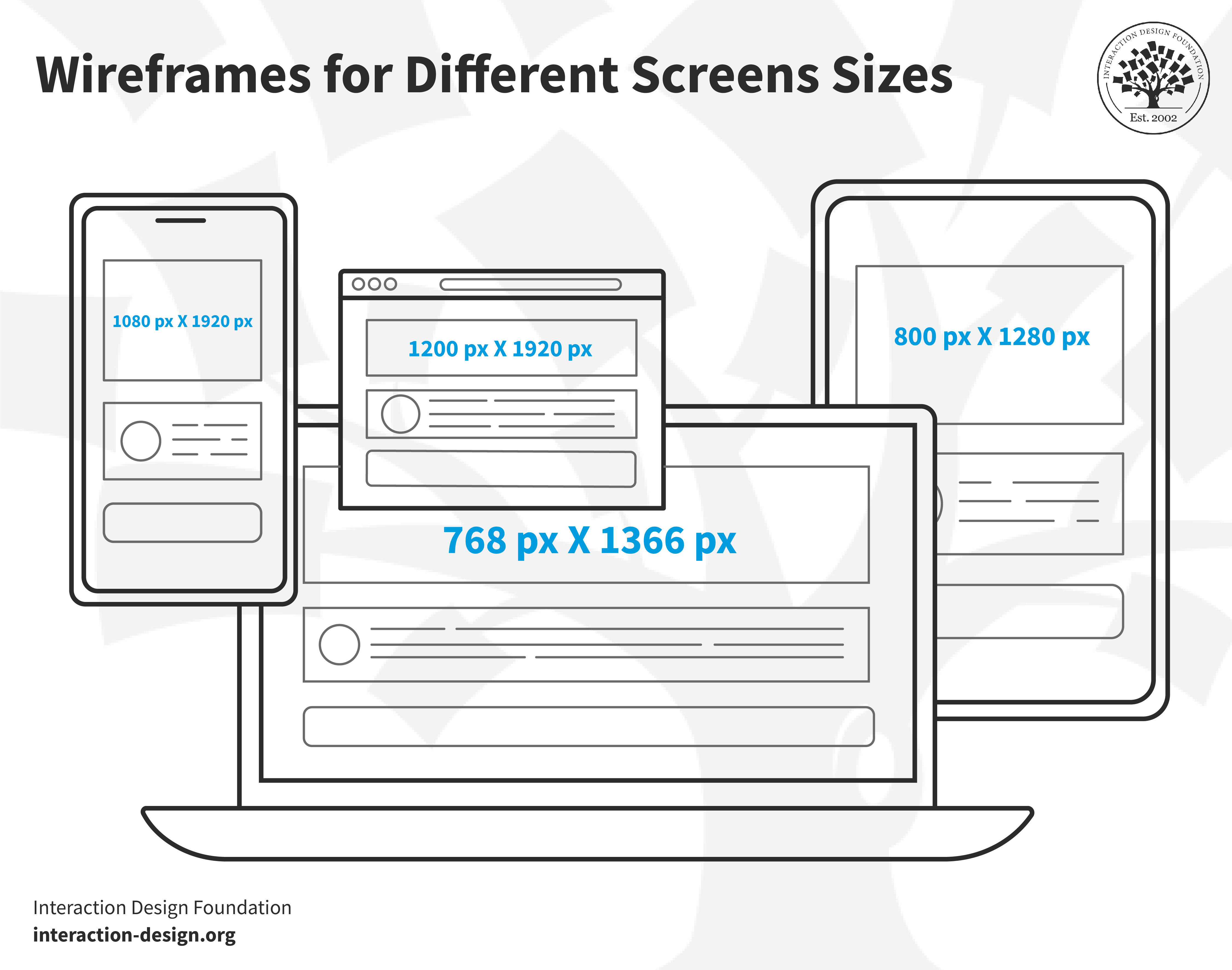
Wireframes for different screen sizes.Card sorting helps inform wireframes and prototypes whether on paper or digitally. Designers can use the feedback from the sessions to inspire their initial low-fidelity (lo-fi) designs.

© Interaction Design Foundation, CC BY-SA 4.0

As you create wireframes, guarantee they illustrate the basic layout and content allocation based on these insights. Then, map out the website or app user flow with logical and efficient paths. Incorporate the initial data into early wireframes and prototypes, then validate and refine design decisions through user testing.

Consider the contextual placement of elements, not just categorization, to guide their relationship on individual screens or pages. Be responsive to feedback; adapt your wireframes and prototypes as needed. Finally, integrate visual design elements that enhance the IA so the design is accessible and inclusive for diverse users.

You can learn more about sketching wireframes in the course Interaction Design for Usability with William Hudson.

How do you set realistic objectives for a card sorting study?

Setting realistic objectives for a card sorting study is crucial for its success and relevance. Consider the following points:

  • Understand the project goals.

  • Identify key content areas.

  • Determine the scope of the session.

  • Choose the right method.

  • Consider participants’ profiles.

  • Be specific and measurable when giving instructions.

  • Plan for actionable results.

  • Consider resource availability and remain flexible.

  • Review and adjust objectives - iterate!

  • Ensure objectives are user-centric.

Earn a Gift Earn a Gift, Answer a Short Quiz!

1
2
3
4
1
2
3
4
Question 1
Question 2
Question 3
Get Your Gift
Interaction Design Foundation logo

Question 1

Why do designers use card sorting in the design process?

1 point towards your gift

  • To create aesthetically pleasing designs
  • To organize random content
  • To understand user mental models
Interaction Design Foundation logo

Question 2

Which type of card sorting allows participants to create their own categories?

1 point towards your gift

  • Closed
  • Mixed
  • Open
Interaction Design Foundation logo

Question 3

How does card sorting contribute to usability improvement?

1 point towards your gift

  • It adds complex features.
  • It makes the interface more colorful.
  • It organizes the information intuitively.

Learn More About Card Sorting

Make learning as easy as watching Netflix: Learn more about Card Sorting by taking the online IxDF Course Interaction Design for Usability.

Why? Because design skills make you valuable. In any job. Any industry.

In This Course, You'll

  • Get excited about designing products, services, and experiences people love. Interaction Design for Usability improves careers and transforms your life and the lives of the people you serve. Every tap, click, and swipe matters. Whether you design websites, apps, or physical products, you'll build trust, loyalty, and satisfaction. It's easy because you already have transferable skills like empathy, logical thinking, and problem-solving. As AI becomes part of how products are built, you stay in demand when you understand how people actually interact with interfaces and what makes interactions feel clear and predictable. These timeless human-centered interaction design skills help you turn AI from a tool into your superpower to ensure that faster production still leads to usable, ethical, and meaningful outcomes for real people.

  • Make yourself invaluable with design skills that save time, reduce costs, and create experiences people value. Did you know companies prioritizing usability achieve greater loyalty, less churn, and better Return on Investment (ROI)? Create work you're proud of when users praise your products for usability, accessibility, and elegance. Whether you use Agile workflows, design intuitive interfaces, manage products, develop content, or optimize customer experiences, these skills benefit any industry—including tech, healthcare, finance, education, and retail.

  • Gain confidence and credibility as you master the usability frameworks behind the world's most beloved designs—all in bite-sized, easy-to-follow lessons. You'll learn step-by-step techniques like card sorting, heuristic evaluation, and paper prototyping. No matter your background, you'll easily master Interaction Design for Usability. With clear guidance and real-world examples, you'll apply your skills immediately. Understand the psychology of persuasion and confidently advocate for usability within cross-functional teams. Get ready to make products better for people, businesses, and society, and make a meaningful impact in your industry. If you want more meaning, more impact, and greater earning potential, this course is perfect for you. 

It's Easy to Fast-Track Your Career with the World's Best Experts

Master complex skills effortlessly with proven best practices and toolkits directly from the world's top design experts. Meet your expert for this course:

  • William Hudson: User Experience Strategist and Founder of Syntagm.

Get an Industry-Recognized IxDF Course Certificate

Increase your credibility, salary potential and job opportunities by showing credible evidence of your skills.

IxDF Course Certificates set the industry gold standard. Add them to your LinkedIn profile, resumé, and job applications.

Course Certificate Example

Be in distinguished company, alongside industry leaders who train their teams with the IxDF and trust IxDF Course Certificates.

Our clients: IBM, HP, Adobe, GE, Accenture, Allianz, Phillips, Deezer, Capgemin, Mcafee, SAP, Telenor, Cigna, British Parliament, State of New York

All Free IxDF Articles on Card Sorting

Read full article
Card Sorting: The Ultimate Guide for 2026 - Article hero image
Interaction Design Foundation logo

Card Sorting: The Ultimate Guide for 2026

Whenever you’re working in UX (User Experience) design, you have to understand user expectations if you’re going to be able to group information effectively. Card sorting is a handy and relatively simple way to engage participants so they categorize topics in a way they find logical. This approach h

Social shares
925
Published
Read Article
Read full article
Revolutionize UX Design with VR Experiences - Article hero image
Interaction Design Foundation logo

Revolutionize UX Design with VR Experiences

Is the future of user experience design (UX design) going to exist on screens or will it find immersive, three-dimensional spaces as its main home? You can design for both views—and interactions—within a digital environment that’s boundless in virtual reality (VR), so read on to find five fundamenta

Social shares
620
Published
Read Article

Card Sorting: The Ultimate Guide for 2026

Card Sorting: The Ultimate Guide for 2026

Whenever you’re working in UX (User Experience) design, you have to understand user expectations if you’re going to be able to group information effectively. Card sorting is a handy and relatively simple way to engage participants so they categorize topics in a way they find logical. This approach helps you uncover user preferences for content arrangement to help create a coherent and user-friendly structure for websites or apps.

You’ve likely come across the concept of card sorting (whether or not you’re in UX). It's a popular, low-tech research technique used to organize complex datasets into intuitive information architecture, menu structures, and navigation workflows. Running a card sort may seem simple, but there is an art to doing it effectively. To get the best results, you need to master the nuance, so let's take a look at the essential do’s and don’ts.

What Is Card Sorting in UX Research?

When you perform a card sort, you involve users in organizing information by having them group labeled cards based on their understanding of the content. Card sorting reveals how users expect to find information on a website. The insights you gain are potentially powerful tools for creating intuitive, user-friendly structures that align with users' mental models to ensure seamless and efficient navigation.

Here’s an example of how a card sorting session might work. Imagine you're the researcher for a grocery store brand creating a new website. You want to see how customers approach the store and what categories they would use for various items. You give the participants cards with items like “Dairy,” “Bread,” “Fruits,” “Toothpaste,” “Deodorant,” “Eggs,” “Insect Repellent,” and “Garbage Bags.” The users then put these into categories. For instance, they might place “Dairy” and “Bread” under “Daily Essentials,” “Toothpaste” and “Deodorant” under “Toiletries,” and “Garbage Bags” and “Insect Repellent” under “Sundries.” However, some participants might consider toothpaste a daily essential. Even though they don't need to buy a new tube every day, they might still categorize it that way based on their daily routine.

Welcome to the “magic” of card sorting, where logic can be subjective! In the example above, you would be able to harvest these insights to organize the website's menu and categories in the way that works best for your users. This process makes it easy for shoppers to find exactly what they need based on their own expectations.

Watch as Design Consultant Donna Spencer provides an excellent example of a card sort in her IxDF Master Class, “How To Use Card Sorting For Better Information Architecture.”

Transcript

Why Do We Use Card Sorting?

Card sorting helps you understand how people think about ideas and concepts rather than just physical items. Once you have a clear understanding of how users perceive a digital design, you can arrange content in a way that makes sense to them as you organize a website's structure or navigation. A card sort reveals how a person’s background and personal experience affect their expectations and the way they envision information. This provides a helpful vantage point to accommodate their worldview and fine-tune your interface design to match their natural way of grouping things.

Card sorting helps you figure out:

  • Categorization: What items belong together and the logic behind those groupings.

  • Organizational Patterns: Different ideas and methods for organizing content.

  • User Consensus: Whether people think similarly or differently about specific concepts or items.

While people use card sorting more often to create IAs, website navigation, and menu structures, the strength of card sorting is how it translates across the board, and you can also use it for internal communication and politics.

In this clip, Donna Spencer explains one of the less obvious uses of card sorting and what it can tell us.

Transcript

You'll find card sorting effective for enhancing your information architecture, but you should not expect it to create the IA for you. Because card sorting is qualitative and exploratory, it often yields inconsistent results that make it unreliable for building an architecture from scratch. Similarly, it can't tell you whether your IA actually works. Even though the card sort informs your design, you won't know if the final structure is effective until you test it. Donna Spencer suggests using a tree test for that purpose instead.

What’s more, card sorting isn’t suitable when you’re after the following:

  • Definitive, black and white answers.

  • Quantitative, statistically valid data.

Advantages and Disadvantages of Card Sorting

Advantages of Card Sorting

  • Simplicity: Very few techniques are as easy as handing someone a deck of cards and then asking them to sort them. It’s direct and basic.

  • Cost-effectiveness: You only need plain cards and either printer ink or pen ink. You may also use sticky notes or some tape.

  • Speed: You can run this exercise quickly and repeat it as many times as necessary until you get the data you need.

  • User-centric: Card sorting focuses on user input, which is crucial for product success. Since it values user perspectives over assumptions, it can save many design headaches later.

  • Familiarity: This technique has been around for a long time. People, including your users, understand it easily and don't need much explanation on how to perform it.

  • Insightful: While it is not the most in-depth approach, card sorting provides valuable insights regarding how users categorize information. You can leverage these insights effectively to improve your design.

Disadvantages of Card Sorting

  • Task ignorance: Card sorting doesn't always consider the practical application of the insights it generates. It pays to be cautious about how you translate those results into your product because the data doesn't always dictate a clear design path.

  • Inconsistency: Results can vary significantly due to individual differences in perception and categorization. These quirks and idiosyncrasies in how people see the world can lead to data that's difficult to generalize.

  • Time-consuming analysis: While a card sort is quick to perform, analyzing the results is another matter. It can lead to long processing times, especially when you're dealing with complex or large data sets.

  • Surface-level insights: Some fundamental issues or contextual nuances may be beyond the scope of this technique. The top-level view a card sort provides often hides more intricate matters that may require deeper research to uncover.

Types of Card Sorting

Six types of card sorting

© Interaction Design Foundation, CC BY-SA 4.0

Card sorting is a versatile UX research technique with different types to suit various needs. Each type offers unique insights into how users organize information. Let’s explore these card sorting methods in detail and look at some examples of when to use them.

1. Open Card Sorting

In an open card sort, participants organize cards into categories that they create themselves. This is an excellent approach if you want to understand how users naturally group information without your own preconceived categories guiding their decisions or influencing how they see the content.

A diagram showing an open card sort process.

Say you get a stack of cards and you sort cards into groups and label these groups; that’s an open card sort. 

© Interaction Design Foundation, CC BY-SA 4.0

2. Closed Card Sorting

In closed card sorting, participants sort cards into categories that you have already defined. This method is particularly useful when you want to test specific groupings or if you already have a basic structure in place that needs validation.

A diagram showing a closed card sort's process.

You get a stack of cards, and you’ve got to sort them based on groups the researchers have created—that’s a closed card sort.

© Interaction Design Foundation, CC BY-SA 4.0

3. Hybrid Card Sorting

Hybrid card sorting is a blend of open and closed card sorting. Participants sort cards into provided categories but can also create new ones of their own. This approach offers a great deal of flexibility for the participants and provides deeper insights into user preferences for you.

Example: Imagine you're building a website for a travel operator that manages tourist resorts. You're conducting a card sort where users sort destinations and activities into predefined categories such as "Beaches," "Mountains," and "Cities". Because this is a hybrid sort, users aren't restricted to your categories. They can create entirely new ones like “Adventure Travel,” “Historic Trails,” or “Family-friendly.” From this, you'll be able to gather much more nuanced insights into how they categorize their travel experiences.

4. Reverse Card Sorting

Reverse card sorting, also known as tree testing, is a process where users work backward within an existing framework. Instead of sorting cards into groups, participants deduce where a specific card should go inside a pre-defined structure. This is an excellent way to test how intuitive a site’s navigation is. At the end of a session, you can evaluate the results by comparing how many users placed the item in the "right" category.

Example: Imagine a website dedicated to cookery, featuring recipes, products, and services. You give a specific recipe card, such as “Vegetarian Lasagna,” to users and ask them to find where it fits within a pre-made set of categories. By observing where they look, you can test if the organization of the site truly makes sense to each user.

5. Modified-Delphi Card Sorting

Modified-Delphi card sorting is a method that evolves with each participant. It begins with the first participant conducting a complete card sort to organize items in a way that makes sense to them. This forms the baseline model. Subsequent participants then refine this model by building on the previous person's work until the process is complete.

Example: Let's picture a team designing a health app that includes features like “Exercise Tracking,” “Diet Plans,” and “Mental Wellness.” The first participant creates an initial structure for these features. The next participant reviews that structure and makes adjustments based on their own logic. This continues through several rounds, allowing the team to reach a consensus on the most intuitive layout for the app.

6. Remote Card Sorting

Remote card sorting allows participants to sort cards through online tools. It is a convenient way to reach a broader and more diverse audience.

Example: An e-commerce brand might use an online tool to have users sort product categories such as "Electronics," "Home Goods," and "Fashion." Participants complete the task on their own computers instead of having to attend a formal in-person session.

Tree Testing vs. Card Sorting: Which One Should You Choose?

First off, here’s a quick overview of both techniques:

  • In tree testing, users navigate through a simplified text version of a site's structure to find specific items. This technique reveals how easily they can locate information within a set framework.

  • Card sorting helps you understand how users categorize information. In a card sort, participants organize topics or items into groups that make sense to them.

To learn more about getting started with this method, watch this video where William Hudson, UX Designer and Author, discusses tree testing in detail. His insights will help you understand how to apply this technique to your own research projects.

Transcript

Choosing between these methods depends on your project's stage and your specific goals. If your current information architecture seems to be causing problems, start with tree testing to assess its effectiveness. This process shows you exactly where users struggle to find information and provides a clear picture of the areas that need improvement.

After you have identified the issues with your current structure through tree testing, use card sorting to understand how users believe the content should be organized. An open card sort allows you to capture natural categorizations and terminologies. This is a crucial ingredient for creating an intuitive and user-friendly architecture.

Finally, perform another tree test after you have reworked your structure based on the card sorting insights. This allows you to compare the new architecture against the old one using similar tasks. This comparison highlights the effectiveness of your changes and ensures your updated design aligns with user expectations and behaviors.

What Tools Do You Need for Card Sorting?

Card sorting doesn't need fancy tools. You can use basic office supplies like index cards and markers to get the job done. With that said, there are several digital tools that can enhance your research process. Below, we highlight six online tools that can help you streamline your card sorting workflow.

Tools to use for card sorting.

© Interaction Design Foundation, CC BY-SA 4.0

Considerations for Choosing a Card Sorting Tool

You should consider several factors when picking the right card sorting tool for your project. Here are four important ones to keep in mind.

  • Study size: Tools vary in their capacity to handle different volumes of data. For larger studies, choose tools that offer robust data handling and automated reporting capabilities.

  • Study format: Decide if your study will be remote or in-person. Tools for remote sorting provide features like online collaboration and automated tracking, while in-person tools often focus on physical interaction or manual data entry.

  • Analysis needs: Some tools come equipped with advanced analytics such as similarity matrices and dendrograms. These are ideal for detailed data interpretation. Determine how deeply you need to analyze the results before selecting a platform.

  • Budget constraints: Be sure to balance your need for specific features with your available budget, as costs can range from free open-source tools to high-end enterprise subscriptions.

How to Run a Card Sort?

Seven steps to run a card sort.

© Interaction Design Foundation, CC BY-SA 4.0

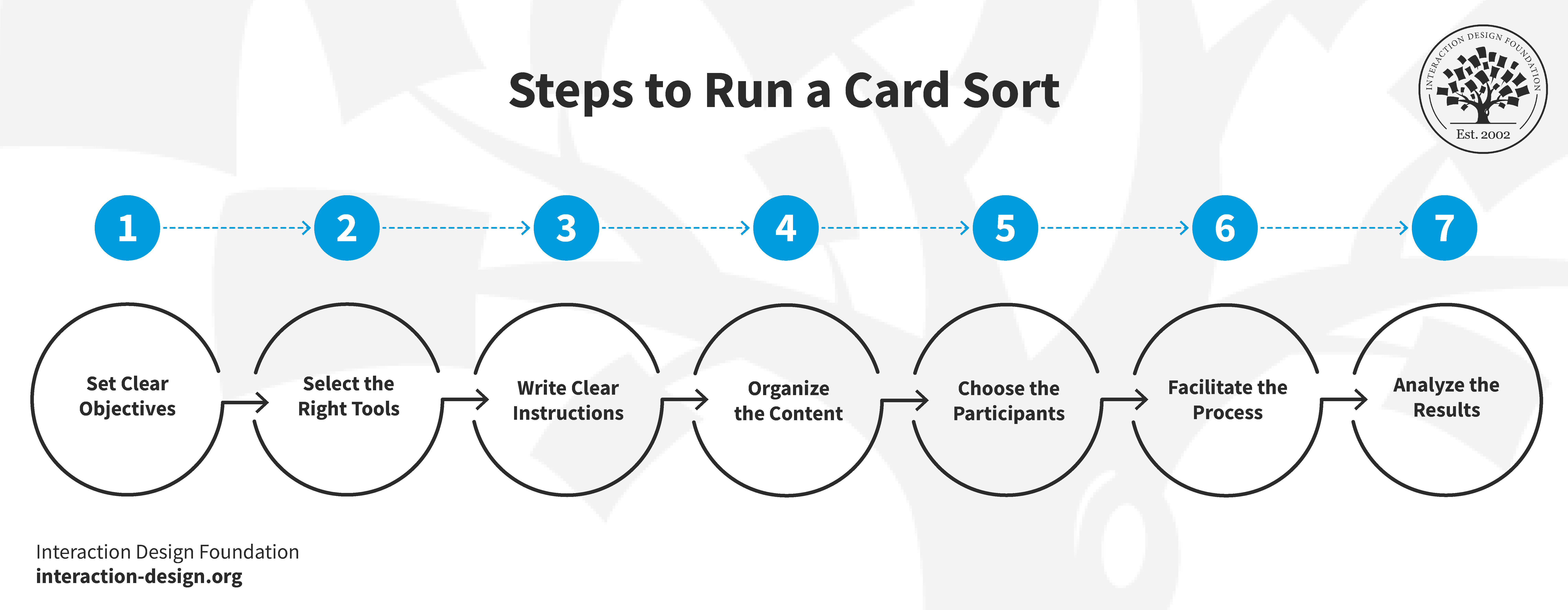
1. Set Clear Objectives

Just like any other research methodology, you must work out exactly what you want to learn. Once you have established your goals, consider whether card sorting is actually the best way to achieve them. If your goal is to understand how users categorize information, then card sorting is likely the right choice.

2. Select the Right Tools 

You'll need some cards for your session. Plain index cards or sticky notes work well for an in-person card sort. You can use anywhere from a handful to about 100 cards depending on the project. However, try to limit the number to 50 if you're conducting a virtual card sort, as digital sessions can be more taxing for participants.

A person arranging a set of different colored post-it notes in the manner of a card sort.

Index cards or Post-it notes work well for card sorting.

© UX Indonesia, Unsplash License

You can find several card sorting tools online such as OptimalSort, but general applications like Trello, Miro, or GitHub can also work well. Using a digital tool offers a significant benefit by making your results immediately available for analysis on your computer. As a helpful extra, you'll be spared the tedious task of manually transferring results from physical cards to a spreadsheet.

3. Write Clear Instructions for Effective Participation

You must prepare your instructions before the card sort begins, regardless of whether it is physical or digital. These instructions need to be clear so your participants know exactly what to do.

Think about the questions people may ask and provide the answers in advance. If you're conducting your card sort online, include these answers in your written instructions to pre-empt any confusion. For an in-person session, have your answers ready to go.

Participants often ask questions such as:

  • “This card fits with more than one group. Can I put it in multiple places?”

  • “I don’t understand this card. Can I exclude it?”

  • “There seems to be some content missing. Can I add a card?”

Another important factor to consider before you start is your analysis. You need to think about the optimal results you want to achieve. For instance, you may wish to have only five people in your sample or as many as twenty-five. If you conduct an in-person card sort, it is important to figure out how to get your data from the physical world into a digital format.

4. Organize the Content

Your content is one of the most critical parts of card sorting. In many ways, it is the most important factor because your results depend entirely on the items you provide to your participants. This is why you must evaluate your content carefully before the session begins to ensure every card is clear and necessary.

Donna Spencer describes some of the elements and their significance of your card sorting content:

Transcript

If you have an extensive content set, it may be wise to split the items into several different card sorts to ensure you get the desired results. This prevents participant fatigue and keeps the data focused.

Steer clear of jargon. If people can't understand your content, they won't be able to group the cards effectively. This can distort your results because people tend to force associations and make connections that aren't actually there when they don't fully understand the information. Using clear and direct content is one of the most important factors for achieving the best possible outcome.

5. Choose the Participants 

The people you select for your card sort are vital to the success of your study. In the video below, Donna Spencer explains the key factors you need to consider when recruiting your participants.

Transcript

You might wonder about the ideal number of participants for your project. Due to space and time constraints, in-person card sorts are often easier to manage with smaller, focused groups. For an online card sort, it is best to send the exercise to a small pilot group first. This allows you to revise and adapt the study based on early feedback. You can always reach out to a larger audience once you're confident the sort is working correctly.

6. Facilitate the Process

It's best to start with an introduction to give your participants context before going through the instructions. In a physical card sort, you can speak directly to your participants. However, if you conduct the session remotely via Zoom or an online tool, you'll need to provide written instructions for most virtual formats.

Don't over-explain or provide too much help. Some participants may look to you for guidance during the session. While you can repeat the instructions, avoid going into further detail. You'll get better results if participants carry on without extra assistance.

It's often better not to tell participants upfront that they'll label the groups they create. While online tools may require this step, informing participants too early in an in-person session can influence their choices. If they focus too much on the labels, they may prioritize the categories over the content itself, which limits the fluidity of the process.

Take notes during the card sorting process and listen to what your participants say. Try not to hover, as this can interfere with the organic conversation between participants.

Offer incentives to encourage participation. These are remarkably effective and are especially valuable in virtual settings where people may feel less committed to finishing. Think about what might motivate your audience, such as a small gift, a discount voucher, or a chance to win a larger prize.

7. Analyze the Results

Analysis tends to be easier with an online card sort because the tool inputs results directly into your computer. For an in-person card sort, you can use numbers and a spreadsheet to simplify the process. Assign a number to each card and record it in your spreadsheet alongside the card’s content. Once the session is over, all you have to do is input the numbers corresponding to the groups created by the users.

First, you want to get an overview of the patterns emerging from your data. In the following video, Donna Spencer shares how to effectively manage this initial review:

Transcript

Next, go into more depth by comparing participants in detail to identify the similarities and differences in their results. Look at the insights you can pull from these variations. For an information architecture project, you might ask if all participants created an “About Us” section. If they did, then check which specific cards they placed into that group. Sometimes, people will create identical group names but populate them with different cards. You should also examine specific cards to see where each individual chose to place them.

Remember that card sorting is primarily a qualitative research exercise. Your goal is to gain insights and discover what stands out as interesting or unexpected in your results. Always review your original user research objectives to ensure you're finding the answers you initially set out to learn.

You can learn more about the differences between quantitative and qualitative user research in this video:

Transcript

Last, but not least, apply your findings to your project. It’s best to combine them with other research methods.

Card Sorting Tips and Best Practices

Card sorting tips and best practices.

© Interaction Design Foundation, CC BY-SA 4.0

Card sorting serves as a powerful tool in user experience, but success hinges on the quality of execution. This method is a vital step in designing intuitive interfaces.

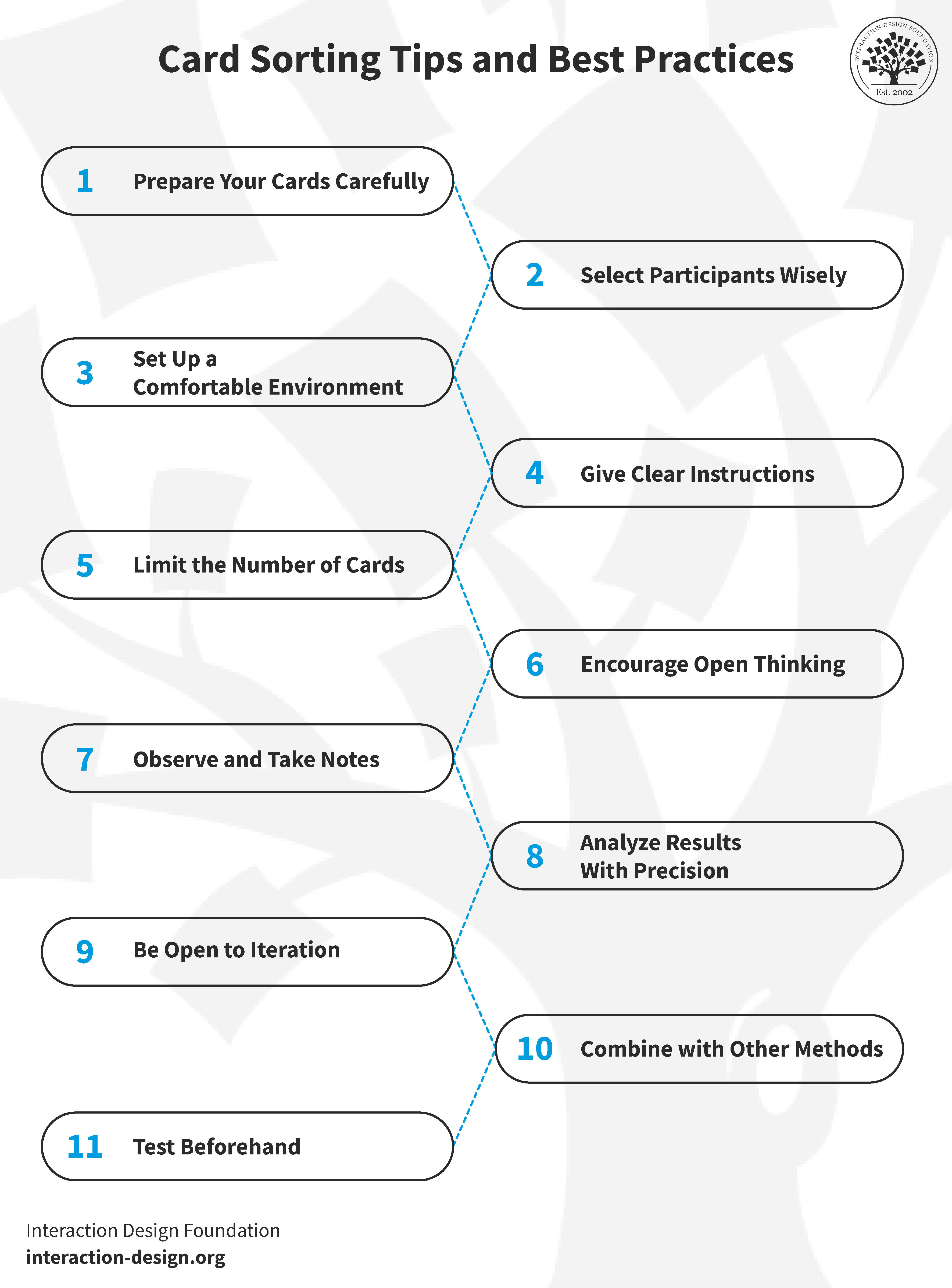
To fully capitalize on the benefits of card sorting, certain best practices should be followed. These guidelines help in conducting productive sessions that yield actionable results:

  1. Use relevant and straightforward cards: Jargon and complex terms should be avoided. The clarity of the cards directly impacts the quality of the results.

  2. Select a diverse group of participants: Choose individuals who represent the target audience. Diversity provides varied perspectives that strengthen the final architecture.

  3. Provide a user-friendly environment: Whether online or in-person, the environment should be comfortable and free from distractions. For online sorts, the selected tool should be easy to navigate.

  4. Give concise, understandable instructions: Clarifying ambiguities is essential. Good instructions lead to more accurate sorting and more reliable data.

  5. Maintain a balanced card count: Too many cards can overwhelm participants. A set of 40–50 cards is typically comprehensive yet manageable.

  6. Encourage free thinking in open sorts: Openness leads to innovative categorizations and unexpected insights into how users naturally perceive content.

  7. Observe and take notes: Monitoring how participants interact with the cards and listening to their comments provides qualitative context that's often as valuable as the sort itself.

  8. Analyze the results thoroughly post-sort: Success depends on spending time identifying patterns, outliers, and surprising groupings. This detailed analysis is where the real value of card sorting lies.

  9. Iterate for better results: Running multiple sessions can refine the understanding of the content and lead to more robust conclusions.

  10. Use a multi-method approach: Combining card sorting with other research methods, such as surveys or user interviews, provides a more comprehensive view of user needs.

  11. Pilot the method: Testing the process before the official session ensures the study is effective and allows for adjustments to be made to gain meaningful insights.

The Take Away

Card sorting is a valuable method for revealing how users perceive and categorize concepts. By uncovering these patterns, designers can organize websites and applications to match user mental models more effectively. Several key factors require careful consideration during the process, including the approach (in-person or remote), objectives, tools, content, and the number of participants. While the process is generally straightforward, each element must be managed with care to ensure the data is reliable.

Although card sorting offers significant insights, results may not always be immediately clear. Despite this potential for ambiguity, the technique remains a preferred choice due to its low cost, simplicity, and minimal investment of effort. When used carefully, this method provides essential guidance for the successful design and functionality of a digital product.

References and Where to Learn More  

Dive deeper into card sorting with Donna Spencer’s Master Class, How To Use Card Sorting For Better Information Architecture.

Learn how to run card sorts and what tools to use:

  • Open-source Information Architecture Design: Using the Tools You Have To Conduct Card Sorting and Tree Testing

  • Card Sorting at Usability.gov

William Hudson explains How to Screen Research Participants

Feel Stuck?
Want Better Job Options?

AI is replacing jobs everywhere, yet design jobs are booming with a projected 45% job growth. With design skills, you can create products and services people love. More love means more impact and greater salary potential.

At IxDF, we help you from your first course to your next job, all in one place.

See How Design Skills Turn Into Job Options
Privacy Settings
By using this site, you accept our Cookie Policy and Terms of Use.
Customize
Accept all

Be the One Who Inspires

People remember who shares great ideas.

Share on:

Academic Credibility — On Autopilot

Don't waste time googling citation formats. Just copy, paste and look legit in seconds.