UX Surveys

Your constantly-updated definition of UX Surveys and collection of videos and articles.
Be a conversation starter: Share this page and inspire others!

592 Shares

What are UX Surveys?

UX surveys, or user experience surveys are tools that gather information about users' feelings, thoughts and behaviors related to a product or service. Surveys are typically a set of questions and can cover a range of topics, depending on the purpose of the research. Designers or researchers analyze survey results to better understand how users interact with a system, application or website and work to improve it.

In this video, William Hudson, User Experience Strategist and Founder of Syntagm Ltd, explains the significance of UX surveys.

Transcript

How Important are UX Surveys?

User experience (UX) surveys play a crucial role to help design teams understand users’ needs, preferences and behaviors. When UX researchers or designers gather feedback as qualitative research data and quantitative research data from many participants, they can gain valuable insights. Survey responses can inform valuable user experience design decisions about digital products or services. From there, designers can fine-tune user interface (UI) elements and more to create a better user experience and a high level of user satisfaction, and so help to win loyal customers.

In this video, Alan Dix, Author of the bestselling book Human-Computer Interaction and Director of the Computational Foundry at Swansea University, explains the difference between quantitative and qualitative research:

Transcript

UX surveys are important for several reasons. First, they provide a cost-effective way to collect valuable insights from users. When companies understand users’ needs and expectations, they can make properly informed decisions. For example, when a brand takes user feedback and the insights it reveals, it can come out with new features that users of their existing mobile app are more likely to appreciate or a better visual design all around.

Second, UX surveys help identify pain points and areas of improvement in the user experience. This lets companies enhance the overall customer satisfaction and loyalty. Last—but not least—when brands conduct UX surveys, they help themselves stay relevant to their customers and drive customer retention. That is a crucial factor for sustainable business growth and exceptional customer service. It’s also vital to help launch a new product when stakeholders have invested so much in it.

Surveys are a particularly useful UX research option. When UX designers or researchers consider research methods for a product design or project, they need to approach and conduct the activities correctly. For example, there are best practices to guide other approaches and types of user research, such as user interviews. Similarly, when researchers or designers decide to use surveys, they'll need to know many factors. These include how to recruit participants and ask the right questions (for example, open questions, closed questions, checkbox responses, rating scale). The skill is in how well they can reach their respondents so they give real insights into these users’ behavior and other relevant areas like potential improvements for the customer service team.

An illustration of a screen to show feedback.

Feedback from users and customers is a vital gauge of where brands stand in the marketplace.

© Interaction Design Foundation, CC BY-SA 4.0

What Types of Surveys Do Design Teams Use?
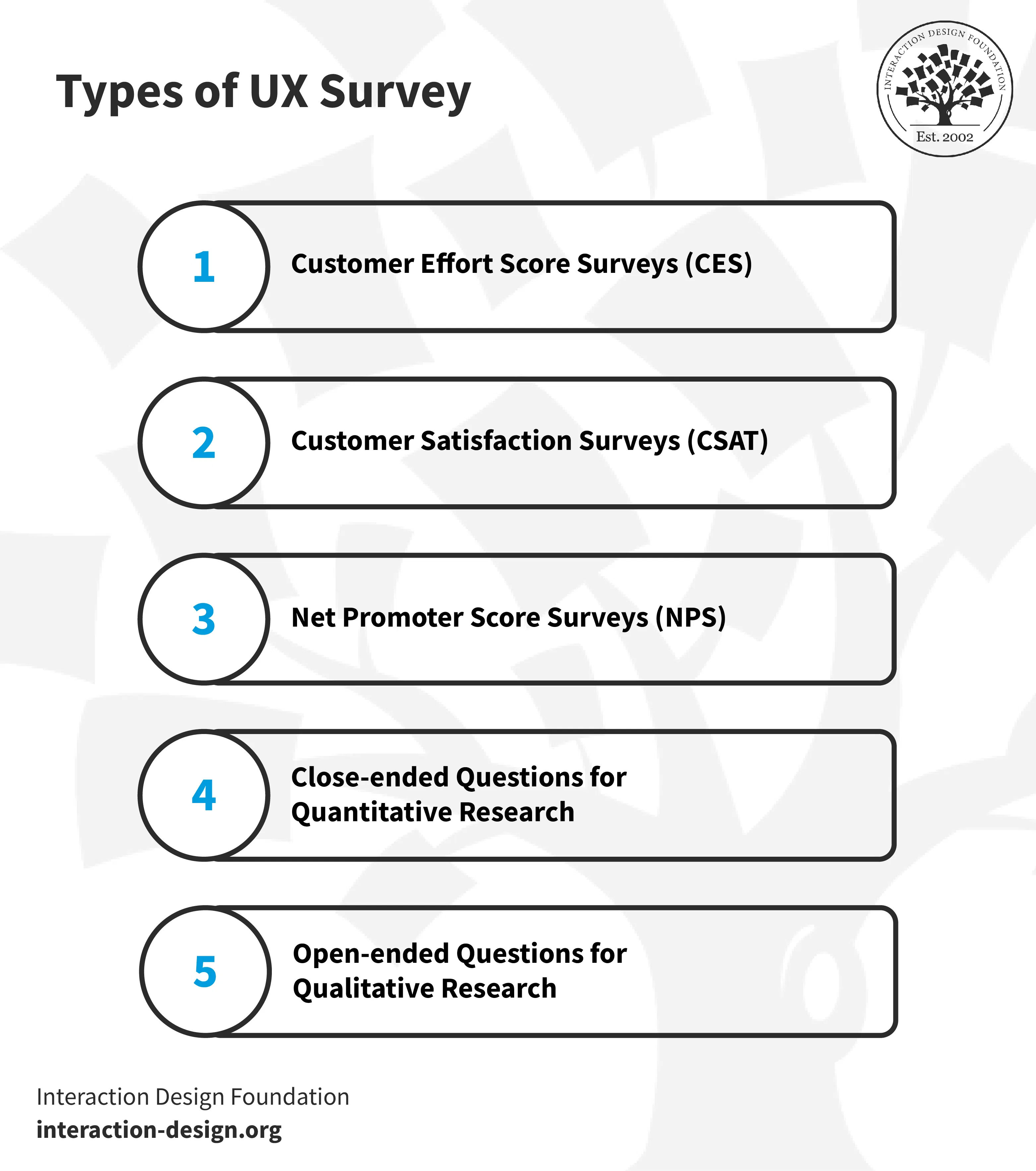
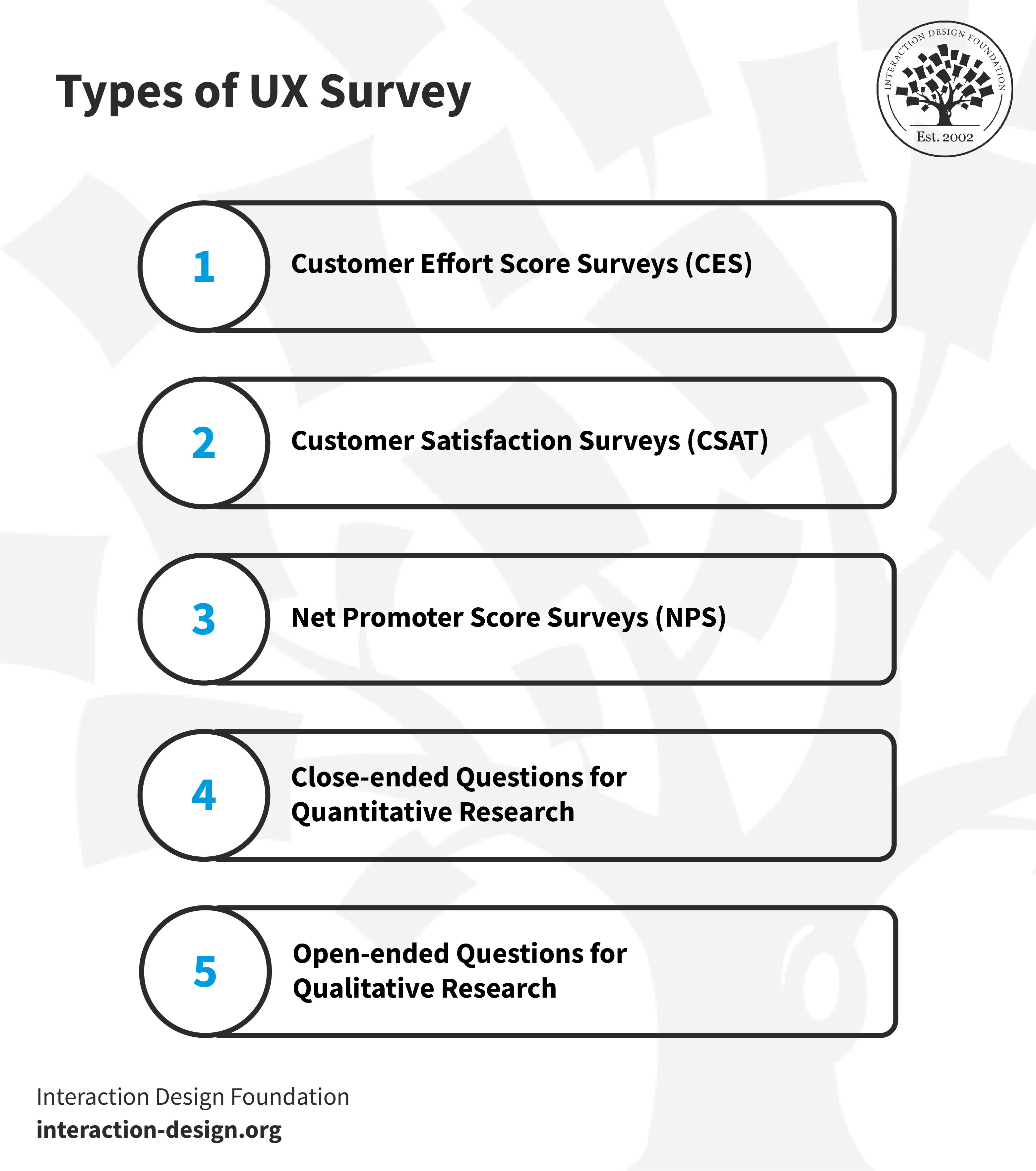
An illustration that shows the types of UX surveys.

© Interaction Design Foundation, CC BY-SA 4.0

Here are the main types of UX surveys:

1. Customer Effort Score Surveys (CES)

CES surveys assess how simple it is for customers to complete tasks with a brand. This is a score that determines if it was easy or difficult for a customer to use a product or get help from a service team. Ease of experience can be more revealing than overall satisfaction. For instance, after a customer service interaction happens, a good question could be:

"How easy was resolving your issue with our customer support?"

  • Very Difficult

  • Difficult

  • Moderate

  • Easy

  • Very Easy

This format helps brands understand how easy the interaction was from the customer's viewpoint—and it can be an excellent tool to identify areas for improvement.

2. Customer Satisfaction Surveys (CSAT)

A CSAT survey measures how content customers are with a company.

  • The chief question is, "How satisfied are you with our service?"

  • Answers can range from 1 ("very dissatisfied") to 5 ("very satisfied").

CSAT surveys focus on individual interactions. These could be purchasing or using customer support, and the surveys use numeric scales to track satisfaction levels over time. Such surveys help brands understand customers’ needs and locate issues with products or services. They also let designers or researchers classify customers based on their satisfaction levels, which helps regarding targeted improvements for a service or product team.

3. Net Promoter Score Surveys (NPS)

NPS surveys are quick and simple. They revolve around one question: “On a scale from 0 to 10, how likely are you to recommend this product/company to a friend or colleague?”. Researchers or designers can then take the score and conduct respondent segmentation into one of three categories:

  • Promoters (Score 9-10): The biggest fans, they’ll likely recommend the product.

  • Passives (Score 7-8): These customers are satisfied with the brand’s product or service, but could easily switch to a competitor.

  • Detractors (Score 0-6): These are unhappy customers who could hurt the brand through negative word-of-mouth.

Researchers—or designers—can calculate the NPS score if they subtract the Detractors' percentage from the Promoters'. This will show customer loyalty and areas for improvement.

4. Closed-ended Questions for Quantitative Research

Well-designed, closed-ended questions are easy ones for respondents to answer. Users pick from predefined options like checkboxes, scales or radio buttons—and these surveys are suitable to gather data with. For example, they could be exit surveys that ask users about how their shopping experience was. The answers they give can yield actionable data—customer preferences or standard problems.

For example, a question could be: "How satisfied are you with our delivery speed?"

The choices could be:

  • Very Satisfied

  • Satisfied

  • Neutral

  • Dissatisfied

  • Very Dissatisfied

Users just select an option that best describes their feelings. This is fast for the user—and easy for the company to analyze.
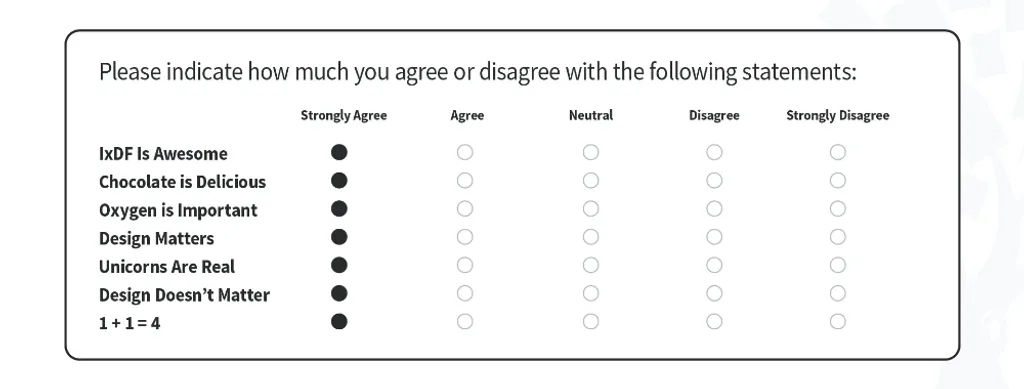
An illustration of a survey featuring closed-ended questions.

Closed-ended questions offer a quick-and-easy way to capture respondents’ feedback.

© Interaction Design Foundation, CC BY-SA 4.0

5. Open-ended Questions for Qualitative User Research

Closed-ended questions may offer fixed choices for quick responses, but open-ended questions permit more detailed, free-form answers. These questions ask users or customers for written responses—going into how they feel and what they expect.

It may take designers or researchers more time to analyze the responses they collect from this type of survey. Even so, they’re valuable as they offer nuanced insights.

For instance, "What feature do you wish we had?" is a good question—and one that can lead to ideas for product enhancements that meet users’ needs.

When and Why Should Designers ConsiderUX Surveys?

A design team can conduct UX surveys at various stages of the design process. They can put surveys out before, during or after they develop their product or service as a way to complement user testing and more. The timing of the survey depends on the specific goals and objectives of the research involved in the UX design project.

Online surveys offer quite a number of advantages. For one thing, there’s the convenience of being able to reach a wider audience and collect data in real-time. What’s more, online surveys allow for more customization and flexibility when it comes to the types of questions that a designer or researcher can ask. That’s especially useful when the design team wants to capture detailed feedback on user behavior or motivations.

Surveys do have some drawbacks, though. For one thing, there’s the potential for biased responses that come from survey fatigue or users’ lack of understanding of questions. What’s more, there’s a limit to how able surveys actually are to get detailed data on user behavior or motivation. Last—but not least—there’s always a risk that respondents may not answer honestly or accurately due to privacy concerns or other factors. Associated with this is the practice of straightlining—that’s where respondents lose the motivation to reply honestly and click or mark the same place or column to get through a survey as fast as possible.

When a designer—or researcher—conducts a UX survey, it’s a strategic decision to understand various aspects of user interaction with a product or service. And here are some vital scenarios and reasons to implement them:

1. Validate Qualitative Findings

Many researchers use surveys to validate and confirm if their qualitative findings, such as those from observations, apply to a wider user group. Qualitative methods typically include a small number of participants, and it is not advisable to base product or business decisions on their insights alone. Quantitative methods such as surveys give teams the confidence in their findings to make impactful decisions. This approach is called triangulation and, in particular, methodological triangulation, as William Hudson explains in this video.

Transcript

2. Feature Evaluation and Enhancement

Designers or researchers may find UX surveys better suited for them to assess existing products than development ones. These surveys can bring in a collection of insights on how well the target audience receives a feature or service. Feedback from such surveys can guide adjustments or additions to make to a product or service.

For example, if customers think an existing feature lacks some functionality, a designer can focus on working to improve it. UX surveys offer valuable data to refine a product—and so better align it with customer needs and expectations.

3. Identify Pain Points

It’s vital to find and weed out pain points—and so then be able to create a user-friendly experience. And UX surveys naturally provide direct feedback from users about issues that bother them. These could include matters that the design team is aware of that actually do make the customer experience less enjoyable or efficient.

For example, users might point out that they find the checkout process too complicated. These insights provide specific areas to focus design improvement efforts upon, and so help to fix problems and prove to users that their feedback is valuable.

4. Assess Customer Satisfaction

A well-timed UX survey can reveal how well a brand meets customer expectations after a critical interaction like a purchase or customer service call.

5. Evaluate Customer Loyalty

Long-term success pivots on customer loyalty. NPS surveys, which are a kind of UX survey, help gauge this. When design teams identify promoters, passives and detractors, they can help tailor customer retention and referral strategies. If they see a drop in loyalty scores, then that’s a spur to dig deeper into potential issues.

6. Journey Mapping

Journey mapping visually represents a user's interactions with a product or service, and it tracks the entire experience—going from the first touchpoint to the final interaction. A well-designed UX survey can give up insights at multiple stages of this journey.

For example, CES surveys are really useful at various checkpoints to measure ease of use. CSAT surveys can check satisfaction at critical touchpoints like purchase or support.

Open-ended questions can offer qualitative insights into why users make specific choices. These answers fill gaps in the journey map that analytics data might lack.

In this video, Matt Snyder, Head of Product and Design at Hivewire, explains journey mapping.

Transcript

7. When Major Transitions or Updates Occur

If a brand is planning to rebrand, make a major update or conduct some other great change, then a UX survey is an essential tool. It helps get a good idea of customer sentiment and expectations beforehand.

When a design team collects survey data, they can account better for adjustments that run in line with customers’ needs. So, they can lessen the risk of there being any negative backlash.

8. Continuous Improvement

The need for improvement is a neverending one—and regular UX surveys create a feedback loop to help brands track user sentiment and performance metrics. They permit ongoing adjustments on the basis of real-world usage and keep the product better aligned with users’ needs and expectations—plus, they sustain a successful marketplace performance.

Product Discovery Coach, Teresa Torres explains continuous improvement in this video:

Transcript

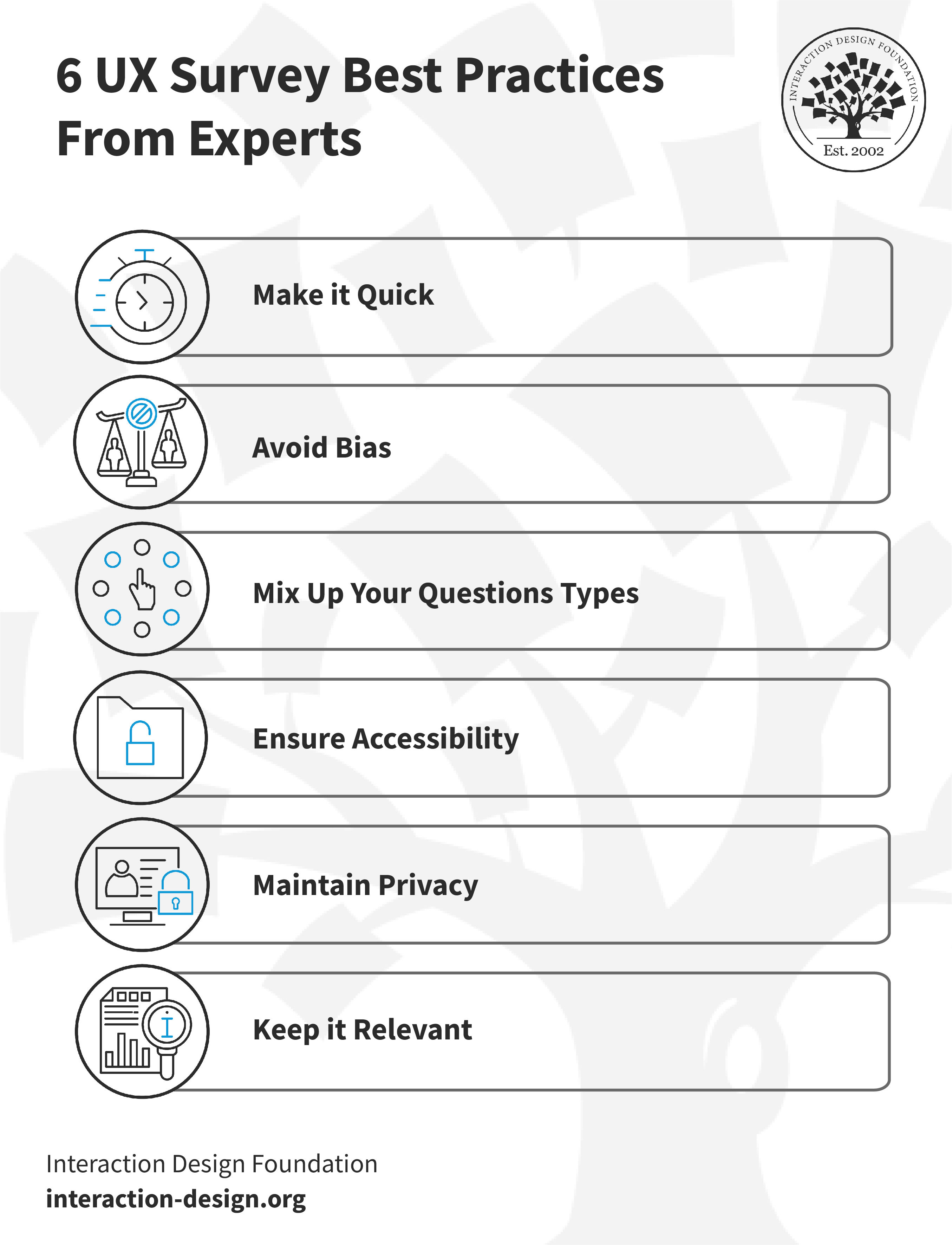
6 UX Survey Best Practices From Experts
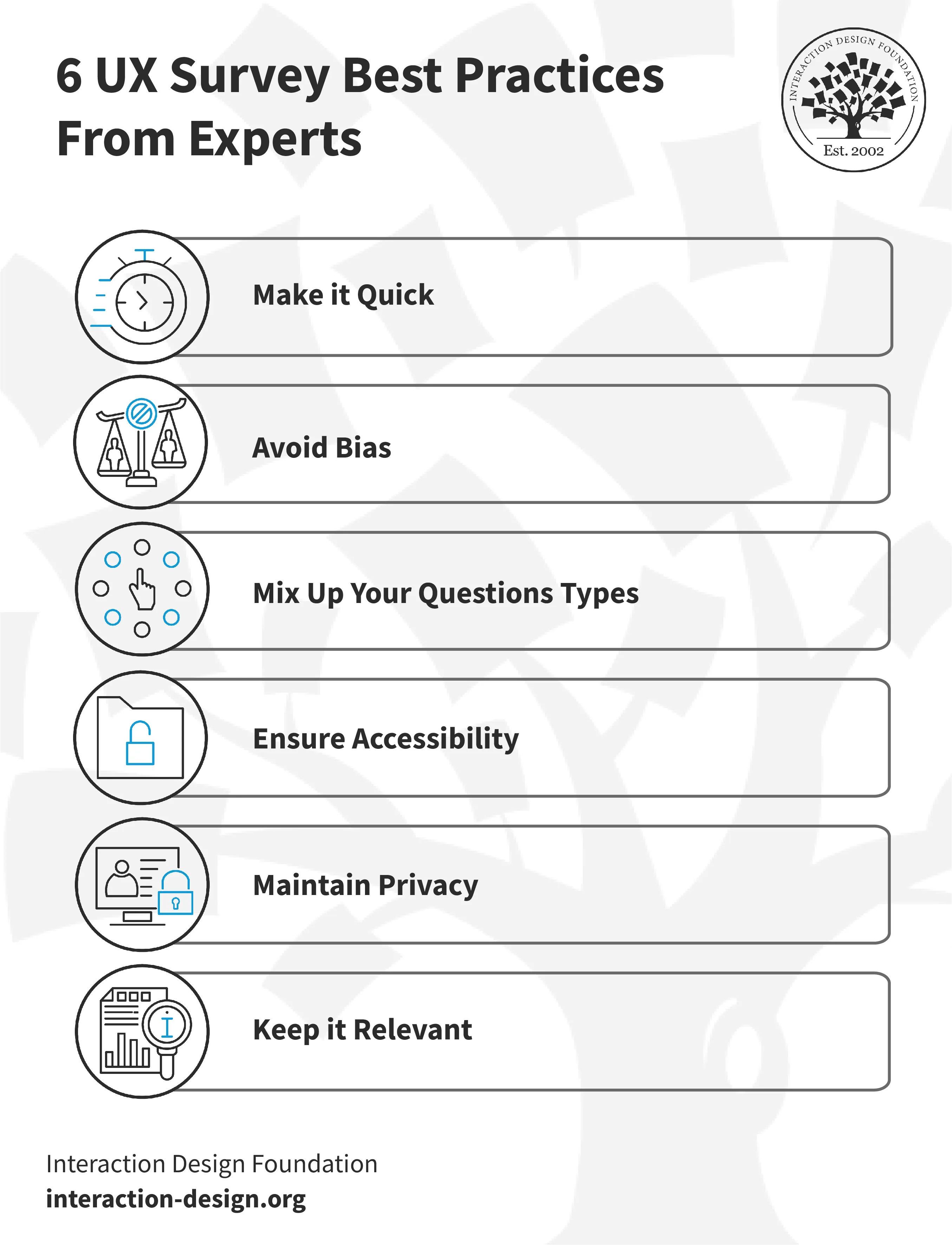
An illustration showing 6 best practices for surveys.

© Interaction Design Foundation, CC BY-SA 4.0

When designers or researchers conduct a UX survey, it calls for careful planning and execution for them to get actionable insights. Here are six best practices:

1. Make it Quick

People’s time is valuable, and long surveys can put off participants. A quick and concise survey keeps a participant engaged—and it’s important to focus on the essential questions and take any unneeded ones out.

  • Keep the survey to 5-10 essential questions.

  • Use clear and concise language.

  • Preview the survey with a friend or colleague to get feedback on the length.

2. Keep It Relevant

It’s crucial to make sure that survey questions are relevant—to collect valuable data. If questions stray off-topic, they might confuse—or even annoy—participants. So, keep questions well focused and that will help keep the insights goal-oriented.

  • Define the target audience and goals first; then write questions.

  • Don’t use generic questions that don't relate to the product or service.

  • Focus on specific user experiences that are in line with the objectives.

  • Give users “not applicable/don’t know” answer options for all closed questions.

3. Avoid Bias

Bias is natural for humans, but it can distort the results—even greatly—and lead to misguided conclusions. The objective framing of questions is something that helps to collect unbiased replies. Some common biases include:

  • Question order bias: This affects responses according to the sequence of questions.

  • Confirmation bias: When the survey asks questions that affirm what the asker already believes.

  • Primacy bias: People choose the first options they see.

  • Recency bias: People choose the last options they see.

  • Hindsight bias: Respondents claim that they could foresee events.

  • Assumption bias: When the asker assumes respondents know certain information.

  • Clustering bias: People believe there are patterns where none exist.

Designers or researchers can remedy these if they:

  • Avoid leading questions.

  • Use neutral language.

  • Consider asking an expert to review questions for potential bias.

  • Test the survey on a small group before they launch it.

4. Mix Up Question Types

Multiple-choice questions and rating scales may be excellent ways to collect numerical data, but open-ended questions can bring in really rich, qualitative insights. Because the blend can make for a more comprehensive view of customer sentiment, it’s vital to:

  • Use a mixture of question types according to the information that’s needed.

  • Leverage open-ended questions for in-depth insights and multiple-choice for quick feedback.

  • Consider scale questions to measure user satisfaction or preferences.

5. Ensure Accessibility

An accessible survey is one that helps bring in a wide range of perspectives. If users or customers—including those with disabilities—can access a survey, they'll provide a much more complete and diverse set of insights. And so, they’ll be able to improve the quality of the data—and the resultant decision-making. So, it’s essential to:

  • Apply easy-to-read fonts and adequate color contrast.

  • Provide alternative text to go with images.

  • Make sure that users can navigate the survey using keyboard controls.

  • Test the accessibility features of the survey.

  • Avoid complex layouts and matrix-style questions.

    Watch this video to understand how essential accessibility is in design:

    Transcript

6. Maintain Privacy

Another critical point is that it’s crucial to prioritize participants' privacy to build trust. When people feel confident that their data is safe, they'll be far more ready to engage fully in a survey. A strong privacy policy meets legal standards. It’s something that boosts participation rates, too, and enriches the quality of the insights. So, it’s important to:

  • State the privacy policy at the beginning of the survey.

  • Use secure platforms to conduct the survey.

  • Assure participants their responses will stay confidential.

  • Put sensitive or personal questions near the end.

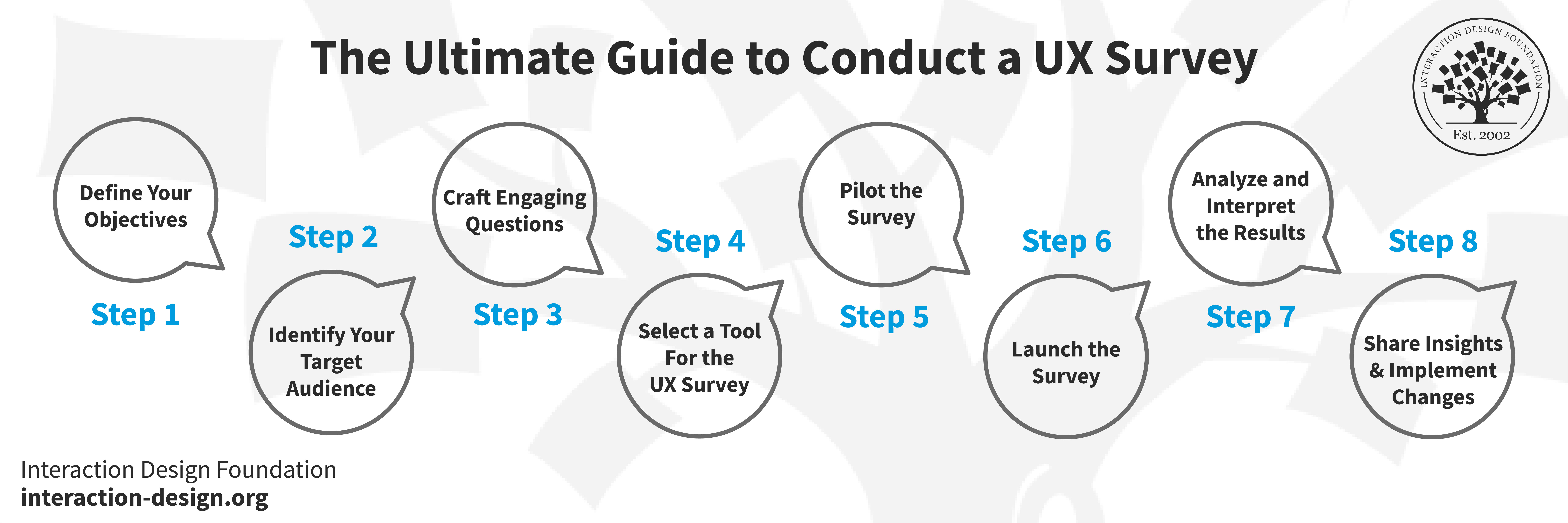
The Ultimate Guide to Conduct a UX Survey
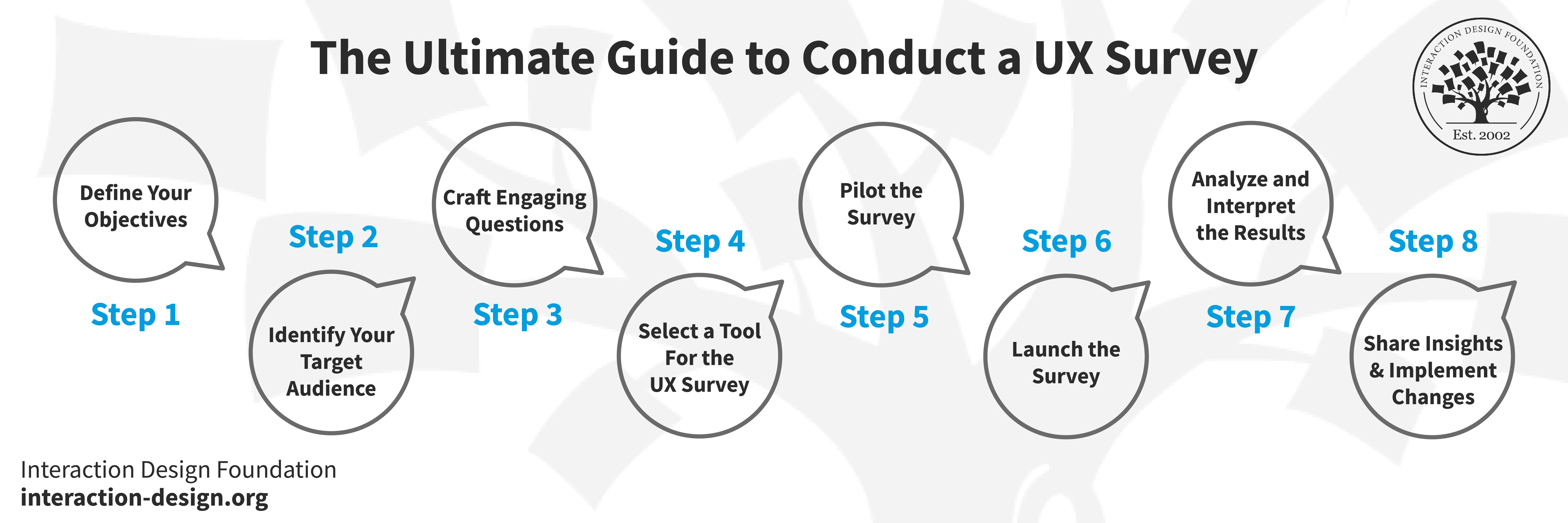
An illustration showing 8 steps to conduct a UX survey.

© Interaction Design Foundation, CC BY-SA 4.0

Designers or researchers should follow these steps to design, distribute and analyze surveys for actionable insights.

Step 1: Define Objectives

To define what they aim to discover, designers—or researchers—should consider:

  • The main goal: Is it to measure user satisfaction or to focus on something else?

  • Relevant user behaviors: Will the survey target frequent users, new users—or both?

  • Key metrics: Is it important to examine completion rates, time spent or other indicators?

  • New feature opinions: Is the input really necessary for new rolled-out features?

  • Pain points: Are user frustrations and roadblocks important things to identify?

When designers or researchers are clear about the objectives, it will guide every next step and ensure they align the results with project goals. Well-defined goals will streamline the survey's structure—and they’ll help craft relevant questions. The sharper focus will also help in the analysis of the data that comes later on.

Step 2: Identify The Target Audience

It’s vital to identify the target audience because of:

  • Product awareness: To gauge how much the audience actually knows about the product or service. This shapes the depth and detail of questions.

  • Interests: Understand what topics engage the audience. That insight’s helpful to make questions interesting.

  • Language: A professional audience may understand industry jargon—while a general one may not. So, it’s a vital point to pick words carefully.

  • Region: Geography can affect preferences and opinions—so it may be necessary to localize questions.

A solid understanding of the target audience helps designers or researchers to write good questions—questions that users or customers can relate to well. It’s something that leads to higher engagement and more accurate data in user research. Designers can make customer or user personas and a user journey around them, too.

Step 3: Craft Engaging Questions for the Questionnaire

Questions really are the heart of a survey. So, it’s vital to write engaging, clear and unbiased ones to get the insights needed. Therefore, what’s crucial is to:

  • Use different types, like multiple-choice for quick feedback or open-ended for deeper insights.

  • Use simple language, don’t use jargon and make sure that every question serves a clear purpose.

  • Be mindful of potential biases and keep the questions neutral.

  • Keep the users interested and guide them onwards through the survey.

Step 4: Select a Tool For the UX Research Survey

It’s a critical point to pick the right tool for the UX survey—for good data collection and analysis. A Google Form provides a quicker way to get started with UX surveys. Here’s why:

  • Ease of use: Google Forms are user-friendly—and it’s easy to create a survey quickly and without much technical knowledge.

  • Customization: It offers various themes and allows question branching based on prior answers.

  • Integration: Google Forms integrates with other Google services like Google Sheets for real-time data tracking.

  • Free: For basic features, it's free of charge.

  • Data analysis: Offers basic analytics like pie charts and bar graphs for really helpful, quick insights.

It’s possible to use specialized UX research tools like SurveyMonkey with more advanced features, too. It’s important to consider what the objectives are—and what the target audience need. Then, a designer or researcher should choose a tool that serves those needs best.

Step 5: Pilot the Survey

Pilot testing is an invaluable step to refine the UX survey. It gives a chance to uncover unforeseen issues with the survey design, questions or technology.

A researcher or designer should recruit participants in small numbers to test the survey. Ask internal team members for help—if it’s needed—or contact professionals via LinkedIn. Use this test survey to understand their experience and make any adjustments that are necessary. This can really make the difference between a good survey and a great one. Plus, it helps iron out any issues and makes sure that a smoother product experience happens for the primary audience.

Step 6: Launch the Survey

To launch the survey means more than to make it live. It calls for picking the proper channels, timing—and even incentives. When a designer or researcher promotes the survey, they make sure that it reaches the intended audience and encourages these people to get involved.

It’s an essential to consider the time of day, week and even platform that aligns with the audience—so, plan every aspect of the launch to maximize participation.

Step 7: Analyze and Interpret the Results

Data analysis transforms raw data into valuable insights—and it’s vital to make sense of things. So, it’s crucial to use analytical tools to sort, filter and interpret the data in the context of the objectives. Look for patterns and correlations but also for unexpected discoveries.

The designer’s or researcher’s interpretation should lead to actionable insights that guide product or service improvement. This step transforms the effort of surveying real value for the project that’s at hand.

Step 8: Share Insights and Implement Changes

Last—but not least—it’s time to share the findings and implement changes. This completes the process. So, it’s really important to create comprehensive reports and engage stakeholders with the insights. Sharing is something that nurtures a shared understanding—and it sets the stage for informed decisions.

The design team should plan and iterate on improvements based on the insights they get—and use the learnings for continuous enhancement.

Each step is a building block—one that contributes to a successful and insightful user experience survey. And when designers or researchers follow this roadmap, it helps make sure that what they create is an engaging, relevant and actionable UX research survey.

Overall, UX surveys are superb opportunities to capture essential feedback that can shed light on the right areas to improve—or develop well—in a product or service. The key is to choose, structure, fine-tune and apply them well—and digest the feedback mindfully.

Questions About Surveys?
We've Got Answers!

Which types of questions should a designer include in a UX survey?

Put in questions that uncover user needs, preferences and frustrations. Focus on close-ended questions for quantitative data and open-ended questions for qualitative insights. And rate satisfaction levels on specific features—and ask about the frequency of use. Include demographic questions so you can understand the user base better. Don’t include leading or ambiguous questions—to make sure that responses aren’t biased. 

William Hudson explains how to write good questions in this video: 

Transcript
 

What length should one aim for in a UX survey?

Aim for one that participants can complete in 5 to 10 minutes. This typically translates to 10 to 15 questions—and when you keep surveys short and focused, it increases the completion rate. What’s more, it makes sure there’s a better quality of responses. Use clear and concise questions so you cover essential topics and don’t overwhelm participants. Prioritize questions that yield the most valuable insights for your design decisions. 

Which common mistakes do designers need to avoid in UX survey design?

Designers need to avoid these common mistakes in UX survey design—mistakes that would happen if they: 

  • Ask leading questions that bias the respondent's answers.

  • Use jargon or technical language—that respondents mightn’t understand. 

  • Include too many open-ended questions—something that can overwhelm participants and reduce completion rates. 

  • Make the survey too long—leading to participant fatigue and drop-offs. 

  • Neglect to pilot the survey to catch issues before wider distribution happens. 

  • Forget to ensure anonymity—which can influence the honesty of responses. 

  • Overlook how important a clear and concise introduction is—one that explains the survey's purpose and estimated completion time. 

William Hudson explains how to write good questions in this video: 

Transcript
 

How does one effectively distribute a UX survey?

To effectively distribute a UX survey, follow these steps: 

  • Identify your target audience based on your UX research’s goals. 

  • Pick the right channels for distribution—like email, social media or your product's website—where your target audience is most active. 

  • Provide incentives—like a chance to win a gift card or access to premium content—to bump up participation rates. 

  • Use clear and compelling communication to explain the purpose of the survey and how participants' feedback is going to actually be used. 

  • Make sure the survey is mobile-friendly—that's because many users will likely access it on their smartphones. 

  • Follow up with reminders—but don’t spam participants—to encourage those who haven’t yet completed the survey. 

Take our course Data-Driven Design: Quantitative UX Research

What incentives typically increase UX survey participation rates?

To increase UX survey participation rates, consider these incentives: 

  • Gift cards or vouchers for popular retailers. 

  • Entry into a prize draw for a larger prize—like electronics or a subscription service. 

  • Exclusive access to premium content or features within your product or service. 

  • Discounts or coupons for your product or service. 

  • A summary of the survey findings—offering valuable insights to participants. 

  • A donation to a charity for each completed survey—and so appeal to participants’ altruism. 

Clearly communicate the incentive in the survey invitation to motivate participants to get involved. What’s more, make sure the chosen incentive is in line with your target audience's interests. 

Take our course Data-Driven Design: Quantitative UX Research

How does one analyze UX survey results?

To analyze UX survey results—and do it well—try following these steps: 

  • Clean the data: Take out incomplete responses and outliers that can skew results. 

  • Do quantitative analysis: For closed-ended questions, use statistical tools to calculate averages, percentages and patterns—it'll help in understanding general trends and user preferences. 

  • Do qualitative analysis: Analyze open-ended responses by categorizing them into themes or topics. That’s going to uncover deeper insights into user motivations, frustrations and experiences. 

  • Identify key findings: Look for commonalities and major differences in the data. And focus on insights that relate to your research objectives directly. 

  • Cross-reference responses: Compare responses across different demographic groups or user segments—to spot specific needs or issues. 

  • Draw conclusions: From your analysis, summarize the main insights that are going to inform your UX design decisions. And think about both the quantitative data and qualitative feedback—to get a well-rounded understanding of your users. 

  • Recommend actions: Suggest actionable steps to address the findings. These are things that could include design changes, new features or areas for further research. 

Remember—the goal of analyzing UX survey results isn’t just to collect data; it’s to gain actionable insights that can improve the user experience, too. 

Get an idea of what actionable insights look like in our piece Rating Scales in UX Research: The Ultimate Guide

How do you ensure user privacy in UX surveys?

Stick to these practices: 

  • Inform participants: Explain the purpose of the survey—clearly—and how you’ll use the responses. Include a privacy statement that outlines the measures you’re taking to protect their information. 

  • Anonymize responses: Collect responses anonymously whenever you can. And if you must link responses to individuals for follow-up, make sure that there’s separate storage of this data from the survey responses to protect anonymity. 

  • Use secure platforms: Choose survey platforms that comply with data protection regulations—such as GDPR or CCPA—and these platforms should offer encryption and secure data storage. 

  • Limit personal data: Only collect personal information that’s absolutely necessary for your research objectives. And certainly don’t ask for sensitive information that could put participants at risk. 

  • Data minimization: Regularly review the data you’ve collected—and delete anything that’s no longer necessary for your research goals. 

  • Educate your team: Make sure everyone who’s involved in the survey process understands the importance of privacy—and knows how to handle participant data responsibly. 

  • Offer opt-outs: Let participants skip questions they’re uncomfortable answering—and provide an option to withdraw from the survey at any point. 

Take our course Data-Driven Design: Quantitative UX Research

What role does UX survey timing play in user feedback quality?

The timing has a great impact on the quality of user feedback. Do the survey too early, and it may result in feedback that doesn't fully reflect the user's experience. That’s because they may not have had enough time to explore and evaluate your product thoroughly. To wait too long to distribute the survey—though—can lead to diminished recall and less precise feedback. That’s because the details of the user experience might no longer be fresh in the respondents' minds. 

Ideally, the survey should follow a meaningful interaction with the product—like completing a purchase or reaching a milestone within an app. This makes sure that the feedback’s relevant and is based on concrete experiences. What’s more, to send surveys after updates or big changes can provide insights into how these alterations actually affect user satisfaction and behavior. 

As another point—consider the user's journey and pick moments when they’re likely to be more receptive and have the time to give thoughtful responses. Avoid times of peak activity or potential stress—it’ll ensure higher response rates and more accurate feedback. 

Strategically timed surveys can yield richer, more actionable insights—and help designers and product managers to make informed decisions that really do enhance the user experience. 

Take our course Data-Driven Design: Quantitative UX Research

How do UX researchers handle survey response biases?

UX researchers handle survey response biases through several strategies—namely, if they: 

  • Design clear questions: They craft questions that are straightforward and unbiased, avoiding leading words that might influence the responses. 

  • Randomize question order: This keeps the order of questions from affecting the answers—especially in surveys with multiple choices. 

  • Pilot test: Researchers conduct pilot tests with a small audience so they can spot—and correct—any biases before they distribute the survey widely. 

  • Use a mix of question types: To put in both open-ended and closed-ended questions helps balance the quantitative data with qualitative insights. It’s something that lowers the risk of skewing the results towards one type of response. 

  • Anonymous responses: To guarantee anonymity is a major plus—it encourages honesty, especially in questions that might lead to socially desirable answers. 

  • Apply statistical techniques: After researchers collect responses, they use statistical methods to find—and adjust for—any biases that might’ve influenced the results. 

  • Diversify sampling: They make sure that the survey reaches a diverse audience—to keep biases that are associated with a particular demographic group from dominating the results. 

What are highly cited scientific articles on the subject of UX surveys?

Santosa, P. I. (2016). Measuring User Experience During a Web-based Survey: A Case of Back-to-Back Online Surveys. Procedia Computer Science, 72, 590-597.  

This publication has been influential in the field of user experience (UX) research, particularly in the context of web-based surveys. The study explores the measurement of user experience during a web-based survey, using a case of back-to-back online surveys. The author investigates the impact of survey design and user interface on the user experience, providing insights into how to create more engaging and user-friendly survey experiences. The findings of this study can help researchers and practitioners in the field of UX design to improve the overall quality and effectiveness of web-based surveys—leading to better data collection and more reliable insights 

What are highly regarded books about UX surveys?

Tullis, T., & Albert, B. (2013). Measuring The User Experience: Collecting, analyzing, and presenting usability metrics. Newnes.  

This book is a comprehensive guide to conducting user experience (UX) surveys and analyzing the resulting data. It covers various UX metrics, such as task success rate, time on task and satisfaction, and provides best practices to design, administer and interpret UX surveys. The book is widely cited in the UX research community as a go-to resource for understanding and applying UX measurement techniques. 

What are the top twenty UX survey questions?

These questions form a comprehensive framework for understanding various aspects of the user experience. Remember to use only a few of these to keep response rates high. 

  1. “How did you find our website/app?” 

  2. “What was your primary goal in visiting our site today? Did you achieve it?” 

  3. “How easy was it to navigate our site?” 

  4. “What features did you use most?” 

  1. “Were there any features that needed to be clarified or easier to use?” 

  2. “How would you rate your overall experience?” 

  3. “What would you change about our website or app?” 

  4. “How likely are you to recommend our product to a friend or colleague?” 

  1. “What other products or services would you like us to offer?” 

  2.  “Did you encounter any technical issues?” 

  3.  “What is your preferred payment/delivery method?” 

  4.  “What is your preferred method of contact for support?” 

  1.  “How would you describe our product in one sentence?" 

  2.  “How does our product compare to similar ones in the market?” 

  3.  “Were our support resources (FAQs, live chat) helpful?” 

  4.  “How could our product better meet your needs in the future?” 

  1.  “How did you find the speed of the site?” 

  2.  “What language options would you prefer for our website/app?” 

  3.  “Would you like a follow-up from our team regarding your feedback?” 

  4.  “Would you be interested in future updates or newsletters?” 

What are good UX survey templates?

Here’s a list of the eight best user experience survey templates that are free to use: 

  1. Client Feedback Form 

Find out what clients think about your business. Use this form as a case study to collect thoughts on customer service and more. Make changes to the template to focus on specific aspects of customer interaction. 

  1. NPS-Enhanced Software Survey 

Experts have made this ready-to-use template to improve your software's Net Promoter Score (NPS). Get critical insights in to elevate your product. 

  1. Basic NPS Inquiry Template 

Easily gauge customer loyalty with this template. Customers rate their likelihood of recommending you from 0 to 10. Adapt the template to explore additional areas. 

  1. Support Team Feedback Form 

Assess the performance of your customer service team. Adapt the survey to delve into aspects that you’re particularly interested in. 

  1. Quick Response Customer Survey 

Send this brief survey to understand customer perceptions. It encourages customers to elaborate on their answers. Make adjustments to fit your needs. 

  1. Product Feedback Survey 

Use this template to collect comments on your products. It aims to identify issues and suggest resolutions. 

  1. Snapshot Product Assessment 

Collect rapid feedback on your products. Use this form to get concise and actionable comments from customers. 

  1. Comprehensive Client Feedback Form 

Capture detailed information on how your customers feel about your products and services. It’s useful for pinpointing specific areas for improvement. 

Earn a Gift Earn a Gift, Answer a Short Quiz!

1
2
3
4
1
2
3
4
Question 1
Question 2
Question 3
Get Your Gift
Interaction Design Foundation logo

Question 1

What is the purpose for designers and researchers to use UX surveys?

1 point towards your gift

  • To create promotional content for marketing campaigns
  • To determine the best color palette and type for a design
  • To understand user needs and improve product design
Interaction Design Foundation logo

Question 2

Which type of UX survey question is best for quantitative data?

1 point towards your gift

  • Closed-ended questions with predefined response options.
  • Hypothetical questions about potential future behaviors.
  • Open-ended questions that ask for detailed user feedback.
Interaction Design Foundation logo

Question 3

What does the Customer Effort Score (CES) survey primarily measure?

1 point towards your gift

  • The effort required by customers to interact with a product or service.
  • The likelihood of customers to recommend a product or service.
  • The overall user satisfaction with a product or service.

Learn More About UX Surveys

Make learning as easy as watching Netflix: Learn more about Surveys by taking the online IxDF Course Data-Driven Design: Quantitative Research for UX.

Why? Because design skills make you valuable. In any job. Any industry.

In This Course, You'll

  • Get excited when you learn the secret to creating products and services people love! If you've ever struggled with conflicting feedback or too many ideas, then this course is for you. Data-Driven Design bridges creativity and logic. You'll use quantitative research to clear the fog and look at people's behavior at scale for everything from apps to business strategies. You’ll learn how numbers tell powerful human stories, and how timeless human-centered design skills help you interpret them. Data gives you clarity, confidence, and credibility. You'll stop guessing and start making real, evidence-based decisions that lead to more user love, more clarity, and the kind of salary that reflects your value.

  • Make yourself invaluable as you collect, analyze, and use data to create designs that deliver measurable results. Did you know that data-driven organizations are 23x more likely to hook new customers, 6x more likely to retain them, and 19x as likely to be profitable? In this course, you'll get in-demand skills that make you an asset in any role that involves decision-making or problem-solving. Data-driven insights—like conversion rates, A/B test results, or satisfaction metrics—make it easier to get buy-in from decision-makers and show the Return on Investment (ROI) of smart, human-centered decisions. As AI becomes standard for processing data, your ability to frame the right problems, interpret results through a human lens, and translate insights into action is what makes you irreplaceable and turns AI into your new superpower.

  • Gain confidence and credibility with hands-on methods and a step-by-step approach to basic statistics. It's easier than you think, even if you don't have experience with design or data. You'll learn to screen participants, write good questions for meaningful surveys, and avoid survey bias. Fast-track your success with 10+ ready-to-use templates, like our How to Choose a Statistical Test guide. Optional real-world projects, including user surveys and early-design testing, allow you to use your new skills immediately and walk away with standout case studies for your portfolio!

It's Easy to Fast-Track Your Career with the World's Best Experts

Master complex skills effortlessly with proven best practices and toolkits directly from the world's top design experts. Meet your expert for this course:

  • William Hudson: User Experience Strategist and Founder of Syntagm.

Get an Industry-Recognized IxDF Course Certificate

Increase your credibility, salary potential and job opportunities by showing credible evidence of your skills.

IxDF Course Certificates set the industry gold standard. Add them to your LinkedIn profile, resumé, and job applications.

Course Certificate Example

Be in distinguished company, alongside industry leaders who train their teams with the IxDF and trust IxDF Course Certificates.

Our clients: IBM, HP, Adobe, GE, Accenture, Allianz, Phillips, Deezer, Capgemin, Mcafee, SAP, Telenor, Cigna, British Parliament, State of New York

All Free IxDF Articles on UX Surveys

Read full article
Why and When to Use Surveys - Article hero image
Interaction Design Foundation logo

Why and When to Use Surveys

Sometimes interviews are a better solution.Knowing what tools to use and when is an important part of the research process. Surveys can be quick and inexpensive, but you need to be sure they’re the right solution for your current problem. Don’t fall into the “to someone with a hammer everything look

Social shares
501
Published
Read Article
Read full article
Writing Good Questions for Surveys - Article hero image
Interaction Design Foundation logo

Writing Good Questions for Surveys

Although question grids like this are much loved by survey tool suppliers, they are very taxing for participants and don’t work well on mobile devices.A quick glance at online survey tools will show a wide variety of question types and formats. In the video we consider what good questions look like

Social shares
542
Published
Read Article
Read full article
Ensuring Quality - Article hero image
Interaction Design Foundation logo

Ensuring Quality

An example of traditional “straightlining". Notice that some of the marked answers would not be made by respondents who are actually reading the questions. There is a temptation to see surveys as a set of simple questions. What could go wrong? The truth is that even the most obvious questions can be

Social shares
469
Published
Read Article
Read full article
User Experience (UX) Surveys: The Ultimate Guide - Article hero image
Interaction Design Foundation logo

User Experience (UX) Surveys: The Ultimate Guide

Imagine you’re a business owner who wants to know what’s working and what’s not on your website—and, oh yes, where you need improvements. Sure, there are a bunch of research methods you can try—like user interviews, usability tests, and A/B testing, but read on and see how a user experience (UX) sur

Social shares
1k
Published
Read Article
Read full article
Rating Scales in UX Research: The Ultimate Guide - Article hero image
Interaction Design Foundation logo

Rating Scales in UX Research: The Ultimate Guide

Picture this: you’re designing a new app or website and want to know how users feel about it, but you want a good way to get actionable insights from those feelings, fast. Feedback is vital—and the sooner you get it, the better—and that’s why something as direct and visual as a rating scale comes in

Social shares
882
Published
Read Article
Read full article
Revolutionize UX Design with VR Experiences - Article hero image
Interaction Design Foundation logo

Revolutionize UX Design with VR Experiences

Is the future of user experience design (UX design) going to exist on screens or will it find immersive, three-dimensional spaces as its main home? You can design for both views—and interactions—within a digital environment that’s boundless in virtual reality (VR), so read on to find five fundamenta

Social shares
620
Published
Read Article

User Experience (UX) Surveys: The Ultimate Guide

User Experience (UX) Surveys: The Ultimate Guide

Imagine you’re a business owner who wants to know what’s working and what’s not on your website—and, oh yes, where you need improvements. Sure, there are a bunch of research methods you can try—like user interviews, usability tests, and A/B testing, but read on and see how a user experience (UX) survey helps gather valuable insights in and pinpoint the areas you’ll need to work on to get a site—or any other digital product or service for that matter—in tip-top shape!

See how UX surveys can offer actionable insights, presenting qualitative data that informs decisions. 

Transcript

What are UX Surveys?

UX surveys—or user experience surveys—help you gather information about users’ feelings, thoughts, and behaviors related to a product or service they encounter, and online surveys form a part of the broader field of usability surveys. They focus on understanding how users interact with a system, application, or website, and they’re helpful sources of qualitative data that can give you actionable insights to, in turn, inform decisions that can give customer satisfaction a big boost as you create a more user-centered design.

Types of UX Surveys

© Interaction Design Foundation, CC BY-SA 4.0

1. Customer Effort Score Surveys (CES)

CES surveys assess how simple it is for customers to complete tasks with what your company offers them—and it’s like a score that tells you if using your product or getting help from your service team was a breeze or a struggle for the customer. People appreciate straightforward questions, and you, dear UX researcher, will be glad of straightforward feedback—and less time you need to spend on it. Time is precious, so spending less effort—and time—on fixing issues is better. Note that ease of experience can be more revealing than overall satisfaction, and experts use the Customer Effort Score as a reliable data source.

For instance, after a customer service interaction, the question could be:

"How easy was resolving your issue with our customer support?"

  • Very Difficult

  • Difficult

  • Moderate

  • Easy

  • Very Easy 

2. Customer Satisfaction Surveys (CSAT)

A CSAT survey measures how happy customers are with your company—and the main question is, “How satisfied are you with our service?”. Answers range from 1, meaning “very dissatisfied,” to 5, which indicates “very satisfied.”

CSAT surveys focus on individual interactions—things like purchasing or using customer support—and they use numeric scales to track satisfaction levels over time. These surveys help you understand what your customers’ needs are like—and pinpoint issues with your products or services. They allow you to categorize customers based on their satisfaction levels, too, and that helps with targeted improvements.

3. Net Promoter Score Surveys (NPS)

NPS surveys are simple and quick since they’ve got just one question: “On a scale from 0 to 10, how likely are you to recommend this product/company to a friend or colleague?”. From the score, you can do respondent segmentation and divide them into one of three categories:

First are the Promoters (Score 9-10)—and they’re your biggest fans, the ones who’re likely to recommend your product. Second are the Passives (Score 7-8)—and these folks find your product/service satisfactory enough, sure, but the loyalty is not there, so watch out for them as they could switch to competitors with ease. Third are the Detractors (Score 0-6)—and speaking of “watch out,” they’re unhappy customers, and—in the golden age of feedback with everybody being able to write about anything—they’re ones who could harm your brand through negative word-of-mouth.

To get a good big-picture view, you can calculate the NPS score by subtracting the Detractors’ percentage from the Promoters’—it’ll give you a good snapshot of customer loyalty and areas for improvement.

4. Close-ended Questions for Quantitative Research

Well-designed, closed-ended questions are nice and easy to answer—and they’re ones where users pick from predefined options like checkboxes, scales, or radio buttons. Surveys such as these are suitable to collect data with—like in exit surveys asking users about their shopping experience—and the answers provide actionable data, like customer preferences or standard problems. You can “plug” insights you get into your redesign efforts.

Get more insights on quantitative research in this course on Data-driven Design.

You may ask,

"How satisfied are you with our delivery speed?" 

The options could be:

  • Very Satisfied

  • Satisfied

  • Neutral

  • Dissatisfied

  • Very Dissatisfied

For closed-ended ones, users don’t need to type out their thoughts—they’ve got to just pick an option that best describes their feelings. It’s a “win-win,” and it’s both quick for the user and easy for the company to analyze.

5. Open-ended Questions for Qualitative User Research

While closed-ended questions give up fixed options for quick responses (and they’re a great convenience because of it), open-ended questions allow for more detailed, free-form answers. They’re questions that ask for written responses, and so they dig deeper into how users feel—and what they expect from a brand and its product or service. It may take more time to analyze the responses you get in from this type of survey, but they’re worth the “work” and are valuable because they offer nuanced insights.

For example, ask a question like “What feature do you wish we had?” and what you get back can lead to ideas for product enhancements that meet users’ needs far better.

When and Why Should You Conduct a UX Survey?

Conducting a UX survey is a strategic decision to understand various aspects of user interaction with a product or service. Here are vital scenarios and reasons for implementing them:

1. To Evaluate Features and Make Enhancements

You may find UX surveys better suited to assess existing products than ones you intend to develop, and they’re surveys that can gather insights on how well your target audience receives a feature or service. Feedback from such surveys can be a great help to guide adjustments or additions to your product—like if customers think an existing feature could do better on the functionality side, you can leverage that valuable data to get your product more in line with user needs.

2. To Identify Pain Points

If you’re going to create a user-friendly experience, it’s vital that you spot pain points and design to alleviate problems. UX surveys provide direct feedback from users about what’s troubling them, and issues could be ones you’re unaware of that make the customer experience less enjoyable or less efficient.

For example, users might point out that they find your checkout process too complicated or that they’ve got trouble finding specific information on your website. Treat insights of this kind like gold; they give you specific areas to focus your improvement efforts on and make UX strategy decisions that will make the best of how users interact with your product or service. Addressing these issues helps you fix problems and show users you value and act upon their feedback.

3. To Assess Customer Satisfaction

Customer satisfaction is crucial for any business—and dissatisfaction can be a sore point on public feedback. A well-timed UX survey can gauge how well you meet customer expectations after a critical interaction—such as a purchase or customer service call—and there’s value to be had in the “good” and the “bad.” Positive feedback helps identify vital areas, while negative feedback highlights issues that need attention.

4. To Evaluate Customer Loyalty

For sure, long-term success hinges on customer loyalty, and NPS surveys—a type of UX survey—help gauge this. When you identify promoters, passives, and detractors, it can help you tailor customer retention and referral strategies, and a dip in loyalty scores is an alert to dig deeper into potential issues and find out how you can solve them.  

5. To Journey Map

Journey mapping visually represents a user’s interactions with your product or service. It tracks the entire experience—from the first touchpoint to the final interaction—and a well-designed UX survey can provide insights at multiple stages of this journey to measure things like ease of use. Are customers finding it simple to navigate from one section of your website to another?

Transcript

CSAT surveys are great to check satisfaction at critical touchpoints with—like purchase or support—and fill you in on vital details about fixes to make. Open-ended questions can bring on qualitative insights into why users make specific choices, and the answers can fill gaps in the journey map that analytics data mightn’t.

6. To Help during Major Transitions or Updates

If you’re planning a significant change, such as a rebrand or major update, a UX survey is invaluable to help assess customer sentiment and expectations with—before you roll out the differences. Getting survey data in means you can make adjustments that do align with customer needs—and you can reduce the risk of any negative backlash searing your brand.

7. To Make Continuous Improvements

It may sound like a drag, but the need for improvement never stops. Regular UX surveys create a feedback loop to help you track user sentiment and performance metrics—and they’re powerful tools that allow for ongoing adjustments based on real-world usage.

Transcript

For example, if you notice a slight dip in satisfaction scores for your app usability, you can investigate and go in and make adjustments before it flares up into a big issue.

6 UX Survey Best Practices From Experts

Visual representation of 6 UX survey best practices from experts.

© Interaction Design Foundation, CC BY-SA 4.0

1. Make it Quick

Time is precious for pretty much everyone—so show your respondents you value theirs (long surveys can be a real turn-off). A quick and concise survey ensures that the participant stays engaged—so do focus on just the essential questions and leave out any unnecessary ones.

Steps You Can Take

Limit your survey to 5-10 essential questions. Use clear and concise language. Preview the survey with a friend or colleague so you get feedback on the length and clarity.

2. Keep It Relevant

It’s vital to keep relevance going in your survey questions—and on-point questions will get you valuable data in return. If questions stray off-topic, though, they’ll risk irritating or baffling participants. Keep questions focused to ensure you get the insights for your goals.

Steps You Can Take

Define your target audience and goals before you write any questions—and don’t have any generic questions that don’t relate to the product or service when you do get writing them. Focus on specific user experiences that align with what your objectives are. Provide not applicable (N/A) / don’t know answers for all closed questions.

3. Avoid Bias

Bias—often an unfortunate “byproduct” of being human—can distort the results and lead to misguided conclusions. The objective framing of questions helps you collect unbiased responses, and some of the common biases include:

  • Question order bias: Affects responses based on the sequence of questions.

  • Confirmation bias: Where you just ask questions that affirm what you already believe.

  • Primacy bias: People choose the first options that come up.

  • Recency bias: People are more influenced by their last experience.

  • Hindsight bias: Respondents say events were foreseeable.

  • Assumption bias: Assumes respondents know certain information.

  • Clustering bias: People see patterns where none exist.

Steps You Can Take

Avoid leading questions, and be sure to use neutral language that doesn’t put any slant or spin on what you’re asking. Consider asking an expert to review your questions to weed out potential bias. Test the survey on a small group of “users” before launching it to see how unbiased it is.

4. Mix Up Your Question Types

While multiple-choice and rating scales excel at gathering numerical data—or more quantitative research data—open-ended questions offer rich, qualitative insights. Get the right blend and you can get a more comprehensive view of customer sentiment.

Steps You Can Take

It’s a great idea to use a mixture of types of questions according to the information you need—open-ended questions for in-depth insights and multiple-choice ones for quick feedback. Think about using scale questions to gauge user satisfaction or preferences.

5. Ensure Accessibility

Accessible design is a big deal in any case, and making your survey accessible helps you capture a wide range of perspectives. If you create an accessible survey for everyone—including those with reduced abilities—you’ll get a more complete and diverse set of insights to gear your decision-making around.

Steps You Can Take

Have easy-to-read fonts and adequate color contrast, and make sure you’ve got alternative text for images. Also make sure that users can navigate the survey using keyboard controls (not everyone uses a mouse). Test the survey’s accessibility features, and—on the subject of keeping things nice and accessible—avoid complex layouts and don’t have matrix-style questions in there.

Watch our video on accessibility to learn more about why it’s so important.

Transcript

See the W3’s Web Content Accessibility Guidelines for more details.

6. Maintain Privacy

Make participants’ privacy a priority—it’s critical to do that if they’re going to build trust in your brand. When people feel confident that their data is safe, they’ll be more ready to engage in full in your survey, and a nifty “bonus” is how a strong privacy policy doesn’t just meet legal standards and boost participation rates but enriches the quality of your insights, too.

Steps You Can Take

State your privacy policy at the start of the survey and be clear about it. Use secure platforms for conducting the survey. Assure participants that their responses will remain confidential—and honor that. Last—but not least—put sensitive or personal questions towards the end.

The Ultimate Guide to Conduct a UX Survey

 A guide to conduct a UX survey in 8 steps.

© Interaction Design Foundation, CC BY-SA 4.0

Step 1: Define Your Objectives

Defining clear objectives sets the stage for a successful UX survey, kicks off the roadmap for the best survey possible, and it helps you understand the key insights you’re after. To zero in on what you’re aiming to discover, consider these questions:

  • What is the main goal? Understand if you want to measure user satisfaction or you want to focus on something else.

  • Which user behaviors are relevant? Is the survey targeting frequent users, new users, or both?

  • What are the key metrics? Do you want to look at completion rates, time spent, or other indicators?

  • New feature opinions: Are you seeking input on new rolled-out features?

  • Pain points: Are you trying to identify user frustrations and roadblocks?

It’s vital to get great clarity in the objectives, as it’ll guide every next step and ensure you align the results with your project goals. Well-defined goals will help you streamline the survey’s structure and help you craft relevant questions. The sharper focus has an added benefit in that it will help you analyze the data you collect later on.

Step 2: Identify Your Target Audience

You need to know whose opinions you want, and how to write questions that they can relate—and respond—to well, so it’s more than a little important to identify your target audience, and there are several reasons.

  • Product awareness: Gauge how much your audience knows about your product, as this will shape the depth and detail of questions.

  • Interests: Understand what topics engage your audience, and you can use that insight to make questions interesting.

  • Language: A professional audience may understand industry jargon, but a general audience may well not—so choose words with care.

  • Region: Geography can affect preferences and opinions, so do localize questions if you need to. 

Step 3: Craft Engaging Questions for the Questionnaire

There’s an art to writing good questions for surveys—and what you ask are the heart of your survey, so if you write engaging, clear, and unbiased ones, they’ll bring back the insights you need from respondents. Your questions have got to captivate the users’ interest and guide them through the survey—so, don’t bog them down with boring, irrelevant, or ambiguous words. Treat your survey as a design in itself, and give it great UX and a “seamless experience”!

Transcript

Use different question types—like multiple-choice ones for quick feedback or open-enders to get deeper insights back. Use simple language, don’t use jargon, and ensure each question serves a clear purpose. Be mindful of potential biases—which can come up without you noticing—and keep the questions neutral.

Step 4: Select a Tool For the UX Research Survey

It’s vital to pick the right tool for your UX survey if you’re going to get the best in data collection and analysis. A Google Form offers you a quicker way to get started with UX surveys—and here’s why:

  • Ease of use: Google Forms is user-friendly, and even if you’re not tech-savvy, you can create a survey quickly.

  • Customization: It offers various themes and allows question branching based on prior answers.

  • Integration: Google Forms integrates with other Google services like Google Sheets for real-time data tracking.

  • Free: For basic features, it’s free of charge.

  • Data analysis: It offers basic analytics like pie charts and bar graphs for quick insights.

You can also use specialized UX research tools like SurveyMonkey with more advanced features, but whichever one you go with, consider what your objectives are and what your target audience need, and then choose a tool that best serves those needs.

Step 5: Pilot the Survey

Pilot testing is a very valuable step for refining the UX survey—and that’s since it gives you a chance to uncover unforeseen issues with the survey design, questions, or technology; things you really wouldn’t notice otherwise. It’s a good idea to recruit participants in small numbers so you can test the survey.

You can ask internal team members for help or contact professionals via LinkedIn, and use this test survey to understand their experience and make necessary adjustments. This can make the difference between a good survey and a great one—and, as stated before, treat the survey like you would a design. When you pilot test well, it helps iron out the kinks and ensures a smoother product experience for the primary audience.

Step 6: Launch the Survey

Well done—it’s launch time! But launching the survey is more than just making it live—you’ll want to choose the proper channels, timing, and even incentives to get the best results. And when you promote the survey, it ensures that it reaches your intended audience and encourages participation from them. Their time is valuable, remember, so consider the time of day, week, and even platform that aligns with your audience. You’ll need to plan every aspect of the launch to maximize participation so you do get it launched well with “All systems go!”.

Step 7: Analyze and Interpret the Results

The results are in—now comes the “fun” part! Data analysis transforms raw data into valuable insights, so be sure to use analytical tools to sort, filter, and interpret the data in the context of your objectives. Look for patterns and correlations—sure—but also keep an eye out for unexpected discoveries, as they may well pop up.

Your interpretation of the data you got back should lead to actionable insights that guide you (and your team/s) to make substantial product or service improvements—and this step transforms the effort of surveying real value for your project.

Step 8: Share Insights and Implement Changes

Last—but not least—share your findings and implement changes to complete the process, and create comprehensive reports and engage stakeholders with the insights to get them on board and on the same page. The reports will need to be clear so the right ideas get communicated—since many stakeholders will need data “translated” for them. Sharing fosters a shared understanding and sets the stage for informed decisions to bring the right fixes and improvements to where they’re needed.

Plan and iterate on improvements based on the insights you get, and be sure to use the learnings for continuous enhancement. Keep your radar on for any insights that might emerge to help you tweak the user experience of your survey in any way possible so it does its job and brings you back info you can use well.

The 20 Best User Experience Survey Questions

These questions form a comprehensive framework for understanding various aspects of the user experience—just be sure to use only a few of these to keep response rates high. 

  1. “How did you find our website/app?”

This question helps assess the effectiveness of your marketing channels, and it shows you where people first encounter your brand. While Google Analytics reveals traffic from specific sources like AdWords or Facebook, it needs to track direct traffic. Know this and you can fine-tune your marketing strategy.

  1. “What was your primary goal in visiting our site today? Did you achieve it?”

So, there are two questions—but, anyway, it focuses on why users visit and if the site meets their needs and, from that, helps identify gaps in content or functionality.

  1. “How easy was it to navigate our site?”

This question looks at how effective your website is, and you’re on the right track if people find it easy to navigate (well done!). If not, well, it’s a red flag and your site’s layout or functionality may need tweaks—which you’ll need to look into with due care and attention.

  1. “What features did you use most?”

This question puts it out there as to which parts of your product or service are most valuable to customers. If the majority say they often use a specific feature, then that’s a pivotal strength to highlight in marketing.

  1. “Were there any features that needed to be clarified or easier to use?”

This question zeroes in on potential weak spots in your product design or functionality—and can leave some things wide open for “attack” but for good reason. If a feature keeps getting labeled as confusing or complicated to use, yes, it needs improvement.

  1. “How would you rate your overall experience?”

Provides a general impression of user satisfaction—the truth’s often in a number or a word or two.

  1. “What would you change about our website or app?”

This question invites suggestions for improving your digital solution—and this “suggestion box” moment gives users a voice in the development process. If they care as much as they should and something has come up, you should hear about it.

  1. “How likely are you to recommend our product to a friend or colleague?”

Recommendations measure customer satisfaction and loyalty, and it’s common for pop-up surveys to use this question based on a widely used metric called the Net Promoter Score (NPS). A high likelihood to recommend means that—sure—customers are happy and likely to become brand advocates.

  1. “What other products or services would you like us to offer?”

This question taps into unmet customer needs and wants—another golden “suggestion box” moment! Responses about this can expose gaps in your current products—or services—and even go beyond feature gaps and inspire new products themselves. Trust in your users and customers, as some of them may know what they’d like to see and can voice it well—and if they didn’t care, they wouldn’t write anything, right?

  1. “Did you encounter any technical issues?”

Technical issues—like bugs, error messages, or crashes—can affect customer satisfaction for the worse (and sometimes to the point they're steamed at you), so you’ll need to hear about it so you can change things (for the better!).

  1. “What is your preferred payment/delivery method?”

It may seem trivial, but some customers will only buy if their preferred payment method is available (and go to a competitor if they have it). Money talks, so you’ll need to understand the popular payment options that resonate with your target audience and see about going with what they want.

  1. “What is your preferred method of contact for support?”

This question seeks to know how customers prefer to reach out for help—and many people will want (or not want) to be emailed, phoned, texted, or what have you as the only way to get hold of them. Understand this and you can help your brand optimize their customer service channels.

  1. “How would you describe our product in one sentence?”

This question aims to capture a concise customer impression of your product, and one-sentence descriptions can reveal key strengths or weaknesses. Note that it’s “one sentence” and not “one word”—as the latter might open up confusing “cans of worms” (or references to other substances) and even praise mightn’t shed light on the all-important “why” factor.

  1. “How does our product compare to similar ones in the market?”

This question seeks to understand your product’s competitive edge or shortcomings and has the brand standing beside its rivals for “inspection time.” Responses can tell you where you excel or lag behind other market players and give you insights on how to up your game or make those strengths even more accessible.

  1. “Were our support resources (FAQs, live chat) helpful?”

You need to understand the effectiveness of your customer support tools—like FAQs and live chat. If most people find these resources helpful, great—they validate your support strategy. If not, it’s a cue to improve these areas, be it better Frequently Asked Questions, better live-support training, or what have you. Support is a big—no, a huge—deal, and it can determine how much your brand is worth to the customers who contact it for help, so make sure you offer assistance that benefits your customers and respects both them and the time that makes up their short lives.

  1. “How could our product better meet your needs in the future?”

This question may be about the future, but it seizes on the present moment by sending the message to customers that your brand values them and what they think. Whether it’s about adding new features or refining existing ones, the feedback can help “big-time” with roadmap planning. If multiple customers highlight the same issue (like with pricing), that’s a vital sign that needs attention—before they “jump ship” to a competitor who’s cheaper. 

  1. “How did you find the speed of the site?”

This question evaluates how your site speed impacts user satisfaction—and, of course, slow loading frustrates users and may even lead them to abandon the site. If multiple people report this issue, you’ll need to get something done for optimization—and remember most users access digital products on mobile devices with mobile UX needs.

  1. “What language options would you prefer for our website/app?”

This question identifies the language preferences of your user base—not everyone will be adept or comfortable with English, for example. If a sizeable portion prefers another language, it makes sense to offer that option—be it Spanish, Russian, Chinese, etc. (though we might leave out Esperanto). Another “perk” of offering text in other tongues is how it won’t just broaden your reach but make your platform more inclusive as well.

  1. “Would you like a follow-up from our team regarding your feedback?”

This question is another one that shows you respect your respondents’ time—and they’ll appreciate the courtesy. Get a “yes” from them and it pretty much means the respondent is engaged and open to dialogue, which you can take as a sign of higher loyalty or interest. But a “no” means they provided feedback, all right, but aren’t looking for a discussion—so just leave it at that and leave them alone.

  1. “Would you be interested in future updates or newsletters?”

For this one, it’s an easy binary response on how interested customers are in staying connected with your brand, with a “yes” meaning a “happy camper.” Wouldn’t it be wonderful if they were all satisfied customers who’re more likely to engage with future offerings, but—reality check—there are going to be “no’s” too. A “no” could suggest that they’re not fully satisfied—or not interested in long-term engagement—so just take it at face value and respect their wishes.

What are Some Great Free UX Survey Templates?

  1. Client Feedback Form

Find out what clients think about your business, and use this form as a case study to gather thoughts on customer service and more. Make changes to the template so you focus on specific aspects of customer interaction.

  1. NPS-Enhanced Software Survey

Experts have made this ready-to-use template to improve your software’s Net Promoter Score (NPS). Use it to gather critical insights to elevate your product.

  1. Basic NPS Inquiry Template

It’s easy to gauge customer loyalty with this template, where customers rate their likelihood of recommending you from 0 to 10—and you can adapt the template to explore additional areas.

  1. Support Team Feedback Form

Assess the performance of your customer service team—and adapt the survey to delve into aspects which you’re particularly interested in.

  1. Quick Response Customer Survey

Send this brief survey out to understand customer perceptions—and it doesn’t just encourage customers to elaborate on their answers, but you can make adjustments to fit your needs too.

  1. Product Feedback Survey

Use this template to collect comments on your products—and it’s nice and handy as it aims to identify issues and suggest resolutions.

  1. Snapshot Product Assessment

Collect rapid feedback on your products, and you can see this form to get concise and actionable comments from customers.

  1. Comprehensive Client Feedback Form

Capture detailed information on how your customers feel about your products and services—handy for not just pinpointing specific areas for improvement but getting a good view of your brand’s “status” with them, too.

Final Thoughts—And The Take Away

UX surveys are pretty powerful tools when you’ve got the right type working for you, the right wording of questions in, and the right mindset on how to engage the people who’ll answer them. It takes everything from defining objectives to crafting engaging questions, ensuring accessibility, analyzing results, and implementing changes, but the work is worth it to zero in on the best survey possible. From the get-go, it’s vital to make sure you’ve got clear objectives keeping the survey on course—because when you understand what you want to achieve with the survey, it sets the foundation for success and guides every subsequent step for you.

Another vital thing to bear in mind is to ask relevant questions that are also engaging: ones that also show you value the time of the people who are answering them; clear, interesting, and unbiased questions that cover various facets of the user experience—a winning formula that helps in capturing genuine feedback and insights.

Last—but not least—your survey is a design in itself that needs to satisfy its users and respect them as individuals with opinions. So, make sure you ramp up the UX of it and keep the “magic” alive so they can look on your brand as one that speaks to—and advocates for—them, and is one that’s interested in retaining them as loyal customers long into a fruitful future.

Feel Stuck?
Want Better Job Options?

AI is replacing jobs everywhere, yet design jobs are booming with a projected 45% job growth. With design skills, you can create products and services people love. More love means more impact and greater salary potential.

At IxDF, we help you from your first course to your next job, all in one place.

See How Design Skills Turn Into Job Options
Privacy Settings
By using this site, you accept our Cookie Policy and Terms of Use.
Customize
Accept all

Be the One Who Inspires

People remember who shares great ideas.

Share on:

Academic Credibility — On Autopilot

Don't waste time googling citation formats. Just copy, paste and look legit in seconds.