Tangible interaction is a type of user experience (UX) that links physical objects with digital information. UX designers create tangible user interfaces (TUIs) to let users interact with digital systems by touching, moving, or manipulating real-world items. This approach makes digital content more intuitive, engaging, and memorable.
Explore the exciting area of design for touch and haptics—the use of devices that stimulate the sense of motion and touch—in this video with Alan Dix: Author of the bestselling book “Human-Computer Interaction” and Director of the Computational Foundry at Swansea University:
What Does Tangible Interaction Look Like?
Screens may have become synonymous with human-computer interaction, but humans are naturally used to more in their world than peering at images and text or thumbing at icons and buttons on rectangular surfaces. Tangible interaction design (TID) blends the digital world with physical experience. Designers access a whole new realm of UX design when they let users manipulate data by moving, touching, or arranging real-world objects.
Still, tangible UX design isn’t a new “discipline,” especially as humans have been using physical controls for centuries. In the previous century, some fundamental electronic devices enabled users to enjoy many kinds of experiences, some of them incorporating haptic feedback such as game controllers that vibrated when players suffered “wounds” or setbacks. Design for tangible interaction endures in many examples, such as:
1. Computer Mice
The mouse is a classic tangible interface; it was the “natural” choice for users to move a controller physically to control a pointer on the screen. The scroll wheel and buttons offer direct tactile feedback and make digital navigation feel immediate and intuitive.
2. Game Controllers
Gamepads, joysticks, and motion-sensitive controllers—like the Nintendo Wii Remote or PlayStation Move—let users control complex digital environments through physical gestures, tilts, and pressure-sensitive buttons.
3. Touchscreens with Physical Styluses
Devices like iPads or drawing tablets that use a stylus let users “draw” or “write” digitally in a way that mimics real-world tools. The stylus becomes a tangible bridge between the user’s hand and digital content.
4. Smart Home Dials (like Nest Thermostat)
As with older, “analogue” dials, users rotate a physical dial to adjust the digital temperature setting. They receive immediate tactile and visual feedback, so blending physical interaction with smart home interfaces.
5. Digital Musical Instruments (like Reactable)
These instruments allow musicians to manipulate sound through pressure, shape, or object placement, and turn abstract sound design into tactile, performative experiences.
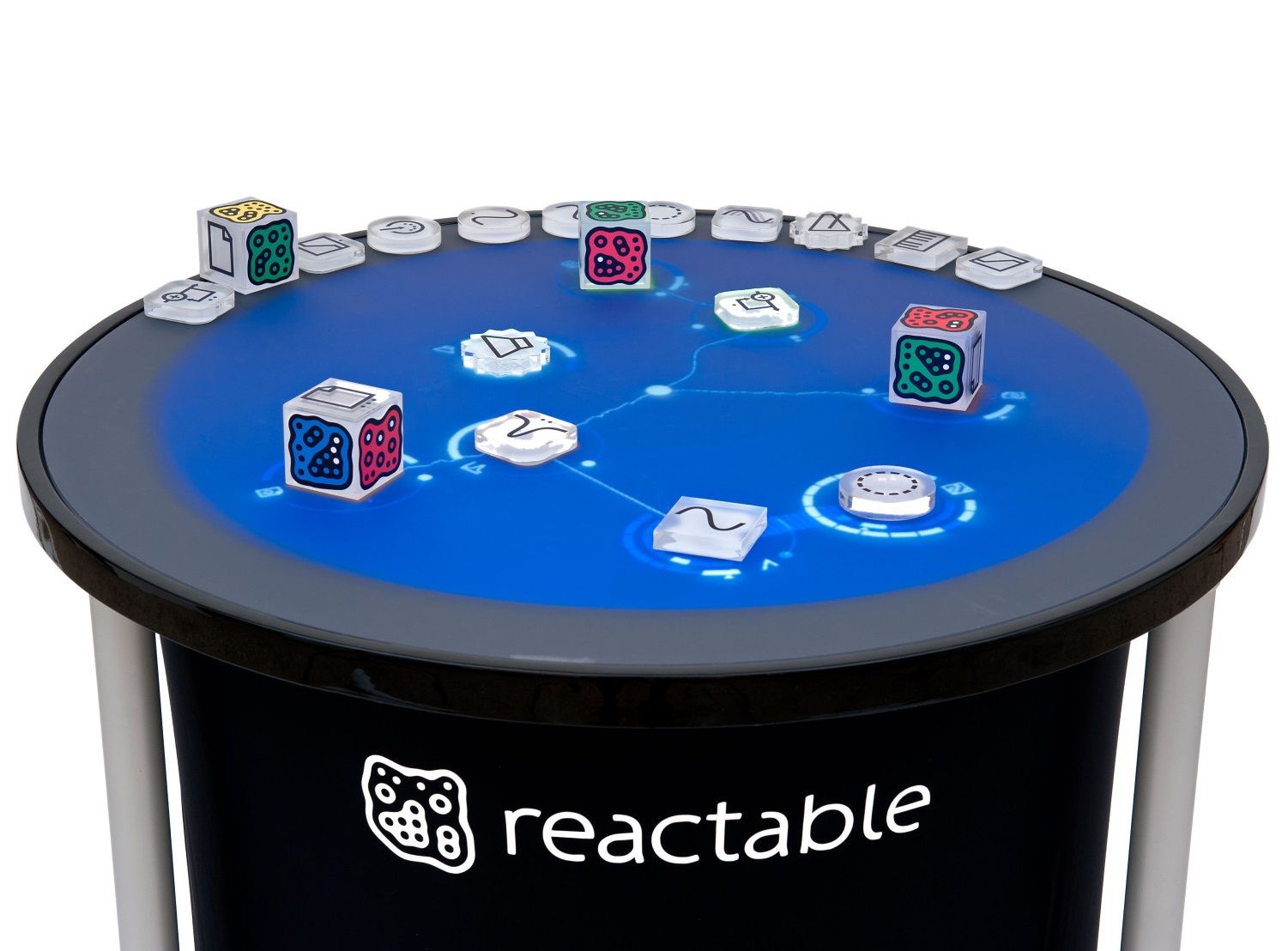
The Reactable might resemble a gambling hall game to some, but this round music table enables multiple users to add sound modules by placing and rotating plastic items. The system updates instantly, creating a live, improvisational experience. You can bet it sounds interesting.
© Organology, Fair use
Why Tangible Interaction Design Matters to UX Designers
“Matter” is the keyword; it’s the solid stuff that brings the nature of interaction closer to the human experience than screen-based activities. Tangible design means designers empower users to reach beyond screens—touch interfaces are immersive, but TUIs extend this engagement into physical space. Tangible interaction transforms bits (digital data) into atoms (physical forms). When digital data takes on a physical form, users can interact with it in more natural, meaningful, and memorable ways.
This method, or style, takes inspiration from the physical world. Rather than tap virtual buttons, users might rotate a knob to zoom in on a map or move a block to trigger a change on a screen. Tangible interaction offers unique value across many user experience challenges. Designers who build tools for education, industrial training, collaboration, or accessibility can find this approach helps create systems that feel intuitive and immediate to users.
What are Benefits of Tangible Interaction Design?
1. Lowers Cognitive Load
When users interact with familiar physical objects, they rely less on short-term memory and can be more “themselves” as they do what comes naturally. Instead of recalling abstract commands or navigating complex menus, they use gestures like rotating, sliding, or grouping objects to perform tasks. This reduces mental effort and aligns with how people naturally think and act. Spatial memory—how users remember locations or arrangements—helps users retain information and return to tasks quickly.
Explore the power of recognition rather than recall, along with other important heuristics that help guide designers as they fine-tune better digital products, in this video with William Hudson, User Experience Strategist and Founder of Syntagm Ltd:
2. Enhances Learning and Retention
Tangible interfaces support “embodied cognition”—the idea that learning happens better when the body is involved. For example, when young children learn to fit shapes through corresponding holes in educational toy frames or build words with physical tiles, they pick up and grasp important concepts (literally and figuratively). Students who explore geography with interactive maps can remember content more effectively, too. Physical actions like rotating, stacking, or placing reinforce learning as they engage multiple senses. Conversely, information in a book or screen limits the knowledge transfer to sight and—for screens equipped with it—sound.
UX designers who work in education or training can tap the potential of tangible interaction for its ability to turn abstract ideas into concrete, hands-on experiences that can sink in faster for users.
3. Improves Engagement and Delight
Tangible systems tend to be fun and immersive. Users of all ages can savor a sense of novelty and joy as they interact with systems that respond to physical gestures. Because it makes the digital world feel more real, tangible interaction boosts emotional engagement. In public installations, museums, or creative software, this can turn casual users into active participants. The “take you there” element of feeling catapulted into the past makes displays far more relatable—visitors can get into the experience much further than they could if they were to observe a printed board or plaque set beside an exhibit. From dinosaurs to medieval knights, the added element of tangibility helps bring them closer while appealing to the childlike curiosity even the oldest visitors can enjoy as they interact with devices like wheels and pucks.
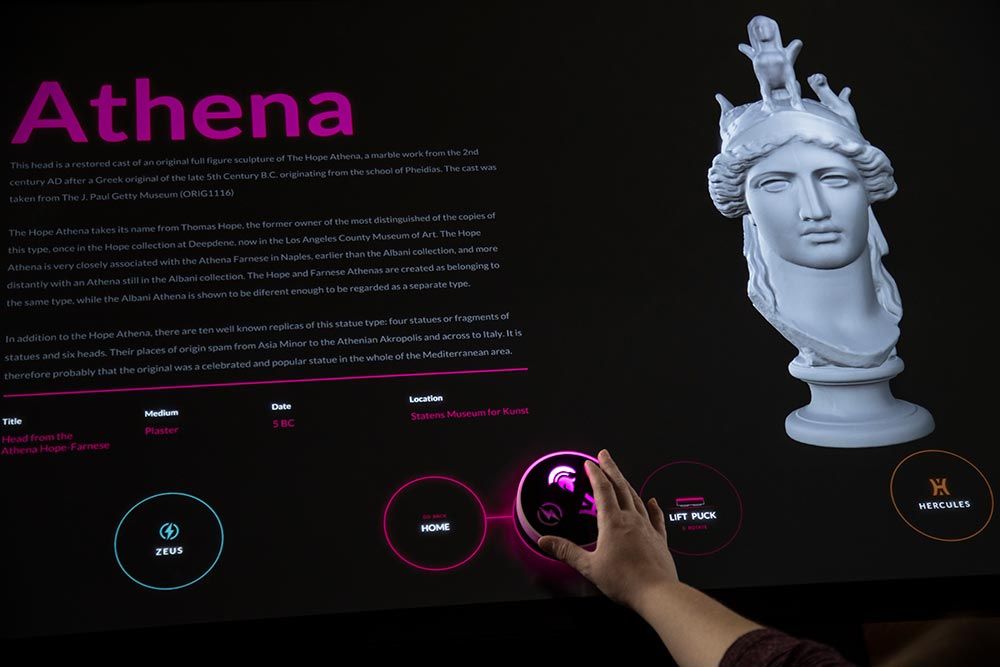
This smart tangible puck can move items on the display even when users lift it off the touch table, communicating wirelessly with the multitouch table—offering enormous, monumental, and maybe even mammoth potential in settings like museums.
© Ideum and SMK - Statens Museum for Kunst, Fair use
4. Supports Collaboration
Physical objects naturally invite group interaction and bring individuals together. This “show and tell” factor can spark enthusiasm and participation in a way that’s natural and easier than, for example, when one person just refers to an abstract concept and hopes others join in. Tangible systems like the Reactable music interface or the metaDESK digital table allow multiple users to gather around, manipulate shared tokens, and contribute equally and in a natural way that offers a seamless experience. The spatial nature of these systems makes roles and actions visible to everyone; it promotes shared understanding and reduces confusion.
This physical presence supports non-verbal communication, too—users can see each other’s hands moving, anticipate actions, and adjust accordingly. UX designers who build for collaborative settings—like educational teams, healthcare providers, or co-creative workplaces—can use tangible interaction to create shared, low-friction environments and make teamwork more “human” in the process.
5. Boosts Accessibility
Tangible interfaces help users with disabilities, particularly motor, visual, or cognitive disabilities. For example, someone with limited vision can use shape, texture, and physical location to interact with content and appreciate it more profoundly than if they were just to hear about that content using assistive technology, for example. Also, large tokens with distinct forms and tactile feedback can improve accuracy and independence.
Designers can integrate voice prompts, haptic responses, or auditory cues to complement physical feedback, too. This multimodal approach offers more entry points, improves inclusivity, and ensures that everyone can tap into more immersive experiences in more ways.
Discover why accessible design is vital and how it helps all users enjoy better, more thoughtful products from brands:
6. Enables Natural and Intuitive Gestures
Naturally, physical interaction mirrors how people already interact with the world—for example, whenever they turn knobs, slide levers, stack blocks, or arrange objects. These gestures feel familiar and require little or no training; humans are “built” to move things. They also offer more nuance than traditional inputs—permitting a multifunctional aspect. For instance, a user can rotate an object to change speed or direction, depending on how they turn it—think of fast versus slow turns, or turning versus turning while pushing in—a convenience that’s hard to replicate on the “flatness” of touchscreens.
7. Bridges the Gap between the Physical and Digital Worlds
Tangible interaction helps designers connect real-world processes to digital functions—bridges that enable designers to build interfaces that feel context-aware and responsive. For example, when a user turns a physical knob to dim smart lights or places an object on a table to launch a digital presentation, they’re using tangible interaction to control a digital process through physical input. This bridge works in both directions:
Physical → Digital: For example, place a tool on a desk and, thanks to sensors, a screen can show maintenance instructions for that tool.
Digital → Physical: For example, a fitness tracker vibrates and flashes a light when you reach a daily step goal, turning digital data into a physical response that provides immediate, tangible feedback.
How Designers Use Core Principles of Tangible Interaction
UX designers build successful tangible systems when they follow a few foundational principles:
1. Physical–Digital Coupling
Every physical action should lead to a clear digital reaction. For example, users rotate a dial to change a setting or move a block to reveal new content. Tight coupling between physical cause and digital effect helps users understand what their gestures mean, and result in, right away.
2. Spatial Representation
Physical layout can represent digital structure—for example, designers might allow users to line up blocks to form a sequence or group objects to cluster ideas. These spatial choices make abstract structures visible and manipulable.
3. Embodied Interaction
This principle focuses on how people use their bodies—not just their fingers. Gestures like twisting, pushing, and leaning can indicate intent to systems that read whole-body posture or movement, so the latter can provide rich, immersive feedback. The world of XR (extended reality), including AR (augmented reality) and VR (virtual reality) taps into this, too.
Explore the exciting landscape of virtual reality in this video about how it has evolved and the virtually limitless possibilities it can offer both designers and users:
4. Tangible Feedback
Real-world objects offer tactile clues: texture, weight, resistance. Designers can also add lights, vibrations (such as haptic feedback), or sounds to strengthen feedback—and let users confirm actions even if they’re not looking at a screen.
5. Respect for Physical Rules
People expect physical objects to behave like real things, where objects should feel solid, stable, and logically constrained. For example, a steering wheel should turn in a way that mimics what drivers would find in a real car, where hard-left or hard-right turns take them to an extreme limit in either direction. A steering wheel that can turn endlessly in either direction can be confusing—or even worry users that it’s disengaged from the steering column and they can’t control the “vehicle.”
How to Design Tangible Interactions: A Step-By-Step Guide
Here’s how to start building tangible interfaces from a UX design perspective:
1. Study Users in their Context
Know your users, what they need and want to do in their contexts, and how they perform tasks and achieve goals. Observe their workflows. Do they rely on physical tools? Work in groups? Use gestures naturally? When you know what they do, why they do it, and how they expect to get things done, you can exceed their expectations and delight them.
Discover what you need to discover about your users and why the contexts they find themselves in help you determine how the best design solutions can take shape for them, as Alan Dix explains:
2. Define Interaction Models
Choose physical actions that match user goals—such as rotate for change, stack for hierarchy, and group for selection; tap into the analogue “design patterns” that match their mental models about what to do with a dial, a glove, a baseball bat—whatever it is that (safely) helps them do what they need to do.
Learn how to match how users picture things with mental models and how they make sense of their world, in this video with Guthrie Weinschenk: Behavioral Economist & COO, The Team W, Inc., and host of the Human Tech podcast, and author of I Love You, Now Read This Book:
3. Prototype with Everyday Materials
Use cardboard, magnets, blocks in prototyping and test prototypes with real users. Even the simplest, low-fidelity prototypes can convey aspects of functionality, such as a cardboard dial that users can turn on the side of a box. Explore how users respond before you start thinking about adding electronics or developing digital interactivity—how quickly do they understand and use the controls?
Tap into prototyping early in the design process to help get on the right track, as Alan Dix explains in this video:
4. Use Simple Sensing Tools
Add RFID (radio-frequency identification), accelerometers, or cameras to detect object movement so users enjoy high-quality performance that mirrors real-world usage. Low-latency responses build trust. Think of a glove or claw that users can grasp, swipe, wave, punch, flick, squeeze, or karate chop with or rotate to do something digitally; now consider how quickly the effect of each of those actions must appear. A delay of even a split-second can ruin the experience.
5. Design Mappings Carefully
Help users predict what physical moves will do—the best designs offer intuitive interaction for seamless experiences. Use color, shape, or placement to hint at meaning, and cue users on what to do. Consider how real-world objects “explain” what users can do with them in the form of affordances.
Understand more about how to empower users with affordances, design elements that match how they understand how to use objects, and open doors to enjoyable experiences faster:
6. Offer Clear Feedback
Confirm actions with lights, sound, motion, or haptics. When users notice system responses right away, they can build confidence in your design and avoid errors. For example, if they arrange blocks in a row, a green light, single pulse, and “positive-sounding” chime might tell them they’ve successfully interacted with the design; meanwhile, a red light, double pulse, and “negative-sounding” buzzer might signal they need to try again.
7. Test, Iterate, and Scale
Try systems in real settings with real users—and ensure they can use design solutions comfortably and safely. Plan for wear, storage, and environmental conditions. For example, a controller ball they can squeeze must be durable enough for the sensors to stay responsive after multiple hard squeezes, yet sensitive enough to be able to respond to light touches. As you determine which design features and elements work best, it’s helpful to have two or more versions to try out with users, so you can pinpoint if—for example—a sphere or disk works better for them in their context of use.
Special Considerations with Tangible UX Interaction Design
Technical Complexity
Sensors and actuators require coding, calibration, and maintenance—especially if they’re in physical objects that are exposed to repeated “trauma” such as hard taps, bangs, or squeezes. Start with simple setups and scale slowly.
Physical Constraints
Tangible systems need physical space and real-world care and maintenance. Consider storage, portability, and cleaning.
Learning Curve
Too many objects or unclear gestures can overwhelm users, so prioritize simplicity and reduce clutter.
Accessibility
Consider users with different abilities—and remember that users may have more than one disability. Use large tokens, strong contrast, and multimodal feedback to help them get what’s going on.
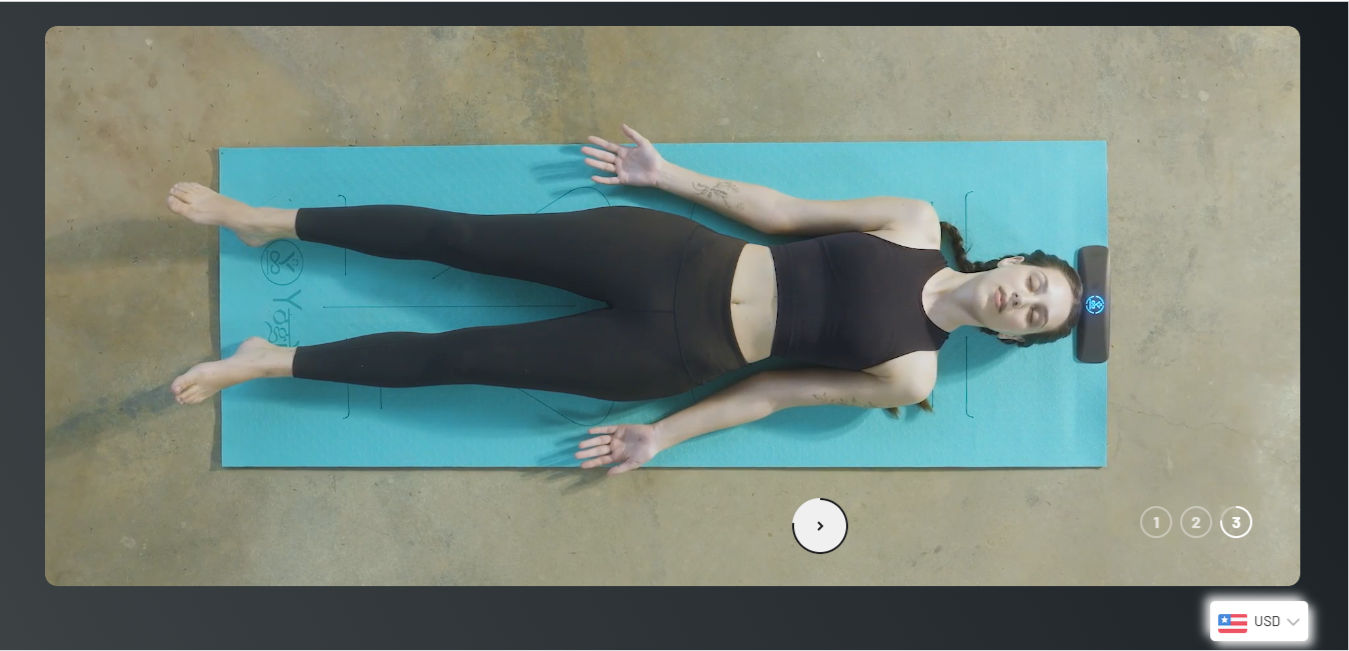
Fitted with sensors, a smart yoga mat such as this one from YogiFi helps users enjoy many benefits, including gentle guidance through instructions, posture suggestions in real-time, and much more, beautifully and intuitively bringing digital responsiveness into a healthy mindfulness practice.
© Wellnesys Inc., Fair use
Tangible interaction isn’t a novelty—it’s a powerful method to design more natural, intuitive, and inclusive experiences. As such, it’s a forward-looking return to how people already interact with the world and extends digital systems into physical space. As tangible interaction continues to evolve, new tech and materials will enter the everyday vocabulary and experiences of users, particularly in these areas:
Internet of tangible things: Everyday items with embedded sensors become UX input points.
Radical atoms: Materials that change shape or stiffness let designers create morphing interfaces.
Mixed reality: AR overlays give physical tokens digital layers, blending touch with vision.
Ultrahaptics: Mid-air feedback adds tactile responses without physical contact.
Smart environments: Responsive furniture and walls create spatially aware UX canvases.
Overall, the best tangible interactive designs focus on real user needs and leverage sensing and feedback to align well with human behavior. They’re more useful and delightful to users because they’re relatable to human beings at a level that’s more immediate and human than words might be able to describe.
Well-designed products that users can reach for can help the brands that create them achieve a powerful balance between exciting and intuitive, novel and familiar, and ingenious and simple. The term “human-centered design” can take on a higher meaning when tangible UX design lifts experiences up and away from screens. As time ticks on and the “staple” of screen-based design morphs into new areas that involve more possibilities and exciting potential, designers can find powerful reservoirs of inspiration in the timeless human need to reach out and touch.