Immersion in Extended Reality (XR)

Your constantly-updated definition of Immersion in Extended Reality (XR) and collection of videos and articles.
Be a conversation starter: Share this page and inspire others!

296 Shares

What is Immersion in Extended Reality (XR)?

Immersion refers to the objective degree to which a user is fully drawn in and absorbed by an experience. Immersion is an essential element of a successful virtual reality (VR) and augmented reality (AR) product. The level of immersion often determines user engagement.

In VR, immersion refers to the extent to which the application, experience or technology engages users by creating a sensory-rich and interactive environment. It’s connected to, but differs slightly from presence in VR. Technology includes VR headsets or head-mounted displays (HMDs). It encompasses qualities such as sensory range, vividness, visual quality, interactability, and the narrative aspect of the experience. Immersion is more focused on the external—it’s primarily about the technology and how effectively it can engage the user's senses to create a convincing virtual environment.

When immersed in an experience, users become deeply engrossed and shift their focus from the physical world to the digital one. Factors such as graphics quality, sound, haptic feedback, and sensory stimuli make the VR experience engaging and deepen immersion. A high level of immersion, and a compelling virtual environment, can evoke powerful emotions and a strong sense of involvement and makes it easier for users to suspend disbelief. 

Game designers and AR and VR designers alike must consider the many factors that contribute to a product’s level of immersion and balance user experience with user engagement. 

Levels of Immersion
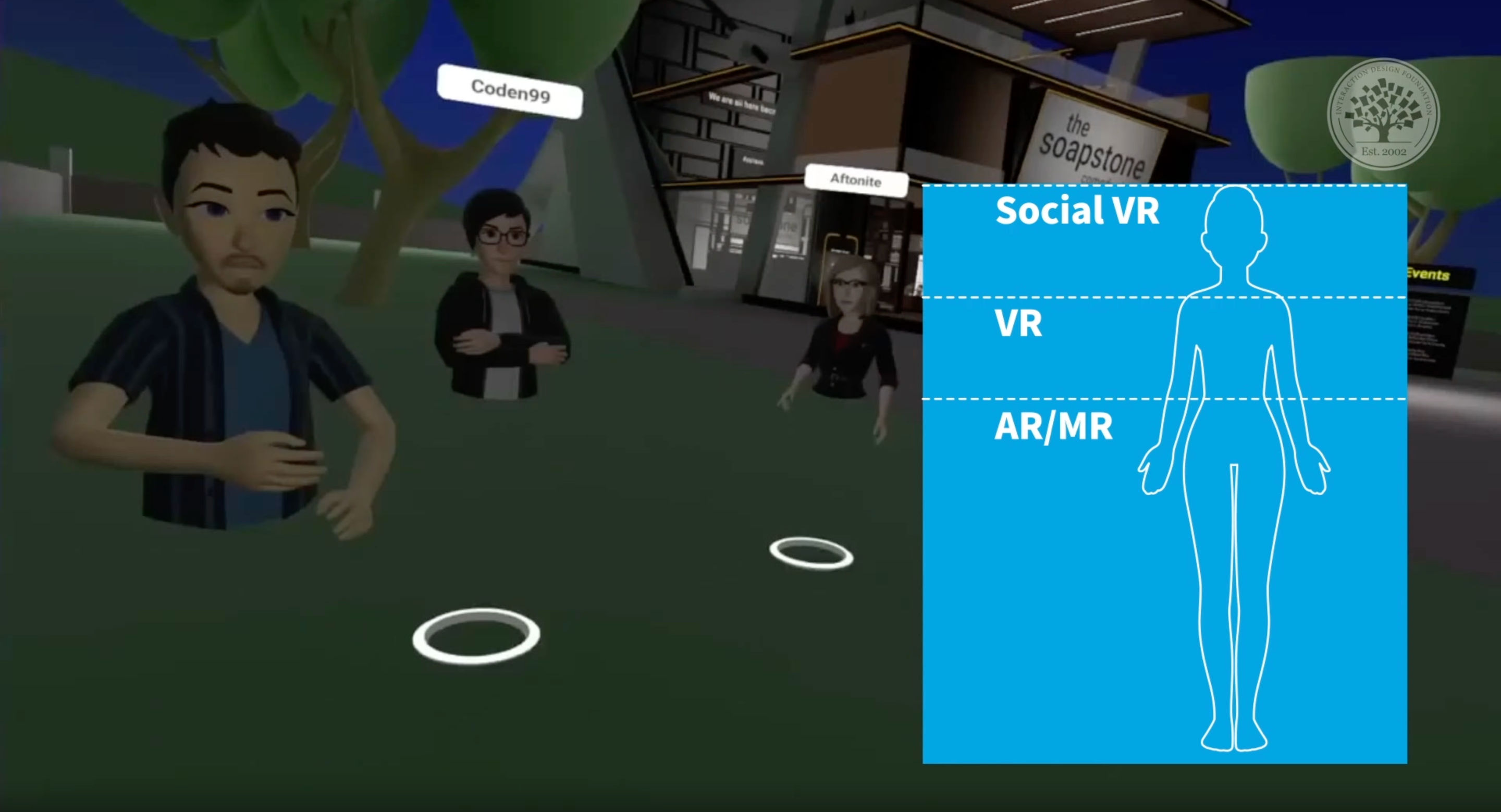
A screenshot from a social VR application that has an overlay with an illustration of a person with a blue background and white lines going horizontally across the background to the person. These lines represent the different levels of immersion.

Different mediums facilitate different levels of immersion. AR/MR have lower levels of immersion, while VR offers a deeper sense of immersion. Social VR heightens immersion even further, allowing different users to interact with each other.

© Interaction Design Foundation, CC BY-SA 4.0

In an AR experience, the level of immersion is typically lower because users need to remain aware of their physical surroundings for safety reasons. Virtual reality experiences offer deeper immersion, but the quality of the design and its ability to take advantage of immersion affects the user experience. The metaverse, or a social VR experience, represents a community-level immersion. 

Frank Spillers, CEO of UX design consulting firm, Experience Dynamics, talks more about immersion and the levels afforded by different applications. 

Transcript
 

Example of AR Immersion—Pokémon GO

Pokémon GO is a popular social augmented reality mobile game that encourages players to explore the real-world environment to find and capture virtual Pokémon. The connection of AR technology with the physical adds a layer of immersion. The thrill of physically moving to different locations in search of rare Pokémon adds an adventurous element that deepens players' immersion in the game's world. Additionally, the game's community-driven events and battles at real-world landmarks, such as the famous Pokémon GO Fest and Gym Battles at local monuments, enhance the immersive and social aspects. 
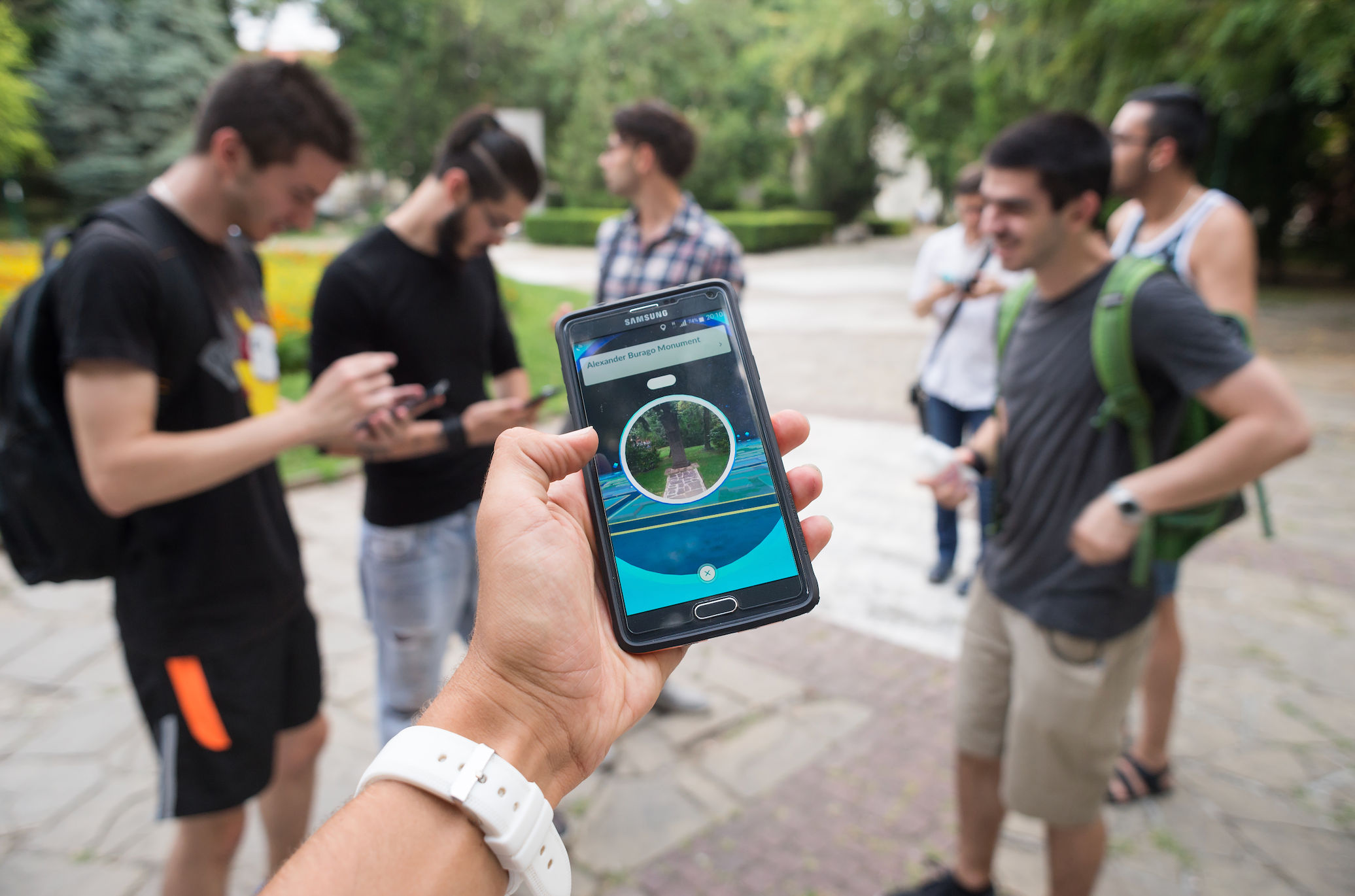
A photo of someone's arm extended with their mobile phone in their hand. They're playing the augmented reality game Pokémon GO. In the background you can see a group of six people, also playing Pokémon GO as demonstrated by them looking at their phones. They're standing in a park.

While augmented reality can't offer the same level of immersion as virtual reality, Pokémon GO's adventurousness encourages people to explore both their physical world and the world offered by the game, deepening the immersion of the experience.

© Interaction Design Foundation, CC BY-SA 4.0

Example of VR Immersion—Half-Life: Alyx

Half-Life: Alyx by Valve immerses players in the decaying Half-Life universe and offers highly realistic, detail-rich environments for interaction. Players can manipulate objects, solve intricate puzzles, and engage in intense combat.

Half-Life: Alyx’s compelling storyline is what sets it apart. Players assume the role of Alyx Vance, a resistance fighter in a world overrun by alien creatures. Their mission is to seize a superweapon from an alien race, free humanity from its oppressive rule and save Alyx’s father. This narrative encourages players to form deep emotional connections with the characters and the game world. The intuitive controls, whether through handheld controllers or voice commands, mimic real-world actions and further draw players into the game's reality. The game's seamless performance and options for user comfort preservation ensure a disruption-free experience. Half-Life: Alyx stands as a testament to VR's potential to deliver immersive, realistic, and deeply engaging experiences.

Best Practices and Tips to Design Immersive Experiences 

Immersive experiences aren’t limited to digital experiences—the theater, movies, theme parks and even books can be immersive. In the context of AR, MR (mixed reality), VR, XR (extended reality) and interactive media like video games, designers must actively induce immersion and also be aware of immersion-breaking elements. Technical issues, inconsistent design or distracting design choices will break immersion and take users out of the experience and back to reality. 

Elements for Immersion

Here are some of the elements you can use to create and maintain immersion:

  1. Realistic environments: Visually and audibly realistic virtual environments created with high-quality 3D graphics, spatial audio, and attention to detail in the environment help users feel more immersed.

  2. Interactivity: Interactive elements that respond to user actions encourage user engagement. Users should be able to manipulate virtual objects, explore, and influence the virtual environment.

  3. Storytelling: Well-crafted and considered narratives enhance the immersion of a digital experience. A story can draw users into the virtual world and keep them engaged.

  4. Social interaction: In social VR or XR experiences, the primary goal is for users to interact with each other. Human interaction can improve the state of immersion.

  5. Physical comfort: Physical comfort, as well as emotional and psychological well-being, are crucial aspects of immersive experiences. Any discomfort or cybersickness felt by a user will hinder immersion and will likely discourage them from repeating the experience. An optimized field of view is an important element of physical comfort.

  6. Intuitive controls: Whether it's through a mobile phone, game console, handheld controllers, gestures, voice commands, or eye tracking, controls should mimic real-world interactions for increased immersion.

  7. Emotional engagement: When users make an emotional connection with the content with elements like a compelling narrative, character development, agency and sensory stimulation, it heightens the sense of immersion. 

Processes for Immersion

Here are some processes to consider for enhanced immersion.

  1. User-centric design: The more user-focused a product is, the more successful it will be. The same is true of immersion—consider the user's comfort, preferences, and abilities to ensure a user-friendly and immersive experience.

  2. Onboard users: Newer technologies like AR and VR have a steeper learning curve than mobile and web interfaces that people are accustomed to. Depending on your design and users, you will likely need to onboard them onto the platform as well as your experience.

  3. Optimized performance: An experience must run smoothly without lag or stutter, as technical issues can break immersion.

  4. Define different levels of immersion: You might be tempted to create fully immersive experiences using the latest devices and technologies. However, not everyone will have access to such technologies. Consider how you can gracefully fall back to lower-tech and slightly less immersive experiences to avoid excluding user groups.

  5. Design for seamless transfers between ecosystems: Immersive media like AR and VR are emerging technologies with different platforms that do not necessarily talk to each other. Users may experience our solutions on different platforms and may want to switch from one to another. Where feasible, make it easy to move from one platform to another so that users don’t have to start over.

How to Balance Immersion and Safety
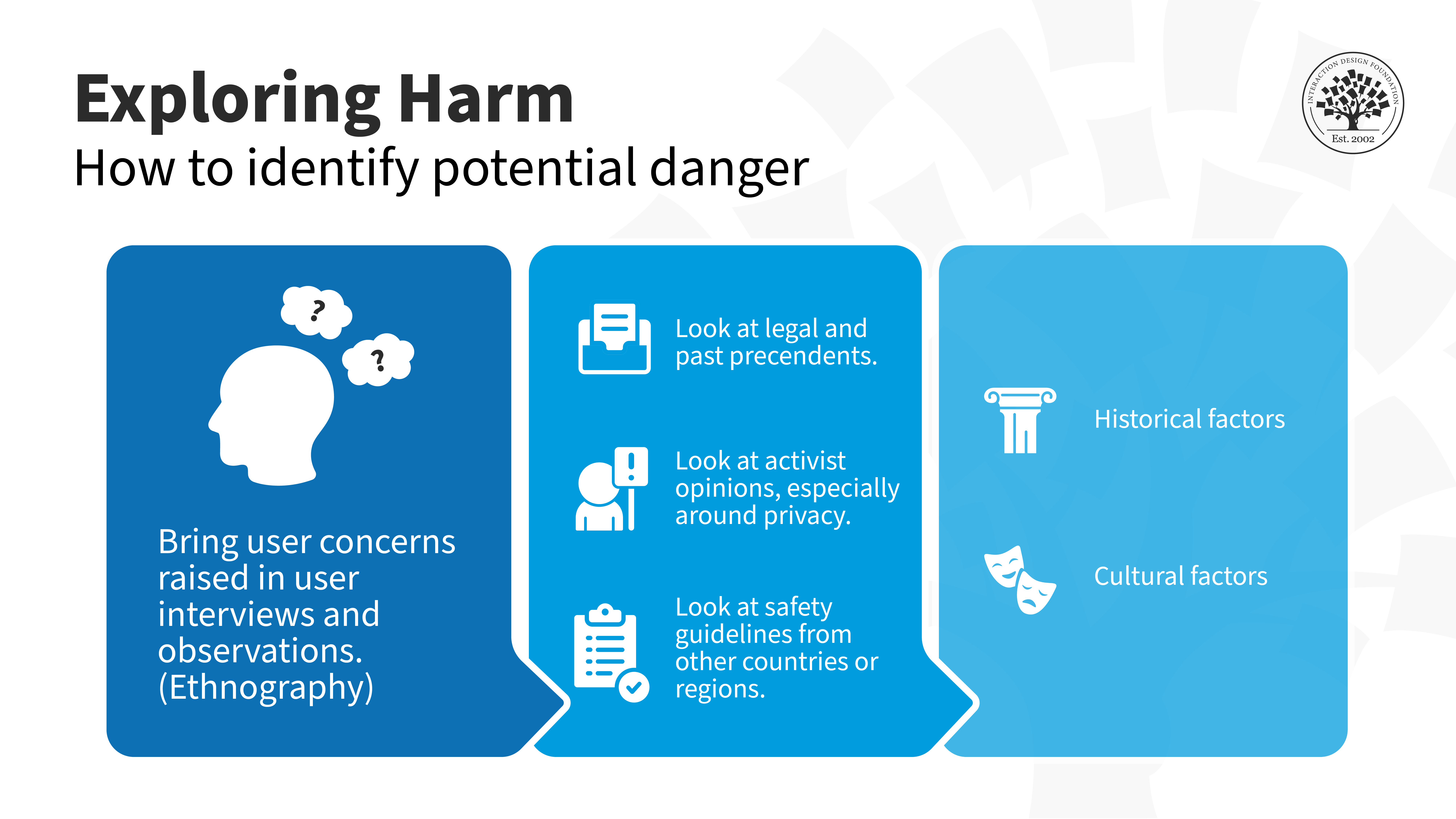
An infographic called 'Exploring harm', it shows how user's can identify potential danger when using augmented reality.

To identify potentially dangerous situations, use ethnographic research techniques such as observation and interviews to identify user concerns. Look at legal and past precedents, activist opinions (especially around privacy) and safety guidelines from other countries or regions. Also consider historical and cultural factors that might affect user safety while interacting with an immersive experience.

© Interaction Design Foundation, CC BY-SA 4.0

Safety is especially crucial for AR and VR. Immersion can dramatically increase user engagement but also lessen or cut off outside stimuli, which can be dangerous for particular contexts of use. For augmented reality contexts, the user may be walking or even running. In these situations, highly immersive AR experiences could be dangerous.

For example, when driving a real-life car, you don't want a user immersed in a virtual world and unable to notice dangers. For this reason, AR interaction design is about balancing safety and immersion.

Google offers some tips and best practices to prioritize user safety:

  1. Build in reminders to look around and check their surroundings.

  2. Don’t make users walk backward.

  3. Avoid long play sessions. Try to find stopping points in the action or moments when users can take a break.

  4. Let users pause or save their progress. Make it easy to continue an experience where they left off.

  5. Encourage users to move around their phone or change the position they’re holding it in to prevent hand fatigue. You can also build resting points in the experience.

Immersive experiences should also provide safeguards to protect users from bullying and abuse, such as the ability to mute, block or report users and specific incidents. Codes of conduct and content moderation outline acceptable etiquette and encourage positive user behavior.

In this video, the CEO of UX consulting firm Experience Dynamics elaborates on the importance of safety. 

Copyright
Transcript

Questions About Immersion in Extended Reality (XR)?
We've Got Answers!

How do different levels of immersion affect user experience in XR applications?

Different levels of immersion profoundly impact the user experience in Extended Reality (XR) applications as it shapes user's perceptions, interactions, and overall engagement with the digital environment. Immersion ranges from non-immersive experiences, where users stay aware of their real-world surroundings while interacting with digital content, to fully immersive experiences that completely captivate users, which makes them lose touch with the real world. In non-immersive settings, users might engage with digital content on desktops or mobile devices, augmenting reality or viewing it in a contained format. Although these experiences can enhance learning and provide convenient visualization, they often fail to evoke strong emotional connections or a deep sense of presence within the digital realm. 


Different mediums offer varying levels of immersion,  Augmented Reality (AR) tends to offer a lower level of immersion compared to Virtual Reality (VR). The pinnacle of immersion comes from advanced VR systems that transport users to another world and allow for highly realistic interactions. This deep immersion boosts experiences in entertainment, education, and training, offering unparalleled levels of engagement and emotional impact, albeit requiring sophisticated technology and potentially leading to cybersickness or disorientation for some. 

Learn more about the various levels of immersion in this video: 

Transcript

Bailenson, J. (2018). Experience on Demand: What Virtual Reality Is, How It Works, and What It Can Do. W. W. Norton & Company.

Schmalstieg, D., & Hollerer, T. (2016). Augmented Reality: Principles and Practice. Addison-Wesley Professional. 

Jerald, J. (2015). The VR Book: Human-Centered Design for Virtual Reality. ACM Books. 

Parisi, T. (2015). Learning Virtual Reality: Developing Immersive Experiences and Applications for Desktop, Web, and Mobile. O'Reilly Media. 

Papagiannis, H. (2017). Augmented Human: How Technology Is Shaping the New Reality. O'Reilly Media.

What are the key components of immersive XR experiences?

The key components of immersive Extended Reality (XR) experiences include:

High-quality visuals: Crisp, high-resolution graphics are essential for a believable and engaging digital environment. They help users feel more present and immersed in the XR experience.

Responsive interaction: Real-time responsiveness to user actions ensures a seamless experience and makes the digital environment feel more real and interactive.

Spatial audio: 3D audio technology enhances the realism of XR environments with sound that changes based on the user's location and actions within the digital space.

Haptic feedback: Physical feedback through vibrations or movements enables users to feel a tactile connection to the virtual world which adds another layer of immersion.

Intuitive user interfaces: User interfaces that are easy to navigate and understand reduce the learning curve and help maintain the sense of immersion by not distracting the user from the experience.

Environmental interaction: Allowing users to interact with objects and elements within the digital environment in a realistic manner further enhances the sense of presence and immersion.

Narrative engagement: A compelling story or narrative that draws users in can significantly increase engagement and emotional investment in the XR experience.

Learn more about immersion in our courses,  UX Design for Augmented Reality and UX Design for Virtual Reality.

What technologies are used to create immersive XR environments?

Creating immersive Extended Reality (XR) environments involves several key technologies:

Head-Mounted Displays (HMDs) or VR headsets: These are essential for VR and MR experiences, providing visual and auditory immersion into the digital world. HMDs track the user's head movements to adjust the virtual environment accordingly.

Augmented reality glasses: AR glasses overlay digital information onto the real world and allow users to see both physical and digital elements simultaneously. These glasses are lightweight and designed for prolonged use.

Motion tracking sensors: These sensors detect the user's movements and translate them to physical actions in the digital environment. They enable interactive experiences by allowing users to navigate and manipulate virtual objects.

Haptic feedback devices: These devices provide tactile feedback to users, simulating the touch and feel of virtual objects to enhance realism.

3D audio systems: Spatial audio technologies create a surround sound experience which makes the virtual environment more realistic by mimicking how sound behaves in the real world.

Powerful computing platforms: High-performance computers and processors power the complex simulations and graphics required for immersive XR experiences to ensure smooth and responsive interactions.

Software Development Kits (SDKs) and platforms: SDKs for VR, AR, and MR development enable creators to build immersive experiences. Platforms like Unity and Unreal Engine are popular choices for developing XR content.

Learn more about immersion and related technologies in our courses,  UX Design for Augmented Reality and UX Design for Virtual Reality.

What are the best practices for designing immersive XR interfaces?

Here are the best practices that ensure a user-friendly, engaging, and accessible experience for XR:

User comfort: Design interfaces that minimize motion sickness and visual fatigue. Keep interactions within easy reach and maintain a stable horizon line to enhance comfort.

Intuitive navigation: Create navigation systems that are easy to understand and use. Implement gesture controls, voice commands, or simple gaze-based selections that feel natural to the user.

Realistic interactions: Design interactions that mimic real-world behavior. Utilize physics engines to ensure objects in the virtual space respond as they would in reality, enhancing the sense of immersion.

Spatial awareness: Design environments and interfaces that encourage users to explore their surroundings. Use audio cues and visual indicators to guide users and highlight interactive elements.

Minimalistic design principles: Avoid cluttering the interface with unnecessary elements. A clean and focused design helps users navigate the experience without feeling overwhelmed.

Clear feedback: Offer immediate and clear feedback for user actions. Visual, auditory, or haptic signals can inform users of their interactions' outcomes, reinforcing engagement.

Accessibility: Design with accessibility in mind to accommodate users with different abilities. Include options for adjusting text size, contrast settings, and alternative input methods.

Test with real users: Conduct usability testing with a diverse group of users early and often. Real-world testing provides valuable insights into user behavior and interface effectiveness.

Learn more about how to design immersive experiences in this Master Class, How To Craft Immersive Experiences in XR.

What role does user research play in creating immersive XR applications?

User research is fundamental in crafting immersive Extended Reality (XR) applications, to ensure that they are accessible, engaging, and meet the target audience's expectations. This research allows designers to tailor XR experiences effectively to the audience by identifying their needs, preferences, and behaviors. It offers insights into how users interact with XR environments, leading to the creation of intuitive and natural interfaces that resonate with users' expectations and enhance usability. Furthermore, by uncovering potential usability issues early in the development process, user research enables timely adjustments that significantly improve the overall user experience.

Learn more about user research in this article, What is User Research

How can designers ensure accessibility in immersive XR experiences?

Designers can ensure accessibility in immersive XR experiences by adopting inclusive design principles that accommodate users with diverse abilities. Initially, conducting accessibility audits and involving users with disabilities in the testing process helps identify potential barriers, guiding the adaptation of XR environments to various needs. Incorporating adjustable settings, such as text size, contrast, and audio descriptions, allows users to tailor experiences to their preferences and requirements. Designers should also implement intuitive navigation that does not rely solely on visual cues, incorporating haptic feedback and spatial audio to guide users through the XR environment, making it accessible to those with visual or auditory impairments.

Furthermore, designers can embrace universal design principles, creating XR applications that are inherently accessible to as wide an audience as possible. This involves using clear, simple language for instructions and feedback, ensuring physical interactions within the XR space are achievable for users with different mobility levels, and providing alternative input methods for interacting with the digital environment. By prioritizing accessibility from the outset, designers can create immersive XR experiences that are enjoyable and usable for everyone, breaking down barriers and fostering inclusivity in the digital realm.

Learn more about accessibility in immersive environments in our course, UX Design for Virtual Reality.

What are some highly cited scientific research papers on immersion?

Guerra-Tamez CR. The Impact of Immersion through Virtual Reality in the Learning Experiences of Art and Design Students: The Mediating Effect of the Flow Experience. Education Sciences. 2023; 13(2):185. https://doi.org/10.3390/educsci13020185  

Petersen, G. B., Petkakis, G., & Makransky, G. (2022). A study of how immersion and interactivity drive VR learning. Computers & Education, 179, 104429. https://doi.org/10.1016/j.compedu.2021.104429  

Lo, S. Y., & Lai, C. Y. (2023). Investigating how immersive virtual reality and active navigation mediate the experience of virtual concerts. Scientific reports, 13(1), 8507. https://doi.org/10.1038/s41598-023-35369-0 

Unity and Unreal Engine are two leading game development platforms recommended for XR design. They offer powerful graphics rendering, physics engines, and support for VR and AR development. These platforms enable designers to create complex, interactive 3D environments with realistic lighting and textures, crucial for immersive experiences. Unity is particularly favored for its user-friendly interface and extensive asset store, while Unreal Engine is renowned for its high-fidelity visuals and cinematic quality.

Additionally, tools like Autodesk Maya and Blender are good for 3D modeling and animation, allowing designers to craft detailed virtual objects and characters. For prototype testing and user interaction design, software like Sketch, Adobe XD, and Axure RP are recommended.

Learn more about immersion in our course UX Design for Virtual Reality.

How important is the choice of hardware in developing immersive XR applications?

The choice of hardware is very important as it directly influences the quality, accessibility, and user experience of the final product. High-performance computing hardware is essential to handle the complex graphics, real-time rendering, and physics simulations required for a truly immersive XR experience. The capabilities of the hardware, including processors, graphics cards, and memory, determine the application's responsiveness and the level of detail it can achieve, which are crucial for maintaining immersion without inducing latency or discomfort.

The selection of input and output devices, such as head-mounted displays (HMDs) or VR headsets for VR, AR glasses, and motion tracking sensors, significantly affects how users interact with and perceive the XR environment. Advanced HMDs with high resolution and refresh rates can reduce the risk of motion sickness and improve visual immersion, while precise motion tracking and haptic feedback devices enhance the realism of interactions within the virtual world. 


Learn more about immersion in our course UX Design for Virtual Reality.

Earn a Gift Earn a Gift, Answer a Short Quiz!

1
2
3
4
1
2
3
4
Question 1
Question 2
Question 3
Get Your Gift
Interaction Design Foundation logo

Question 1

What is immersion in the context of virtual reality (VR)?

1 point towards your gift

  • The creation of fully interactive, three-dimensional virtual worlds.
  • The focus solely on auditory experiences.
  • The use of flat, 2D graphics to represent environments.
Interaction Design Foundation logo

Question 2

How does augmented reality (AR) typically achieve immersion?

1 point towards your gift

  • It blends digital content with the real world.
  • It focuses exclusively on virtual interactions.
  • It completely replaces the real world with a virtual one.
Interaction Design Foundation logo

Question 3

Which tool is important to improve immersion in VR environments?

1 point towards your gift

  • Handheld controllers that mimic real-world actions
  • High-resolution monitors that display animations
  • Standard television screens

Learn More About Immersion in Extended Reality (XR)

Make learning as easy as watching Netflix: Learn more about Immersion in Extended Reality (XR) by taking the online IxDF Course UX Design for Virtual Reality.

Why? Because design skills make you valuable. In any job. Any industry.

In This Course, You'll

  • Get excited when you learn how to create Virtual Reality (VR) experiences people love. The global VR market will grow to $227 billion by 2029! Whether you want to create VR games or interactive business solutions, this course will help you bring your big ideas to life. VR opens up a new dimension for your creativity, literally! Virtual reality lets people step into digital worlds for a deeper emotional connection. It leads to higher retention, engagement, and loyalty in gaming, education, and corporate training.

  • Make yourself invaluable with specialized knowledge and in-demand skills that open doors to exciting career paths! You'll master timeless human-centered design skills that ensure VR experiences are meaningful, ethical, and genuinely resonant: Skills that keep you in demand as technology evolves. Does UX design for virtual reality sound complicated? It can be, but we've made it easy for you! With step-by-step guidance, you'll master it faster than you think, no matter your background. The UX Design for VR course shows you how to create VR products that make a real impact in any industry. You'll explore social VR and the Metaverse and master the secret to achieving comfort, safety, and inclusivity in VR. You'll be able to design for presence and immersion with VR elements like storytelling, sound design, spatial audio, and emotion design.

  • Gain confidence and credibility as you conceptualize, create, and refine VR prototypes for your portfolio. You can choose to create a complete VR portfolio project, from storyboarding to 3D prototyping, and walk away with a polished portfolio that puts you in demand. Download ready-to-use templates, like the 3D wireframe checklist and USE scorecard for VR, to fast-track your success in one of the most sought-after areas of UX design.

It's Easy to Fast-Track Your Career with the World's Best Experts

Master complex skills effortlessly with proven best practices and toolkits directly from the world's top design experts. Meet your experts for this course:

  • Frank Spillers: Service Designer and Founder and CEO of Experience Dynamics.

  • Mel Slater: Distinguished Investigator at the University of Barcelona in the Department of Clinical Psychology, active member of the Institute of Neurosciences, and Co-Director of Event Lab (Experimental Virtual Environments for Neuroscience and Technology).

Get an Industry-Recognized IxDF Course Certificate

Increase your credibility, salary potential and job opportunities by showing credible evidence of your skills.

IxDF Course Certificates set the industry gold standard. Add them to your LinkedIn profile, resumé, and job applications.

Course Certificate Example

Be in distinguished company, alongside industry leaders who train their teams with the IxDF and trust IxDF Course Certificates.

Our clients: IBM, HP, Adobe, GE, Accenture, Allianz, Phillips, Deezer, Capgemin, Mcafee, SAP, Telenor, Cigna, British Parliament, State of New York

All Free IxDF Articles on Immersion in Extended Reality (XR)

Read full article
How to Use Narrative as a Design Tool - Article hero image
Interaction Design Foundation logo

How to Use Narrative as a Design Tool

Storytelling is ubiquitous; it transcends time, place, and culture. It also transcends technology, but takes a central position in virtual reality (VR). Humans are born storytellers, story-listeners, and story-lovers, so it’s no surprise that narrative—a feature from humans’ earliest times of tales

Social shares
524
Published
Read Article
Read full article
Learn the Role of Perception and Memory in HCI and UX - Article hero image
Interaction Design Foundation logo

Learn the Role of Perception and Memory in HCI and UX

Have you ever wondered how your brain makes sense of the world? It's a fascinating process! If you want to design helpful products and services that people love, you must first understand how they think. A large part of human interaction relies on perception, our ability to see, hear and feel our su

Social shares
650
Published
Read Article
Read full article
Revolutionize UX Design with VR Experiences - Article hero image
Interaction Design Foundation logo

Revolutionize UX Design with VR Experiences

Is the future of user experience design (UX design) going to exist on screens or will it find immersive, three-dimensional spaces as its main home? You can design for both views—and interactions—within a digital environment that’s boundless in virtual reality (VR), so read on to find five fundamenta

Social shares
620
Published
Read Article

How to Use Narrative as a Design Tool

How to Use Narrative as a Design Tool

Storytelling is ubiquitous; it transcends time, place, and culture. It also transcends technology, but takes a central position in virtual reality (VR). Humans are born storytellers, story-listeners, and story-lovers, so it’s no surprise that narrative—a feature from humans’ earliest times of tales around campfires—turns up in VR design, and it’s essential for immersive experiences that have got depth and emotion—experiences that will leave a lasting impression on your users, and you can do so much when you know how to use narrative as a design tool.

VR allows people to explore their imaginations and traverse far beyond reality; the potential destinations are amazing whenever they don a VR headset or goggles and set off into somewhere new. However, whether someone’s in the real world or a virtual one, the practice and importance of storytelling is universal—and you’ll need, and enjoy weaving, a narrative of some kind if you’re going to create a successful VR experience; it’s vital.

Watch CEO of Experience Dynamics and UX Consultant Frank Spillers explain why storytelling is so important in VR and how it can transform behavior and create a sense of presence and immersion.

Transcript

View narrative as a design tool. That’s because storytelling breathes something vital into the virtual worlds that you get to create as a VR designer, and it doesn’t just inject depth, emotion, and purpose but moves things forward in ways that users can relish, too. But perhaps above even this is the point that storytelling elevates VR from just being a technological novelty to something profound and relatable, something accessible and “human.”

Think about designing in VR and you’ll already know that content and all the rich little details are crucial to get right, sure. But there’s something else. If content is “king,” then context needs to be an “emperor” of sorts. A well-crafted narrative bestows your users with that all-important context, and it’s the tale to lead and guide them through the VR environment with a sense of purpose and direction—much like you’d find in a well-made, gripping movie or a book you just can’t put down. The difference in VR is that the user is right in there as an “actor”—and that storytelling element is what creates a connection between the user and the virtual world, and as such should foster presence and immersion for them. In fact, storytelling is the key to the enterprise as far as the VR user becoming an active participant goes, and it’s through storytelling that you design something that allows them to shape the course of the experience and hopefully form a personal bond with the content.

The second couple of decades of the twenty-first century have seen a rise in interactive storytelling through more traditional mediums—TV and video games—where players and viewers can have an influence on the outcome of a story based on the decisions that they make, decisions of their very own. Still, that’s the point that interactive storytelling has built up momentum there, but how about virtual reality? Well, the spatial aspect of VR has thrown the doors open even wider, what with virtual reality environments being the places where users get to move and interact from wherever they might be in reality (or, at least, places that are safe for users to “exit” from their real realities, so no cliff edges, driver’s seats—you know, that sort of thing!). The bond between user and VR grows whenever we look at how that spatial aspect and being transported into a world you make for them can give them a unique sense of agency. That “thereness” and “Wow, I can do things in here!” are what make every journey inside of this immersive world something that they can feel is theirs, for real.

How to Bring Storytelling into Your VR Experience

  1. Understand your audience and goals: This rings true for any UX design project—and the user research factor is the only way to start and shape what will be what users need, want, and go for in the marketplace. You can think of it like building a runway for an aircraft (which you’ll need to build, too). To “take off,” you’ll need to lay a solid foundation, one on which you discover and understand exactly who and what you seek to deal with. You research to find who wants to go where (as in, what your target users need help with in the form of a design solution) and all the things that can get in the way, and why, and how you can take your “passengers” (VR users) to their desired destination.
    That’s why you should always start by identifying your target audience and the goals of your VR experience. Who are the users? What emotions—or reactions—do you want to bring out from them? And when you’ve got a firm grasp of your audience and objectives, that understanding will shape the direction of your story.

  2. Conceptualize the story: Great—you’ve got a sense of direction going already from knowing so much about your users! Now, it’s time to get creative and get the conceptualization going—as in, of the core elements of your story. How you do that is through techniques like brainstorming, mind maps, storyboards, mood boards, and user journeys. So, what is the central theme or message you want to get across? What is the setting? Who are the characters? What’s the narrative arc? From there, think about how VR’s immersive nature can take these elements and propel them into overdrive so that users get the best experiences possible.

  3. Embrace immersion: You’ve got a wealth of tech and know-how to tap here as you leverage VR’s immersive capabilities and build a palpable sense of presence for users within the story. Craft environments and characters that users can feel a true part of and take to with natural zest, and it’s a major plus to bring spatial audio, realistic visuals, and interactive elements to bear on things so you deepen immersion for users to the maximum.

  4. Create a compelling hook: Hooks are what draw every kind of story-follower (be it listener, reader, or viewer) into a story so they become a story-lover, and that’s why you use this chance to capture users’ attention from the outset. Think of a movie, a novel, or anything else that had an opening to it that you just couldn’t leave and had to stay and find out more. A strong opening is one that piques curiosity and establishes the story’s tone, so use visual and auditory cues and you can guide users’ focus and draw them into the experience so it’s like they’re “really” there.

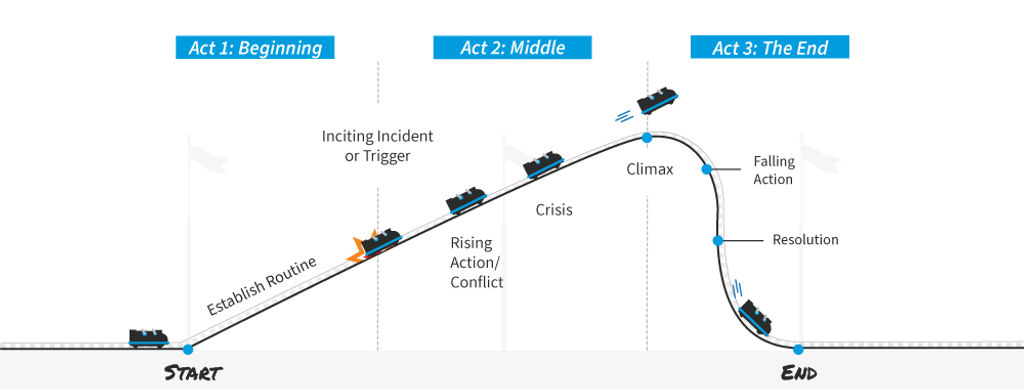
  5. Establish narrative flow: The plot thickens now as you put in place a well-paced narrative that keeps users interested throughout the experience. It’s here where a story arc and/or story beat is particularly useful. So, think about the sequence of events and how they lend themselves to a good story, and build tension, introduce conflicts, and create moments of resolution or revelation—all the juicy things you’d find in a powerful story in a novel, on film, you name it.

  6. Point of view, field of view, multiple perspectives and experiences: Take advantage of VR's ability to shift the lens and provide multiple perspectives—and think about the user’s point of view: it could be first person or third person (as in, do they see things as from their own eyes or do they see themselves as a separate body?). Can users experience the story from different angles or switch between characters’ viewpoints? If so, it’s something that—done well—can enhance both depth and engagement and catapult the user so much more into the exciting reality you’re drawn them into.

  7. Offer agency and choice: Now we’re into another massive factor, and something that makes us true humans: free will and freedom of choice, and hence why you’ll find those decision points so precious, ones that allow users to make choices that influence the story’s direction. The options they go for should have meaningful consequences, and so give users a sense of agency and ownership over the narrative—as in, you amplify the “take you there” factor with the factors of “You get to do things!” and “Guess what, those things count towards how much of a happy ending there is!”. It’s like an insurance against their becoming viewers or passive observers, so be sure to milk it and apply good judgment to shape the stories that excite and give maximum benefit to the individuals who’ve decided to suspend their disbelief and take you up on your offer to entertain them.

  8. Put sound and music to work: Think of a scene from your favorite movie—a moment when the feelings of the characters and the mood of the situation they were in came through in a profound way that the visuals couldn’t have cast on their own. That’s the power of sound and music, which play a crucial role in creating atmosphere and emotional impact—and you’ll know this from any movie you’ve enjoyed that’s been a hit. And if you’ve seen any “making of” snippets of a classic blockbuster where the cast are on the set with the director and crew, on videotape and without the soundtrack or mood-building incidental music or other signatures of slick production (like 35mm film), you’ll know how integral the sonic element is to the magic of the movie. Use spatial audio to bolster and boost the user’s sense of presence and work into the magic a fitting musical score so it complements the story’s mood. If there’s suspense, for instance, have that mounting tension come through in—perhaps—the discordant tinkling of piano keys or cello strings or synth, whatever works and whatever you can create and apply.

  9. Immerse users in environments: Now you’ve got everything else worked out, the distinction between good and great can be down to the details, and getting them spot on. The world-building part is huge, of course, so be sure to craft detailed and immersive environments that support—and boost—the storytelling and what it does for users. Your users should feel like they’re part of the world you’ve created, with attention to details that support the narrative beautifully. For instance, can they reach out a finger so a message-carrying butterfly lands on it? Maybe it’s escaping cold weather ahead? Is that cold weather occurring because of something that your user is in there to confront, perhaps a supernatural force? Say as much as you can in the narrative that’s relevant by showing as much as you can in the world you build for your VR users.

  10. Test and iterate: Last—but not least—let’s get back to the “real world” after all the fun we’ve had—and it’s here where you prototype your VR story and then test it with real users. Be sure to gather feedback in on their emotional responses, interactions, and—another massive factor—overall experience, and then use this feedback to refine and improve the narrative elements so everything works as best it can.

VR is a rapidly evolving field—as it’s been for quite a while and will keep on being—and it presents infinite opportunities for storytelling. It’s important to approach it with imagination and excitement, to be sure, but also to view it as a UX design project that’s grounded in objectivity and the science of testing. That’s why you’ll do well to continuously iterate and refine your narrative based on the user feedback you get in, and also keep in step with technological advancements and emerging trends in VR design, too.

The Take Away

Storytelling is one of traits of human nature that’s closest to home for people, and has been for thousands of years. VR opens up a whole new world of storytelling—and it’s one that goes far, far beyond pixels and code to put target audiences in the picture and guide users through immersive experiences that resonate deeply with them. You’re the designer, so you get to infuse virtual realms with purpose and emotion that make—and keep—things compelling at every part—including every twist, turn, and decision point your users get to make. More than a guide, a well-crafted narrative immerses users deeper and deeper into the VR landscape you’ve given them. The ingredients of presence, immersion, and active participation evoke and help bind personal connections with the content—and, if you do it well, they’ll be strong connections.

The unique spatial aspect of VR empowers users with agency, that all-important aspect that means they’re well and truly part of what’s going on and which allows them to interact and shape the unfolding narrative. Techniques like brainstorming, mind maps, and mood boards help you to develop your stories and your vision, and if you embrace VR landscapes, you can use the immersive capabilities of VR—like spatial audio and interactive elements—to forge a strong sense of presence. Do it right and users will flock to experience a winner of a VR design piece.

References and Where to Learn More

John Bucher’s book, Storytelling for Virtual Reality: Methods and Principles for Crafting Immersive Narratives, explores storytelling in VR in-depth.

This Medium article provides a comprehensive look of narrative as a design tool. 

This episode of Make It by Adobe Creative Cloud explores immersive storytelling. 

VRScout has written an extensive guide on VR storytelling.

Hero Image: © Interaction Design Foundation, CC BY-SA 4.0

Feel Stuck?
Want Better Job Options?

AI is replacing jobs everywhere, yet design jobs are booming with a projected 45% job growth. With design skills, you can create products and services people love. More love means more impact and greater salary potential.

At IxDF, we help you from your first course to your next job, all in one place.

See How Design Skills Turn Into Job Options
Privacy Settings
By using this site, you accept our Cookie Policy and Terms of Use.
Customize
Accept all

Be the One Who Inspires

People remember who shares great ideas.

Share on:

Academic Credibility — On Autopilot

Don't waste time googling citation formats. Just copy, paste and look legit in seconds.