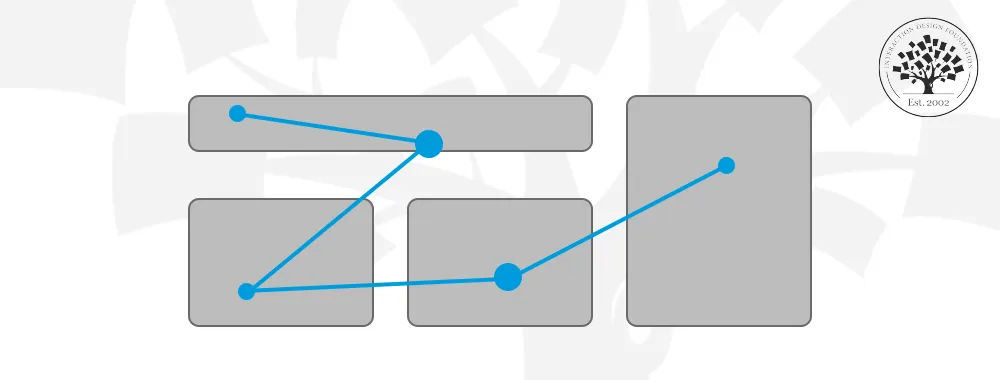
Eye tracking in user experience (UX) design is a technique to use specialized technology to track—and analyze—where users look on a digital interface and for how long. Designers use this data to understand user attention and behavior—and optimize how they place elements like buttons and menus to enhance the user experience.
© Interaction Design Foundation, CC BY-SA 4.0
How to Understand Eye Tracking and Its Relevance in UX Design
Eye tracking is a useful technique in usability testing and user research. It offers a detailed real-time view of user engagement and interaction patterns. That’s because it records where and how users look at various elements on webpages and mobile apps.
Eye tracking evolved from direct observation studies in the 19th century as a rudimentary tool to become an important part of user research. By the late 1990s, marketing research and advertising agencies had begun leveraging this technology to study how individuals consume online content.
Advancements in technology in areas like virtual reality (VR) have brought enhancements in eye tracking—and the ability to pinpoint user actions like pupil dilation and gaze patterns. Eye tracking glasses and VR headsets with eye tracking have gotten more sophisticated, affordable and helpful as tools.
Eye tracking solutions for UX designers and researchers have also become more accessible and cost-effective—in any case. Modern smartphones can serve as accurate eye trackers—something that’s very helpful for mobile UX research. The evolution of hardware and software has enabled diverse applications of eye tracking across marketing, UX design, psychological research and gaming.
To do eye tracking, it takes equipment that uses specialized infrared light to create reflections in a user's eyes. Cameras then capture these reflections to make certain of the eye's position and movement. Designers or researchers measure fixation points—where the gaze lingers—and saccades—the rapid movements between these points. This data really helps them understand the visual paths that users take during their tasks—like reading or exploring a webpage. And tools like heat maps and gaze plots visually represent these paths. They give clear, actionable insights into user behavior. When designers observe and interpret visual patterns, they can make informed decisions to make the digital products and interfaces they work on better.
The Benefits of Using Eye Tracking in UX Design
© Interaction Design Foundation, CC BY-SA 4.0
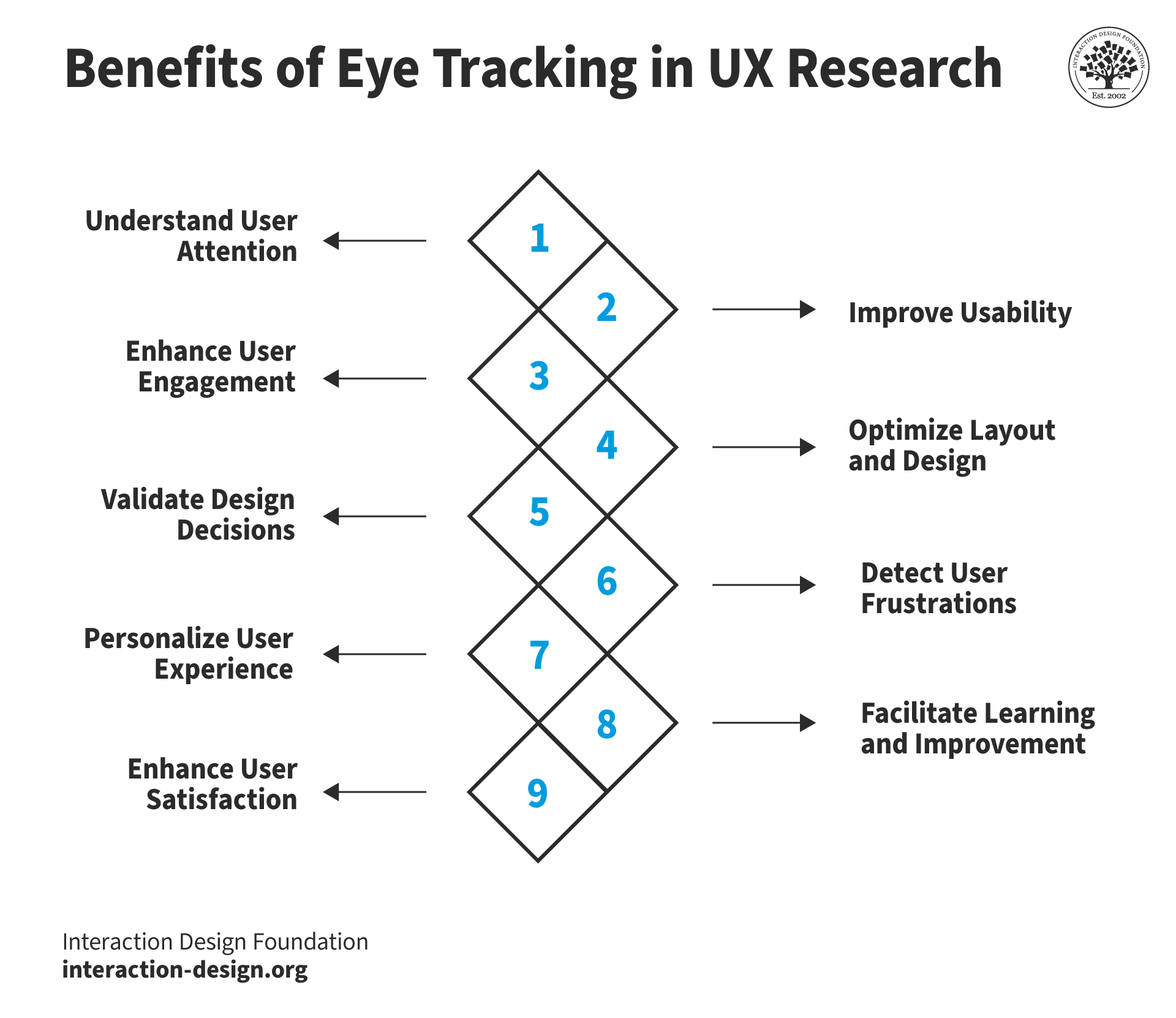
Eye tracking is a helpful asset to observe natural user behavior without interference. With eye tracking, designers can:
1. Understand User Attention
Eye tracking provides really useful data on where users focus their attention—and for how long—so UX designers can understand which elements capture attention and which don’t. This lets them make targeted improvements for their target audience in the information architecture and more. For instance, after designers analyze fixation and saccade patterns, they can refine the visual hierarchy of their designs to better match what users expect and need.
2. Improve Usability
Eye tracking helps weed out the areas within a user interface (UI) that confuse or frustrate users. This early detection of usability issues can save a great deal of time and resources in the product design process. And when designers collect data, they can catch problems early and make needed adjustments before further development stages.
Watch this video to understand usability in more depth:
3. Enhance User Engagement
Eye tracking measures how often—and how long—users look at and engage with certain elements. It can reveal smooth flow areas, too, and these insights can help guide designers to replicate successful elements across different parts of the interface.
4. Optimize Layout and Design
Eye tracking lets designers look deeply into the effectiveness of visual design elements—and optimize the visual hierarchy. They can see how users navigate a page and—from there—fine-tune the visual hierarchy to make it best for the user’s natural flow.
Layout sets the foundation for effective visual communication—and to make layouts that are more effective, designers can use approaches such as the Golden Ratio.
In this video, William Hudson, User Experience Strategist and Founder of Syntagm Ltd, explains how to use the golden ratio to create balanced, visually pleasing layouts, showing how this timeless principle helps you structure pages that guide the user’s eye naturally and effectively.
Designers can also compare different design alternatives—and do so effectively. Eye tracking can give them concrete data on how different designs perform in terms of user engagement and ease of navigation. Designers can—therefore—make evidence-based decisions to boost both the interface’s appeal and its functionality. That’s particularly useful in A/B testing scenarios where subtle differences in design can have a big impact on user experience.
UX Strategist and Consultant William Hudson explains A/B testing:
5. Validate Design Decisions
Eye tracking offers empirical evidence to validate design choices—plus, it helps take guesswork and personal biases out of the design process. This data-driven approach helps identify what works and what doesn't in a design.
6. Detect User Frustrations
Eye tracking can uncover user frustrations through indicators like rapid eye movements or fixed gazes—often signals of confusion or annoyance. If designers understand these pain points, they can work with that much more focus to improve the user experience.
7. Personalize User Experience
Eye tracking helps designers tailor interactions based on individual user behaviors—and this personalization makes users feel understood and valued.
8. Facilitate Learning and Improvement
Eye tracking helps designers and researchers understand user behavior, visual perception and cognitive processing—and it’s knowledge that can contribute to continuously enhancing UX practices.
9. Enhance User Satisfaction
Ultimately, eye tracking leads to designs that more effectively meet user needs—and it can result in increased user satisfaction, higher likelihood of return usage and positive product recommendations.

In this heat map example, users looked longer at the summer sales banner than anywhere else.
© H&M / Oculid, Fair Use
How do Designers Leverage Eye Tracking?
UX researchers—or designers—typically do the following:
1. Tracking Studies
Designers begin with a clear research question—and from there form a hypothesis. They then pick the essential metrics and create specific tasks and visual stimuli to help bring about the study—a structured approach to help them tailor their eye tracking work to yield actionable insights.
2. Conduct the Study: In-Lab or Remotely
Designers can conduct eye tracking studies in lab environments or remotely—and they can do either moderated or unmoderated studies. This flexibility lets them collect data in the most suitable context for their specific study needs. It could be to observe user behavior closely, in a controlled environment—or capture more natural user interactions in their everyday settings.
3. Conduct Recruitment and Data Collection
For studies that focus primarily on heat maps, it’s better to recruit at least 30 participants. The recruitment process and the study's scale can vary—it depends on the hypothesis and the eye tracking metrics that need analysis. Designers can use software-only solutions—they’re significantly more affordable than traditional eye-tracker studies. These enable them to conduct tests globally—something that enhances the diversity and volume of data they collect.
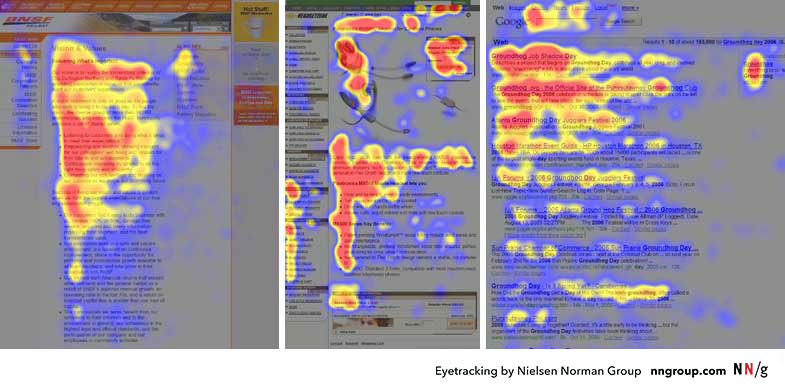
These heat maps are from the eye tracking studies of three websites. Red areas are where users looked the most, yellow areas fewer views, and blue the least-viewed areas—and no fixations for the grey areas.
© Nielsen Norman Group, Fair Use
4. Analyze User Interaction Through Visual Data
Eye tracking technology gives UX designers a wide range of visual data—like gaze plots, heat maps and gaze replays. They’re tools that offer insights into visual attention patterns and user interactions. They help designers understand where users look, for how long and what elements capture their attention and areas of interest. Eye tracking usability testing data is crucial for designers to find design elements that work well—and those that need improvement.
5. Integrate It with Other Research Methods
Designers integrate eye tracking with other research methodologies—like surveys and click-rate analysis. This multifaceted approach lets them get a good understanding of user behavior—plus, it captures data that users mightn’t report, themselves. This integration enriches the collected data. It gives a more complete view of user interactions and preferences, too. The combination of qualitative insights from interviews and quantitative data from eye tracking creates a foundation for informed design decisions that’s really robust.
Author and Human-Computer Interaction Expert, Professor Alan Dix explains the difference between qualitative and quantitative research and data:
One point about eye tracking that’s very important is that it can go far beyond surface-level analytics to provide deep insights into users’ subconscious behaviors. This includes users’ instinctive reactions to visual stimuli. And that’s a level of insight that is invaluable for designers to create interfaces that aren’t just functional but intuitively align with user expectations and behaviors, too.
Challenges and Considerations in Eye Tracking

© Interaction Design Foundation, CC BY-SA 4.0
Here are some:
1. Limited User Awareness and Attention-based Eye Tracking
Eye tracking mightn’t always indicate user awareness. Users might look at a specific area on the screen—and yet not notice important features. This makes it uncertain whether they’ve actually perceived something.
2. Omission of Peripheral Vision
Eye tracking can fail to capture what users actually perceive in their peripheral vision. So, it makes it hard to be sure if they’ve overlooked anything—as eye tracking can’t account for peripheral vision where fixations don’t occur.
3. Understand User Gaze Intent
To solely rely on eye tracking doesn’t provide insights into the reasons behind users' visual focus. It indicates the location and duration of user gaze but doesn’t reveal their cognitive processes.
4. Varied Suitability
Eye tracking's effectiveness varies among individuals. That’s due to factors such as eyewear, pupil size and eye movement—and they’re things that can pose challenges for some UX eye tracking tools and eye tracking devices to accurately account for all users.
How to Overcome These Constraints
Despite its limitations, eye tracking is something that can greatly contribute to building up an understanding of users. When researchers and designers thoroughly understand its capabilities and constraints—combined with alternative user research methods—they can make the best use of eye tracking in UX testing and research. What’s more, when designers test with diverse user groups and use the best eye tracking software for usability testing, they can tighten their grasp of what it is about their designs that works—and what needs to be more effective.
What are Best Practices for Effective Eye Tracking?
© Interaction Design Foundation, CC BY-SA 4.0
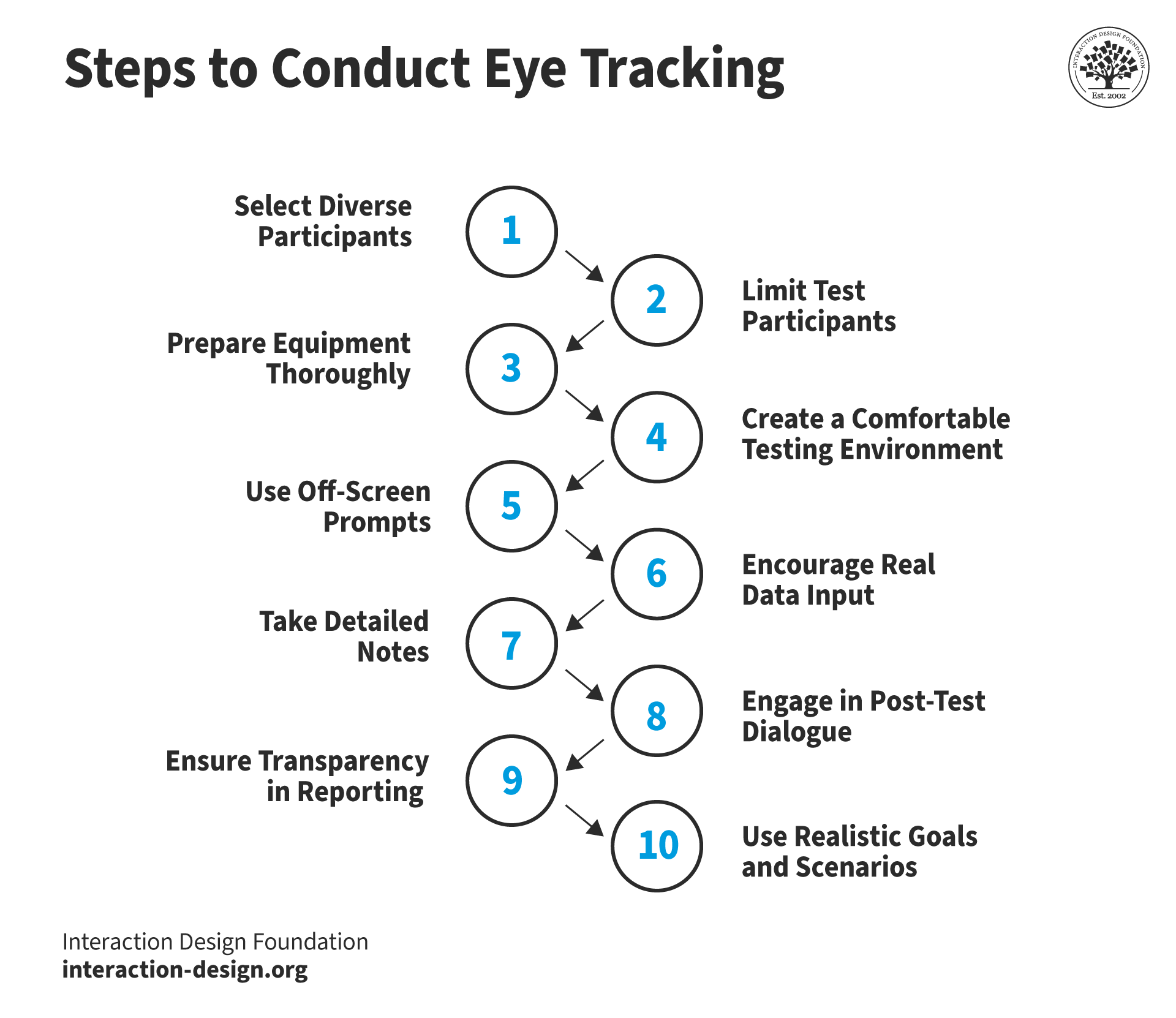
Eye tracking testing in UX research calls for a structured approach—and here are 10 steps to effectively conduct eye tracking tests:
1. Select Diverse Participants
Pick diverse real users who represent the product's audience from various backgrounds—something that can help get a comprehensive understanding of how users interact with the product. It’s important to make sure the eye tracking system supports participants who wear glasses—or adjust participant selection accordingly.
2. Limit Test Participants
Test with five or fewer people—that’s how to efficiently identify most issues without getting into redundancy. Do multiple tests at different times to see how effective changes are.
3. Prepare Equipment Thoroughly
It’s vital to make sure that UX eye tracking tools and computers are ready well in advance of the test day—to keep any last-minute issues from cropping up. Test the equipment to make sure it’s working and ready.
4. Create a Comfortable Testing Environment
Conduct tests in a calm and quiet environment. Tell participants about the focus of the product—and that the purpose is to test the product, not them. It’s helpful to use viewing rooms with one-way mirrors and soundproofing—if possible. In any case, it’s vital to minimize any impact of the observers on the users.
5. Use Off-Screen Prompts
Give users printed instructions for each test part to help them remember what to do. It’ll help keep the test smooth and focused, too, since users shouldn’t have to ask questions.
6. Encourage Real Data Input
Prompt participants to use their information when they fill out forms—to simulate real usage and find any form-related issues. Reassure them that their data will be safe, and confirm that they’ve got all the data they need before they start.
7. Take Detailed Notes
Record observations about each participant—and that includes behavior and verbal feedback—to complement eye tracker data and spot usage patterns. For example, users’ facial expressions and utterances are things that can shed powerful insights.
Professor of Human-Computer Interaction, UCL, Ann Blandford discusses the advantages and disadvantages of different data-gathering methods like video, audio, and notes.
8. Engage in Post-Test Dialogue
Have post-test discussions with participants to collect feedback on their experiences and thoughts. Be sure to ask them about their feelings and thoughts during the test. It’s important to be mindful about asking questions like these—to avoid leading questions. Honest answers from users will, of course, give the best insights.
9. Ensure Transparency in Reporting
Clearly explain test results to clients—and that includes what technical terms and data mean. Show users all notes and data, too. That will build their trust and understanding of the testing process.
10. Use Realistic Goals and Scenarios
Design tests around real events using common language to avoid leading participants and accurately assess product usability. For example, if a designer wants to assess how well users can change the expiration date of a credit card on a website, it’s better to ask users to make any needed changes to their payment information on the site—as opposed to “update your credit card’s expiration date.”
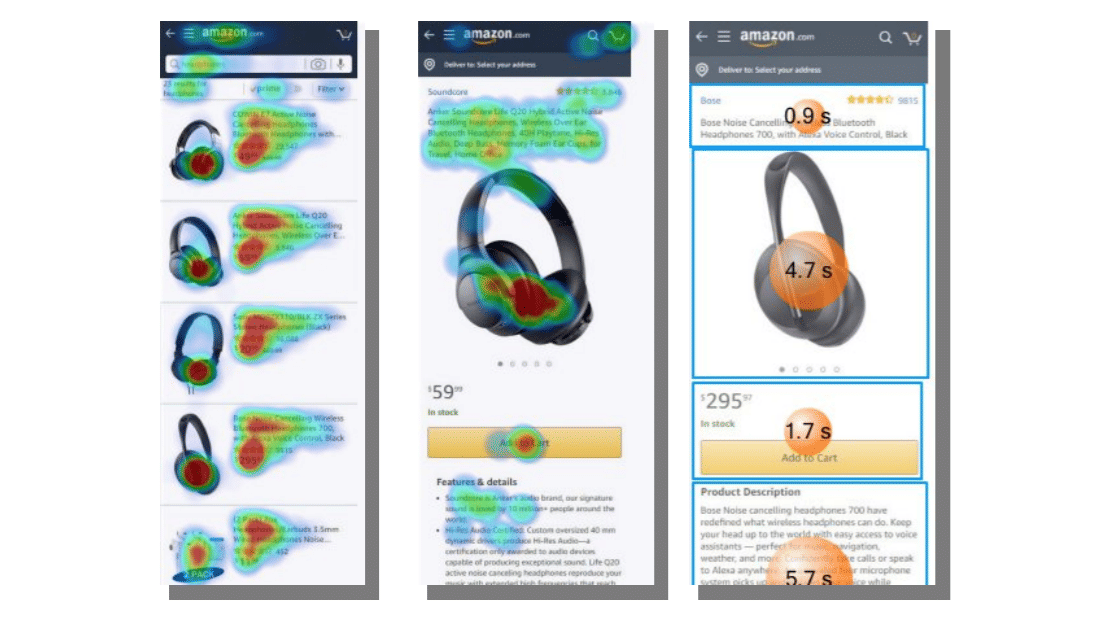
This study revealed that the more a product was on the bottom, the less attention participants paid to it.
© Eye Square / Oculid, Fair Use
What are Examples of Eye Tracking Tools and Services?
In no particular order, here are some examples of popular and helpful eye tracking brands:
1. Eye Square is a specialist provider of neuromarketing research that incorporates eye tracking, facial coding and emotion analytics. This platform captures and analyzes real, explicit and implicit reactions of customers in many settings, and shows brands what occurs and why.
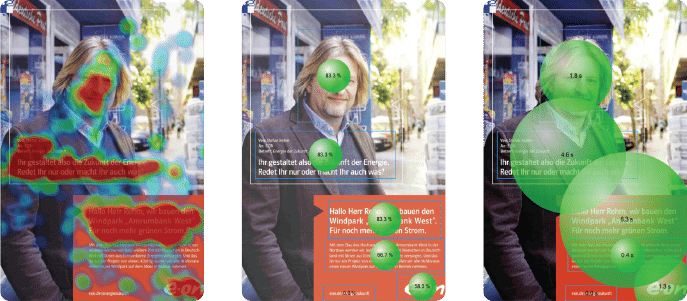
© Mike Stevens, Fair Use
2. Eyes Decide provides online eye tracking solutions, helpful for market research and product design. Their integrated platform supports constructing, running and analyzing studies.
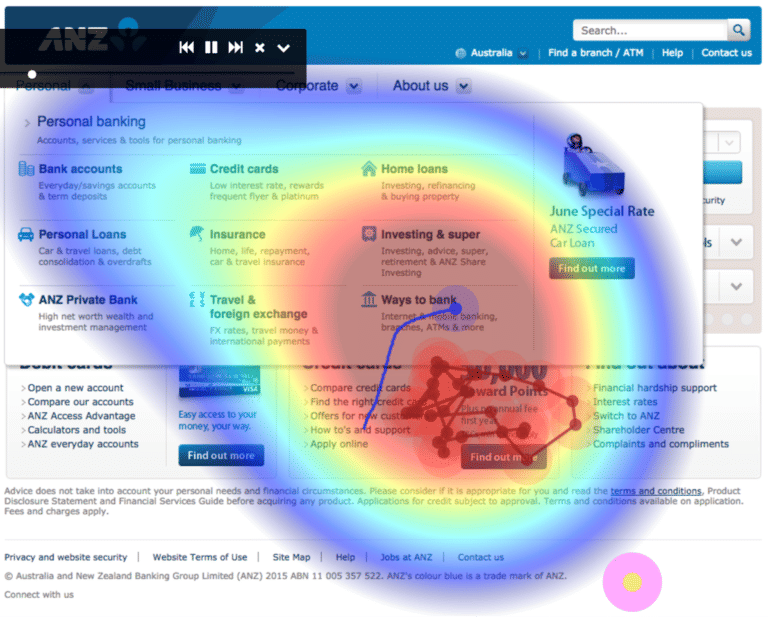
© Mike Stevens, Fair Use
3. Eyezag provides mobile and desktop eye tracking solutions via standard webcams—tests run in-browser. They offer self-service and managed service solutions.
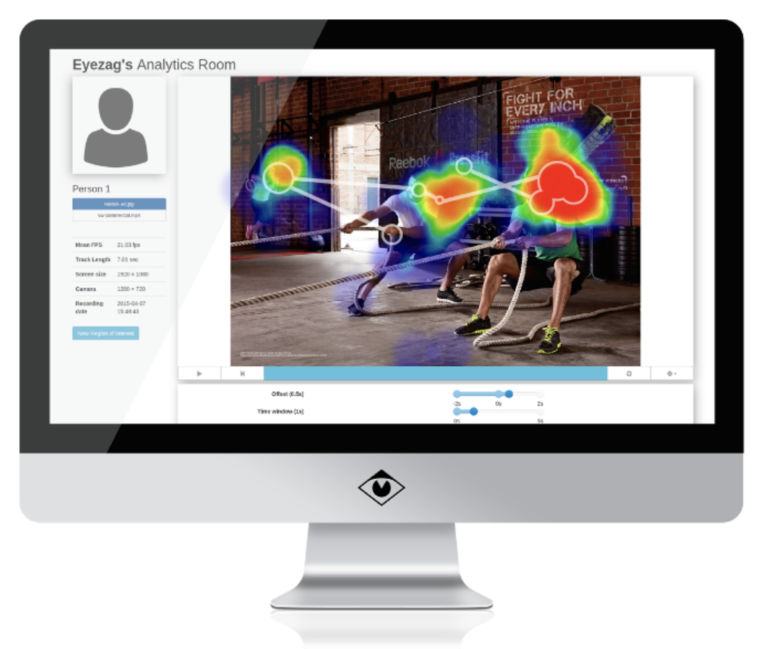
© Mike Stevens, Fair Use
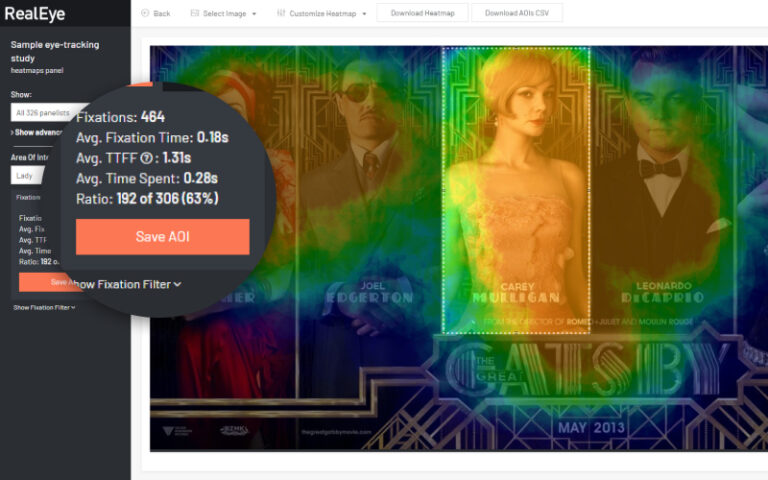
4. RealEye offers screen-based webcam eye tracking, mouse-tracking and facial coding—with a platform that supports 10 languages. The system’s connectable to any panel or survey platform—and they have basic surveys also available to add to studies.
© Mike Stevens, Fair Use
Remember, UX eye tracking is a valuable asset for designers and researchers to apply in their product design. However, it takes a thorough understanding of the potential—and potential limitations—of the available technology to capture the most relevant parts of the user behaviors they need. Once a design team has a fund of accurate data to work with, they can work to fine-tune outstanding areas and retest the next iteration to see if the users’ gaze pays the desired attention.
Learn More About Eye Tracking in UX
Take our course User Research – Methods and Best Practices.
Read the Nielsen-Norman Group’s free report, How to Conduct Eyetracking Studies.
Read Eye Tracking In Mobile UX Research by Mariana Macedo for more insights into measuring eye movement as a type of research.
Consult Eye Tracking in UX: Decoding User Behavior for Seamless Design by Ehsan Jamalzadeh for more details and tips.
Go to Eye Tracking: What Is It & How to Use It for Usability Testing by Madison Zoey Vettorino for further helpful insights and more.
Read The Top 15 Eye Tracking Platforms for Market & User Research by Mike Stevens for valuable examples of tools and further information.