Usability Testing

Your constantly-updated definition of Usability Testing and collection of videos and articles.
Be a conversation starter: Share this page and inspire others!

1,380 Shares

What is Usability Testing?

Usability testing is the practice of testing how easy a design is to use with a group of representative users. It usually involves observing users as they attempt to complete tasks and can be done for different types of designs. It is often conducted repeatedly, from early development until a product’s release.

“It’s about catching customers in the act, and providing highly relevant and highly contextual information.”

— Paul Maritz, CEO at Pivotal

Transcript

Usability Testing Leads to the Right Products

Through usability testing, you can find design flaws you might otherwise overlook. When you watch how test users behave while they try to execute tasks, you’ll get vital insights into how well your design/product works. Then, you can leverage these insights to make improvements. Whenever you run a usability test, your chief objectives are to:

1) Determine whether testers can complete tasks successfully and independently.

2) Assess their performance and mental state as they try to complete tasks, to see how well your design works.

3) See how much users enjoy using it.

4) Identify problems and their severity.

5) Find solutions.

While usability tests can help you create the right products, they shouldn’t be the only tool in your UX research toolbox. If you just focus on the evaluation activity, you won’t improve the usability overall.
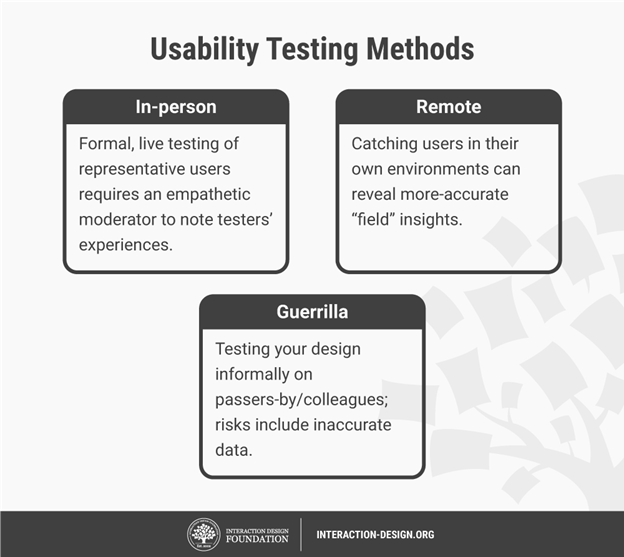
There are different methods for usability testing. Which one you choose depends on your product and where you are in your design process.

Usability Testing is an Iterative Process

To make usability testing work best, you should:

1) Plan

a. Define what you want to test. Ask yourself questions about your design/product. What aspect/s of it do you want to test? You can make a hypothesis from each answer. With a clear hypothesis, you’ll have the exact aspect you want to test.

b. Decide how to conduct your test – e.g., remotely. Define the scope of what to test (e.g., navigation) and stick to it throughout the test. When you test aspects individually, you’ll eventually build a broader view of how well your design works overall.

2) Set user tasks

a. Prioritize the most important tasks to meet objectives (e.g., complete checkout), no more than 5 per participant. Allow a 60-minute timeframe.

b. Clearly define tasks with realistic goals.

c. Create scenarios where users can try to use the design naturally. That means you let them get to grips with it on their own rather than direct them with instructions.

3) Recruit testers – Know who your users are as a target group. Use screening questionnaires (e.g., Google Forms) to find suitable candidates. You can advertise and offer incentives. You can also find contacts through community groups, etc. If you test with only 5 users, you can still reveal 85% of core issues.

4) Facilitate/Moderate testing –Set up testing in a suitable environment. Observe and interview users. Notice issues. See if users fail to see things, go in the wrong direction or misinterpret rules. When you record usability sessions, you can more easily count the number of times users become confused. Ask users to think aloud and tell you how they feel as they go through the test. From this, you can check whether your designer’s mental model is accurate: Does what you think users can do with your design match what these test users show?

If you choose remote testing, you can moderate via Google Hangouts, etc., or use unmoderated testing. You can use this software to carry out remote moderated and unmoderated testing and have the benefit of tools such as heatmaps.
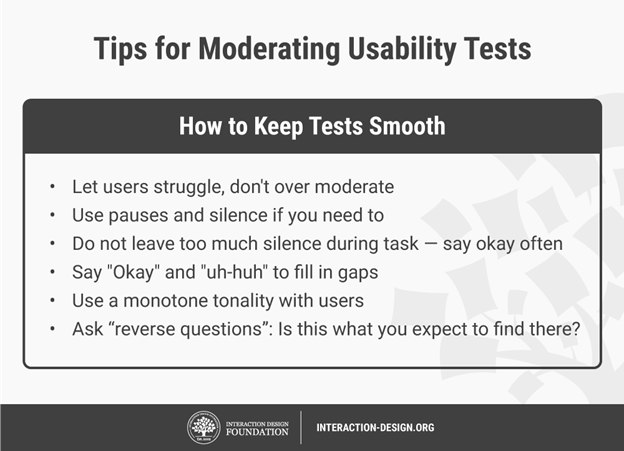
Keep usability tests smooth by following these guidelines.

1) Assess user behavior – Use these metrics:

Quantitative – time users take on a task, success and failure rates, effort (how many clicks users take, instances of confusion, etc.)

Qualitative – users’ stress responses (facial reactions, body-language changes, squinting, etc.), subjective satisfaction (which they give through a post-test questionnaire) and perceived level of effort/difficulty

2) Create a test report – Review video footage and analyzed data. Clearly define design issues and best practices. Involve the entire team.

Overall, you should test not your design’s functionality, but users’ experience of it. Some users may be too polite to be entirely honest about problems. So, always examine all data carefully.

Questions About Usability Testing?
We've Got Answers!

How to conduct usability testing?

To conduct usability testing effectively:

  1. Start by defining clear, objective goals and recruit representative users.

  2. Develop realistic tasks for participants to perform and set up a controlled, neutral environment for testing.

  3. Observe user interactions, noting difficulties and successes, and gather qualitative and quantitative data.

  4. After testing, analyze the results to identify areas for improvement.

For a comprehensive understanding and step-by-step guidance on conducting usability testing, refer to our specialized course on Conducting Usability Testing.

When to do usability testing?

Conduct usability testing early and often, from the design phase to development and beyond. Early design testing uncovers issues when they are more accessible and less costly to fix. Regular assessments throughout the project lifecycle ensure continued alignment with user needs and preferences. Usability testing is crucial for new products and when redesigning existing ones to verify improvements and discover new problem areas. Dive deeper into optimal timing and methods for usability testing in our detailed article “Usability: A part of the User Experience.”

Transcript


Incorporate insights from William Hudson, CEO of Syntagm, to enhance usability testing strategies. William recommends techniques like tree testing and first-click testing for early design phases to scrutinize navigation frameworks. These methods are exceptionally suitable for isolating and evaluating specific components without visual distractions, focusing strictly on user understanding of navigation. They're advantageous for their quantitative nature, producing actionable numbers and statistics rapidly, and being applicable at any project stage. Ideal for both new and existing solutions, they help identify problem areas and assess design elements effectively.

How to do usability testing for mobile applications?

To conduct usability testing for a mobile application:

  1. Start by identifying the target users and creating realistic tasks for them.

  2. Collect data on their interactions and experiences to uncover issues and areas for improvement.

  3. For instance, consider the concept of ‘tappability’ as explained by Frank Spillers, CEO: focusing on creating task-oriented, clear, and easily tappable elements is crucial.

Employing correct affordances and signifiers, like animations, can clarify interactions and enhance user experience, avoiding user frustration and errors. Dive deeper into mobile usability testing techniques and insights by watching our insightful video with Frank Spillers.

Transcript

How many participants do you need for most usability tests?

For most usability tests, the ideal number of participants depends on your project’s scope and goals. Our video featuring William Hudson, CEO of Syntagm, emphasizes the importance of quality in choosing participants as it significantly impacts the usability test's results.

Transcript

He shares insightful experiences and stresses on carefully selecting and recruiting participants to ensure constructive and reliable feedback. The process involves meticulous planning and execution to identify and discard data from non-contributive participants and to provide meaningful and trustworthy insights are gathered to improve the interactive solution, be it an app or a website. Remember the emphasis on participant's attentiveness and consistency while performing tasks to avoid compromising the results. Watch the full video for a more comprehensive understanding of participant recruitment and usability testing.

How to analyze usability test results?

To analyze usability test results effectively, first collate the data meticulously. Next, identify patterns and recurrent issues that indicate areas needing improvement. Utilize quantitative data for measurable insights and qualitative data for understanding user behavior and experience. Prioritize findings based on their impact on user experience and the feasibility of implementation. For a deeper understanding of analysis methods and to ensure thorough interpretation, refer to our comprehensive guides on Analyzing Qualitative Data and Usability Testing. These resources provide detailed insights, aiding in systematically evaluating and optimizing user interaction and interface design.

Is usability testing qualitative or quantitative?

Usability testing is predominantly qualitative, focusing on understanding users' thoughts and experiences, as highlighted in our video featuring William Hudson, CEO of Syntagm. 

Transcript

It enables insights into users' minds, asking why things didn't work and what's going through their heads during the testing phase. However, specific methods, like tree testing and first-click testing, present quantitative aspects, providing hard numbers and statistics on user performance. These methods can be executed at any design stage, providing actionable feedback and revealing navigation and visual design efficacy.

How to do remote usability testing?

To conduct remote usability testing effectively, establish clear objectives, select the right tools, and recruit participants fitting your user profile. Craft tasks that mirror real-life usage and prepare concise instructions. During the test, observe users’ interactions and note their challenges and behaviors. For an in-depth understanding and guide on performing unmoderated remote usability testing, refer to our comprehensive article, Unmoderated Remote Usability Testing (URUT): Every Step You Take, We Won’t Be Watching You.

User testing vs usability testing - what's the difference?

Some people use the two terms interchangeably, but User Testing and Usability Testing, while closely related, serve distinct purposes. User Testing focuses on understanding users' perceptions, values, and experiences, primarily exploring the 'why' behind users' actions. It is crucial for gaining insights into user needs, preferences, and behaviors, as elucidated by Ann Blanford, an HCI professor, in our enlightening video. 

Transcript

She elaborates on the significance of semi-structured interviews in capturing users' attitudes and explanations regarding their actions. Usability Testing primarily assesses users' ability to achieve their goals efficiently and complete specific tasks with satisfaction, often emphasizing the ease of interface use. Balancing both methods is pivotal for comprehensively understanding user interaction and product refinement.

What are the benefits of usability testing?

Usability testing is crucial as it determines how usable your product is, ensuring it meets user expectations. It allows creators to validate designs and make informed improvements by observing real users interacting with the product. Benefits include:

  • Clarity and focus on user needs.

  • Avoiding internal bias.

  • Providing valuable insights to achieve successful, user-friendly designs. 

Transcript

By enrolling in our Conducting Usability Testing course, you’ll gain insights from Frank Spillers, CEO of Experience Dynamics, extensive experience learning to develop test plans, recruit participants, and convey findings effectively.

Where to learn about usability testing?

Explore our dedicated Usability Expert Learning Path at Interaction Design Foundation to learn Usability Testing. We feature a specialized course, Conducting Usability Testing, led by Frank Spillers, CEO of Experience Dynamics. This course imparts proven methods and practical insights from Frank's extensive experience, guiding you through creating test plans, recruiting participants, moderation, and impactful reporting to refine designs based on the results. Engage with our quality learning materials and expert video lessons to become proficient in usability testing and elevate user experiences!

Transcript

Earn a Gift Earn a Gift, Answer a Short Quiz!

1
2
3
4
1
2
3
4
Question 1
Question 2
Question 3
Get Your Gift
Interaction Design Foundation logo

Question 1

What is the primary purpose of usability testing?

1 point towards your gift

  • To assess how easily users can use a product and complete tasks
  • To document the number of users visiting a product’s webpage
  • To test the market viability of a new product
Interaction Design Foundation logo

Question 2

At what stage should designers conduct usability testing?

1 point towards your gift

  • Only after the product is fully developed
  • Only during the initial concept phase
  • Throughout all stages of product development
Interaction Design Foundation logo

Question 3

Why do designers perform usability testing multiple times during the development process?

1 point towards your gift

  • To increase the product cost
  • To lengthen the development timeline
  • To refine the design based on user feedback and improve user satisfaction

Learn More About Usability Testing

Make learning as easy as watching Netflix: Learn more about Usability Testing by taking the online IxDF Course User Research – Methods and Best Practices.

Why? Because design skills make you valuable. In any job. Any industry.

In This Course, You'll

  • Get excited as you learn the business superpower: user research! Master it, and you'll solve meaningful problems, create better experiences, and drive success in any field. Why? User research empowers you to become a detective of human behavior. You'll discover what people truly need so that you can create products and services they love. You can use user research to reduce abandoned carts in online shopping, improve patient outcomes in healthcare, and solve challenges in any industry. It's easier than you think! With step-by-step guidance, you'll master User Research quickly—no matter your background. Studies show that user research can improve time to market by up to 330% and increase revenue by up to 320%. So get on board, do work you're proud of, and get paid what you're worth.

  • Make yourself invaluable with timeless human-centered skills. At the heart of great design is understanding people: What they need, what holds them back, and what keeps them coming back. As AI becomes part of how teams build and iterate, this deep understanding of people turns AI from a tool into your superpower. Effortlessly transform insights into Return on Investment (ROI) as you design solutions people love. You'll learn to make data-driven decisions that eliminate guesswork as you design products and services based on real user needs. That drives loyalty and outperforms competitors. You'll easily translate research into visuals that win over stakeholders, managers, and clients. Discover exactly what motivates people and build solutions that consistently deliver results.

  • Gain confidence and credibility with hands-on experience in usability testing, contextual inquiries, semi-structured qualitative interviews, and observational methods. Master how to ask the right questions and create actionable personas from your research. You'll plan, conduct, and analyze research in real-world scenarios, fast-tracking your success with 40+ ready-to-use templates like interview guides, affinity diagrams, and customer journey maps. If you want to leave assumptions behind and create with precision, purpose, and impact, this course is perfect for you. If you're interested, we'll even help you build your portfolio around an app, so your new superpowers shine clearly.

It's Easy to Fast-Track Your Career with the World's Best Experts

Master complex skills effortlessly with proven best practices and toolkits directly from the world's top design experts. Meet your experts for this course:

  • Frank Spillers: Service Designer and Founder and CEO of Experience Dynamics.

  • Ann Blandford: Professor of Human-Computer Interaction at University College London.

  • Alan Dix: Author of the bestselling book “Human-Computer Interaction” and Director of the Computational Foundry at Swansea University.

Get an Industry-Recognized IxDF Course Certificate

Increase your credibility, salary potential and job opportunities by showing credible evidence of your skills.

IxDF Course Certificates set the industry gold standard. Add them to your LinkedIn profile, resumé, and job applications.

Course Certificate Example

Be in distinguished company, alongside industry leaders who train their teams with the IxDF and trust IxDF Course Certificates.

Our clients: IBM, HP, Adobe, GE, Accenture, Allianz, Phillips, Deezer, Capgemin, Mcafee, SAP, Telenor, Cigna, British Parliament, State of New York

All Free IxDF Articles on Usability Testing

Read full article
Four Assumptions for Usability Evaluations - Article hero image
Interaction Design Foundation logo

Four Assumptions for Usability Evaluations

Usability is a vital part of the user experience as a whole. It’s vital for UX design teams to be able to assess whether a system they’ve developed is “usable”. When we say “usable” what we normally mean is the “extent to which a system is simple and enjoyable to use”. Yet, as with all simple concep

Social shares
556
Published
Read Article
Read full article
7 Great, Tried and Tested UX Research Techniques - Article hero image
Interaction Design Foundation logo

7 Great, Tried and Tested UX Research Techniques

Thinking about conducting some user research? Wondering which techniques are most likely to provide useful results? Then look no further. We’ve compiled a list of 7 excellent techniques which are tried and tested and have been proven to deliver real value in UX projects. Let’s take a look at each te

Social shares
1.2k
Published
Read Article
Read full article
Mobile Usability Research – The Important Differences from the Desktop - Article hero image
Interaction Design Foundation logo

Mobile Usability Research – The Important Differences from the Desktop

It’s important to remember that while we may use the same methods for mobile usability research as we use for other types of usability research; the mobile environment is different to the environment at the desktop. This means being aware of the context and adapting research to take advantage of tha

Social shares
808
Published
Read Article
Read full article
Making Use of the Crowd – Social Proof and the User Experience - Article hero image
Interaction Design Foundation logo

Making Use of the Crowd – Social Proof and the User Experience

Social proof (sometimes referred to as informational social influence) is a psychological concept. It refers to the tendency of human beings to follow the actions of others when making decisions and placing weight on those actions to assume “the correct decision”. It’s a concept that can be used in

Social shares
620
Published
Read Article
Read full article
Best Practices for Mobile App Usability from Google - Article hero image
Interaction Design Foundation logo

Best Practices for Mobile App Usability from Google

In today's world, mobile apps are an essential aspect of our daily routines, so the demand for user-friendly and intuitive mobile applications has skyrocketed. In response to this need, Google has released a set of best practices for mobile app usability to increase user satisfaction and retention r

Social shares
770
Published
Read Article
Read full article
Unmoderated Remote Usability Testing (URUT) - Every Step You Take, We Won’t Be Watching You - Article hero image
Interaction Design Foundation logo

Unmoderated Remote Usability Testing (URUT) - Every Step You Take, We Won’t Be Watching You

Unmoderated Remote Usability Testing (URUT) is a technique designed to help you overcome the downsides of moderated usability testing. While moderated usability testing is undeniably useful it suffers from the fact that it’s time consuming, it takes a lot of effort to recruit participants, the costs

Social shares
699
Published
Read Article

Unmoderated Remote Usability Testing (URUT) - Every Step You Take, We Won’t Be Watching You

Unmoderated Remote Usability Testing (URUT) - Every Step You Take, We Won’t Be Watching You

Unmoderated Remote Usability Testing (URUT) is a technique designed to help you overcome the downsides of moderated usability testing. While moderated usability testing is undeniably useful it suffers from the fact that it’s time consuming, it takes a lot of effort to recruit participants, the costs (due to all that time input) are usually too high to conduct moderated testing with large numbers of users and users are observed outside of their usual environment (which may change their behaviours).

About URUT

URUT is designed for usability testing for products or interfaces. That means it measures how satisfied (or not satisfied) a user is with the interface and operability of the product.

The idea is that participants will work through a task (or tasks) in their usual environment without the need for a moderator to be present. These tasks are presented to the user via an online platform.

Data is captured from URUT in one of two ways. The first is via click-stream and in this instance URUT often resembles a survey and captures quantitative data for researchers. The second is via video and will provide a more qualitative insight into user behavior.

Click-stream offers fast data capture and easy analysis but video offers deeper insight into user behavior. It is possible to combine the two approaches but the tests need careful design to benefit from this approach.


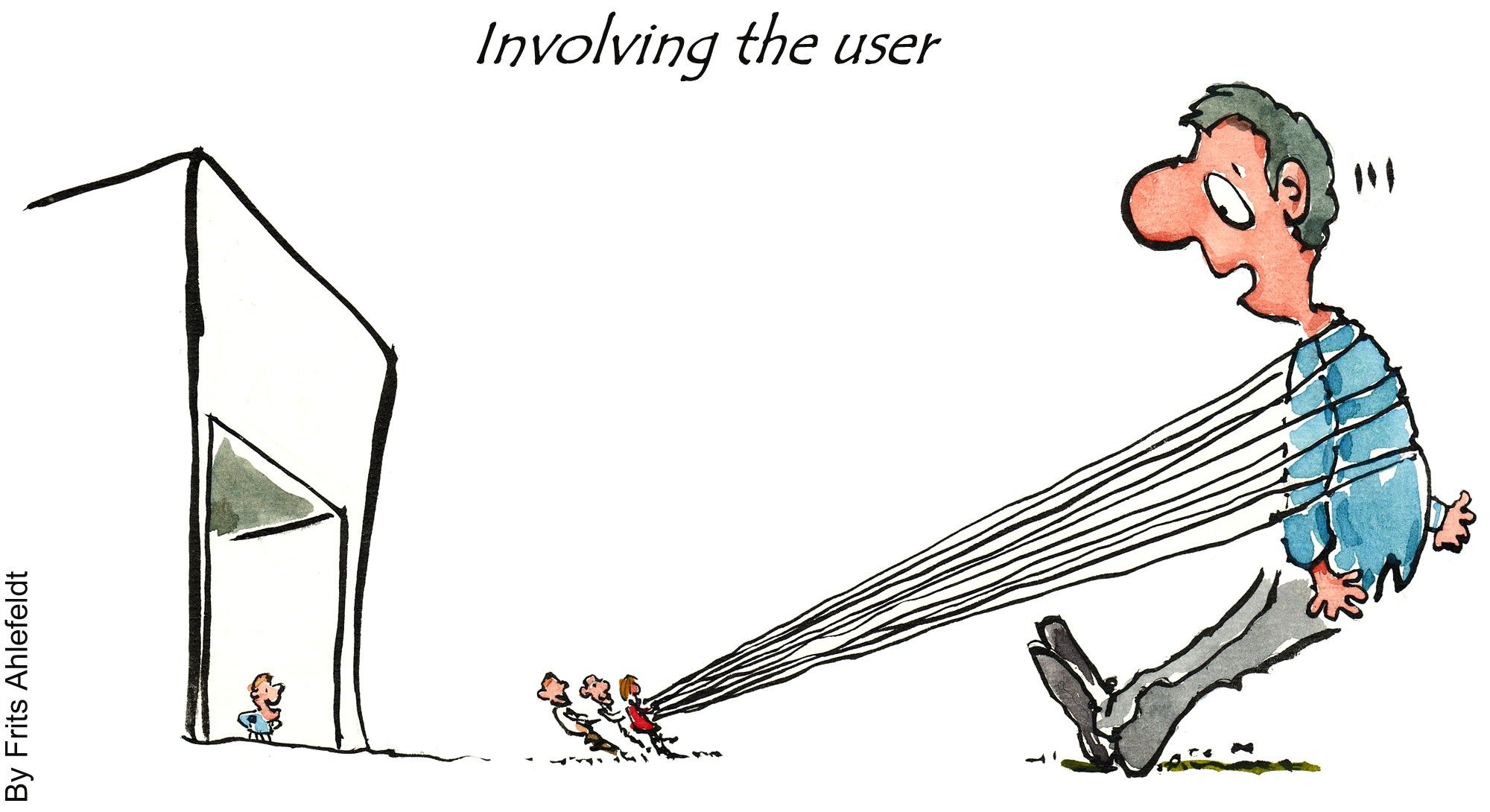
Author/Copyright holder: Frits Ahlefeldt-Laurvig. Copyright terms and licence: CC BY-NC-ND 2.0

It’s definitely easier to involve a user in Unmoderated Remote Usability Testing than it is to get them involved in lab moderated testing.

When Should I Use URUT Rather than Moderated Testing?

A lot depends on the needs of your usability tests but some of the more common scenarios include:

  • Competitor benchmarking. URUT makes it easy to examine two different products and capture enough data to make informed decisions based on the differences discovered.
  • Budget constraints. URUT is cheaper than moderated testing – if you don’t have the money for the latter the former may be a better approach.
  • Tight deadlines. If you need the data in a hurry it’s much faster to set up URUT than moderated testing.
  • Geographical constraints. If you want to test a global (or widely-dispersed) audience then URUT is likely to be easier and cheaper to implement (by far) than moderated testing.
  • In the wild data. If the customer’s environment has a large influence over use then moderated testing is probably not the way to go.
  • Large sample sizes. Without the need for moderation – automated remote testing can be scaled to deliver statistically significant data from the user base. Though it’s worth remembering that Steve Krug, the usability expert says; “Testing one user is 100 percent better than testing none.”


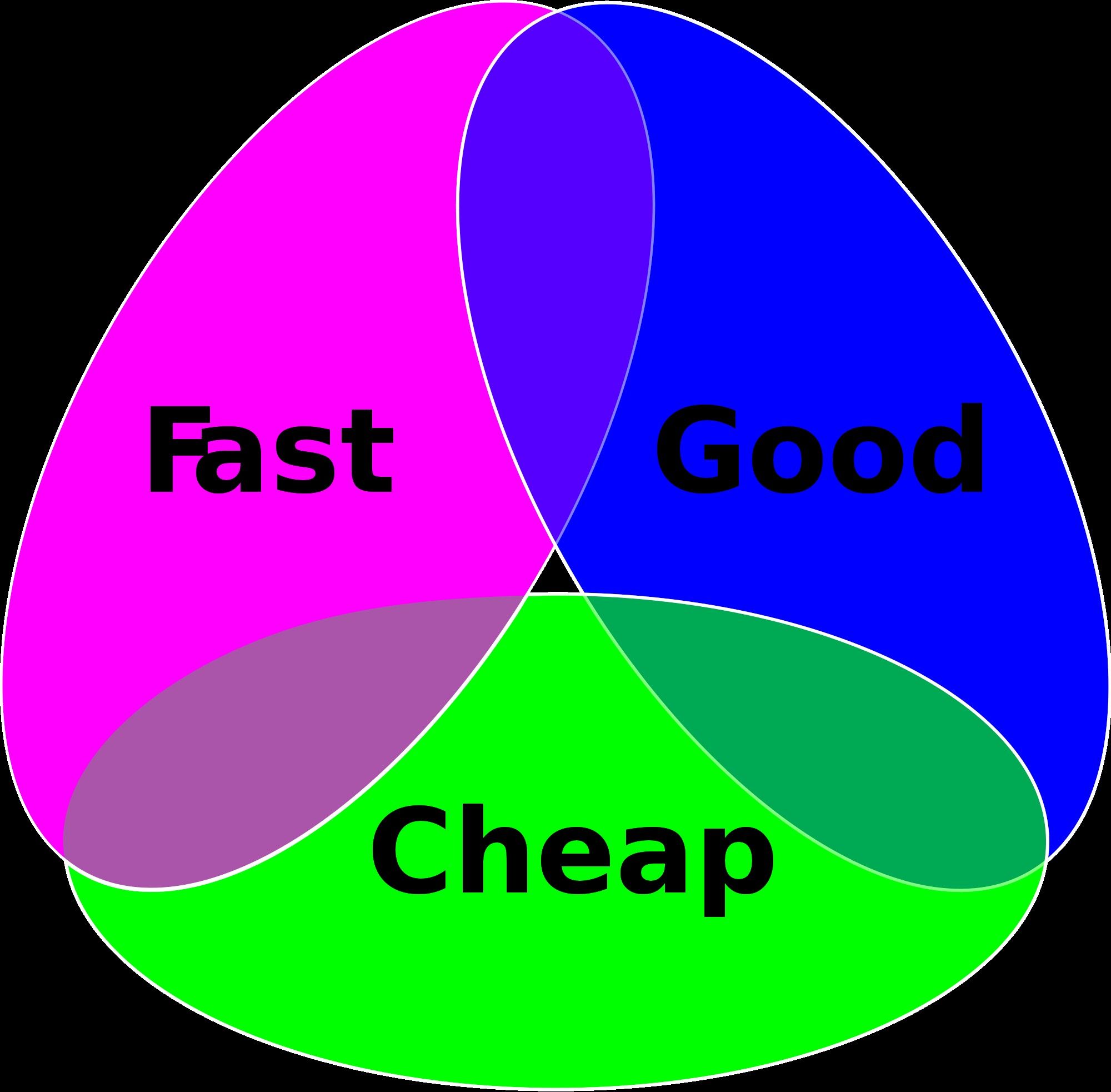
Author/Copyright holder: Cosmocatalano. Copyright terms and licence: CC0 1.0

When you’re trying to save money – don’t forget the quality triangle for good project results.

Considerations for Running URUT

There are many considerations to developing and running URUT for your products and some will be specific to your own needs but there are some general considerations for URUT too:

Prior to URUT

As with all forms of research; you need to be clear about the objectives of your research and what questions you expect to answer with the research. You can work with stakeholders to develop this understanding.

Participants

You’re also going to need to work out how to get people to take part in the study; your options include:

  • E-mail. If you have a list of customer e-mail addresses you can e-mail them to ask them to take part.
  • Pop-ups. If your customers are on your website; you can use a pop-up to redirect them to the study. The advantage of this approach is that you’re likely to get a very representative sample but the disadvantage is that it may distract them from shopping or other more valuable business activity.
  • Accessing pre-built testing databases. You can pay to access other people’s testing databases if you don’t have your own. These resources can often be targeted quite specifically to ensure representative audiences.
  • Social media. There’s nothing wrong with asking for volunteers on your social media channels either (if they’re active enough).


Author/Copyright holder: Jason Howie. Copyright terms and licence: CC BY 2.0

Assuming you have a large following on social media, it can be a great way to get participants involved in your URUT.

You may also need to offer participants an incentive to take part. The less involved the participant is with the product/service – the more of an incentive it usually takes to get them on board.

Task Design

You’ll need to be very clear about the tasks that participants are expected to complete. You must offer enough detail that they can do this without assistance (and you may need dummy data to supply them with too – such as credit card data for a mock purchase).

Keep instructions as simple and minimal as possible and always include a call-to-action when necessary.

Survey Questions

You can also include survey questions in an URUT exercise:

  • Closed questions following each task can help measure how participants are feeling about the usability of that task.
  • Questions can be used at the end of the exercise to get a more general impression of the exercise.
  • Questions can also be used to derive demographic data.
  • Questions can also be used to test comprehension of content.


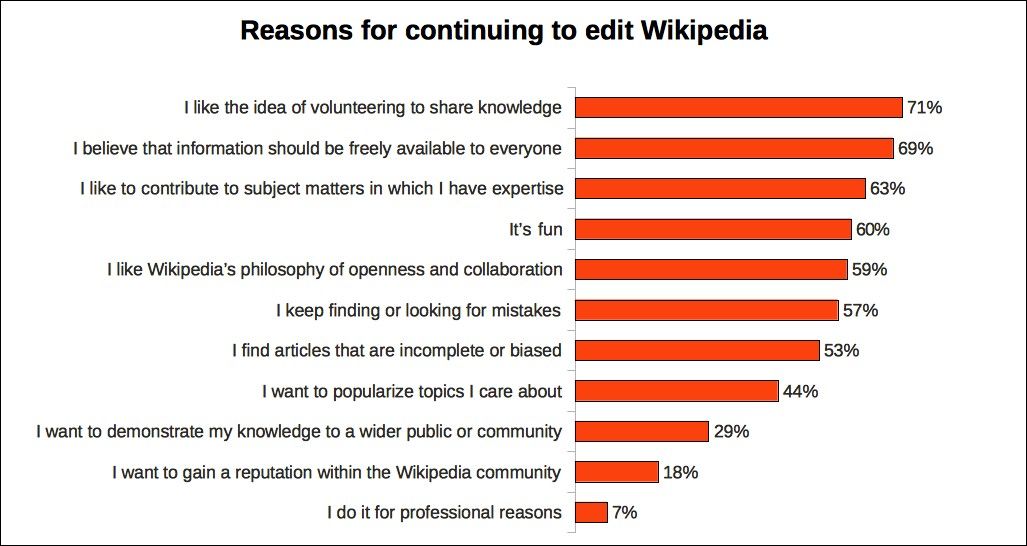
Author/Copyright holder: JayWalsh. Copyright terms and licence: CC BY-SA 3.0

Survey questions can provide additional insight into emotions or even unrelated topic areas during URUT. Wikipedia uses surveys, as seen here, to gauge how its editors feel about their work.

Delivery of the URUT Tool

Make sure that the tool is easy to access and to get to grips with without any support. You don’t want to introduce barriers to entry for participants.

Pilots

It can be very useful to test an URUT with a small number of participants and then evolve the URUT before launching it with a large audience.

Support

You should offer some telephone or e-mail support to participants for both the URUT exercise and if they have any questions after it has been completed.

Analysis

Once the URUT is complete – you need to analyze the data collected. You can apply any qualitative or quantitative technique that you require to get a clear understanding of results. It can be useful to define some headline metrics and measure these first to give quick results back to stakeholders.

The Take Away

URUT (Unmoderated Remote Usability Testing) can be a useful replacement for moderated usability testing in certain circumstances. The technique should be used with careful thought and have clear objectives before being employed. It’s an excellent addition to a usability tester’s or UX designer’s toolkit.

Resources

Course: Conducting Usability Testing:
/courses/conducting-usability-testing

The Nielsen Norman Group offers some good tips on choosing URUT tools - https://www.nngroup.com/articles/unmoderated-user-testing-tools/

UX Matters examines the case for and against URUT here - http://www.uxmatters.com/mt/archives/2010/01/unmoderated-remote-usability-testing-good-or-evil.php

Hero Image: Author/Copyright holder: leisa reichelt. Copyright terms and licence: CC BY-SA 2.0

Feel Stuck?
Want Better Job Options?

AI is replacing jobs everywhere, yet design jobs are booming with a projected 45% job growth. With design skills, you can create products and services people love. More love means more impact and greater salary potential.

At IxDF, we help you from your first course to your next job, all in one place.

See How Design Skills Turn Into Job Options
Privacy Settings
By using this site, you accept our Cookie Policy and Terms of Use.
Customize
Accept all

Be the One Who Inspires

People remember who shares great ideas.

Share on:

Academic Credibility — On Autopilot

Don't waste time googling citation formats. Just copy, paste and look legit in seconds.