Cybersickness in virtual reality refers to motion sickness-like symptoms—such as nausea, dizziness, headaches, eye strain, vertigo and disorientation—that affect people when they interact with virtual environments.
Cybersickness occurs when there's a disconnect between what the eyes see and what the body feels, especially in terms of motion. For example, a user in a virtual reality (VR) environment might perceive movement (like flying or fast-paced action), but their body doesn't experience the corresponding physical motion. This sensory mismatch can confuse the brain and lead to symptoms of cybersickness.
Causes of Cybersickness
Cybersickness in VR (also known as VR sickness) shares many symptoms with motion sickness but differs in terms of causes. With motion sickness, one feels ill because they feel movement in the muscles and inner ear but don't see it. In the case of cybersickness, it's the opposite. People see movement on the screen but don’t feel it.

Free-roaming exploration games such as Subnautica (pictured above) or Skyrim VR, which involve extensive free-roaming exploration, can sometimes cause discomfort due to their vast, open-world design.
© Unknown Worlds Entertainment, Inc. (via PlayStation), Fair Use
Here are the main factors that cause and exacerbate cybersickness:
Prolonged Exposure to Digital Screens: Spending extended periods looking at screens, whether computer monitors, smartphones, or VR headsets, can strain the eyes and disrupt the usual perception of space and motion, leading to cybersickness symptoms.
Rapid Movement in the Visual Field: Fast-paced or unpredictable movements within immersive media or the virtual environment can exacerbate the sensory conflict, particularly in VR settings where the user's viewpoint can change rapidly, which causes disorientation and discomfort.
Lack of Control Over the Environment: Users with little control over their movement or actions in a digital environment are more susceptible to VR sickness. This lack of control can enhance the feeling of disorientation and imbalance.
Frame Rate and Quality of Graphics: Lower frame rates and poor-quality graphics can cause a lag between the user's actions and the visual feedback they receive. This lag can contribute to the sensory mismatch, leading to cybersickness symptoms.
Individual Differences: Factors such as age, gender, and personal susceptibility to motion sickness can affect one's likelihood of experiencing cybersickness. Some people might be more prone to it due to their inherent sensitivity to motion and balance disruptions.
Pre-existing Conditions: People with certain medical conditions, such as vestibular disorders, migraines, or even anxiety, may be more susceptible to cybersickness due to their heightened sensitivity to sensory disturbances.
People who suffer from VR sickness can manage their symptoms by adopting one or more of the following practices:
Take breaks from the screen.
Use blue light glasses.
Avoid certain types of visual content that can trigger symptoms.
Properly adjust screen brightness and resolution to reduce eye strain.
Minimize exposure to flashy displays and illustrations.
Maintain a good posture and ensure proper ventilation in the workspace.
While users may take measures to manage the condition, VR experience providers can address some of the issues through the hardware. A good quality VR headset has a high resolution, low latency and high refresh rate, all contributing to a smooth visual experience.
Role of UX Design to Help Prevent Cybersickness
Besides the hardware, VR UX designers can help prevent or mitigate the problem by designing environments that minimize sudden movements:
Stationary Reference Point: The key to managing digital motion sickness is to allow the brain to realize that the body is not moving. People who feel nauseous can get relief if they stare at a fixed point for a short time. Provide these stationary reference points, say, an object or a wall that users can stare at to signal to their brain that they are stationary.
Movement and Locomotion: Movements should be smooth and natural to reduce the chance of motion sickness. The VR experience should avoid sudden accelerations, rotations, or abrupt stops. Give users options for different locomotion styles, such as teleportation or gradual acceleration, to accommodate their preferences.
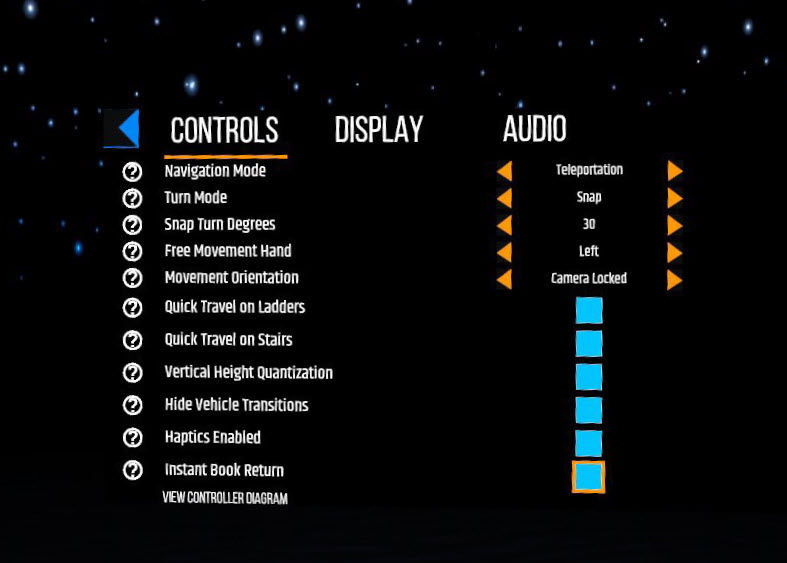
Many apps include settings that allow users to choose how to navigate. Here is an example from Cyan’s Myst game, with the navigation set to “Teleportation.”
© Cyan, Fair Use
User Comfort Settings: Provide adjustable settings for comfort-related factors, such as the option to turn off certain effects, adjust movement speed, or enable a stationary mode.
Frame Rate and Performance: Maintain a high and consistent frame rate (e.g., 90 Hz) to prevent motion sickness and nausea. Optimize graphics and animations to ensure smooth performance.
Field of View (FOV): Optimize the field of view to match human peripheral vision. Avoid tunnel vision effects or extreme FOV that could strain your users' eyes or cause discomfort.
Interactions and Controls: Design intuitive and ergonomic interactions. Ensure that controls and gestures are easy to understand and execute. Minimize the need for complex or rapid hand movements.
User Interface (UI): Create UI elements that are easy to read and interact with. Avoid clutter and excessive 3D UI elements that may strain users' eyes or distract them from the experience.
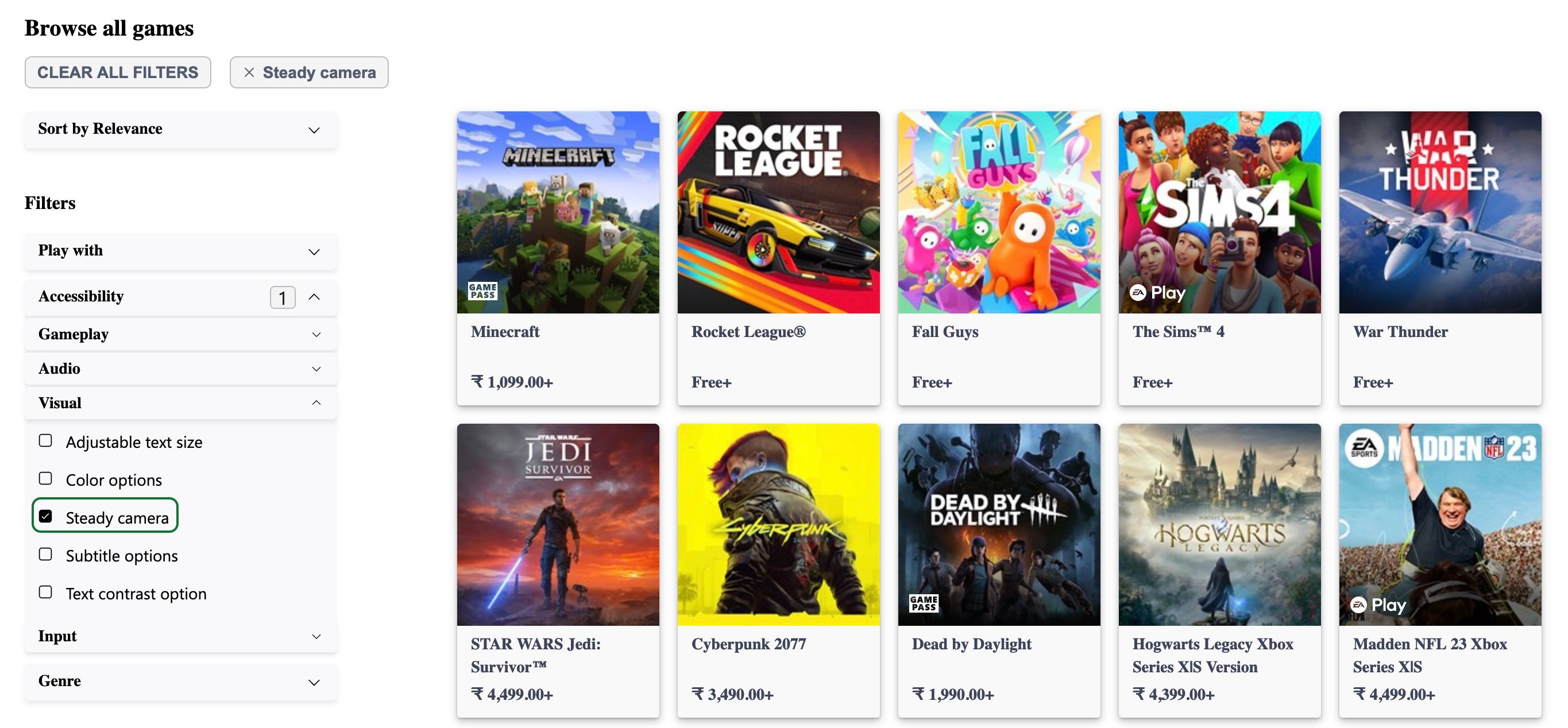
Microsoft’s Xbox game store allows users to filter games based on accessibility features. In this case, the chosen filter is “Steady Camera.” According to the Xbox guidelines, these games avoid “the use of shaking camera or “bobbing” movements, which may cause motion discomfort for some individuals, or there are options to turn off such movement.”
© Microsoft, Fair Use
Visual Comfort: Use comfortable and balanced color palettes. Minimize flickering, glare, or overly bright visuals that can cause eye strain or discomfort. Maintain realistic depth perception and scale to prevent visual distortions leading to discomfort or dizziness.
Audio Design: Implement spatial audio cues that accurately reflect the virtual environment. The audio should enhance the sense of immersion and presence without overwhelming or disorienting your users.
Content Length: Extended VR pieces or longer sessions can lead to fatigue, so offer users breaks or design experiences they can enjoy in shorter intervals.
Designers can incorporate these principles into the design of digital products to reduce the risk of cybersickness.