Inclusive Design

Your constantly-updated definition of Inclusive Design and collection of videos and articles.
Be a conversation starter: Share this page and inspire others!

197 Shares

What is Inclusive Design?

Inclusive design is an approach to create accessible products and experiences that are usable and understandable by as many people as possible. It goes beyond accessibility to consider users’ diverse needs, backgrounds and experiences.

Transcript

Why Do We Need Inclusive Design?

Inclusive design ensures that every person—regardless of their gender, location, native language and physical abilities—can enjoy and use products or services.

To understand inclusive design, we as user experience (UX) designers must understand the sections of our users who have historically been excluded from product designs:

  • Women

  • People of color

  • People with non-binary identities (LGBTQ+)

  • People who do not speak English natively

  • People with restricted mobility

  • People with different cognitive abilities.

These exclusions are sometimes obvious. In most cases, they’re subconscious. For example, you may find websites that use gender stereotypical images such as suit-clad Caucasian men in a boardroom or young female service professionals. 

Conversely, inclusive experiences are those that reach beyond assumptions about demographics to embrace the full range of human diversity. They bring out the best in human-centered design to grant equal access across the board. Making your design work accessible to people from all backgrounds, ability levels, and other imaginable categories ensures a strong brand identity as well. When design focuses on inclusivity, it proves it hasn’t let the biases of a bygone era make it visually impaired.
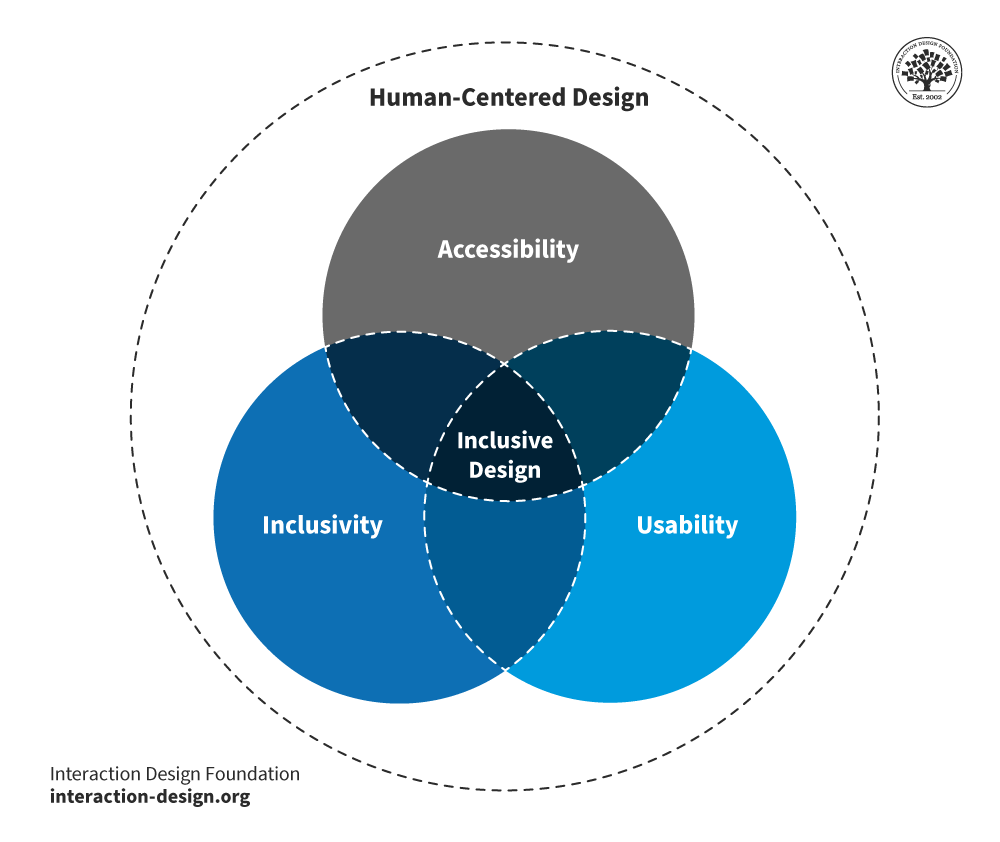
A diagram of a multicolored circle  Description automatically generated

Inclusive design is the meeting place of several key design factors.

© Interaction Design Foundation, CC BY-SA 4.0

Inclusive design has its roots in the disability rights movement, which began in the 1950s. The goal of this movement was for people with disabilities to have access to the same rights, opportunities, and resources as non-disabled people. One example of a powerful design benefit that came from this is the curb cut. Curb cuts help wheelchair users, but they also act as ramps for cyclists and many others. 

A picture of a sidewalk granite curb cut for wheelchair users and other users.

Sidewalk granite curb cut for wheelchair users, or anyone with tired or aching knees.

© Nick-philly, CC BY-SA 4.0

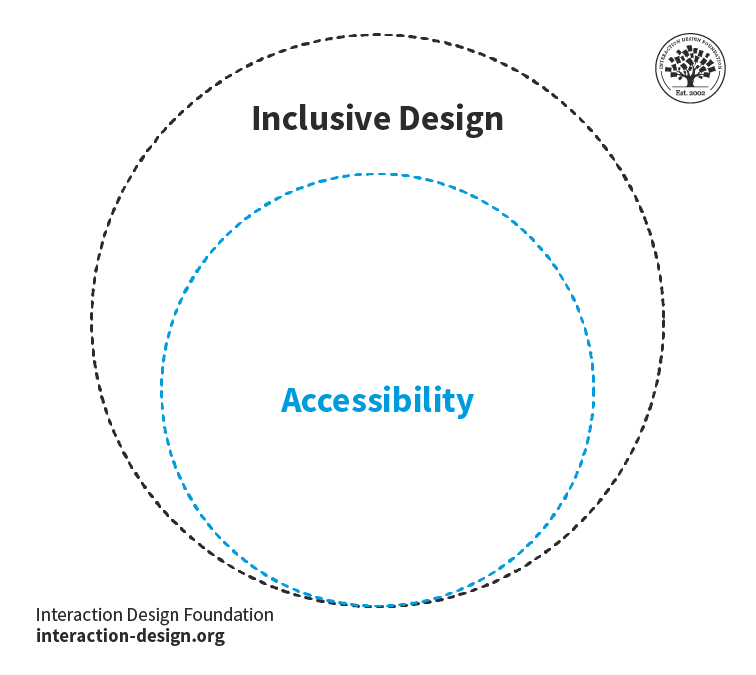
Inclusive design practices take this spirit of accessible design a step further in user interfaces. For example, it’s not just about images that have high contrast and alt text for screen readers. It’s also about how you design these images. For example, you practice inclusive design through clear and unambiguous messages that depict a diverse group of people. You also do it through thoughtful use of pronouns in the caption. You make your target users feel welcome because you include them from your designer’s research right through to user testing. In the process, you learn to recognize exclusion in web design and far beyond.
© Interaction Design Foundation, CC BY-SA 4.0

To practice inclusive design, don’t design for an "ideal user" or make assumptions about user behavior or their needs for functionality. Instead, ask critical questions during the early stages of your design process. In your UX research, you can uncover potential barriers that may affect your users. You should consider the accessibility of content for individuals who may have disabilities, limited vision, or use assistive technologies. Many aspects of disability are in the realm of neurodiversity. For instance, think about how users on the autism spectrum might not recognize features in your design because of how you set out the elements. 

It’s also important to challenge assumptions about users and understand how their experiences may differ. For example, is design practice geared solely toward users in the United States? In the early phases of design and development, it’s vital to get to grips with questions like this.

Such questions could involve age, gender identity, ethnicity, language, culture, location, religion, and socio-economic status. For example, “What is the impact of language on users’ understanding and use of the product?” When you have the answer, you as a UX designer can create products that you tailor to the needs of a diverse range of users. Consequently, all users will benefit because you will have designed to address a vast range of pain points. When you build inclusive products, you infuse them with a sense of belonging to a huge span of user groups .


A picture of a person on Shopify's homepage.

Something as “small” as images can be a huge step towards inclusive design. Shopify’s homepage has a rotating cast of diverse users. Its prominent headline “Making Commerce Better for Everyone” and the subtitle, “...supporting the next generation of entrepreneurs, the world’s biggest bands, and everyone in between.” reinforce this ideology.

© Shopify, Fair Use

Inclusive Design vs Universal Design vs Design For All vs Accessibility: Related but Distinct Concepts
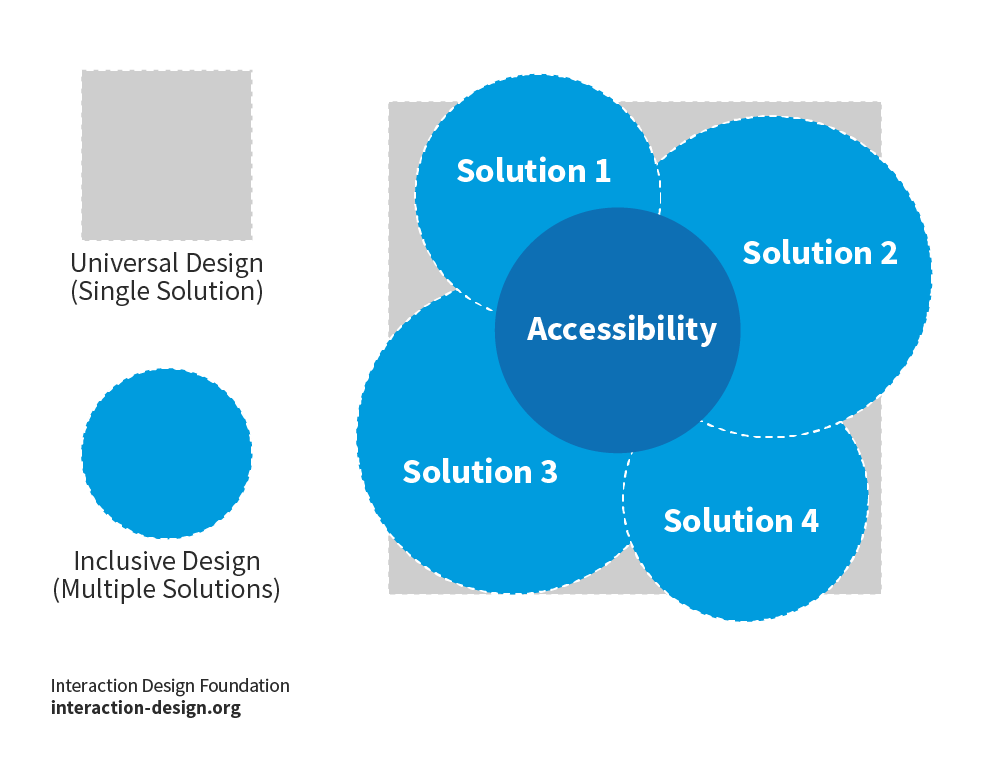
A diagram showing the position of Accessibility as a concept within Universal Design and as it relates to Inclusive Design.

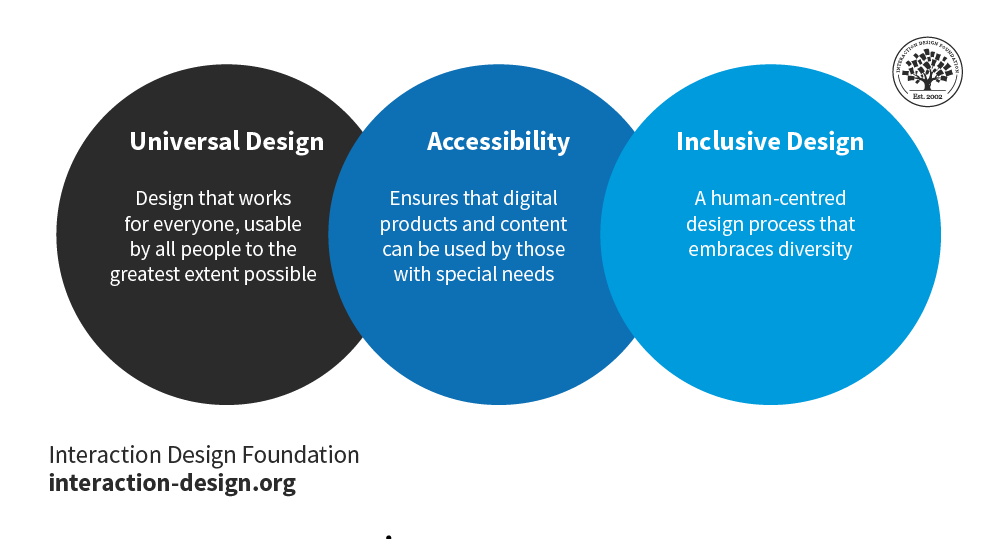
Accessibility is the lowest common denominator and is an integral part of inclusive and universal design. While inclusive design and universal design both cater to the widest range of users, universal design strives for a single solution to cater to everyone, while inclusive design tries to achieve the goal through multiple adaptations.

© Interaction Design Foundation, CC BY-SA 4.0

Inclusive design is related to three other concepts in the spirit of removing barriers: Accessibility, Universal Design and Design for All. Accessibility is narrower in scope and involves designing products so that people with disabilities can use and enjoy the products just as well as people without disabilities. Accessibility is the bare minimum with respect to Inclusive Design and Universal Design.

Both inclusive design and universal design aim to ensure that a design is usable and understandable for the maximum number of people. The difference lies in how designers implement the design. Universal design opts for a one-size-fits-all answer to design. All users use the same product, without any specialization. For example, in a digital design, subtitles cover accessibility in the sense that hard-of-hearing viewers have them. Also, they satisfy this universal design principle of equitable use. Viewers who aren’t hard-of-hearing but who aren’t native speakers of the language either can understand the content better with the closed captioning. The feature also benefits people who are in loud environments.
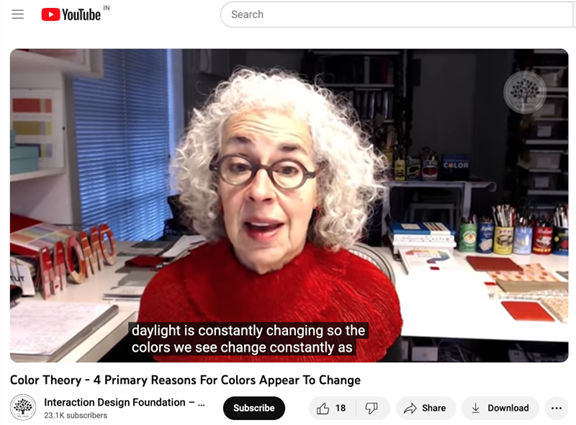
A screenshot of an IxDF video on YouTube, featuring captions of the speaker's words.

YouTube offers subtitling options for users who are hard of hearing but also for any user who needs them at the time (e.g., in a loud environment or for non-native speakers).

© YouTube, Fair Use

Inclusive design doesn’t require designers to stick to a single design. Designers can implement multiple variations of the design to cater to different user segments.

Design for all is most closely related to inclusive design. It focuses on including accessible features in digital interfaces from early on in design—as opposed to retrofitting a “mainstream” design with options for users with disabilities later. However, its scope is not quite as explicit regarding how it involves users in the design process who have been traditionally underrepresented.

In general, universal design is used for physical products, where customization or multiple variations become expensive to develop. Inclusive design works well with digital products as they are relatively inexpensive to mass-customize. Dark mode options, text-size selectors, options to select age, and ways of identifying the user’s full name (i.e., some cultures term and place “first” and “last name” in different ways) are some examples of inclusive design.
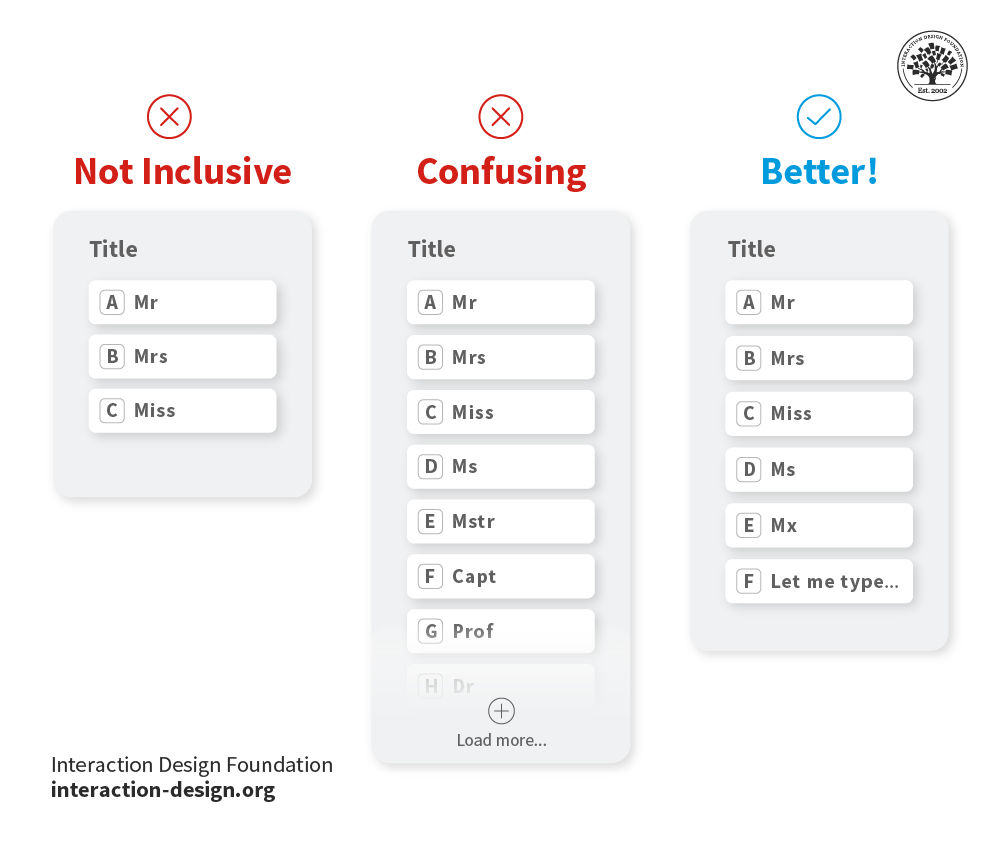
Screenshot of an Application showing three versions: 'Not inclusive', 'Confusing' and 'Better!'.

Always research current best practices to make the most inclusive and optimal decision for your products.

© Interaction Design Foundation, CC BY-SA 4.0

The Principles of Inclusive Design

Microsoft defines 3 main guiding principles of inclusive design:
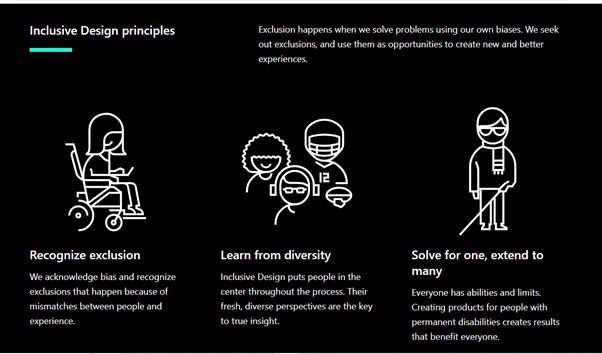
A screenshot showing Microsoft's 3 Principles of Inclusive Design.

Microsoft’s three fundamental principles of Inclusive Design: Recognize exclusion; Learn from diversity; Solve for one, extend to many.

© Microsoft, Fair Use

  1. Recognize Exclusion: We may not realize it, but all of us have biases—it is human nature. If we design solutions for user problems without recognizing these biases, we will end up excluding certain groups of people. Note that this is not limited to physical disabilities. It can apply to other forms of exclusion, such as social participation or temporary impairments. For example, if your app won’t work well on older phones (e.g., for users who can only afford those), it will exclude them. It is only after we recognize and acknowledge exclusion, that we can begin to design inclusive experiences. User research can provide powerful insights for you to design more inclusively. User testing can also reveal points of exclusion.

    A screenshot of Girls Who Code's homepage.

    Nonprofit Girls Who Code’s mission steps from historical exclusion. Despite the name, their target audience includes non-binary people.

    © Girls Who Code, Fair Use

  2. Learn from Diversity: Inclusive Design puts people in the center throughout the process. Involving people from different communities throughout the design process will help you gain fresh, diverse perspectives. So, include people from different age groups, cultures, ability levels, socioeconomic backgrounds, education levels and more in your design team. 

  3. Solve for One, Extend to Many: When you design a feature with one group in mind, you can expand the scope to help others who can benefit. For example, if you offer users an option to listen to content rather than read it, you’ll help users who have limited sight as well as those who may just want to rest their eyes.
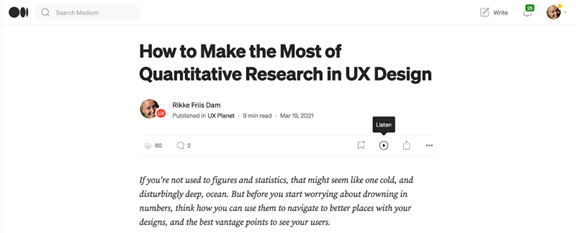
A screenshot of a Medium page.

Medium offers the feature to listen to a story on its platform that is helpful for people who might find it hard to read long passages either due to vision difficulties or simply to rest their eyes after a long day staring at the screen!

© Medium, Fair Use
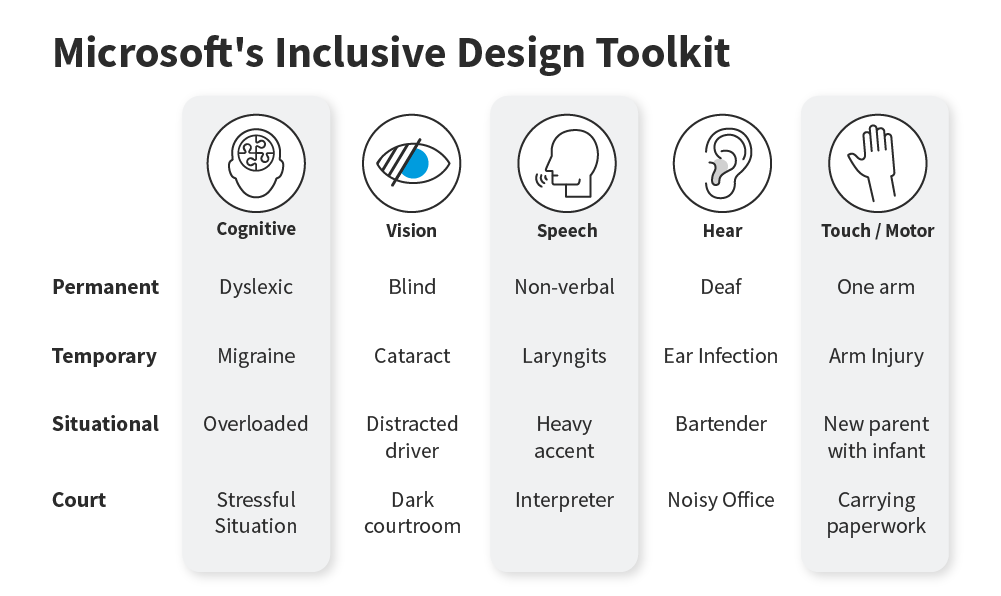
Additional Inclusive Design Principles

In 2017, accessibility experts Henny Swan, Ian Pouncey, Heydon Pickering, Léonie Watson developed a set of seven principles for inclusive design:

  1. Provide a Comparable Experience: Build your UI so everyone can perform tasks and achieve goals in a way that suits them without compromising on your content. Different users will have different ways of using your interface, and tools to do so. For instance, you help users of all types with content for alternative means such as screen readers and transcripts. Or you might give users options to change the font size, color, etc. of their subtitles to suit them.
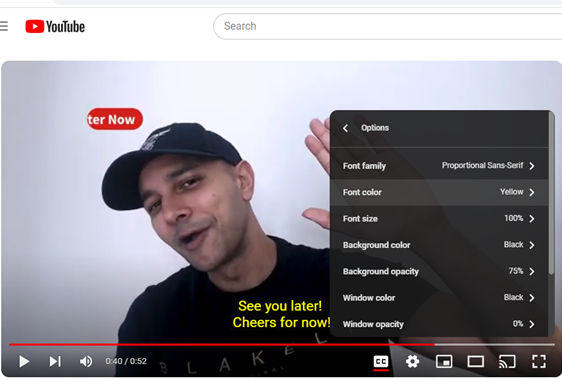
    A screenshot of YouTube showing subtitles or closed captions that a user has selected to be yellow in color.

    YouTube offers the feature to adapt how your subtitles appear, including the color.

    © YouTube, Fair Use

  2. Consider situation: Consider the situation, or rather the context of your user and design accordingly. For example, Google Maps automatically switches to dark mode when you enter a tunnel or at sundown.

  3. Be Consistent: Use well-established patterns to make an interface that users will find familiar. So, use design patterns to achieve that consistency in information architecture and more, and maximize users’ understanding. Another example of consistency is to write the same things in the same way (e.g., micro copy, instructions) and in plain language to make text easy to understand.  
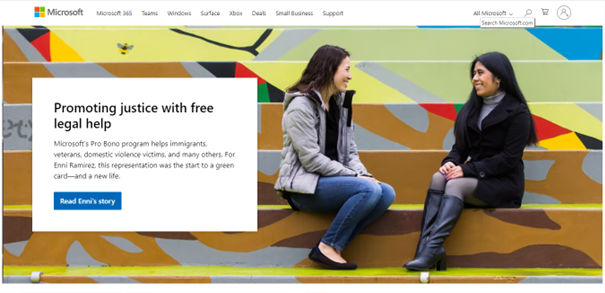
    A screenshot of Microsoft's homepage.

    Microsoft’s homepage shows a highly familiar layout. The logo is in the top left and the search is the magnifying functionality in the top right.

    © Microsoft, Fair Use

  4. Give Users Control: Provide several ways for users to appreciate content and complete tasks. For example, if you have a long list of content for users, consider letting them choose to have a grid or a list. Another form of control might be to let users delete items by swiping left and also have the option to select them from another screen so they can delete more at once.
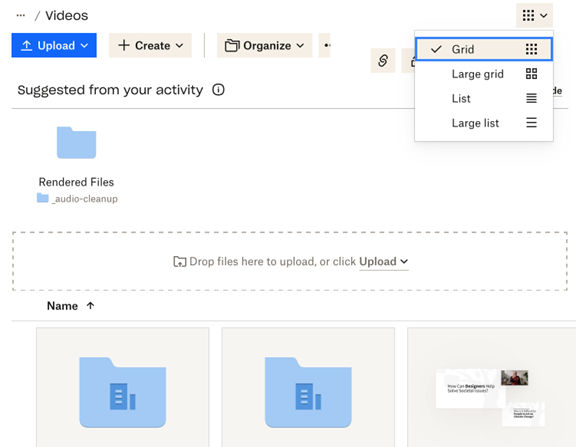
    A screenshot of a computer  Description automatically generated

    Dropbox offers a variety of views.

    © Dropbox, Fair Use
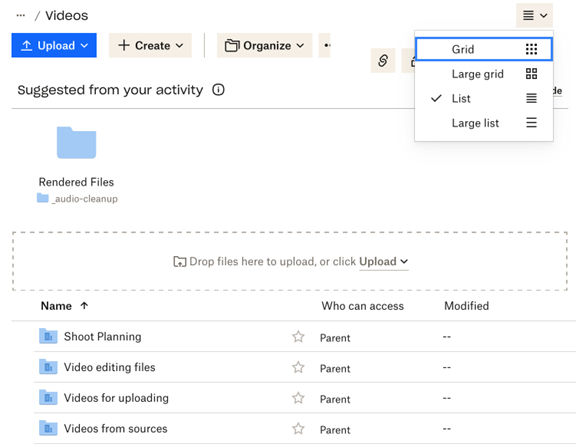
    A screenshot of a computer screen showing Dropbox's offered views.

    Dropbox offers a variety of views.

    © Dropbox, Fair Use

  5. Offer Choice: Give your users several ways to achieve the same goal. For example, three ways to delete an email on an email client: Swipe, hit the delete key on the keyboard, or right-click and select delete. 

  6. Prioritize Content: Help users focus on one thing at a time. For example, for each page of a website, present users with the core task, feature or information they need and expect to find. So, be clear what the purpose of each page is and highlight that to them. Use progressive disclosure to reveal the prioritized content to them. If it’s a button, for example, what is the most frequent action users will take on a virus-scanning app? It will be “Scan Device” rather than secondary actions such as “See Scan History.” 

    A screenshot showing Avast antivirus at work on a computer.

    Avast prioritizes the function of running a smart scan here.

    © Avast, Fair Use

  7. Add Value: Focus on adding value to your interface with features that are not only efficient but also versatile in how they let users interact with content in diverse ways. You can do this in several ways—for example, integrating with connected devices, such as voice commands to control a TV. Or you might add some bonus functionality, such as a “show password” feature.
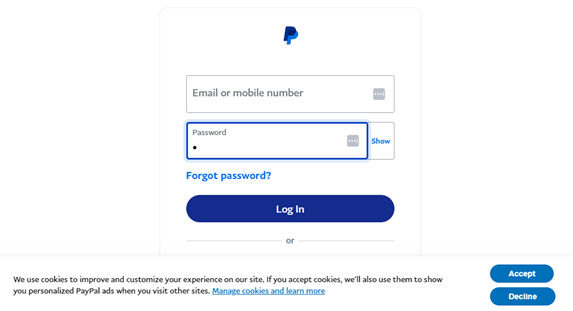
    A screenshot of PayPal's login page.

    PayPal offers a “Show” feature for users to see their password as they enter it.

    © PayPal, Fair Use

Transcript

The Benefits of Inclusive Design

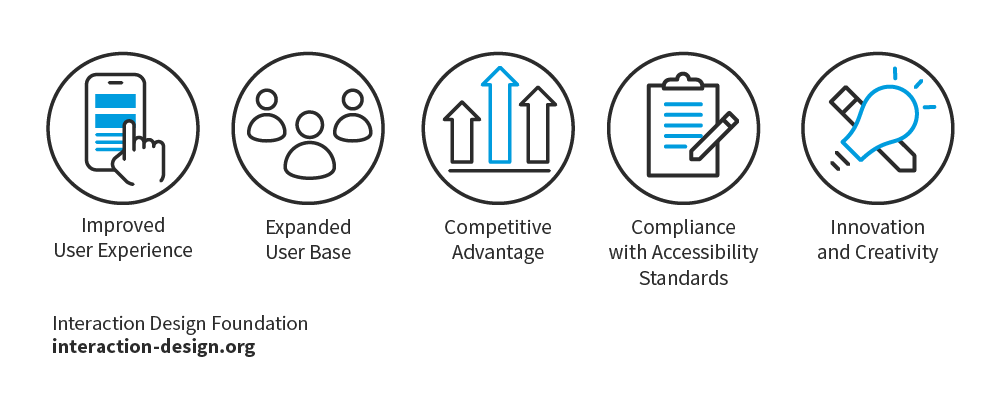
Inclusive design offers numerous benefits, both for users and businesses. Here are some key advantages:
© Interaction Design Foundation, CC BY-SA 4.0

  • Improved User Experience

Inclusive design enhances the overall user experience. It ensures that everyone—irrespective of physical or cognitive abilities, age, culture, educational background, gender, and language can access and navigate digital products effectively. This results in a more inclusive and satisfying experience for all users.

  • Expanded User Base

Inclusive design enables products to reach a broader audience. As they accommodate diverse needs and preferences, inclusive designs attract users who may have been excluded in the past. This expands the potential user base and increases the market reach of the product.

  • Competitive Advantage

Inclusive design has become a standard practice for many businesses. By embracing inclusive design principles, brands can differentiate themselves from competitors and position themselves as leaders in accessibility and inclusivity. This can enhance brand reputation and attract loyal customers.

  • Compliance with Accessibility Standards

Inclusive design ensures compliance with accessibility standards and legal requirements. Many countries have laws mandating digital accessibility, and failure to comply can result in legal consequences. By prioritizing inclusive design, businesses can avoid legal issues and demonstrate their commitment to accessibility.

Inclusive design promotes innovation and creativity by encouraging designers to think outside the box. From there, they can develop solutions that cater to diverse user needs. When you consider a wide range of perspectives, you can uncover new ideas and create unique user experiences in products or services that take the extra step beyond user-centered design and universal design.

Inclusive Design in Practice: Examples and Case Studies

Many well-known brands have embraced inclusive design principles and have created products that cater to a diverse range of users. Here are some examples:

Google

Google has prioritized inclusive design in its products. The Google Camera features the technology to capture accurate and fine-tuned tones of people’s skin color. Previously, cameras had overlooked this tendency for the imaging of people with darker skin colors to come out inaccurately, Google embraced inclusive testing to accommodate everyone.   


A screenshot of a camera taking a picture of a person.

Google’s camera fine-tunes how it captures some skin tones to ensure accuracy.

© Google, Fair use

Microsoft

Microsoft has made significant efforts to promote inclusive design. Their inclusive design toolkit provides resources and guidelines for designers to create products that are accessible to a wide range of users. Microsoft's Xbox Adaptive Controller is a notable example of inclusive design. It was specifically designed to meet the needs of gamers with limited mobility.


Screenshot / Picture of the Microsoft Xbox Adaptive Controller.

The Microsoft Xbox Adaptive Controller offers exceptional control.

© Microsoft, Fair Use


These examples demonstrate how inclusive design can be integrated into various digital products to improve accessibility and enhance user experiences.

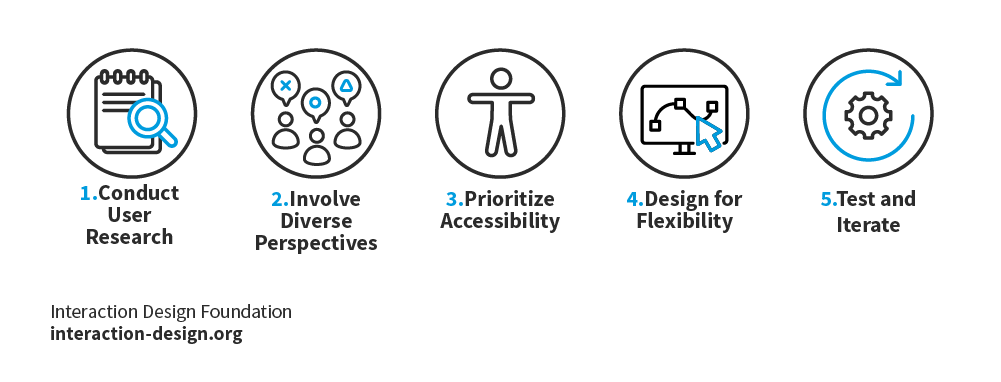
Best Practices for Inclusive Design
© Interaction Design Foundation, CC BY-SA 4.0

1. Conduct User Research

User research is a crucial step to understand the diverse needs and experiences of your target audience. Conduct interviews, surveys, and usability tests with individuals from different backgrounds and abilities to gain insights into their specific requirements.

2. Involve Diverse Perspectives

Build a diverse design team that includes individuals from different backgrounds, abilities, and experiences. This diversity will help uncover different viewpoints and ensure that design decisions are not biased or based on assumptions. Also ensure that stakeholders appreciate these differences and how different people use interfaces and technology. 

3. Prioritize Accessibility

Consider accessibility throughout the design process. Start by following WCAG guidelines to ensure that your digital products are accessible to individuals with disabilities. Test your designs using both automated tools and manual testing involving individuals with disabilities.

4. Design for Flexibility

Create flexible and customizable interfaces that allow users to adapt the product to their specific needs. Provide options for adjusting font sizes, color contrast, and other visual elements. Consider offering alternative input methods for users with limited mobility.

5. Test and Iterate

Regularly test your designs with users, including those with diverse abilities and backgrounds. Use their feedback to improve the accessibility and inclusivity of your product. Iterate and refine your designs based on user insights and evolving accessibility standards.

When you follow these best practices, you can foster inclusivity and create digital products that all users find accessible and enjoyable. Remember, too, to watch out for elements of exclusion that may remain. For example, if your design includes pictures or illustrations, do they reflect a truly diverse scenario that you would be proud to represent your product? 

Overall, inclusive design is a goal well worth aiming for. To achieve it, you need to understand user experience research, accessibility, user flow, and interactive design principles. When you recognize how different factors like information organization, visual design, and product qualities affect the user experience, you can consistently create inclusive designs.
© Interaction Design Foundation, CC BY-SA 4.0

Transcript

Questions About Inclusive Design?
We've Got Answers!

How is inclusive design different from accessibility?

Inclusive design and accessibility both focus on making products usable for more people, but they have different approaches.

Accessibility is about ensuring that people with disabilities can use a product by following specific guidelines. For example, the Web Content Accessibility Guidelines (WCAG) require websites to work with screen readers and keyboard navigation.

Inclusive design goes further by considering a wide range of human needs from the start. It does not just remove barriers for people with disabilities—it’s also about designing for different ages, cultures, languages, and economic backgrounds.

Enjoy our Master Class How to Design for Neurodiversity: Inclusive Content and UX with Katrin Suetterlin, UX Content Strategist, Architect and Consultant.

Watch this video to learn why accessible design is important in any case:

Transcript

What are the main principles of inclusive design?

Here are 10 principles of inclusive design:

  1. Recognize exclusion. Bias exists in every design decision. Designers must identify and address it to avoid excluding people based on ability, background, or access to technology. User research and testing reveal gaps that may exclude certain groups.

  2. Learn from diversity. Include people from different ages, cultures, abilities, and backgrounds in the design process. Diverse perspectives help create solutions that serve a wider audience.

  3. Solve for one, extend to many. Features designed for specific needs often help others too. For example, text-to-speech benefits people with vision impairments and those who prefer listening.

  4. Provide a comparable experience. Ensure all users can complete tasks in ways that suit them, such as offering subtitles, transcripts, or screen reader support.

  1. Consider context. Design must adapt to users’ environments. For example, Google Maps automatically switches to dark mode at night or in tunnels.

  2. Be consistent. Use familiar design patterns, layouts, and terminology. Consistency improves usability and reduces confusion.

  3. Give users control. Allow users to adjust settings, such as text size or content layout, to match their needs.

  4. Offer choice. Provide multiple ways to perform key actions, like deleting an email through swiping, keyboard shortcuts, or menu options.

  1. Prioritize content. Focus on essential tasks and information. Use progressive disclosure to present details when needed.

  2. Add value. Integrate useful features, like voice commands or a “show password” option, to enhance usability for different users.

Enjoy our Master Class How to Design for Neurodiversity: Inclusive Content and UX with Katrin Suetterlin, UX Content Strategist, Architect and Consultant.

Watch our video about the difference between universal design and inclusive design:

Transcript

How do I make sure my designs include everyone?

To ensure your designs include everyone, start by recognizing who might be excluded. Consider people with disabilities, different cultural backgrounds, varying levels of digital access, and different age groups.

Conduct user research with diverse participants. Listen to their needs and challenges. Test your designs with real users to find barriers you may have missed.

Follow accessibility standards like WCAG to make digital products usable for people with disabilities. Use clear language, readable fonts, and strong color contrast.

Offer multiple ways to interact with your design. Let users navigate with a keyboard, mouse, voice commands, or touch.

Keep your layout consistent and familiar so users do not struggle to understand how it works.

Last but not least, ask yourself: Who does this design help? Who does it exclude? If you find gaps, adjust your design to make it more inclusive.

Enjoy our Master Class How to Design for Neurodiversity: Inclusive Content and UX with Katrin Suetterlin, UX Content Strategist, Architect and Consultant.

Watch our video about the difference between universal design and inclusive design to see important points about what “everyone” means in design terms:

Transcript

What are common mistakes in inclusive design?

Designers make several common mistakes in inclusive design.

First, they assume all users are the same. Designing for an “average” user often leaves out people with disabilities, older adults, and those from different cultural or economic backgrounds.

Second, they add accessibility as an afterthought. Retrofitting a design costs more and leads to weaker solutions. Inclusive design must start from the beginning with accessible design, too.

Third, they rely too much on automation. Automated accessibility checks help but do not catch everything. Real user testing reveals issues that tools might miss.

Fourth, they use unclear language and poor visual contrast. Complex wording, small text, and low-contrast colors make products harder to use, especially for people with visual or cognitive challenges.

Last but not least, they ignore flexibility. Good design offers multiple ways to interact, such as voice commands, keyboard navigation, and customizable layouts.

Enjoy our Master Class How to Design for Neurodiversity: Inclusive Content and UX with Katrin Suetterlin, UX Content Strategist, Architect and Consultant.

Watch our video about the difference between universal design and inclusive design to see important points about how to avoid a one-size-fits-all approach to design:

Transcript

How do I avoid bias in my designs?

To prevent bias from creeping into your designs, start by recognizing that bias exists. Everyone has biases, and they can shape design decisions in ways that exclude people.

First, research diverse user groups. Talk to people with different abilities, backgrounds, and experiences to understand their needs. Solid user research helps uncover true user needs.

Second, test your designs with real users. Don’t assume your design works for everyone—gather feedback from a broad audience to catch unintended barriers.

Third, avoid designing for an “average” user or “everyone.” People interact with products in many ways, so offer multiple options, like text and voice input or adjustable font sizes. A useful thing to bear in mind is that if you design for “everyone,” you design for no one.

Fourth, use inclusive language and imagery. Represent different genders, ethnicities, and abilities to ensure everyone feels seen.

Last, but not least, challenge your assumptions. Ask yourself, “Who does this design serve? Who might struggle to use it?” Making adjustments based on these questions leads to fairer, more inclusive designs.

Watch as CEO of Experience Dynamics, Frank Spillers explains important points about designer bias in a visual context.

Transcript

Enjoy our Master Class, Accessible and Inclusive Design Patterns with Vitaly Friedman, Senior UX Consultant, European Parliament, and Creative Lead, Smashing Magazine.

How can I make websites more inclusive?

Design for diverse needs, backgrounds, and abilities from the start to make websites more inclusive.

First, consider different user contexts. Some users have disabilities, while others face temporary or situational challenges, like poor lighting or slow internet. Design for all of them.

Second, offer multiple ways to interact. Let users navigate with a keyboard, mouse, touch, or voice. Provide language options and adjustable layouts.

Third, use clear, culturally neutral content. Avoid jargon, regional slang, or references that exclude certain groups.

Fourth, show diversity in visuals. Use images and examples that represent different ages, ethnicities, genders, and abilities.

Last, but not least, test with a diverse audience. Real users will reveal barriers that designers might miss.

Inclusive design ensures websites serve everyone—and far beyond “everyone” as an average user—not just those with specific accessibility needs.

Enjoy our Master Class, Accessible and Inclusive Design Patterns with Vitaly Friedman, Senior UX Consultant, European Parliament, and Creative Lead, Smashing Magazine.

Watch our video about the difference between universal design and inclusive design to see important points about how to avoid a one-size-fits all approach to design:

Transcript

How do I convince my company to care about inclusive design?

To convince your company to care about inclusive design, show how it benefits both people and business.

First, explain the financial impact. Inclusive products reach more customers, including people with disabilities, older adults, and non-native speakers. Companies that prioritize inclusivity often see higher engagement and brand loyalty.

Second, highlight legal and ethical reasons. There are elements of accessibility in inclusive design, and many countries require accessibility by law. Failing to meet these standards can lead to lawsuits and damage a company’s reputation.

Third, use real-world examples. Show how companies like Microsoft and Apple have gained success by designing to include everyone.

Fourth, run small tests. If you improve one feature for inclusivity, measure its impact. A simple change, like clearer navigation or better text contrast, can improve usability for all users.

Last, but not least, speak your company’s language. Frame inclusive design as a smart investment, not just a moral choice. Business leaders listen when inclusivity aligns with profits and growth.

Watch as UX Pioneer, Don Norman explains important points about how designers can have more influence in the organizations they work for.

Copyright
Transcript

How can I include diverse users in my research?

To include diverse users in your research, identify groups you might overlook. Consider differences in ability, age, culture, gender, language, and economic background.

First, recruit participants from varied communities. Work with advocacy groups, local organizations, and online forums to reach underrepresented users.

Second, use multiple research methods. Some users may prefer interviews, while others feel more comfortable with surveys or usability tests. Offer flexible options to gather honest feedback.

Third, remove barriers to participation. Provide translations, offer compensation, and ensure research materials work for people with disabilities.

Fourth, create a welcoming environment. Avoid biased questions, respect cultural differences, and listen without assumptions.

Finally, test in real-world conditions. A product that works in an office may fail in low-light, noisy, or offline settings. Diverse research leads to better, more inclusive designs.

Enjoy our Master Class How to Design for Neurodiversity: Inclusive Content and UX with Katrin Suetterlin, UX Content Strategist, Architect and Consultant.

Watch as UX Strategist and Consultant, William Hudson explains important points about user research:

Transcript

What are some highly cited scientific articles about inclusive design?

Reed, D., & Monk, A. (2011). Inclusive design: Beyond capabilities towards context of use. Universal Access in the Information Society, 10(3), 295–305.

Reed and Monk extend traditional inclusive design approaches by emphasizing the importance of context in design processes. They compare inclusive design to interaction design within human-computer interaction, identifying additional issues and processes. This paper is significant for advocating a broader perspective that considers the context of use, enriching the inclusive design discourse.

Mendez, C., Letaw, L., Burnett, M., Stumpf, S., Sarma, A., & Hilderbrand, C. (2019). From GenderMag to InclusiveMag: An inclusive design meta-method. arXiv preprint arXiv:1905.02812.

This paper introduces InclusiveMag, a generalization of the GenderMag method, to assess software's support for diverse populations. The authors present case studies demonstrating the application of InclusiveMag to various underserved populations. This work is influential for providing a systematic approach to evaluating and improving software inclusivity.

Myerson, J. (2021). Designing a World for Everyone: 30 Years of Inclusive Design. Lund Humphries.

Jeremy Myerson’s Designing a World for Everyone marks the 30th anniversary of the Helen Hamlyn Centre for Design at the Royal College of Art, chronicling the evolution of inclusive design. Through 30 groundbreaking projects spanning product, graphic, interior, and urban design, Myerson showcases how inclusive design has shifted from a consumer-driven focus to a more participatory and human-centered approach. The book highlights the impact of designing for diverse populations, including older and disabled individuals, demonstrating how inclusive design fosters accessibility and social equity. By exploring real-world applications, Myerson provides a compelling narrative on the transformative power of inclusive design in shaping everyday environments.

Gilbert, R. M. (2019). Inclusive Design for a Digital World: Designing with Accessibility in Mind. Apress.

Regine Gilbert’s Inclusive Design for a Digital World is a comprehensive guide for designers aiming to create accessible digital products. The book covers essential aspects of technological accessibility, offering step-by-step solutions rooted in user experience design principles. Gilbert emphasizes the importance of considering all potential users, including those with disabilities, in the design process. Through practical examples and actionable advice, the book equips designers with the tools needed to implement inclusive design practices, ensuring digital interfaces are usable by everyone, regardless of their abilities.

Earn a Gift Earn a Gift, Answer a Short Quiz!

1
2
3
4
1
2
3
4
Question 1
Question 2
Question 3
Get Your Gift
Interaction Design Foundation logo

Question 1

What is the goal of inclusive design?

1 point towards your gift

  • To create visually appealing products for only a few regions of the world
  • To focus only on users with disabilities
  • To guarantee products are usable and accessible to the widest range of people
Interaction Design Foundation logo

Question 2

Why is it important to recognize exclusion in inclusive design?

1 point towards your gift

  • To consider and include all potential users
  • To reduce the number of design revisions
  • To simplify the design process
Interaction Design Foundation logo

Question 3

How do diverse perspectives contribute to inclusive design?

1 point towards your gift

  • They limit the number of design options.
  • They make the design process faster.
  • They provide unique insights and broaden understanding.

Learn More About Inclusive Design

Make learning as easy as watching Netflix: Learn more about Inclusive Design by taking the online IxDF Course Accessibility: How to Design for All.

Why? Because design skills make you valuable. In any job. Any industry.

In This Course, You'll

  • Get excited about creating accessible products people love! Prioritizing accessibility naturally improves everyone's experience. For example, video captions don't just help people with hearing impairments. They also help anyone who watches videos in a noisy space, with sound off, or in a non-native language. With over 1 billion people living with disabilities, your design decisions will open (or close) the door to millions. If you want to tap into a massive, underserved market and build your reputation as an inclusive, impactful designer, this course is for you. 

  • Make yourself invaluable by mastering how accessibility can accelerate product success and, in addition, protect your brand from legal risks. Accessibility isn't just good for people with disabilities—it's great for business. Happier users lead to greater impact, loyalty, and the kind of salary that reflects your value. You'll learn how to demonstrate the return on investment (ROI) of accessibility and easily build a compelling business case. You'll confidently design for a wide range of disabilities and easily create smooth experiences everyone loves.

  • Gain confidence and credibility as you implement Web Content Accessibility Guidelines (WCAG) and the ready-to-use Accessibility Screener template. With expert guidance and step-by-step templates, it's simpler than you think! You'll immediately be able to apply these insights across all roles and industries. AI-powered features have the potential to make products more accessible at scale, but you stay in demand when you know how to apply them well. Timeless human-centered accessibility skills help you make clear choices that ensure new features, automated systems, and design decisions actually work for people with different abilities. You don't need a specific background. You'll get a deep understanding of how design impacts usability for everyone through interviews with an accessibility specialist with visual impairment. Even without any prior experience, you'll effortlessly optimize code with practical techniques like Accessible Rich Internet Applications (ARIA) markup and alt text for images. This course gives you the skills to master compliance standards and create products with improved usability for everyone.

It's Easy to Fast-Track Your Career with the World's Best Experts

Master complex skills effortlessly with proven best practices and toolkits directly from the world's top design experts. Meet your expert for this course:

  • Frank Spillers: Service Designer and Founder and CEO of Experience Dynamics.

Get an Industry-Recognized IxDF Course Certificate

Increase your credibility, salary potential and job opportunities by showing credible evidence of your skills.

IxDF Course Certificates set the industry gold standard. Add them to your LinkedIn profile, resumé, and job applications.

Course Certificate Example

Be in distinguished company, alongside industry leaders who train their teams with the IxDF and trust IxDF Course Certificates.

Our clients: IBM, HP, Adobe, GE, Accenture, Allianz, Phillips, Deezer, Capgemin, Mcafee, SAP, Telenor, Cigna, British Parliament, State of New York

All Free IxDF Articles on Inclusive Design

Read full article
Understand the Social Needs for Accessibility in UX Design - Article hero image
Interaction Design Foundation logo

Understand the Social Needs for Accessibility in UX Design

As UX designers, we have a lot on our plates. The term “UX Unicorn” exists for a reason. We are responsible for our clients’ goals as well as our users’ needs. You might ask then, why should you think about Accessibility in your UX Design process?Imagine going into a design workshop and telling your

Social shares
928
Published
Read Article
Read full article
Learn to Create Accessible Websites with the Principles of Universal Design - Article hero image
Interaction Design Foundation logo

Learn to Create Accessible Websites with the Principles of Universal Design

“Productivity is never an accident. It is always the result of a commitment to excellence, intelligent planning and focused effort.”— Paul J. Meyer, premier international authority on goal setting, motivation, time management, and personal and professional development Accessibility is not t

Social shares
1k
Published
Read Article

Understand the Social Needs for Accessibility in UX Design

Understand the Social Needs for Accessibility in UX Design

As UX designers, we have a lot on our plates. The term “UX Unicorn” exists for a reason. We are responsible for our clients’ goals as well as our users’ needs. You might ask then, why should you think about Accessibility in your UX Design process?

Imagine going into a design workshop and telling your client that you need more hours to make his or her company website accessible. You’ll need a good use case to convince your client and maybe even yourself that accessibility should feature in the UX Design process. Here, we will look at the social need of why you should design with accessibility in mind.

People with Disabilities Form One of the Largest User Groups in the World

In 2023, the World Health Organization estimated there were 1.3 billion people with disabilities in the world or 16% of the global population. That is almost the entire population of China or India and about four times the population of the U.S. In fact, persons with disabilities are the largest minority in the world.

Disabilities can develop from birth, aging or accidental or health-related incidents. On average, people who are 70 years old or older will spend eight years as individuals with disabilities. As the Baby Boomers who were born in the years following the Second World War – approximately between the years 1946 and 1964 – have been aging, we have been seeing an increasing need for digitally inclusive and accessible solutions.

How to Use Personas to Start Thinking About Accessibility

Personas are fundamental for UX design projects. If we want to build accessibility design thinking into the UX process, then one of the best methods is to have a persona with a disability.

According to the Centers for Disease Control and Prevention (CDC), which is the leading national public health institute of the United States, a person with disability may have difficulty with the following:

  • Vision

  • Movement

  • Thinking

  • Remembering

  • Learning

  • Communicating

  • Hearing

  • Mental health

  • Social relationships

Here are examples of personas with disabilities:

Example 1: Vision Impairment

A 60-year-old retired woman with vision loss caused by diabetes—the woman’s disability is illness-/age-related.

Example 2: Physical Impairment

A 22-year-old male college student who has muscle weakness with his hands due to Multiple Sclerosis

Example 3: Cognitive Impairment

A 45-year-old female who immigrated to the U.S. for less than two years—English is her second language, and she needs extra time to read and write English phrases. As you can see, adding a disability to our personas makes it easier for us to think about accessibility for UX projects. In the following sections, you will learn about different models of disability and the social impact it has on us as designers.

Two Models to Look at How Disability Is Perceived in the Society

The definition of disability varies based on models of disability. The nonprofit organization Michigan Disability Rights Coalition listed nine different models of disability. For our purpose, we will look at the two dominant models: the Medical Model of Disability and the Social Model of Disability.

The Medical Model of Disability: The Person as the Cause For Disability

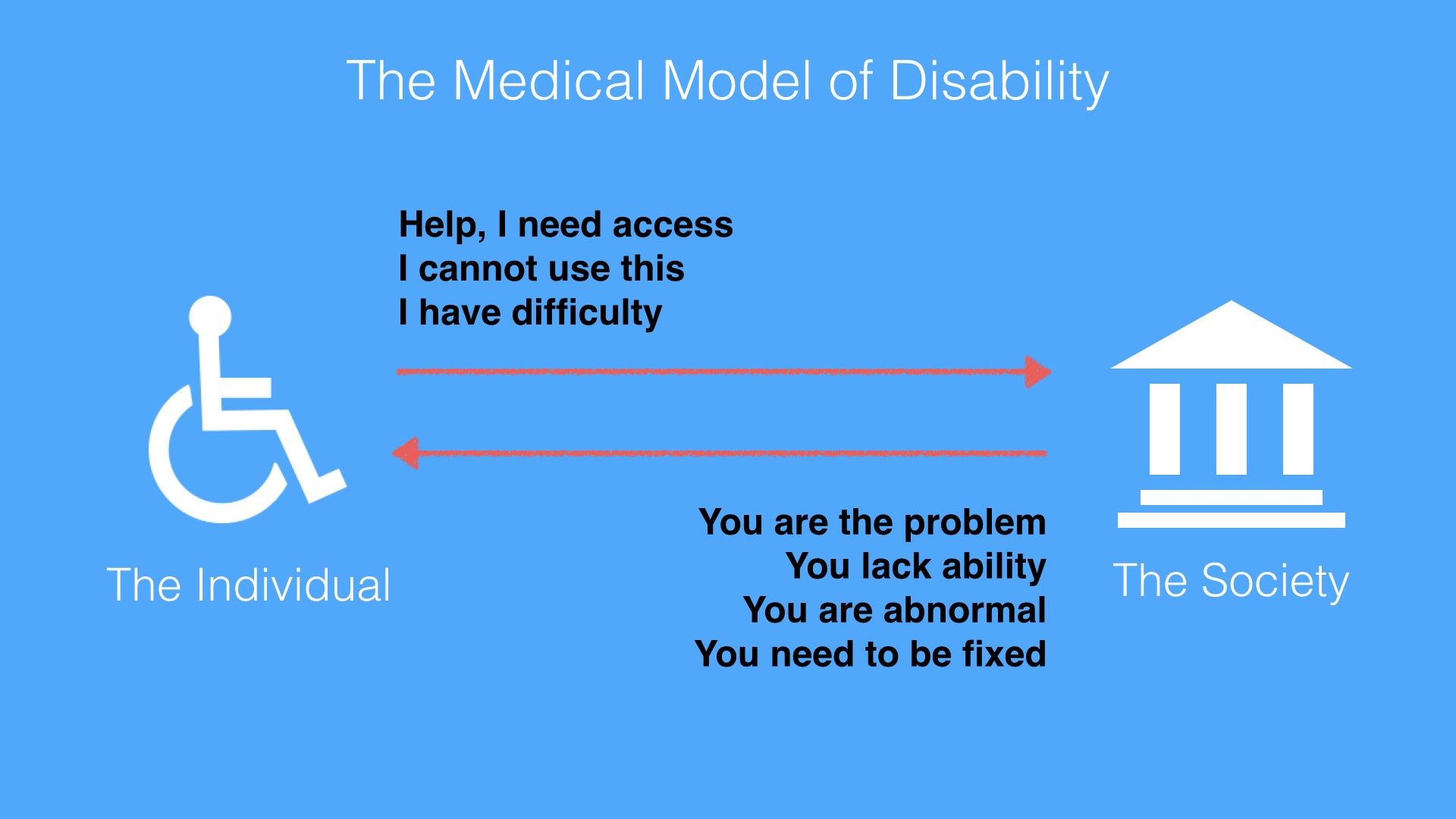
The Medical Model of Disability places the burden and responsibility on the person with a disability. The person is the problem or owns the problem. The Medical Model of Disability is harsh. It uses keywords such as ‘abnormality’, ‘lack of ability’ and ‘disadvantage’ to describe a person. The Medical Model of Disability applies the medical world’s view that one needs cures or fixes to be a normal functioning person.

© Ruby Zheng and Interaction Design Foundation, CC BY-NC-ND

The World Health Organization (WHO) published the International Classification of Impairments, Disabilities and Handicaps manual in 1980. The goal of the manual was to classify the consequences of diseases and their implications for the lives of individuals. It used the Medical Model of Disability as its basis to define disability.

According to the manual, here is the progression and definitions of diseases for persons with disabilities:

“Disease > Impairment > Disability > Handicap
Impairment: In the context of health experience, an impairment is any loss or abnormality of psychological, physiological, or anatomical structure or function.
Disability: In the context of health experience, a disability is any restriction or lack (resulting from an impairment) of ability to perform an activity in the manner or within the range considered normal for a human being.
Handicap: In the context of health experience, a handicap is a disadvantage for a given individual, resulting from an impairment or a disability, that limits or prevents the fulfillment of a role that is normal (depending on age, sex, and social and cultural factors) for that individual.” – World Health Organization (WHO), International Classification of Impairments, Disabilities, and Handicaps, 1980

Needless to say, these definitions are harsh and use keywords such as ‘abnormality’, ‘lack of ability’ and ‘disadvantage’ to describe a person. The Medical Model of Disability applies the medical world’s view that one needs cures or fixes to be a normal functioning person. And it places the onus on persons with disability.

The Social Model of Disability: Society as the Cause For Disability

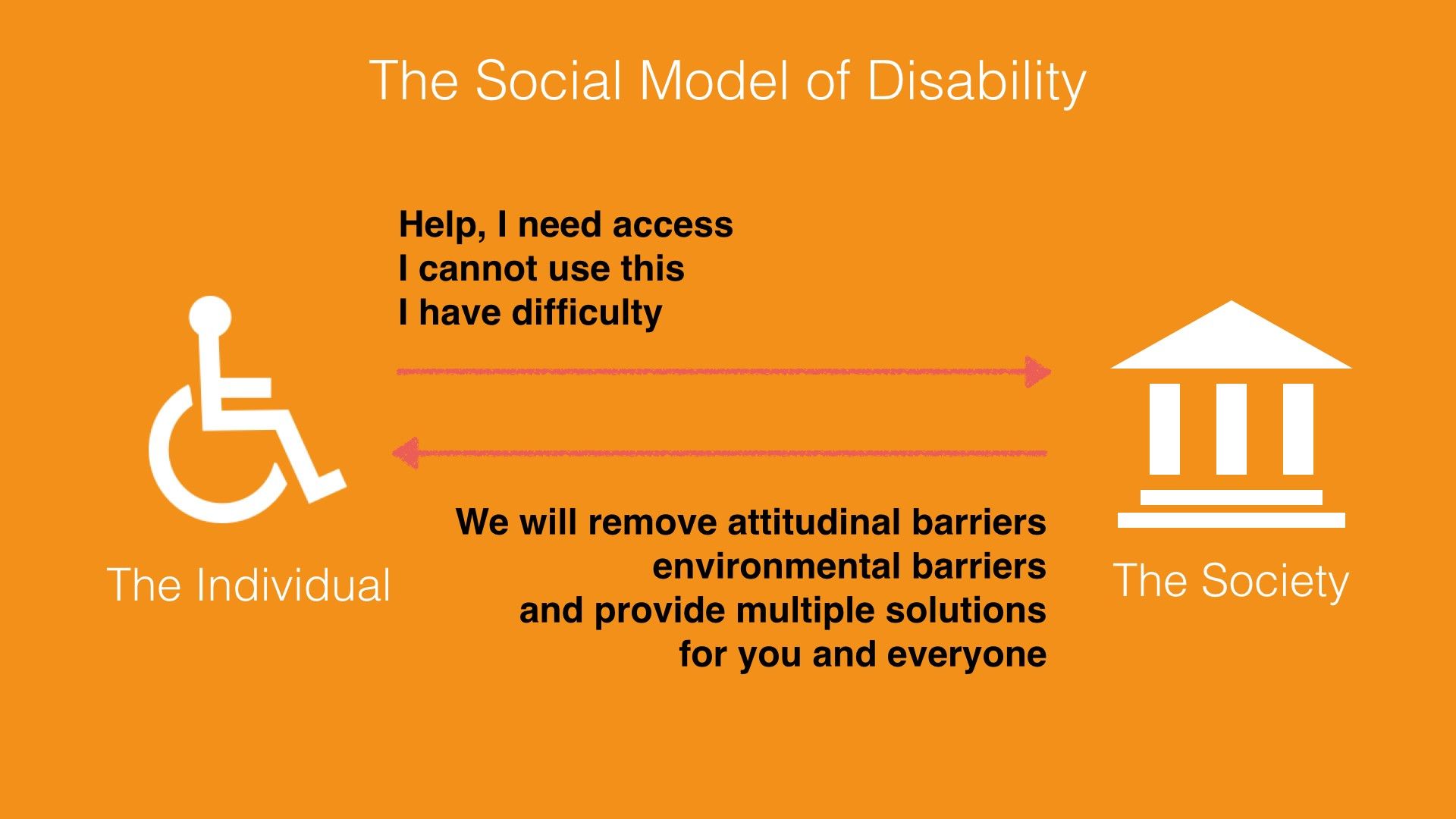
The Social Model of Disability does not place the burden and responsibility on the person with a disability. Instead, this model describes disability as a consequence of environmental, social and attitudinal barriers. Instead of fixing or curing a person with disabilities, it is up to society to remove barriers so as to improve his or her life. Hence, this model provides a deeper understanding and acceptance of people with disabilities.

© Ruby Zheng and Interaction Design Foundation, CC BY-NC-ND

The reaction from the disability community towards the WHO’s manual and the Medical Model of Disability was immediate. Three years after the WHO published the manual, Mike Oliver coined a new model called the Social Model of Disability. Oliver was a British author and disability rights activist.

In a paper titled "The Individual and Social Models of Disability”, Oliver contended against the Medical Model of Disability:

"The simple answer to this is that disability is a social state and not a medical condition. Hence medical intervention in, and more importantly, control over disability is inappropriate. Doctors are trained to diagnose, treat and cure illnesses, not to alleviate social conditions or circumstances."
– Mike Oliver, “The Individual and Social Models of Disability”, 1990

Oliver believed the Social Model of Disability provides a deeper understanding and acceptance of people with disabilities. It describes disability as a consequence of environmental, social and attitudinal barriers.

With this model, the onus is no longer on persons with disabilities but on society. Instead of trying to fix or cure a person with a disability, it is up to society to drive social integration and acceptance. As UX designers, we should take environmental, social and attitudinal barriers into consideration. For example, a common environmental barrier for users is being able to see the screen under bright sunlight. This barrier applies to both visually impaired users and ‘normal’ users. If we take this barrier into consideration, then we will design a solution with large fonts and strong color contrast.

The UN Convention on the Rights of Persons with Disabilities

The idea of barriers from the Social Mode of Disability is adopted into global policies for digital accessibility. The United Nations is one of the international catalyzers. It adopted the Convention on the Rights of Persons with Disabilities, which is often referred to as the CRPD or ‘the convention’, in 2006 and signed it into effect in 2007. It is the first major human rights treaty of the 21st century. It bases its philosophy and definition on the Social Model of Disability.

The official UN definition of disability is the following:

"The term persons with disabilities is used to apply to all persons with disabilities including those who have long-term physical, mental, intellectual or sensory impairments which, in interaction with various attitudinal and environmental barriers, hinders their full and effective participation in society on an equal basis with others." – UN, Secretariat for the Convention on the Rights of Persons FAQ, 2007

UN Example of an environmental barrier:

"A person in a wheelchair might have difficulties being gainfully employed not because of her condition but because there are environmental barriers such as inaccessible buses or staircases in the workplace which obstruct his or her access."
– UN, Secretariat for the Convention on the Rights of Persons FAQ, 2007

UN Example of an attitudinal barrier:

"A child with an intellectual disability might have difficulties going to school due to the attitudes of teachers, school boards and possibly parents who are unable to adapt to students with different learning capacities."
– UN, Secretariat for the Convention on the Rights of Persons FAQ, 2007

How the Convention for Persons with Disabilities Is Adopted Worldwide

By March 2024, 191 states had ratified the convention and 164 had signed it. (A signature indicates an intention to ratify, but it does not immediately create legal obligations.) Thus, the convention came to protect more than 80% of the world's population. The U.S. has not ratified the convention as of May 2024 but did add its signature in July 2009. Some U.S. lawmakers do not want to ratify the convention. They contend that the U.S. has its own regulations for accessibility. The two main regulations in the U.S. are the Rehabilitation Act of 1973 and the Americans with Disabilities Act (ADA) passed in 1990.

What Is Information and Communications Technology (ICT) Accessibility?

Article 9 of the convention is the section on accessibility. It includes accessibility needs for physical environment and transportation, and digital information and services. The convention uses information and communications technology (ICT) as an umbrella term for any digital device or application. There are two parts to this section.

Article 9 – Accessibility, Part I

The first part of Article 9 describes the types of public infrastructures that are to be considered under the convention.

"To enable persons with disabilities to live independently and participate fully in all aspects of life, States Parties shall take appropriate measures to ensure to persons with disabilities access, on an equal basis with others, to the physical environment, to transportation, to information and communications, including information and communications technologies and systems, and to other facilities and services open or provided to the public, both in urban and in rural areas.” – UN, Convention on the Rights of Persons with Disabilities, Article 9, 2006

Article 9 – Accessibility, Part 2

The second part of Article 9 lists the types of appropriate measures which should be taken under the convention. Promoting access to new ICTs, such as the Internet, is one of the required measures:

“Promote access for persons with disabilities to new information and communications technologies and systems, including the Internet” – UN, Convention on the Rights of Persons with Disabilities, Article 9, 2006

How ICT Accessibility Affects UX Design for the Web

When designing for digital devices or applications, all of us who are UX designers need to think about ICT Accessibility and how to implement solutions so as to enable access for all. The World Wide Web is an important component of information and communications technology. In this section, we’ll take a look at how ICT Accessibility affects UX Design for the web.

The World Wide Web Consortium (W3C) is an international community that develops standards for the web. It follows the principles of W3C Director and inventor of the World Wide Web, Tim Berners-Lee, and holds accessibility as a fundamental need for web design.

“The power of the Web is in its universality. Access by everyone regardless of disability is an essential aspect.
– Tim Berners-Lee, W3C Director and inventor of the World Wide Web

The W3C follows the UN convention principles. It recognizes access to Information and Communications Technology (ICT) as a basic human right. As an effort to improve accessibility, the W3C launched the Web Accessibility Initiatives (WAI) in 1997. The WAI provides guidelines, standards and techniques for accessibility.

The WAI has created three core guidelines for the web:

  1. Web Content Accessibility Guidelines (WCAG)

  2. Addresses the information on a website, including text, images, forms, sounds, and such.

  3. Authoring Tool Accessibility Guidelines (ATAG)

  4. Addresses software that creates Web sites.

  5. User Agent Accessibility Guidelines (UAAG)

  6. Addresses Web browsers and media players, and relates to assistive technologies.

The Web Content Accessibility Guidelines (WCAG) 1.0 was first published in 1999 and was updated to version 2.0 in 2008. WCAG version 2.2 became a recommendation in October 2023. It is an important source of reference for international policies, standards and legislation. In addition, this is good guidance for UX designers to learn about how to design accessible websites.

Web Content Accessibility Guidelines (WCAG) 2 Provide Four Layers of Guidance for UX Designers

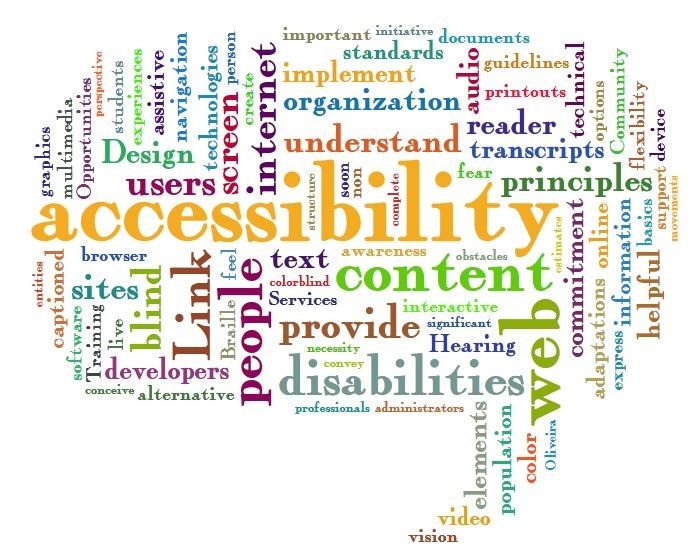
The Web Accessibility Word Cloud shows a collection of words often used in the accessibility design space. The size of the words shows how often they are used. Some of the frequently used words are ‘accessibility’, ‘content’, ‘web’, ‘internet’, ‘design’ and ‘disabilities’.

© Jil Wright, CC BY 2.0

WCAG 2 has an amazing set of design principles, guidelines and techniques. It is created for UX and web designers, content creators, and developers. You can start applying these principles and techniques right away. We are presenting them to you here and showing you how designers at Apple, TED talks and Twitter have already implemented the principles to the benefit of persons with disabilities as well as users without disabilities.

  1. Principles – The top layer of guidance is four principles that provide the foundation for Web accessibility: Perceivable, Operable, Understandable, and Robust (POUR).

  2. Guidelines – Under the principles are guidelines. The 12 guidelines provide the basic goals that designers should work toward in order to make their designs more accessible to users with different disabilities. The guidelines are not testable, but they provide the framework and overall objectives to help designers understand the success criteria and better implement the techniques.

  3. Success Criteria – Each guideline has a set of testable success criteria to verify accessibility for a web application or website. Each criterion has three levels: A, AA, and AAA. Level A is the minimal level. In the U.S., companies generally design and develop toward Level AA compliance. A level AA compliance will cover most legal regulations.

  4. Sufficient and Advisory Techniques – For each of the guidelines and success criteria, there are a wide variety of techniques that fall into two categories:

    1. Those that are sufficient for meeting the success criteria.

    2. Those that are advisory.

4 Principles and 12 Guidelines Which Will Help You Design for Accessibility

The following four principles – Perceivable, Operable, Understandable and Robust (POUR) – are easy to implement, and they will help you remember to design for accessibility whenever possible. We’ll show you how other designers have implemented the principles in a successful way.

Principle 1: Perceivable – and How UX Designers Can Incorporate the Principle

“Principle 1: Perceivable Information and user interface components must be presentable to users in ways they can perceive.”

  • Guideline 1.1 Text Alternatives: Provide text alternatives for any non-text content so that it can be changed into other forms people need, such as large print, braille, speech, symbols or simpler language.

  • Guideline 1.2 Time-based Media: Provide alternatives for time-based media.

  • Guideline 1.3 Adaptable: Create content that can be presented in different ways (for example, simpler layout) without losing information or structure.

  • Guideline 1.4 Distinguishable: Make it easier for users to see and hear content, including separating foreground from background.

Design Example: TED Talks Video Transcripts

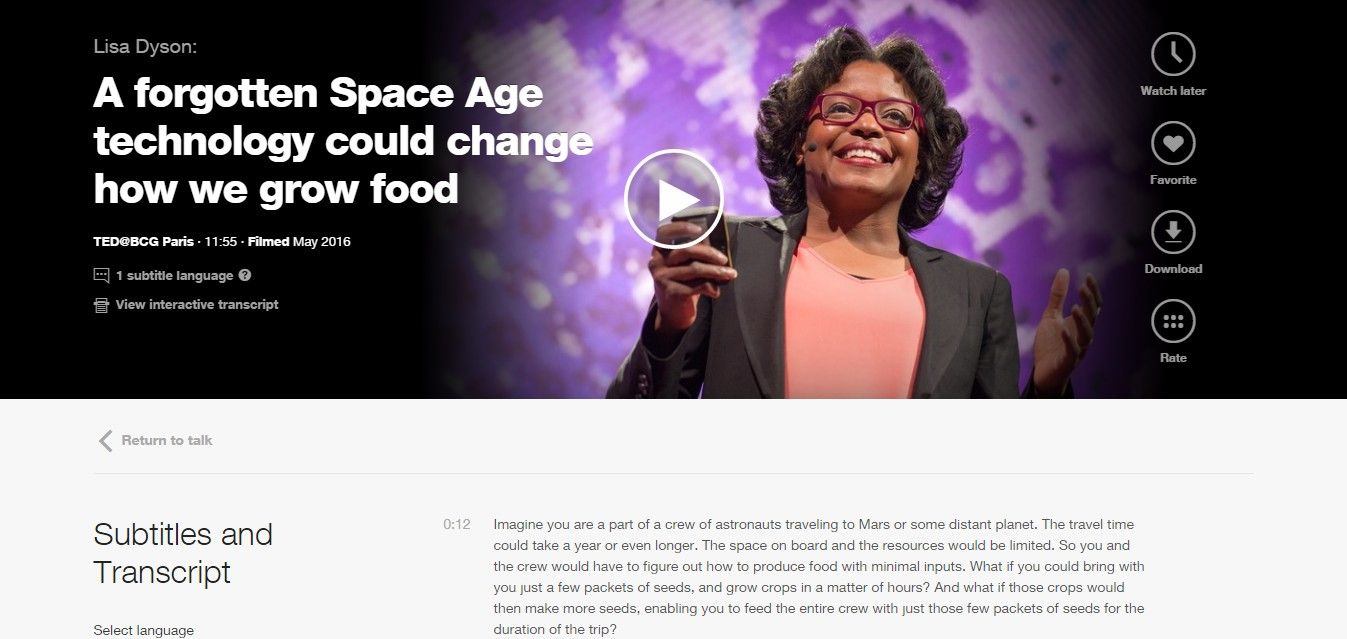
The TED talks, which are live lectures recorded in front of a large audience, are a great example of how videos include a transcript. This makes the TED talks accessible to a wide audience. People with hearing impairments can read the transcripts, and people with visual impairments can hear the audio. However, this feature is also great for people sitting in a bus who do not want to disturb other passengers.

All TED talks provide subtitles and transcripts for all of their videos.

© TED Conferences, LLC, Fair Use

Principle 2: Operable – and How UX Designers Can Incorporate the Principle

“Principle 2: Operable – User interface components and navigation must be operable.”

  • Guideline 2.1 Keyboard Accessible: Make all functionality available from a keyboard.

  • Guideline 2.2 Enough Time: Provide users with enough time to read and use content.

  • Guideline 2.3 Seizures: Do not design content in a way that is known to cause seizures.

  • Guideline 2.4 Navigable: Provide ways to help users navigate, find content, and determine where they are.

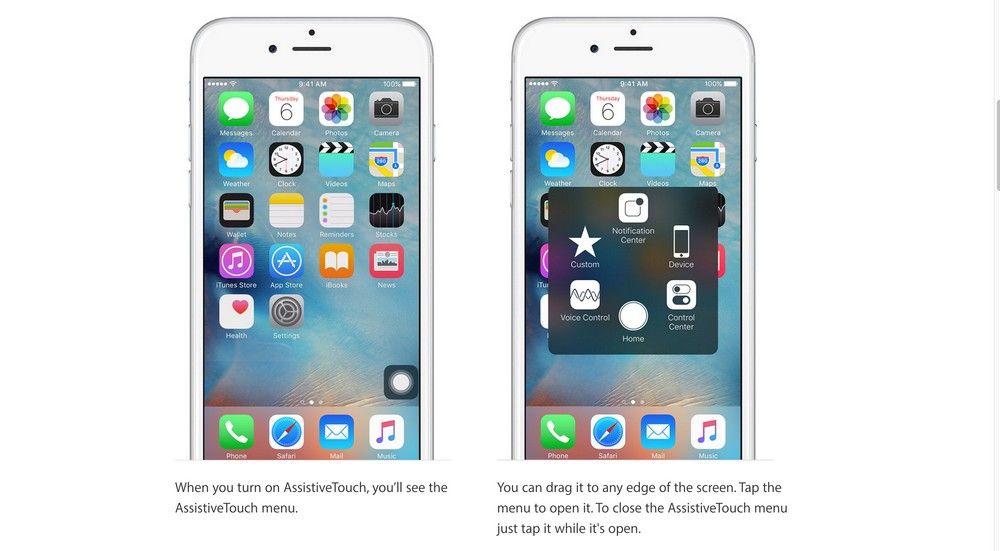
Design Example: Apple AssistiveTouch

AssistiveTouch is an accessibility feature for Apple's iPhone, iPad and iPod. It provides alternative navigation methods and touch gestures for people with physical impairments. Users using AssistiveTouch can quickly access settings and the home screen and create their own touch gestures.

Apple’s AssistiveTouch provides alternative navigation methods and gesture controls.

© Apple, Inc., Fair Use

Principle 3: Understandable – and How UX Designers Can Incorporate the Principle

“Principle 3: Understandable – Information and the operation of user interface must be understandable.”

  • Guideline 3.1 – Make text content readable and understandable.

  • Guideline 3.2 – Make web pages appear and operate in predictable ways.

  • Guideline 3.3 – Help users avoid and correct mistakes.

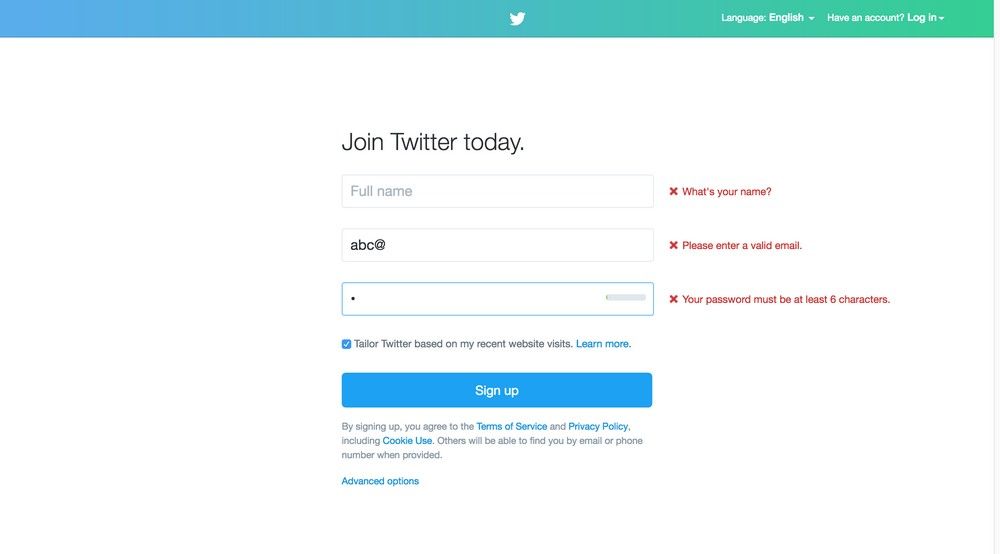
Design Example: Twitter Error Message

Twitter error messages for its sign-up form are readable and understandable. The error messages are written in Standard English with no jargon or acronyms. Also, the error messages are marked in red and placed next to the input fields. It makes it easy for users to understand and correct their mistakes.

Twitter error messages use Standard English. Also, the error messages are marked in red and placed next to the input fields. It makes it easy for users to understand and correct their mistakes.

© Twitter, Inc., Fair Use

Principle 4: Robust – and How UX Designers Can Incorporate the Principle

Principle 4: Robust Content must be robust enough that it can be interpreted reliably by a wide variety of user agents, including assistive technologies.”

  • Guideline 4.1 – Maximize compatibility with current and future user agents, including assistive technologies.

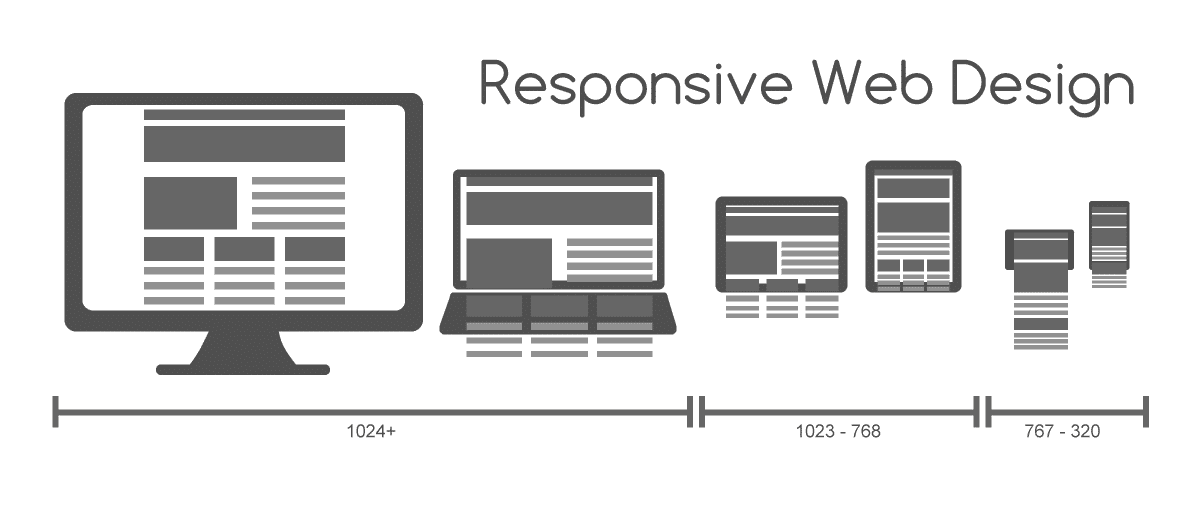
Design Example: Responsive Web Design

Responsive Web Design is a web design approach coined by web designer and developer Ethan Marcotte in 2011. This approach enables designers to create websites that are robust, accessible and optimized for different browsers and screen sizes.

Responsive Web Design is an approach to creating websites for different browsers and screen sizes.

© Muhammad Rafizeldi, CC BY-SA 3.0

The Take Away

As designers, we need to plan and design for accessibility in UX projects. We have the responsibility, not only to our profession but also to our users and society, to design accessible digital solutions. One simple method of including accessibility in our UX projects is to assign a disability to one of the personas. Another method is to follow the Web Content Accessibility Guidelines (WCAG), as developed by the W3C (directed by the inventor of the World Wide Web, Tim Berners-Lee) and inspired by the UN convention principles.

As a community, we can remove discrimination against people with disabilities and protect their rights to be part of society. By doing so, we will create access to all products and services that will delight everyone.

Hero Image: © David Amsler, CC BY 2.0

References & Where to Learn More

Course: Accessibility - How to Design for All

World Health Organization(WHO), International Classification of Impairments, Disabilities, and Handicaps, 1980.

United Nations, Convention on the Rights of Persons with Disabilities, 2006.

W3C Standards for Web Design Accessibility.

Feel Stuck?
Want Better Job Options?

AI is replacing jobs everywhere, yet design jobs are booming with a projected 45% job growth. With design skills, you can create products and services people love. More love means more impact and greater salary potential.

At IxDF, we help you from your first course to your next job, all in one place.

See How Design Skills Turn Into Job Options
Privacy Settings
By using this site, you accept our Cookie Policy and Terms of Use.
Customize
Accept all

Be the One Who Inspires

People remember who shares great ideas.

Share on:

Academic Credibility — On Autopilot

Don't waste time googling citation formats. Just copy, paste and look legit in seconds.