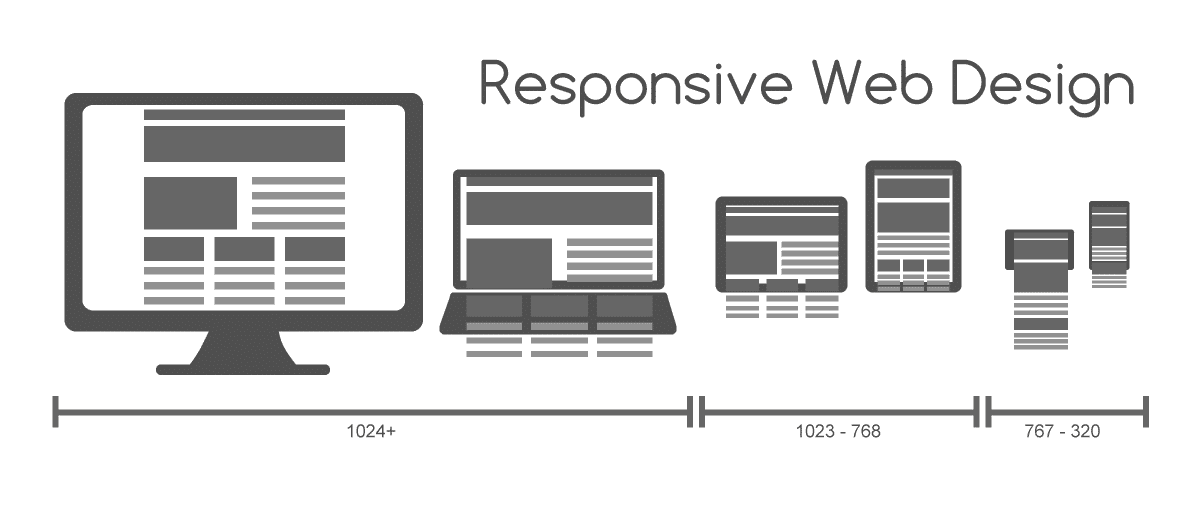
The Web Content Accessibility Guidelines (WCAG) are internationally recognized standards the World Wide Web Consortium (W3C) developed to ensure that digital content is accessible to all users, including those with disabilities. UX (user experience) designers comply with WCAG and create perceivable, operable, understandable, and robust user interfaces.
Discover why designers must make accessible design a primary consideration to help all users, not just those with disabilities:
Where Did WCAG Come from and Why?
WCAG—pronounced “we-kag”—carries significant weight in UX design and for good reason. The inception of WCAG dates back to the late 1990s, a period that witnessed the rapid expansion of the internet and a growing awareness of the need for digital inclusivity. In the 1990s, the Internet, along with the World Wide Web, snowballed to expand its status far beyond just a household name.
At the start of the decade, the general public consciousness about “being online” was that it was new, exciting, and exotic—and, for many people, more a curiosity for specialist interests such as computer enthusiasts. That soon changed; so much so that the perception of internet use in the latter half of the 1990s had shifted to the point many people couldn’t imagine life without it.
The number of both developments and websites mushroomed in the ’90s. Home computing—which had taken off as a major trend in the 1980s—brought computers to the fingertips of innumerable users in households around the world. Suddenly, far more people were “users,” and so—if they were to enjoy the benefits of the internet—they had to be able to use computers and find their way around early cyberspace with then-novel equipment such as modems.
However, particularly given the speed of developments, the risk emerged that the technology (and brands who used, created, and released it) would exclude people—and not just older individuals who had lived for decades without ever touching a computer. An internet “wild west” existed thanks to a lack of standardized practices and coding. Hordes of websites and webpages appeared, many offering treasure troves of valuable information and more. The problem was that often users with disabilities who relied on assistive technologies couldn’t access sites that ignored their needs.
In 1997, the W3C launched the Web Accessibility Initiative (WAI). Their aim was to develop strategies, guidelines, and resources to make the web accessible to people with disabilities. This initiative led to the release of WCAG 1.0 in May 1999. WCAG 1.0 primarily focused on HTML content and provided a foundation for accessible web design.
“The power of the Web is in its universality. Access by everyone regardless of disability is an essential aspect.”
— Tim Berners-Lee, W3C Director and inventor of the World Wide Web
Over the years, WCAG has evolved to address the changing landscape of web technologies and user needs. WCAG 2.0, which emerged in December 2008, introduced a more technology-neutral approach, emphasizing testable success criteria. WCAG 2.1 followed in June 2018, expanding the guidelines to cover mobile accessibility, low vision, and cognitive disabilities. The current version, WCAG 2.2, was published on 5 October 2023 with a further update in December 2024. It adds nine new success criteria focused on keyboard navigation, touch interactions, and cognitive accessibility. All versions are backward compatible: content that meets WCAG 2.2 also meets 2.1 and 2.0. The W3C is also developing WCAG 3.0, though no release date has been confirmed. WCAG 2.2 remains the current recommended standard.
The reason for WCAG’s existence and enforcement becomes more profound when one considers the immense number of users who need designers to accommodate them. About one in six users worldwide—over one billion human beings—have a disability in these principal areas:
Visual disabilities (low vision, blindness, color blindness)
Hearing disabilities (hard of hearing or deafness)
Mobility and motor disabilities
Cognitive, learning, and neurological disabilities
Speech disabilities
What are the POUR Principles: A Framework for Accessibility?
Four guiding principles form the core of WCAG; they’re collectively known as the acronym POUR:
Perceivable: Information and user interface components must be presentable to users in ways they can perceive. For example, this means that a brand’s website must present certain images with alt text so that users with visual disabilities can understand what the image depicts.
Explore the nature of human perception and sensation in this video with Alan Dix: Author of the bestselling book “Human-Computer Interaction” and Director of the Computational Foundry at Swansea University:
Operable: User interface components and navigation must be operable. For example, users who cannot use a conventional mouse must be able to navigate by other means, such as using a keyboard to get around.
Understandable: Information and the operation of the user interface must be understandable. For example, a governmental agency’s website must be understandable to all users, including users with cognitive disabilities, for them to access the services they’re entitled to use.
Robust: Content must be robust enough for a wide variety of user agents, including assistive technologies, to be able to interpret.
These principles serve as a foundation for designers to create accessible web content and ensure that users with diverse abilities can access and interact with digital products effectively, comfortably, and without hindrance.

The Alt text for this image reads, “A set of blotches that resemble a Dalmatian.” This spotted dog image illustrates one of the Gestalt rules—design principles designers use to make more engaging interfaces and images. When users right-click this image to inspect the alt text, they see—and for users who rely on screen readers, the screen reader reads—this alternative text.
© Interaction Design Foundation, CC BY-SA 4.0
It’s the Law to Comply with WCAG in Many Nations
Compliance with WCAG isn’t just a matter of best practice—it’s also a legal requirement in many jurisdictions. These legal frameworks underscore the importance of WCAG compliance, not just to meet legal obligations but to promote inclusivity and equal access to digital content, too. Areas and laws that monitor and enforce accessibility standards include:
United States
Americans with Disabilities Act (ADA): While the ADA does not explicitly mention WCAG, courts and the Department of Justice have interpreted it to require accessible digital content, often referencing WCAG as the standard.
Section 508 of the Rehabilitation Act: Federal agencies are required to make their electronic and information technology accessible to people with disabilities. ADA Title II regulations finalized in April 2024 reference WCAG 2.1 Level AA for state and local government websites, while WCAG 2.2 is increasingly cited in ADA lawsuits and adopted as best practice across the industry.
European Union
European Accessibility Act (EAA): Enacted in 2019, the EAA became legally applicable across EU member states on 28 June 2025. It requires websites, apps, ebooks, e-commerce platforms, and other digital products and services to be accessible to people with disabilities. The EAA currently references WCAG 2.1 AA via the European Standard EN 301 549, which is expected to be updated to reference WCAG 2.2.
Canada
Accessible Canada Act: Passed in 2019, this act requires federally regulated entities to ensure their digital content is accessible, referencing WCAG 2.0 Level AA as the standard.
United Kingdon
Public Sector Bodies Accessibility Regulations (2018): UK public sector websites and mobile apps must meet WCAG 2.1 Level AA. Following the UK's departure from the EU, the European Accessibility Act no longer applies in the UK, but the government has signaled an intention to align future requirements with WCAG 2.2. Private sector obligations are less prescriptive, but the Equality Act 2010 requires organizations to make reasonable adjustments for disabled users, which courts increasingly interpret to include digital accessibility.
Beware the Risks of Non-Compliance
If a brand fails to adhere to WCAG guidelines, the consequences can be significant: legal, financial, and reputational.
Legal action: Organizations may face lawsuits for non-compliance, leading to costly settlements and legal fees. For example, some large household-name brands have been sued for an accessibility violation.
Reputational damage: Inaccessible websites can harm an organization’s reputation and signal a lack of commitment to inclusivity. If a website appears not to care about accessibility and users with disabilities, it can tarnish its public image. Users of all abilities might even find the brand questionable in other ways—perhaps thinking, “If it doesn’t care about accessibility, what else might it not care about?”
Loss of audience: Users with disabilities may abandon inaccessible websites, resulting in a loss of potential customers or clients.
When organizations proactively address accessibility, they can reduce these risks and demonstrate a commitment to accessibility and inclusivity. Brands can note that one vital by-product—or benefit—of accessible design is how when they design for users with disabilities, they design for everyone. For example, YouTube’s captions help users with hearing disabilities and users who don’t have hearing disabilities when they’re in loud environments.

Captions can be deal-breakers for users—they don’t have to be deaf or hard-of-hearing to appreciate the convenience of captions or subtitles. It could be because they have another first language, construction workers are using jackhammers nearby, or users just prefer to see the words.
© Interaction Design Foundation, CC BY-SA 4.0
How Brands Comply with WCAG’s Conformance Levels
In a world where accessibility is serious business, designers and brands need to be aware of the most up-to-date WCAG standards and what they stipulate. Compliance with accessibility guidelines means that designers know the WCAG conformance levels and what to do about it. This means they know how to implement design elements, features, and code that ensure users with disabilities can access, use, and enjoy websites without restriction.
WCAG outlines three levels of conformance to accommodate varying degrees of accessibility:
Level A is the minimum level of accessibility; it addresses the most basic web accessibility features. For example, when designers use alt text, include captions for prerecorded video, and make sure that color isn’t the only way to convey information (such as to distinguish links or highlight text), they comply with WCAG level A.
Level AA is what most organizations consider the standard level; it addresses the biggest and most common barriers for users with disabilities. For example, when designers use captions for live-streamed video, they apply a minimum color contrast ratio of 4.5:1 for normal text and 3:1 for large text, and use headings in a logical order (H1, H2, H3, etc.) for users to understand content.
Level AAA is the highest level of accessibility; it targets the most comprehensive accessibility features. For example, when designers use a contrast ratio of at least 7:1 between text and its background and offer sign language interpretation for video content, they comply with WCAG level AAA.
Note that while level AAA conformance is ideal, it may not be feasible for all web content. So, many organizations aim for level AA compliance to balance accessibility with practical implementation.
How to Integrate WCAG into UX Design
For UX designers, adherence to WCAG isn’t just a compliance exercise but a commitment to inclusive design. Key considerations for integrating WCAG into the UX design process are to make digital solutions:
1. Perceivable
Text alternatives: Provide alternative text for non-text content, such as images and videos, enabling screen readers to convey information to users with visual impairments.
Adaptable content: Ensure content is presentable in different ways without losing information or structure, and so accommodate various assistive technologies.
Distinguishable content: Use sufficient color contrast between text and background, and don’t rely only on color to convey information. This way, you can aid users who have color vision disabilities.
Watch this video about color blindness to understand how the world appears to many users, and how to design to help them enjoy better user experiences with digital solutions:
2. Operable
Keyboard accessibility: Design interfaces that users can navigate using a keyboard alone, and support users with motor disabilities such as those who can’t use a conventional mouse.
Navigable interfaces: Provide clear and consistent navigation mechanisms, including headings and labels, to help users understand and navigate the content structure.
Explore how navigation helps users explore designs effectively, with Alan Dix:
Avoid seizure-inducing content: Don’t create or use content that flashes more than three times per second. Many users may have photo-sensitive epilepsy, and flashing content can cause them to have seizures.
3. Understandable
Readable text: Use clear and simple language, and define unusual words or abbreviations. Many users may have cognitive disabilities and need accessible text content to make sense of messages.
Predictable navigation: Ensure that web pages appear and operate in predictable ways, to reduce confusion and enhance user confidence.
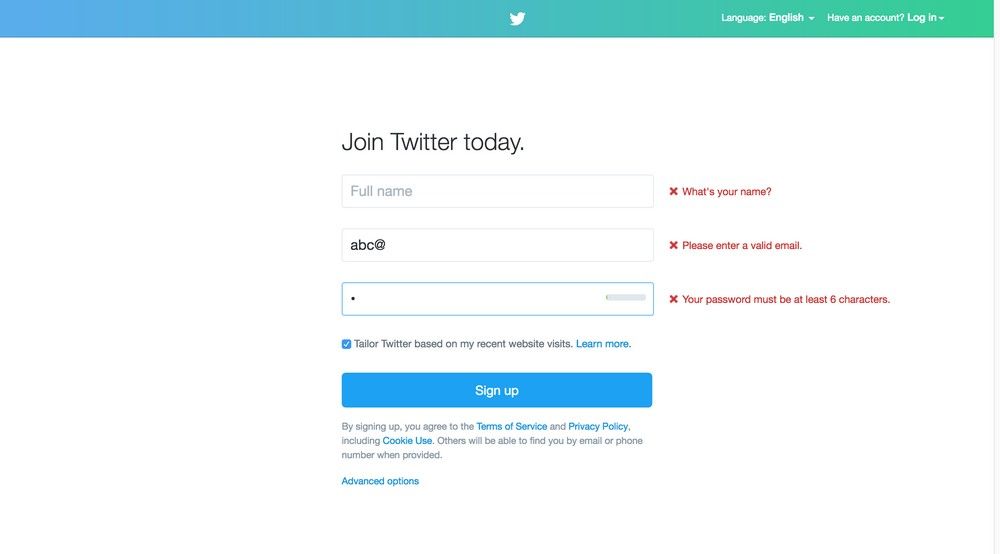
Input assistance: Provide guidance and error suggestions for user inputs, to help with form completion and reduce or minimize user frustration.
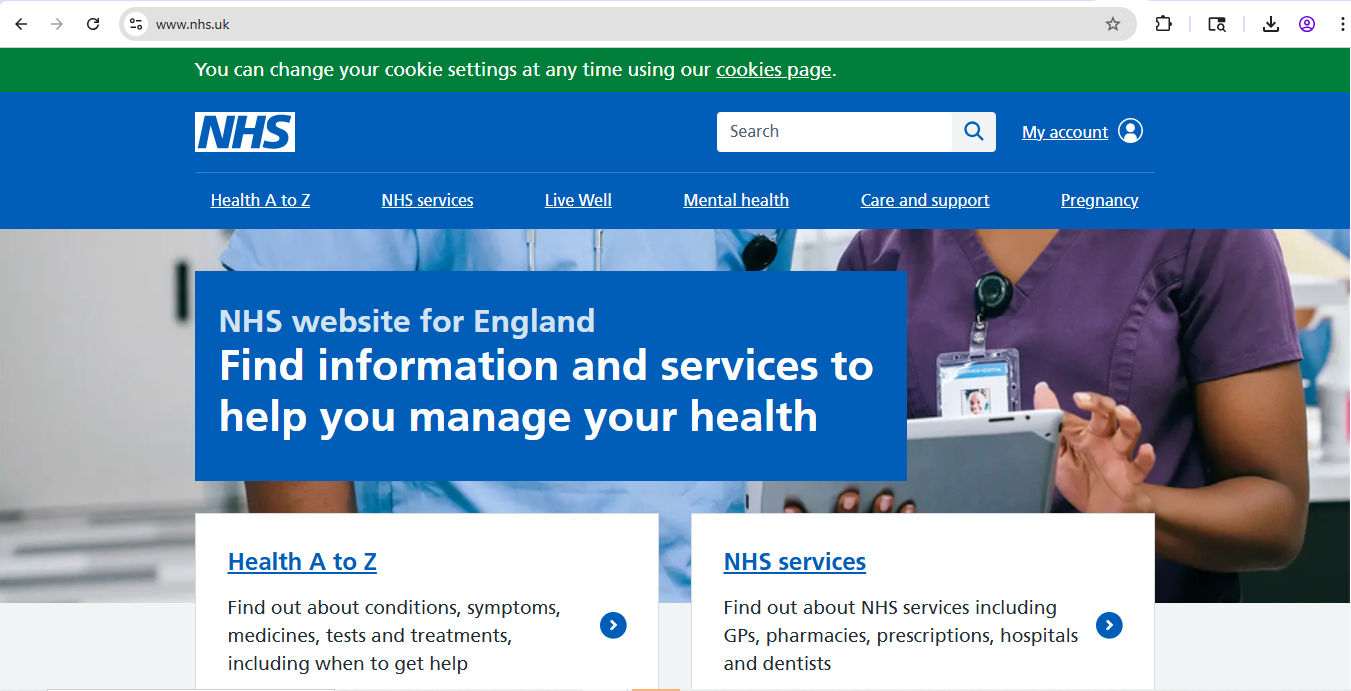
The U.K.’s National Health Service website illustrates the understandable component of the WCAG guidelines, especially in its easy-to-read text and layout. Consider how helpful it is for users who may have one disability or more—human beings who may also be ill, injured, or anxious about their health and need every bit of help they can get to find information, fast.
© NHS, Fair Use
4. Robust
Compatible content: Use standard HTML and CSS practices to ensure content is compatible with current and future user agents, including assistive technologies.
WCAG UX Best Practices and Considerations
As technologies develop and users encounter new realms—and challenges—the Web Content Accessibility Guidelines continue to update. Along with following any changes in standards, UX and UI (user interface) designers—as well as other design team members, product managers, and stakeholders—should consider the following best practices:
Foster an Inclusive Design Mindset
Approach design with inclusivity in mind from the outset, rather than retrofit accessibility features later in the UX design process. It makes it easier, prevents oversights, and helps save money and time.
Discover the world—and possibilities—of inclusive design and the special considerations it applies to users, as UX Content Strategist, Architect and Consultant, Katrin Suetterlin discusses:
Your Brand Can Reach Everyone, Everywhere, Every Time
Accessibility isn’t about dilution of your brand’s image and voice; it’s about empowerment so users can use, enjoy, and delight in seamless experiences no matter their ability level. For example, a UX writer or designer doesn’t have to “dumb down” a message to reach users who might not understand what a brand offers. Short and sensible makes the best sense, anyway, for users in a wide range of contexts—where “Buy” is easier than “Purchase,” for example.
Conduct User Testing with Diverse Participants
It’s wise to conduct usability testing with participants who have a range of abilities to identify and address accessibility barriers. Note that for users with disabilities and those who use assistive technology, specialist agencies are the best option to test digital products and ensure usability levels are high, for everyone.
Collaborate with Developers
Work closely with developers to ensure that they implement design specifications accurately and accessibly.
Utilize Accessibility Tools
Employ accessibility tools such as WAVE and AXE to evaluate and enhance the accessibility of web content you and your team create during the design and development phases.
Enjoy Better Search Engine Optimization (SEO)
Another plus when you design for accessibility is that when you make a website more user-friendly and accessible to a wider audience—including those with disabilities and search engine crawlers—you improve your brand’s site SEO and ranking.
Discover how accessible design helps with usability and Search Engine Optimization, as Frank Spillers: Service Designer, Founder and CEO of Experience Dynamics explains:
Overall, consider how WCAG protects users with disabilities and ensures better experiences for everyone. The guidelines mirror real-world, physical accessibility concerns such as wheelchair ramps, lowered curbs, and many other architectural and product designs. Such essential touches for users with disabilities become welcome conveniences for users who have temporary disabilities, such as commuters using their devices one handed while standing on a busy train—the possibilities are vast for both context and circumstances (such as a hand injury).
The digital world will continue to evolve, as will the standards that help keep users of diverse abilities safe from missing out on all the rich and vital details of digital design solutions such as websites and applications. To design meaningful and inclusive experiences for all users needn’t be a chore when designers remember that everyone benefits from accessible design done well.