Presentations

Your constantly-updated definition of Presentations and collection of videos and articles.
Be a conversation starter: Share this page and inspire others!

887 Shares

What are Presentations?

Presentations are structured ways to share your ideas or information with an audience, whether in person, online, or asynchronously (not “live”). They are often supported by visuals like slides, charts, images, or videos.

Explore what presenting effective messages to audiences who want to hear from you helps you achieve, as feedback and iterations help you shape the best possible product, in this video with Morgane Peng, Managing Director, Global Head of Product Design and AI Transformation.

Transcript

In UX (user experience) design, you’ll use presentations to explain research findings, showcase design solutions, and align stakeholders around a shared goal. When done right, presentations turn complex design work into clear, actionable insights. They help you build trust, earn buy-in, and move projects forward.

Your Work Doesn’t Speak for Itself. You Do.

You might think your work speaks for itself. It doesn’t. It’s your job to frame it, explain it, and champion it, whether you’re kicking off a project, walking through usability findings, or just sending a status update.

Presentations are golden opportunities to build bridges, between designers and developers, between teams and stakeholders, between user needs and business priorities. Without strong presentation skills, even the best design work risks being misunderstood, sidelined, or forgotten. And the team’s “hands” can become disconnected not just from the “mind” but the “heart” of the brand, too, a recipe for disaster. The same is true for any job.

When and Where UX Designers Present

Each type of presentation comes with different goals and formats:

1. Interview Presentations

These are typically one-way presentations where you showcase your portfolio; they’re often followed up with a two-way discussion.

Discover valuable tips about how to maximize your chances with a good UX portfolio and avoid pitfalls, in this video with Morgane Peng.

Transcript

2. Design Presentations

You share research insights, prototypes, or usability findings with your audience, including stakeholders from various departments and clients. These often start one-way and evolve into dialogue and active discussion of important points to address in a current or proposed design solution.

3. Workshops

You facilitate or participate in interactive, two-way sessions for brainstorming or problem-solving. Workshops can pull teams together in live collaborative efforts that land on precious design insights.

4. Career Presentations

You report achievements to managers or human resources (HR) personnel, like a “highlight reel” to encapsulate your value to the brand.

5. Email Presentations

You deliver asynchronous updates you write with clarity and structure, so these “speak for” you without the need for a meeting.

Each type of design presentation requires different preparation; however, the core goal is the same: you must make the message easy to understand, relevant, and actionable.

How to Deliver an Effective UX Design Presentation, Step by Step

1. Plan to Avoid “Death by PowerPoint”

One of the biggest risks in presentations is what’s known as “Death by PowerPoint.” This happens when you overload your slides with text, charts, and detail, leaving your audience disengaged and “punch drunk” by what’s on the screen. Begin with your audience, not your slides.

Why it fails:

  • Slides compete with you. People read faster than you speak, so if your slides are text-heavy, they’ll stop listening to you and go right to the source.

  • Cognitive overload occurs. Too much information makes your audience tune out, their heads exploding with facts, figures, even relatable stories that would otherwise sound good coming from you at the right time (not jammed into a paragraph on the screen).

  • Monotony. Repetitive slide decks without story or variation drain energy; your listeners may lose the will to even care why they should be there, let alone remember what the meeting is about.

The cure is simple: let slides support, not replace you. Keep slides visual, scannable, and aligned with your message, and in step with an “alive” pace that makes the subject matter matter to the people who have taken the time from their schedules to sit in a room listening to you.

Discover other potential pitfalls to avoid before you plan to present for success, in this video with Morgane Peng.

Transcript

2. Follow Key Frameworks for Presentations

Now that you know what to avoid, think about how a framework can help you add structure to what you’ll present. Great presentations don’t happen by chance; they follow proven structures and delivery styles that help your message stick, and here are two key ones to consider:

Freytag’s Pyramid: Tell a Design Story

Freytag’s Pyramid has five stages to help you land a first-class design story in the minds of eager listeners: exposition, rising action, climax, falling action, and resolution.

  • Exposition: Show the reality of the initial situation: for example, “Our team designed a mobile banking app for Gen Z, but onboarding had huge drop-offs.”

  • Rising action: This is where you shed light on the “emergency” and figures that demonstrate a problem to address, such as: “In usability tests, 7 out of 10 participants quit halfway, calling the flow confusing.”

  • Climax: Now you come in with a solution to stop and reverse the crisis, like: “We debated patching but chose a full redesign: shorter steps, optional fields, clearer progress.”

  • Falling action: It’s time to show the symptoms easing from the cure and the hopefully powerful signs that what you did was effective, such as: “In testing, completion jumped 40%, and users described the flow as ‘smooth.’”

  • Resolution: Close out the story with a happy ending to confirm the effectiveness of the cure; in this case: “Support tickets dropped by half, and conversions doubled.”

This story arc makes your audience feel the tension of the problem and the relief of resolution. They’ll remember their initial shock and suspense of the emergency you addressed with a solution that alleviated it. Compare this with what would happen if you were to just feed them data; the percentages and figures might still be alarming, but the arc of a story frames the facts and lifts the crisis and cure from a flat, “academic” account into a tangible tale with real-world impact.

STAR Method: Explain Your Role Clearly

STAR (Situation, Task, Action, Result) is a direct approach that can neatly emphasize your personal contribution to turn negative situations around and make the person behind shine. An example that presents an overview of this could be:

  • Situation: “Our e-commerce site had a high cart abandonment rate.”

  • Task: “As the lead UX designer, I was responsible for reducing friction.”

  • Action: “I ran usability tests, analyzed heatmaps, identified the problem, which was a complicated form, and simplified it.”

  • Result: “Checkout completion rose 30% and bounce rates dropped.”

STAR is especially effective in portfolio reviews and interviews, where clarity about your role matters most.

3. Pick a Presenter Style: Choose How You Deliver

Along with an effective framework, your delivery style shapes how your presentation lands. Choose from these main styles:

  • The Storyteller makes an emotional and narrative-driven approach, such as telling the story of “Emily,” a customer who struggled to buy groceries online, before showing how your redesign changed her life.

  • The Demonstrator makes for a hands-on approach, such as where you conduct a live demo of a prototype where one-click reordering replaces a clunky flow. It’s a helpful way to deliver information when the audience is already familiar with the project.

  • The Instructor teaches in a step-by-step explainer approach. It’s particularly helpful for enlightening stakeholders who don’t have design backgrounds, such as teaching non-design colleagues how to run a guerrilla usability test in several clear steps.

  • The Collaborator brings things around for an interactive and co-creative experience. You still present in this approach, but it’s more leading collaborative design activities, such as sketching wireframes together in a workshop with product managers and engineers.

Note that you don’t have to stick to one role; you can also blend them, perhaps starting with a Storyteller intro, then moving into a Demonstrator demo, and ending with a Collaborator-style discussion, for example.

4. Design Slides That Work and Support Your Presentation
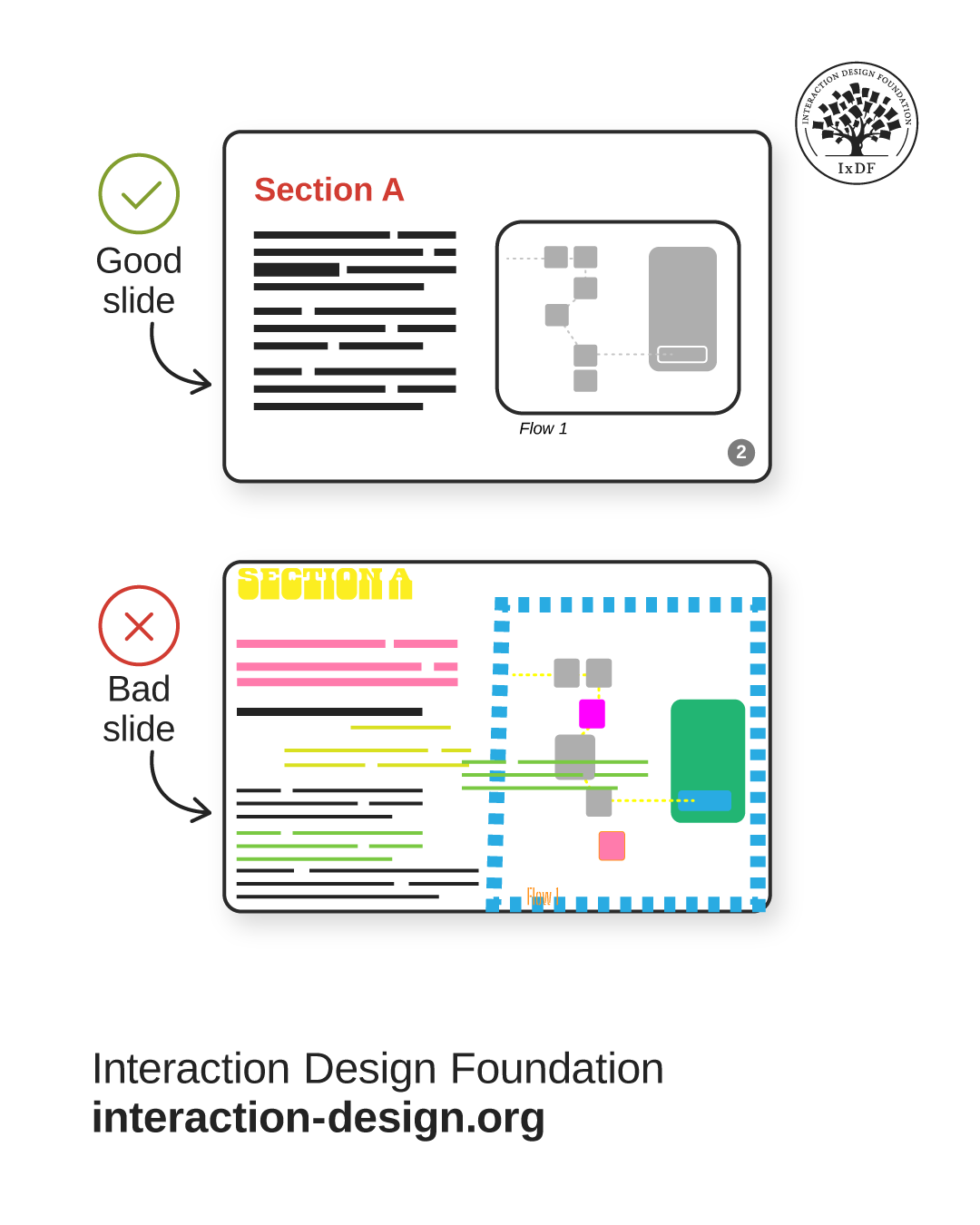
An illustration of two slides, one well-ordered, good one and a bad one with such problems as misaligned text and too many colors.

© Interaction Design Foundation, CC BY-SA 4.0

Slides should amplify your story, not compete with it, so:

  • Keep it simple with minimal text, consistent fonts, strong visuals that speak volumes, much like a good picture can tell a “thousand words.”

  • Write meaningful headlines. “56% of users struggled in checkout,” not “Usability findings.”

  • Use progressive disclosure, where you reveal content gradually to match your pace and ease the audience into more complex or intricate concepts thoughtfully.

Discover how to use progressive disclosure to keep target users, including meeting room audience members, engaged and eager to know more, in our video.

Transcript

  • Adapt for sharing, especially important when you’re not there to present “live”; for emailed decks, use full sentences and highlight key takeaways.

As with any design solution that has users, think of slides as interfaces: make them clear, scannable, and audience-centered.

5. Build Trust Through Presentations

Presentations succeed only if your audience trusts you. The good news is two trust frameworks can help you establish and build that all-important ingredient and rapport with your audience.

Discover how to win your audience’s trust so your presentation can resonate with them, in this video with Morgane Peng.

Transcript

Trust Framework 1: Competence & Warmth

Two core questions any audience will ask are: “Are you skilled?” and “Do you care?” High competence without warmth feels cold; consider a knowledgeable designer who delivers first-class but hates people and is rude. On the flip side, warmth without competence feels weak; consider a friendly designer who bungles most of the design jobs they work on, a pitiful, if nice professional. People won’t trust either of them, but for different reasons. You need both high competency levels and high empathy levels to tick both boxes, a competent professional and a decent human being.

An Example of How to Use the Competence and Warmth Framework:

  • Competence: Share usability data: “70% abandoned checkout; here’s the heatmap to show it.”

  • Warmth: Use empathy: “Imagine being asked for a credit card before browsing. That’s where users’ frustration began. Also, what about older or vulnerable users? It’s scary, almost like a trap.”

This balance ensures stakeholders respect your expertise as a designer and see you as an approachable, caring professional: if you care about users, you care about people, and you care about people in the brand.

Trust Framework 2: Giver vs Taker

Psychologist and bestselling author Adam Grant’s framework describes Givers (who share value, information, and other benefits, not expecting anything in return), Takers (who extract value and, wanting to get more for themselves, will give back as little as possible), and Matchers (who balance giving and taking on a reciprocal basis).

In presentations, a designer who appears as a Giver builds trust; Matchers also can, but it’s better to be a Giver to win audiences over.

  • Example of a Giver stance: “This new flow reduces support calls and saves your team time.”

  • Example of a Taker mistake: “We need more budget.” (They do not show any shared benefits.)

Framing designs as contributions to others’ success makes stakeholders more willing to support your work. If you have a generous personality and want only the best for people, you’ll come across as someone who is kind and worth supporting, and certainly worth listening to.

6. Set the Stage for Success

You have you presentation plan in place, and ideally have rehearsed what you’ll present, at least once; now it’s time to arrange the stage for success to happen upon. Apart from anything else, your setup shapes first impressions; so:

  • In-person: Arrive early, declutter the room, sit at eye level and not so that you are alone on one side of the table, and greet people warmly.

  • Online: Clear your desktop, hide bookmarks, and use chat tools to engage.

Begin with context and credibility, a pleasant “preamble” that sets the stage relevantly before you dive into content.

These choices signal professionalism and readiness, that you’re confident, know your material and why it’s important to your audience, and respect everyone’s time out of their busy schedules.

7. Delivery: How to Present with Confidence

Be sure to rehearse your presentation. On the day, manage any stress safely with the 4-7-8 breathing method (4 seconds to inhale, 7 seconds to hold, 8 seconds to exhale) and try striking a power pose (don’t slouch, open your posture in your chest, and ground your posture with your abdomen). You have your slides and frameworks for cultivating trust and framing information into relatable stories that will resonate with the audience. Now, you want to make the most effective delivery: blend voice, body language, and presence:

  • Pitch, pace, tone: vary them to avoid monotony and highlight insights and empathy.

  • Articulation: especially when mentioning technical terms, speak clearly.

  • Silence: may be golden, but it’s also like “white space,” so use pauses to frame key ideas. It can also make people take notice, in the right measures at the right times. Too little silence might make your presentation jammed and even sound stressed, like you’re trying to finish as fast as possible. Too much silence can make you sound like you’ve lost your train of thought.

  • SOLER framework: Sit squarely, Open posture, Lean forward, Eye contact, Relax, and this balance of confidence and openness can make audiences far more receptive. However, note that in some cultures, sustained eye contact can be especially off-putting, so tailor your approach to the locale.

Get a greater grasp of how to position yourself for success in a presentation, in this video with Morgane Peng.

Transcript

8. Use Active Listening

Throughout your presentation, keep your “radar” on to note how your target audience is responding to you. It can be difficult to maintain an active listening approach when you’re proceeding through a rehearsed presentation, but be sure to keep your eyes and ears open, and receptive, to how others are receiving what you’re saying and showing them.

Discover how to use active listening to make your presentation even more successful, in this video with Morgane Peng.

Transcript

9. Handle Questions and Feedback

Presentations often evolve into discussions and feedback sessions. How you handle feedback shapes trust and proves your level of professionalism, so:

  • Acknowledge concerns by offering acknowledgements such as “That’s a good point.”

  • Seek clarity for questions that need it, such as “Can you share what makes you think this might confuse users?”

  • Detach ego: remember that critique of a design isn’t a critique of you. Unless there are preexisting problems between yourself and an audience member, nobody will have an axe to grind. Distance yourself from what may seem like an “unfair critique” and keep your professional and emotionally mature stance.

  • Reframe criticism, and treat feedback as collaboration, not opposition. It will also show your emotional maturity and prove your professionalism in a credibility-building moment as a trustable team member, and leader.

An image of the instructor with the caption Have strong opinions weakly held.

Sound advice, and so much better than the other way around.

© Interaction Design Foundation, CC BY-SA 4.0

10. Remember the Role of Presentations in Career Growth

Every presentation you give influences how others see you: not just your work. For all you plan, prepare, deliver, take as feedback, and prove to roomful after roomful of people that you are a caring professional who knows the craft, others will take notice and rewards will come. Designers who present clearly and confidently:

  • Win faster project approval.

  • Earn trust with executives and peers.

  • Build reputations as leaders.

  • Stand out in interviews and reviews.

Good presenters advance faster than those who rely just on their craft.

Overall, presentation and speaking before an audience to get effective messages across are an art, not a natural-born talent. Presentations are far more than slide decks, but the human element of framing, lifting, and making points relevant to other human beings is more than worth the effort for even the shiest designers. Far from being hindrances, presentations are vehicles for clarity, trust, and influence, capable of catapulting designers who present well into promotions and higher levels of influence.

There might seem much to remember, but designers who avoid “Death by PowerPoint,” structure with Freytag’s Pyramid or STAR, adapt delivery styles, apply trust frameworks, and design slides that support their story can tap a skill and cultivate a talent they might never notice otherwise. They can become accustomed to turning presentations into powerful tools of collaboration and leadership, advocating for users, aligning teams, and accelerating their career. Every presentation is a chance to lead, inspire, and make design matter to people who, if they don’t already know why design must matter, will know what’s important and what to do by the end of a successful session.

Questions About Presentations?
We've Got Answers!

Why do UX designers need to give presentations?

UX designers must give presentations because their work affects many people: users, stakeholders, cross-functional teams, and themselves. A presentation makes research findings, design decisions, and user pain points clear so everyone understands the “why” behind the design and other important points. For example, when showing usability test results, presenting data alongside real user quotes helps executives connect emotionally and see the urgency for change.

Presentations build alignment across teams, too, and ensure developers, product managers, and business leaders share the same understanding. Without presenting, designs risk being misunderstood or dismissed, left to lie undeciphered and uncared about. Strong presentation skills help UX designers advocate for users, secure buy-in, move projects forward, and, by association, forward their own careers.

Discover how to tap one of the most powerful forces in design, in our article Trust: Building the Bridge to Our Users.

What’s the role of visuals in UX presentations?

Visuals in UX presentations illustrate insights, simplify complexity, and make design stories memorable. Instead of reading bullet points, audiences can see user flows, heatmaps, or prototypes that clarify problems and solutions instantly. For example, showing a video clip of a user struggling with a confusing checkout process makes the issue more persuasive than a written report.

Charts or diagrams also highlight key data trends quickly, too, which helps executives grasp impact at a glance. Good visuals support your narrative without overwhelming it. They should highlight, not replace, your voice. In UX design presentations, visuals bridge the gap between research detail and stakeholder understanding, to make sure the message lands clearly. If the presentation is a “design” (which it is in a sense), think of visuals as the “user interface” of your presentation: scannable, consistent, and user-focused.

Explore how to make the most suitable use of visual representation to support any presentation you give.

How should I prepare for a UX presentation?

To prepare for a UX presentation, start with your audience and ask: who are they, what do they care about, and how much detail do they need? Then structure your content using frameworks like STAR (Situation, Task, Action, Result) or Freytag’s Pyramid to create flow. Rehearse at least once out loud, as it helps you find unclear sections and builds confidence.

Prepare your environment, too: arrive early, test your slides, and declutter your desktop if you’re presenting online. Plan for interaction: anticipate likely questions or moments for discussion. For example, in a portfolio presentation, prepare follow-up slides showing alternate flows in case someone asks.

Don’t go into a presentation unprepared, hoping you’ll naturally flow through in the moment. Strong preparation reduces nerves and shows professionalism as your message can resonate and your design can earn support from the right people.

Discover how to come across better in UX presentations, design team meetings, and more, in our article What Soft Skills Does a UX Designer Need?.

How do I keep my audience engaged?

To keep your audience engaged, you make your presentation relevant, interactive, and easy to follow for them. To begin, tailor the details to your audience; developers may want technical specifics, while executives need business impact; neither might understand the terms you’re used to, though, so avoid jargon if it might get in the way.

Use stories and real examples, such as a clip of a frustrated user struggling in testing, to capture empathy. Ask questions during your talk: “Have you seen this issue in your product area?” This brings matters around to the audience, invites participation and prevents passive listening. Vary your pitch and pacing to avoid a monotonous delivery, and use visuals to break up complexity. For longer presentations, preview what’s coming so people know why to stay engaged and will feel awake enough to take in valuable insights and invested enough to support your solutions.

Enjoy our Master Class Storytelling That Sells UX Design: Define Requirements and Engage Leadership with Rafael Hernandez, Lead Product Designer, T. Rowe Price.

How do I show competence in a presentation?

To show competence in a presentation, combine solid evidence with crystal-clear explanations. In UX (user experience) design, this often means presenting usability findings, survey data, or prototypes in a structured way that highlights your expertise. For example, instead of saying “users struggled with navigation,” show a heatmap of clicks paired with a video clip that proves they did in no uncertain terms.

Competence comes from how you organize content, too, through how you use methods like STAR to ensure your process looks deliberate and solid, not improvised and haphazard. Avoid jargon unless your audience understands it; simplicity shows mastery. Confidence in delivery matters too, as steady pacing and clear articulation reinforce credibility and show you know your stuff. Competence is not about overwhelming your audience with detail but showing you understand the problem deeply and have a well-reasoned solution that creates real value.

Find out more about what matters for UX designers to cast better impressions, in our article Key Soft Skills to Succeed as a UX Designer.

How do I show warmth in a presentation?

You show warmth in a presentation by demonstrating empathy, openness, and approachability. For designers who give presentations, this often means humanizing research findings. So, instead of only reporting “40% of users abandoned checkout,” share a short story or direct quote from a participant: “I felt pressured to give my credit card before I trusted the site.” The human touch lifts cold, hard facts off the screen and animates them in your target audience’s minds.

Warmth comes through your body language, too, through open posture, natural eye contact, and an inviting tone. Acknowledge contributions from teammates and respect feedback, even if it’s critical; if nothing else, it will show emotional maturity and professionalism, that you can divorce your craft from your person. Also, frame your work as a shared success (“this design helps the support team reduce calls”) to show you’ve got a team-player’s spirit. Personal warmth sends the message that you care not only about design outcomes but about people, too, a combination that builds trust and makes your audience more receptive to a more likeable presenter.

Delve into design critiques to prepare better for constructive criticism and know how to turn it around into something even more positive.

How do I capture attention at the start?

To capture attention at the beginning of a UX design presentation, show why your topic matters right now. Start with context, such as: “Last month, 40% of new users abandoned onboarding,” as it will create urgency. Alternatively, use a short story: “Meet Alex. He downloaded our app, but within three minutes, he’d had enough and gave up in frustration.”

Questions are helpful “hooks,” too, such as: “Have you ever left a shopping cart because checkout felt too complicated?” These openings spark curiosity and empathy, piquing the audience’s interest so it starts mattering to them. Don’t dive into details immediately; as dramatic as big figures might sound, your audience needs a reason to care before they listen to methods or results. Give them a strong opening to signal relevance, frame the problem, and set up your solution as a trusted cure, and it will help ensure stakeholders stay engaged throughout.

Explore how to come across better as a more trustable presenter, in this video with Morgane Peng, Managing Director, Global Head of Product Design and AI Transformation.

Transcript

Why does storytelling matter in UX presentations?

Storytelling matters in UX presentations because it turns data into human experience and so makes insights memorable and persuasive. A statistic like “60% failed onboarding” is important and might be dramatic enough to make people take notice. However, if you tell the story of, for example, Maria, a new user who struggled with confusing steps and gave up, you’ll bring the problem down to “street level” with a real presence, and away from an abstract sense of faceless percentages.

Stories build empathy and help stakeholders see the design challenge from a user’s perspective; plus, they show the presenter as someone who cares. Use frameworks like Freytag’s Pyramid (problem, tension, solution, resolution) to create a narrative arc that audiences naturally follow. For example, build tension by showing clips of users failing tasks, then resolve it with your improved prototype and positive feedback. Storytelling doesn’t replace evidence; it amplifies it and bridges research and impact, paving the wave for the happy ending you can deliver through a solution.

Steer your way to more gripping, effective presentations when you know how to leverage storytelling well.

What presentation style should I use?

The right presentation style depends on your audience and goal, and as a designer-presenter you can choose from four main styles: Storyteller, Demonstrator, Instructor, and Collaborator.

Use the Storyteller style when you want to build empathy, such as sharing a user journey to reveal the human dimensions of a problem. Pick Demonstrator when you’re walking through, for example, a prototype live and let the product speak for itself (best for when the audience already knows about the subject).

Choose the Instructor style in workshops when teaching methods like quick usability testing, or where you need to fill an unaware audience in on subject matter they’re not familiar with. Adopt the Collaborator approach when, for example, you’re co-creating wireframes with stakeholders in real time, like in a workshop.

You can mix styles, too, such as starting with Storyteller to frame the problem, then switching to Demonstrator with your prototype, and then ending as a Collaborator by inviting input. When you match style to the context, you can help make your presentations clear, engaging, and relevant and help everyone get on the same page.

Tap user journeys to cast more empathy in your presentation, from our article Top Tips to Create Effective Journey Maps.

What are some recent or highly cited scientific articles about UX/UI design presentations?

Peng, Y.-H., Jang, J., Bigham, J. P., & Pavel, A. (2021). Say it all: Feedback for improving non-visual presentation accessibility. In CHI Conference on Human Factors in Computing Systems (CHI ’21), May 8–13, 2021, Yokohama, Japan. ACM.

This study introduces Presentation A11y, a tool that provides real-time and post-session feedback to help presenters improve accessibility for blind or visually impaired audiences. In an analysis of 90 real-world presentations (TED Talks, lectures, seminars), 72% of slide elements were found to be inadequately described. Presentation A11y significantly improved coverage of slide content during talks and led to 3.26× more accessibility issues being identified afterward. The system provides visual cues on which elements were or weren’t verbally addressed, helping presenters align visual and verbal content. This is essential for UX designers working in inclusive design or accessible communication.

Pissierssens, S., Claes, J., & Poels, G. (2019). The “Physics of Diagrams”: Revealing the scientific basis of graphical representation design. arXiv.

This paper consolidates 81 design guidelines and 34 supporting propositions into a unified conceptual model for graphical representation called the “Physics of Diagrams.” By organizing these insights into a clear framework of seven core principles, the authors make a significant contribution to the systematic design of diagrams. The work offers a strong theoretical and empirical foundation for crafting effective visual content, which is especially valuable for UX designers creating presentations involving data visualization or complex information structures. It serves as a blueprint for making diagrams clearer, more consistent, and easier for users to interpret.

Xiong, C., Setlur, V., Bach, B., Lin, K., Koh, E., & Franconeri, S. (2021). Visual arrangements of bar charts influence comparisons in viewer takeaways. arXiv.

This empirical study investigates how different bar chart arrangements influence the viewer’s interpretation. Participants were presented with variations including stacked, overlaid, vertically, and horizontally juxtaposed bar charts. The study found that arrangement substantially changes what comparisons viewers notice and remember. Notably, designers often mispredict which layouts will be most effective. For UX designers and presentation creators, this research emphasizes the critical role of layout in guiding audience attention and comprehension. It supports more intentional design of data visualizations, especially in contexts where precision and clarity of communication are essential.

Duarte, N. (2008). Slide:ology: The Art and Science of Creating Great Presentations. O’Reilly Media.

This book revolutionized how designers approach presentations, focusing on visual storytelling and clarity over text-heavy slides. UX designers benefit from its guidance on slide composition, color, and layout, concepts that parallel interface design. Duarte empowers presenters to craft visuals that speak clearly, enhancing understanding and engagement.

Duarte, N. (2010). Resonate: Present Visual Stories that Transform Audiences. Wiley.

Resonate teaches presentation as narrative. Duarte shows how to build a message arc, use contrast to maintain interest, and connect emotionally. For UX designers, these storytelling strategies translate directly into crafting persuasive product pitches and compelling user journeys.

DiResta, D. (2018). Knockout Presentations: How to Deliver Your Message with Power, Punch, and Pizzazz. Morgan James Publishing.

This book focuses on performance: how to stand, speak, and connect with an audience. For UX professionals who pitch or present frequently, DiResta’s strategies ensure their message isn’t lost in delivery. She emphasizes presence, confidence, and charisma: essential soft skills in UX leadership and client interaction.

Earn a Gift Earn a Gift, Answer a Short Quiz!

1
2
3
4
1
2
3
4
Question 1
Question 2
Question 3
Get Your Gift
Interaction Design Foundation logo

Question 1

Why should designers avoid using complex design jargon during presentations to stakeholders?

1 point towards your gift

  • Stakeholders may think designers lack creativity
  • Technical terms make the presentation look more impressive
  • Unfamiliar terms confuse the audience and reduce engagement
Interaction Design Foundation logo

Question 2

Why do skilled presenters use storytelling during design presentations?

1 point towards your gift

  • Stories make presentations feel less professional
  • Stories create emotional connections and support better understanding
  • Storytelling limits the time available to explain research findings
Interaction Design Foundation logo

Question 3

What should designers do to make their presentation slides more effective?

1 point towards your gift

  • Fill slides with all the research notes
  • Use large text and clean visuals to highlight key points
  • Add multiple font styles to keep the audience interested

Learn More About Presentations

Make learning as easy as watching Netflix: Learn more about Presentations by taking the online IxDF Course Present Like a Pro: Communication Skills to Fast-Track Your Career.

Why? Because design skills make you valuable. In any job. Any industry.

In This Course, You'll

  • Get excited to finally see your work get the recognition and results it deserves. Strong communication is the #1 skill employers seek, and research shows it's directly linked to faster promotions and higher salaries. Successful presentations aren't an innate talent, they're a skill you can master. With proven frameworks and practical techniques, you'll gain lifelong skills that turn every presentation into a career opportunity.

  • Make yourself invaluable when you master the art of delivery and craft messages that resonate. You'll inspire action and guide the conversation. You become the person people listen to, trust, and follow. Research shows that people trained in presentation skills are 12% more likely to move into leadership roles. This is the skill that gets your name on the next big project, a salary increase, and the shortlist for promotion. Deliver presentations where each word works for you and gets you the results you want. As AI speeds up how products, services, and experiences are created, clear communication becomes the skill that keeps you in demand. Strong presentation skills help you turn AI output into clear direction, aligned decisions, and real results.

  • Gain confidence and credibility as you learn how to overcome nervousness and impostor syndrome, use your voice and body language to engage any audience, and own every room you enter. Never again leave a meeting thinking, "I should have said that better." Master the overlooked skill of turning feedback into fuel: handle criticism with confidence, navigate difficult conversations, and make Q&A sessions your strongest moments. If you can't communicate your ideas, someone else will, and they'll get the credit.

  • Craft your personal portfolio with step-by-step guidance. Through hands-on activities, you'll create a professional presentation video, an impactful asset that showcases your skills and helps you stand out to employers, clients, and collaborators. It'll speak for you long after the course ends.

It's Easy to Fast-Track Your Career with the World's Best Experts

Master complex skills effortlessly with proven best practices and toolkits directly from the world's top design experts. Meet your expert for this course:

Morgane Peng: Head of Product Design & AI Transformation at Societe Generale CIB. Morgane is a design leader who climbed from trainee to Managing Director, and knows exactly how to use strategic communication and presentation skills to fast-track career growth and open doors to leadership.

Get an Industry-Recognized IxDF Course Certificate

Increase your credibility, salary potential and job opportunities by showing credible evidence of your skills.

IxDF Course Certificates set the industry gold standard. Add them to your LinkedIn profile, resumé, and job applications.

Course Certificate Example

Be in distinguished company, alongside industry leaders who train their teams with the IxDF and trust IxDF Course Certificates.

Our clients: IBM, HP, Adobe, GE, Accenture, Allianz, Phillips, Deezer, Capgemin, Mcafee, SAP, Telenor, Cigna, British Parliament, State of New York

All Free IxDF Articles on Presentations

Read full article
The Persuasion Triad — Aristotle Still Teaches - Article hero image
Interaction Design Foundation logo

The Persuasion Triad — Aristotle Still Teaches

The Greek philosopher Aristotle (384-322 b.c.e.) classified properties of items and concepts in the known universe. One of his most fundamental discoveries was the composition of persuasive speaking. Although Aristotle identified the “three appeals” that make it up 23 centuries ago, when the known u

Social shares
971
Published
Read Article
Read full article
The 5 Pixar Storytelling Principles That Will Redefine How You Present and Fast-Track Your Career - Article hero image
Interaction Design Foundation logo

The 5 Pixar Storytelling Principles That Will Redefine How You Present and Fast-Track Your Career

Ever sat through a presentation that felt like watching paint dry? You’re not alone. Most presentations miss one vital ingredient: Storytelling. And when it comes to telling stories that make people laugh, cry, or rethink their entire worldview… no one does it like Pixar. They’ve mastered the art of

Social shares
403
Published
Read Article
Read full article
You’re Not Bad at Presenting; You Just Haven’t Mastered the Right Way (Yet) - Article hero image
Interaction Design Foundation logo

You’re Not Bad at Presenting; You Just Haven’t Mastered the Right Way (Yet)

Ever walked out of a presentation thinking, “That could’ve gone so much better, maybe I’m just not a presenter”? You’re not alone. And you’re not the problem. You simply haven’t been shown an easy, clear, repeatable way to prepare, deliver and follow up.Presenting is not an innate talent; it’s a ski

Social shares
287
Published
Read Article
Read full article
How to Present Like Steve Jobs (Without the Turtleneck) - Article hero image
Interaction Design Foundation logo

How to Present Like Steve Jobs (Without the Turtleneck)

Steve Jobs treated every presentation like a user journey. He shaped the emotional pacing with the precision of a product designer. If you think presenting is about speaking, you’re missing the deeper craft: Guiding someone’s experience. He made people see the world through his eyes. The power of hi

Social shares
255
Published
Read Article
Read full article
Presentations Are Your Career Currency: Here's How to Cash In - Article hero image
Interaction Design Foundation logo

Presentations Are Your Career Currency: Here's How to Cash In

Your career works like a bank account. Every project you finish and every skill you develop is a deposit. When you explain your work clearly, you’re investing in your own reputation. Each presentation pays dividends over time. Master presentation skills, and you’ll watch your career grow exponential

Social shares
195
Published
Read Article
Read full article
How to Reframe Negative Feedback Without Losing Confidence in Yourself - Article hero image
Interaction Design Foundation logo

How to Reframe Negative Feedback Without Losing Confidence in Yourself

Negative feedback hurts. There's no way around it. Your stomach drops, your heart beats faster, and your thoughts race: “Am I about to lose this client?” “Are they questioning if I'm the right person for this job?” “Will this affect my reputation?” But what if you could change your relationship with

Social shares
255
Published
Read Article

The Persuasion Triad — Aristotle Still Teaches

The Persuasion Triad — Aristotle Still Teaches

The Greek philosopher Aristotle (384-322 b.c.e.) classified properties of items and concepts in the known universe. One of his most fundamental discoveries was the composition of persuasive speaking. Although Aristotle identified the “three appeals” that make it up 23 centuries ago, when the known universe was smaller, they are timeless. Persuaders of all types have been relying on them since, including we who appeal to users through UX design.

The Trinity of Persuasion

Looking at any act where a speaker tries convincing another person or group, we might first see someone arguing a point. From debating in school to selling merchandise on TV, persuaders state a case to win over an audience in order for the latter to do something. The persuader needs a) an objective, b) an audience, and c) to reach that audience with a message. Specifically, he/she has to persuade them, as opposed to an authority figure ordering them to do something. Aristotle identified that the art of persuasion consisted of three parts:

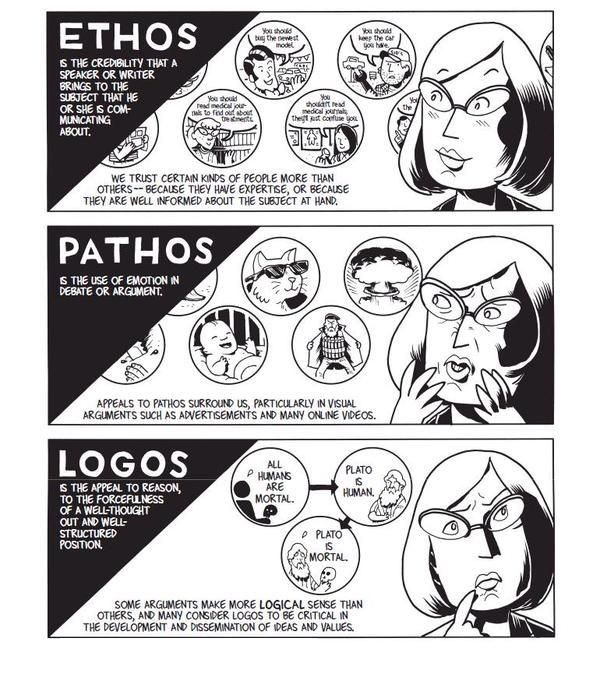
1) Logos — Appealing to Logic

2) Pathos — Appealing to Emotions

3) Ethos — Appealing to Ethics, Morals and Character

In the case of logos, a persuader uses facts, statistics, quotations from reputable sources/experts, as well as existing knowledge. This is the side of the argument that can prove how solid it is based on facts alone.

Author/Copyright holder: Unknown. Copyright terms and licence: Unknown.

Pathos involves delivering the argument in a way that appeals to the audience’s emotions. Logos alone has facts that are cold, flat and ‘dead’. For example, a scientist speaking at a world convention can talk about global warming and bring up facts and figures about how many tons of ice melt into the sea every year. There, she would be using logos. However, by arguing about the impact of global warming on living things, for instance, how many polar bears will die if the current trend continues, she’ll tap the emotions of the audience. Pathos is the emotional vehicle that carries the logos to the audience.

Ethos has to do with who the persuader is. His/her identity will have a great impact on how the audience takes the message. If our scientist had been running late, and a politician stumbled onto the stage and tried speaking for her, no one would take him seriously. He isn’t a specialist in the field. Not only that, his general knowledge (and political agendas: he may want to distort facts about the topic for his own gain!) about global warming would fail to convince them of his “expertise”. Fortunately, our expert on thermodynamics and environmental science shows up to give the talk. The audience listens to her because:

  • She is a specialist in her field and has practical intelligence.

She knows what she’s talking about, having been working in the discipline for thirty-five years.

  • She’s got a virtuous nature.

She is an honest, hardworking professional who has proven her dedication by writing articles, working at the South Pole, and is not in her vocation just to make money.

  • She has good intentions.

Her commitment to environmental conservation is evident in the articles she has written and, now, in the speech she is delivering. Keeping global warming at bay is her sole intention, and her life’s work reflects that.

Ethos comes first

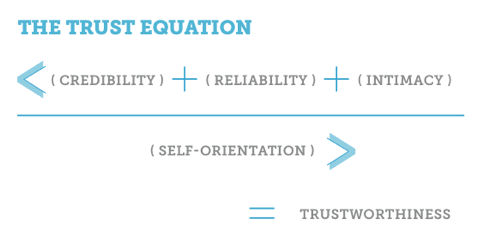
So, we can take the heuristics, or rules of thumb, embodied in Aristotle’s three appeals to deliver persuasive designs. First, work on establishing trust, which is what Aristotle determined was the most important part of the honest process of persuasion. Winning users’ trust (in that split second on landing on your design, where they judge you as being, hopefully, credible) and reinforcing it (by establishing familiarity or at least reducing uncertainty in a good-looking, user-friendly design) are essential for them to start recognizing your organization’s ethos. You can reinforce your ethos with a strong social media presence. A well-Liked Facebook page will show that you’re likeable, fashionable, are just like your users and, therefore, know what they want.


Author/Copyright holder: Social Media Examiner. Copyright terms and licence: All rights reserved Img source


How do we organize our three appeals around a plot? Let’s imagine that we’re designing for a water purification company. There, our plot is:

“The Smiths, Joneses and Johnsons are concerned about the purity of their water supply; they want to fix that problem but don’t know where to start.”

As the designer, you could mention that your models catch 99% of pollutants, and that logos will look good. Or, how about a good emotional hook to get users a little desperate to find the facts? If you build towards mentioning the statistical efficacy of your water purifier, you might first point out to users that what they don’t know sure can hurt them, and then show how many thousands of households’ dirty water problems your company has solved. Also, you might want to include some humor… “In many cities, a glass of water will have been through six or seven people before it gets to you; let’s flush those other folks right now!” There are many emotions out there for you to tap (I’ll stop it with the water puns now) as pathos. Then, are you going to back up these facts and passionate delivery by showing your audience why you are wise and a specialist (more of your ethos)?

Let’s stop right there, step back, and think about our users again. Who are they?

All About Them — Directing your Persuasive Design

Oddly, even if you’re the best advocate in the world and have an airtight case with the argument you’re presenting (because it’s so scientifically grounded) and you’re making the best speech in your career, you can still lose!

How? It’s easy—your audience was the wrong one to attempt persuading. If you’ve ever heard about stand-up comedians “dying” behind the microphone because the crowd was hostile and didn’t get their jokes, that’s a similar concept.


Author/Copyright holder: Unknown. Copyright terms and licence: Unknown.


Fortunately, as UX designers, we know that we must at least try to figure out exactly who our users are well in advance of presenting our work to them. Say you had to present a design to show 7-year-olds why drinking filtered water was good for them, and then had to present to the heads of a school. You’d focus on a simplified version with an image-heavy, text-light entertaining design for the kids (who just have to drink the water). For the other group (50-something-year-olds who have to worry about costs and benefits), you’d have to concentrate on more text to show the stats, keep the images relevant as functioning representations (like diagrams), and make the whole affair far more serious.

The audience determines the composition of your design. You’ll need to identify your audience. Of course, you want to build beyond that trust and familiarity that you’ll establish with them. You want to win them over so much that they’ll follow through with a call to action. Winning their approval is key; you want to take them from landing on your design with a sense of “What’s this?” and warming that neutral (or even skeptical) feel they have into a feeling of agreement and, if you’re selling something, need. If your design is for water purifiers, you’ll appeal to a large section of the public.

However, what if your industry doesn’t have that potential draw? What if you’re designing for a funeral director’s business? There, you’ll be addressing a totally different usership—bereaved people and professionals from associated fields.

The power of culture

It’s easy to forget another important variable when we’re considering the characters in our targeted audience: culture. The Internet has shrunk the world; however, as internationalized as our sensibilities may have become, and as much as we can find out more about other cultures in our “global village”, one powerful feature remains: our culture largely determines our values. In some cultures, for instance, black is a funerary color, in others white is. The world is awash with a variety of cultures that see the world in very different ways. What appeals to one might offend another.

Therefore, it’s impossible to design to try and reach everyone. So, you might think that the best option is to at least try and appeal to everyone without offending anyone. The answer is a neutral approach? Hmm…well, the problem there is that you’ll be backing away from reaching anyone in a powerful way. This is like painting the walls of a rental property magnolia and putting in beige carpeting. You don’t know who the tenants will be; you can’t afford to gamble with taste: red might offend; yellow might make people sick. Most people will tacitly agree with neutral color choices, but they won’t be thanking you for wowing them. Congratulations on taking a safe, marginal approach that will be sure to keep casual renters from ever really being able to feel totally at home.

So, how do you aim high and keep your users from finding you as tasty as boiled lettuce? You need to elicit strong, positive feelings from them before they click away to find your competitor who does it for them. The art of aiming your persuasive design is the other side of the coin.

The Take Away

Aristotle determined that persuasion comprises a combination of three appeals: logos, pathos, and ethos. Anyone seeking to persuade an audience should craft his/her message with facts (logos), tapping an argument’s emotional aspect (pathos), and presenting his/her apparent moral standing (ethos). Ethos consists of three sub-qualities: the persuader’s professional intelligence, virtuous nature, and goodwill.

Creating persuasive designs is only one side of the coin. Unless we’re casting them to the right audience, taking on board cultural/lifestyle considerations, we will fail. Knowing who the users are is vital. Moreover, in UX design, we can only start persuading our users once we have their trust by presenting our ethos. From there, we can bring out the solid facts and get users interested with well-placed emotional hooks.

Where to Learn More

Toxboe, A. (2015). “Beyond Usability: Designing with Persuasive Patterns”. Smashing Magazine.

Gremillion, B. (2015). “Why UX Design Patterns Work and How to Use Them.” Creative Bloq.

Feel Stuck?
Want Better Job Options?

AI is replacing jobs everywhere, yet design jobs are booming with a projected 45% job growth. With design skills, you can create products and services people love. More love means more impact and greater salary potential.

At IxDF, we help you from your first course to your next job, all in one place.

See How Design Skills Turn Into Job Options
Privacy Settings
By using this site, you accept our Cookie Policy and Terms of Use.
Customize
Accept all

Be the One Who Inspires

People remember who shares great ideas.

Share on:

Academic Credibility — On Autopilot

Don't waste time googling citation formats. Just copy, paste and look legit in seconds.