Negative Space

Your constantly-updated definition of Negative Space and collection of videos and articles.
Be a conversation starter: Share this page and inspire others!

394 Shares

What is Negative Space?

Negative space—also, white space or whitespace—is the unmarked areas between and within a design’s visual components. It may be any color, texture, pattern—or even a background image. Designers use it to create a balance between design elements and provide visual breathing room for content. 

Why is Negative Space Important in Design?

“Less is more” is the short answer. In user experience (UX) design and particularly user interface (UI) design, a powerful element can greatly make a website or application more effective and usable. Still, it’s one that designers often overlook. This unmarked space between design elements really plays a critical role. That's because it helps create a user-friendly interface that’s visually appealing—and this space has a large part to play in working that “magic.” 

The concept of positive and negative space really isn't anything new. Negative space in art has for a long time been known to give elements “room to breathe.” And it’s been a staple in graphic design for many decades. This space works well almost everywhere—it helps direct the viewer’s attention to important subject matter in a given piece. In that sense, that blank or “nothing” area works with the visual content—and it's just as important as it. 

In spite of the name, negative space is a highly positive tool—and how well designers use it can make or break a design. Active negative space is what designers use to—in strategic ways—enhance a design’s structure and guide users through the content. There’s also passive negative space—something that's more for aesthetic appeal. Instead of contributing to the design’s structure, though, it enhances the user experience through visual relief—and by making the design that bit easier for users to understand. 

“Whitespace is to be regarded as an active element, not a passive background” 

— Jan Tschichold, calligrapher, typographer & book designer, influential in 20th Century graphic design      

This idea of empty space is more than just an aesthetic element—it’s got a massive impact on the effectiveness of a user interface. Importantly, it’s not a matter of black and white elements. It can involve any color and having enough screen space left unmarked to calm things down. Some key reasons as to why white space is crucial in UX design are how it makes for: 

1. Improved Comprehension 

One of the main advantages of negative space is how it can make content so much more readable and legible. Whenever designers use appropriate spacing between lines of paragraphs and in the margins, users can read and understand the information far more easily. Research has shown an important point about this. That's namely that increasing space between paragraphs and in the left and right margins can improve comprehension—according to UX Planet editor-in-chief Nick Babich—by up to 20%.
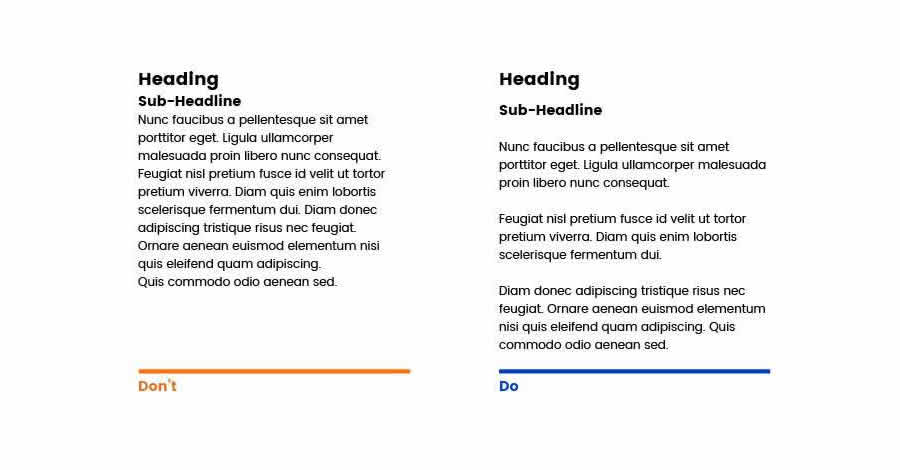
Image comparing amount of white space on 2 screens.

See how the readability improves with the negative space between the paragraphs?

© Anastasia Diachenko, Fair Use

2. Focus and Attention

Negative space helps guide users' attention to and focus on specific elements or sections of a webpage or application. When designers put enough space around important content, they can direct users' eyes to the key information or call-to-action buttons—and doing this helps them make sure that users can quickly—and effortlessly—spot and engage with the most critical elements on the page. Since they're paying attention, the viewer’s eye can achieve a great deal more.
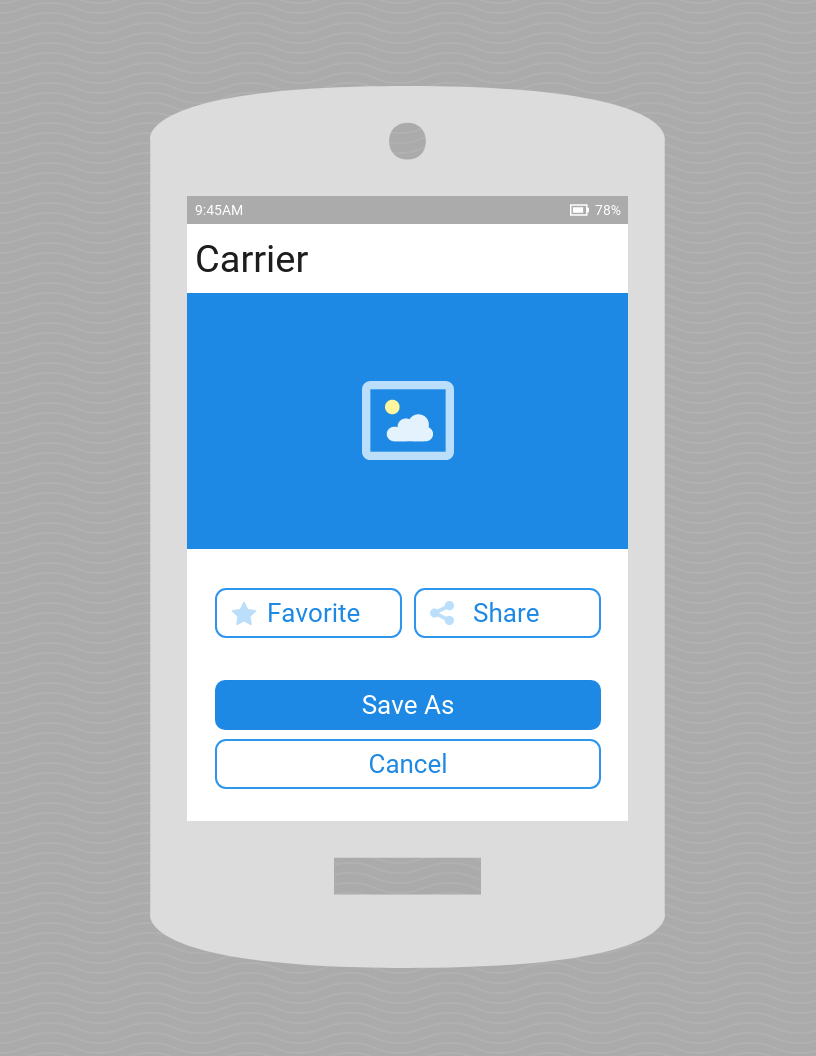
Image of a smartphone screen design highlighting white space use.

The negative space on this mobile app interface design helps users focus on the important parts.

© Joan Ang, Fair Use

3. Clarity and Organization

When designers include negative space in their designs, it really helps bring a sense of organization and clarity home to users. It lets designers separate different sections and elements in each work they make. And this makes the overall layout more visually appealing and easier to navigate for users. 

So, it’s vital to avoid clutter and give sufficient space in an image, space between columns—and space between text and other elements. That way, users can easily find—and understand—the content they’re looking for. 

Screenshot of the Interaction Design Foundation homepage.

The IxDF homepage incorporates negative space—including the main image—to add clarity in a crisp, uncluttered layout.

© Interaction Design Foundation, CC BY-SA 4.0

4. Visual Hierarchy

An important point is how negative space plays such a vital part to establish a visual hierarchy in a design—and designers can use the space strategically to make different levels of emphasis. What’s more, they can draw attention in ways that are appropriate. From doing that, they can guide users through the content and highlight important elements—such as bull’s-eyeing them with sufficient white space around. This helps users very quickly understand the structure of the page and navigate through it far more efficiently. Here, it’s helpful when designers know how users tend to scan screens. That’s typically in an F-pattern when reading content or a Z-pattern.        

Image of a brand screen with download buttons.

Notice how the negative space aids in the Z-pattern of this site’s layout. It helps guide users’ eyes as they scan from left to right at the top, diagonally down and then left to right again at the bottom.

© Aqua, Fair Use

5. Branding and Style    

Another point is that negative space can contribute to the overall branding and style of a website or application. And when designers use white space intentionally, they can bring a real sense of elegance, sophistication and professionalism. Brands like Apple, Mercedes Benz, and IKEA are known for their minimalistic designs. They use negative space effectively and carry a sense of luxury and quality to viewers, users and customers. 

Screenshot of Mercedes Benz homepage

Mercedes Benz’s website features negative space to help cast a luxury brand image.

© Mercedes Benz, Fair Use

How to Apply Negative Space in Web and App Design

Here are some practical tips to effectively apply negative space in interfaces: 

1. Embrace Minimalism

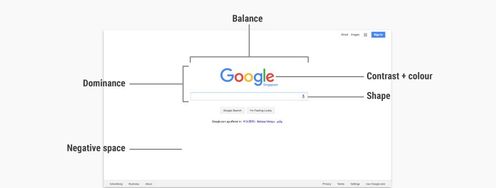
It’s good for designers to embrace the concept of minimalism whenever they work to simplify a design and take out any unnecessary elements or clutter. When they do this, it lets negative space take center stage and create a clean and uncluttered interface. It might sound counterintuitive to make “nothing” so important—given that it seems to imply lack of design effort. Even so, it’s a vital skill—as well as an antidote to excessive design or horror vacui. One might think of Google’s crisp, calming homepage as a fine example of minimalist—and highly successful—design. 

2. Use Consistent Spacing

Designers should keep the spacing consistent throughout their designs; they'll create a sense of harmony and balance when they do that. This includes the spacing between paragraphs, images and buttons—plus the spacing between other UI elements. Consistency in spacing like this helps users build up a mental model of the interface that's in front of them. And it’s something that makes it easier for them to navigate and interact with the content. What's more, that evenness really establishes a calming sense of order—one that helps them build a good sense of trust in the brand. 

3. Prioritize Content with Negative Space

Designers should use negative space strategically—so they prioritize and highlight important content or elements. And when they put more space around crucial information or call-to-action buttons, they can draw users' attention. And then—moving on from there—designers can guide their brand's users towards desired actions. 

Image showing how negative space prioritizes content.

Prioritize the content with the help of negative space. Here, you see where the party’s at and what to do to get to it, right away.

© Common Ninja, Fair Use

4. Experiment with Micro and Macro Negative Space

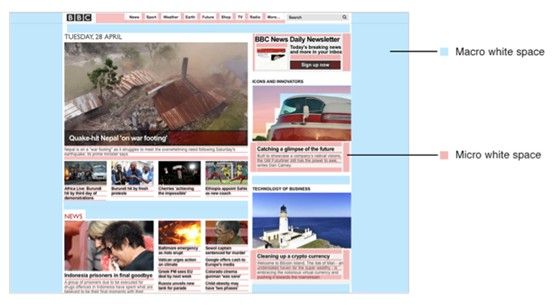
Understand the distinction between micro and macro negative space and experiment with both types in a design. Micro negative space is all about the small gaps within elements—like line spacing and margins. Macro negative space, though, refers to the larger space between major layout elements. When designers balance both types effectively, they can achieve something powerful—and make a visually appealing and organized layout. 
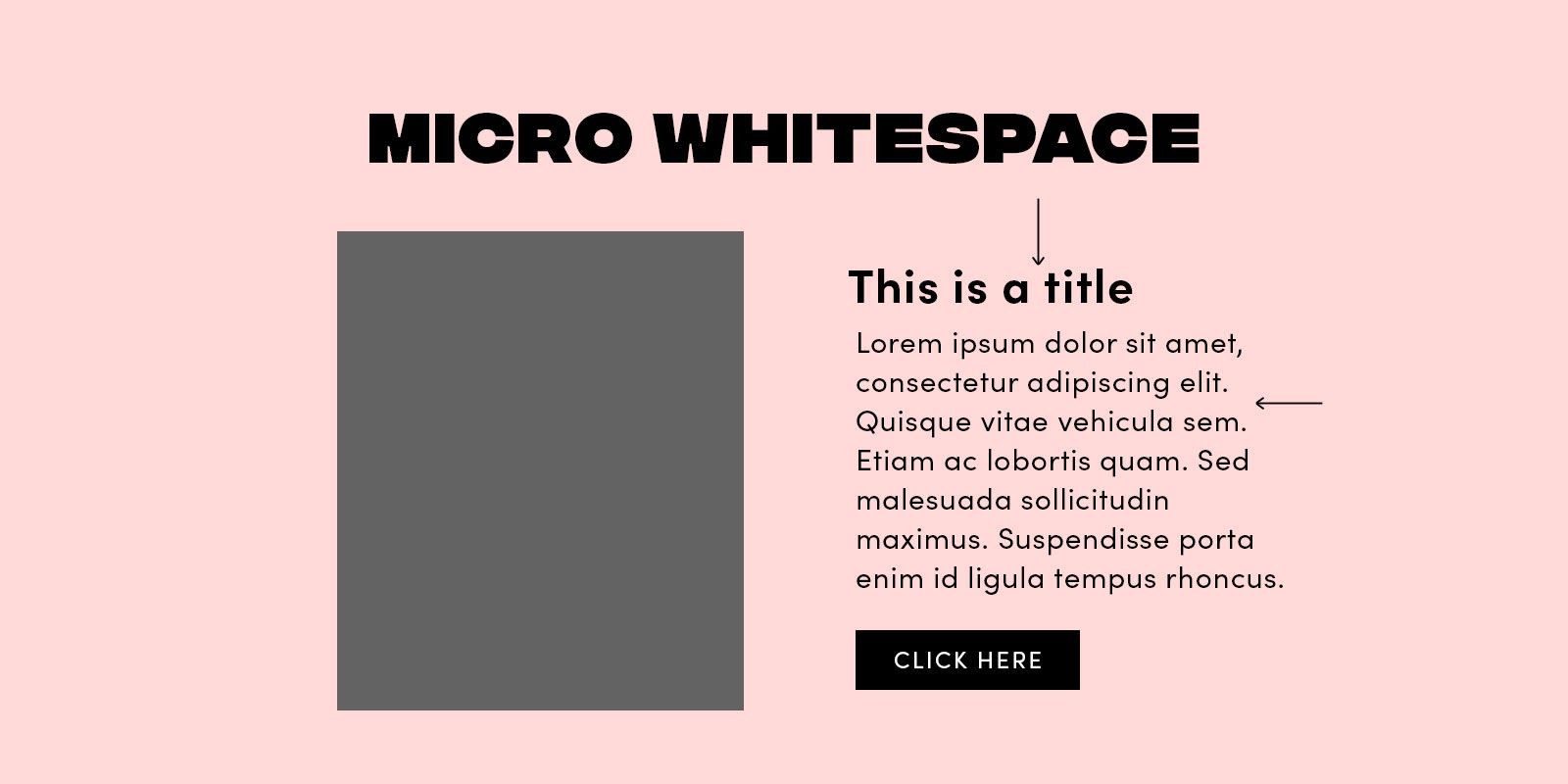
Image showing micro white space on a screen design.

The micro part of negative space, here called 'whitespace'.

© Stephanie Corrigan, Fair Use
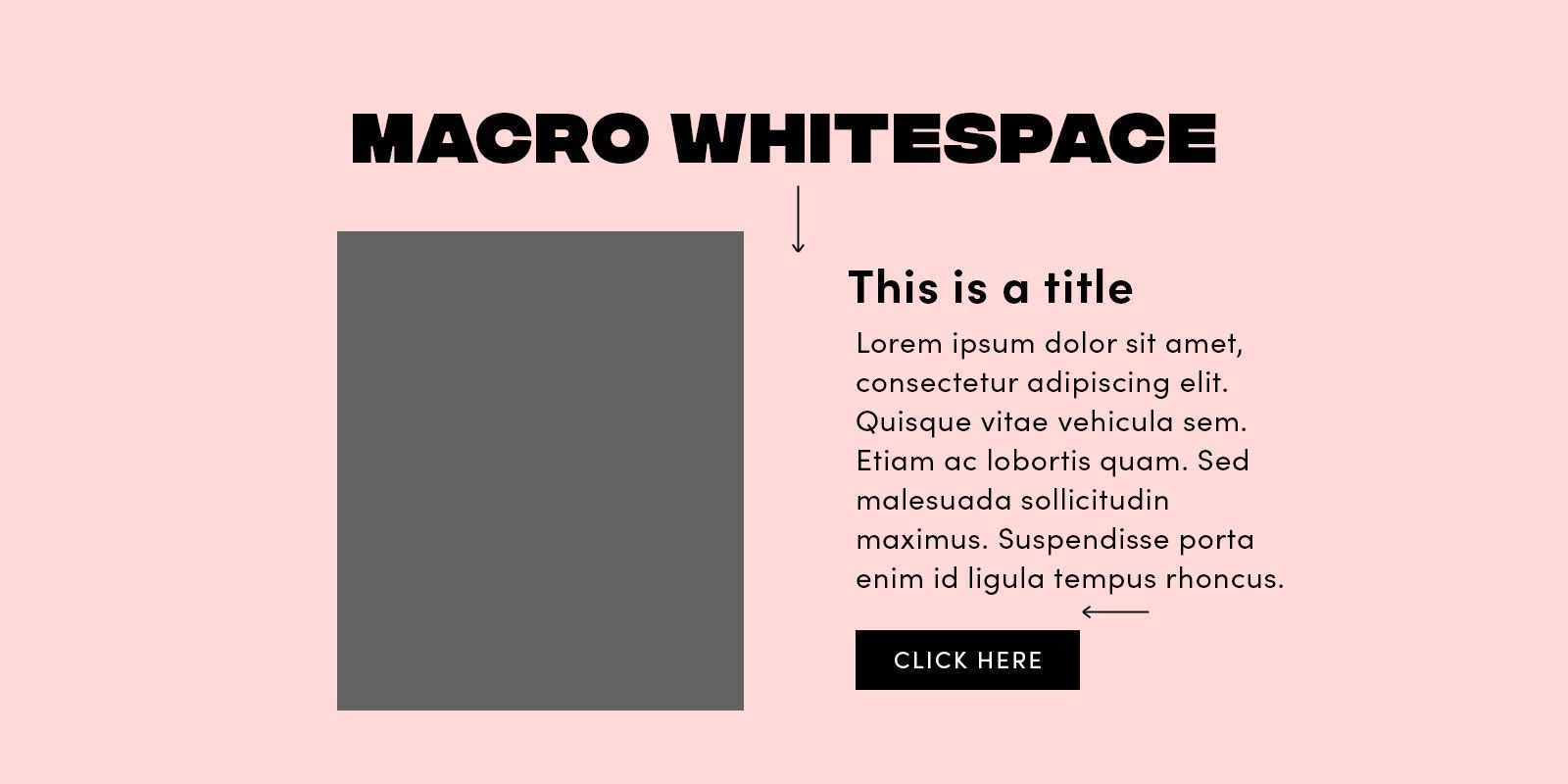
Image showing macro white space on a screen design.

The macro part of negative space, here called 'whitespace'.

© Stephanie Corrigan, Fair Use

5. Maintain Balance

Negative space is essential, but one vital thing to do is strike the right balance with it. Too much of it may make the design feel extremely empty. Too little, though, and it can make things look cluttered and overwhelming—and so probably won’t speak so well for the brand, either. So, it's best to aim for a truly harmonious balance—and one that really lets the content breathe while keeping a visually pleasing composition. 

Image comparing amount of white space on 2 screens.

Sometimes, it’s easier to spot when there’s too much negative space.

© Pineapple, Fair Use

6. Remember, Negative Space can Take Many Forms

Remember, negative space can even be an image that a designer works into their product design’s interface. It's important, then, to make sure it’s not “busy”-looking—and keep it in step with the brand message. That’s what designers want to resonate from their brand to their visitors, users, and—hopefully—customers after making that conversion. 

Image of Rubin vase showing negative and positive space.

In the famous Rubin vase, one can switch out the positive and negative space to see one of two scenes: a white vase on a (negative space) black background, or two faces on a (negative space) white background.

© Connor Turnbull, Fair Use

Another important point to understand is negative space’s role in the Gestalt design principles. These Gestalt principles—or laws—are vital parts of a designer’s toolbox. They include the principles of figure-ground, closure and common fate—to name just a few. They involve the role of negative space to make the “magic” truly work in web design and more. 

Transcript
 

7. Remember to Test

Ultimately, user tests will show how effective the negative space in one's designer work is. Such techniques as eye tracking can show a great deal about how negative space works to make an interface usable, desirable—and more. 

Examples of Effective Use of Negative Space

Brands that effectively utilize negative space in their interfaces include: 

1. Apple

Apple is famous for its clean and minimalist design aesthetic. Their use of ample negative space really delivers a sense of elegance and sophistication. And it emphasizes how important their products and brand really are. The space around their products on their website really lets the user focus just on the product—and it’s something that enhances the overall user experience. 

Screenshot of Apple's home page.

Apple’s homepage features generous amounts of negative space.

© Apple, Fair Use

2. Medium

Medium is a platform that prioritizes readability and user experience. And their use of negative space between paragraphs and around images makes a really visually appealing and easy-to-read layout. The generous spacing there lets users focus on the content and not feel overwhelmed at all. 

Screenshot of Medium's home page.

Medium’s use of negative space here is golden.

© Medium, Fair Use

3. Google

Google's homepage is a prime example of a really effective use of negative space—and the simplicity and minimalism of their design features ample white space that’s all around the search bar. It’s something that creates a calm and focused user experience. Users can—very—easily find the search bar and enter their query without any distractions. 

Screenshot of Google's Homepage

Google’s iconic homepage features perhaps the ultimate use of minimalist negative space design.

© Google, Fair Use

Overall, remember that negative space is one of the most powerful design tools that any designer can use. It’s there to complement the positive space they include as focal points—and strategically so. What's more, it’s a big part of the product experience—and it’s one that no designer should underestimate but—instead—use with care and an eye for strategy.  

Questions About Negative Space?
We've Got Answers!

Why is negative space important in design?

Negative space—or white space—is vital in design for several reasons: 

Visual Clarity: 

Negative space helps provide visual clarity and organization in your designs. It separates different elements—and makes it easier for the users to understand the content and the relationships between the elements you include on, for example, a web page. 

Readability: 

Adequate space around text and other content is something that improves readability. It keeps text from looking crowded. And that makes it easier for the users to absorb information as they're paying attention that much more. It’s especially helpful on mobile devices where the screen real estate is at a real premium. What’s more, vertical white space between lines of text is important, too—particularly so for longer lines. Otherwise—if it’s not there—users can find it tough to find where the start of the next line is. 

Emphasis: 

You can use negative space strategically to draw users’ attention to specific elements—it’s a handy tool for that. And when you surround an element with white space, you can make it really stand out and create a focal point. 

Aesthetics: 

When you include negative space—and the right amount of it—it contributes to the overall aesthetics and visual design—whether that’s on a mobile app or in website design. Along with such factors as typeface and font size, it can make your designs appear more elegant, clean—and visually appealing. 

Reducing Cognitive Load: 

When a design is too cluttered, it raises the amount of cognitive load on the viewer. When you include the right amount of empty space, you lighten this load as you provide breathing room. That makes it far less overwhelming for users. 

Mobile Responsiveness: 

Negative or white space is a vital ingredient for responsive web design. It lets content adapt to different screen sizes—and because of that, it makes for a good user experience on various devices. 

Brand Identity: 

White space doesn't just improve the user experience—it’s something that, featured well and consistently, helps nurture trust between the user and your brand, too. 

Balance and Harmony: 

Negative space contributes a great deal to the balance and harmony of a design. It lets you distribute elements evenly—and so it brings home a nice sense of equilibrium. 

Good user experience (UX) design: 

Negative space is a critical ingredient for creating user-friendly interfaces. It helps keep accidental clicks or taps on touch devices from happening—what’s more, it improves navigation. 

Psychological Impact: 

Negative space can make for a big positive perception of a design from a user—and their impression of it. A clean and uncluttered layout can build up a sense of professionalism and trustworthiness in users. White space—a long-used tool in graphic design—isn't just the absence of content—it's a time-tested, valuable and purposeful element in good UX design as well. So, use it with a sharp eye for strategy—to improve aesthetics, functionality and the overall user experience. And when it comes to usability tests, you'll find it's a really valuable tool in your design process. 

Is it "white space" or "whitespace"?

Both "white space" and "whitespace" are common spellings—and both are considered correct depending on the context. 


In typography, "white space" is the more common use to refer to the empty space between characters and lines of text. In computer programming, "whitespace" is in more common use to refer to any character or series of characters that represent horizontal or vertical space. 


Still, it's always a good idea to check the specific guidelines for the context in which you are writing. You can also use the term “negative space” to refer to “white space” and “whitespace”. 

What is positive and negative space in design?

Positive and negative space are design concepts—and they refer to the relationship between the subject of a piece of art or design and the space around it. 

Positive space is the area that contains the subject or areas of interest in a work of art or design. It could be—for example—a person's face in a portrait or the objects in a still life painting. 

Negative space—also called white space—is the area around the subject or areas of interest. It’s the empty space that surrounds the design elements you include in filling the frame of an image. 

Negative and positive space in art are vital components in creating visually appealing pieces of artwork.  

In user interface (UI) design, you use positive and negative space to create a sense of balance, rhythm and harmony in your compositions. And from manipulating the amount of positive and negative space in a design, you can create different moods and emotions in the viewer. For example, minimalist designs with negative space often communicate calm and soothing feelings—meanwhile, designs with more positive space can carry senses of energy and excitement to users. 

What are some highly cited pieces of research about negative space?

Here are some highly cited academic works related to the subject of negative space, or white space, in user experience design and user interface design: 
 
1.  Coursaris, C. & Kripintris, K. (2012). "Web Aesthetics and Usability: An Empirical Study of the Effects of White Space". This study provides valuable insights into the use of white space in web design and its impact on user experience. 

 2. Wang, Y., Zong, S., Zong, S. & Wang, Y. (2008). "White space design and its application for website interface". The article discusses the importance of white space in creating a clean and uncluttered design—and provides examples of how to use white space to enhance the user experience. The authors also discuss the challenges of using white space in website design, including the need to balance white space with content and the importance of considering cultural differences.  

 3. Cheng, F. (2017) "The Impact of White Space on User Experience for Tablet Editions of Magazines”. This thesis explores the impact of white space on user experience for tablet editions of magazines. It includes references to several academic works related to white space in user experience design. 

1. White Space Is Not Your Enemy by Kim Golombisky and Rebecca Hagen 

This book’s specifically dedicated to design principles—including the use of white space. It's suitable for both beginners and experienced designers, offering practical advice on layout and composition. 

2. Layout Essentials: 100 Design Principles for Using Grids by Beth Tondreau 

Grids and layout are closely tied to the effective use of white space. This book delves into the principles of layout design—and gives insights into how to structure content for optimal visual appeal. 

3. The Non-Designer's Design Book by Robin Williams 

Williams' book is a friendly guide for non-designers, covering fundamental design principles. It includes discussions on white space and its role in creating well-balanced and visually pleasing designs. 

Earn a Gift Earn a Gift, Answer a Short Quiz!

1
2
3
4
1
2
3
4
Question 1
Question 2
Question 3
Get Your Gift
Interaction Design Foundation logo

Question 1

What best defines negative space in design?

1 point towards your gift

  • The area intentionally left blank between and around design elements.
  • The dark shadows in a product's imagery.
  • The unused space within a product's code.
Interaction Design Foundation logo

Question 2

How does adequate negative space impact a design's readability and comprehension?

1 point towards your gift

  • It distracts users from important content.
  • It highlights key elements and reduces clutter.
  • It increases cognitive load for the end user.
Interaction Design Foundation logo

Question 3

Which design practice uses negative space to convey meaning through simple yet effective visual language?

1 point towards your gift

  • Brutalism
  • Minimalism
  • Skeuomorphism

Learn More About Negative Space

Make learning as easy as watching Netflix: Learn more about Negative Space by taking the online IxDF Course Visual Design: The Ultimate Guide.

Why? Because design skills make you valuable. In any job. Any industry.

In This Course, You'll

  • Get excited when you use visual design principles to create impressive visuals people love! Great visual design makes the message clear, memorable, and persuasive—whether it's an app, a logo, or a presentation slide. You'll learn what makes a design excellent and how science and culture influence what works and what doesn't. You'll create designs that truly connect with people. Visual design isn't just about beauty—it's about shaping ideas that inspire action, build trust, and give meaning to your work. As AI makes visual production faster and cheaper, you stay in demand when you can turn rough or AI-generated visuals into successful designs that get approved, adopted, and used. If you want to stand out with timeless human-centered design skills, this course is for you.

  • Make yourself invaluable with practical design skills that amplify your impact in any industry! Did you know that you only have 50 milliseconds to make a good first impression? Great visual design ensures you pass the test every time. You'll learn to use visual elements to guide emotions, influence purchasing decisions, and optimize User Experience (UX) and User Interface (UI) design. You'll master color theory, typography, and grid systems to improve usability, build credibility, and create designs that stop the scroll.

  • Gain confidence and credibility as you fast-track results with step-by-step exercises and downloadable templates! Complete optional tasks to walk away with portfolio-ready case studies that will help you land your dream job and advance your career. You'll get hands-on and design a low-fidelity wireframe, apply a monochromatic, complementary, or triadic color scheme, choose typefaces, and select a grid system. It's easier than you think! No matter your background, you can master Visual Design. With clear guidance and real-world examples, you'll apply your skills right away. This course will give you the visual design skills you need to solve design challenges, collaborate smarter, and make it easy for decision-makers to say yes to your vision.

It's Easy to Fast-Track Your Career with the World's Best Experts

Master complex skills effortlessly with proven best practices and toolkits directly from the world's top design experts. Meet your experts for this course:

  • Mia Cinelli: Associate Professor of Art Studio and Digital Design at the University of Kentucky.

  • Joann Eckstut: Color Consultant, Founder of The Roomworks, and one of the 12 designers chosen by the Color Association of the USA to create the yearly forecast used by industries to keep up with color trends.

  • Arielle Eckstut: Author, Agent-at-large at the Levine Greenberg Rostan Literary Agency, and Co-Founder of The Book Doctors and LittleMissMatched.

Get an Industry-Recognized IxDF Course Certificate

Increase your credibility, salary potential and job opportunities by showing credible evidence of your skills.

IxDF Course Certificates set the industry gold standard. Add them to your LinkedIn profile, resumé, and job applications.

Course Certificate Example

Be in distinguished company, alongside industry leaders who train their teams with the IxDF and trust IxDF Course Certificates.

Our clients: IBM, HP, Adobe, GE, Accenture, Allianz, Phillips, Deezer, Capgemin, Mcafee, SAP, Telenor, Cigna, British Parliament, State of New York

All Free IxDF Articles on Negative Space

Read full article
The Power of White Space in Design - Article hero image
Interaction Design Foundation logo

The Power of White Space in Design

We want to show you a tool so vital that it may amaze you as a designer. It’s as underrated as silence between musical notes. However, it’s powerful enough to mean keeping people on your page – survival, in other words.Many elements form the layout and structure of an interactive design. Often negle

Social shares
1.2k
Published
Read Article
Read full article
Horror Vacui: The Fear of Emptiness - Article hero image
Interaction Design Foundation logo

Horror Vacui: The Fear of Emptiness

Our next article is all about a scary-looking subject in that its title may look ominous. Fear not! It covers a concept that will seem familiarvery quickly. Of course, having a better understanding of it will let you work its antidote into your designs with confidence.Horror Vacui — the fear of not

Social shares
855
Published
Read Article
Read full article
The Key Elements & Principles of Visual Design - Article hero image
Interaction Design Foundation logo

The Key Elements & Principles of Visual Design

Visual design is about creating and making the general aesthetics of a product consistent. To create the aesthetic style of a website or app, we work with fundamental elements of visual design, arranging them according to principles of design. These elements and principles together form the building

Social shares
1.4k
Published
Read Article
Read full article
How to Improve Your UX with HCI Insights - Article hero image
Interaction Design Foundation logo

How to Improve Your UX with HCI Insights

Design plays a role that’s utterly crucial in our daily lives—it bridges functionality with aesthetics to meet user needs. In product development, it’s design that determines how user-friendly and appealing a product is. The field of human-computer interaction (HCI) is foundational to UX design. To

Social shares
578
Published
Read Article

The Power of White Space in Design

The Power of White Space in Design

We want to show you a tool so vital that it may amaze you as a designer. It’s as underrated as silence between musical notes. However, it’s powerful enough to mean keeping people on your page – survival, in other words.

Many elements form the layout and structure of an interactive design. Often neglected, one of the most vital is white space (or negative space), the space found inside and surrounding the other design elements.

For a website or app, many different visual elements make up the layout. These include typography, drawn lines, icons, images, etc. Imagine a painting; these parts are the painted bits. However, what do they all need to form that painting? They need a canvas! White space is like a canvas: it’s the background that holds the elements together in a design, enabling them to stand out.

Let’s see why designing the white space is so important.

What is White Space?

White space is the area between design elements. It is also the space within individual design elements, including the space between typography glyphs (readable characters).

Despite its name, white space does not need to be white. It can be any color, texture, pattern, or even a background image.

White space can cause problems between designers and clients. Design theory promotes the use of white space for elegance and ensuring a quality user experience. Sadly, many clients and managers consider white space wasted space. They think it could be used to house more information or other visual elements.

On the contrary, white space is a great tool to balance design elements and better organize content to improve the visual communication experience. If you were a technical writer in charge of composing hundreds of manuals for a kitchen appliance company, you would work to find a superb balance of words and images. Few people read manuals for pleasure; it is then crucial to hold the readers’ attention! For that, the white space is the real star of the show, working between the words and the pictures. It keeps each page from looking busy. Instead of calling the helpline, readers will digest the troubleshooting advice.

People get frustrated when information bombards them. We’re humans, not machines. White space calms us, letting us “breathe”.

As with the other user interface elements, you as a designer need to understand the role white space plays and experiment to find the right balance between it and the rest of the elements.

Micro vs. Macro White Space

White space is commonly categorized based on the density of micro white space and its relationship to macro white space. We’re talking about ratios and proportions.

Micro White Space

We call the small space between design elements micro white space. You can find it between lines and paragraphs. It includes the space between grid images and that used to separate menu links.

Micro white space has a direct impact on content legibility. For example, marginal white space surrounding paragraphs affects the user’s reading speed and comprehension. If text appears in margins outside regular paragraphs, people read it more slowly. They find it harder to understand than text without such margins.

Macro White Space

Macro white space is the large space between major layout elements, and the space surrounding the design layout. You’ll find macro white space to the right and the left of most websites’ content, and in the space between a website’s content blocks.

Unlike micro white space, macro white space acts as a container of the overall design. It’s “big picture” white space – easier to notice. Probably the best example of a website that implements macro white space intensively (and effectively) is the homepage of Google.com. Google’s iconic look is beautifully simple, but did you notice something else? That simplicity is also calming. Because there’s no clutter, there’s less work for your eyes and mind. You can focus on the reason you’re there: to search for something!

There’s a great story behind why Google ended up this way. Google.com was one of the first websites to make extensive use of white space. When they started out, Internet connections were far slower. Participants in user tests would wait for the page to download despite everything already being on screen. They were not used to seeing so much white space! From these user tests, designers at Google decided to add the copyright notice at the bottom of the page for users to know that the page was fully loaded.

So, What Determines Which White Space You Should Use?

The use of both macro and micro spaces depends on the following factors:

Content - With more information in the layout, fewer amounts of macro white space will be available. In contrast, the volume of micro white space will increase. This compromise is vital; otherwise, pages would be solid chunks of data: extremely difficult to read! For example, Boulton (2007) describes how news websites tend to depend on micro white space to provide an effective legible experience for users. Users’ reading comfort is crucial.

Design - The user interface design influences the ratio between micro and macro white spaces in the layout. The designer chooses the design style. This can bias the layout to one type of white space over another.

UserUser research (including demographic information) can be used to determine the right balance of macro and micro white spaces for that specific audience. There is no “rule of thumb” to apply consistently between audiences. As always in user experience, we need to check with the target users of our product or service.

Branding message – Using white space can suggest a company’s budget and thus the quality of the product. Think of the branding for companies such as Apple, Mercedes Benz, and IKEA. How do they support this theory?

The image below shows both macro and micro white spaces on an old page of the BBC news website. Mirroring paper newspapers, news websites tend to make scarce use of white space. Instead, they show their credibility through this high quantity of content on the page. They reflect how “happening” our world is!

Active vs. Passive: Another Way to Approach the Usefulness of White Space

Besides the differentiation between micro and macro white space, you can also look at white space as being active or passive.

Active white space - the white space used to enhance page structure and help guide the user through the page’s content.

Passive white space – applied to improve the aesthetics of the layout without guiding the user through a specific reading, flow, or content order. For example, the white space between font glyphs and paragraph lines functions in this way (Boulton, 2007).

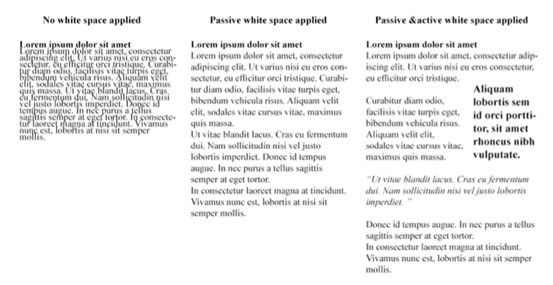
The image above shows the difference between text with no white space applied, passive white space applied, as well as both passive and active white spaces applied:

  • On the left side of the image, the text doesn’t have any real amount of white space between characters, rows, paragraphs, etc. We notice straightaway that the lack of white space makes the text crushed and compressed. It’s very tough to read.

  • In the central example, we’ve added some passive (and micro) white space. Do you notice how much easier you can read it than the first?

  • Moving to the right-hand-side example, we’ve added some active white space to guide ourselves through the text. Happily, that hard “wall of text” we first saw has become something laid out in a format we’re used to. White space may enhance the overall readability and flow of the text, but we also need it for the sake of our eyes and sanity!

Three Elements to Consider When Designing Negative Space

Legibility

As we saw, micro white space is essential for making interface content legible. As a designer, you should consider white space when choosing the design typography specifications, such as font, size, color, style, leading, kerning, and tracking. Remember the image from the previous page? Changing the white space layout affects reading performance and overall user experience. Happy readers are far more likely to stay on your page.

Design Tone and Branding

White space contributes to the tone of the overall design. Websites with larger amounts of macro white space may reflect minimalism and luxury. Websites with smaller amounts of macro white space may come across as informative, as is the case with news websites (Kyrnin, 2015).

Note: these indications aren’t “set in stone”. It’s always best to test the use of white space on your users. Only they can tell you how they perceive your designs.

Focus and Attention

White space can help guide the user through interactive content. It may help to build focal points and direct the user’s attention to specific layout parts.

Part of the strategic planning for a website is giving priority to specific elements or content. You can use many visual methods to spotlight specific elements; one is to play with the amounts of white space around these focal points. The branding and print industries apply this theory to draw attention to brand messages.

The Take-away

White space (negative space) is the area between design elements. It's another tool for designers to design for the user experience (UX). Remember that white space is not necessarily white; it’s just the name to indicate spaces where there are neither user interface (UI) elements nor specific content.

As a designer, you can introduce white space based on four main factors:

  • Content,

  • Design,

  • user and

  • brand

Use macro white space to organize content in the layout and direct the user through the blocks of content shown. Use micro white space inside the design element features as seen in the text, images and content blocks.

We can also approach white space as being passive or active. Passive white space does not have a specific role in the design other than facilitating the user experience. It is all about being easier to read. Active white space guides the focus and attention of users. It is more about standing out and making a statement.

References & Where to Learn More

Many articles exist online about white space and its relevance in design. The following is a list of articles where you can delve into the power and usage of negative space.

Boag, P. (2011, February 15) Why White Space Matters. Boag World. [2014, June 20]

Boulton, M. (2007).Whitespace. A List Apart. [2015, April]

Kollin, Z. UX Myths.Myth #28:White Space Is Wasted Space. [2014, June 20]

Kyrnin, J. The Importance of White Space in Web Designs. Web Design Basics. [2014, June 20]

Turnbull, C. Using White Space (or Negative Space) in Your Designs. Web Design Tuts Plus. [2014, June 20]

Hero Image: Author/Copyright holder: Julia Kay. Copyright terms and licence: CC BY 2.0

Feel Stuck?
Want Better Job Options?

AI is replacing jobs everywhere, yet design jobs are booming with a projected 45% job growth. With design skills, you can create products and services people love. More love means more impact and greater salary potential.

At IxDF, we help you from your first course to your next job, all in one place.

See How Design Skills Turn Into Job Options
Privacy Settings
By using this site, you accept our Cookie Policy and Terms of Use.
Customize
Accept all

Be the One Who Inspires

People remember who shares great ideas.

Share on:

Academic Credibility — On Autopilot

Don't waste time googling citation formats. Just copy, paste and look legit in seconds.