Your constantly-updated definition of Grid Systems and collection of videos and articles. Be a conversation starter: Share this page and inspire others!
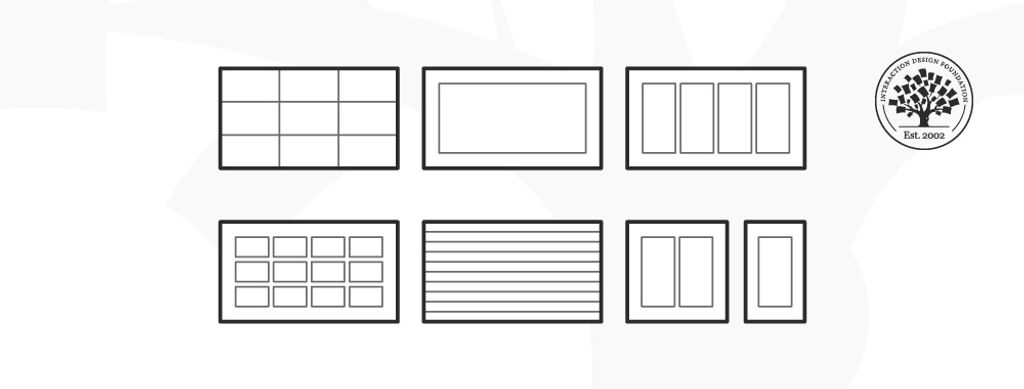
Grid systems are aids designers use to build designs, arrange information and make consistent user experiences. They include rule of thirds, golden section, single-column, multi-column, modular, baseline and responsive grid systems. For example, responsive adapts content to screen size and orientation, for consistency.
“One must learn how to use the grid; it is an art that requires practice.”
― Josef Müller-Brockmann, Graphic designer, author, educator and International Typographic Style pioneer
See why grid systems are invaluable aids.
Grids provide Stability, Consistency and Familiarity
For centuries, grids have played a vital role in displaying information optimally. From publishing to graphic design and UI design, grids remain extremely useful for helping organize design elements best. Low-tech and inexpensive, they’re also essential to keeping users happy and securing their trust for designers’ brands.
In visual design, a grid system helps you align screen elements based on sequenced columns and rows. Like making a map, you apply the column-based structure of a grid system to guide your design, structuring your text, images and functions consistently throughout it so they can appear instantly recognizable elsewhere. A reassuringly varied selection of grid systems exists. The key is to pick the right one for the right project.
Rule of Thirds – This grid system splits content evenly into thirds, horizontally and vertically. You put your design elements at the intersection of those dividing lines or along one of the lines. Used effectively in (e.g.) cinema, it’s a tried-and-tested way to catch users’ eyes and access them in familiar visual terms.
The Golden Section – Or The Golden Ratio, it’s a long-established mathematical ratio used by artists and architects for over 2,000 years. Its formula is: Side A is to side B as side B is to sides A+B, which equates to a ratio of 1:1.618. Featuring frequently in nature, the golden section can please users’ eyes with organic and natural-looking design compositions.
Single-Column – The simplest grid, it comprises a single column of text surrounded by margins. It’s the default for new documents in page layout programs, and typically appears in books where single columns of text appear in spreads (facing pages).
Multi-Column – These grids provide flexible formats for publications with a complex hierarchy or that integrate text and illustrations. The more columns you create, the more flexible your grid becomes. You can use the grid to articulate the hierarchy of the publication by creating zones for different kinds of content. A text or image can occupy a single column, or span several. Not all the space has to be filled.
Modular – This type has consistent horizontal divisions from top to bottom as well as vertical divisions from left to right. These modules govern the placement and cropping of pictures and text. You split the page into several columns according to the content. Then, you divide the page from top to bottom in several rows. This combination assures continuity throughout the design. You can enhance the clarity of your message by how you place text on the grid. The modular grid offers infinite ways of doing this, although it takes some learning to use it best.
Baseline – This grid system comprises horizontal guidelines that govern the entire document. Baseline grids help you anchor all (or nearly all) layout elements to a common rhythm. To make one, choose the type size and leading of your text: e.g., 10-pt Scala Pro with 12 pts leading (10/12). Avoid auto leading; you can work with whole numbers that multiply and divide cleanly, then. Use this line space increment to set the baseline grid in your document preferences.
Responsive – This grid system adapts to screen size and orientation, ensuring consistency across layouts. Responsive grids typically comprise three elements: columns (areas that the content occupies), gutters (gaps between columns) and margins (spaces that add padding between the page contents and the viewport edges). The configuration of columns, gutters and margins changes depending on the screen’s width. A breakpoint is the range of predetermined screen sizes that have specific layout requirements. At a given breakpoint range, the layout adjusts to match the screen size and orientation. Each breakpoint range determines the number of columns, and recommended margins and gutters, for each screen size.
Grid systems in graphic design align screen elements based on columns and rows. Designers use these to organize content on a page neatly. They create a consistent and harmonious user experience. These systems include various types like single-column, multi-column, and modular grids. Each type serves a different purpose.
For example, single-column grids are great for simple layouts, while multi-column ones handle complex designs. They help in aligning elements like text, images, and graphics. This makes the design more user-friendly and aesthetically pleasing.
You'll find grid systems helpful if you want to create professional and effective graphic designs.
What is an example of a grid system?
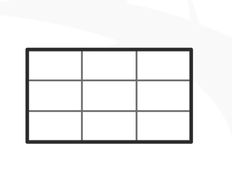
The "Rule of Thirds" is an example of a grid system in graphic design and photography. This grid divides a layout into nine equal parts: two horizontal and two vertical lines. Designers and photographers place the most important elements at the intersections or along these lines. This positioning creates balance and interest in the composition.
The Rule of Thirds guides the viewer’s eye to key parts of the design or photo and makes it more engaging. It's a simple yet effective way to organize content. Designers use this method for its visual appeal and ease of application.
What is a grid system in layout design?
In layout design, a grid system provides a framework of intersecting vertical and horizontal lines. Designers use this framework to place and align text, images, and other elements. This system ensures proper alignment and a structured layout. It makes designs easy to navigate and visually appealing.
Grid systems vary in complexity. They range from simple single-column layouts to complex multi-column arrangements. Grids create a balanced and professional design appearance. They guide the placement of elements to create harmony and order in the overall design. This makes grid systems crucial in layout design.
Why is the grid important in layout design?
Grids streamline the design process and improve the appearance and functionality of the final product. They play a vital role in layout design for several reasons:
Create balance: Grids allow designers to achieve a balanced look. They guide the placement of elements on vertical and horizontal lines. It creates an equilibrium without over-relying on symmetry.
Enhance visual appeal: Grids offer a structured layout that helps guide viewers through the information hierarchy. This structure makes the design visually attractive and user-friendly. Consistent visual frameworks, like the ones described in UX design tutorials, reinforce this point. They emphasize the importance of visual hierarchy in creating a cohesive and engaging layout.
Transcript
Transcript loading ...
Autoscroll
Grids focus the viewer's attention and improve the user interface in design projects.
These systems help designers organize content and create visually pleasing layouts.
What is the definition of a grid?
A grid acts as a structure in design, consisting of intersecting vertical and horizontal lines. Designers use grids to organize text, images, and other elements. This structure ensures alignment and consistent placement across various parts of a layout.
Grids are essential in graphic design, web design, and other design fields. They help designers create balanced, organized, and visually appealing compositions. By employing a grid, designers simplify the design process and achieve a harmonious appearance in the final output.
Where to learn more about grid systems?
For learning about grid systems in design, consider these two resources:
The article How To Use Grid Systems thoroughly examines different grid types. It includes advice from Massimo Vignelli, an Italian designer. You'll find this article helpful if you want to organize your work better.
Visual Design Course covers visual elements, color theory, and typography. It focuses on grid systems, and experts teach the course. They mix theory with practical tasks. You can take this course to improve your design skills and build a portfolio.
These resources offer a practical understanding and application of grid systems in the design work. You can apply this knowledge directly applied to your projects.
Earn a Gift! Answer a Short Quiz at the End of This Page
Earn a Gift, Answer a Short Quiz!
1
2
3
4
1
2
3
4
Question 1
Question 2
Question 3
Get Your Gift
2
3
4
2
3
4
Question 1
Question 2
Question 3
Get Your Gift
3
4
3
4
Question 1
Question 2
Question 3
Get Your Gift
4
4
Question 1
Question 2
Question 3
Get Your Gift
Try Again! IxDF Cheers for You!
0 out of 3 questions answered correctly
Remember, the more you learn about design, the more you make yourself valuable.
Improve your UX / UI Design skills and grow your career! Join IxDF now!
Learn More About Grid Systems
Make learning as easy as watching Netflix: Learn more about Grid Systems by taking the
online IxDF Course Visual Design: The Ultimate Guide.
Why? Because design skills make you valuable. In any job. Any industry.
In This Course, You'll
Get excited to master the timeless principles behind great visual design and move from "This looks nice" to "I know why this design works and how I can bring that to my own work".Research from the University of Basel and Google has shown that people judge a design's visual appeal in as little as 17 to 50 milliseconds, long before they've read a single word. That split-second reaction is formed through our perception of visual elements like composition, contrast, and color, and it's something you can influence.In this course, you'll build a stronger eye for visual design and learn from legends like Ellen Lupton, author of the bestselling book "Thinking with Type". You'll start with the fundamental elements every strong composition relies on: line, shape, negative space, volume, value, color, and texture. From Bauhaus-era paintings to the Beethoven poster (1955) and the live MTA New York subway map (2020), you'll trace the impact of more than 100 years of iconic design, see how itcontinues to shape the visual world, and learn to apply that thinking to your own work. Whether you want to break into visual design or are a senior designer who wants to strengthen your fundamentals, this course gives you timeless, human-centered design skills you'll use for the rest of your career.
Make yourself invaluable when you can identify the invisible structure behind great design: how layouts guide the eye, typography creates tone, color carries meaning, and composition shapes what people notice first. These visual choices shape users' trust, emotion, and actions, which means they influence engagement, conversion, and revenue. AI has made it easier to produce visuals, but also easier to produce bad ones. With a strong foundation in visual design, you'll know the difference between what looks finished and what actually works. In this course, you'll learn practical skills you can apply immediately, like how to pair typefaces, use alignment to direct visual flow, choose color with cultural context and psychology in mind, and use grid systems to organize information across different media. By analyzingreal-world designs, you'll break down what works, what doesn't, and why, so you build the habit of seeing and creating structure in everything. Whether it's websites, decks, apps, physical interfaces, or posters, you'll bring that trained eye to whatever lands on your desk next.
Gain confidence and credibility as you learn to articulate your design decisions without second-guessing yourself. You'll discover how type works, from its anatomy to kerning, leading, tracking, and hierarchy, and know how to talk about itprecisely. You'll also be able to describe color choices in terms of theory, schemes, symbolism, and cultural context. When a client asks why you chose that typeface, color palette, or composition, you'll have a confident and clear answer that connects design choices to user behavior and business outcomes. Instead of saying "I like it" or "something feels off," you'll name the root problem and know how to fix it.
Craft a personal portfolio with optional hands-on activities and downloadable templates. You'll use grid systems, responsive layouts, typographic systems, sketching, journey mapping, and paper prototyping to explore ideas, organize information, and create stronger work across digital and print. By the end, you'll have portfolio pieces that show employers, clients, and collaborators your design expertise and be able to explain every choice with confidence.
Learn From Industry Leaders
Master complex skills with proven best practices and toolkits directly from industry leaders. Meet your experts for this course:
Mia Cinelli: Associate Professor of Art Studio and Digital Design at the University of Kentucky.
Joann Eckstut: Color Consultant, Founder of The Roomworks, and one of the 12 designers chosen by the Color Association of the USA to create the yearly forecast used by industries to keep up with color trends.
Arielle Eckstut: Author, Agent-at-large at the Levine Greenberg Rostan Literary Agency, and Co-Founder of The Book Doctors and LittleMissMatched.
Earn Industry-Recognized Certificates
Industry giants trust our courses to train their teams, and prestigious universities integrate our content into their curricula. Add your certificates to your LinkedIn profile, résumé, and job applications.
Now that we’ve seen some grids at work in the Rule of Thirds article, let’s examine them a little more deeply. As a concept that deals so fundamentally with the fabric and background of our work as designers, it’s easy to overlook the power of grids and think more about the elements we want to creat
You may well have seen the “Rule of Thirds” plenty of times at work in a photograph or image on a website and not even realized it; it’s a well-known (and well-applied!) photography technique that’s been making pictures more captivating for a long time—including making websites have more harmonious
Learn the Role of Perception and Memory in HCI and UX
Have you ever wondered how your brain makes sense of the world? It's a fascinating process! If you want to design helpful products and services that people love, you must first understand how they think. A large part of human interaction relies on perception, our ability to see, hear and feel our su
The Top 4 Things You Can Learn from IxDF’s New Visual Design Course
Users’ first impressions typically form in 50 milliseconds, and visual design plays a substantial role in whether users get a good or a bad one. Good first impressions are essential to engage new users and ensure the success of a product or experience. Studies show that visual appeal—what we see—is
Social shares
634
Published
Read Article
How To Use Grid Systems
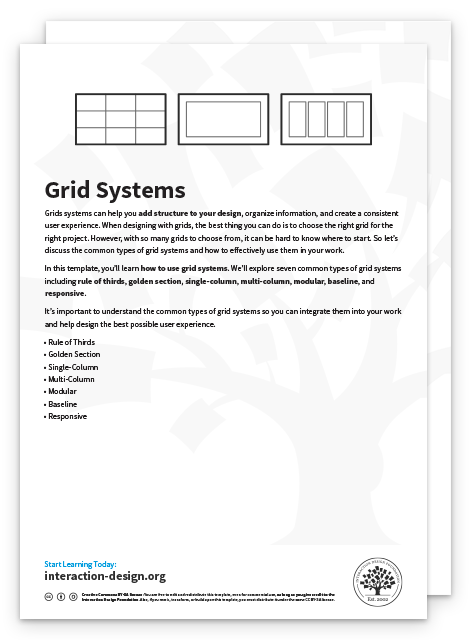
Grids systems can help you add structure to your design, organize information and create a consistent user experience. When designing with grids, the best thing you can do is to choose the right grid for the right project. However, with so many grids to choose from, it can be hard to know where to start. So, let’s discuss the common types of grid systems and how to effectively use them in your work.
In this lesson, you’ll learn how to use grid systems. You’ll also learn how to make a book from Italian designer Massimo Vignelli. We’ll explore seven common types of grid systems including rule of thirds, golden section, single-column, multi-column, modular, baseline and responsive.
It’s important to understand the common types of grid systems so you can integrate them into your work and help design the best possible user experience. Before we start, let’s first watch Italian designer Massimo Vignelli make a book.
Massimo Vignelli Makes Books
Massimo Vignelli’s approach to book design is the subject of a video created by Pentagram, a design firm, for the “What Will You Make Today?” campaign from paper company Mohawk. In the video, Vignelli discusses his use of the grid as the basis for the layout of a book’s pages, using one of his classic book designs for the architect Richard Meier as an example.
“The grid is an integral part of book design, it’s not something that you see. It’s just like underwear: you wear it, but it’s not to be exposed. The grid is the underwear of the book.” — Massimo Vignelli
The interior pages of the book feature the grid of 24 rectangular blocks that Vignelli used as the basis of his layout for the Meier monograph, as you’ll see in the video. Let’s watch.
The rule of thirds is a grid system that divides a composition evenly into thirds, both horizontally and vertically. The design elements are placed at the intersection of those dividing lines, or along one of the lines itself.
Here, we see how the rule of thirds is used as an effective way to elicit emotion and define the relationship between the two characters in Disney Pixar’s Wall-E.
An example of the rule of thirds in effective cinematic action.
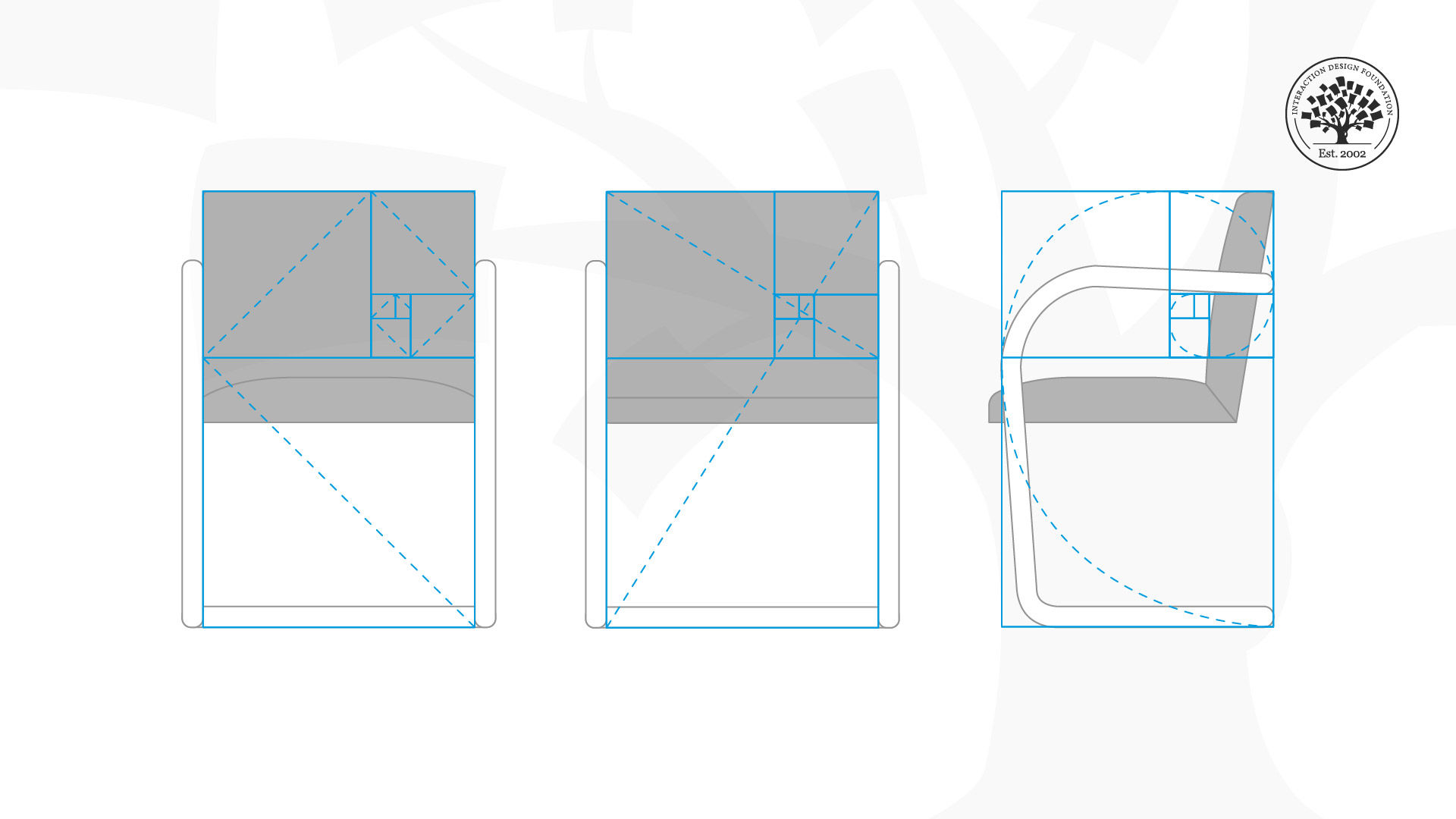
The golden section (also known as the golden ratio) is a mathematical ratio that has been used in art and architecture for more than two thousand years. The formula for the golden section is a : b = b : (a+b). This means that the smaller of two elements (such as the shorter sides of a rectangle) relates to the larger element (i.e., the longer sides) in the same way that the larger element relates to the two parts combined. In other words, side a is to side b as side b is to the sum of both sides. Expressed numerically, the ratio for the golden section is 1 : 1.618.
The golden section is commonly found in nature, and when used in a design, it fosters organic and natural-looking compositions that are aesthetically pleasing to the eye.
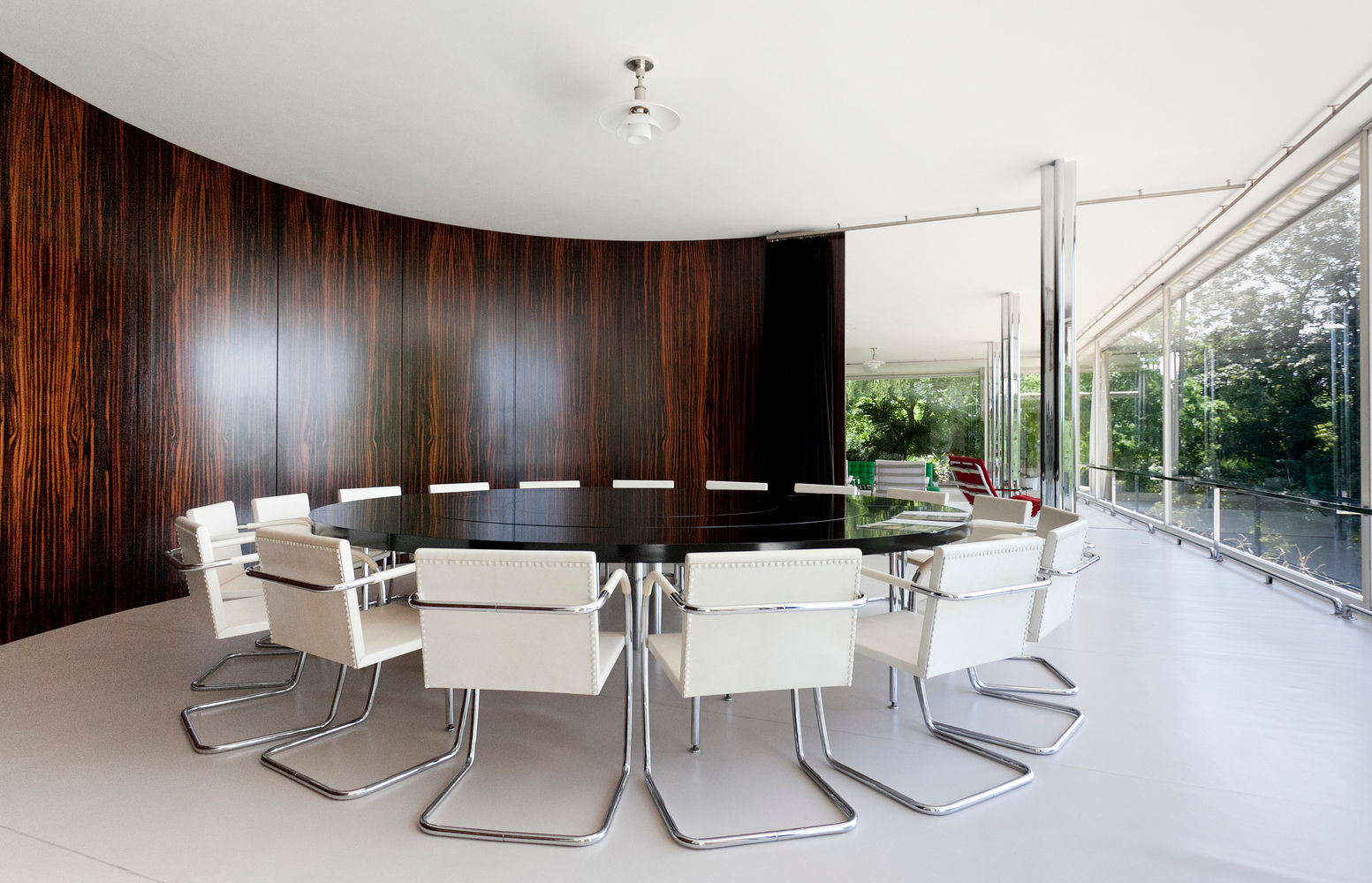
The use of the golden rule is evident in the Brno Chair designed by Ludwig Mies van der Rohe. The chair was named after the town of Brno (in the Czech Republic) where the Tugendhat family, who commissioned the chair, lived. The Tugendhat house had a large dining room and table that could seat 24. The family needed a set of compact chairs that could fit neatly under the dining table. The Brno chair was designed for this purpose with a low sweep of the arms and compact form to fit neatly under the table.
A set of Brno Chairs, designed by Ludwig Mies van der Rohe in 1930. The chairs are neatly positioned around a table in the Villa Tugendhat.
The front view of the chair and side view fit neatly into the golden section rectangle. The angle of the front legs and chair back are symmetrical, and the radii of the curves are in 1:3 proportion.
A practical, comfortable and neat example of the golden section.
The simplest grid consists of a single column of text surrounded by margins. Essentially, every time you open a new document in a page layout program, you are prompted to create a single column grid.
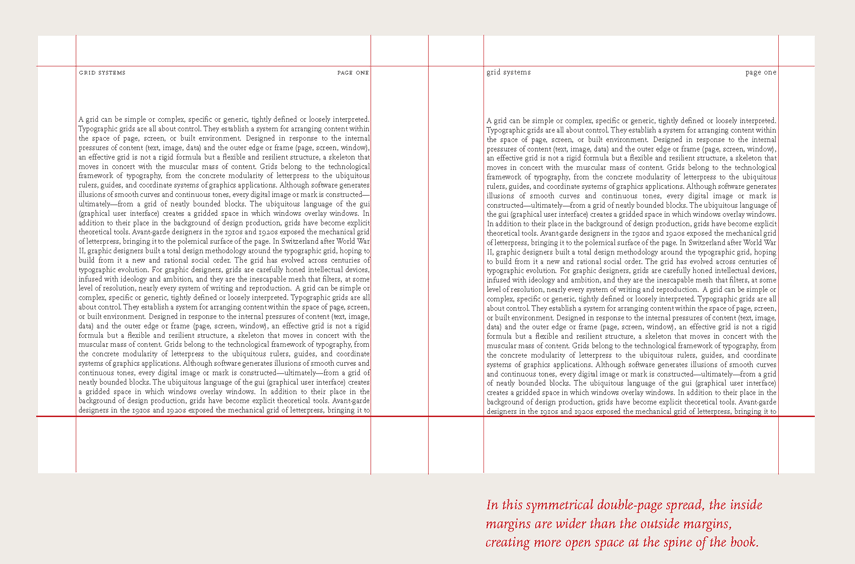
Here, we see the use of a single-column grid in a traditional book design by Ellen Lupton. Often, books and magazines are designed in spreads (facing pages) with a single column of text.
An example of a single-column grid — when a book is bound, the inside margins naturally get “pulled” into the spine a little.
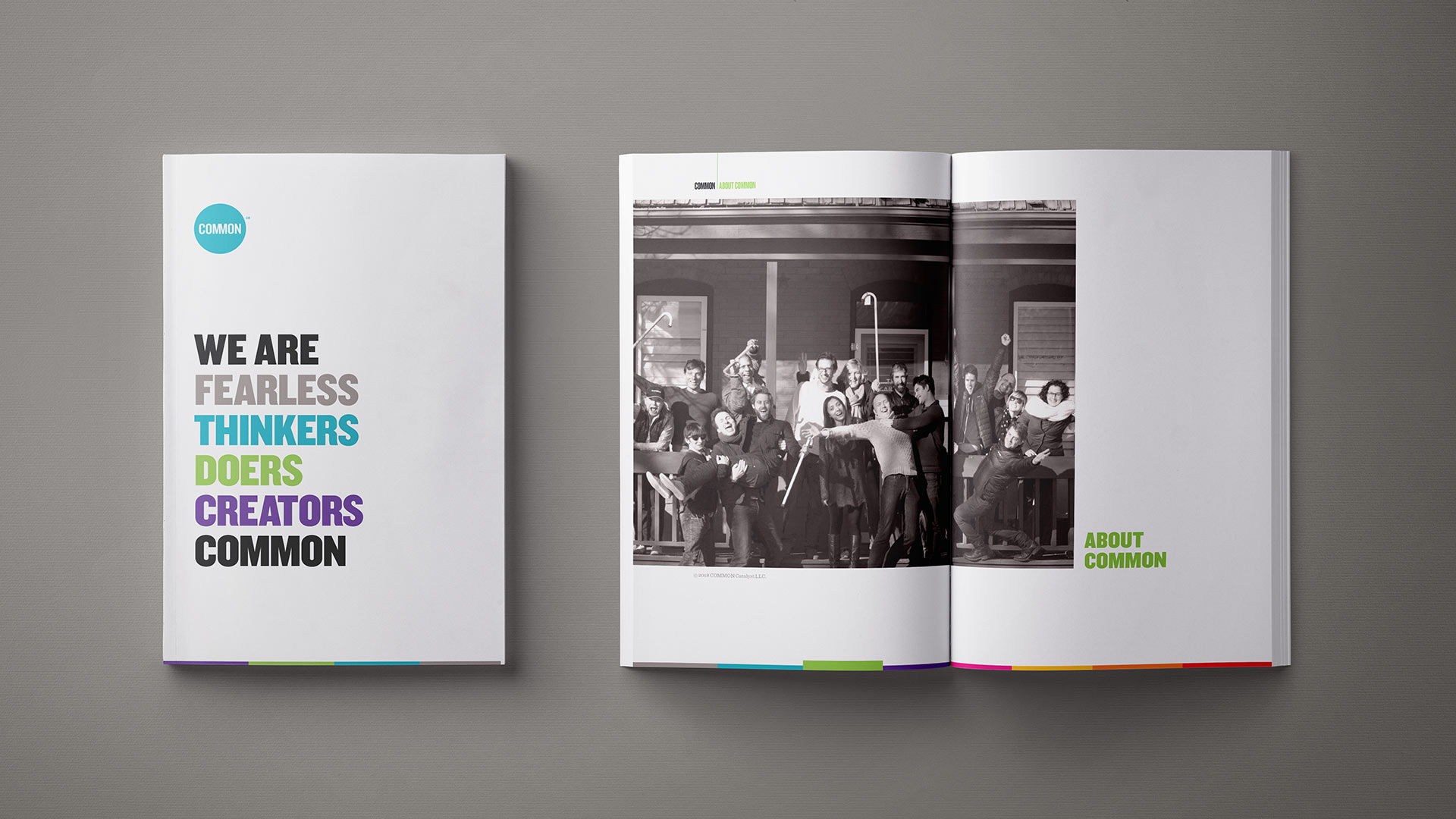
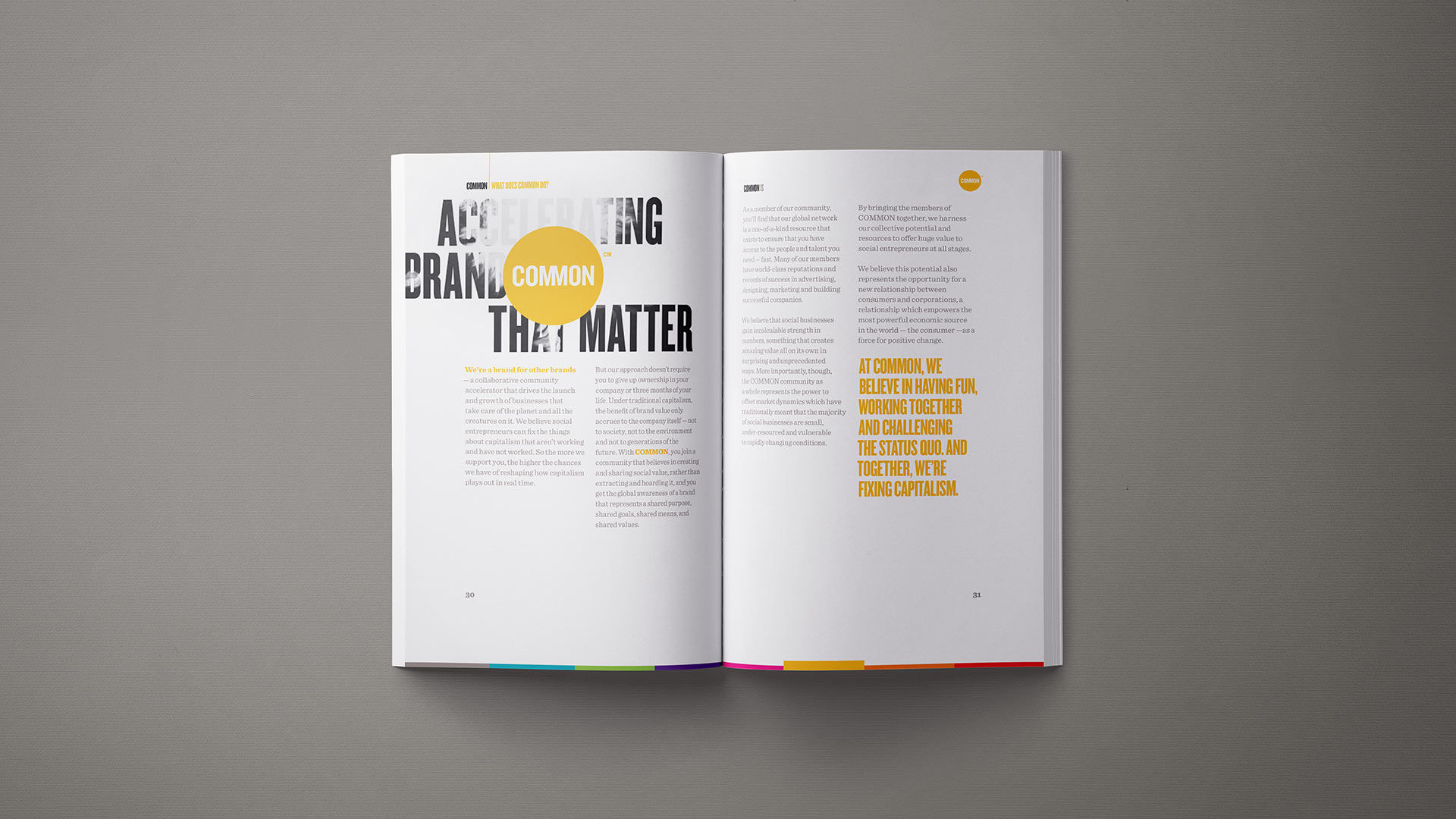
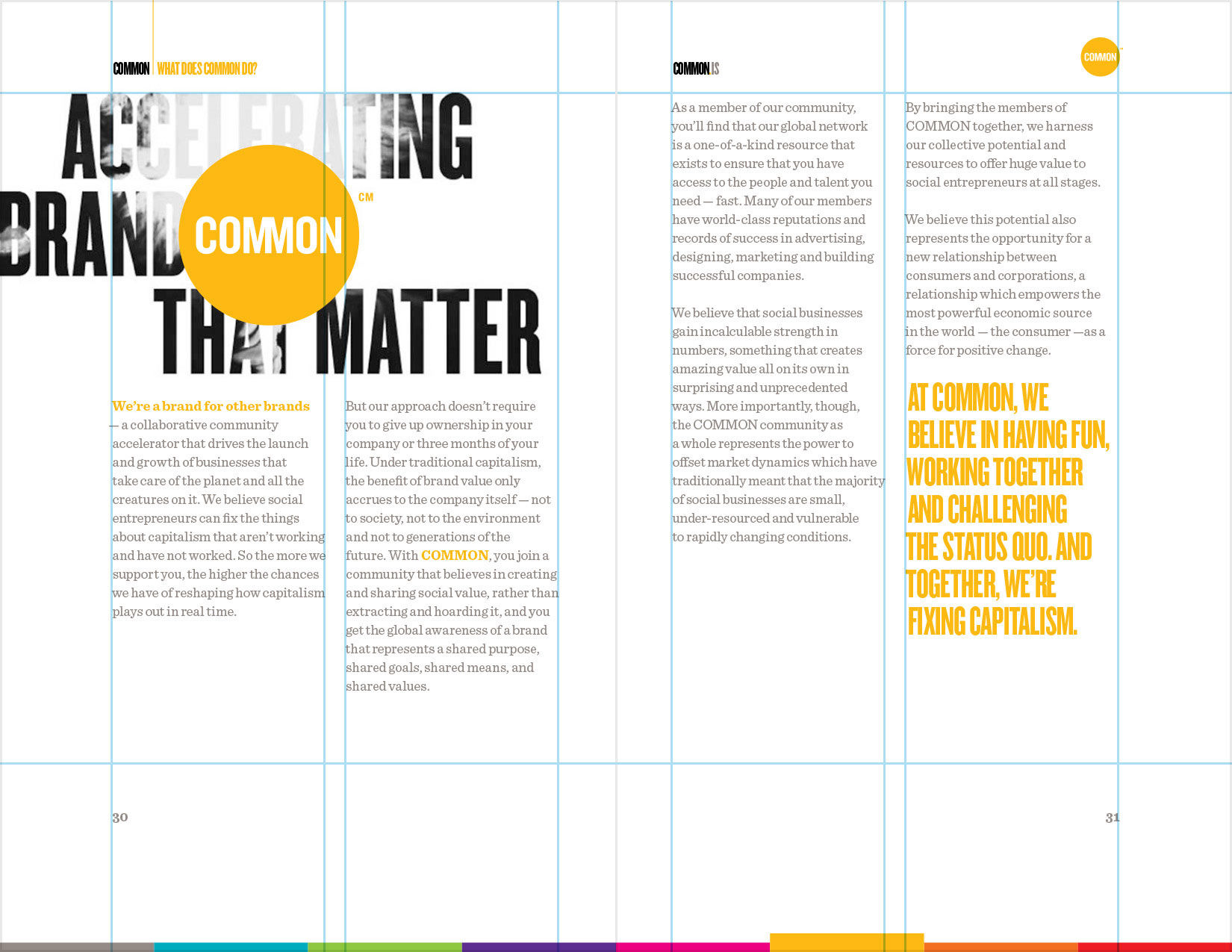
While single-column grids work well for simple documents, multi-column grids provide flexible formats for publications that have a complex hierarchy or that integrate text and illustrations. The more columns you create, the more flexible your grid becomes. You can use the grid to articulate the hierarchy of the publication by creating zones for different kinds of content. A text or image can occupy a single column, or it can span several. Not all of the space has to be filled.
Here, we see the use of a multi-column grid designed by Daniel Skrok for COMMON, a creative accelerator and community for social businesses. Often, books and magazines are designed in spreads (facing pages) with a single column of text.
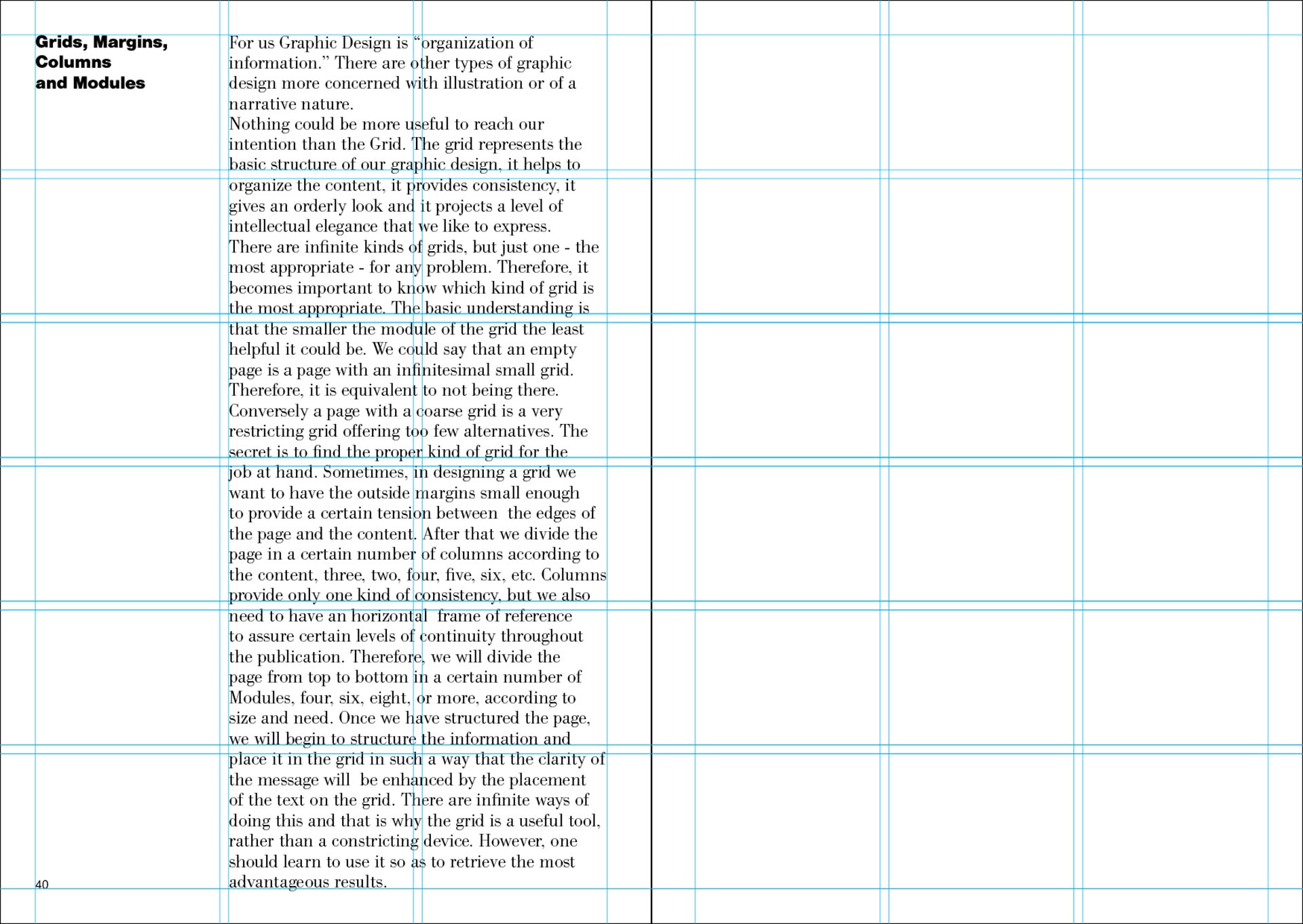
A modular grid has consistent horizontal divisions from top to bottom in addition to vertical divisions from left to right. These modules govern the placement and cropping of pictures as well as text. In the 1950s and 1960s, Swiss graphic designers including Gerstner, Ruder and Müller-Brockmann devised modular grid systems like the one shown here.
Below, we see an example of a modular grid in The Vignelli Canon by Massimo Vignelli. Massimo creates a grid by dividing the page into a certain number of columns according to the content (two, three, four, five, six, etc.). Then he divides the page from top to bottom into a certain number of rows (four, six, eight, or more) according to the size and need. The combination of vertical columns and horizontal rows assures a level continuity throughout the publication.
An example of a modular grid at work in The Vignelli Canon.
Once you have structured the page, you can begin to structure the information and place it in the grid in such a way that the clarity of the message will be enhanced by the placement of the text on the grid. There are infinite ways of doing this, and that is why the grid is a useful tool, rather than a constricting device. However, one should learn to use it so as to retrieve the most advantageous results.
Baseline Grid
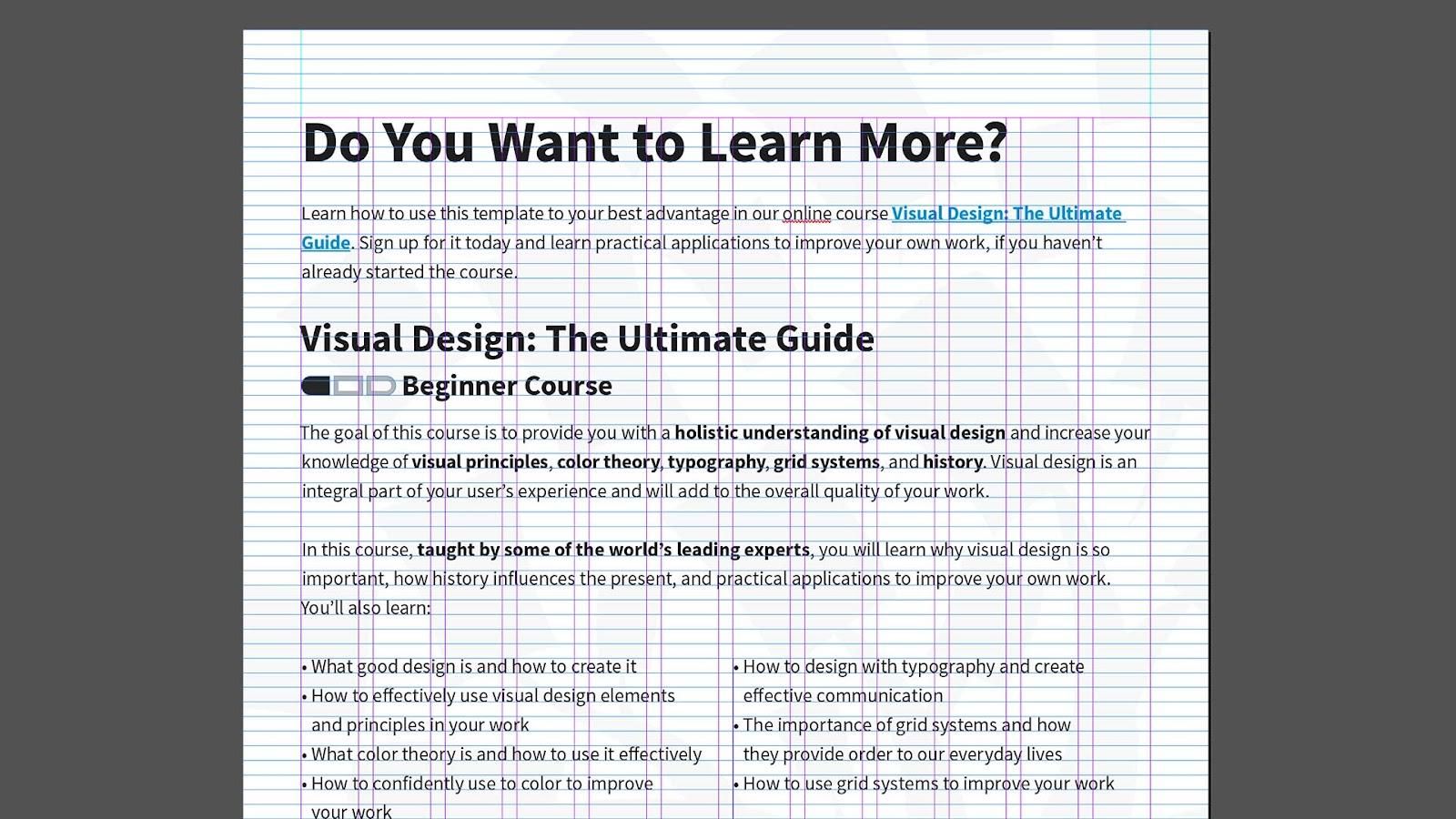
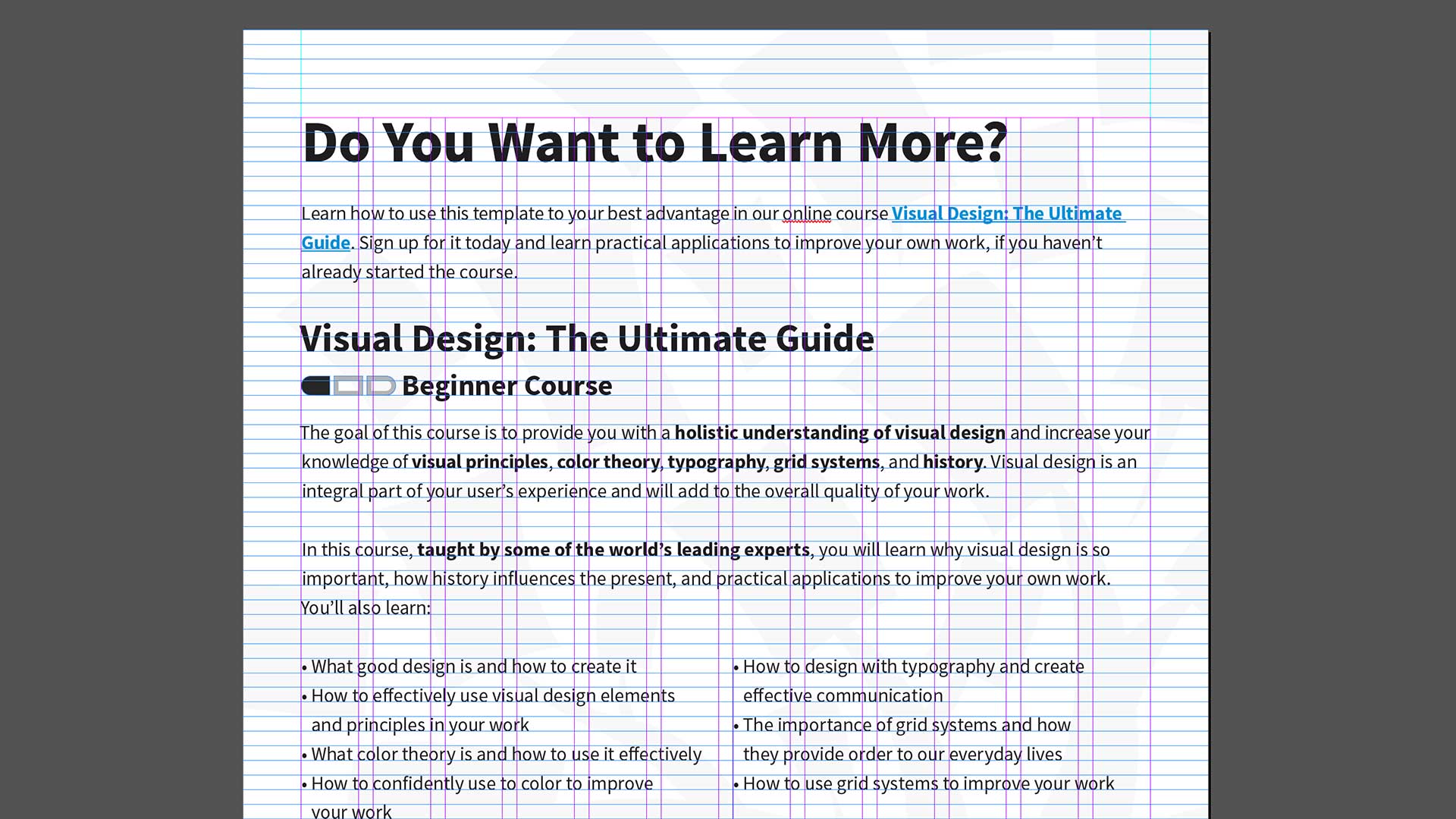
A baseline grid consists of horizontal guidelines that govern the whole document. Baseline grids serve to anchor all (or nearly all) layout elements to a common rhythm.
Practical Tip: To create a baseline grid, simply choose the type size and leading of your text, such as 10-pt Scala Pro with 12 pts leading (10/12). Avoid auto leading so that you can work with whole numbers that multiply and divide cleanly. Use this line space increment to set the baseline grid in your document preferences.
Below, we see the use of a baseline grid in a downloadable template design by the IxDF. The horizontal baseline creates a common rhythm and a consistent alignment between multiple columns of text.
An example of a baseline grid in an IxDF downloadable template.
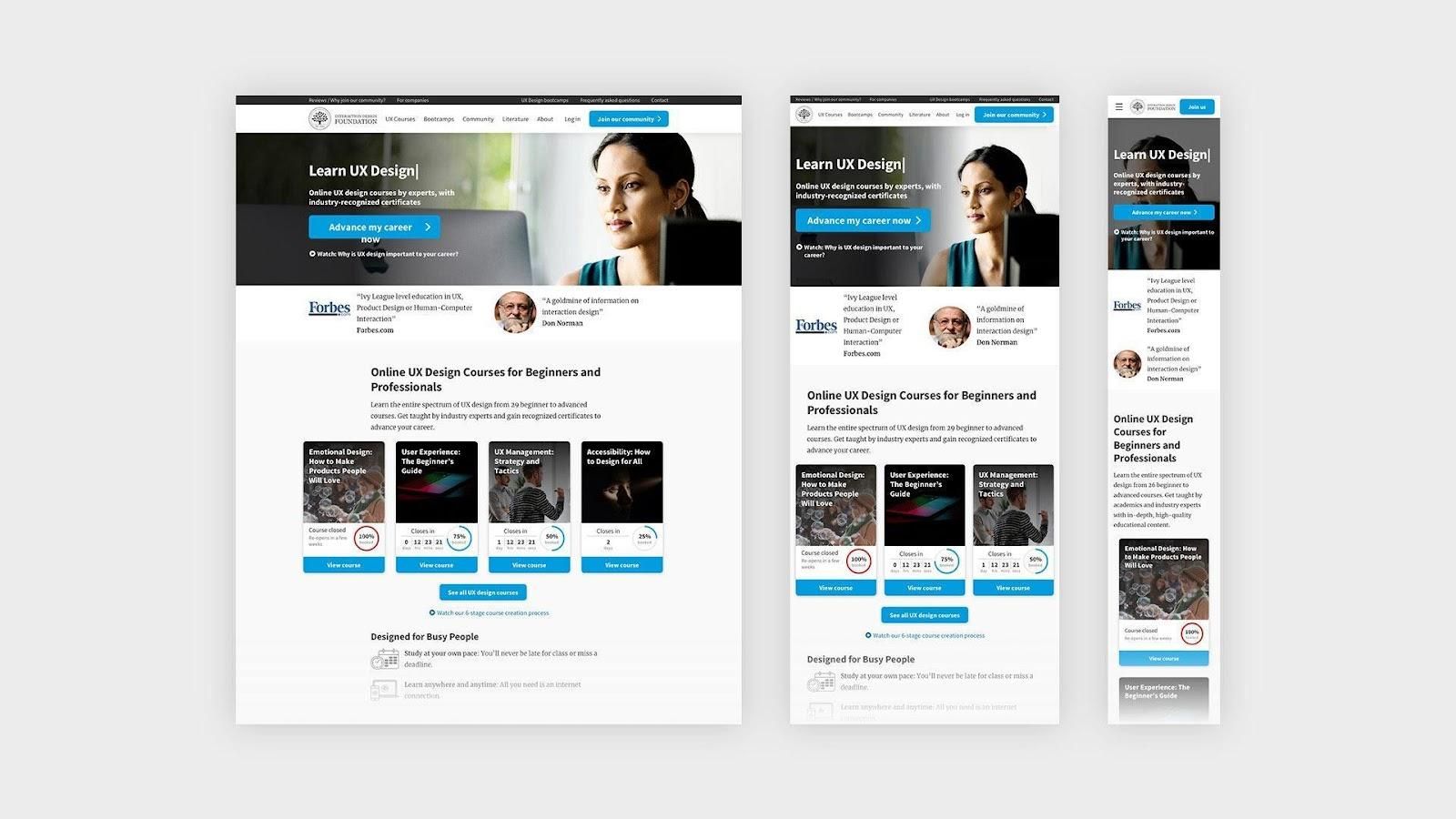
A responsive grid adapts to screen size and orientation, ensuring consistency across layouts. These grids are typically made up of three elements — columns, gutters and margins.
Columns are the areas that content occupies. The gaps in between columns are gutters, which add breathing spaces between the content to avoid visual overload. Finally, margins are spaces that add padding between the page’s contents and the edges of the viewport. The configuration of columns, gutters and margins change depending on the screen’s width.
A breakpoint is the range of predetermined screen sizes that have specific layout requirements. At a given breakpoint range, the layout adjusts to suit the screen size and orientation. Each breakpoint range determines the number of columns, and recommended margins and gutters, for each screen size.
For example, the IxDF Design System provides a structure for consistent page layouts, as well as for optimizing how content is displayed on different screen sizes. The responsive grid system is fluid on mobile and tablet sizes and fixed on desktop.
The responsive grid system here helps the page adjust cleanly to the screens of users’ various devices.
Advance Your Career With This Free Template
for “How to Use Grid Systems”
The Take Away
Grid systems can help you add structure to your design, organize information and create a consistent user experience. When designing with grids, the best thing you can do is to choose the right grid for the right project.
In this lesson, you learned how to use grid systems. You also learned how to make a book from Italian designer Massimo Vignelli. We explored seven common types of grid systems including rule of thirds, golden section, single-column, multi-column, modular, baseline and responsive.
Let’s recap the seven common grid systems:
The rule of thirds is a grid system that divides a composition evenly into thirds, both horizontally and vertically.
The golden section has been used in art and architecture for more than two thousand years. Expressed numerically, the ratio for the golden section is 1 : 1.618.
Single-column grids are the simplest, consisting of a single column of text surrounded by margins.
Multi-column grids provide flexible formats for publications that have a complex hierarchy or that integrate text and illustrations.
Modular grids have consistent horizontal divisions from top to bottom in addition to vertical divisions from left to right.
Baseline grids consist of horizontal guidelines that govern the whole document. Baseline grids serve to anchor all (or nearly all) layout elements to a common rhythm.
Responsive grids adapt to screen size and orientation, ensuring consistency across layouts. They are typically made up of three elements — columns, gutters and margins.
Now that you understand the importance of the grid systems and how to integrate them into your work, take what you learned and add a little structure to your designs.
References and Where to Learn More
Learn more about the Grid Systems by reading this insightful book by Kimberly Elam: Kimberly Elam. Grid Systems: Principles of Organizing Type. 2004. (Link)
Learn more about Geometry of Design by reading this intriguing book by Kimberly Elam: Kimberly Elam. Geometry of Design: Studies in Proportion and Composition. 2011. (Link)
Learn more about the Typographic Grids by reading this fascinating book by Ellen Lupton: Ellen Lupton. Thinking with Type. 2010. (Link)