The Rule of Thirds

Your constantly-updated definition of The Rule of Thirds and collection of videos and articles.
Be a conversation starter: Share this page and inspire others!

197 Shares

What is The Rule of Thirds?

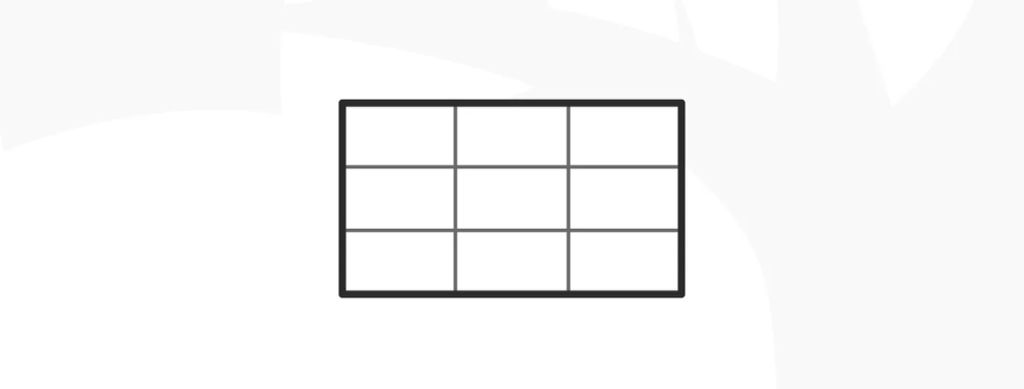
The rule of thirds is a design technique where designers divide a layout into nine equal parts through two equally spaced horizontal lines and two equally spaced vertical lines. This technique makes sures key elements—like images, text or calls to action—appear along these lines or at their intersections, and so boost user engagement and make a balanced, visually appealing interface.  
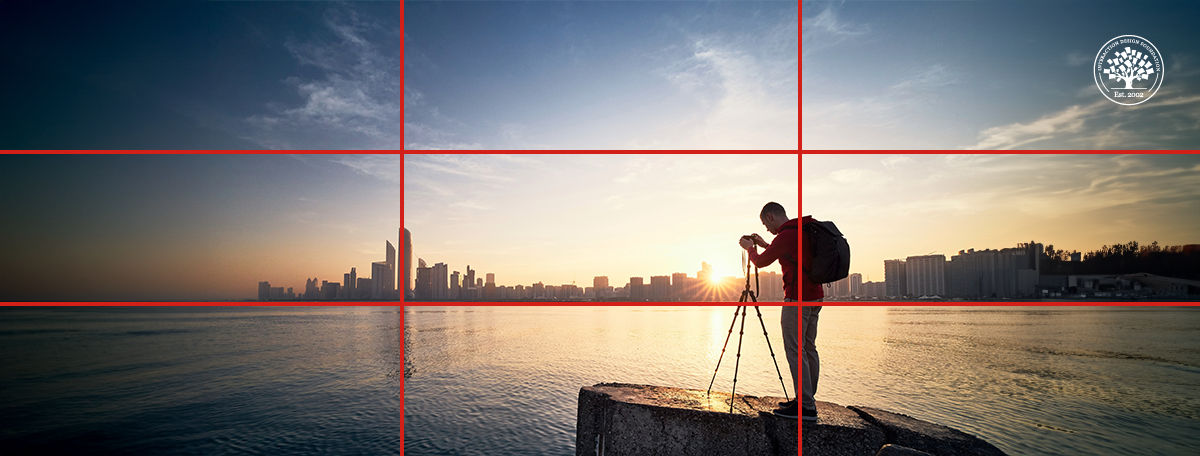
An illustration of a grid with 3 rows and 3 columns.

© Interaction Design Foundation, CC BY-SA 4.0

Why is The Rule of Thirds Important in Design?

The rule of thirds has deep roots in the theory of proportions. That theory emphasizes the relationship between individual components—micro—and the overall structure—macro—in design. The rule of thirds comes from Painter and Engraver, John Thomas Smith's 1797 insights in Remarks on Rural Scenery, and it’s evolved to become a cornerstone of design alongside the golden ratio and the rule of proportions.  

Designers, photographers and others who work in the visual arts have applied the rule of thirds design principle in works that are both captivating and effective—to create a sense of harmony, intrigue and more. These compositions feature strategically placed elements along the grid lines or their intersections—or the “sweet spots”—to whet visual interest and create balance. For example, the rule of thirds in graphic design is a staple technique of visual communication, one that can access viewers in a storytelling manner—or arouse their interest in other compelling ways.    
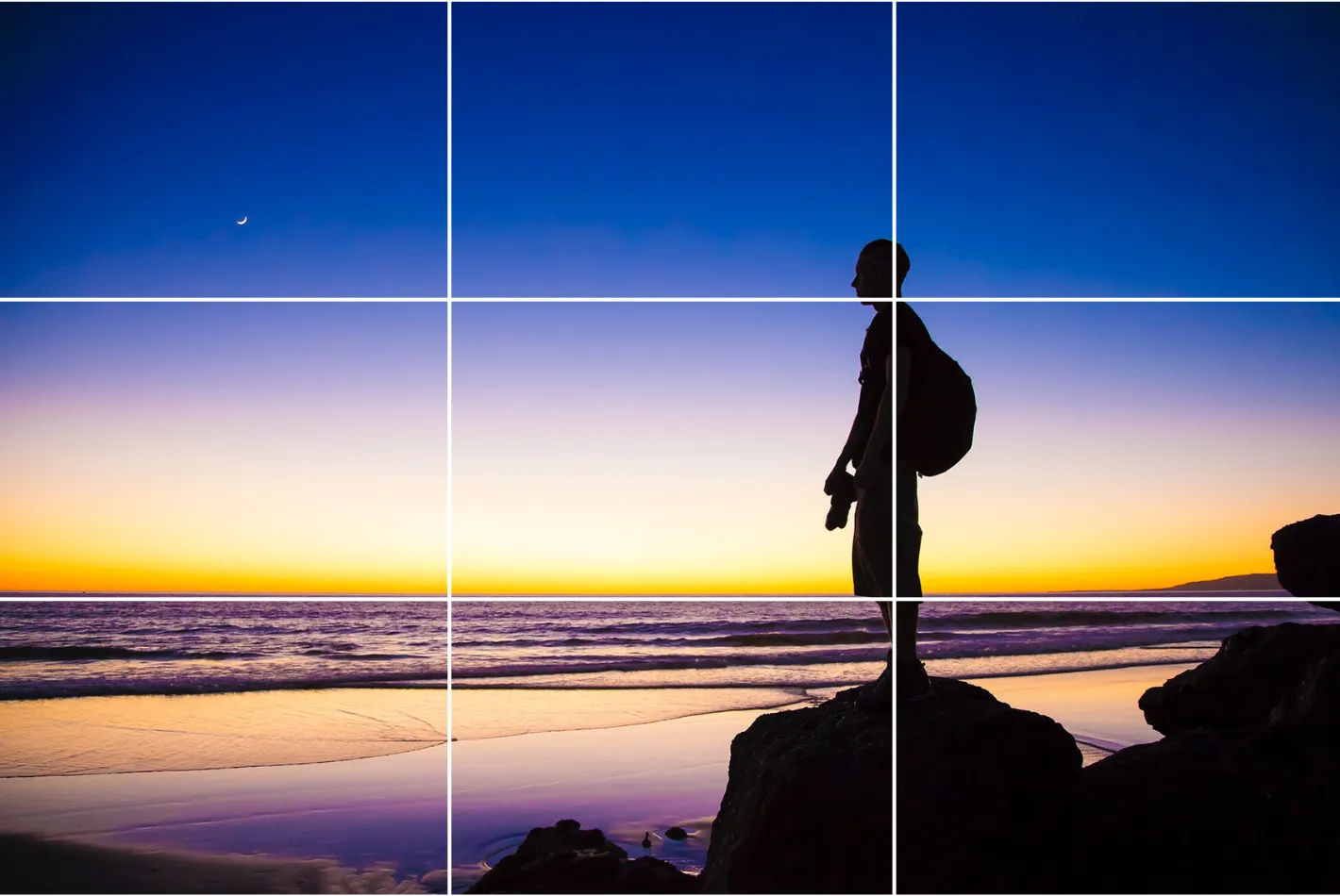
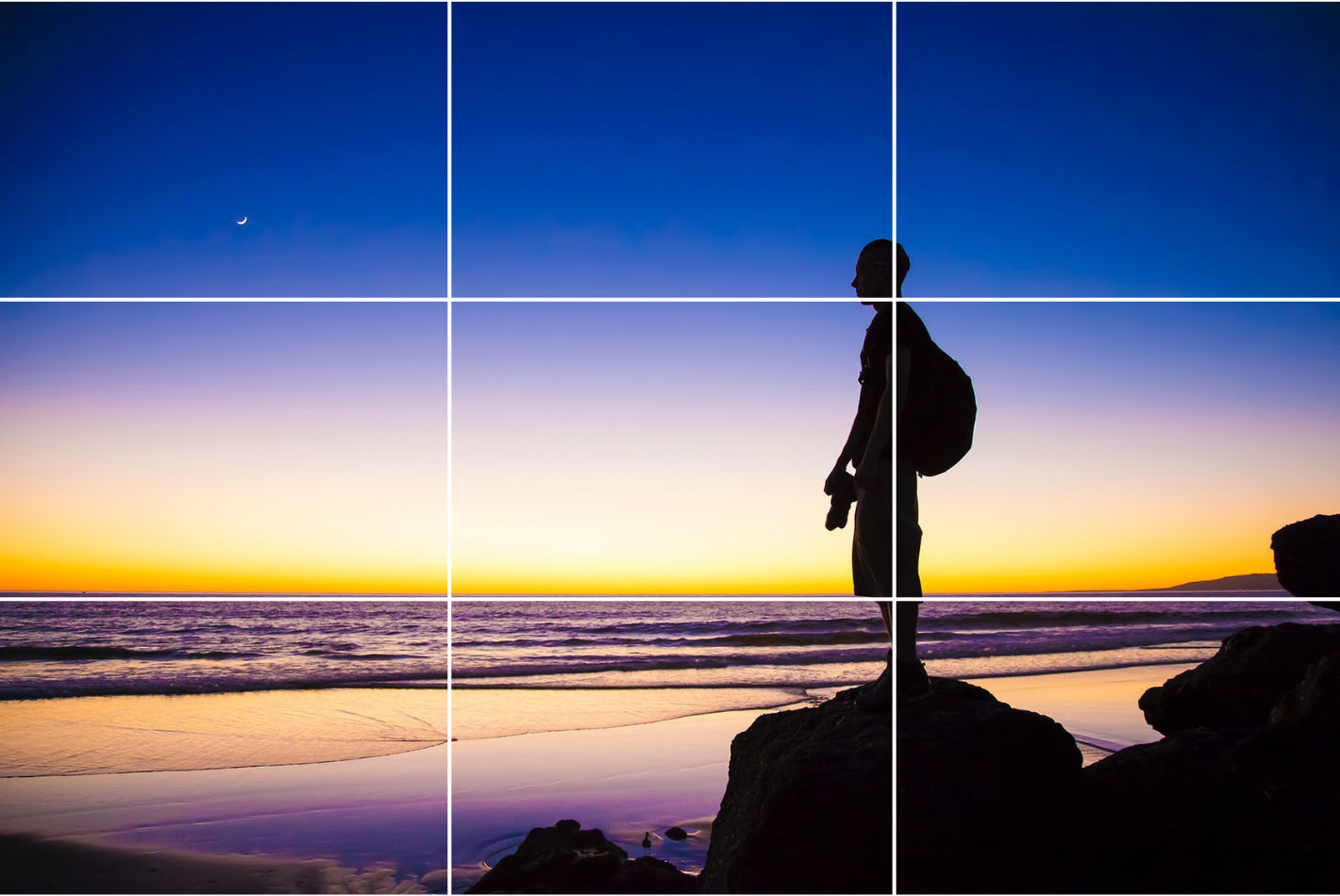
An image of a person looking at a sky within a grid to illustrate the rule of thirds.

The rule of thirds is a design staple that speaks volumes through the compositions it frames.

Unsurprisingly, the rule of thirds is an essential visual design technique that features greatly in UX (user experience) design. Designers particularly value it as a way to help optimize the user experience in digital products such as web pages. When designers work on user interfaces (UIs), they use the rule of thirds to guide the eyes of their target audience naturally to the most crucial parts of a site or mobile app. They can therefore improve usability and aesthetic appeal as they help users establish a sense of order, intrigue and trust in their design works. 

When designers get the rule of thirds working in their designs, they align key interface elements—such as navigation bars, call-to-action buttons and key information—along these strategic points. Here are the main benefits of the rule of thirds in UI design: 

1. Visual Hierarchy, Harmony and Balance

Designers use the rule of thirds to establish a clear visual hierarchy in their web design work and elsewhere. This arrangement helps them highlight the most crucial elements there, like call-to-action buttons or key information. It makes them easily accessible and noticeable for users.  

The rule of thirds helps make a balanced composition, too. When designers distribute elements evenly across the grid, they can stop themselves from overcrowding a design—and make sure that each component receives adequate space to “breathe.” This technique enhances how clear and readable the interface is overall. What’s more, when designers apply the rule of thirds across websites they design, it can give a really consistent and professional look to their work. 

2. Enhanced User Interaction and Conversion

When designers put elements strategically around a screen with the rule of thirds, it doesn’t just capture user attention. It guides users’ interactions across the interface, too. This guidance is something that can greatly improve both the navigation and usability. And it can lead to better user engagement—as well as potentially higher conversion rates. For example, if designers place a primary call-to-action at an intersection point within the grid, it can draw users’ eyes towards it—and naturally so. So, users will be much more likely to interact with the call-to-action.  

The rule of thirds can really help improve the user experience whenever users encounter static elements like information architecture on a webpage. Still, it also applies to dynamic elements in interactive designs, where user focus is absolutely critical. 
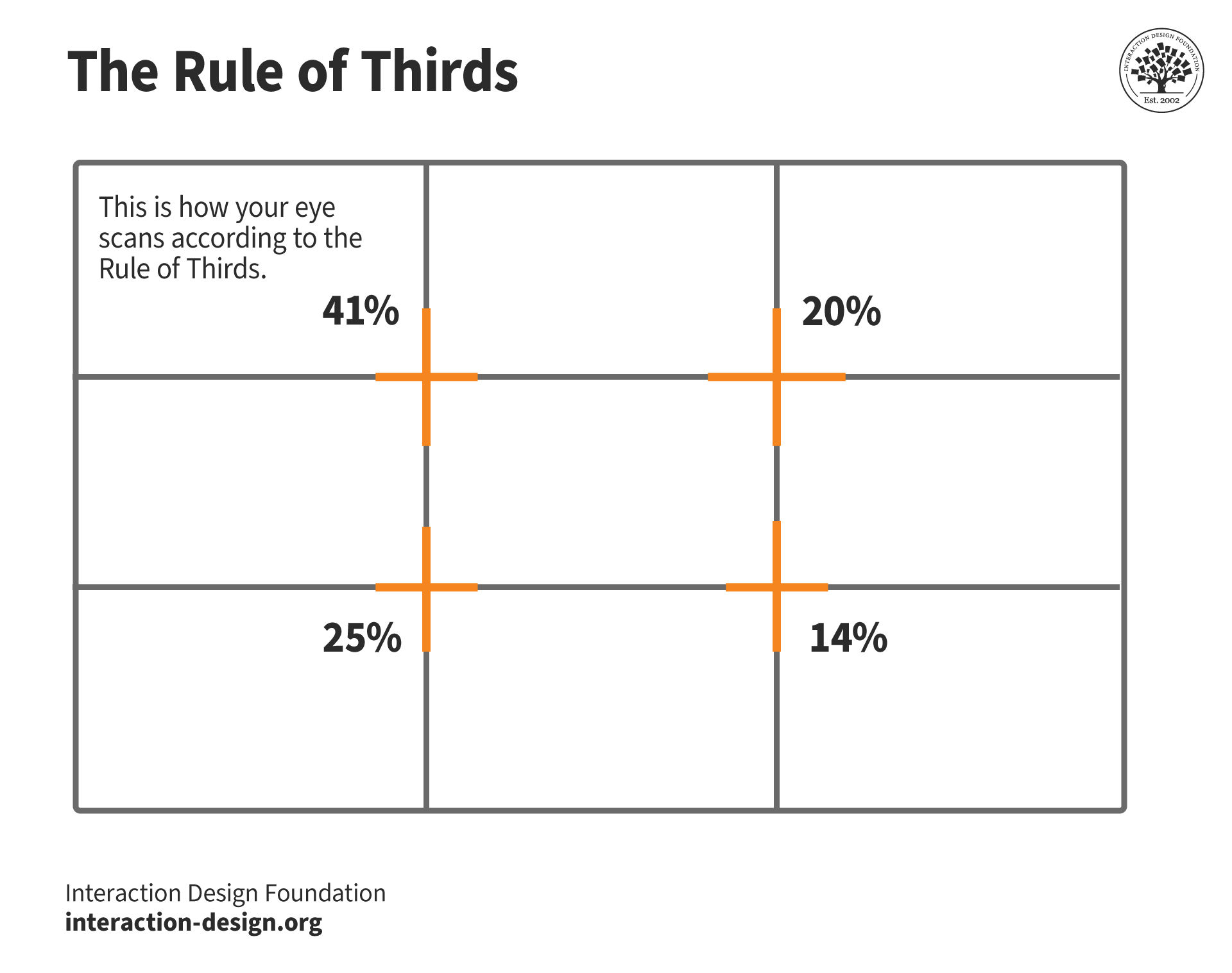
An illustration of the rule of thirds as a grid with four percentages for eye attention at the four sweet spots.

© lovish verma, Fair Use

3. Adaptability Across Devices

Another great advantage of the rule of thirds lies in its flexibility and effectiveness across different screen sizes and orientations. This adaptability is something that’s crucial in responsive design—where user interfaces have to function seamlessly across a range of devices from desktops to smartphones. With the rule of thirds, designers can create layouts that keep a high level of visual appeal and functionality, whatever the device. This makes sure users can have a consistent user experience—everywhere. 

4. Enhanced Visual Interest

The rule of thirds also encourages designers to experiment with asymmetry so they can make layouts that are more dynamic and visually interesting. For instance, designers can place an image near two-thirds of one side rather than center it. That way, they can break the monotony of a symmetrical design. This adds an element of surprise and visual interest, and the technique’s particularly effective to draw the user's eye to specific areas of the screen. It gives a boost to both the design's aesthetic quality and its functional efficiency, too. 
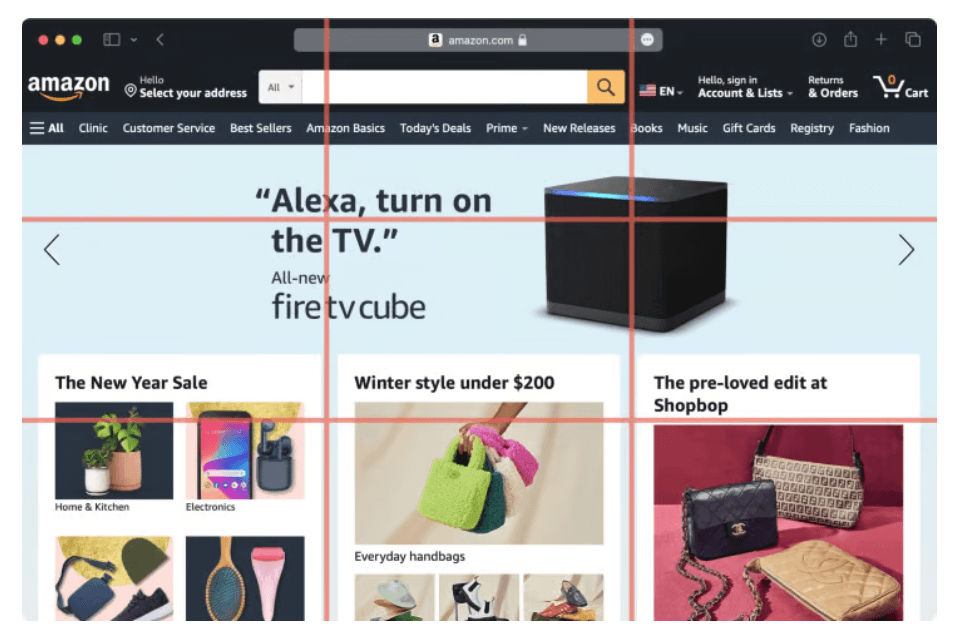
A screenshot from Amazon.com showing the rule of thirds grids too.

Amazon structures its homepage around a grid that’s divided into nine equal parts—leveraging the rule of thirds to make the best visual flow and user engagement.

© Angela Fabunan, Fair Use

How Do Designers Apply the Rule of Thirds in Website Design?

UI designers use the rule of thirds in website design to organize and position elements effectively, and here's how they do it: 

1. Layout Composition

Designers put key elements like logos, navigation menus and call-to-action buttons at the intersection points—or along the lines. This makes for a layout that’s more balanced and visually engaging.  

2. Content Placement

Designers often place images, text blocks and other content in a way that goes in line with the rule of thirds grid. They draw users’ attention to the important content and make a natural flow for their eyes to go with. 

3. Visual Hierarchy

When designers align important content or interactive elements with the intersecting points or lines, they can establish a visual hierarchy that’s clear—and guide the user's focus to specific areas of the website. 
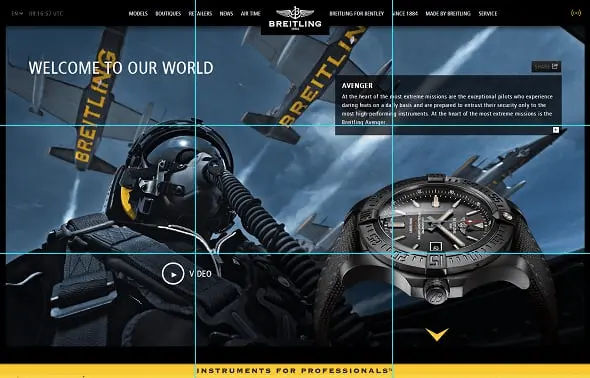
Image of a webpage featuring a pilot inside a cockpit, with the rule of thirds grids shown for illustration.

Breitling watch’s design balances many elements well on one screen.

© Camren Browne, Fair Use

4. Balance Negative Space

Designers use the rule of thirds to make sure there’s an optimal distribution of negative space or white space. This can boost the readability—and overall user experience—of the design. 

5. Responsive Design

When designers create content for different screen sizes, the rule of thirds helps them keep a balanced composition and adapt the layout effectively across various devices. 

CEO of Experience Dynamics, Frank Spillers explains responsive design: 

Transcript
 

Advanced Techniques and Examples

For more sophisticated applications, designers might choose to use variations like focusing on just the columns or rows of the grid. This can help them put emphasis on specific aspects of the content more strongly.  
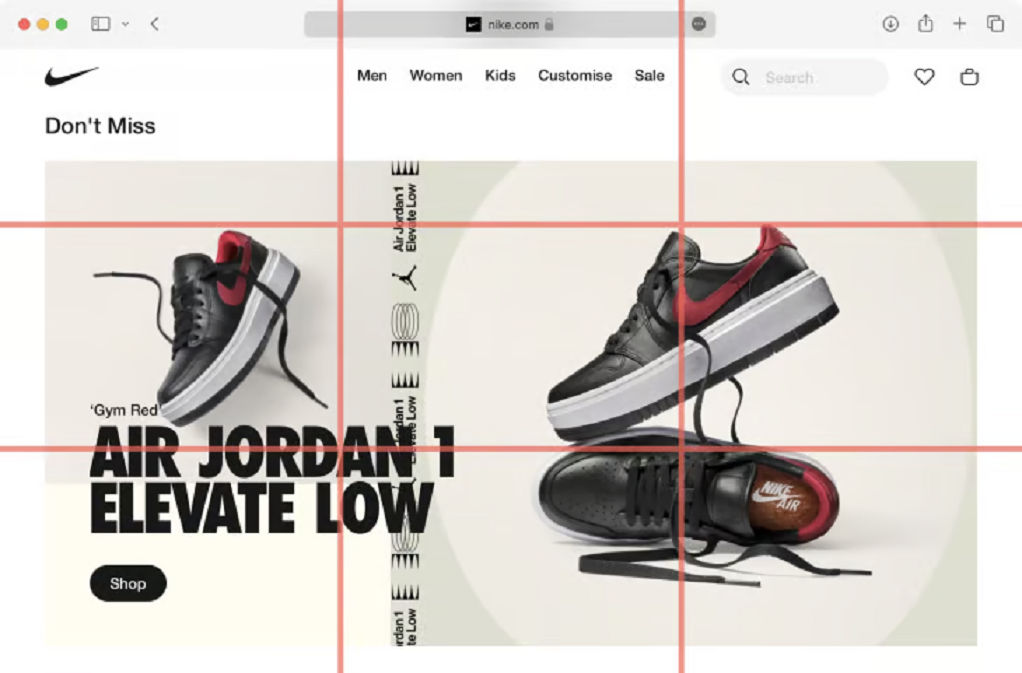
Image of a Nike webpage featuring the rule of thirds grid lines shown over it as an illustration.

Nike utilizes the rule of thirds by making sure that these focal points really grab the viewer's attention.

© Angela Fabunan, Fair Use

Step-by-Step Guide to Implement the Rule of Thirds

To design rule of thirds compositions well, designers can follow these steps: 

1. Establish the Grid

Designers should set up a basic grid on their design canvas—one that divides the space into nine equal sections. That grid will serve as the foundation for them to strategically place the design elements. It’s important to make sure that the grid lines are even in spacing both horizontally and vertically so they create a balanced layout. 

2. Place Key Elements

Designers should focus on positioning important elements—like logos, navigation menus, call-to-action buttons and key content—at the intersections of these grid lines. These points typically attract the most viewer attention, and they can give a great boost to the design’s visual impact. The top-left intersection—for example—gets the highest visual attention at over 40%. That makes it an ideal spot for the most important information or interactive elements to go. 

3. Use Visual Weight and Balance

Designers should distribute elements across the grid to keep a visual balance. Avoid overcrowding any one part of the grid, especially the intersections. The rule of thirds encourages not just the placement of elements at the intersections but along the lines themselves, too. That can help them achieve a well-proportioned and aesthetically pleasing design. 
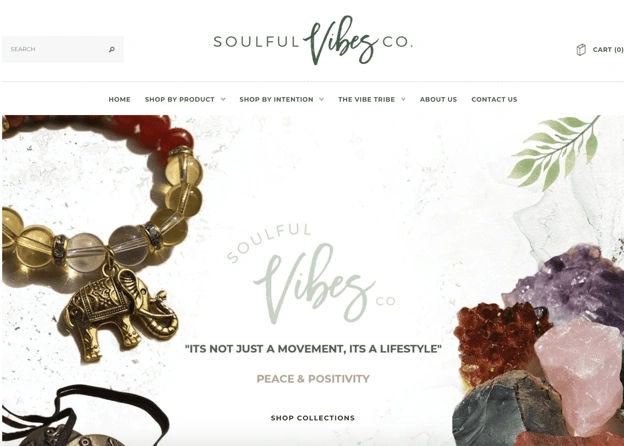
Image of a Soulful Vibes Co. webpage exemplifying the rule of thirds.

This design’s main focus—on the crystal rocks and the beaded bracelet with an elephant—is on the left and right thirds sections, and that makes sure the visitor focuses on the center text itself: "It's not just a movement, it's a lifestyle."

© Caroline Forsey, Fair Use

4. Apply the Rule in Photography and Graphics

When designers work images or graphical elements into their designs, they should line the subject or focal point up with the grid intersections or along the lines. This technique is crucial not just in UI/UX design but in photography, too, where the rule of thirds is a foundational skill. For example, in a landscape photo, to run the horizon line along the top or bottom horizontal grid line—and not the center—can make for a more captivating composition. 

5. Practice Continuously and Make Adjustments

The best way to master the rule of thirds is to keep at it with continuous practice—and experimentation. Designers should apply this rule in different projects and see how it changes their design’s visual appeal as well as user interaction. They should use tools like cropping and re-aligning in post-production so they refine how they put elements according to the rule of thirds. What’s more, this can help them train their designer’s eye to naturally recognize these balance points in future projects. 

6. Conduct Usability Testing

Designers can make sure how effective their rule-of-thirds web designs and other visual designs are when they do their user testing well. Regular feedback mechanisms—like A/B testing and heatmaps—can further refine how they apply the rule of thirds. These can help designers understand how users interact with their creations—and where they may need to make adjustments. When designers regularly revisit these principles and adapt them based on specific project needs and user feedback, it can lead to more refined and successful design outcomes. 

UX Strategist and Consultant, William Hudson explains A/B testing in this video: 

Transcript
 

Software and Tools to Implement the Rule of Thirds

Designers can choose from numerous tools to implement the rule of thirds, including the following: 

1. Grid Systems in Design Software

Design software like Adobe Photoshop, Illustrator or Sketch often include grid systems that allow designers to overlay a rule of thirds grid on their designs. This helps designers align and position elements according to the rule. 

2. Grid Plugins and Extensions

Many design softwares offer plugins and extensions specifically for grid systems and composition, such as "GuideGuide" for Photoshop and "Grid Guide" for Sketch, which enable designers to create and align designs based on the rule of thirds. 

3. Grid Generators

Online grid generators such as "Gridulator" and "Gridpak" let designers generate custom grid systems, including the rule of thirds—and download them to use in their design projects. 

4. Grid Paper and Templates

Physical grid paper and printable templates with the rule of thirds grid are ideal for sketching and initial wireframing before designers move on to digital design software. 

5. Mobile Apps

There are mobile apps specifically for applying the rule of thirds to photographs that smartphone users take. These apps overlay the grid on the camera viewfinder, helping photographers align their shots according to the rule. 
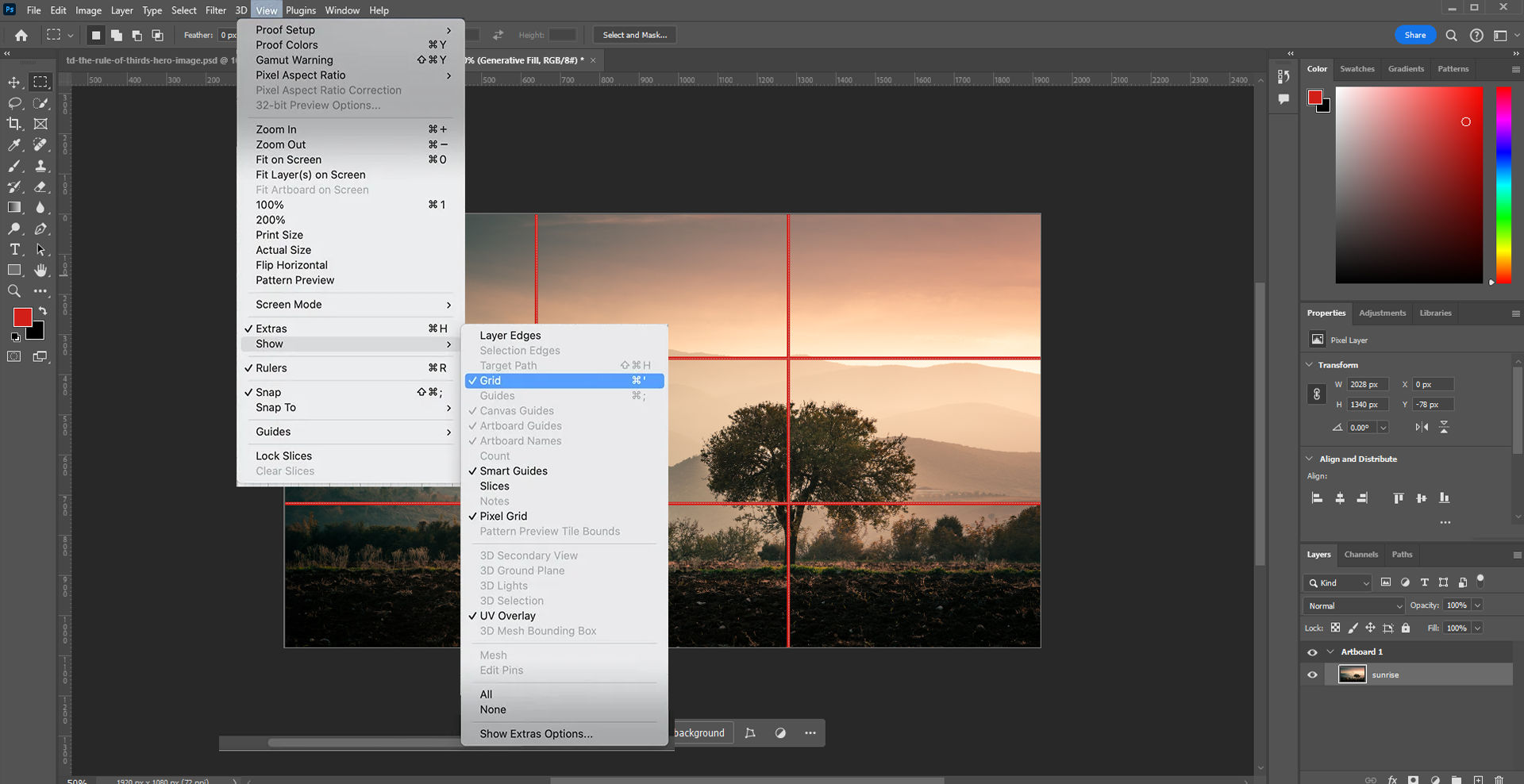
Image of a Photoshop screen.

Photoshop features a handy way to apply the rule of thirds: click "View" → "Show" → "Grid".

Considerations and Risks about the Rule of Thirds

The rule of thirds is certainly a fundamental design principle in UX and UI design. Still, it’s crucial to be aware of potential limitations and risks that may affect just how effective a design ends up being. When designers understand these considerations, it can help them make decisions that are more informed—and potentially avoid common pitfalls. 

1. Limitations in Creative Freedom

To rely too heavily on the rule of thirds may accidentally get in the way of a designer’s creativity. It might lead to designs that lack a unique feel and a personal touch. This overreliance can end up making interfaces feel standardized, monotonous—and uninspiring. Users will be less likely to take to experiences that don’t have the engaging effects they’re after. 

2. Suitability for Various Design Approaches

The rule of thirds mightn’t always be the best choice for every design scenario. For instance, minimalistic interfaces—which thrive on simplicity and ample white space—or data-heavy interfaces—which call for a different approach to information hierarchy and layout—mightn’t benefit from strictly sticking to this rule. 

3. Risks of Overcrowding and Clutter

Designers might feel tempted to put too many elements at the intersections of the grid—in the belief that doing so will capture users’ attention better. However, this can lead to a cluttered and overwhelming interface—one where the user finds it difficult to focus or find important information. 

4. Balance and Composition Challenges

If designers use the rule of thirds incorrectly, it can result in compositions that are unbalanced and visually confusing. If designers fail to thoughtfully align elements—or if they misuse the grid—the overall aesthetic and functional quality of the design may suffer and harm the user experience. 

5. Overemphasis on Aesthetics Over Usability

Indeed, it’s important to create designs that are very visually appealing. Even so, designers who overemphasize aesthetics at the cost of usability can end up making interfaces that are utterly beautiful—yet hard to navigate and understand. This misalignment often results in users who are frustrated and who may not engage deeply with the product. 

6. Inflexibility Across Different Devices

The rigidity of the rule of thirds can sometimes work against its application across various screen sizes and resolutions. Designs that look perfect on a desktop might not translate well to smaller mobile screens. This can lead to issues in visual coherence and user interaction. 

7. Content-Design Disconnect

If designers stick too strictly to the rule of thirds, they might make designs that don’t adequately consider the content they should display. This can make for a disconnect between what the design emphasizes and the actual information or functionality that needs to come across to users—which can potentially mislead users. 

8. Accessibility Concerns

Designs that focus too heavily on aligning elements strictly according to the rule of thirds might overlook important accessibility considerations—like readable text sizes and easily clickable buttons. This oversight can make the interface less accessible to users with disabilities—and that’s a great risk in user-centered design

This video explains why accessibility is such a vital concern in design: 

Transcript
 

Designers should note that to break away from the rule of thirds can work well, too. It might lead to unique and captivating designs. Depending on the project's requirements and creative direction, designers might deviate and arrive at fresh perspectives and innovative solutions—solutions that really stand out in the digital landscape. 

Overall, the rule of thirds is a time-tested tool that can help improve user experience—and boost engagement and conversion. It can cast compelling imagery and build trust with a brand, too. As with other design principles, it’s important to apply it mindfully and create good-looking designs that users find useful, helpful and more. 

Questions About Rule of Thirds?
We've Got Answers!

How does the rule of thirds improve visual composition?

The rule of thirds is a fundamental composition principle in design and photography. It improves visual balance and interaction in a layout. When designers divide the image into a grid—of three horizontal and three vertical segments—they put important elements along these lines or at their intersections. This technique encourages a more natural movement of the eye through the artwork. What’s more, it gives its aesthetic appeal a boost and makes the composition more dynamic and balanced. 

Take our Visual Design: The Ultimate Guide course. 

How does the rule of thirds relate to the golden ratio?

The rule of thirds and the golden ratio both guide the arrangement of elements in a design—but they do it in different ways. The rule of thirds divides the design space into nine equal parts with two horizontal and two vertical lines. To stick key elements at the intersections or along these lines creates balance and directs the viewer's eye. 

The golden ratio, though, involves a more complex mathematical relationship of 1:1.618. It suggests a division of space that’s asymmetrical yet naturally pleasing to the eye. When designers use the golden ratio, they often make a focal point that runs in line with this ratio. That leads to a sense of aesthetic harmony, one that feels organic. 

Although both principles aim to enhance visual interest and harmony, many professionals see the golden ratio as being more flexible. That’s due to its adaptability to different scales and its prevalence in nature. The rule of thirds is a kind of simplification of the golden ratio. It makes it easier to apply—but sometimes less dynamic. 

Designers can choose between these principles based on their specific goals and the project’s context. Both methods help structure content in a way that's visually appealing and easy to navigate. 

Watch as UX Strategist and Consultant, William Hudson explains the golden ratio: 

Transcript
 

Take our UI Design Patterns for Successful Software course. 

Are there cultural variations in the use of the rule of thirds?

Yes, cultural variations affect it. This composition principle is widely applicable, indeed, but its implementation can differ based on cultural perceptions—of space, balance and aesthetics. In Western cultures, for instance, designers often use the rule of thirds to create dynamic visual interest in a picture. They position key elements off-center to guide the viewer’s eye in a specific narrative direction. 

In many Asian cultures, though, there’s a preference for compositions that are more central and symmetric. This reflects principles of balance and harmony—that are prevalent in artistic traditions like Japanese Zen gardens and Chinese landscape paintings. Here, designers might still use the rule of thirds but do it in a way that emphasizes balance and tranquility rather than dynamic movement. 

These cultural preferences can influence everything from graphic design to web layouts. And it’s crucial to understand these differences for designers who work in global contexts. When they recognize and adapt to cultural variations in visual composition, designers can communicate more effectively with diverse audiences.

Watch Author and Human-Computer Interaction Expert, Alan Dix explain why it’s important to design with culture in mind: 

Copyright
Transcript
 

Take our Visual Design: The Ultimate Guide course. 


Are there tools to help apply the rule of thirds in digital design?

Yes, several tools help with this. These tools often integrate into graphic design software and applications—making it easier to align and put elements in place according to this compositional rule. 

One common feature is the grid overlay. Most photo editing and graphic design programs, such as Adobe Photoshop and Illustrator, offer a grid option that you can overlay on your canvas. This grid splits the image into nine equal parts, which matches the rule of thirds layout. Designers can place key elements at the intersections or along the lines to enhance visual interest and balance. 

What’s more, many camera apps on smartphones and digital cameras come with an option to show the rule of thirds grid on the screen while capturing photos. This helps photographers frame their shots according to this principle—even before they edit the images. 

Some website and UI design tools also incorporate grid systems that adapt the rule of thirds. These tools help designers maintain alignment and proportion across different screen sizes, and ensure that the layout remains effective and aesthetically pleasing. 

Take our Master Class Accessible and Inclusive Design Patterns with Vitaly Friedman, Senior UX Consultant, European Parliament, and Creative Lead, Smashing Magazine. 

Take our Visual Design: The Ultimate Guide course. 


Can you combine the rule of thirds with other design principles?

Yes, you can. For instance, when you use the rule of thirds to position key elements in a design, you can also apply the principle of balance to make sure that these elements distribute visual weight evenly. This keeps the design from feeling too heavy on one side or the other. Alignment comes into play when you use the grid lines of the rule of thirds to line up text and other elements neatly. This can enhance the clarity and cohesiveness of the design. 

Contrast can work in tandem with the rule of thirds, too. You place contrasting elements at the grid intersections or along the lines. This doesn’t just capture attention—it makes the composition more dynamic and engaging, too. 

Also, the principle of movement—where you arrange elements to lead the viewer's eye across the design—is something that can benefit from the strategic placement through the rule of thirds. This creates a natural flow, and one that guides the viewer through the design in a deliberate way. 

Take our Master Class Accessible and Inclusive Design Patterns with Vitaly Friedman, Senior UX Consultant, European Parliament, and Creative Lead, Smashing Magazine. 

Take our Visual Design: The Ultimate Guide course. 


How do you measure the effectiveness of the rule of thirds in a design?

Focus on several key aspects: viewer engagement, composition balance and the overall aesthetic appeal. 

First, assess viewer engagement. Track how users interact with the design. In digital designs, tools like heat maps can show where viewers spend the most time looking. If these areas align with the intersections of the rule of thirds, it suggests that the rule’s guiding viewer attention well. 

Next, evaluate the composition’s balance. A well-applied rule of thirds should create a visual balance that feels neither too cluttered on one side nor too empty on the other. This balance contributes to a more pleasant viewing experience—one which you can subjectively assess by collecting feedback from users or other designers. 

Last—but not least—think about the overall aesthetic appeal. This involves looking at how well the elements within the design harmonize and contribute to a unified look. You can conduct surveys or A/B testing to see which designs viewers prefer. A design that applies the rule of thirds well is one that will often receive more positive reactions, indicating how aesthetically effective it is. 

Take our Master Class How to Get Started with Usability Testing with Cory Lebson, Principal and Owner of Lebsontech LLC. 

Take our Conducting Usability Testing course. 

Transcript
 

What are the common mistakes when applying the rule of thirds?

Here are some common ones. One typical error is over-reliance on the grid. While the rule of thirds does give a helpful guide, to rigidly put every element along the grid lines or intersections can make a design feel forced or unnatural. It's important to use the grid as a guideline rather than a strict rule—permitting some flexibility to achieve the best visual outcome. 

Another mistake is to ignore the context of the elements within the design. For instance, if a key element like a call-to-action button or a focal image aligns perfectly with a grid intersection but clashes with other important components or text, the overall composition might suffer. Designers must consider the interplay between all elements, and ensure they complement rather than compete with each other. 

Finally, some designers forget to consider the viewer's natural reading patterns. Those patterns vary from culture to culture. For example, in Western cultures, people typically scan images and text from left to right. It can boost the readability—as well as engagement—to place the most significant elements in a design accordingly. Not thinking about these patterns can lead to a disconnect with the audience. 

Watch Author and Human-Computer Interaction Expert, Alan Dix explain why it’s important to design with culture in mind: 

Copyright
Transcript
 

Take our Visual Design: The Ultimate Guide course. 


Does the rule of thirds apply to mobile app design?

Yes, the rule of thirds applies to mobile app design. It serves as a powerful tool to create interfaces that are both visually appealing and functional. This rule helps designers put important elements—like buttons, logos and navigation items—in places that are easy to access and notice. When designers divide the screen into nine equal parts with two horizontal and two vertical lines, they can find strategic spots for these key components. 

To apply the rule of thirds in mobile app design boosts the user experience by making sure that crucial information and interactive elements get the attention they deserve. For example, to position a call-to-action button at one of the intersections can make it more prominent—and encourage users to click. Similarly, to get text or important content aligned along these lines can improve the readability and make the information more digestible. 

What’s more, this compositional rule helps maintain visual balance in the app’s layout—something that's especially important given the limited space on mobile screens. By distributing elements thoughtfully across the grid, the design avoids overcrowding and creates a cleaner, more organized interface. 

CEO of Experience Dynamics, Frank Spillers explains UI patterns and how to use them: 

Transcript
 

Take our Mobile UI Design course. 

What are highly cited scientific articles about the subject of the rule of thirds?

Koliska, M. (2021). Guided by the Grid: Raising Attention with the Rule of Thirds. Journalism Practice, 15(4), 524-541. 

This publication has been influential because it gives a comprehensive analysis of the rule of thirds. Despite the widespread use of this rule, there’s little research to understand how professionals apply it in practice. This study examines the use of the rule of thirds in photographic composition—and draws on a survey of 181 participants who evaluated 590 window views. The authors used a tree-regression model to predict view satisfaction based on the application of the rule of thirds. The findings suggest that the rule of thirds can be a useful tool to create images that are visually engaging, as it helps to draw the viewer's attention to key elements within the frame. This research contributes to a better understanding of the cognitive and perceptual processes involved in visual composition—and it has implications for fields such as photography, graphic design and visual communication. 

What are some highly regarded books about the rule of thirds?

Samara, T. (2023). Making and Breaking the Grid, Third Edition: A Graphic Design Layout Workshop. Rockport Publishers.  

This book’s been influential in the field of graphic design because it gives a comprehensive and accessible guide to understanding and applying the rule of thirds. The updated third edition of this classic text includes a cross-cultural and inclusive re-envisioning of design history related to the grid—as well as expanded discussions of grid use in interactive and UX/UI scenarios. The book is filled with hundreds of large, full-color layout concepts and diagrams that educate and inspire designers. It doesn’t just teach the basics of the grid system—it shows how to effectively break the rules to create unique and visually engaging layouts, too. This book is an essential resource for designers who work in any medium, as it helps them develop a deeper understanding of the cognitive and perceptual processes that are involved in visual composition. 

Earn a Gift Earn a Gift, Answer a Short Quiz!

1
2
3
4
1
2
3
4
Question 1
Question 2
Question 3
Get Your Gift
Interaction Design Foundation logo

Question 1

What is the rule of thirds?

1 point towards your gift

  • It's a grid-based approach which divides a composition into nine equal parts.
  • It's a principle to prioritize the three dominant colors in a design.
  • It's a rule that always groups all design elements into sets of three.
Interaction Design Foundation logo

Question 2

How does the rule of thirds generally improve visual interest in a design?

1 point towards your gift

  • It aligns all secondary elements evenly across the design.
  • It centers all focal points in the frame.
  • It positions key elements away from the center to create dynamic compositions.
Interaction Design Foundation logo

Question 3

Why should designers position crucial elements along the grid lines or intersections?

1 point towards your gift

  • To align the layout with the golden ratio
  • To draw attention to the key elements using natural visual pathways
  • To ensure all design elements are visible at once

Learn More About The Rule of Thirds

Make learning as easy as watching Netflix: Learn more about Rule of Thirds by taking the online IxDF Course Visual Design: The Ultimate Guide.

Why? Because design skills make you valuable. In any job. Any industry.

In This Course, You'll

  • Get excited when you use visual design principles to create impressive visuals people love! Great visual design makes the message clear, memorable, and persuasive—whether it's an app, a logo, or a presentation slide. You'll learn what makes a design excellent and how science and culture influence what works and what doesn't. You'll create designs that truly connect with people. Visual design isn't just about beauty—it's about shaping ideas that inspire action, build trust, and give meaning to your work. As AI makes visual production faster and cheaper, you stay in demand when you can turn rough or AI-generated visuals into successful designs that get approved, adopted, and used. If you want to stand out with timeless human-centered design skills, this course is for you.

  • Make yourself invaluable with practical design skills that amplify your impact in any industry! Did you know that you only have 50 milliseconds to make a good first impression? Great visual design ensures you pass the test every time. You'll learn to use visual elements to guide emotions, influence purchasing decisions, and optimize User Experience (UX) and User Interface (UI) design. You'll master color theory, typography, and grid systems to improve usability, build credibility, and create designs that stop the scroll.

  • Gain confidence and credibility as you fast-track results with step-by-step exercises and downloadable templates! Complete optional tasks to walk away with portfolio-ready case studies that will help you land your dream job and advance your career. You'll get hands-on and design a low-fidelity wireframe, apply a monochromatic, complementary, or triadic color scheme, choose typefaces, and select a grid system. It's easier than you think! No matter your background, you can master Visual Design. With clear guidance and real-world examples, you'll apply your skills right away. This course will give you the visual design skills you need to solve design challenges, collaborate smarter, and make it easy for decision-makers to say yes to your vision.

It's Easy to Fast-Track Your Career with the World's Best Experts

Master complex skills effortlessly with proven best practices and toolkits directly from the world's top design experts. Meet your experts for this course:

  • Mia Cinelli: Associate Professor of Art Studio and Digital Design at the University of Kentucky.

  • Joann Eckstut: Color Consultant, Founder of The Roomworks, and one of the 12 designers chosen by the Color Association of the USA to create the yearly forecast used by industries to keep up with color trends.

  • Arielle Eckstut: Author, Agent-at-large at the Levine Greenberg Rostan Literary Agency, and Co-Founder of The Book Doctors and LittleMissMatched.

Get an Industry-Recognized IxDF Course Certificate

Increase your credibility, salary potential and job opportunities by showing credible evidence of your skills.

IxDF Course Certificates set the industry gold standard. Add them to your LinkedIn profile, resumé, and job applications.

Course Certificate Example

Be in distinguished company, alongside industry leaders who train their teams with the IxDF and trust IxDF Course Certificates.

Our clients: IBM, HP, Adobe, GE, Accenture, Allianz, Phillips, Deezer, Capgemin, Mcafee, SAP, Telenor, Cigna, British Parliament, State of New York

All Free IxDF Articles on The Rule of Thirds

Read full article
Rule of Thirds: The Definitive Guide & Examples - Article hero image
Interaction Design Foundation logo

Rule of Thirds: The Definitive Guide & Examples

You may well have seen the “Rule of Thirds” plenty of times at work in a photograph or image on a website and not even realized it; it’s a well-known (and well-applied!) photography technique that’s been making pictures more captivating for a long time—including making websites have more harmonious

Social shares
1.3k
Published
Read Article
Read full article
Learn the Role of Perception and Memory in HCI and UX - Article hero image
Interaction Design Foundation logo

Learn the Role of Perception and Memory in HCI and UX

Have you ever wondered how your brain makes sense of the world? It's a fascinating process! If you want to design helpful products and services that people love, you must first understand how they think. A large part of human interaction relies on perception, our ability to see, hear and feel our su

Social shares
650
Published
Read Article

Rule of Thirds: The Definitive Guide & Examples

Rule of Thirds: The Definitive Guide & Examples

You may well have seen the “Rule of Thirds” plenty of times at work in a photograph or image on a website and not even realized it; it’s a well-known (and well-applied!) photography technique that’s been making pictures more captivating for a long time—including making websites have more harmonious layouts—and has much to offer designers, as you’ll find.

What Is the Rule of Thirds?

The rule of thirds inhabits the same zone of visual magic as the Golden Ratio, or golden ratio—and note that capitalization is optional; it’s just nice to intro these terms once like that to show they pack a great deal of power—but it’s unique in what it does. It’s a composition technique that empowers artists, photographers, user experience (UX) designers, and user interface (UI) designers to make stunning visuals with—ones that aren’t just aesthetically pleasing but that appeal to the emotions at a deeper level as well.

Imagine dividing an image into nine equal parts with the help of two vertical and two horizontal lines—so you end up with a grid with three rows and three columns. What you do is place your subject on the left or right according to the proportions of this grid, along the lines or at the points where they intersect, which leaves more room for the other objects too. Other forms of composition exist as well, but the rule of thirds helps you get the most well-composed shots—shots that can communicate far more because they speak to the viewers, or users, and tell them far more than if you didn’t use this rule.

A 3x3 grid

© Interaction Design Foundation, CC BY-SA 4.0

By the way, the best part of all is that there’s a rule-of-thirds setting that’s readily available on most cameras and mobile phones—and that pretty much underlines the point that the rule of thirds is one of the most helpful tools that can empower you to balance your main subject and the white space inside of your image. That white space or negative space—which is a calming zone of serenity to help set off what is going on in a picture or design—has got an important job to do too, after all, but in any case the rule of thirds is something that’s got a lot going for it, and it can do wonders for the graphics you include. That’s the good news, and there’s even better news: there’s only one way to master it, and that’s practice so you get a sharp eye for what it can do, and is it ever fun to play with and see what comes out.

“If you are tuned in to the imagery we see around us, I feel like you sort of absorb [the rule of thirds] even if you can’t put your finger on it.” 

— Khara Plicanic, Photographer, Author, and Instructor. 

What Is the Rule of Thirds In UI Design?

To branch over into the graphic design trade first, it’s also—for many decades—been a handy design tool there, one that’s helped graphic designers to align and position graphic elements to create balance, add interest to their work, and make the most of how viewers perceive content in visually striking designs. What’s key about how it “works”—and so to do—is to divide a page into a tic-tac-toe (naughts and crosses) board so as to make a three-by-three grid that’s got nine equal sections. To use—or, rather, apply—the rule of thirds, designers take the lines that cross at four points in the middle of the page, and they’re the “sweet spots” in a design, and they’re where people tend to look first—it’s a natural thing.

Just like it is in graphic design, rule of thirds in UI (user interface) design is a fundamental principle that helps structure and organize elements on a screen with all-but guaranteed results. Put main subjects—like elements, text, images, or icons—here and it can make your work so much more interesting and dynamic; it just takes knowing what can work where best.

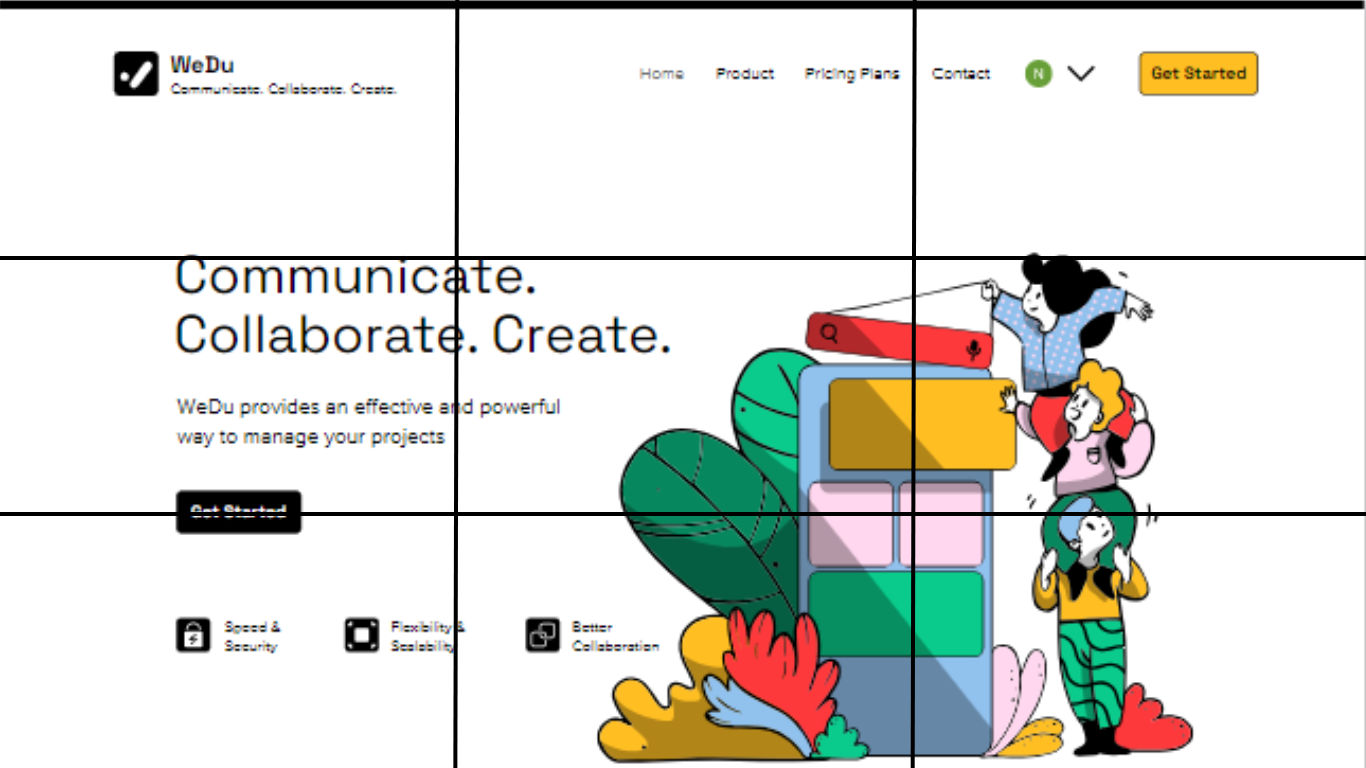
Usually, the four intersections are themselves the ideal spots for placing crucial elements—like, for example, this website template from Wix below, where it places important elements like the hero Image, titles or CTAs (calls to action) along the horizontal grid lines. It works a treat on this, although bear in mind before you head out and “sweet spot” using the intersections for everything, since UIs have a responsive nature—due to responsive design—that placing things with the intersections works best on only some screen sizes; the purpose of this rule is for you to make your designs look interesting and be more effective.

A Wix website template with the rule of thirds grid overlaid.

© WIX, Fair Use

How to Use the Rule of Thirds for Images

The rule of thirds gets easier once you understand it well, and the more you practice it, the more you’ll find how it’s a superb help for you to capture better outcomes—and there are four essential guidelines in mind, tactics that will improve the aesthetic of your photos, and, by association, not just the images you put in your websites and other UI layouts, but those digital solutions overall too.

1. Align the Subject With Lines or Intersections

When you’re about to take a photograph, you can enable a 3x3 grid on your digital camera screen and add it as an overlay. Then you focus on the four intersections that the grid lines form and align your subject with one of these—though, you can also align it with the vertical or horizontal lines. The image below is an example, one where the human figure is the subject or the focal point, and appears along the right line, and, this way, the focus remains on the subject—but, rather than detract from it, the other visual elements complement it and set the scene.

Place the main subject on one of the intersecting lines of the 3x3 grid to add interest to the image.

© Unsplash, Unsplash Licence

2. Align the Linear Elements With Grid Lines

You can also align your elements with either the vertical or horizontal axis—a nifty effect that can work best in different ways for different subjects—and we’ll mention another common program that includes a mobile application is Lightroom. The orientation of your objects and the scene are what will decide which line you can use here. For instance, objects in a landscape—such as horizons, trees/forests, beaches, and cityscapes—work best aligned with horizontal grid lines. 

That’s most of the “great outdoors,” sure, but what about things like doors, pillars, waterfalls, and people in standing positions (not that people are things, but you get the point)? What those items (and persons) have in common is verticality, so they’re going to be elements that look better when you align them with the vertical grid lines and make a photo more aesthetically pleasing to the eye. But there’s a bonus with the rule of the thirds as well, and it’s that—at the same time as you’re pleasing your viewers’ eyes—you can emphasize the whole scene’s interesting elements all the more , and that’s because the scene can “function” better as a scene, and if there isn’t a story going on in there already, many a beholder will be able to imagine some kind of storytelling power at work.

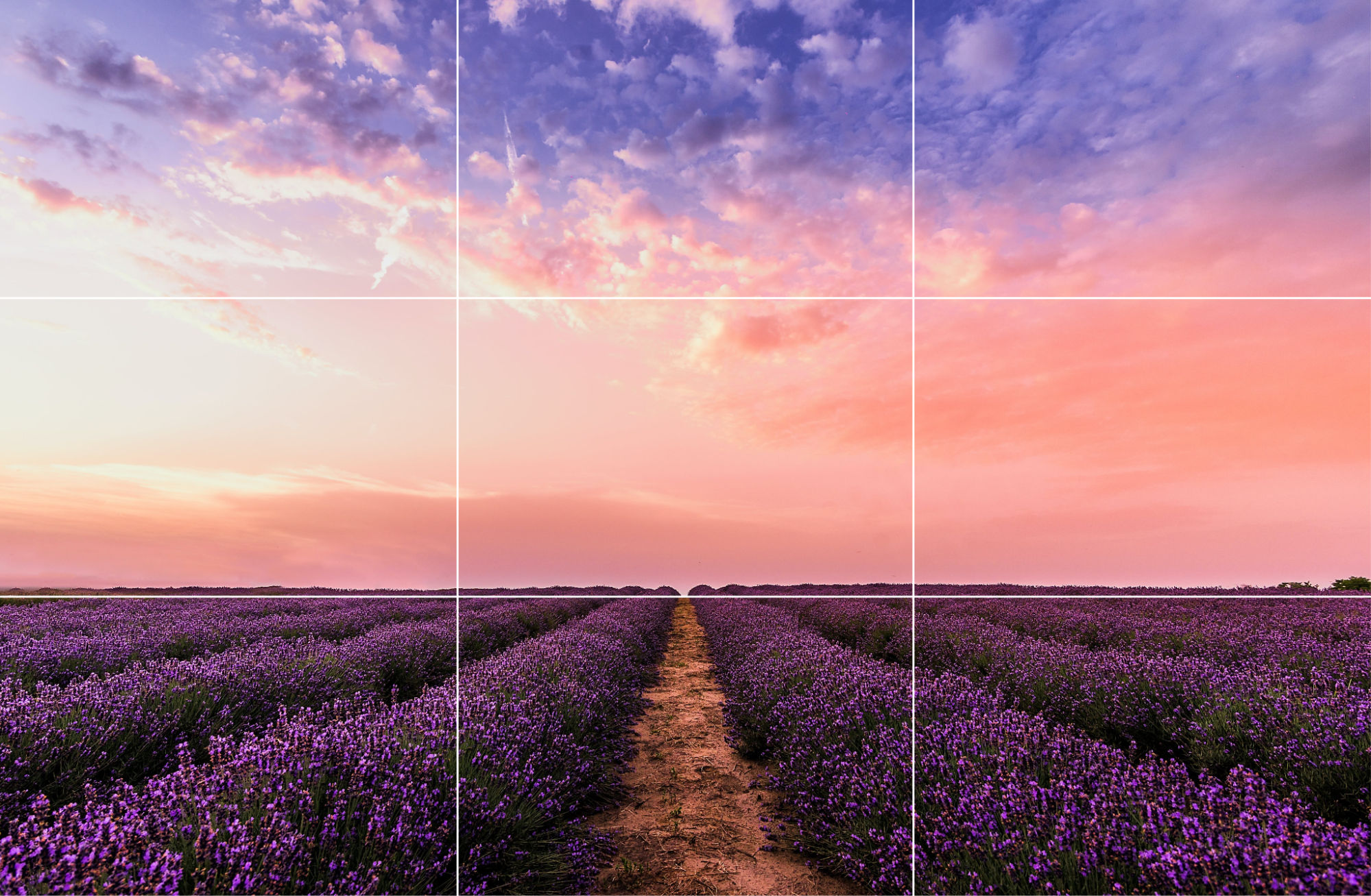
An image of a filed with purple flowers adorned with pink sky.

Instead of placing the horizon line at the center, align it with one of the grid lines. Aligning it with the lower grid line, such as in this image brings more focus to the sky.

© Pexels, CC0

3. Align Objects Diagonally

It may sound—or look, to be more precise—counterintuitive with all this “x” and “y” axis (or left-right and up-down) linearity going on, to tilt things, but another advanced tactic that you’ll find can be a big help is if you line elements up diagonally. It’s not for everything, to be sure, but it’s a tactic that does work well whenever you want to capture objects that have got irregular shapes—things like paths, roads, and rivers being good examples, and especially ones that “snake” in wonderful ways. Put the central element on a diagonal and then, to make sure they’re aligned right, check for the diagonal intersection points, as it’ll help the viewer’s eyes wander around the image and take it in in a way that is bound to have a more impressive effect on them.

An aerial image of a snaking road with a three by three grid overlying it.

Consider aligning subjects diagonally, instead of horizontally or vertically—for example, this winding river makes for a more dynamic composition when it diagonally splits the image.

© Unsplash, Unsplash Licence

4. Break the Rule of Thirds

Yes, you read that right (and, no, we’re not sabotaging our piece about how to use this rule at all!), and it kind of goes in step with the famous Picasso saying about learning the rules like a pro so one can break them like an artist. With that said, though, it’s a rare case when this “anti” (or “non”) tactic works better than the rule of thirds itself and you can get away with completely disregarding the rule—but that’s just in a few cases, we hasten to repeat. For instance, if you see a balance already happily at work (or play) in the scene, then there’s no real need for the rule of thirds to come into play. Have a look at the picture below and you may well find there’s symmetry in landscapes with lake and river reflections, seas, and wet roads; so, no further action from you (or anyone else) is needed.

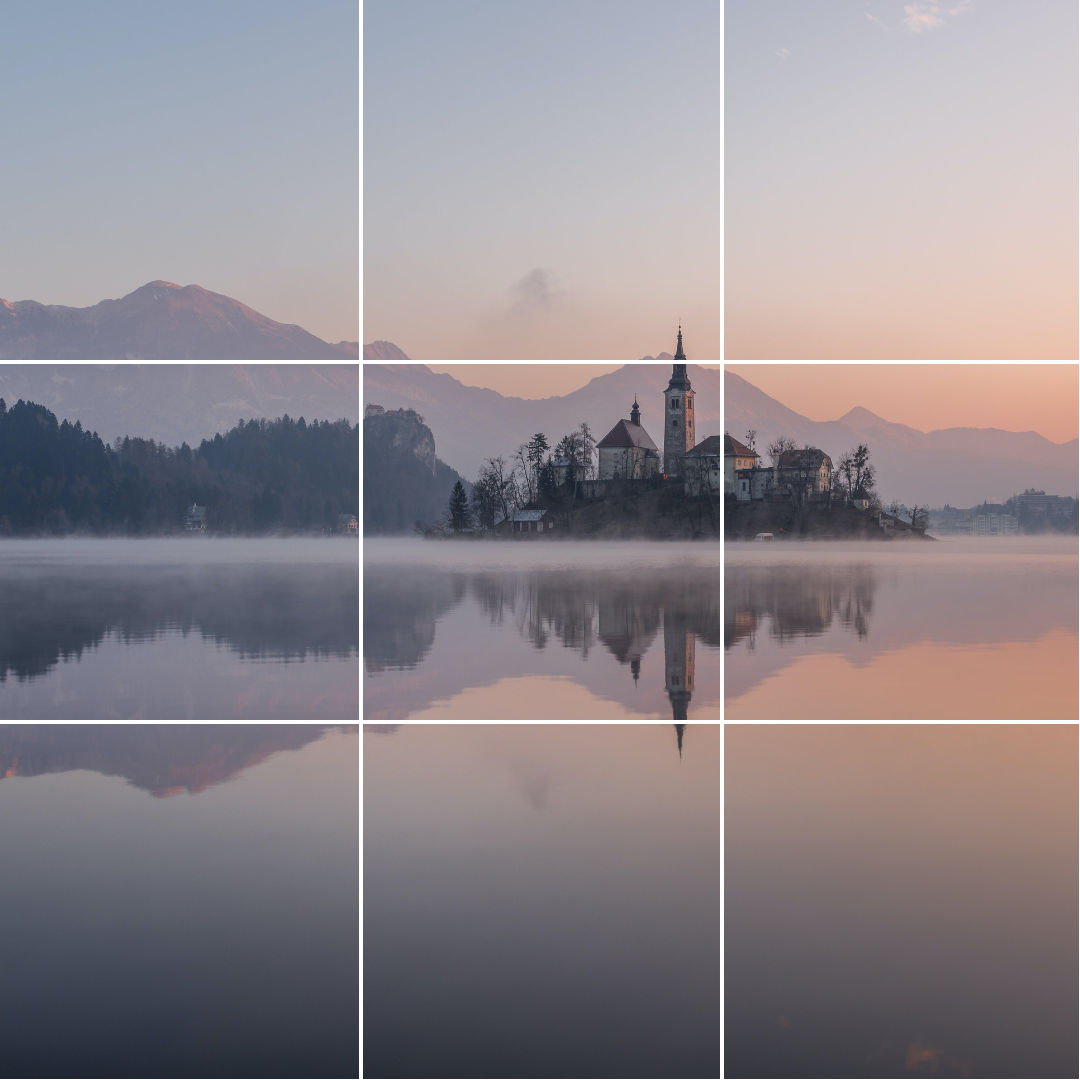
An image of a steeple and other buildings on a waterfront with a three by three grid overlying it.

In this image, the buildings along with their reflection form one unit, and so make the rule of thirds tricky to implement. With that said, even with the image split neatly into two, what—or where—does your eye focus on?  Chances are, along one of the intersection points. 

© Pexels, CC0

All right, so that’s the “breaking the rule” approach that can come into play in a few instances, for sure, but there are various other scenarios in photography—and working with images and designs generally—where something else comes up, and it may be challenging to use the rule of thirds at all, and you can dismiss even thinking about it.

1. Small Subject

If you want to take or click a picture where the subject is too small, the rule of thirds breaks and won’t be much use. How small “too small” is is something you’ll notice at the time, so if you want to highlight the subject, keep the rule of thirds aside and place the distant building, bird, ant, or whatever small target is there that you want at the center of the image.

2. Frame-Filling Portraits

Then, when you want to click or take a picture where all the parts of an image aren’t entirely in the frame or when the subject is in the foreground, it might get complicated to apply the rule of thirds. That’s a phenomenon that happens due to the fact that if the subject occupies most of the frame, there’s only one thing to focus on: it—or the person who’s there—so there’s no need to apply the rule of thirds; you’ve got what you want right there and up close.

Rule of Thirds Examples

Example 1

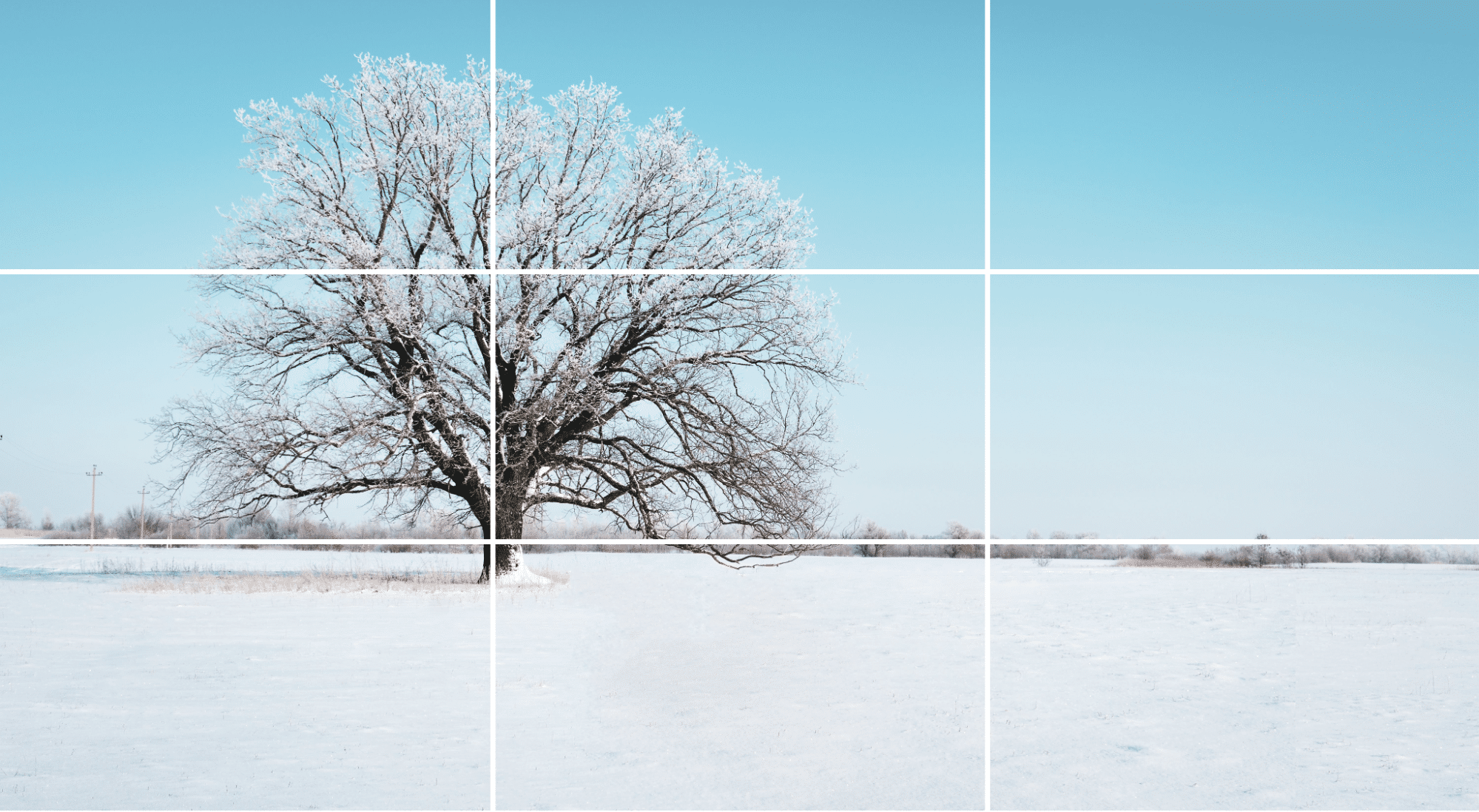
A photo of a bare tree in a snowy field with a three by three grid overlying it.

A tree aligned along the left vertical grid line with the horizon aligned along the lower horizontal grid line.

© Pexels, CC0

This photograph is a perfect example of good composition, starting with how the tree—the main subject—lines up in a perfect way with the left vertical line and is well positioned with the help of the intersections, and so this leaves negative space on the right to set the scene. The picture-taker's also divided this photo into two parts, with the ground cleanly aligned to the horizontal grid line, so a third of the picture is the foreground while two-thirds of the photograph make up the background—adding depth. There’s no object or element on the right, so what that means is no distractions are in the way, and the focus stays on the subject—a tree in a wintry scene, and there’s more of a story waiting to come out from there than there’d be if it were front and center.

Example 2

A windmill aligned with the left vertical grid line with hills and mountains in the background at a distance.

© Pexels, CC0

This example looks similar to the previous one, but only partially, and there are three points to pick up from it as an example. For one thing, the horizon in this image isn’t complete, or you might say that there even isn’t one. Next, the rule of thirds is loosely followed in this picture, positioning only the subject (the windmill) on the left with the aid of intersections. And last—but not least—the photographer has tried to align the limited horizon with the bottom horizontal gridline to maintain the balance and proportions.

Example 3

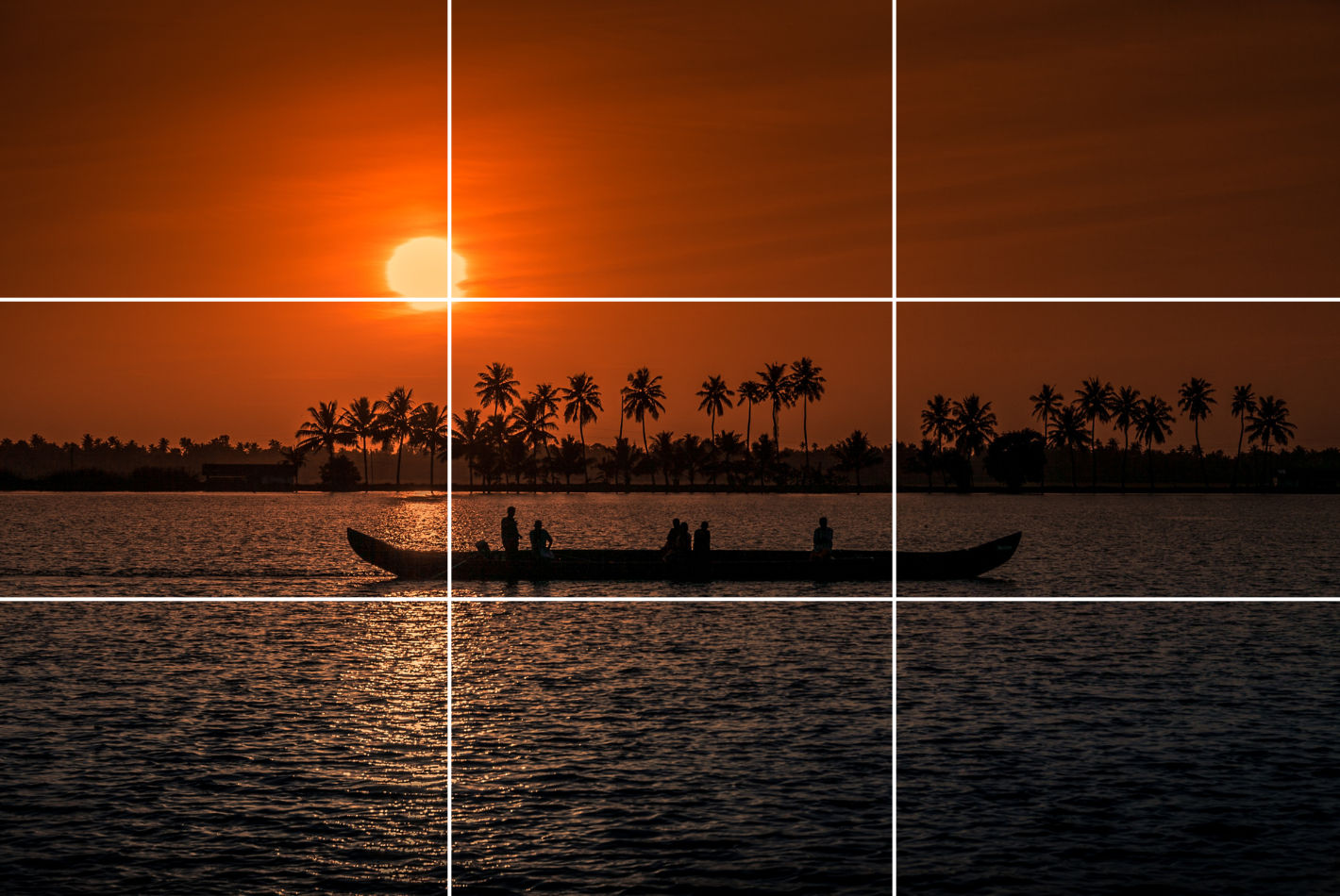
A Snake boat sailing against the backdrop of a sunset and palm trees.

© Pixabay, CC0

In this one, the photographer has used the rule of thirds loosely—almost to the point of breaking it—but there sure is a great deal to learn from this type of composition. For one thing, the photographer has divided the image into two almost equal halves in a horizontal way by positioning the coastline at the center.  Then note how the photo’s main subject is the boat, which is itself nearly at the center—and since it’s smaller, it leaves room for the essential details—and also how the image splits into three parts: the river (the foreground), the horizon, the subject (the central element of the picture), and the trees and the sun (the background).

Example 4

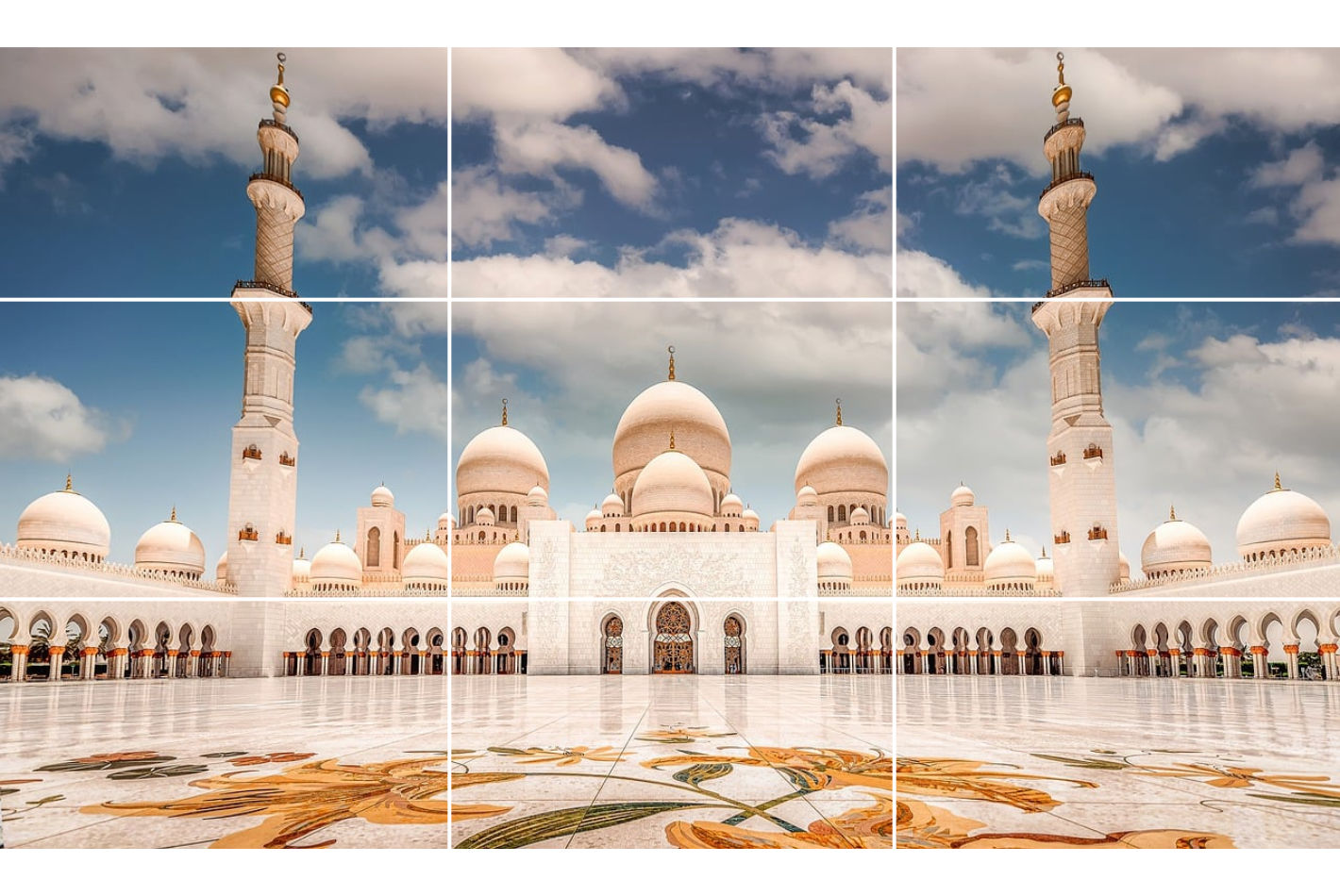
Front view of a mosque.

© Pixabay, CC0

This example is not something one would come across all that often at all, and—in fact—it’s more than a little rare to find such symmetry in objects or landscapes, but this example has got a great deal to teach. A clear thing here is how the subject—the façade of the mosque—covers most of the frame, but note how close this picture is to a perfect alignment with the grid and how the positioning is so balanced that the spacing around the subject is almost equal on both sides, and how the center alignment of the subject leaves room for additional details—like the sky and design on the floor—and how the photograph splits into three parts, with the designer floor (the foreground), the subject (the mosque’s façade), and the sky (the background).

Example 5

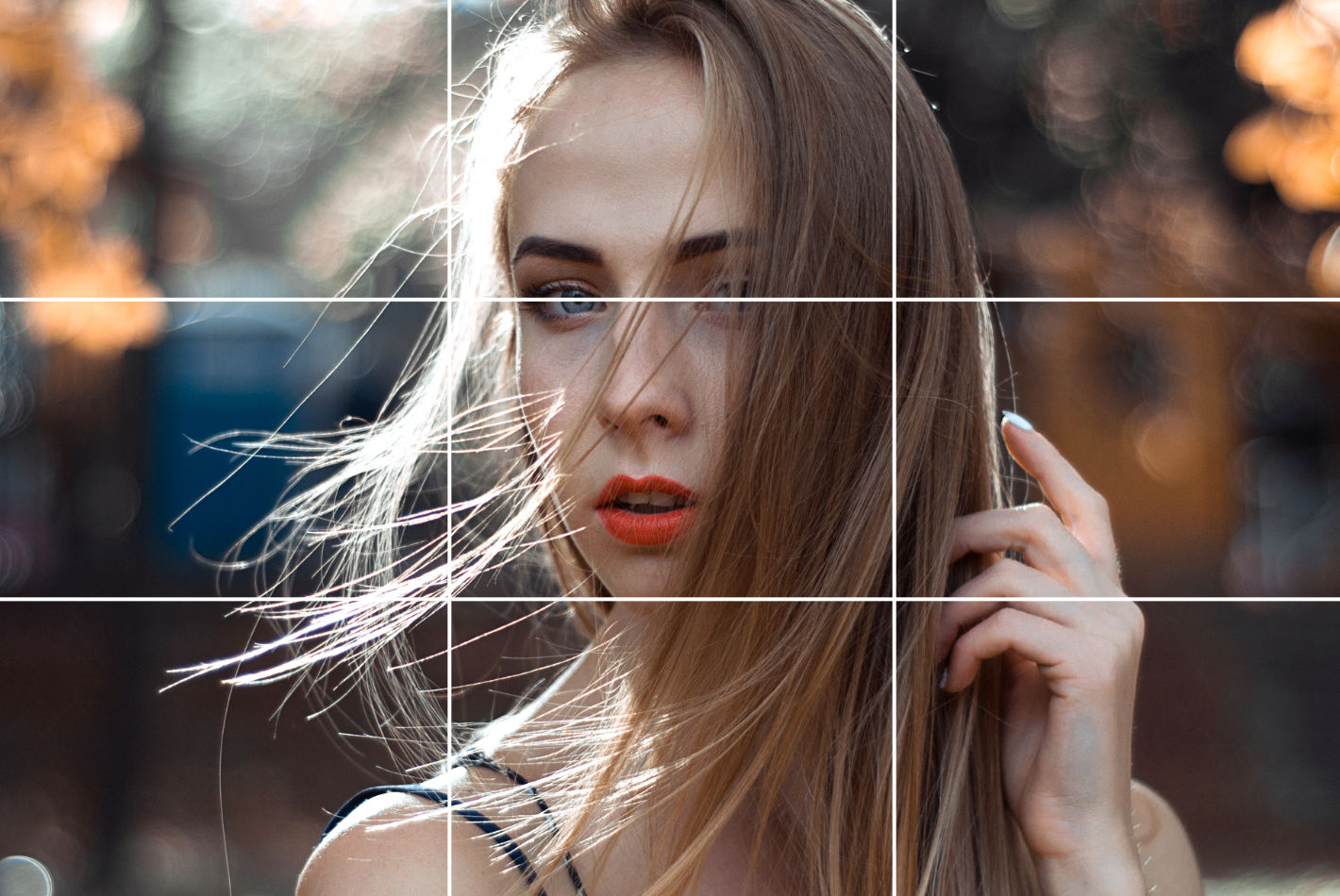
A woman is looking into the camera, her hair lightly brushing against her face.

© Pexels, CC0

Last—but, again, not least!—come portraits and people, and in comparative terms it’s more accessible to use the rule of thirds in portrait photography than it is in landscape photography. For example, in the portrait of the person above, the photographer has done a great job of keeping the subject in the center and focus, and what the best way to get the right alignment there is is to place the eyes on the upper horizontal grid line. Then, the additional parts—like shoulders—have got to stay within the lower grid line for the rule of thirds to “work,” which it does well here. As a final point, the picture-taker has also made sure that the face is at the center—and voilà, the rule-of-thirds magic happens!

Learn more about grid systems in How To Use Grid Systems

Best Tools for Editing Using the Rule of Thirds

If you can’t use the rule of thirds correctly while you’re clicking pictures, you can improve the composition while editing your photos afterwards. Every piece of editing software has got the option to use grids, and here’s how you can use it in different software:

1. Adobe Photoshop

There are two ways to apply the rule of thirds in Adobe Photoshop:

Way 1

  • Open Photoshop and place the photo you want to edit.

  • Next, on the top toolbar, click on the icon next to the home and select any one of the crop options. 

  • Look for the little grid icon in the top bar and select the first option, Rule of Thirds.

  • Next, check the box for Always Show Overlay in the same menu.

Way 2

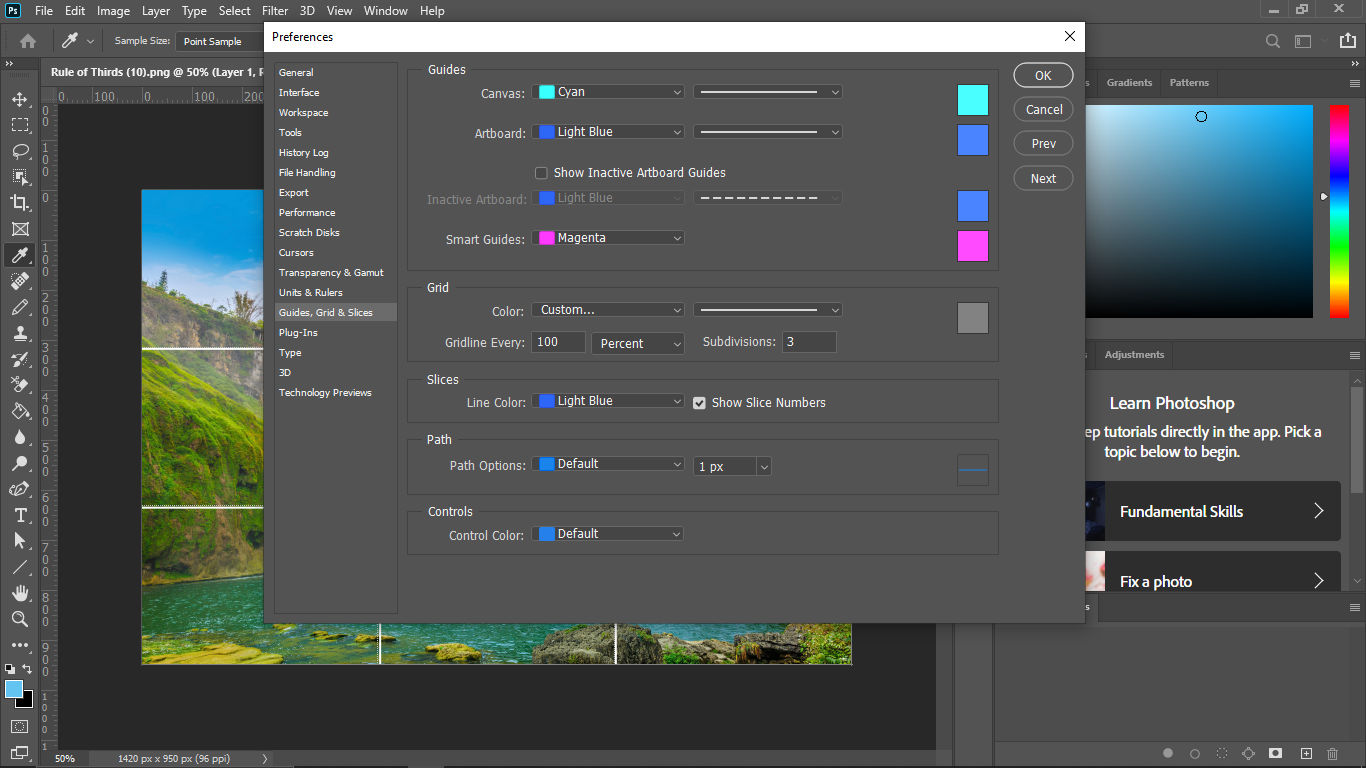
  • Go to Edit > Preferences > Guides, Grids & Slices, then navigate to the submenu.

  • Set Gridline Every to 100 > Click on the navigation next to it, select Percent > Set the subdivisions as 3 and click OK.

  •  If you still can’t see the gridlines, go to view and enable the extras. 

Screenshot of Adobe Photoshop's Guides, Grid & Slices section of Preferences.

© Adobe, Fair Use

2. Lightroom

Another popular software that also has a mobile app is Lightroom. It is one of the most preferred pieces of photo editing software. To use the rule of thirds grid in Lightroom, follow these steps: 

  • Import your photo into Lightroom.

  • Go to the Develop module > click on Crop Overlay option. 

  • Go to Tool > Crop Guide Overlay > Thirds to enable the three-by-three grid in Lightroom.

3. GIMP

To use the rule of thirds while editing in GIMP, follow these steps:

  • To enable the grid in GIMP, choose View, then Show Grid. 

  • The default grid appears on the screen as a series of solid lines, each set 10 pixels apart.

  • You can change the appearance and spacing of the grid lines. To do that, choose Image < Configure Grid. You can divide the width and height of the image by 3 to obtain the correct values to enter in the dialog box.

  • Next, choose a line style of your liking, color, and spacing to customize.

4. Canva

Although Canva is a popular cloud software for graphic designing, many people also use it for photo editing. Therefore, using the rule of thirds grid in Canva is simple. But this feature is only available in a pro account. If you have a Canva Pro account, here’s how you can enable it in Canva:

  • Create a custom-sized art board according to the image you want to edit.

  • Add your photo to the uploads and place it on the artboard.

  • Next, select 'Files' in the top-left corner and select ‘View Settings.’

  • In ‘View Settings,’ select ‘Add guides.’

  • Once selected, you can customize the number of rows and columns you want on your artboard. 

  • Go to ‘Custom,’ add the number of rows and columns (3X3), and you’ll have the rule of thirds grid on your artboard. 

The Take Away

The rule of thirds is a powerful, well-established, and tried-and-tested visual design tool—and principle—where you apply a 3x3 grid with nine equal spaces within it and align subject material along the appropriate intersection lines or at intersecting points and sweet spots. It’s a “preset” that comes more or less standard on equipment like phones and cameras, and the power it can deliver to make images “speak” more to viewers—including the users of one of your websites, dear designer, for example—can be phenomenal. 

With the many examples of how, when, and when not to use the rule of thirds (as well as when to break it!)—plus the software guidance on how to bring the best out of your images—you’ve got before you a legion of fine points that can spill over from photography into UI design.

If you’re after yet more insights—which is understandable, given how compelling this topic is—there’s indeed more that we’ve got to help you with, and you can take courses on visual perception by the IxDF to understand the anatomy of the eye, theories of human color vision, and other essential principles that can take your designs into overdrive while you broaden your skillset.

Feel Stuck?
Want Better Job Options?

AI is replacing jobs everywhere, yet design jobs are booming with a projected 45% job growth. With design skills, you can create products and services people love. More love means more impact and greater salary potential.

At IxDF, we help you from your first course to your next job, all in one place.

See How Design Skills Turn Into Job Options
Privacy Settings
By using this site, you accept our Cookie Policy and Terms of Use.
Customize
Accept all

Be the One Who Inspires

People remember who shares great ideas.

Share on:

Academic Credibility — On Autopilot

Don't waste time googling citation formats. Just copy, paste and look legit in seconds.