Heuristics

Your constantly-updated definition of Heuristics and collection of videos and articles.
Be a conversation starter: Share this page and inspire others!

394 Shares

What are Heuristics?

Heuristics in UX (user experience) design are general principles that guide designers as they create user-friendly interfaces. Designers apply heuristics such as error prevention, recognition rather than recall, and others to help optimize digital products, identify usability issues, and improve user experiences efficiently.

Watch as William Hudson, User Experience Strategist and Founder of Syntagm Ltd, explains important points about heuristics at work in design:

Transcript

The Origins of Heuristics in UX Design

Heuristics are a set of rules for solving problems in quick, practical ways. The concept of heuristics in UX design traces back to the late 1980s and early 1990s. It was an era when computing and interaction design looked more than a little different to today. In 1990, usability experts Jakob Nielsen and Rolf Molich introduced the idea of heuristic evaluation as a method to identify usability problems in UIs (user interfaces).

In 1994, Nielsen refined the “10 Usability Heuristics for User Interface Design”—a set of principles that have become foundational for UX designers to create pleasant and seamless user experiences. The purpose of these heuristics was to provide a framework for evaluating user interfaces without the need for extensive user testing.

Jakob Nielsen’s 10 usability heuristics are:

  1. Visibility of system status: The system should always keep users informed about what is going on, through appropriate feedback within reasonable time.

  1. Match between system and the real world: The system should speak the users’ language, with words, phrases, and concepts familiar to the user, rather than system-oriented terms.

  1. User control and freedom: Users often choose system functions by mistake and will need a clearly marked “emergency exit” to leave the unwanted state without having to go through an extended dialogue.

  1. Consistency and standards: Users shouldn’t have to wonder whether different words, situations, or actions mean the same thing, hence why designers should follow platform conventions and maintain consistency throughout.

  1. Error prevention: Even better than good error messages is a careful design which prevents a problem from occurring in the first place.

“An ounce of prevention is worth a pound of cure.”

— Benjamin Franklin, American Polymath

  1. Recognition rather than recall: When people must remember what to do in a situation, they find it more taxing than when they have a cue or suggestion on screen. Minimize the user’s memory load by making objects, actions, and options visible.

  1. Flexibility and efficiency of use: Accelerators—which novice users likely won’t notice—may often speed up the interaction for the expert user such that the system can cater to both inexperienced and experienced users.

  1. Aesthetic and minimalist design: Dialogues should not contain information which is irrelevant or rarely needed.

  1. Help users recognize, diagnose, and recover from errors: Error messages should inform users in plain language, precisely indicate the problem, and constructively suggest a solution.

  1. Help and documentation: Even though it’s better if users can use a system without documentation—like how-to information and guidelines—it may be necessary to provide help and documentation.
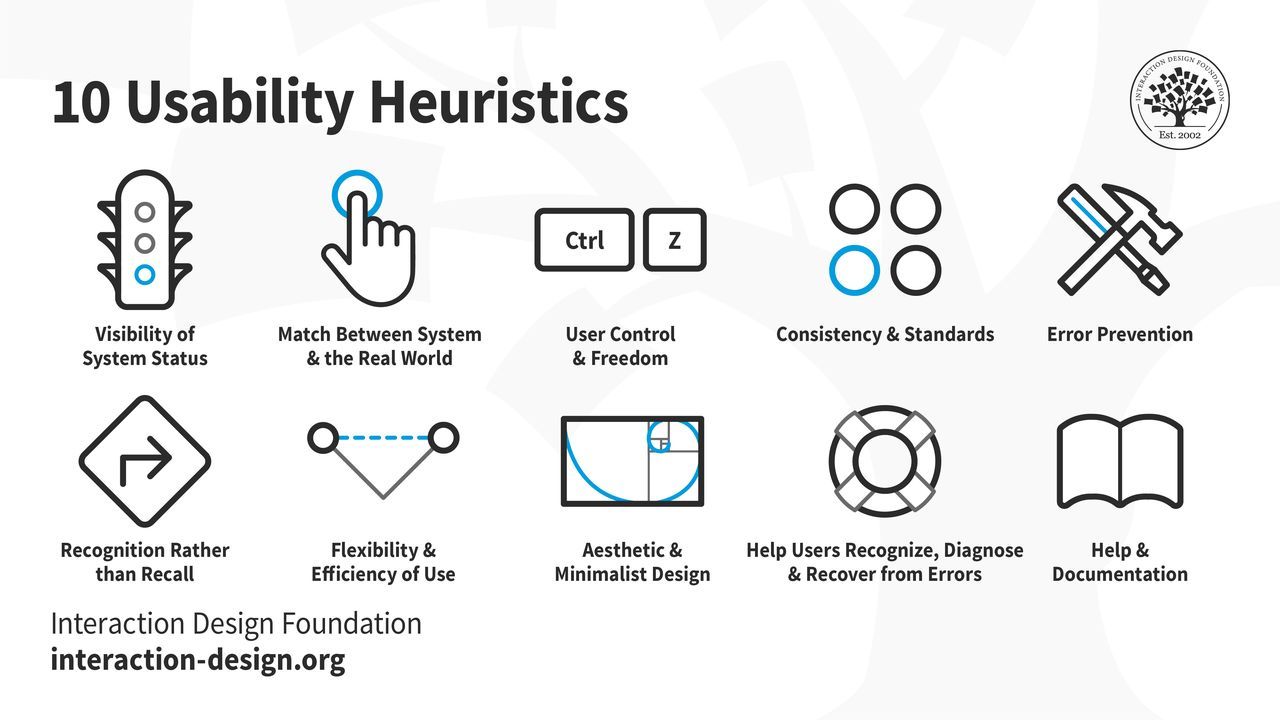
A diagram showing 10 Usability Heuristics

Nielsen’s heuristics have stood the test of time. When Nielsen revisited them in 2020 to slightly refine the definitions’ language, the 10 heuristics remained unchanged.

© Interaction Design Foundation, CC BY-SA 4.0

These heuristics act like an early-warning system for designers to shape their UIs with before they commit to testing on expensive final design solutions. Indeed, when designers—and heuristic evaluators—apply these principles, they often can systematically identify potential usability issues early in the UX design process. That translates to more efficient and cost-effective improvements and less problematic designs for user testing.

How Heuristics Help UX Designers and Brands

The best way to illustrate the true value of heuristics is to imagine a world without them. For example, designers can create great-looking websites according to what they know about design principles and what a great-looking website looks like. However, a great-looking digital product is no guarantee that it’s highly usable—and usability is just one of the seven factors that influence UX. That approach can detach the designer from the user and get in the way of an empathic connection with their user needs, behaviors, and the rich details of context in their user journey.

Watch this video to understand why successful designs reflect empathy with users:

Transcript

UX professionals continue to use heuristics such as Nielsen’s widely to evaluate and improve user interfaces across various digital products. For example, you can apply them early to prototypes you create to stay mindful of what users need every step of the way.

When you apply UX heuristics, you can flip perspectives with the user and understand how to answer questions like “Did that go into my shopping cart?” and “How do I see what I’ve sent?” quickly.

At the same time, you can see how to keep users from becoming confused and asking questions like: “They said, ‘Log in’ on the other screen; why is it ‘Sign in’ here?” and “How do I get back to where I was?”

Watch as Alan Dix, Author of the bestselling book “Human-Computer Interaction” and Director of the Computational Foundry at Swansea University, explains why good designs need prototyping:

Transcript

If your product is a website, application, or other digital product—such as augmented reality (AR) or virtual reality (VR)—you can use heuristics to help ensure that the interface aligns with user expectations and behaviors. Heuristics are a tool that empowers you to stay two steps ahead of users and help prevent the ultimate problem: user distrust.

Consistent and predictable interactions mean greater user satisfaction and efficiency; users get what they want or need to do done, fast. You can enjoy great efficiency with a heuristic evaluation of your design, too. It’s a cost-effective method to assess usability, and saves you from finding numerous problems later in usability testing.

How To Create More Intuitive and User-Friendly Interfaces with Heuristics

Understand and apply each of Nielsen’s 10 usability heuristics—along with an 11th one—to get on the fast track and create effective user interfaces. Here’s a breakdown of each heuristic with some practical advice:

  1. Visibility of system status: Keep users informed about what’s happening on the interface and in the system—provide timely and appropriate feedback. Empathize with them; many users access apps and sites in potentially stressful situations and can become frustrated quickly, or even fearful if they don’t know what’s going on.

  • For example, show progress indicators during loading times or confirmation messages once users complete actions.

  1. Match between system and the real world: Use language and concepts familiar to users. Don’t give them technical jargon. Instead, use terms that align with users’ real-world experiences. Even if your brand has a quirky personality, it’s a good idea to keep things simple and familiar for users.

  • For example, use “Shopping Cart” instead of “Item Inventory.”
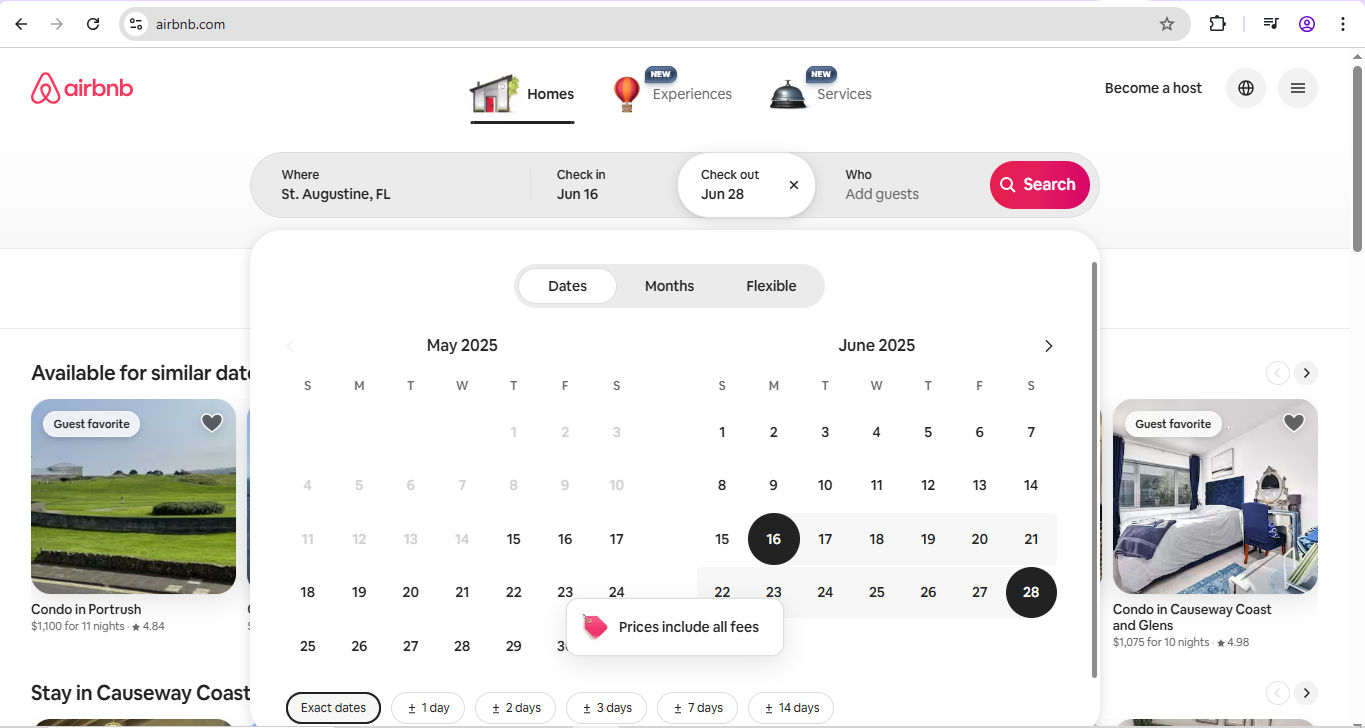
A screenshot of an Airbnb page.

Airbnb uses plain language and calendar icons, and mirrors real-world booking experiences.

© Airbnb, Fair Use

  1. User control and freedom: Mistakes happen in an imperfect world; you can count on it. So, provide users with the ability to undo and redo actions. Include clearly marked “exit” options to allow users to leave unwanted states without difficulty. Users might access solutions like banking apps while they’re on a bumpy bus ride. What if they need to make a payment, accidentally add a zero or two, and accidentally click “Pay”?

  • For example, offer a “Cancel” button during multi-step processes.

  1. Consistency and standards: Maintain consistency in design elements and follow platform conventions. Users look for items they’ve come to understand as “industry standards,” so use standard icons and terminology consistently to prevent confusion. Again, they may access your digital product in a hurry; don’t delay them as they wonder where buttons are or what words mean. Even small pauses cost them time and, in even just a few seconds, can cost your brand credibility in their eyes.

  • For example, use a magnifying glass icon for search functionality.
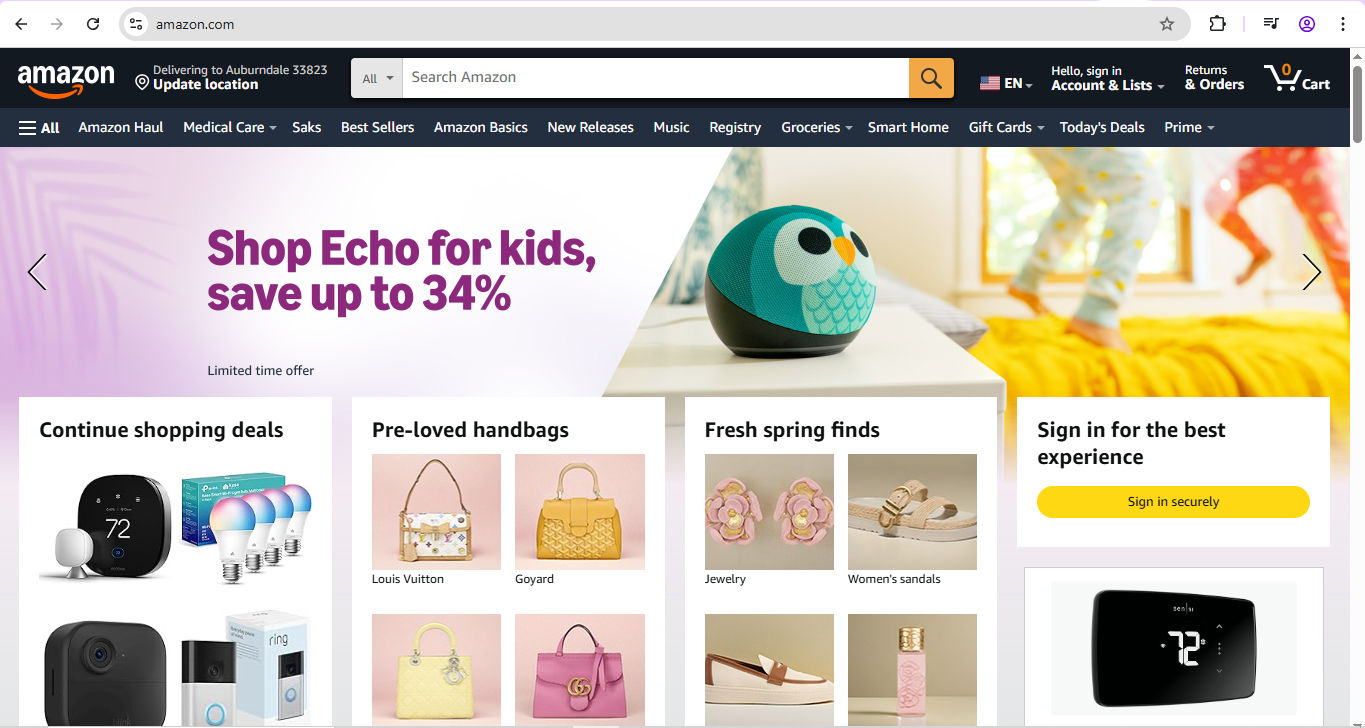
A screenshot from Amazon.com.

Amazon’s highly findable magnifying glass helps users identify the search bar and get the products they want, fast.

© Amazon, Fair Use

  1. Error prevention: Assume it’s an imperfect world and users need safety nets; it is, and users will be glad of the consideration (or will become irritated or angry if they’re allowed to “fall”). So, design interfaces that prevent errors in the first place. Use confirmation dialogs for critical actions and provide constraints to guide user input.

  • For example, disable the “Submit” button until all required fields are completed, or guard-rail the banking app user who may have made a mistake with a “Confirm payment” screen. Show them the amount they’re about to pay—if it’s wrong, let them edit the amount or cancel (which goes back to Heuristic 3).

  1. Recognition rather than recall: Minimize users’ memory load by making options and information visible. So, use menus, icons, and tooltips to help users recognize actions and options without having to remember them. Users in their many contexts expect to find choices and achieve goals fast without having to remember which screen they saw something on—hesitation breaks seamless experiences.

  • For example, if users need to contact customer support, have an easily recognizable icon for it throughout a site.

  1. Flexibility and efficiency of use: Power users know their way around; newcomers won’t—although they should still find the digital solution intuitive and user-friendly. So, cater to both and provide shortcuts and customization options for experienced users while maintaining simplicity for novices.

  • For example, offer keyboard shortcuts for frequent actions and allow users to customize their dashboard layout.

  1. Aesthetic and minimalist design: Cluttered, busy designs keep users back, so design interfaces with simplicity in mind. Remove unnecessary elements that don’t support user tasks—don’t have anything in there that gets in the way of what users want to do.

  • For example, use whitespace effectively to create a clean and focused layout.
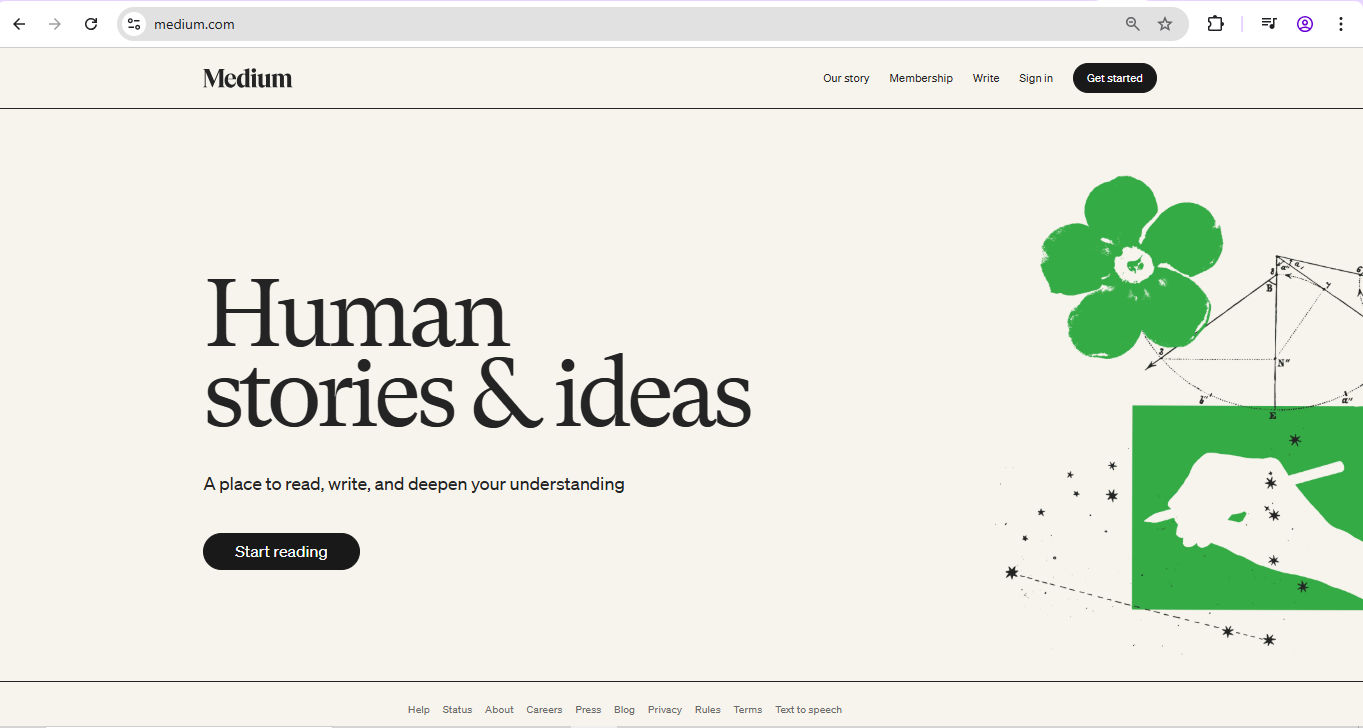
A screenshot from Medium.com.

Medium’s clean layout features generous whitespace (which can be grey, too)—lots of breathing space to help deliver a great experience whether you’re a reader or writer.

© Medium, Fair Use

  1. Help users recognize, diagnose, and recover from errors: Errors will happen, even with guardrails in place. So, provide clear and concise error messages that indicate the problem and suggest solutions. Avoid technical language and error codes.

  • For example, display "Please enter a valid email address" instead of "Error 400."

  1. Help and documentation: Fast, empathic aid helps users when they need to pause on more intricate sites or consider what a product or service includes. So, offer easily accessible help and documentation that focuses on users’ tasks and their needs in context. Include search functionality and organize content logically.

  • For instance, provide a searchable FAQ section and contextual help links.

  1. Accessibility and inclusion: In a world where accessible design is a legal requirement in many jurisdictions, create interfaces that are perceivable, operable, understandable, and robust for all users. This aligns with the Web Content Accessibility Guidelines (WCAG), and you can use it to help your brand reach not just users with disabilities but all users too (such as subtitles for users in loud places).

Key aspects of this heuristic include:

  • Perceivability: Ensure that users can perceive the information a digital product presents, regardless of their sensory abilities.

  • Operability: Design interfaces that users with various physical abilities can operate.

  • Understandability: Create content that users with different cognitive abilities can understand.

  • Robustness: Develop content that a wide range of user agents, including assistive technologies, can interpret reliably.

Watch our video about accessibility to understand why it’s vital in design:

Transcript

Some Considerations and Cautions about Heuristics

While heuristics are valuable tools in UX design, they’re not a guarantee of perfect designs. They are principles to guide you as you develop user-friendly and accessible designs; so, recognize their limitations and use them appropriately.

  • Subjectivity: Heuristic evaluations rely on the expertise of the evaluator, which can introduce bias. Different evaluators may identify different issues based on their perspectives and experiences.

  • Not a substitute for user testing: Heuristics should complement—not replace—user testing. While they can help you empathize better with users’ needs and identify potential usability issues, they don’t capture actual user behavior and preferences.

  • Context matters: Heuristics are general guidelines and may not apply equally to all contexts. For great designs that resonate with users, you’ll want to consider the specific needs and expectations of their target users when applying these principles.

  • Over-reliance: If you rely just on heuristics, you might overlook unique usability challenges. So, combine heuristic evaluations with other methods, such as user testing and analytics. It will help you gain a comprehensive understanding of usability issues and can prevent expensive design missteps.

Overall, include heuristics effectively as part of your broader UX strategy. Jakob Nielsen’s 10 usability heuristics give you a solid foundation to set your digital creations on, and the accessibility and inclusion heuristic offers an important additional lens to examine the user-friendless of your product.

Heuristic Evaluation: An Essential and Enduring Tool

The timelessness of heuristics is a reassuring indicator that mirrors the enduring relationship between technology and users. Technological advancements will continue to produce system changes and pave the way for exciting new products. However, human users will still need to find things and do things as easily as possible on the apps and sites they choose to try, trial, and subscribe to. They won’t just appreciate brands that guardrail them, forgive their mistakes, and keep them on board; they’ll be secure in the knowledge that they are safe and valued. They will expect brands to do that, too. Use heuristics mindfully and help deliver seamless experiences to users of all types—and have winning products to show for your thoughtful design work.

Questions About Heuristics?
We've Got Answers!

How do heuristics help improve a product's usability?

Heuristics help improve a product's usability as they give designers quick, reliable rules to evaluate and refine user interfaces. These rules, like “keep things consistent” and “give users feedback,” highlight common trouble spots before they become real problems. Designers use them to spot issues fast—without waiting for full user testing (which they will need to do later, anyway, but heuristics are a definite help to complement user testing).

For example, if a user struggles to undo an action, the “user control and freedom” heuristic would spotlight that flaw. Nielsen's 10 usability heuristics, a common industry standard, help teams spot 80% of usability issues with just five users. That kind of power means teams can tweak designs early, save time, and avoid frustrating users.

Use heuristics early and often. Don't wait for real users to uncover what you can catch with a keen eye and a checklist.

Watch as William Hudson, User Experience Strategist and Founder of Syntagm Ltd, explains important points about heuristics at work in design:

Transcript

Take our course Mobile UX Design: The Beginner's Guide for valuable insights about design for the majority of digital product encounters.

How do Nielsen's heuristics differ from other design principles?

Nielsen's heuristics differ from other design principles because they focus purely on usability and practical problem-solving. While many design principles cover broad goals like aesthetics, branding, or emotional impact, Nielsen's heuristics target how users interact with a product.

These ten rules emphasize clarity, feedback, error prevention, and user control. They act as a usability checklist that helps designers uncover real problems quickly. Other design principles—like those from Dieter Rams or the Gestalt school—highlight beauty, harmony, or cognitive psychology. Nielsen's approach goes straight to what blocks users.

Think of it this way: Nielsen's heuristics catch what breaks a user's flow. Other design rules might polish the experience. Combine both, and you'll create products that look great and work beautifully.

Take our course Mobile UX Design: The Beginner's Guide for valuable insights about design for the majority of digital product encounters.

How do I evaluate a design using heuristics?

To evaluate a design using heuristics, review each screen or interaction and check it against a set of usability rules—like Nielsen's 10 heuristics. These rules help you spot flaws without the need for user data. For example, ask: “Does the interface clearly show what's going on?” or “Can users fix errors easily?” Move through the interface step-by-step, checking for feedback, consistency, and clarity.

Note each problem you find and link it to the specific heuristic it violates. Then, rate the severity of each issue—low, medium, or high impact. This helps your team prioritize fixes.

Find out how to conduct a Heuristic Evaluation (HE).

Who should take part in a heuristic evaluation?

Usability experts, designers, and UX researchers should take part in a heuristic evaluation. Ideally, assemble a small group of 3–5 professionals who understand usability principles. Each person reviews the interface alone first to avoid group bias, and then everyone discusses findings together.

Don't limit this process to senior roles. Junior designers or developers with UX knowledge also add valuable insights. The key is understanding usability, not just the product.

This team-based approach uncovers more issues. Research shows that one expert might catch 35% of usability problems, while five can catch up to 80%. That makes the evaluation sharper and more comprehensive.

Heuristic evaluations don't need users. They need sharp eyes trained on usability.

Discover how to conduct a Heuristic Evaluation (HE).

What are the limits of using heuristics in UX design?

Heuristics help catch many usability issues fast—but they have limits. They rely on expert judgment, not real user data. So while heuristics flag common problems, they can miss how real people actually use a product.

For example, an expert might say a button lacks clarity, but only user testing reveals that users never see it. Heuristic evaluations also depend on the reviewers' experience. A weak evaluation finds few issues or misses severe ones.

Heuristics can't replace usability testing or field research. Use them early to fix obvious problems—and then validate with users. This layered approach blends speed with accuracy and gives you the best of both worlds.

Explore how to conduct a Heuristic Evaluation (HE).

How do I avoid bias when I do heuristic evaluations?

To avoid bias in heuristic evaluations, review the design independently before you discuss it with others. Groupthink can cloud judgment, so make sure each evaluator examines the interface alone first. Then, compare notes in a team session to find common patterns and overlooked issues.

Use Nielsen's heuristics as an objective checklist. Don't rely on memory; anchor your feedback in the specific rule each issue breaks. Document what you see, too, not what you assume the user will do. Bias often creeps in when you imagine how someone “should” use a design.

If you designed the interface, ask others to review it instead. Familiarity leads to blind spots, and you may be too close to your design to be able to notice issues. Diverse evaluators reduce this risk and can spot usability issues more effectively.

Watch Alan Dix, Author of the bestselling book “Human-Computer Interaction” and Director of the Computational Foundry at Swansea University, explain why good designs need prototyping:

Transcript

Take our course Mobile UX Design: The Beginner's Guide for valuable insights about design for the majority of digital product encounters.

Why do different evaluators find different issues using heuristics?

Different evaluators find different issues using heuristics because each brings a unique background, focus, and interpretation of the rules. Some notice visual consistency problems, while others catch deeper navigation flaws. Their experience, role, and design knowledge shape what stands out—to them.

Heuristic evaluations depend on expert judgment, not a strict formula. That means two people can review the same screen and flag different problems. One might see a missing error message, while the other finds unclear icons.

That's why teams get better results than individuals. Multiple perspectives fill in the gaps and create a more complete picture. By association, they help string together a tighter “safety net” for you to design with new considerations in mind. Those considerations, in turn, will help your users.

Take our course Mobile UX Design: The Beginner's Guide for valuable insights about design for the majority of digital product encounters.

Can I create my own set of design heuristics?

Yes; you can create your own set of design heuristics. To start, understand your users, product goals, and industry context. Then build rules that reflect real challenges your users face. For example, an e-commerce team might include “support quick product comparison” or “make shipping costs clear early.”

Custom heuristics help when standard ones—like Nielsen's—don't cover specific needs (although Nielsen's have stood the test of time for good reason). Keep your set small and focused. Aim for 8–12 rules to stay sharp and usable. Each heuristic should highlight a common usability concern in your domain.

Test your custom set—run evaluations and refine them based on what your team actually finds useful. This keeps them grounded and relevant.

Enjoy our course Mobile UX Design: The Beginner's Guide for valuable insights about design for the majority of digital product encounters.

Should I update heuristics for new tech like AR or voice UI?

Yes; update heuristics if your design is for new tech like AR or voice UI. Traditional rules—like Nielsen's—still help, but they miss challenges unique to emerging interfaces. AR demands spatial clarity and context awareness. Voice UI requires clear prompts, feedback, and conversational flow.

New technologies change how users interact, so your heuristics should evolve as well. For example, “ensure visual feedback” becomes “ensure timely audio or spatial feedback” in voice or AR systems. If heuristics stay too generic, they overlook friction points in new environments.

Keep your core usability principles, but extend them with domain-specific rules. This approach helps you catch issues early—and not guessing how new tech fits old standards.

Explore the exciting worlds of AR and VR for key insights.

Enjoy our Master Class How To Craft Immersive Experiences in XR with Mia Guo, Senior Product Designer, Magic Leap to find valuable insights in an exciting set of design fields.

What are some recent or highly cited scientific articles about UX heuristics?

Bertini, E., Gabrielli, S., Kimani, S., Catarci, T., & Santucci, G. (2006). Appropriating and assessing heuristics for mobile computing. Proceedings of the Working Conference on Advanced Visual Interfaces (AVI '06), 119–126.

This study addresses the limitations of traditional heuristic evaluation methods when applied to mobile computing interfaces. Recognizing that standard heuristics may not adequately capture the contextual nuances of mobile environments, the authors developed a set of mobile-specific heuristics. These were derived through a systematic methodology involving literature review, expert consultations, and empirical validation. The study compared the effectiveness of these mobile heuristics against Nielsen's traditional heuristics in identifying usability issues in mobile applications. Findings indicated the mobile-specific heuristics were more adept at uncovering context-related usability problems, highlighting the importance of tailoring evaluation methods to the unique constraints and user behaviors associated with mobile computing.

Nielsen, J., & Molich, R. (1990). Heuristic evaluation of user interfaces. Proceedings of the SIGCHI Conference on Human Factors in Computing Systems, 249–256.

This foundational paper introduced the heuristic evaluation method, a usability inspection technique where experts assess interfaces against established heuristics. Nielsen and Molich proposed a set of heuristics to identify usability problems efficiently. Their work laid the groundwork for systematic usability evaluations, emphasizing the importance of expert reviews in the design process. The method's cost-effectiveness and rapid feedback have made it a staple in UX practices.

Nielsen, J. (1994). Enhancing the explanatory power of usability heuristics. Proceedings of the SIGCHI Conference on Human Factors in Computing Systems, 152–158.

In this paper, Nielsen refined his earlier heuristics, expanding them to a set of ten principles that address common usability issues. These heuristics, such as "visibility of system status" and "consistency and standards," provide a comprehensive framework for evaluating user interfaces. The paper's influence is evident in its widespread adoption across various domains, serving as a foundational reference for UX professionals.

Nielsen, J., & Mack, R. L. (Eds.). (1994). Usability Inspection Methods. John Wiley & Sons.

Usability Inspection Methods, edited by Jakob Nielsen and Robert L. Mack, is a foundational work in the field of usability engineering. This book introduced a structured suite of methods such as heuristic evaluation, cognitive walkthroughs, and formal usability inspections, which allow practitioners to identify usability issues without extensive user testing. Each method is detailed with procedures, benefits, and limitations, making it an essential reference for usability professionals and researchers. Its influence stems from bridging academic research and practical application, leading to its widespread adoption in both industry and educational contexts. The book significantly advanced the formalization of usability assessment practices in the design process.

Earn a Gift Earn a Gift, Answer a Short Quiz!

1
2
3
4
1
2
3
4
Question 1
Question 2
Question 3
Get Your Gift
Interaction Design Foundation logo

Question 1

What is the primary difference between a usability heuristic and a usability guideline?

1 point towards your gift

  • Heuristics are strict rules, whereas guidelines are flexible suggestions.
  • Heuristics are general principles for interface design, while guidelines offer more specific and prescriptive advice.
  • Heuristics are used only in hardware design, while guidelines are used in software design.
Interaction Design Foundation logo

Question 2

How are Jakob Nielsen’s heuristics most commonly used in design?

1 point towards your gift

  • To create color palettes and brand guidelines.
  • To conduct heuristic evaluations that identify usability issues in user interfaces.
  • To build user personas and marketing strategies.
Interaction Design Foundation logo

Question 3

Which example best illustrates the “visibility of system status” heuristic?

1 point towards your gift

  • A button that changes color when clicked, indicating that it has been pressed.
  • An app with no indication that a file is being uploaded, leaving the user unsure if anything is happening.
  • A game that starts playing background music as soon as the app launches without user input.

Learn More About Heuristics

Make learning as easy as watching Netflix: Learn more about Heuristics by taking the online IxDF Course Mobile UX Design: The Beginner's Guide.

Why? Because design skills make you valuable. In any job. Any industry.

In This Course, You'll

  • Get excited as you design world-class mobile apps and interfaces that make a real difference in people's lives. Mobile UX Design doesn't just offer a skill, it gives you freedom. Freedom to work from anywhere, switch industries, and build a career on your own terms. With mobile-first design in high demand across the world, your skills can take you wherever you want to go. Almost 90% of the world's population owns a smartphone, and more than half of all online traffic comes from mobile devices, so your work has the power to reach billions. Whether you're designing for healthcare, finance, gaming, or education, you'll create intuitive, accessible solutions that make people's lives easier, faster, and better.

  • Make yourself invaluable by learning how to use your human strengths such as empathy, creativity, and problem-solving to build experiences people love and keep coming back to. As AI accelerates how fast we build and iterate, your timeless human-centered skills become even more powerful. You'll direct AI with deep human insight, and ensure outcomes remain meaningful, ethical, and genuinely resonate with people. This is how you stay in demand: Human-centered design skills transform AI from a tool into your new superpower. You'll create experiences that meet people where they are: On the go, at home, or at work. Well-designed mobile UX design leads to happier customers, retention, and revenue. This course will give you the skills to launch successful apps and interfaces that deliver results on the App Store, Google Play, or within your organization. No matter your background, you can master mobile UX design. With clear guidance and real-world examples, you'll apply your skills straight away! 

  • Gain confidence and credibility with optional practical exercises. You'll develop an app feature for mobile, tablet, and desktop, then adapt the design for different contexts like lighting conditions and user movement. You'll get comfortable with human-centered mobile design best practices and the mobile UX design lifecycle. Use our downloadable templates such as the Customer Journey Map and Usable, Satisfying, and Easy (USE) Scorecard to fast-track results and help you excel in any role, in any industry.

It's Easy to Fast-Track Your Career with the World's Best Experts

Master complex skills effortlessly with proven best practices and toolkits directly from the world's top design experts. Meet your experts for this course:

  • Frank Spillers: Service Designer and Founder and CEO of Experience Dynamics.

  • Alan Dix: Author of the bestselling book “Human-Computer Interaction” and Director of the Computational Foundry at Swansea University.

  • Mike Rohde: Experience and Interface Designer, author of the bestselling “The Sketchnote Handbook.”

Get an Industry-Recognized IxDF Course Certificate

Increase your credibility, salary potential and job opportunities by showing credible evidence of your skills.

IxDF Course Certificates set the industry gold standard. Add them to your LinkedIn profile, resumé, and job applications.

Course Certificate Example

Be in distinguished company, alongside industry leaders who train their teams with the IxDF and trust IxDF Course Certificates.

Our clients: IBM, HP, Adobe, GE, Accenture, Allianz, Phillips, Deezer, Capgemin, Mcafee, SAP, Telenor, Cigna, British Parliament, State of New York

All Free IxDF Articles on Heuristics

Read full article
Stand on the shoulders of giants and follow international standards - Article hero image
Interaction Design Foundation logo

Stand on the shoulders of giants and follow international standards

Design can be very subjective. This leads UX practitioners facing criticism and a lack of credibility when dealing with other more scientific disciplines. Fortunately, you can rely on international standards to refer to and easily bridge the gap. The ISO 9241 Standard for the Ergonomics of Human-Sy

Social shares
674
Published
Read Article
Read full article
Context of Use for Mobile - Article hero image
Interaction Design Foundation logo

Context of Use for Mobile

Before we dive into design approaches for mobile, you need to understand the context of mobile users and their unique characteristics. That means you need to know when, why, and under what conditions and constraints users interact with your app or mobile content. If you, therefore, understand the bi

Social shares
690
Published
Read Article
Read full article
User Interface Design Guidelines: 10 Rules of Thumb - Article hero image
Interaction Design Foundation logo

User Interface Design Guidelines: 10 Rules of Thumb

Learn to design with your user’s needs and expectations in mind by applying Jakob Nielsen and Rolf Molich’s Ten User Interface Guidelines. These heuristics have been reflected in many of the products designed by some of the most successful companies in the world such as Apple, Google, and Adobe. Fur

Social shares
1.4k
Published
Read Article

User Interface Design Guidelines: 10 Rules of Thumb

User Interface Design Guidelines: 10 Rules of Thumb

Learn to design with your user’s needs and expectations in mind by applying Jakob Nielsen and Rolf Molich’s Ten User Interface Guidelines. These heuristics have been reflected in many of the products designed by some of the most successful companies in the world such as Apple, Google, and Adobe. Further evidence of how their design teams incorporate these rules into their design process is reflected in the user interface guidelines published and shared by these companies. This article will teach you how to follow the ten rules of thumb in your design work so you can further improve the usability, utility, and desirability of your designs.

Nielsen and Molich's 10 User Interface Design Guidelines

Jakob Nielsen, a renowned web usability consultant and partner in the Nielsen Norman Group, and Rolf Molich, another prominent usability expert, established a list of ten user interface design guidelines in the 1990s. Note that there is considerable overlap between Nielsen and Molich's heuristics and Ben Shneiderman’s 'eight golden rules'. These 10 rules of thumb further iterate upon Shneiderman’s eight golden rules 4 years after Shneiderman’s initial publication.

  • Visibility of system status. Users should always be informed of system operations with easy to understand and highly visible status displayed on the screen within a reasonable amount of time.

  • Match between system and the real world. Designers should endeavor to mirror the language and concepts users would find in the real world based on who their target users are. Presenting information in logical order and piggybacking on user’s expectations derived from their real-world experiences will reduce cognitive strain and make systems easier to use.

  • User control and freedom. Offer users a digital space where backward steps are possible, including undoing and redoing previous actions.

  • Consistency and standards. Interface designers should ensure that both the graphic elements and terminology are maintained across similar platforms. For example, an icon that represents one category or concept should not represent a different concept when used on a different screen.

  • Error prevention. Whenever possible, design systems so that potential errors are kept to a minimum. Users do not like being called upon to detect and remedy problems, which may on occasion be beyond their level of expertise. Eliminating or flagging actions that may result in errors are two possible means of achieving error prevention.

  • Recognition rather than recall. Minimize cognitive load by maintaining task-relevant information within the display while users explore the interface. Human attention is limited and we are only capable of maintaining around five items in our short-term memory at one time. Due to the limitations of short-term memory, designers should ensure users can simply employ recognition instead of recalling information across parts of the dialogue. Recognizing something is always easier than recall because recognition involves perceiving cues that help us reach into our vast memory and allowing relevant information to surface. For example, we often find the format of multiple choice questions easier than short answer questions on a test because it only requires us to recognize the answer rather than recall it from our memory.

  • Flexibility and efficiency of use. With increased use comes the demand for less interactions that allow faster navigation. This can be achieved by using abbreviations, function keys, hidden commands and macro facilities. Users should be able to customize or tailor the interface to suit their needs so that frequent actions can be achieved through more convenient means.

  • Aesthetic and minimalist design. Keep clutter to a minimum. All unnecessary information competes for the user's limited attentional resources, which could inhibit user’s memory retrieval of relevant information. Therefore, the display must be reduced to only the necessary components for the current tasks, whilst providing clearly visible and unambiguous means of navigating to other content.

  • Help users recognize, diagnose and recover from errors. Designers should assume users are unable to understand technical terminology, therefore, error messages should almost always be expressed in plain language to ensure nothing gets lost in translation.

  • Help and documentation. Ideally, we want users to navigate the system without having to resort to documentation. However, depending on the type of solution, documentation may be necessary. When users require help, ensure it is easily located, specific to the task at hand and worded in a way that will guide them through the necessary steps towards a solution to the issue they are facing.

Google Inc., the multibillion-dollar technology company, certainly produces designs that reflect the above heuristics. Jon Wiley, the head designer of Google Search in 2012 once said:

“When I think of design and creating great user experiences, I generally think of it in terms of three things: usability, utility and desirability.”

Nielsen and Molich’s 10 user interface guidelines cover these three key components of user experience quite nicely, which means you can likely improve the user experience of your designs by following these guidelines!

Learn How Adobe Integrates Nielsen and Molich's Ten User Interface Design Guidelines

Adobe Systems Incorporated, the large North American computer software company, is a great example of how designs reflecting Nielsen and Molich’s ten user interface guidelines can lead to success for a company. One of their most popular products, Adobe Photoshop, which is a raster graphics editor exhibits the characteristics of a well designed user interface that reflects these guidelines.

We will take a closer look at how Adobe Photoshop reflects each of these guidelines in order to inspire you to improve the usability, utility, and desirability of your own designs by incorporating the 10 rules of thumb into your own work.

1. Visibility of System Status

Photoshop does a great job of letting the user know what’s happening with the program by visually showing the user what their actions have led to whenever possible. For example, when users move layers around in the Layers palette, they can visually see the layer being represented as physically dragged within the space.

The cursor graphic goes from representing an open-hand to a gripped hand when the user drags a layer around within the Layers palette. This makes it easier to instantly understand the system status. Additionally, Adobe’s choice of using a ‘hand’ is a great example of the second guideline where the system matches the real world.

© Adobe Systems Incorporated, Fair Use

2. System Match to the Real World

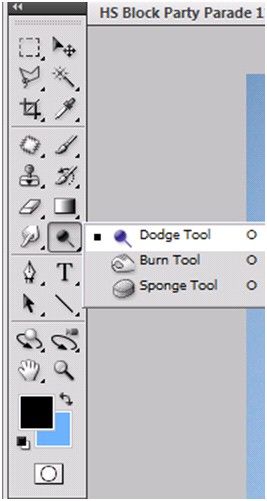
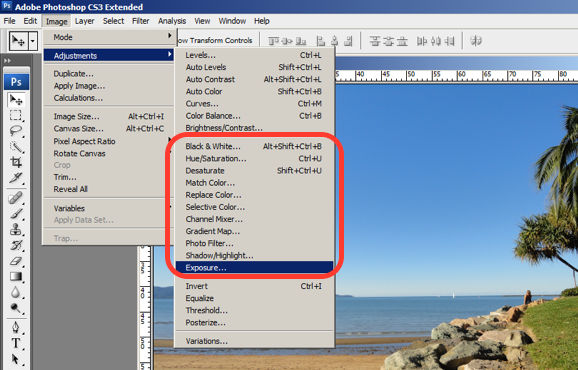
An example of Photoshop mimicking the real world in terms and representations that their target users would understand, is where they design the information structure and terminology to mirror the same wording we would use in the world of photography or print media. Familiar concepts and terms like RGB, Hue/Saturation/Brightness and CMYK are used to represent color, while various tools like the dodge tool and the burn tool mimics a traditional darkroom technique for photographs.

Photoshop’s Dodge Tool and Burn Tool mimics a traditional darkroom technique for photographs

© Adobe Systems Incorporated, Fair Use

Photoshop utilizes the term, “Exposure”, as commonly used in the world of photography.

© Adobe Systems Incorporated, Fair Use

3. User Control and Freedom

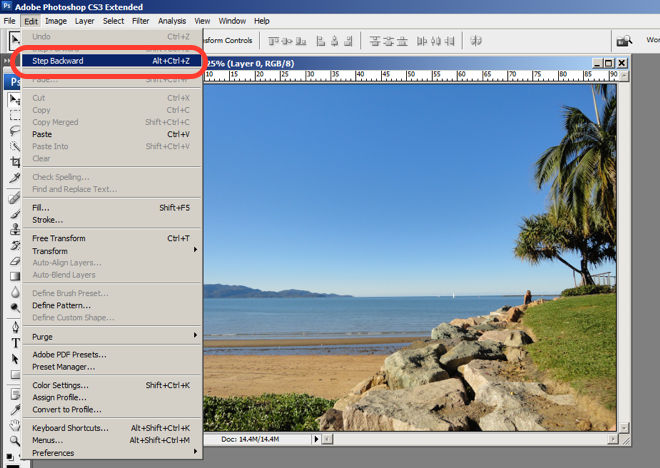
Photoshop is very good at providing users with control every step of the way. As the user makes changes to an image or adds various artistic effects, they are able to quickly and easily take a step backwards if they make an error, for instance.

The users are in control as they can take a Step Backward or Step Forward under the Edit menu, or alternatively they can use Photoshop’s keyboard shortcuts like Alt+Ctrl+Z, for example.

© Adobe Systems Incorporated, Fair Use

4. Consistency and Standards

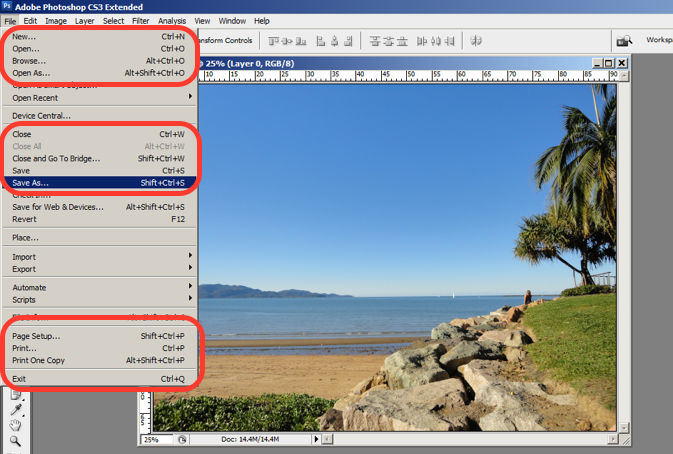
Photoshop maintains a standard layout and look and feel when it comes to the menu bar. They also utilize commonly known terminology such as “New…”, “Open…”, “Save As…”, etc.

The File menu in Photoshop displays a variety of highly familiar options.

© Adobe Systems Incorporated, Fair Use

5. Error Prevention

To prevent users from making errors, Photoshop provides a brief description or label of the tools when a user hovers over it to help make sure users are using the proper tool for the task at hand.

The user hovers over the eraser icon and Photoshop displays the “Eraser Tool” label.

© Adobe Systems Incorporated, Fair Use

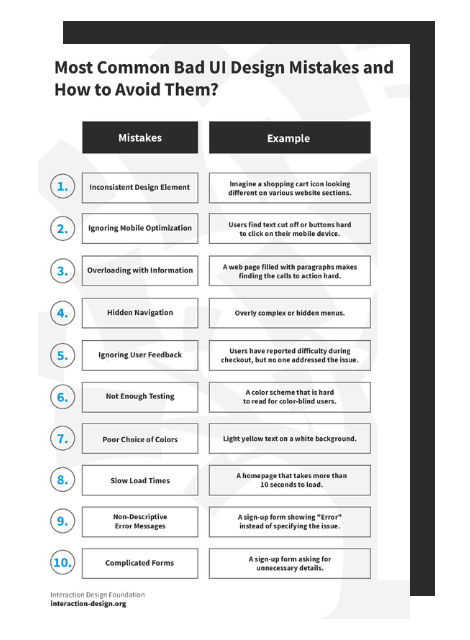
Advance Your Career With This Free Template for “Bad UI Design Mistakes and How to Avoid Them”
Bad UI Design Mistakes and How to Avoid Them
We respect your privacy
Get 1 powerful email each week: Design a life you love!

6. Recognition rather than Recall

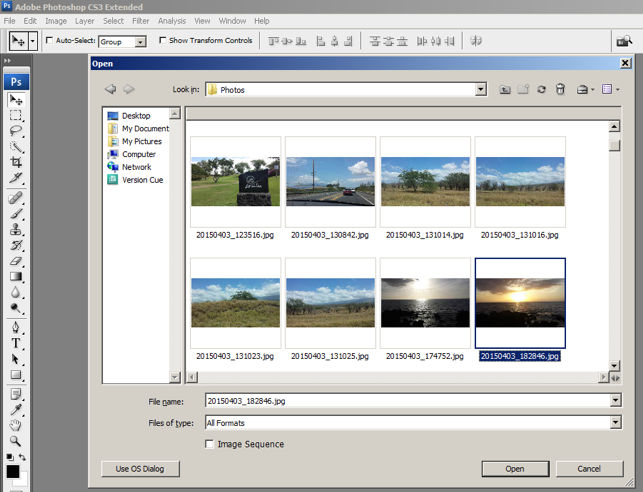
Whether it be making a selection from the artistic filters menu, or opening a new image file, Photoshop provides a sample view for users to make the right choice. This allows for the user to visually recognize what they’re looking for instead of having to recall the name or typing it in to search for it. Perhaps you have encountered other photo editing programs which ask you to recall and type the name of the file you want to work on. This can indeed be really difficult to recall as it is often something to the effect of: 29412_09342.JPG.

The user is able to visually recognize the sunset image by its thumbnail and select it.

© Adobe Systems Incorporated, Fair Use

7. Flexibility and Efficiency of Use

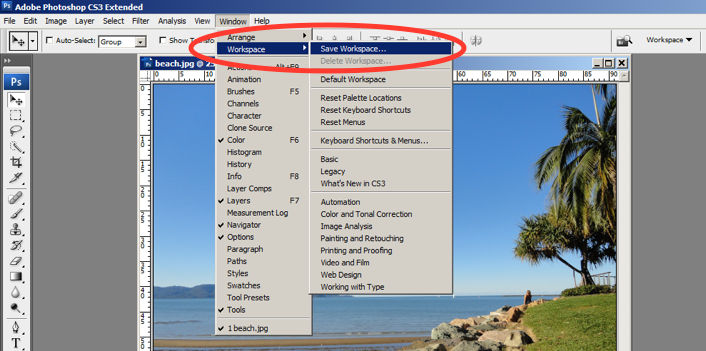
One of the many reasons for frequent users to love Photoshop is for its flexibility and efficiency. Users are able to utilize its flexibility by organizing and adding to their Workspace, as well as making things more efficient by saving it for future use.

Photoshop gives frequent users the ability to save their preferred workspace-setup.

© Adobe Systems Incorporated, Fair Use

8. Aesthetic and Minimalist Design

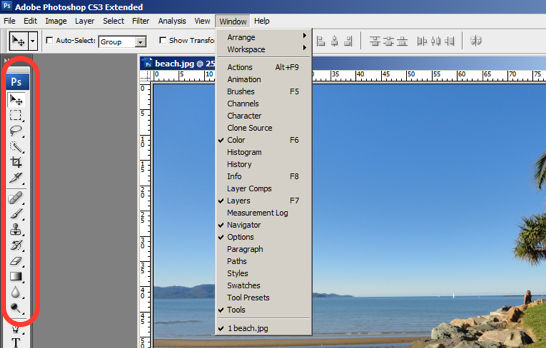
The toolbar in Photoshop only displays the icons and is neatly tucked to the side to help keep clutter to a minimum, and maintain a minimalist aesthetic.

The Photoshop toolbar is minimalist and avoids clutter by representing the tools with icons only.

© Adobe Systems Incorporated, Fair Use

9. Help Users Recognize, Diagnose and Recover from Errors

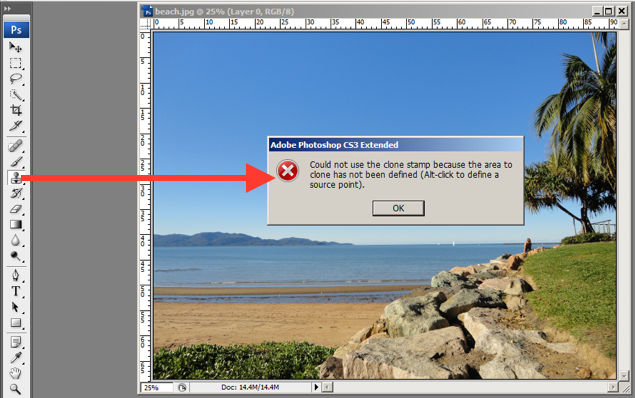
Whenever there is an error, Photoshop provides dialogue that lets the user know what went wrong and how to fix it.

In this error message for the user’s misuse of the clone stamp, Photoshop explains what went wrong, the reason why and how the user should proceed from there.

© Adobe Systems Incorporated, Fair Use

10. Help and documentation

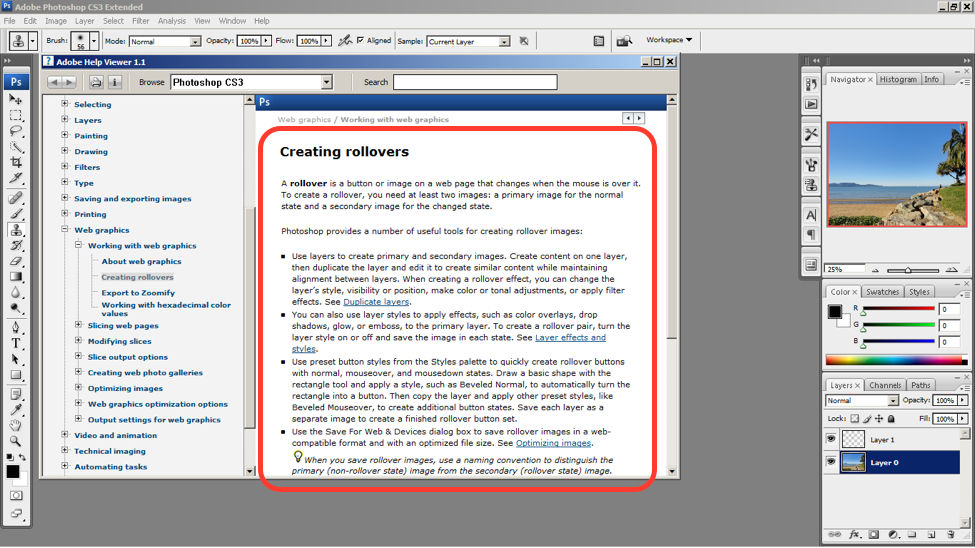
Help and documentation can be accessed easily via the main menu bar. From there, you can find a wide variety of help topics and tutorials on how to make full use of the program.

The window displays information on how to create rollovers in the context of web graphics. The user is also able to see a list of topics on the side menu.

© Adobe Systems Incorporated, Fair Use

10 Steps to Improve Usability, Utility, and Desirability by Implementing Nielsen and Molich’s User Interface Design Guidelines

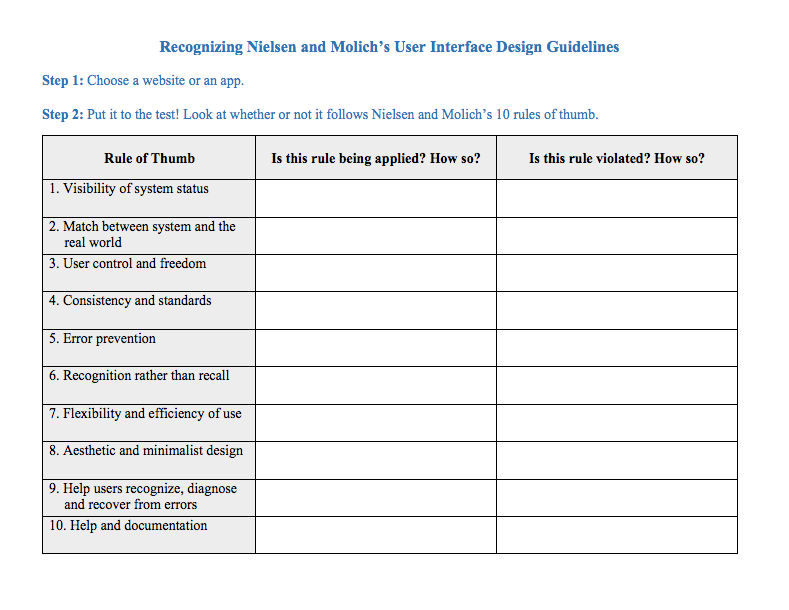
As a designer, you should have the ability to critique the designs of your own as well as the work of others with well supported reasoning. Applying Nielsen and Molich’s 10 rules of thumb in evaluating interface design will help you recognize any potential issues as well as guide you and your team in creating better experiences for your users. Here’s a worksheet for you to practice with as you learn the skill of recognizing whether or not these rules have been applied and when these rules have been violated. Finally, it’s time to improve the website or app by further implementing the 10 guidelines.

Download PDF here.

The Take Away

When you follow Nielsen and Molich’s 10 user interface guidelines you will design with usability, utility and desirability in mind. Just as the designers of successful companies like Apple, Google, and Adobe, you’ll be able to support your design decisions with well researched heuristics and be confident in creating designs that are both usable and beautiful. To practice recognizing these 10 rules of thumb, go ahead and work through the exercise outlined in the attached file from the above section.

References and Where to Learn More

To find more information on Jakob Nielsen’s ‘Enhancing the Explanatory Power of Usability Heuristics’ please see

Course: UI Design Patterns for Successful Software

Hero Image: Barry Schwartz. Flickr, CC BY-NC 2.0

Feel Stuck?
Want Better Job Options?

AI is replacing jobs everywhere, yet design jobs are booming with a projected 45% job growth. With design skills, you can create products and services people love. More love means more impact and greater salary potential.

At IxDF, we help you from your first course to your next job, all in one place.

See How Design Skills Turn Into Job Options
Privacy Settings
By using this site, you accept our Cookie Policy and Terms of Use.
Customize
Accept all

Be the One Who Inspires

People remember who shares great ideas.

Share on:

Academic Credibility — On Autopilot

Don't waste time googling citation formats. Just copy, paste and look legit in seconds.