Bad Design

Your constantly-updated definition of Bad Design and collection of videos and articles.
Be a conversation starter: Share this page and inspire others!

493 Shares

What is Bad Design?

Bad design refers to design that fails to meet user needs effectively, lacks functionality, or creates unnecessary complexity, which leads to frustration, inefficiency and a poor user experience. It often results from overlooking essential principles of good design, such as usability, accessibility, aesthetics, and user-friendliness. 

In this video, learn about the phenomenon of Norman Doors and how it relates to good and bad design:  

Transcript
  

What Makes a Bad Design “Bad”? 

Bad design becomes "bad" primarily because it fails to effectively communicate or fulfill its intended function, which results in confusion, exasperation, or dissatisfaction among users. The characteristics that typically contribute to a design being considered flawed include: 

1. Lack of Clarity and Usability 

Designs that confuse users, make navigation difficult, or obscure important information hinder usability. For instance, a website with a cluttered layout, confusing menus, or hidden call-to-action buttons can leave users feeling lost and frustrated. 

Clippy, the Microsoft Office Assistant, was intended to make Office applications more user-friendly but became notorious for its intrusive and often unhelpful interruptions, especially for regular users. They found Clippy annoying rather than helpful, leading Microsoft to disable the feature by default in Office XP and eventually remove it altogether in future versions. 

Chris Pratley, a former Microsoft employee, said that Clippy was “optimized for first use.” In his post-mortem report on Clippy, he said: 

What has happened is that the usability test showed that people who have never seen a feature before have trouble with it in the first hour of using it. So the designer makes the feature hold your hand through the process. That improves the results in the test, but ruins the feature for people who know what they are doing. 
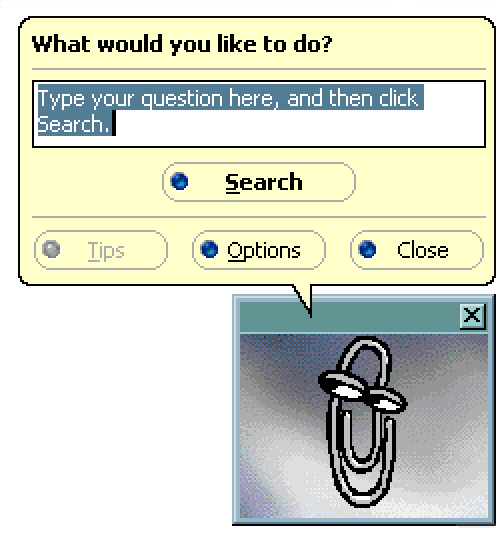
The original Microsoft Clippy from 1997.

© Microsoft, Fair Use

2. Poor Accessibility 

Design that does not consider all users, including those with disabilities, is a hallmark of bad design. This could be a website that fails to provide alternative text for images (crucial for screen readers), uses color combinations with low contrast, or lacks keyboard navigation, making it inaccessible to users with visual impairments or other disabilities.  

CAPTCHAs are designed to distinguish human users from bots and often present significant accessibility challenges, particularly for users with visual impairments. Traditional CAPTCHAs that require users to identify and type distorted text can be nearly impossible for screen reader software to interpret. Even audio CAPTCHAs or image-based CAPTCHAs can pose problems for users with hearing impairments or cognitive disabilities. This highlights the need for more accessible alternatives, such as checkbox CAPTCHAs ("I am not a robot") or more innovative solutions like behavioral analysis that doesn't require user interaction. 

3. Ignores User Needs and Feedback 

Designs created without understanding or considering the target audience's needs, preferences, and behaviors are likely to miss the mark. An example is a mobile app with a beautiful interface that fails to perform its core function efficiently or an app that overlooks user feedback regarding critical bugs or desired features. 

The release of Windows 8 by Microsoft in 2012 is a notable example of a product criticized for ignoring user needs and feedback, primarily due to its drastic redesign that removed the familiar Start menu in favor of a new tile-based, touch-centric interface. This shift not only confused many users but also alienated those on non-touch devices, despite significant feedback during beta testing advocating for the retention of traditional elements. The backlash led Microsoft to reintroduce the Start button in Windows 8.1 and eventually restore the Start menu in Windows 10, acknowledging the misalignment with user preferences and the importance of listening to user feedback to maintain trust and satisfaction. 
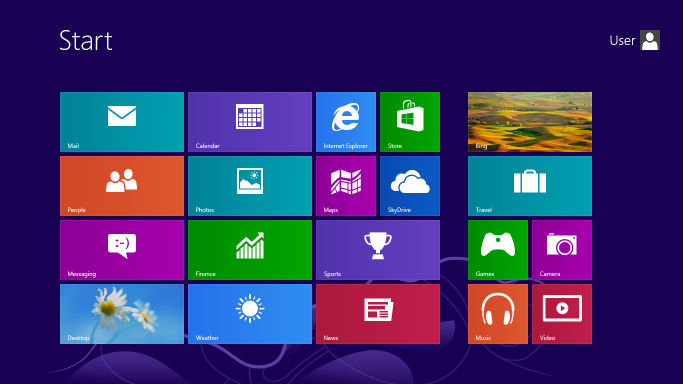
The new tile menu that was introduced in Microsoft Windows 8.

© Microsoft, Fair Use

 4. Aesthetics at the Expense of Functionality 

While aesthetics are important, designs that prioritize appearance over functionality can lead to a subpar user experience. An example would be a visually stunning website that loads slowly due to heavy use of high-resolution images and complex animations, thereby sacrificing performance and usability. 

The launch of Apple's iOS 7 in 2013 exemplifies the tension between aesthetics and functionality. The operating system transitioned from skeuomorphism to a flat design that prioritized minimalism over clarity. This aesthetic overhaul led to usability issues, such as indistinct actionable elements, reduced contrast, and confusing navigation, due to the removal of visual affordances and the use of light colors and thin fonts. User feedback prompted Apple to iterate on iOS 7's design in subsequent updates, with the reintroduction of subtle visual cues to improve discoverability and readability. This situation highlights the critical importance of balancing visual appeal with functional usability in design, ensuring that aesthetic innovations do not compromise the user experience. 
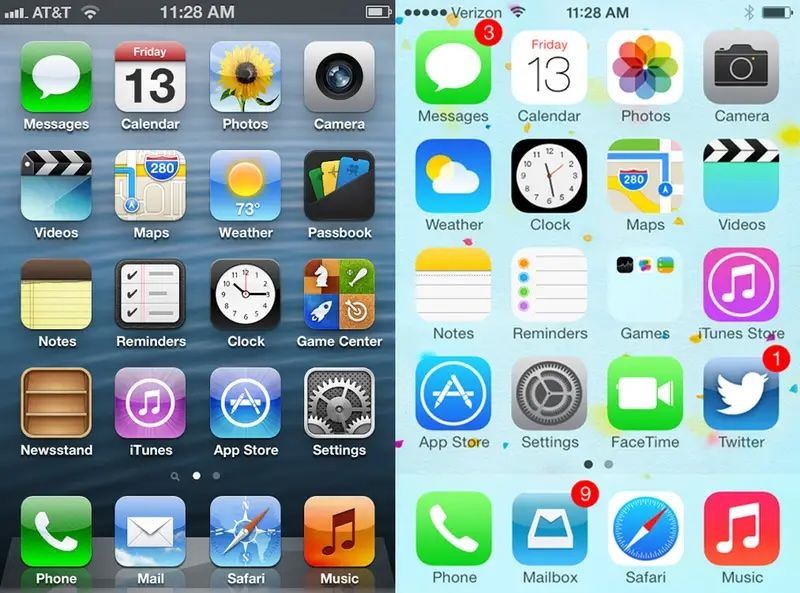
A side by side comparison of Apple's iOS 6 and 7 with two iPhone screens next to one another.

Apple’s previous operating systems, including iOS 6, had a skeuomorphic design. In 2013, however, Apple changed to a flat design with the release of the iOS 7. This caused widespread backlash, resulting in different iterations in updated versions of the system.

© Apple, Fair Use

5. Inconsistency 

A lack of consistency in design elements such as typography, color schemes, and layout across a product can confuse users and degrade the user experience. Inconsistent application designs or branding materials can erode trust and professionalism. 

In 2018, Snapchat's significant redesign merged content from friends, media, and celebrities into a single feed, which caused confusion and backlash among users. This overhaul disrupted the app's consistency in its navigation and how it presented content—a move away from the familiar user interface that users had come to know. The resulting petition, with over 1.2 million signatures calling for a rollback, emphasized the crucial need to maintain a coherent and user-friendly design to ensure user satisfaction and engagement. 

6. Little or No Adaption to Changing Needs and Technologies 

Designs that fail to evolve with user needs, technological advancements, or trends can quickly become outdated. For example, a website that is not optimized for mobile devices ignores the significant portion of users accessing the internet via smartphones. 

BlackBerry was a leader in the smartphone industry but struggled to adapt to the shift towards touchscreens and expansive app ecosystems. It continued to prioritize physical keyboards and its own less versatile operating system. This Business Insider video discusses the Blackberry’s rise and fall:  

How Bad UX and UI Design Impacts User Experience 

Bad User Interface (UI) and User Experience (UX) Design can significantly detract from the overall user experience. A well-designed interface aims to facilitate ease of use, efficiency, and satisfaction in the interaction between the user and the product. Conversely, a poorly designed interface can lead to complete disengagement with a product. Here are several ways in which bad UI/UX design can negatively impact user experience: 

  • Increased confusion and frustration: Poorly designed interfaces can leave users bewildered, struggling to complete basic tasks due to confusing, unclear, or counterintuitive layouts, as seen in the initial launch of Apple's Apple Music. The service faced criticism for its convoluted user interface, which mixed users' music libraries with streaming options in a way that was not intuitive to navigate. 

  • Reduced efficiency and productivity: An interface that fails to optimize for ease of use can significantly slow down users, as exemplified by the complex and layered menus found in the early versions of Adobe's Creative Cloud apps. Users often had to navigate through multiple menus to find common tools and features which hindering workflow efficiency. 

  • Higher learning curve: A steep learning curve can deter users, such as those new to Amazon's Alexa. Initially, users found it challenging to discover and remember the specific voice commands required to interact with the device effectively—this demonstrates the need for more intuitive interaction cues. 

  • Decreased user satisfaction and loyalty: Negative interactions with an interface can lead to a drop in overall satisfaction. The redesign of LinkedIn's interface in 2017 received backlash for its over-simplified design that removed or hid many used features, frustrating long-time users and impacting their loyalty to the platform. 

  • Loss of trust: Inconsistent design and unreliable products can erode trust. This is exemplified by the Volkswagen emissions scandal. Although not a direct UX example, the deliberate design choice to cheat emissions tests betrayed user trust on a massive scale and emphasized the broader implications of design ethics. 

  • Accessibility issues: Failing to consider all users leads to exclusion, such as websites without mobile optimization, epitomized by older government websites that are difficult to navigate on smartphones. This means a significant portion of the population seeking information or services are excluded.  

  • Increased error rates: Non-intuitive interfaces can lead to user errors. This was the case with early electronic voting machines that led to confusion over how to select candidates, resulting in misvotes or spoiled ballots. A clear, error-proof design is essential. 
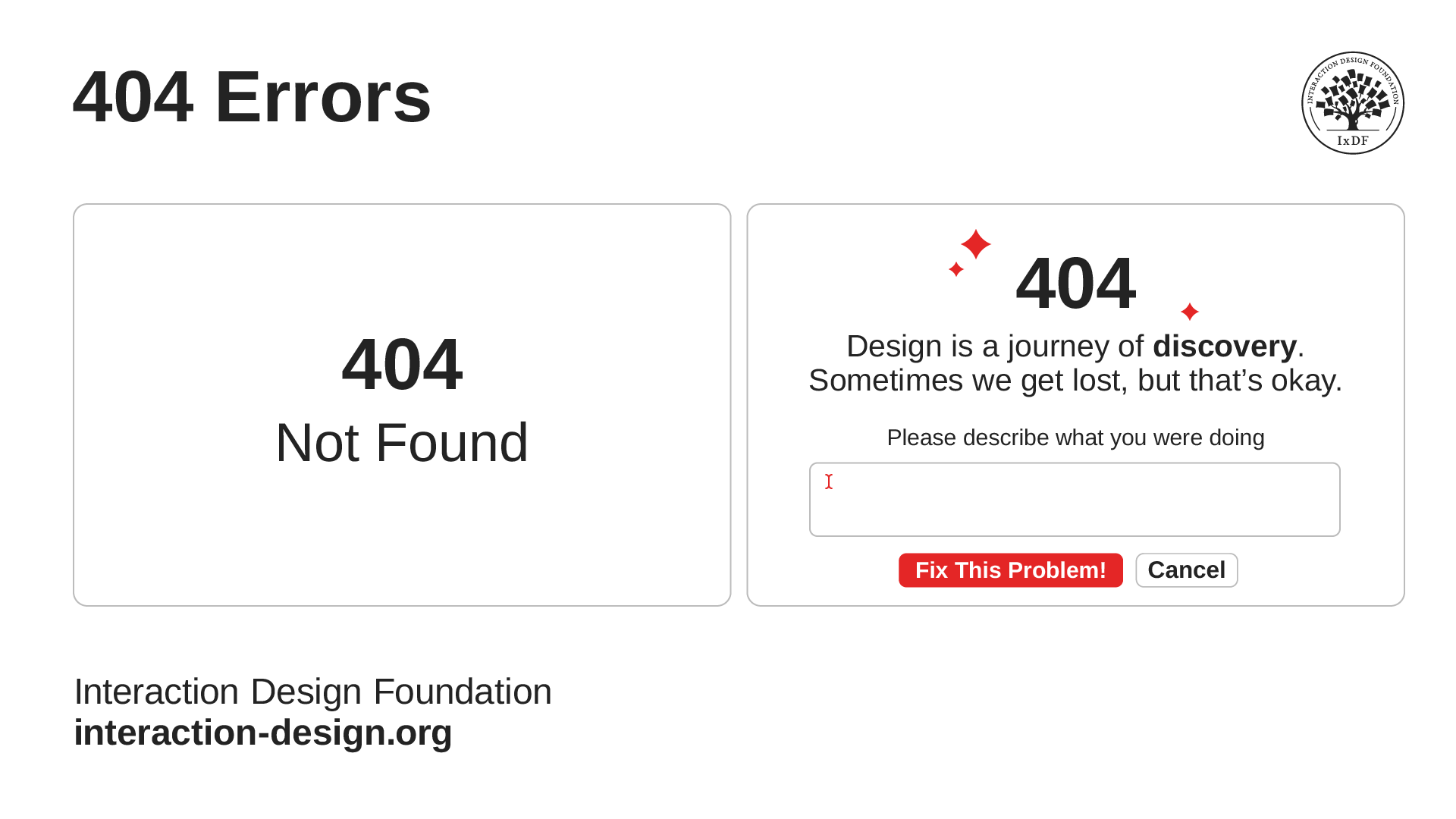
    An illustration of two different 404 error screens side by side.

    Designers should aim to reduce the instances of errors but some occasional errors are unavoidable. It helps to make these instances memorable or unique to enhance the user experience.

    © Interaction Design Foundation, CC BY-SA 4.0

  • Negative impact on brand image: Users often associate their experience with a product's interface with the brand as a whole. The release of Google Buzz, which automatically shared users' email contacts publicly without clear consent, resulted in a privacy uproar that tarnished Google's image regarding user privacy. 

  • Financial consequences: Design flaws can lead to direct and indirect financial losses, as seen with the costly recall of Samsung's Galaxy Note 7 due to design flaws in its battery—there were many instances of overheating and fires. In addition to financial losses, Samsung experienced long-term damage to its reputation.   

 A user-centered design approach that prioritizes clear, intuitive, and accessible design is vital to avoid these pitfalls. This approach ensures usability, enhances user satisfaction, and fosters trust, ultimately contributing to a product's success and a brand's reputation. 

How Can Designers Avoid Bad Design? 

Designers can steer clear of bad design and create positive, user-friendly experiences by adopting a series of best practices focused on user-centered design principles. Here are strategies to help avoid common pitfalls and ensure the creation of effective and engaging designs: 

Understand Users 

Designers should conduct user research to gain insights into users' needs, preferences, behaviors, and challenges. Create personas and user journey maps to guide design decisions from the perspective of the end-user. 

This video explains what user research is and why it’s so important: 

Transcript
 

Prioritize Usability 

Interfaces should be intuitive and easy-to-use interfaces. Designers must ensure that navigation is logical, content is easily accessible, and actions are straightforward to perform. 

Implement Consistent Design 

Maintain consistency in layout, color schemes, typography, and terminology across your product. Consistency helps users learn the interface faster and reduces confusion. 

Iterate Based on User Feedback and Testing 

Regularly test your designs with real users to identify usability issues and areas for improvement. Use feedback to iteratively refine and enhance the user experience. 

Design for Accessibility 

Ensure your designs are accessible to people with disabilities by following accessibility guidelines (such as WCAG). Consider color contrast, keyboard navigation, alternative text for images, and other accessibility best practices. 

Beyond accessibility is inclusive design, learn the differences between them and universal design and their importance in UX design. 

Transcript
 

Optimize Performance 

Balance aesthetic elements with performance considerations. Optimize images, leverage efficient coding practices, and minimize load times to ensure a smooth and responsive experience. 

Embrace Minimalism 

Avoid overwhelming users with unnecessary elements or information. Use white space effectively and keep interfaces clean and focused on the most important content or actions. 

Adapt for Different Devices and Screen Sizes 

Design responsively to ensure your product provides a seamless experience across various devices, from desktops to smartphones. Test on multiple devices to guarantee compatibility and usability. 

This video explores adaptive design and how it enhances user experience:  

Transcript
 

Incorporate Visual Hierarchy 

Use size, color, and placement to establish a clear visual hierarchy that guides users to the most important elements and actions on the page. 

This video explains the concept of visual hierarchy and how to use it:  

Transcript
 

Collaborate 

Designers must work closely with developers, content creators, and other stakeholders to ensure that design decisions are feasible and aligned with overall project goals. Collaboration can also bring new insights and ideas to the design process. 

Questions About Bad Design?
We've Got Answers!

How does bad design affect a product's usability and accessibility?

Bad design significantly impacts usability and accessibility, which leads to a poor user experience. It introduces a steep learning curve, reduces efficiency, increases error rates, and lowers user satisfaction. This design flaw frustrates users and may deter them from using the product further. Additionally, neglecting accessibility standards excludes a significant segment of users with disabilities, limiting the product's reach and potentially leading to legal and ethical issues. Inadequate compatibility with assistive technologies further alienates users with specific needs, reducing the product's potential user base and success. 

To address these challenges, designers must adopt a user-centered design approach that prioritizes understanding and meeting the diverse needs of all users, including those with disabilities. Following principles of good design and guidelines like the Web Content Accessibility Guidelines (WCAG) improves both usability and accessibility. Involving users with diverse abilities in the design and testing phases can uncover valuable insights, aiding in the creation of products that are functional and inclusive. By employing these practices, designers can overcome the drawbacks of bad design, creating experiences that are accessible and enjoyable for a wide and diverse audience. 

Learn more about usability in this video:  

[[1702]] 

What role does user feedback play in identifying and correcting bad design?

User feedback plays a crucial role in identifying and correcting bad design by providing direct insights into how real users interact with and perceive a product. It highlights usability issues, confusing elements, and unmet needs that may not be evident to designers and developers. This feedback, whether gathered through usability testing, surveys, or user interviews, helps pinpoint specific areas where the design fails to meet user expectations or deviates from user-friendly principles. Armed with this information, design teams can make targeted adjustments to improve usability, enhance user satisfaction, and ensure the product aligns more closely with user requirements. Essentially, user feedback acts as a guiding light for refining and evolving the design to eliminate flaws and create a more intuitive and effective user experience

Learn more about how to get user feedback and why it's important in this video:  

Transcript
 

What impact does bad design have on a brand's image and customer loyalty?

Bad design negatively affects a brand's image and customer loyalty through user frustration, confusion, and dissatisfaction, which can erode trust and suggest a lack of attention to user experience. This not only damages the brand's reputation through negative word-of-mouth but also impacts repeat business as customers are driven to seek alternatives with more intuitive and satisfying experiences. In a competitive market, the importance of good design extends beyond aesthetics, playing a critical role in fostering positive user interactions, trust, satisfaction, and ultimately, loyalty towards the brand, underscoring its significance for long-term success. 

Learn more about how to design for user trust in the Master Class, How to Design for User Trust.

What are some well-regarded books on the topic of bad design?

Some well-regarded books are:

Shariat, J., & Savard Saucier, C. (2017). Tragic Design: The Impact of Bad Product Design and How to Fix It (1st ed.). O'Reilly Media. 

Norman, D. (2013). The Design of Everyday Things (Illustrated ed.). Basic Books. 

How can designers learn from bad design examples?

Designers learn from bad design examples by analyzing their ineffectiveness and user frustration causes. They identify specific design elements that hinder usability, such as unclear navigation, inconsistent layouts, or the absence of accessibility features. Through this analysis, designers appreciate user-centered design principles more and understand the impact of their decisions on the user experience. Examining bad designs also develops their critical thinking and problem-solving skills, prompting them to propose better alternatives. This process reinforces best practices knowledge and helps them avoid similar mistakes. Ultimately, bad design examples serve as valuable educational tools, guiding designers to create intuitive, effective, and user-friendly products. 

Learn more about UX best practices in our course User Experience: The Beginner’s Guide

What is the role of testing to prevent bad design?

Testing prevents bad design with a systematic approach to evaluation. Testing evaluates usability, functionality, and user satisfaction before a product is finalized. Through various testing methods, designers and developers can identify and address issues that could lead to poor user experiences. Usability testing, for example, allows teams to observe real users interacting with the product, uncovering problems with navigation, comprehension, or task completion. Performance testing ensures the product functions smoothly under different conditions, while accessibility testing verifies that it serves a broad audience, including users with disabilities. By incorporating user feedback and data from these tests, teams can make informed revisions, enhancing the product's overall quality and avoiding design decisions that detract from the user experience. Testing, therefore, serves as a critical feedback loop in the design process, ensuring that the final product meets user needs and expectations effectively. 

Learn more about usability testing in our course Conducting Usability Testing

How can the collaboration between designers and developers prevent bad design?

The collaboration between designers and developers can prevent bad design by ensuring that both the visual and functional aspects of a product are well-integrated and user-centered from the start. Through effective communication, designers can convey their vision and user experience goals clearly, while developers can provide insights into technical feasibility and constraints. Regular collaboration sessions allow for the exchange of ideas, enabling both parties to find innovative solutions that balance aesthetics with functionality. This teamwork facilitates early identification and resolution of potential design and usability issues, reducing the risk of rework and ensuring a smoother development process. By working closely together, designers and developers can create products that not only look good but also perform seamlessly, enhancing the overall user experience and preventing bad design outcomes. 

Learn more about designer-developer collaboration in the Master Class, A Guide To Hassle-Free Designer-Developer Collaboration.

What measures can organizations take to foster a culture that prevents bad design?

Organizations can foster a culture that prevents bad design by implementing several measures: 

Promote user-centered design: Encourage the adoption of user-centered design principles across all projects, emphasizing the importance of understanding and addressing user needs. 

Encourage collaboration: Facilitate regular collaboration between designers, developers, and other stakeholders to ensure a holistic approach to product development. 

Invest in continuous learning: Provide resources and opportunities for continuous learning, including workshops, conferences, and access to industry literature, to keep teams updated on best practices and emerging trends. 

Implement regular testing: Integrate usability testing and user feedback into the design process, using insights gained to inform design decisions and improvements. 

Celebrate good design: Recognize and celebrate examples of good design within the organization, reinforcing the value of design excellence. 

Foster an open feedback culture: Create an environment where constructive feedback is encouraged and valued, enabling teams to learn from successes and mistakes. 

Learn more about user-centered design and testing in our course User Experience: The Beginner’s Guide

Earn a Gift Earn a Gift, Answer a Short Quiz!

1
2
3
4
1
2
3
4
Question 1
Question 2
Question 3
Get Your Gift
Interaction Design Foundation logo

Question 1

What is the primary reason a design becomes "bad"? 

1 point towards your gift

  • It focuses too much on aesthetic appeal over usability.
  • It incorporates too much user feedback into the design process.
  • It fails to communicate or fulfill its intended function, leading to confusion.
Interaction Design Foundation logo

Question 2

Why is poor accessibility considered a hallmark of bad design? 

1 point towards your gift

  • It makes the design visually unappealing to some users.
  • It fails to consider all users, particularly those with disabilities.
  • It increases the complexity of the user interface for all users.
Interaction Design Foundation logo

Question 3

What is one of the key risks of prioritizing aesthetics over functionality in design? 

1 point towards your gift

  • The design may confuse users and negatively impact usability.
  • The design becomes too simple and lacks visual appeal.
  • The design does not need frequent updates or improvements.

Learn More About Bad Design

Make learning as easy as watching Netflix: Learn more about Bad Design by taking the online IxDF Course User Experience: The Beginner's Guide.

Why? Because design skills make you valuable. In any job. Any industry.

In This Course, You'll

  • Get excited when you experience how easy it is to transition into tech and land your dream job with User Experience (UX) design skills. No design background? No problem. You already have transferable skills, so it's easy to fast-track your career

  • Learn to combine logical thinking with creativity. Do you enjoy creativity and structure? Do you communicate ideas clearly? UX designers turn ideas into services, experiences, and products. This course helps you structure your existing skills and apply them in an innovative, creative context. You'll use hands-on methods that empower you to continuously test and optimize your products and services from idea to delivery.

  • Make yourself invaluable when you use the very fabric of being human, such as empathy and intuition, to make users and customers smile. More smiles, more impact, greater salary potential. You'll find out what your users need and want, and you'll build products, experiences, and services that help them succeed. You can benefit from UX design in any job, any industry. As AI becomes part of everyday work, timeless human-centered UX design skills help you decide what problems are worth solving and how solutions should actually work for people. This approach turns AI from a tool into your new superpower, keeping your work useful, relevant, and centered around peoples’ needs, even as technologies change.

  • Gain confidence and credibility when you master a range of powerful, real-world UX design skills such as user research, user interviews, personas, customer journey maps, sketching, task analysis, low-fidelity paper prototyping, and usability testing. It's easy with downloadable templates

  • Craft your personal portfolio with step-by-step guidance. It's completely optional. Your portfolio is your gateway to transition into a career in tech or design. You'll be able to apply your new skills immediately in your current job. If you're new to UX design, this course is the best place to start. Your path to tech starts here. UX design is your way in.

It's Easy to Fast-Track Your Career with the World's Best Experts

Master complex skills effortlessly with proven best practices and toolkits directly from the world's top design experts. Meet your experts for this course:

  • Don Norman: Father of User Experience (UX) design, author of the legendary book “The Design of Everyday Things,” and co-founder of the Nielsen Norman Group.

  • Rikke Friis Dam and Mads Soegaard: Co-Founders and Co-CEOs of IxDF. 

  • Mike Rohde: Experience and Interface Designer, author of the bestselling “The Sketchnote Handbook.”

  • Stephen Gay: User Experience leader with 20+ years of experience in digital innovation and coaching teams across five continents.

  • Alan Dix: Author of the bestselling book “Human-Computer Interaction” and Director of the Computational Foundry at Swansea University.

  • Ann Blandford: Professor of Human-Computer Interaction at University College London.

  • Cory Lebson: Principal User Experience Researcher with 20+ years of experience and author of “The UX Careers Handbook.”

Get an Industry-Recognized IxDF Course Certificate

Increase your credibility, salary potential and job opportunities by showing credible evidence of your skills.

IxDF Course Certificates set the industry gold standard. Add them to your LinkedIn profile, resumé, and job applications.

Course Certificate Example

Be in distinguished company, alongside industry leaders who train their teams with the IxDF and trust IxDF Course Certificates.

Our clients: IBM, HP, Adobe, GE, Accenture, Allianz, Phillips, Deezer, Capgemin, Mcafee, SAP, Telenor, Cigna, British Parliament, State of New York

All Free IxDF Articles on Bad Design

Read full article
Design Failures - Article hero image
Interaction Design Foundation logo

Design Failures

Steve Jobs once said: ''Design is not just what it looks like and feels like. Design is how it works.'' Normally, we like to showcase great design but there’s a lot you can learn from dreadful design too. We don’t think Steve Jobs had anything to do with the 30 howlers that follow. From lousy usabi

Social shares
1.1k
Published
Read Article
Read full article
Bad Design vs. Good Design: 5 Examples We Can Learn From - Article hero image
Interaction Design Foundation logo

Bad Design vs. Good Design: 5 Examples We Can Learn From

Looking at examples of bad design alongside counter-examples of good design is not only fun but also draws important lessons for designers. They highlight pitfalls for designers to avoid and let us understand how to translate design theories into solutions that work in the real world. Jared Spool, t

Social shares
1.5k
Published
Read Article
Read full article
Bad UX Exposed: A Comprehensive Guide to Avoiding Pitfalls - Article hero image
Interaction Design Foundation logo

Bad UX Exposed: A Comprehensive Guide to Avoiding Pitfalls

In today’s vibrant digital design landscape, creating meaningful connections with users goes beyond offering innovative products or services. It leads us into the world of user experience design (or UX design). This critical factor shapes our interaction with the users and plays a big role in making

Social shares
946
Published
Read Article
Read full article
7 Bad UI Design Examples You Can Learn From - Article hero image
Interaction Design Foundation logo

7 Bad UI Design Examples You Can Learn From

Have you ever clicked on a button that didn't respond? Or have you found yourself lost in a maze of confusing menus? You’re not alone! Such interactions lead to users' frustration and missed business opportunities. If you’re a designer, developer, or business owner, you’ll want to understand wh

Social shares
826
Published
Read Article
Read full article
How to Improve Your UX with HCI Insights - Article hero image
Interaction Design Foundation logo

How to Improve Your UX with HCI Insights

Design plays a role that’s utterly crucial in our daily lives—it bridges functionality with aesthetics to meet user needs. In product development, it’s design that determines how user-friendly and appealing a product is. The field of human-computer interaction (HCI) is foundational to UX design. To

Social shares
579
Published
Read Article

Bad Design vs. Good Design: 5 Examples We Can Learn From

Bad Design vs. Good Design: 5 Examples We Can Learn From

Looking at examples of bad design alongside counter-examples of good design is not only fun but also draws important lessons for designers. They highlight pitfalls for designers to avoid and let us understand how to translate design theories into solutions that work in the real world. Jared Spool, the American writer, researcher and usability expert, once said: “Good design, when it’s done well, becomes invisible. It’s only when it’s done poorly that we notice it.” So, let’s look at five examples of obviously bad designs, shine the light on how good design makes it work, and distill some lessons so we can all create great and invisible experiences for our users.

1. Information Overload

The Bad: Parking Signs in Los Angeles

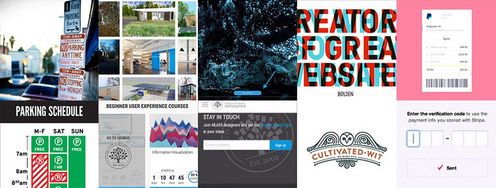
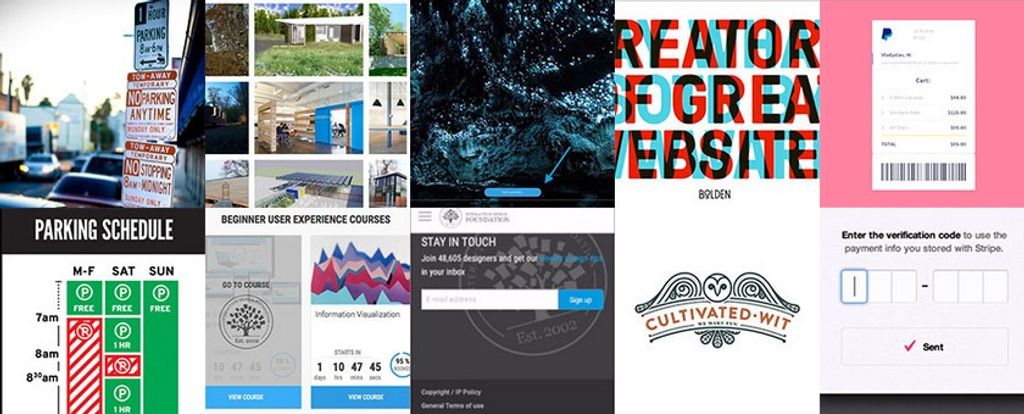
Parking signs in Los Angeles (LA) have been the epitome of information overload for decades. They’ve always been notoriously hard to understand because the traffic rules are complex, resulting in the need to convey a lot of information in a small area.

How confusing are these signs? Traditionally, very—look at this example from the 2010s:

An image of a confusing Los Angeles parking sign

As LA parking signs go, this example is already a pretty simple one.

© Jorge Gonzalez, CC BY-SA 2.0

Imagine you are a driver along this road on a Tuesday morning at 9 a.m. Can you park at this spot? What sounds like a simple question takes a lot of mental processing to answer.

As designers, we’re often faced with situations where we have to design for a lot of information to be displayed in a small space. The parking signs in LA might be an extreme case, but many times designing for mobile apps means facing the same problems. Is there a way out for both the parking signs and designers in general?

The Good: Nikki Sylianteng’s Parking Sign

Designing a sign that displays all the information while being easy to understand sounds like an impossible task. But that’s exactly what Brooklyn designer Nikki Sylianteng did.

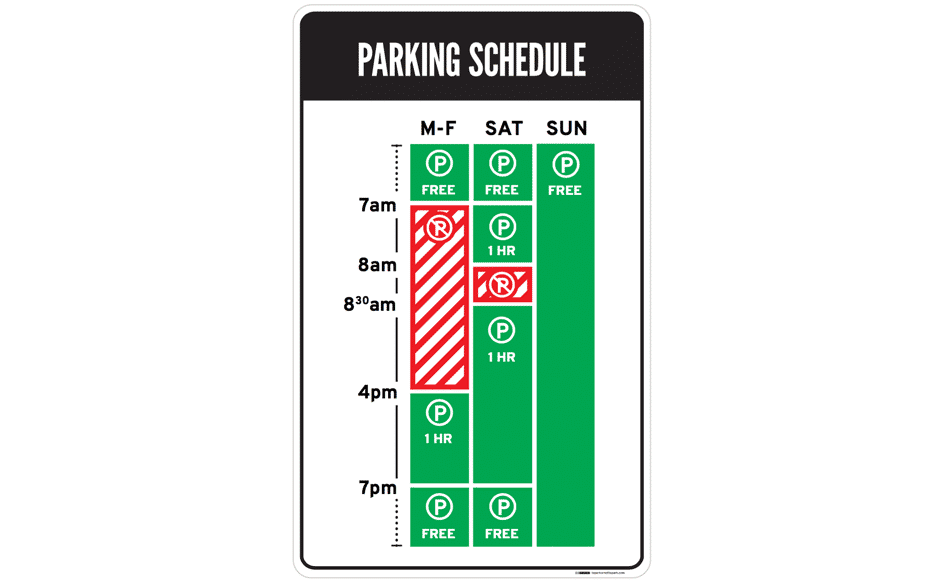
An image of Los Angeles parking sign design by designer Nikki Sylianteng

Nikki’s proposed parking sign was eventually used in LA as part of a trial run.

© Nikki Sylianteng, CC BY-NC-SA 4.0

Nikki’s design works well because it’s user-centered. Nikki realized that drivers simply want to know whether they can park at a spot. Yes or no—that’s all drivers needed, and that’s all the parking sign shows.

Her design uses visuals, rather than text, to convey information. The result is incredibly intuitive—green for OK, red for No Parking. It’s even designed for the colour blind, with stripes for No Parking.

Now when you look at the sign, you’ll know that on Tuesday at 9 a.m., parking is not allowed. The bars show what’s what at a glance—simple.

Lessons Learned: Best Practice

  • Understand what your users need, then design based on that. This helps reduce information overload.

  • If you have a lot of information to convey, try using visuals instead of text. Learn more about data visualization here.

2. Mystery Meat Navigation

The Bad: LazorOffice.com

Coined in 1998 by Vincent Flanders of Web Pages That Suck, the Mystery Meat Navigation (MMN) refers to cases where the destination of a link is not visible until the user clicks on it or points the cursor at it. The term “mystery meat” was a reference to meat served in American public school cafeterias that are so processed that their exact type is no longer discernible.

MMN is bad because it reduces the discoverability of navigation elements. This adds cognitive load to users because they now have to guess how to navigate or what clicking something does.

While most MMN are found in older websites, they’re surprisingly prevalent in modern websites. Take Lazor Office, for example, a design firm that creates pre-fabricated homes.

A screenshot from LazerOffice.com

LazorOffice.com has a grid of MMN images on its home page. As you can see, this tableau gives precious little indication as to where to go. Instead, nine images just sit, leaving some of us pondering an enigma rather than interacting with a page.

© Lazor Office, LLC , Fair Use

Below the fold of their home page, a grid of image thumbnails lies waiting. Are they clickable? Well, yes—if you move your mouse cursor over an image, it changes to a pointer. But what happens when you click on an image?

“Click to find out!” is never a good User Experience (UX) solution. Chances are, your users are going to abandon their navigation and find an alternative solution on a competitor’s site.

The Good: Course Cards on Interaction Design Foundation’s website

Thankfully, MMN problems are easy to solve. The key is to be aware that you must clearly label links. Simply adding “View project” that appears on mouse hover will improve the usability of Lazor Office’s page above.

A screenshot from IxDF's website showing course cards

Our course cards are as un-mysterious as links go.

© Interaction Design Foundation, Fair Use

For the Interaction Design Foundation’s course cards, we not only have “View Course” at the bottom of each card to indicate the action that will happen, but we also have a hover state with the text “Go to course.” Many websites follow a similar convention, and you should, too, to maximize your website’s usability.

Lesson Learned: Best Practice

Always label your links! You wouldn’t like to eat mystery meat—and similarly, your users wouldn’t like to click on mystery links.

3. Adding Friction to User Actions

The Bad: iFly50.com

As designers, we should add friction to user actions with extreme caution, unless the point is to dissuade users from performing that action. Sometimes, however, we might even unintentionally add friction to user actions (mostly due to aesthetic or novelty reasons) that result in detrimental UX.

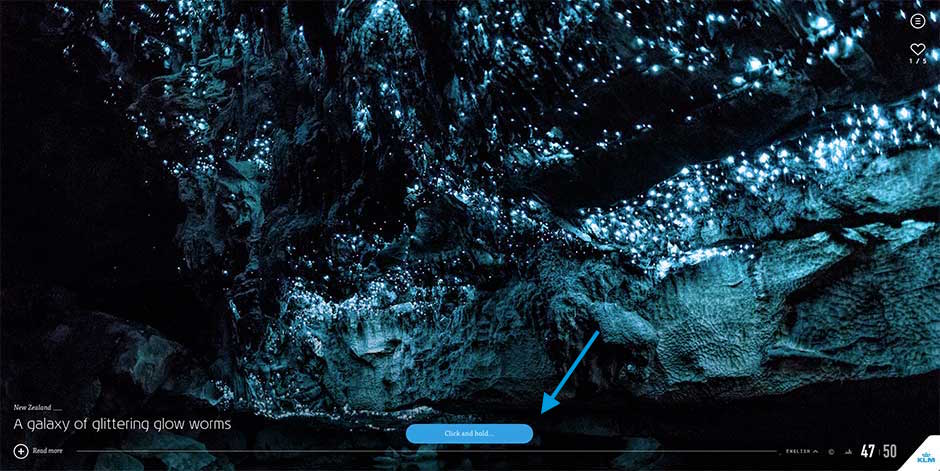
One example is iFly50.com, created by KLM for the anniversary of the iFly magazine. iFly 50 is a vertical scrolling website showcasing 50 travel destinations, and in some destinations (such as the one below), a button near the bottom asks users to click and hold for a few seconds to view more photos.

A screenshot from KLM's iFly 50 website.

iFly 50 expects its users to click and hold for a few seconds every time they want to see more photos.

© Koninklijke Luchtvaart Maatschappij NV (KLM Royal Dutch Airlines), Fair Use.

The act of adding a few seconds of friction to each action can result in tremendously poorer UX. Imagine if, instead of clicking to load a page instantly, you’ve now got to click and hold for two seconds for every link you clicked in your browser. You’ll quit exploring the internet altogether after a few click-and-holds.

We designers often get carried away with the newest interaction styles or actions, but it is critical to always exercise caution when your design could add friction to user actions. Most of the time, tried-and-tested conventions (for example, simple clicks or swipes) work perfectly.

The Good: Elastic Scrolling on iOS

Interestingly, mindfully adding friction to user actions can result in great design. One of Apple’s most popular inventions in their mobile operating system, iOS, is the creation of elastic scrolling, where in certain situations (such as at the end of a webpage) scrolling becomes increasingly difficult.

In iOS’s elastic scrolling, friction is deliberately added in some situations.

© Interaction Design Foundation, Fair Use

You can see this in action above, where increased friction occurs when the user scrolls to the end of the webpage. Friction was added to indicate situations where scrolling is no longer allowed—the result is an intuitive experience.

Lesson Learned: Best Practice

Avoid adding any kind of friction to user actions as much as possible—and carefully implement it when you have no alternative.

4. “Clever” Design that Ignores Usability

The Bad: Bolden.nl

Sometimes, clever designs can be detrimental to UX. What makes this mistake more dangerous is that we designers love clever designs. They’re tiny graphical wonders that bring a smile to our faces. Sadly, the majority of humans are not designers. Even sadder, not all clever designs are good designs, especially when they create accessibility, discoverability or usability problems.

Take Dutch strategic design and development studio Bolden’s website, for example:

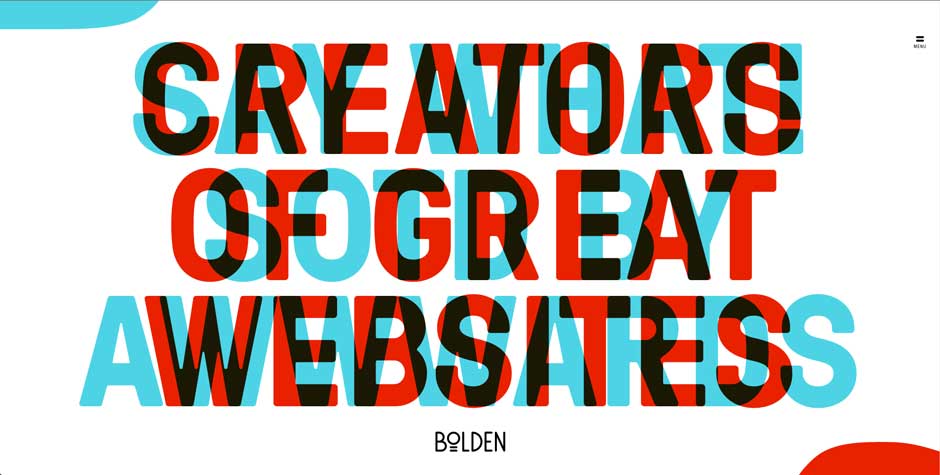
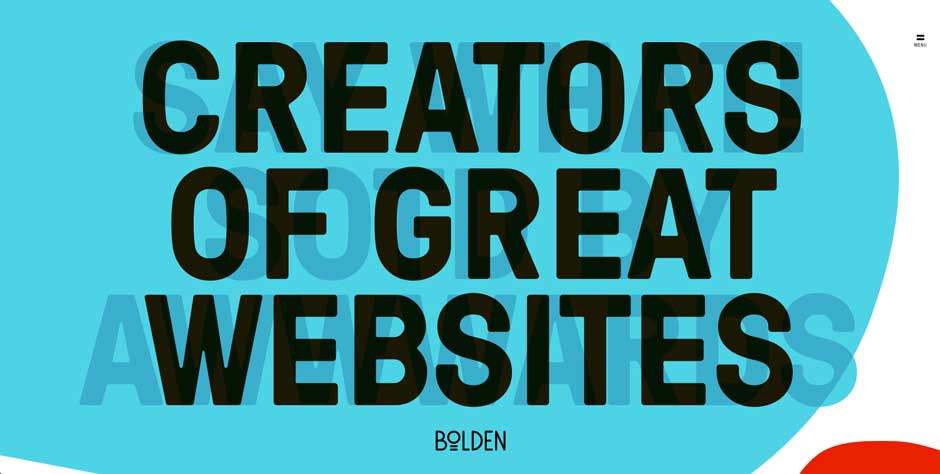
Can you tell what their home page is trying to say? No? Well, that’s because you’ll have to move your mouse to the corner of the page so as to see the messages properly.

© Bolden, Fair Use

Screenshot of Bolden's homepage

Is this a clever design? Yes, definitely. But is this bad design? Absolutely!

Bolden, Fair Use

This is a great example of designing for the designer rather than the user—the website seriously reduced the legibility of its headlines in its creators’ determination to deliver a novel design. Whoever designed this also left out text to tell users that they’re supposed to move their mouse to the corners, which means the discovery of the headlines relies on happenstance. Furthermore, even when the headline is revealed, the contrast between the text and the background is poor due to the point that you can still see overlapping text. This all adds up to create a user-unfriendly website.

The Good: CultivatedWit.com

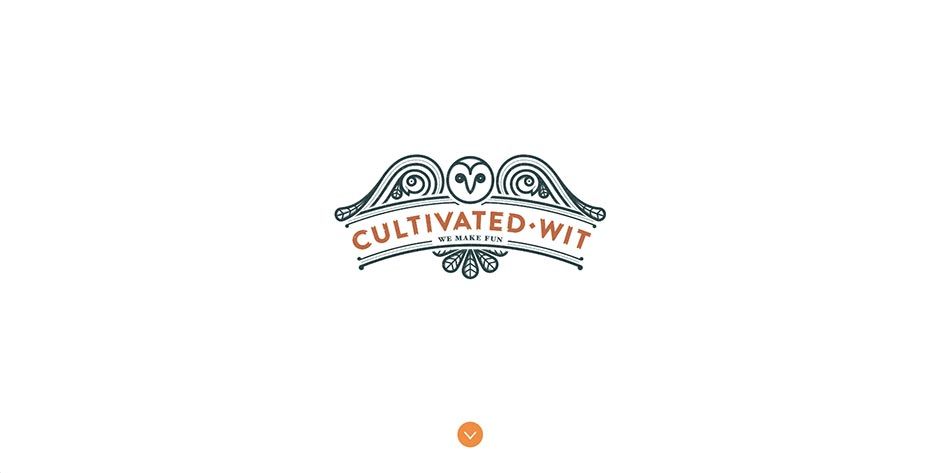
Cultivated Wit’s website is a great counter-example of how clever design need not put a strain on usability.

Screenshot from Cultivated Wit's homepage

Cultivated Wit’s homepage displays an illustrated owl.

© Cultivated Wit, Fair Use

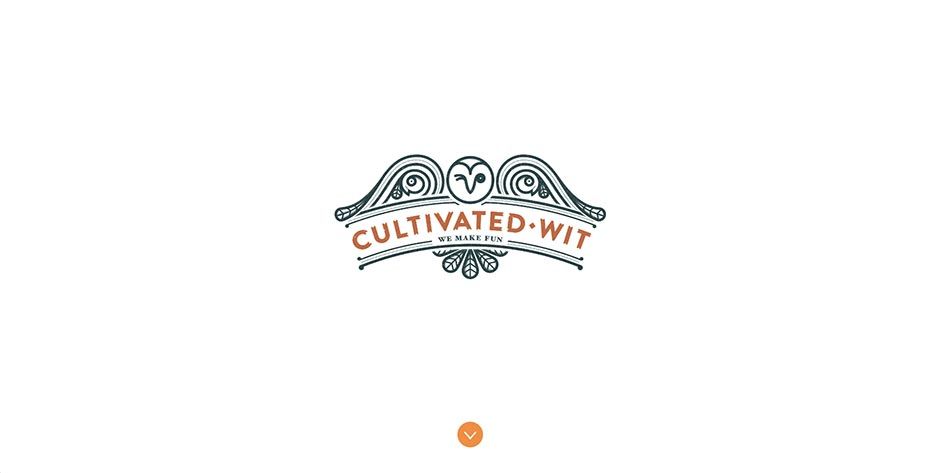
In Cultivated Wit’s homepage, the illustration of the owl winks when your mouse moves over it:

Screenshot from Cultivated Wit's homepage

Surprise! The owl winks at you when you point the cursor at it. Note the wise allocation of whitespace, too.

© Cultivated Wit, Fair Use

The key difference here is that this does not form an essential part of the website, so it does not diminish the usability even if the user does not discover this clever design element.

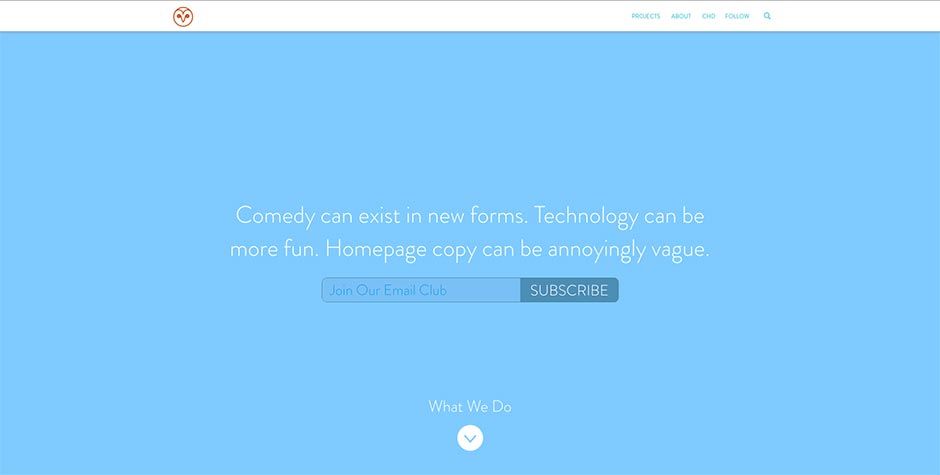
Furthermore, they have a clear downward-pointing arrow to suggest something lies below the fold. And when you scroll down, you’ll see this:

Screenshot from Cultivated Wit's homepage

Websites can be clever without sacrificing UX.

© Cultivated Wit, Fair Use

The copy (which is legible and has good contrast) creates a sense of wit—not unlike what Bolden was trying to achieve—without diminishing the user experience of the website. The only small problem is the text “Join our email club” should be more visible, but taken as a whole, Cultivated Wit’s website is a great example of delivering a clever design without creating poor UX.

Lesson Learned: Best Practice

Clever designs should always be made as foolproof as possible and/or tested on actual users. Sometimes, clever designs can backfire, and hurt usability.

5. Superfluous Animations

The Bad: PayPal Receipt Concept on Dribbble

Animations are a crucial element of interaction design, but they should always serve a purpose. They should never be done for animation’s sake. Unfortunately, designers tend to have a love affair with animations, partly because animations are so fun to create that we might not know when to stop.

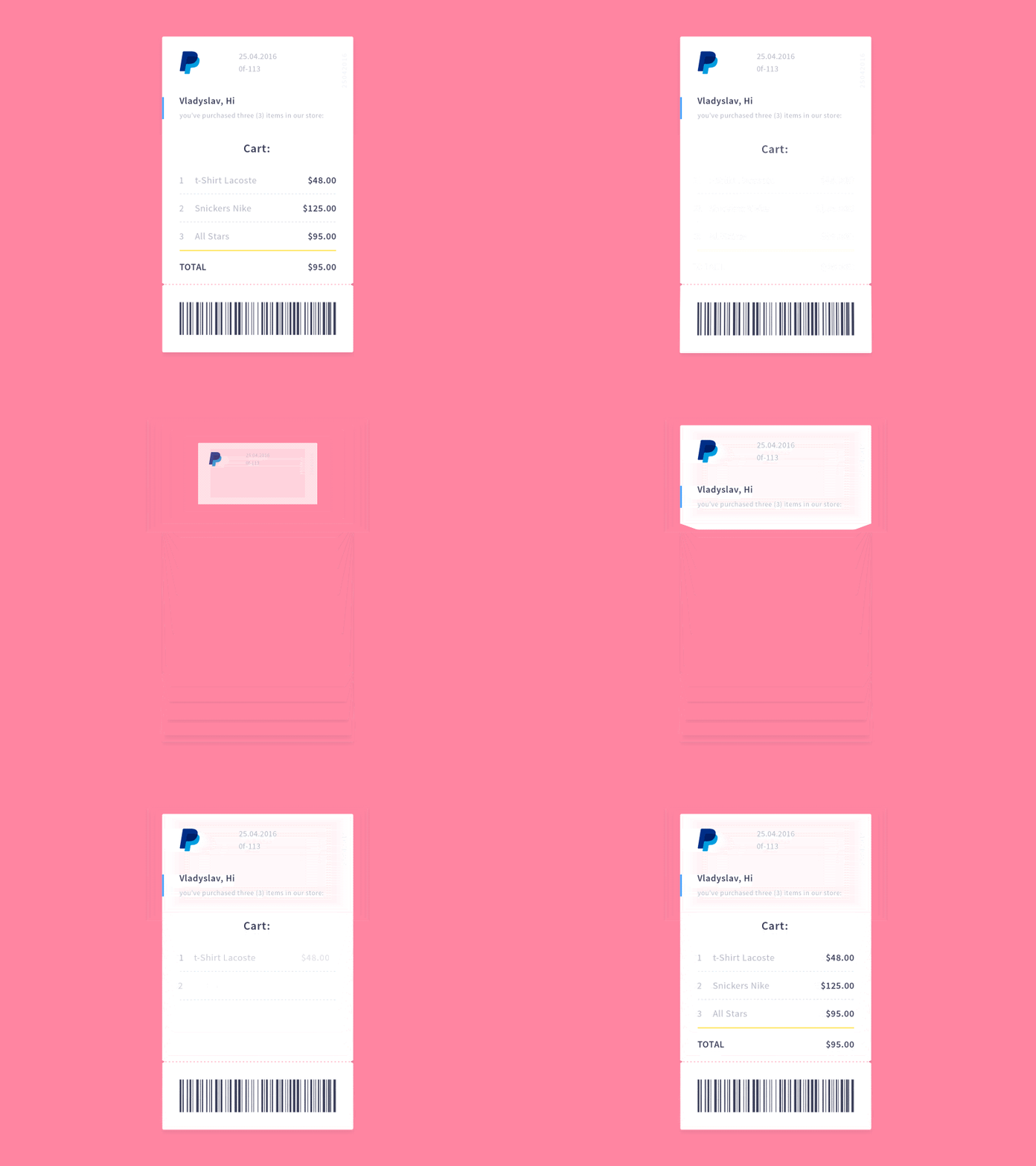
Vladyslav Tyzun’s animation concept for a PayPal email receipt, posted on Dribbble, is an example of animation done wrong:

A PayPal receipt animation

The animation is pretty, but superfluous. In total, it takes a whopping 3.5 seconds to see the transaction details. A simple fade-in of the receipt would be more elegant, and because it takes up less time, better for the user as well.

© Vladyslav Tyzun, Fair Use

This problem becomes dangerous when designers seemingly can’t get enough of animations. As of 2016, Vladyslav’s animation would receive more than 500 likes and 8,000 views. This shows a misguided appreciation that designers have towards animation for animation’s sake. Having insight into the designer’s tendency to prefer swooping epics over more direct representations and catching yourself before you give in to animations will save you a lot of time and prevent many headaches. Remember, users come to sites for a purpose—we want to show them what they are after in a short space and time, not detain them in a grand tour of the gallery.

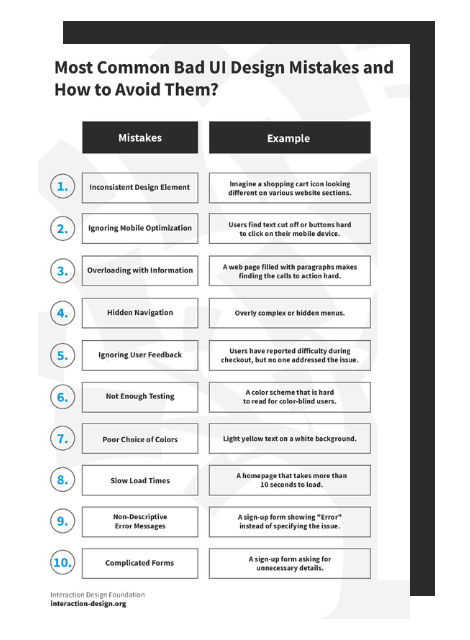
Advance Your Career With This Free Template for “Bad UI Design Mistakes and How to Avoid Them”
Bad UI Design Mistakes and How to Avoid Them
We respect your privacy
Get 1 powerful email each week: Design a life you love!

The Good: Stripe Checkout’s Animation

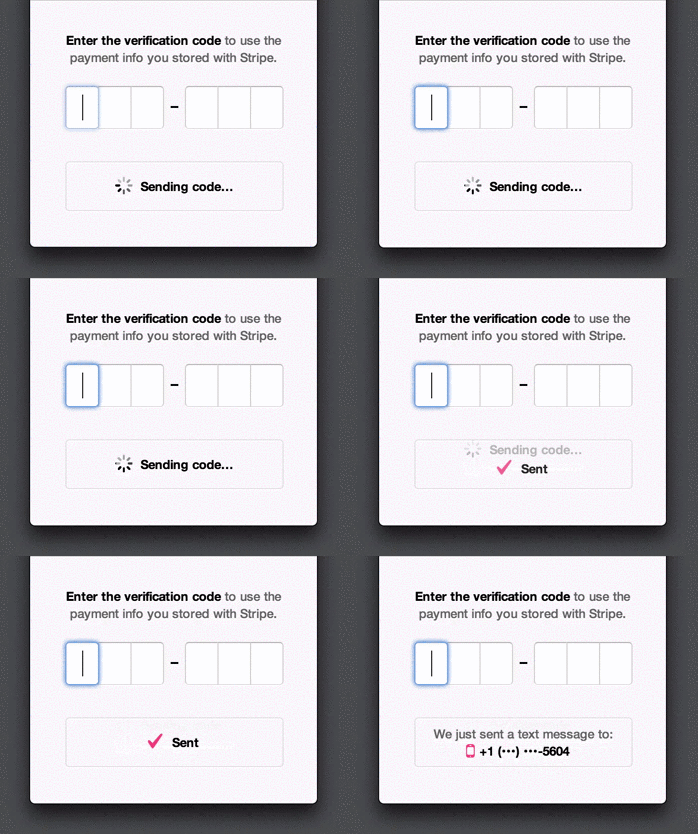
When we do animation purposefully, however, the results can be great. Look at Stripe Checkout’s animation when the user receives a verification code:

Animation from Stripe's verification code action

Stripe uses animations to make things seem faster than they are: it provides users with updates (like “Sent”) even though they might not have received the SMS yet. This prevents users from feeling frustrated at having to wait, and provides assurance that an SMS is on its way right now.

© Stripe, Inc., Fair Use

Rachel Nabors, a web animations expert at the W3C, suggests five principles to keep in mind when designing animations:

  1. Animate deliberately: Think through each animation before you create it.

  2. It takes more than 12 principles: Disney’s 12 principles of animation work for films, but not necessarily for websites and apps.

  3. Useful and necessary, then beautiful: Aesthetics should take the back seat to UX.

  4. Go four times faster: Good animations are unobtrusive, which means they run fast.

  5. Install a kill switch: For large animations such as parallax effects, create an opt-out button.

Lesson Learned: Best Practice

Always make your animation purposeful—too much can kill the UX of a product. Beauty has to pull its weight and be functional.

The Take Away

Isn’t it fun looking at examples of bad design? Thankfully, it’s educational as well. Here are the key lessons and best practices from the five examples of good and bad designs:

  1. Understand what your users need, then deliver that information.

  2. If you’ve got lots of information to convey, try using visuals instead of text.

  3. Always label your links! Users don’t like mystery links.

  4. Avoid adding any kind of friction to user actions unless they’re meant to dissuade the action.

  5. Test your clever designs and include them cautiously.

  6. Animation is like cursing. If you overuse it, it loses all its impact.

The next time you frown at an instance of bad design, stop to think: understand why the design failed, find examples of designs that did things right, and make a mental note of the lesson you’ve learned. And then share the love: share your lesson with other designers in our discussions forum!

Feel Stuck?
Want Better Job Options?

AI is replacing jobs everywhere, yet design jobs are booming with a projected 45% job growth. With design skills, you can create products and services people love. More love means more impact and greater salary potential.

At IxDF, we help you from your first course to your next job, all in one place.

See How Design Skills Turn Into Job Options
Privacy Settings
By using this site, you accept our Cookie Policy and Terms of Use.
Customize
Accept all

Be the One Who Inspires

People remember who shares great ideas.

Share on:

Academic Credibility — On Autopilot

Don't waste time googling citation formats. Just copy, paste and look legit in seconds.