Before we dive into design approaches for mobile, you need to understand the context of mobile users and their unique characteristics. That means you need to know when, why, and under what conditions and constraints users interact with your app or mobile content. If you, therefore, understand the big picture (context) of a user’s interaction with a device—the social, emotional, physical, and cultural factors—you can create better user experiences. This will help you differentiate your app from others and get more people to use yours.
In this video, Frank shares practical tips on how to be more context-aware to understand contexts of use and apply it to mobile user experience (UX) design.
As you can see, the mobile context varies from person to person. People don’t pay full attention to their smartphones as they do with desktops—remember that mobile users are on the move. They may be looking out for a cab at a noisy intersection (with details of their cab ride on their phones), jogging in a park (while listening to music), or scrolling through their social media feed while waiting for food at a restaurant. In each of these cases, we can’t—and shouldn't—expect them to be fully attentive to their devices. As Luke Wroblewski mentions, they use “one hand, one eyeball.”
“People use their smartphones anywhere and everywhere they can, which often means distracted situations that require one-handed use and short bits of partial concentration. Effective mobile designs not only account for these one thumb/one eyeball experiences but aim to optimize for them as well.”
— Luke Wroblewski, Product Director at Google
What Factors Influence Context of Use?
To better understand user context, you should consider:
Environmental factors: Noise, light, space, privacy, etc.
Cultural factors: Customs, traditions, rules, religion, manners and laws.
Inclusion factors: Unique use cases and interactions based on gender, race, ethnicity, sexual orientation, age, disability, socio-economic status, and more.
Activity/workload: Are they walking, driving, working, multi-tasking, using multiple channels, multiple devices, etc.?
Social factors: Who else is there? Who else is the user interacting with? What is the user concerned about socially (for example, reputation, exposure, embarrassment)?
Emotional factors: Is the user feeling happy? Frustrated? Did something upset the user? Is the user anxious, worried, or stressed? Have their attitudes toward the problem changed? In other words, their mood and mental model.
Goals: What are the users’ desired outcomes? What do they want to accomplish; how do they think about the problem they want to solve?
Cognitive load: What is the users’ attention span—is it continuous or intermittent? What else is going on in their minds—do they need to focus on another task, rely on memory, or make decisions simultaneously? Do they have any time constraints?
Task/task performance: What do they need to do? Do they have calls to make or messages to send? What do success and satisfaction with the task look like?
Device(s): The OS, hardware, capabilities, etc.
Connection: Speed, network reliability, etc.
Contextual Model for Mobile Beyond “On-the-Go”
Whitney Hess, an HCI designer and UX consultant, proposes a broader model of context for mobile devices and a hierarchy that links mobile to other devices available to a user. Instead of looking at devices from a location perspective (mobile is on-the-go, a desktop is at the desk, and a tablet is on a flight), we look at devices from the perspective of what the user wants to achieve.
“CONTEXT IS KING…the physical context of use can no longer be assumed by the platform, only intentional context can… I have learned to see devices as location agnostic and instead associate them with purpose—I want to check (mobile), I want to manage (desktop), I want to immerse (tablet). This shift away from objective context toward subjective context will reshape the way we design experiences across and between devices, to better support user goals and ultimately mimic analog tools woven into our physical spaces.”
— Whitney Hess, in A List Apart
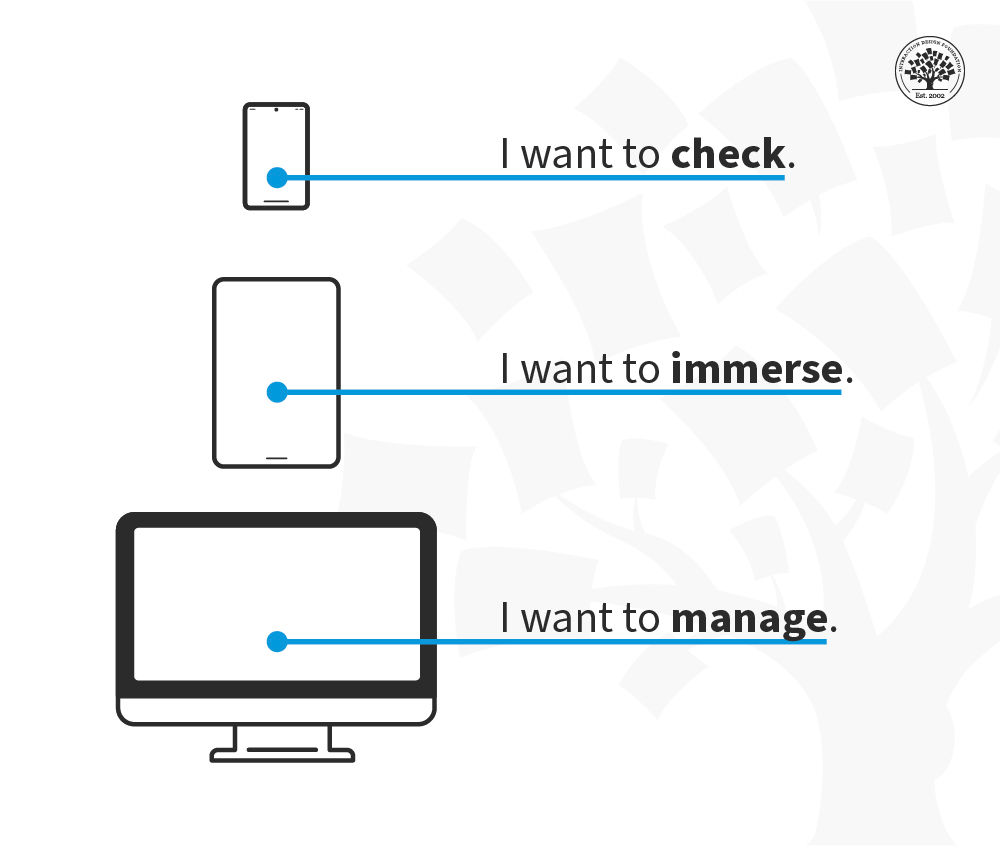
© Whitney Hess, Fair Use
This model summarizes the difference between platforms. The mobile context is one of shorter interactions “checking” where you might dip in and out of a social network, seek an address or scan your email but don’t want to do anything particularly complex.
The tablet is mainly a leisure device (though it has its enterprise context, too) and provides a chance to immerse in an experience without becoming overly interactive.
Finally, the traditional desktop/laptop platform is where people manage their overall experiences on(and off)line.
This contextual model represents the user’s intentions rather than their physical location, and while there may be some shift between levels on each device, the main intent of each platform is clear.
How to Identify Context of Use?
The answer is research. Smartphone usage is incredibly diverse. Mobile users include a broad range of physical and cognitive abilities, language fluency, and cultural and geographical differences. Just as one size doesn’t fit all devices, one UX strategy doesn’t serve all communities.
For instance, what do you need to know about an underrepresented community or users that are usually left out? For example: What do visually impaired users need to navigate your pages? IOS and Android devices have screen readers built-in, which helps them interact with smartphones. So, remember that you will have visually impaired users who rely on VoiceOver (on iOS) and TalkBack (on Android) to interact with your solutions.
Field studies will help you understand what else users do: their challenges and how they usually confront them.
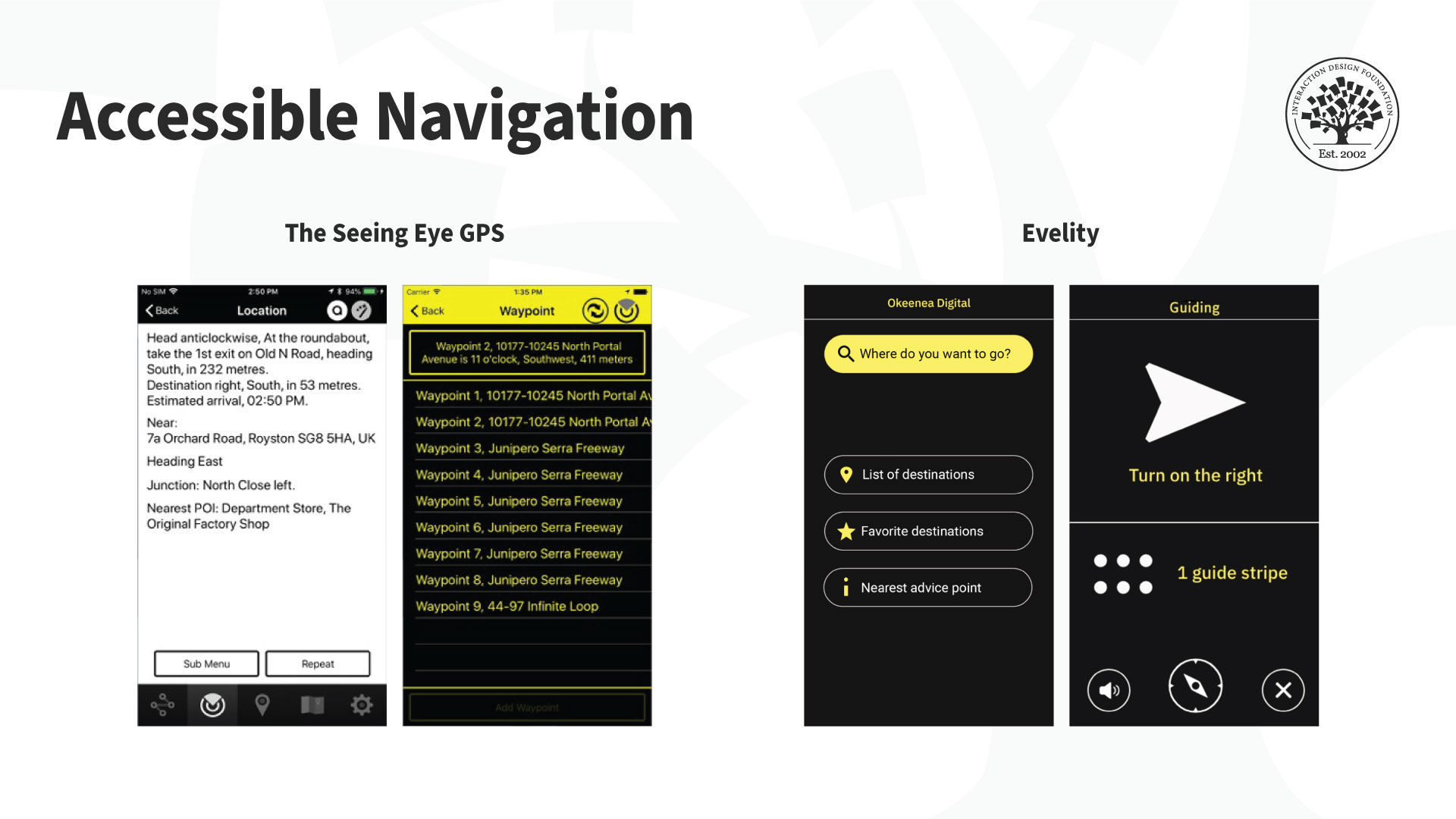
There are also tools for visually impaired users to use maps. The Seeing Eye GPS (left) is a fully accessible turn-by-turn GPS iPhone app with all the typical navigation features plus features unique to visually impaired users. It highlights routes, points of interest and locations. There’s even an app to help navigate indoor spaces like venues. For example, the Evelity app (right) is an all-disability GPS indoor wayfinding app.
© GoodMaps Inc and Okeenea Digital, Fair Use
Another use case is if your app targets a non-local market. In that case, you will need to understand the cultural factors (national and regional nuances) and your audience’s cultural needs, constraints, and opportunities. You must localize your product. A simple translation is not enough for localization; in other words it’s not enough to adapt an application for local contexts. Some terms can get lost in translation—or they can sound illogical or offensive. So there’s more to local contexts than language. You might need to tweak some features or introduce new ones by region.
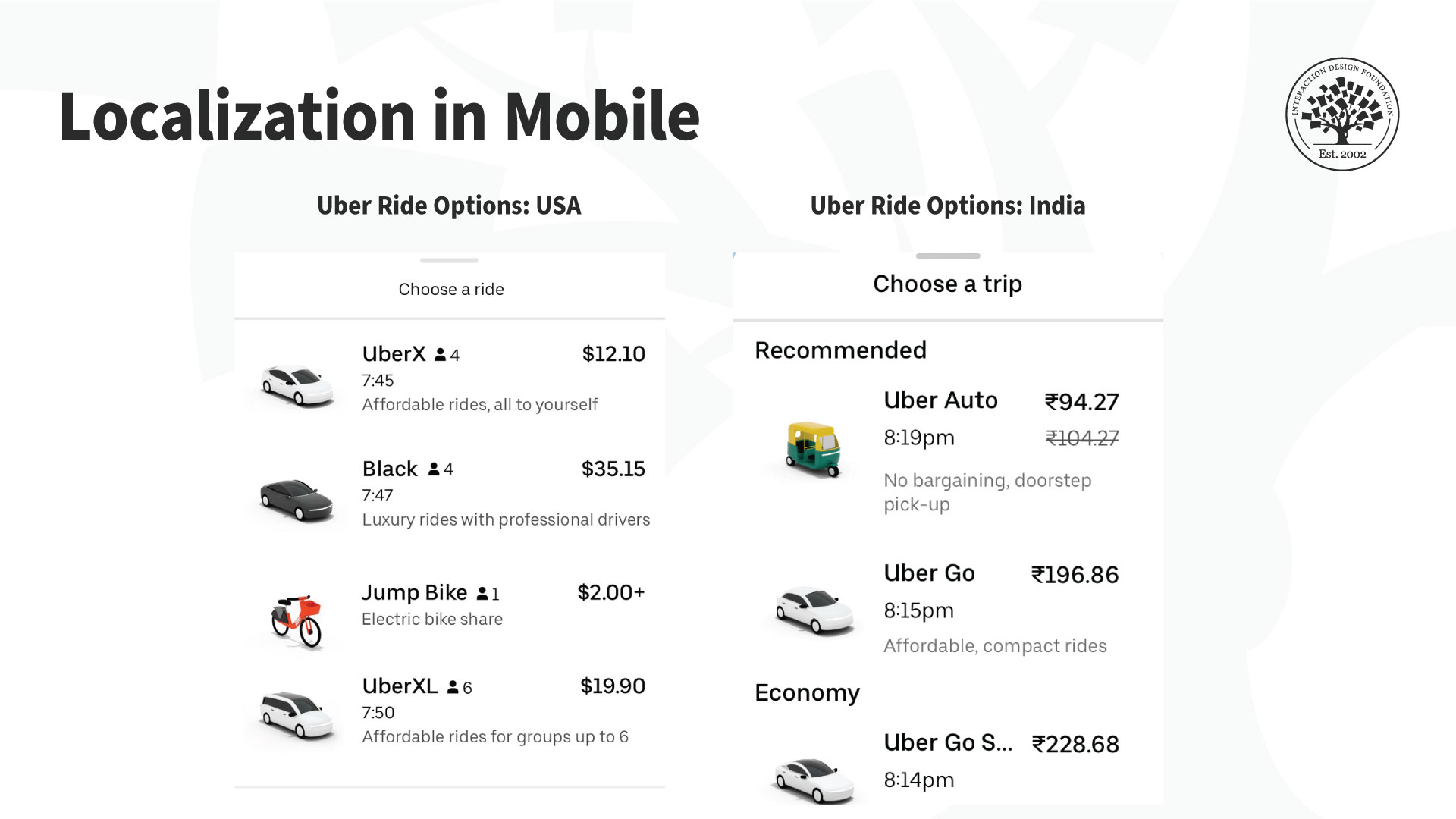
For example, Uber’s vehicle offerings suit the local markets. Users in India (right) can book an autorickshaw (a three-wheeled motor vehicle), which is not available in the US version of the application (left).
© Uber, Fair Use
The Take Away
Context of use for mobile is essential to build a successful mobile UX. Mobile interactions change with physical, social, emotional, and cultural contexts. As a designer, you need to know where, when, why, and under what conditions and constraints users interact with your app, or mobile content. These insights will guide the design, layout, and overall UX strategy.
References and Where to Learn More
To learn more about the context of use for mobile, read Design Sketch: The Context of Mobile Interaction by Savio and Braiterman.
Read Whitney’s definition of location-agnostic and context-specific mobile context.
For a detailed look at accessibility, take the course Accessibility: How to Design for All.
Check out Frank’s short webinar on designing context-aware experiences (~40 minutes).
Hero image: © Interaction Design Foundation, CC BY-SA 4.0