Your constantly-updated definition of Context Awareness and collection of videos and articles. Be a conversation starter: Share this page and inspire others!
Context awareness is a criterion in UX design that focuses on the users’ context of use. Context-aware UX adapts to the social, emotional and physical environment of the user.
Transcript
Transcript loading ...
Autoscroll
Therefore, designers can use sensor-based data from devices—including location, time, activity, environment, etc.—to adapt their designs to the user's real-time context and provide an optimized experience. This is critical in mobile User Experience (UX) design.
Other Factors in Context Awareness
Smart devices have also expanded the possible contexts of use beyond smartphones and desktops. For example, smart thermostats and smart homes might adjust their behaviors to the time of day or whether a person is home.
Factors such as location or time of day might also affect the layout of a design. Some applications will use location data to detect when a person is driving and adopt a minimalist design to not distract the driver.
Context awareness should also be sensitive to the user's emotional state. High-stress environments use formal and calming colors, layouts and tones of voice. Entertainment interfaces might be more playful, colorful and whimsical.
Questions About Context Awareness? We've Got Answers!
What does context awareness mean in UX design?
Context awareness in UX (user experience) design means understanding and adapting to the user’s situation—like location, device, time, and intent—to deliver relevant, seamless experiences.
A context-aware design such as an application responds dynamically to conditions like screen size, user behavior, and environment. For example, mobile apps that adjust layouts for one-handed use or travel apps that change interface based on GPS location apply context awareness. It ensures designs meet users where they are—literally and figuratively—delivering enhanced usability and offering the best satisfaction.
Context-aware UX design is non-negotiable for many applications. Imagine if an app for drivers failed to pinpoint their vehicle’s position on a high-speed road or motorway until dangerously close to a needed exit ramp or turnoff. Effective context awareness prevents such disappointments (or potential accidents if a driver tries to negotiate a sharp turn at the last moment!) by knowing where the user is, what they may be experiencing, and offering plenty of warning about what they need to do on the road ahead.
Take a deep-dive into context awareness in the IxDF Encyclopedia of Human-Computer Interaction entry for Context-Aware Computing.
What sensors or inputs make an app context-aware?
Sensors and inputs that make an app context-aware include GPS, accelerometers, gyroscopes, ambient light sensors, microphones, cameras, and user data like calendar or app usage. These elements help the app adapt to the user’s environment and behavior and provide sensible guidance based on a clear grasp of the real-world context.
GPS provides location context, enabling features like navigation or local recommendations. Accelerometers and gyroscopes detect motion and orientation—crucial for fitness apps or screen rotation. Light sensors adjust screen brightness for visibility. Microphones and cameras capture sound and visuals for voice commands or AR experiences. Moreover, context-aware apps can use time of day, user routines, or previous interactions to personalize content and bring the brand closer to the user in a seamless experience.
For example, Google Maps uses GPS, compass, and accelerometer data to guide users accurately, even indoors, reinforcing Google’s status as a trusted brand for millions of users around the world.
Watch as Frank Spillers, Service Designer, Founder and CEO of Experience Dynamics, briefly discusses context awareness.
Transcript
Transcript loading ...
Autoscroll
How do wearables use context awareness in their interfaces?
Wearables use context awareness by responding to the user’s activity, environment, and biometric data to deliver timely, relevant interactions. These devices adjust their interface and functions based on motion, location, heart rate, or even ambient conditions.
Smartwatches dim or brighten screens based on light sensors, switch to workout mode when detecting motion, and send health alerts from biometric data. Fitness trackers use GPS and accelerometers to recognize walking, running, or cycling. Voice assistants activate in low-interaction scenarios like driving. These interfaces prioritize quick glances, haptic feedback, and voice commands—tailored for on-the-go users.
Actionable Insights
Design for quick interactions—buttons, gestures, and haptics matter.
Use sensor data to reduce user input and increase proactivity.
Test interfaces in varied real-world conditions (e.g., movement, low light).
For example, Fitbit devices adjust UI and feedback based on user motion and heart rate, optimizing when and how to present information.
Take a deep-dive via the IxDF Encyclopedia of Human-Computer Interaction entry for Wearables.
What UX research methods help uncover user context?
UX research methods that uncover user context include field studies, contextual inquiries, diary studies, ethnographic research, and in-situ usability testing. These methods explore users’ real-world environments, behaviors, and motivations.
Contextual inquiries involve observing and interviewing users in their natural settings—revealing habits, constraints, and needs. Field studies offer firsthand insights into physical and digital contexts. Diary studies let users self-report activities and emotions over time. Ethnographic research dives deeper into cultural and social influences. In-situ testing measures how people use a product in actual use scenarios, uncovering issues that lab tests might miss.
Actionable Insights:
Begin with field observations to map environmental influences.
Use contextual interviews to understand the “why” behind user actions.
Combine diary studies with usage analytics for deeper correlation.
Explore how ethnographic research helps designers pry the “lid” off users’ worlds (with their consent) to learn about users’ behaviors, needs, and more.
How do I use past behavior to predict future user needs?
To use past behavior to predict future user needs, analyze usage patterns, preferences, and interaction histories. UX teams can then anticipate actions, personalize experiences, and design proactive features. For example, Spotify uses listening history to curate daily mixes, anticipating mood and context based on past habits.
Start by collecting behavioral data: clicks, navigation paths, session frequency, and feature usage. Identify recurring patterns—like users consistently skipping onboarding or repeatedly using one tool. Apply predictive models or heuristics to forecast needs. For example, if users often search for support after a feature launch, offer in-product guidance next time. Recommendation engines also rely on past preferences to suggest future content.
Actionable Insights
Use tools like Mixpanel or Heap to analyze behavioral trends.
Design with "anticipatory UX": surface next steps or tips based on user paths.
Validate predictions with A/B tests or user feedback loops.
Discover how A/B testing can help you find which versions of your prototypes and design solutions do better with users.
How do I protect user privacy in context-aware design?
To protect user privacy in context-aware design, collect only essential data, gain clear consent, anonymize information, and give users control over their data. For example, Apple’s iOS shows live indicators when sensors activate and requires user permission for every context-driven function.
Context-aware apps often use sensors, location, or behavioral data—making privacy critical. Implement data minimization: gather only what your app truly needs. Use explicit opt-ins, not hidden permissions. Anonymize data to remove personal identifiers. Allow users to review, adjust, or delete their context data. Follow established standards like GDPR or CCPA for compliance and trust.
Some additional tips: show clear, simple explanations of what data is used and why; include toggles to control features like location or motion tracking; and conduct privacy audits to evaluate risks from context features.
How does context awareness help personalize user experiences?
Context awareness helps personalize user experiences by adapting content, layout, and functionality to the user’s situation—like location, behavior, time, or device. This makes interfaces more relevant, efficient, and engaging. For example, Netflix uses viewing history, time of day, and device type to serve up personalized recommendations that improve engagement.
By detecting user context, systems can tailor interactions automatically. For example, a shopping app may highlight nearby deals using GPS. A banking app might simplify its interface during poor network conditions. Fitness trackers adapt suggestions based on sleep or movement patterns. These personal touches reduce friction and enhance satisfaction by aligning digital experiences with real-life needs.
Actionable Insights
Use behavioral data to surface relevant content or shortcuts.
Adjust UI elements based on device and usage conditions.
Test how well personalization performs through A/B testing or feedback loops.
Get a greater grasp of contexts of use from Alan Dix: Author of the bestselling book “Human-Computer Interaction” and Director of the Computational Foundry at Swansea University.
Transcript
Transcript loading ...
Autoscroll
How much data do I really need to make a feature context-aware?
You only need enough data to identify clear, actionable context cues—often, a small set of high-quality signals, such as location, time, or device use, can make a feature effectively context-aware.
Context-aware design prioritizes relevance over volume. Over-collecting data can increase privacy risks and reduce performance. Instead, pinpoint key context drivers for your feature. For example, a travel app may only need GPS and time of day to tailor results for users. Data from sensors (motion, ambient light) or behavioral patterns (past usage, preferences) becomes powerful when combined thoughtfully. Above all, quality, clarity, and consent matter more than quantity; test your design carefully to ensure you hit the right balance.
Actionable Insights
Identify your feature’s goal, then map the smallest data set that can enable it.
Start with one or two variables (e.g., time + location) and iterate based on value.
Avoid “data hoarding”—collect only what improves UX.
Discover the best (and most ethical) design version and enjoy our Master Class Design with Data: A Guide to A/B Testing with Zoltan Kollin, Design Principal at IBM.
Can I integrate context awareness into my existing app?
Yes, you can integrate context awareness into an existing app by adding features that respond to user location, behavior, or device status—often through APIs, SDKs, or lightweight sensor data. For example, Instagram added context-aware stickers and local filters without altering its core feed—enhancing personalization while maintaining app stability.
Context awareness doesn’t require a full rebuild. Start by identifying where your app can adapt, like changing content based on time, tailoring interfaces for mobile vs. desktop, or personalizing recommendations. Use APIs for GPS, motion, or ambient data (e.g., from iOS Core Location or Android SensorManager). Layer in usage history or user preferences to enhance adaptability. Ensure any new context-aware feature aligns with your app’s core value and maintains user trust.
Actionable Insights
Audit current user flows for context opportunities.
Begin with modular add-ons like location-based prompts or dark mode triggers.
Test in stages to validate relevance and usability.
Enjoy our Master Class How to Get Started with Usability Testing with Cory Lebson: Principal User Experience researcher with 20+ years experience and author of The UX Careers Handbook.
How can I give users control over what context data I use?
Give users control over context data by offering clear permissions, transparent settings, and real-time management tools. Let users decide what data to share, when, and how it’s used. For example, Apple’s iOS shows active sensors in real time and allows users to manage permissions app-by-app, setting the gold standard in user control.
User trust hinges on visibility and choice. Implement opt-in permissions—don’t assume consent. Use plain language to explain why you need each type of context data (e.g., “We use location to show nearby stores”). Provide settings where users can toggle context features like GPS, motion, or usage history. Let them revoke access at any time. Real-time indicators, such as icons when a sensor is active, reinforce transparency and control.
Actionable Insights
Design privacy dashboards that have intuitive toggles.
Use just-in-time prompts for sensitive features (e.g., camera access).
Log consent history to stay compliant and accountable.
In “Context‑Aware Design: A New Frontier,” Spool explores how modern UX can evolve by dynamically adapting to a user's current environment, goals, and needs. He frames this emerging discipline through vivid examples—like Fanvision in sports venues and location‑aware train navigation systems—to show how combining sensors, maps, schedules, and personalized services can drastically improve user experiences. A standout case study is Apple's in-store app, which ties together product scanning, mobile purchasing, appointment scheduling, and staff assistance on-the-go. Spool's article is influential because it shifts UX design from static interfaces to fluid, context-responsive systems, laying important groundwork for what he dubs a “new frontier” in interaction design.
In Understanding and Using Context, Dey and Abowd deliver a foundational work in context-aware computing. The authors first offer a clear operational definition: “context is any information that can be used to characterize the situation of an entity (person, place, or object) relevant to user–application interaction” They explore multiple uses of context—such as tagging, presentation, and automation—and introduce the Context Toolkit, an architectural framework with sensors, aggregators, interpreters, and widgets that simplify building context-aware systems. This toolkit provided reusable components and programming abstractions, marking a major advance from ad hoc prototypes to scalable, systematic context-aware application development.
Schilit, B. N., Adams, N., & Want, R. (1994, December). Context‑aware computing applications. In Proceedings of the IEEE Workshop on Mobile Computing Systems and Applications (pp. 85–90). IEEE Computer Society.
In Context‑Aware Computing Applications (1994), Schilit, Adams, and Want helped formalize the concept of “context‑aware computing” and introduced a widely cited taxonomy of foundational application types. Context‑aware systems, as described in the paper, sense features such as user location, nearby devices, and environmental conditions to dynamically adapt their behavior. Using the PARCTAB—a wireless handheld prototype developed at Xerox PARC—they demonstrated four key categories: proximate selection, automatic contextual reconfiguration, contextual information and commands, and context‑triggered actions. Widely recognized as a cornerstone in the field, this work popularized the term and provided one of the first structured frameworks guiding decades of research into ubiquitous and adaptive systems.
What are some popular and respected books about context awareness?
In this 356-page technical reference, Manish J. Gajjar explores how hardware, software, and sensor technologies integrate with mobile platforms to enable context-aware applications. The 11-chapter volume covers a wide range of topics, including sensor types and hubs, sensor fusion, firmware and operating system integration, power management, data validation and calibration, as well as security, privacy, and usability. With practical examples from domains like mobile health and vehicular systems, the book offers a comprehensive and accessible resource for engineers, developers, and UX designers working on sensor-enabled mobile and IoT solutions.
In this concise, five-chapter monograph, HCI researcher Geri Gay examines how mobile computing technologies—when embedded in spatial and social contexts—reshape human interaction, navigation, and community engagement. The book explores the affordances of physical space, the design of systems that support social awareness and presence, and the influence of mobile tools on group behavior. It also addresses the ethical implications of deploying context-aware technologies. Though brief at 71 pages, this work provides a solid theoretical foundation alongside practical insights, making it especially valuable to HCI researchers and practitioners working on mobile, context-sensitive user experiences.
In Designing Mobile Interfaces, Steven Hoober and Eric Berkman present 76 mobile interaction patterns, covering everything from content layout and information widgets to gestures, sensors, haptics, and error prevention. Each pattern is framed with the design problem, solution, implementation details, variations, and antipatterns. The book serves both newcomers and experienced UX professionals as a practical reference for solving mobile design challenges, including those involving sensor input and adaptive interfaces.
Earn a Gift! Answer a Short Quiz at the End of This Page
Earn a Gift, Answer a Short Quiz!
1
2
3
4
1
2
3
4
Question 1
Question 2
Question 3
Get Your Gift
2
3
4
2
3
4
Question 1
Question 2
Question 3
Get Your Gift
3
4
3
4
Question 1
Question 2
Question 3
Get Your Gift
4
4
Question 1
Question 2
Question 3
Get Your Gift
Try Again! IxDF Cheers for You!
0 out of 3 questions answered correctly
Remember, the more you learn about design, the more you make yourself valuable.
Why? Because design skills make you valuable. In any job. Any industry.
In This Course, You'll
Get excited to stop treating phones and tablets as just smaller screens and apply mobile UX principles built around how people think and make decisions on their devices. Smartphones and tablets differ in usage, attention spans, and session length. You can use those differences to create intuitive, accessible solutions that make people's lives easier, faster, and better. Through the eight goals of mobile UX, the principles of responsive and adaptive design, Google's micro-moments framework, and Josh Clark's three mobile mindsets, you'll understand what people are really trying to do when they pick up their phones. According to Statista, smartphone ownership has nearly doubled since 2019, and mobile devices generate over 62% of all web traffic worldwide. Companies in nearly every industry now build for mobile first: for SEO, for performance, for feature prioritization, and for users who increasingly live on their phones. Mobile UX is one of the most essential skills to invest in, whether you're ready to make the switch into a career in design or take on a more senior or leadership role.
Make yourself invaluable when you know how to design a mobile product people return to. According to AppsFlyer, 1 in 2 apps are uninstalled within 30 days of download, so designers who can improve retention are in high demand. You'll learn the five-step human-centered design process built for mobile (assess, understand, define, differentiate, and sketch), and how context of use influences whether people keep your app or delete it. From there, you'll study how to use sociability to build a community that leads to long-term adoption. No matter your background, you'll be able to make thebusiness case for mobile UX, whether you're presenting to your team or interviewing for a role.
Gain confidence and credibility as you replace opinions with structured heuristic evaluations. When you understandthe trade-offs between native, hybrid, and web apps (cost, capability, and reach), you'll be able to pick the right format for any project. You'll use the heuristic frameworks of Jakob Nielsen, Nadav Savio, and Jared Braiterman to assess mobile interfaces, and the USE Scorecard to score real mobile experiences against the criteria that decide whether users adopt them or not. Finally, the Assumption Buster helps you catch bias early, so your designs stay accessible and inclusive for all your users.
Craft your personal portfolio with a series of optional hands-on activities. You'll pick a mobile app, evaluate it against the eight goals of mobile UX, redesign it, layer in a sociability feature, and end with a heuristic evaluation. Apply your new skills immediately with downloadable templates, including the Customer Journey Map and the USE Scorecard. You'll finish the course with a complete case study that walks recruiters throughyour design process (from research to evaluation) and shows you can step into a mobile UX role.
Learn From Industry Leaders
Master complex skills with proven best practices and toolkits directly from industry leaders. Meet your experts for this course:
Frank Spillers: Service Designer and Founder and CEO of Experience Dynamics.
Alan Dix: Author of the bestselling book “Human-Computer Interaction” and Director of the Computational Foundry at Swansea University.
Mike Rohde: Experience and Interface Designer, author of the bestselling “The Sketchnote Handbook.”
Earn Industry-Recognized Certificates
Industry giants trust our courses to train their teams, and prestigious universities integrate our content into their curricula. Add your certificates to your LinkedIn profile, résumé, and job applications.
How to manage the users’ expectations when designing smart products
Smart products that adapt to aspects of the users’ activity, context or personality have become commonplace. With more and more products which act intelligently emerging in the market place, users often end up expecting to interact with them more like they would among themselves, as humans. In the f
Before we dive into design approaches for mobile, you need to understand the context of mobile users and their unique characteristics. That means you need to know when, why, and under what conditions and constraints users interact with your app or mobile content. If you, therefore, understand the bi
Getting Lost and Found – Maps and the Mobile User Experience
The ability to harness GPS data and map data on smartphone platforms offers designers a chance to enhance the user experience of their products. However, in order for maps to deliver better experiences for users – it’s important to integrate these features with UX in mind. There are some sensible ru
Social shares
668
Published
Read Article
Context of Use for Mobile
Before we dive into design approaches for mobile, you need to understand the context of mobile users and their unique characteristics. That means you need to know when, why, and under what conditions and constraints users interact with your app or mobile content. If you, therefore, understand the big picture (context) of a user’s interaction with a device—the social, emotional, physical, and cultural factors—you can create better user experiences. This will help you differentiate your app from others and get more people to use yours.
As you can see, the mobile context varies from person to person. People don’t pay full attention to their smartphones as they do with desktops—remember that mobile users are on the move. They may be looking out for a cab at a noisy intersection (with details of their cab ride on their phones), jogging in a park (while listening to music), or scrolling through their social media feed while waiting for food at a restaurant. In each of these cases, we can’t—and shouldn't—expect them to be fully attentive to their devices. As Luke Wroblewski mentions, they use “one hand, one eyeball.”
“People use their smartphones anywhere and everywhere they can, which often means distracted situations that require one-handed use and short bits of partial concentration. Effective mobile designs not only account for these one thumb/one eyeball experiences but aim to optimize for them as well.”
— Luke Wroblewski, Product Director at Google
What Factors Influence Context of Use?
To better understand user context, you should consider:
Environmental factors: Noise, light, space, privacy, etc.
Cultural factors: Customs, traditions, rules, religion, manners and laws.
Inclusion factors: Unique use cases and interactions based on gender, race, ethnicity, sexual orientation, age, disability, socio-economic status, and more.
Activity/workload: Are they walking, driving, working, multi-tasking, using multiple channels, multiple devices, etc.?
Social factors: Who else is there? Who else is the user interacting with? What is the user concerned about socially (for example, reputation, exposure, embarrassment)?
Emotional factors: Is the user feeling happy? Frustrated? Did something upset the user? Is the user anxious, worried, or stressed? Have their attitudes toward the problem changed? In other words, their mood and mental model.
Goals: What are the users’ desired outcomes? What do they want to accomplish; how do they think about the problem they want to solve?
Cognitive load: What is the users’ attention span—is it continuous or intermittent? What else is going on in their minds—do they need to focus on another task, rely on memory, or make decisions simultaneously? Do they have any time constraints?
Task/task performance: What do they need to do? Do they have calls to make or messages to send? What do success and satisfaction with the task look like?
Device(s): The OS, hardware, capabilities, etc.
Connection: Speed, network reliability, etc.
Contextual Model for Mobile Beyond “On-the-Go”
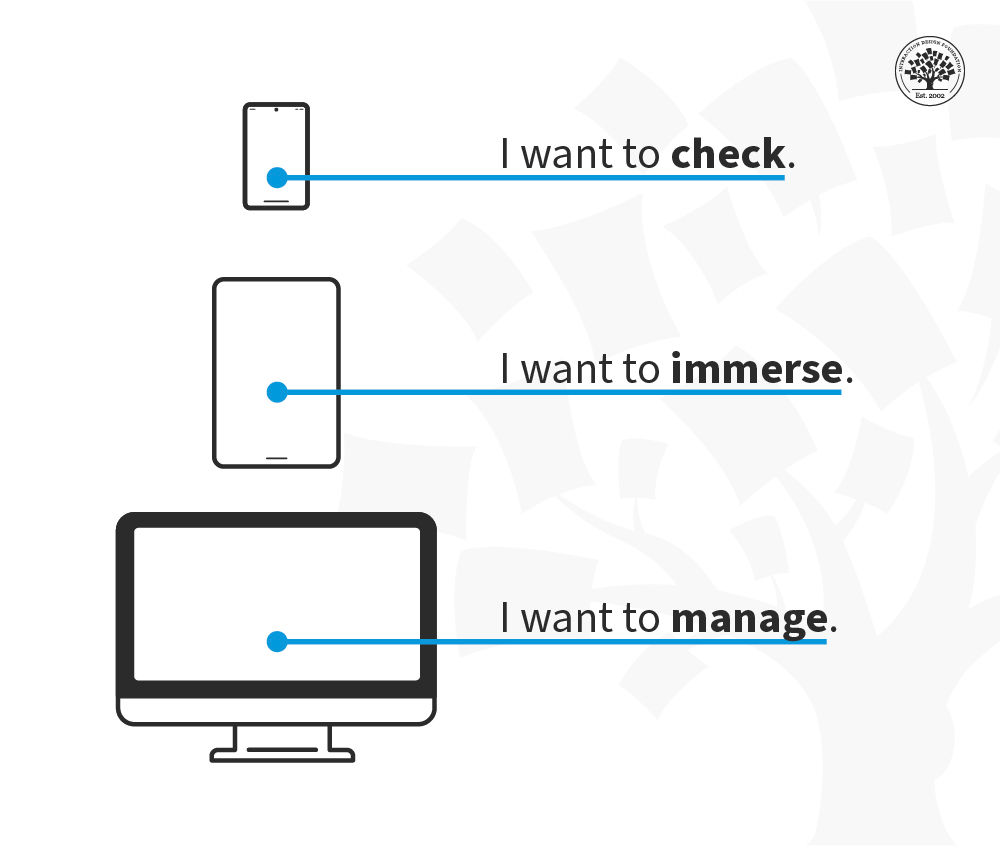
Whitney Hess, an HCI designer and UX consultant, proposes a broader model of context for mobile devices and a hierarchy that links mobile to other devices available to a user. Instead of looking at devices from a location perspective (mobile is on-the-go, a desktop is at the desk, and a tablet is on a flight), we look at devices from the perspective of what the user wants to achieve.
“CONTEXT IS KING…the physical context of use can no longer be assumed by the platform, only intentional context can… I have learned to see devices as location agnostic and instead associate them with purpose—I want to check (mobile), I want to manage (desktop), I want to immerse (tablet). This shift away from objective context toward subjective context will reshape the way we design experiences across and between devices, to better support user goals and ultimately mimic analog tools woven into our physical spaces.”
This model summarizes the difference between platforms. The mobile context is one of shorter interactions “checking” where you might dip in and out of a social network, seek an address or scan your email but don’t want to do anything particularly complex.
The tablet is mainly a leisure device (though it has its enterprise context, too) and provides a chance to immerse in an experience without becoming overly interactive.
Finally, the traditional desktop/laptop platform is where people manage their overall experiences on(and off)line.
This contextual model represents the user’s intentions rather than their physical location, and while there may be some shift between levels on each device, the main intent of each platform is clear.
How to Identify Context of Use?
The answer is research. Smartphone usage is incredibly diverse. Mobile users include a broad range of physical and cognitive abilities, language fluency, and cultural and geographical differences. Just as one size doesn’t fit all devices, one UX strategy doesn’t serve all communities.
For instance, what do you need to know about an underrepresented community or users that are usually left out? For example: What do visually impaired users need to navigate your pages? IOS and Android devices have screen readers built-in, which helps them interact with smartphones. So, remember that you will have visually impaired users who rely on VoiceOver (on iOS) and TalkBack (on Android) to interact with your solutions.
Field studies will help you understand what else users do: their challenges and how they usually confront them.
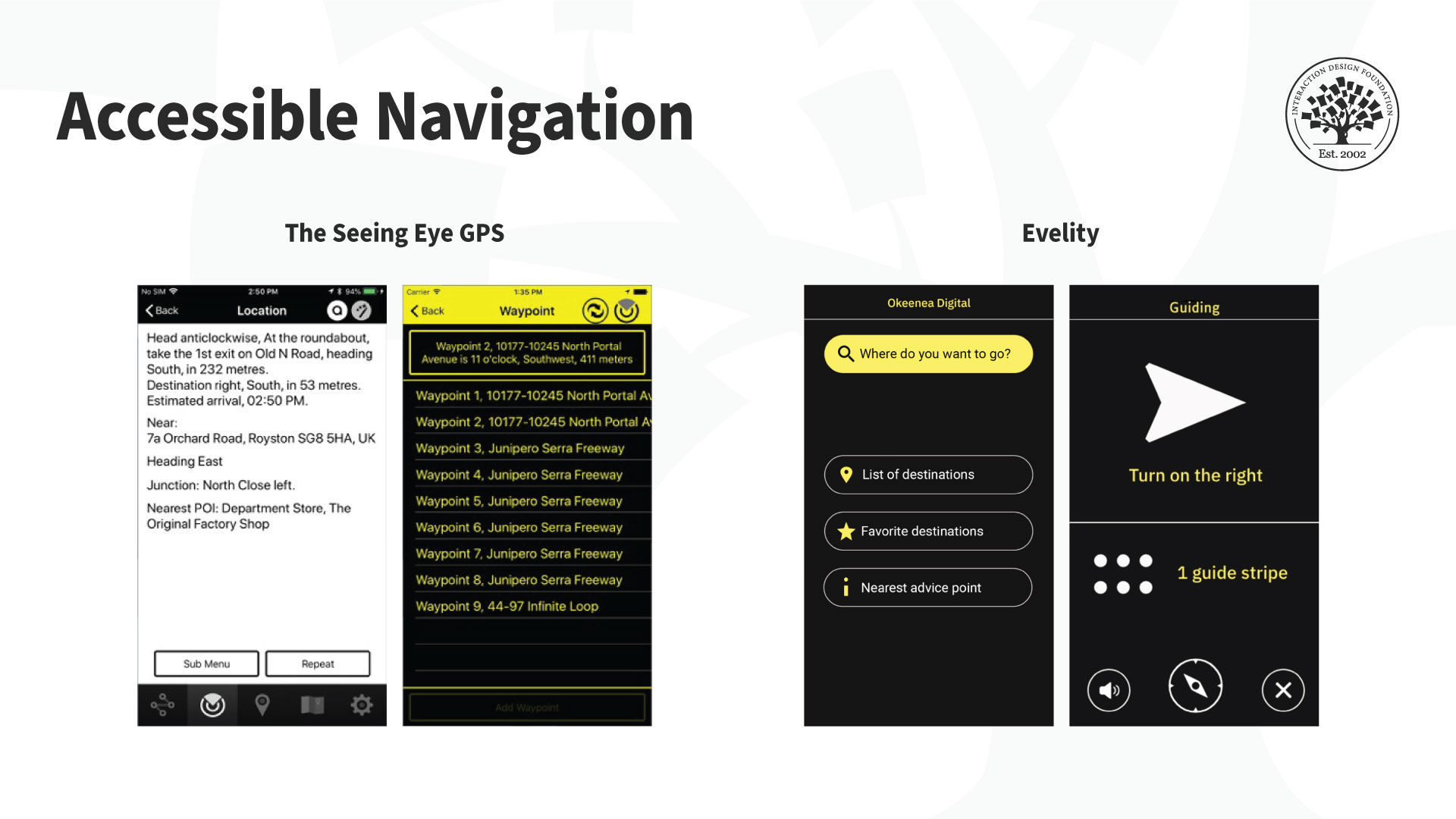
There are also tools for visually impaired users to use maps. The Seeing Eye GPS (left) is a fully accessible turn-by-turn GPS iPhone app with all the typical navigation features plus features unique to visually impaired users. It highlights routes, points of interest and locations. There’s even an app to help navigate indoor spaces like venues. For example, the Evelity app (right) is an all-disability GPS indoor wayfinding app.
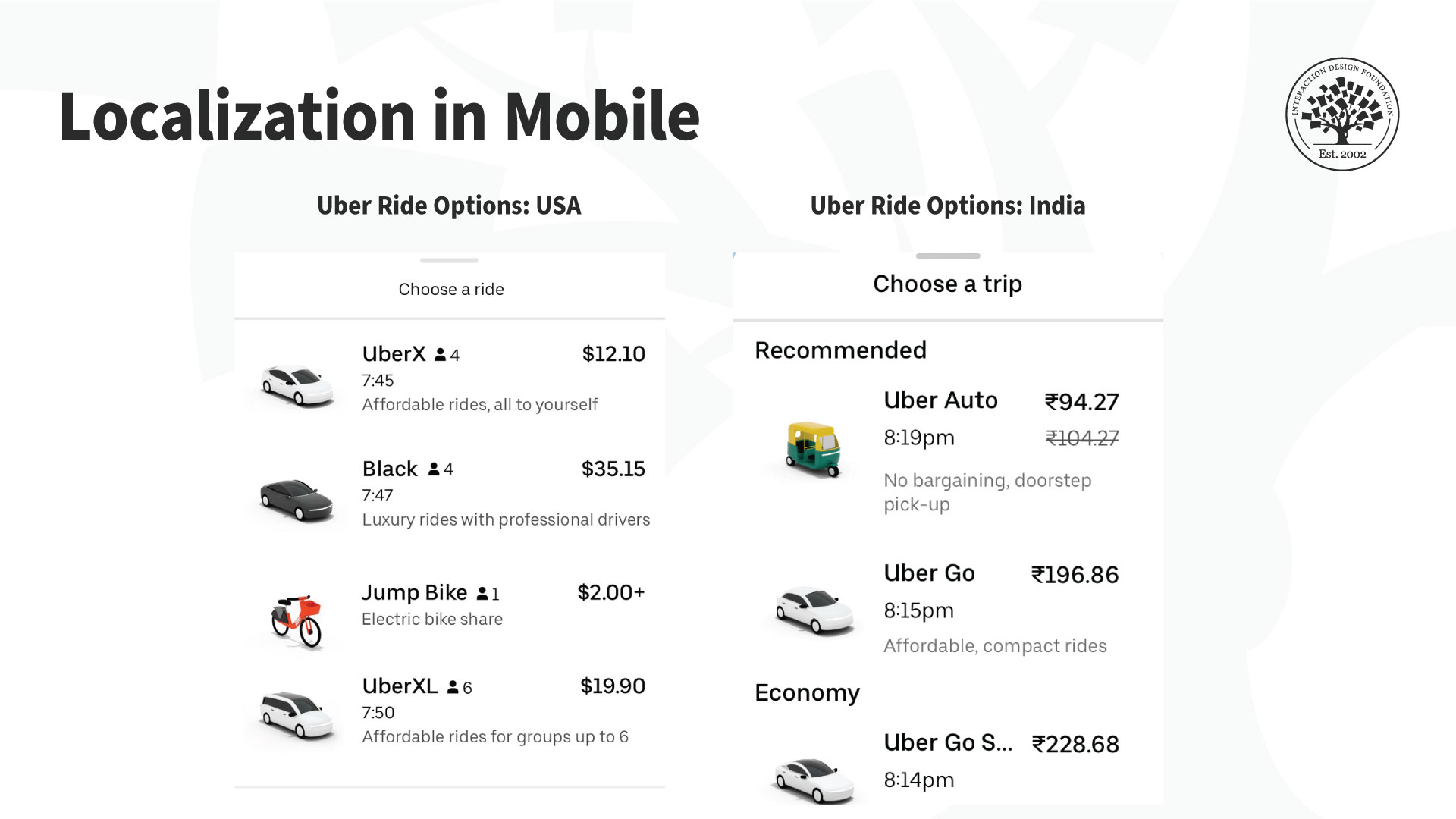
Another use case is if your app targets a non-local market. In that case, you will need to understand the cultural factors (national and regional nuances) and your audience’s cultural needs, constraints, and opportunities. You must localize your product. A simple translation is not enough for localization; in other words it’s not enough to adapt an application for local contexts. Some terms can get lost in translation—or they can sound illogical or offensive. So there’s more to local contexts than language. You might need to tweak some features or introduce new ones by region.
For example, Uber’s vehicle offerings suit the local markets. Users in India (right) can book an autorickshaw (a three-wheeled motor vehicle), which is not available in the US version of the application (left).
Context of use for mobile is essential to build a successful mobile UX. Mobile interactions change with physical, social, emotional, and cultural contexts. As a designer, you need to know where, when, why, and under what conditions and constraints users interact with your app, or mobile content. These insights will guide the design, layout, and overall UX strategy.