Contexts of Use

Your constantly-updated definition of Contexts of Use and collection of videos and articles.
Be a conversation starter: Share this page and inspire others!

690 Shares

What are Contexts of Use?

One of the key focal points of user-centered design is the context in which the designs will be used. For technology products and services, contexts of use include a potentially broad array of factors—physical and social environments, human abilities and disabilities, cultural issues and similar.

Transcript

Contexts describe the actual circumstances of use. While not all of the aspects mentioned above apply in each case, it is important to consider what is and isn’t relevant. For example, almost all products and services operate within a legal context that requires them to be operable by people with disabilities. Other legal contexts govern the use of personal data – the GDPR in Europe, for instance—the ages for which certain content may be shown, along with strict laws in some locations around gambling and betting.

Environmental and physical contexts may not be particularly relevant to most websites, but this can change dramatically for systems used outside the typical home or office. Examples include external Automated Teller Machines (“cash machines” or “cash dispensers”), computing systems used in farming—some of which must be steam cleaned—and systems used for stock control in unheated warehouses or, more challenging still, cold stores.

ATM (cash dispense), sited outdoors.

Cash dispensers are a common example of an unusual context of use. They have to cater for a wide range of users—short, tall and in wheelchairs—as well as variations in lighting and weather.

© Interaction Design Foundation, CC BY-SA 3.0

Warehouse worker scanning bar codes with portable reader.

Desktop computers are not always an appropriate solution. Here a warehouse worker scans stock using a portable reader and tablet.

© Interaction Design Foundation, CC BY-SA 3.0

How to Define Contexts of Use

User research and observation is essential to determine context of use. The goal of these processes, which include contextual interviews, user visits, etc., is to answer key questions such as the ones suggested by the leading UX consultancy Experience Dynamics:

  • Where do your users engage with your product or service? (physically, environmentally, device-specific)

  • What is happening to the user when they are using it? (social or emotional influences)

  • What is physically or socially preventing users from completing their tasks? (e.g., another party or person has to act first)

  • When does usage happen and what triggers it? (timing and coordination)

  • What expectations do users bring to the task? (mental model)

  • Why do users want to do this before that? (workflow, motivation, flow)

  • What makes sense to users and why does that differ from how you think about it? (content, labeling, problem-solving)

Contexts of Use in HCI

In user-centered and user experience design, one of our main concerns is usability. The international standard on the ergonomics of human-system interaction (see Learn More About Contexts of Use) defines usability as

“…the extent to which a system, product or service can be used by specified users to achieve specified goals with effectiveness, efficiency and satisfaction in a specified context of use.”

Notice that the very definition of usability depends on the context of use. This isn’t hard to understand outside of software systems. However, contexts are usually overlooked because contexts of use are outside of the normal considerations in most software development methods.

The standard goes on to describe the components:

“The context of use comprises a combination of users, goals, tasks, resources, and the technical, physical and social, cultural and organizational environments in which a system, product or service is used.”

This is a much broader definition of contexts than is used in practice, but it is complete. Less formal definitions tend to group users, goals, tasks and resources separately from the environments as described above. However, the benefit of grouping all of these elements together becomes obvious when considering how the standard describes achieving usability in design and development. The steps are:

1.    Understand and specify the context of use.

2.   Specify the user requirements, including usability considerations.

3.   Produce design solutions making use of the above.

4.   Evaluate the design solutions.

When referring to a complete system, the context of use would include all users along with their respective goals, tasks and the required resources as well as the environmental contexts across all of those factors. These include

  • Technical environment: Equipment and applications, including hardware, furniture; information (data the users have access to) relevant to the tasks; support services, either human- or system-based (such as assistive technology).

  • Physical environment: Where the system will be used and what the environmental factors would be (consider the warehouse, farm or cold storage examples earlier).

  • Social, cultural and organizational environment: Other people involved (such as stakeholders) and the relationships between them, the organizational structure, language, legislation, cultural norms and values, work practices, group working and privacy.

Contexts of Use in Mobile

The context of mobile use is very different from that of desktops. It will require a different approach, such as context awareness, mobile-first or task-oriented design. In this video, Frank Spillers, the founder of Experience Dynamics, shares practical tips on how to understand the context of use in mobile User Experience (UX) design.

Transcript

Researchers Savio and Braiterman introduced the “overlapping spheres of context” to a mobile user’s context that included:

  • Personal goals (such as identity, status, and social interaction).

  • Attention levels (complete or partial, intermittent or continuous).

  • Tasks (for example, make calls, send a video, or get directions).

  • Device constraints (including, among other things, software, sensors, battery and network).

  • Secondary activities (such as walking, eating, etc.).

  • Environment (sound, light, space, etc.).

  • Culture (economics, religion, law, etc.).
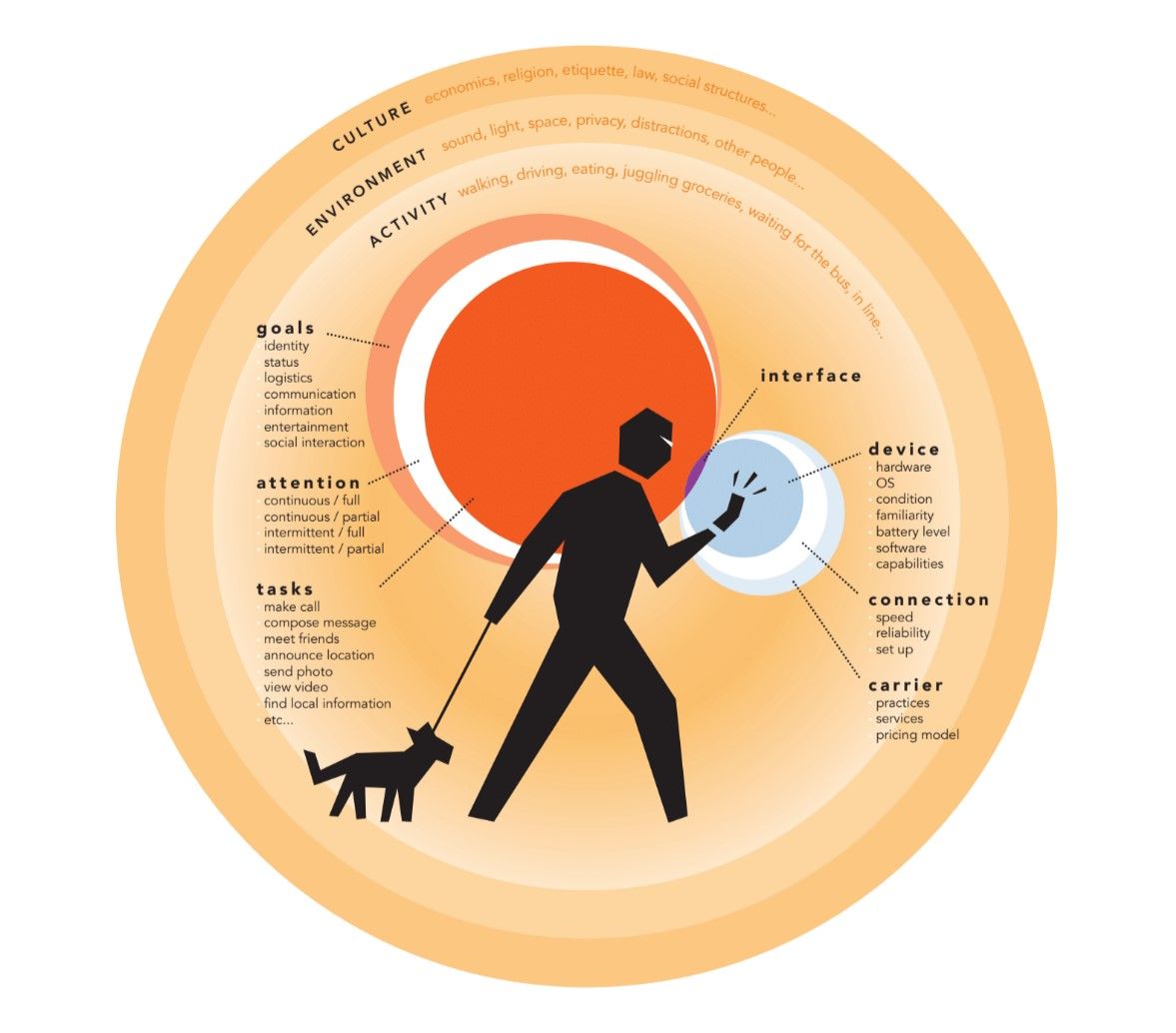
Mobile users’ context of use is much more complex than that of desktop users. Savio and Braiterman introduced the “overlapping spheres of context” to illustrate this complexity. As a designer, you must consider users’ personal goals, attention levels, tasks, device constraints, secondary activities (such as walking, eating, etc.), environment (sound, light, space, etc.) and culture (economics, religion, law, etc.).

© Nadav Savio and Jared Braiterman, Fair-Use

Mobile experiences that factor in the context of use will be more likely to be successful than designs that are made for a generic audience with a one-size-fits-all approach.

Questions About Contexts of Use?
We've Got Answers!

What does “context of use” mean in UX design?

“Context of use” in UX (user experience) design describes the circumstances under which users interact with a product—who the users are, what tasks they aim to accomplish, and the environment in which they use it. Designers study context of use to uncover needs, pain points, and expectations that shape how users experience a product.

This concept helps designers make better design decisions because a feature that works in an office might fail in a noisy subway or outdoors in bright sunlight. For example, banking apps often simplify navigation for on-the-go use, while professional software offers advanced features for focused work sessions.

Take our course User Research – Methods and Best Practices to find out how to lift the lid on contextual inquiries to observe real-life scenarios, so your designs feel intuitive, relevant, and effortless for the people using them.

What are the main elements that define a context of use?

The main elements that define a context of use in UX (user experience) design are users, tasks, tools, and environment. These factors describe who interacts with a product, what they need to accomplish, the device or system they use to do it, and the physical or social setting in which they operate.

Designers study these elements to understand how real-world conditions shape user experience. For example, an app which doctors use in a hospital must support quick, accurate decisions, often under stress, while a travel app must adapt to patchy connectivity and different time zones.

Discover how ethnographic research helps designers discover accurate insights about users so they can ensure designs match user needs and work seamlessly in the situations they’ll actually face.

How does context of use differ from user personas or scenarios?

Context of use focuses on the real-world circumstances in which users interact with a product—who they are, what tasks they perform, the tools they use, and the environment around them. Meanwhile, user personas represent fictional archetypes based on research and summarize user goals, behaviors, and motivations. Scenarios, on the other hand, tell a narrative about how a persona might use the product in a specific situation.

The key difference is that one would expect to see more detail in a report of contexts than one would in a persona.

Explore how personas form a vital part of design—enjoy our Master Class User Stories Don't Help Users: Introducing Persona Stories with William Hudson, Consultant Editor and Author.

How do I research the context of use for a product or service?

To research the context of use for a product or service, focus on observing and understanding how real users interact with it in their natural environments. Start with field studies or contextual inquiries, where you watch users perform tasks in real settings. Combine this with user interviews to uncover motivations, frustrations, and expectations.

It's helpful to supplement observations with diary studies, where users log their interactions over time, and surveys to gather broader insights. Capture details about users, tasks, tools, and environments—like lighting, noise levels, or connectivity—that affect the experience.

Tip: bring prototypes into these sessions; when you see users struggle or succeed in real situations, it reveals design opportunities you won’t find in a lab.

What questions should I ask users to understand their context?

To understand a context of use for a user, ask questions that uncover who they are, what they do, where they do it, and what challenges they face, as well as the “why.” Start with user-focused questions like: Who uses this product? What are their goals, routines, and pain points?

Move to task questions: What tasks do you perform with this product? Which ones are easy or frustrating? Then explore environmental factors: Where do you usually use it—at work, on the go, or at home? Do you notice distractions, noise, or time pressures?

Next, ask about tools and constraints: What devices do you use? What prevents you from completing tasks smoothly? These open-ended questions reveal insights that guide design choices.

For the “why” aspects, dig into the problem context with these kinds of questions:

What problem were you trying to solve when you first sought out this type of solution?

What would happen if you couldn't use this product - what would you do instead?

What does success look like for you when using this product?

Also, for the “why,” ask questions to establish the motivational context:

What prompted you to use this today?

How does this fit into your broader goals or workflow?

What would make this experience feel worthwhile to you?

Get a greater grasp of how to secure helpful insights from users in semi-structured interviews.

How do I ensure my product works well in unexpected contexts?

Design for flexibility and resilience to ensure your product works well in unexpected contexts. Start by testing beyond ideal conditions—simulate poor lighting, weak internet, noise, or multitasking. Observe how users adapt, and note where the product struggles.

Use edge-case testing and stress scenarios to uncover failures before launch. For example, test navigation apps with no signal in tunnels or rural areas. Build in fallback options (like offline modes or simplified views) to support users when conditions change.

Finally, gather real-world feedback after release. Monitor support requests, usability issues, and unexpected uses to iterate quickly. Products that thrive in messy, real-world conditions create stronger trust and loyalty.

By designing with user scenarios in mind, we can better understand the situations many users might find themselves in.

What’s the difference between physical and digital contexts of use?

The difference between physical and digital contexts of use lies in the factors that shape how users interact with a product.

A physical context includes real-world conditions, such as lighting, noise, weather, or whether the user is standing, sitting, or moving. These factors affect how users hold devices, focus attention, or complete tasks.

A digital context covers the on-screen environment: the device type, software, interface design, connectivity, and even competing apps or notifications.

For example, someone might shop online (digital context) while on a crowded bus with patchy Wi-Fi (physical context); both influence the experience.

Designers must study and test in both physical and digital contexts to ensure that products remain usable and intuitive no matter where or how they’re used.

Explore important aspects of how to anticipate how the people who use digital products encounter and use them, through a solid grasp of their user behavior.

How does cultural context impact UX design?

Cultural context shapes how users perceive, interpret, and interact with products. Elements such as language, symbols, colors, and reading directions vary widely across cultures and can change how users experience a design.

For instance, red tends to signal danger in Western countries but prosperity in China. Similarly, interface patterns that feel common in one culture—like swiping left to delete—might confuse users elsewhere.

To design for diverse audiences, conduct cross-cultural research, test prototypes in different regions, and don’t assume that one cultural norm fits all. Respecting cultural context not only prevents misunderstandings but builds trust and inclusivity into your UX design solutions too.

Explore how to design with culture in mind in this video with Alan Dix: Author of the bestselling book “Human-Computer Interaction” and Director of the Computational Foundry at Swansea University.

Copyright
Transcript

What mistakes do designers make when they ignore context of use?

When designers ignore context of use, they risk creating products that feel clumsy, frustrating, or even unusable in real life. Common mistakes include over-designing for ideal conditions, assuming users always have strong internet, full attention, or a quiet workspace. This leads to failures when people use the product, for example, on noisy trains, with poor Wi-Fi, or while multitasking.

Another mistake is misaligned features—building tools users can’t access or don’t need in their actual environments. For example, a small-screen app with tiny buttons might look sleek in a lab but fail outdoors in bright sunlight.

Avoid these pitfalls by testing in real settings, gathering user feedback, and considering messy, unpredictable conditions from the start—life “happens” to users, and it can be unpredictable.

Understand how usability testing yields essential insights and helps direct better design decisions.

How can I design for users with very different contexts of use?

To design for users with very different contexts of use, focus on flexibility and adaptability. Start by mapping the key differences, such as devices, environments, and constraints, and then identify common needs across all contexts.

Build responsive, modular designs that adjust seamlessly. For example, banking apps adapt layouts for mobile on-the-go use while offering richer dashboards on desktops. Provide customization options like adjustable font sizes or offline modes, so users can tailor the experience to their situation and really make it “their own.”

Test your product in contrasting real-world settings, such as quiet offices, noisy streets, and low-connectivity zones, to ensure it stays usable everywhere. Designing for variety not only broadens accessibility but makes your product more resilient as well.

Discover how to investigate user needs so you can determine better steps forward with designing for the people who will use what you create.

What are some helpful resources about contexts of use for UX designers?

Franz, B., & Kauer‑Franz, M. (2024). Usability and User Experience Design: The Comprehensive Guide to Data‑Driven UX Design. Rheinwerk Computing.

Franz and Kauer‑Franz (2024) present a comprehensive, data‑driven roadmap for UX design, blending psychological insights, proven design principles, and practical methods. The book covers the entire UX lifecycle—from context of use analysis and requirements gathering to prototyping, testing, and review. It emphasizes grounding digital product design in real‑world user environments and includes case studies spanning B2C, B2B, and medical applications. With 673 pages of guidance, examples, and full‑color illustrations, it equips UX designers and developers with actionable tools for integrating context research into every design decision—ensuring products are both usable and aligned with users’ needs and situations.

Spillers, F. (2024, July 3). What is context of use in UX design? Experience Dynamics Blog. https://frankspillers.com/what-is-context-of-use-in-ux-design/

Spillers (2024) defines context of use as the sum of users, tasks, and environments (UTE) in which products and services are experienced. He argues that understanding context is essential to designing solutions that fit seamlessly into users’ lives and avoid harmful misalignments. Drawing on examples—from accessibility failures in adaptive fashion to overlooked environmental constraints—Spillers shows how designs lacking contextual awareness often backfire. He provides seven guiding questions for field research, helping UX practitioners uncover barriers, triggers, and expectations in real-world settings. The article serves as a practical, motivating framework for embedding deep context research into UX projects.

Nikolov, N. (2023, February 25). Analysis phase of HCD: Understanding and specifying the context of use. UX Blog. https://www.nikolaynikolov.ch/blog/hcd-analysis-phase

Nikolov (2023) provides a deep dive into the analysis phase of human‑centered design (HCD), framing it as the foundation for creating user‑centered products and services. The article systematically explains how to understand and specify the context of use, detailing the roles of users (primary, secondary, indirect), tasks, environments, and resources. Nikolov outlines practical research activities—contextual inquiry, interviews, focus groups, task analysis, personas, and journey maps—showing how each feeds into a coherent context description. For UX practitioners, this comprehensive guide is both conceptual and hands‑on, offering a step‑by‑step roadmap for embedding real‑world context into every stage of design.

Usability Body of Knowledge. (2009, August). Context of use analysis. Usability Body of Knowledge. https://www.usabilitybok.org/context-of-use-analysis

This Usability Body of Knowledge entry (2009) outlines context of use analysis as a foundational UX method for gathering detailed information about users, tasks, tools, environments, and constraints. It explains how this information—collected through interviews, workshops, surveys, or field studies—feeds directly into requirements, conceptual design, and usability test planning. The page provides a clear “how‑to,” describing stakeholder meetings, use of a checklist, and consensus‑building steps. It also covers variations for simple versus complex systems. For UX designers and researchers, it’s a practical, standards‑aligned reference for embedding real‑world context into every stage of the design process.

Earn a Gift Earn a Gift, Answer a Short Quiz!

1
2
3
4
1
2
3
4
Question 1
Question 2
Question 3
Get Your Gift
Interaction Design Foundation logo

Question 1

What are contexts of use?

1 point towards your gift

  • The environments and conditions under which people use a product.
  • The financial cost of developing a product.
  • The graphical elements of a user interface.
Interaction Design Foundation logo

Question 2

Which method is important for understanding the contexts of use?

1 point towards your gift

  • Competitive benchmarking
  • Contextual inquiries
  • Market analysis
Interaction Design Foundation logo

Question 3

Which of the following is a type of context considered in user-centered design?

1 point towards your gift

  • Financial context
  • Marketing context
  • Physical context

Learn More About Contexts of Use

Make learning as easy as watching Netflix: Learn more about Contexts of Use by taking the online IxDF Course Human-Computer Interaction: The Foundations of UX Design.

Why? Because design skills make you valuable. In any job. Any industry.

 In This Course, You'll

  • Get excited about designing products and experiences people truly love. From medical apps that save lives to educational tools that bridge learning gaps, Human-Computer Interaction (HCI) is at the heart of every great User Experience (UX) Design. You'll learn what people enjoy and how to use that knowledge to create meaningful, engaging solutions. No design background? No problem. You already have transferable skills, like empathy, problem-solving, communication, and organizing information, so you have more HCI knowledge than you realize. HCI blends psychology, design, engineering, and ethics to help you craft experiences that feel intuitive and make it easy for people to fulfill their needs and reach their goals. That's what we human beings love. More love means higher business profits and a salary that reflects your value.

  • Make yourself invaluable when you discover the science behind great design. You'll master timeless human-centered design skills like perception, insight, and strategic thinking that become even more powerful in an AI-enhanced world. Turn AI into your superpower with your unique human understanding that no algorithm can generate on its own. Studies show that tech and design-related occupations will grow 23% by 2031, much faster than the average. HCI skills are in demand across every industry. This course helps you structure your existing skills and apply them creatively, from idea to delivery. With your HCI skills, it's easy to drive customer loyalty and business success because you know how to design for people. Level up in your current role or use your new skills to break into a career in design and tech.

  • Gain confidence and credibility as you build experiences so effortless they feel like second nature. It's easier than you think. With ready-to-use templates for global navigation, personas, and more, you'll get everything you need to immediately apply your skills and create user-centered results people keep coming back to. Build a standout portfolio and fast-track your career with optional hands-on exercises. This course will give you real-world human-centered design solutions, such as a website, app, or smart device, to showcase your in-demand skills.

It's Easy to Fast-Track Your Career with the World's Best Experts

Master complex skills effortlessly with proven best practices and toolkits directly from the world's top design experts. Meet your expert for this course:

  • Alan Dix: Author of the bestselling book “Human-Computer Interaction” and Director of the Computational Foundry at Swansea University.

Get an Industry-Recognized IxDF Course Certificate

Increase your credibility, salary potential and job opportunities by showing credible evidence of your skills.

IxDF Course Certificates set the industry gold standard. Add them to your LinkedIn profile, resumé, and job applications.

Course Certificate Example

Be in distinguished company, alongside industry leaders who train their teams with the IxDF and trust IxDF Course Certificates.

Our clients: IBM, HP, Adobe, GE, Accenture, Allianz, Phillips, Deezer, Capgemin, Mcafee, SAP, Telenor, Cigna, British Parliament, State of New York

All Free IxDF Articles on Contexts of Use

Read full article
Functionality and Mobile Design – Don’t Shrink the Screen, Focus on the Tasks - Article hero image
Interaction Design Foundation logo

Functionality and Mobile Design – Don’t Shrink the Screen, Focus on the Tasks

Designing for mobile devices is not the same as designing for laptops or desktops. It's about creating a unique user experience that focuses on what matters to mobile users. To achieve this, it's important to focus on the tasks that users want to accomplish and ensure they can be executed efficientl

Social shares
781
Published
Read Article
Read full article
Context of Use for Mobile - Article hero image
Interaction Design Foundation logo

Context of Use for Mobile

Before we dive into design approaches for mobile, you need to understand the context of mobile users and their unique characteristics. That means you need to know when, why, and under what conditions and constraints users interact with your app or mobile content. If you, therefore, understand the bi

Social shares
690
Published
Read Article
Read full article
How to Use the Environment in Your AR Experience - Article hero image
Interaction Design Foundation logo

How to Use the Environment in Your AR Experience

Augmented Reality (AR) is an exciting medium because of the unique way it interacts with physical space to add new information and meaning. Let's look at what makes AR unique: the context of use. Unlike other devices and platforms, using an AR headset or mobile phone for AR allows you to interact wi

Social shares
393
Published
Read Article
Read full article
9 Persona Mistakes That Are Costing You Customers - Article hero image
Interaction Design Foundation logo

9 Persona Mistakes That Are Costing You Customers

Are your personas not driving you to better products, happier customers, and higher profits? It’s actually quite common. You've heard about the benefits of personas and all the success stories, and you think, “let’s give this a try!" But in reality, your current personas don’t get you anywhere, don’

Social shares
339
Published
Read Article

Context of Use for Mobile

Context of Use for Mobile

Before we dive into design approaches for mobile, you need to understand the context of mobile users and their unique characteristics. That means you need to know when, why, and under what conditions and constraints users interact with your app or mobile content. If you, therefore, understand the big picture (context) of a user’s interaction with a device—the social, emotional, physical, and cultural factors—you can create better user experiences. This will help you differentiate your app from others and get more people to use yours.

In this video, Frank shares practical tips on how to be more context-aware to understand contexts of use and apply it to mobile user experience (UX) design.

Transcript

As you can see, the mobile context varies from person to person. People don’t pay full attention to their smartphones as they do with desktops—remember that mobile users are on the move. They may be looking out for a cab at a noisy intersection (with details of their cab ride on their phones), jogging in a park (while listening to music), or scrolling through their social media feed while waiting for food at a restaurant. In each of these cases, we can’t—and shouldn't—expect them to be fully attentive to their devices. As Luke Wroblewski mentions, they use “one hand, one eyeball.”

“People use their smartphones anywhere and everywhere they can, which often means distracted situations that require one-handed use and short bits of partial concentration. Effective mobile designs not only account for these one thumb/one eyeball experiences but aim to optimize for them as well.”

— Luke Wroblewski, Product Director at Google

What Factors Influence Context of Use? 

To better understand user context, you should consider:

  • Environmental factors: Noise, light, space, privacy, etc.

  • Cultural factors: Customs, traditions, rules, religion, manners and laws. 

  • Inclusion factors: Unique use cases and interactions based on gender, race, ethnicity, sexual orientation, age, disability, socio-economic status, and more.

  • Activity/workload: Are they walking, driving, working, multi-tasking, using multiple channels, multiple devices, etc.?

  • Social factors: Who else is there? Who else is the user interacting with? What is the user concerned about socially (for example, reputation, exposure, embarrassment)? 

  • Emotional factors: Is the user feeling happy? Frustrated? Did something upset the user? Is the user anxious, worried, or stressed? Have their attitudes toward the problem changed? In other words, their mood and mental model.

  • Goals: What are the users’ desired outcomes? What do they want to accomplish; how do they think about the problem they want to solve? 

  • Cognitive load: What is the users’ attention span—is it continuous or intermittent? What else is going on in their minds—do they need to focus on another task, rely on memory, or make decisions simultaneously? Do they have any time constraints?

  • Task/task performance: What do they need to do? Do they have calls to make or messages to send? What do success and satisfaction with the task look like? 

  • Device(s): The OS, hardware, capabilities, etc.

  • Connection: Speed, network reliability, etc.

Contextual Model for Mobile Beyond “On-the-Go”

Whitney Hess, an HCI designer and UX consultant, proposes a broader model of context for mobile devices and a hierarchy that links mobile to other devices available to a user. Instead of looking at devices from a location perspective (mobile is on-the-go, a desktop is at the desk, and a tablet is on a flight), we look at devices from the perspective of what the user wants to achieve.

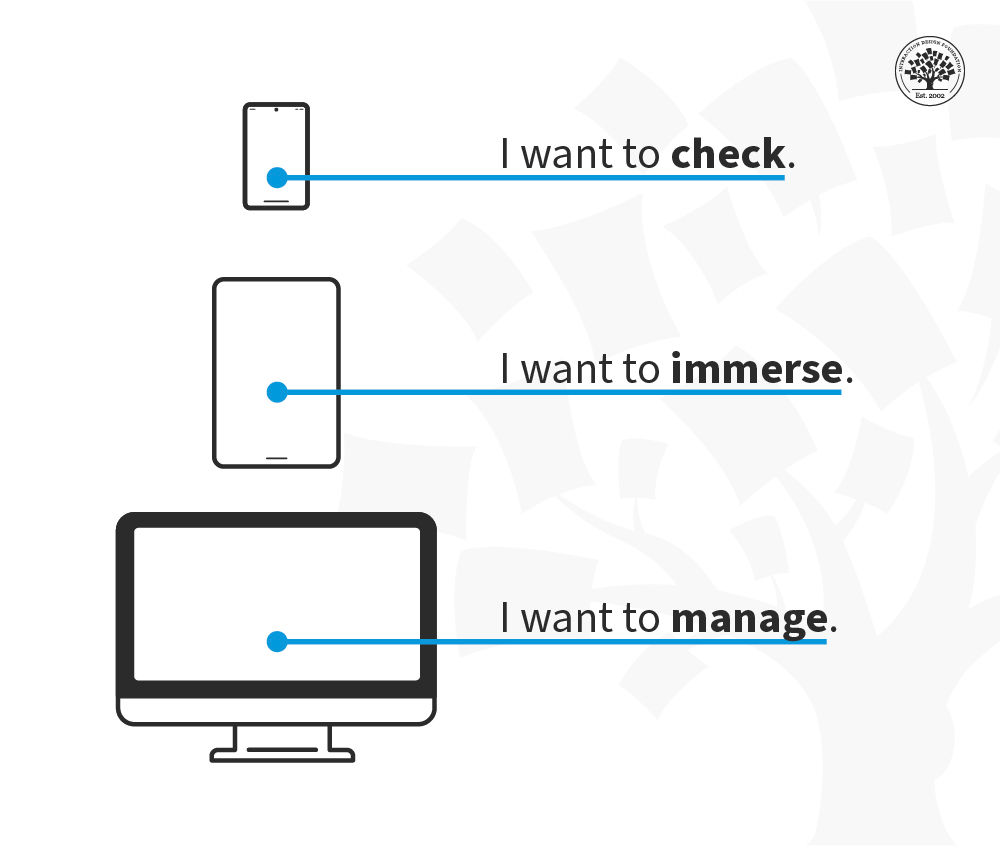
“CONTEXT IS KING…the physical context of use can no longer be assumed by the platform, only intentional context can… I have learned to see devices as location agnostic and instead associate them with purpose—I want to check (mobile), I want to manage (desktop), I want to immerse (tablet). This shift away from objective context toward subjective context will reshape the way we design experiences across and between devices, to better support user goals and ultimately mimic analog tools woven into our physical spaces.”

— Whitney Hess, in A List Apart

Illustration representing users' goals in different devices: smartphone—

© Whitney Hess, Fair Use

This model summarizes the difference between platforms. The mobile context is one of shorter interactions “checking” where you might dip in and out of a social network, seek an address or scan your email but don’t want to do anything particularly complex.

The tablet is mainly a leisure device (though it has its enterprise context, too) and provides a chance to immerse in an experience without becoming overly interactive.

Finally, the traditional desktop/laptop platform is where people manage their overall experiences on(and off)line.

This contextual model represents the user’s intentions rather than their physical location, and while there may be some shift between levels on each device, the main intent of each platform is clear.

How to Identify Context of Use?

The answer is research. Smartphone usage is incredibly diverse. Mobile users include a broad range of physical and cognitive abilities, language fluency, and cultural and geographical differences. Just as one size doesn’t fit all devices, one UX strategy doesn’t serve all communities. 

For instance, what do you need to know about an underrepresented community or users that are usually left out? For example: What do visually impaired users need to navigate your pages? IOS and Android devices have screen readers built-in, which helps them interact with smartphones. So, remember that you will have visually impaired users who rely on VoiceOver (on iOS) and TalkBack (on Android) to interact with your solutions.

Field studies will help you understand what else users do: their challenges and how they usually confront them.

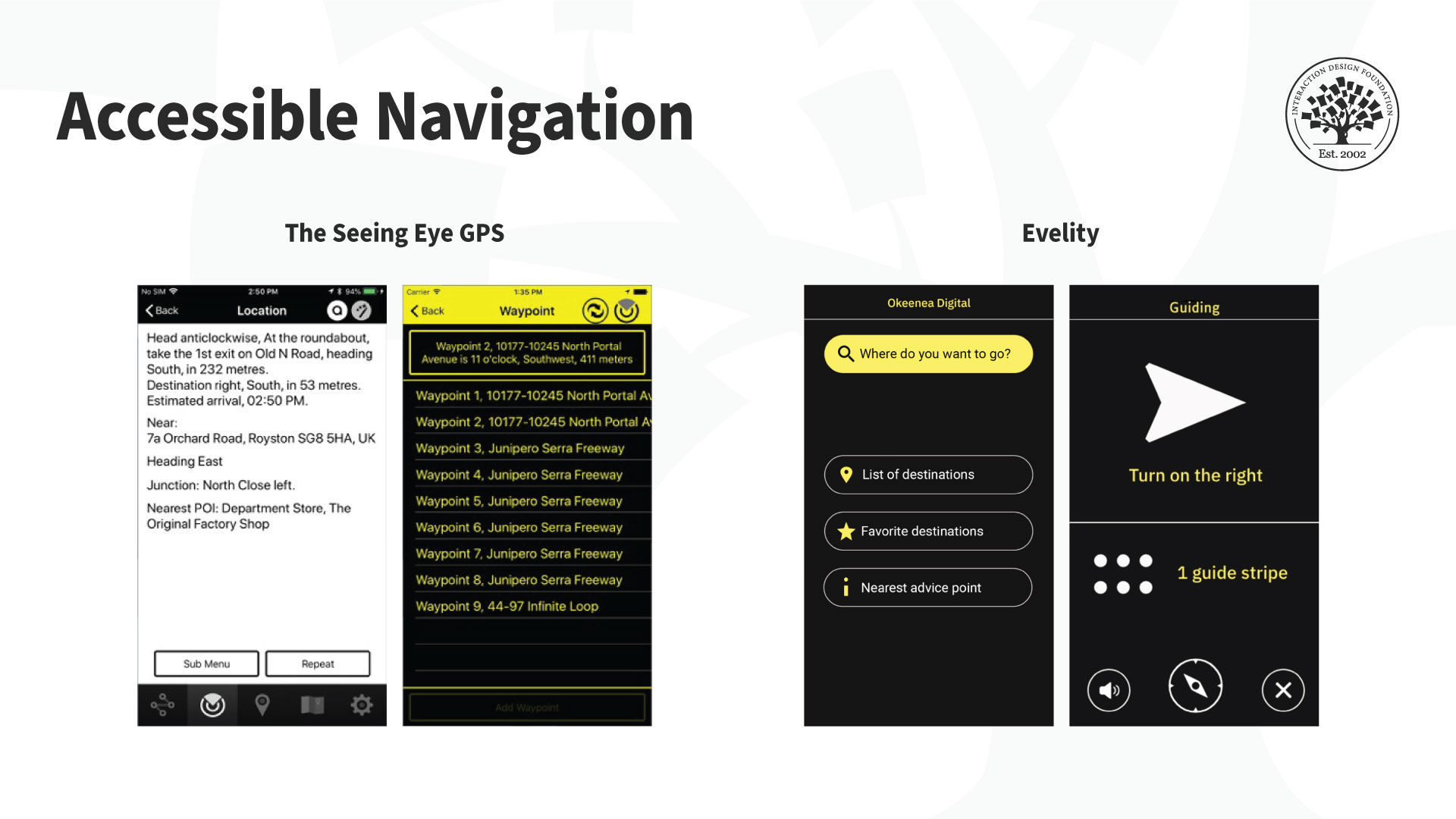
Screenshots of the Seeing Eye app and the Evelity app.

There are also tools for visually impaired users to use maps. The Seeing Eye GPS (left) is a fully accessible turn-by-turn GPS iPhone app with all the typical navigation features plus features unique to visually impaired users. It highlights routes, points of interest and locations. There’s even an app to help navigate indoor spaces like venues. For example, the Evelity app (right) is an all-disability GPS indoor wayfinding app.

© GoodMaps Inc and Okeenea Digital, Fair Use

Another use case is if your app targets a non-local market. In that case, you will need to understand the cultural factors (national and regional nuances) and your audience’s cultural needs, constraints, and opportunities. You must localize your product. A simple translation is not enough for localization; in other words it’s not enough to adapt an application for local contexts. Some terms can get lost in translation—or they can sound illogical or offensive. So there’s more to local contexts than language. You might need to tweak some features or introduce new ones by region.

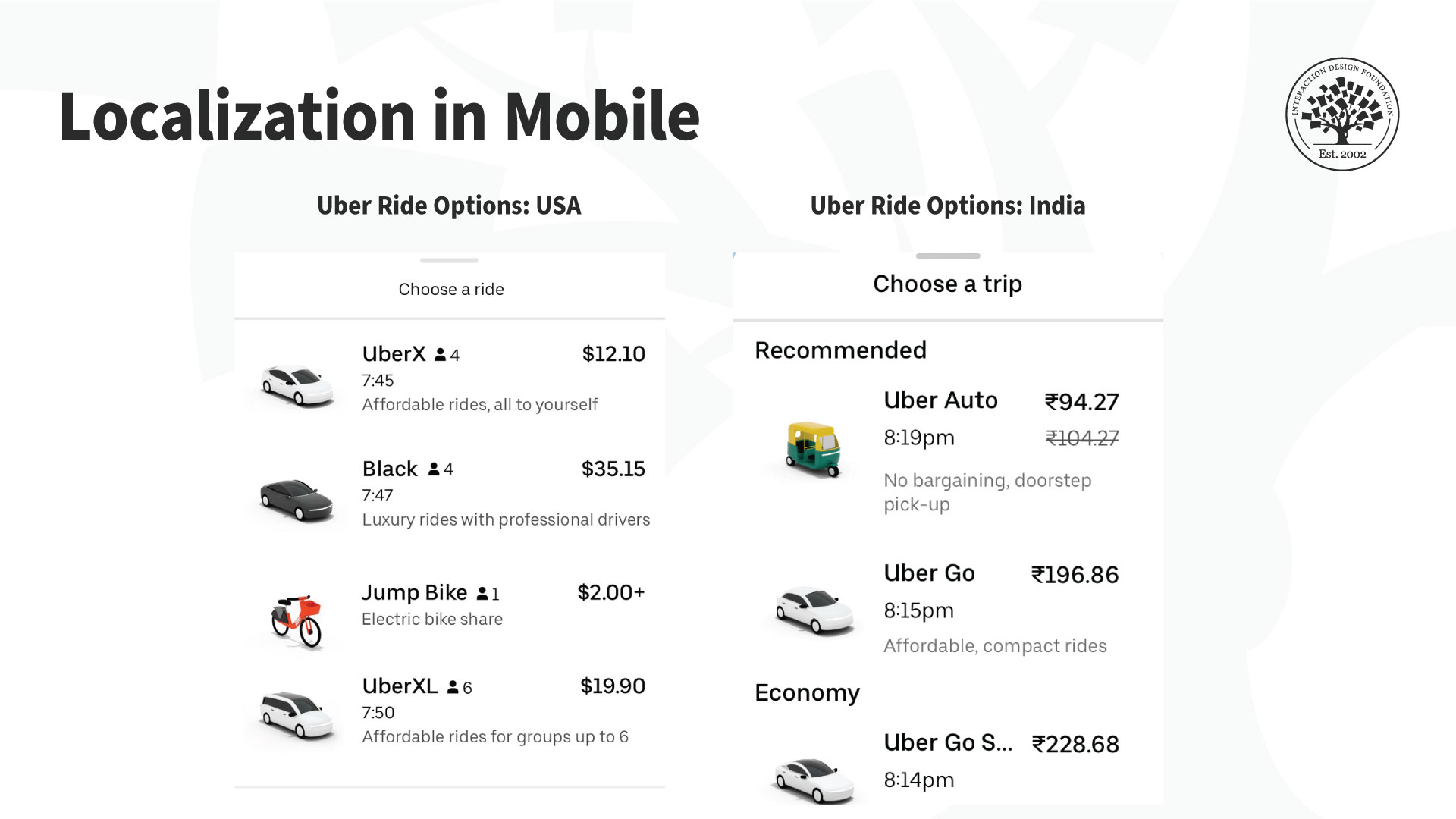
Screendhots of the Uber app.

For example, Uber’s vehicle offerings suit the local markets. Users in India (right) can book an autorickshaw (a three-wheeled motor vehicle), which is not available in the US version of the application (left).

© Uber, Fair Use

The Take Away

Context of use for mobile is essential to build a successful mobile UX. Mobile interactions change with physical, social, emotional, and cultural contexts. As a designer, you need to know  where, when, why, and under what conditions and constraints users interact with your app, or mobile content. These insights will guide the design, layout, and overall UX strategy.

References and Where to Learn More

To learn more about the context of use for mobile, read Design Sketch: The Context of Mobile Interaction by Savio and Braiterman.  

Read Whitney’s definition of location-agnostic and context-specific mobile context

For a detailed look at accessibility, take the course Accessibility: How to Design for All.

Check out Frank’s short webinar on designing context-aware experiences (~40 minutes).

Hero image: © Interaction Design Foundation, CC BY-SA 4.0

Feel Stuck?
Want Better Job Options?

AI is replacing jobs everywhere, yet design jobs are booming with a projected 45% job growth. With design skills, you can create products and services people love. More love means more impact and greater salary potential.

At IxDF, we help you from your first course to your next job, all in one place.

See How Design Skills Turn Into Job Options
Privacy Settings
By using this site, you accept our Cookie Policy and Terms of Use.
Customize
Accept all

Be the One Who Inspires

People remember who shares great ideas.

Share on:

Academic Credibility — On Autopilot

Don't waste time googling citation formats. Just copy, paste and look legit in seconds.