User Abilities And Skills

Your constantly-updated definition of User Abilities And Skills and collection of videos and articles.
Be a conversation starter: Share this page and inspire others!

98 Shares

What are User Abilities And Skills?

Humans have a variety of abilities and skills that affect how they interact with products, services, and experiences. These skills include motor, vision, and cognitive skills. Designers must consider the range of their users’ abilities and skills and ensure their solutions are accessible, usable, and learnable.

In this video, William Hudson, User Experience Strategist and Founder of Syntagm Ltd, explores some essential considerations for designers regarding user abilities and skills.

Transcript

Ability vs Skill: What’s the Difference?

The words “skill” and “ability” are often used interchangeably. However, they each have a separate meaning:

  • Human abilities are the diverse natural qualities or tendencies that people are born with, such as cognitive processing speed, spatial reasoning, or musical sensitivity. These abilities form a foundation for developing skills, but the expression of ability can vary greatly across individuals. It's important to recognize that disabilities are also part of human variation, and people may develop different learning and skill development pathways. Individuals of all ability levels can learn, grow, and contribute meaningfully with the right support and tools.

  • Human skills are learned and improved through practice and experience. Examples include communication, problem-solving, and leadership. People build these skills over time by training, repeating tasks, and using them in real situations.

For example, someone with strong musical abilities, such as a heightened sense of rhythm, pitch perception, or auditory memory, may find it easier to develop musical skills, such as playing an instrument, composing, or singing.

Both ability and skill levels can change throughout people’s lives:

  • Abilities tend to remain relatively stable throughout a person's life. However, certain life events, health conditions, or circumstances may affect these abilities or lead to disabilities.

  • Skills can be continuously enhanced and adapted, but can also decline—for example, in later life.

Which Abilities and Skills Are Involved in User Interaction?

Skills and their underlying abilities affect how each unique human being interacts with a product, service, or experience. User experience (UX) designers are primarily concerned with motor, visual, and cognitive skills:

  • Motor skills involve physical movements. In technology design and development, some key physical movements include the use of touch screens, mice, and keyboards. Some of these require fine motor skills, such as moving a mouse over a small target, while others need gross motor skills. Other factors associated with motor skills are hand-eye coordination and reaction time.

  • Visual skills and abilities include visual acuity, color perception, and light sensitivity. Interactive systems are usually highly visual, making human skills in this area extremely important. People with low vision may need higher contrast or larger features, such as increased text size and line thickness. Some users may benefit from larger screens or magnification tools.

  • Cognitive skills include short and long-term memory, attention, and executive function. People with less cognitive skills or disabilities may need clear cues of the status of interactions, frequent reminders, and reduced complexity. In this video, Alan Dix, Author of the bestselling book Human-Computer Interaction and Director of the Computational Foundry at Swansea University, explains the limits of our short-term memory and some tips on how to design for it.

    Transcript

How do User Abilities and Skills Affect UX Design?

Users are not alike. Designers must not assume that people taking a role in an organization or social setting form a homogeneous group; this is far from the reality of the situation. People vary widely in their experience and physical and mental abilities.

When designers use tools such as personas or base designs on user research with specific target groups, they must still consider the range of user abilities and skills separate from these tools. Solutions must account for this diversity and be usable, inclusive, and accessible to as many people as possible.
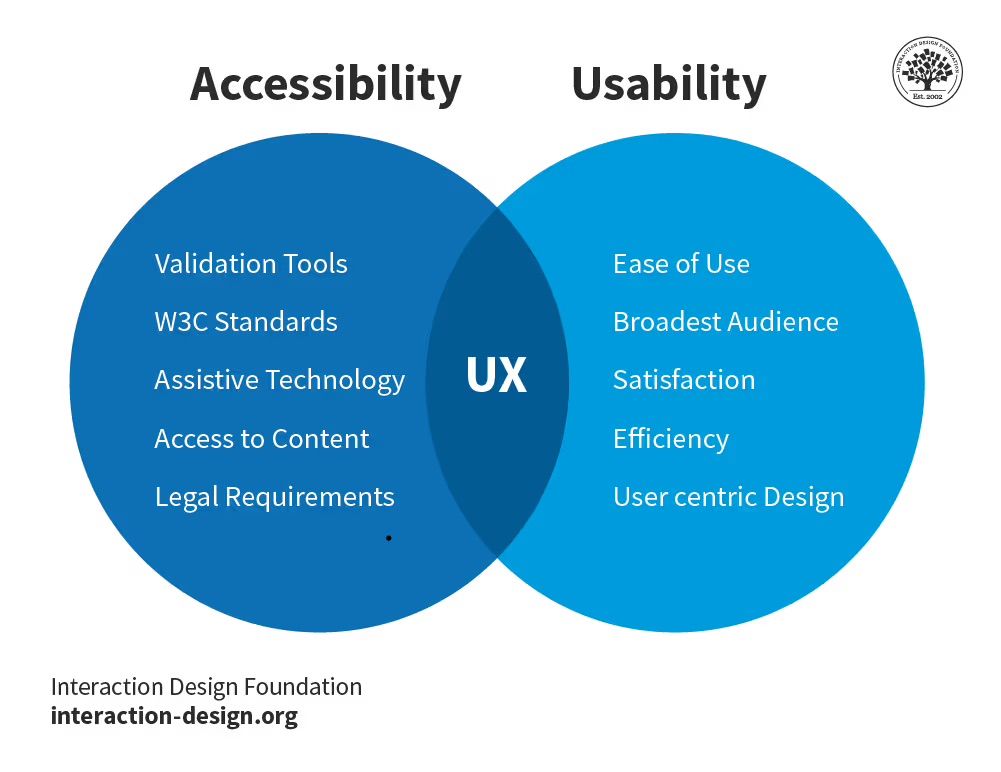
Venn diagram with two circles: accessibility and usability. Where they cross in the middle is written UX. Accessibility lists validation tools, W3C standards, assistive technology, access to content, and legal requirements. Usability lists ease of use, broadest audience, satisfaction, efficiency, and user-centric design.

Good UX happens when a product, service, or experience is both accessible and usable. This is why designers consider the range of their users’ abilities and skills in their design choices.

© Interaction Design Foundation, CC BY-SA 4.0

This point is very important for personas in particular. An inclusive approach is contrary to the philosophy of personas, which are intended to focus on a specific group of people that designers want to delight. In this video, William Hudson, User Experience Strategist and Founder of Syntagm Ltd, explains why inclusive design must be considered alongside personas.

Transcript

Practical Steps for Inclusive Design

  1. User research: It is essential that you consider the needs of various user groups from the outset. Remember that when you focus on the needs and behaviors of a specific group of users, you are not addressing the range of abilities and skills of all users. This diversity must be considered separately.

  2. Accessibility: Use accessibility evaluation tools and involve users with disabilities to identify and rectify accessibility issues.
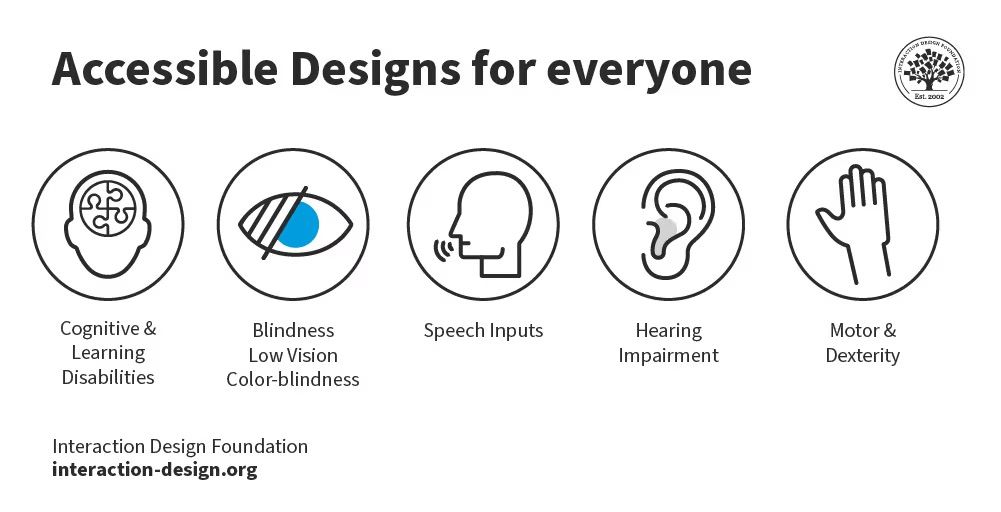
    Illustration titled accessible designs for everyone. It features five elements represented by icons: 1. Cognitive and learning disabilities, blindness. 2. Blindness, low vision, and color-blindness. 3. Speech inputs. 4. Hearing impairment. 5. Motor and dexterity.

    Unless you have researchers who are experienced in accessibility testing, it is often more effective to use outside agencies for this specialist task. There are many considerations when it comes to whether a product is truly accessible.

    © Interaction Design Foundation, CC BY-SA 4.0

  3. Team awareness: Ensure that your design and development teams are familiar with accessibility standards and the basics of inclusive design. Share the Web Content Accessibility Guidelines (WCAG) with them or run a workshop on inclusive design.

Inclusive Design Best Practices

Solutions that accommodate a broad range of user abilities and skills are essential for inclusive, usable, and accessible products. In this video, Katrin Suetterlin, UX Content Strategist, explains the important difference between inclusive and universal design.

Transcript

Unless you are building solutions primarily for expert users, it is best to use simple language and interactions. Always evaluate potential solutions with prospective users who have a range of skills and abilities. Beware that advanced and confident users are much more likely to volunteer for user research than those with basic or limited skills and abilities. Try to engage with a diverse body of research participants.

Allow interfaces to be customizable in terms of presentation. On some platforms, system settings for font sizes, colors, and layouts are enough. However, in some cases, your solution may need features to allow for this customization.

Be aware of accessibility and assistive technology. In some countries, it is a legal requirement to comply with the WCAG 2 guidelines, but generally, you must not discriminate against users with reduced abilities.

Some users rely on assistive technology to compensate for limited abilities. For example, some users may use screen readers to present the contents of a display audibly. Assistive technologies are part of many platforms, but more advanced third-party solutions are available as well. Your solutions do not have to address in detail how these work, but there are some basic requirements in making content machine-readable for assistive technologies to function correctly.

Questions About User Abilities And Skills?
We've Got Answers!

How do personas relate to user skills and abilities?

It is a common misconception that personas should describe all users of a solution. On the contrary, one of the main strengths of personas is that they focus on the users you want to delight with your design. The wide range of skills and abilities for all users is a separate consideration. A persona may define a typical set of skills and abilities, but designers must always design for as broad a range as possible. This is true whether or not they use personas.

A key benefit of personas is that they allow us to design for an individual rather than a group, which fosters more empathy. In this video, William Hudson, User Experience Strategist and Founder of Syntagm Ltd, explains the psychology behind personas.

Transcript

What are some practical steps for creating inclusive software designs?

Practical steps for inclusive software design include:

  • Conducting user research to understand diverse needs, such as through interviews or usability testing.

  • Applying universal design principles, such as flexible layouts or clear navigation.

  • Incorporating accessibility testing, such as screen reader compatibility checks.

  • Educating design teams on accessibility standards, such as WCAG guidelines training.

  • Continuously improving solutions based on user feedback and the latest standards.

In this video, William Hudson, User Experience Strategist and Founder of Syntagm Ltd, presents some of the key considerations for usability and accessibility in web design.

Transcript

What is the role of customizable interfaces in inclusive software design?

Customizable interfaces allow users to adjust font sizes, colors, and layouts according to their needs. This approach enhances accessibility and usability for users with different visual, motor, and cognitive abilities.

Another consideration similar to customizable interfaces is adaptive design. In this video, Frank Spillers, Service Designer and Founder and CEO of Experience Dynamics, explains adaptive design.

Transcript

How can assistive technologies be supported in software design?

Software can be designed to support assistive technologies such as screen readers, magnifiers, and voice recognition systems. When designers ensure compatibility with these tools, it helps users with disabilities interact with the software more effectively.

Designers can often introduce biases into a design that exclude users of assistive technologies. In this video, Frank Spillers, Service Designer, and Founder and CEO of Experience Dynamics, explains three common biases and how to avoid them.

Transcript

What are the Web Content Accessibility Guidelines (WCAG) 2, and why are they important?

The WCAG 2 provides a framework for making web content more accessible. It emphasizes four principles: perceivable, operable, understandable, and robust. Adhering to these guidelines ensures that software is accessible to users with disabilities and meets legal and ethical standards.

Designing for accessibility benefits both users and businesses through improved usability and search engine optimization (SEO). In this video, Frank Spillers, Service Designer and Founder and CEO of Experience Dynamics, explains the benefits.

Transcript

What is the significance of usability in software design?

Usability focuses on how easily and efficiently all users can achieve their goals with a product, service, or experience. Designers consider different abilities and skills in the design process to help identify and eliminate potential barriers, enhancing the overall user experience.

In this video, Alan Dix, Author of the bestselling book Human-Computer Interaction and Director of the Computational Foundry at Swansea University, explains three key guidelines for usability.

Transcript

Earn a Gift Earn a Gift, Answer a Short Quiz!

1
2
3
4
1
2
3
4
Question 1
Question 2
Question 3
Get Your Gift
Interaction Design Foundation logo

Question 1

Which statement best shows how abilities and skills change over time?

1 point towards your gift

  • Abilities usually improve with practice, while skills never change.
  • Skills and abilities both stay the same for most of a person’s life.
  • Skills often grow with experience, while abilities may shift due to life events.
Interaction Design Foundation logo

Question 2

How can a design team best support inclusive design practices?

1 point towards your gift

  • Assume all users will use the product in the same way.
  • Rely on internal staff alone to test for accessibility issues.
  • Train the team in accessibility standards and include users with disabilities in testing.
Interaction Design Foundation logo

Question 3

Why must designers look beyond personas when designing for accessibility?

1 point towards your gift

  • Personas already include every possible user type.
  • Personas focus on target users, but not the full range of abilities and skills.
  • Personas make design faster and remove the need for research.

Learn More About User Abilities And Skills

Make learning as easy as watching Netflix: Learn more about User Abilities And Skills by taking the online IxDF Course Personas and User Research: Design Products and Services People Need and Want.

Why? Because design skills make you valuable. In any job. Any industry.

In This Course, You'll

  • Get excited to create products, services, and experiences people actually love, without the guesswork. Personas grounded in research will help you move beyond assumptions and craft experiences that truly delight. Expanding requirements cause 47% of projects to overspend, launch late, or fail altogether. One additional feature turns into five, and before you know it, the project is unrecognizable, packed with things no one asked for. When you design for a persona, you get to focus on what truly matters and solve the real problems people have. Fewer problems, more smiles. More smiles, more profit.

  • Make yourself invaluable when you can transform raw research into powerful personas that turn ideas into user-centered solutions that smash business goals and improve people's lives. As AI accelerates how fast we build and iterate, your timeless human-centered skills become even more powerful. You'll direct AI with deep human insight, and ensure outcomes remain meaningful, ethical, and genuinely resonate with people. This is how you stay in demand: Human-centered design skills transform AI from a tool into your new superpower. With design personas, you’ll make smarter decisions, keep everything and everyone on track, and drive your team and projects to success.

  • Gain confidence and credibility as you learn the simple step-by-step method to create effective personas, complete with templates that turn knowledge into real-world results. Get to grips with observations, triangulation, and grounded theory, distill your findings with affinity diagrams, and pour it all into personas that work. Access real user research in the optional course project, and bring your new skills to life with a portfolio piece that'll open up exciting and fulfilling career opportunities.

You'll Learn from the Best

In this course, you'll learn from one of the world's leading experts:

  • William Hudson: User Experience Strategist and Founder of Syntagm Ltd.

Get an Industry-Recognized IxDF Course Certificate

Increase your credibility, salary potential and job opportunities by showing credible evidence of your skills.

IxDF Course Certificates set the industry gold standard. Add them to your LinkedIn profile, resumé, and job applications.

Course Certificate Example

Be in distinguished company, alongside industry leaders who train their teams with the IxDF and trust IxDF Course Certificates.

Our clients: IBM, HP, Adobe, GE, Accenture, Allianz, Phillips, Deezer, Capgemin, Mcafee, SAP, Telenor, Cigna, British Parliament, State of New York

All Free IxDF Articles on User Abilities And Skills

Read full article
Why Personas Don’t Represent Every User - Article hero image
Interaction Design Foundation logo

Why Personas Don’t Represent Every User

Personas give focus—they help you make decisions and design products and services that delight users. These decisions typically end up as features in your system. However, most systems have users with a broad range of abilities and skills. This broad range doesn’t change the features you should incl

Social shares
426
Published
Read Article

Why Personas Don’t Represent Every User

Why Personas Don’t Represent Every User

Personas give focus—they help you make decisions and design products and services that delight users. These decisions typically end up as features in your system. However, most systems have users with a broad range of abilities and skills. This broad range doesn’t change the features you should include in your solution, but it does affect how you implement them. New and infrequent users benefit from interactions that are easy to learn and remember, while expert and frequent users require fast, efficient workflows. These considerations are beyond the scope of personas— all systems face these challenges, regardless of whether personas are used.

Personas are meant to focus on core user needs, behaviors, and goals—not to account for every possible skill level or ability. While some products and services cater to specific skill levels (like Photoshop for professional designers and photographers), most should be flexible enough to support a range of users. If personas try to include every skill variation, they become overly complex and less effective. Instead, personas should capture users’ key motivations, pain points, and behaviors to drive meaningful design decisions.

In this video, William Hudson, User Experience Strategist and Founder of Syntagm Ltd, explains the relationship between personas, skills, and abilities.

Transcript

William keeps the message simple in the video and talks about "right mouse clicks" and "plain English." The technical term for a right mouse click is "secondary click," but that may not mean as much to many people. And, of course, languages other than English are used in interactive solutions. You need to use the equivalent of plain English in those cases.

The Few Cases Where Personas Must Account for Skill Levels

There are some rare exceptions to the abilities and skills rule. The first is when a solution is specifically intended for users with certain skill levels. For example, Adobe Photoshop targets experienced hobbyists and professionals. Even a task as simple as resizing an image can be challenging for a novice Photoshop user. Therefore, it wouldn’t be surprising if Adobe’s personas depict users as relatively experienced.

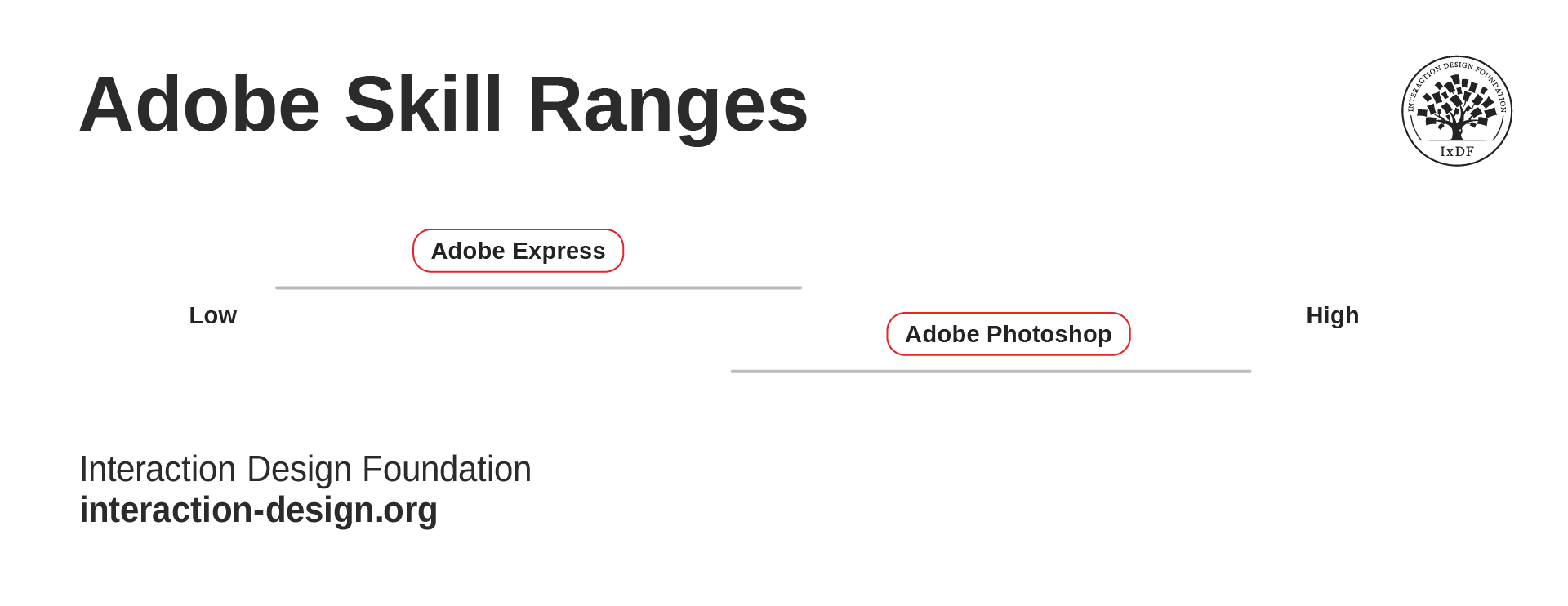
In contrast, Adobe Express is an online service aimed at novice users. It is likely that Adobe Express would include beginner ability and skill levels in its personas:

“The quick and easy create-anything app. Make stunning social posts, images, videos, flyers, and more with Adobe Express. Dream it. Make it. Easy.”

— Adobe Website

Both Photoshop and Express support similar tasks, like editing photos and creating graphics. However, they are aimed at users with different abilities and skill levels. For example, Photoshop has advanced tools like layer masks and blending modes that give professionals full control over their designs. Adobe Express, on the other hand, is designed for novices to quickly create template-based designs.

A simple chart that shows Adobe Express’s range of user skill levels goes from low to medium, while Adobe Photoshop goes from medium to high, with some overlap in the middle.

Adobe Express and Adobe Photoshop still need to work with as broad a range of users as possible; however, they are different ranges!

© Interaction Design Foundation, CC BY-SA 4.0

Personas and Accessibility

As with skills and abilities, you should treat accessibility as a general issue that needs to be considered for all solutions. William explains more in this video.

Transcript

Accessibility is very challenging for the Adobe products mentioned above since they are highly visual. You must address accessibility for all solutions, whether you use personas or not. Adobe lays out how it addresses accessibility in its Adobe Accessibility Conformance Reports (see the references below).

If you use personas for a product or service designed for users with specific accessibility needs, you should include the relevant details. Otherwise, your solution must be accessible to all users, regardless of the personas you create.

The Take Away

Personas are crucial in product and service design, but their purpose is not to account for every possible user ability or skill level. In most cases, inclusivity and accessibility lie outside the primary scope of personas.

However, there are exceptions—such as products specifically designed for users with certain skill levels or abilities (such as Adobe Photoshop, which is designed for professionals, or Adobe Express, which caters to beginners). In these cases, creating personas that reflect those specific user needs makes sense.

Ultimately, while personas help you focus on key user needs and behaviors, they don’t replace your broader responsibility to ensure accessibility for all users, including those who rely on assistive technology.

References and Where to Learn More

Explore Adobe’s Accessibility Conformance Reports to learn more about how they approach accessibility.

Read the Web Content Accessibility Guidelines (WCAG) to understand how to make web content more accessible to people with disabilities.

Watch our Master Class with Vitaly Friedman to learn all about Accessible and Inclusive Design Patterns.

Sign up for our Master Class with Katrin Suetterlin to discover How to Design for Neurodiversity with Inclusive Content and UX.

Hero image: © Interaction Design Foundation, CC BY-SA 4.0

Feel Stuck?
Want Better Job Options?

AI is replacing jobs everywhere, yet design jobs are booming with a projected 45% job growth. With design skills, you can create products and services people love. More love means more impact and greater salary potential.

At IxDF, we help you from your first course to your next job, all in one place.

See How Design Skills Turn Into Job Options
Privacy Settings
By using this site, you accept our Cookie Policy and Terms of Use.
Customize
Accept all

Be the One Who Inspires

People remember who shares great ideas.

Share on:

Academic Credibility — On Autopilot

Don't waste time googling citation formats. Just copy, paste and look legit in seconds.