A collection of Ukranian nested dolls on a table. The biggest doll is labelled as having a high skill and ability level, while one of the smaller dolls is labelled as having a low skill and ability level.

Why Personas Don’t Represent Every User

by William Hudson • 20 min read

426 Shares

Personas give focus—they help you make decisions and design products and services that delight users. These decisions typically end up as features in your system. However, most systems have users with a broad range of abilities and skills. This broad range doesn’t change the features you should include in your solution, but it does affect how you implement them. New and infrequent users benefit from interactions that are easy to learn and remember, while expert and frequent users require fast, efficient workflows. These considerations are beyond the scope of personas— all systems face these challenges, regardless of whether personas are used.

Personas are meant to focus on core user needs, behaviors, and goals—not to account for every possible skill level or ability. While some products and services cater to specific skill levels (like Photoshop for professional designers and photographers), most should be flexible enough to support a range of users. If personas try to include every skill variation, they become overly complex and less effective. Instead, personas should capture users’ key motivations, pain points, and behaviors to drive meaningful design decisions.

In this video, William Hudson, User Experience Strategist and Founder of Syntagm Ltd, explains the relationship between personas, skills, and abilities.

Transcript

William keeps the message simple in the video and talks about "right mouse clicks" and "plain English." The technical term for a right mouse click is "secondary click," but that may not mean as much to many people. And, of course, languages other than English are used in interactive solutions. You need to use the equivalent of plain English in those cases.

The Few Cases Where Personas Must Account for Skill Levels

There are some rare exceptions to the abilities and skills rule. The first is when a solution is specifically intended for users with certain skill levels. For example, Adobe Photoshop targets experienced hobbyists and professionals. Even a task as simple as resizing an image can be challenging for a novice Photoshop user. Therefore, it wouldn’t be surprising if Adobe’s personas depict users as relatively experienced.

In contrast, Adobe Express is an online service aimed at novice users. It is likely that Adobe Express would include beginner ability and skill levels in its personas:

“The quick and easy create-anything app. Make stunning social posts, images, videos, flyers, and more with Adobe Express. Dream it. Make it. Easy.”

— Adobe Website

Both Photoshop and Express support similar tasks, like editing photos and creating graphics. However, they are aimed at users with different abilities and skill levels. For example, Photoshop has advanced tools like layer masks and blending modes that give professionals full control over their designs. Adobe Express, on the other hand, is designed for novices to quickly create template-based designs.
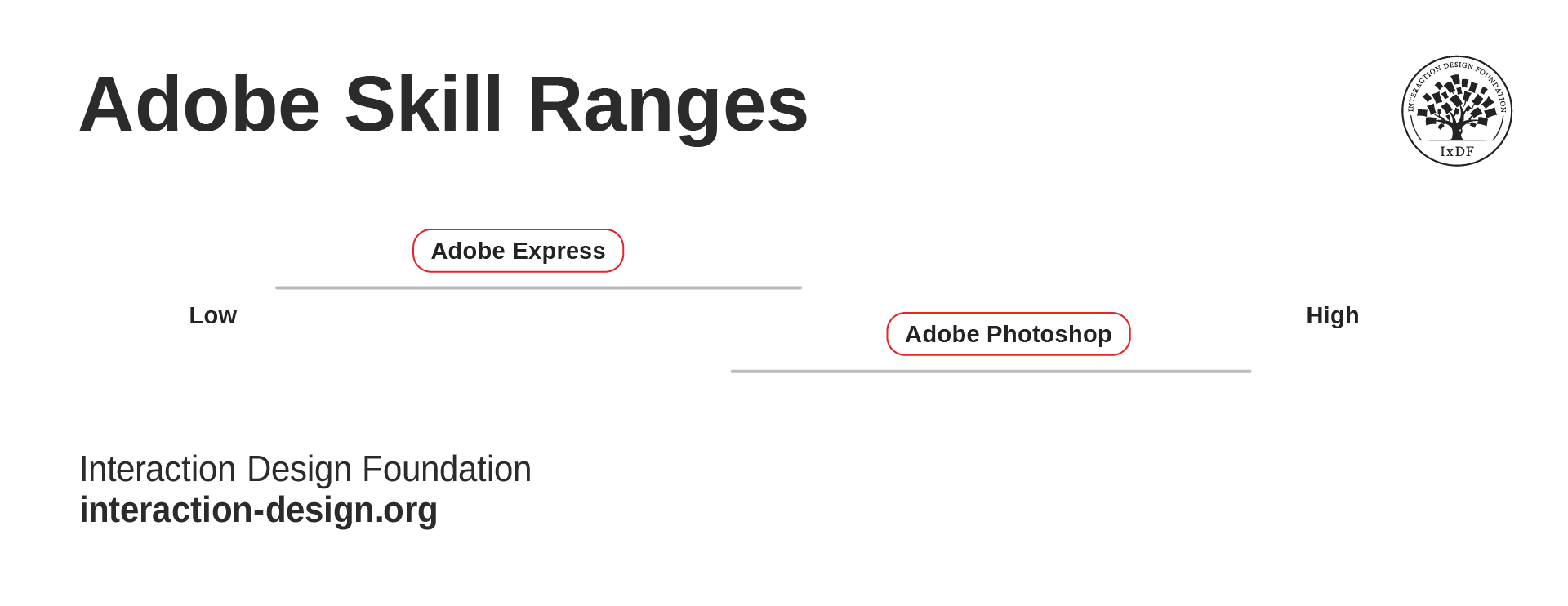
A simple chart that shows Adobe Express’s range of user skill levels goes from low to medium, while Adobe Photoshop goes from medium to high, with some overlap in the middle.

Adobe Express and Adobe Photoshop still need to work with as broad a range of users as possible; however, they are different ranges!

© Interaction Design Foundation, CC BY-SA 4.0

Personas and Accessibility

As with skills and abilities, you should treat accessibility as a general issue that needs to be considered for all solutions. William explains more in this video.

Transcript

Accessibility is very challenging for the Adobe products mentioned above since they are highly visual. You must address accessibility for all solutions, whether you use personas or not. Adobe lays out how it addresses accessibility in its Adobe Accessibility Conformance Reports (see the references below).

If you use personas for a product or service designed for users with specific accessibility needs, you should include the relevant details. Otherwise, your solution must be accessible to all users, regardless of the personas you create.

The Take Away

Personas are crucial in product and service design, but their purpose is not to account for every possible user ability or skill level. In most cases, inclusivity and accessibility lie outside the primary scope of personas.

However, there are exceptions—such as products specifically designed for users with certain skill levels or abilities (such as Adobe Photoshop, which is designed for professionals, or Adobe Express, which caters to beginners). In these cases, creating personas that reflect those specific user needs makes sense.

Ultimately, while personas help you focus on key user needs and behaviors, they don’t replace your broader responsibility to ensure accessibility for all users, including those who rely on assistive technology.

References and Where to Learn More

Explore Adobe’s Accessibility Conformance Reports to learn more about how they approach accessibility.

Read the Web Content Accessibility Guidelines (WCAG) to understand how to make web content more accessible to people with disabilities.

Watch our Master Class with Vitaly Friedman to learn all about Accessible and Inclusive Design Patterns.

Sign up for our Master Class with Katrin Suetterlin to discover How to Design for Neurodiversity with Inclusive Content and UX.

Hero image: © Interaction Design Foundation, CC BY-SA 4.0

Learn More in This Course:

Personas and User Research: Design Products and Services People Need and Want

Course Closed
100 % booked
View Course

What You Should Read Next

  • Read full article
    14 UX Deliverables: What will I be making as a UX designer? - Article hero image
    Interaction Design Foundation logo

    14 UX Deliverables: What will I be making as a UX designer?

    What does a UX designer actually produce? Here, we will explore the concept of UX deliverables, a term that describes the outputs of a UX design process during its various stages. The deliverables produced by UX designers vary according to their role in the design team and also depending on the meth

    Social shares
    1.2k
    Published
    Read Article
  • Read full article
    Data Analysis: Techniques, Tools, and Processes - Article hero image
    Interaction Design Foundation logo

    Data Analysis: Techniques, Tools, and Processes

    Data analysis is one of those terms that “is what it sounds like,” although there’s more to it than may meet the eye. In any case, it’s a valuable skill for making better decisions—a skill that you can bring to bear on both your professional and personal life, from personal budgeting to analyzing cu

    Social shares
    1.2k
    Published
    Read Article
  • Read full article
    Flow Design Processes - Focusing on the Users' Needs - Article hero image
    Interaction Design Foundation logo

    Flow Design Processes - Focusing on the Users' Needs

    It can be really tempting to start a design project by leaping into the deep end and starting to sketch out pages and work on the information architecture of the final product. However, it’s almost certainly the wrong approach to take. To create great user experiences – designers must focus on the u

    Social shares
    1k
    Published
    Read Article
  • Read full article
    User Experience (UX) Surveys: The Ultimate Guide - Article hero image
    Interaction Design Foundation logo

    User Experience (UX) Surveys: The Ultimate Guide

    Imagine you’re a business owner who wants to know what’s working and what’s not on your website—and, oh yes, where you need improvements. Sure, there are a bunch of research methods you can try—like user interviews, usability tests, and A/B testing, but read on and see how a user experience (UX) sur

    Social shares
    1k
    Published
    Read Article
  • Read full article
    Creating Personas from User Research Results - Article hero image
    Interaction Design Foundation logo

    Creating Personas from User Research Results

    When you’re in the beginning stages of your design project and you have just finished some highly informative interviews and observations in the context of your users, your head is full of impressions. You have a feeling for the different types of users who exist, and you have heard some similaritie

    Social shares
    954
    Published
    Read Article
  • Read full article
    Card Sorting: The Ultimate Guide for 2026 - Article hero image
    Interaction Design Foundation logo

    Card Sorting: The Ultimate Guide for 2026

    Whenever you’re working in UX (User Experience) design, you have to understand user expectations if you’re going to be able to group information effectively. Card sorting is a handy and relatively simple way to engage participants so they categorize topics in a way they find logical. This approach h

    Social shares
    925
    Published
    Read Article
  • Read full article
    Personas for Mobile UX Design - Article hero image
    Interaction Design Foundation logo

    Personas for Mobile UX Design

    To design successful user experiences, it's critical to understand your users. One way to learn about your users is with user personas. Here, we’ll explore the benefits of personas in UX design and provide a step-by-step guide on how to create compelling user personas that inform your design choices

    Social shares
    871
    Published
    Read Article
  • Read full article
    Methods to Help You Define Synthesise and Make Sense in Your Research - Article hero image
    Interaction Design Foundation logo

    Methods to Help You Define Synthesise and Make Sense in Your Research

    So you’ve got piles of data gathered from the inspiring empathy research activities you’ve undertaken, and you’re blankly staring at the data thinking, “Where to from here …?” and “What do I do with all this information?” It’s time to bring all the research you’ve collected together and make sense o

    Social shares
    821
    Published
    Read Article
  • Read full article
    Emotional Drivers for User and Consumer Behavior - Article hero image
    Interaction Design Foundation logo

    Emotional Drivers for User and Consumer Behavior

    In his paper; “Conditional Reflexes” the scientist Ivan Pavlov proved that a dog could be conditioned to respond to a stimulus. He presented a dog with food and the dog began to salivate. He also rang a bell every time he presented the food. Eventually he could ring the bell and cause the dog to sal

    Social shares
    688
    Published
    Read Article
  • Read full article
    Positive Friction: How You Can Use It to Create Better Experiences - Article hero image
    Interaction Design Foundation logo

    Positive Friction: How You Can Use It to Create Better Experiences

    While friction in UX is typically something you want to minimize, adding friction can improve the user experience and contribute to good design in many situations. Researchers at UCL define positive friction as friction that “can disrupt mindless automatic interactions, prompting moments of reflecti

    Social shares
    683
    Published
    Read Article

Top Articles

Top Topic Definitions

Feel Stuck?
Want Better Job Options?

AI is replacing jobs everywhere, yet design jobs are booming with a projected 45% job growth. With design skills, you can create products and services people love. More love means more impact and greater salary potential.

At IxDF, we help you from your first course to your next job, all in one place.

See How Design Skills Turn Into Job Options
Privacy Settings
By using this site, you accept our Cookie Policy and Terms of Use.
Customize
Accept all

Be the One Who Inspires

People remember who shares great ideas.

Share on:

Academic Credibility — On Autopilot

Don't waste time googling citation formats. Just copy, paste and look legit in seconds.

Feel Stuck? Want Freedom?

Join 326,038+ designers who get one powerful email each week. Learn to design a life you love.

Next email in
1
day
5
hrs
41
mins
37
secs

Free forever. No spam. Unsubscribe anytime.