Sociability in UX/UI Design

Your constantly-updated definition of Sociability in UX/UI Design and collection of videos and articles.
Be a conversation starter: Share this page and inspire others!

197 Shares

What is Sociability in UX/UI Design?

Sociability refers to the social aspect of user interactions and connections in a product or service. In UX design, sociability involves creating meaningful social interactions between users that promote community belonging and enhance the overall user experience. This practice can lead to products and services that are functional, emotionally satisfying and enjoyable to use.

Transcript

Here are some examples of features that UX designers can incorporate into their designs to promote social interaction:

© Interaction Design Foundation, CC BY-SA 4.0

  • Sharing buttons allow users to share content with friends and followers on social media platforms.

  • Comment systems enable users to leave feedback, ask questions, and discuss content with each other in a public forum.

  • Forums or discussion boards provide a space for users to connect and share their thoughts on particular topics.

  • Social gaming features allow users to compete against each other or collaborate on tasks.

  • Chat functionalities enable users to communicate with each other in real-time.

How to Design for Sociability: Best Practices

In sociability for UX design, the goal is to create environments where users feel comfortable interacting with each other.

Incorporate sociability into your designs to increase engagement, build user loyalty and create a sense of community among users. It can also provide essential information about user behavior and preferences. Remember to always respect user privacy and seek consent before tracking any behavior. 

Here are some best practices and examples of sociability in UX design:

  1. Design for both individual and collective user experiences. Facebook gives users personalized newsfeed content based on their interests (the individual experience). It also provides features like comments and reactions, helping users to connect and interact with friends and family (the collective experience).
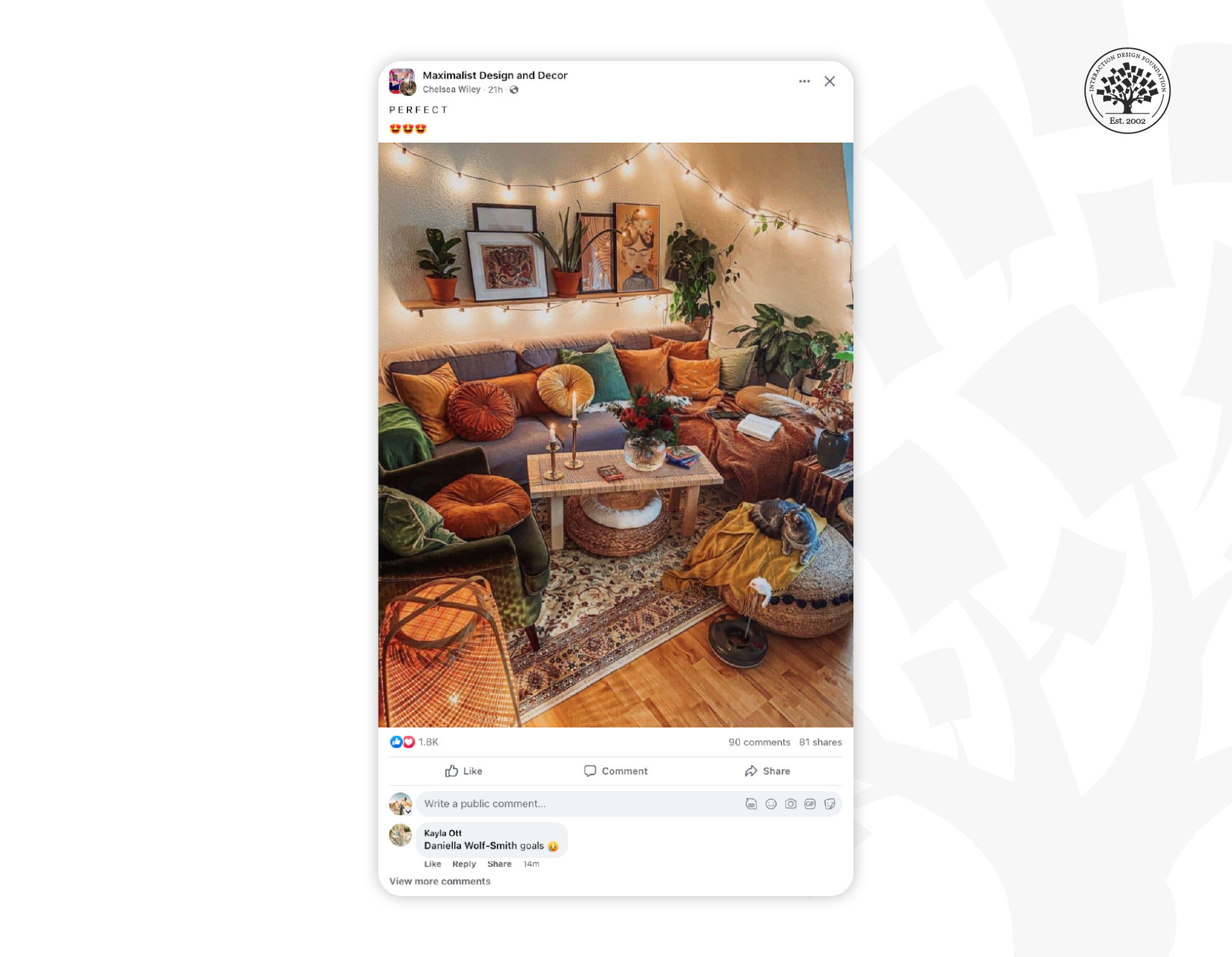
    © Facebook, Fair Use

  2. Consider ease of use, user privacy, and security. WhatsApp provides easy-to-use messaging features and incorporates end-to-end encryption to avoid unauthorized access.

  3. Think about the needs of different audiences. For instance, a social media platform for teenagers may have features like photo filters and stickers. In contrast, a professional networking platform may have features like job postings and skill endorsements.

  4. Determine the level of social interaction desired. For example, the purpose of social media platforms is to have high levels of social interaction. On the other hand, online shops may have less interaction to reduce distractions from shopping. Amazon's e-commerce site emphasizes product information and reviews, minimizing social interaction to ensure a seamless shopping experience.
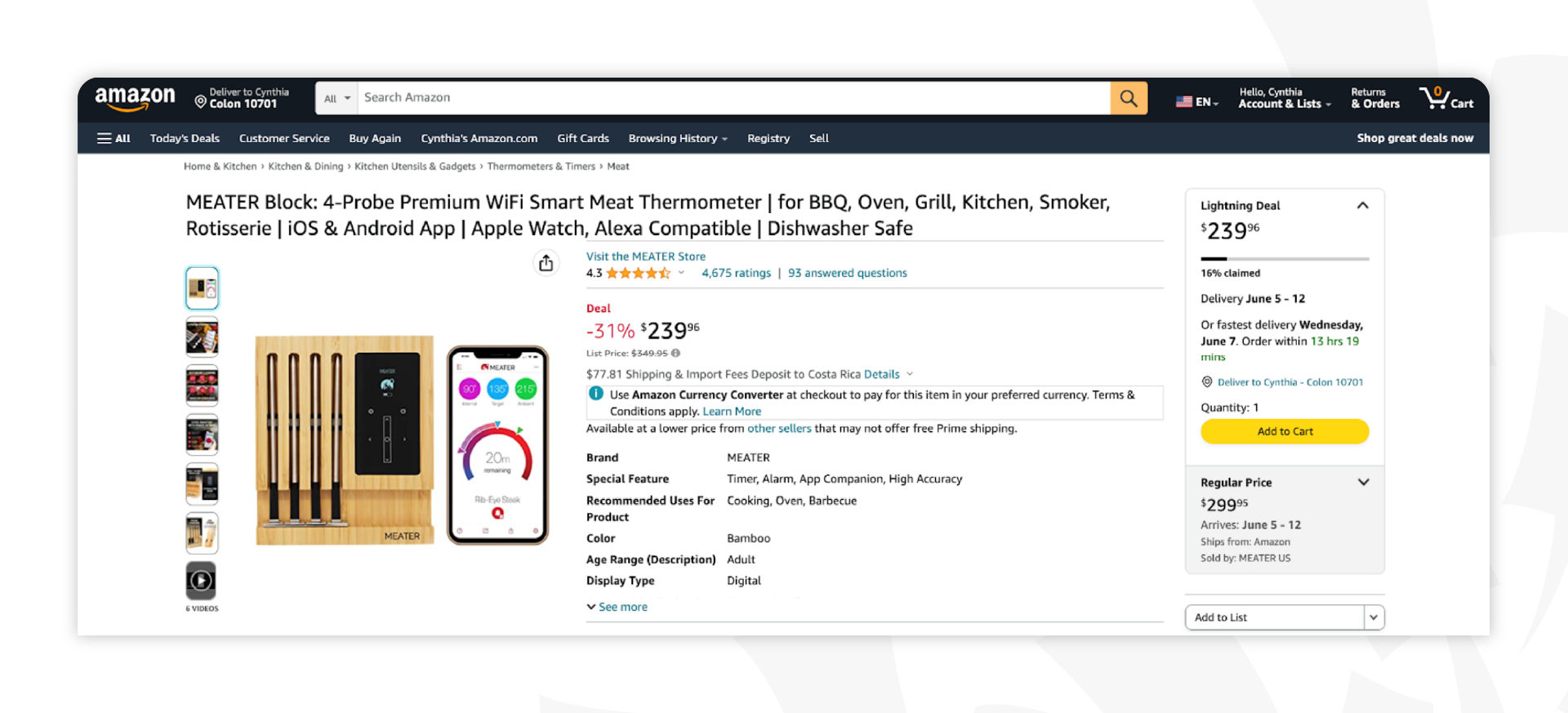
© Amazon, Fair Use

Create Inclusive and Accessible Sociability Features in Your Design

Designers can add closed captioning, audio descriptions, or alternative text for images to make social interactions available to all users.

To make content easy to read, you can use effective color contrast, font size, and visual cues in sociability features. Clear language can help neurodivergent users and those who are blind access and understand the content. Additionally, keyboard shortcuts and navigation options can help users with limited mobility participate in social interactions.

Another important consideration is to design for cultural inclusivity. UX designers should recognize cultural norms and values when creating social features. Perceptions, including those involving interpretations of colors, and humor can vary significantly from one culture to the next.

The Role of Gamification to Enhance Sociability and Engagement

Gamification has become an increasingly popular technique to enhance sociability and engagement in UX design. Including game-like features in your apps or websites makes them more enjoyable and entertaining. Here are some easy ways to gamify sociability:

  • Use leaderboards. This encourages social interaction and friendly competition by letting users compare their achievements.

    The IxDF leaderboard ranks members based on their points earned through activities such as course scores, writing articles or adding meaningful contributions to our forum. It's a great way for members to track their progress while also serving as motivation to contribute more.

    © Interaction Design Foundation, CC BY-SA 4.0

  • Incorporate badges or rewards. Users can add badges to their profiles or share them on social media platforms, encouraging others to engage with the product or service.
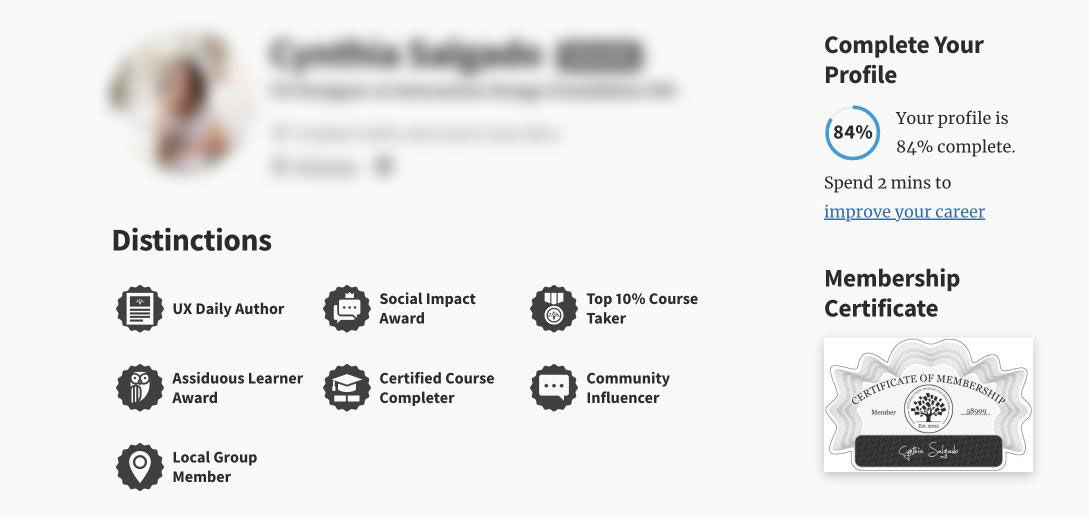
    The distinctions are awarded to IxDF members who have achieved certain milestones, such as completing courses or contributing to discussions.

    © Interaction Design Foundation, CC BY-SA 4.0

  • Add challenges, quests or levels. This will motivate your users to engage with your product for extended periods of time.

Sociability in Virtual Reality Environments

Second Life is a popular virtual world that allows users to create and customize their avatars and interact with other users in a simulated environment.

© Interaction Design Foundation, CC BY-SA 4.0

Virtual reality (VR) environments provide a unique opportunity for designing social interactions. VR allows users to interact with one another in the same physical space, regardless of their location. This is why designing for sociability in VR requires a different approach than traditional UX design:

Design for presence. Consider visual and auditory feedback, haptic feedback and spatial audio. These interactions within the product create a sense of reality for your users.

Design for embodiment. Embodiment refers to the feeling of having a physical body within the virtual environment. Provide users with an avatar or representation of themselves to create a more immersive social experience.

How to Balance Sociability and Productivity in UX Design

Productivity-focused products or services require a balance between social interaction and efficiency. Social features can be fun and help people feel like team members, but they can distract and hinder productivity.

To balance sociability and productivity, give users control over their social interactions. For example, allow them to customize their notifications or turn off social features altogether to help them stay focused on their tasks while still having the option to engage with peers when desired.

Another approach is to design social features that are part of the product or service workflow. This allows users to engage socially without disrupting their work.

Questions About Sociability?
We've Got Answers!

How does sociability impact user experience?

Sociability shapes user experience by making digital interactions feel human, engaging, and intuitive. When users feel socially connected—whether through avatars, personalized messages, or community features—they’re more likely to trust the product and enjoy using it.

Designs that reflect social norms (like turn-taking in chat interfaces or reactions in messaging apps) mimic real-world interactions. This reduces friction and increases emotional satisfaction. For example, apps like Duolingo use sociable design to motivate users with cheering icons and friendly reminders.

Sociability also impacts accessibility. A socially aware interface helps users with diverse communication needs feel understood and included.

Research shows that sociable systems increase user retention and satisfaction by fostering emotional bonds—not just functional value.

Watch as CEO of Experience Dynamics, Frank Spillers explains important points about sociability:

Transcript

Read our Tell the World About It – Taking Your Mobile Designs Social piece for further insights.

What types of products benefit most from sociability-focused UX?

Products that rely on user interaction and community thrive with sociability-focused UX. Social media platforms like Instagram and TikTok depend on features that foster sharing, engagement, and a sense of belonging. Messaging apps like WhatsApp and Slack also benefit, as their core value lies in seamless human connection.

Learning platforms like Duolingo and Coursera use sociability to boost motivation—features like peer discussion boards, achievement sharing, or “learning streaks” make users feel part of a community. Games, fitness apps, and dating platforms also see huge gains when sociability is built into the experience.

Sociability matters most where user engagement, retention, or emotional connection drive success. When users feel socially seen and supported, they stick around.

Watch as CEO of Experience Dynamics, Frank Spillers explains important points about sociability:

Transcript

Read our Tell the World About It – Taking Your Mobile Designs Social piece for further insights.

How do I design interfaces that encourage social interaction?

To design interfaces that encourage social interaction, start by making participation easy and rewarding. Use clear calls-to-action like “Reply,” “Share,” or “React” to invite users to engage. Social cues—like real-time typing indicators and profile photos—help make the interface feel alive and connected.

Incorporate feedback loops, such as likes, comments, or badges, to create a sense of reciprocity and recognition. Let users personalize their presence (e.g., avatars, bios), and include ways for them to interact both privately (messaging) and publicly (forums or feeds).

Context matters too: place interaction options where they feel natural—under posts, in group chats, or at key moments in a user journey.

Products like Instagram, Discord, and Reddit succeed because their UX supports authentic social behavior.

Watch as CEO of Experience Dynamics, Frank Spillers explains important points about sociability:

Transcript

Read our Tell the World About It – Taking Your Mobile Designs Social piece for further insights.

How can I balance sociability with privacy in UX?

To balance sociability with privacy in UX, give users control over what they share and with whom they share it. Offer clear privacy settings and make them easy to find and understand. Let users decide if their activity is public, private, or visible to select groups. That power of choice is vital.

Design defaults matter. Avoid making all content public by default—this often backfires and breaks trust. Provide contextual cues and reminders, like “Visible to friends only,” to clarify sharing scopes.

Build features that enable social interaction without requiring exposure. For example, anonymous forums or pseudonymous profiles can support sociability while respecting privacy.

Apps like Signal and Reddit approach this balance differently but succeed by giving control to users and being transparent about data use.

Watch as CEO of Experience Dynamics, Frank Spillers explains important points about sociability:

Transcript

Read our Tell the World About It – Taking Your Mobile Designs Social piece for further insights.

How do I prevent toxic behavior while promoting sociability?

To prevent toxic behavior while promoting sociability, design social features with safeguards from the start. Use clear community guidelines and surface them where users interact—not just in the fine print. Set the tone early on by modeling respectful behavior through system messages and prompts.

Add friction where it’s needed. For example, Reddit uses cooldown timers before posting in heated threads. Instagram uses AI to flag harmful comments before they’re posted. These small nudges help users pause and rethink.

Empower users to report abuse and customize their experience with mute, block, and privacy controls. And make moderation visible—when users see toxic behavior addressed, their trust in the product, the brand behind it, and the community they’re involved in increases.

Strong communities don’t happen by accident. Sociability must come with thoughtful boundaries.

Watch as CEO of Experience Dynamics, Frank Spillers explains important points about sociability:

Transcript

Read our Tell the World About It – Taking Your Mobile Designs Social piece for further insights.

What design patterns promote sociability in apps or websites?

Design patterns that promote sociability in apps or websites focus on encouraging interaction, expression, and connection. Features like activity feeds, comments, and likes turn static content into a conversation. Profile pages with avatars and bios personalize the experience and make users feel present and more involved in the community.

Chat interfaces—from direct messaging to group chats—enable real-time engagement. Notifications keep users looped in and prompt timely interaction. Reactions—emoji responses, for example—let users participate with low effort but high emotional value.

More advanced patterns, such as collaborative editing (Google Docs) or co-browsing (Twitch watch parties), create shared experiences that deepen social bonds.

To make these patterns work, design them with empathy: include moderation, privacy settings, and cues that model positive behavior.

Watch as CEO of Experience Dynamics, Frank Spillers explains important points about sociability:

Transcript

Read our Tell the World About It – Taking Your Mobile Designs Social piece for further insights.

How do I support both introverted and extroverted users in sociable UX?

To support both introverted and extroverted users in sociable UX, offer flexible interaction modes. Extroverts may enjoy open forums, live chats, and visible leaderboards. Introverts, meanwhile, often prefer low-pressure options like anonymous participation, reaction buttons, or private messaging.

Let users control their social exposure—freedom of choice is a powerful key to the enterprise. Provide settings to hide activity, limit notifications, or participate passively. What’s more, design features that allow users to ease into interaction—like draft-saving, comment previews, or choosing when to go public.

Balance real-time and asynchronous communication. Extroverts often thrive in fast-paced conversations, while introverts may need more time to reflect and respond thoughtfully.

LinkedIn, for example, caters to both types: users can post publicly, engage privately, or simply observe. Empathetic UX includes every personality, an echo of accessibility that ensures everyone can find something right for them in a product.

Watch as CEO of Experience Dynamics, Frank Spillers explains important points about sociability:

Transcript

Read our Tell the World About It – Taking Your Mobile Designs Social piece for further insights.

How do I ensure sociability features don’t exclude marginalized groups?

To ensure sociability features don’t exclude marginalized groups, designers must build with inclusivity from the start. That means engaging diverse users during research, especially those from underrepresented backgrounds. Without this, features can unintentionally favor dominant social norms and silence minority voices.

Designers should offer flexible identity options—such as letting users pick pronouns, avoid real names, or engage anonymously. Safety features matter too. Marginalized users face disproportionate harassment online, so give them robust tools to block, report, and control visibility.

Use inclusive language and imagery across the UI. And test with people of varying races, genders, disabilities, and cultures to surface hidden biases.

This approach aligns with ethical and inclusive design principles upheld by major institutions like the W3C, which stress designing for equity—not just access.

Watch as CEO of Experience Dynamics, Frank Spillers explains important points about sociability:

Transcript

Read our Tell the World About It – Taking Your Mobile Designs Social piece for further insights.

How do I handle sociability in apps for children or vulnerable users?

When designing sociability features for children or vulnerable users, prioritize safety, privacy, and developmental appropriateness. Avoid open-ended public chat or unmoderated interactions. Instead, use guided communication tools like pre-set responses, moderated forums, or voice controls with safety filters.

Follow regulations like COPPA (for children under 13 in the U.S.) or GDPR-K (for children in the EU). These laws require parental consent, minimal data collection, and clear explanations written for young users.

Build strong reporting, blocking, and content-filtering tools. Design interfaces that teach respectful online behavior and show users how to protect themselves.

Apps like Roblox and YouTube Kids use layered protections: real-time moderation, restricted chat, and parental controls—balancing sociability with child safety.

Watch as CEO of Experience Dynamics, Frank Spillers explains important points about sociability:

Transcript

Read our Tell the World About It – Taking Your Mobile Designs Social piece for further insights.

What are some highly cited scientific articles about sociability in UX design?

Mortazavi, E., Doyon-Poulin, P., Imbeau, D., & Robert, J.-M. (2023). Development and validation of four social scales for the UX evaluation of interactive products. International Journal of Human–Computer Interaction, 40(20), 6608–6621.

This study addresses the growing importance of sociability in interactive product design by developing and validating four social UX scales within the UEQ+ framework. The scales—Identification, Social Interaction, Social Stimulation, and Social Acceptance—were rigorously tested across two large participant groups using exploratory factor analysis and MANOVA. The results demonstrated that these scales effectively discriminate between product categories with varying social attributes. This paper is important because it offers a reliable, validated tool for designers and researchers to assess the social dimension of user experience, filling a critical gap in UX evaluation methods. It enhances the ability to design products that foster meaningful social interactions and acceptance.

Crumlish, C., & Malone, E. (2015). Designing Social Interfaces: Principles, Patterns, and Practices for Improving the User Experience (2nd ed.). O'Reilly Media.

Designing Social Interfaces is a foundational guide for UX designers, product managers, and developers building social and collaborative applications. In this updated second edition, Crumlish and Malone offer a rich set of interaction design patterns drawn from real-world web and mobile applications. The book combines behavioral science, user-centered design principles, and practical design strategies to help create engaging, user-friendly digital spaces. Its influence stems from its thorough framework for designing social features—like comments, sharing, identity, and reputation—based on usability and psychological research. This resource is frequently cited in UX and HCI discussions for its practical, pattern-based approach to enhancing the social dimension of digital products.

Kraut, R. E., Resnick, P., Kiesler, S., Burke, M., Chen, Y., Kittur, N., Konstan, J., Ren, Y., & Riedl, J. (2012). Building Successful Online Communities: Evidence-Based Social Design. MIT Press.

Building Successful Online Communities: Evidence-Based Social Design integrates insights from social psychology, economics, and other social sciences to enhance the design and management of online communities. The authors translate theoretical findings into practical design claims, offering strategies to encourage user contributions and foster member commitment. Each claim is supported by empirical evidence from experiments and observational studies, making it a valuable resource for designers and managers aiming to create thriving online platforms.

Earn a Gift Earn a Gift, Answer a Short Quiz!

1
2
3
4
1
2
3
4
Question 1
Question 2
Question 3
Get Your Gift
Interaction Design Foundation logo

Question 1

What is the primary goal of sociability in UX design?

1 point towards your gift

  • To enhance user engagement through social interactions.
  • To increase the click-through-rate of the user.
  • To reduce the cost of product development.
Interaction Design Foundation logo

Question 2

Why would a professional networking platform highlight features like skill endorsements?

1 point towards your gift

  • To facilitate social gaming.
  • To foster professional connections and visibility.
  • To promote user competition only.
Interaction Design Foundation logo

Question 3

Which of the following is a recommended practice to design sociable user experiences?

1 point towards your gift

  • The encouragment of interactions that respect user privacy and consent.
  • The limitation of user interactions to maintain privacy.
  • The prioritization of automated interactions over human contact.

Learn More About Sociability in UX/UI Design

Make learning as easy as watching Netflix: Learn more about Sociability by taking the online IxDF Course Mobile UX Strategy: How to Build Successful Products.

Why? Because design skills make you valuable. In any job. Any industry.

In This Course, You'll

  • Get excited as you create mobile experiences people love! Feel like you're not reaching your potential? This is your moment to grow, feel confident, and accelerate your career. Did you ever download an app, only to delete it almost immediately because it didn't meet your expectations? You're not alone. Apps lose 77% of their daily active users within the first 3 days of installation. In this course, you'll learn how to design apps that fit effortlessly into people's lives, solve real-world problems, and make a lasting impact. You'll build actionable personas and apply proven best practices. You'll learn how to tap into what people want and create an app that delivers with total confidence.

  • Make yourself invaluable when you create mobile experiences that drive adoption and loyalty in any industry. As AI supports new mobile features, timeless human-centered design skills help you decide how those features fit into real mobile contexts, on small screens, and in moments of distraction. That’s what turns AI from a superficial add-on into a real superpower in your day-to-day work. And it's easier than you think! With step-by-step guidance, you'll apply your new Mobile UX Strategy skills straight away. You'll learn how to conduct mobile user research and make data-driven decisions that increase engagement, boost retention, and drive measurable growth. You'll integrate assistive technology and champion accessibility to improve your app's usability for all and expand your market reach. You'll learn how to optimize your content for shorter attention spans and the on-the-go nature of mobile devices.

  • Gain confidence and credibility with practical exercises and ready-to-use templates like the Accessible Design Cheatsheet and 10-Step Guide to Personas. The optional portfolio project helps you walk away with an impressive portfolio. How? You'll learn to redesign a mobile app, and you'll be able to use your portfolio and IxDF course certificate to fast-track your career. You'll get comfortable with frameworks that help you lead mobile UX design initiatives, influence stakeholders, and turn ideas into successful mobile products.

It's Easy to Fast-Track Your Career with the World's Best Experts

Master complex skills effortlessly with proven best practices and toolkits directly from the world's top design experts. Meet your experts for this course:

  • Frank Spillers: Service Designer and Founder and CEO of Experience Dynamics.

  • Alan Dix: Author of the bestselling book “Human-Computer Interaction” and Director of the Computational Foundry at Swansea University.

  • Torrey Podmajersky: Author of “Strategic Writing for UX” and President of Catbird Content, who has designed and executed content strategies for iconic brands like Google, OfferUp, and Microsoft.

Get an Industry-Recognized IxDF Course Certificate

Increase your credibility, salary potential and job opportunities by showing credible evidence of your skills.

IxDF Course Certificates set the industry gold standard. Add them to your LinkedIn profile, resumé, and job applications.

Course Certificate Example

Be in distinguished company, alongside industry leaders who train their teams with the IxDF and trust IxDF Course Certificates.

Our clients: IBM, HP, Adobe, GE, Accenture, Allianz, Phillips, Deezer, Capgemin, Mcafee, SAP, Telenor, Cigna, British Parliament, State of New York

All Free IxDF Articles on Sociability in UX/UI Design

Read full article
Tell the World About It – Taking Your Mobile Designs Social - Article hero image
Interaction Design Foundation logo

Tell the World About It – Taking Your Mobile Designs Social

There is no device more personal than the smartphone but how do you connect the wider social world available on the mobile web to your own app or website? Social interaction on the mobile web is a key part of creating great user experiences. There are some simple actions you can take to increase the

Social shares
557
Published
Read Article
Read full article
Enter the World of Social VR - Article hero image
Interaction Design Foundation logo

Enter the World of Social VR

Our metaverse is big—as in massive and expanding, to be more exact—and there’s plenty of room to trailblaze inside of all of that digital space, so if virtual reality (VR) can teleport, catapult, and integrate human users into brand-new worlds of excitement, discovery, and learning (which it can, by

Social shares
550
Published
Read Article

Feel Stuck?
Want Better Job Options?

AI is replacing jobs everywhere, yet design jobs are booming with a projected 45% job growth. With design skills, you can create products and services people love. More love means more impact and greater salary potential.

At IxDF, we help you from your first course to your next job, all in one place.

See How Design Skills Turn Into Job Options
Privacy Settings
By using this site, you accept our Cookie Policy and Terms of Use.
Customize
Accept all

Be the One Who Inspires

People remember who shares great ideas.

Share on:

Academic Credibility — On Autopilot

Don't waste time googling citation formats. Just copy, paste and look legit in seconds.