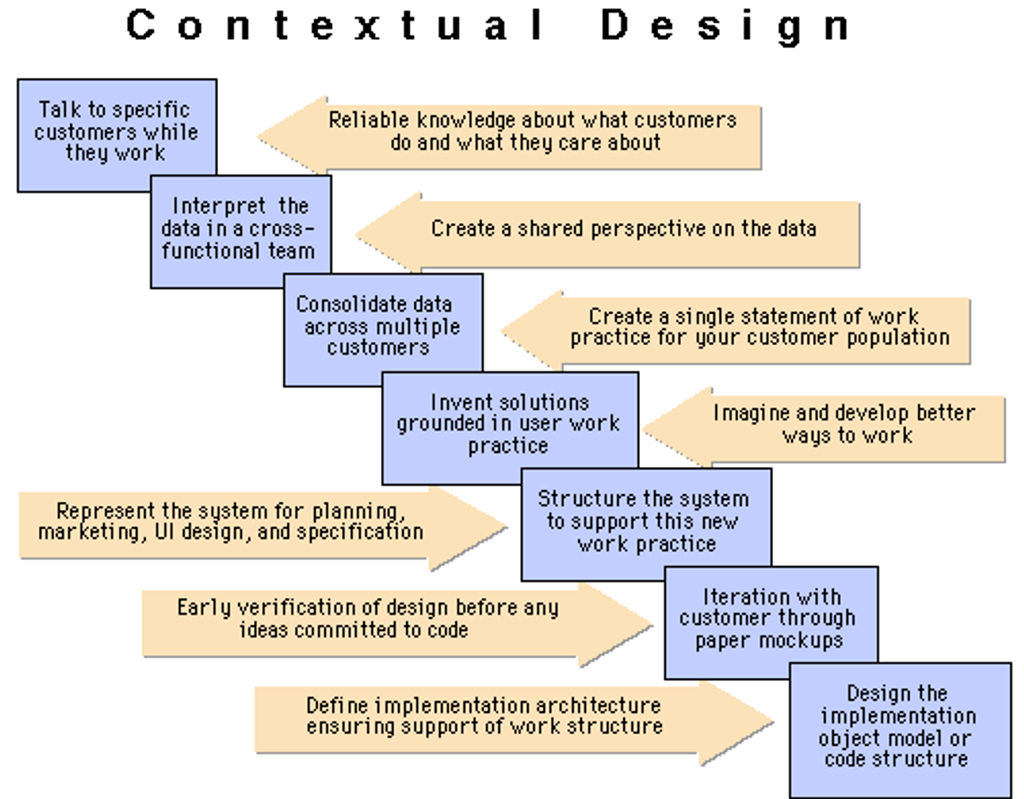
Contextual design is a structured, user-centered design methodology focused on understanding how people work and live in their natural environments so UX (user experience) designers can build systems that truly support these users’ real goals and needs. You conduct field research, observe users in context, model their behaviors, and translate those insights into design concepts and prototypes which you iterate and refine with users in their real settings.
In this video, Alan Dix: Author of the bestselling book “Human-Computer Interaction” and Director of the Computational Foundry at Swansea University, explains how grounding your design in the social and physical context of work helps you avoid screen-only thinking and create prototypes that fit real workflows.
When and Where Contextual Design Can Work Best
Contextual design may be an ideal choice when:
You’re creating systems for complex or unfamiliar workflows.
Users interact with the system in diverse, real-world environments.
Note, it may be less appropriate for simple interfaces with well-understood users, or when timelines and budgets are extremely tight. However, even then, you can adapt elements of the methodology.
Where contextual design works particularly well is in complex, real-world domains, such as:
Healthcare: Designing for nurses, doctors, or patients in clinical settings where workflows, safety, and physical environment matter greatly.
Enterprise software: Supporting specialists whose tasks span multiple systems and contexts.
Education: Creating learning tools tailored to classroom dynamics, cognitive load, and varied student needs.
Manufacturing: Observing operators and engineers in noisy, tool-heavy environments helps design safer, more usable control systems.
Mobile and IoT (Internet of Things): Designing apps that adapt to user environments (including smart homes, for example), interruptions, and physical constraints.
In this video, Frank Spillers: Service Designer, Founder and CEO of Experience Dynamics, shows you how to design mobile apps that are right for the user’s environment, interruptions, and physical constraints instead of focusing only on screens.
Understand What Real Users Face, and Drive Successful Solutions
When you explore and find the details and dynamics surrounding specific users’ realities, you can fine-tune solutions that prove the benefits of contextual design, such as how it helps you:
Deeply Understand Real User Needs
You uncover what users really do, not just what they say they do. For example, people can be too close to their everyday lived experiences to be able to accurately describe them. When you get the “real deal” of what they go through, you can find workarounds, hidden pain points, and flows that matter, which can lead you towards creating more relevant, usable products for them.
To achieve this, you can use grounded theory: an open qualitative research approach that lets insights emerge directly from user behavior. In this video, William Hudson, User Experience Strategist and Founder of Syntagm Ltd, explains how grounded theory’s iterative process of collecting and analyzing data helps you reveal genuine user behaviors to build a strong, reliable research foundation.
Enjoy Better Alignment across Teams
When you have accurate details about who and what are important to design for and why, cross-functional teams can share the same models, artifacts, and user stories. And because this helps align team members from departments like design, development, and marketing, communication improves with the users’ real needs clearly in sight.
Enjoy Strong Product Coherence and System Integrity
Because you adopt a context-of-use scope and achieve a systemic view through user environment design, storyboards, and models, design features hang together, navigation and functions make sense, and the overall experience feels unified.
Improve Innovation Opportunities
Sometimes the insights you uncover through designing for contexts lead to entirely new visions of what the product or system could do, not just incremental improvements. As contextual design supports visioning based on actual observed user practices, you might land on “Eureka!” insights that take you far beyond what you may have anticipated.
Reduce Redesign and Rework Later
Since you can catch problems early, particularly when you’re prototyping, you’ll prevent costly changes after launch. And because you use real data, it helps slash the chances that assumptions will put you on the wrong track.
In this video, Alan Dix shows you how testing prototypes with real users lets you catch issues early and reduce expensive rework later.
Create More Usable, Adopted Products
Products which brands design around real-world practices are ones which users can integrate more smoothly into their lives. Users can accept them more readily, avoid frustration and workarounds, and learn more easily.
Empower Users and Win Trust from Them
When you prove your brand listens to users by listening to their tacit knowledge and testing with them, you engage users as partners and help them feel respected.
How to Practice Effective Contextual Design and Create Winning Solutions, Step by Step
To make the most of contextual design, try this suggested approach and use each stage to build toward a product that fits users’ real-world contexts.
1. Conduct Contextual Inquiries
To start, enter the user’s actual environment, which could be an office, a factory floor, a home, or wherever they face problems requiring a solution. Here, you observe people performing real tasks and ask them questions so you can understand their motivations for getting things done and their workflows. Also, users’ hesitations and silent habits can often signal pain points and unmet needs.
It’s the most direct way to gather insights grounded in reality, and a welcome alternative to user interviews, where users often can’t accurately describe what they do, even if they’re experts at it.
Explore the drawbacks and benefits of user interviews, in this video with Ann Blandford: Professor of Human-Computer Interaction at University College London.
2. Conduct Interpretation Sessions
After each field visit, hold interpretation sessions with your team to review notes, discuss key moments, and begin building models as you transform raw observations into a structured understanding you can draw better ideas from.
Your team can gain a shared mental model of the user’s world, without which observations may remain fragmented or become biased toward individual interpretations.
3. Create Visual Models
Now you create a series of visual models that represent different aspects of what users do:
Flow models show communication and coordination. For example, in a hospital, a flow model might map how a nurse records patient vitals, hands them to a doctor, and then updates the electronic health record, which specialists review later. A flow model highlights communication breakdowns, such as delays when switching between paper notes and digital records.
Sequence models capture task steps. For example, an e-commerce customer who buys a product might: (1) search for an item, (2) compare alternatives, (3) add an item to the cart, (4) review delivery options, (5) pay, and (6) track shipment. If the model reveals extra steps, such as repeatedly checking shipping costs, it shows friction that’s worth addressing.
Artifact models reveal the physical or digital tools users rely on. For example, in a manufacturing plant, workers might use laminated checklists taped to machines to help them track safety inspections. When design teams model the artifact, it shows how these low-tech aids are essential and could inspire digital solutions that replicate their visibility and ease of use.
Cultural models map attitudes and influences. For example, in a corporate setting, employees may avoid using a new system because managers informally encourage “the old way” to save time. A cultural model visualizes these forces and makes it clear that the barrier isn’t usability alone but social norms and leadership influence.
Physical models show layout and spatial relationships. For example, a physical model of a call center might show the cramped desk layout, headset wiring, and noise levels a user typically experiences. When you spot this context, you can understand more about how the distraction-rich environment causes workers to miss on-screen alerts
These models provide multiple perspectives on how users perform tasks, and they reveal breakdowns, redundancies, and design opportunities.
4. Consolidate
Once you’ve studied enough users, synthesize across participants: cluster similar behaviors, identify key roles and breakdowns, and capture patterns in consolidated work models. You also filter unique user insights into themes that are representative across the population, so helping the resulting design to serve shared needs, not just individual ones.
How many is “enough users”? Typically, it’s 10–30 users per distinct role or user group, although you might need around 10–12 participants per user type to start seeing strong patterns. You may need more in highly diverse or complex domains, but fewer if the domain is narrow and homogeneous. For example, if you’re studying airline gate agents who all use the same system under nearly identical conditions, 6–8 well-chosen field studies might be enough to capture the major workflows there.
5. Conduct Visioning
Now that you and your design team have used the consolidated models as a foundation, you can brainstorm future work practices and designs that better support users. For this, you can sketch possible scenarios and imagine improved workflows.
Visioning helps you shift the focus from problem identification to solution generation, and the team can begin to explore innovations grounded in real user practice rather than hypothetical features.
Discover how to run a brainstorm that can point you towards more promising design concepts.
6. Apply a Conceptual Model
Create a conceptual model, which is a clear, structured representation of what the system does and how users understand it. Unlike traditional environment design that emphasizes layout or physical context, a conceptual model focuses on getting your product’s structure in line with users’ mental models.
So, you’ll want to identify the key objects, actions, and relationships users expect based on their real-world experience. For example, in a calendar app, users naturally think in terms of events, dates, and notifications. Your conceptual model should reflect those expectations so that users can easily form an accurate mental image of how your interface works.
This step has a deep connection with the Object-Oriented UI Design approach, where you organize the interface around objects familiar to the user, like tasks, documents, or conversations, instead of abstract system processes.
By grounding your design in a well-articulated conceptual model, you reduce user confusion, improve learnability and usability, and create a coherent and scalable interface structure. In contextual design, conceptual models serve as a bridge between field research (contextual inquiry) and interface design, letting you and your team translate real-world insights into usable, user-centered systems. They help you abstract from specific tasks to design systems that are flexible and intuitive across use cases.
7. Do Prototyping and Iteration
Lastly, it’s time to build low-fidelity prototypes and then, after testing and tweaking those, high-fidelity prototypes of the envisioned system. When you create a prototype, you return to users, often in the original context, to test and refine it based on feedback.
8. Test in Real Contexts
Wherever possible, test prototypes in the same environment where users will use the product itself. This reveals environmental factors, such as distractions, tool limitations, and cultural norms, that impact usability and which you won’t be able to “replicate” so easily elsewhere.
9. Iterate Based on User Feedback
Adapt the prototype based on what you observe users doing with it and how helpful they find it. Then, tweak out the problem areas and re-test your prototypes with users. That way, you can ensure the final system will be something they’ll find usable, acceptable, and aligned with real work they do.
10. Be Systematic Yet Adaptable
Follow the structure of the methodology but scale it to suit your project’s scope, time, and resources. Like a Minimum Viable Product (MVP), as opposed to a “final-and-full” solution, even lightweight versions, if executed well, can bring you high value.
Explore how much value MVPs can bring as usable solutions you can iterate upon, in this video with Frank Spillers.
Special Considerations for Contextual Design
Despite its strengths, contextual design isn’t always easy to implement, and it involves some challenges and trade-offs. Here’s what to consider:
It requires time and resources: Field studies, models, and iteration take longer than quick fixes or assumption-based approaches. Teams must plan accordingly and examine how much their brand can invest in a design process before they begin.
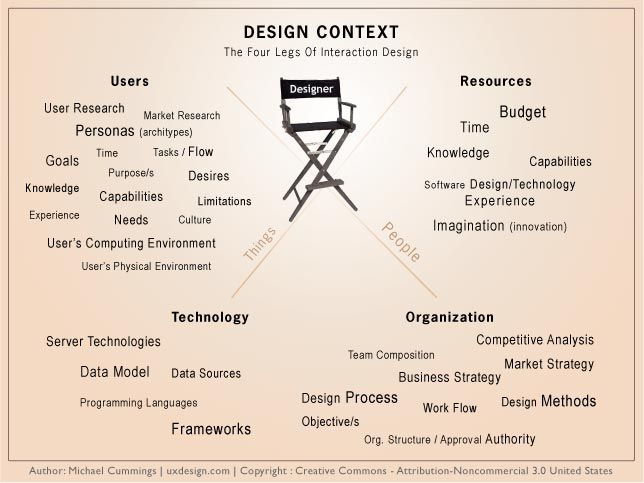
Context is key: Respond to the actual environments in which users encounter and use systems: physical, cultural, technical, and social. Lab-based designs often fail because they ignore this: a major point for taking a Get Out Of the Building (GOOB) approach instead.
In this video, Frank Spillers shows you how to Get Out Of the Building so your design decisions reflect real user behaviors and contexts.
Data can be messy and overwhelming: It takes skill and collaboration to synthesize diverse observations into clear insights. Not every team is equipped for this level of analysis and mature understanding of data-driven design, especially handling the qualitative data.
In this video, William Hudson shows you how to focus qualitative work on what people say and do, avoid overreading small samples, and use methods like first‑click testing, tree sorting, and larger‑sample studies when you need reliable numbers.
Scalability can be a concern: Large or distributed teams need consistent methods to apply contextual design across geographies or user segments.
Organizational resistance: Some companies prefer faster, more metrics-driven approaches. Brand stakeholders might look on contextual design as too qualitative or slow unless teams can clearly justify its use.
Don’t reduce users to “task-completers”; they’re real people with human needs. So, look at broader work goals, motivations, and organizational context. You’re designing for the whole ecosystem they are in, not just isolated moments they experience.
Don’t only design for the “average” user; that’s “faceless design,” and it can’t hold up in the field for everyone. When you note where users differ (roles, workflows, tools), you can plan for scalability, flexibility, and edge cases, and produce products that prove empathy with real human users in the field.
Find out what empathy in design means and how it can make the difference between a good design and a great one, in our video.
Overall, contextual design provides a robust framework for designers and product teams to understand real user behavior and translate those insights into systems that truly support people’s work and goals. The payoffs can be great when you observe users in context, model their workflows, and design in partnership with them: you can create coherent, usable, and often innovative solutions.
Indeed, the approach takes effort and time, but its long-term impact on usability, adoption, and product success can reward well. For a project such as a contract for a large client with many employees, for example, it can be a decision that leads to increased success for the company, and greater and more rewarding contracts for you.