Storyboards in UX/UI Design

Your constantly-updated definition of Storyboards in UX/UI Design and collection of videos and articles.
Be a conversation starter: Share this page and inspire others!

493 Shares

What are Storyboards in UX/UI Design?

Storyboards in user experience design (UX design) are visual representations of a user's journey through a product or service. These sequences of images outline the user's actions, thoughts and emotions at each stage. Designers use storyboards to understand user experiences, identify pain points and design solutions that enhance usability, satisfaction—and more. 
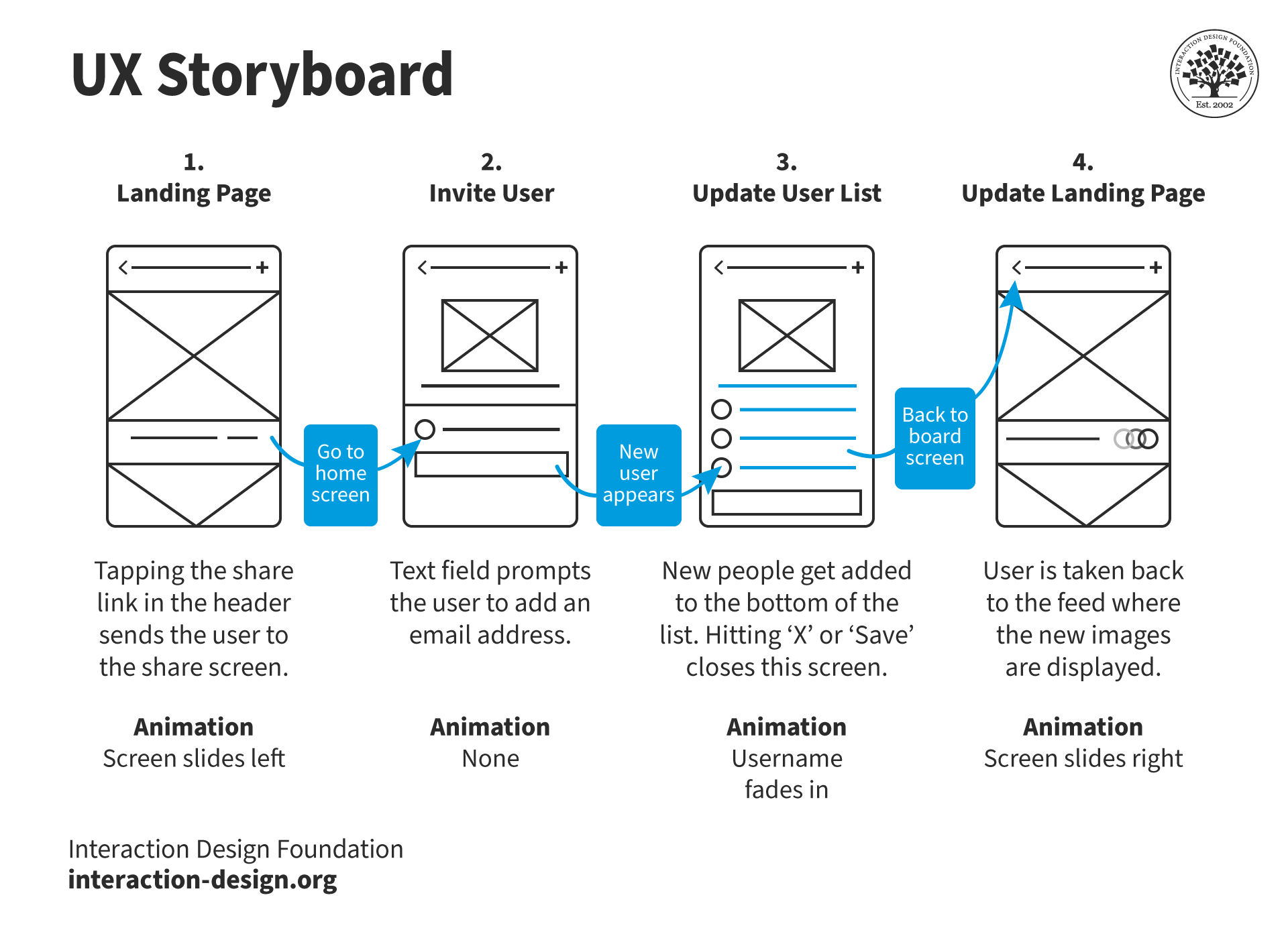
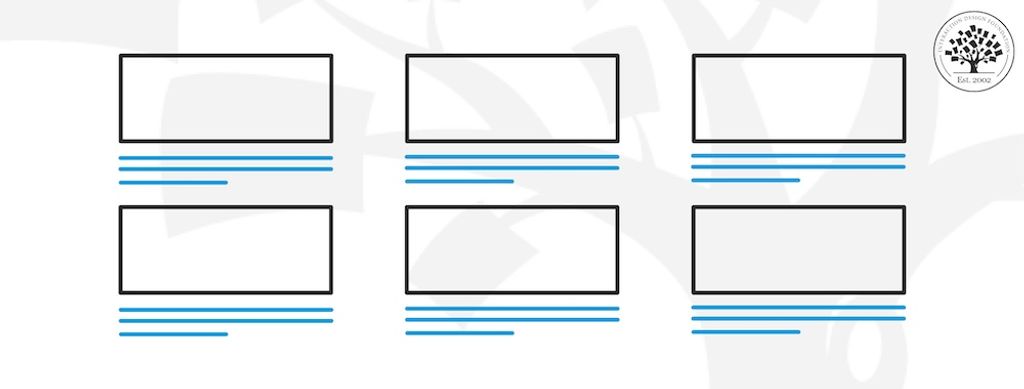
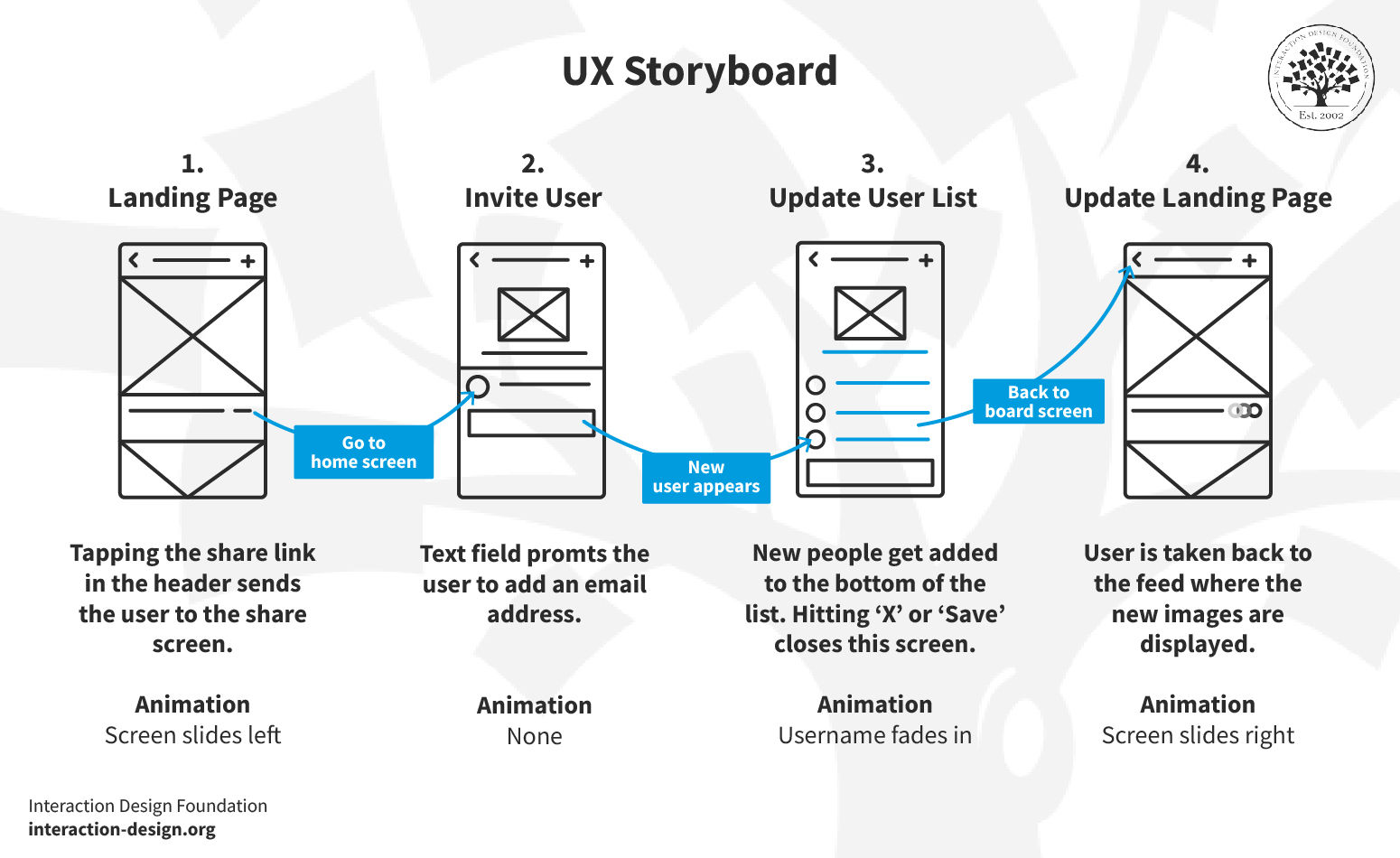
An example of a storyboard in four parts.

An example of a UX Storyboard, in this case to invite a user.

© Interaction Design Foundation, CC BY-SA 4.0

Why are Storyboards Important in UX Design?

When designers use storyboards, they create a tangible and visual representation of target user interactions. This doesn’t just help in the design and development process. It makes sure that teams keep user needs at the forefront of product development, too. Storyboards have served the film industry since the early days of cinema. However, they’re also highly effective tools in UX design because of how they: 

1. Predict User Experience

Storyboards empower designers to anticipate how users will interact with a product over time. When designers visualize these interactions, they can find potential issues and user needs early in the design process.  

2. Enhance Communication

These visual tools play a critical role as they communicate the user's journey to team members and stakeholders who may not be familiar with the intricacies of UX design. This makes it easier to get the team’s vision aligned and understand the user's perspective. 

3. Facilitate Ideation and Iteration

Storyboarding isn’t just about prediction; it’s a method for ideation as well. It provides a creative framework for brainstorming new solutions to user problems for design and development teams. Teams can rapidly modify storyboards to reflect changes in the design approach.  

4. Integrate with Other UX Tools

While storyboards provide a narrative visual representation, teams often use them together with other UX tools like user journey maps. Storyboards add a visual layer to the textual information in journey maps. They enrich the overall understanding of the user experience and help guide design decisions. 

Watch as CEO of Experience Dynamics, Frank Spillers explains how to journey map for a service design

Transcript
 

What Does a UX Storyboard Look Like?

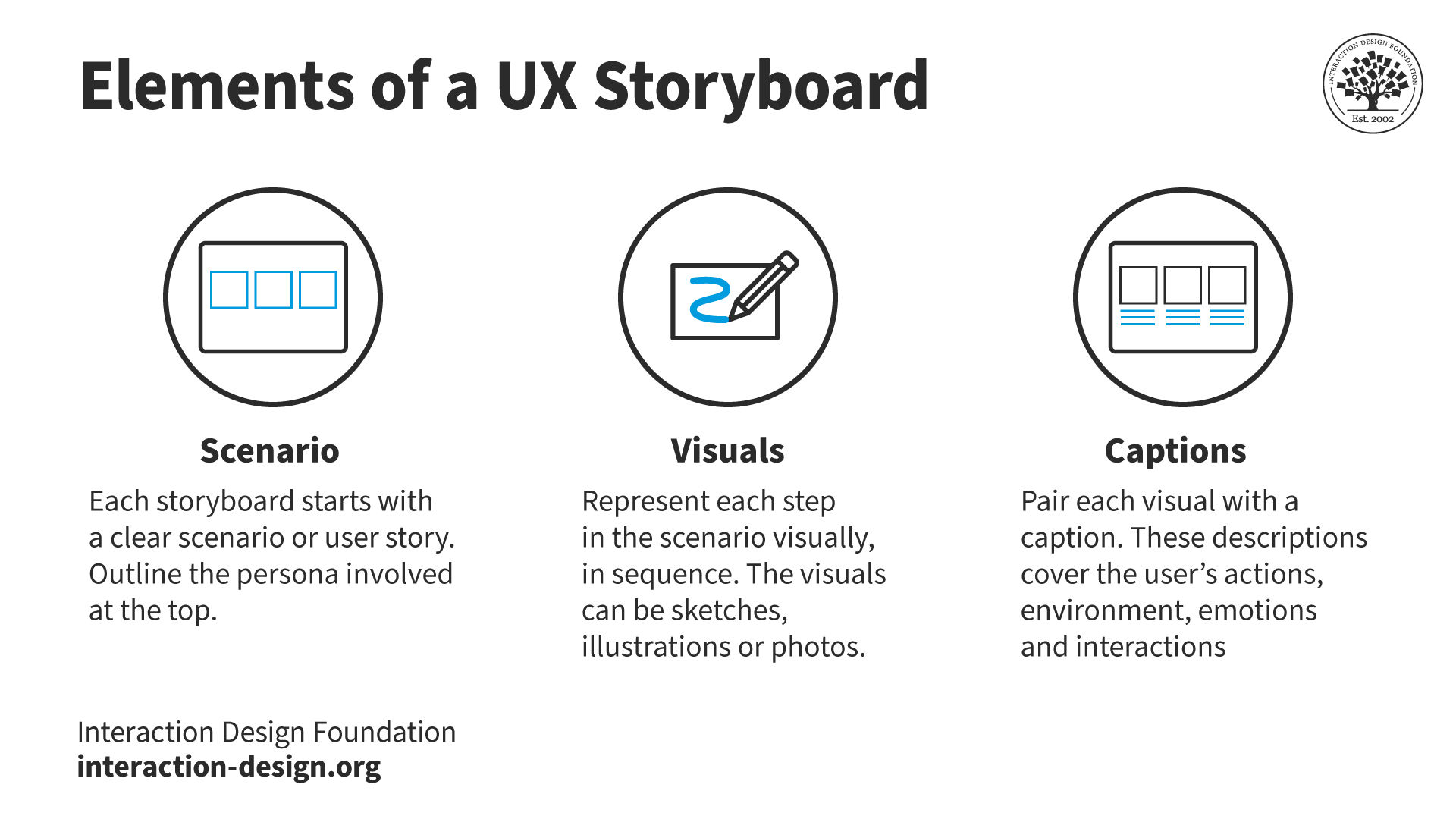
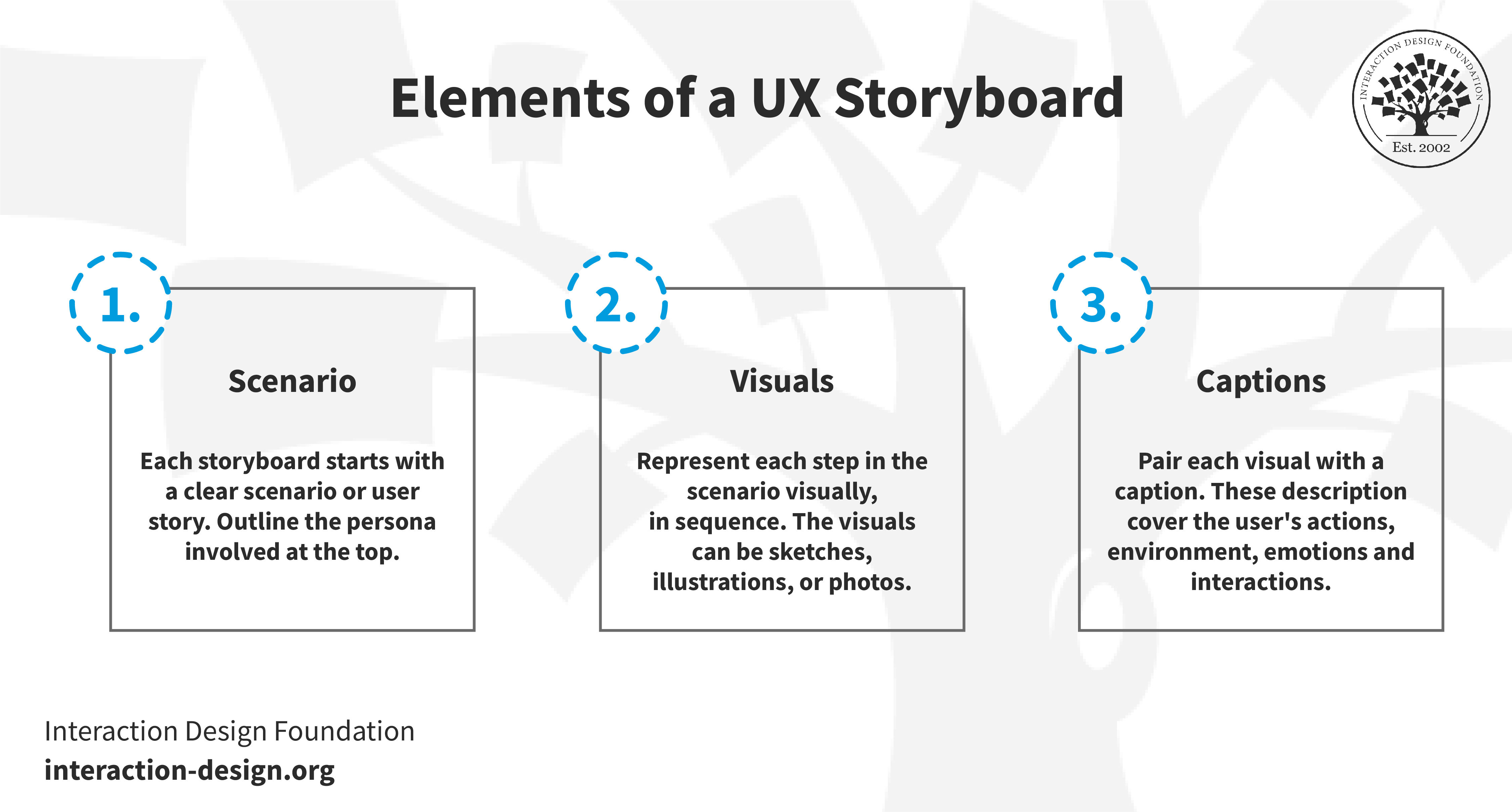
An illustration showing the three elements, scenarios, visuals and captions, of a storyboard.

© Interaction Design Foundation, CC BY-SA 4.0

1. Specific Scenario or User Story

Each storyboard begins with a scenario that outlines the context and the problem the user faces. This scenario often has a persona or a specific role as its basis. This helps teams to tailor the design to meet user needs and expectations.  

2. Visuals

The visuals are a series of drawings, sketches or images that depict each step of the user's interaction with the product. These visuals serve as a graphical representation of the user's journey. They illustrate actions, environments and potential obstacles.  

3. Captions

Captions accompany each visual. They provide a textual description of what’s happening in the scene. They explain the user’s actions, emotional states, environmental conditions and interactions with the device. Captions are crucial—they add depth and understanding to the visuals. They make the storyboard a comprehensive tool to capture how users feel, act and more throughout a sequence.  
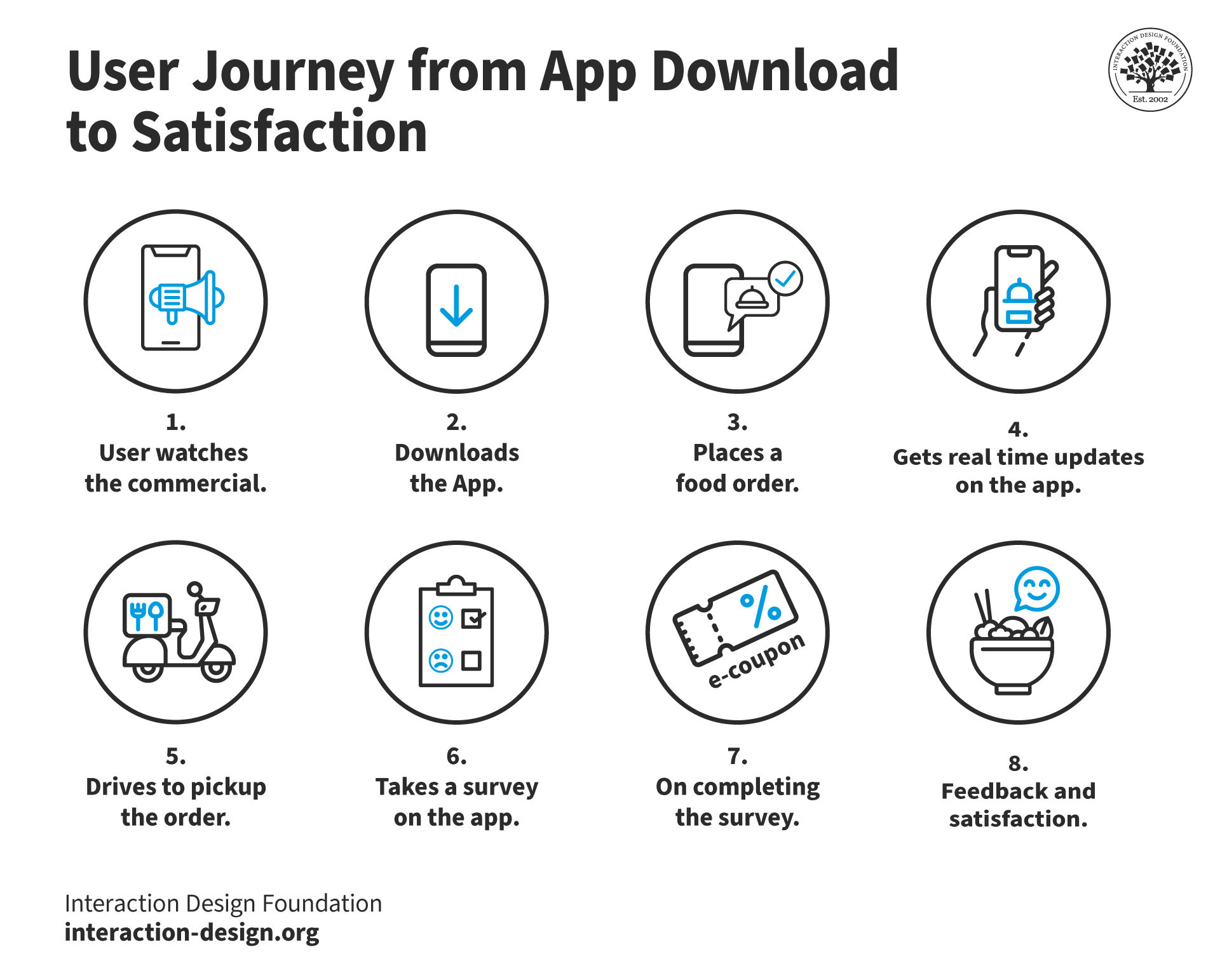
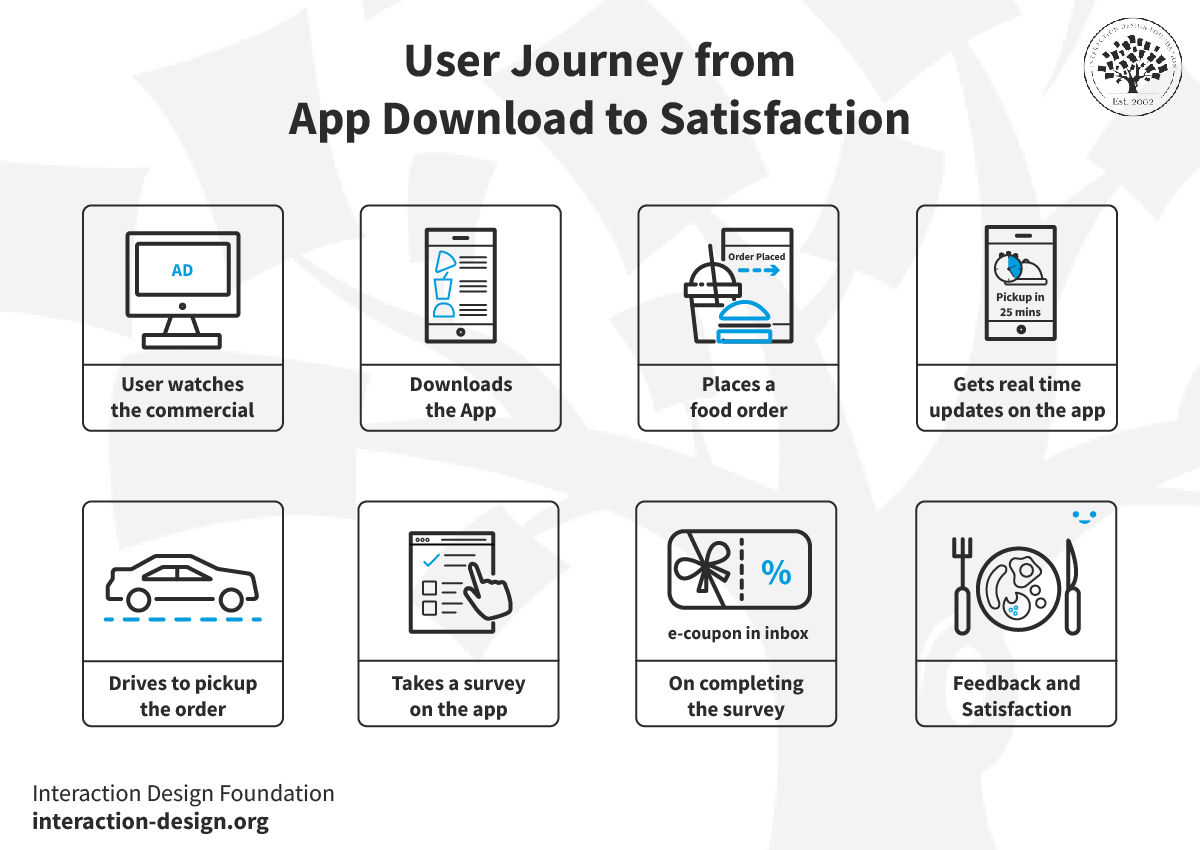
A storyboard of a user journey from app download to satisfaction in 8 parts.

© Interaction Design Foundation, CC BY-SA 4.0

How Do Designers Use Storyboards?

A storyboard is an effective tool at any stage in a design process. For example, early on, it can offer the big-picture perspective when design teams want to win support from stakeholders. A close-up storyboard in UX design is a powerful tool for a design team later on, where they can examine the practicalities of the user flow in fine detail. In any case, here are the main uses of storyboards:   

1. Research and Ideation

UX designers leverage storyboards primarily when they’re in the initial stages of the design process. After designers conduct user research, storyboards help to visualize the information they’ve collected. They also help set the stage to define problems and ideate potential solutions. This visual representation lets designers prioritize user needs; plus, it makes collaborative brainstorming sessions easier. 

UX Strategist and Consultant, William Hudson explains the importance of user research: 

Transcript
  

2. Design and Validation

During the design phase, storyboards keep playing a crucial role. They guide product decisions and illustrate how users might interact with a product or service. They help map out the user journey—showing each step a user takes. That’s essential for teams to empathize with the user and make sure they’re indeed following a user-centered design approach. This step-by-step visualization also helps communicate the design to stakeholders and team members. It makes sure everyone’s on the same page and everything’s understood across the board. 

See why empathy is a vital ingredient in design: 

Transcript
  

3. Usability Testing and Feedback

Storyboards are also instrumental during usability testing and feedback sessions. They pre-visualize a sequence of interactions, so they let designers and product managers test and validate ideas with users, gather their feedback and make any needed adjustments. This iterative process is crucial to refine the user experience and give the product’s usability a powerful boost. 

What are the Benefits of Making Storyboards in UX Design?
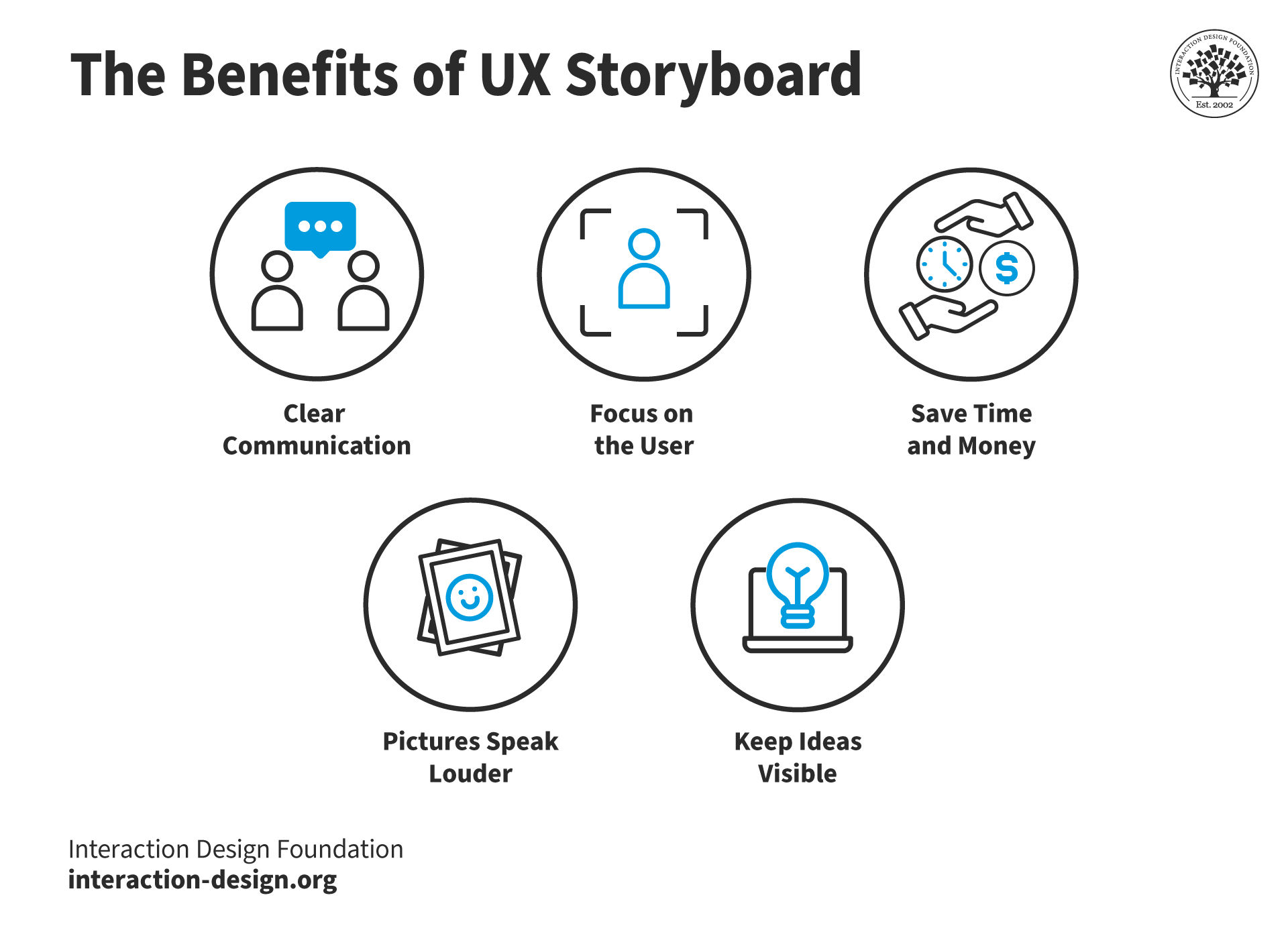
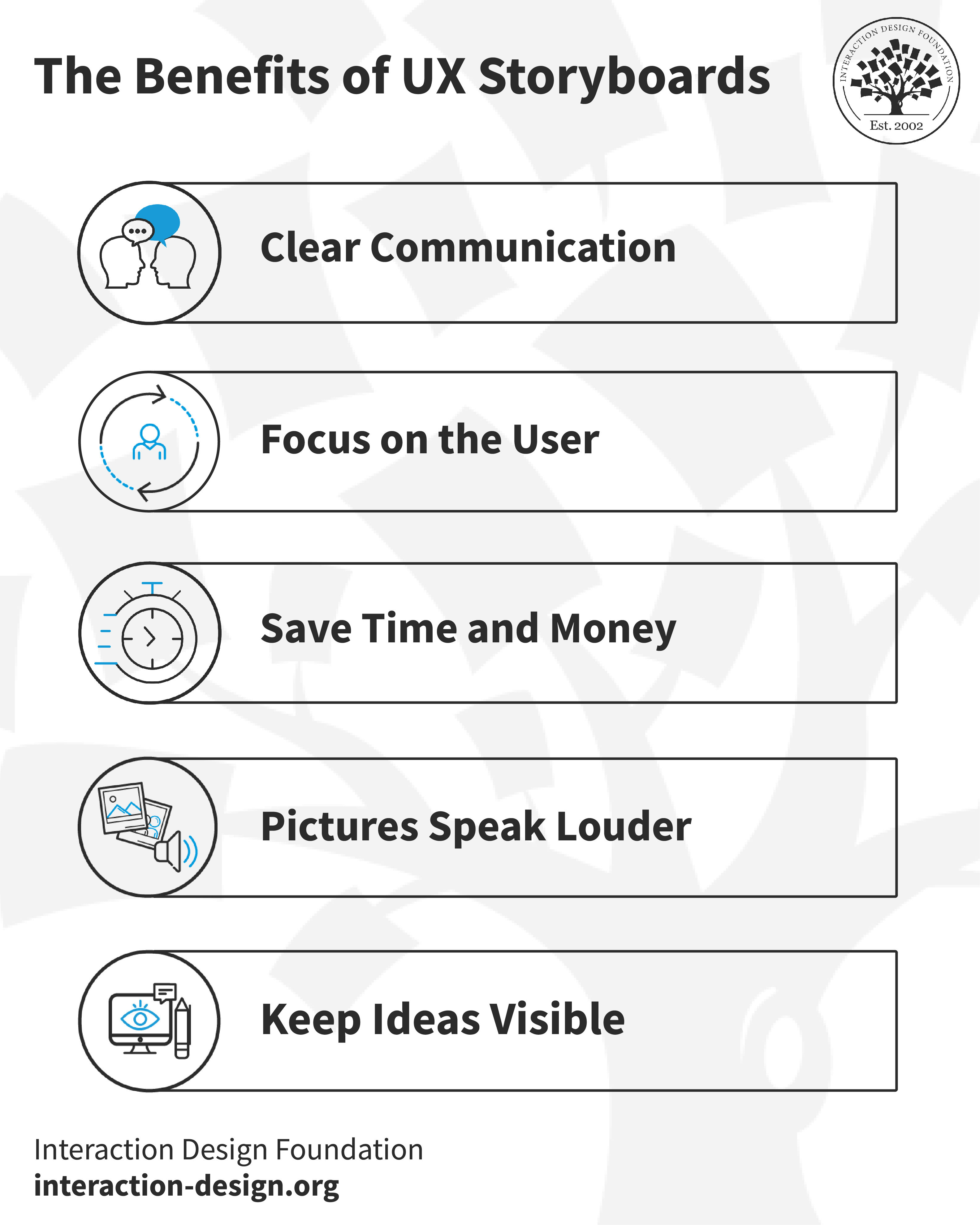
An illustration showing five benefits of storyboards.

© Interaction Design Foundation, CC BY-SA 4.0

Storyboarding in UX design offers a whole myriad of benefits that make the design process improve by leaps and bounds—making it more efficient, user-centered and communicative. Namely, storyboards: 

1. Enhance Communication and Clarity

Storyboarding serves as a powerful communication tool—one that bridges the gap between designers, stakeholders and team members. It sets out a visual narrative that helps all parties who are involved clearly understand the user journey and the design intentions. This clarity is crucial for everyone to be on the same page. It therefore makes for more informed decision-making and lowers the chances that misinterpretations come about.  

  • Visual simplicity: Storyboards carry complex user interactions through simple visuals. They make it easier for people from non-technical backgrounds to grasp the concepts in them quickly.  

  • Unified vision: As storyboards present a visual story, they help get the team’s vision aligned. This makes sure that all members understand the product's direction and user interactions.  

2. Focus on the User

At the heart of UX design is a strong ability to empathize with users. Storyboards excel at nurturing this empathetic understanding. When designers visualize the user's journey, they can get a better grasp of the user's needs, emotions and challenges. That way, they can design more effective and tailored user experiences. 

  • User perspective: Storyboarding encourages designers to think from the user’s perspective—something that promotes a user-centric approach for everyone to follow throughout the UX design workflow.  

  • Emotional connection: Visual stories help designers and stakeholders connect emotionally with the user scenario. This makes the design more effective at solving real user problems.  

3. Save Time and Money

One of the strategic advantages of storyboarding is how it can identify potential design issues at an early stage. This proactive approach doesn’t just save time for product teams. It significantly cuts down on the costs associated with making changes at later stages of the product development cycle, too.  

  • Problem detection: As storyboards map out the user journey, they can highlight usability issues, gaps in the user experience or bottlenecks that mightn’t be evident in textual descriptions alone.  

  • Iterative refinement: The visual and editable nature of storyboards makes it easy to iterate on designs—and so enable teams to quickly address and refine user issues as they come up.  

4. Speak Louder than Words

Images tell a story in a more profound way than words can—especially when people who aren’t visual designers see them. Pictures in storyboards build a stronger connection with team members in this way. They help them feel real empathy for the users in the scenarios that they show. Team members can also remember images more easily, which helps them build towards more user-centric design solutions. 

5. Keep Ideas Visible

Storyboarding promotes an environment of collaboration and creativity among design teams. Storyboards keep the ideas that teams need to consider visible. When pictures that are easy to relate to are out in the open, it encourages the sharing of ideas and makes for easier iterative feedback. That’s essential for teams to refine and perfect the user experience.  

When teams integrate storyboarding into their UX design process—like design thinking—they can leverage these benefits to create more engaging, user-friendly and successful products. The visual, communicative and collaborative nature of storyboards makes them an indispensable tool all around. 
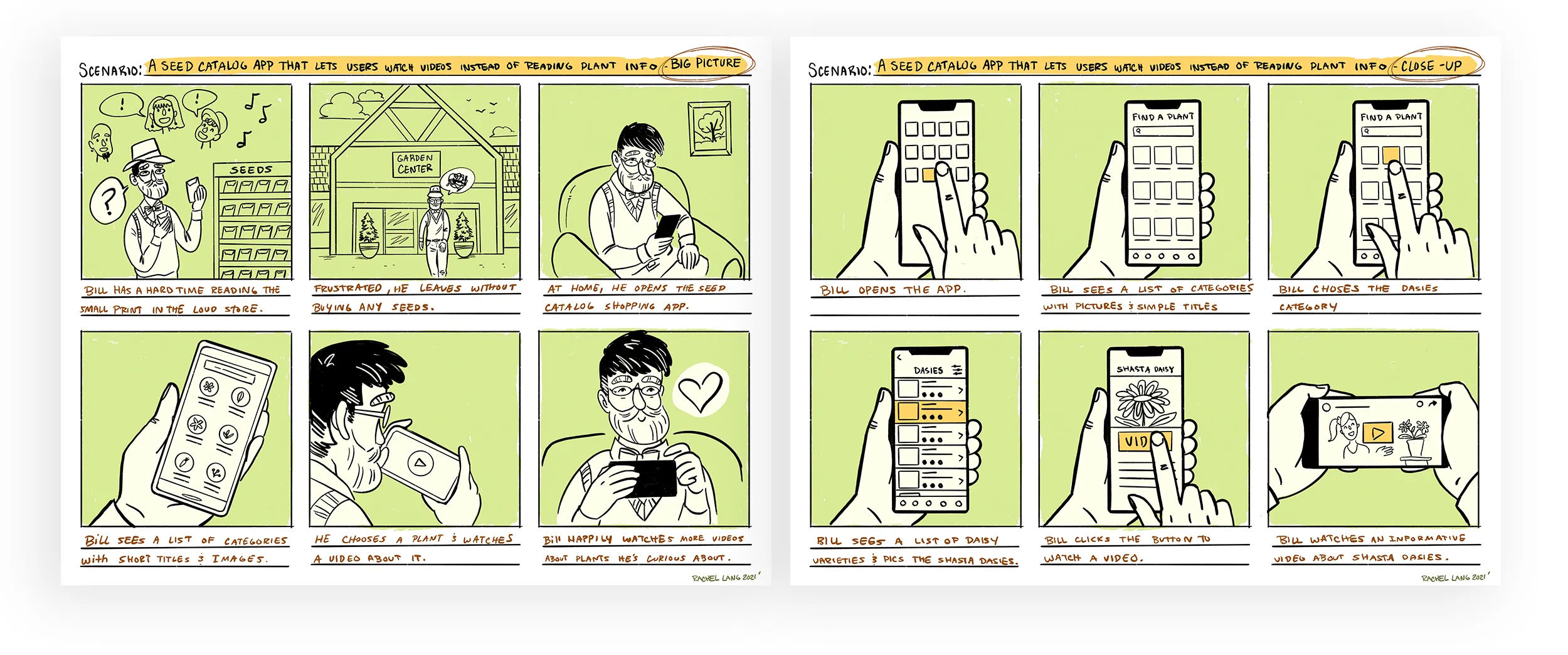
An example of a storyboard.

This UX storyboard example is for a seed catalog: a “big picture” storyboard (left) shows a user (“Bill”) in a setting and focuses on emotion and motivation; a “close up” storyboard (right) shows the actual interactions with the app screens.

© Rachel Lang, Fair Use

What UX Storyboard Tools are There?

Several digital tools are available to help designers create good and effective storyboards in UX design. These tools offer features that cater to the specific needs of UX professionals, such as UX design storyboard templates. This makes the process more efficient and accessible:  

  1. Miro: With its collaborative whiteboarding capabilities, Miro allows teams to create and share storyboards in a highly interactive environment.  
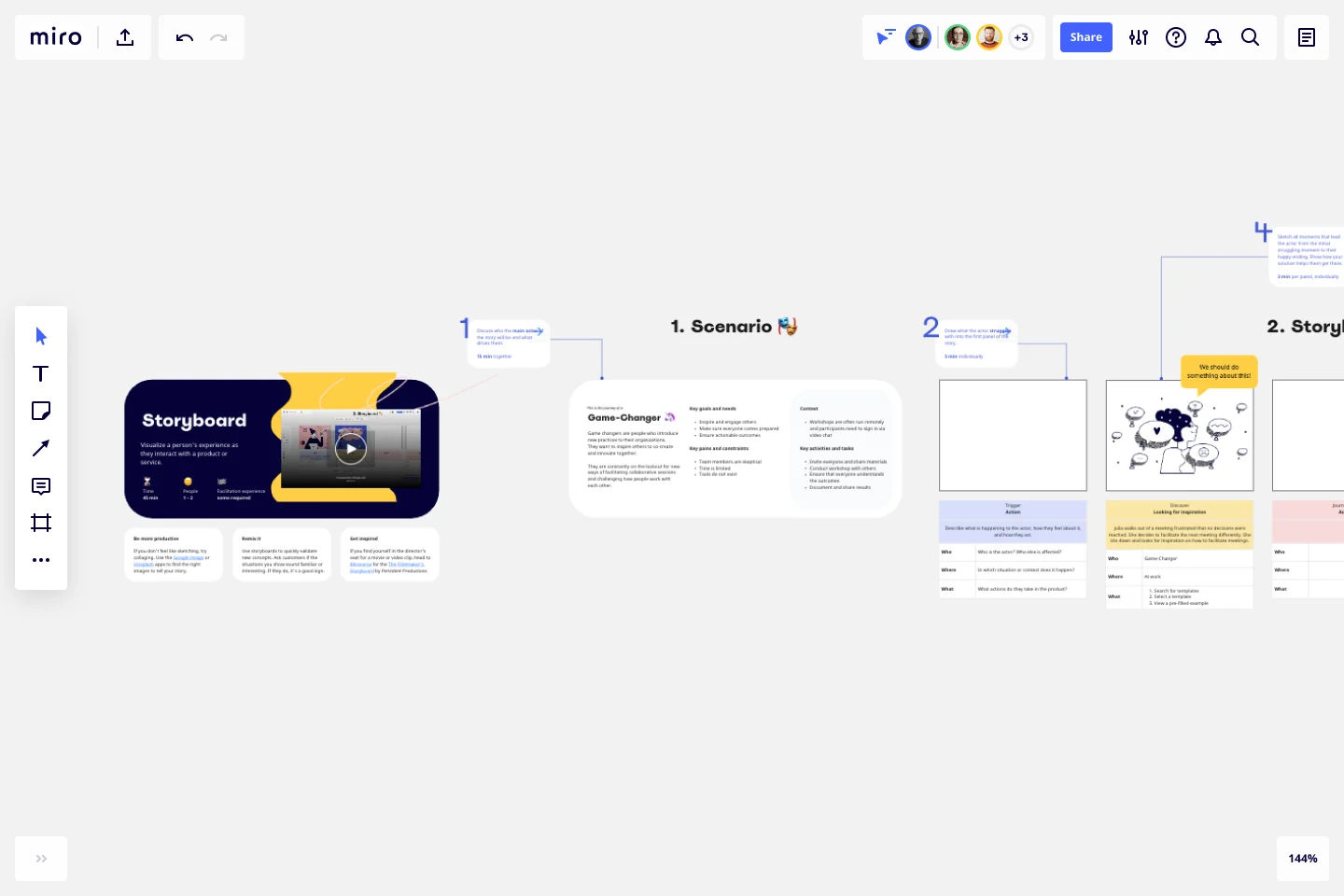
A screen from Miro.

For example, Miro offers a storyboard template.

© Miro, Fair Use

  1. Canva: With a user-friendly interface, Canva provides templates and design elements that make it easy to craft visually appealing storyboards.  
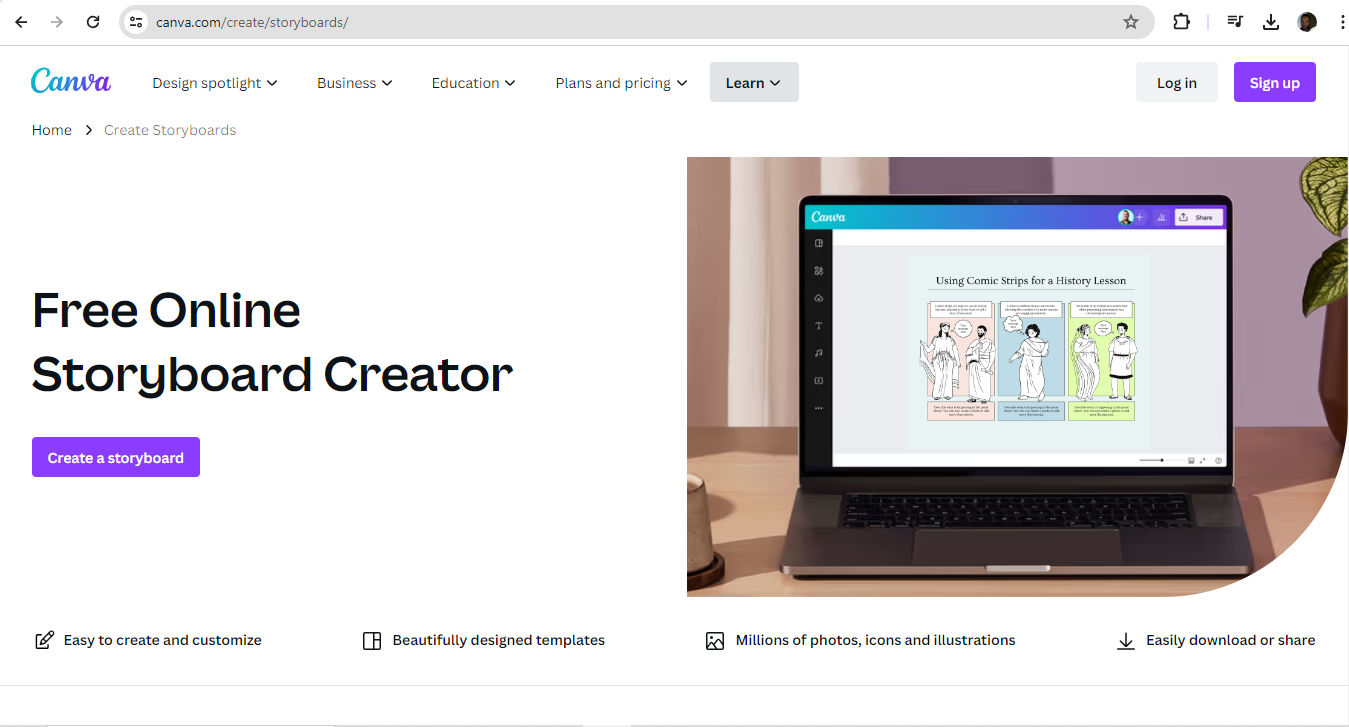
A screen from Canva.

© Canva, Fair Use

  1. Figma: Figma stands out for its integration capabilities, which allows designers to create and iterate on storyboards within the context of their overall design workflow. 
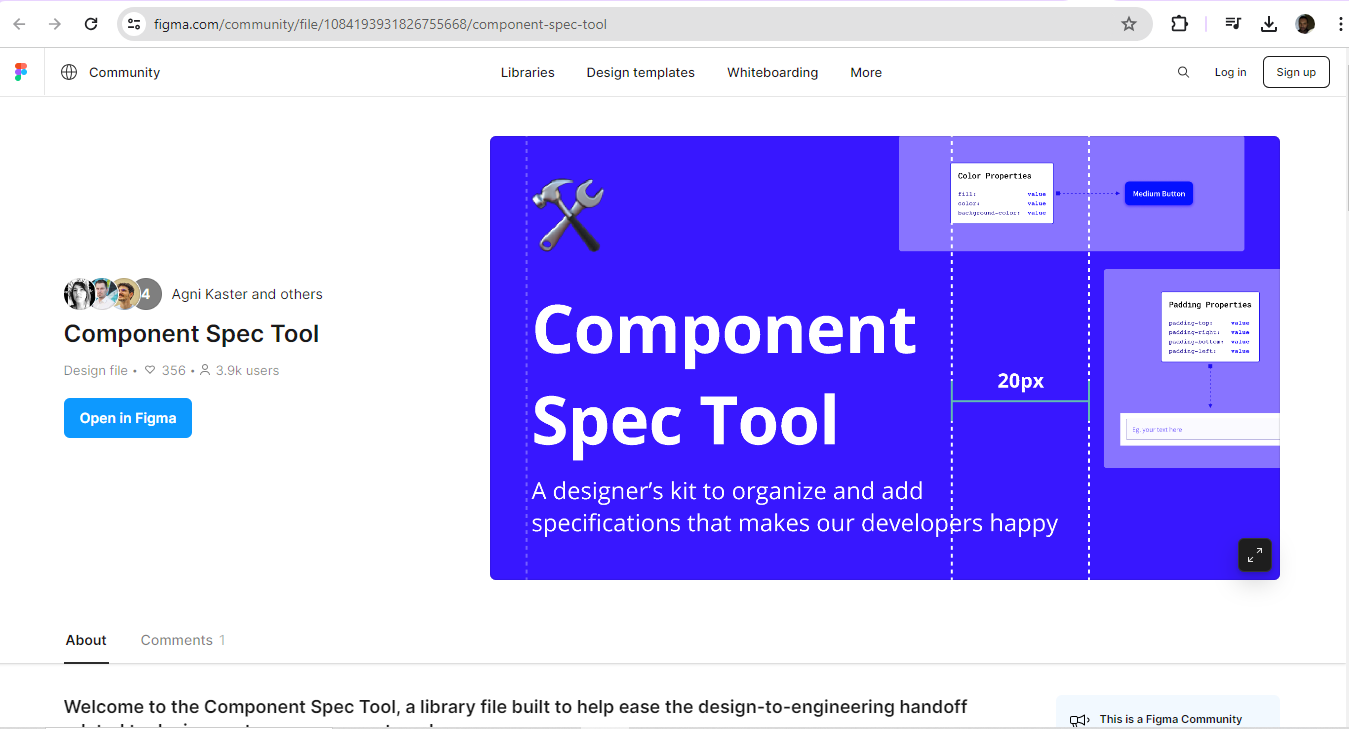
A screen from Figma.

© Figma, Fair Use

  1. Storyboard That: This tool facilitates quick storyboard creation—and offers customizable scenes and characters to streamline the design process.  
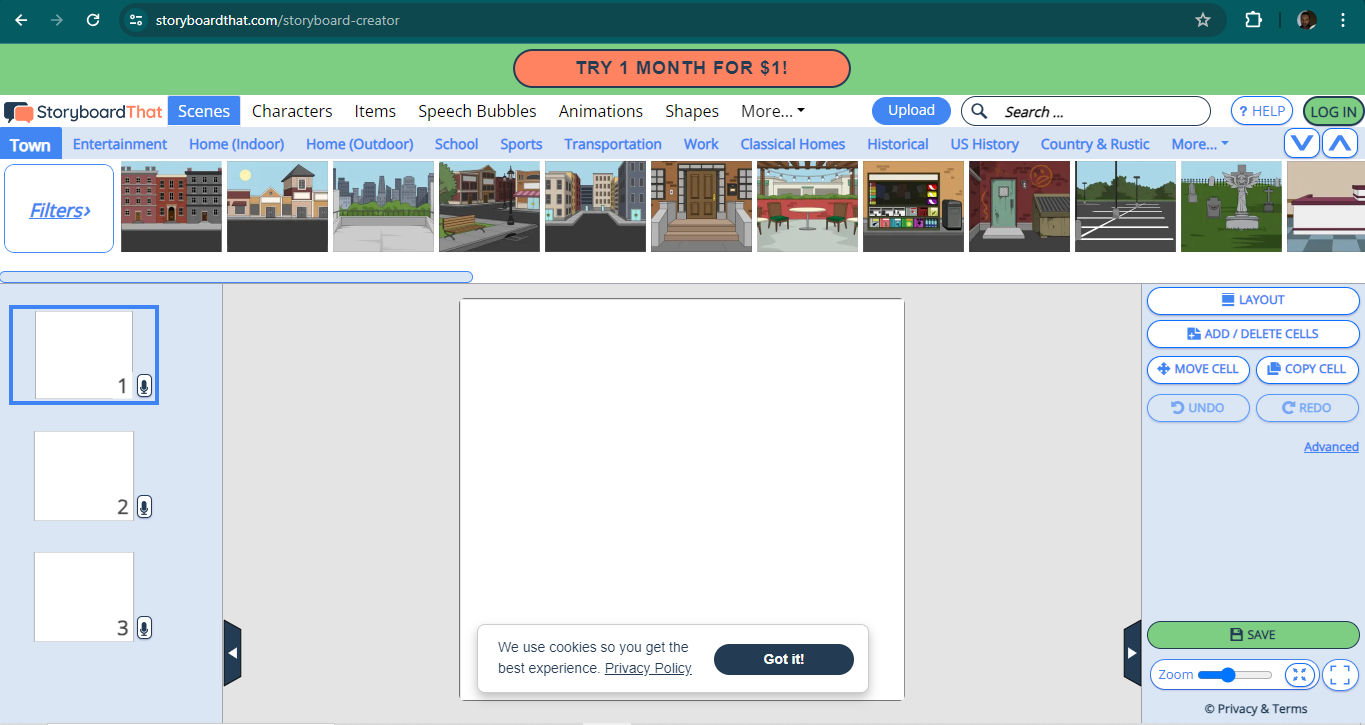
A screen from Storyboard That.

© Storyboard That, Fair Use

  1. Boords: Boords is specifically for storyboarding, and features tools for scripting, storyboarding, and sharing, all within one platform.  
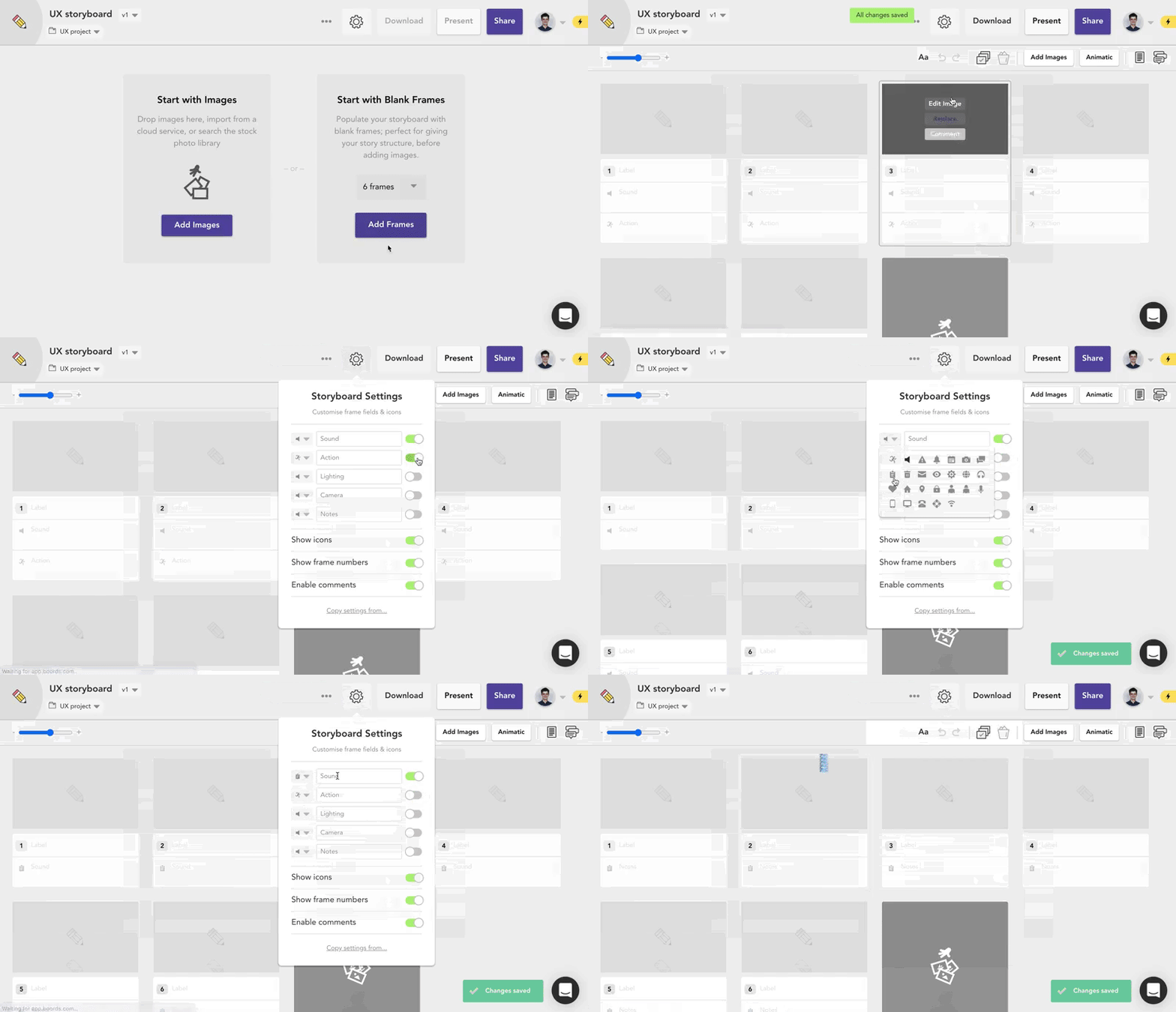
A screen from Boords.

© Luke Leighfield, Fair Use

Best Practices, Tips & a Step-by-Step Guide to Create Storyboards
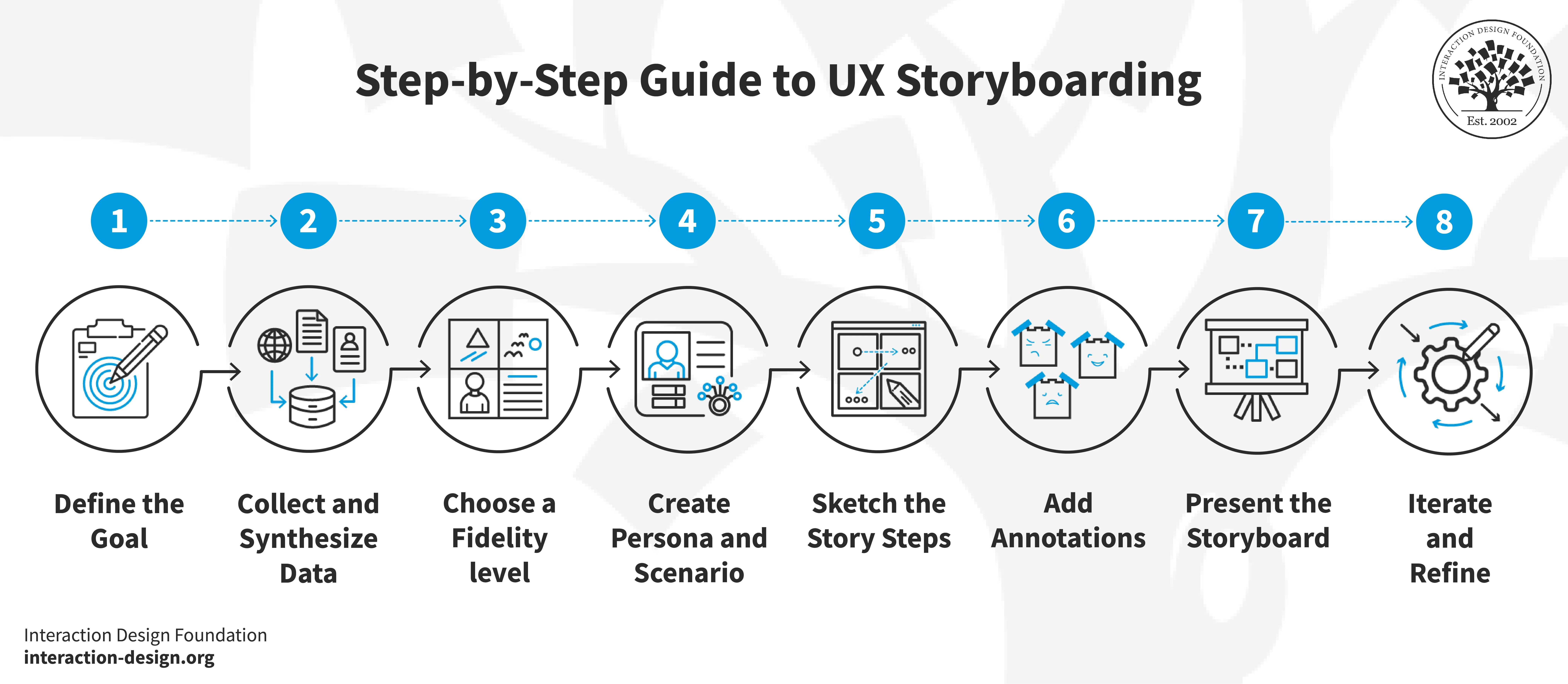
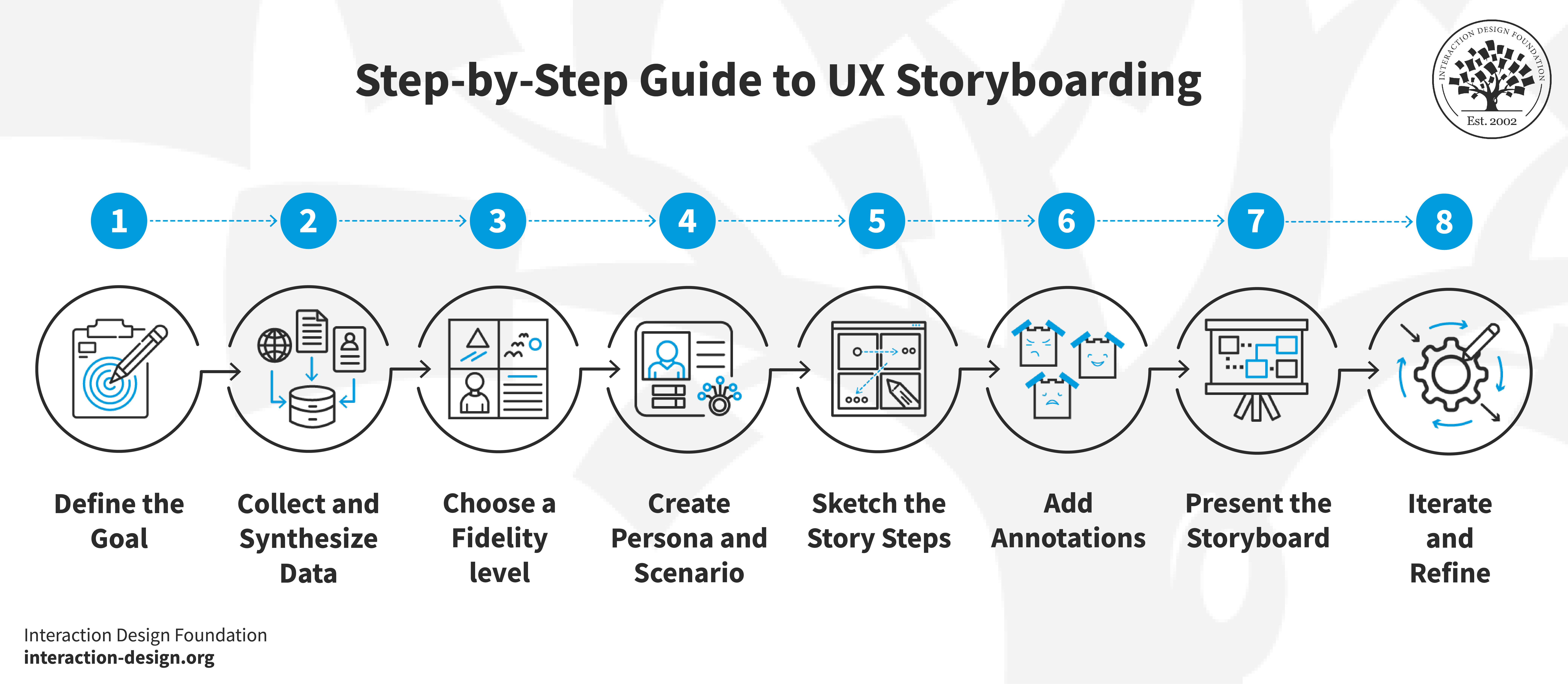
An illustration of the steps to UX storyboarding.

© Interaction Design Foundation, CC BY-SA 4.0

Here’s a suggested step-by-step guide to create storyboards:  

1. Define the Goal

Clearly define the purpose of the storyboard within the project's scope.  

2. Collect and Synthesize Data

Collect relevant data through UX research methods like user interviews, field research or other reliable sources to make sure the storyboard has a grounding in real user experiences. 

3. Choose a Fidelity Level

Decide whether to use a low-fidelity storyboard for quick internal discussions or a high-fidelity storyboard for presenting to stakeholders outside of the design team. Low-fidelity storyboards focus on quick sketches that convey ideas. Meanwhile, high-fidelity storyboards include detailed scenes that are effective for deeper engagement. 

4. Create a Persona and Scenario

Establish the main character (user persona) and specific scenario that the storyboard is going to address. This step crucially sets the context for the user interactions that the storyboard will depict.  

Author and Human-Computer Interaction Expert, Professor Alan Dix explains personas and their importance: 

Transcript
 

5. Sketch the Story Steps 

Organize the sequence of events in the user's journey. Prioritize the most relevant and impactful scenarios. That will make sure the storyboard remains focused and manageable. Make the visuals from these that clearly represent each step of the user journey. Use simple shapes and lines to create characters and settings—or trace images for more detailed scenes. 

6. Add Annotations

Accompany each visual with captions that explain the user's actions, emotions and any changes in the environment.  

7. Present the Storyboard

Share the storyboard with team members, stakeholders and users. Collect feedback through methods like interviews and usability testing. 

8. Iterate and Refine

Then, it’s time to iterate and refine the storyboard from insights that have come up.  
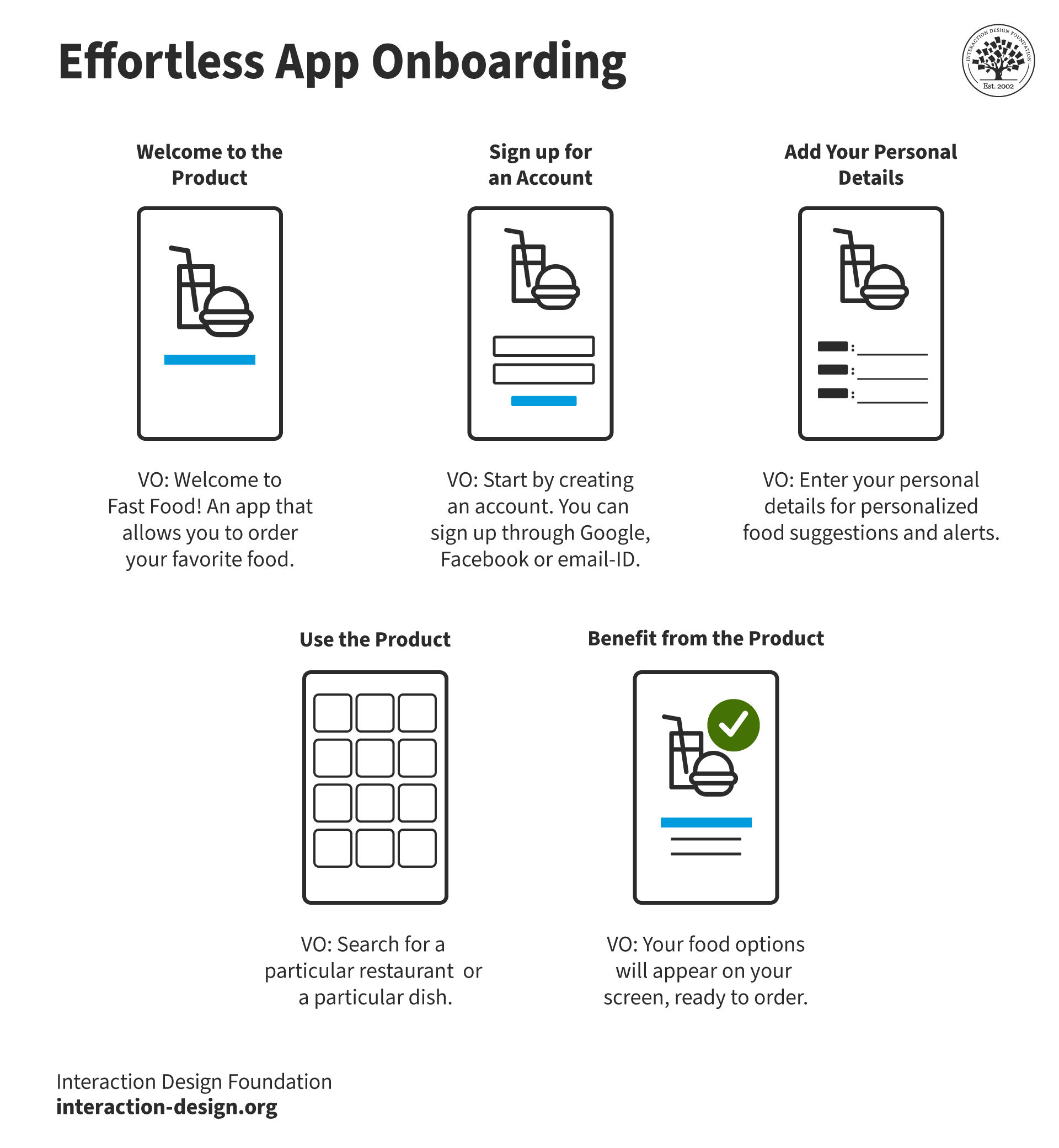
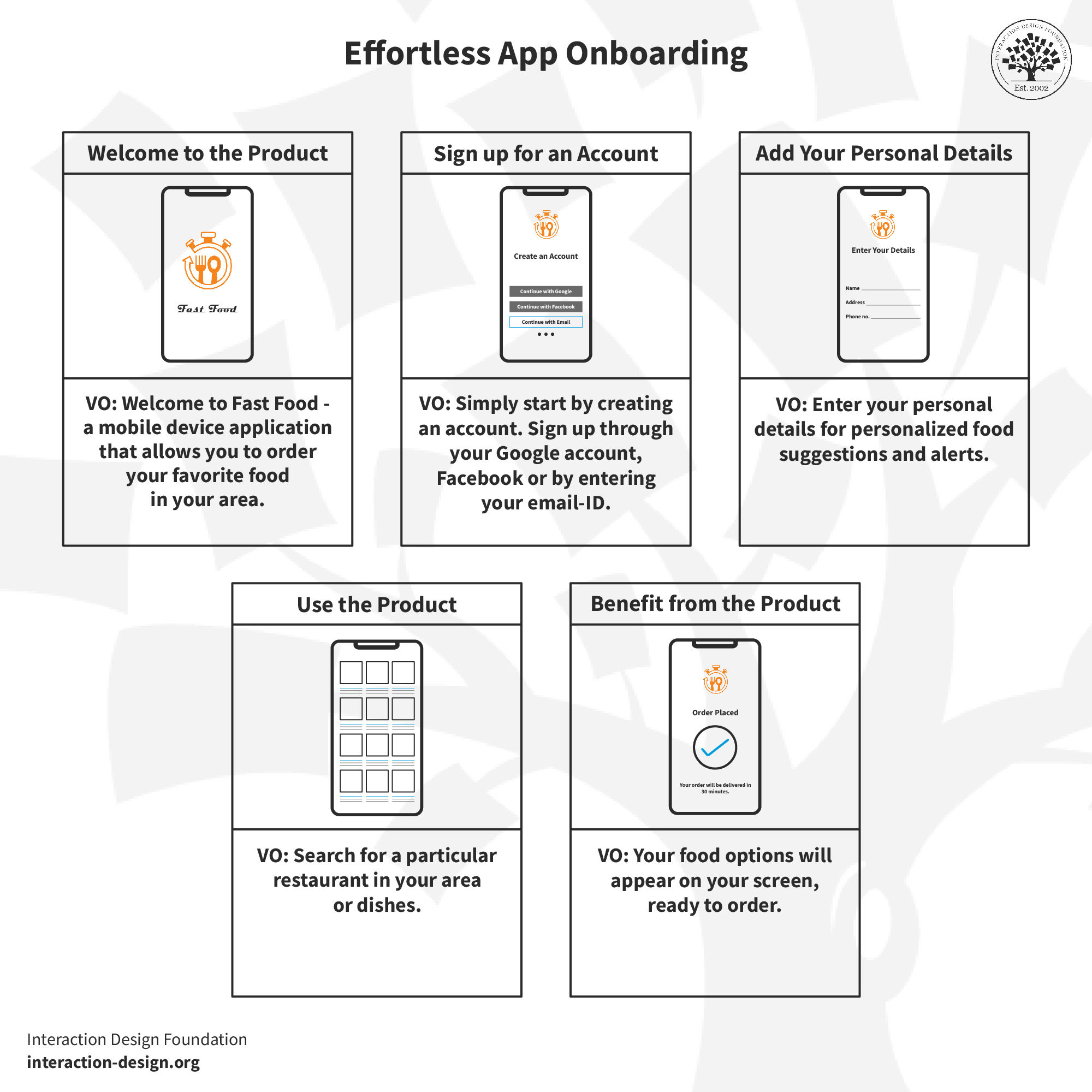
A storyboard for effortless app onboarding.

© Interaction Design Foundation, CC BY-SA 4.0

Best Practices for Effective Storyboarding 

Designers should keep these tips in mind: 

1. Utilize Real Data

It’s important to base storyboards on authentic data from UX research to be sure they accurately reflect user needs and behaviors. 

2. Focus on Clarity and Simplicity

While creating storyboards, make the narratives clear and simple to understand. Don’t overcomplicate the visuals or the storyline.  

3. Engage with Emotions

Use emoticons or expressive characters to depict the user's emotional journey as they go through the interaction. This helps build a stronger connection with the audience.  

4. Collaborate Iteratively

Involve stakeholders and users in the storyboard-creation process. This collaborative approach is something that helps to refine ideas and get the storyboard in line with user expectations and business goals.  

Considerations & Potential Risks of Storyboarding

Storyboarding in UX design is indeed immensely beneficial, but it does come with its own set of challenges and considerations. It’s vital for designers to understand these potential pitfalls—to craft more effective and user-centric storyboards.  

1. Time and Resource Constraints

To create detailed and effective storyboards is often a time-consuming process—one that can call for great amounts of resources. Designers must balance the depth and detail of storyboards with the practical constraints of project timelines and resources. This balance is crucial. It’s how designers can help make sure that storyboarding doesn’t become a bottleneck in the design process.  

2. Selection of Relevant Scenarios

It’s crucial to choose the most relevant and representative user scenarios to include in a storyboard. It requires a deep understanding of the target audience—and the specific context for the product’s use. To misjudge this aspect can lead to a disconnect between the storyboard and actual user needs. 

Professor Alan Dix explains user scenarios: 

Transcript
 

3. Balance of Detail and Fidelity

It can be challenging to find the right level of detail for a storyboard. Too much detail may lead to needless complexity. Meanwhile, too little can make the storyboard ineffective as a communication tool. Designers must carefully decide the fidelity of storyboards—whether they need to be high-fidelity with detailed illustrations or low-fidelity with basic sketches—to get the user journey across appropriately.  

4. Subjectivity and Interpretation Issues

The subjective nature of storyboards can lead to varied interpretations among different stakeholders. What one person perceives might differ from another's understanding. This can potentially lead to miscommunication—and a bad misalignment of project goals. When storyboards are clear and have descriptive captions, it can help mitigate this risk.  

5. Capture of Complexity

Another significant challenge is how able the storyboard is to capture the full complexity of user experiences. This is especially so in systems that involve multiple platforms or devices. To simplify these experiences into a storyboard can sometimes lead to oversimplification—where crucial nuances of user interactions might vanish.  

6. Ability to Handle Diverse User Scenarios

In multi-platform and multi-device products, it can be challenging to manage the diversity of user scenarios. Each platform may offer different user interactions, which need accurate representation and consideration in the design process.  

7. Prioritization for Testing and Validation

To determine which user scenarios to prioritize for testing and validation is another critical consideration. This decision impacts how effectively the storyboard can improve the final product—since it determines which aspects of the user experience to scrutinize and refine.  

William Hudson explains important points about usability testing in this video: 

Transcript
 

8. Measure of Impact

Finally, to measure the impact and success of storyboards in improving user experience is something that poses its own challenges. Unlike quantitative methods that provide clear metrics, the qualitative nature of storyboards makes it hard to assess their direct impact on the design's success.  

9. Balance of Business and User Needs

Storyboards must also run in line with both business strategy and user needs. This dual focus requires designers to constantly balance what’s best for the user with what’s viable for the business—so they can be sure that the final product is both user-friendly and commercially successful. 

Overall, storyboards are a valuable asset to any team’s design work. The insights they can show can be particularly useful in how they reflect how users come to use a successful product or service. 

Questions About Storyboards?
We've Got Answers!

What are the key components of a storyboard in UX design?

The key components of a storyboard in UX design are frames, annotations and the user’s journey. 

  1. Frames represent the visual part of the storyboard. They’re sketches or illustrations that depict the user interface at various stages of the user's interaction. Designers use these frames to visualize the flow and layout of a digital product. 

  2. Annotations are crucial as they accompany each frame to explain what goes on in the scene. This includes details about the user’s actions, thoughts and emotions. Annotations help stakeholders understand the context and reasoning behind each step in the interaction. 

  3. Lastly, the user’s journey outlines the path the user takes across the frames. It highlights the sequence of actions from the beginning to the end of a particular task. This journey showcases how the user progresses through the application—highlighting critical interactions and decision points. 

Take our Master Class Storyboarding 101: From Ideas to Narratives with Kay Carmichael, Storyboard Artist and Teacher. 

Transcript
 

Take our Design Thinking: The Ultimate Guide course. 

How detailed should a UX storyboard be?

The detail level in a UX storyboard should match the project's goals and the team's needs. 

For initial brainstorming, you can use low-fidelity storyboards. These are simple and focus only on the main steps of the user's journey. They usually include basic sketches and short annotations to highlight key interactions and decisions. This type helps teams quickly align on the concept before diving deep into specifics. 

For later stages, high-fidelity storyboards are more suitable. These contain detailed illustrations and comprehensive annotations—that describe the user's actions, emotions and the overall context in more thorough detail. They often include specific user interface (UI) elements, and are useful for guiding detailed design and development processes. 

Ultimately, the storyboard's complexity depends on its purpose. If it serves to communicate broad concepts to a non-technical audience, simplicity reigns. If it aids in detailed design or user testing, then complexity and detail are necessary. 

UX Strategist and Consultant, William Hudson explains brainstorming in this video: 

Transcript
 

Take our Master Class Storyboarding 101: From Ideas to Narratives with Kay Carmichael, Storyboard Artist and Teacher. 

Transcript
 

What tools do you need to create a storyboard for UX design?

To create a storyboard for UX design or use a UX storyboard template, you can choose from among several tools:  

  1. Sketching tools: Pencils, pens and paper are essential for freehand drawing. Designers use these for quick and easy sketches that form the basic frames of the storyboard.  

  2. Digital drawing tools: Software like Adobe Photoshop, Sketch or Illustrator helps in refining sketches or creating digital storyboards. These tools offer more precision and versatility in design.  

  3. Storyboarding software: Tools like InVision, Balsamiq or Storyboard That specialize in creating and organizing digital storyboards. They provide templates and elements that make it easy to construct a coherent narrative.  

  4. Collaboration tools: Platforms such as Miro or Figma facilitate teamwork by allowing multiple users to work on the storyboard simultaneously. These are particularly useful for remote teams.  

  1. Annotation tools: To add detailed annotations to your frames, you can use simple text editing features which are available in most digital drawing and storyboarding software. 

Take our Master Class Storyboarding 101: From Ideas to Narratives with Kay Carmichael, Storyboard Artist and Teacher. 

Transcript
 

What are the differences between storyboards and wireframes?

Storyboards and wireframes are both tools in UX design—still, they serve different purposes and present information differently. 

Storyboards show a sequence of events—demonstrating how users interact with a product. They tell a story about the user's journey, including their actions, emotions and changes in the scene. Storyboards help teams understand the user experience in a narrative form—something that’s useful for visualizing the flow and context of interactions. 

Wireframes, on the other hand, are static, low-fidelity sketches of individual screens. They focus on the layout, structure, and functionality of a page or interface, without detailed design elements like colors or images. Wireframes help designers organize the elements of a page clearly and communicate the functionality and hierarchy of a website or app to stakeholders and developers. 

In essence, storyboards give a dynamic, contextual overview of user interactions, while wireframes detail the specific elements and structure of individual pages in a more static and focused way. 

William Hudson explains wireframing in this video: 

Transcript
 

Read our piece, How to Create Wireframes: An Expert’s Guide

How do you incorporate user stories into a storyboard?

To do this, follow these steps: 

  1. Identify user stories: Start by picking user stories that describe the tasks and goals of your target users. These stories should outline what the users need to accomplish—and why. 

  2. Define key scenes: Break down each user story into key scenes or steps that the user must take. This process involves identifying the critical points in the story where interactions occur. 

  3. Sketch frames: For each scene, sketch a frame that visually represents the user interaction. These sketches should depict both the interface and the user's actions. 

  4. Add annotations: Beside each frame, write annotations to explain the user’s thoughts, actions and emotional state. This helps clarify the purpose of each interaction as well as how it connects to the user's goals. 

  1. Link the frames: Connect the frames in a logical sequence that matches the user's journey through the story. This flow will guide viewers through the storyboard and make the user's path clear. 

  2. Review and iterate: Finally, review the storyboard with your team or stakeholders. Make adjustments based on feedback so you more accurately reflect the user experience. 

UX Designer and Author of Build Better Products and UX for Lean Startups, Laura Klein explains user stories: 

Transcript
 

For more practical insights on working on agile teams, take the course, Agile Methods in UX Design

Transcript
 

What is the difference between a storyboard and a user journey map?

A storyboard and a user journey map both visualize the user experience, but they do differ in format and focus. 

A storyboard is a visual narrative that shows how a user interacts with a product through a series of images or sketches. It depicts specific scenarios involving the user—like completing a task or encountering a problem. Storyboards capture the sequence of actions, decisions and emotions of the user—often like a comic strip—to illustrate the flow of the experience. 

A user journey map, though, is a more abstract tool that outlines the various stages a user goes through when they interact with a service or product. It typically includes a timeline of the user's steps, their emotions, pain points and the touchpoints where they interact with the product. Unlike storyboards, user journey maps don’t usually contain detailed visual scenes. Instead, they provide a high-level overview of the user experience, highlighting key moments and transitions across the entire interaction. 

Take our Master Class How to Create Actionable User Journey Maps with Kelly Jura, Vice-President, Brand & User Experience at ScreenPal. 

Take our Journey Mapping course. 

Transcript
 

What are the common mistakes to avoid when creating UX storyboards?

When you’re creating UX storyboards, stay away from these common mistakes to make sure they’re effective:  

  1. Overcomplicated visuals: Keep the sketches simple and focused on key interactions. Overly detailed illustrations can distract from the main purpose of the storyboard—which is to communicate user experiences.  

  2. Ignores user’s emotions: Include how the user feels at various points in the journey. To neglect the emotional aspect can result in a design that doesn’t resonate with users.  

  3. Lacks clear annotations: Always provide clear annotations that explain what happens in each frame. This helps others understand the storyboard without their needing additional explanations.  

  4. Skips steps in the process: Make sure the storyboard covers all critical steps in the user's journey. Missing steps can bring about misunderstandings about how the final product should function.  

  1. Not testing with users: Validate the storyboard with actual users or stakeholders. This feedback can expose misunderstandings and give up insights that will help improve the design.  

  2. No iterations: After feedback, refine the storyboard. Often, the first version needs adjustments so it better meets the users’ needs. Avoid these errors and you can help make your storyboards clear, comprehensive and user-centered. 

Take our Master Class Storyboarding 101: From Ideas to Narratives with Kay Carmichael, Storyboard Artist and Teacher. 

Transcript
 

Take our Design Thinking: The Ultimate Guide course. 

What role do personas play in UX storyboarding?

Personas play a crucial role in UX storyboarding—they guide the design process to focus on the needs and behaviors of real users. A persona is a fictional character that represents a specific user type within a targeted demographic. Designers use personas to simulate the experiences of actual users. 

When designers work to create a storyboard, personas help make sure that the scenarios and interactions are realistic and relevant. They shed light to give a clear understanding of the user’s goals, challenges and preferences. This understanding influences how designers conceive and visualize user interactions within the storyboard. When designers consider the persona's background and needs, they can create more accurate scenes that reflect how real users would interact with a product. 

What’s more, when teams use personas in storyboarding, they help their members communicate ideas more effectively. Team members can better understand and agree on design decisions when they relate them back to the persona's needs and behaviors. This alignment is a vital step on the path to creating a user-centered design that enhances the user experience. 

Overall, personas make storyboards not only more user-focused but also more actionable and effective in guiding the design of a product that really does meet user expectations. 

Author and Human-Computer Interaction Expert, Professor Alan Dix explains personas and why they’re important: 

Transcript
 

Take our Master Class User Stories Don't Help Users: Introducing Persona Stories with William Hudson, Consultant Editor and Author. 

When should you use storyboards in the UX design process?

You should use storyboards in the UX design process primarily during two stages:  

1. Concept development: When you begin a project, use storyboards to visualize and explore different ideas for how users will interact with your product. This helps teams understand and agree on the direction of the design before any detailed work begins.  

2. User testing and feedback: Later, as you refine the concept, get your storyboards to communicate the planned user experience with stakeholders and test users. This lets you collect feedback on the proposed interactions and make necessary adjustments before you finalize the design. Storyboards are especially useful when the design process calls for a clear understanding of sequential user actions and emotional responses. They help everyone involved envision the complete context of user interactions—and make it easier to weed out potential issues and find opportunities for improvement.  

Overall, storyboards serve as a powerful tool for both conceptualizing initial ideas and validating them through user engagement—and to make sure the final product lines up well with users’ needs. 

Take our Master Class Storyboarding 101: From Ideas to Narratives with Kay Carmichael, Storyboard Artist and Teacher. 

Transcript
 

What are some creative ways to use storyboards in UX design?

In UX design, you can use storyboards creatively in several ways to enhance the design process as well as the final user experience. You can use them to:  

  1. Explore multiple scenarios: Use storyboards to visualize different user scenarios for the same feature. This approach lets you compare various user paths and choose the most effective one.  

  2. Stakeholder presentations: Present storyboards to stakeholders to provide a clear, visual explanation of proposed designs and interactions. This makes complex ideas more accessible and engaging; plus, it helps stakeholders make informed decisions.  

  3. Cross-functional workshops: Use storyboards in workshops with cross-functional teams to bring about better understanding and collaboration. This can spur innovative ideas and make sure all team members are on the same page regarding the user journey.  

  4. User testing: Utilize storyboards during user testing sessions to illustrate specific tasks or experiences. This can help participants understand their tasks better, and result in more accurate feedback. 

  1. Marketing and communication: Use storyboards to communicate the user experience to marketing teams. This helps them create more accurate campaigns that reflect the actual user journey and product benefits.  

Laura Klein explains the value of cross-functional teams: 

Transcript
 

Take our Master Class Storyboarding 101: From Ideas to Narratives with Kay Carmichael, Storyboard Artist and Teacher. 

Transcript
 

What are highly cited scientific articles about the subject of storyboards?
  1. Asgari, M., & Hurtut, T. (2024). A Design Language for Prototyping and Storyboarding Data-Driven Stories. Applied Sciences, 14(4), 1387.  

This publication introduces a design language for prototyping and storyboarding data-driven stories (DDS)—items that are becoming increasingly important in UX design. The authors propose a framework that consists of four main categories—expression, connection, narration and replication—with specific design rules to guide the ideation and implementation of DDS. This work has been influential in establishing a structured approach to incorporating storytelling into the UX design process.  

  1. Rasheed, Y. (2019). A Model-Driven Approach for Creating Storyboards of Web Based User Interfaces. Typeset.io.  

This publication has been influential in the field of storyboarding for UX design by introducing a model-driven approach to creating storyboards for web-based user interfaces. The authors present a framework that leverages the principles of model-driven software engineering to automate the development of evolutionary prototypes from initial requirements. This approach helps reduce the complexity of the storyboarding process by employing abstraction and separation of design from implementation. The paper demonstrates how this model-driven approach can streamline the creation of storyboards, making it a valuable tool for UX designers to effectively communicate and iterate on their design ideas. The integration of storyboarding and metamodeling techniques has the potential to enhance the efficiency and quality of the UX design process.  

  1. Peng, Q., & Martens, J. B. (2018). Requirements gathering for tools in support of storyboarding in user experience design. Typeset.io.  

This publication has been influential in the field of storyboarding for UX design by exploring the requirements and challenges that designers face when creating storyboards. The authors conducted an exploratory study to identify the main obstacles that design students encounter when using storytelling in their design process, and to explore ways to address such obstacles. The paper highlights the importance of storyboarding as a visual communication tool in UX design, while also acknowledging the limitations of traditional tools like pen and paper. The authors propose that digital tools are becoming increasingly popular, but still need improvement to better support the storyboarding process. This work has contributed to the understanding of the role of storyboarding in UX design and the need for more effective tools to facilitate the creation and use of storyboards. 

Earn a Gift Earn a Gift, Answer a Short Quiz!

1
2
3
4
1
2
3
4
Question 1
Question 2
Question 3
Get Your Gift
Interaction Design Foundation logo

Question 1

What is the primary purpose of a storyboard in UX design?

1 point towards your gift

  • To create a detailed technical specification
  • To generate design ideas through the use of comic strips
  • To visualize the user's journey through a product
Interaction Design Foundation logo

Question 2

How do storyboards help predict user experience?

1 point towards your gift

  • They create high-fidelity prototypes.
  • They focus on aesthetics, color scheme and copy only.
  • They imagine interactions and identify potential issues early.
Interaction Design Foundation logo

Question 3

How do storyboards improve communication in UX design?

1 point towards your gift

  • They eliminate the need for user research.
  • They provide technical documentation.
  • They visually communicate the user's journey.

Learn More About Storyboards in UX/UI Design

Make learning as easy as watching Netflix: Learn more about Storyboards by taking the online IxDF Course Design Thinking: The Ultimate Guide.

Why? Because design skills make you valuable. In any job. Any industry.

In This Course, You'll

  • Get excited when you discover that you don't need to start from scratch to use the secret recipes that empower companies like Apple and Google to shape the future. You just need a structure and proven methods to optimize what you already do. As AI becomes part of your day-to-day workflows, your ability to guide it with timeless human-centered skills such as strategic thinking, creativity, and empathy for real users is what turns AI into your superpower and delivers meaningful results.

  • Build on your existing creativity, problem-solving, and people skills to learn the powerful 5-stage method called Design Thinking. It's one of the key drivers behind Apple and Google's continuous innovation and provides a clear, structured way to solve real-world problems. You've already got the instincts, so it's easy to learn the method. 

  • Make yourself invaluable with hands-on skills in Design Thinking. Design Thinking can help you break into User Experience Design, product design, and tech. It's widely applicable, impactful, and fun! Use your skills to improve customer support processes, create new products, and even tackle big challenges like climate change. This human-centered approach is a key driver of business success because it guides you to systematically understand and address what your users really need and want. That's why Design Thinking skills can help you increase sales, keep customers loyal, and turn them into powerful advocates for your company.

  • Gain confidence and credibility as you effortlessly apply methods from all five stages of the Design Thinking process. You'll be guided to build empathy and gather insights into people's habits through user interviews. 

  • Use our downloadable templates to create affinity diagrams, empathy maps, and actionable "How Might We" questions. Develop solutions as you apply ideation and innovation methods. Create a paper prototype early and fast, then test and optimize your prototype to ensure that your users love it. More love, more impact, greater salary potential. 

  • Apply your new skills in an optional project where you'll design and test a user-centered experience that's perfect for your portfolio and career growth. Master Design Thinking to amplify your uniquely human strengths like empathy, intuition, and creativity, and confidently stay in demand as AI reshapes how teams work.

It's Easy to Fast-Track Your Career with the World's Best Experts

Master complex skills effortlessly with proven best practices and toolkits directly from the world's top design experts. Meet your experts for this course:

  • Don Norman: Father of User Experience (UX) Design, author of the legendary book “The Design of Everyday Things,” and co-founder of the Nielsen Norman Group.

  • Alan Dix: Author of the bestselling book “Human-Computer Interaction” and Director of the Computational Foundry at Swansea University.

  • Mike Rohde: Experience and Interface Designer, author of the bestselling “The Sketchnote Handbook.”

Get an Industry-Recognized IxDF Course Certificate

Increase your credibility, salary potential and job opportunities by showing credible evidence of your skills.

IxDF Course Certificates set the industry gold standard. Add them to your LinkedIn profile, resumé, and job applications.

Course Certificate Example

Be in distinguished company, alongside industry leaders who train their teams with the IxDF and trust IxDF Course Certificates.

Our clients: IBM, HP, Adobe, GE, Accenture, Allianz, Phillips, Deezer, Capgemin, Mcafee, SAP, Telenor, Cigna, British Parliament, State of New York

All Free IxDF Articles on Storyboards in UX/UI Design

Read full article
Introduction to the Essential Ideation Techniques which are the Heart of Design Thinking - Article hero image
Interaction Design Foundation logo

Introduction to the Essential Ideation Techniques which are the Heart of Design Thinking

Ideation is at the heart of the Design Thinking process. There are literally hundreds of ideation techniques, for example brainstorming, sketching, SCAMPER, and prototyping. Some techniques are merely renamed or slightly adapted versions of more foundational techniques. Here you’ll get an overview o

Social shares
1.2k
Published
Read Article
Read full article
5 Common Low-Fidelity Prototypes and Their Best Practices - Article hero image
Interaction Design Foundation logo

5 Common Low-Fidelity Prototypes and Their Best Practices

Low-fidelity prototypes allow us to quickly and inexpensively test ideas, so we can validate our hypotheses and improve our solutions. To maximize their effectiveness, it’s important for us to know which low-fidelity prototypes we should use, their pros and cons, as well as how to create them. Here,

Social shares
1.3k
Published
Read Article
Read full article
14 UX Deliverables: What will I be making as a UX designer? - Article hero image
Interaction Design Foundation logo

14 UX Deliverables: What will I be making as a UX designer?

What does a UX designer actually produce? Here, we will explore the concept of UX deliverables, a term that describes the outputs of a UX design process during its various stages. The deliverables produced by UX designers vary according to their role in the design team and also depending on the meth

Social shares
1.2k
Published
Read Article
Read full article
UX Storyboards: Ultimate Guide - Article hero image
Interaction Design Foundation logo

UX Storyboards: Ultimate Guide

In user experience design, we use techniques like workshops and interviews to understand users. We turn our research into user stories and process flows. We use personas and wireframes to share our ideas with our teams.But it’s important to remember the real people we design for. We need to know wha

Social shares
774
Published
Read Article
Read full article
Revolutionize UX Design with VR Experiences - Article hero image
Interaction Design Foundation logo

Revolutionize UX Design with VR Experiences

Is the future of user experience design (UX design) going to exist on screens or will it find immersive, three-dimensional spaces as its main home? You can design for both views—and interactions—within a digital environment that’s boundless in virtual reality (VR), so read on to find five fundamenta

Social shares
620
Published
Read Article

UX Storyboards: Ultimate Guide

UX Storyboards: Ultimate Guide

In user experience design, we use techniques like workshops and interviews to understand users. We turn our research into user stories and process flows. We use personas and wireframes to share our ideas with our teams.

But it’s important to remember the real people we design for. We need to know what happens in their lives. We must see how our product can improve their lives. And that’s where a UX storyboard can help us.

What is a UX Storyboard?

A UX storyboard is a visual tool—one that illustrates a user's experience with a product or service. Designers use storyboards to understand and address user needs as they move forward in the UX design process. Each one consists of sequences of drawings or images, and these sequences show a user's interactions with a product. They also portray the user's emotions and challenges—vital pieces of UX research to work with as the product develops.

The term “storyboard” refers to a visual organizer, and it shows the development of a sequence, shot by shot. The storyboard includes many panels—each of which holds illustrations or images. These visuals represent individual shots, and notes accompany each panel. They describe what happens in the scene and the script's dialogue. Walt Disney Studios developed the storyboarding technique in the 1930s. They used it to construct coherent stories—stories that became the animated films many people know and love.

Think of the UX storyboard in the same way. Each panel represents a step in the user's journey, and this tool helps designers empathize with users. It helps you create user-centered designs, too. For a design for any type of user, a storyboard is a valuable asset to provide digital product teams, product owners and other stakeholders who refer to it with a pertinent picture of a user flow or journey in action. With an effective visual representation, everyone can keep both a big-picture view of what’s going on and a high level of detail in each part of the sequence.

For example, a storyboard for a shopping app might show a user discovering a product. It then moves on to show the user purchasing the product and receiving it. Through this process, designers may find possible pain points and opportunities for improvement—so making a storyboard a valuable design tool.

Task Analysis—another method—focuses on observing user behavior. Watch Frank Spillers, CEO at Experience Dynamics, discuss this technique in more detail.

Transcript

Elements of a UX Storyboard

Three key elements of a UX storyboard: a specific scenario, visuals and captions.

© Interaction Design Foundation, CC BY-SA 4.0

A UX storyboard typically includes three key elements: a specific scenario, visuals and captions.

  1. Scenario: Each storyboard starts with a clear scenario or user story. Outline the persona involved at the top. Include a short, understandable text description of the scenario. This description sets the scene; plus, it makes the storyboard clear to team members or stakeholders. For instance, think about this scenario: "Fitness enthusiast John seeks a user-friendly app to track his daily workout routines."

  2. Visuals: Represent each step in the scenario visually, in sequence. The visuals can be sketches, illustrations, or photos. Pick the style based on your storyboard's purpose and target audience. These images should include relevant details—like the user's environment, speech bubbles, or sketches of the user interface they interact with.

  3. Captions: Accompany each visual with a caption. These brief descriptions cover the user's actions, environment, emotions and interactions. Keep captions concise since you have the image as the primary element. Limit them to two bullet points maximum.

Together, these elements form a UX storyboard. They serve as a visual tool that can communicate the user's journey effectively and reveal things that mightn’t be readily apparent otherwise.

The Role of Storyboards in Product Design

Storyboards greatly help product managers and designers. They're like comic books but intended for different purposes. A UX storyboard shows how users might use a product. It makes it easy to see how people interact with an app or service. This tool also helps to understand users' motivations.

In UX, storyboards map how users will use a product or service. They show each step a user takes. They help predict what might happen. Designers use them like Disney animators did. They help tell the story of the user and the product. This way, designers find problems in the user experience. They can then make it better. Better user experience directly enhances user satisfaction and engagement with a product.

Storyboards help designers share their ideas, too, and they make it easy to show thoughts in a way that's quick and clear. This helps teams work better together. Storyboards in product design turn ideas into real things, and they help make designs that focus on the user. This is a vital aid that leads to a better experience for the user.

The Benefits of UX Storyboards

UX storyboards are great for design—big helps that use storytelling to make user experience (UX) design better. Let's look at their main benefits.

The benefits of using UX storyboards

© Interaction Design Foundation, CC BY-SA 4.0

1. Clear Communication

Storyboards offer a swift and lucid way to share ideas. They use visuals—which our brains process quicker than text—and this is a quality that ensures quick comprehension across teams. It’s also something that leads to better teamwork, with everyone grasping problems and solutions rapidly.

2. Focus on the User

Storyboards are centered on users—a point that makes designers think from the user's point of view. Storyboards make the user's story interesting and easy to relate to, as well. This helps everyone care more about what the user needs in reality.

Good user stories define the user's needs and goals—and they make sure that the development team builds features that truly benefit the end user.

3. Save Time and Money

Storyboarding helps test ideas quickly. Designers can draw a quick storyboard to see if an idea works. From that, they can find out early if an idea is good or not. It stops wasting time and money on ideas that don't work.

4. Pictures Speak Louder

Images in a storyboard tell a stronger story than words can. They make it easier for people to understand and remember for longer, especially if they are not designers. Storyboards make people feel more connected to the story. They focus on real problems and situations, increasing empathy in the process.

5. Keep Ideas Visible

Storyboards make it easier to remember user stories and problems. They're like a quick picture of what's essential. Putting them up where everyone can see them keeps these ideas in mind.

When to Storyboard in UX Design

Storyboarding in UX design is helpful at many stages. This part explains when to use storyboards best.

1. Fuel the Ideation Process

Storyboards can help designers come up with ideas—often great ideas. They let designers sketch how users might use a feature. This helps understand the user's setting before a design team and development team start to build. Storyboards for ideation start conversations. They change as more real data comes in.

2. Guide Feature Prioritization and Team Alignment

Storyboards help show how users use apps. This can reveal a great deal and makes it easy to see which features matter most. What’s more, teams understand what is important together. For example, a storyboard for a login process can show what works for users and what frustrates them. This helps teams decide which features to focus on.

3. Integrate into the Design Lifecycle

Storyboards fit into many parts of the UX and product design process. They are good after researching and before solving problems. Storyboards turn research data into a story with pictures. This helps find main themes and user scenarios. It makes it easier to spot the right problems and think of solutions.

Obtaining relevant research insights forms the foundation for informed decision-making. Watch Alan Dix (Author, Professor and Researcher) discuss the difference between two research methods—qualitative and qualitative.

Transcript

As mentioned above, storyboards show how solutions might work in the ideation stage. Designers can see how well different ideas meet user needs. This is important before starting the design and building stages.

In the design phase, storyboards guide decisions. They keep the focus on what users need. When design teams look back at storyboards, it helps them stay in line with user needs while designing.

4. Transform Research Insights into Visual Stories

Storyboards can help to explain the results of research and usability testing—and they show how users interact with apps or websites. The use of visuals—instead of just text—makes summaries more engaging. Storyboards can include what users say and their body language, things that help designers to understand user experiences better.

5. Enhance Journey Maps

Storyboards add detail to user or customer journey maps. They show images of users at different stages using a product. Pictures of the user's device, workspace, and group settings help others feel more connected—something that gives a clearer view of the user's world and challenges.

Three UX Storyboard Examples

In UX design, storyboards illustrate how users interact with products. They highlight challenges and solutions in a user's journey. Here, we present examples of UX storyboards.

1. User Journey from App Download to Satisfaction

UX storyboard example showing user app download to satisfaction journey

© Interaction Design Foundation, CC BY-SA 4.0

The storyboard captures a user's journey while they’re engaging with a food app. It starts with the user seeing a commercial prompting them to download the app.

Feeling hungry, they download the app and place an order. As they wait, the app shows real-time updates. Meanwhile, they drive to the restaurant—with their appetite and expectations.

Post-order, the app sends a survey, which the user completes. As a thank-you gesture, the app delivers an e-coupon to their inbox. The final frame also shows the user happy with the food through a smile emoji. It indicates a successful and rewarding user experience.

2. Invite a User Made Simple

UX storyboard example showing user invite journey 

© Interaction Design Foundation, CC BY-SA 4.0

This storyboard shows a clear path for inviting a new user to a platform. It begins on the landing page. A user taps a share link, and then the screen slides to the left and shows the invite screen.

The focus here is on ease and clarity. The invite screen includes a field to type in an email address, with no extra animation. It's straightforward—type, invite, done.

When the user adds and saves an email, the storyboard takes them to an updated list. A new user's name fades in to show they've joined. This subtle animation confirms the action without fuss.

Then, the user goes back to the main screen. The storyboard closes the loop, and the user returns to the landing page. It's a smooth slide back to the start.

This example shows the power of a clean, simple invitation process. The creator keeps it easy with clear steps and minimal distractions getting in the way. It shows that a good design helps users confidently complete tasks without their getting confused.

3. Effortless App Onboarding

UX storyboard example showing app onboarding

© Interaction Design Foundation, CC BY-SA 4.0

The third storyboard illustrates a user's onboarding journey for a mobile app. The first screen welcomes users to the app designed to find free food locally. The storyboard's simplicity is something that ensures the user knows the app's purpose.

Next, the user signs up for an account where they get three options to Sign up—Google, Facebook or with their email. It’s a quick, two-field form—no clutter, no hassle. This simplicity keeps users engaged and not overwhelmed by the process.

Next, the app asks for more personal details. These include the name, address and phone no. This info helps the app include more personalization to the user’s journey.

The storyboard then shows the app in use. The users can see multiple restaurant options available to them. They can quickly find a suitable restaurant and place their order. This quick success shows the app's value right after sign-up. Last, the app completes the process with the “Order Placed” screen. It shows the exact wait time for the order delivery, too.

This example shows the effectiveness of a clear, step-by-step onboarding process. The creator made each step purposeful and straightforward. They ensure the user sees immediate value and knows how to deepen their engagement with the app.

Your Step-by-Step Guide to UX Storyboarding

An effective UX storyboard is something that requires careful planning, the right data, and collaboration to narrate the user's journey visually. So, in this section, we’ll walk through the fundamental steps in creating a storyboard that brings the user's story to life.

Steps to create a UX storyboard

© Interaction Design Foundation, CC BY-SA 4.0

Step 1: Define the Goal

Before you draw the first box of your storyboard, you’ve got to know where you're heading. Ask yourself: What do you want to achieve? Are you mapping out a new feature or exploring a user's journey through your app? It’s vital to be clear about things here—your goal could range from resolving a specific user issue to presenting a new product idea.

Set a specific, actionable goal to guide your storyboard creation most effectively. This step makes sure that your process remains focused and pertinent. It’s vital to document your goal and communicate it with your team for initial alignment. A precise goal maintains the storyboard’s direction and ensures you take purposeful actions at—and for—every step.

Step 2: Collect and Synthesize Data

You've got a wealth of sources for data collection—including user research, interviews, usability testing, and site metrics. You don't need to use all of them, though. Pick the most relevant sources that will inform your storyboard effectively. Conduct thorough user research, engage in insightful interviews, perform detailed usability tests, and analyze your site metrics to make sure the data you collect is robust.

Once you've collected this data, synthesize it so you can uncover the core user insights. This synthesis will help you understand user motivations and struggles, as well as their success moments. It tells you what users do and—vitally—why they do it. You can craft a storyboard that resonates with real user experiences this way.

Performing this step early sets a strong foundation for your storyboard. It ensures that a solid, user-centered ground backs up the story you'll tell. This makes it a reliable reference to turn to throughout the design process.

Step 3: Choose a Fidelity level

Determine the storyboard's fidelity based on its purpose and the intended audience.

  • Use simple sketches or sticky notes for internal team discussions. This method facilitates brainstorming and lets you make easy modifications. It supports collaborative creation and the flexibility to adjust sequences.

  • Create detailed illustrations for client presentations or deliverables using tools like Adobe Illustrator or Sketch. This higher-fidelity approach is one that yields a polished and refined visual.

Focus on clarity and effectiveness, not over-finessing visuals. Select the fidelity that best conveys your story and is well in line with the storyboard's goals.

Step 4: Create a Persona and Scenario

A persona and scenario ground your storyboard in reality. It ensures the story resonates with actual user experiences.

Personas help you understand and address users' specific behaviors, needs and contexts. Alan discusses how to create effective personas in UX design.

Transcript

  • Create a fictional yet realistic persona that represents your target user. Draw from research data to make this persona detailed and authentic. Include behaviors, preferences, and needs. This persona becomes a key figure in your storyboard. It guides the story's direction.

  • Next, it’s vital to develop a scenario for your persona. This scenario is a specific situation where the persona interacts with your product. So, describe the setting—is it at home, in an office, or on the go? What are the other important contexts of use? Is it a noisy office? Are there distractions at home? Detail the challenges and objectives the persona faces. What are they trying to achieve with your product? What obstacles do they encounter?

This step helps you empathize with users and design solutions that meet their needs. It brings great focus to your storyboard.

Step 5: Sketch the Story Steps

Sketch each step of the persona's journey in the scenario.

  • Start with the initial problem or need for a service.

  • Show critical actions as they engage with your product.

  • Include essential moments of interaction, decision-making and the outcome.

  • Use simple drawings or stick figures for clarity.

Aim to clearly and visually represent the user's journey, and make it both understandable and sequential. This step turns conceptual ideas into tangible visuals. It lays out the user's path clearly and methodically.

Step 6: Add Annotations

Write short notes underneath each picture. Explain what's happening and why the user feels a certain way. This makes the storyboard tell a better story—and be that much more relatable. It helps everyone understand not only what the user does, but how they feel as well. Keep these notes clear but short. They should give just enough information to get the point across.

Here’s an example of John:

  1. Faces a Problem: John struggles to track his daily fitness routine.

  • Annotation: John struggles with manual fitness tracking and seeks a better alternative.

  1. Discovers the Product: He finds your fitness tracking app online.

  • Annotation: Intrigued, John stumbles upon the app while searching for fitness solutions.

  1. Initial Use: John downloads the app and starts to input his fitness data.

  • Annotation: John easily inputs his data. He expects positive changes.

  1. Engages with Features: He explores features like setting goals and tracking progress.

  • Annotation: John uses a goal-setting feature. He appreciates its ease and usefulness.

  1. Experiences Benefits: John sees improvements in his routine and feels motivated.

  • Annotation: John notices a tangible improvement in his fitness routine and overall well-being.

  1. Recommends to Friends: Satisfied, he recommends the app to his friends.

  • Annotation: Happy with his progress, John shares the app with friends, confident it can help them too.

This storyboard with John shows the steps of the emotional journey plus the reasoning behind each action. It provides a deeper understanding of the user experience.

Step 7: Present the Storyboard

Present the storyboard to your team, stakeholders, or clients. Choose a format that suits your audience.

  • For internal teams, a casual walkthrough might suffice.

  • For clients or major stakeholders, consider a more formal presentation.

Explain each step with a focus on the user's journey, emotions and the story's flow. It’s important to encourage feedback and discussions. This presentation provides an opportunity to align everyone's understanding and collect those all-important insights for improvements.

Remember, the storyboard acts as a communication tool. So, make sure it conveys the intended message and user experience.

Step 8: Iterate and Refine

After you present the storyboard:

  • Gather feedback and insights.

  • Use them to refine your storyboard.

  • Look for areas that need clarification or improvement.

  • Adjust the visuals, emotions, or annotations as needed.

This iterative process will help you hone the storyboard into an effective tool. It ensures the final version accurately represents the user experience and meets the project's goals. Refine the storyboard until it resonates with all stakeholders and guides the design process in the best way.

References and Where to Learn More

Read the Forbes article that shares insights on best practices for great UX features on a website. Learn how to visualize your website as a storyboard. 

Marli Mesibov takes a real-life example of an app she helped to build in 2017 and explains five steps you can use to help you build a story into your user experience.

Find helpful insights about visual storytelling in Visual storytelling for UI-UX design with examples.

Feel Stuck?
Want Better Job Options?

AI is replacing jobs everywhere, yet design jobs are booming with a projected 45% job growth. With design skills, you can create products and services people love. More love means more impact and greater salary potential.

At IxDF, we help you from your first course to your next job, all in one place.

See How Design Skills Turn Into Job Options
Privacy Settings
By using this site, you accept our Cookie Policy and Terms of Use.
Customize
Accept all

Be the One Who Inspires

People remember who shares great ideas.

Share on:

Academic Credibility — On Autopilot

Don't waste time googling citation formats. Just copy, paste and look legit in seconds.