Project Management

Your constantly-updated definition of Project Management and collection of videos and articles.
Be a conversation starter: Share this page and inspire others!

788 Shares

What is Project Management?

UX (user experience) project management combines traditional project management techniques with UX design principles so design teams can create digital products that meet and exceed user expectations. UX project managers oversee the process of improving user experience across digital platforms, like websites, apps or other applications that need user interaction.

Author and Human-Computer Interaction Expert, Professor Alan Dix explains important points about creativity including in project management design:

Transcript

Why is UX Project Management Important?

UX project managers have a diverse set of responsibilities—and these span various aspects of the product development and service development lifecycle that are involved in the overall project, where managers:

1. Oversee User Experience

Project managers manage the user experience of digital products and focus on user engagement and interaction as well as user and customer satisfaction.

2. Coordinate Teams

Project managers harness the skills of user interface (UI) and UX designers, creative teams and marketing departments to carry out work on everything from the planning phase, research, ideation of potential solutions and iterations of these. They also take project execution in hand and spearhead digital campaigns, plus keep efforts optimal regarding project deliverables to complete the project and achieve maximum success beyond launch.

3. Develop Strategies

Project managers create strategies to combine the skills of all disciplines that go into creating a user experience. UX project managers make sure to make the best strategies so that design objectives align with business goals and user needs throughout the project lifecycle.

4. Conduct Research and Analysis

A typical approach to project management is to lead user research and analysis efforts—which include interviews, surveys and usability testing—and it’s a crucial part of a manager’s role.

UX Strategist and Consultant, William Hudson explains important points about user research:

Transcript

5. Implement a Project Methodology

Managers use effective project management methodologies—like Waterfall or Agile methods—to guide their teams’ project.

UX Designer and Author of Build Better Products and UX for Lean Startups, Laura Klein explains important points about Agile design:

Transcript

6. Keep Communication Channels Open

It’s vital that managers keep open communication channels going with the whole team and stakeholders. They need to facilitate excellent, real-time collaboration between various creative professionals and bridge the gap between designer and developer communications.

Laura Klein explains important points about cross-functional collaboration:

Transcript

7. Manage Resources

UX project managers oversee resource allocation, task delegation and goal setting. They define realistic roadmaps and the project timelines it needs. What’s more, they assign tasks to the right team members.

8. Handle Risk Management

A project management foundation is for managers to implement corrective actions with contingencies when things don't go according to plan and manage project risks effectively.

9. Keep a High Level of Quality Assurance

As managers oversee the entire process, they help maintain the quality of the final product from their heightened perspective. They make sure that a brand’s web design, for example, really is enjoyable, interactive and user-friendly.

One point to highlight in particular is how management here is the crucial overarching force behind brands that create digital products that don’t just meet technical requirements but provide the best possible user experience, too. However, UX project manager jobs are hands-on, as the role calls for a proactive force to lead from the front and help gel the various teams and stakeholders together. It’s a job description that combines the analytical aspects of project management with the creative elements of UX design, so that the products—or services—that a design team, development team and other departments involved have to show for their efforts are both functional and user-friendly.
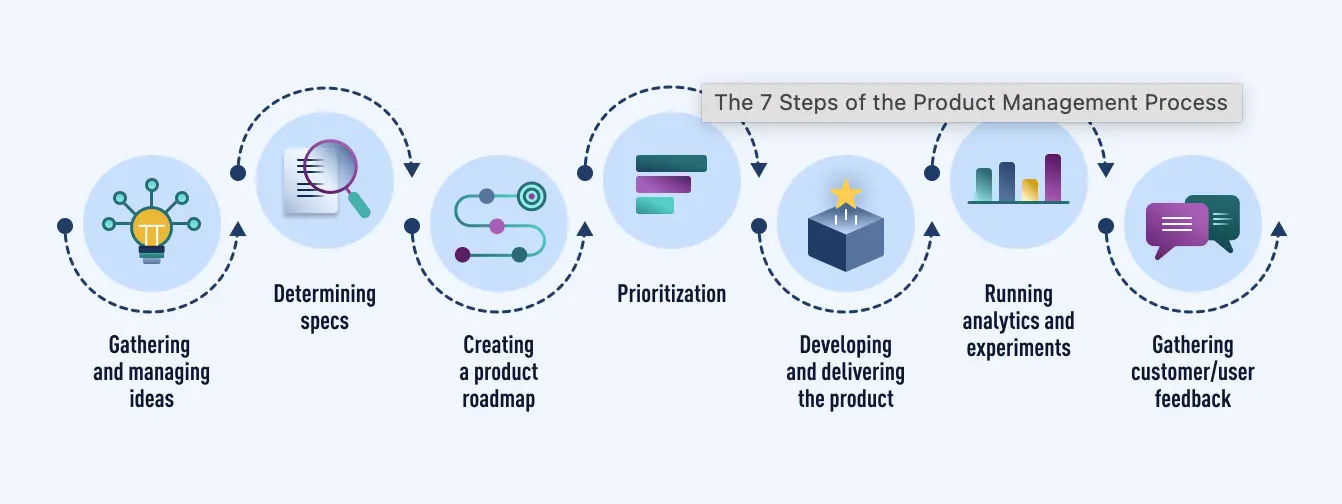
A diagram of a product management work process.

This example is of a product manager’s work process—one form of project management.

© User Experience, Fair Use

What Are Essential Skills for UX Project Managers?

UX project managers need a diverse set of skills to excel in their roles. These skills broadly fall into the categories of technical skills and soft skills—both of which are crucial for success, whether traditional approaches or an Agile approach are involved, for instance.

Technical Skills

UX project managers must possess a range of technical skills if they’re to effectively lead projects and teams. It’s a key point that means UX designers who are proficient in their work have a head-start if they want to transition to become UX project managers—and here are main areas:

1. Visual Design and UI Design

It’s vital for managers to have a solid understanding of visual design principles—including color theory, typography and layout. Their proficiency in the principles as well as design software is a fundamental part of what allows UX project managers to create and evaluate visual elements of a product.
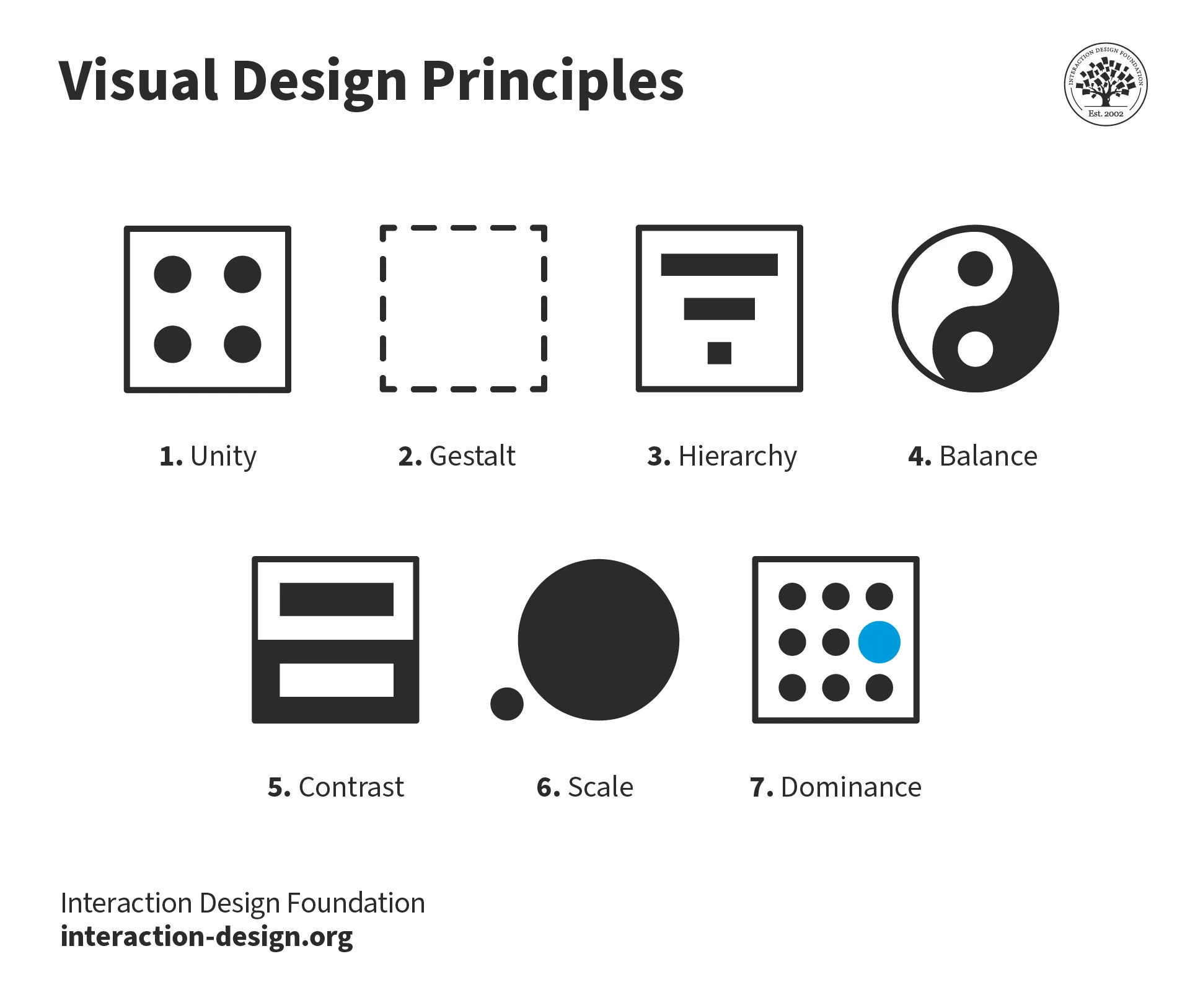
A diagram showing seven visual hierarchy elements: Unity, Gestalt, Hierarchy, Balance,  Contrast, Scale and Dominance.

© Interaction Design Foundation, CC BY-SA 4.0

2. User Research and Analysis

How able a manager is to plan, conduct and analyze findings from various research methods is critical. This includes user testing and analytical research to understand user needs and behaviors.

UX Strategist and Consultant, William Hudson explains key points about analytics:

Transcript

3. Information Architecture (IA)

Another vital area for UX project managers to be adept in is to organize information in an understandable way. This skill applies to websites, apps software—and even physical spaces—and involves systems like labeling, navigation and search functions.

William Hudson explains important points about information architecture:

Transcript

4. Wireframing and Prototyping

It’s a fundamental skill for managers to be able to create wireframes and prototypes. Wireframes serve as blueprints for interfaces—the early foundations on which to build strong ideas and shape effective architectures.
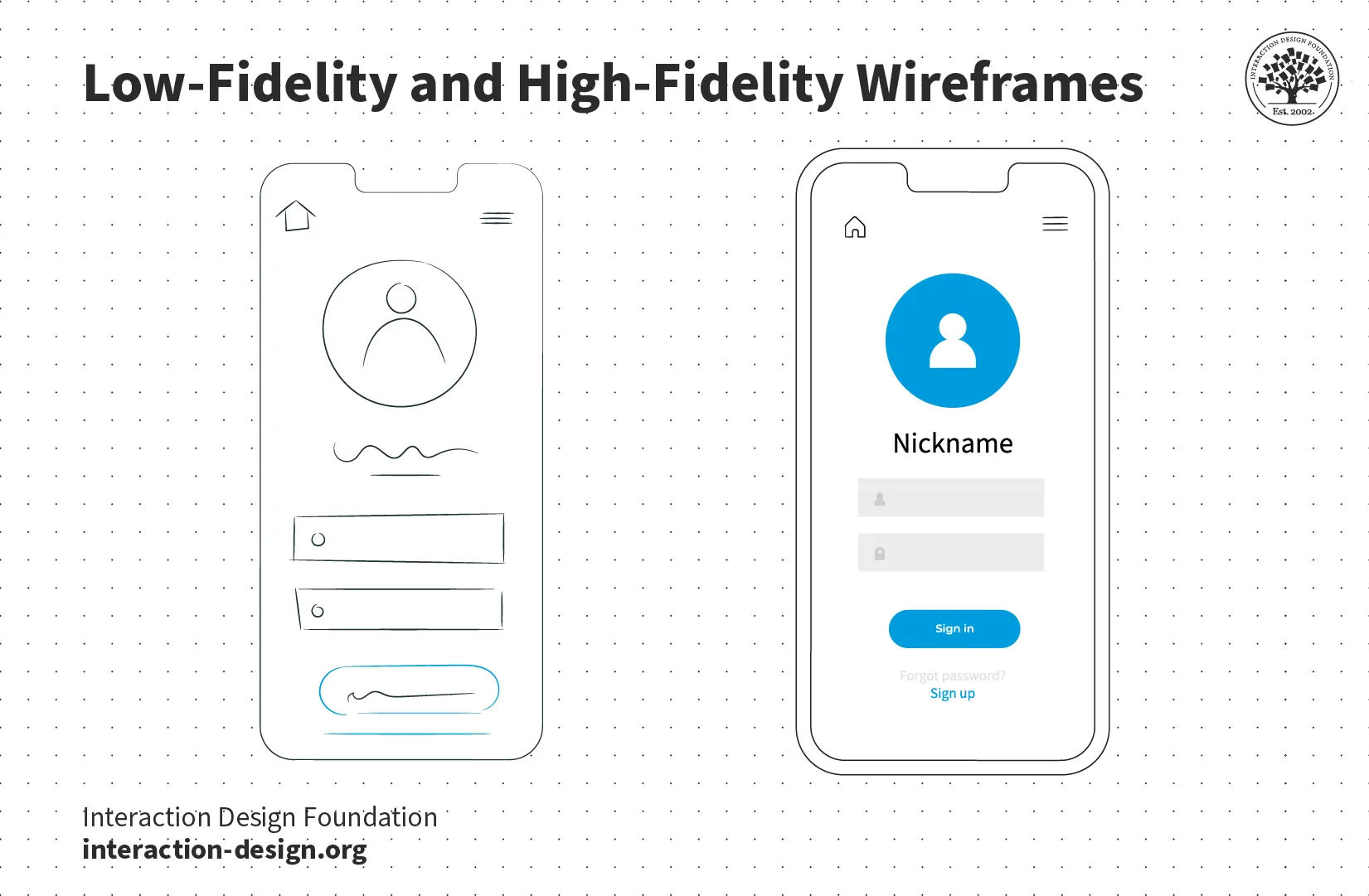
An illustration of two wireframes: low fidelity and high fidelity.

© Interaction Design Foundation, CC BY-SA 4.0

Meanwhile, prototypes let teams test functionality before their efforts channel into final product development.

Author and Human-Computer Interaction Expert, Professor Alan Dix explains essential information about UX prototyping:

Transcript

5. Agile Methodology

A deep and solid understanding of Agile project management practices is valuable for managers to have. That’s because many software development teams use this iterative approach. Project managers often head up Agile teams.

6. Application Development Basics

While UX project managers aren't expected to code, a basic understanding of languages like JavaScript, CSS and HTML can be beneficial when they’re communicating with developers.

Co-founder of Hype4, Szymon Adamiak explains ways to communicate better with developers:

Transcript

Soft Skills

Alongside their technical skills, UX project managers need to cultivate a strong set of soft skills so they can lead teams effectively and make sure project success is on point for the brand and its target users:

1. Communication and Presentation

Strong communication skills are essential ingredients for managers to know what goes into doing user research, presenting designs to stakeholders and collaborating with team members.

Author, Speaker and Leadership Coach, Todd Zaki Warfel explains important aspects of how to communicate with stakeholders and clients:

Transcript

2. Collaboration

UX project managers frequently work with various teams and personnel. These include leadership, UI designers and developers. So, they need to be able to collaborate effectively as they help direct things to keep everyone on point for project success.

3. Leadership

As project leaders, UX project managers need to guide their teams, make decisions and take responsibility for project outcomes.
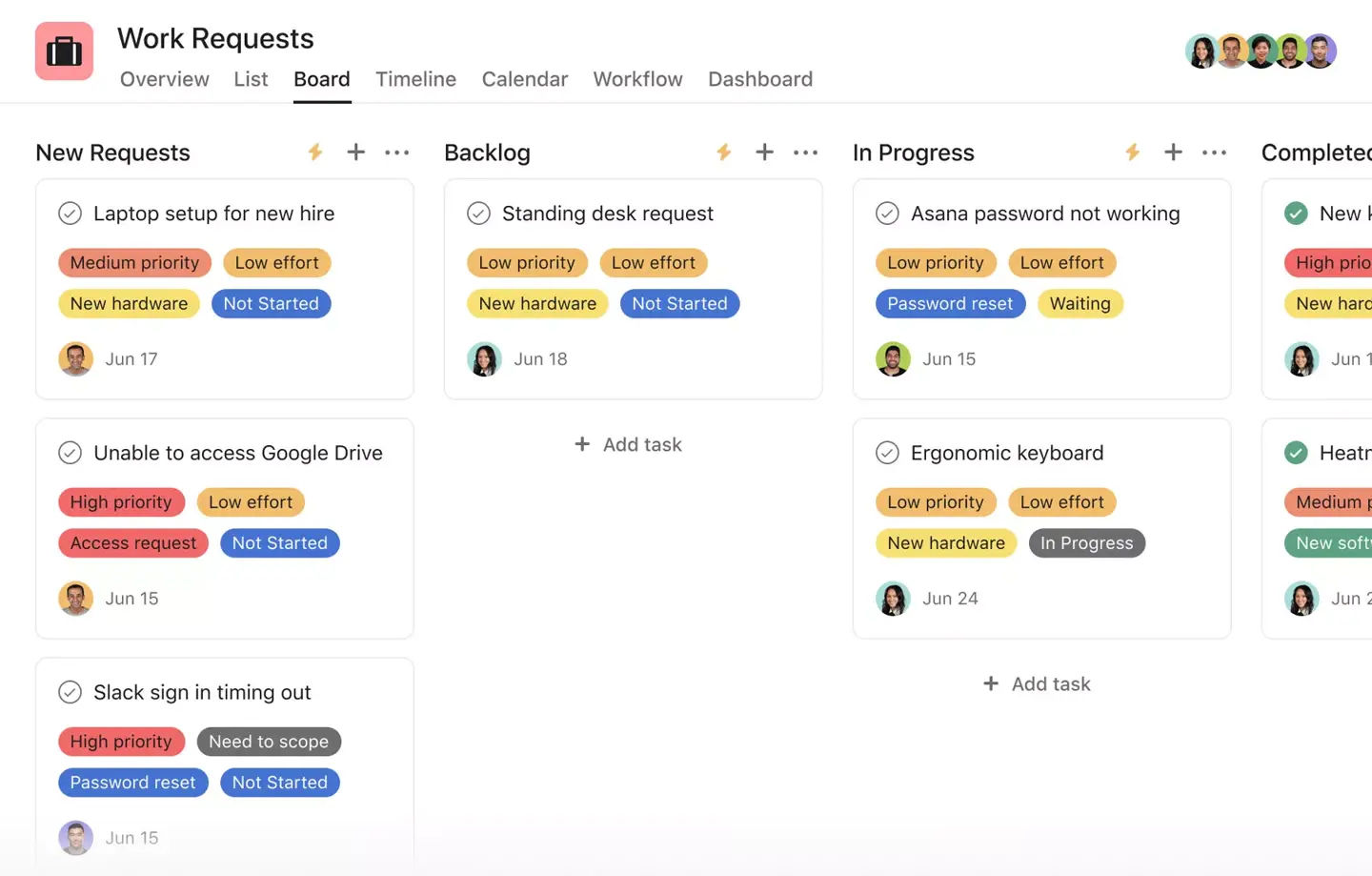
An image showing work requests on a collaboration team board.

Managers need to stay aware of and be proactive about who’s handling what.

© Julia Martins, Fair Use

4. Problem-Solving and Critical Thinking

Managers often have to think on their feet as they move between teams—the ability to analyze complex situations, identify issues and develop creative solutions is vital in UX project management.

Author and Human-Computer Interaction Expert, Professor Alan Dix explains vital points about the Six Thinking Hats approach, a handy tool to solve problems with for managers and others:

Transcript

5. Adaptability

UX projects can experience many twists and turns as realities unfold—over everything from budget to team issues. So, managers need to be flexible and able to adjust to changing project requirements or unexpected challenges.

6. Time Management and Organization

To manage multiple projects or aspects of one project demands excellent time management and organizational skills.

7. Conflict Resolution

With so many team members and others involved in a project, personalities and preferences might well come into conflict sooner or later. So, it’s vital that an effective project manager be able to navigate and resolve conflicts, be it within teams or with stakeholders.

8. Awareness of Responsibilities and Legal Requirements

As leaders who represent the brand at the design and development levels, UX project managers need to have a deep understanding of those essential ingredients that design solutions need to do well in the marketplace—including the legal ones. For example, that’s why accessibility is so important for project managers to ensure becomes part of each design project.

Watch our video to understand more about accessible design and why it’s crucial:

Transcript

What Are Some UX Project Management Frameworks?

UX project managers use various frameworks to guide their work and make sure their teams and brands can enjoy successful outcomes with what they produce for their target audience. Three popular frameworks in UX project management are Agile, Waterfall and Lean UX. Each framework has its unique approach in how to manage projects and deliver truly user-centered designs.

1. Agile

Agile UX combines Agile software development with UX practices. This framework places UX specialists within Agile software teams and creates a culture that values the UX process. Agile emphasizes individuals and interactions over processes and tools—something that lets teams respond flexibly to business needs.

Key features of Agile UX include:

  1. Teams carry out UX work ahead of development sprints.

  1. UX specialists analyze short- and long-term solutions.

  1. UX specialists lead activities to nurture good collaboration.

  1. Established processes keep a tight focus on user-centered design.

Common Agile frameworks include Scrum and Kanban.

UX Designer and Author of Build Better Products and UX for Lean Startups, Laura Klein explains essential points about Kanban boards:

Transcript

2. Waterfall

The Waterfall methodology is a linear project management approach that software developers more or less “inherited” from the construction and manufacturing industries. In this framework, managers split project tasks into phases that follow a sequential order—much like a waterfall—where teams complete sections of work and then pass it on.

A typical Waterfall process consists of five to seven phases:

  1. Requirements gathering

  1. Design (logical and physical)

  1. Implementation

  1. Verification

  1. Maintenance

The Waterfall approach is adaptable to incorporate UX activities within the project lifecycle. UX managers can see that designers conduct user research, create information architecture and perform usability testing at various stages of the process.

Waterfall works best for smaller projects with fixed budgets, release dates and scopes. It's suitable for applications that don't need frequent updates, too.

3. Lean UX

Lean UX’s focus is on the experience that’s under design and not so much the deliverables themselves. Lean’s core objective is to collect feedback as early as possible so the insights can come to help with quick decision-making.

Lean UX principles include to:

  1. Implement a design system or component library.

  1. Decouple front-end and back-end code.

  1. Establish a user research practice.

  1. Use OKRs (Objectives and Key Results).

Lean UX works well in Agile development environments, where teams execute work in rapid, iterative cycles. This approach lets teams plug the data they’ve generated into each iteration so they can use it most effectively.
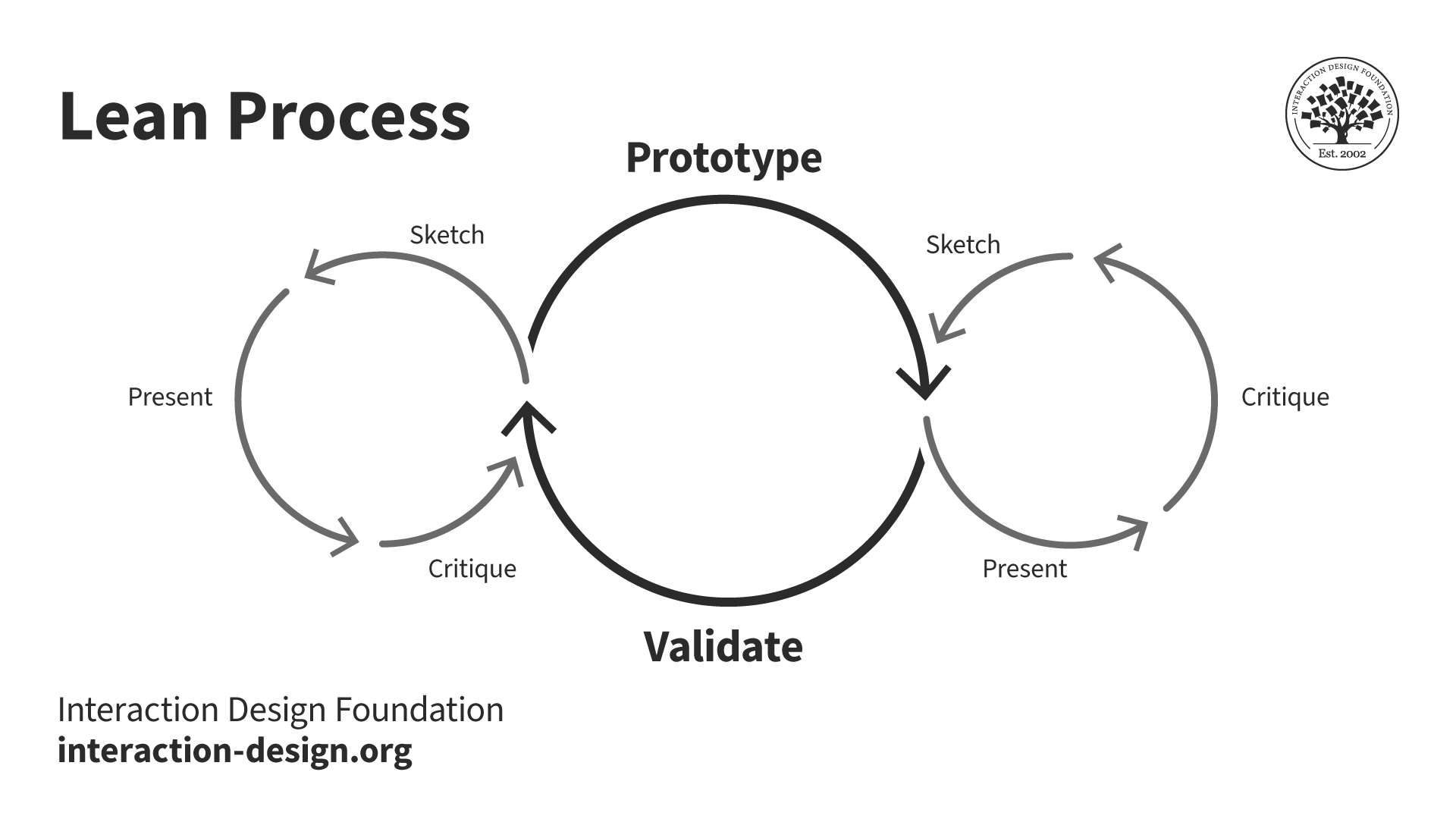
A diagram showing the Lean process.

© Interaction Design Foundation, CC BY-SA 4.0

Each of these frameworks offers unique advantages for UX project management. The choice of framework depends on the project's specific needs, team structure and organizational culture, so UX project managers need to understand such frameworks if they’re to pick the most appropriate approach for their projects and adapt them as they need to make sure the best outcomes happen.

What Tools Do UX Project Managers Need?

Effective UX project management relies on a combination of tools that enable collaboration, design, prototyping, user testing and higher aspects of management. The most important tools split into two main areas, to help across various stages of UX projects:

1. Project Management Tools

Project management tools help make a blueprint and keep everyone on the same page with a big-picture view. Several popular project management tools help design leads manage big projects with multiple team members and stakeholders effectively. For example, Gantt charts can be extremely helpful. Without such tools, it would be hard to manage a UX project—rather like trying to build a house without a blueprint.
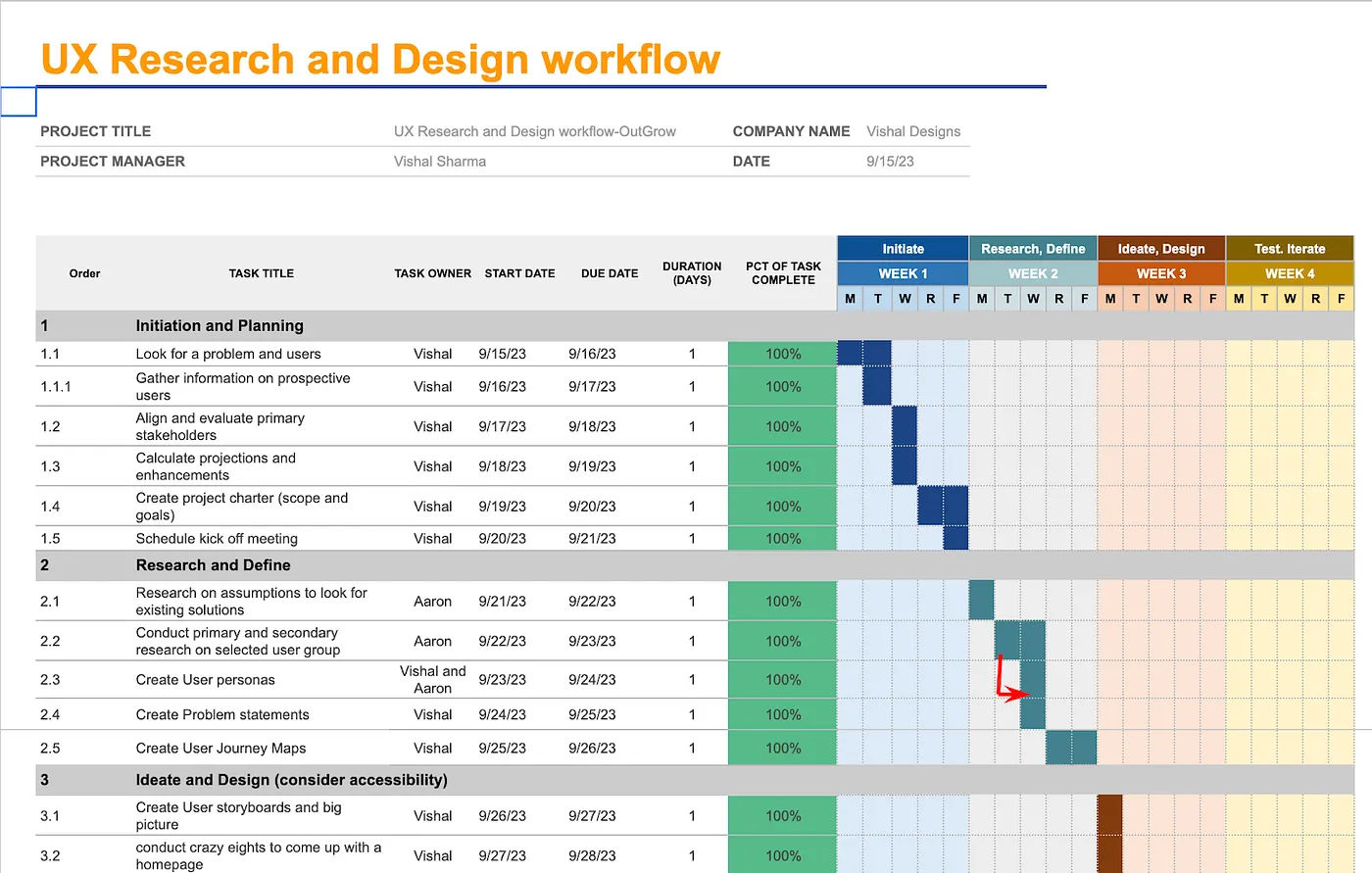
This is an image of a workflow titled UX Research and Design workflow.

This workflow captures what’s going on in a project.

© Vishal S, Fair Use

2. Design and Prototyping Tools

Prototyping is a crucial part of the UX design process—it lets design teams create interactive visuals for user testing and stakeholder review. Most prototyping tools don't require coding experience, so they’re highly accessible to designers of all skill levels. Managers need to know the tools of their trade here. Many tools offer various features to enhance the design process—like animation libraries and solutions for creating design systems. Each tool is unique and suited to meet different needs, so designers can find the perfect fit for their projects and managers can be satisfied that the design team’s efforts can be even more on-point as a result.

How Can UX Designers Transition to Become Project Managers?

UX designers typically can strengthen their case to move into UX project management roles if they:

  1. Gain experience: It’s helpful to have 3-5 years of UX design experience—working on diverse projects and collaborating with cross-functional teams—and even more so to lead small projects or initiatives within their designer’s role.

  1. Develop project management skills: It’s wise to get familiar with project management methodologies like Agile, Scrum or Waterfall and even think about obtaining certifications such as PMP (Project Management Professional) or PRINCE2.

  1. Boost leadership abilities: Designers should work on how they practice effective communication, team management and conflict-resolution skills—hence why it’s wise to take on mentoring roles or lead design workshops.

  1. Broaden knowledge: It’s helpful to understand the business side of UX—including budgeting, resource allocation and stakeholder management—and keep a finger on the pulse of industry trends and emerging technologies.

  1. Pursue relevant education: Designers can think about pursuing advanced degrees in design management, business administration or project management to complement their design background.
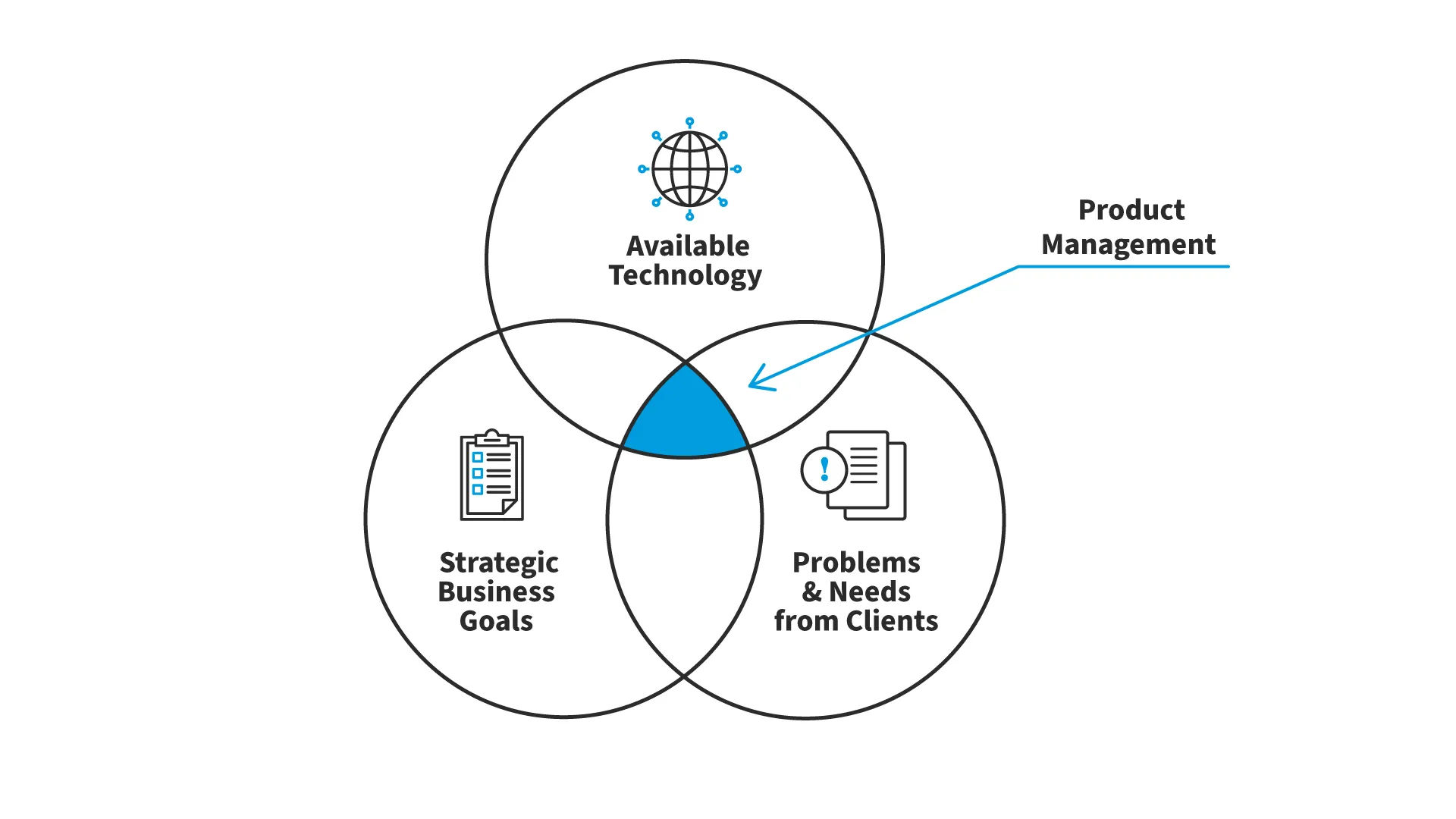
A Venn diagram featuring three circles, Strategic Business Goals, Available Technology and Problems and Needs from Clients,  showing where product management fits in in the intersection of all three.

This is one aspect of project management in UX design—how best to manage a product calls for a fusion of areas.

© Joca Torres, Fair Use

  1. Network and seek mentorship: It’s helpful for designers to connect with UX project managers in their industry to get both valuable insights and potential opportunities.

  1. Optimize their UX portfolios: Portfolios are essential vehicles both for designers to apply for design work and to transition into project management if they choose.

Design Director at Societe Generale CIB, Morgane Peng explains vital points about design portfolios:

Transcript

Designers who want to become project managers should understand how they present their portfolio is a design challenge in itself. If they can show a full understanding of what went into the design projects they worked on, they’ll prove a grasp of UX project management that can help them stand out as candidates and serve them well in the new managerial roles they might win.
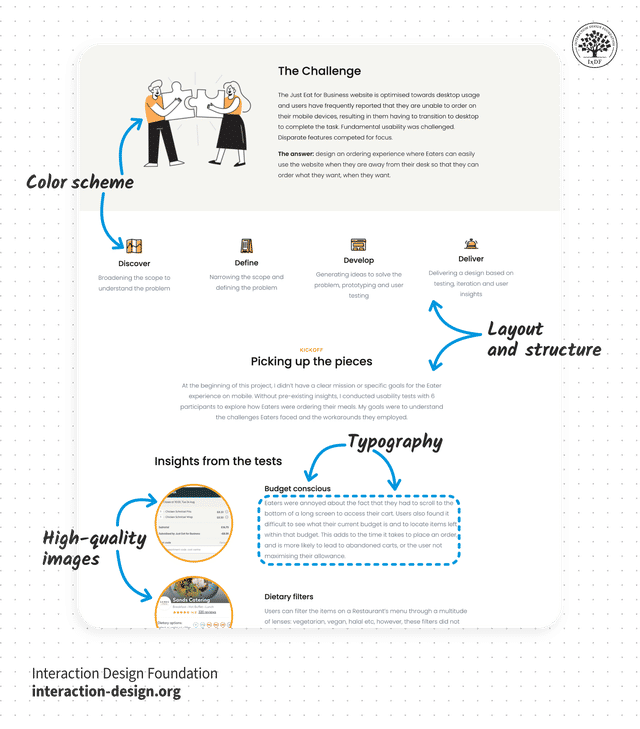
An illustration showing proper page structure in a document.

Designers should consider how they present their design work can translate into how they might present project management work to stakeholders.

© Interaction Design Foundation, CC BY-SA 4.0

Portfolios are a chance to showcase a well-rounded appreciation for what goes into a design project—including management processes and metrics or KPIs (key performance indicators). Designers who can prove their skill sets in research, collaboration, managing or handling clients or stakeholders, prototyping and other areas—and do it from a vantage point that exhibits a managerial point of view—will be much more likely to stand out as potential UX project leaders. That’s why it’s essential to show what went into each case study, for example, and not just the end results. Potential employers want to get a deep understanding of the thought processes that tackled challenges to reach that happy ending—a usable, desirable digital solution or service that can stand tall in the marketplace.
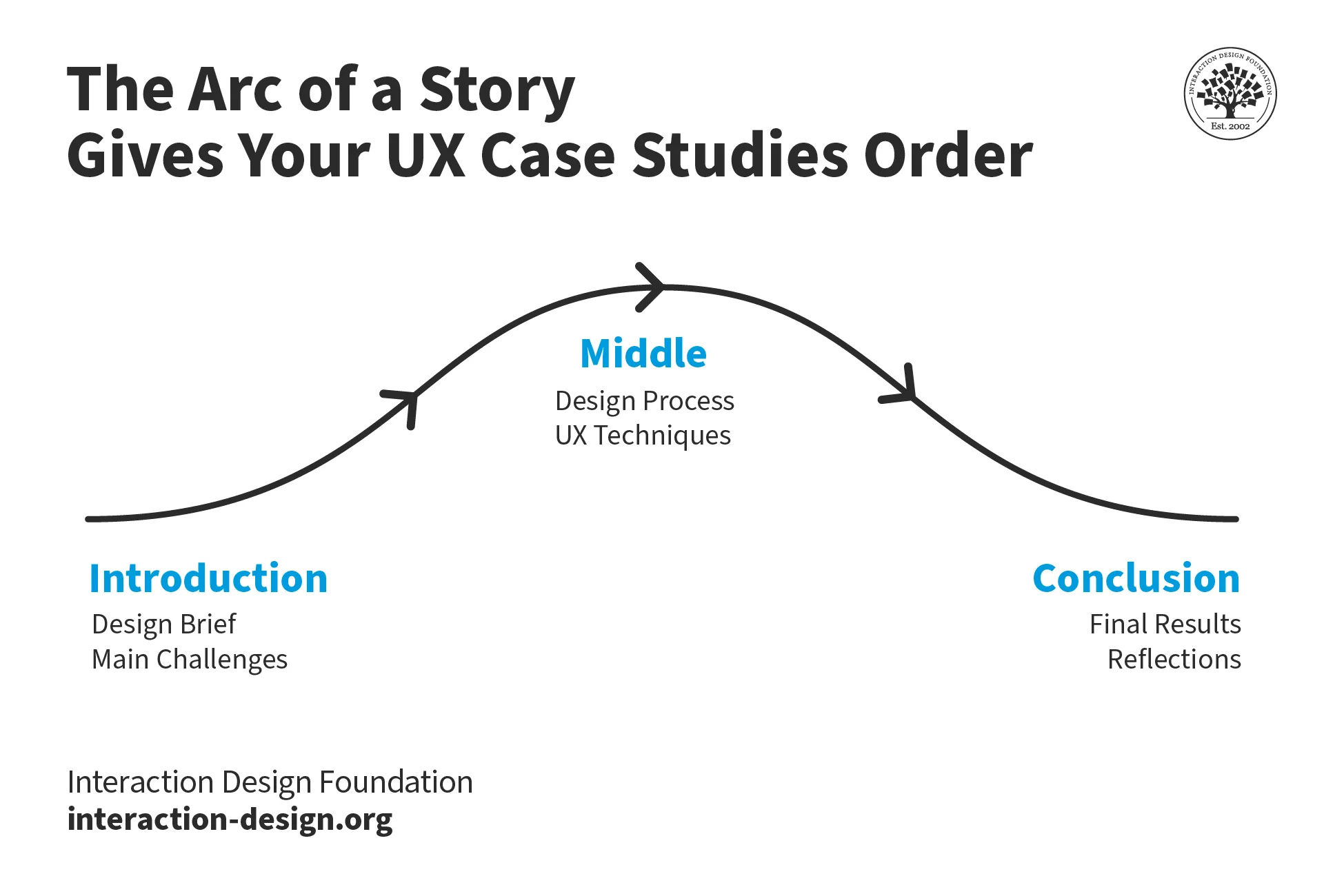
A diagram showing the story arc approach to case studies.

© Interaction Design Foundation, CC BY-SA 4.0

What Are Potential Pitfalls for UX Project Managers?

UX project managers might well need to handle challenges that can derail even the most promising projects. Here are some common ones:

  1. Scope creep: It’s vital to clearly define project scope from the outset and implement a change management process to keep project boundaries from expanding too far.

  1. Poor communication between team members and stakeholders: Regular check-ins and transparent reporting are among the ways to keep healthy communication channels open.

  1. Neglect for user research: It’s a critical mistake—one that can lead to products that fail to meet user needs and then fail utterly in the marketplace. It’s critical therefore to prioritize user testing and feedback throughout the development process—to make sure the final product really resonates with its intended audience.

William Hudson explains important points about usability testing:

Transcript

  1. Lack of stakeholder buy-in: This can massively hinder progress, too, and it’s crucial to engage stakeholders early and often and show them the value of UX decisions to get their support and manage their feedback effectively.

Design Director at Societe Generale CIB, Morgane Peng explains essential points about feedback:

Transcript

Overall, UX project management is the guiding force that helps teams both to meet user needs and business goals and to stay on point through the design and development process. UX project managers oversee the entire process—from user research and design to implementation and testing—while they coordinate teams and resources as effectively as possible.

Management at this level is a demanding role but one that—as long as project managers perform their duties well—ensures the best decisions channel through all teams and parts of the process. When this happens, everyone involved in a project can be more likely to stand back after the brand releases their combined work and feel just as delighted as the users in their target audience will be.

Questions About Project Management?
We've Got Answers!

What's the average salary of a UX Project manager?

A UX Project Manager typically earns between $80,000 and $120,000 annually in the United States, but the exact salary depends on factors like location, experience and the size of the company. The project manager vs UX designer salary is a question that extends to those with more experience or specialized skills in UX design and project management, as they can command higher pay, too. To bolster your earning potential, consider getting certifications or expanding your expertise in both UX and management to get more on the managerial side in the project management vs UX design money question. 

Check out our piece, Transition into a UX Career: Top Insights for additional points. 

How do I start a UX project?

First, define your goals and understand the problem you want to solve. Do research to collect as much information as possible about your users and their needs. Next, create user personas and journey maps to visualize your findings. Then, brainstorm and sketch ideas with your team—focusing on solutions that address user pain points. Develop wireframes and prototypes to test your concepts. Last—but not least—gather feedback from real users, iterate based on that feedback and refine your designs. A clear plan and strong user focus are key to a successful UX project. 

UX Strategist and Consultant, William Hudson explains important points about UX research: 

Transcript
 

How can I set realistic timelines for a UX project?

To start, break the project down into key phases like research, design, prototyping and testing. Estimate how long each phase will take based on the project's complexity and your team's experience—and factor in extra time for unexpected issues, revisions and feedback. Talk to your team to get their input and adjust your estimates as needed. Always build in some buffer time to handle delays without rushing; it’s only good—and fair—project management for designers and everyone else involved. Plan carefully and stay flexible, and you can set timelines that will really keep the project on track without overwhelming your team. 

Watch our Master Class, Design KPIs: From Insights to Impact with Vitaly Friedman, Senior UX Consultant, European Parliament, and Creative Lead, Smashing Magazine. 

Author and Human-Computer Interaction Expert, Professor Alan Dix explains important and helpful advice regarding time management: 

Transcript
 

How do I manage a UX project budget?

To start, list all your costs, including research, design tools, team salaries and any external resources like freelancers or software—and be sure to prioritize essential expenses and allocate funds with that firmly in mind. Track spending regularly—and if you notice any overspending, adjust your plans or reallocate funds from less-critical areas. Communicate with your team about the budget—so no unpleasant surprises arise—and it will make for more informed decisions, too. Keep a small reserve for unexpected costs. Overall, if you monitor your budget closely and make adjustments wisely, you’ll be able to manage your project finances well and help stay on track—and target—for success in design, project management and much more. 

Watch our Master Class, Design KPIs: From Insights to Impact with Vitaly Friedman, Senior UX Consultant, European Parliament, and Creative Lead, Smashing Magazine. 

CEO of Experience Dynamics, Frank Spillers explains key points about a related topic, return on investment (ROI), which is helpful for managers to consider: 

Transcript
 

How do I communicate with stakeholders in a UX project?

To start, understand their goals and concerns. Keep your updates clear and focused on how the design supports business objectives—being sure to use simple language and visuals like wireframes or prototypes to make complex ideas that much easier for them to grasp. Schedule regular meetings to share progress and get their feedback—and be sure you listen to their input and address their questions. You’ll need to be fully transparent about any challenges or changes—and, vitally, always explain the reasoning behind your design decisions. Clear, consistent communication builds trust and makes sure that everyone stays aligned throughout the project. Last—but not least—keep calm, courteous and organized. To stay organized and open to change is a particularly vital foundation; project management can be more efficient and effective that way, and stakeholders will be more likely to trust in your efforts. 

 Watch our Master Class, Win Clients, Pitches & Approval: Present Your Designs Effectively with Todd Zaki Warfel, Author, Speaker and Leadership Coach. 

Transcript
 

What should I do if a UX project is falling behind schedule?

If a UX project starts to fall behind schedule, first assess the situation to identify the cause of the delay. Prioritize tasks by focusing on the most critical ones that impact the project's success. Communicate the issue to your team and stakeholders—immediately—so everyone is aware and can contribute to solutions. Adjust the timeline if you have to, but consider reallocating resources or streamlining certain processes to make up time, too. Stay flexible and open to making tough decisions—like cutting non-essential features. From taking proactive steps and keeping everyone informed, you can get the project back on track. 

Author and Human-Computer Interaction Expert, Professor Alan Dix explains important and helpful advice regarding time management: 

Transcript
 

Watch our Master Class, Design KPIs: From Insights to Impact with Vitaly Friedman, Senior UX Consultant, European Parliament, and Creative Lead, Smashing Magazine. 

What are some highly cited scientific articles about project management in UX design?

Mara, A., & Jorgenson, J. (2015). Mutt Methods, Minimalism, and Guiding Heuristics for UX Project Management. International Journal of Sociotechnology and Knowledge Development, 7(3), 38-48.  

This publication has been influential in the field of UX project management by proposing a flexible and tailored approach to managing UX projects. The authors recognize that UX is a multifaceted discipline with diverse perspectives and approaches—all united by a focus on the user. Instead of adhering to a single project management methodology (such as Agile, Lean, or Waterfall), they argue for a more adaptable approach that can be customized to the specific demands of each UX project. 

The paper introduces four key heuristics to help UX teams narrow their focus and determine the most appropriate project management approach: project scope, project agents, evaluation timing and evaluation criteria. By addressing these four areas, UX teams can better identify which project management techniques and genres will be most effective for their specific goals. 

Unger, R., & Chandler, C. (2012). A Project Guide to UX Design: For User Experience Designers in The Field or in The Making (2nd ed.). New Riders. 

A Project Guide to UX Design by Russ Unger and Carolyn Chandler has been highly influential in the field of UX design and project management. This comprehensive guide provides practical insights for both novice and experienced UX designers—offering a structured approach to managing UX projects from start to finish. The book covers a wide range of essential topics, including project planning, user research, information architecture, prototyping and working with stakeholders. 

The book's influence stems from its ability to bridge the gap between theoretical UX knowledge and its application in professional settings. It offers actionable strategies and techniques that designers can immediately implement in their work. Its comprehensive coverage of UX design topics has made it a staple in many UX education programs and professional development reading lists. 

Earn a Gift Earn a Gift, Answer a Short Quiz!

1
2
3
4
1
2
3
4
Question 1
Question 2
Question 3
Get Your Gift
Interaction Design Foundation logo

Question 1

How does project management primarily help designers in a project?

1 point towards your gift

  • By reducing the need for stakeholder communication.
  • By organizing tasks to meet deadlines and objectives.
  • By allowing designers to avoid budget constraints.
Interaction Design Foundation logo

Question 2

What is a common pitfall in project management that can lead to project delays?

1 point towards your gift

  • Overestimating resource availability.
  • Ignoring the client’s feedback.
  • Spending too much time on stakeholder engagement.
Interaction Design Foundation logo

Question 3

Why is stakeholder management important in project management?

1 point towards your gift

  • It helps to avoid unnecessary expenses.
  • It ensures that all parties are aligned with the project’s goals.
  • It reduces the need for project documentation.

Learn More About Project Management

Make learning as easy as watching Netflix: Learn more about Project Management by taking the online IxDF Course Build a Standout UX/UI Portfolio: Land Your Dream Job.

Why? Because design skills make you valuable. In any job. Any industry.

In This Course, You'll

  • Get excited when you discover the secret to a portfolio that fast-tracks your way to job offers. Did you know most hiring managers decide on your application in just 7.4 seconds? In today's competitive job market, first impressions are everything

  • Learn to build a career where you fulfill your potential and earn a salary that reflects your true value. Your design portfolio is your ultimate advocate. It speaks for you when you're not in the room. In this course, you'll get real-world insider insights from an expert who's reviewed thousands of portfolios. Take the course and build the career you're truly meant for.

  • Make yourself invaluable when you learn how to hook hiring managers with your problem-solving mindset, user-centered design approach, and business acumen. We know how frustrating it is to apply for job after job with no response. As AI makes it easier to generate generic portfolios and case studies, you stay in demand by clearly showing your timeless human-centered design skills: How you think, make decisions, and solve real problems. This User Experience/User Interface (UX/UI) portfolio course gives you the skills to finally stand out from the pack. Whether you're new to design or already experienced, you'll turn your past work experiences into portfolio gold and create a portfolio they love! No matter your background, it's easier than you think.

  • Gain confidence and credibility with our step-by-step blueprint for a portfolio that gets you hired faster into a role where you'll fulfill your purpose and increase your salary potential. Through hands-on projects and ready-to-use downloadable templates, you'll develop a winning portfolio strategy, write attention-grabbing hooks, present your portfolio with confidence, and master the first impression formula. You'll walk away with a pitch-ready UX/UI design portfolio you can use to land your dream job.

It's Easy to Fast-Track Your Career with the World's Best Experts

Master complex skills effortlessly with proven best practices and toolkits directly from the world's top design experts. Meet your expert for this course:

  • Morgane Peng: Designer, speaker, mentor, and writer who serves as Director and Head of Design at Societe Generale CIB.

Get an Industry-Recognized IxDF Course Certificate

Increase your credibility, salary potential and job opportunities by showing credible evidence of your skills.

IxDF Course Certificates set the industry gold standard. Add them to your LinkedIn profile, resumé, and job applications.

Course Certificate Example

Be in distinguished company, alongside industry leaders who train their teams with the IxDF and trust IxDF Course Certificates.

Our clients: IBM, HP, Adobe, GE, Accenture, Allianz, Phillips, Deezer, Capgemin, Mcafee, SAP, Telenor, Cigna, British Parliament, State of New York

All Free IxDF Articles on Project Management

Read full article
The Pareto Principle and Your User Experience Work - Article hero image
Interaction Design Foundation logo

The Pareto Principle and Your User Experience Work

There are two things that are always in short supply on any project; time and money. The Pareto Principle can, in the long-term, help you save both. It can also help you make intelligent decisions based on your user research. Our story begins with a Management Consultant Joseph M Juran back in the

Social shares
805
Published
Read Article
Read full article
Feature Creep, the Bane of Our Existence - Article hero image
Interaction Design Foundation logo

Feature Creep, the Bane of Our Existence

If you’re ever tempted to answer the question; “How long will it take before this is ready?” with “How long is a piece of string?” then it’s likely that your projects are suffering from feature or scope creep. UX designers, project managers and freelancers alike need to be able to either resist or a

Social shares
631
Published
Read Article
Read full article
Making Your UX Life Easier with the MoSCoW - Article hero image
Interaction Design Foundation logo

Making Your UX Life Easier with the MoSCoW

If you’re stuck trying to move a project forward because it seems like there are too many things to concentrate on then the MoSCoW method may help you get unstuck. It’s a prioritization technique which is easy to learn and simple to apply. It can also help you decide what’s really valuable for your

Social shares
824
Published
Read Article
Read full article
Stakeholder Maps - Keep the Important People Happy - Article hero image
Interaction Design Foundation logo

Stakeholder Maps - Keep the Important People Happy

Every project in every business has its stakeholders. These are people who are not necessarily working on the project but have an objective to meet from the outcome of the project. Stakeholders can be internal to the company such as the CEO or the Marketing Manager and they can be external to the co

Social shares
818
Published
Read Article
Read full article
How to Get Meaningful Design Feedback from Your Clients - Article hero image
Interaction Design Foundation logo

How to Get Meaningful Design Feedback from Your Clients

Meaningful design feedback is essential to the collaborative and iterative design process, and it’s equally important for UX/UI designers, graphic designers, product managers and most creative professionals. However, getting design feedback from clients can be one of the most painful aspects of the

Social shares
679
Published
Read Article
Read full article
Why Should Designers Become Leaders? - Article hero image
Interaction Design Foundation logo

Why Should Designers Become Leaders?

Are you excited to do good for humanity? Would you like to help solve the world’s biggest problems such as climate change, hunger and eliminate excess waste? If yes, that’s a good start. But what happens when you get ignored? Because you will most likely get ignored, because designers most often are

Social shares
414
Published
Read Article

Transition into a UX Career: Top Insights

Transition into a UX Career: Top Insights

Today’s world relies on technology more than ever. Think about it: we use apps to order food, websites to book travel and smart devices to control our homes—and how we interact with these technologies has become a massive part of our daily lives. And the winds of change keep blowing as yet more sophisticated products continue to emerge to keep up with tech advancements and users’ expectations. User experience (UX) design is about creating technology that’s easy and enjoyable to use—and it’s the way to get behind this “wind” and guide users as well as steer brands to heightened levels of satisfaction and success. Now’s a great chance to understand how to get into a career where you design products and services that work in user-friendly ways—in the IxDF UX Careers: Set Yourself Up for Success Master Class.

You might think UX design is an exciting career opportunity—and you're not alone. Indeed, it's a fast-growing field that’s filled with many opportunities to create digital experiences that people love and keep coming back for more. Even so, maybe you’ve got a few doubts—and perhaps they’re these:

  • Where do I even start?

  • What skills do I need?

  • What kind of jobs can I get?

If you're passionate about making technology easier to use, more enjoyable to experience for people and more meaningful for them too, then UX design could be your perfect career. To help you out, we'll discuss the basics of UX design and provide you with the key insights you’ll need to start your journey, and rest assured that you'll find valuable information here whether you're a complete beginner or have some design experience.

Is a Career in UX Right for You? 

An image of a person looking at a laptop screen.

The answer is—it depends. You see, UX isn't just one job; it’s a whole world of different roles, with different focuses and levels of experience needed. You can find UX designers at work in almost any industry—from tech giants like Google and Apple, to startups, non-profits and government agencies; they’re pretty much everywhere.

And the potential for a career in UX is huge—and you’d not be wrong to wonder if there’s ever been a better time to flourish in this kind of career. While products and services are nothing new in general as concepts, the nuances and fineries of them in a 21st-century context certainly are. With ever-newer ways of addressing both long-existing user needs and ones that have emerged in response to more-recent developments, businesses and organizations have got to understand how important it is to create products and services that people enjoy and use more easily whatever their situation. What that translates to is a growing demand for skilled UX designers.

But it's not just about design skills and pleasing—or delighting—users and consumers. To be a great UX designer, you’ve got to understand the stakeholders' requirements, too; you must balance what users want with business objectives.

So, if you enjoy solving problems and want to create seamless digital experiences that resonate both with a brand’s target audience and to the tune of maximum success for the brand, then a career in UX design might be the perfect fit for you.

What Does a UX Designer Do?

An image of three people with notes on papers.

Realistically speaking, UX designers wear many hats. Even so, don’t worry; things may be wide-ranging—and include how web designers focus on visual elements in interface designs—but their main goal is to create products and services that are easy and enjoyable to use. That said, they still have to understand user requirements—in depth—and it’s something that calls for a great deal of collaboration.

"UXer be strong, be wild, ask a million questions if required. Why, why and more why."

— Pavitra Sirse Tandon, UX Manager, Smartbox Group

Here's a quick peek at some of the things UX designers do:

  • Conduct research through interviews, surveys and observations.

  • Create user flows and journey maps to visualize interactions.

  • Sketch ideas, create wireframes and build interactive prototypes.

  • Work closely with developers and stakeholders, as well as with other designers.

  • Prioritize usability and user satisfaction throughout the design process.

This is just a snapshot of what a UX designer does. The tasks and responsibilities can vary based on the company, industry and the designer's experience level.

The Fields of User Experience

If you want to create user experiences that truly delight and soar high above mere user expectations, then the world of UX offers many avenues to explore. There are four main fields—each one with its specializations and roles you can take on. This is exceptionally good news as it means you can tailor your UX career to your interests and strengths and fine-tune a fine career.

  1. UX Designer

  2. UX Researcher

  3. UX Writer

  4. UX Prototyper

Good content complements a good UX design. You can play around with words and make the design stand out. Watch Torrey Podmajersky (Author, Speaker and UX Writer) explain how to get into UX writing.

Transcript

Each field offers a range of specializations and career paths. For example, a UX designer might specialize in visual design, interaction design or information architecture. A UX researcher, meanwhile, might focus on qualitative research, quantitative research or usability testing.

The beauty of UX is that it's a growing field—if not a blossoming one that will stay in full bloom. And, as time goes on and cutting-edge tech soon blends into everyday expectations and as people find new ways to access things that make life simpler, more delightful—not to mention less stressful—you'll always see new roles and specializations emerge and, amid them, find something new to learn and explore. Whether you're a creative problem solver, a data-driven analyst or a writer with a knack for user-friendly copy, have no fear—there's a place for you in the world of UX design.

Your Progression into a UX Design Career

An image of a person standing behind a laptop screen with three other people in front of it.

Here's a roadmap to guide your first steps toward a UX design career. Understand how you can progress from someone with no or next-to-no knowledge of the industry to being skillful in the extreme.

1. Hone Your Craft (and Build a Strong Foundation)

Before you jump into the job hunt, it's crucial to understand the essence of UX design—and it’ll take a deep dive to sample, see and succeed at appreciating the rich textures and layers of the craft and become au fait with a UX design process and more. So, why not take the plunge—immerse yourself in the field and explore its principles, methodologies and best practices. Then, there’s the point about the organizations themselves to consider—namely, how they want things done. Sure, the design principles are there for the taking, but brands—with their individual idiosyncrasies, traditions and style guides, et cetera—tend to have their own “takes” on how to speak best to their target users and customers. So, it’s vital to research different companies to understand their UX approaches and what they expect from their designers and team members; some will be long-established names; others, fresh up-and-coming “disruptors”—the possibilities are immense.

The tech side is vital to cover, so be sure to build a solid foundation in UX design software and tools—and keep an eye on what’s hot and what’s not. As you’re doing that, take the time to identify your own strengths and weaknesses—and be honest with yourself. What are you naturally good at? What areas could you improve on? Which things do you like doing the most? The answers you furnish in this self-awareness exercise will help you focus your learning and development efforts—and form a stronger circle around what you need to spotlight as you proceed.

2. Create Your Portfolio

Think of your portfolio as your gallery—the one where you curate the best examples of your UX work and can be proud to showcase it as a kind of “brand ambassador” of your good name. You can—and would do well to—show your skills, experience and unique design style through your portfolio. It’s what’s going to travel ahead of you and do the talking for you in the first instance a lot of the time. Potential employers, prospective clients and others will base their all-important first impressions of you on it—and subsequent opinions, too. It’s your shop window, so be careful what you put on display in it and make sure it's a true reflection of your personality and capabilities.

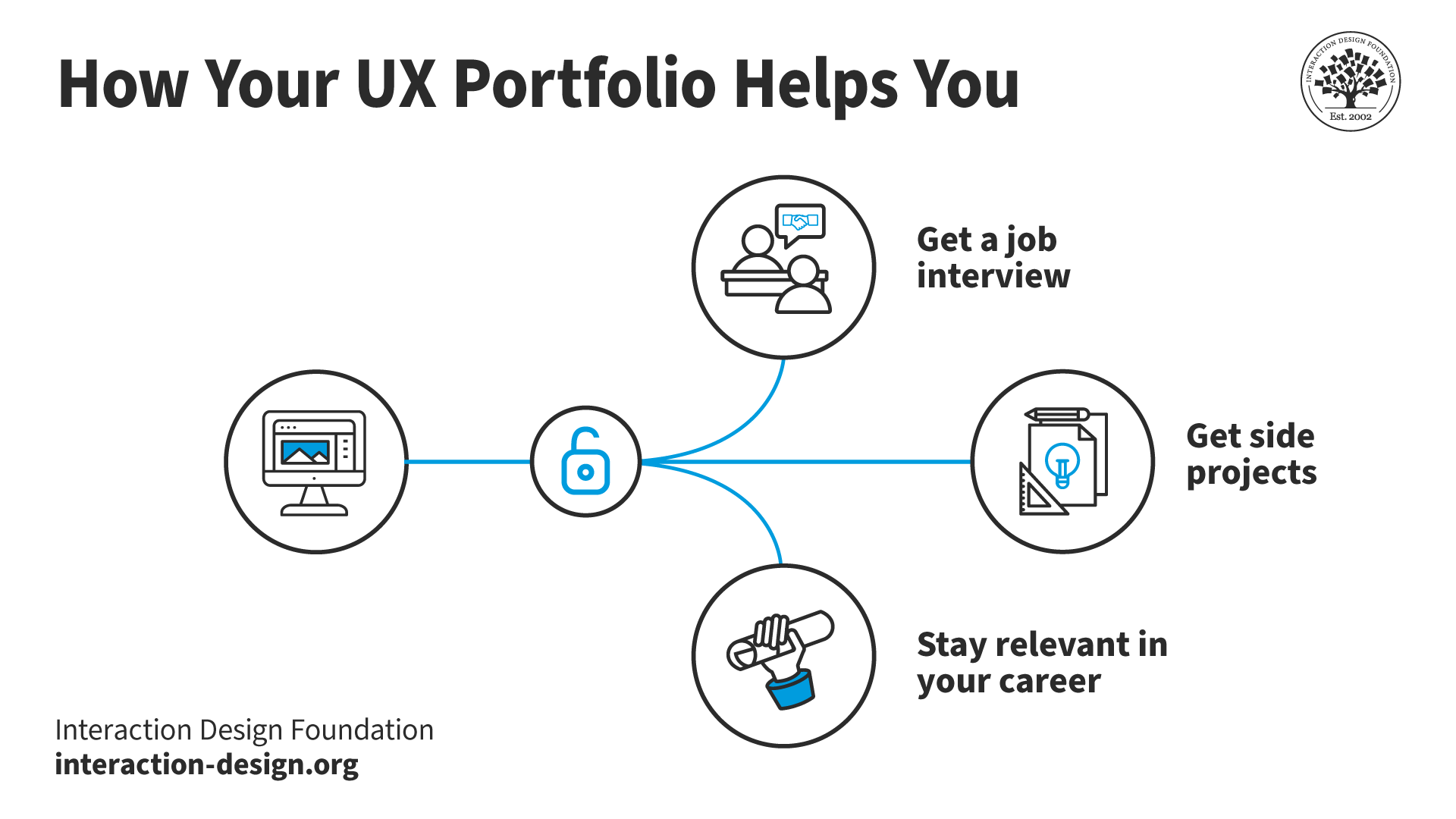
A diagram showing how a UX portfolio helps designers.

The benefits of a UX portfolio.

© Interaction Design Foundation, CC BY-SA 4.0

Want another big gem of advice? It’s vital to walk potential employers through your design process—it shows your problem-solving skills and ability to iterate on ideas. Nobody wants to see just the “answers”; think back to school here if it helps—whoever decided your grade almost certainly wanted to see how you worked math problems out, for instance. If you're short on real-world experience, create mock projects to show your understanding of UX principles and how well you can apply them to real-world scenarios—the matters that will matter the most out there.

It’s impossible to overstate how your portfolio can make all the difference in how well you perform in an interview. You’ve got to write your case studies in a compelling way—one that really captivates your target audience: the ones who’ll hopefully hire you. Watch Mads Soegaard, Founder of the Interaction Design Foundation, discuss how to write great case studies for your UX design portfolio.

Transcript

3. Define Your Persona: The Authentic UX Professional

In the UX world, your personal brand is just as important as your skills and experience. Be yourself, but be mindful of how you present yourself online and in person. You must practice your articulation skills. You should be able to convey your thoughts and ideas in a clear and concise manner. Pay attention to your body language and nonverbal cues, as they can speak volumes.

4. Prepare Well for the Interview

The interview is your chance to shine—as in, brightest among the competitors. So, research the company—thoroughly—and the people you'll interview with. Practice common interview questions and be ready to share your UX story where you highlight your passion, skills and experiences.

Use the interview to connect with your interviewers on a personal level. Don’t just say it; show it—it’s vital to share your passion for UX, your career goals and what excites you about the company and the role.

Skills you Need as a UX Designer

It calls for a unique blend of both soft and hard skills to become a successful UX designer—and a standout candidate. Yes, you need technical abilities to create functional designs, but you require—and they’ll expect—soft skills to understand user needs, collaborate effectively and advocate for user-centered solutions, too. So, without further ado, here's an overview of the kind of skills you need and need to show: 

Soft Skills: The Human Touch in UX Design

  • Empathy: This is the engine that should power any design vehicle; first and foremost, it’s absolutely essential to show you’ve well and truly got the ability to put yourself in the shoes of your users and understand their needs, motivations and pain points. And then there are the many shades of empathy you’ll need to show around that—to design for users of all abilities—and baking that in to show you care, your brand cares and everyone can benefit from the design solution. To help you create designs that really resonate, what’s the key? It’s empathy!

  • Communication: Much as it may seem a corporate hirer’s buzzword that gets chucked into resumes as a must-have—and sometimes only as an afterthought for those who don’t do it well—communication really is a critical ingredient. And you need strong communication skills to explain your design decisions, collect feedback and collaborate with stakeholders.

  • Collaboration: Maybe with the exception of the ultra-rare “brand of one”—think UI-UX designer, developer and “everything-elser”—who designs, codes, writes copy for, markets and does, indeed, everything else, UX design is a team sport. You'll need to work effectively with other designers, developers, product managers and stakeholders to bring your ideas to life and make sure everyone’s on board about the value of the design.

  • Problem-solving: This one may also seem a little corporate “buzzwordy”—but make no mistake, it’s crucial to not just mention but show—and prove—to potential hirers. After all, UX design is all about solving problems for users. So, you'll need to be able to identify pain points, brainstorm solutions and iterate on your designs until you find the best possible outcome—aiming past just staying content with “good enough” to tweaking the most superior market entry, one that can utterly delight target users and give competitors a challenge to approach.

Hard Skills: The Technical Toolkit of UX Design

  • User research: You need to understand how to conduct user interviews, surveys, usability tests and other research methods to gather insights that will inform your design decisions and carry them to soaring heights.

  • Information architecture: One of the most fundamental aspects of UX design is how it requires you to organize information in a clear and intuitive way to create user-friendly products and services.

  • Wireframing and prototyping: These skills allow you to visualize your ideas and test them with users before—and, ideally, starting long before—you invest time and resources in development.

  • Visual design: To get more into the “design” side of the equation, a basic but solid understanding of visual design principles—such as color theory, typography and layout—can help you create aesthetically pleasing and effective designs. Just remember, design and art are different and the lifeblood of UX design courses through clean, lean and insightfully made visuals.

The specific skills you need are going to vary based on your role and the industry you work in. Regardless of your specialization, what you’ve read above are essential ingredients in the make-up of good designers. You’ll need to develop a strong foundation in soft and hard skills that will set you up for success as a UX designer and empower you to impress as you progress.

How Do You Progress in Your UX Career?

An image of a person with a laptop speaking to two other people.

Your UX journey doesn't end with your first job—it may well be just the first leg of a long and productive trek. And, as you gain experience and expertise, your career can take many paths. You might lead design teams, mentor junior designers and even shape the strategic direction of a company's products—it’s all there, waiting, if you’ve got the drive to go places like these.

For instance, you might well start as a junior designer in a typical UX career path. Then, as you progress, you could become a lead designer—where you oversee projects and mentor your team. From there, you might move into management as a people manager or a staff designer—if you want, perhaps taking an online course.

But it doesn't stop there. Senior managers, heads of UX, UX directors and even CXOs (Chief Experience Officers) all play crucial roles in shaping a company's user experience—it really is a team effort, which is where you can slot in at pretty much any level you desire.

The path you choose will depend on your interests, skills and ambitions—but remember, there's no one-size-fits-all answer. The most important thing is to find a path that allows you to grow as a designer and make a meaningful impact on the world through your work.

The demand for good designers will grow as design is a hot topic. Watch Don Norman (Researcher, Professor and Author) discuss how you can progress in your career in design.

Transcript

The Future of UX Design

The future of UX design is full of possibilities. As technology advances, so does the way we interact with it. This creates new challenges and opportunities for UX designers. Artificial intelligence (AI), machine learning (ML), augmented reality (AR), virtual reality (VR) and voice user interfaces (VUI) are just a few of the technologies that hold the power to bring new opportunities in UX design.

The Take Away

A career in UX design is an opportunity to shape how people interact with technology and the world around them. The demand for skilled UX designers will grow as we see new technological advancements. It doesn't matter if you prefer the creative challenges of designing user interfaces, the analytical rigor of user research or the persuasive power of UX writing; there's a path in UX design that aligns with your passions and skills.

The IxDF UX Careers: Set Yourself Up for Success Master Class will provide deeper insights into what we discussed in this piece. This IxDF Master Class will help you determine if a career in UX design is right for you. Explore the various career paths within the field, identify your metrics for success and learn how to align your skills and ambitions with the right UX role.

This Master Class is perfect for anyone curious about a UX career, whether you're a newcomer exploring your options or an experienced professional seeking a change.

Pavitra S. Tandon—a seasoned UX manager with over 14 years of experience working with diverse clients and teams—leads this class, which will provide valuable insights and practical guidance for a career in UX. Pavitra's extensive background in integrating data, UX and design thinking techniques and her passion to mentor and volunteer makes her an ideal guide for aspiring and established UX professionals.

References and Where to Learn More

Take the IxDF UX Careers: Set Yourself Up for Success Master Class. As a member, you get 90% off on every Master Class. To become a member of IxDF, sign up here.

Read our topic definition of user experience (UX) design.

Take our course User Experience: The Beginner’s Guide.
You need to understand more about UX design if you want a career in it. Read this article to learn how to become a UX designer.

Here's a constantly updated list of in-demand UX tools.

Feel Stuck?
Want Better Job Options?

AI is replacing jobs everywhere, yet design jobs are booming with a projected 45% job growth. With design skills, you can create products and services people love. More love means more impact and greater salary potential.

At IxDF, we help you from your first course to your next job, all in one place.

See How Design Skills Turn Into Job Options
Privacy Settings
By using this site, you accept our Cookie Policy and Terms of Use.
Customize
Accept all

Be the One Who Inspires

People remember who shares great ideas.

Share on:

Academic Credibility — On Autopilot

Don't waste time googling citation formats. Just copy, paste and look legit in seconds.