Field of View (FOV) in Extended Reality

Your constantly-updated definition of Field of View (FOV) in Extended Reality and collection of videos and articles.
Be a conversation starter: Share this page and inspire others!

98 Shares

What is Field of View (FOV) in Extended Reality?

Field of View (FoV) in extended reality (XR) refers to the extent of the observable, virtual or augmented world that is visible through a headset or device at a given moment. FoV is like the visible area you can see through a pair of binoculars.

In virtual reality (VR), a wider FoV means you can see more of the virtual world at once, which can make it feel more real and immersive. In augmented reality (AR), digital images are overlaid onto the real world, so the FoV determines how much of your surroundings can have these digital enhancements. Essentially, FoV is the window to the virtual or augmented world.

Field of View in VR and AR

FoV in VR is often wider than AR, as the medium allows for a broader view, which can enhance immersion and make the virtual environment feel more realistic. In AR, MR or XR, FoV determines how much of the real world can be augmented with digital overlays. A larger FoV can offer a more comprehensive and engaging experience, but technical limitations often require a balance between a wide FoV and factors like device size, comfort, and processing power.

In this video, UX Design Consultant Frank Spillers discusses FoV in augmented reality.

Transcript

Here, Frank talks about FoV in virtual reality. 

Transcript

FoV in AR typically ranges from 30 to 50 degrees. This narrower scope is due to the complexities of overlaying digital images onto the real world, a process that involves sophisticated optics and display technology. This limited FoV can constrain immersion but is generally sufficient for practical AR applications like data overlay or navigation assistance.

As discussed in the video, an AR experience that goes beyond the more natural 30 to 50 degrees can be tiresome or uncomfortable for the user.
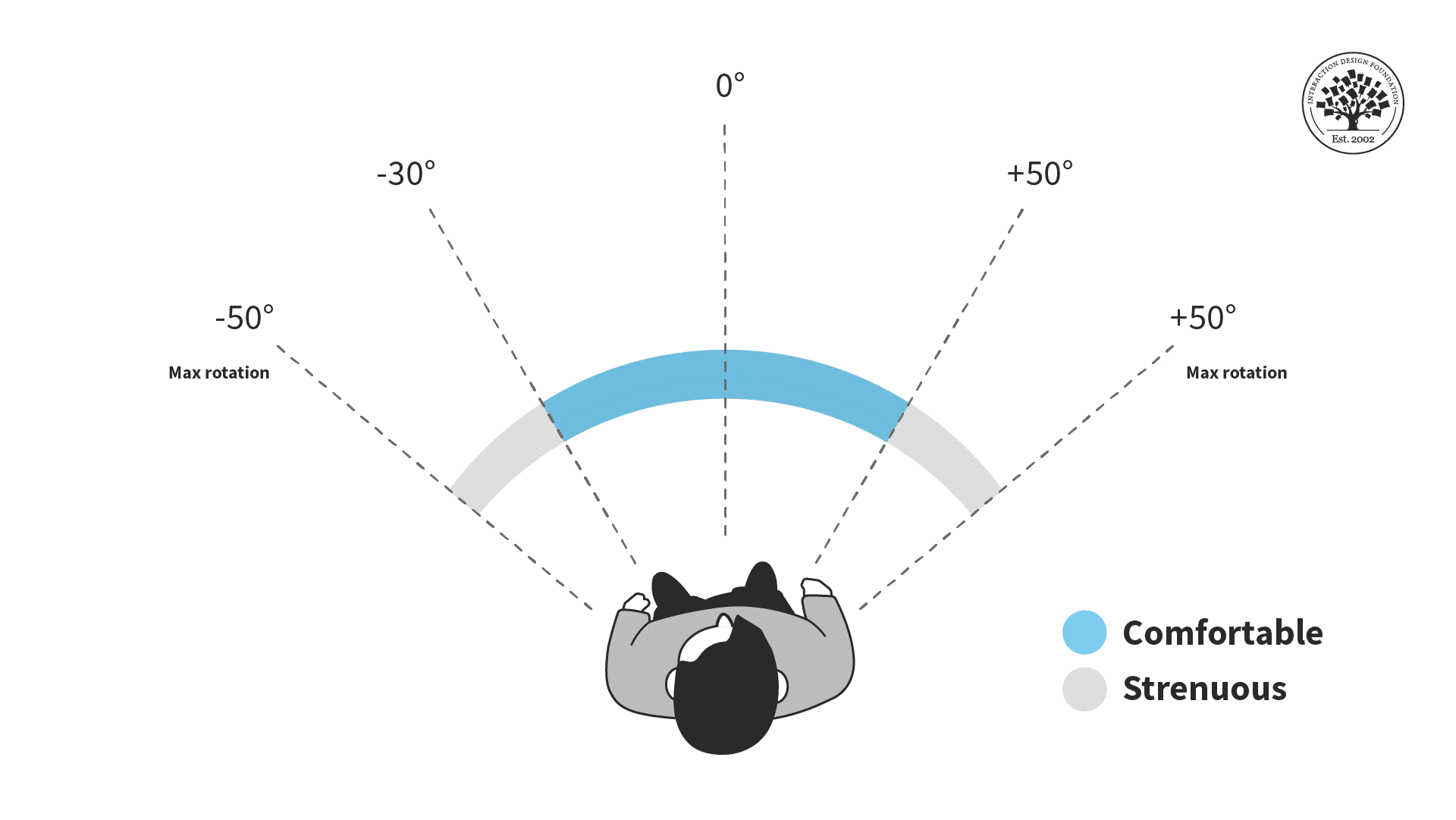
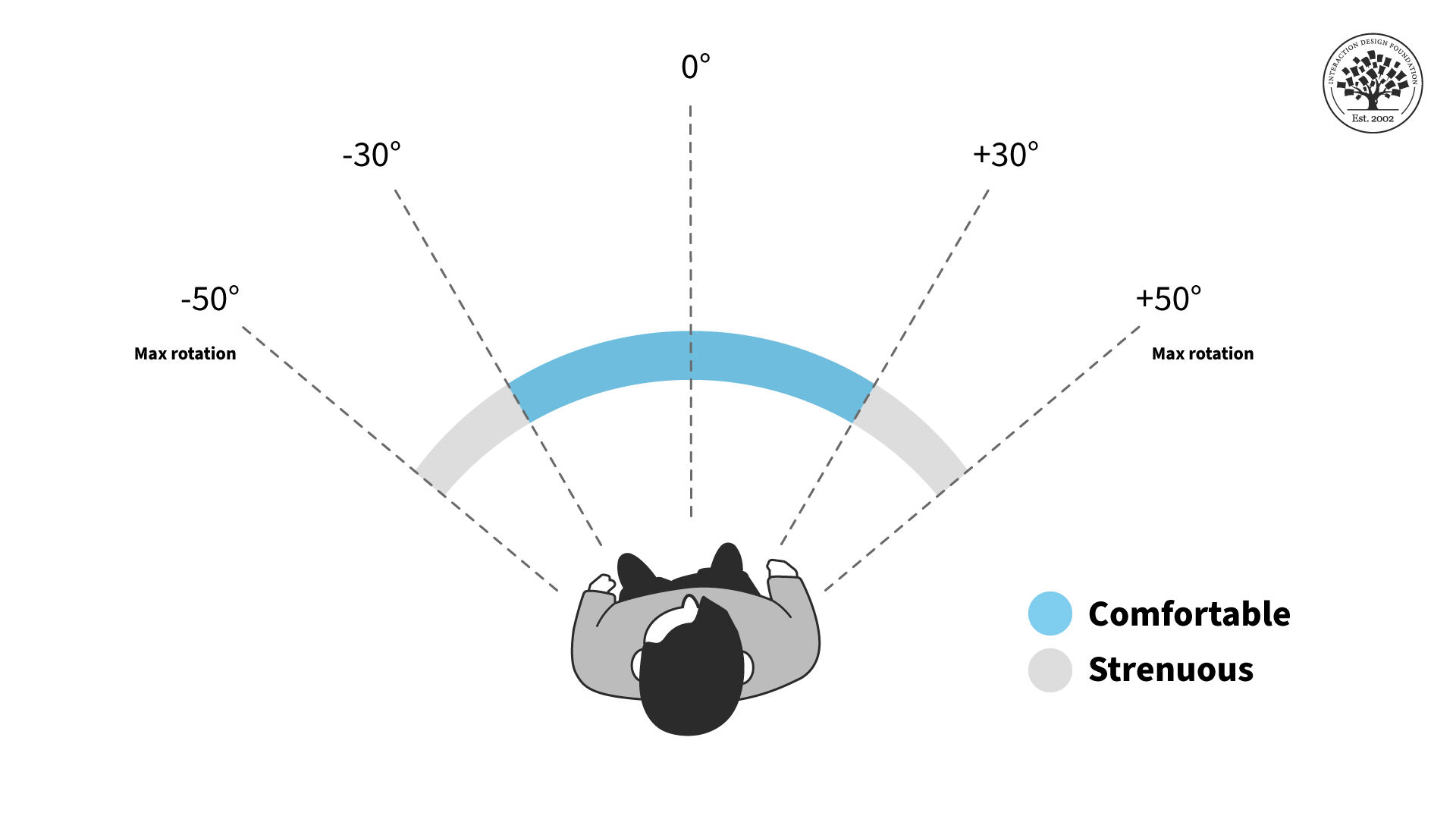
Horizontal Field of View placement. The optimal FoV in augmented reality is between 30 to 50 degrees.

© Interaction Design Foundation, CC BY-SA 4.0

VR offers a substantially wider FoV, usually between 90 degrees and 110 degrees, with some high-end models reaching up to 120 degrees or more. As Frank mentions above, wider isn’t necessarily better. It’s important to consider how a wider field can enhance immersion. However, immersion must not come at the expense of the user’s comfort. For example, if the user experiences neck strain, they won’t value the immersive content.
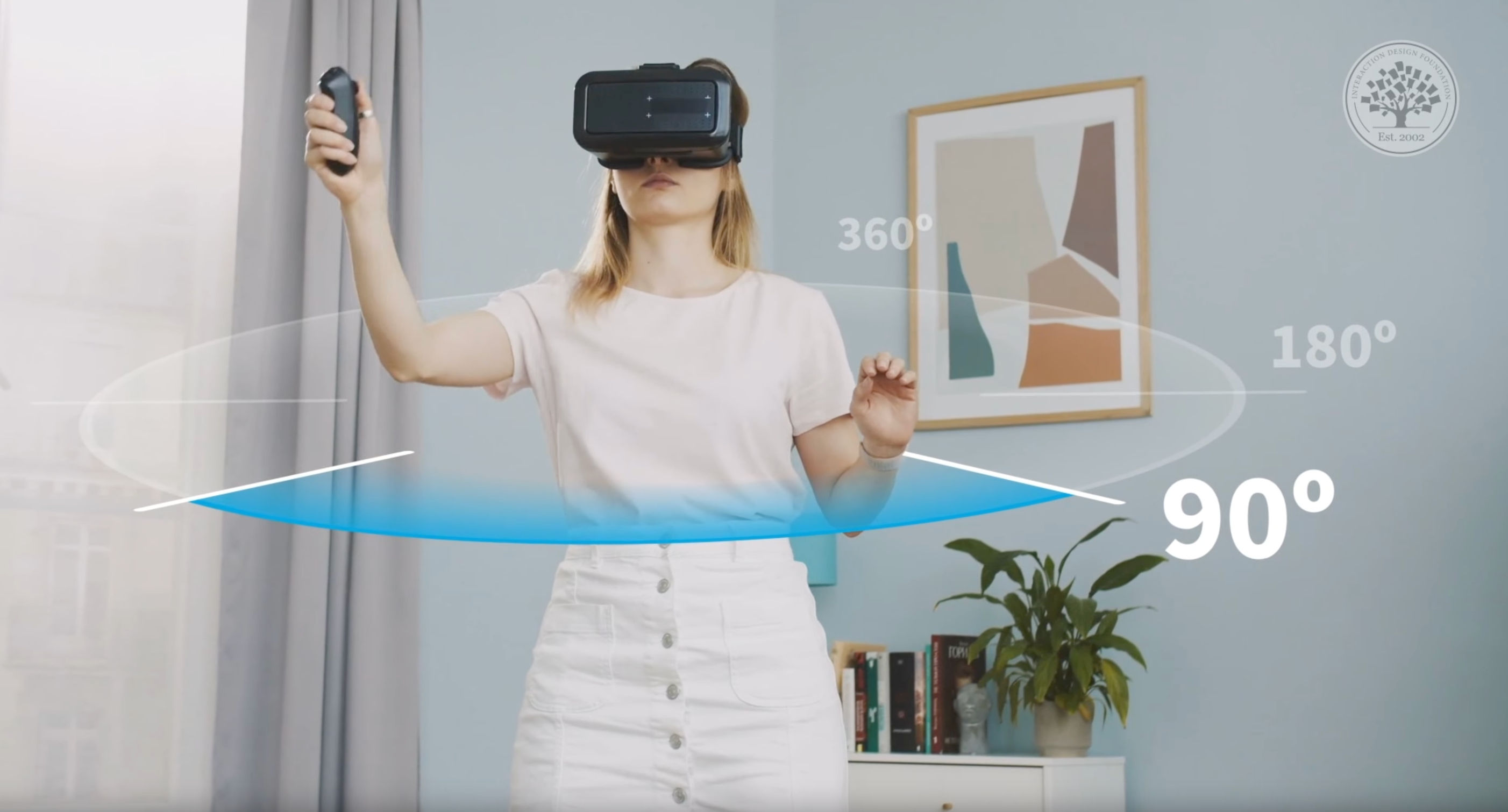
The optimal Field of View in VR is wider than in AR, about 90 degrees to 110 degrees.

© Interaction Design Foundation, CC BY-SA 4.0

It’s easier to achieve a broader view in VR, as a designer can render a fully digital environment. However, it does require more powerful processing, which can lead to bulkier VR headsets. Designers should aim to strike a balance between immersion, realism and comfort for their users. 

How Does Field of Vision Impact User Experience?

Field of View (FoV) significantly impacts user experience in both VR and Augmented Reality (AR) in several ways:

  1. Immersion: In VR, a wider FoV makes the virtual world feel more encompassing and realistic, as it fills more of the user’s natural field of vision. This can make users feel like they are truly “inside” the virtual world. On the other hand, a limited FoV can lead to a “tunnel vision” effect, where the user is constantly reminded that they are looking through a device.

  2. Comfort and Presence: An optimal field of vision makes the user feel comfortable. A very wide one might cause neck strain, dizziness or cybersickness since the user will need to move around a lot. A narrow FoV might strain the user’s eyes since they’ll need to concentrate on a very small area all the time.

  3. Spatial Cognition: A broader FoV helps improve spatial awareness in VR. Users can navigate more naturally and interact more effectively with the environment. In AR, a narrower FoV might mean that users won’t see as much augmented content without turning their head.

  4. User Interface and Interaction Design: The FoV influences how content and interfaces are designed. In a narrow FoV, important elements must be centrally located, whereas a wider FoV allows for a more spread-out arrangement of elements.

  5. Realism in AR: The FoV impacts how convincingly digital content can be integrated into the real world. A narrow FoV might make the augmented elements feel more like they’re floating in a small window of space, rather than a seamless part of the user’s environment.

  6. Motion Sickness: Users might suffer motion sickness if there’s a mismatch between what the user sees and what they expect to see based on their movements. Hence it is vital that the FoV setting in VR matches the user’s natural FoV.

  7. Accessibility: A wider FoV can be more inclusive as it accommodates users with a wider range of visual capabilities and preferences, but it also has to be balanced with considerations like the weight and comfort of the headset.

How to Design for Field of Vision

Despite unlimited screen size in AR/VR, designers must recognize human physical limits to deliver a smooth experience.. For an optimal user experience, it’s important to position content within a comfortable visual range to avoid excessive head-turning. This approach minimizes fatigue and ensures users don’t miss key animations or audio cues. For activities like conversations with virtual characters or watching extended animations, keep the content within a natural range of motion.

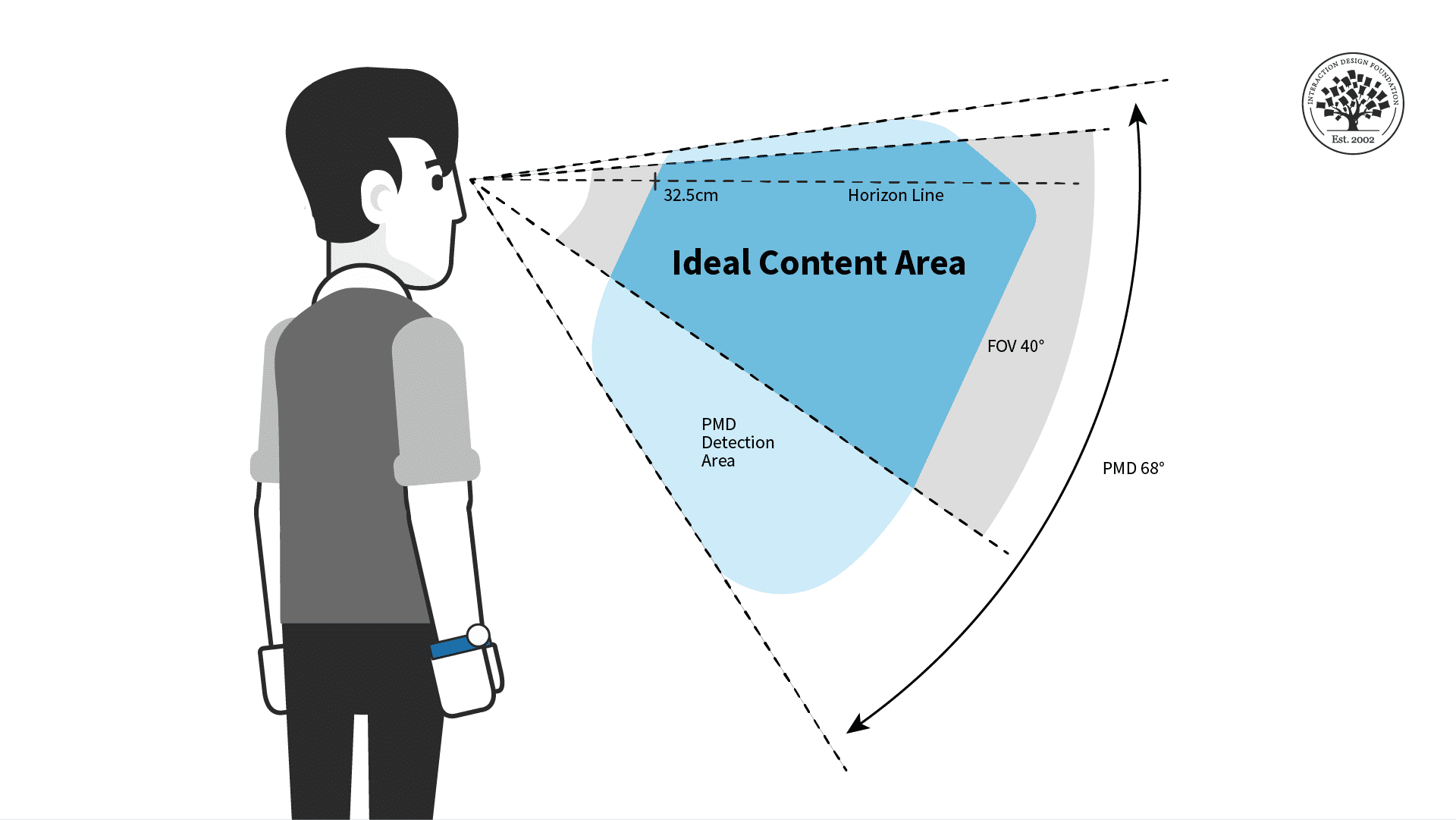
To reach the ideal FoV, designers have to consider the average head rotation, which is about 30 degrees to each side from the center. Content shouldn’t be placed beyond this range, as neck rotations further than that are uncomfortable for most people. Vertical content placement is equally vital. Most content should be positioned around the horizon line or slightly above, within a 40-degree angle downwards and about 10 degrees upwards from the horizon to ensure it falls within the user’s comfortable line of sight.

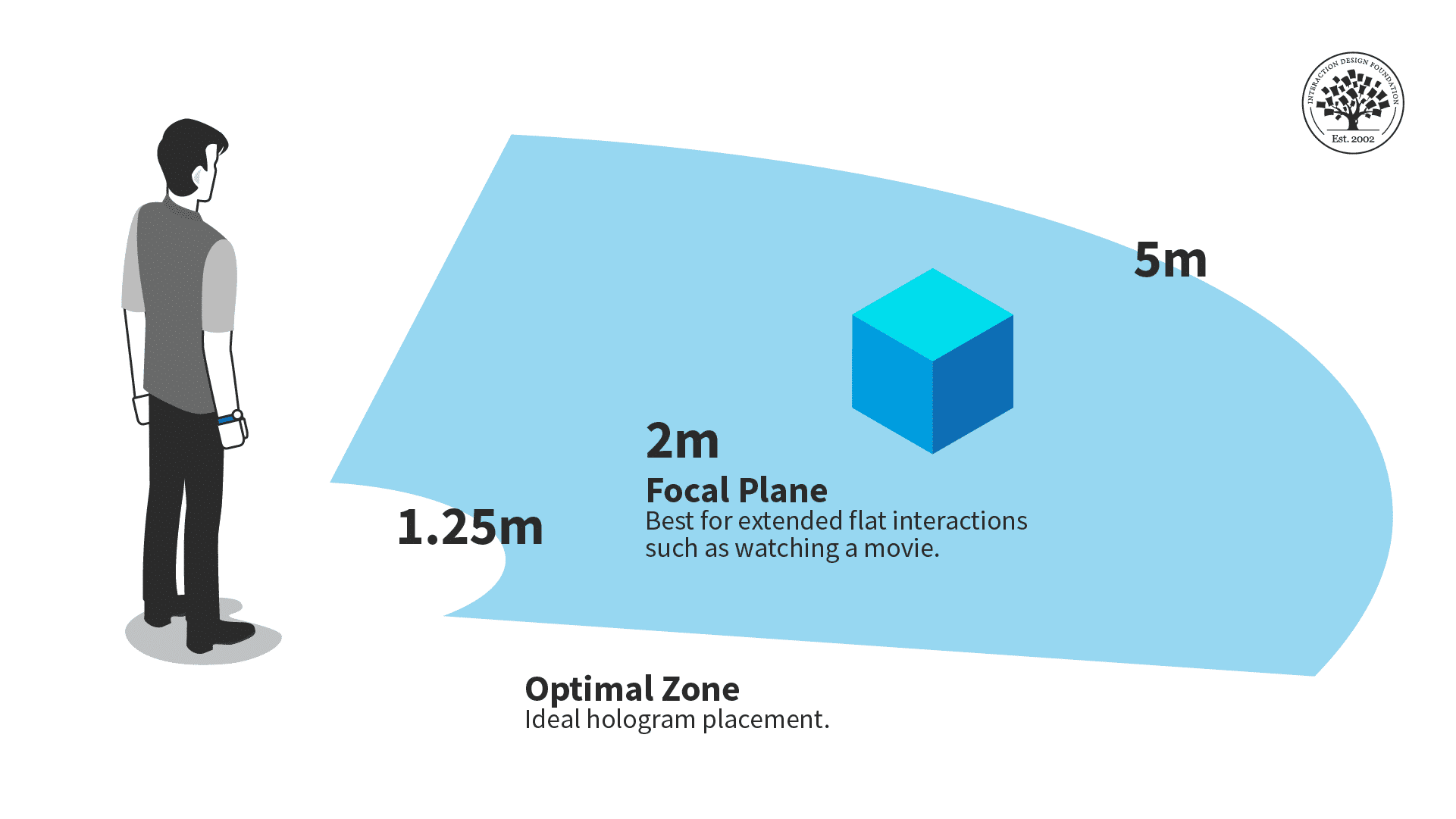
This content placement strategy is similar to the design of cinemas, theaters, and concert venues. Distance is also a key factor; ideal content placement is between 1.25 and 5 meters away. This range ensures all elements and animations are clearly visible and appropriate animation triggering (the initiation of animations or interactive elements based on the user’s location and actions within a specific distance range). Content shouldn’t be placed too close as it could lead to discomfort or immersion-breaking issues, for example, 3D models might intersect the user.
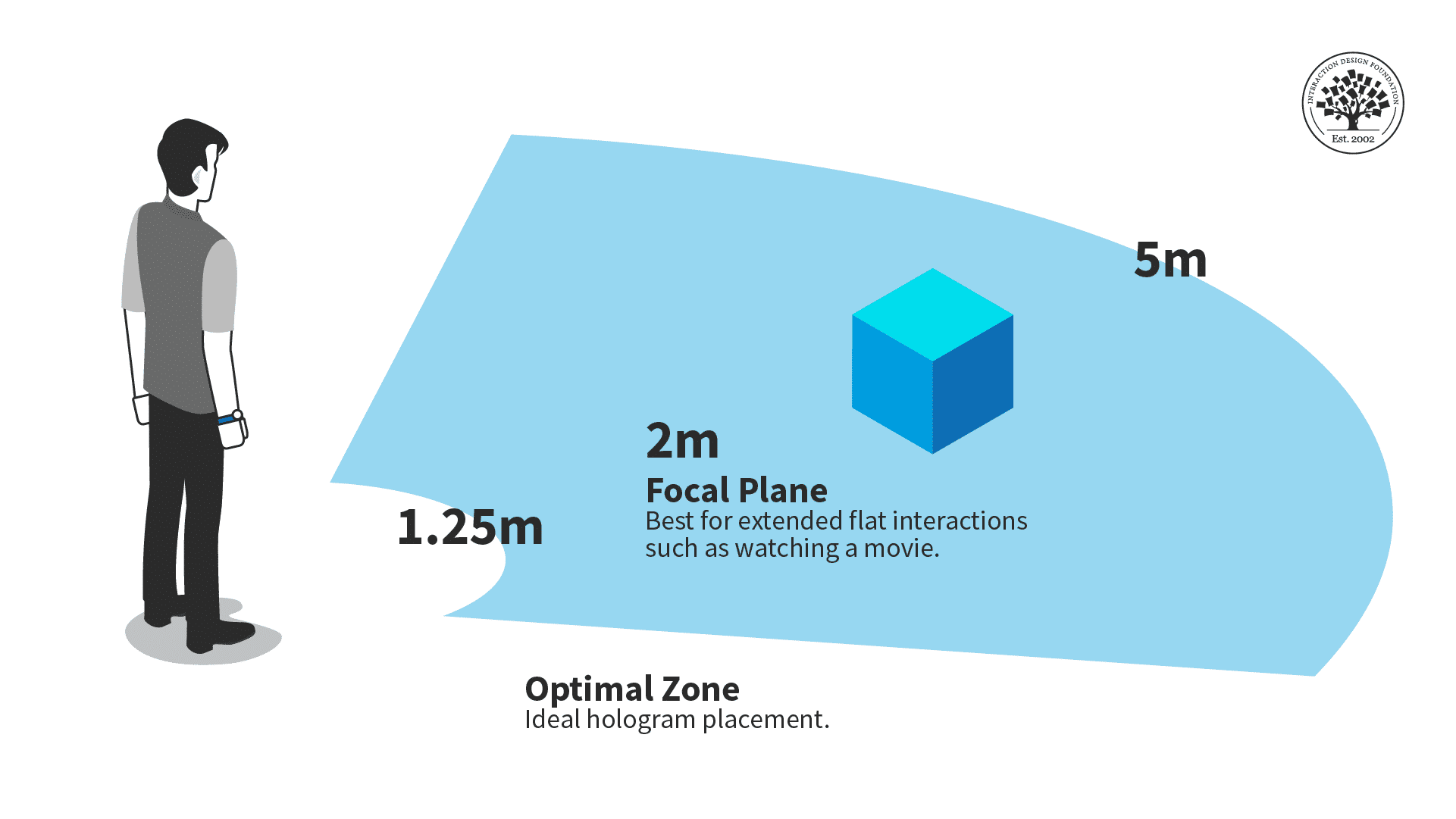
Place content at an optimal distance from the user. The ideal hologram placement is between 1.25 and 5 meters.

© Interaction Design Foundation, CC BY-SA 4.0

Tips to Enhance User Experience

An optimal FoV ensures a successful XR experience. The optimal FoV depends on what medium or device a user will experience the product. Here are key strategies and considerations to achieve a user-friendly and immersive experience.

Understand the Medium: VR Considerations

Maximize Immersion: Aim for a wide FoV, between 90 degrees and 110 degrees, to enhance the feeling of presence and immersion. Design content that leverages this breadth and encourages users to explore the environment.

Balance with Comfort: Be aware that a very wide FoV might lead to discomfort or motion sickness for some users. Design content that minimizes rapid movements or extreme peripheral action.

Understand the Medium: AR Considerations 

Effective Use of Limited FoV: Design elements should be central and easily visible within AR’s limited view.

Context Awareness: Integrate digital elements with the real world smoothly and safely. Ensure that important information or interactions don’t require users to move their heads excessively.

UX Design Strategies

  1. Content Placement: Place important information and interactive elements within the central area of the FoV. This is especially important in AR, where the FoV is more restricted.
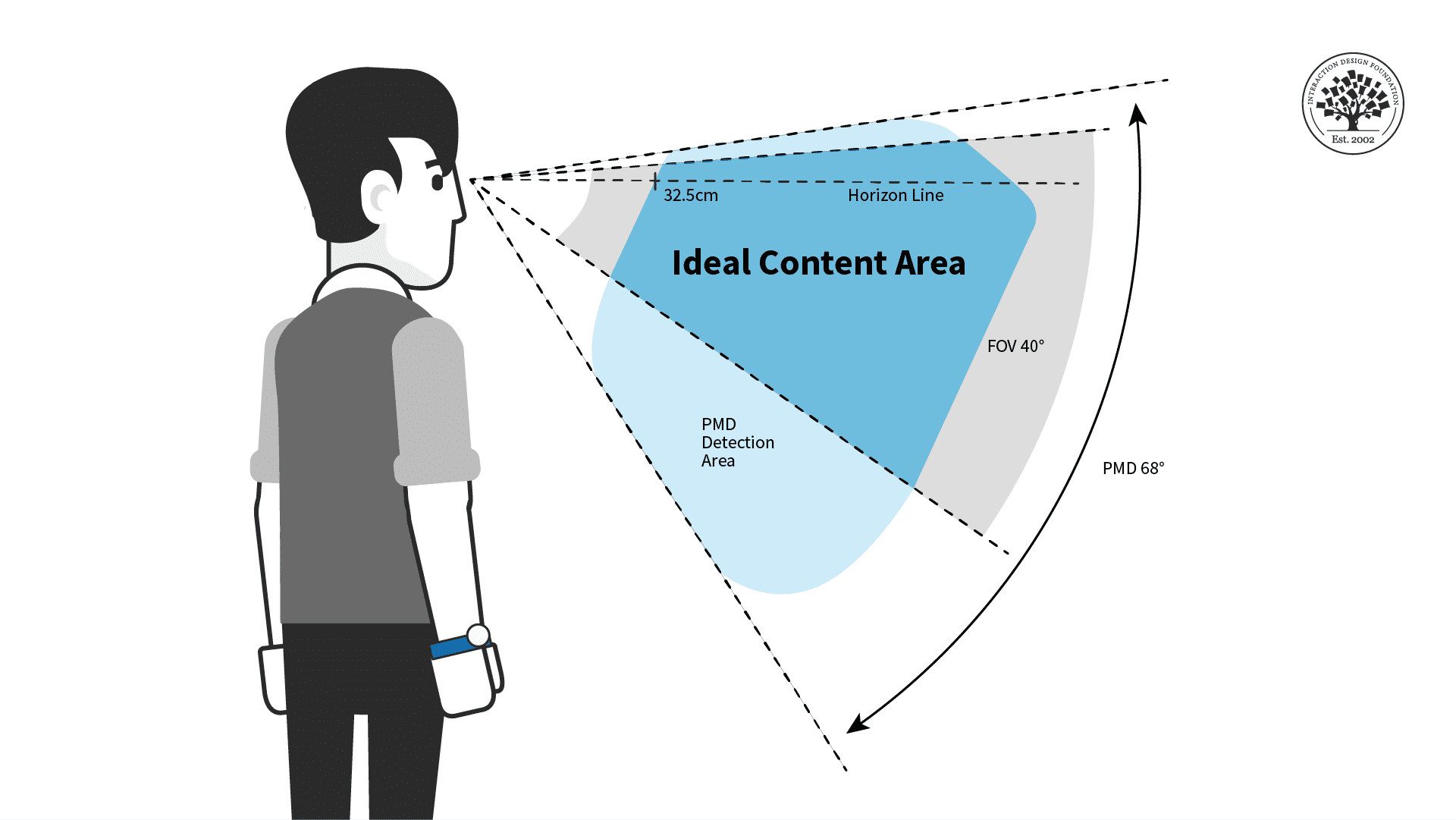
    Vertical Field of View placement. The field of view is restricted in augmented reality. Ensure the most important elements are in the central area for a comfortable user experience.

    © Interaction Design Foundation, CC BY-SA 4.0

  2. User Testing and Feedback: Conduct extensive user testing to understand how different FoV settings affect user experience. Pay attention to feedback regarding comfort, immersion, and usability.

  3. Adaptive Design: Design content that can adapt to different FoV settings, to accommodate a variety of devices with varying FoV capabilities.

  4. Minimize Fatigue: For prolonged use, design experiences that minimize the need for constant head movement, which can be tiring or uncomfortable.

  5. Visual Hierarchy and Clarity: Establish a clear visual hierarchy. Place critical interactive or narrative elements prominently within the FoV.

  6. Consider Peripheral Vision: In VR, use peripheral areas for non-essential or ambient information, which can enhance immersion without causing discomfort.

  7. Guidance and Onboarding: Provide clear guidance and onboarding for users to understand how to navigate and interact within the given FoV.

  8. Accessibility: Take into account users with different needs. Ensure that the experience is accessible and comfortable for a diverse audience.

  9. Work with Developers and Engineers: Collaborate closely with technical teams to understand the limitations and possibilities of the hardware, and to implement designs effectively.

  10. Iterative Design Process: Employ an iterative design process, using prototypes to test 

Questions About Field of View (FOV) in Extended Reality?
We've Got Answers!

How is FoV calculated or measured in VR and AR devices?

Field of View (FoV) in VR and AR devices is typically measured in degrees—it represents the extent of the observable world at any given moment. It's calculated based on the optical design of the headset, including the lens and screen properties. The higher the degrees, the wider the FoV. 

Learn more about AR and VR in our courses, UX Design for Augmented Reality and UX Design for Virtual Reality.

What challenges are associated with increasing FoV in VR/AR headsets?

Increasing FoV presents technical challenges such as the need for more powerful processing to render wider scenes, potential distortions at the edges of the display, and the requirement for more advanced optics, which can increase the cost and complexity of the headset.

Learn more about AR and VR in our courses, UX Design for Augmented Reality and UX Design for Virtual Reality.

How does FoV affect motion sickness in VR environments?

A limited or overly wide FoV can contribute to motion sickness in VR environments, as there's a disconnect between the motion perceived by the visual system and the lack of corresponding vestibular feedback (balance and spatial orientation).

Learn more about comfort and other elements of AR and VR in our courses, UX Design for Augmented Reality and UX Design for Virtual Reality.

Can FoV be adjusted or customized in VR/AR headsets?

Some high-end VR/AR headsets offer adjustable FoV to cater to different user preferences and applications. However, this feature is not universally available across all devices.

Learn more about AR and VR in our courses, UX Design for Augmented Reality and UX Design for Virtual Reality.

What are the differences in FoV requirements between VR and AR?

VR typically requires a larger FoV for an immersive experience, as it replaces the real world with a virtual one. AR, on the other hand, overlays digital information onto the real world, so a smaller FoV may be sufficient.

Read more about immersion in What is Immersion?

How does FoV influence spatial perception in virtual environments?

A wider FoV can enhance spatial perception in virtual environments—it makes the experience more immersive and realistic by aligning more closely with human vision.

Learn more about AR and VR in our courses, UX Design for Augmented Reality and UX Design for Virtual Reality.

What role does FoV play in immersive storytelling in VR and AR?

FoV plays a critical role in immersive storytelling in VR and AR by determining how much of the virtual world is visible to the user, thus affecting the narrative and engagement level.

Learn about storytelling in VR in the article, How to Use Narrative as a Design Tool.

How do you design content for varying FoV in VR and AR?

To design content for varying FoV, factors such as how much of the scene is visible at a time and how to ensure important elements are within the user's immediate field of view have to be considered, especially in devices with limited FoV.

Learn more about AR and VR in our courses, UX Design for Augmented Reality and UX Design for Virtual Reality.

What are the implications of FoV on user interface design in VR/AR?

In UI design, FoV impacts how and where information is presented. A larger FoV allows for more content and interactive elements to be displayed without causing discomfort or disorientation.

Learn more about AR and VR in our courses, UX Design for Augmented Reality and UX Design for Virtual Reality.

How does FoV interact with other sensory feedback in XR experiences?

FoV interacts with other sensory feedback (like audio, haptics) to create a cohesive experience. The synchronization of the visual field with other sensory inputs is crucial for maintaining immersion and reducing disorientation or motion sickness.

Learn more about AR and VR in our courses, UX Design for Augmented Reality and UX Design for Virtual Reality

Learn more about XR in our Master Class, How to Craft Immersive Experiences in XR.

Earn a Gift Earn a Gift, Answer a Short Quiz!

1
2
3
4
1
2
3
4
Question 1
Question 2
Question 3
Get Your Gift
Interaction Design Foundation logo

Question 1

What is Field of View (FoV) in extended reality (XR)?

1 point towards your gift

  • The range of physical movement a user can make while wearing a headset
  • The extent of the virtual or augmented world visible through a headset or device at a given moment
  • The distance between the user and the virtual objects in an XR experience
Interaction Design Foundation logo

Question 2

How does FoV in AR typically differ from FoV in VR?

1 point towards your gift

  • AR usually has a wider FoV because it overlays digital elements on the real world
  • AR typically has a narrower FoV than VR, which can limit the amount of augmented content visible
  • AR and VR both have the same FoV, with no significant difference in visibility
Interaction Design Foundation logo

Question 3

How does a wider FoV impact the user experience in VR?

1 point towards your gift

  • It improves immersion but can lead to discomfort or motion sickness if too wide
  • It reduces immersion but increases the user's sense of safety
  • It makes the experience less immersive by restricting movement

Learn More About Field of View (FOV) in Extended Reality

Make learning as easy as watching Netflix: Learn more about Field of View (FOV) in Extended Reality by taking the online IxDF Course UX Design for Virtual Reality.

Why? Because design skills make you valuable. In any job. Any industry.

In This Course, You'll

  • Get excited when you learn how to create Virtual Reality (VR) experiences people love. The global VR market will grow to $227 billion by 2029! Whether you want to create VR games or interactive business solutions, this course will help you bring your big ideas to life. VR opens up a new dimension for your creativity, literally! Virtual reality lets people step into digital worlds for a deeper emotional connection. It leads to higher retention, engagement, and loyalty in gaming, education, and corporate training.

  • Make yourself invaluable with specialized knowledge and in-demand skills that open doors to exciting career paths! You'll master timeless human-centered design skills that ensure VR experiences are meaningful, ethical, and genuinely resonant: Skills that keep you in demand as technology evolves. Does UX design for virtual reality sound complicated? It can be, but we've made it easy for you! With step-by-step guidance, you'll master it faster than you think, no matter your background. The UX Design for VR course shows you how to create VR products that make a real impact in any industry. You'll explore social VR and the Metaverse and master the secret to achieving comfort, safety, and inclusivity in VR. You'll be able to design for presence and immersion with VR elements like storytelling, sound design, spatial audio, and emotion design.

  • Gain confidence and credibility as you conceptualize, create, and refine VR prototypes for your portfolio. You can choose to create a complete VR portfolio project, from storyboarding to 3D prototyping, and walk away with a polished portfolio that puts you in demand. Download ready-to-use templates, like the 3D wireframe checklist and USE scorecard for VR, to fast-track your success in one of the most sought-after areas of UX design.

It's Easy to Fast-Track Your Career with the World's Best Experts

Master complex skills effortlessly with proven best practices and toolkits directly from the world's top design experts. Meet your experts for this course:

  • Frank Spillers: Service Designer and Founder and CEO of Experience Dynamics.

  • Mel Slater: Distinguished Investigator at the University of Barcelona in the Department of Clinical Psychology, active member of the Institute of Neurosciences, and Co-Director of Event Lab (Experimental Virtual Environments for Neuroscience and Technology).

Get an Industry-Recognized IxDF Course Certificate

Increase your credibility, salary potential and job opportunities by showing credible evidence of your skills.

IxDF Course Certificates set the industry gold standard. Add them to your LinkedIn profile, resumé, and job applications.

Course Certificate Example

Be in distinguished company, alongside industry leaders who train their teams with the IxDF and trust IxDF Course Certificates.

Our clients: IBM, HP, Adobe, GE, Accenture, Allianz, Phillips, Deezer, Capgemin, Mcafee, SAP, Telenor, Cigna, British Parliament, State of New York

All Free IxDF Articles on Field of View (FOV) in Extended Reality

Read full article
Spatial UI Design: Tips and Best Practices - Article hero image
Interaction Design Foundation logo

Spatial UI Design: Tips and Best Practices

UX design for Augmented Reality (AR) has some different guidelines than what is used for screen-based UX. Designers must consider the space and the physical limits of what is comfortable for the human body. Also, as AR overlays physical space, you must be very aware of the cognitive load because you

Social shares
618
Published
Read Article

Spatial UI Design: Tips and Best Practices

Spatial UI Design: Tips and Best Practices

UX design for Augmented Reality (AR) has some different guidelines than what is used for screen-based UX. Designers must consider the space and the physical limits of what is comfortable for the human body. Also, as AR overlays physical space, you must be very aware of the cognitive load because you add to the existing distractions of the real world.

In this video, UX consultant Frank Spillers covers the main guidelines for AR design. These are invaluable tips that will make your designs much more user-friendly.

Copyright
Transcript

General Guidelines for Spatial UI

Let's summarize Frank's guidelines for spatial design in AR:

  • Design for context intelligence: Have your program sense and respond to the environment. Use space to trigger new content automatically when the user gets near.

  • Minimize abstract UIs: Affordances are the best tool to make UIs intuitive, especially 3D ones. Don't force users to interpret what things mean. If something looks interactable, make it interactable. Work with real physics and the environment. Use real physics and respect the boundaries of physical space; don't put an interactable object beyond a wall or window. Avoid "secret UIs" or hidden features that users need to use.

  • Use real physics: Have objects behave and interact in a way that mimics their real-world counterparts. A rubber ball should bounce, and the door handle should open a door.

  • Direct manipulation: Use natural interactions—for example, simple hand gestures like pressing a button, rotating, or grabbing an object. Use eye tracking or triggers based on the user's proximity. AR is not a suitable medium to flip through menus in, so make interactions as simple and intuitive as possible.

  • Expect interruptions: AR is highly interruptible. Don't make experiences with uninterruptible content like long videos or animations, especially if they cannot be paused. Allow the user to drop in and out of the experience quickly. It’s very similar to how mobile apps work.

  • Respect user spatial memory: Don’t overwhelm users with multiple interactions simultaneously. Instead, use contextual tutorials, which tell the user what they need to know in the moment.

When you design for mobile and desktop, you are limited to the area of the screen. For AR, the area you can work with is limited only by the physical limitations of our vision—more specifically, our field of view and view distance.

How to Design Around Field of View

Transcript

Users will be more comfortable if they aren't constantly forced to swivel their heads. This is true in all Extended Reality (XR) platforms. Place important content in front of them. The ideal horizontal placement for content is within 30 degrees off-center on either side. More than 30 degrees from the center is strenuous on the neck and shouldn't be used often. Content beyond 50 degrees is physically impossible for most people.

These rules apply primarily to content that moves with the user's gaze, like a heads-up display. If you have a scene in front of the user, ensure the main content doesn't exceed these areas. Otherwise, they might miss something when they turn their bodies. For example, you don't want two scenes playing simultaneously on either side of the user. Additionally, if the user uses a phone instead of a headset, the holograms might be cut off, breaking immersion.

A top-down perspective of a person with their field of view displayed as a cone in front of their eyes. The area of -30 to 30 degrees from the center line is highlighted blue to symbolize a comfortable head position. The area from -50 to -30 degrees is highlighted gray to denote a strenuous head position. The area from 50 degrees to -30 degrees is also highlighted gray.

AR content should stay within a certain field of view to reduce neck strain.

© Interaction Design Foundation, CC BY-SA 4.0

For the vertical field of view, the chance of neck strain is less of an issue but still present. You shouldn't have users look straight up or down for long periods, especially when they walk around. The ideal content placement for vertical rotation is the 40-degree area slightly above the center of vision or horizon line.

A side view of a person with an AR headset. The ideal viewing angle is displayed in blue, and is roughly forty degrees below the horizon line, and sixty-eight degrees being the a where peripheral diction can detect movement.

For prolonged interactions, put AR content in the ideal horizontal area displayed above for the most comfort.

© Interaction Design Foundation, CC BY-SA 4.0

Place your AR experiences in the most comfortable viewing angles to make users more relaxed and less tired. Remember that other factors might adjust the viewing angles and ideal distance.

While you design, consider whether the user is sitting, reclining, standing, or walking. While walking, you generally want users to face the direction they are walking in. While seated, the user may be more comfortable but unable to turn their whole body unless they adjust their seat. If possible, have your content automatically adjust for these different scenarios, and adjust once the user is in motion.

Remember that every human body is different, so give the user tools to adjust their field of view if they have neck pain or other conditions. Above all, you want to ensure the user has everything they need to be comfortable with your product.

FOV Design Tips and Best Practices

  • The user should always control the camera movement. Let them drive. Don't shake the camera, purposely lock rotation, or turn the user's camera for them.

  • Be sensitive to issues around dizziness or vertigo. You shouldn't need users to spin constantly to see everything.

  • Avoid abrupt movements and be mindful of people's reflexive reactions. For example, users will react to objects that fly toward their faces. If you need to bring content to or from the user, move it slowly and smoothly toward them for the most comfort.

  • Use shorter animations than you would in a desktop or VR experience. Remember that AR is for short bursts of activity and design around distractions.

  • Avoid timed challenges, like limited window rewards that are only available for a few seconds. This is primarily a safety issue, but it is also a good idea because these can be easy to miss if the user is looking elsewhere.

  • Allow the user to see the world in the background. AR users don't expect to be fully immersed without warning. It may be unsettling or dangerous to obscure their whole environment with content.

  • Lastly, you will want to place content at a comfortable distance away from the user, especially for prolonged interactions.

A side view of a person showing a green area of 1.25m-5m away signifying the ideal placement for AR content.

The optimal zone for AR content is between one and a quarter meters and five meters.

© Interaction Design Foundation, CC BY-SA 4.0

Ideally, you should place objects within five meters of the users and beyond one and a quarter meters. Users might overlook your content, want more personal space, or collide with the holograms if things are too close. Too far, and it might be hard for the user to see.

Consider situations where a user can move closer or farther from your content. While seated, the optimal distance is critical, as the user can't adjust the distance themselves. A walkable experience can be more flexible with distance, but ensure your content works best in the optimal view distance.

For example, audio or animations should trigger once the user reaches the right distance.

The Take Away

Because of how it interacts with physical space, AR needs to follow specific guidelines to make an experience that isn't unpleasant for viewers.

Object placement should fall within a central area in the user's field of vision, and objects shouldn't be too close or far away from the user.

References and Where to Learn More

For a comprehensive and In-depth Guide to Mixed Reality from Microsoft, read Design Guidance for Mixed Reality.

For more on user focus and forced functions in AR, see "Forcing functions"- an interaction design technique used but not widely understood

This article outlines positional memory and its importance in AR: Did you move your user's cheese? All you need to know about 'Positional Memory'

See UX Planet's graphic on the field of view guidelines in How to start designing for AR/VR.  

Read more about spatial design for AR in Creating Augmented and Virtual Realities: Theory & Practice for Next-Generation Spatial Computing.

Hero Image: © iStock, Fair Use

Feel Stuck?
Want Better Job Options?

AI is replacing jobs everywhere, yet design jobs are booming with a projected 45% job growth. With design skills, you can create products and services people love. More love means more impact and greater salary potential.

At IxDF, we help you from your first course to your next job, all in one place.

See How Design Skills Turn Into Job Options
Privacy Settings
By using this site, you accept our Cookie Policy and Terms of Use.
Customize
Accept all

Be the One Who Inspires

People remember who shares great ideas.

Share on:

Academic Credibility — On Autopilot

Don't waste time googling citation formats. Just copy, paste and look legit in seconds.