Wearable computing refers to digital technologies that are seamlessly integrated into clothing or accessories, enabling continuous interaction, data collection, and real-time feedback without interrupting daily activities. Devices such as smartwatches, fitness trackers, and AR (augmented reality) glasses extend computing power beyond traditional screens, making technology more personal, portable, and context-aware.
UX (user experience) designers conduct research, map user contexts, design glance-based and gesture interfaces, and test prototypes to craft intuitive, ergonomic, and privacy-aware wearable user experiences.
Explore fascinating facets of how many computers modern people can have, including on their person, in this video with Alan Dix: Author of the bestselling book “Human-Computer Interaction” and Director of the Computational Foundry at Swansea University.
Why Wearable Computing Matters to UX Designers
Given how the development of wearables has occurred, and how wearable computing will remain in fashion whatever the season, designers value the sphere of wearable UX design for many reasons:
Glanceability and Minimal Attention
Wearables deliver timely data without demanding focused interaction or distracting the user. Think of a user wearing a smartwatch or fitness tracker in the middle of a five-kilometer run. The watch might brighten every time they twist their wrist around for them to check how they’re doing. A haptic buzz every 500 meters might keep them motivated, while one every 10 meters might annoy them. It’s the designer’s job to anticipate when to show information and when to stay silent.
Context Awareness
Wearable UX devices frequently sense motion, location, and health signals. UX design for wearables requires designers to leverage context to personalize interfaces appropriately. What’s on the user should register and understand what’s going on around the user—and, where appropriate for health purposes, within the user—and respond appropriately in the capacity of its function. For example, for our 5K runner, if their heart rate races too high, the watch must signal this as a warning.
Grab a greater grasp of why designers make devices context aware to serve users better, in this video with Frank Spillers: Service Designer, Founder and CEO of Experience Dynamics.
Physical Form and Ergonomics
Another main category for UX wearable design is that designers must consider how skin contact, weight, material, and mounting affect comfort and acceptance. Consider again our 5K runner—perhaps they have several smartwatches and keep a “good watch” (still a smartwatch, but with a leather strap and elegant “clock” face) for social occasions and are using their “running watch” with its narrow lightweight form and easy-to-clean strap.
Privacy and Social Transparency
Social UX design considerations are essential for wearable UX users—they’re often out and about and interacting with others. Designers must control how data displays—especially personal notifications in public contexts—and signal to others when devices record or act. For example, our runner might be crossing the finishing line and want to record a voice memo—a brief “I did it; 5K finished in 34 minutes and 35 seconds!” When they complete the recording and press stop, the smartwatch must indicate it has stopped recording and not record any other sounds until the user engages that feature again.
Battery and Offline Design
Wearables tend to work untethered—hence the “extreme” mobile convenience they give their users. From that, however, come the concerns of power conservation and offline modes; designers must factor these considerations in gracefully. For example, if our 5K runner had a watch that gave long buzzes every 50 meters and beeped frequently, it might run down its battery quickly.
Fashion and Adoption
People wear devices—so, for example, is it a fitness tracker or a wristwatch? The short answer is, it’s clothing or an accessory. It’s just one that happens to do more than a traditional wristwatch would. What would a target audience prefer? Is a clunky or futuristic variation necessary to add to a sleek and classy main model? For good wearable UX, designers need to think beyond screens to style, cultural acceptance, and emotional resonance.
Explore how to elevate experience to enchantment levels, in this video with Alan Dix.
A Tailored History of Wearable Computing
Wearable computing surrounds people across the planet—on streets, in parks, and anywhere else users who use and enjoy these devices might go. Twenty-first-century living involves smart homes, smaller devices, and the phenomenon of people not just taking their devices with them but wearing them, too. First, the smartphone lifted life to a new perspective for countless users, then smartwatches and other wearable devices raised the standard to levels previously only imagined in science fiction.
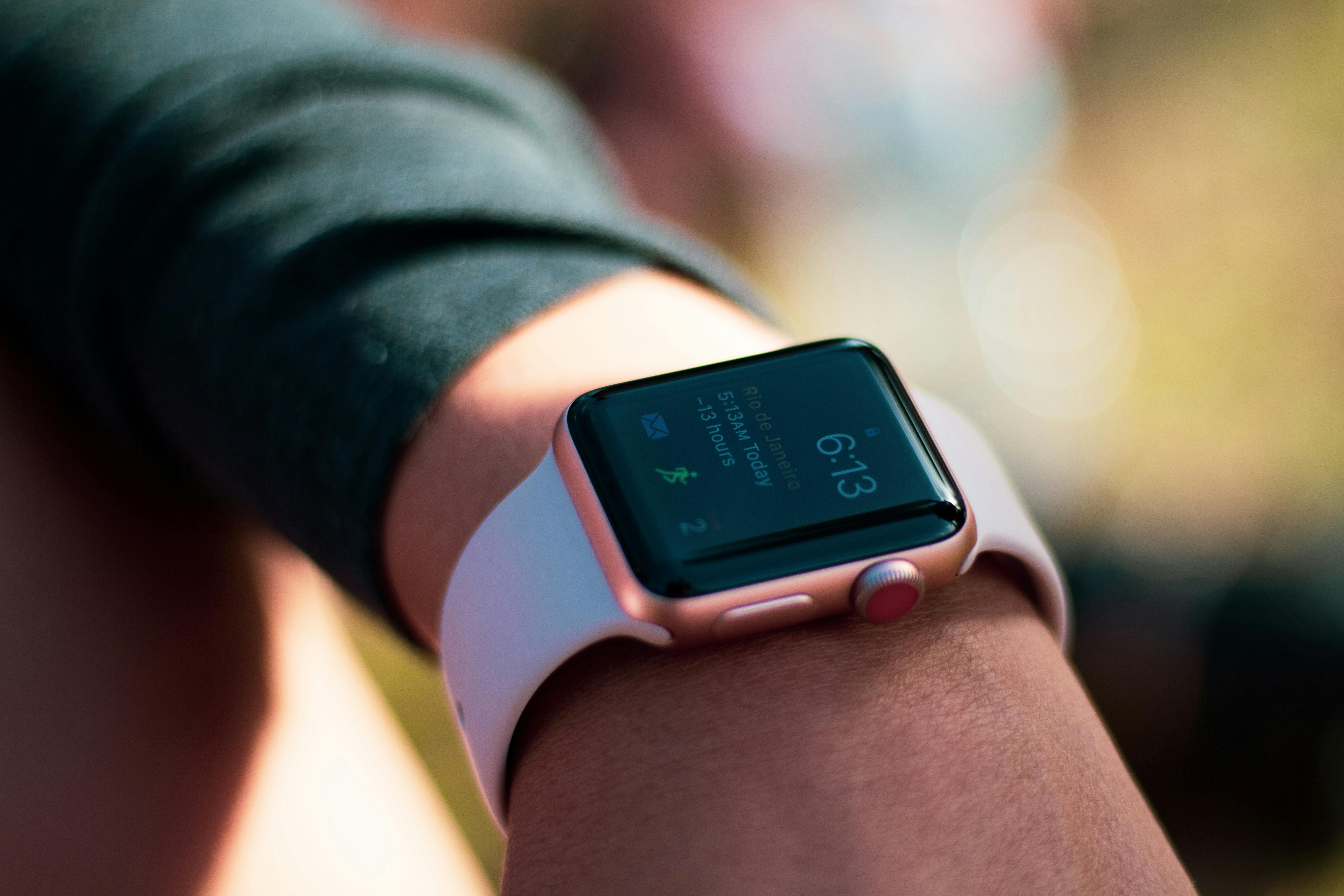
Consider how the smartwatch has changed the definition of “real time”—users can track, monitor, and do more while having a handy reference as to how they’re doing.
© Pexels, Ingo Joseph, Fair use
The smart wearables that adorn the bodies of millions of users worldwide at any given moment represent an evolution from earlier gadgets. Computerized wearables evolved from simple mechanical aids in the analogue world into the miniaturized, context-aware digital devices that brands such as Apple and Google lead the industry with. One can trace early “wearables” back to even primitive tools such as abacus-rings, centuries ago, for people to have literally close to hand.
In the 1960s, Edward Thorp and Claude Shannon built concealed timing computers—the size of a cigarette packet—in shoes to predict roulette spins, marking some of the first electronic wearable computers. By the late 1970s, HP had released the HP01 calculator watch.
As computing became more “mobile” and moved from gigantic devices in specialized environments to desktop-oriented computers made accessible to the masses at home, so too did wearable computing advance. In the 1980s and ’90s, researchers like Steve Mann experimented with backpack-mounted and head-mounted computers. Mann built the first Linux wristwatch around 1998 and is widely referred to as the “father of wearable computing.”
In 1991, Carnegie Mellon’s VuMan prototypes and MIT’s wearable experiments laid foundational human-computer interaction (HCI) research firmly in place. Samsung’s SPHWP10 watch phone arrived in 1999. A particular noteworthy addition, Timex had released the Timex Datalink in 1994—it synced wirelessly to calendars and contacts.
Discover how Human-Computer Interaction remains an essential “force” in design and will do for as long as designers create computerized products and digital solutions for users, in this video with Alan Dix.
The 2000s and 2010s saw wearables take off to reach high altitudes in the marketplace, as more consumer-oriented wearables welcomed many eager users. Lightweight, comfortable Fitbit fitness trackers emerged to make Fitbit an industry heavyweight, and Android-paired smartwatches became popular. Speaking of “popular,” the iconic Apple Watch launched in 2015, setting high UX standards with such modern “norms” as glanceable notifications, haptic feedback, and term personalization, while matching atomic-level accuracy and integrating health and contactless payment features.
Other notable wearables include Google Glass, from the early 2010s, which aimed for subtle augmented reality (AR) delivery and minimal social disruption.
Explore the virtually limitless possibilities for designing for AR in this video with Frank Spillers.
From its origins to its storied recent history, through its many forms that match the forms of the people who wear wearable UX devices, wearable computing represents an advancement of the same spirit that adapted mobile UX design to free users from the confines of computing on desktops.

These smart socks are smart, comfortable, and washable, and let users collect real time data on relevant gait metrics—with each sock infused with textile pressure sensors, a nine axis IMU, and wireless connectivity.
© Sensoria®, Fair use
How to Design Wearables, a Step-by-Step Guide
1. Conduct UX Research and Context Analysis
Get to know what type of target users you intend to design for—interview and observe users in real life. Understand scenarios where glanceable, handsfree interactions matter most. Map tasks like fitness tracking, notifications, and navigation, and pay attention to ambient noise, lighting, movement.
Find a treasure trove of helpful tips about how to use task analysis for better designs, in this video with Frank Spillers.
2. Define Personas and User Scenarios
Perhaps no “tool” is more useful than user personas—fictitious representations of real users—to “feel out” the realities of what the people who will use your proposed design solution face in their everyday world. So, build personas that describe wearable users—such as “Fitness-Focused Francine,” “Medical-Monitoring Mike,” or “Hands-Full Harry.”
Explore how personas are more than helpful—they’re vital to design—in this video with William Hudson: User Experience Strategist and Founder of Syntagm Ltd.
Use effective user scenarios in tandem with effective personas, and define scenarios like jogging or cycling—whatever suits the persona and brings their real-world challenges and opportunities closer to the design team.
Get an added edge on your designs when you know how to craft user scenarios that can take your personas to places that give the most helpful insights, in this video with Alan Dix.
3. Prioritize Features by Glanceability
Show only essential information and sequence it so users see one discrete data point at a time. You’ll want to keep screen reliance to an absolute minimum. For example, our 5K runner might want to have the vital statistics of heart rate as well as the time, where to turn next (even if running in a group), and distance-run notifications to boost morale. Apart from the safety issue of distracted running, a sweating, tired, and perhaps panting runner won’t want to be bothered with pressing or swiping to get through irrelevant information before they find what they want.
So, prioritize and filter information and let smart algorithms decide what to deliver and when. Data overload is a real risk with wearables.
4. Design Interactions Beyond Touch
Incorporate gestures, voice, and haptics such as tap, swipe, long-press, and wrist-twist. Vibrations can guide navigation or alerts without users’ needing to look—a single pulse in a millisecond can save them several seconds needing to check a screen, which can make all the difference for safety and convenience.
Find out how to harness haptics and help your users feel more in tune with your product, in this video with Alan Dix.
5. Prototype on Actual Devices or Simulators
Prototyping helps you find the right design path, and in UX design for wearable computing that means you can use items such as real watches or cloth prototypes. Observe readability, comfort, reachability, and battery drain. Test motion blur, daylight visibility, sweat, and clothing interference—all the real-world issues that can get in the way of seamless UX design.
6. Iteratively Test with Users in Real Contexts
Conduct field testing during runs, commuting, working—whatever the contexts demand. Measure glance time, task success, and ergonomic strain. How do test users find the wearable? Is it comfortable? Does it respect how they feel and social reactions? Note that what users do can speak volumes more than what they tell you they do—one reason being that they often won’t want to discuss negative factors because it might offend the designer.
Consider why context needs to be so important in design for UX wearable-style, in this video with Alan Dix.
7. Incorporate Privacy and Status Indicators
Default to nonrevealing notifications—allow settings like dim mode whenever a user’s wrist faces other people. Include visual or haptic cues when recording so users don’t accidentally execute actions.
8. Design Offline and Failsafe Modes
When the wearable is disconnected, the user interface (UI) should explain offline status and allow fallback actions like logging and delayed sync. For example, if our 5K runner takes a mini-marathon in the wilderness and has no connectivity for a day or more, ensure the watch can delay-sync the number of steps and other statistics when they can receive internet signals again.
9. Ensure Fashion Fit and Aesthetic Compatibility
Work with industrial designers to get the design right. Present devices that fit body shapes, attire, and lifestyles and offer customizable bands, themes, and materials to suit multiple tastes and user needs.
10. Iterate Based on Feedback and Metrics
Track engagement, error rates, battery life, and user satisfaction—your wearable solution is “out there” in the real world, handling elements like connectivity issues, power drain potential, and—indeed—the elements (rain, etc.). Optimize refresh rates, notification frequency, and sensor sampling to balance experience and runtime.
11. Favor Simplicity
Go for minimal input fields, predictable behavior, direct navigation. Much as mobile UX design doesn’t replicate desktop experiences for phones, don’t replicate smartphone apps at wrist size. They’re different.
Special Considerations
Battery and Power
Remember, once the charging cord comes out, it’s a downward slope between 100% and “charge device now” beeps. Good UX designs must guide users on charging habits, so avoid animations or sensors that drain power, and allow low power drain modes. Provide indicators and reminders thoughtfully, too.
Sensor Accuracy and Calibration
Display sensor confidence or calibration status, such as heartrate sensor accuracy, to build trust.
Accessibility and Inclusivity
Ensure glove-friendly gestures, adjustable text size, colorblind safe palettes, and haptic patterns for hearing-impaired users—designing for users with disabilities helps make the best of the user experience for everyone.
Explore why accessible designs make good sense for all users, in our video.
Context Switching and Interruptions
Wearables operate across contexts—all the more so because users have them “on them” more literally than their mobile phones. So, transition from walking to meeting or driving. Design UI flows that pause/resume smoothly.
Data Security and Ethics
Consider secure data storage, encryption, user consent, and transparency about what data is collected and shared. Use reputable UX literature and standards.
Long-Term Wear Experience
Test materials for skin irritation, comfort, weight distribution—vital aspects of contact on the body. Design strap styles that suit lifestyles (sports, office, sleep).
Overall, UX design for wearables represents a golden opportunity—and challenge—to design for human beings. Designers for wearable UX need to tailor devices and experiences that interface more intimately with their users and the many realities they take themselves—and their wearable devices—into. It demands sensitivity to glanceable moments, embodied form factors, privacy contexts, and nonvisual interactions, and it takes a level of empathy that understands that no matter if it’s fabric, jewelry, or some other accessory, it’s about creating wearable experiences that enhance users’ lives rather than distract them.
UX wearable design will continue to have much to offer as technology advances and modes like gesture-based interaction take interactivity in new directions. The future is here: every day designers research, ideate, and create novel solutions or variations on existing ones. What’s paramount to remember is that when users are wearing UX design as well as using it, it’s personal.

