Mood boards in user experience (UX) design are visual collections of design elements like colors, textures and imagery. Designers use them to set a visual direction, share ideas with stakeholders and maintain a cohesive design language. They serve as inspiration and a reference for the overall look and feel of a product or interface.
Why are Mood Boards Important in UX Design?
Mood boards are essential tools in UX design. With them, design teams gain a visual representation of the emotional and aesthetic direction of a design project. Designers and design teams use these boards to compile various elements like images, colors, textures and words—to encapsulate and carry the intended feel and style of a digital product. Mood boards are important aids to help teams with their creative process and design ideas because they help to:
1. Communicate Ideas Visually
Mood boards visually communicate the feelings or values that a team aims to evoke through a digital product. This visual representation helps stakeholders understand the design direction. Stakeholders should be able to make sense of mood boards—and shouldn’t need technical knowledge to understand what UX or UI (user interface) designers do. Nor should they have to have seen UX mood board examples before.
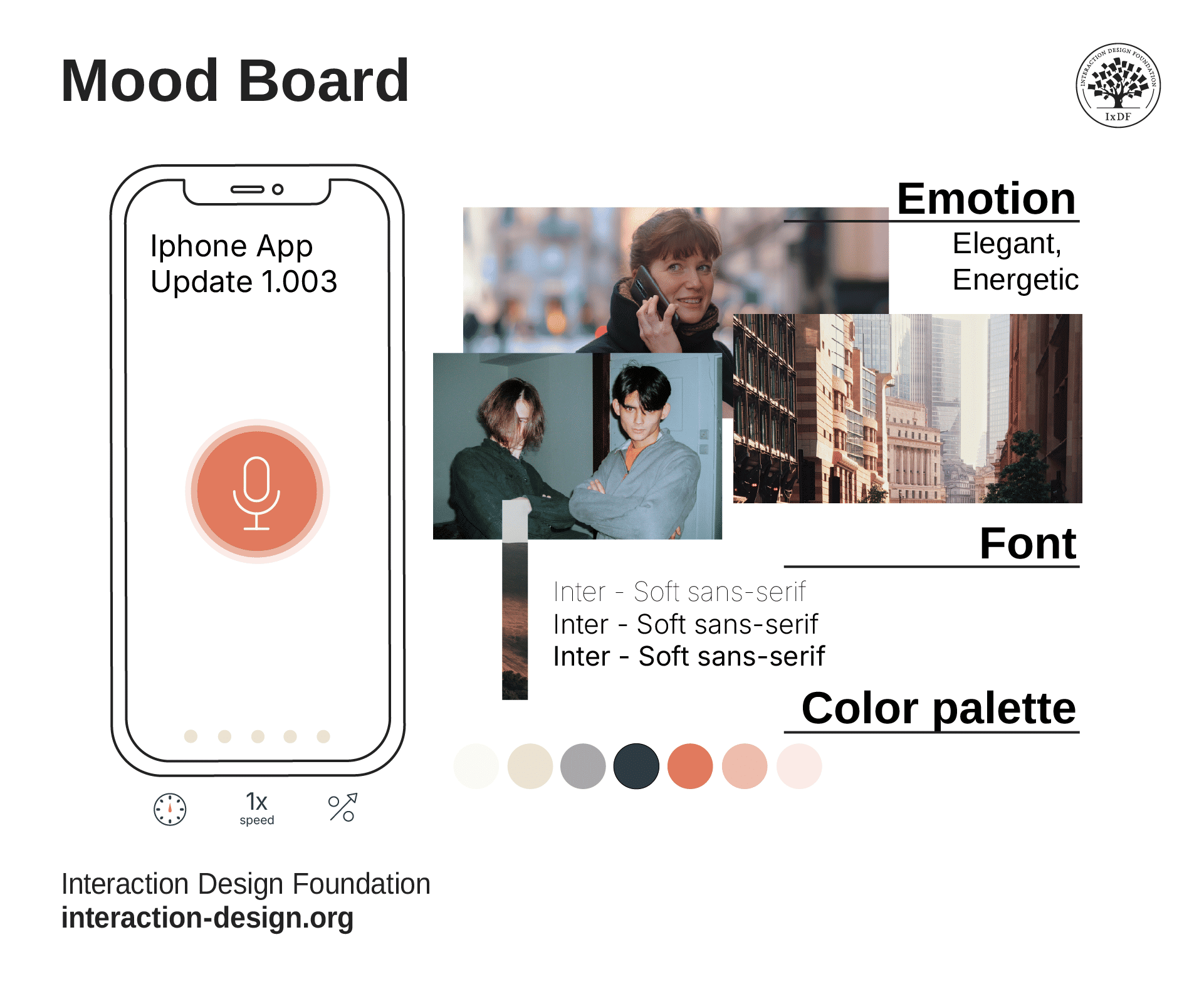
This mood board of an application captures the tone, style, and more, conveying a great feel for the brand’s product in a collage of images and text with an exceptional color choice to match.
© Interaction Design Foundation, CC BY-SA 4.0
2. Build Consensus
Mood boards help bring about a consensus among design teams and stakeholders before the design process begins. They help make sure everyone is on the same page with the visual direction of a creative project.
3. Facilitate Emotional Connection
Since mood boards define the primary UI colors and visual identity, they help establish an emotional connection with the user, something that’s crucial for user experience—especially as designers have to empathize with pain points and use problem solving for users in user flows.
See why empathy is vital in design:
What are the Essential Elements for a Mood Board?
Consider the following table to get an understanding of what should go on a mood board:
Element Type | Examples | Purpose |
Visuals | Images, textures, color palettes | To set the aesthetic tone of the project |
Font styles, type treatments | To complement the visual style and tone | |
UI Components | Buttons, icons, navigation menus | To visualize the functional design elements |
Inspirational Elements | Videos, animations, sound clips | To convey dynamic aspects of the design |
Organizational Tools | Adobe Spark, Canva, Miro | To assemble and share the mood board |
Also, mood boards come in two main formats: physical and digital. Consider the following comparisons between the two:
Aspect | Physical Mood Boards | Digital Mood Boards |
Sensory Experience | Allows interaction with real textures and materials | Limited to visual and auditory senses |
Dynamic Elements | Generally static, focusing on tangible elements | Can include videos, animations, and sounds |
Requires physical space and materials | Accessible anywhere with digital tools | |
Collaboration | Can be challenging to share remotely | Easily to share and edit for teams online |
Tools | Traditional crafting material like foam boards | Digital platforms like Adobe Express and Canva |
What are the Benefits of Mood Boards for Design Teams?
Mood boards are especially helpful because they help to:
1. Visualize and Communicate Design Concepts
Mood boards serve as a vital tool for designers and design teams as they work to visualize and refine design concepts—and that’s before the actual design process begins. They allow designers to assemble images, textures, color palettes and other elements that represent the intended style in visually appealing ways. These boards help make sure that all team members and clients share a common understanding of the project's direction from early on. Specifically, mood boards:
Clarify the design vision: Mood boards make abstract ideas tangible. They help to clarify the design vision and remind all stakeholders of the original goals of a digital design or service.
Make client involvement easier: Since designers can involve clients early in the design process, mood boards make sure there’s a mutual understanding and agreement on the project's aesthetic direction. This lowers the likelihood of disagreements later on.
Enhance team collaboration: Mood boards act as a focal point for discussions. They help make sure that all team members are on the same page regarding their interpretations and ideas—so, better collaboration and creativity can result from this.
2. Boost Efficiency and Effectiveness in Design Development
Mood boards don’t just streamline the design process. They enhance the effectiveness of the design outcomes as well. These boards enable designers to experiment with different elements quickly—without needing detailed executions at the early stages. As they do this, mood boards help designers:
Save time and resources: As the boards help visualize ideas early on, they cut down on the time a brand needs to spend on revisions. This translates to saving money, and mood boards can help prevent resource wastage for designers, design teams and their brands.
Promote creative exploration: Designers can create multiple alternatives, play with different color schemes and explore various design directions without the constraints of the full design process. This exploration is especially beneficial for product designers—that’s because they don’t have to commit to a single path towards an app or web design at this stage.
3. Serve as a Strategic Tool in Various Design Projects
Whether for digital products or brand development, mood boards are adaptable to various design projects. What’s more, they help make sure that all design elements cohesively mirror the mood and style the design team intends. More specifically, mood boards offer designers:
Versatility across projects: Mood boards are applicable in various design fields. These include UX and UI design and product branding. So, they’re a universal tool in the design industry for all sorts of design work—notably visual designs.
Consistency and cohesion: As mood boards establish a clear aesthetic direction from the start, they help keep things consistent across all design elements and different platforms. This quality is crucial for brand identity and user experience. Plus, UI designers can especially benefit from all the visual elements on show in a UI/UX mood board.
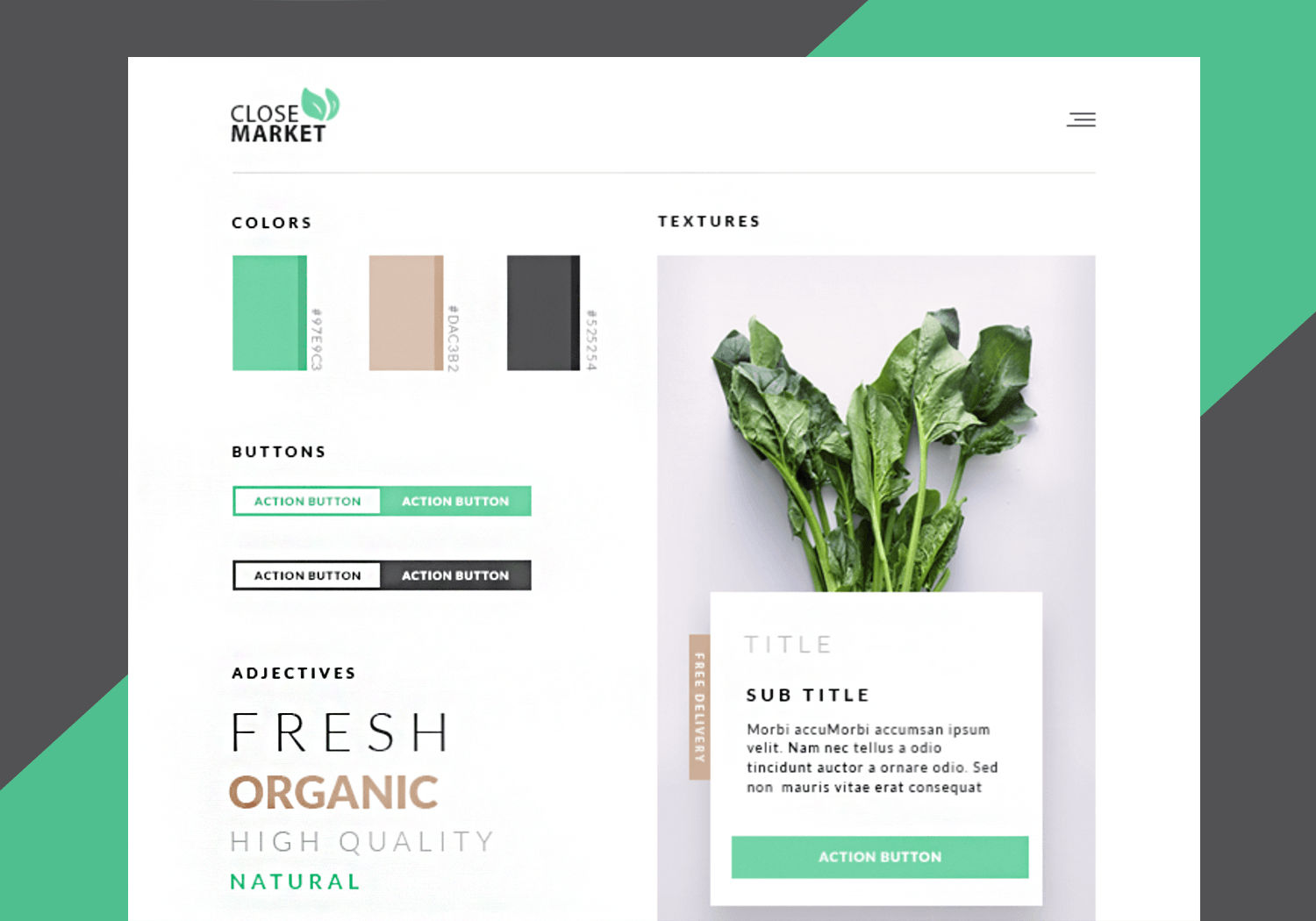
This website mood board example conveys the color palette, font, spacing and imagery for the website of an organic food store well with beige-brown, green and graduated black squares that match the color tones of the chard shown.
© Joseph Downs, Fair Use
What is the Best Way to Create Effective Mood Boards?
To make and use the most effective mood board, designers can consider this step-by-step approach:
Step 1: Define the Project Direction
Designers define the purpose and goals of their mood board. This clarity is something that will guide the selection of all elements that follow.
Step 2: Gather Materials
Collect written content like brand values and positioning statements, as well as any existing visuals that clients provide. This includes logos, design elements and images that resonate with the brand's identity.
Step 3: Select Inspiring Imagery and Elements
Designers should choose a mix of images, textures and other elements that are in line with the concept and mood they want the digital product to carry to users. These should evoke the emotions and feelings they intend for the project.
Step 4: Incorporate Motion and Sound
For projects that involve interactive elements, it’s important to include examples of video, audio and animation. This helps to convey the design’s dynamic aspects.
Step 5: Add Color and Typography
Colors and fonts are pivotal parts to help set the tone. Designers should use tools like Adobe Color CC and Coolors to find complementary colors—and select typography that reflects the personality of the brand.
Step 6: Organize the Mood Board
Designers should arrange the elements they’ve collected thoughtfully. They should create a hierarchy, and put key elements prominently and adjust the size and position of others to show their relationship and importance.
Step 7: Stay Open to Inspiration
It’s vital to keep the mood board dynamic and open to changes as new inspirations arise. This flexibility can lead to more creative outcomes.
Step 8: Explain Choices
If designers intend to share the mood board with clients or team members, they should include notes on their thought process and inspirations; that can help others understand the vision and stay on board with it.
Step 9: Collaborate and Refine
Designers need to use the mood board as a tool for collaboration. It’s important to share it with stakeholders to brainstorm and refine ideas. This will help make sure that a consistent design vision remains a palpable reality.
Step 10: Seek Feedback
It’s time to invite feedback from clients and team members. Constructive criticism is essential—a vital way to make sure the mood board effectively gets the intended vision across to the beholder.
Watch this video with Design Director at Societe Generale, Morgane Peng for helpful advice about feedback and how to seek it:
What are Best Practices to Create and Use Mood Boards?
1. Consider Physical and Digital Formats
Designers can create mood boards using both physical and digital methods. It’s important to remember that each offers unique advantages.
Physical mood boards are an excellent way to help engage with tangible elements such as foam or whiteboards. Still, team members need to be present to use them.
Digital mood boards let designers include dynamic elements such as video and sound. These can be vital to set the mood and atmosphere for a project. Plus, remote teams can use digital boards. Free mood board templates and software for mood boards include tools like Moodboard, Moodzer, Adobe Express and Canva. These resources can help designers enhance the creation and sharing of digital mood boards.
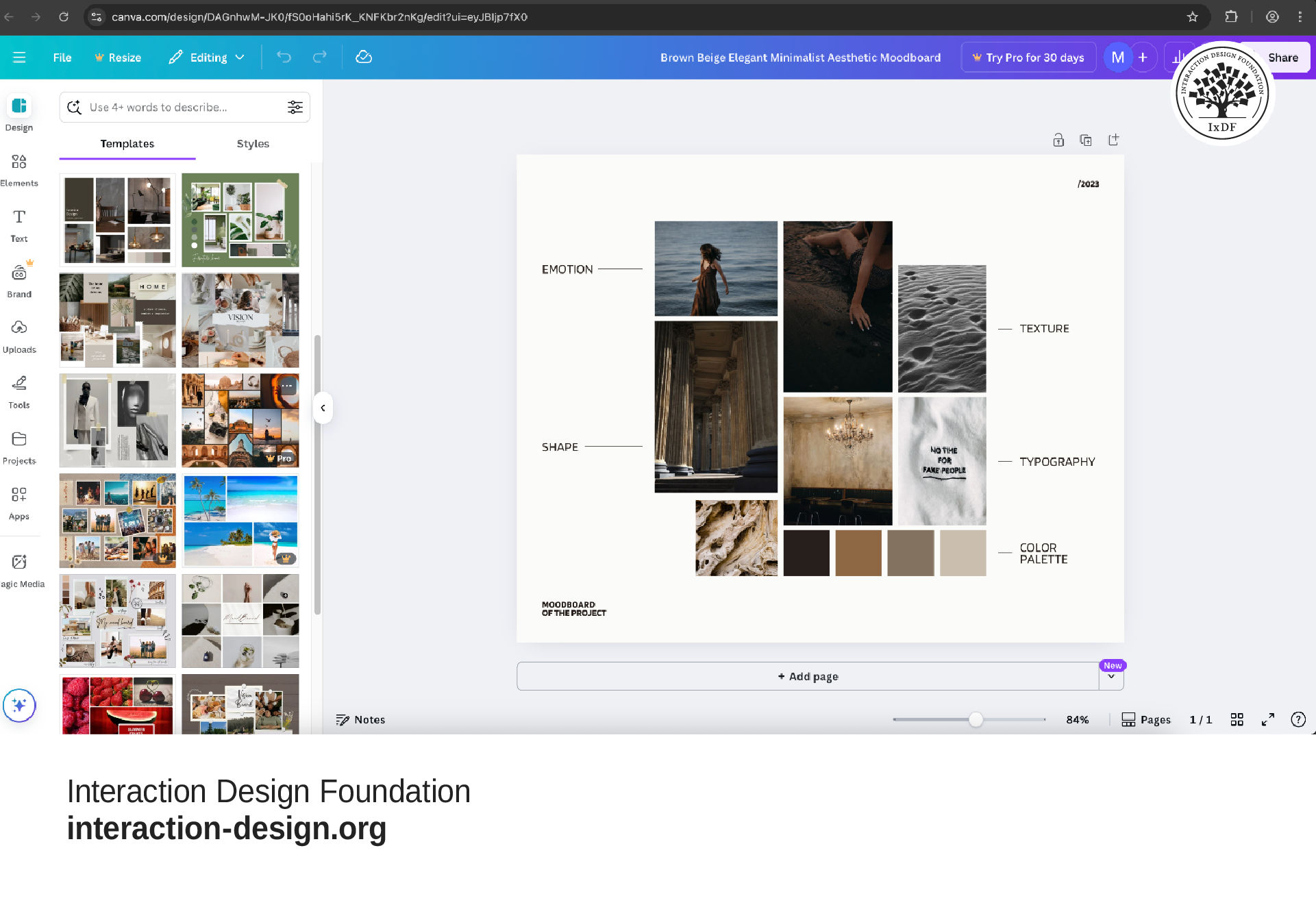
Canva has thousands of images and assets available, as well as template layouts, and lets users upload their own images.
© Interaction Design Foundation, CC BY-SA 4.0
2. Encourage Bold and Inventive Creations
When designers work on mood boards, it's crucial to be bold and inventive. This approach lets them explore creative boundaries and innovate beyond conventional design frameworks. As mood boards help push the limits of creativity, they’re great tools to capture and convey the essence of the intended design—and make a compelling and memorable impact.
3. Use Good Tools to Create Mood Boards
Use digital tools like Canva, Adobe Spark and Miro to assemble mood boards. These platforms offer flexibility and collaborative features that are beneficial for team projects. The best websites to create mood boards and software resources provide extremely helpful resources for teams who want to leverage mood boards as powerful collaborative tools.
4. Gather UI Components
Include specific UI components like buttons, forms and icons. These elements should complement the overall design and help visualize the functional aspects of the project.
5. Document and Share
Once the design team has finalized a mood board, they should document and share it with all project stakeholders. This makes sure that everyone can see and get on board with the visual direction and design goals.
6. Take a User-Centric Approach
Designers need to consider their target audience's preferences and expectations so they can be sure that the mood board resonates with them. As with many other deliverables, a mood board is a design. So, it’s crucial to be sure that it can access and inform stakeholders and individuals from non-design backgrounds.
7. Achieve Brand Alignment
The elements in the mood board should fall into line with the brand's values and identity; that’s to maintain consistency across the product. The best examples of mood boards bring out the organization’s essence in the best way.
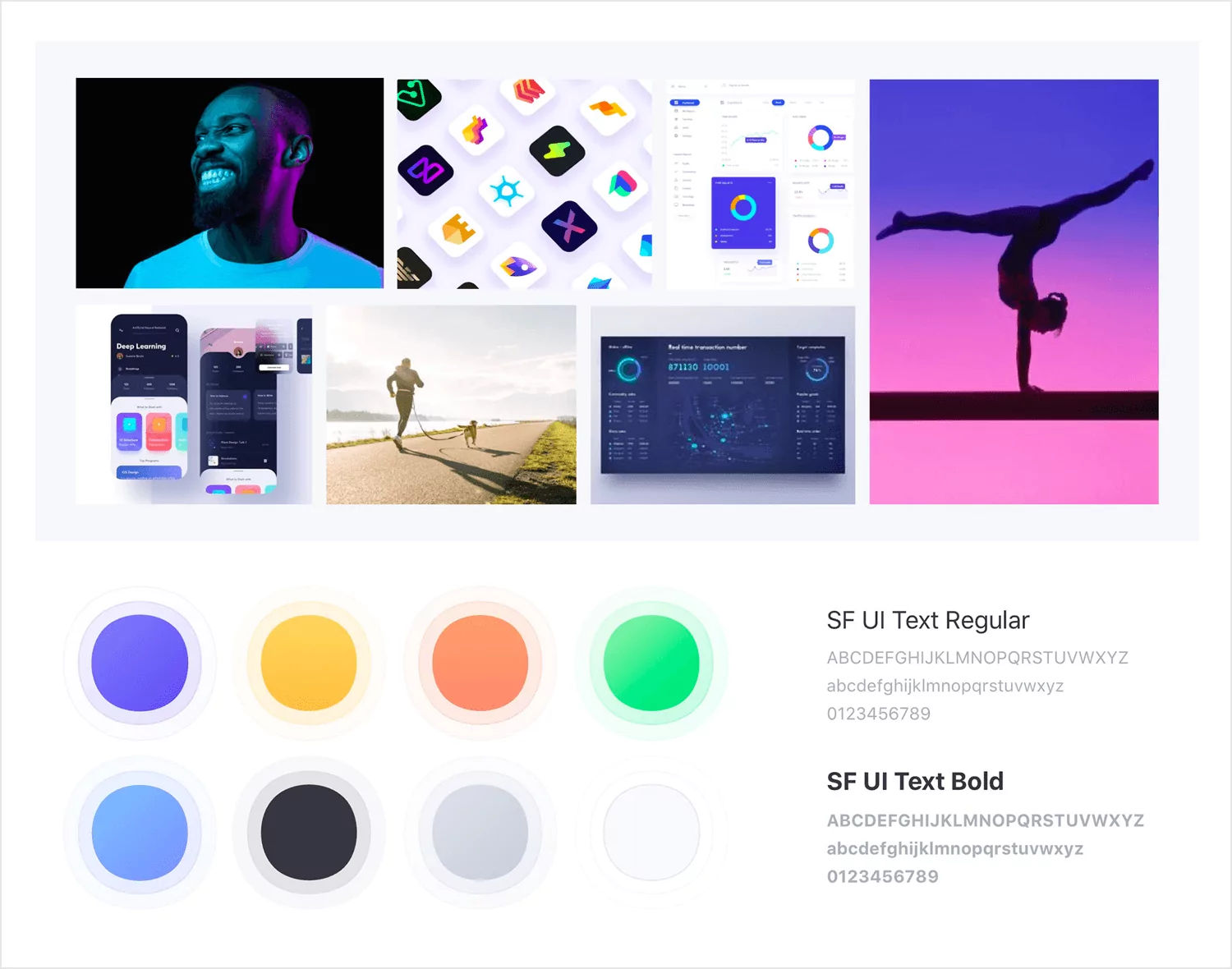
This app UI mood board for fitness coaching app Personal Gold exemplifies a good color theme and use that support imagery to reinforce the adjectives “cheerful,” “sporty,” “effective” and “trendy.”
© Hijim Nam, Fair Use
8. Include Comprehensive Elements
Beyond visuals, mood boards in UX design should include tone-of-voice words, marketing ideas and interaction-design patterns. This comprehensive approach helps designers and design teams develop a holistic design strategy—from the moment they consider how to make mood boards that get across the best ideas for collaboration and brand success.
9. Remember the Important Ingredients
Aside from having easy access to materials such as the best tools and websites to create mood boards, designers should keep their eye on their brand, message, themes and other design aspects regarding what users would expect or like. So, it’s particularly important to keep the following in mind:
Images: Photographs that represent the desired visual style and atmosphere of the product or experience—this includes user personas in real-life situations related to the product.
Mood and emotion: Visual representations of emotions, moods or atmospheres that the design should evoke. Images that convey the desired user experience, such as joy, efficiency or comfort.
Overall, it’s vital to remember that mood boards are not just a way to assemble inspiring images. They’re a strategic tool in UX design. They help translate abstract concepts into visual narratives that guide the design process. When designers, other design team members and other stakeholders find themselves well and truly aligned, they can make sure that the final product brings the desired emotional and aesthetic experience to all users.





