The value proposition canvas is a tool businesses and designers use to analyze, evaluate and adjust the value proposition of their product or service to align with their customers' requirements. Businesses support their canvases with research, which informs product and service development, improvement and strategy.
In this video, Frank Spillers, CEO of Experience Dynamics, explains what the value proposition canvas is:
Alex Osterwalder, Yves Pigneur and Alan Smith created the value proposition canvas to help companies and teams effectively design, test and build their value propositions to customers.
The goal of the Value Proposition Canvas is to assist you in designing great Value Propositions that match your Customer's needs and jobs-to-be-done and helps them solve their problems. This is what the start-up scene calls product-market fit or problem-solution fit. The Value Proposition Canvas helps you work towards this fit in a more systematic way.
— Alex Osterwalder, co-founder and CEO of Strategyzer
What Is the Difference Between the Value Proposition Canvas and the Business Model Canvas?
The value proposition canvas is an extension of the business model canvas. The business model canvas maps out a product’s or business's:
Key partners: The people who are crucial to perform key activities and use resources effectively.
Key activities: Essential daily actions that maintain the value proposition and business operations.
Key resources: Essential tools and resources across all areas, including customer retention.
Value proposition: The product or service that aims to create value for the customers.
Customer relationships: Strategies for customer acquisition, retention and upselling.
Customer segments: Key customer groups, like seniors, parents, students, etc.
Channels: The distribution method(s) for the service or product.
Cost structure: The main cost drivers and return on investment (ROI) evaluation.
Revenue streams: The sources of income, like advertising.
Sustainability: The evaluation of the product’s or service’s impact on the environment and society.
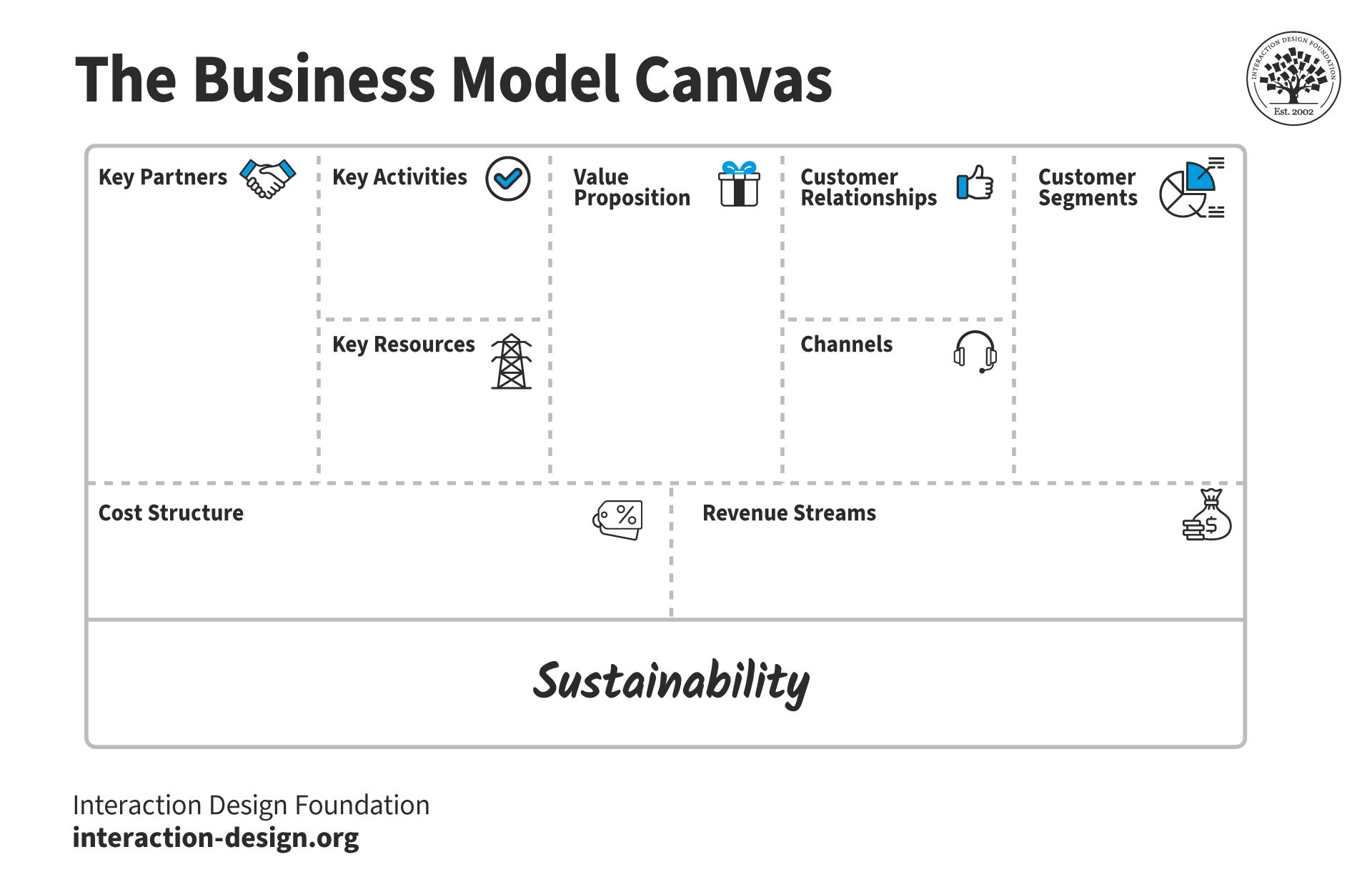
The business model canvas is a tool that helps companies and designers understand the requirements needed to create and deliver a product or service. This template includes sustainability as an additional consideration.
© Strategyzer AG, modified: CC-BY-SA-3.0
The value proposition canvas takes the value proposition and customer segments boxes of the business model canvas and examines them in more detail. This detail enables businesses and designers to define better customer value propositions. A value proposition is a statement or short paragraph that:
Clearly describes what a service, business or organization offers.
Who benefits from it.
Why it is beneficial to those people.
Value propositions typically follow this format:
Our “product/service” help(s) “customer segment“ who want to “customer’s jobs to do/problems to solve“ by “your verb“ and “your verb, “unlike “competing value proposition.“
For example, Amazon’s value proposition for customers might be:
Our online marketplace helps shoppers who want to purchase goods online by offering a vast selection of products and a convenient shopping experience, unlike traditional retail experiences or smaller online platforms.
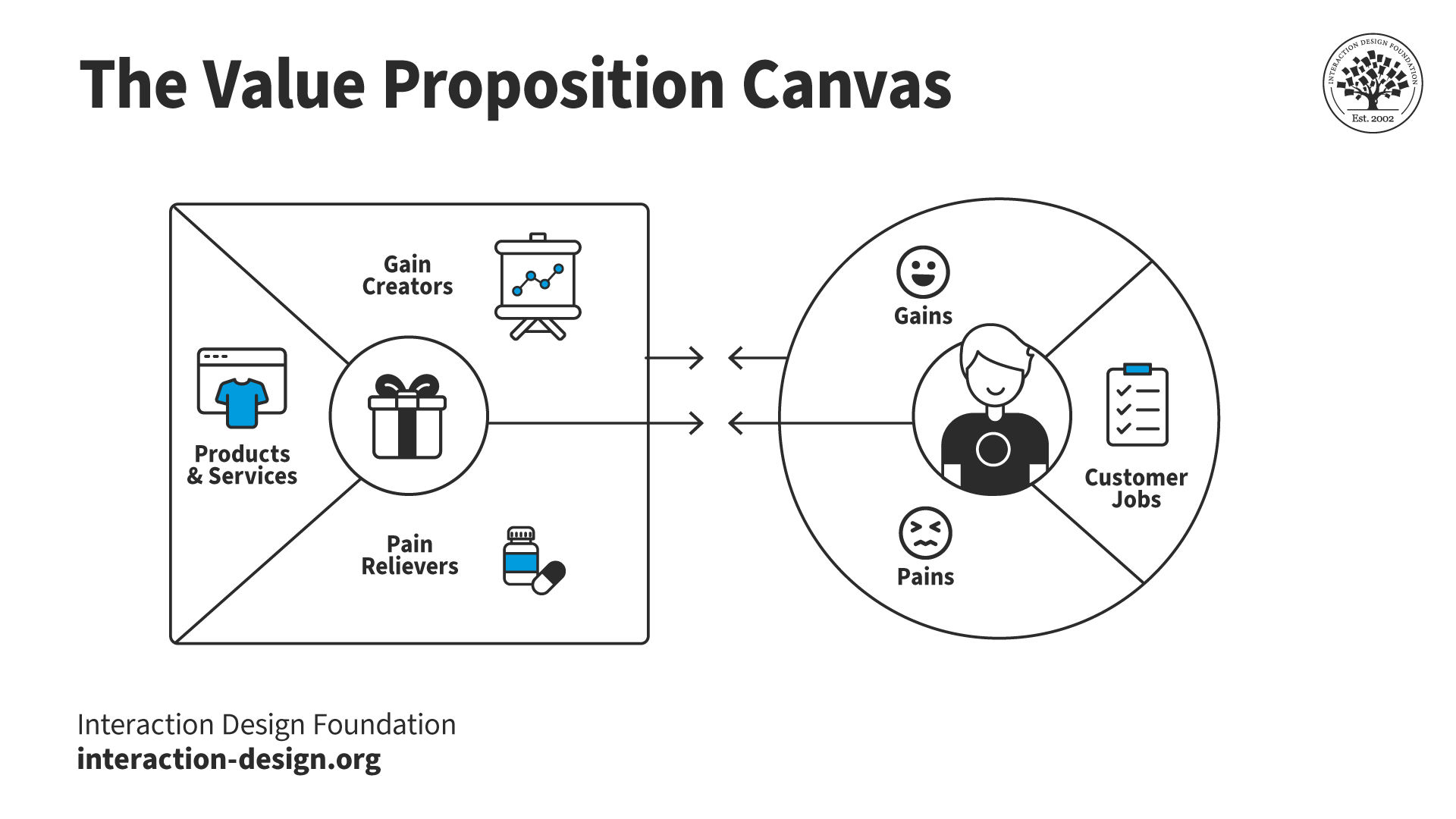
The value proposition canvas consists of two sections and six components. The customer segment on the right includes customer jobs, pains and gains. The value map on the left consists of products and services, pain relievers and gain creators.
© Interaction Design Foundation, CC BY-SA 4.0
The Value Proposition Canvas In UX, Service and Product Design
The value proposition canvas is primarily a business strategy tool. However, it is a valuable tool for service design, user experience (UX) design and other design disciplines. The canvas helps designers create products and experiences that align with the users' needs, pains and gains.
Designers may create a value proposition canvas themselves, take part in canvas workshops or reference a canvas as part of a business’s internal documentation.
The canvas benefits the design process in the following ways:
Aids design iteration: It grounds ideation and design in the core value proposition. The canvas encourages designers to test and refine based on actual user feedback. This approach leads to products that align with customer needs.
Validates value propositions: It can indicate whether the initial value proposition fits with the target customers.
Enhances team collaboration: It acts as a shared guide for designers, product managers and marketers. The canvas improves communication and enables all stakeholders to pursue the same user-centric goals.
Centers on user needs: It focuses on understanding customer needs deeply. This approach aligns designs with what users truly want.
Guides feature development: It helps identify which features and elements are most valued by customers.
Boosts efficiency: It identifies mismatches between user expectations and product offerings early. Designers who use the canvas can save time and resources on less impactful features.
When Do Designers Use the Value Proposition Canvas?
Designers create and use the value proposition canvas at different stages throughout the design process.
First, designers use the value proposition canvas in the initial research phase to gain a deep understanding of their target audience’s needs, desires and pain points. They then use this canvas to help them conceptualize solutions. This approach ensures new product ideas or service concepts align closely with customer requirements.
Designers continue to use the canvas during the iteration of a product. The canvas helps them identify areas for improvement based on feedback or changing market demands. Finally, designers use the canvas before production or development begins. At this stage, the canvas validates that the proposed solution resonates with the intended audience.
How to Create a Value Proposition Canvas
The value proposition canvas consists of two main sections. Each section contains three components that help designers understand customers and create value propositions that meet their needs.
Customer Segment
Designers and businesses use the customer segment to record their assumptions about their customers. They state how they believe their products solve customer needs. Then, they test these assumptions to confirm if they are true or false. The purpose of the customer segment is not to design an ideal customer but to understand real customers.
The customer segment consists of the jobs a customer needs to complete, the pains they want to avoid and the gains they want to receive. This section of the value proposition canvas allows designers to focus on the customer or user separate from the product.
For example, if the Interaction Design Foundation (IxDF) created a value proposition canvas, the customer segment would not focus on someone who wants an IxDF membership. Instead, the customer segment might concentrate on a design professional who wants to learn new design skills.
Designers and businesses often create multiple value proposition canvases for different types of customers. In the IxDF example, there might be several canvases for design professionals, students and transitioning designers.
Customer Jobs
The customer segment maps the customers’ jobs to help identify:
The tasks your customers are trying to complete.
The problems they are trying to solve.
The needs they wish to satisfy.
The three types of customer jobs are:
Functional jobs are specific tasks that have practical benefits. Functional jobs focus on the tangible aspects of a product that improve daily activities or solve practical problems.
Emotional jobs cater to the feelings and emotional states that customers wish to achieve when using a product.
Social jobs are how customers want others to perceive them and their desire to fit into or stand out within their social circles.
When design teams and businesses fill out customer jobs, they start with surface-level jobs close to their solution. After this, they go deeper to develop a more detailed and valuable customer profile. Designers often end up with many jobs as they continually go deeper. This approach creates a more robust customer profile to test and confirm later.
For example:
One job of a design professional is to learn new design skills (functional).
Why do they want to learn new design skills?
To feel accomplished and confident in their design abilities (emotional).
To enhance their portfolio (functional).
Why do they want to strengthen their portfolio?
To gain recognition in the design community (social).
To create opportunities for new jobs or clients (functional).
Once businesses and designers have identified customer jobs, they rank them in order of importance to the customer. Ranked jobs help businesses determine whether their product fits the customer. For example, the ranking for a design professional might be:
Learn new design skills (functional).
Create job or client opportunities (functional).
Stay updated with the latest design trends (functional).
Increase efficiency in their workflow (functional).
Enhance their portfolio (functional).
Network with other design professionals (social).
Gain recognition in the design community (social).
Feel accomplished and confident in their design abilities (emotional).
Find inspiration for new projects (emotional).
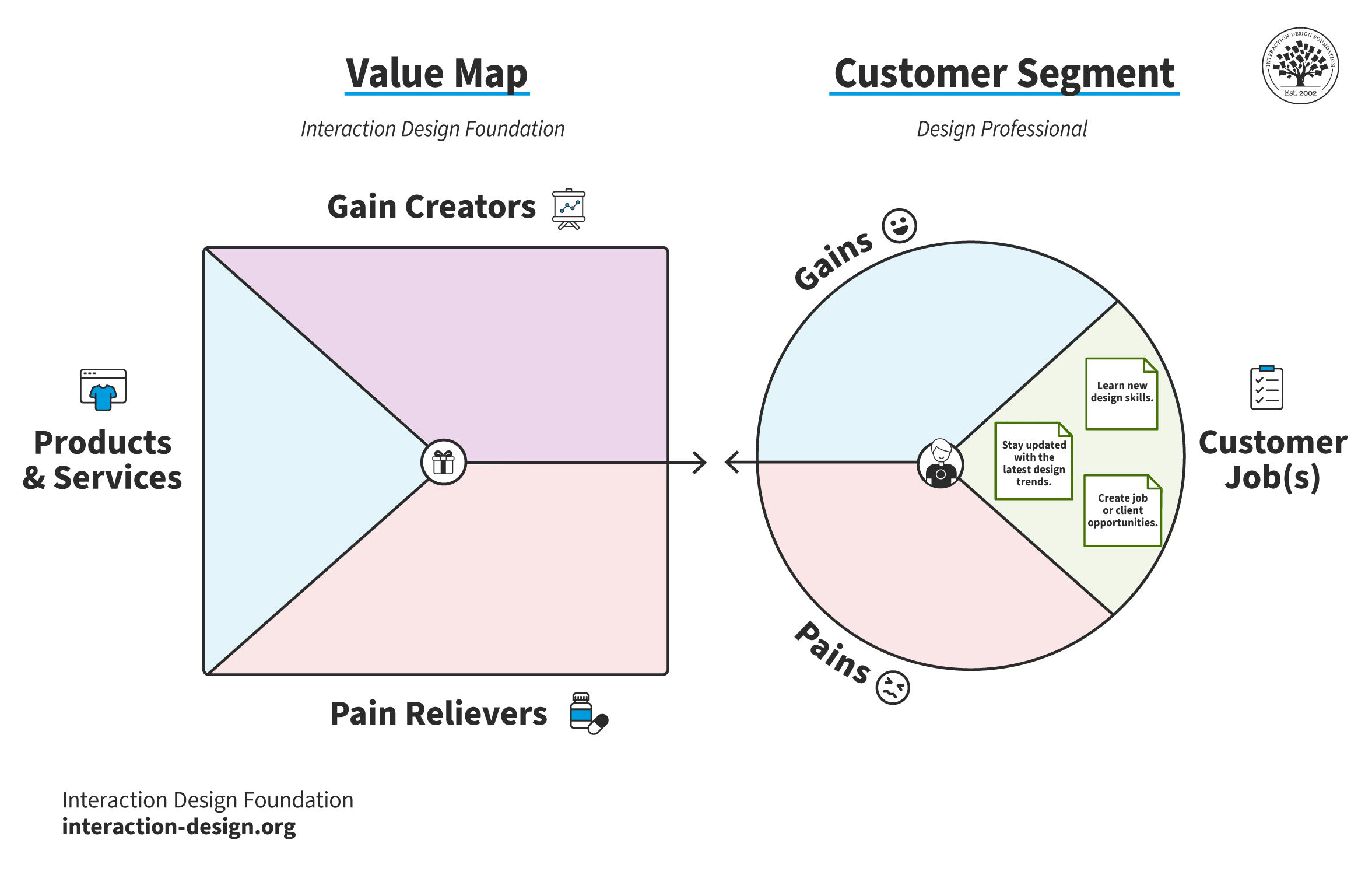
Customer jobs define what a customer needs to get done but don’t explain why they would choose a particular product or service. The pains and gains answer this question.
© Interaction Design Foundation, CC BY-SA 4.0
Pains
Customers face negative experiences, emotions or risks before, during and after getting a job done. Businesses identify pains to understand the challenges and frustrations their customers experience. Designers ask the following questions:
Question | Examples |
What significant concerns and risks worry your customers? | Losing money. Social problems. Losing respect, status or trust. |
What causes user dissatisfaction or stress? | Design issues that annoy them. Interface problems. Making frequent errors. |
What challenges do your users face with current designs? | Not having enough features. Interfaces that are hard to use. Trouble finishing tasks. |
What barriers prevent users from adopting designs? | High initial cost. Steep learning curve. Resistance to change. |
What aspects of a product or service do users find too costly or demanding? | Excessive time requirements. High monetary costs. Significant effort needed. |
For example, some pains for a design professional who wants to wants to grow their design knowledge may be (ranked by most “painful”):
I might not have enough free time to complete a course.
What if the course isn't high-quality?
I don’t have a big budget for courses.
I am not a fluent English speaker, but I want to take courses in English. I might struggle to understand.
I might not be motivated enough to start and finish the course.
What if I don't learn anything new?
I don’t have the time/effort to learn how a new platform works.
What if the platform is down when I have time to study?
If I fail the course, what will my peers think of me?
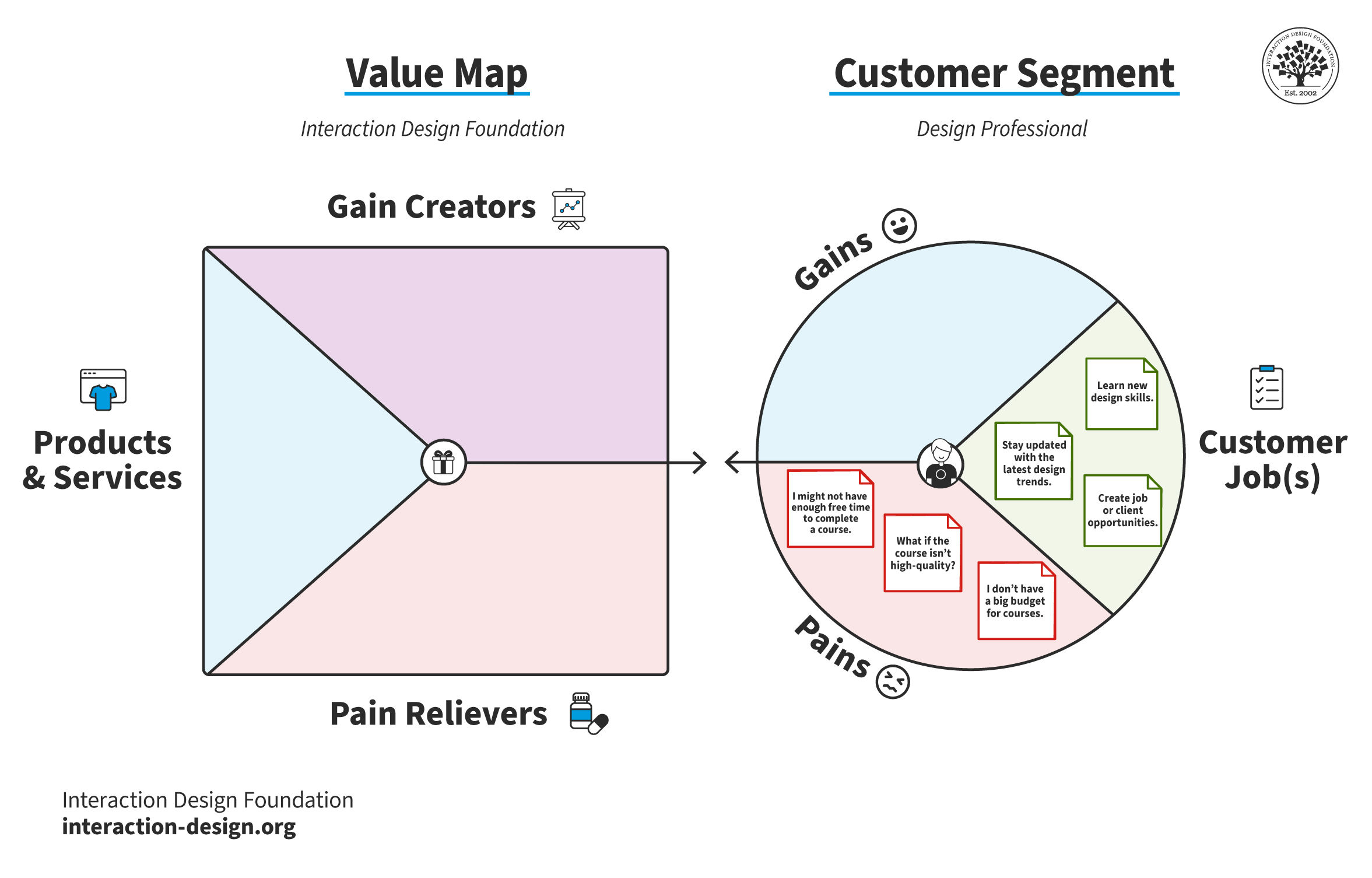
Pains define customers' negative experiences with existing solutions and their fears. Designers identify pains to understand their users and customers deeply.
© Interaction Design Foundation, CC BY-SA 4.0
Gains
Gains represent the outcomes and benefits your customers want, and that would give them moments of delight. Two key points define gains:
Gains are more than what customers expect. They are not the simple result of a job. For example, a gain for a design professional looking to learn new design skills is not “A greater design knowledge.” Instead, a gain would be “Suggestions of how to continue growth after course completion.”
Gains aren’t just the inverse of pains. For example, if a pain is “What if I don't learn anything new?” a gain isn’t “Learning something new.” Instead, a gain would be “Educational materials tailored to my level of knowledge and career stage.”
To define gains, designers ask the following questions:
Question | Examples |
How do current designs make users happy? | Special features. Good performance. High quality. |
What positive social results do users want? | Looking professional. Gaining more respect. |
What improvements in design can enhance user satisfaction and daily experience? | Simpler designs. More features. |
How do users judge success and failure? | How well products and services work. Their return on investment. |
What cuts in time, money or effort would make your customers happy? | Quicker and simpler onboarding. Cheaper options. |
What factors influence users to adopt your product? | Appealing design. Solid guarantees. Specific or more features. |
For example, some gains for a design professional who wants to wants to grow their design knowledge may be (ranked by most “gainful”):
Increased job opportunities or better/more clients.
Opportunities for practical application.
Suggestions of how to continue growth after course completion.
Industry-recognized certificates.
Community support.
Regular updates on industry trends.
Boosted creativity and inspiration.
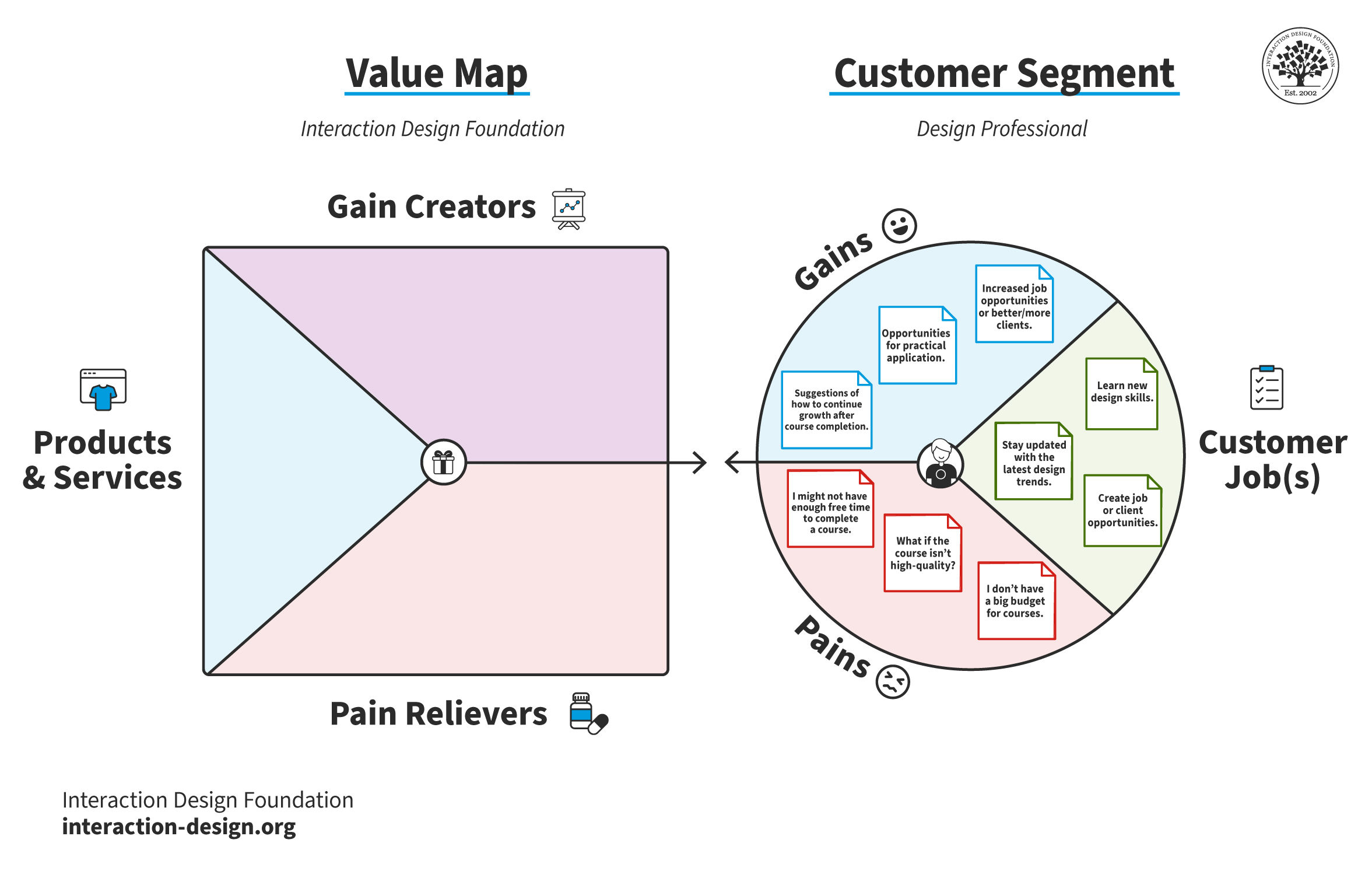
Gains are the outcomes customers expect from a job well done. Moments of delight and unexpected bonuses are also gains.
© Interaction Design Foundation, CC BY-SA 4.0
Value Map
The value map consists of a business's products and services, the pains they relieve and the gains they create.
While the customer segment will include many jobs, pains and gains, the value map should contain only a few products and services, pain relievers and gain creators. A business should address a customer’s most important jobs, pains and gains well. If a business tries to address every customer job, pain and gain, they will likely do it poorly.
Products and Services
This component outlines the business's various products and services. Products can be:
Tangible (e.g., a physical product, an in-person service).
Digital (e.g., an application, an online course).
Intangible (e.g., consulting services).
IxDF’s products and services, ranked as most important to a design professional who wants to wants to grow their design knowledge, are:
High-quality beginner, intermediate and advanced design courses.
Insightful webinars with industry experts on the latest design trends.
A worldwide community of designers, online forums and in-person meet-ups.
Blog articles and newsletters with the newest design knowledge and trends.
An open-source, free-to-access library of design knowledge.
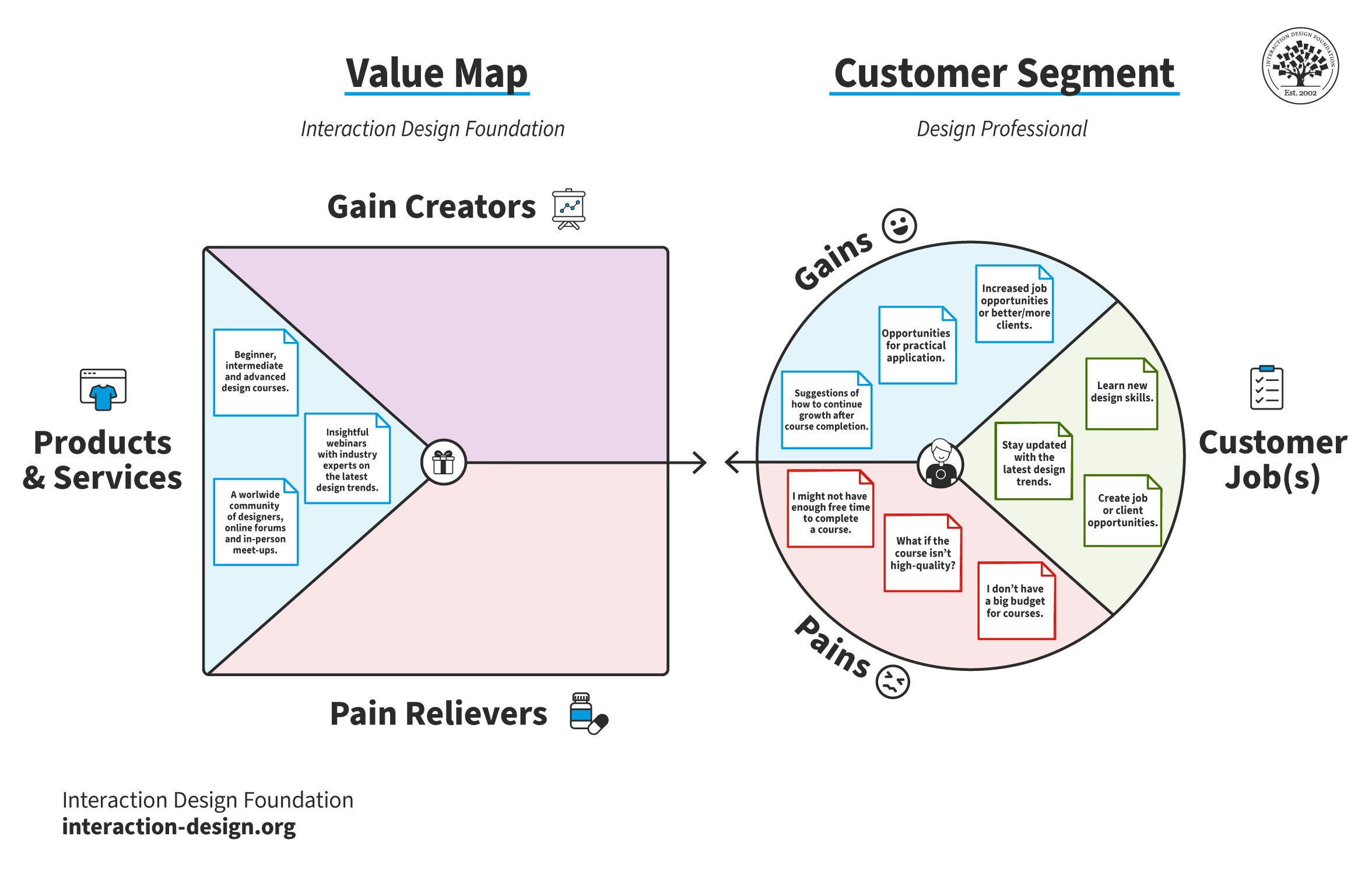
Designers and businesses list and match their products and services to their customers' needs. This component of the value map includes core products and additional services.
© Interaction Design Foundation, CC BY-SA 4.0
Pain Relievers
Relievers directly address the pains customers experience. The questions designers ask are the inverse of the customer pains questions. For example, instead of “What causes user dissatisfaction or stress?” designers ask, “How does my product or service alleviate customer dissatisfaction or stress?”
However, designers must remain objective and be honest about the pains their product relieves. For example, Amazon relieves many of the pains of its customers. However, if a customer's pain is “I don’t want to be overwhelmed by choice,” Amazon cannot entirely relieve this pain. While they make product recommendations, Amazon has a vast range of products, so they may still overwhelm customers with options.
IxDF’s pain relievers, ranked by most relieving, are:
High-quality and educational content delivered by industry experts.
Courses you can take at your own pace.
A single flat fee for access to the entire course library.
New courses are regularly released.
A simple, straightforward interface.
A mix of video and text-based lessons to keep students engaged.
Video transcripts and local communities for non-fluent English speakers.
Customer pains that the IxDF cannot relieve are:
What if the platform is down when I have time to study? While IxDF has a stable platform with minimal downtime, it’s impossible to completely relieve this pain. Occasional downtime is unavoidable for an online platform.
If I fail the course, what will my peers think of me? While customers can retake any course, IxDF cannot relieve this pain directly.
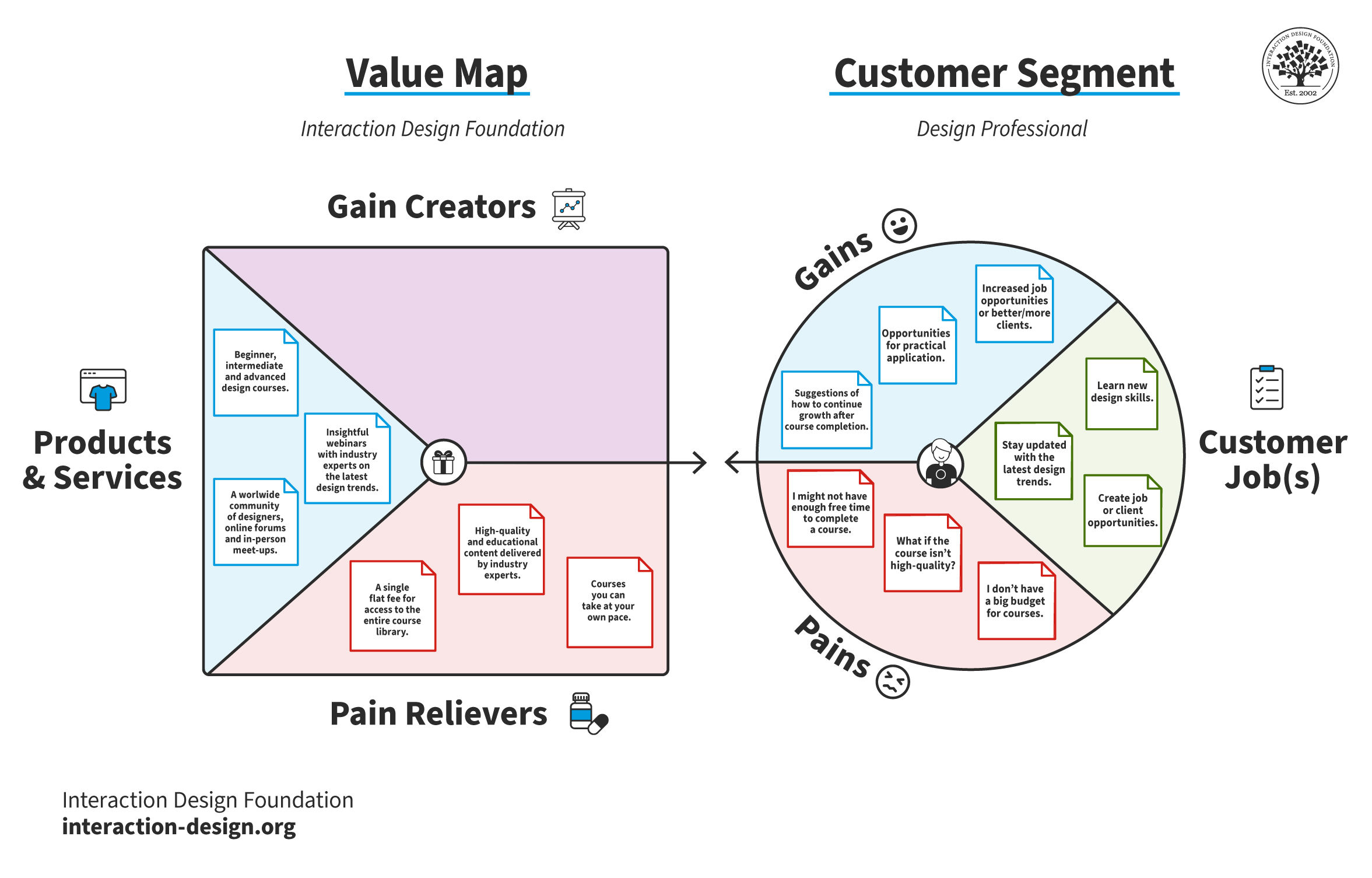
Pain relievers are features or benefits that designers and businesses plan to use to relieve customer pains. A single product may not relieve all customer pains.
© Interaction Design Foundation, CC BY-SA 4.0
Gain Creators
These are the features or benefits that create desired outcomes for the customer. As with customer gains, gain creators can be the outcomes of the jobs customers complete or moments of delight the customer does not expect.
Some of the IxDF’s gain creators ranked by gain created are:
High-quality insights from industry superstars like Don Norman.
Industry-recognized course certificates. Students can share certificates on social media for increased status and social gain.
90% member discount on webinars.
Practical exercises to test new skills and build portfolios.
“Learn More” sections in all lessons, including internal and external resources.
Learning paths that suggest courses based on profession or field of expertise.
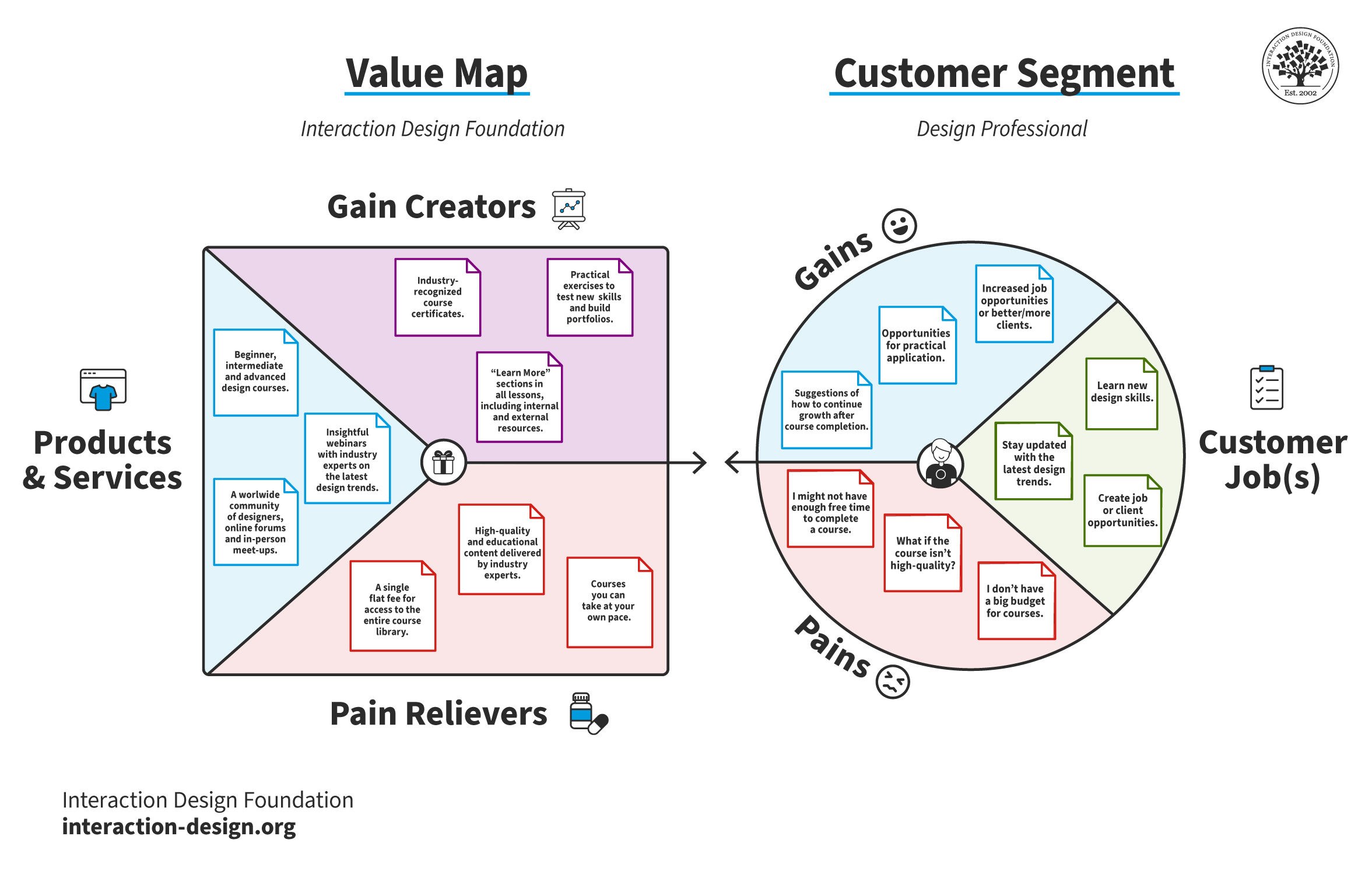
Gain creators are a product or service's elements, benefits or outcomes that give users satisfaction and delight. These may be gains that customers expect, or that will surprise them.
© Interaction Design Foundation, CC BY-SA 4.0
Product-Market Fit
Product-market fit is when a product meets strong market demand and serves its target audience better than competitors. Designers and businesses match the elements of the value map to those of the customer segment to see if they achieve this fit. The sections of the value map are not exclusive to their corresponding sections in the customer segment. For example, a gain creator can match with a customer pain.
If a product or service does not address all customer jobs, pains and gains, this does not mean it doesn’t achieve fit. Designers rank all elements of the value proposition canvas to understand if their product meets the customers’ greatest needs. For example, there likely won’t be a fit if a product doesn't address the most crucial job of a customer. However, there will likely still be a fit if a product doesn’t address the two least essential customer jobs.
If designers and businesses don’t achieve fit, they must change their value proposition or consider a different target customer.
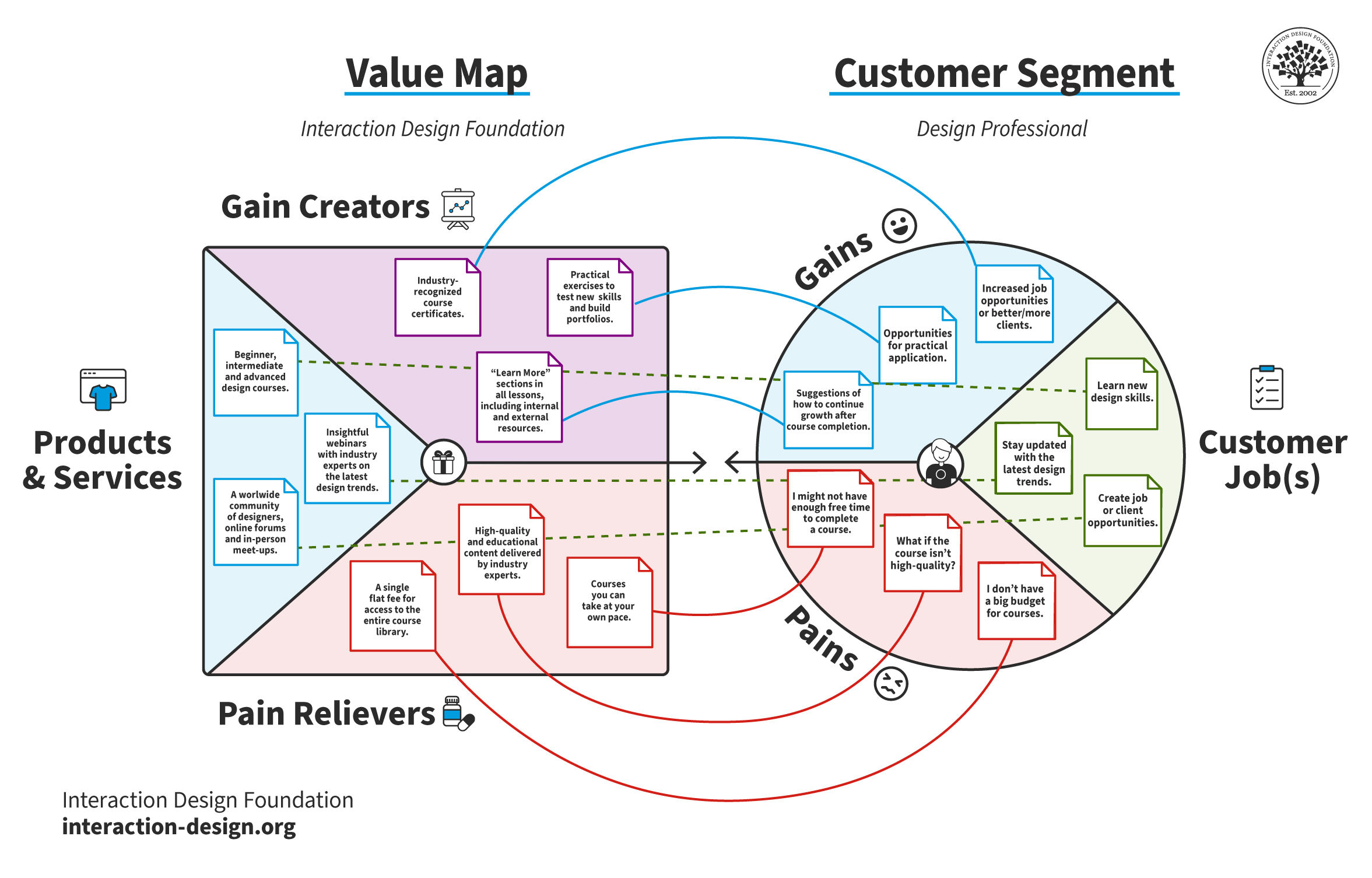
A product or service achieves product-market fit when it fulfills enough customer jobs, relieves enough customer pains and creates enough customer gains. In the IxDF example, IxDF achieves market fit as it matches most customers' jobs, pains and gains.
© Interaction Design Foundation, CC BY-SA 4.0
Value Proposition Canvas Tips and Best Practices
Designers and businesses follow these best practices for accurate and actionable value proposition canvases:
Always start with the customer segment: The purpose of the customer segment is to consider the customer separate from your product. If you start with the value map, you are more likely to define your ideal customer than who they truly are.
Approach the components of each section in any order: You do not need to complete customer jobs before you move on to pains and gains. Likewise, for the value map, add products and services, pain relievers and gain creators as you think of them.
Create multiple value proposition canvases for different customer segments: Very few businesses have a single type of customer. If your product or service has various kinds of customers, create individual canvases for each.
Involve the whole team: Collaborate on your value proposition canvases for the best results. Invite other team members, stakeholders and departments. For example, customer support and sales often have valuable insights for the customer segment.
Share your canvases with the whole organization: The value proposition canvas helps align everyday activities, workshops and strategizing with customers’ needs. The canvas is a valuable tool for user-centered design.
Create competitor value maps: Create multiple versions of the same canvas but with different value maps. For example, if you’re creating a new project management SaaS, you might develop canvases for services like Asana, Airtable and Monday. This practice helps you understand how well your competitors relieve customer pains, create gains and fulfill jobs. Likewise, it enables you to identify competitor shortcomings and develop better solutions.
Make pains and gains quantitative: For example, a more actionable customer pain for an e-commerce site would be “more than three steps to purchase” compared to “too many steps to purchase.” Quantitative pains and gains help you measure value.
Update your business model canvas: As a value proposition canvas changes and evolves, it affects the business model canvas. Iterate between both tools—add and remove value propositions and customer segments and update other boxes based on changes.
How to Research and Test the Value Proposition Canvas
Research plays a pivotal role in practical and actionable value proposition canvases. Designers use research to inform the creation of their canvases and confirm if their beliefs about their users are correct.
How to Identify Customer Segments for a Value Proposition Canvas
Customer research helps inform value proposition canvases. Businesses and designers identify customer segments in the following ways:
Conduct market research: Gather data through surveys, interviews and market analysis to understand various demographics, their needs and preferences. This foundational step helps to segment the market into distinct groups.
Analyze behaviors and preferences: Look for patterns in how different groups use similar products or services, their buying behavior and what drives their loyalty. This insight helps in refining your segments.
Consider psychographics: Beyond demographic factors, explore psychographic elements such as lifestyle, values and attitudes. These elements add depth to your customer profiles, making your segments more precise.
Evaluate segment viability: Assess the size, accessibility and profitability of each segment. Focus on those that are sustainable and align with your business goals.
Iterate based on feedback: As you engage with potential users, prepare to refine your segments based on honest feedback and insights. This iterative process ensures your segments remain relevant and targeted.
How to Research Customer Jobs, Pains and Gains
Designers and businesses should always back up their customer segments with research. This research confirms assumptions and informs the iteration of the value proposition canvas.
Steve Blank, an entrepreneur and a significant figure in the Lean Startup approach, developed the idea of "get out of the building" (GOOB). Designers and businesses use GOOB to observe and learn more about their customers. This method is similar to ethnographic research.
In this video, Frank Spillers explains GOOB:
The following research methods help businesses and designers when they get out of the building:
Customer interviews: Conduct in-depth interviews with potential or existing customers. Ask open-ended questions to uncover their experiences, frustrations and desires.
Surveys and questionnaires: Use surveys to reach a broader audience. Include questions that probe into the problems they face, their needs and the improvements they seek in existing solutions.
Observation and ethnographic studies: Observe customers in their natural environment to understand how they interact with products or services like yours. This method can reveal the needs and frustrations customers have but don’t say.
Social media and forums: Analyze conversations on social media platforms and forums related to your industry. Look for common complaints, wishes and what users value in products or services.
Competitor analysis: Study your competitors and their customer feedback. Reviews and testimonials can provide insight into areas where competitors are failing or succeeding.
Empathy mapping: Use empathy maps to visualize and categorize the insights you've gathered about your customers’ thoughts, feelings, experiences and needs.
Card sorting: Use card sorting with customers for them to rank their most important jobs and the intensity of their pains and gains.