Your constantly-updated definition of the Business Model Canvas and collection of videos and articles. Be a conversation starter: Share this page and inspire others!
The business model canvas is a tool designers use to map out a business or product’s key actors, activities and resources, the value proposition for target customers, customer relationships, channels involved and financial matters. It gives an overview to help identify requirements to deliver the service and more.
“A business model describes the rationale of how an organization creates, delivers, and captures value.”
— Alexander Osterwalder, Co-creator of the Business Model Canvas
Learn about the business model canvas and how it helps in design.
Transcript
Transcript loading ...
The Business Model Canvas – Flexible Chart, Early-Warning System and More
In service design, two tools are essential to use early in your design process: the business model canvas and the value proposition canvas. You can use the business model canvas to build an overview of changes to be made to an existing business (e.g., a merger) or of a totally new business opportunity or market gap. At the start of your design process, it’s vital to map out the business model of your service to see how it will fit into the marketplace. You’ll also need to ensure what you propose can bring maximum value to both your customers and business, and keep doing so in terms of customer retention, profitability and more.
To gain the most accurate vision of a proposed product or service, it’s essential to understand all the components and dynamics of not only the customer experience but also the service as a whole ecosystem. This ecosystem contains all the channels and touchpoints that must work together to deliver and sustain maximum value to the customer.
This canvas gives you several important advantages, namely these:
It’s collaborative – so you can bring the various partners together on the same page to generate and analyze ideas, and have an early testing ground for concepts before you advance to service staging a prototype.
It’s human-centered – so you can keep close track on how to create and maximize value for customers as well as stakeholders and other partners.
It makes it easier to collect rich data – if you have a clear purpose and strategy in mind.
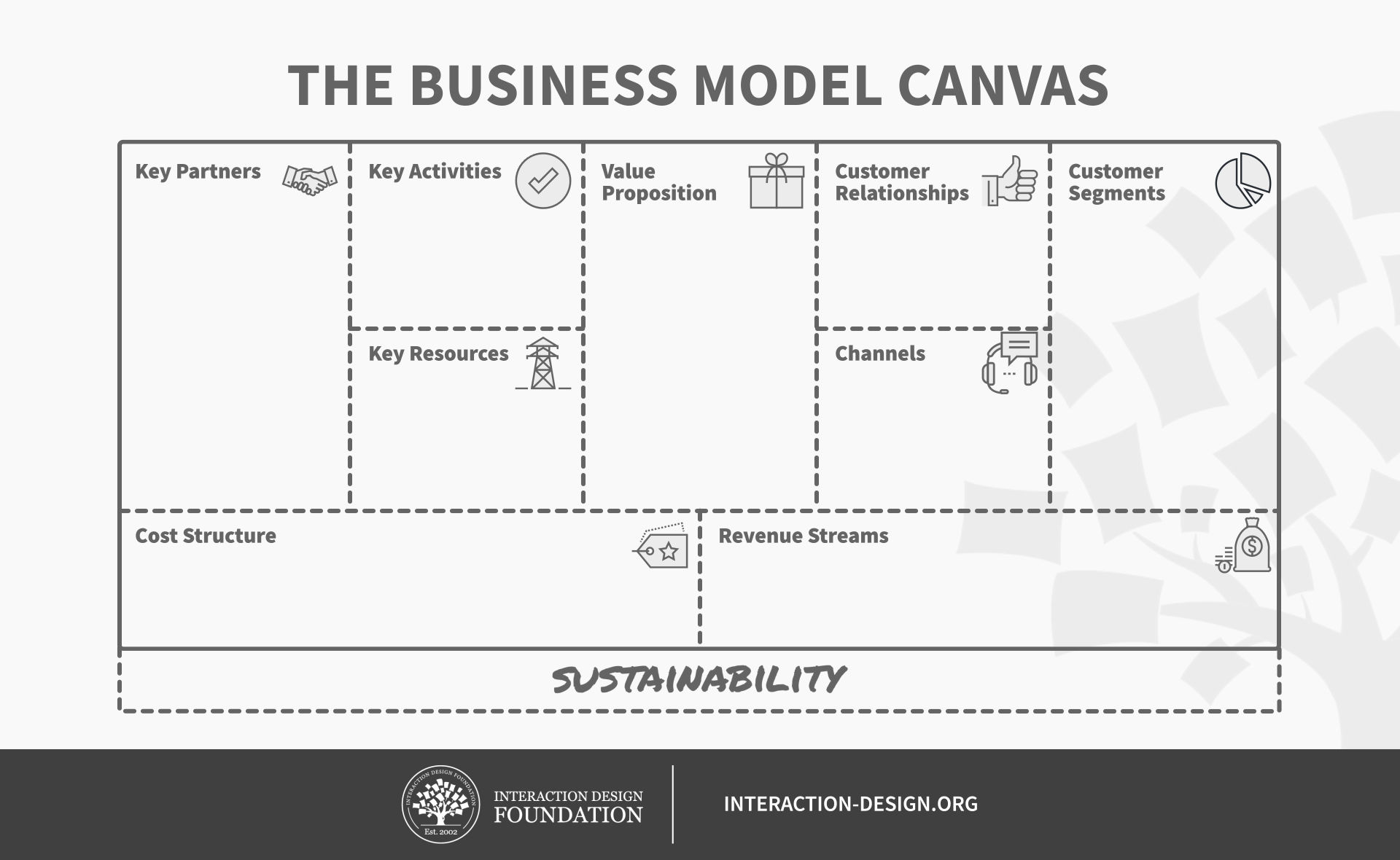
A business model canvas typically contains 10 boxes:
Key Partners – The people who will help you fulfill the key activities, using the key resources.
Key Activities – Those vital actions that go into the everyday business to get things done; these are all the activities needed to realize and maintain the value proposition, and to power everything else involved.
Key Resources – The tools needed to get those things done, stretching across all areas the canvas covers to include, for example, customer retention.
Value Proposition – The item you think will create value for your customer: e.g., a new idea, a price drop. This is a summary of what your business will deliver to customers, and feeds into the value proposition canvas, the tool you’ll use to expand this.
Customer Relationships – Where you envision the relationship each customer segment expects: e.g., customer acquisition, retention and upselling (i.e., How do you get customers? How do you keep customers? How do you continue to create value for them?).
(Note: boxes 5 and 4 are closely linked as everything you do revolves around retaining the customer and considering the customer lifecycle.)
Customer Segments – Your most important customers (e.g., seniors); consider the value of personas here.
Channels – How you deliver the value proposition. Will it be online, through physical means or a combination? Here, you identify which channels are the best (both desirable for customers as well as cost-efficient and cost-effective for the brand).
Cost Structure – Here you find the most essential cost drivers. This allows you to consider the return on investment (ROI).
Revenue Streams – Where you find potential revenue sources (e.g., advertising).
Sustainability – How sustainable your offering is overall, to the environment, to the social good, etc.
For the best results, follow these guidelines and aim to fill in all the gaps, looking out for cause-and-effect relationships that run between boxes/throughout:
Complete the top seven boxes (Key Partners to Customer Segments) – using all the information you can gather from your research.
Complete the next boxes:
Cost Structure – Determine the cost drivers from the Key Partners, Activities and Resources boxes; and
Revenue Streams – Determine these from the Customer Relationships, Customer Segments and Channels boxes.
Once you have established these, you can work to estimate them in monetary terms.
Complete the Sustainability box – according to the insights you’ve found.
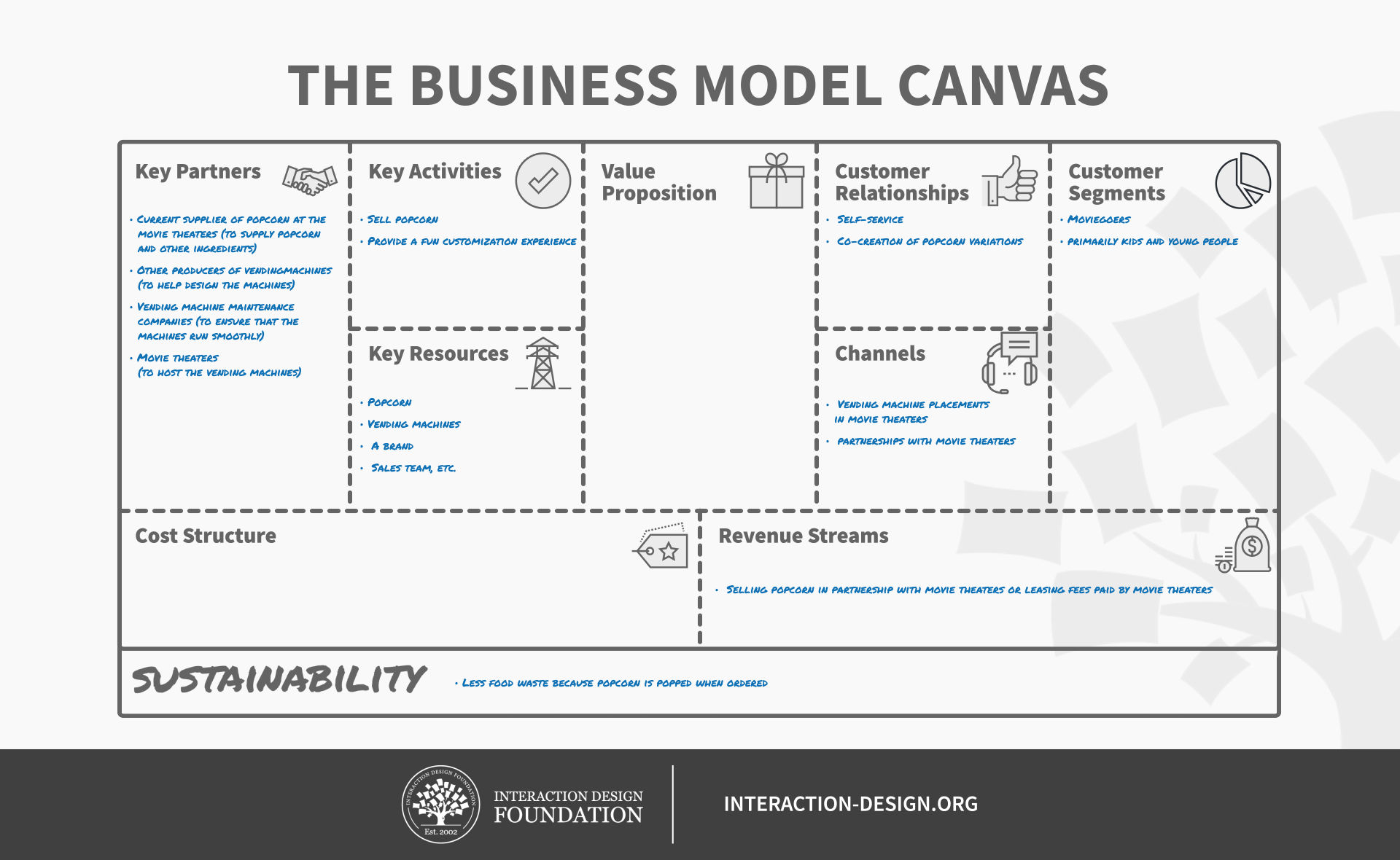
Here’s an example of a business model canvas as a work in progress:
Overall, remember your canvas is a flexible tool. It’s also a living document that you can revisit and use to find the most effective alternatives. With a clear sense of goals, a keen eye for detail and ear for input, and a readiness to refine this canvas, you can use it to fine-tune the best service prototype every time.
Questions About Business Model Canvas? We've Got Answers!
What are the key components of the Business Model Canvas?
First, there are customer segments, which define the different groups of people or organizations a business serves—or will serve. Second, value propositions enter the picture, which describe the unique benefits and solutions the business will offer each customer segment. Third, there are channels, which outline how a company will deliver its value proposition to customers—for example, online or via retail stores.
For the fourth component, you've got customer relationships—a critical element (not that any of the others are any less so) that explains how a business interacts with customers—for example, self-service or through personal support. Fifth are revenue streams. These identify how the business earns money from each customer segment. The sixth component is key resources, which lists the assets—which could be physical, intellectual, human, and/or financial—that it will take to create value.
For the last three (traditional) components, you’ve got key activities, which cover the essential tasks a company has to perform to deliver its value proposition; key partnerships, which include external organizations, suppliers, or partners that help the business function, and—last, but not least—cost structure, which details the expenses involved in operating the business.
Sustainability is the final component on (or in) some versions of the BMC, and it’s all about how sustainable your offering is overall, to the environment, to the social good, and so on.
A vital thing to remember when you’re using the BMC is to make customer validation a priority, so be sure to test your assumptions early on by engaging real users.
Watch as CEO of Experience Dynamics, Frank Spillers explains how to use the Business Model Canvas:
Transcript
Transcript loading ...
How does the Business Model Canvas differ from a traditional business plan?
The Business Model Canvas (BMC) is a fast, flexible, and visual way to map out a business, while a traditional business plan is a detailed and text-heavy document that outlines every part of a business in depth.
The BMC focuses on nine key elements—like customers, revenue, and partnerships—and sometimes a tenth (sustainability), and it helps teams brainstorm, test ideas fast, and adapt. Not for nothing, then, do startups and innovators use it to pivot quickly without needing to rewrite long documents.
A traditional business plan includes detailed financial projections, market research, and long-term strategies. Investors and banks often require it for funding, and it takes time to write and isn’t easy to change.
The key difference is that aBMC is lean and action-driven, while a business plan is comprehensive and structured. So, it’s best to use the BMC for big-picture thinking and quick iteration, while a business plan may be better when you’re seeking investment or long-term planning.
What are the benefits of using the Business Model Canvas in product and service design?
The Business Model Canvas (BMC) is valuable for brands and teams because it helps them visualize, test, and improve a product or service quickly. It keeps ideas clear and focused by breaking them into key parts, like customers, value, and revenue. For designers, the BMC is helpful for seeing the big picture and spotting weak points early, and another massive benefit is how it makes collaboration easy because everyone works from the same simple, one-page tool. Changes happen fast, without any need to rewrite long documents.
What’s more, the BMC connects product design with business goals, and teams can align on customer needs, pricing, and marketing before launching, a vital “safeguard” that helps prevent costly mistakes later.
For services, the BMC helps map out user experiences, partnerships, and delivery methods and ensures the service stays useful and profitable. How valuable the BMC is for 21st-century products and services is all but impossible to overstate, not least since it saves time, improves teamwork, and helps designers build products and services that succeed (and therefore saves money and reputation, too, since they’re brands that are more likely to do well).
Watch as CEO of Experience Dynamics, Frank Spillers explains how to use the Business Model Canvas:
Transcript
Transcript loading ...
How can UX/UI designers use the Business Model Canvas to align design decisions with business goals?
UX/UI designers can use the Business Model Canvas (BMC) to make sure their designs support business goals when they map out key elements like customer segments, value propositions, and revenue streams, and—from that—they’ll be able to understand what the business needs are and how users interact with what the brand’s offering them.
For example, if the revenue stream depends on subscriptions, designers can focus on a smooth sign-up flow and upgrade options. If the value proposition is convenience, meanwhile, designers can simplify navigation and reduce friction.
Another great benefit the BMC offers in the “department” of aligning decisions with goals is how it also helps designers collaborate with other teams—and they can align their choices with marketing, sales, and product strategy. From using the BMC, UX/UI designers can make sure that every design choice—from button placement to user flows—supports both user needs and business success, so keeping the business profitable while they make better user experiences that give users what they’re after in a design, and delighting them enough to convert into loyal brand supporters.
Watch as CEO of Experience Dynamics, Frank Spillers explains how to use the Business Model Canvas:
Transcript
Transcript loading ...
How does the Business Model Canvas help in defining user personas and customer segments?
The Business Model Canvas (BMC) helps teams identify and understand their target users by breaking down customer segments and value propositions—and so spurs brands on to define who their customers are and what problems they need to solve.
From mapping out customer segments, teams group users by shared traits, like age, behavior, or needs—something that makes it easier to create detailed user personas that reflect real customers.
Watch as Author and Human-Computer Interaction Expert, Professor Alan Dix explains important points about personas:
Transcript
Transcript loading ...
The value proposition section connects in a direct way to these segments, and it helps teams match products or services to user needs and get it right. If a company serves both students and professionals, for instance, then the BMC shows how each group gets value in different ways. This process is another effective guardrail to help brands not make the mistake of designing for “everyone” and instead focuses on real users—and so, it helps teams prioritize features, messaging, and user experiences that matter and reflect in long-term success as the products and services they design, develop, and release fit real customer needs and drive engagement.
Can the Business Model Canvas be used to improve existing products or services?
Yes, if you’ve got an existing product or service, you can analyze and improve existing products or services with the BMC—and a huge benefit lies in how it gives a clear, one-page view of how a business operates, and so makes it easier to spot weak areas and find new opportunities.
From reviewing the customer segments, teams can check if they’re serving the right audience or if new customer groups exist. Then the value proposition section helps them see if the product still solves real problems or if it needs an update. Another plus is how the BMC also highlights inefficiencies. So, if a business spends too much on key resources but gains little in the way of revenue streams, it can adjust its pricing, cut costs, or improve offerings.
For services, meanwhile, the BMC helps businesses refine customer relationships and delivery channels. So, for example, if users struggle with support or usability, teams can improve these areas without guessing and taking redesign missteps. The BMC is a powerful tool for making smarter decisions, keeping products and services relevant, profitable, and user-friendly—no matter if the brand is just about to come into being, is a fresh startup, or has been “up and running” for some time.
An example of a brand that’s achieved this is Netflix, which began as a DVD-rental service and successfully adjusted to a new market landscape when content streaming replaced the old model of renting DVDs. Netflix “revisited” its model of convenient rentals with one of on-demand streaming and self-produced content and shows to delight audiences to the point that it’s a major household name and industry heavyweight.
What are common mistakes when filling out a Business Model Canvas?
One big mistake when filling out a BMC is being too vague—as in, instead of clearly defining customer segments, a designer or stakeholders write “everyone” or “all users,” which makes it hard to target the right audience.
Another mistake is focusing too much on the product and ignoring the business side. For example, teams might describe features, which is all right, but forget to explain how the product creates value or makes money.
Some businesses make the “fatal” error of not testing their ideas—they fill out the BMC based on assumptions instead of real customer feedback, leading to poor decisions, rather like building an escalator to nowhere because you fail to connect what you want to send up to the people you think want it and it misses the mark completely because they’re not at that place to receive it.
Another common issue is ignoring key partnerships, and many businesses fail to list important suppliers, collaborators, or distributors that help them scale. Last but not least, some teams treat the BMC as a one-time exercise instead of updating it regularly, a big faux pas because markets change, as does the tech involved, and the BMC should evolve with them.
Watch as CEO of Experience Dynamics, Frank Spillers explains how to use the Business Model Canvas:
Transcript
Transcript loading ...
What are some popular and often-cited books about the Business Model Canvas?
This book, by Alexander Osterwalder and Yves Pigneur, introduced the Business Model Canvas (BMC), a visual framework for developing, assessing, and improving business models. It is widely used by entrepreneurs, startups, and corporations. Based on insights from hundreds of practitioners the book provides a structured yet flexible tool for innovating and strategizing business models.
Earn a Gift! Answer a Short Quiz at the End of This Page
Earn a Gift, Answer a Short Quiz!
1
2
3
4
1
2
3
4
Question 1
Question 2
Question 3
Get Your Gift
2
3
4
2
3
4
Question 1
Question 2
Question 3
Get Your Gift
3
4
3
4
Question 1
Question 2
Question 3
Get Your Gift
4
4
Question 1
Question 2
Question 3
Get Your Gift
Try Again! IxDF Cheers for You!
0 out of 3 questions answered correctly
Remember, the more you learn about design, the more you make yourself valuable.
Why? Because design skills make you valuable. In any job. Any industry.
In This Course, You'll
Get excited to turn everyday services into seamless experiences people love. Think of Starbucks: You get a promotional email, you use the app to order, and you arrive at the store to collect it. In service design, you orchestrate both sides of that service: the parts customers see, and the operations, processes, and systems behind them that make it possible. When the whole sequence works, customers come back, teams stay aligned, and businesses run more efficiently. Whether you're shaping customer experiences or improving internal workflows, this course teaches you to design services that work better for the people who use them and who run them. If you're a UX designer, you'll learn how your existing skills map to service design, whether you want to add service design methods to your current role or specialize into a service design career.
Make yourself invaluable when you can design human-centered services that align with business goals, from flight booking and food delivery to government services. PwC found that 32% of customers stop buying from a brand they love after just one bad experience, but are willing to pay up to a 16% price premium for a great one. This course guides you through the full service design process to align operations and catch potential issues before they reach customers. With worked examples for Amazon and Airbnb, you'll use Osterwalder and Pigneur's Business Model Canvas and Value Proposition Canvas to define how your service fits the business and meets customer needs. You'll run ethnographic research and synthesize your findings into role-based personas and journey maps. To map every moving part of your service, you'll use customer lifecycle maps, ecosystem maps, and service blueprints, then prototype and test with service staging. As automation and AI take over technical execution, this process gives you the timeless, human-centered design skills companies are looking for.
Gain confidence and credibility when you can advocate for service design, embed it, and build maturity inside your organization. Because the best services are co-created, collaboration will become a core part of how you design. You'll bring stakeholders together in workshops and run four kinds of ideation sessions (brainstorming, braindumping, brainwriting, and brainwalking), and combine group and individual modes so every voice contributes, not just the most confident ones in the room. You'll also learn how to fit the process into Lean and Agile workflows, and measure performance after launch with Google Ventures' HEART framework. Through interviews with professional service designers who've worked with organizations like Twitch and the IRS, you'll gain practical industry insight you can bring straight into your own work.
Craft a personal portfolio that shows you can run a real service design project end-to-end. In an optional hands-on project, you'll experience a real-world service on a service safari, and turn your findings into personas, a journey map, and a Value Proposition Canvas that ground your design decisions in proof. You'll develop your chosen idea, prototype it with Business Origami, and test and iterate until it's launch-ready. And with 20+ templates and step-by-step guides, you'll apply these methods immediately in your work. You'll leave ready to collaborate on and lead service design initiatives, whether in your current role or your next one.
Learn From Industry Leaders
Master complex skills with proven best practices and toolkits directly from industry leaders. Meet your experts for this course:
Frank Spillers: Service Designer and Founder and CEO of Experience Dynamics.
David Bill: Interaction Designer who led service design for five U.S. federal agencies at Booz Allen Hamilton before driving innovative design solutions as a Senior UX Designer at Amazon Web Services (AWS).
Kendra Shimmell: Vice President of Design at Remitly and former Senior Director of Research and Central Science at Twitch (Amazon).
Earn Industry-Recognized Certificates
Industry giants trust our courses to train their teams, and prestigious universities integrate our content into their curricula. Add your certificates to your LinkedIn profile, résumé, and job applications.
All Free IxDF Articles on the Business Model Canvas
Service design is concerned with the design of services and making them better suit the needs of the service’s users and customers. It examines all activities, infrastructure, communication, people, and material components involved in the service to improve both quality of service and interactions b
The Relationship Between Visual Design and User Experience Design
A common perception about UX designers is that
we are artists who can create beautiful interfaces from a blank canvas. While the aesthetics of products are important, visual design is only one aspect of the design process – in which team members with different skillsets and expertise collaborate
Social shares
799
Published
Read Article
The Relationship Between Visual Design and User Experience Design
A common perception about UX designers is thatwe are artists who can create beautiful interfaces from a blank canvas. While the aesthetics of products are important, visual design is only one aspect of the design process – in which team members with different skillsets and expertise collaborate with each other. Knowledge of the components of user experience design can help beginners evaluate which skills to focus on, and help companies appreciate interdisciplinary product teams and hire the right combination of team members to deliver great experiences.
In his book,
The Elements of User Experience, Jesse James Garrett provides a framework for the various aspects of UX design. While the framework was originally drawn for websites, it is applicable to all digital applications and can help bring clarity on the relationship between visual design and UX design.
Transcript
Transcript loading ...
Garrett’s Elements of User Experience
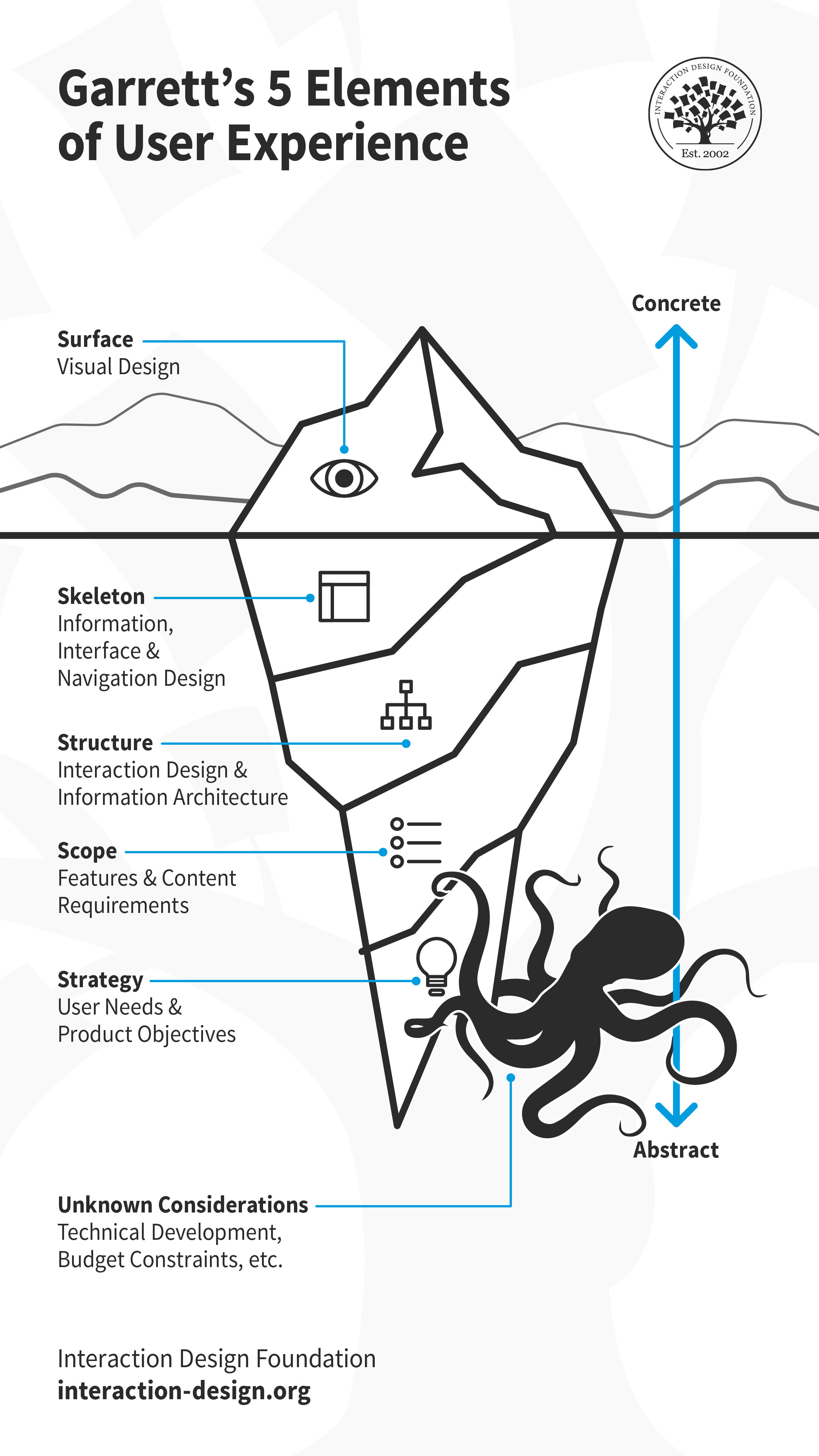
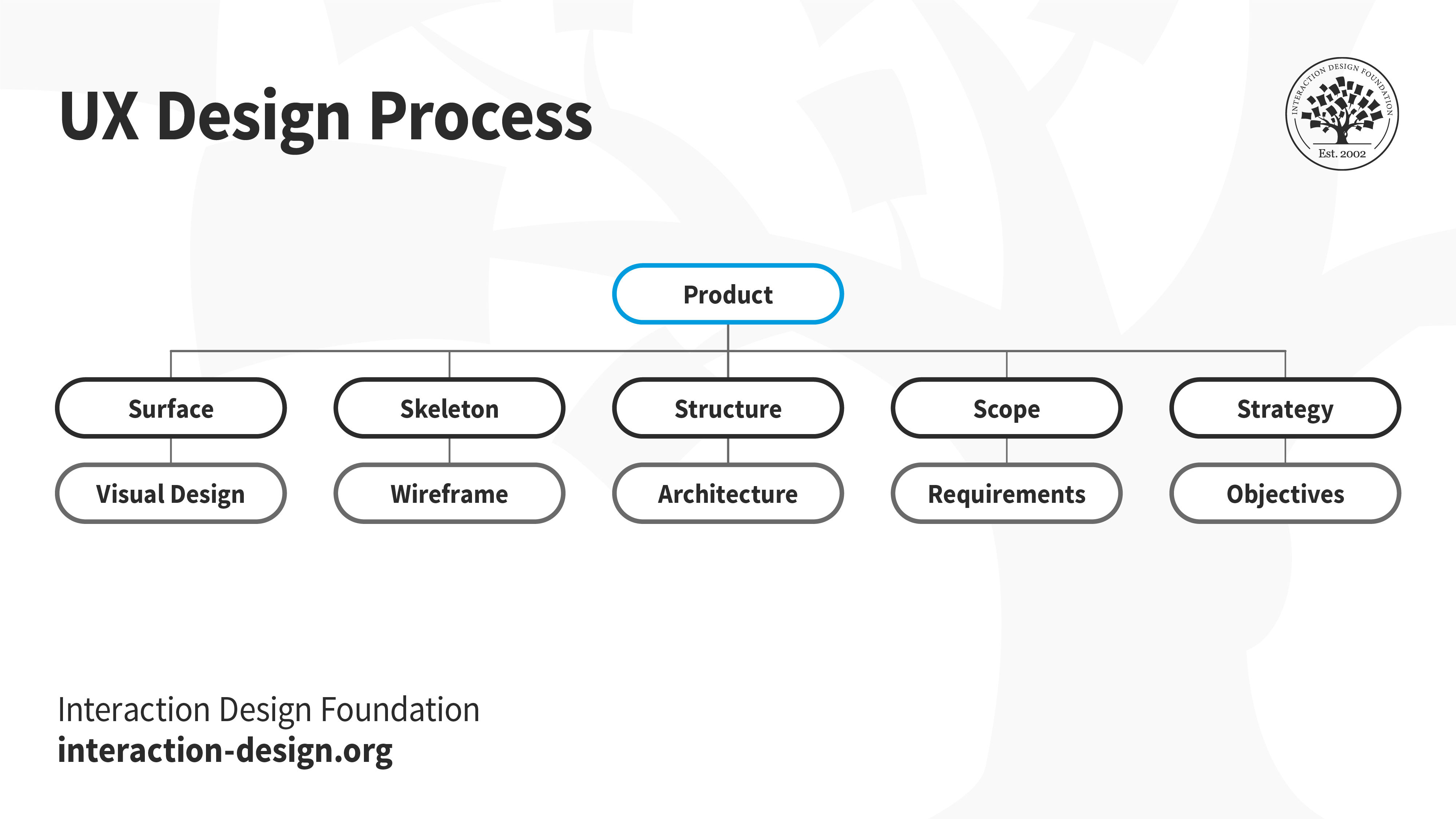
Jesse James Garrett's 5 planes of Strategy, Scope, Structure, Skeleton and Surface make up the Elements of User Experience.
Garrett breaks down the elements of user experience into 5 planes stacked in order. At the bottom of the stack is the most abstract plane – Strategy. As we move up each plane, we become less abstract and more visible. The top-most plane is the Surface, and is the most visible or concrete aspect of UX design.
We can understand the framework through the analogy of a building.
Strategy
Let’s say you have a piece of land and would like to construct a building. The first few decisions of the project include:
Why are you constructing a building; is it to live in or for commercial purposes?
Who might want to rent the building? Is the location favorable for potential buyers or renters? You consult appraisers and attorneys to help you with these decisions. Through these questions, you identify the
business objectives and the user needs.
Scope
The decisions taken on the Strategy plane influence the scope. In the case of the building, you consult a professional, who inspects the land to assess what is possible to construct on it – a detached house, an apartment building, an office space or maybe a shopping mall. The scope of the project defines
what the value proposition, the productand the
features that meet the business objectives and user needs are.
Structure
Once the scope is decided, your architect creates some blueprints, showing the entrance and exits to different rooms, hallways, restrooms, elevators and staircases. This is the structure –
how the user interacts with and navigates around the product’s features.
Skeleton
The architect creates sketches or 3D models based on the blueprint and includes details of the interiors. The architect also enlists the help of a builder to create a full-scale sample of a portion of the building, complete with furniture and fittings, to give you a more realistic feel of the space. Here—on the Skeleton plane—the
interface of the product becomes visible.
Surface
Finally, an interior designer helps you decide the color of the walls, the flooring, the furniture and accessories in individual rooms. The Surface plane is where the layer of
presentation is put in place.
The Digital “Building”
Let us apply this framework to a fictitious digital product.
The UX team first identifies the users, their challenges and how users currently solve those challenges. They conduct
surveys and interviews and use tools such as user personas and
customer journey maps. At the end of these activities, the team may find out, for example, that freelance writers (potential users) find it difficult to maintain books of accounts (the challenge). Perhaps existing applications do not cater to the specific nature of their services (opportunity).
UX designers often work closely with business stakeholders for these
strategy-related activities and decisions, sometimes with the help of a business model canvas to help understand how the business will create, deliver and capture value.
The team brainstorms to identify potential solutions and then
scopes out the value proposition. Let’s say the team decides to offer a freemium mobile application for freelance writers. They identify the different features of the application and create a
product roadmap, which prioritizes the features to introduce first. The designers consult business stakeholders as well as technical teams to create the roadmap.
The team then begins work on the
structure of the application. This typically includes different types of flowcharts and
maps indicating how information is classified and how users navigate around the product. Let’s say the first feature to roll out is invoices. The team classifies the different pieces of data associated with invoices – date of issue, payment terms, due date, etc. There may be other pieces of data, such as customer name, contact information and payment modes. The team then identifies the relationships between these different pieces of data in a logical manner. This task is sometimes handled by specialists called
information architects.
The
skeleton of the application is where the first drawings are created, in the form of
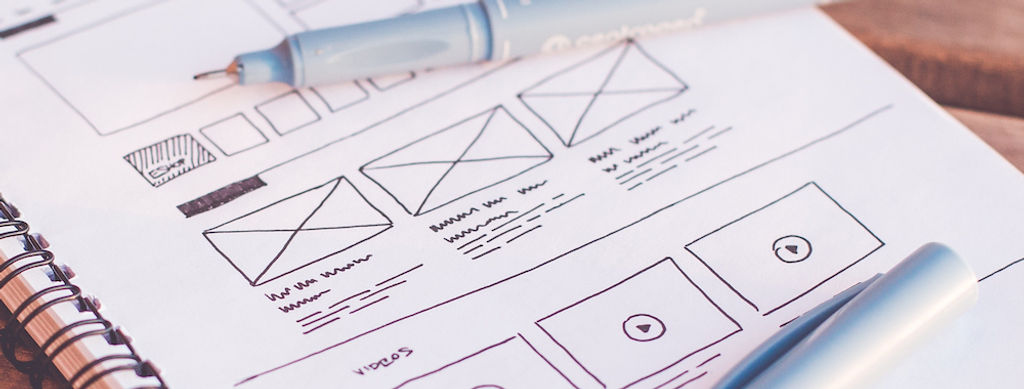
wireframes. Wireframes are simple line drawings, usually no more than labelled boxes and lines depicting different items on the screen. These wireframes may be turned into
prototypes to get a feel of how the application works.
The surface is where all the
visual design elements—colors, typography, icons and illustrations—come into the picture. This also includes the content and microcopy such as labels, headings, messages and instructions.
As we can see, UX design is a broad discipline, with scope for many specialists to handle specific activities, such as research, information architecture, visual design and copywriting.
Through much of the UX design process, deliverables will include information presented as flowcharts or maps, which do not require artistic skills.
“Problems with visual design can turn users off so quickly that they never discover all the smart choices you made with navigation or interaction design.” – Jesse James Garrett
As it’s the most (and often the
only) visible aspect of UX design, those new to the field think that visual design is the biggest part of a UX designer’s role. However, as we’ve seen, visual design is typically one of the last decisions taken in the design process, and there is much more to a product under the surface.
While you may have the skills to carry out all tasks, you likely will be part of a team rather than work alone. In the design process, two (and more) heads are better than one! A team of designers provides different perspectives and can generate more ideas, not to mention work in parallel to speed up their efforts. You may find that you can conduct surveys and analyze the results efficiently, while another team member creates illustrations or color palettes.
UX design also requires decisions related to business and technology, which necessitate an interdisciplinary team that can make decisions such as:
How will the product generate revenues?
Should we run third-party advertisements on the product?
Is it possible to collaborate / integrate with similar products to offer a more holistic experience?
All these decisions impact the product in different ways – from broad feature sets (the scope) to a small icon on a standalone screen (surface).
Specialists who work on visual design within the team are called user interface (UI) designers. When you see a job description refer to the UX designer’s role as UI/UX, it means that the company is looking for someone skilled in visual design as well as research, information architecture and wireframing.
This doesn’t, however, mean that dedicated visual designers should not understand the principles of user experience design. As the first point of contact with users, visual design is extremely important. If the user doesn’t like what she sees, then she may not invest the time to explore the product at all. Once the user decides to explore the product, the aesthetics must be consistent with the underlying architecture and adhere to usability principles to provide an experience that delights the user. For example:
A shopping cart icon on the surface makes it easy for the user to understand the underlying purchase functionality.
High contrast between background and foreground colors makes text easy to read.
If an interactive element on a screen is styled as a button, then the same style across all screens makes it easy to identify interactive elements.
Iterate. Iterate. Iterate.
Our discussion of UX design would be incomplete without mentioning that, unlike the physical building in our initial example, the work of the UX design team is never done. Through every stage of the design process, the team tests its hypothesis and designs. The team conducts
heuristic evaluations and
usability tests with real users to identify scope for improvements and opportunities.
Some questions the team may ask are:
How well do we understand our users? Are we solving the right problem(s)? (Strategy)
Does the product solve the problem(s)? What features can help solve the problem(s)? (Scope)
Are the product features easy to use? (Structure, Skeleton, Surface)
The findings of usability tests often have a rippling effect on the decisions taken on other planes.
The Take Away
UX design is a broad discipline, one that involves multiple activities and skills. In the order of abstraction, UX design includes decisions made on the Strategy, Scope, Structure, Skeleton and Surface planes. Visual design is part of the Surface plane and is one of the last decisions taken during a design project.
While UX designers can have all the skills associated with user experience design, it is common for UX teams to have specialists for one or more aspects of the design process. Visual designers, also called user interface (UI) designers, are specialists who focus on the visual aspect of the user’s experience. While UX designers need not be visual designers, visual designers must understand the principles of UX design, to ensure the user has a seamless experience.
Read the full framework of UX in this book: Jesse James Garrett, The Elements of User Experience: User-Centered Design for the Web, 2002
A sample chapter of Garrett’s book,
Meet the Elements, is available on his website.
The original poster drawn in 2000, which shows the breakdown of all the elements, along with the different tasks, is available on Garrett’s website
here.