Copywriting in UX/UI Design

Your constantly-updated definition of Copywriting in UX/UI Design and collection of videos and articles.
Be a conversation starter: Share this page and inspire others!

493 Shares

What is Copywriting in UX/UI Design?

Copywriting is the art of creating text to optimize a design’s usability and encourage users to interact with it. Designers should write in their brand’s voice and prove a solid understanding of target users. Good copywriting means shaping brand experiences and driving conversion through clarity, helpfulness and trust.

“Writing is easy. All you have to do is cross out the wrong words.”

— Mark Twain

See why copywriting is vital to your success.

The Critical Craft of Copywriting

Copywriting is vital to user experience (UX) design because an amazingly designed app could fail catastrophically if it contains confusing copy—for instance, if a button says “Get in” instead of “Log in”. Similarly, a website could be brilliant in almost every respect but frustrate users with inappropriate humor or jargon. Traditionally, copywriting refers to marketing. However, it also applies to you as a designer because you should write copy that combines maximum ease of use with promoting your brand from the users’ perspective—choosing words that complement the rest of your design consistently. Many brands used to focus on copywriting after design and development teams had completed work. However, because words are critical to successful designs, increasing numbers of organizations recognize copywriting as an invaluable ingredient early in the interaction design process.

Designers in different UX roles write copy—from generalists such as UI designers to specialists such as content strategists. In any case, it’s crucial to get the wording right throughout interfaces and documents. Firstly, you should craft copy that maximizes usability. Before you can persuade users to do anything with your design, it must be intuitive and helpful and show you’ve applied design principles effectively overall. For example, the microcopy you write for buttons should clearly tell users what clicking those buttons will do. Every word your design displays should contribute to helping users find what they want fast and get tasks done with zero confusion. And when things go wrong, users should receive clear, polite and friendly error messages to help them get back on track. Perhaps most importantly, with so many users on mobile devices, screen space is limited—so, you’ll need to complement a lean, tightly focused layout with succinct word choices.

Secondly, in designs you attract users by emphasizing why they want your product/service. Copywriting for conversion means you must portray a trustworthy brand presence by choosing words your target audience expects. So, your words must prove you empathize with these users—having pinpointed their needs from UX research—so that they easily understand your website, think your product sounds enticing, etc. To maximize relevance for these users, you should therefore write in their dialect—not only regionally (e.g., Australian English) but also regarding age, industry, etc. For example, the copy in a fashion app aimed at young women should have a casual tone with appropriate typography that matches the rest of the content. A picture may be worth a thousand words, but engaging words are crucial in enticing users to become customers.

Of course, as a designer you can also leverage good copywriting in your career. Specifically, the way you craft copy in your portfolio or personal website will affect how effective you are in job hunting or securing clients.

Copywriting – How to Weave Words that Win

To craft strong copy, you should:

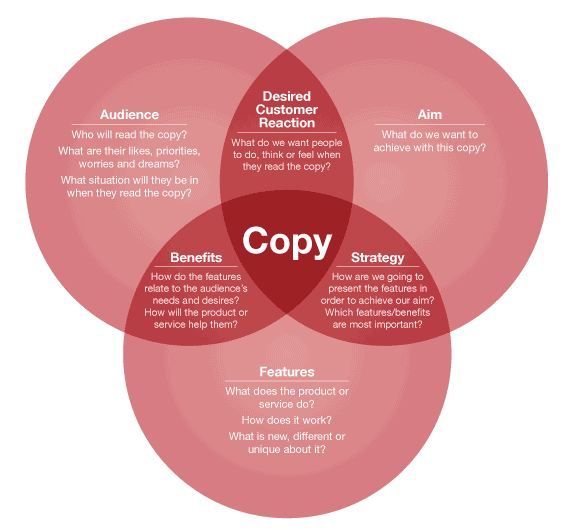
  1. Highlight the benefits—E.g., if you write “because you’re safe from malware”, it will resonate with users far better than highlighting features (e.g., “voice-controlled”) or advantages (e.g., “is better than”).

  2. Make it about the users—Address them with “you” and “your” to get closer and increase their sense of ownership.

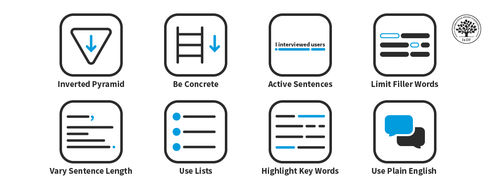
  3. Get to the point, in the active voice and without filler words—E.g., write, “Log in to comment.”—not, “You must be signed in to comment.”

  4. Keep copy simple, appropriate and jargon-free—Plain English works best, so choose words which a typical 12-year-old would understand. You won’t patronize users if you keep the tone they expect from your brand. If you use unnecessary words that seem more impressive, you may confuse and irritate users. Similarly, be careful with humor.

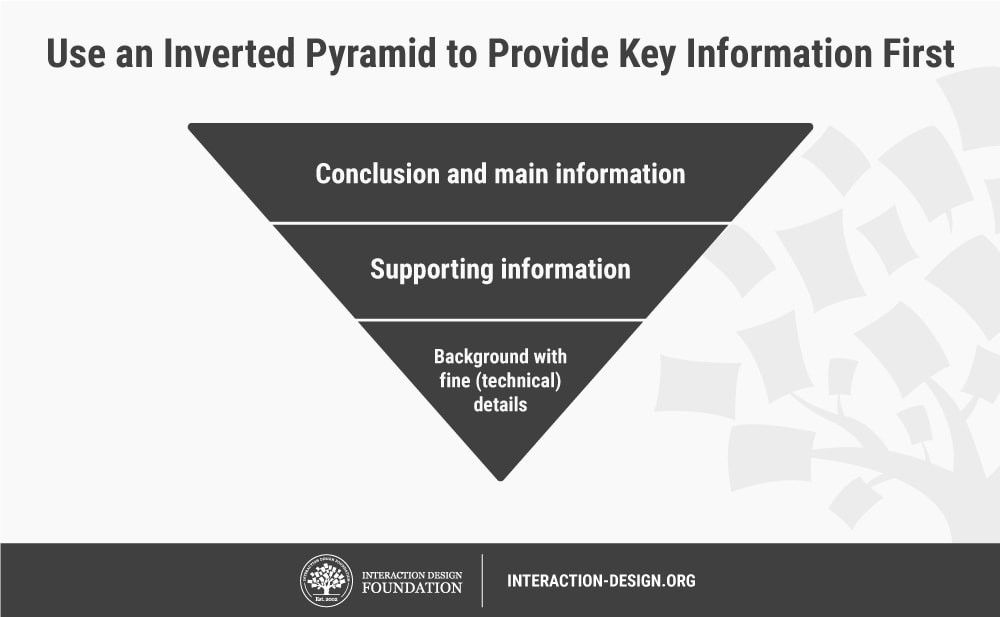
  5. Use the inverted pyramid to state your main points first.

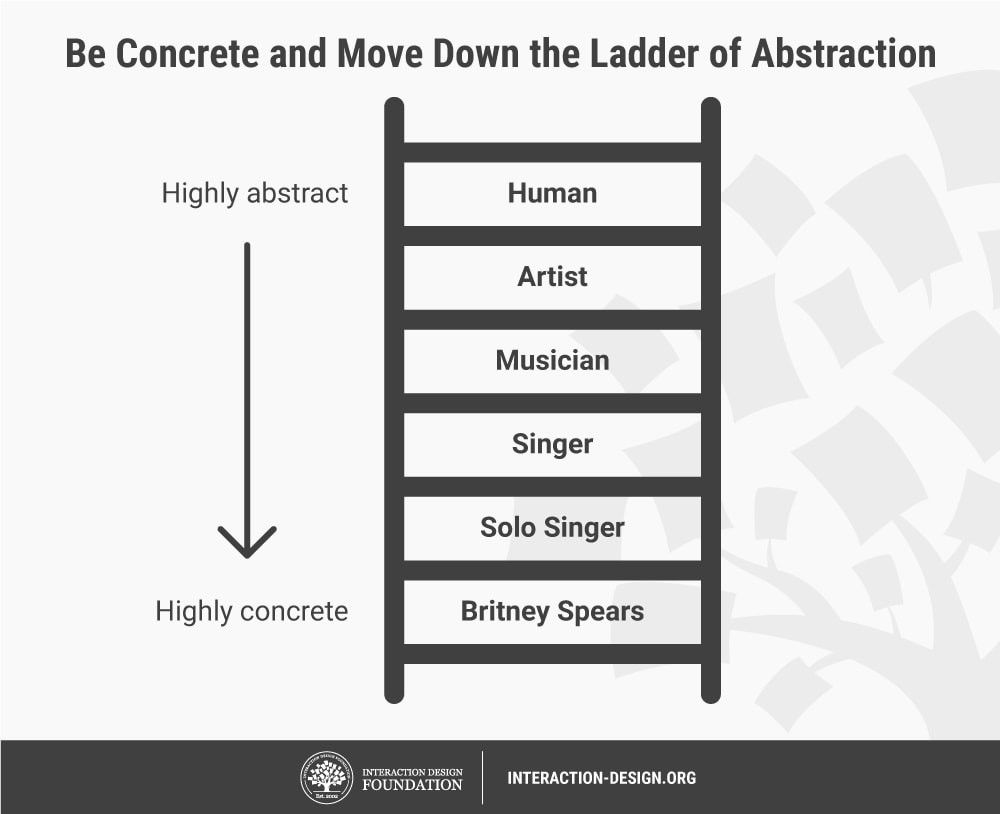
  6. Be concrete and walk down the ladder of abstraction.
  1. Mix short and long sentences to maximize readability.

  2. Use clear labels, headings, bullet points and numbered lists to help users skim short chunks of copy.

  3. Embed links with descriptive text for accessibility.

  4. Keep copy consistent—Use the same words to describe the same things throughout the interface/document. Repetitiveness beats confusion.

  5. Use progressive disclosureInsert “Read more” links to avoid flooding users with additional information.

  6. Test on real users—Put your copy through usability testing.

Your copy is a visual element. Alongside other content, it must appeal to users while making it easy for them to perform tasks—be it to use a website or decide to hire you. So, how your text looks (font, color) matters as much as its meaning. Decide how to complement your messages with images. With thoughtful editing, you can refine compelling copy that helps users forget they’re using an interface—the hallmark of a seamless experience.

Questions About Copywriting?
We've Got Answers!

How can I write persuasive UX microcopy?

To write persuasive UX microcopy, focus on clarity, consistency, and empathy. Guide users with concise, helpful language that matches their goals and mindset. Use active verbs, avoid jargon, and speak like a human—not a system message. Align with industry conventions (like “Add to cart” or “Sign in”) to keep things familiar and reduce friction. Users trust patterns they recognize.

Also, reduce anxiety in critical moments—reassure with lines such as “You can cancel anytime.” or “No credit card required.” Reinforce confidence with social proof, like “Join 10,000+ designers.” Keep your tone and style consistent across the product, so nothing feels jarring or off-brand.

Well-crafted microcopy feels almost invisible, but it drives action, builds trust, and creates a smooth, confident user experience.

Enjoy our Master Class UX Writing: How to Use Words as a Design Power Tool with Torrey Podmajersky, Author, Speaker and UX Writer at Google.

Watch as Torrey Podmajersky explains important points about writing for UX.

Transcript

What’s the difference between copywriting and content writing?

Copywriting and content writing might sound similar, but they serve different goals. Copywriting is all about persuasion. It aims to get users to take immediate action—buy, sign up, click, or download—and so do something that usually involves conversion. You’ll see copywriting in ads, landing pages, emails, and product pages.

Content writing, on the other hand, focuses on informing or educating. It builds trust over time through blog posts, guides, articles, and tutorials. Content writing boosts SEO, attracts the right audience, and helps them stick around. It’s not about the hard sell—it’s about delivering value that earns loyalty.

A useful analogy might be this: copywriting asks for the date, while content writing builds the relationship. Both are essential for UX, marketing, and product design—you just use them at different moments along the user journey.

Enjoy our Master Class UX Writing: How to Use Words as a Design Power Tool with Torrey Podmajersky, Author, Speaker and UX Writer at Google.

Watch as Torrey Podmajersky explains important points about writing for UX:

Transcript

What are some examples of great UX copy in real products?

Here are some real-world examples of great UX copy:

  • Slack’s onboarding messages—Slack welcomes new users with friendly, conversational onboarding messages that guide them through the platform’s features. This approach reduces user anxiety and encourages engagement by making the learning process feel less daunting.​

  • Duolingo’s encouraging notifications—Duolingo uses playful and encouraging language in its notifications to motivate users to continue their language learning journey.

  • Airbnb’s booking confirmations—Airbnb provides clear and reassuring booking confirmation messages, detailing reservation specifics and offering helpful information about the stay. This transparency builds trust and ensures users feel confident about their arrangements.​

  • Headspace’s meditation prompts—Headspace uses gentle and empathetic language to guide users through meditation sessions.

Enjoy our Master Class UX Writing: How to Use Words as a Design Power Tool with Torrey Podmajersky, Author, Speaker and UX Writer at Google.

Watch as Torrey Podmajersky explains important points about writing for UX:

Transcript

How do I write error messages that don’t frustrate users?

Crafting user-friendly error messages is essential to maintain a positive user experience and minimize frustration, so here are key strategies to achieve this:​

  • Be clear and specific—Clearly explain what went wrong and why. Avoid terms like “Error 404.” Instead, use descriptive language such as “Page not found. The link you clicked may be broken or the page may have been removed.” ​

  • Offer constructive solutions—Guide users on how to resolve the issue. For example, “That is not the expected password for that user name. Please try again or reset your password if you've forgotten it.” ​

  • Use a friendly tone—Use empathetic and approachable language. Phrases like “Oops! Something went wrong.” can make the message feel less intimidating. ​

  • Avoid technical jargon—Use simple, everyday language that all users can understand. Replace terms like “Authentication failure” with “We couldn't verify your login details.”

  • Maintain consistency—Ensure that error messages are consistent in style and placement throughout your application. It will help users recognize and understand them quickly. ​

  • Provide visual cues—Incorporate icons or colors to draw attention to error messages, enhancing visibility and comprehension. ​

  • Prevent errors proactively—Because prevention is better than a cure, so, where possible, design forms and interfaces that minimize the chance of user errors, such as using dropdowns instead of free-text fields. ​

Enjoy our Master Class UX Writing: How to Use Words as a Design Power Tool with Torrey Podmajersky.

Watch as Torrey explains important points about writing for UX:

Transcript

How do I write for buttons, labels, and tooltips?

Buttons:

  • Use clear action verbs—Begin with verbs that specify the action, like “Submit,” “Download,” or “Learn More.” This clarity helps users understand the button’s function immediately. ​

  • Keep labels concise—Aim for brevity without sacrificing clarity. A concise label reduces cognitive load and helps users understand quickly. ​

  • Maintain consistency—Use uniform terminology and style across all buttons to avoid confusing users. Consistent design nurtures familiarity and trust.

Labels:

  • Be descriptive and specific—Labels should clearly describe the function or purpose of the element they represent, aiding users in navigation and understanding. ​

  • Use familiar language—Employ terms that your target audience commonly understand. ​

  • Ensure readability—Pick legible fonts and appropriate text sizes to make labels easily readable across devices. ​

Tooltips:

  • Provide supplementary information—Use tooltips to offer additional context or explanations that aren’t immediately necessary but can assist users when needed. ​

  • Keep text brief—Tooltips should be short and to the point, delivering helpful information without overwhelming the user.

  • Position strategically—Place tooltips near the related element without obstructing other content, ensuring they appear at appropriate times, such as on hover or focus. ​

Enjoy our Master Class UX Writing: How to Use Words as a Design Power Tool with Torrey Podmajersky.

Watch as Torrey Podmajersky explains important points about writing for UX:

Transcript

How do I write copy that’s good for SEO and UX?

Creating content that excels in both search engine optimization (SEO) and user experience (UX) requires a balanced approach. Here are key strategies to achieve this:​

  • Prioritize clarity and readability—Write in a straightforward manner, avoiding jargon. Content that’s easy to understand enhances user engagement and retention. It’s a good idea to aim for a grade 6–8 reading level for general audiences. You can use tools such as Hemingway Editor—which highlights complex sentences and suggests simpler alternatives—and Grammarly, which checks grammar and offers clarity suggestions. You can also use Readability Formulas to assess how readable your text is.

  • Integrate keywords naturally—Insert relevant keywords seamlessly in your content to improve search engine rankings without compromising readability. ​

  • Structure content effectively—Use headings, subheadings, bullet points, and short paragraphs to break up text. This will improve readability and help search engines understand your content’s hierarchy.

  • Focus on user intent—Align your content with your target audience’s needs and queries. Address their questions directly to enhance satisfaction and search relevance.

  • Optimize meta descriptions and titles—Craft compelling and accurate meta titles and descriptions that include primary keywords. It will encourage click-throughs from search results. ​

  • Ensure mobile-friendliness—With most users accessing content via mobile devices, ensure your content is responsive and loads efficiently across all platforms.​

Enjoy our Master Class UX Writing: How to Use Words as a Design Power Tool with Torrey Podmajersky.

Watch as Torrey explains important points about writing for UX.

Transcript

Podmajersky, T. (2019). Strategic Writing for UX: Drive Engagement, Conversion, and Retention with Every Word. O'Reilly Media.

Torrey Podmajersky's Strategic Writing for UX provides a comprehensive guide to crafting user-centered content that enhances engagement, conversion, and retention. The book offers practical strategies for integrating effective writing into the software development lifecycle, aligning content with product principles, and employing content-first design rooted in conversation. Podmajersky emphasizes the importance of creating purposeful, concise, conversational, and clear text, supported by frameworks and patterns for various UX text elements. This work is essential for UX professionals aiming to develop content that not only meets organizational goals but also resonates with users, thereby improving overall user experience.

Redish, J. G. (2012). Letting Go of the Words: Writing Web Content that Works (2nd ed.). Morgan Kaufmann.

Janice (Ginny) Redish's Letting Go of the Words is a comprehensive guide to creating effective web content that prioritizes user needs and behaviors. Emphasizing a conversational approach, Redish provides practical strategies for planning, organizing, writing, and testing web content to ensure clarity and usability. The book is enriched with real-world examples, illustrating techniques for crafting content that is easy to scan and understand, thereby enhancing user experience. This work is pivotal for web content creators, UX designers, and communication professionals aiming to develop user-centered digital content.

Metts, M. J., & Welfle, A. (2020). Writing Is Designing: Words and the User Experience. Rosenfeld Media.

Writing Is Designing by Michael J. Metts and Andy Welfle reframes writing as an integral element of the design process. Instead of treating words as mere “content,” the authors advocate for their deliberate use as tools to shape user experiences. Through practical chapters on clarity, tone, inclusivity, error messaging, and collaboration, this book provides guidance for designing with words. Targeting UX writers, content strategists, designers, and product managers, it empowers professionals to test, validate, and defend their writing as design work. Its message—that writing is a design discipline—has made it a foundational read in the UX and product writing community.

How do I use tone of voice in UX writing?

In UX writing, tone of voice shapes how users perceive and interact with your product. While your brand’s voice reflects its personality and should stay consistent, the tone can adapt based on context and user emotions. ​

Here's how to effectively use tone in UX writing:

  • Understand your users—Research your target audience to grasp their preferences, needs, and emotional states. This insight helps tailor your tone to resonate with them. Understanding user interpretation is vital, and this is why it’s important to do user testing. User tests can help you see whether users interpret your message as you intended—and if your tone and wording resonate with your target audience. Users can misunderstand even well-written copy, and it’s crucial to see how they respond emotionally to content. Do they trust it? Is it confusing? Does it bore them? Testing can reveal a lot and give you precious insights to work with.

  • Align with your brand voice—Ensure your tone reflects your brand’s core values and personality, and maintain consistency across all content.

  • Adapt to context—Modify your tone based on the situation. For example, use a reassuring tone for error messages and a celebratory tone for success notifications. ​

  • Maintain clarity—Prioritize clear and concise language to enhance user comprehension and usability.​ User feedback from testing often reveals confusing language, headlines that don’t grab attention, dense or overly long paragraphs, and other things that can get in the way.

By thoughtfully adjusting your tone, you can create a more engaging and user-friendly experience that aligns with both user expectations and your brand’s identity. You can test online copy with methods such as A/B testing (showing different versions of it to users), five-second testing (showing content briefly and asking users what they recall or what they would do next), or surveys or interviews, where you directly ask users what they think of certain pieces of copy.

Enjoy our Master Class UX Writing: How to Use Words as a Design Power Tool with Torrey Podmajersky, Author, Speaker and UX Writer at Google.

Watch as Torrey Podmajersky explains important points about writing for UX:

Transcript

What skills do I need to become a UX copywriter?

To excel as a UX copywriter, you’ll need a blend of these essential skills:​

  • Exceptional writing abilities—Craft clear, concise, and engaging content that guides users seamlessly through your brand’s digital interfaces. ​

  • User experience (UX) understanding—Grasp UX design principles to ensure your copy aligns with user needs and enhances overall usability. ​

  • Content strategy development—Plan and structure content effectively to maintain consistency and coherence across all user touchpoints. ​

  • Proficiency with design tools—Familiarity with tools like Figma or Sketch will help you collaborate with design teams and integrate copy into wireframes and prototypes. ​

  • Strong research skills—Conduct user research to understand audience behaviors, preferences, and pain points so you can produce more effective copy. ​

  • Effective communication and collaboration—Work closely with designers, developers, and stakeholders to ensure the copy aligns with the product’s goals, and users’ expectations. ​

  • Curiosity and adaptability—Stay updated with industry trends and adapt to evolving user needs and technological advancements. ​

Develop these skills and you’ll position yourself to create compelling UX copy that enhances user satisfaction and contributes to the success of your brand’s digital products.

Enjoy our Master Class UX Writing: How to Use Words as a Design Power Tool with Torrey Podmajersky.

Watch as Torrey Podmajersky explains important points about how to get into UX writing:

Transcript

Here are some popular practical resources that UX writers, product designers, and others trust and share often.

Mailchimp’s Content Style Guide: One of the most referenced tone and voice guides, it offers clear, example-rich guidance on writing UI copy, emails, and marketing material.

“How to Write Copy That Converts” by Joanna Wiebe (Copyhackers): Copyhackers is a goldmine of tutorials and conversion copywriting techniques.

UX Writing Hub Blog: Featuring interviews, case studies, and tips from top UX writers, it also offers a UX writing course and weekly newsletter.

Earn a Gift Earn a Gift, Answer a Short Quiz!

1
2
3
4
1
2
3
4
Question 1
Question 2
Question 3
Get Your Gift
Interaction Design Foundation logo

Question 1

What is the primary goal of copywriting in UX design?

1 point towards your gift

  • To craft text that enhances usability and user engagement
  • To design the visual elements of the user interface
  • To optimize the technical performance of the website
Interaction Design Foundation logo

Question 2

Which element is important in effective copywriting for UX?

1 point towards your gift

  • Focus on the brand's needs over the user's needs.
  • The use of complex jargon to impress users.
  • To write concisely and avoid unnecessary filler words.
Interaction Design Foundation logo

Question 3

How does copywriting directly influence user actions in UX design?

1 point towards your gift

  • It determines the website’s color scheme.
  • It encourages specific actions through persuasive text.
  • It pushes users to take the correct action through interactive icons.

Learn More About Copywriting in UX/UI Design

Make learning as easy as watching Netflix: Learn more about Copywriting by taking the online IxDF Course AI for Designers.

Why? Because design skills make you valuable. In any job. Any industry.

In This Course, You'll

  • Get excited about how quickly you can create meaningful results when you turn AI into your new superpower and combine it with timeless human-centered design skills. As an AI-powered designer, you’ll increase your efficiency and salary potential, and as a human-centered leader, you'll create ethical AI-powered products people love. When these abilities come together, you’ll solve real-world problems faster and make the world a better place. Studies show that AI-driven productivity accelerates growth and helps busy professionals like you achieve in months what once took decades. Now's the time to master the powerful combination that keeps you in demand.

  • Make yourself invaluable when you use AI to accelerate repetitive tasks while applying your irreplaceable human strengths like empathy, critical thinking, and ethical decision-making to guide every solution toward what users truly need. Leaders seek professionals with AI fluency because the people who thrive combine AI efficiency with deep human insight that machines can't replicate. You'll learn to automate and streamline repetitive tasks, make data-driven decisions, and optimize your workflow for innovation and cost savings. No matter your background, you'll easily master AI for Designers. With clear guidance and real-world examples, you'll apply your skills immediately.

  • Gain confidence and credibility as you master the art of text prompts for design. You'll learn how to deal with bias in AI and how to use AI tools to create intuitive user experiences that drive business success. You can fast-track your portfolio of AI-enhanced case studies with step-by-step guidance, practical tips for real-life projects, and downloadable templates. This course gives you the hands-on knowledge to guide AI with timeless human-centered design skills, and that's how you stay in demand in any industry!

It's Easy to Fast-Track Your Career with the World's Best Experts

Master complex skills effortlessly with proven best practices and toolkits directly from the world's top design experts. Meet your experts for this course:

  • Ioana Teleanu: Founder of UX Goodies and former Lead Product Designer (AI) at Miro.

  • Rafael Hernandez: Lead Product Designer at T. Rowe Price.

  • Jarvis Moore: Senior Design Lead, Design Systems at Microsoft.

  • Niwal Sheikh: Product Design Lead at Netflix.

  • Vitaly Friedman: Senior UX Consultant for the European Parliament, and Creative Lead, Smashing Magazine.

  • Pablo Stanley: Designer and CEO of Musho and Lummi.

Get an Industry-Recognized IxDF Course Certificate

Increase your credibility, salary potential and job opportunities by showing credible evidence of your skills.

IxDF Course Certificates set the industry gold standard. Add them to your LinkedIn profile, resumé, and job applications.

Course Certificate Example

Be in distinguished company, alongside industry leaders who train their teams with the IxDF and trust IxDF Course Certificates.

Our clients: IBM, HP, Adobe, GE, Accenture, Allianz, Phillips, Deezer, Capgemin, Mcafee, SAP, Telenor, Cigna, British Parliament, State of New York

All Free IxDF Articles on Copywriting in UX/UI Design

Read full article
5 Great Ideas to Improve the UX of Your Copy - Article hero image
Interaction Design Foundation logo

5 Great Ideas to Improve the UX of Your Copy

We’ve said it before and we’ll probably say it again; the copy used in products is as important to the user experience as any other part of the design. Great graphics, awesome information architecture and simple processes can still be completely wasted if the text sucks.More importantly, from a busi

Social shares
640
Published
Read Article
Read full article
8 Essential Writing Tips for a Clear and Confident UX/UI Design Portfolio - Article hero image
Interaction Design Foundation logo

8 Essential Writing Tips for a Clear and Confident UX/UI Design Portfolio

Have you ever read and re-read something over and over and still didn’t understand it? Unless it was a book on advanced nanoengineering, it probably wasn’t your fault. Much of the writing you will read in your life will be unnecessarily complex or vague. Surprisingly, however, it’s easy to write eff

Social shares
787
Published
Read Article
Read full article
How Aristotle’s 6 Elements of Drama Will Transform Your UX/UI Design Case Studies into Page-Turners - Article hero image
Interaction Design Foundation logo

How Aristotle’s 6 Elements of Drama Will Transform Your UX/UI Design Case Studies into Page-Turners

Storytelling breathes life into design. It turns design documentation into design adventures. If you can absorb recruiters in the narrative of your portfolio, they won’t want to put it down. A compelling story will lead to more interest, more job offers, and better positions. That’s why you should t

Social shares
757
Published
Read Article
Read full article
Freytag’s Pyramid: Craft Compelling UX/UI Design Case Studies the Easy Way - Article hero image
Interaction Design Foundation logo

Freytag’s Pyramid: Craft Compelling UX/UI Design Case Studies the Easy Way

Stand-out case studies for your portfolio are simpler to write than you might think. The not-so-secret “secret sauce” is storytelling—something humans have been doing for a long time. As a result, there is a multitude of frameworks, guidelines, and structures that UX/UI designers can take advantage

Social shares
718
Published
Read Article
Read full article
How to Write the Perfect Introduction to Your UX Case Study - Article hero image
Interaction Design Foundation logo

How to Write the Perfect Introduction to Your UX Case Study

It’s tough to write beginnings, isn’t it? It can be especially difficult to write the introduction of your UX case study, since it will determine the success of your job application. What should you include? How do you make a good first impression? Fret not! We’ve got you covered here. Your introduc

Social shares
782
Published
Read Article

5 Great Ideas to Improve the UX of Your Copy

5 Great Ideas to Improve the UX of Your Copy

We’ve said it before and we’ll probably say it again; the copy used in products is as important to the user experience as any other part of the design. Great graphics, awesome information architecture and simple processes can still be completely wasted if the text sucks.

More importantly, from a business perspective, the copy can create action. Want a user to fill in a form? The right wording can make that happen. The same goes with encouraging users to share their experiences on social media or for closing a sale.

Getting good at writing copy takes practice. It also takes fluency in the language you’re writing in. I have huge admiration for second language users but the majority of them lack proper fluency. Awkward grammatical and sentence construction problems ensue from that. In most cases it’s much harder to learn to write a language than it is to speak it; mainly because you will normally get much more practice at speaking it than writing it.

Then there’s the need for localization. American, British, Australian, Indian, etc. English are all slightly different. There’s a need to breathe authenticity into your copy as well as words.

However, that should all be taken for granted. Hiring a copywriter that can tick those boxes is straightforward but there are a lot of tricks that can turn an average copywriter into a great one. Here are 5 ideas that should help boost the UX of your copy to new levels:

It’s All About Benefits, Selling is a Constant Process

If you want to convert business, and let’s be fair that’s what websites are all about, you need to consider that every interaction you have is a step in the sales process. If your home page sends people running for the hills… you aren’t going to get them to your product pages and wow them with your offerings.

Your visitors need to be convinced to spend their time on your site. That means explaining the benefits of doing so. That’s also how you get people to sign up to a mailing list to get further information. Don’t tell them what they’re getting, tell them why it matters. You can use images to enhance the copy so that benefits become even more tangible.

Which is more likely to win the click?

  • Click here for a copy of our e-book.
  • Subscribe now and learn how to make your first $1 million before you turn 30!

Benefits are the key to conversion. So make certain that you explain the benefits at every turn possible.


Author/Copyright holder: afunkydamsel. Copyright terms and licence: CC BY-ND 2.0

You Only Have One Voice and Thus One Audience

Sure, you’ve got a bunch of user personas and they constitute your target audience but when it comes to copy – you can only talk to one customer. That’s the customer that stays and reads what you have to say and buys what you have to sell.

That means revisiting the research in this area. You need to distil the essence of a single perfect user out of your research. If you try to be all things to all men; you will sound confused. You want a detailed profile of that user. What do they earn, what do they read, where do they work, how much do they earn, etc?

That profile allows your copywriter to talk to the ideal user. It allows them to develop a strong identifiable voice that rises above the background noise.

Talk to Your Users, What’s Their Language?

I’m from England. I went to Public School and I’ve worked internationally for more than a decade. If you sit and talk with me, you’ll have a very different impression of English people than if you talk to someone with a different background.

This matters because you need to speak the language of your users. If I’m your target audience there’s no point in peppering your copy with accessible British street slang; I haven’t set foot on a British street in the best part of a decade. Likewise, if your audience is a bunch of English teens – they’re not going to get on with the kind of copy I like. They’re au fait with slang and expect it in their content.


Author/Copyright holder: Eric Andresen. Copyright terms and licence: CC BY-NC-ND 2.0

Your copy needs to feel natural to the audience. Your profile will help with this. You can easily work out when a sentence is completely wrong for an audience but the subtleties require a lot more effort.

Features Aren’t Benefits

When I worked as a salesman, years ago, the first thing I learned was a little acronym FAB. It stands for features, advantages and benefits. People don’t buy features and they don’t really buy advantages – they buy benefits.

Features are what something does, the price point, the visual appeal, etc. they’re the contents of the box. Advantages sound like they should be benefits but in fact are simply a better explanation of a feature. It’s the benefits that count.

So for example, if you were selling a shirt:

  • Made of 100% Egyptian Cotton! Is a feature.
  • Egyptian Cotton is silkier than regular cotton. Is an advantage.
  • Egyptian Cotton shirts are the most comfortable products on the market because you barely know that you’re wearing them! Is a benefit.

Test Your Copy

Make your copy jump through hoops before it goes live. Find some users in your target audience and have them read the copy. Get their feedback. Does it speak to them? Or are you missing the mark in some perceptible manner?

You wouldn’t dream of not testing other areas of the user experience so don’t neglect the copy. The more you test, the more certainty you have that you’re going to succeed with the copy when it goes live.

Most importantly test variants of text. If you want to know whether “click here” or “sign up now!” works best, this is the easiest way to find out.


Author/Copyright holder: ABC Copywriting. Copyright terms and licence: All rights reserved. Img

Summary

Copywriting is an art. Like almost all arts, it can be learned. The tips here will help your copywriters focus more on the outcomes of their copy than the writing process itself naturally assumes.

Header Image: Author/Copyright Holder: Rachel. Copyright terms and licence: CC BY-NC 2.0


Feel Stuck?
Want Better Job Options?

AI is replacing jobs everywhere, yet design jobs are booming with a projected 45% job growth. With design skills, you can create products and services people love. More love means more impact and greater salary potential.

At IxDF, we help you from your first course to your next job, all in one place.

See How Design Skills Turn Into Job Options
Privacy Settings
By using this site, you accept our Cookie Policy and Terms of Use.
Customize
Accept all

Be the One Who Inspires

People remember who shares great ideas.

Share on:

Academic Credibility — On Autopilot

Don't waste time googling citation formats. Just copy, paste and look legit in seconds.