Ubiquitous Computing

Your constantly-updated definition of Ubiquitous Computing and collection of videos and articles.
Be a conversation starter: Share this page and inspire others!

98 Shares

What is Ubiquitous Computing?

Ubiquitous computing is the embedding of computation into everyday objects and spaces so technology fades into the background. UX (user experience) designers craft seamless, context-aware experiences across devices and environments to facilitate ubiquitous computing and ensure technology stays helpful, invisible, and intuitive even as it surrounds users.

Explore how context-aware technology literally surrounds people and offers a wide range of exciting design opportunities, in this video with Alan Dix: Author of the bestselling book Human-Computer Interaction and Director of the Computational Foundry at Swansea University.

Transcript

Why Ubiquitous Computing is Everywhere

“Everywhere” is the word with ubiquitous computing—often called ubicomp, pervasive computing, or ambient intelligence—as it means embedding computing into the environment so that digital services appear anytime, anywhere, using diverse devices and sensors. Think of a well-equipped modern home, with voice-activated assistants like Alexa and Google Nest home automation systems—all awaiting input from those living in it to improve their lives through sheer convenience.

The rise of the smart home mirrors the rise of the smartphone, except the former is arguably more intimate and seamless than the latter. Unlike the conscious “reach for” element of a phone, ubiquitous computing is part of the environment and users can forget devices are there. One of the keys to the power of ubiquitous computing is that devices are aware of their users’ world—or at least their immediate environment such as their home—and context. Over time, “ubi tech” becomes acquainted with user behaviors and can anticipate user needs via the “training” such ubiquitous computing devices receive from the people operating them, such as voice user interfaces (VUIs) learning their owner’s voice patterns. And context-aware systems that can anticipate user needs without explicit interaction are ones that blend digital into physical life.

Explore why designing for context-awareness makes great sense, in this video with Frank Spillers: Service Designer, Founder and CEO of Experience Dynamics.

Transcript

Why Ubiquitous Computing Matters to UX Designers

Perhaps most significantly, ubicomp excels in areas where traditional computing fails and offers users and designers a distinctly modern—yet timelessly relevant—set of benefits, such as how effective ubiquitous computing UX design:

Reduces Friction

Devices anticipate needs from context and sensors, reducing explicit commands. This context awareness, seamless handoffs between devices, and integration with physical activities allows more “natural” co-existence—if not, harmony—between user and devices.

For example, a runner’s playlist can adjust based on pace, their route is tracked automatically, and workout data syncs across multiple devices without the runner’s conscious intervention. If our runner had to deliberately tap, swipe, and press on a device to execute commands, they would need to slow down or stop—a minor inconvenience that would nevertheless “counteract” benefits of what should be life-improving conveniences. This alternative—or “new way”—represents computing that augments rather than interrupts human activity.

Affords Greater Accessibility

The implications of ubicomp extend beyond convenience in other valuable ways, too, and accessible design is particularly important. Ubiquitous computing enables new forms of accessibility—voice interfaces help users with visual disabilities, for example, while gesture recognition assists those with limited mobility.

Discover how accessible designs help users with disabilities and users without, too, in this video.

Transcript

Supports Ambient Interactions and Learning

Ambience and background are keywords in ubicomp, as it also creates opportunities for ambient learning and passive skill development through context-sensitive information delivery. Calm technology encourages peripheral notifications that inform without interrupting users—helpfulness that comes from sources that blend into the environment, almost as if they weren’t even there.

Enables Invisible Convenience

Speaking of not being there, along with such ambience comes an invisibility that translates across many environments, given how smart homes, healthcare monitoring, and city services become seamless via background computing.

Challenges Brands to Address Critical Ethical Design Concerns

One aspect of all this “background convenience” that can alarm users relates to its deeper implications. While this is a primary concern, designers have a golden opportunity to tailor solutions around privacy, fairness, and access, and minimize the risk of surveillance or inequality.
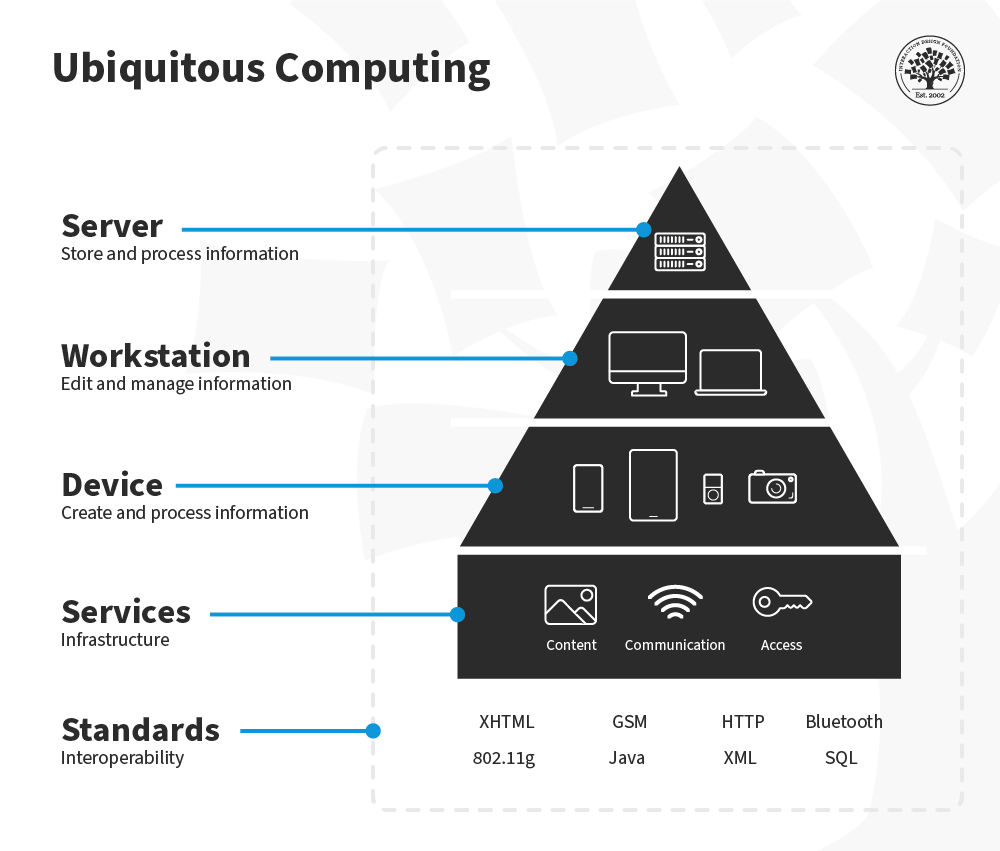
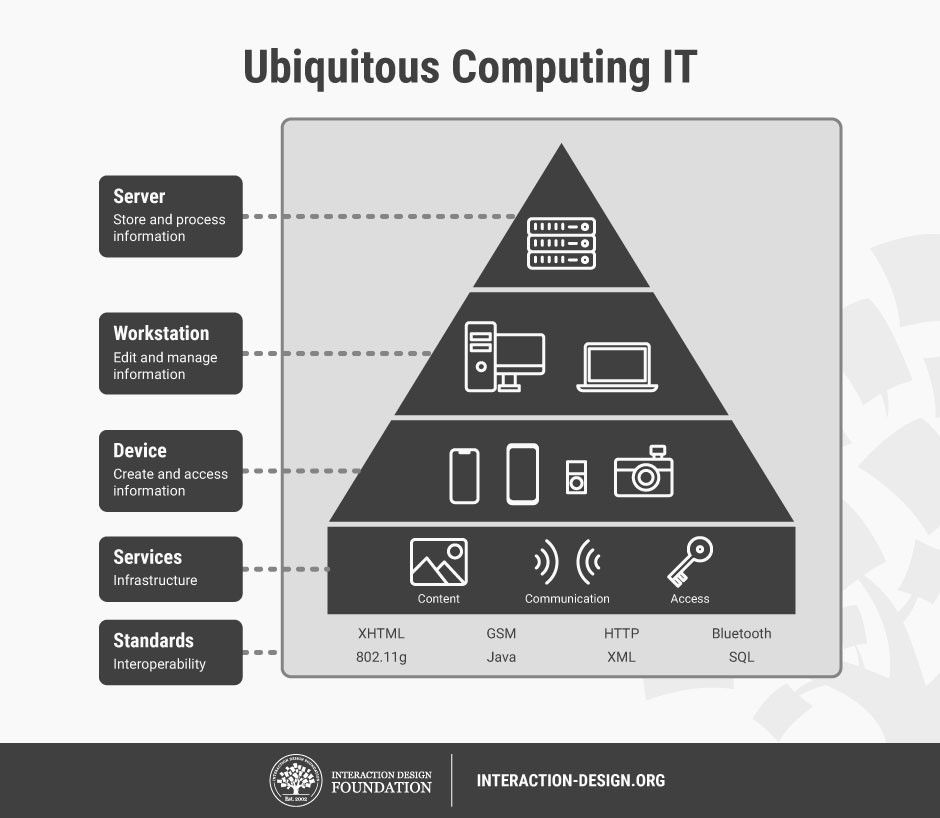
A diagram showing ubiquitous computing in 5 layers.

How to envision computers dissolving into everyday life—computing in clothing, furniture, and architecture, operating in the background? This high-roofed house—or pyramid on a pedestal—captures what’s going on succinctly: with the server at the top, to store and process information; the workstation below it, to edit and manage information; then the device, to create and process information; then services below that, for infrastructure; and, on the bottom, standards—for interoperability.

© Interaction Design Foundation, CC BY-SA 4.0

How to Design for Ubiquitous Computing, Step by Step

Try this suggested approach to UX design for ubiquitous computing:

1. Define Contexts of Use

First and foremost, uncover the essential knowledge you’ll need via user research—to start, map where and how users will encounter sensors, devices, or ambient interfaces. For example, if it’s a home assistant that can monitor and control devices and systems like central heating, stoves and ovens, and lighting, interactions will mostly occur in the home but also via remote control (via a smartphone, for example) from afar. Consider physical environments, routines, and sensory inputs—for example, busy users may be rushing around their home saying commands from various rooms, at various volumes.

Explore how to design better for user behavior and user needs through users’ contexts of use, in this video with Alan Dix.

Transcript

2. Specify User Needs and Goals

Flesh out your user research and conduct contextual interviews, diary studies, and observation in real settings. Ethnographic research techniques particularly empower you to find out from users what matters to them, why, and how you might be able to deliver design solutions that deliver on the most promising ways to delight them. In particular, cultural probes can help access the level where users can provide the most accurate insights into their lived realities.

Identify tasks users perform—especially unnoticed ones—that technology could support. For example, for our home assistant, a user might prefer Saturdays for their main laundry day—a notification from your design could gently remind them to wash their clothes on Saturday mornings.

Consider how cultural probes can uncover valuable insights to inform your design decisions for the better, in this video with Alan Dix.

Transcript

3. Decide Interaction Modalities

Mainly, you’ll want to design for calm interactions and notifications in the periphery, so balance informing users without capturing full focus. Use subtle cues: ambient light, gentle audio, or haptic signals—and shift contact only when it’s necessary or urgent.

For example, if a user is baking a cake and their front door sensor indicates they’re leaving the property, their smart home assistant that controls cooking devices could send them an alert.

Blend voice, gesture, ambient light, spatial audio, or tangible interfaces as appropriate.

Discover how and when to harness the power of haptics to boost your designed product’s effectiveness, in this video with Alan Dix.

Copyright
Transcript

4. Prioritize Context Awareness

Context deserves more than a single category on this list, since it’s something to keep being aware of. Combine sensors—such as motion, location, biometric—to infer user state, while preserving privacy of users. Keep context inference simple and transparent; users will trust designs that make the effort to understand the complexities of what’s going on and respect them, too.

5. Prototype in the Wild

Build prototypes in real-world settings (“in the wild”) to test usability beyond lab conditions. You want your prototypes to meet the users in their environments and contexts of use—the only way to assess their value. Use low-fidelity physical sensors or mock artifacts to simulate invisibility and context adaptation.

Peer into the potential that prototyping offers so you can make better design choices from more informed testing results, in this video with Alan Dix.

Transcript

6. Evaluate Experience Holistically

Because ubicomp weaves so intricately into users’ lives, you’ll want to assess beyond what they get done with it. So, measure not just task completion but sleep, cognitive load, attention flow, trust, and user satisfaction.

Use attention-management frameworks to design for when interruptions occur—for they will; that’s the nature of human living. It’s vital to ground design in real settings, hence why you’re testing in the field and not relying on assumptions or lab-only observations. Field deployments expose hidden usability issues and friction in real lighting, noise, and social settings.

7. Iterate with Ethical Safeguards

The “price” of modern living can seem extreme to many people, especially when it comes to their homes—their “sanctuary” where they should feel they can drop their guard and be themselves in full. So, include privacy controls and transparency about sensing and data use. When users have full control over what their homes hear, register, and report, they’ll more likely trust your brand and dispel fears of tech totalitarianism and device eavesdropping. As this is such a potentially serious issue, here’s a quick checklist:

  • Always inform users what your designed system is sensing and why.

  • Secure data streams, allow anonymization, and support user consent.

  • Apply fairness frameworks to avoid biased behavior or exclusion.

8. Deploy Thoughtfully

Ensure systems degrade gracefully if sensors fail or connectivity drops and offer fallback experiences or manual modes. For example, a default for a front or garage door should be to lock or close secured in the event of a power or system fail; otherwise, the user might be wide open to opportunistic burglars. Assure users with notifications that their property is safe and secure following such safeguard measures. For example, our homeowner may be on vacation in another country and—if their video monitoring system can’t show them a lowered garage door or it’s registered a problem—a notification to (accurately) say there’s nothing to worry about might mean the difference between peace of mind and a ruined trip.

Also beware of information overload: too many ambient signals or too much information coming at once can overwhelm users. Always craft experiences that filter notifications by relevance and timing.

9. Plan for Interoperability

Systems should operate across devices and vendors—for example, your smart home assistant may need to work with other apps, monitoring, law enforcement, and other services. Ensure protocols and interfaces work smoothly across environments.
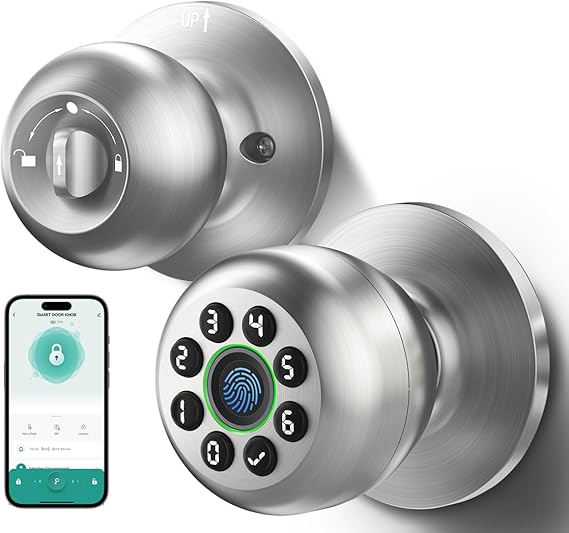
An image of two sides of a smart door lock and handle and an app on a smart phone.

Users’ homes can recognize and help them in ways that offer security and convenience—for example, for users who carry shopping bags in both hands, there’s no need to fumble with a pocket for keys when fingerprint entry is so handy.

© WREO, Fair use

How Did Computers Become So Ingrained in Everyday Life?

Ubiquitous computing might sound almost dramatic to some people, as if to suggest a new kind of world (the digital) might rise to challenge the old (the “analogue”). However, and for all the artificial intelligence (AI) at work, it’s more of a natural progression. Xerox PARC researcher Mark Weiser articulated the concept in the early 1990s, envisioning a world where computing would become so seamlessly integrated into human environments that it would essentially disappear from conscious awareness. Roy Want and colleagues at PARC implemented early ubicomp in systems like Active Badge and PARCTab (1990s), enabling indoor localization and context-aware behaviors long before smartphones became what they are today.

“The Ubiquitous Computing era will have lots of computers sharing each of us. Some of these computers will be the hundreds we may access in the course of a few minutes of Internet browsing. Others will be imbedded in walls, chairs, clothing, light switches, cars – in everything. UC is fundamentally characterized by the connection of things in the world with computation.”

— Mark Weiser & John Seely Brown, 1996

Where the paradigm of “everywhere computing” might have once seemed like science fiction to some observers, it has gradually evolved from theoretical framework to lived reality—and modern design expectations. The future is “here,” surrounding users every day and fundamentally challenging the desktop metaphor that dominated personal computing for decades.

To put ubicomp into perspective, consider its “predecessor.” The traditional computing model—with its characteristics of Windows, Icons, Menus, and Pointers (WIMP)—emerged when computers were expensive, stationary machines that needed dedicated attention and explicit interaction. At home or at the office, users sat at desks, manipulated cursors, and consciously engaged with applications through hierarchical menu systems. This model served well when computing was a distinct activity. However, it’s too “deliberate” for more intimate aspects of daily life as digital capabilities permeate almost every facet of twenty-first-century living.

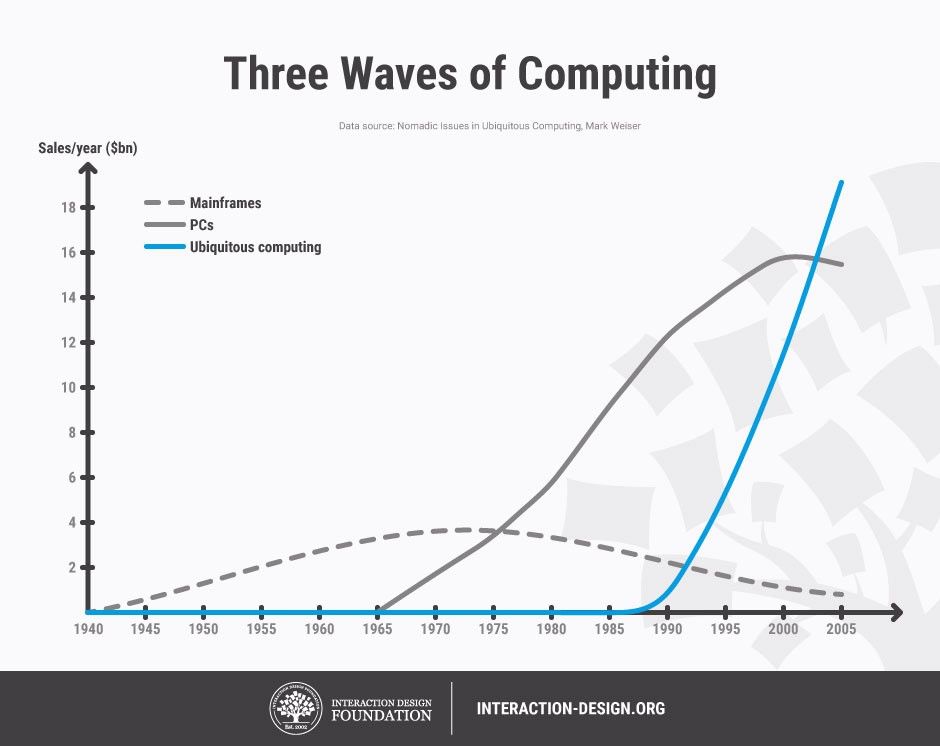
A line chart titled 3 Waves of Computing, showing on the Y axis sales in billions of $ per year and on the X axis years from 1940 to 2005 with 3 categories, mainframes which rose and fell in sales from 1940s to 2005, PCs which rose from 1965 and peaked around 2000, and ubiquitous computing, which has been rising since the second half of the 1980s.

Ubicomp represents the kind of evolutionary step designers can stay ahead of with exciting, relevant, and respectful digital solutions to help users enjoy modern living in its many forms.

© Interaction Design Foundation, CC BY-SA 4.0

Technological advancements and convergences helped bring about the rise of ubiquitous computing. Moore’s Law empowered processors to become small and cheap enough to embed in everyday objects. Wireless networking freed devices from physical tethers and cabled existence, while advances in sensors, displays, and battery technology made always-on, context-aware computing feasible. Maybe most crucially, the internet provided the infrastructure for these distributed devices to communicate and coordinate.

The smartphone revolution marked ubiquitous computing’s first major victory over traditional desktop paradigms. Instead of needing to sit at workstations to get anywhere online, users were suddenly able to carry powerful computers that respond to touch, voice, and gesture. With the prevalence of smart mobile phones and tablets, so too came the need for dedicated mobile UX design to cater to these unique experience types. Mobile devices don’t just replicate desktop functionality, and design for them certainly isn’t about shrinking desktop-tailored experiences. Mobiles enable entirely new interaction models based on location awareness, biometric authentication, and ambient intelligence.

Smart homes showcase ubicomp’s maturation in many ways:

  • Thermostats learn occupancy patterns and adjust temperature automatically.

  • Voice assistants embedded in speakers, displays, and appliances respond to natural language commands without requiring traditional input devices.

  • Lighting systems adapt to circadian rhythms.

  • Security cameras use computer vision to distinguish between family members and strangers.

To a great extent, these systems abandon windowed interfaces in favor of ambient feedback, voice interaction, and automated responses.

Wearable technology further demonstrates this shift. Fitness trackers monitor physiological data continuously, providing insights without demanding active user engagement. Smartwatches deliver notifications through haptic feedback and micro-interactions that would be cumbersome on traditional computers. Medical devices like continuous glucose monitors and pacemakers perform life-critical computing entirely in the background. Even while asleep, users might rest easier knowing they’re being watched over—not necessarily surveilled.

The Internet of Things (IOT) has expanded this computing fabric into vehicles, retail environments, and public infrastructure. Modern cars incorporate dozens of computers that manage everything from engine performance to entertainment, often accessible through touch screens and voice commands instead of traditional interfaces. Retail environments use RFID (radio frequency identification) tags, mobile payments, and recommendation algorithms to create shopping experiences that barely resemble the explicit transaction models of earlier e-commerce.

Thanks to such advances, interconnectivity, and machine learning, modern society is set up to know more—and help more—via ethically designed software and technology, aware of what to monitor and how to respond.

Explore how machine learning features at so many levels in modern UX design and society, in our video.

Transcript

Special Considerations for Ubiquitous Computing Design

Given the more personal and intimate nature of technology that seamlessly dissolves into the user’s life, environment, and lifestyle, consider these design responsibilities and potential hazards in particular.

Fairness and Inclusion

When designing personalized experiences, make sure the system doesn’t reinforce stereotypes or unfair biases. Collect data from a wide range of users and test your designs across diverse groups. This helps ensure your product works equally well for everyone, respects different needs, and treats all users with dignity.

Cultural and Social Norms

Different environments have different expectations, a reality that extends across many nations and societies around the world. Social acceptability, cultural sensitivities, and local norms shape whether ambient cues feel appropriate, so be sure to factor that into design choices.

Discover how to design with culture in mind, in this video with Alan Dix.

Copyright
Transcript

Regulatory Context

Data-centered systems in public spaces may be subject to laws like GDPR or HIPAA, for example, for medical records. Designers must align data practices with regulations to protect and preserve users’ data integrity.

Overall, ubiquitous computing is here to stay, spread, and evolve—and, when ethically designed, improve many standards of modern living further as well. Conscientious designers can mindfully embed intelligence into everyday life and push the benefits for users to higher levels while respecting the eternal need for respecting individuals’ rights and dignity.

From household name brands that offer users better options to manage their home lives to sensor networks that help with traffic prediction and city planning, ubicomp represents great possibilities and responsibilities. It can make a great deal possible for many people—be they elderly users who need medication reminders or fall monitoring, single parents managing hectic lives, or businesses managing the spaces where great things happen. Ubiquitous computing can help prevent fires, keep family commitments running smoothly, aid in sleep—the list is long and growing as further digital applications weave successfully into users’ lives and living spaces.

As artificial intelligence improves and hardware continues miniaturizing, the world will continue to witness the most profound technologies disappearing into the fabric of everyday life—making people more capable without making us more conscious of the computational infrastructure supporting our activities. One thing in particular for designers not to forget on this journey into the future is: for a goal, keep the user in control—and help them stay empowered.

Questions About Ubiquitous Computing?
We've Got Answers!

What does ubiquitous computing mean in simple terms?

Ubiquitous computing means technology is everywhere and works in the background—seamlessly and invisibly. Instead of needing to sit at a computer, you interact with technology through phones, wearables, sensors, or smart environments. Think of smart thermostats adjusting temperatures based on your habits or fitness trackers logging your activity without input. For UX (user experience) designers, this shifts focus from screens to whole environments in that you design not just for clicks, but for presence, motion, and context.

Interesting fact: Mark Weiser, who coined the term in the late 1980s, envisioned computers “vanishing into the background.”

Actionable insight: Focus on minimal interfaces and ambient interactions. Prioritize simplicity and context over visual complexity.

Explore how to incorporate simplicity in designs that can resonate with users.

What are the main features of ubiquitous computing?

Ubiquitous computing has four core features:

  • Invisibility: Users interact without realizing it.

  • Context-awareness: Systems adapt to location, time, activity, or user behavior.

  • Connectivity: Devices communicate across networks.

  • Scalability: It spans from wearables to smart cities.

These features demand an adaptive approach to ubiquitous UX design. For example, a health app might shift between mobile, watch, and voice input depending on the situation.

Actionable insight: Design for fluid transitions, not fixed screens. Use contextual triggers like location or time to deliver the right interaction at the right moment.

Connect to a more concrete grasp of context awareness and learn how to design for various situations.

How does ubiquitous computing relate to the Internet of Things (IoT)?

Ubiquitous computing and IoT are “paired” in that they go hand in hand in a sense. IoT connects everyday objects—like fridges, cars, or lights—to the internet. Ubiquitous computing uses this connectivity to deliver seamless, smart experiences across those objects. While IoT is the tech infrastructure, ubiquitous computing is the design vision: tech everywhere, working quietly.

Interesting fact: There are over 15 billion IoT devices globally, projected to double by 2030.

Actionable insight: It is vital to map out how different devices communicate and what experience they should deliver collectively—not in isolation.

Investigate how to design for the Internet of Things and reach more users in more ways.

How do designers create user interfaces for ubiquitous computing systems?

Designers build interfaces that go beyond screens—embracing voice, gestures, ambient cues, and haptic feedback. These systems often run with minimal user input, so the UI (user interface) must feel intuitive and invisible, morphing seamlessly into the background almost as if it were not even there.

Actionable insight: Use progressive disclosure; start with minimal interfaces and reveal complexity only when needed. Design for edge cases where manual control becomes necessary. For example, you might design a smart home interface that relies on automation but allows full override by the user when things go wrong.

Peer at how to use progressive disclosure in more effective designs.

How do I design seamless experiences across multiple devices?

Create consistent visual and interaction patterns while adapting them to the strengths of each device. So, you will need to unify tone, content, and logic across touchpoints like phones, smartwatches, and voice assistants.

Use design systems and journey maps to plan how users flow between devices. Consider context switches—like moving from home to car—and design accordingly.

For example, Spotify allows users to switch playback between phone, speaker, and desktop without breaking continuity.

Enjoy our Master Class How to Create Actionable User Journey Maps with Kelly Jura, Vice-President, Brand & User Experience at ScreenPal.

What are the key UX challenges in ubiquitous computing?

Major challenges for designers include:

  • Context-switching between devices

  • Invisible errors in automated systems

  • Data privacy and user consent

  • Designing for trust without overwhelming the user

Ensure that feedback loops exist, even in silent systems, and that users always understand what the system is doing and why.

Actionable insight: Provide clear status indicators and fallback mechanisms for users. For every “invisible” action, offer a visible confirmation somewhere.

Discover how to reach users on one all-important level in particular, in our article Trust: Building the Bridge to Our Users.

How can designers handle context-awareness in their products?

Context-aware design adapts to location, time, user activity, and even emotional state—hence the “aware” aspect. Use sensors, user data, and environmental cues to personalize experiences.

Actionable insight: Build logic trees or decision trees that define how the product should respond under different contexts, and remember that users will have many contexts. Design with personas (fictitious representations of real users) and user scenarios to “feel out” as many types of contexts to tailor a design solution to. Always include opt-outs for users who want control.

A good example to have in mind is how Google Maps shifts from walking to driving directions automatically but lets users switch manually.

Explore how personas are more than an essential “tool” in UX design—designing without them falls short, in this video with William Hudson: User Experience Strategist and Founder of Syntagm Ltd.

Transcript

How do I make sure users feel in control when tech is everywhere?

Give users control through clear settings, pause/stop functions, and transparency about data use. Remember in particular that the homes of users are a place where they should not have to worry about being “watched” or “listened in on”—that trust is “sacred.” Ubiquitous systems can feel invasive if they operate without consent.

Actionable insight: Provide options for customization and clear system feedback. Use onboarding to explain what is happening and why.

For example, smart assistants like Alexa allow voice history review and deletion—offering users peace of mind and assurance that they are in control.

Discover helpful points about how to tailor ubiquitous computing experiences in our article, No-UI: How to Build Transparent Interaction.

How can designers build trust in ubiquitous systems?

Designers earn trust through predictability, consistency, user control, and ethical use of data. UI (user interface) elements should clearly explain system behavior and give users options to change it. Transparency builds trust. Users need to understand what the system knows, how it makes decisions, and what actions it takes. Here are some tips to design for trust and transparency:

  • Display clear onboarding, data usage explanations, and allow manual overrides.

  • Never hide consequences of user actions.

  • Use permission prompts, usage logs, and status dashboards.

  • Avoid hidden processes.

  • Narrate what the system does behind the scenes.

  • Maintain an ethical grasp of technology application and AI (artificial intelligence).

Tap into Human-Centered AI (HCAI) for a firmer foundation in designing for the future.

What ethical concerns should I consider when designing ubiquitous systems?

Ethics are vital to keep top of mind and key ethical concerns for ubiquitous system design include:

  • Privacy: Avoid surveillance and data hoarding.

  • Consent: Ask before tracking.

  • Bias: Ensure fairness in AI-driven interactions.

  • Inclusion: Design for all users, not just the tech-savvy ones.

Apply ethical design principles from early on. Create UX patterns that support consent, transparency, and diversity in outcomes.

Beware of bias before and during your design process to help make better decisions for your product and users.

How do I make ubiquitous tech accessible for all users?

Accessibility must span multiple interaction modes: voice, gesture, visual, haptic. Accessible design ensures that people with disabilities can access and enjoy the same benefits, and it is not just a legal requirement in many jurisdictions—it is smart because accessible designs help all users, too.

Follow WCAG guidelines across all interfaces, including non-traditional ones. Use multimodal inputs and provide redundancies.

For example, a smart speaker should work via voice and app to ensure users with speech impairments are not excluded.

Explore how to bake accessibility into your design process and serve all users better experiences because of it.

What are some recent or highly cited articles about ubiquitous computing?

Abowd, G. D., & Mynatt, E. D. (2000). Charting past, present, and future research in ubiquitous computing. ACM Transactions on Computer‑Human Interaction, 7(1), 29–58.

This highly cited paper by Abowd and Mynatt reviews the first decade of ubicomp research, identifying three core interaction themes—natural interfaces, context‑aware applications, and automated capture and access—and introduces the concept of “everyday computing.” The authors argue that computation should evolve from sporadic tools to continuous companions embedded in daily human life. They explore scaling across devices, space, people, and—most notably—time, focusing on interruption/resumption, temporal modeling, and associative storage. Crucially, they emphasize user‑centered evaluation, privacy, and social implications. For UX designers, this paper offers foundational theoretical frameworks, design challenges, and future directions essential for designing seamless, long‑term context‑aware user experiences.

Zhang, H., Wang, L., Sheng, Y., Xu, X., Mankoff, J. M., & Dey, A. K. (2023). A framework for designing fair ubiquitous computing systems. In Adjunct Proceedings of the 2023 ACM International Joint Conference on Pervasive and Ubiquitous Computing & the 2023 ACM International Symposium on Wearable Computers (pp. 394–397). ACM.

This conference paper presents a comprehensive framework to guide the design of fair and equitable ubiquitous computing systems. It integrates stakeholder engagement, inclusive data collection, fairness-aware algorithms, and continuous evaluation, all while respecting user privacy. The authors emphasize the practical challenges of ensuring algorithmic fairness in real-world contexts, making this especially relevant for UX designers in healthcare, education, and smart environments. Its structured, modular framework is usable at different design stages and helps practitioners make explicit fairness decisions, mitigating biases across diverse user populations in adaptive systems.

Zhao, S., Tan, F., & Fennedy, K. (2023). Heads-up computing: Moving beyond the device-centered paradigm. Communications of the ACM, 66(9), 56–63.

This journal article introduces the “Heads-Up Computing” paradigm, which advocates for interfaces that align more closely with user natural perception and activity flows, moving beyond traditional screen-based UX. The authors envision seamless integration of computation into the perceptual space of users via wearable multimodal systems—such as head-mounted displays and gesture-based interactions. For UX designers, this offers a future-facing framework and practical design challenges for spatial computing, AR/VR, and embodied interaction. It advances ubicomp UX from device dependency toward adaptive, human-centered experiences embedded directly in physical environments.

Kuniavsky, M. (2010). Smart Things: Ubiquitous Computing User Experience Design. Morgan Kaufmann.

In Smart Things, Mike Kuniavsky presents a practical guide for designing products in the emerging world of ubiquitous computing. Targeting UX designers, the book focuses on crafting compelling user experiences for smart devices that blend physical form, embedded technology, and networked services. Kuniavsky introduces models and design patterns to manage the complexity of ubiquitous systems, drawing from real-world projects and user research. He emphasizes context-aware interaction and the integration of user needs with business goals. The book has become a foundational resource for professionals creating products beyond the screen—such as wearables, IoT devices, and ambient systems—offering grounded methods to navigate this design frontier.

Dourish, P., & Bell, G. (2011). Divining a Digital Future: Mess and Mythology in Ubiquitous Computing. MIT Press.

Divining a Digital Future critiques the assumptions and narratives that have driven the development of ubiquitous computing. Paul Dourish and Genevieve Bell argue that mainstream ubicomp research often relies on idealized visions—such as seamless invisibility or perfect automation—that overlook real-world complexities. Through ethnographic insights and historical context, they call for a design approach that accounts for culture, infrastructure, and messiness. This book has had major influence on UX and HCI communities by challenging technocentric design and encouraging practitioners to embed social and cultural awareness into technology development. It helps UX designers recognize how values and metaphors shape both systems and user expectations.

Earn a Gift Earn a Gift, Answer a Short Quiz!

1
2
3
4
1
2
3
4
Question 1
Question 2
Question 3
Get Your Gift
Interaction Design Foundation logo

Question 1

What is the main goal of ubiquitous computing?

1 point towards your gift

  • To make users focus more on computer interfaces
  • To place large computers in centralized locations
  • To integrate computers into everyday environments
Interaction Design Foundation logo

Question 2

How does ubiquitous computing change the way people interact with technology?

1 point towards your gift

  • People use only one device for all activities
  • People interact with multiple devices embedded in their environment
  • People rely on a keyboard and mouse for every interaction
Interaction Design Foundation logo

Question 3

Why do designers include context-aware systems in ubiquitous computing?

1 point towards your gift

  • To track user activity for marketing purposes only
  • To adjust device behavior based on the user’s surroundings
  • To replace human decision-making completely

Learn More About Ubiquitous Computing

Make learning as easy as watching Netflix: Learn more about Ubiquitous Computing by taking the online IxDF Course AI for Designers.

Why? Because design skills make you valuable. In any job. Any industry.

In This Course, You'll

  • Get excited about how quickly you can create meaningful results when you turn AI into your new superpower and combine it with timeless human-centered design skills. As an AI-powered designer, you’ll increase your efficiency and salary potential, and as a human-centered leader, you'll create ethical AI-powered products people love. When these abilities come together, you’ll solve real-world problems faster and make the world a better place. Studies show that AI-driven productivity accelerates growth and helps busy professionals like you achieve in months what once took decades. Now's the time to master the powerful combination that keeps you in demand.

  • Make yourself invaluable when you use AI to accelerate repetitive tasks while applying your irreplaceable human strengths like empathy, critical thinking, and ethical decision-making to guide every solution toward what users truly need. Leaders seek professionals with AI fluency because the people who thrive combine AI efficiency with deep human insight that machines can't replicate. You'll learn to automate and streamline repetitive tasks, make data-driven decisions, and optimize your workflow for innovation and cost savings. No matter your background, you'll easily master AI for Designers. With clear guidance and real-world examples, you'll apply your skills immediately.

  • Gain confidence and credibility as you master the art of text prompts for design. You'll learn how to deal with bias in AI and how to use AI tools to create intuitive user experiences that drive business success. You can fast-track your portfolio of AI-enhanced case studies with step-by-step guidance, practical tips for real-life projects, and downloadable templates. This course gives you the hands-on knowledge to guide AI with timeless human-centered design skills, and that's how you stay in demand in any industry!

It's Easy to Fast-Track Your Career with the World's Best Experts

Master complex skills effortlessly with proven best practices and toolkits directly from the world's top design experts. Meet your experts for this course:

  • Ioana Teleanu: Founder of UX Goodies and former Lead Product Designer (AI) at Miro.

  • Rafael Hernandez: Lead Product Designer at T. Rowe Price.

  • Jarvis Moore: Senior Design Lead, Design Systems at Microsoft.

  • Niwal Sheikh: Product Design Lead at Netflix.

  • Vitaly Friedman: Senior UX Consultant for the European Parliament, and Creative Lead, Smashing Magazine.

  • Pablo Stanley: Designer and CEO of Musho and Lummi.

Get an Industry-Recognized IxDF Course Certificate

Increase your credibility, salary potential and job opportunities by showing credible evidence of your skills.

IxDF Course Certificates set the industry gold standard. Add them to your LinkedIn profile, resumé, and job applications.

Course Certificate Example

Be in distinguished company, alongside industry leaders who train their teams with the IxDF and trust IxDF Course Certificates.

Our clients: IBM, HP, Adobe, GE, Accenture, Allianz, Phillips, Deezer, Capgemin, Mcafee, SAP, Telenor, Cigna, British Parliament, State of New York

All Free IxDF Articles on Ubiquitous Computing

Read full article
One Size Fits All? Definitely Not in Task-Oriented Design for Mobile & Ubiquitous UX - Article hero image
Interaction Design Foundation logo

One Size Fits All? Definitely Not in Task-Oriented Design for Mobile & Ubiquitous UX

In the 1980s and ‘90s, our technology-loving civilization rode the wave of Personal Computing – one computer per person. As computers became smaller and less expensive to produce, every worker—or indeed, every person—could have one at his/her disposal. With the rapid rise of Ubiquitous and Mobile co

Social shares
688
Published
Read Article

One Size Fits All? Definitely Not in Task-Oriented Design for Mobile & Ubiquitous UX

One Size Fits All? Definitely Not in Task-Oriented Design for Mobile & Ubiquitous UX

In the 1980s and ‘90s, our technology-loving civilization rode the wave of Personal Computing – one computer per person. As computers became smaller and less expensive to produce, every worker—or indeed, every person—could have one at his/her disposal. With the rapid rise of Ubiquitous and Mobile computing, the situation had certainly changed by the 2010s. It’s more or less fair to say that every person is the owner and user of many computers, desktops or laptops, tablets and—of course—smartphones. We receive our computing services even from things that don’t look like computers at all—for example, Amazon’s Alexa or smartwatches. What does this mean for UX design? How can we design experiences that take this variety in computing resources and interfaces into account and help ourselves optimize our results? Let’s find out.

Mark Weiser, a senior researcher at Xerox Park and widely regarded as the founding father of Ubiquitous Computing, argued in 1994 that the future of computing would be dominated by ubiquitous computing devices. Contrary to the Personal Computing model, where each person owns a computer, Ubiquitous Computing is a model where each person owns and uses many computers, or even where many computers share many users. It’s not hard to see that this prediction came true: A modern smart home, including not just Internet of Things devices such as smart lighting, smart thermostats and smart energy meters but also personal and shared devices such as tablets, smartphones, and desktop and laptop computers, provides shared services to all family members and guests.

“The Ubiquitous Computing era will have lots of computers sharing each of us. Some of these computers will be the hundreds we may access in the course of a few minutes of Internet browsing. Others will be imbedded in walls, chairs, clothing, light switches, cars – in everything. UC is fundamentally characterized by the connection of things in the world with computation. This will take place at a many scales, including the microscopic.”

-Mark Weiser & John Seely Brown, 1996

Author/Copyright holder: Teo Yu Siang and Interaction Design Foundation. Copyright terms and licence: CC BY-NC-SA 3.0

Ubiquitous Computing is the third wave of computing, according to pioneering researcher Mark Weiser. He correctly predicted that devices such as tablets, smartphones and connected Internet of Things gadgets would overtake the market and transform the way we think about computers and their services (diagram based on Weiser, M. 1994).

For a UX designer, understanding the users’ environment during the Empathy or Define stages in the Design Thinking process means understanding the devices available to them and what they are best suited for, or the how and why users make use of these devices.

Understanding the context of device use to inform UX design

In their book “Pervasive Computing: The mobile world”, Uwe Hansmann et al. (2003) discuss the information technology infrastructure that would power the ubiquitous computing wave. In their discussion, they offered the insight that computing services would be provided via a range of devices available to the users, either directly or as part of a service infrastructure. One critical aspect of this insight was the purpose of use of each device:

  • Servers will be used to store and process large volumes of information – indeed, think about cloud services such as Dropbox or Google Drive, or the massive servers that process big data to provide recommendations in services like Foursquare. These devices are not directly accessible to users, but they are part of the user experience, as the information architecture in user interfaces largely depends on the processed information this infrastructure provides.

  • Workstations are devices such as desktops and laptops: People can use these devices for longer sessions, spanning from a few minutes to several hours. Because of their large screens and input modalities (keyboard and mouse), they are well suited for editing and managing considerable volumes of personally relevant information, or for accomplishing complicated tasks that require the cognitive processing of lots of information.

  • Devices are what we refer to as our tablets, smartphones or other personal, mobile gadgets (e.g., fitness trackers). They are primarily used to access the information stored in the servers and managed by workstations, or to create small bits of information themselves, which can be uploaded to servers. Interaction with these devices is best limited in short sessions, a few seconds or minutes at the most, typically because the user might be mobile (thus often interrupted or distracted by more urgent things—for instance, paying attention to the road while walking), but also because the limited input and output modalities of these devices (small screens, awkward touch-based text and pointer entry) frustrate users during prolonged use.

Author/Copyright holder: Andreas Komninos and Interaction Design Foundation. Copyright terms and licence: CC BY-NC-SA 3.0

The tiers of ubiquitous computing information technology infrastructure by Hansmann et al. (2003). Services will be distributed across a wide range of different types of computers, and users will employ a different device depending on how they need to interact with a service. We can expect to have a larger volume of devices, compared to workstations or servers. The ecosystem of devices and services is underpinned by an array of common standards that guarantees interoperability.

Let’s consider an example of the above. If you wanted to engage in a complex task, such as finding a new TV to buy, you would probably want to do this on a desktop computer. With its large screen, you can open multiple browser tabs or stack browser windows side by side, helping you navigate and compare technical specifications and prices from multiple e-shops until you find what you want and go through the checkout process. The same task would be much more difficult using a smartphone. Because you would need to visit multiple e-shops and only one website can be displayed on the screen at any time, you would need to remember what you found previously or frequently switch through the many websites to refresh your memory, making the interaction very frequent and, of course, putting considerable strain on your cognitive load and memory. Other examples might be editing a long document or email, where the small screen on a smartphone presents not just input problems but also problems with having an overview of the document structure (you need to scroll a lot!) and managing spelling mistakes.

Inversely, if you wanted to quickly fact-check something during a conversation in the pub (e.g., to find what year the Bugatti Veyron car model came out), you could very easily do this with your smartphone. If you wanted to check in to a place on Facebook, you could again create this small bit of information with your smartphone – there’s certainly no need to wait until you are at a stationary computer! Or, to record your daily jogging activity, a wearable fitness band is just perfect; you don’t even need your smartphone for that. For a UX designer, what would be the point in engaging in the design of a website for desktop computers that allowed users to record their jogging but required them to carry a laptop while doing so?

That last question was rhetorical – of course, there’s no point. But the question highlights that good UX design depends on understanding not just what the users want to do (and their motivations) but also the devices that they have available to them (or haven’t, but that’s something you might create from scratch).

Choosing adaptive or responsive UI strategies with Task-Oriented Design

Task-oriented design (TAD) is not a strictly defined methodology, but according to Lewis & Rieman (1994), it’s simply an approach to systems development that places a heavy focus on finding out the goals that users need to meet while interacting with a system, and then designing that system so that it can best accommodate the tasks that lead to accomplishing these goals. The process of breaking down a user’s goal into tasks is called Task Analysis.

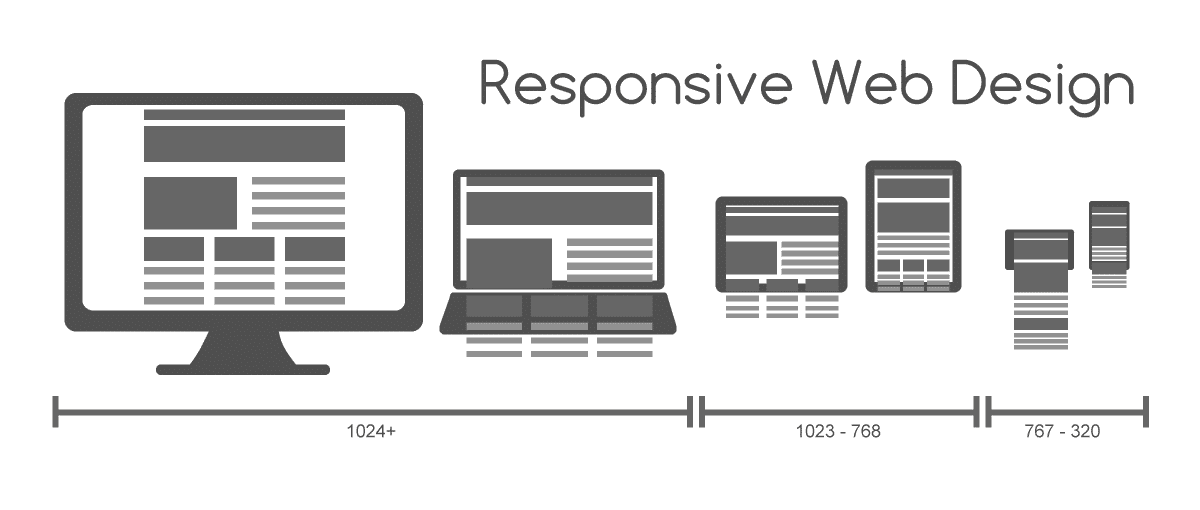
In the days of old, the services offered by websites and applications were tightly coupled to the hardware that these ran on. For example, back in the early 2000s, you could only visit a website through a personal computer. From our vantage point, years later, we can easily see how it’s simply not enough to think of services as something that’s so heavily bound by hardware. Instead, a service should adapt, as much as possible, to the hardware devices currently available to the user. This has led to the introduction of concepts such as responsive design, whereby the interface (usually a website) adapts to the physical layout of the device on which it is being viewed, in order to afford maximum usability. You will have seen this often with the mobile versions of many websites, where code ensures that the interface layout changes drastically to facilitate navigation and information seeking through the small displays of modern smartphones.

Author/Copyright holder: Muhammad Rafizeldi, Wikimedia. Copyright terms and licence: CC BY-SA 3.0

In responsive design, the content is “liquid” – i.e., restructured and laid out differently so as to better fit the device on which it is being displayed. All of the content and functionality are still there; they’re just presented differently.

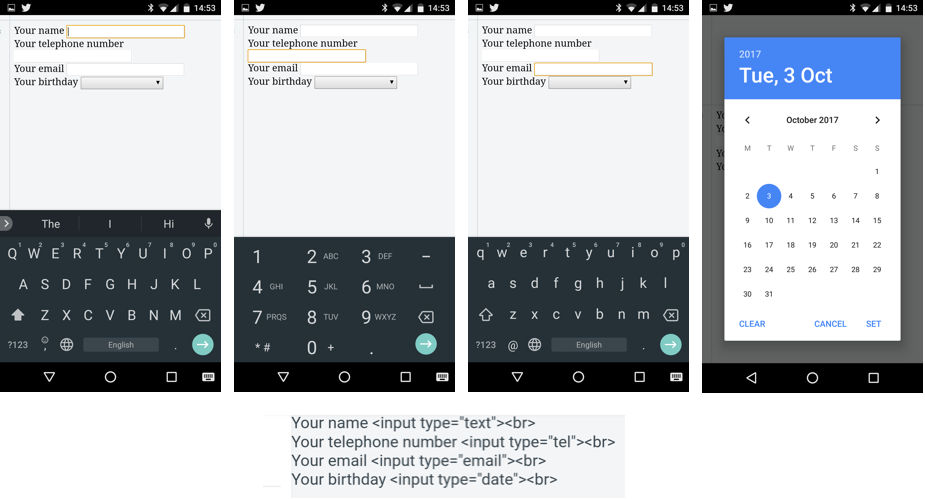
The concept of adaptive design builds on this principle but doesn’t only concern itself with laying out interface elements differently. In adaptive design, depending on the user’s goal and device context, the service may alter not just its layout and visual appearances but also the way it offers services. In web design, this is often accomplished by having separate, dedicated, custom versions of the same website, tailored for mobile devices. Some services might not appear in the UI, because it doesn’t make sense for the user to be able to perform them in the given context (device and use mode). For example, a custom mobile website for an e-shop may completely lack a multiple-item comparison feature, because fitting so much information about multiple items inside a small screen is just impractical. Alternatively, some services may be provided differently. For example, if a programmer defines that an input field should contain only numbers (e.g., used for entering a telephone number), the mobile device will display a special version of the keyboard that allows the input of just numbers, to ensure that the user enters valid data. The equivalent field on the desktop version of the website may simply have additional code attached that checks that the entered data is valid (i.e., numeric only).

Author/Copyright holder: Andreas Komninos, Interaction Design Foundation. Copyright terms and licence: CC BY-SA 3.0

An example of adaptive system design: Google’s Chrome browser and GBoard keyboard for Android. The snippet of code shows the HTML specified by a web designer, indicating the various purposes of the input fields to the browser (context of entry). When the user focuses on each input field, different versions of the keyboard appear – to help with entry tasks. From the left to the right, a standard text field invokes the default keyboard view along with a suggestion bar. A “telephone” field invokes a numeric-only version of the keyboard that contains symbols (+, #, *) used in telephone dialing. An “email” field invokes a special version of the alphanumeric keyboard that has a shortcut to the @ symbol and no suggestion bar. Finally, a “date” field invokes not the keyboard but a special dialog window to allow users to select a date accurately. Note that the functionality of the keyboard is different in each case – for example, you can’t force the keyboard into an alphanumeric mode for the telephone field.

A task-oriented approach to design teases out such user requirements and guides design to help users achieve their goals, by optimally designing not just for the task at hand, but also for the device available to the user and the situations in which this device is used.

Designing for users, devices and use context

Often, the use of a certain type of device also implies a lot about the way users engage with that given device. As Hansmann et al. (2003) highlighted, users in the age of Ubiquitous Computing can choose the most appropriate type of device to achieve a goal depending on their current context. For example, reading the news on a desktop computer typically means the user is stationary and prepared to dedicate a considerable amount of time to that activity. If users are on their mobiles, they could well be seated, but this might quickly change (e.g., as they approach their train stop), so perhaps it’s best to give them just the really important news first, because the interaction with the device is likely to be interrupted at any time by other priorities. The level of interruption during mobile use is all too real: researchers Oulasvirta et al. (2005) found that when we are using our mobile or cell phones, interactions are impulsive, fragmented and inherently short term, as our use of the mobile device continuously competes for our cognitive resources with the simultaneous performance of mobility (e.g., walking) as well as environmental (e.g., being aware of our surroundings) and social tasks (e.g., being aware of those around us and our relationship with them). It was found in that study that for these reasons, users’ attention to their cells or mobiles spans between a mere 4 and 8 seconds. This means that any task (or sub-task) you would want your users to perform on their mobile devices shouldn’t take longer than that amount of time. Going beyond this might run the risk of causing frustration (the ultimate sin for any designer) and accidents. We certainly don’t want to encourage less-attentive users to walk into things, out in front of moving things, or off things that are any distance above the ground!

Author/Copyright holder: tomemrich, Flickr. Copyright terms and licence: CC BY 2.0

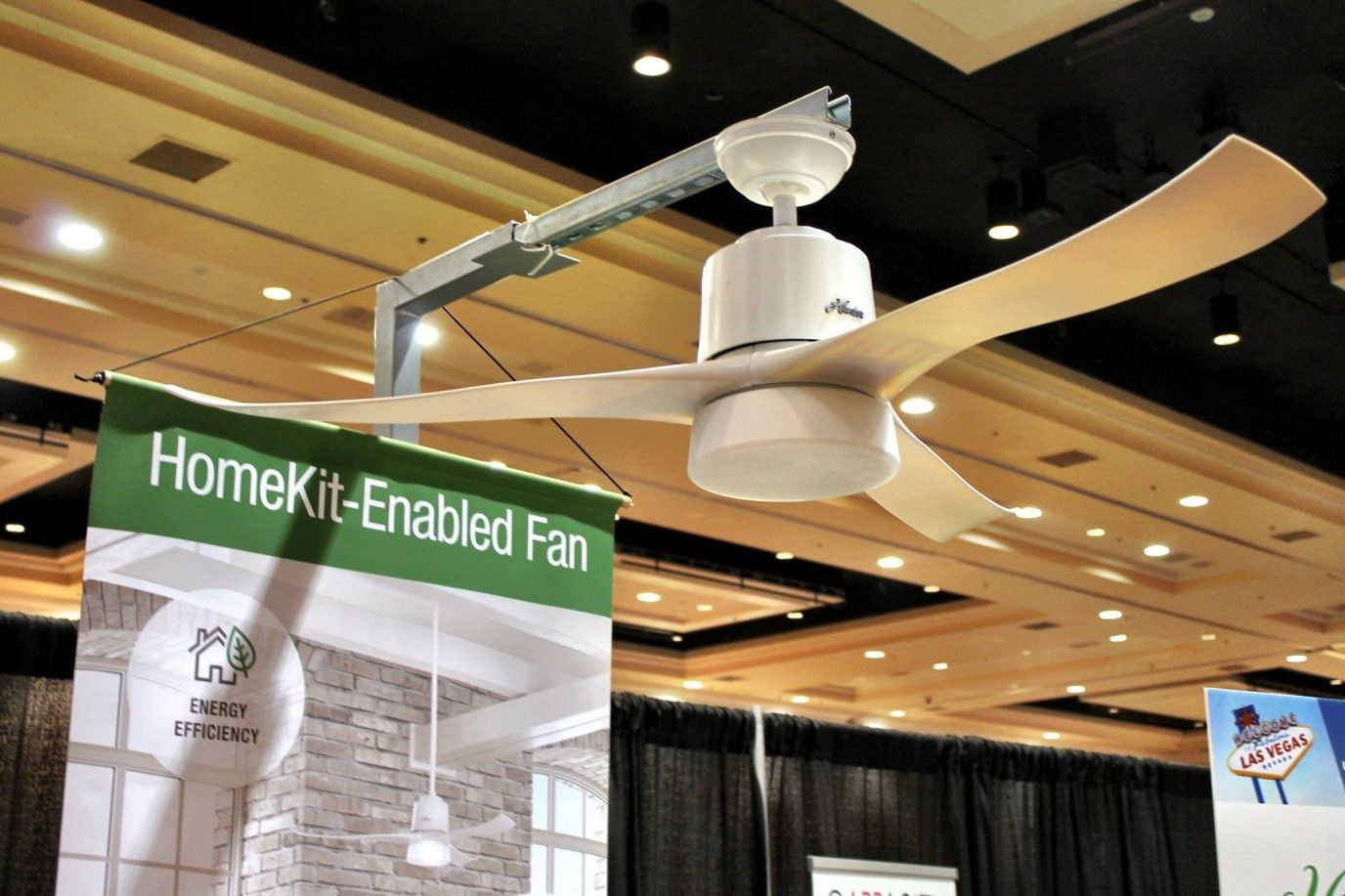
How do you design the UX for that which has no interface? A connected IoT device such as this fan, for example. In many cases, the interface has to be purely virtual, or very limited (think of just an on-off switch and maybe a few LEDs). Here are your key considerations: Where are the users? What are they doing? What are their goals? What’s the best way of interacting with this device?

UX consultant Larry Marine (2014) outlines some of the contexts of use associated with different types of devices and the assumptions that we might be entitled to make about our users when they are using such devices.

  • Stationary computers (e.g., laptops and desktops): With these devices, users are typically stationary and interaction sessions to complete goals are longer, ranging from several minutes to even hours. They are the preferred type of device for performing more complex tasks. As stated previously, the large display area that can fit a lot of information allows users to spend more time processing that information, rather than interacting with the device to get it. Also, because of the ability to use keyboards and mice, the creation and management of large volumes of information are much easier. The accuracy and feedback-rich nature of such input devices (e.g., you know when you’ve pressed a key or clicked a button) allows users to perform complex operations (e.g., blind-type, drag-and-drop, multiple selections) with little frustration.

  • Tablets: Because of their relatively large size that requires either the use of both hands or some support (e.g., on the body or a table), tablets are typically used from a stationary position. Even when the users are mobile, they would typically need to stop in order to use their devices. Nevertheless, tablets tend to have a relatively large display area, so they could be just as good for reviewing large volumes of information as stationary computers. On the other hand, they lack the accuracy and feedback of keyboard and mouse devices, because input largely relies on the touchscreen and virtual keyboard. As such, tablets are not appropriate for managing and creating large volumes of information. In this respect, an adaptive design such as the design of the keyboard operation and automatic switch between alphanumeric and numeric-only modes or the automatic input of values (e.g., entering a city name by resolving the geographic coordinates fetched by the GPS) can help considerably.

  • Smartphones: These devices have, by and large, become our sidekicks, our trusted companions that go everywhere with us and often, literally or metaphorically, save our lives when we need to find some information or generate some quickly. Let’s think about what this means for a moment. We use our smartphones mostly to support other tasks that we perform, such as finding our way to the nearest café or finding a cab to take us somewhere. This means that interaction with these devices is spontaneous and sporadic. We use them for short periods of time, to accomplish simple and very focused information-retrieval tasks swiftly (e.g., finding out our location) or to respond to an incoming alert (e.g., replying to a short message). The small display sizes mean that only small amounts—or short bursts—of information can be presented at any time to a user. They also mean that input is largely frustrating, whether it involves selecting material on the screen or entering text with the virtual keyboard. As a result, interaction sequences have to be very short and simple, both for minimizing the amount of interaction and for allowing users to quickly resume their ongoing tasks. You should also automate as much as possible, both in terms of filtering out and presenting only the content which is contextually relevant (e.g., showing only a list of cafés within walking distance instead of all cafés in the city), and in terms of data entry (e.g., automatically fetching the users’ geographical coordinates instead of requiring them to input these manually using a map).

Larry Marine’s article stops short of the latest development of the third wave of computing, which is the proliferation of the Internet of Things. We can add to his list as follows.

  • Internet of Things devices:small, connected devices that are pervasive (i.e., embedded in the environment around us) and work autonomously to make our lives a little more comfortable. They serve single purposes and should be designed to support just those and optimally so. Users are seldom close or attentive to those devices. Other than setting them up, and sometimes intervening to override their behavior, users can be mobile or stationary, but they are typically far away from these and engaged in other, unrelated tasks. These devices pose the hardest interaction problems. As they are meant to be largely transparent, their interfaces might be completely virtual (i.e., visible only through another device, such as a smartphone) or completely minimal, with a low-resolution display, mechanical controls (e.g., knobs or buttons) and possibly status LEDs. Interaction with these devices is meant to be mostly implicit—for example, our mere presence in a room at night might be enough to switch on the intelligent lighting for that room to the levels of our personal preference. One important consideration for these devices, though, is that they are inherently shared devices. While smartphones are highly personal, IoT devices often serve many users simultaneously (e.g., family members in the same room), whose individual preferences might conflict. Given that, we cannot really rely on large-scale success from designing for a “bachelor-pad” market.


Author/Copyright holder: CODE_n, Flickr. Copyright terms and licence: CC BY 2.0

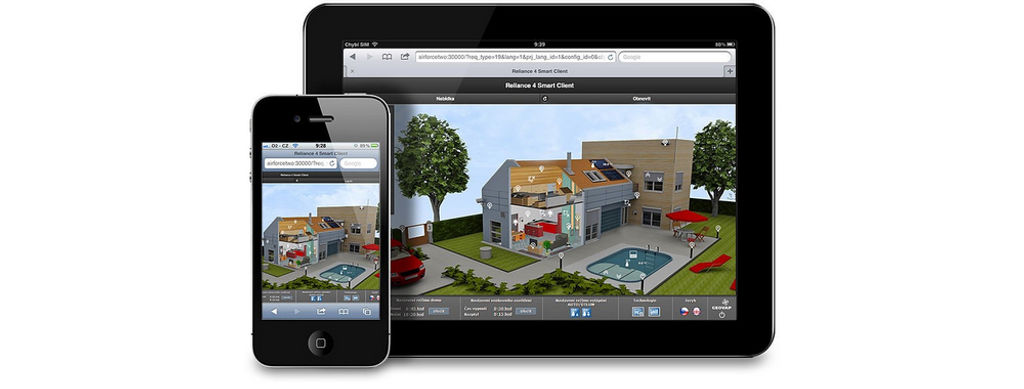
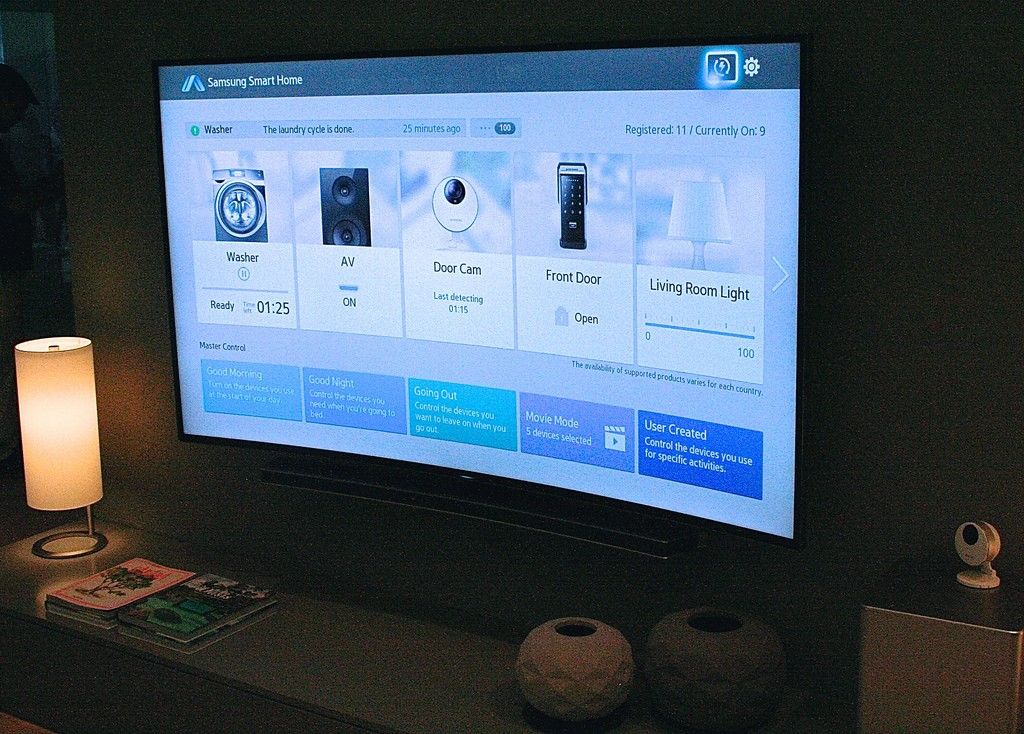
Connected device virtual interfaces, such as Samsung Home (pictured) or Apple’s HomeKit, consist of a framework that provides a unified application through which users can control all the connected devices in their home. This is another great example of adaptive design – these apps adapt to whatever functions each device can offer and display only those controls to the user that are relevant.

Naturally, these are general assumptions that may not always hold true, depending on the context of the UX that we are designing for. However, keeping these assumptions in mind and adapting them for your own project will greatly help you in deciding whether a responsive or adaptive design is best suited for the UX design of your application (which you should really begin to think of as a service).

The Take Away

The third wave of computing—Ubiquitous Computing—brings new opportunities as well as challenges for us as UX designers. Responsive and adaptive design are one way in which we can begin to address the design challenges of offering services to users via all the devices they own or have use of. To create efficient designs and pleasurable user experiences, we can employ task-oriented design approaches to defining the users’ problems and ideating new solutions. The analyses of tasks, however, should focus not just on the users’ goals and subtasks for achieving these but also on the nature of the devices that users may employ to carry out these tasks, and the implications these devices have regarding the way and environment in which users are to use them—and enjoy doing so. Only when we accommodate the entire scope of use in this way can we craft designs that will arrive on target in the marketplace and satisfy users time and again, wherever they may happen to be.

References & Where to Learn More

Hero Image: Author/Copyright holder: Bretislav Valek, Wikimedia. Copyright terms and licence: CC BY-SA 3.0

Hansmann, U., Merk, L., Nicklous, M. S., & Stober, T. (2003). Pervasive computing: The mobile world. Springer Science & Business Media.

Cousins, C. (2015). “Is adaptive design better than responsive design?”.

Lewis, C., & Rieman, J. (1993). Task-centered user interface design. A Practical Introduction.

Marine, L. (2014). “Responsive Design vs. Task-Oriented UX Design”.

Oulasvirta, A., Tamminen, S., Roto, V., & Kuorelahti, J. (2005, April). Interaction in 4-second bursts: the fragmented nature of attentional resources in mobile HCI. In Proceedings of the SIGCHI conference on Human factors in computing systems (pp. 919-928). ACM.

Weiser, M. (1994, March). Ubiquitous computing. In ACM Conference on Computer Science (p. 418).

Weiser, M., & Brown, J. S. (1997). The coming age of calm technology. In Beyond calculation (pp. 75-85). Springer New York.

Feel Stuck?
Want Better Job Options?

AI is replacing jobs everywhere, yet design jobs are booming with a projected 45% job growth. With design skills, you can create products and services people love. More love means more impact and greater salary potential.

At IxDF, we help you from your first course to your next job, all in one place.

See How Design Skills Turn Into Job Options
Privacy Settings
By using this site, you accept our Cookie Policy and Terms of Use.
Customize
Accept all

Be the One Who Inspires

People remember who shares great ideas.

Share on:

Academic Credibility — On Autopilot

Don't waste time googling citation formats. Just copy, paste and look legit in seconds.