Task-Oriented Design

Your constantly-updated definition of Task-Oriented Design and collection of videos and articles.
Be a conversation starter: Share this page and inspire others!

197 Shares

What is Task-Oriented Design?

Task-oriented design is an approach to design that focuses on user task completion instead of designing with specific devices, features, aesthetics or technical considerations in mind.

Users do not interact with a product with only one device; not all devices suit specific tasks. For example, a user would use a hand-held device instead of a laptop for driving directions. When planning a vacation, a user might interact with a laptop instead. Then, users might want to send those directions to their phones once they begin their trip.

A task-oriented framework considers all the devices a user interacts with, even when using the same product. Good designs optimize specific tasks for each device interface. Consider all devices as part of the same experience aimed at helping users complete tasks. There are different approaches and frameworks, including mobile-first and content-first (where content is prioritized over design elements).

Designers create layouts for different devices that are optimized for typical usage patterns. The layout of an application or website may be tailored to fit the screen size and input capabilities of a specific device for the best user experience. Mobile User Experience (UX) design might not include a function available on a desktop or vice versa.

Task-Oriented Design and Ubiquitous Computing

As the number of computing devices increases, users rely less on a single computer. Additionally, the number of tasks handled by computing devices has also increased. For a seamless experience, devices may send the next stage in a task to another device to be completed. Good task-oriented UX design involves finding where tasks or phases of tasks belong in a larger digital ecosystem. To understand this ecosystem, you can use task analysis and user research methods, such as contextual inquiries.

Task-oriented designs often consider how users will interact with a product and their specific contexts of use within their environment. For example, designers must consider how a user might use a product in public, at home, or in the car. This context helps the designer understand the user's ability to complete tasks, such as their available time or what type of device they are using. Designers also consider how users might interact with the product over time: how does the user learn to use a product, and how do they become comfortable using it?

Benefits of the Task-Oriented Design Approach

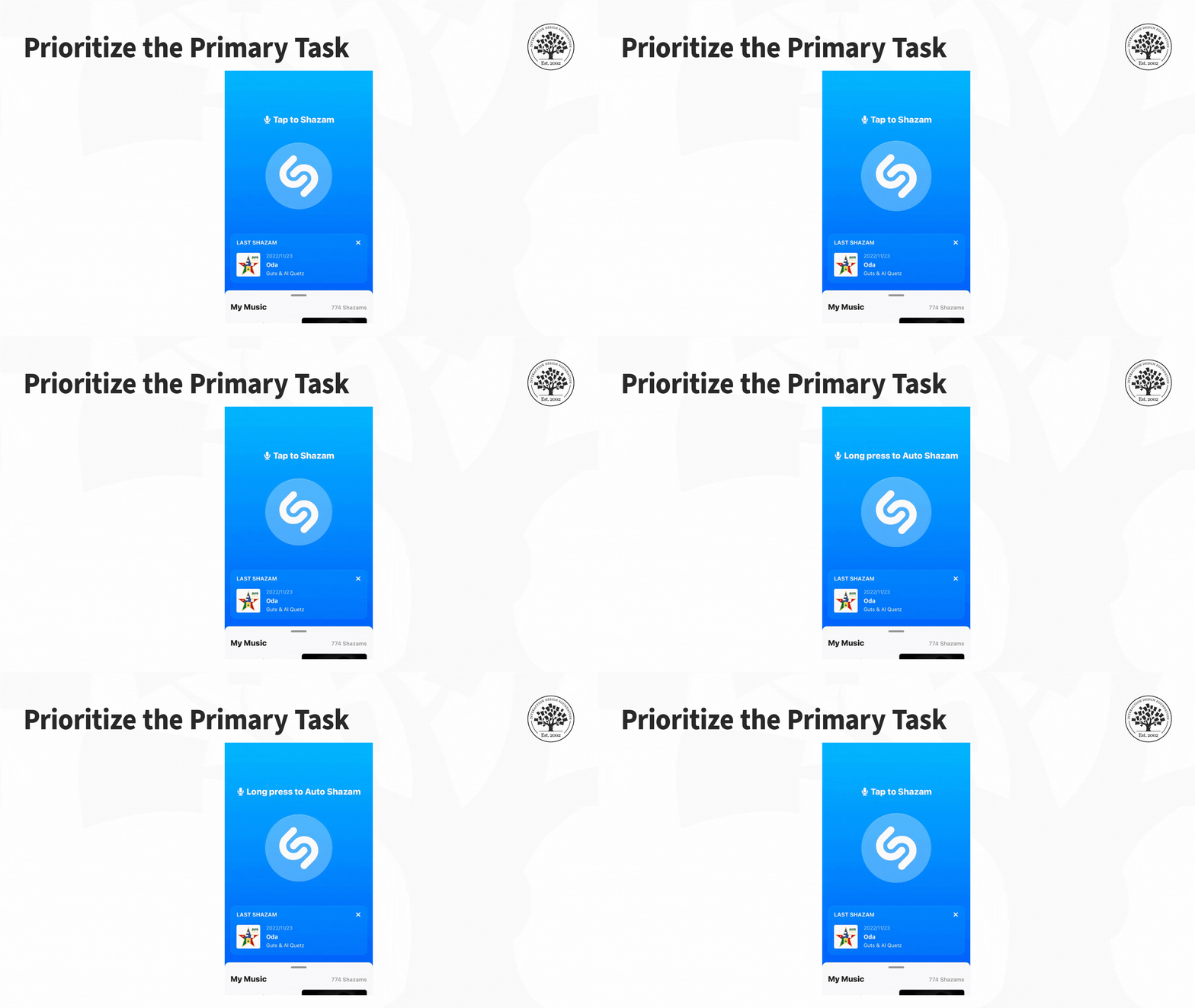
One of the main benefits of this approach is that it helps designers identify pain points in existing workflows and streamline them to improve overall user satisfaction. For example, the app Shazam uses a task-oriented design approach. Shazam's primary function is to help users identify songs that are playing nearby. The app achieves this through its clean layout and user-friendly interface, making it easy for users to complete the main task without any extra distractions or complications.
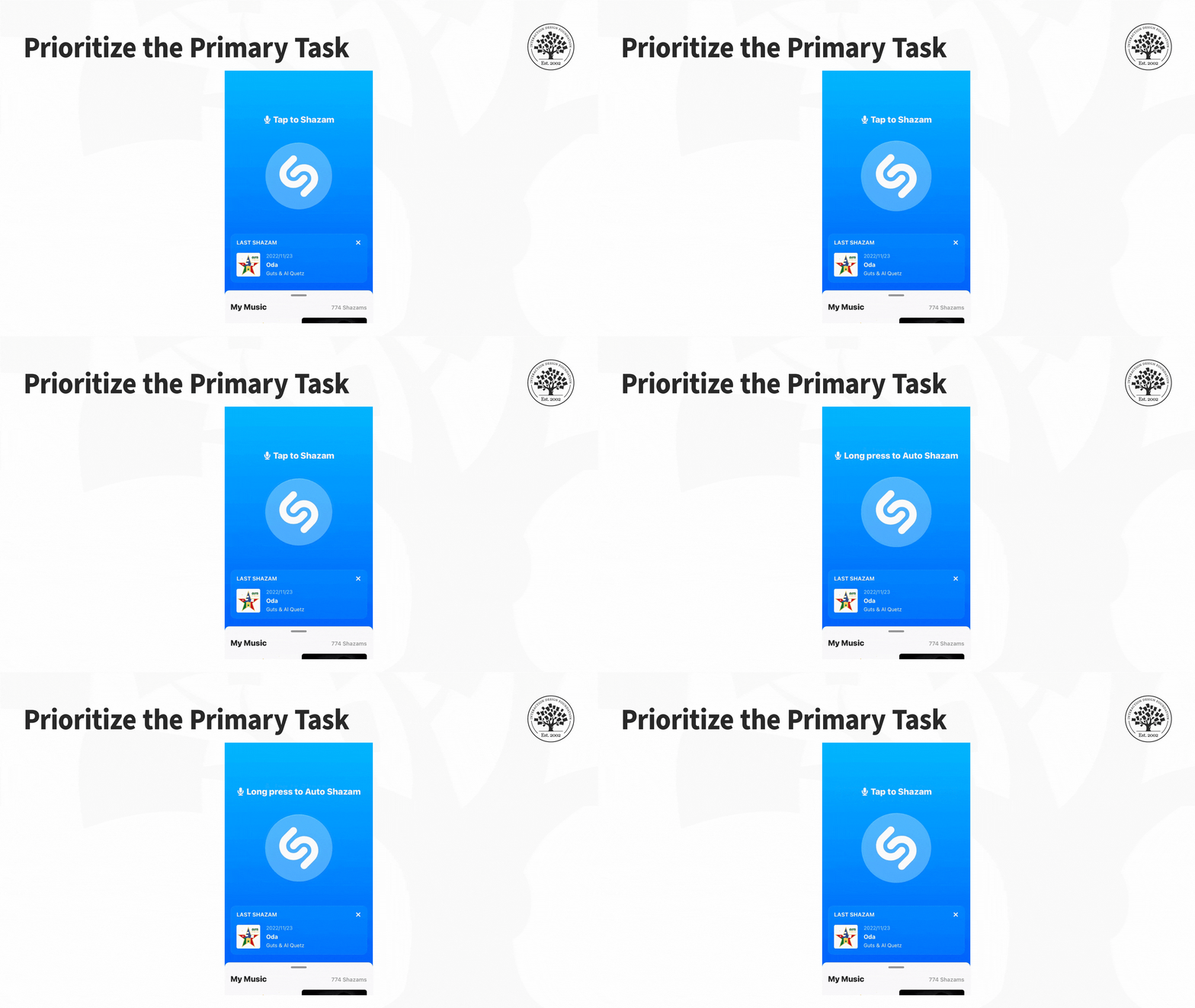
Shazam has a clean layout and user-friendly interface. This helps users quickly complete their primary tasks without any distractions or complications.

© Shazam, Fair Use

The benefits of using a task-oriented design approach are numerous. By focusing on the tasks users want to accomplish, this approach helps designers create intuitive and easy-to-use products. This increases user satisfaction, better product adoption rates, and reduced support costs.

Other benefits of the task-oriented design approach are:

  • It allows designers to create products tailored to specific user needs, which can make a product more appealing to a broader range of users.

  • It helps create more efficient workflows, allowing users to complete tasks faster and with less effort.

  • It enables the development of products that are easier to maintain and update over time by focusing on tasks rather than features.

How to Balance the Task-First Approach with Other Design Considerations
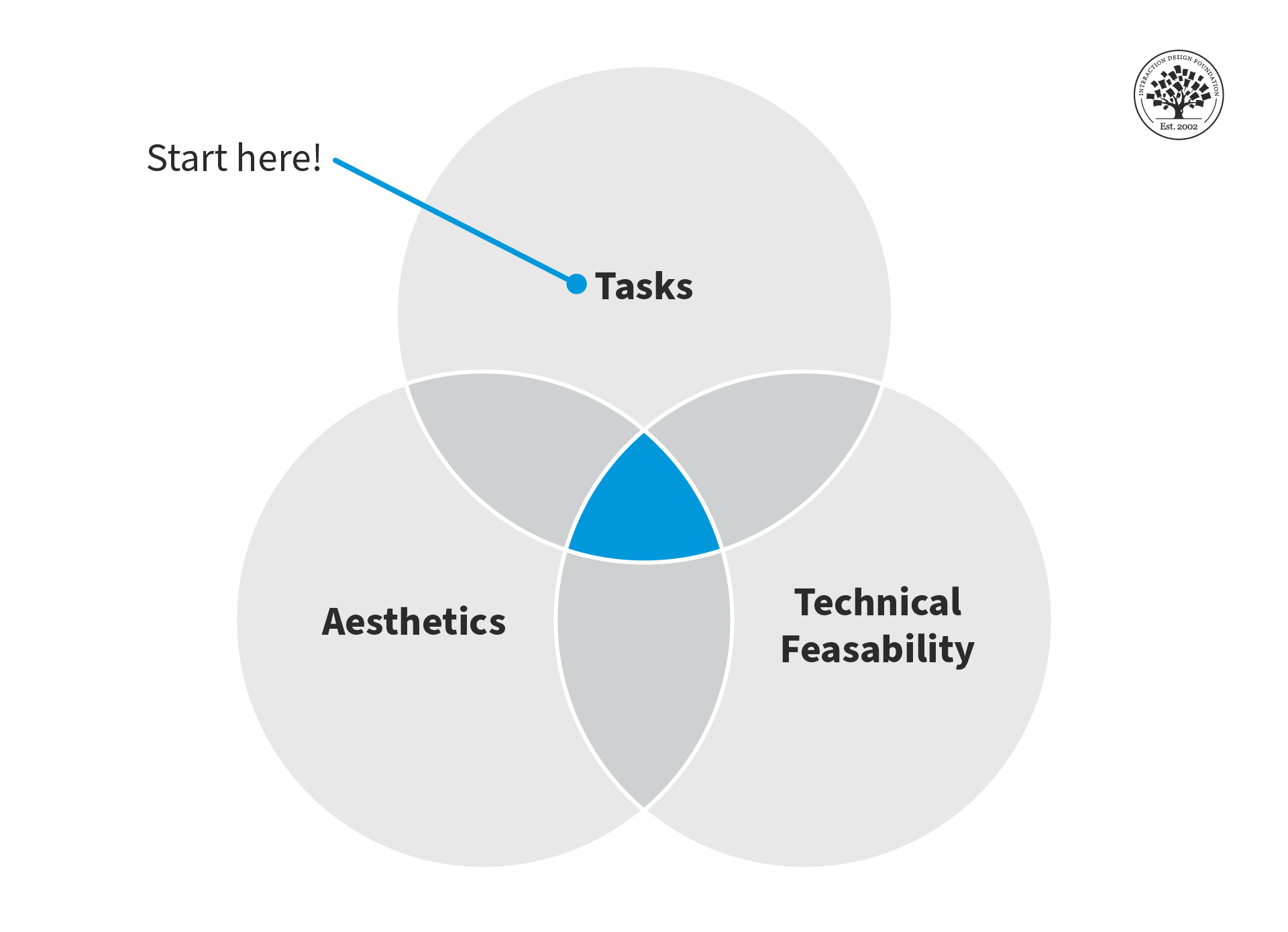
The task-oriented design approach is excellent for prioritizing tasks and helping users achieve their goals. However, designers must balance this focus with other essential design factors: aesthetics and technical feasibility.

© Interaction Design Foundation, CC BY-SA 4.0

Designers can create wireframes and prototypes to test and balance tasks with aesthetics and technical feasibility. Wireframes allow designers to create a basic layout of the website or application without getting bogged down by aesthetic details. Prototypes allow designers to test alternatives and identify potential technical issues before finalizing the design.

Test with Users to Successfully Implement the Task-Oriented Design Approach

User tests can help you implement the task-first approach successfully. Designers can observe users as they interact with a website or applications to identify areas where they struggle to complete tasks. Then, they can use this feedback to refine the design and optimize it for efficiency and ease of use.

User testing helps designers identify roadblocks or issues early in the design process. When you catch these issues in the early stages of the design process, you can make the necessary changes before launching the website or application and prevent frustration and confusion for users down the line.

Questions About Task-Oriented Design?
We've Got Answers!

How does task‑oriented design differ from user‑centered design?

Task‑oriented design focuses on the actions users perform and builds workflows around those key tasks. On the other hand, user‑centered design (UCD) centers on understanding overall needs, context, and emotional goals of users across the experience and task flows. Task‑oriented design organizes interfaces by the tasks users must complete; it is about placing features right where they apply, rather than grouping features by category.

Designers who use task‑oriented design streamline user journeys, eliminate unnecessary steps, and replicate tools as needed across flows. While UCD values empathy and iterative involvement, task‑oriented design puts specific task completion efficiency front and center, which makes workflows faster, more intuitive, and less mentally taxing for users.

Understand more about user-centered design to appreciate its value in design, too.

Why is task‑oriented design important for digital products?

Task‑oriented design improves usability as designers use it to align interfaces with real goals of users. When designers emphasize the tasks people actually perform, rather than abstract features or following assumptions, they can simplify workflows and reduce cognitive overhead. Digital products that focus on task flow help users complete their primary objectives faster, improving satisfaction, retention, and adoption while lowering support costs.

As it involves streamlining interaction paths and eliminating irrelevant features, task‑oriented design increases efficiency, cuts confusion, and supports consistent experiences across devices. Users spend less time figuring out what to do and more time completing what they came to do. That focus on intentional, goal-driven workflows makes task‑oriented products intuitive and effective.

Explore what assumptions can do to design solutions and why designers must be mindful of them.

How do you identify the key tasks users want to complete?

User researchers uncover key tasks through user interviews, surveys, analytics, and observation. Conducting ethnographic research helps designers see real-world behavior and identify recurring actions. Task analysis decomposes each goal into mental and physical steps, spotting frequency and criticality.

Reviewing product usage data, such as most-used features, paths, or drop-off points, highlights common task flows. Team workshops using affinity mapping and grounded research consolidate findings into clusters of high-priority tasks. Choosing representative tasks forms the basis of task‑centered design process, ensuring designs address real needs rather than assumptions. Lastly, combining qualitative and quantitative insights pinpoints the tasks that matter most to users.

Find helpful points about task analysis in this video with Frank Spillers: Service Designer, Founder and CEO of Experience Dynamics.

Transcript

How can personas and scenarios inform task‑oriented design?

Personas—synthesized representations of real users—represent archetypal users and anchor design around their behavior and goals, especially task needs. Scenarios help designers “plug” those personas into narrative journeys, showing how users complete tasks in real contexts and workflows.

Designers use personas and scenarios to decompose tasks into steps and decision points, aligning interface elements to support user goals. By mapping tasks to scenarios, teams prioritize key pathways and avoid unnecessary features. Scenarios reveal edge‑cases or conditional flows that might otherwise be overlooked, too.

Together, personas and scenarios provide empathy and clarity, ensuring task‑oriented design remains grounded in real user motivations and anticipated behavior.

Want to know more about personas and how to use them effectively? Personas and User Research: Design Products and Services People Need and Want will show you how to gather meaningful user insights, avoid bias, and build research-backed personas that help you design intuitive, relevant products. You will walk away with practical skills and a certificate that demonstrates your expertise in user research and persona creation.

How can designers break down complex tasks into simpler steps?

Designers simplify complex tasks by applying hierarchical task analysis and progressive disclosure—a user interface (UI) design pattern that reveals content or features in manageable stages and shows only what is needed for the current task to reduce clutter, cognitive load, and make applications easier to use and learn. First, they map high-level goals and decompose them into sub‑tasks and atomic interactions using task analysis methods.

They build step‑by‑step flows that divide heavy tasks across screens or phases. Interface guidelines emphasize showing only what is needed at each moment, reducing choice overload.

Designers apply chunking, too, grouping related steps and limiting cognitive load per screen. They validate flow clarity through prototype testing and feedback sessions. Breaking the task into digestible segments keeps users focused and minimizes errors. This structured approach ensures each interface step feels manageable, building toward completion in a way that feels logical and intuitive.

Explore how to use progressive disclosure to the advantage of your users.

How do you design for rare or edge‑case tasks without cluttering the interface?

Designers balance core versus edge-case visibility by hiding rare task flows behind progressive disclosure, context menus, or advanced options. They keep the primary UI (user interface) clean and focused on high-frequency tasks. Edge tasks appear only when needed—for example, via an “Advanced settings” link or during contextual errors, not in main navigation. Designers use persona-based prioritization, and they only provide features relevant to the persona and task journey.

Designers rely on search or command bars to surface rare functionalities on demand, too, instead of listing them all upfront. Behind-the-scenes, they document edge-case workflows in scenarios. This approach keeps the interface streamlined for most users while still supporting complete task coverage when necessary.

What role do micro‑interactions play in supporting user tasks?

Micro‑interactions provide feedback in task workflows, helping users know the system responded to their action. They communicate status, confirmations, errors, or progress, reducing uncertainty and restart attempts. For instance, a button animation shows a task submission succeeded. These small bursts of feedback smooth task flow, reassure users, and prevent missteps.

Thoughtfully timed micro‑interactions guide attention, highlight next steps, and reduce pauses. When well-designed, they feel intuitive and light; poorly designed ones, though, distract or delay. In task‑oriented design, micro‑interactions keep users moving confidently and minimize cognitive friction, ensuring each step in the workflow feels clear and responsive.

Discover how to make better designs for users in the moment in our article The Role of Micro-interactions in Modern UX.

What common design mistakes break task‑oriented workflows?

Many design missteps disrupt task flows and cause frustration. Onboarding screens that interrupt workflows or ask for unnecessary information before core tasks start create friction. Feature bloat—exposing too many options—overwhelms users and slows decision‑making. Inconsistent labeling, navigation, or button placement forces users to relearn between steps. Failure to display context or state—for example, missing progress bars—leaves users unsure where they stand.

Interruptive modals, hidden error feedback, and redirected links also break task continuity. Also, designers often mix unrelated tasks on one screen or force extra clicks. Each of these mistakes breaks the natural flow, increases errors, and raises mental load, undermining design objectives.

Explore how to tailor design solutions that meet users where they need them, especially with their user contexts in mind.

How does mobile design benefit from a task‑oriented approach?

Mobile environments demand concise, efficient experiences, making task‑oriented design essential. With limited screen real estate and varied contexts (single‑handed use, distraction), mobile interfaces benefit from streamlined, task-first flows.

Designers present only task-critical actions and use large tap targets, simplified hierarchy, and gesture-based navigation. They minimize steps and do not drown users in deep menus. Task‑oriented mobile design also prompts designers to leverage mobile-specific features like autofill, location context, push notifications, or voice input to support tasks efficiently. By focusing on what users want to accomplish right now, mobile experiences feel faster and easier. Users complete their goals with minimal friction, fewer taps, and higher satisfaction compared to feature‑packed, cluttered mobile UIs.

Move into mobile UX design for a deep dive into many helpful aspects of how to create excellent products that suit users on the go and more.

What are some helpful resources about task-oriented design for UX designers?

UXMisfit. (2020, March 11). Task‑Oriented Design – the future of UX Design? https://uxmisfit.com/2020/03/11/task-oriented-design-the-future-of-ux-design/

This article argues that task-oriented design extends beyond responsive design by adapting workflows across devices. It explains how tasks may vary by platform—mobile vs. desktop vs. voice—and shows how designers shape unique task flows optimized for each device. The piece emphasizes cross-device continuity, where a task started on one device smoothly continues on another. UX practitioners get practical advice on aligning feature delivery to device-specific task contexts (such as voice on smart speakers versus visual UI). This resource helps teams design flexible, consistent experiences tuned to task context and platform constraints.

Frank Spillers. (2010, June 28). 5 Task‑Centered UX Design Patterns Competitors Are Using. https://frankspillers.com/5-task-centered-ux-design-patterns-competitors-are-using-get-ahead/

Frank Spillers outlines five task-centered design patterns—such as presenting tasks upfront, grouping related actions, and anticipating user needs. The patterns emphasize following natural user workflows rather than imposing feature hierarchies. This article gives specific, tactical examples of interfaces that reduce friction by aligning with user goals. It shows how shifting from feature categories to task sequences boosts usability and brand differentiation. Designers working on navigation, onboarding, or dashboards gain actionable frameworks they can test.

Number Analytics. (2025, May 27). Task Analysis: A Key to User‑Centered Design. Number Analytics Blog. https://www.numberanalytics.com/blog/task-analysis-user-centered-design

This article explains how task analysis informs task-oriented and user-centered design. It defines methods like hierarchical task breakdown, GOMS, and cognitive task analysis. Designers discover how task analysis reveals user goals, pain points, and workflow structure. The article discusses how task models support design decisions and refine interfaces. With examples and a practical framework, it guides practitioners in mapping real behaviors to design solutions. UX teams get clear steps to integrate task analysis early in design, optimizing information architecture and task flow. This resource bridges theory and action with immediate applicability in modern UX practice.

UX Mastery. (n.d.). Object‑focused vs Task‑focused Design. UX Mastery Blog. https://uxmastery.com/object-focused-vs-task-focused/

This UX Mastery post contrasts object‑focused design (based on entities such as files or items) with task‑focused interfaces built around actions users need to perform. It explains how task‑focused systems reduce information overload by showing only content relevant to the current goal. The article references real tools like the Eclipse task context UI and provides design reasoning behind filtering mechanisms. For designers tackling complex systems, it offers clear logic and justification for prioritizing tasks over object hierarchies. The post helps UX teams decide when and how to transition toward task‑oriented interaction patterns for higher efficiency and reduced cognitive clutter.

The Story Journal. (2023, April 15; updated January 2024). A Quick Task! Task‑Oriented Design in Mobile Design. The Story Journal. https://thestory.is/en/journal/task-oriented-mobile-design-ux/

This mobile‑focused article breaks down how task‑oriented design helps mobile interface workflows. It explains why tasks must adapt to mobile-specific contexts—short attention spans, gesture input, environmental distractions—and how designers split tasks into minimal steps optimized per device. It gives examples like date selection via button taps and GPS-enabled forms. The actionable guidance includes tailoring workflows to smartphone or tablet contexts without simply shrinking desktop user interfaces (UIs). UX teams get direction on structuring mobile tasks for clarity, speed, and reduced taps. This supports task-first strategies in mobile UX patterns and product design tailored to real usage situations.

Lewis, C., & Rieman, J. (1994). Task-Centered User Interface Design: A Practical Introduction (Rev. ed.) [Shareware manual]. Department of Computer Science, University of Colorado, Boulder.

Task-Centered User Interface Design: A Practical Introduction, by Clayton Lewis and John Rieman, is a foundational manual in human–computer interaction pedagogy. Originally copyrighted in 1993 and revised in 1994, it presents a step-by-step, task-centered methodology for designing effective user interfaces, grounded in real user goals and activities. Organized into chapters on understanding tasks, generating and refining designs, evaluation without users, user testing, and iterative prototyping, the book emphasizes pragmatic, low-cost techniques suitable for both novices and professionals. Distributed as shareware by the University of Colorado Department of Computer Science, it remains a widely cited, accessible, and enduring resource in HCI education and design practice.

Earn a Gift Earn a Gift, Answer a Short Quiz!

1
2
3
4
1
2
3
4
Question 1
Question 2
Question 3
Get Your Gift
Interaction Design Foundation logo

Question 1

What is the primary focus of task-oriented design?

1 point towards your gift

  • Complete user tasks efficiently
  • Incorporate the latest technology
  • Improve visual aesthetics
Interaction Design Foundation logo

Question 2

Why is it important to consider multiple devices in task-oriented design?

1 point towards your gift

  • To evaluate total production costs
  • To focus on desktop experiences only
  • To optimize user tasks across different devices
Interaction Design Foundation logo

Question 3

Which research method is important in task-oriented design to understand user contexts?

1 point towards your gift

  • Competitive analysis
  • Contextual inquiries
  • Demographic analysis

Learn More About Task-Oriented Design

Make learning as easy as watching Netflix: Learn more about Task-Oriented Design by taking the online IxDF Course Mobile UX Design: The Beginner's Guide.

Why? Because design skills make you valuable. In any job. Any industry.

In This Course, You'll

  • Get excited as you design world-class mobile apps and interfaces that make a real difference in people's lives. Mobile UX Design doesn't just offer a skill, it gives you freedom. Freedom to work from anywhere, switch industries, and build a career on your own terms. With mobile-first design in high demand across the world, your skills can take you wherever you want to go. Almost 90% of the world's population owns a smartphone, and more than half of all online traffic comes from mobile devices, so your work has the power to reach billions. Whether you're designing for healthcare, finance, gaming, or education, you'll create intuitive, accessible solutions that make people's lives easier, faster, and better.

  • Make yourself invaluable by learning how to use your human strengths such as empathy, creativity, and problem-solving to build experiences people love and keep coming back to. As AI accelerates how fast we build and iterate, your timeless human-centered skills become even more powerful. You'll direct AI with deep human insight, and ensure outcomes remain meaningful, ethical, and genuinely resonate with people. This is how you stay in demand: Human-centered design skills transform AI from a tool into your new superpower. You'll create experiences that meet people where they are: On the go, at home, or at work. Well-designed mobile UX design leads to happier customers, retention, and revenue. This course will give you the skills to launch successful apps and interfaces that deliver results on the App Store, Google Play, or within your organization. No matter your background, you can master mobile UX design. With clear guidance and real-world examples, you'll apply your skills straight away! 

  • Gain confidence and credibility with optional practical exercises. You'll develop an app feature for mobile, tablet, and desktop, then adapt the design for different contexts like lighting conditions and user movement. You'll get comfortable with human-centered mobile design best practices and the mobile UX design lifecycle. Use our downloadable templates such as the Customer Journey Map and Usable, Satisfying, and Easy (USE) Scorecard to fast-track results and help you excel in any role, in any industry.

It's Easy to Fast-Track Your Career with the World's Best Experts

Master complex skills effortlessly with proven best practices and toolkits directly from the world's top design experts. Meet your experts for this course:

  • Frank Spillers: Service Designer and Founder and CEO of Experience Dynamics.

  • Alan Dix: Author of the bestselling book “Human-Computer Interaction” and Director of the Computational Foundry at Swansea University.

  • Mike Rohde: Experience and Interface Designer, author of the bestselling “The Sketchnote Handbook.”

Get an Industry-Recognized IxDF Course Certificate

Increase your credibility, salary potential and job opportunities by showing credible evidence of your skills.

IxDF Course Certificates set the industry gold standard. Add them to your LinkedIn profile, resumé, and job applications.

Course Certificate Example

Be in distinguished company, alongside industry leaders who train their teams with the IxDF and trust IxDF Course Certificates.

Our clients: IBM, HP, Adobe, GE, Accenture, Allianz, Phillips, Deezer, Capgemin, Mcafee, SAP, Telenor, Cigna, British Parliament, State of New York

All Free IxDF Articles on Task-Oriented Design

Read full article
Functionality and Mobile Design – Don’t Shrink the Screen, Focus on the Tasks - Article hero image
Interaction Design Foundation logo

Functionality and Mobile Design – Don’t Shrink the Screen, Focus on the Tasks

Designing for mobile devices is not the same as designing for laptops or desktops. It's about creating a unique user experience that focuses on what matters to mobile users. To achieve this, it's important to focus on the tasks that users want to accomplish and ensure they can be executed efficientl

Social shares
781
Published
Read Article
Read full article
What Comes First in Mobile Design: Tasks, Content, or Mobile Optimization? - Article hero image
Interaction Design Foundation logo

What Comes First in Mobile Design: Tasks, Content, or Mobile Optimization?

For many users worldwide, mobile was their first Internet experience and continues to be their primary way to access information. This is also true for people who don't need to use computer desktops, particularly since smartphone applications have dramatically changed how we live our lives. Here, we

Social shares
692
Published
Read Article

What Comes First in Mobile Design: Tasks, Content, or Mobile Optimization?

What Comes First in Mobile Design: Tasks, Content, or Mobile Optimization?

For many users worldwide, mobile was their first Internet experience and continues to be their primary way to access information. This is also true for people who don't need to use computer desktops, particularly since smartphone applications have dramatically changed how we live our lives. Here, we'll look at three UX approaches to design for a world that relies heavily on mobile to solve problems for entertainment, health, wellness and more. 

© Frank Spillers and Interaction Design Foundation, CC BY-SA 4.0

Distractions surround mobile users. Hence, when you design for mobile, you must prioritize what is important for the user: give them what they need and do it efficiently within their changing environments and contexts.

We can consider three approaches to design interactions for mobile:

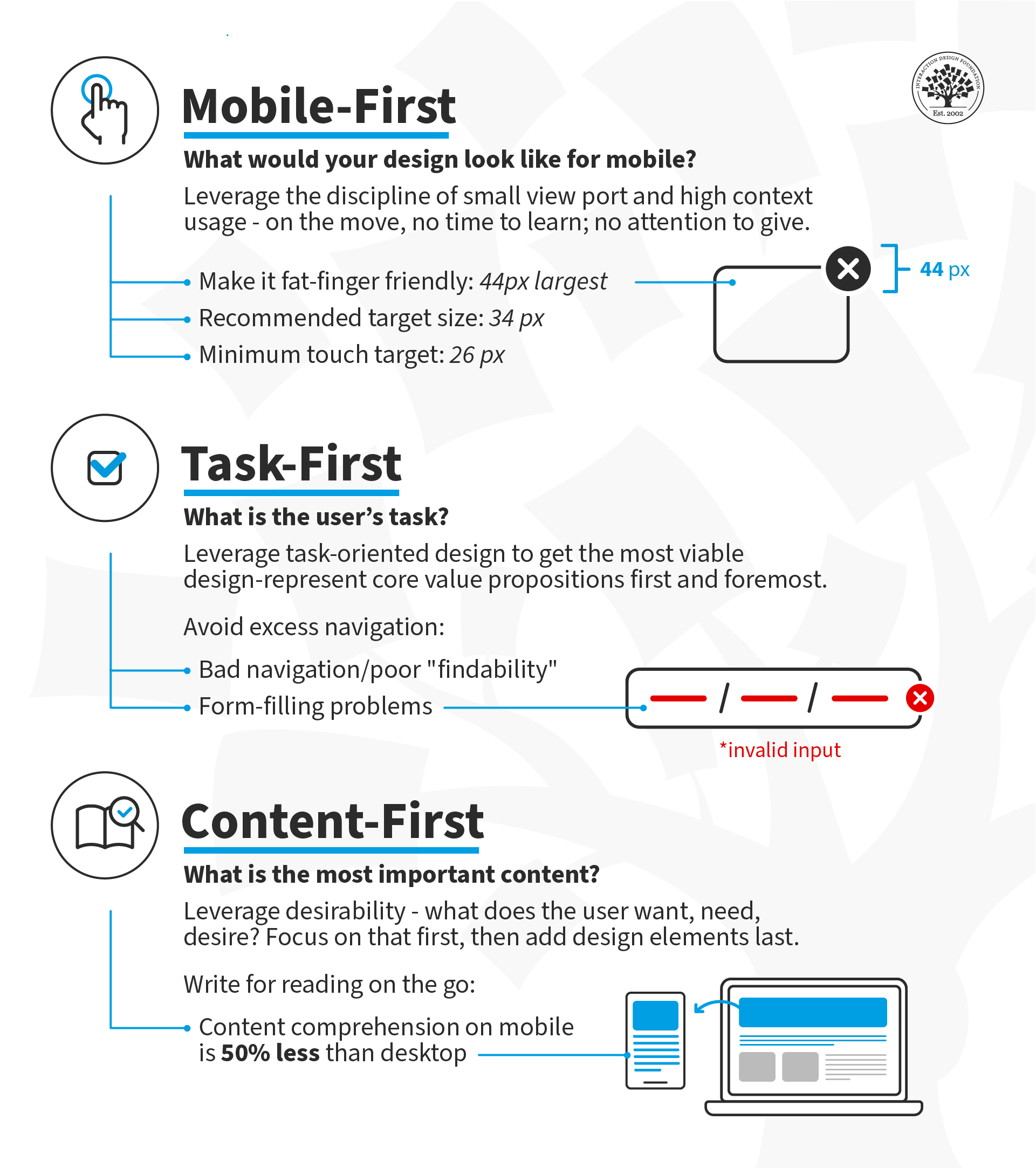
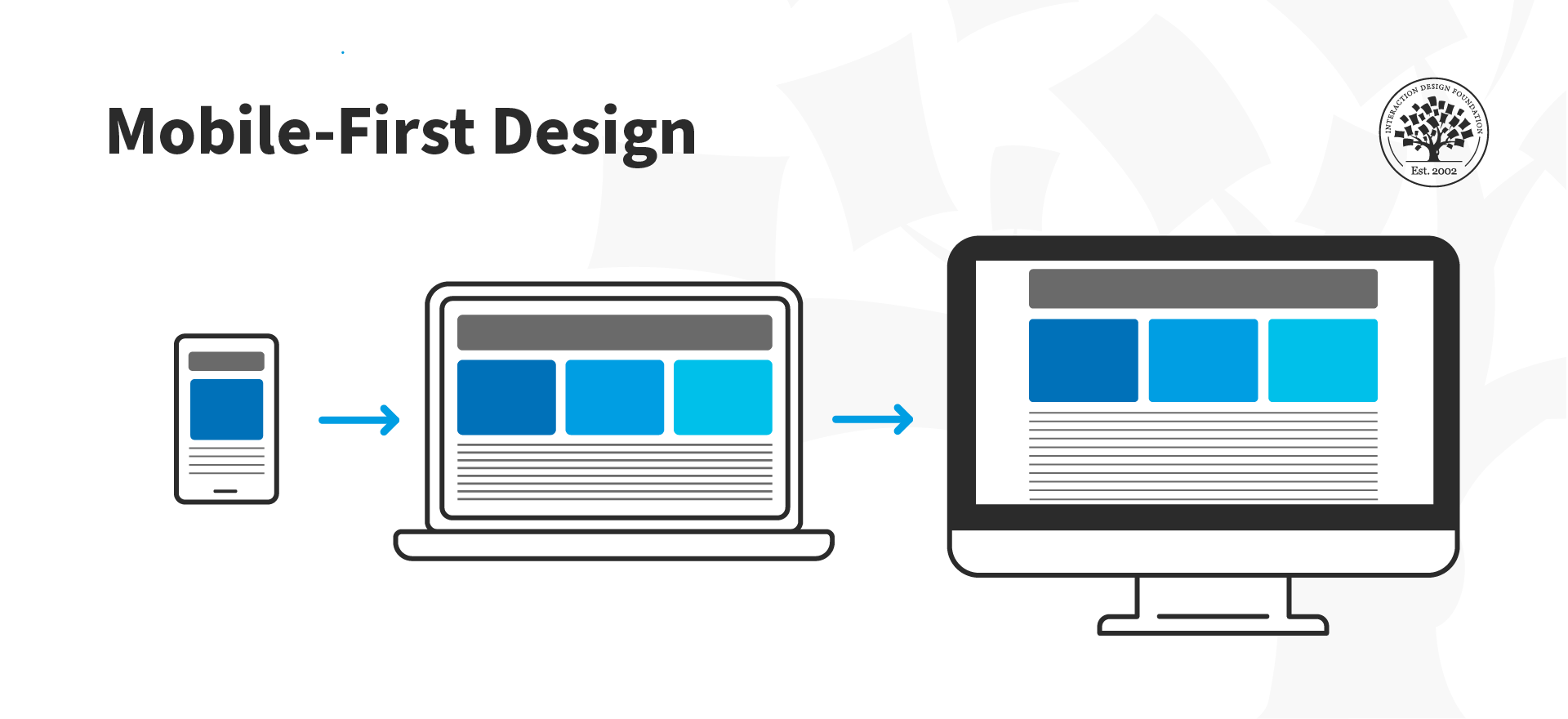
  1. Mobile-First: Design for small screen sizes first and then expand to larger device sizes. Users are on the move; they can spare neither time nor attention. Under these constraints (movement, time, attention), decide what makes sense on your screen(s). 

  2. Task-First: Design the core value proposition first. Focus on the users' primary task and support successful task completion.

  3. Content-First: Start with Desirability—what does the user want, need and desire? Design the content around that desire and add the other elements of user experience (interactions, interfaces and usability) afterward. 

What is Mobile-First?

In the mobile-first design approach, you start your design process with mobile users in mind first and then scale up to larger screen sizes. This means you prioritize the mobile experience and ensure all your content and features are accessible on smaller screens. Another way to approach mobile-first is to prioritize content from the outset so that even if you begin your design process on a larger screen, you still have the flexibility to show your content effectively in a mobile environment.

Luke Wroblewski, a Product Director at Google, proposed this concept in 2009 and offered three reasons for designing for mobile first. Here, we've updated Luke's arguments for going mobile first to reflect the new mobile landscape:

1. Mobile Has Exploded

It's undeniable that the use of smartphones has become ubiquitous in today's society. Ensure your app provides an exceptional user experience across different platforms and screen sizes to reach a global audience.

2.  Mobile Forces You to Focus

Regardless of device specifications, the one thing that's key to all mobile devices is portability. People use them on the move, which means that you must focus on the most important actions and tasks for your users.  

There's much more room on a desktop screen, and you can afford to add extraneous features, but smartphones don't give you that luxury. Remember that the user experience on smartphones is also determined by how they're used—on the move and in short, sharp bursts of activity, which is very different from sitting at a desk and browsing the internet for hours on end.

© Interaction Design Foundation, CC BY-SA 4.0

 3. Mobile Offers New Capabilities

On desktop, the web is the standard way to interact with most businesses, but on mobile, the preference has shifted to applications. This is due to smartphones' many sensors and features, such as GPS, accelerometers, pedometers, touchscreens, gesture controls, augmented reality, and eye tracking.

The mobile-first approach enables designers to leverage the full potential of mobile, rather than replicate the desktop experience on a smaller screen.

© Interaction Design Foundation, CC BY-SA 4.0

What Is Task-First?

This approach prioritizes user tasks over other design considerations, such as aesthetics or technical feasibility. This ensures the app is designed with the users’ needs in mind, resulting in a more efficient and practical experience. By focusing on user tasks, designers can also identify pain points in existing workflows and streamline them to improve overall user satisfaction.

For example, let's look at an application like Shazam, designed with a task-first approach. Its primary function is to assist users to identify songs playing in their vicinity. The app achieves this thanks to its clean layout and user-friendly interface that makes it easy for users to complete the main task without any extra distractions or complications.

The Shazam app features a clean interface that helps users accomplish the main task: to identify music playing nearby.

© Interaction Design Foundation, CC BY-SA 4.0

The Task-First approach prioritizes giving users what they want as quickly and easily as possible without requiring them to hunt, search, or think too much.

What Is Content-First?

The concept of a content-first approach has been around since the early days of web design, but it gained new relevance with the rise of responsive design. The basic idea is that content should be the primary focus of mobile UX design, as users come to apps and sites primarily for the content they offer rather than for the interface's design.

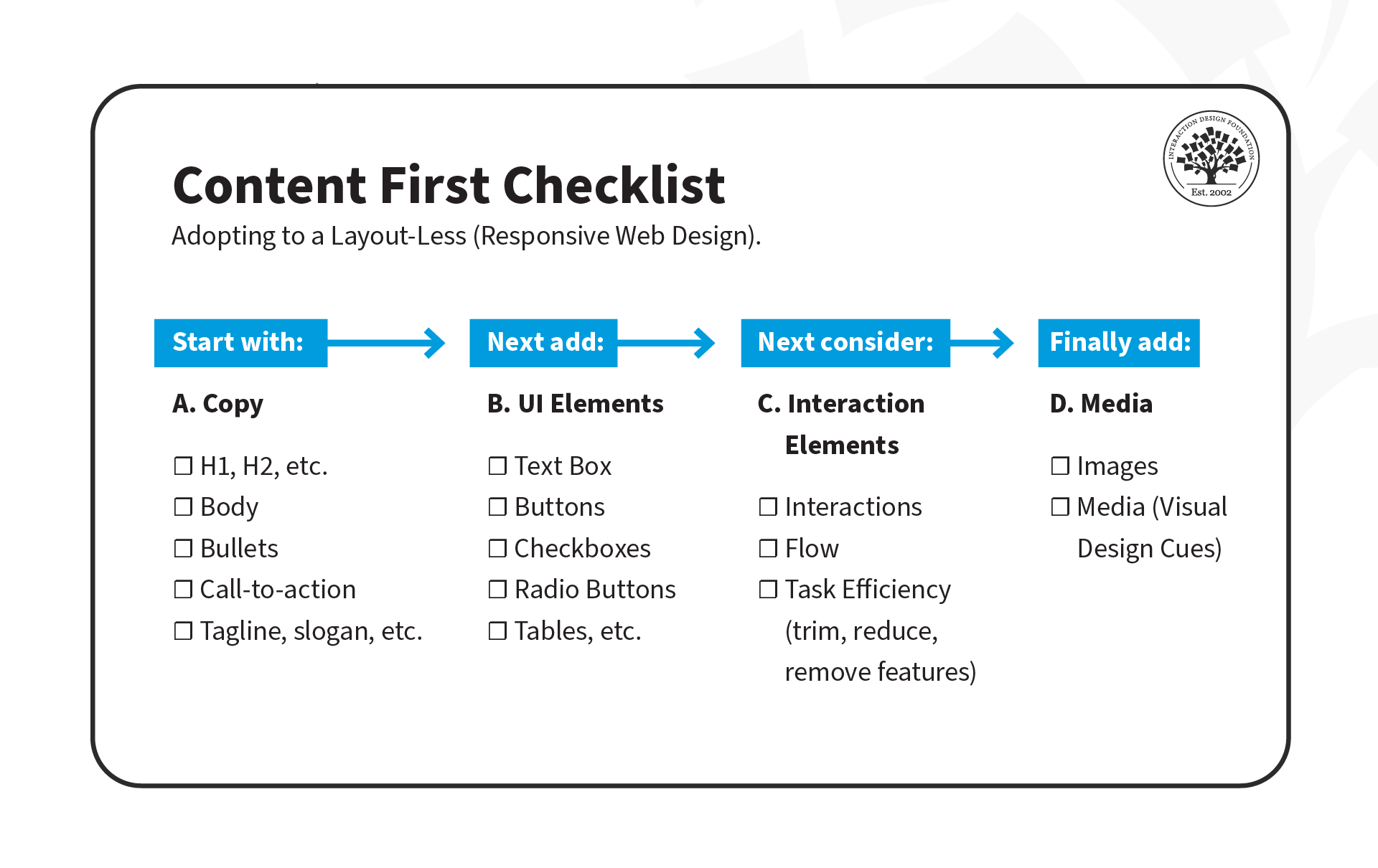
As UX designers, we often focus on interfaces and wireframes, but the content-first approach suggests that we should define the content structure first and then add UI and interaction elements later.

There are three stages to this approach:

  1. Copy: Create clear and concise copy that conveys the intended message to users. This may include defining typography, font sizes, and heading structure (H1, H2, H3, H4, H5), which is critical for accessibility. Properly defined headings make it easier for screen readers to parse a page.

  2. UI Elements: Once the copy is defined, it's time to add UI elements such as buttons, icons and graphics that support the content and help guide users through their tasks.

  3. Interaction Elements: Add animations and transitions to enhance the user experience.

© Experience Dynamics, Fair Use

Interested in adopting the content-first approach? Here's a helpful checklist to assist you on your transition. Download the template, and share it with your team!

Advance Your Career With This Free Template for “How to Use the Content-First Design Approach”
How to Use the Content-First Design Approach
We respect your privacy
Get 1 powerful email each week: Design a life you love!

Put It All Together: A Demonstration of Mobile-, Task- and Content-First Approach

Now that we've covered the three approaches, let's see them in action! In this video, Frank Spillers will show you how to create an interface for a health app that enables patients to chat with doctors. He'll use examples from each approach: mobile-first, task-first, and content-first.

Transcript

The Take Away

It's important to understand the unique challenges and opportunities of the mobile platform. Here are three powerful prioritization approaches to keep in mind:

Mobile-First: Mobile-First is a design strategy that puts mobile at the forefront of the design process. It recognizes the importance of the mobile web and emphasizes the need to create an experience tailored specifically to mobile devices. 

Task-First: Task-First prioritizes users' tasks. It helps them complete tasks quickly and efficiently and minimizes cognitive load. This approach is particularly well-suited for mobile devices since users are often on-the-go and need to complete tasks quickly.

Content-First: Content-First puts content at the center of the design process. Rather than starting with wireframes or UI elements, this approach begins by defining the content structure first. This allows designers to optimize experiences for different contexts, physical or otherwise.

References and Where to Learn More

Read Luke Wroblewski’s original proposition for Mobile First.

See Clayton Lewis and John Rieman’s original definition of task-centered design in Task-Centered User Interface Design: A Practical Introduction.

More about content first in these articles:

To know why the heading structure is crucial for accessibility, see this resource:
Accessibility at Penn State 

Read the forecast number of mobile users worldwide from 2020 to 2025, from Statista.

Hero Image: © Interaction Design Foundation, CC BY-SA 4.0

Feel Stuck?
Want Better Job Options?

AI is replacing jobs everywhere, yet design jobs are booming with a projected 45% job growth. With design skills, you can create products and services people love. More love means more impact and greater salary potential.

At IxDF, we help you from your first course to your next job, all in one place.

See How Design Skills Turn Into Job Options
Privacy Settings
By using this site, you accept our Cookie Policy and Terms of Use.
Customize
Accept all

Be the One Who Inspires

People remember who shares great ideas.

Share on:

Academic Credibility — On Autopilot

Don't waste time googling citation formats. Just copy, paste and look legit in seconds.