Content-First

Your constantly-updated definition of Content-First and collection of videos and articles.
Be a conversation starter: Share this page and inspire others!

98 Shares

What is Content-First?

The content-first approach puts content ahead of design elements and aesthetics to create user-friendly products with content that is easy to find, read and understand.

Transcript

While content-first prioritizes content, it doesn't necessarily mean design is disregarded. On the contrary, the content-first strategy recognizes that design and content must work together seamlessly to create an effective website or app. It aims to ensure that your product's design approach aligns with its content and, thus, maximizes the impact of both. There are other approaches too, such as task-oriented design which focuses on task-completion.
© Interaction Design Foundation, CC BY-SA 4.0

Design considerations are still essential in the content-first design approach but are addressed from a user-centered perspective. With a focus on the user's needs and preferences, designers can create products that look good and enhance the user's experience. This means it is necessary to create page layouts and visual elements that complement the content and help users navigate the site quickly.

Advantages of the Content-First Approach for Digital Products

If you choose to adopt this strategy, it's important that you think about two key elements that will help you prioritize content over design:

  • Improves User Experience: When designers prioritize content, they improve the quality of the experience since users visit websites or use apps to find relevant information.

  • Promotes Content-Informed Design Decisions: When content is available, designers can design the experience accordingly. For example, they can choose tone, voice, language and message that complement and enhance the content. Effective UX writing is essential for this.

How to Implement a Content-First Approach in Your Design Process

To start a project with the content-first approach, it's essential to understand what you want to achieve with your website. To establish a strong foundation:

  1. Consider the purpose of your website or app (the “why”). Determine what you would like to communicate and how your content will help you achieve those goals. This step is crucial because when you prioritize content over design, the focus is on the effective delivery of the message.

  2. Think about the story you want to tell (the “what”). Consider how your content will convey a narrative that aligns with your brand's values and resonates with your audience. This will also help you create a product that engages users.

  3. Identify the actions you want users to take on your website or app (the “how”). Whether it's to make a purchase, fill out a form, or contact you directly, try understanding the expected user behavior from the outset.

A content-first approach in web or app design is simple, but requires some adjustments to your design process. Here are some steps you can take when adopting this method:

  1. Conduct a Content Audit: Start by auditing your website's existing content. Identify which pages and sections of the site are most important and analyze how the current content performs.

  2. Conduct Competitive Analysis: Investigate what your competition is doing regarding content; for example, what message do they communicate? What are the key features of their website or app? How do they use visual design to communicate brand values? Also, make a list of positive and negative aspects.

  3. Conduct User Research: While competitive analysis is good, you must not copy their mistakes! Moreover, your users may have different needs than your competitors. Do your field research and conduct interviews to understand your users better.

  4. Create a Site Map or a User Flow: A site map is a visual representation of all the pages on a site, and a user flow documents the steps users take to accomplish their tasks on an app. Both are valuable tools to identify what type of content your users prefer and help you check where the content would have more impact.

  5. Create a Content Inventory Document: This list features all the content on your website, such as text, images or documents. It helps you identify gaps in content and avoid duplicates or unnecessary items.

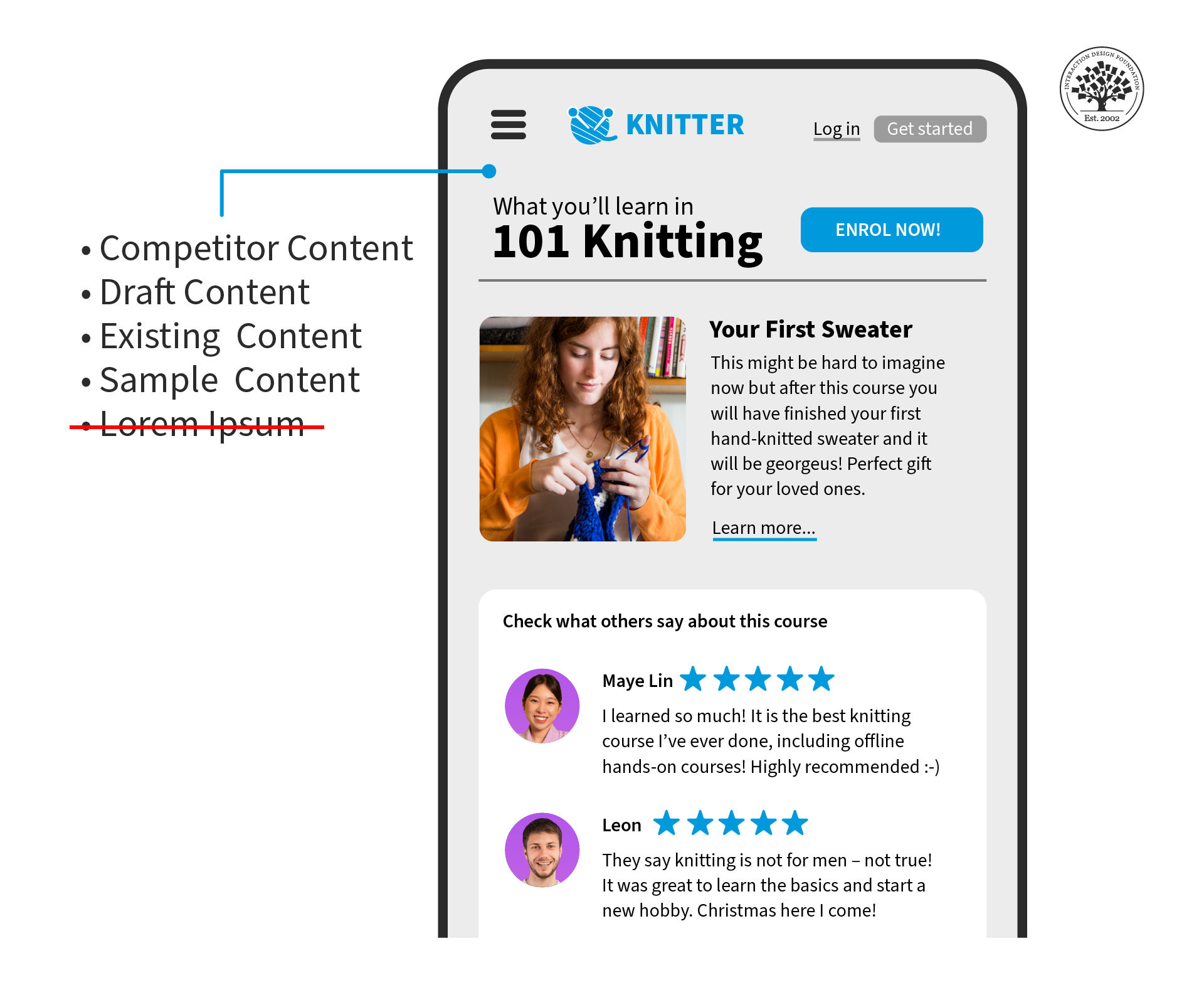
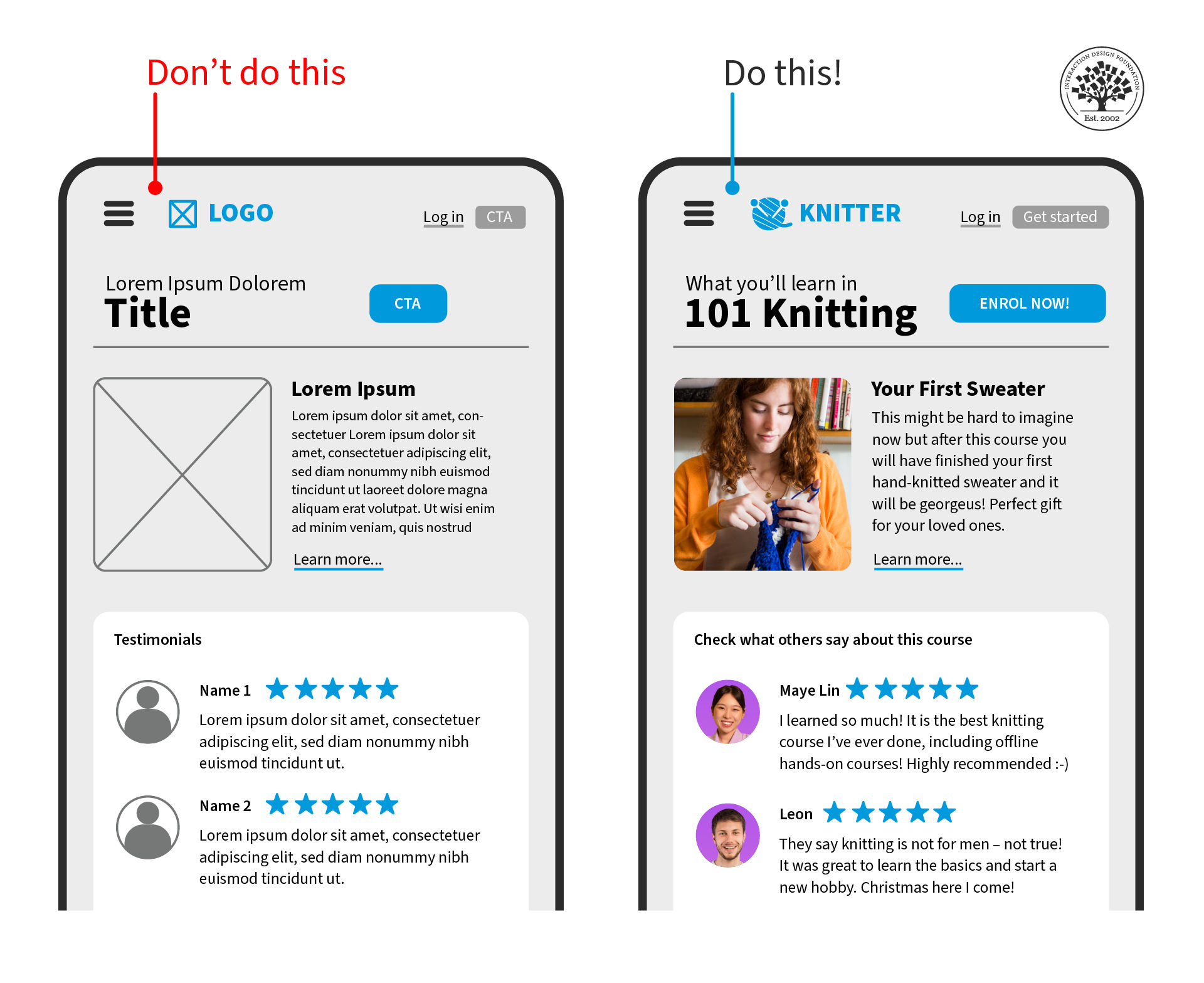
  6. Use Proto-Content to Avoid Unnecessary Design Iterations: Using proto-content, or low-fidelity content, instead of generic placeholder text like "Lorem Ipsum," is especially helpful when creating designs for localized content since it enables designers to understand how the design will look and feel with real content in different scenarios and languages.

  7. Create a Limited Number of Layouts: Standardizing formats for groups of pages can improve usability since consistency informs users about what to expect next, so ask yourself: how many pages should follow the same format? For large websites, experts recommend using 5–7 templates, fewer than that for smaller products. To help you visualize the layouts, create sketches of them.

Best Practices and Considerations for Using the Content-First Approach
© Interaction Design Foundation, CC BY-SA 4.0

The content-first approach is a great way to create effective websites and apps that deliver the message clearly and concisely. Here are some best practices and considerations to keep in mind when using this approach:

Use Clear, Concise Language

One of the main goals of the content-first approach is to make it easy for users to find and understand your content. To achieve this goal, you should use clear, concise, easy-to-read and easy-to-understand language. Avoid jargon or technical terms that may confuse your audience.

Prioritize Your Content

During your content creation process, make a note to prioritize your content based on its importance. This means placing the most critical information at the top of the page, so users can quickly find what they need. Use headings, subheadings, and bullet points to break up large blocks of text and make it easier for users to scan.

Consider Localization

If you're creating a website for a global audience, consider localization when developing your content strategy. This means translating your content into multiple languages and adapting it for different cultures. Remember that certain words or images may have different meanings in other parts of the world.

Test Your Content Strategy

Before launching your website or app, test your content strategy with real users to see how they interact. Conduct user testing sessions where participants perform tasks on your site while you observe their behavior. This will help you identify any issues with navigation or usability.

Collaborate with Stakeholders

Collaboration is key when using the content-first approach. Involve stakeholders from different departments in the design process, including marketing, sales, customer service and IT. This will help ensure that everyone's needs are being met and that the final product is effective.

Questions About Content-First?
We've Got Answers!

How is content-first design different from traditional design approaches?

Content‑first design flips the conventional workflow by starting with the actual words, visuals, and messages users need before any wireframes or layouts exist. Traditional design often begins with frameworks, templates, or UI elements and makes content to fit afterwards. That approach can lead to filler text, disjointed messaging, or layouts that fail to support key user goals.

Content‑first design makes the content the foundation, shaping structure, navigation, and interaction around it. This shift helps make sure UIs (user interfaces) convey the right information at the right time, producing user experiences that feel purposeful and aligned with business objectives rather than retrofitted for convenience.

Get a greater grounding in our article What Comes First in Mobile Design: Tasks, Content, or Mobile Optimization?.

What benefits does a content-first strategy bring to a product or website?

A content‑first strategy helps create clarity and consistency. Since design decisions stem from real content, not placeholders, teams can avoid mismatched visuals and awkward filler.

Prioritizing content means users find essential information faster, boosting engagement, trust, and conversions. Pages load with purpose: less missing content and more relevant microcopy, CTAs (calls to action), and instructions. Also, it streamlines collaboration between designers, copywriters, and stakeholders since everyone works from the same “source of truth.” Content‑first methods reduce costly rework later because layouts do not need re‑engineering to fit content. Ultimately, it leads to user‑focused products that can communicate clearly and perform better in real‑world use.

Discover helpful points about an essential subject in our article Consistency: MORE than what you think.

How do you start a design project using a content-first approach?

Starting with content-first means collecting the “real” words and assets early. Teams begin by defining the project goals and identifying what users need to know or do on each screen. Content audits and stakeholder workshops uncover missing or outdated information.

UX writers draft key pieces—headings, calls‑to‑action, onboarding text—before wireframes exist. Designers then structure layouts to fit this content naturally, not force it into pre‑made boxes. This process involves early collaboration between UX writers, designers, and subject experts. When teams build around authentic content, they can avoid generic placeholders and ensure the interface feels intentional, readable, and aligned with user tasks from the start.

Enjoy our Master Class UX Writing: How to Use Words as a Design Power Tool with Torrey Podmajersky, Author, Speaker and UX Writer at Google.

What research methods help uncover the right content for users?

Strong content‑first design relies on research to identify what users really need. UX teams use qualitative methods such as interviews and quantitative ones such as surveys to uncover user goals and pain points. Content audits evaluate existing material for accuracy and relevance.

Card sorting and tree testing reveal how users group and label information, shaping navigation and copy structure. Search query analysis highlights the language people use, informing terminology. Usability tests expose content gaps or confusing messaging by observing how users struggle—or succeed—with real tasks. Combining qualitative and quantitative methods ensures teams build around authentic, user‑driven content that answers questions, reduces friction, and supports core workflows.

Climb to a higher level with tree testing and discover helpful design truths from users.

What common mistakes do teams make when they ignore content-first principles?

When teams skip content‑first thinking, design often leads while content lags behind—and it shows. Arbitrary placeholders cause layouts that do not fit real copy later. Marketing or development teams may cram long headlines or instructions into tight spaces, breaking visual balance.

Content mismatches cause inconsistent voice, missing calls to action (CTAs), and confusing navigation labels. Users see vague, filler‑heavy pages that frustrate instead of guide. Ignoring content‑first makes for costly redesigns, too, as teams scramble to retrofit UI for actual words. The biggest mistake is to treat content as decoration instead of the backbone of the experience.

Find another dimension of content and why it is essential in our article How to Craft Effective Mobile Experiences: The Role of Content Strategy and UX Writing.

What role does microcopy play in a content-first approach?

Microcopy is the short, functional bits like button labels, error messages, and tooltips. It becomes a crucial pillar of content‑first design, guiding users through tasks, clarifying actions, and reducing uncertainty. When UX writers craft it early, microcopy shapes layouts: for example, knowing if a call‑to‑action reads “Submit” or “Get My Free Guide” impacts button size and placement.

It sets the tone and builds trust, too. For example, friendly microcopy on payment forms eases anxiety. Content‑first teams write microcopy up front so designers design around real words, not filler. This creates cohesive interfaces where even the smallest bits of text support user goals and make the experience feel intuitive.

Find the answer to What is Micro-copy and How do We Deliver Good UX with it? in our article about that very question.

What is the relationship between content-first and mobile-first design?

Content‑first and mobile‑first design complement each other. Mobile‑first strips experiences down to essentials, forcing designers to prioritize. Content‑first ensures those essentials are the right words, visuals, and CTAs (calls to action).

Starting with content guarantees mobile interfaces are not just simplified; they are meaningful. Instead of shrinking desktop text onto a phone, teams decide what users truly need on small screens. Mobile layouts then wrap around crucial content, neatly making every word count. Together, the two approaches lead to streamlined, user‑focused designs where messaging drives structure and clutter disappears. They share a goal: clear, task‑ready experiences that work in any context.

Discover helpful insights about mobile-first design.

What is the difference between content-first design and content strategy?

Content‑first design and content strategy overlap, but they are not identical. Content strategy is the overarching plan for creating, managing, and governing content across a product or brand. It answers the question, “What content do we produce, why, and who maintains it?”

Content‑first design is a design process that starts each project or screen with actual content, instead of retrofitting it later. Think of content strategy as the big picture (voice, governance, lifecycle) and content‑first design as the tactical execution (designing from the words up). Together, they ensure that both the what and the how of content creation produce consistent, user‑centered experiences.

Explore how content strategy has such a massive bearing on where design solutions go.

How does content-first design affect wireframing and prototyping?

In a content‑first workflow, wireframes do not start as empty boxes; they evolve from real headlines, buttons, and error messages. This grounds prototypes in authentic scenarios and prevents layouts from “breaking” later when the real content arrives. Writers and designers collaborate from the start, and they shape wireframes to fit text flow and hierarchy.

This way, prototypes become more realistic for testing, as users see actual copy instead of placeholder text. This permits usability tests to reveal whether labels, CTAs, and messages work. By integrating content early, wireframing and prototyping can yield stronger, more validated designs—and fewer painful adjustments once development begins.

Discover how to use prototypes to pave the way to more effective designs.

How can agile teams integrate content-first thinking into sprints?

Agile teams adopt content‑first thinking by treating content as a sprint deliverable, not an afterthought. Before design starts, writers join sprint planning to identify key copy needs, such as form instructions or onboarding messages. Story mapping includes both interface steps and supporting words. Writers, designers, and developers collaborate in the same sprint cycles, so content and layout evolve together.

Teams draft “proto‑content” early, refine it through iteration, and then test it in prototypes. This approach prevents last‑minute filler, aligns cross‑functional teams, and ensures each sprint produces fully usable increments, including the content. The result is faster, cleaner releases with messaging baked in from day one.

Get a greater grasp of how to leverage agile design and enjoy the many benefits of this approach.

What are some helpful resources about content-first for UX designers?

Heidvogel, L. (2023, February 2). Content‑First Design: The Value‑Added UX Approach. UX Writing Hub. https://uxwritinghub.com/content-first-design-in-ux/

Linda Heidvogel describes how content-first design places real content—words, messages, and structure—before visuals. She reflects on her own UX education and highlights how wireframes using Lorem Ipsum often create misaligned flows and require costly redesigns. By including writers early and treating content as foundational, she demonstrates how teams build more logical hierarchy and seamless user journeys. This article underscores the practice of writing draft copy before design. It offers clear, real-world advice for UX teams and helps them recognize how content-first approaches prevent layout issues and create purposeful, user-centered interfaces.

Roe, S. (2019, November 12). How I use content‑first design to influence strategy. One Design Community (Medium). https://medium.com/capitalonedesign/how-i-use-content-first-design-to-influence-strategy-cf79d16260f1

This article explores the strategic impact of content-first design within product and UX teams. He describes designing with real content before layout, showing how collaborating early on words can reshape page structure and increase clarity. Through the team project at Capital One—reimagining onboarding by writing conversation-style form copy first—he demonstrates that content-first decisions influenced organizational strategy and improved conversion rates. The article confirms that content drives design goals rather than vice versa.

Loranger, H. (2024, April 10). Layout vs content: design a site where content is king. Nielsen Norman Group. https://www.nngroup.com/articles/layout-vs-content/

This article explains why content should lead layout decisions rather than be forced into a pre-defined structure. She demonstrates how prioritizing “real content first” avoids awkward design gaps, enhances usability, and ensures information flows in natural reading order. The piece emphasizes that layout (white space, grids, hierarchy) must serve content—not overshadow it—and gives designers practical strategies to align structure with messaging. Because NN/g backs it with usability research and real-world examples, this article offers essential guidance for building purposeful, content-driven interfaces.

Earn a Gift Earn a Gift, Answer a Short Quiz!

1
2
3
4
1
2
3
4
Question 1
Question 2
Question 3
Get Your Gift
Interaction Design Foundation logo

Question 1

What is the main goal of the content-first approach?

1 point towards your gift

  • Incorporate the latest technology in the design.
  • Prioritize content over design elements.
  • Prioritize micro-copy over user needs.
Interaction Design Foundation logo

Question 2

How does the content-first approach improve user experience?

1 point towards your gift

  • It focuses on visual design only.
  • It makes content easy to find and understand.
  • It uses complex language and jargon based on user feedback.
Interaction Design Foundation logo

Question 3

Why is it important to define the content structure first in the content-first approach?

1 point towards your gift

  • To decrease development costs and the project timeline
  • To guarantee the design effectively supports the content
  • To prioritize correct code implementation

Learn More About Content-First

Make learning as easy as watching Netflix: Learn more about Content-First by taking the online IxDF Course Mobile UX Strategy: How to Build Successful Products.

Why? Because design skills make you valuable. In any job. Any industry.

In This Course, You'll

  • Get excited as you create mobile experiences people love! Feel like you're not reaching your potential? This is your moment to grow, feel confident, and accelerate your career. Did you ever download an app, only to delete it almost immediately because it didn't meet your expectations? You're not alone. Apps lose 77% of their daily active users within the first 3 days of installation. In this course, you'll learn how to design apps that fit effortlessly into people's lives, solve real-world problems, and make a lasting impact. You'll build actionable personas and apply proven best practices. You'll learn how to tap into what people want and create an app that delivers with total confidence.

  • Make yourself invaluable when you create mobile experiences that drive adoption and loyalty in any industry. As AI supports new mobile features, timeless human-centered design skills help you decide how those features fit into real mobile contexts, on small screens, and in moments of distraction. That’s what turns AI from a superficial add-on into a real superpower in your day-to-day work. And it's easier than you think! With step-by-step guidance, you'll apply your new Mobile UX Strategy skills straight away. You'll learn how to conduct mobile user research and make data-driven decisions that increase engagement, boost retention, and drive measurable growth. You'll integrate assistive technology and champion accessibility to improve your app's usability for all and expand your market reach. You'll learn how to optimize your content for shorter attention spans and the on-the-go nature of mobile devices.

  • Gain confidence and credibility with practical exercises and ready-to-use templates like the Accessible Design Cheatsheet and 10-Step Guide to Personas. The optional portfolio project helps you walk away with an impressive portfolio. How? You'll learn to redesign a mobile app, and you'll be able to use your portfolio and IxDF course certificate to fast-track your career. You'll get comfortable with frameworks that help you lead mobile UX design initiatives, influence stakeholders, and turn ideas into successful mobile products.

It's Easy to Fast-Track Your Career with the World's Best Experts

Master complex skills effortlessly with proven best practices and toolkits directly from the world's top design experts. Meet your experts for this course:

  • Frank Spillers: Service Designer and Founder and CEO of Experience Dynamics.

  • Alan Dix: Author of the bestselling book “Human-Computer Interaction” and Director of the Computational Foundry at Swansea University.

  • Torrey Podmajersky: Author of “Strategic Writing for UX” and President of Catbird Content, who has designed and executed content strategies for iconic brands like Google, OfferUp, and Microsoft.

Get an Industry-Recognized IxDF Course Certificate

Increase your credibility, salary potential and job opportunities by showing credible evidence of your skills.

IxDF Course Certificates set the industry gold standard. Add them to your LinkedIn profile, resumé, and job applications.

Course Certificate Example

Be in distinguished company, alongside industry leaders who train their teams with the IxDF and trust IxDF Course Certificates.

Our clients: IBM, HP, Adobe, GE, Accenture, Allianz, Phillips, Deezer, Capgemin, Mcafee, SAP, Telenor, Cigna, British Parliament, State of New York

All Free IxDF Articles on Content-First

Read full article
What Comes First in Mobile Design: Tasks, Content, or Mobile Optimization? - Article hero image
Interaction Design Foundation logo

What Comes First in Mobile Design: Tasks, Content, or Mobile Optimization?

For many users worldwide, mobile was their first Internet experience and continues to be their primary way to access information. This is also true for people who don't need to use computer desktops, particularly since smartphone applications have dramatically changed how we live our lives. Here, we

Social shares
692
Published
Read Article

What Comes First in Mobile Design: Tasks, Content, or Mobile Optimization?

What Comes First in Mobile Design: Tasks, Content, or Mobile Optimization?

For many users worldwide, mobile was their first Internet experience and continues to be their primary way to access information. This is also true for people who don't need to use computer desktops, particularly since smartphone applications have dramatically changed how we live our lives. Here, we'll look at three UX approaches to design for a world that relies heavily on mobile to solve problems for entertainment, health, wellness and more. 

© Frank Spillers and Interaction Design Foundation, CC BY-SA 4.0

Distractions surround mobile users. Hence, when you design for mobile, you must prioritize what is important for the user: give them what they need and do it efficiently within their changing environments and contexts.

We can consider three approaches to design interactions for mobile:

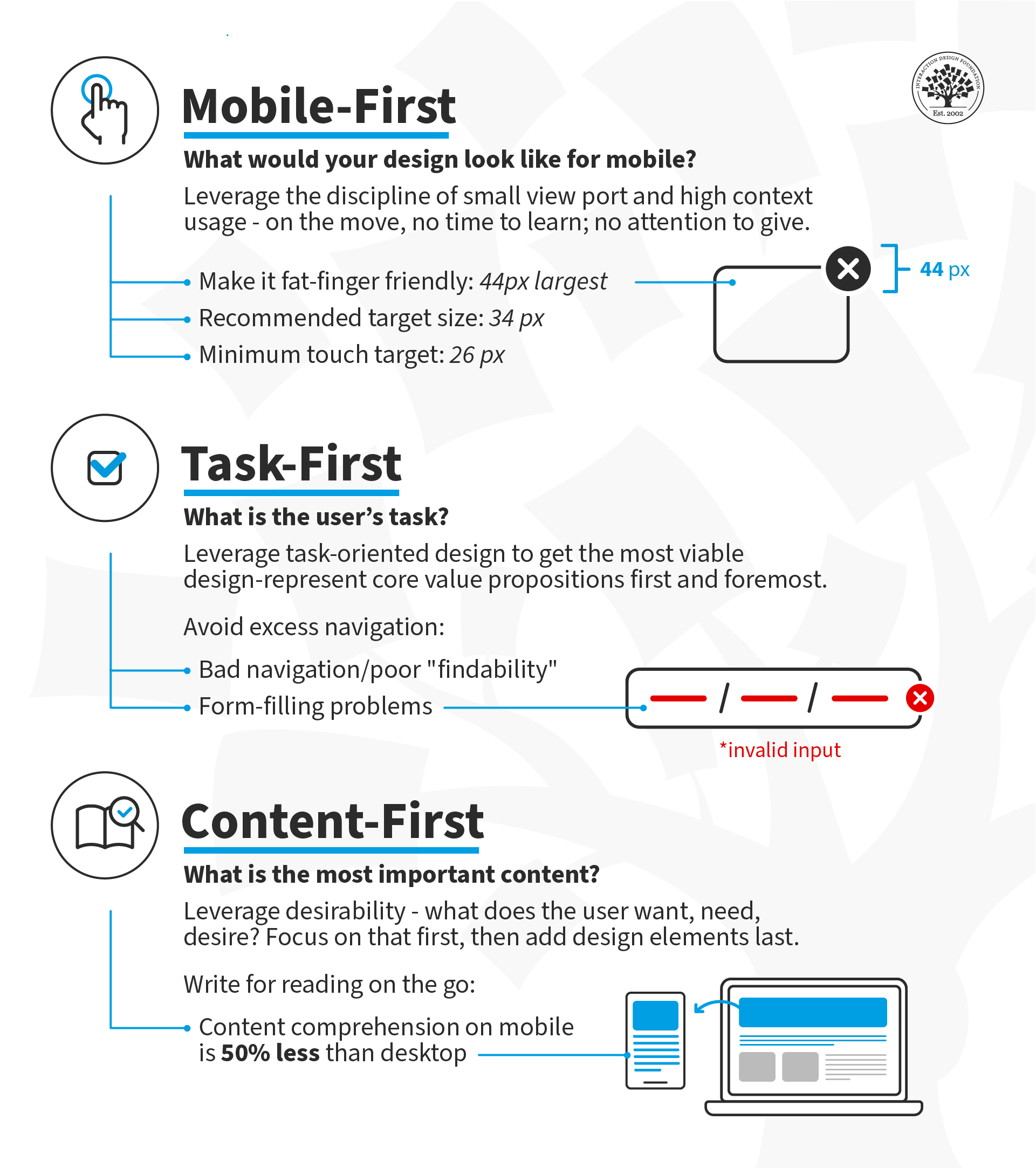
  1. Mobile-First: Design for small screen sizes first and then expand to larger device sizes. Users are on the move; they can spare neither time nor attention. Under these constraints (movement, time, attention), decide what makes sense on your screen(s). 

  2. Task-First: Design the core value proposition first. Focus on the users' primary task and support successful task completion.

  3. Content-First: Start with Desirability—what does the user want, need and desire? Design the content around that desire and add the other elements of user experience (interactions, interfaces and usability) afterward. 

What is Mobile-First?

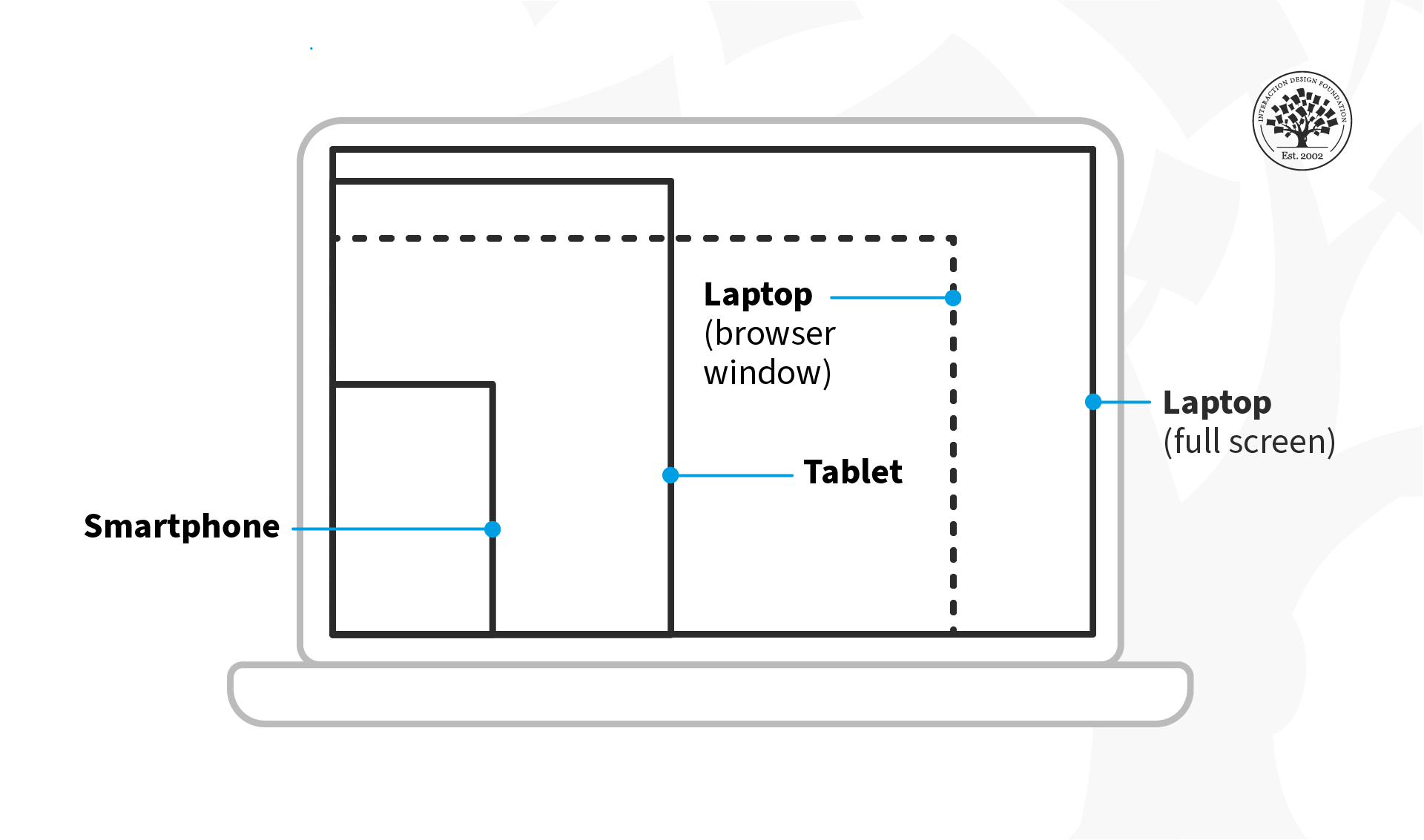
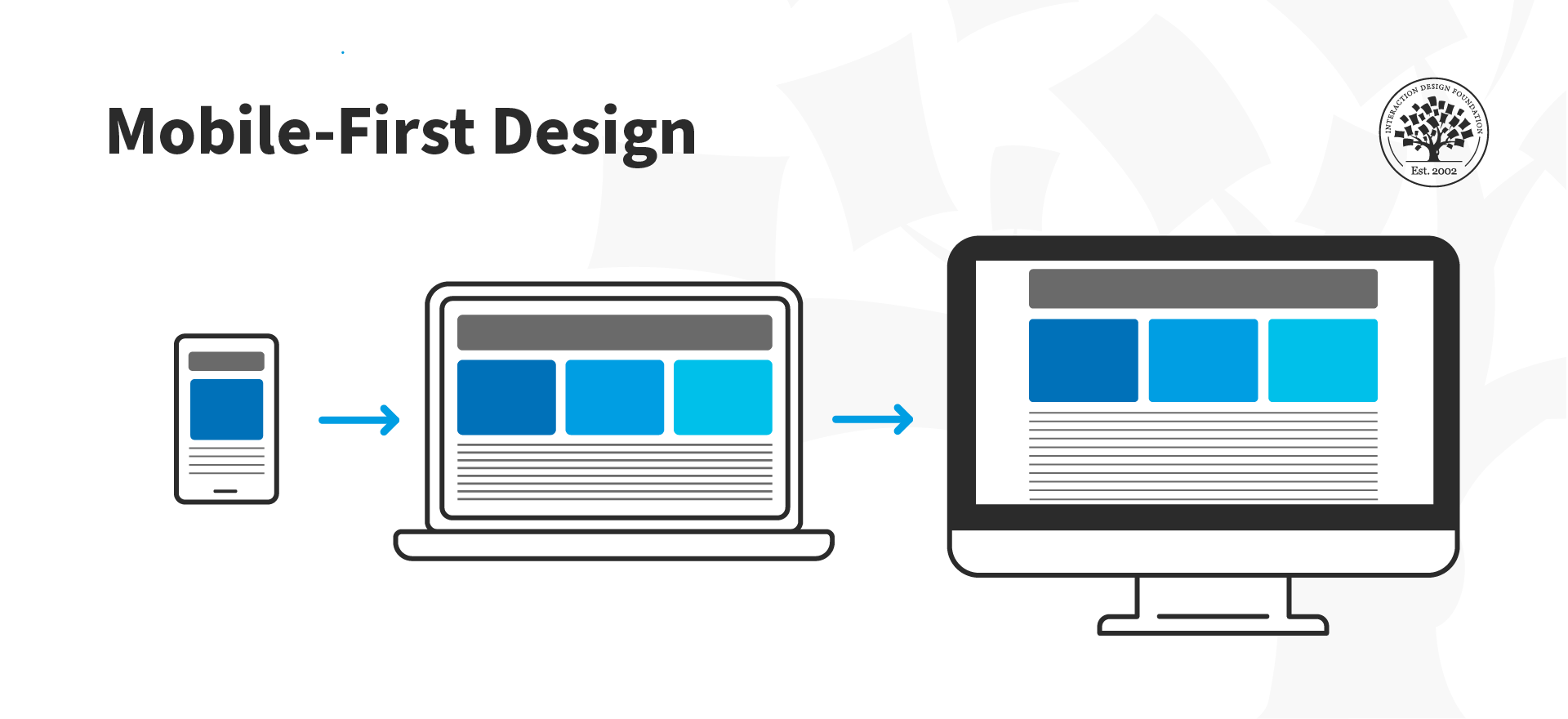
In the mobile-first design approach, you start your design process with mobile users in mind first and then scale up to larger screen sizes. This means you prioritize the mobile experience and ensure all your content and features are accessible on smaller screens. Another way to approach mobile-first is to prioritize content from the outset so that even if you begin your design process on a larger screen, you still have the flexibility to show your content effectively in a mobile environment.

Luke Wroblewski, a Product Director at Google, proposed this concept in 2009 and offered three reasons for designing for mobile first. Here, we've updated Luke's arguments for going mobile first to reflect the new mobile landscape:

1. Mobile Has Exploded

It's undeniable that the use of smartphones has become ubiquitous in today's society. Ensure your app provides an exceptional user experience across different platforms and screen sizes to reach a global audience.

2.  Mobile Forces You to Focus

Regardless of device specifications, the one thing that's key to all mobile devices is portability. People use them on the move, which means that you must focus on the most important actions and tasks for your users.  

There's much more room on a desktop screen, and you can afford to add extraneous features, but smartphones don't give you that luxury. Remember that the user experience on smartphones is also determined by how they're used—on the move and in short, sharp bursts of activity, which is very different from sitting at a desk and browsing the internet for hours on end.

© Interaction Design Foundation, CC BY-SA 4.0

 3. Mobile Offers New Capabilities

On desktop, the web is the standard way to interact with most businesses, but on mobile, the preference has shifted to applications. This is due to smartphones' many sensors and features, such as GPS, accelerometers, pedometers, touchscreens, gesture controls, augmented reality, and eye tracking.

The mobile-first approach enables designers to leverage the full potential of mobile, rather than replicate the desktop experience on a smaller screen.

© Interaction Design Foundation, CC BY-SA 4.0

What Is Task-First?

This approach prioritizes user tasks over other design considerations, such as aesthetics or technical feasibility. This ensures the app is designed with the users’ needs in mind, resulting in a more efficient and practical experience. By focusing on user tasks, designers can also identify pain points in existing workflows and streamline them to improve overall user satisfaction.

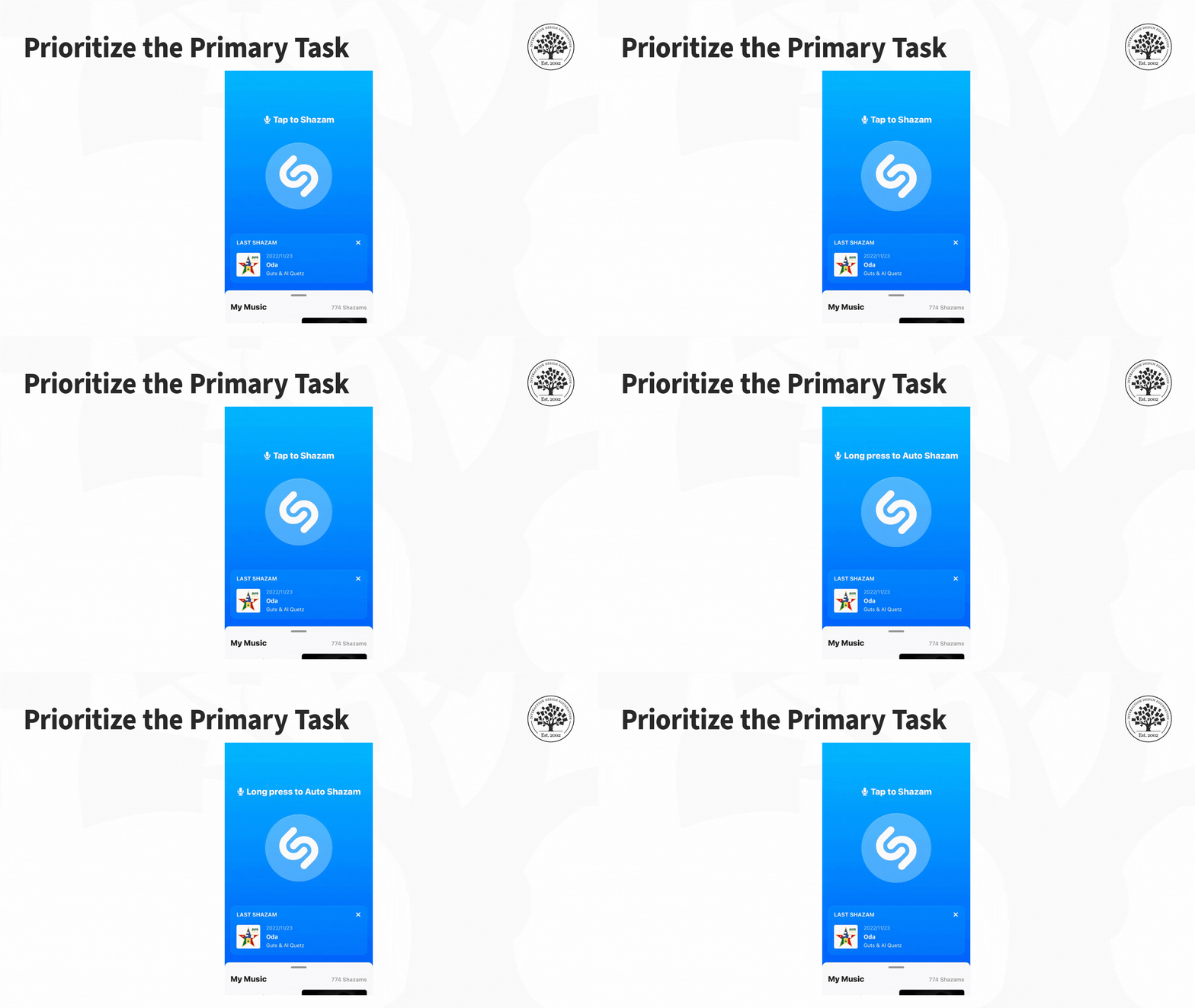
For example, let's look at an application like Shazam, designed with a task-first approach. Its primary function is to assist users to identify songs playing in their vicinity. The app achieves this thanks to its clean layout and user-friendly interface that makes it easy for users to complete the main task without any extra distractions or complications.

The Shazam app features a clean interface that helps users accomplish the main task: to identify music playing nearby.

© Interaction Design Foundation, CC BY-SA 4.0

The Task-First approach prioritizes giving users what they want as quickly and easily as possible without requiring them to hunt, search, or think too much.

What Is Content-First?

The concept of a content-first approach has been around since the early days of web design, but it gained new relevance with the rise of responsive design. The basic idea is that content should be the primary focus of mobile UX design, as users come to apps and sites primarily for the content they offer rather than for the interface's design.

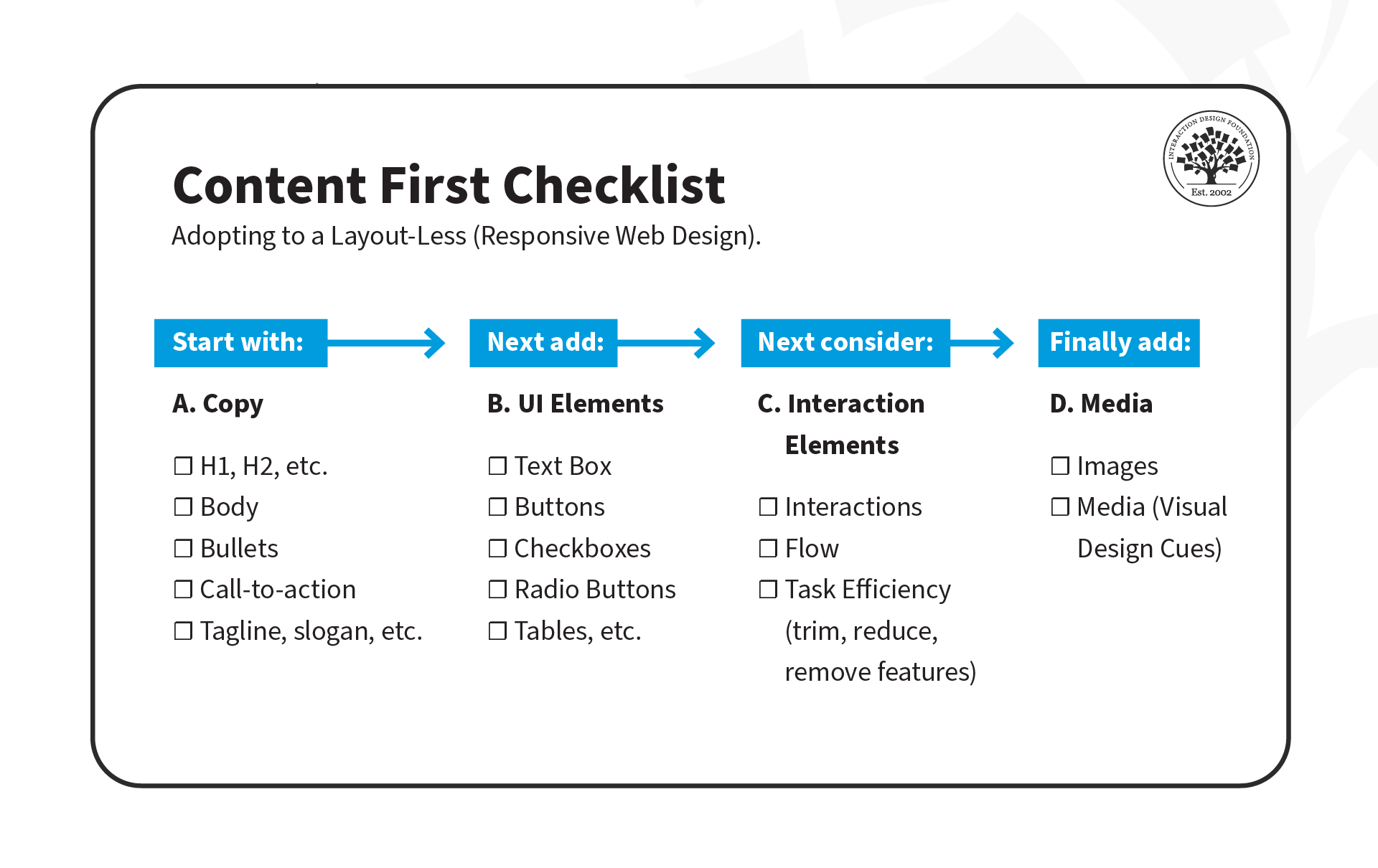
As UX designers, we often focus on interfaces and wireframes, but the content-first approach suggests that we should define the content structure first and then add UI and interaction elements later.

There are three stages to this approach:

  1. Copy: Create clear and concise copy that conveys the intended message to users. This may include defining typography, font sizes, and heading structure (H1, H2, H3, H4, H5), which is critical for accessibility. Properly defined headings make it easier for screen readers to parse a page.

  2. UI Elements: Once the copy is defined, it's time to add UI elements such as buttons, icons and graphics that support the content and help guide users through their tasks.

  3. Interaction Elements: Add animations and transitions to enhance the user experience.

© Experience Dynamics, Fair Use

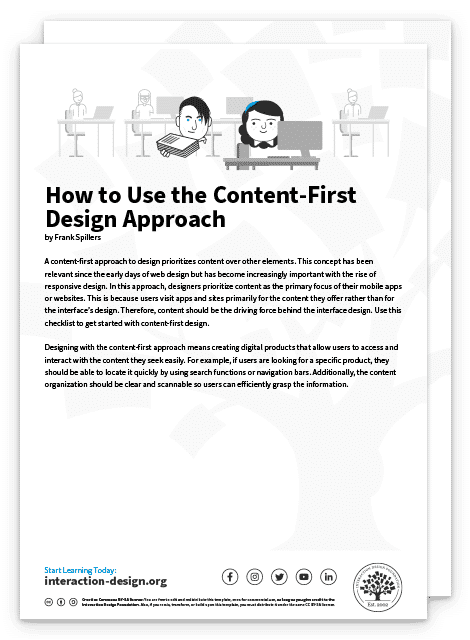
Interested in adopting the content-first approach? Here's a helpful checklist to assist you on your transition. Download the template, and share it with your team!

Advance Your Career With This Free Template for “How to Use the Content-First Design Approach”
How to Use the Content-First Design Approach
We respect your privacy
Get 1 powerful email each week: Design a life you love!

Put It All Together: A Demonstration of Mobile-, Task- and Content-First Approach

Now that we've covered the three approaches, let's see them in action! In this video, Frank Spillers will show you how to create an interface for a health app that enables patients to chat with doctors. He'll use examples from each approach: mobile-first, task-first, and content-first.

Transcript

The Take Away

It's important to understand the unique challenges and opportunities of the mobile platform. Here are three powerful prioritization approaches to keep in mind:

Mobile-First: Mobile-First is a design strategy that puts mobile at the forefront of the design process. It recognizes the importance of the mobile web and emphasizes the need to create an experience tailored specifically to mobile devices. 

Task-First: Task-First prioritizes users' tasks. It helps them complete tasks quickly and efficiently and minimizes cognitive load. This approach is particularly well-suited for mobile devices since users are often on-the-go and need to complete tasks quickly.

Content-First: Content-First puts content at the center of the design process. Rather than starting with wireframes or UI elements, this approach begins by defining the content structure first. This allows designers to optimize experiences for different contexts, physical or otherwise.

References and Where to Learn More

Read Luke Wroblewski’s original proposition for Mobile First.

See Clayton Lewis and John Rieman’s original definition of task-centered design in Task-Centered User Interface Design: A Practical Introduction.

More about content first in these articles:

To know why the heading structure is crucial for accessibility, see this resource:
Accessibility at Penn State 

Read the forecast number of mobile users worldwide from 2020 to 2025, from Statista.

Hero Image: © Interaction Design Foundation, CC BY-SA 4.0

Feel Stuck?
Want Better Job Options?

AI is replacing jobs everywhere, yet design jobs are booming with a projected 45% job growth. With design skills, you can create products and services people love. More love means more impact and greater salary potential.

At IxDF, we help you from your first course to your next job, all in one place.

See How Design Skills Turn Into Job Options
Privacy Settings
By using this site, you accept our Cookie Policy and Terms of Use.
Customize
Accept all

Be the One Who Inspires

People remember who shares great ideas.

Share on:

Academic Credibility — On Autopilot

Don't waste time googling citation formats. Just copy, paste and look legit in seconds.