A series of illustrations representing task analysis.

How to Improve Your UX Designs with Task Analysis

• 12 min read

1,176 Shares

One of the most important steps in the design thinking or human-centered design (HCD) methodology is to define the users' problems. This means to clearly identify and articulate problems in the UX so that you can later begin the ideation process (i.e., generate great ideas on how to solve said problems). Task analysis is a simple exercise that UX designers can undertake during the definition of a problem, which can help identify opportunities to improve and generate some preliminary ideas as to how you might approach these challenges. Let's find out how.

Transcript

Task analysis is a method that helps you understand how users accomplish their goals and the steps they take to get there. This establishes their mental models and is crucial for task-oriented design. The most common output of a task analysis is a diagram that outlines the user's actions and the system's responses.

Designers can use this diagram to identify areas where additional support may be needed or to eliminate unnecessary steps. For example, designers may automate certain actions that users currently perform manually.

You can approach a task analysis activity from two main viewpoints:

  1. Hierarchical Task Analysis: Consists of breaking down tasks into smaller sub-tasks.

  2. Cognitive Task Analysis: Focuses on tasks that require decision-making, problem-solving, memory, attention and judgment. 

How to Prepare for a Task Analysis

Usability experts agree that task analysis is an important activity where designers must understand the users and their environments, their goals and external factors that might influence the performance of the task. This means that you may have already engaged in user research, which provides you with outputs such as user personas, scenarios or storyboards. This data is essential for task analysis, as you will base your work on these outputs. 

To ensure an effective task analysis process, it's essential to gather focused data during user research. Cognitive scientist and UX consultant Larry Marine suggests collecting five types of data during this phase:

  • Trigger: What initiates the task for the user?

  • Desired Outcome: How will users know they have successfully completed the task?

  • Base Knowledge: What will the users be expected to know when starting the task?

  • Required Knowledge: What do users already know before starting the task?

  • Artifacts: What resources or tools will users require during the task?

How to Conduct a Task Analysis 

With your current information, you can sketch out how a user goes about their daily life by mapping out the sequence of activities required to achieve a goal. Before you start, it's important to have an overview of the process and its steps to prepare better.

Here is a step-by-step guide for conducting task analysis:

  1. Identify the Task You Need to Analyze: Pick a persona and scenario for your user research and repeat the task analysis process for each of them. What is that user's goal and motivation to achieve said goal?

  2. Break Down This Goal into Smaller Subtasks: A good rule of thumb is to aim for 4–8 subtasks – any more than this may indicate that the goal is too broad or abstract.

  3. Draw a Layered Task Diagram of Each Subtask: You can use any notation you like for the diagram since there is no real standard here. Larry Marine shares some constructive advice on his notation, which you will examine below.

  4. Write the Story: Ensure you accompany your diagram with a narrative that focuses on the whys.

  5. Validate Your Analysis: Review the analysis with someone who wasn’t involved in the breakdown but knows the tasks well enough to check for consistency. 

  6. Pro Tip: Conduct a parallel task analysis with more than one person to undertake the process simultaneously so that you can compare and merge outputs into a final deliverable. 

Larry Marine likes to annotate his task analysis diagrams using different colors in the various flows; for example, green represents users' actions, yellow is a step the system can do, purple represents tools or knowledge, and orange represents questions about the task.
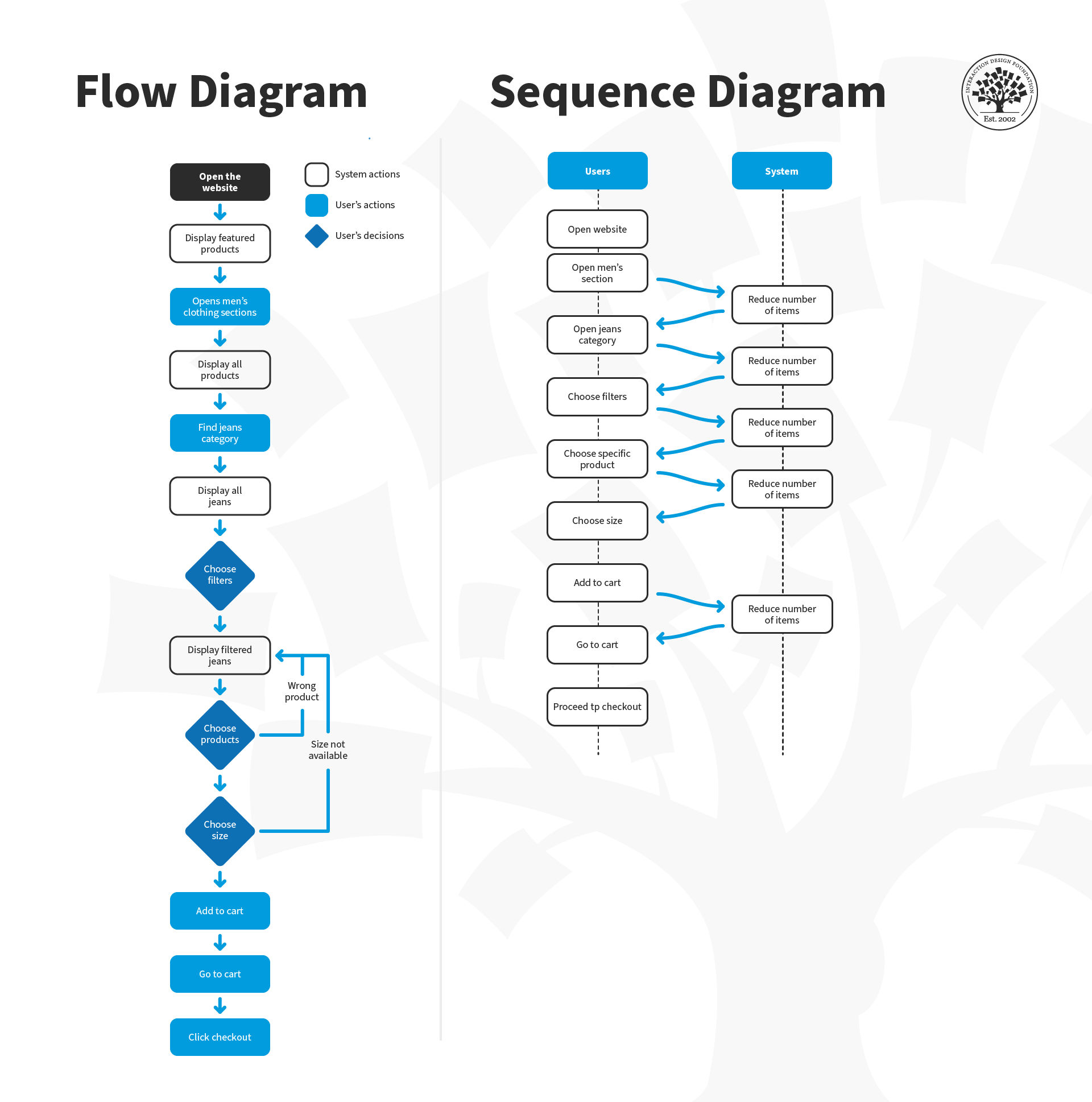
Larry Marine suggests adding annotations to task analysis diagrams using a variety of colors that correspond to different flows. This technique helps him better visualize the user's journey and identify pain points or areas for improvement in the user experience.

© Interaction Design Foundation, CC BY-SA 4.0

A task analysis would probably have a greater proportion of "green" flows initially. A redesigned task would probably have fewer "green" and more "yellow" flows to show that you've really managed to off-load tasks from a user to a system, thus improving their overall experience to make their lives easier.

Download and share this guide on task analysis with your team to collaboratively visualize your user's journey and identify pain points.
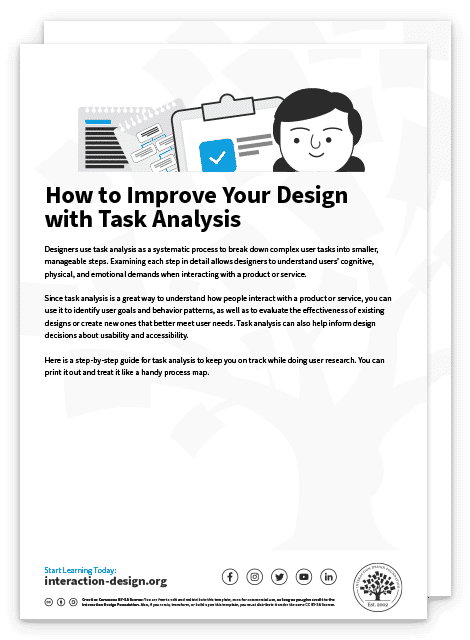
Advance Your Career With This Free Template for “How to Improve Your Design with Task Analysis”
How to Improve Your Design with Task Analysis
We respect your privacy
Get 1 powerful email each week: Design a life you love!

The Take Away

Task analysis is a vital tool in a UX designer's skill set, as it helps designers understand how users complete tasks and identify areas for improvement. However, it's important to keep the user's perspective in mind and resist the temptation to generate your own interpretations of the problem or stick to design elements just for the sake of it.

To ensure that task analysis is effective, it should be backed by rigorous user research. Without data from user research, any efforts to proceed with task analysis will be blind and may not reflect actual user needs. Remember that task analysis is not a one-off process. Designers may need to repeat task analysis on their own designs later in the process. 

Finally, task analysis requires time, resources, people, and budget like any other UX design activity. Balance these requirements carefully and engage in the process only if you have sufficient amounts of these elements. 

References and Where to Learn More

Read these books about Task Analysis and other related concepts:
Task Analysis. Human-computer interaction: Development Process. Catherine Courage, Janice (Genny) Redish, and Dennis Wixon. 2009

Task Analysis: How to Develop an Understanding of Work (Users' Guides to Human Factors and Ergonomics Methods). Jack Stuster. 2019.

Check out this in-depth article about Hierarchical Task Analysis from UX Matters.

Follow Larry Marine’s excellent approach to Task Analysis.

Learn about Task Analysis and usability from the Usability.gov website.

Hero Image: © Interaction Design Foundation, CC BY-SA 4.0

Learn More in This Course:

Journey Mapping

1
1
47
52
91 % booked
View Course

What You Should Read Next

  • Read full article
    What is Interaction Design? - Article hero image
    Interaction Design Foundation logo

    What is Interaction Design?

    Interaction design is an important component within the giant umbrella of user experience (UX) design. In this article, we’ll explain what interaction design is, some useful models of interaction design, as well as briefly describe what an interaction designer usually does.A simple and useful unders

    Social shares
    1.5k
    Published
    Read Article
  • Read full article
    Apple’s Product Development Process – Inside the World’s Greatest Design Organization - Article hero image
    Interaction Design Foundation logo

    Apple’s Product Development Process – Inside the World’s Greatest Design Organization

    Apple’s Product Development Process may be one of the most successful design processes ever implemented. With a valuation that exceeds $2 trillion, there’s a lot that designers can learn from Apple and introduce into their own design environments.Apple is a notoriously secretive business. In Steve J

    Social shares
    1.4k
    Published
    Read Article
  • Read full article
    Shneiderman’s Eight Golden Rules Will Help You Design Better Interfaces - Article hero image
    Interaction Design Foundation logo

    Shneiderman’s Eight Golden Rules Will Help You Design Better Interfaces

    Follow Ben Shneiderman’s 'Eight Golden Rules of Interface Design' if you want to design great, productive and frustration-free user interfaces. Apple, Google and Microsoft are among some of the highly successful companies whose well-designed products reflect Shneiderman’s rules. The characteristics

    Social shares
    1.4k
    Published
    Read Article
  • Read full article
    How to Change Your Career from Graphic Design to UX Design - Article hero image
    Interaction Design Foundation logo

    How to Change Your Career from Graphic Design to UX Design

    If there’s an occupation that is 100% linked with the public’s idea of what design is all about, it’s graphic design. From the familiar golden arches of the McDonald’s brand to the typography and colors of movie posters, graphic designers create some of the most iconic and ubiquitous designs around

    Social shares
    1.4k
    Published
    Read Article
  • Read full article
    The Grid System: Building a Solid Design Layout - Article hero image
    Interaction Design Foundation logo

    The Grid System: Building a Solid Design Layout

    Now that we’ve seen some grids at work in the Rule of Thirds article, let’s examine them a little more deeply. As a concept that deals so fundamentally with the fabric and background of our work as designers, it’s easy to overlook the power of grids and think more about the elements we want to creat

    Social shares
    1.4k
    Published
    Read Article
  • Read full article
    The Principles of Service Design Thinking - Building Better Services - Article hero image
    Interaction Design Foundation logo

    The Principles of Service Design Thinking - Building Better Services

    Service design is all about taking a service and making it meet the user’s and customer’s needs for that service. It can be used to improve an existing service or to create a new service from scratch. In order to adapt to service design, a UX designer will need to understand the basic principles of

    Social shares
    1.4k
    Published
    Read Article
  • Read full article
    A Simple Introduction to Lean UX - Article hero image
    Interaction Design Foundation logo

    A Simple Introduction to Lean UX

    Lean UX is an incredibly useful technique when working on projects where the Agile development method is used. Traditional UX techniques often don’t work when development is conducted in rapid bursts – there’s not enough time to deliver UX in the same way. Fundamentally Lean UX and other forms of UX

    Social shares
    1.3k
    Published
    Read Article
  • Read full article
    Dieter Rams: 10 Timeless Commandments for Good Design - Article hero image
    Interaction Design Foundation logo

    Dieter Rams: 10 Timeless Commandments for Good Design

    Let’s pay a virtual visit to a famous industrial designer’s workshop. By examining the principles of his winning approach, we can incorporate vital elements into our designs in the “less is more” age.As user experience practitioners, most of us have worked with Nielsen and Molich’s 10 heuristics or

    Social shares
    1.3k
    Published
    Read Article
  • Read full article
    The 7 Factors that Influence User Experience - Article hero image
    Interaction Design Foundation logo

    The 7 Factors that Influence User Experience

    User Experience (UX) is critical to the success or failure of a product in the market but what do we mean by UX? All too often UX is confused with usability which describes to some extent how easy a product is to use and it is true that UX as a discipline began with usability – however, UX has grown

    Social shares
    1.3k
    Published
    Read Article
  • Read full article
    10 Free-to-Use Wireframing Tools for UX Designers in 2026 - Article hero image
    Interaction Design Foundation logo

    10 Free-to-Use Wireframing Tools for UX Designers in 2026

    Wireframes help you quickly ideate and test your ideas. While paper wireframes are the fastest to create, digital wireframes look more polished and presentable. If you are looking for a pocket-friendly wireframing tool, look no further.Whether you prefer browser-based apps or offline desktop tools,

    Social shares
    1.3k
    Published
    Read Article

Top Articles

Top Topic Definitions

Feel Stuck?
Want Better Job Options?

AI is replacing jobs everywhere, yet design jobs are booming with a projected 45% job growth. With design skills, you can create products and services people love. More love means more impact and greater salary potential.

At IxDF, we help you from your first course to your next job, all in one place.

See How Design Skills Turn Into Job Options
Privacy Settings
By using this site, you accept our Cookie Policy and Terms of Use.
Customize
Accept all

Be the One Who Inspires

People remember who shares great ideas.

Share on:

Academic Credibility — On Autopilot

Don't waste time googling citation formats. Just copy, paste and look legit in seconds.

Feel Stuck? Want Freedom?

Get one powerful email each week, like 326,062 others.

Learn to design a life you love.

Next email in
6
days
13
hrs
47
mins
53
secs