UX (user experience) artifacts are tangible deliverables that designers create throughout the design process to document research, communicate ideas, guide development teams, and more. These materials serve as the foundation for brands to build products that truly meet user needs and facilitate collaboration across multidisciplinary teams.
Discover where UX artifacts fit into the design process, in this video:
Why UX Artifacts Drive Successful Design Projects
UX design requires both systematic documentation and clear communication for designers and developers to turn abstract concepts into concrete solutions. UX artifacts serve as the critical bridge between user research insights and final product implementation—well-made ones create accountability and structure within design teams and minimize confusion.
Teams use these artifacts to establish a clear rationale for design decisions and have them as records to speak for themselves. That becomes invaluable when stakeholders question choices, which can—and does—happen, especially when business stakeholders don’t have design backgrounds. UX artifacts serve as vital references when new team members need to understand a project’s evolution or processes, too. Without proper artifacts, collaboration often breaks down due to miscommunication or incomplete information transfer between designers, developers, product managers, and marketing teams.
Explore how to handle stakeholders who don’t understand design, with Morgane Peng: Designer, speaker, mentor, and writer who serves as Director and Head of Design at Societe Generale CIB:
The iterative nature of design work makes UX artifacts even more essential. As projects evolve through multiple rounds of testing and refinement, artifacts serve as “living” historical records—or vital safety nets for teams to catch themselves and avoid repeating past mistakes or losing valuable insights. Artifacts create institutional memory that persists even when team members change; their presence safeguards important findings and decisions from fading into obscurity. They embody a brand’s commitment to ensure continuity in design thinking and user focus.
Speaking of design thinking, discover how this UX design process helps teams find their way to the best digital products and services, as this video discusses:
Also, UX artifacts accelerate decision-making by providing shared reference points for discussions. Rather than debate abstract concepts, teams can point to specific research findings, user personas—fictitious representations of real users—or usability test results to support their arguments. This evidence-based approach saves time and leads to more informed decisions, all while reducing subjective disagreements that might otherwise derail projects.
Some Essential Types of UX Artifacts for Modern Design Teams
User experience artifacts divide into several categories, and they correspond with core activities that teams use them for:
1. Research Artifacts Help Designers Understand Users
Research artifacts capture insights about users, their behaviors, and their needs. They’re foundational documents that inform all subsequent design decisions, and they help teams maintain user focus throughout the design and development process. Important UX research artifacts include these ones:
User personas represent archetypal users based on research data—and they’re vital artifacts as they go beyond demographics to include goals, frustrations, behaviors, and motivations. Effective personas help teams make design decisions by asking, “What would our primary persona expect in this situation?” When researchers and designers make effective personas, they transform abstract user data into relatable characters that guide feature prioritization and interface design choices.
Discover the power of—and need for—good user personas, as William Hudson: User Experience Strategist and Founder of Syntagm Ltd, explains:
User journey maps visualize the complete experience users have whenever they’re interacting with a product or service across multiple touchpoints. These artifacts reveal pain points, emotional highs and lows, and opportunities for improvement that individual feature analysis might miss. Journey maps often expose systemic flaws that will need cross-functional solutions rather than isolated design fixes—hence why they’re such valuable communication deliverables for teams to hammer out problems for users, customers, and—by association—their brand.
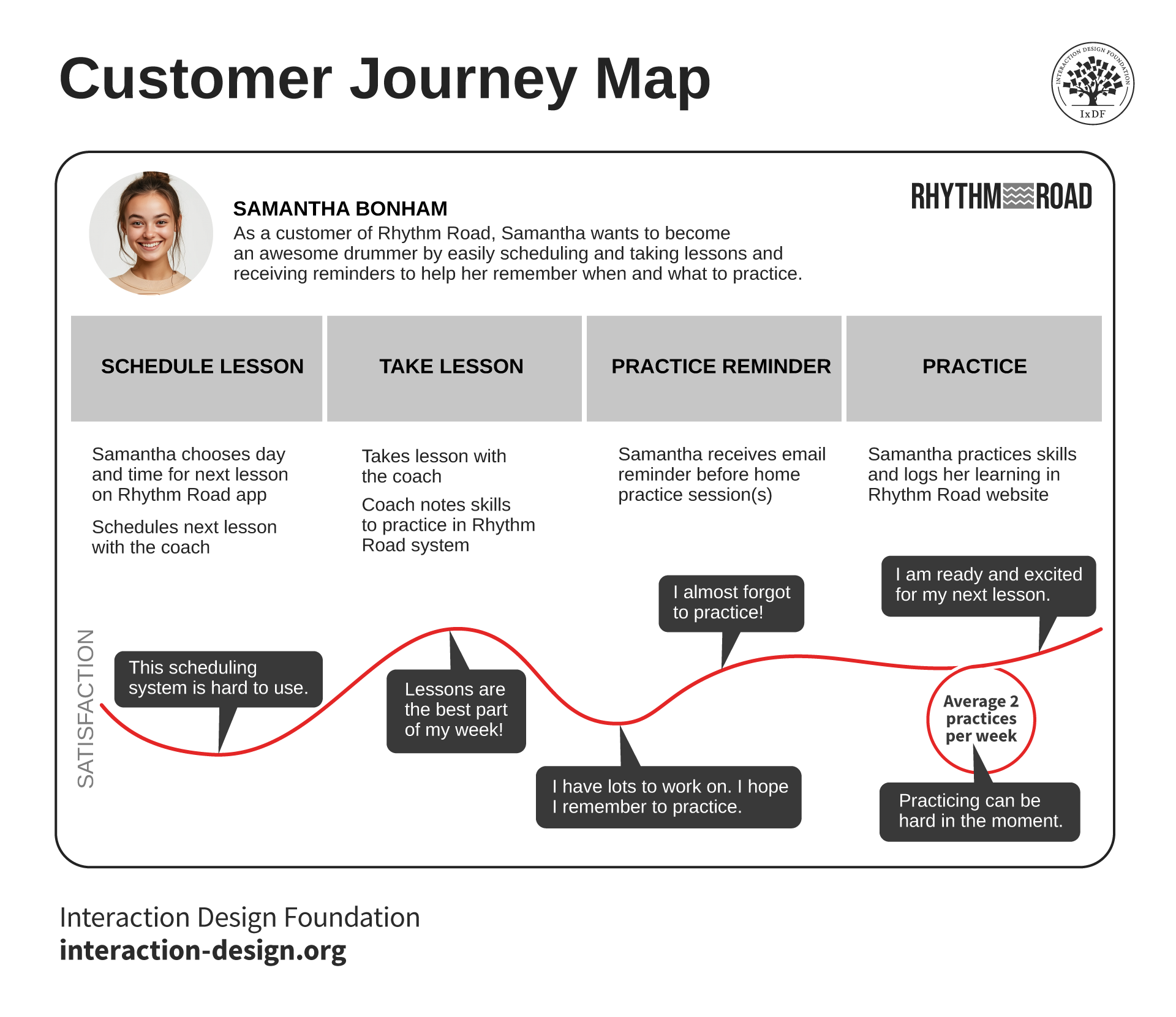
This customer journey map shows the ups and downs a user might have for her drumming practice needs.
© Interaction Design Foundation, CC BY-SA 4.0
Empathy maps provide deeper psychological insight into user mindsets by documenting what users think, feel, see, hear, say, and do in specific contexts. These artifacts help designers build emotional connections with their target audience, a vital prerequisite for any successful design. From there, they can design with genuine empathy rather than assumptions about user needs.
Explore why design with empathy helps more users enjoy more successful products:
Research reports synthesize findings from user interviews, surveys, usability tests, and other research activities into actionable insights. For any design project, user research must form the foundations for designers and teams to build upon. Strong research reports present data clearly, highlight key findings, and translate observations into specific recommendations that guide design team priorities and feature development decisions. They’re there for all team members and other stakeholders to refer to in case any doubt should arise as to why a design solution went in a certain direction.
Discover important points about how user research helps designers and brands climb to reach users at the highest levels and delight them.
2. Design Strategy Artifacts Align Teams Around Goals
Strategic artifacts establish the foundation for design work through how they define objectives, constraints, and success metrics. These documents align teams around shared goals and prevent scope creep during implementation phases—vital for a UX strategy to successfully guide designs that access users to the maximum.
Design briefs outline project objectives, target users, key requirements, and success criteria in concise formats. Briefs serve as “north stars” for design teams; they help keep discussions focused on essential outcomes. Without an effective brief, they might end up getting lost in feature debates or technical implementation details that could knock the project’s momentum off track. Design briefs include a dedicated structure—such as project overview, objectives, target audience, scope and deliverables, and more. Chaos could result if a brand failed to have a solid reference point like this to help keep them on track.
Competitive analysis documents examine how other products solve similar problems. Teams look over the “fence” to see how other brands approach their users’ problems; from such research, teams create documents so they can understand market standards, identify differentiation opportunities, and avoid reinventing solutions that users already understand from other contexts. These artifacts inform positioning strategies and feature-prioritization decisions; they help brands stay safer in the marketplace, too, from knowing where to direct their efforts and what not to try—and why.
Content strategy documents define voice, tone, and messaging approaches for products—they ensure consistent communication across all user touchpoints. They help writers and designers create cohesive experiences that reinforce brand identity while meeting user information needs effectively so everyone can enjoy a seamless experience without confusion or doubt.

Airbnb offers accommodation solutions to users worldwide; when people travel and stay in others’ properties, they need to trust the brand behind it. Every element and dimension of the experience—including icons, layout, and copy—must consistently reinforce the brand image for users to be sure they can invest in it.
© Airbnb, Fair use
3. Information Architecture Artifacts Help Organize Complexity
Information architecture artifacts organize and structure content and functionality in ways that make intuitive sense to users. These deliverables create the backbone that supports easy navigation and findable content across digital products, so teams can get where they need to go quickly.
Sitemaps show hierarchical structures of websites or applications—they help teams understand how different sections relate to each other and ensure there’s logical information organization. Sitemaps reveal content gaps or redundancies that need attention before any development begins, too, and so save time and resources during implementation.

Sitemaps capture the pages and parts a website needs to successfully reach users and cover all the bases for the brand.
© Interaction Design Foundation, CC BY-SA 4.0
User flows diagram the paths users take to complete specific tasks—they’re artifacts that identify potential friction points, missing steps, or unnecessary complexity in user journeys. Well-crafted user flows streamline experiences since teams can spot, and eliminate, redundant actions and highlight opportunities to simplify complex processes. They’re different from journey maps, which capture the user’s whole experience with a product or service, and user flows let teams focus on functionality and what a user does in a series of steps to complete a task.
Card sorting results document how users naturally group and categorize information, which informs navigation structures and decisions about content organization. Design teams use card sorting to gain insights from users and move beyond internal assumptions about information hierarchy so they can create structures that match user mental models and conform to what users expect. Otherwise, teams rely on organizational charts and their own beliefs about “how things should look.”
Explore helpful points about how designers use card sorts to help determine the future look of their designs, with Donna Spencer, Author, Speaker and Design Consultant:
4. Interface Design Artifacts Help Bring Concepts to Life
Interface artifacts translate abstract concepts into concrete visual and interactive specifications—they’re vital for teams to guide implementation while ensuring consistency across product experiences. These artifacts are some of the most familiar ones for designers in their creative roles as they invest their skillsets. Through these, they take the early steps towards the digital design solutions they’ll ultimately refine after extensive testing and finding the best path to direct their efforts.
Wireframes establish layout structure and content hierarchy without visual design distractions. Wireframes help teams focus on functional requirements and user flow optimization before they get into aesthetic considerations. They facilitate rapid iteration on structural concepts without teams getting bogged down in color or typography debates.
Explore how wireframing helps guide the structure of digital solutions, in this video:
Mockups add visual design elements to wireframe structures—fleshing out matters to show how interfaces will actually look with typography, color schemes, imagery, and spacing applied. Mockups help stakeholders visualize final products and provide specific feedback on design choices before development starts.
Prototypes are artifacts where designers create interactive versions of design concepts. Designers typically begin with low-fidelity prototypes—such as paper prototypes—to test more basic functionality. Then they refine matters and graduate to mid-fidelity and high-fidelity prototypes, which have more functionality and “realism.”
It’s impossible to overstate the value of prototyping—prototypes allow teams to test user interactions, validate design assumptions, and communicate complex behaviors that static images can’t convey. Prototypes bridge the gap between design intent and technical implementation, while reducing miscommunication between designers and developers long before teams commit to final design ideas.
Explore how prototyping helps power the way to more effective design solutions, with Alan Dix: Author of the bestselling book “Human-Computer Interaction” and Director of the Computational Foundry at Swansea University:
Style guides document visual design standards—they define a brand’s look and include color palettes, typography systems, iconography, and spacing rules. As a brand’s turn-to resource for how it must appear, these artifacts ensure consistency across different designers and development teams. Meanwhile, style guides speed up the design process by establishing reusable standards and reducing decision fatigue. For an analogy, imagine if a brand had a wardrobe; what “clothes” or “uniform” would it need to wear for people to recognize and trust it?
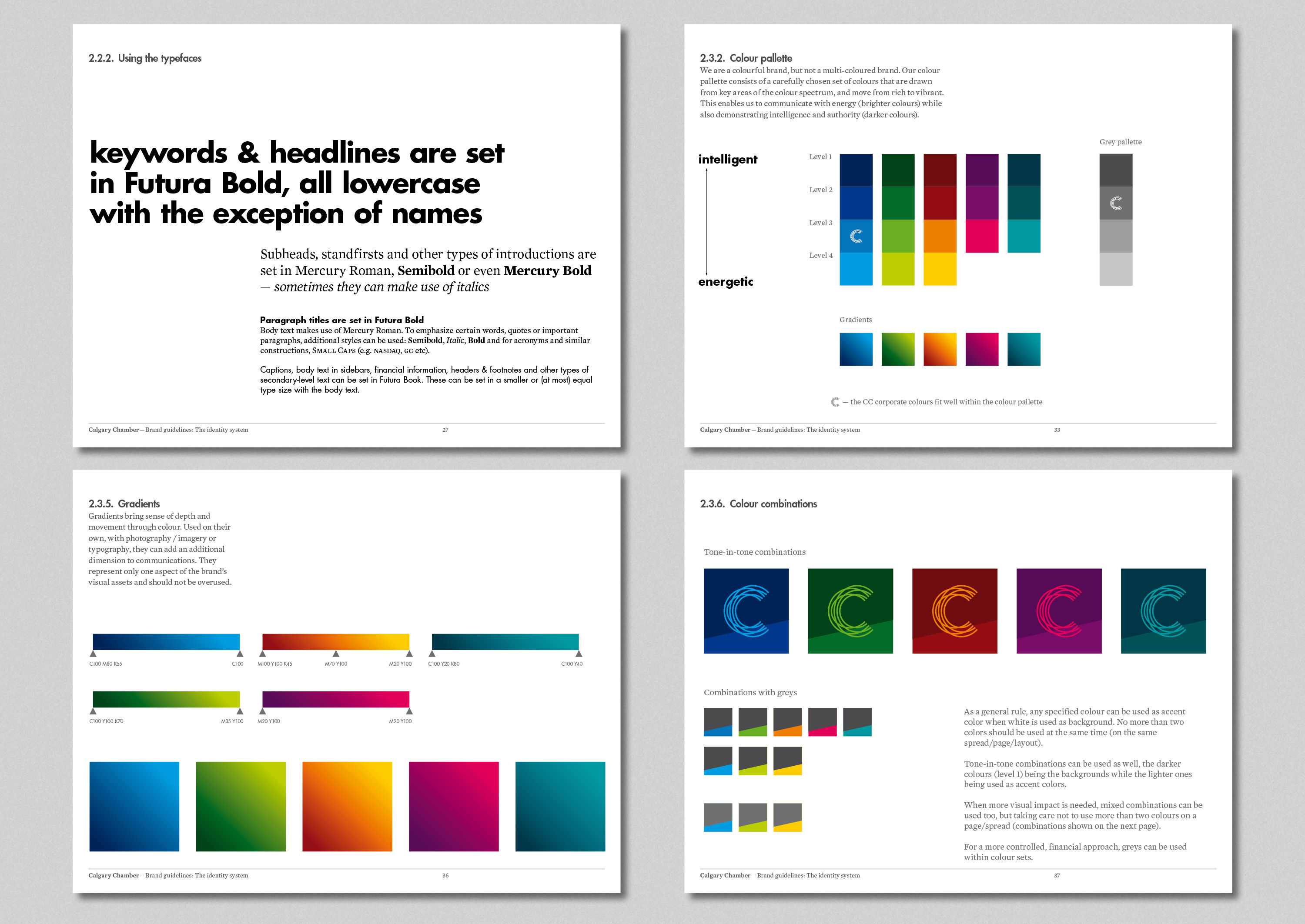
Brands and users value consistency highly; designers can see this need reflected in how organzations access users visually with branding elements and guides, such as in this work for the Calgary Chamber of Commerce .
© Iancul, Fair use
Component libraries catalog reusable interface elements with their various states and usage guidelines. Design teams use libraries to promote design consistency while they can efficiently scale design systems across large products or multiple applications. Component libraries reduce redundant work and maintain visual coherence as teams grow and products expand—designers don’t have to keep creating from scratch when they already have a “batch.”
5. Testing and Validation Artifacts Measure and Guide Success
Testing artifacts capture user feedback and measure design effectiveness—they’re the evidence for design decisions and the means to find areas that need improvement based on actual user behavior rather than assumptions.
Usability test reports document user behavior during task completion attempts—they identify specific friction points, error patterns, and user mental models that differ from designer assumptions. Even with the best intentions, designer bias and assumptions can creep into prototypes. Usability test reports guide iterative improvements based on observed user data; they keep efforts well-grounded in reality instead of theoretical best practices. The earlier researchers run tests and their reports help guide refinements, the less likely design teams might have rude awakenings with failed products later.
A/B and multivariate test results compare different design approaches using quantitative metrics. When designers set two or more versions of a proposed solution before users, they can come away with some proof to help make data-driven decisions about interface changes and feature implementations. These artifacts provide statistical confidence for design choices that might otherwise rest on the shaky foundations of subjective preferences or internal debates.
Discover how to discover which version of a potential solution users prefer and important points about where to take it, as William Hudson explains.
Accessibility audit reports evaluate how well designs serve users with disabilities—accessible designs serve as examples of why consideration for users of all ability levels is non-negotiable. With accessibility audits, brands can breathe more easily that they’re in legal compliance while expanding their products’ potential user base through inclusive design practices. Accessibility audits identify specific barriers and provide actionable recommendations for designers to create more accessible experiences.
Understand why accessibility is a big deal for designers and brands, in this video:
Some Best Practices to Create Effective UX Artifacts
1. Focus on Actionable Insights Over Raw Data
Transform observations into clear recommendations that guide design decisions instead of presenting data dumps that demand other team members to interpret them. Use specific quotes and examples to bring user voices into artifacts—but protect user privacy through anonymization. Validate research findings with multiple data sources whenever possible, triangulating insights from interviews, analytics, and behavioral observations to build confidence in conclusions.
Learn how triangulation helps back up findings so designers can proceed with more confidence, with William Hudson.
Present findings in formats that busy stakeholders can quickly digest—use executive summaries and visual highlights to communicate key points effectively. Include the rationale for strategic decisions so future team members understand the thinking behind current approaches without unintentionally trying to “reinvent the wheel.” Also, update strategic artifacts as projects evolve to maintain alignment between the current reality and documented plans.
2. Design for Multiple Audiences and Use Cases
Tailor artifacts for specific target audiences while maintaining consistency across all deliverables. Developers need clear technical specifications, while business stakeholders will want high-level summaries that connect design decisions to business objectives. It’s wise to create artifact templates that ensure a consistent capture of information across different projects and team members so everyone is on the same “page.”
Base information architecture decisions on user mental models rather than internal organizational structures—and open card sorts will help you understand how users naturally categorize information. Test information architecture with realistic content rather than placeholder text; “Lorem ipsum” text doesn’t reveal content hierarchy problems or labeling issues that can surface when actual product content appears.
3. Maintain Version Control and Documentation Standards
Use consistent naming conventions and file organization systems. It’s vital for team members to find current versions of design materials—quickly and easily. Document the evolution of design thinking through version control that tracks changes and comments and enables collaboration across distributed teams.
Plan testing artifacts before conducting research so the data capture stays relevant. Create templates for common research activities to keep consistency across different studies and researchers. What you need to test will help you determine how to go about it. Include both quantitative metrics and qualitative observations in testing reports, presenting results in context of business objectives and user goals to build momentum for design improvements.
4. Pick Tools That Support Collaborative Workflows
Choose design and research tools that allow real-time collaboration and integrate with your existing workflow. It’s vital to have a well-oiled “machine” with all moving parts working together, rather than creating silos between team members. Look for platforms that combine multiple functions—like design, prototyping, and documentation—to reduce context switching when creating artifacts.
Prioritize tools with robust version control, commenting systems, and shared libraries that maintain consistency across projects. Consider how different tools connect with each other, from research platforms that export data to design software, to documentation systems that centralize all artifacts in searchable repositories. The right tool stack slashes administrative overheads while improving both artifact quality and team efficiency.
Overall, UX artifacts have a dynamic nature—they’ll keep evolving as design practices mature and new technologies emerge. AI-powered tools increasingly help designers and teams with artifact creation—everything from generating personas based on research data to creating interactive prototypes from wireframes. Still, the fundamental purpose remains constant and takes human discretion: to translate user needs into product solutions through systematic documentation and clear communication.
The most successful design teams treat UX artifacts as living documents that evolve with projects rather than static deliverables created once and forgotten like proud words and diagrams on a dusty “shelf.” They understand that artifacts serve different purposes for different audiences and know how to tailor their creation and presentation appropriately. They understand the need to enshrine standards in relatable documents and resources, too. Plus, they know why they must build comprehensive artifact libraries that serve as institutional knowledge bases.
As remote work becomes more prevalent and brands need solid reference points for many aspects of their everyday lives, UX artifacts play an increasingly important role. From the smallest startups with lofty visions to the industry giants who speak to millions of users and customers through successful apps and websites every day, the need to maintain design quality and team alignment will remain profound. Teams who master artifact creation and management prove they have the organization and focus to build products that truly serve their users while they can achieve business objectives. Their brands will be better equipped to navigate whatever trends, currents, and “storms” may lie ahead as technologies change and users demand more.