UX Deliverables

Your constantly-updated definition of UX Deliverables and collection of videos and articles.
Be a conversation starter: Share this page and inspire others!

197 Shares

What are UX Deliverables?

User experience (UX) deliverables are documents, drafts and other artifacts that serve as the tangible byproducts of an entire UX design process. They contain vital information about a project, provide a basis for design decisions and function as communication tools to convey decisions to stakeholders

Watch this video to see how deliverables fit into the design process.  

Transcript
 

UX Deliverables are Vital Parts of a Design Process

UX deliverables play an extremely vital part in a team’s design process—and they guide the whole project's trajectory. They’re particularly important because they: 

Inform Design Decisions

UX deliverables—especially research deliverables—bring on data-driven insights that can both inform and validate design decisions. And when they’re armed with a wealth of knowledge about their users' needs and behaviors, teams can move forward to create designs that aren’t just aesthetically pleasing but functional and intuitive, too. What’s more, deliverables like wireframes and prototypes can help teams spot potential roadblocks and challenges in their design process. Team members can proactively address these and make sure that there’s a smooth transition from design to development. 

Facilitate Communication

Deliverables serve as a common language for designers, stakeholders and developers—and they enable team members to discuss and understand the project in effective ways. When they’ve got such a tangible reference point, all the team members can move forward from a concrete foundation. This helps clarify expectations, get visions aligned and minimize misunderstandings—and the chances of misunderstandings. It also permits more effective feedback and revisions. Stakeholders can provide specific comments on well-defined deliverables, instead of vague or general feedback. 

Screenshot from video showing Sketch program in use.

Sketch is an excellent tool for handoff, among other purposes.

© Sketch B.V., Fair Use

Provide Documentation

Deliverables also function as a record of the design process. They allow convenient future reference and iteration. Design teams who have concrete deliverables at given stages of their design process can build upon or revisit features more easily. This documentation is also shareable with new team members or stakeholders. It makes sure everyone is on the same page—and serves as a bridge between members in project management, the development team and others. What’s more, deliverables can act as a portfolio—to showcase a team's design process, design solutions and capabilities to potential clients. 

Promote User-Centric Design

Another thing that deliverables do is help to make sure that a design remains truly user-centric. Teams can keep track of their work and refer back to the project history—and so they’re able to make sure that everyone’s on the same page, and aligned towards a common goal. This doesn’t just keep brands on point with their target users' or potential users' needs at the forefront of all design decisions—it prevents unnecessary waste and questionable results such as feature creep as well. And this focus on the user helps make for a more intuitive, user-friendly and enjoyable product. 
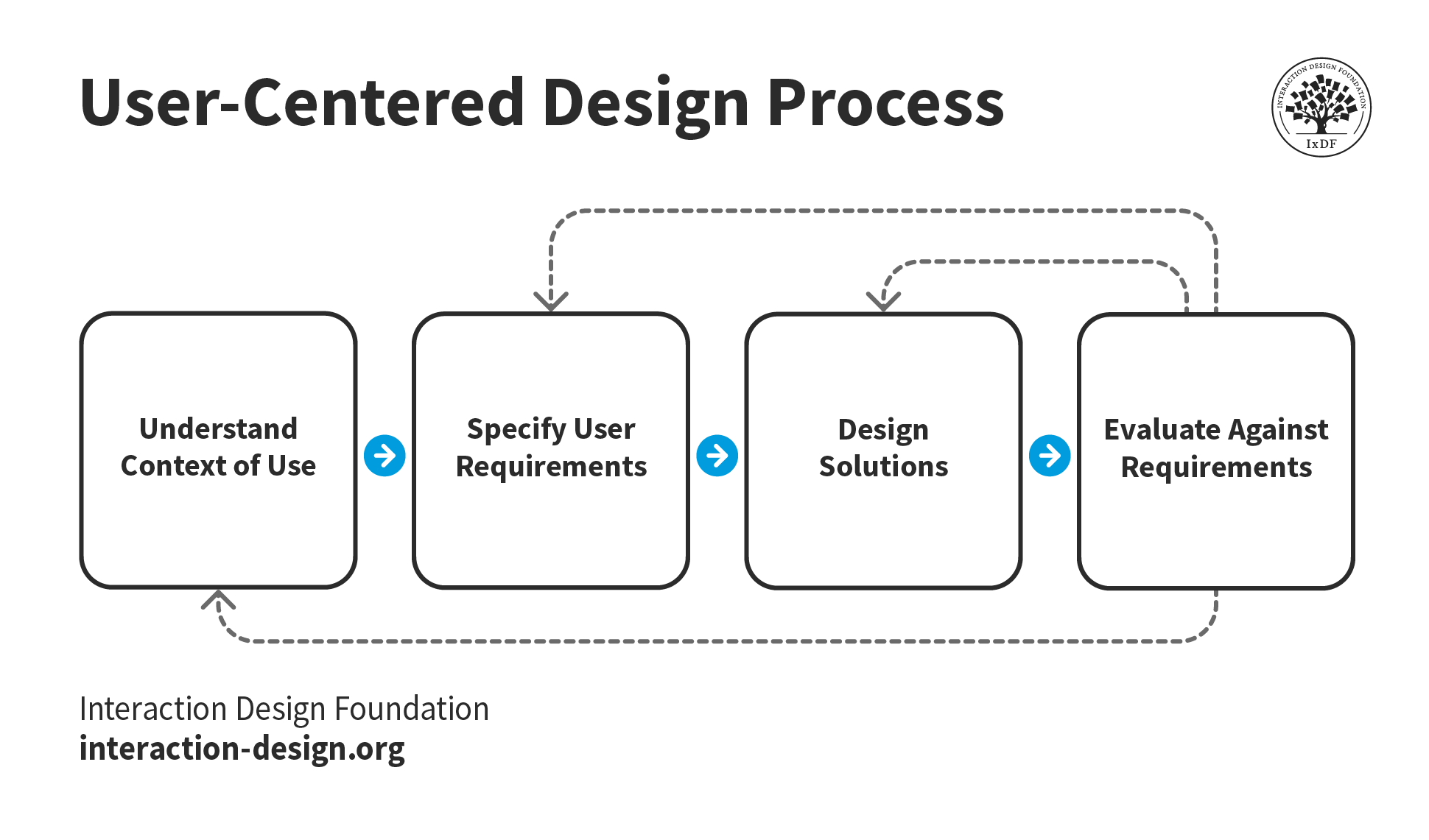
Image showing user-centered design process.

In the user-centered design process, design teams iterate and move forward with their deliverables.

© Interaction Design Foundation, CC BY-SA 4.0

Types of UX Deliverables

Whatever design process a design team uses, the deliverables are the crafts, currency and progress indicators of the project. They include representations of user data, design ideas and much more. All stakeholders need a unified vision of where a given project is heading. So, designers and project managers must ensure they accurately represent data and insights through all design stages.  

UX deliverables generally fall into two main categories—UX research deliverables and UX design deliverables—and include several subcategories. 

UX Research Deliverables

​​These are the outputs of user research activities. They encapsulate user behavior, needs and attitudes, and so inform the design process. Examples include product objectives deliverables, such as personas and storyboards.​(These appear in detail in the next section.)​​ 

UX Design Deliverables

These are the outputs of the design process that represent the functionality and aesthetics of what will be the final product. Examples include user flows, sitemaps, wireframes and prototypes. 

Watch this video to see what the elements of user experience are and what actions they require in the design process: 

Transcript
  

A List of the Most Common UX Deliverables

The scope of UX deliverables is vast, ranging from initial research findings to final design representations. Below is a list of the most common deliverables, based on different activities in the design process. 

User Needs and Product Objectives

These deliverables include personas, storyboards and customer journey maps. Designers create these to understand user behavior, needs and motivations. These insights will enable them to start work on designs that are intuitive and user-friendly—designs that will really meet the needs of the target audience. What’s more, they help identify potential challenges and opportunities for improvement in the design process. Such deliverables include: 

Personas

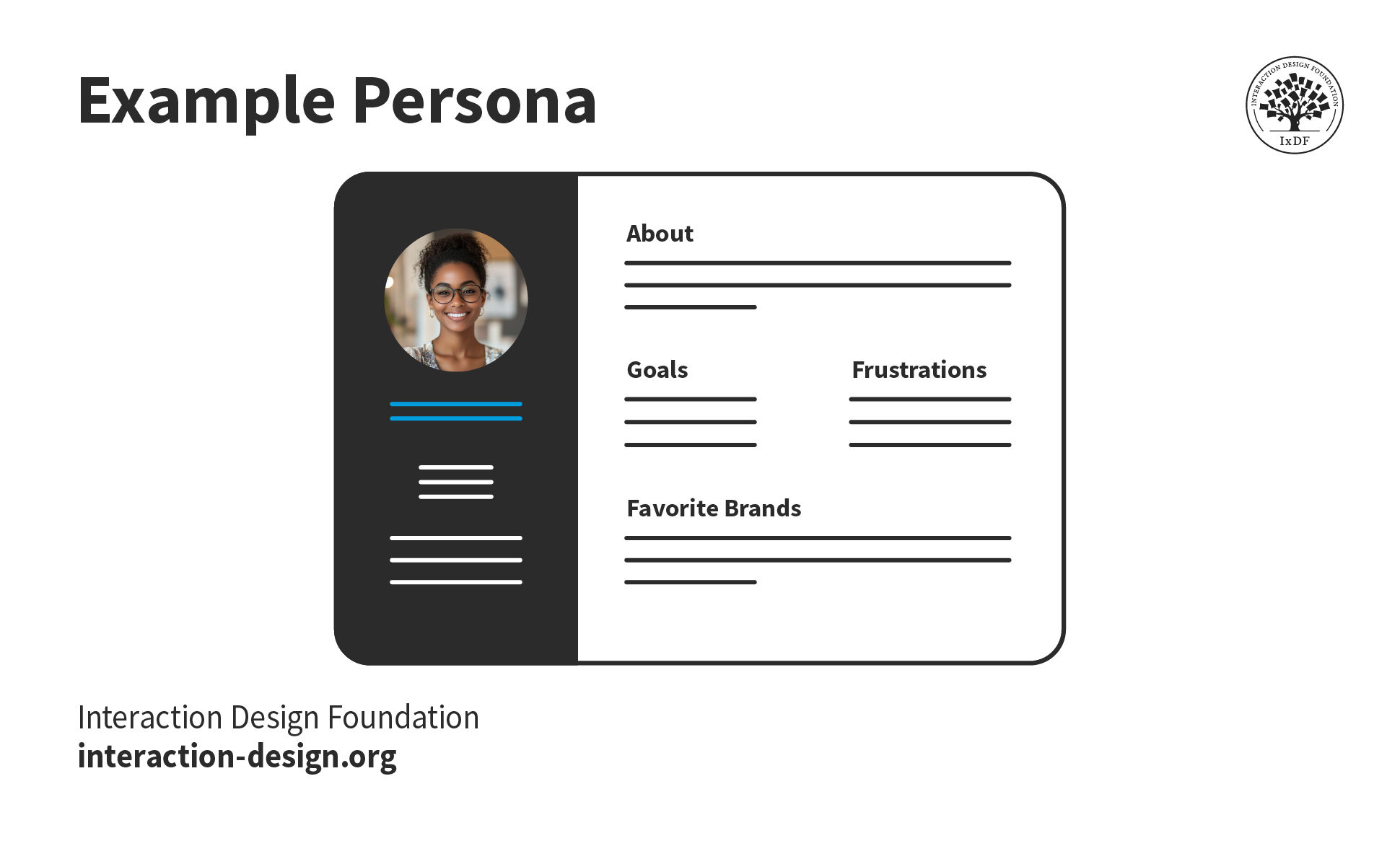
​​​These are fictional characters which designers create to represent typical users, including​​​​ ​​these users’​​ motivations, skills, and frustrations. The purpose is for designers to empathize with their prospective users as much as possible. Then they can get fully behind these users’ needs and more as they progress with design ideas. Designers might create ​​several ​​different personas per project to portray the widest section of a target audience. ​​     ​​​​​ 
 
Human-computer interaction expert Professor Alan Dix explains how personas are especially helpful in design: 
​​ ​​

Transcript
​​ ​     ​​ ​​ 

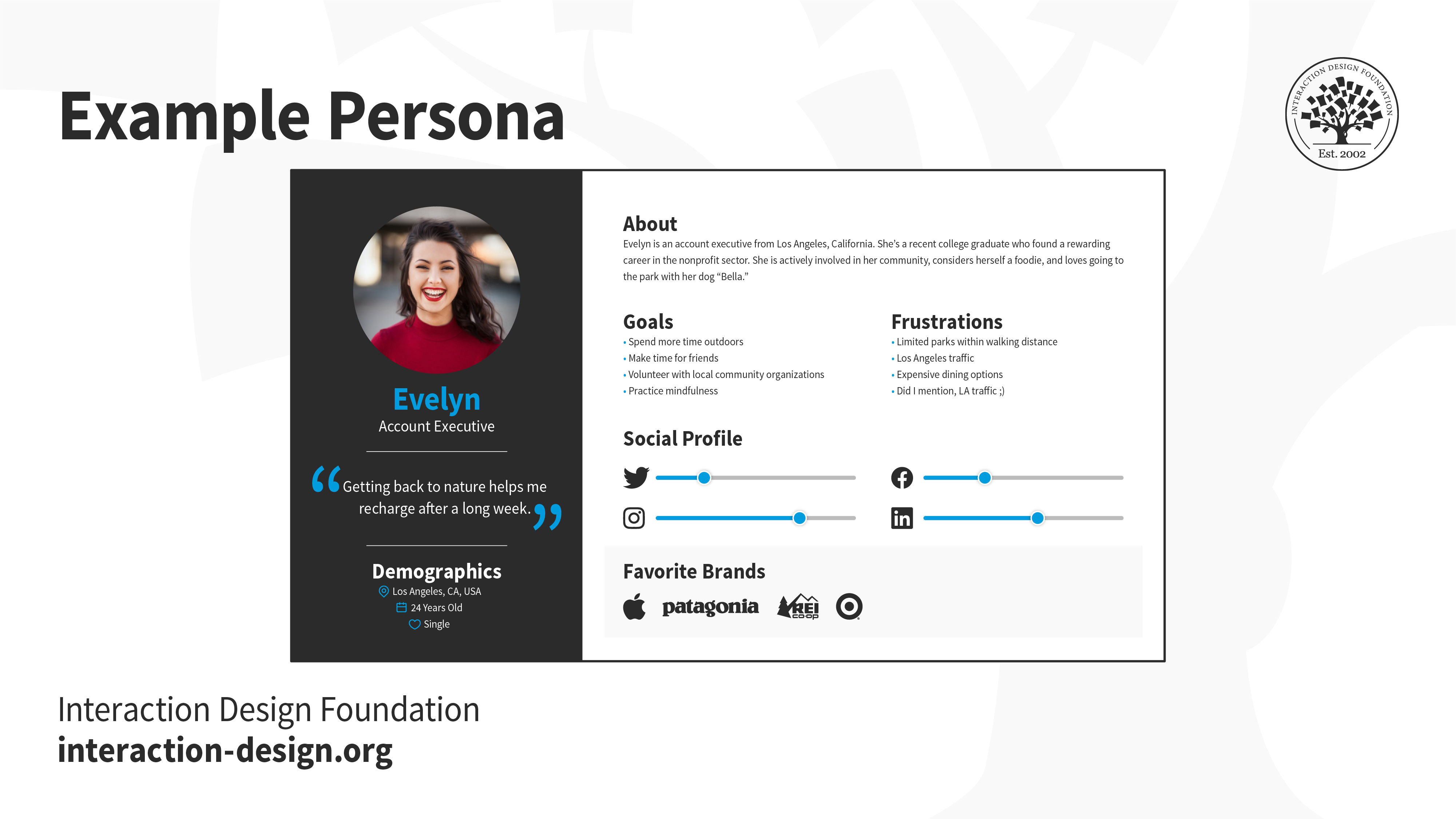
Image of a Persona.

© Interaction Design Foundation, CC BY-SA 4.0

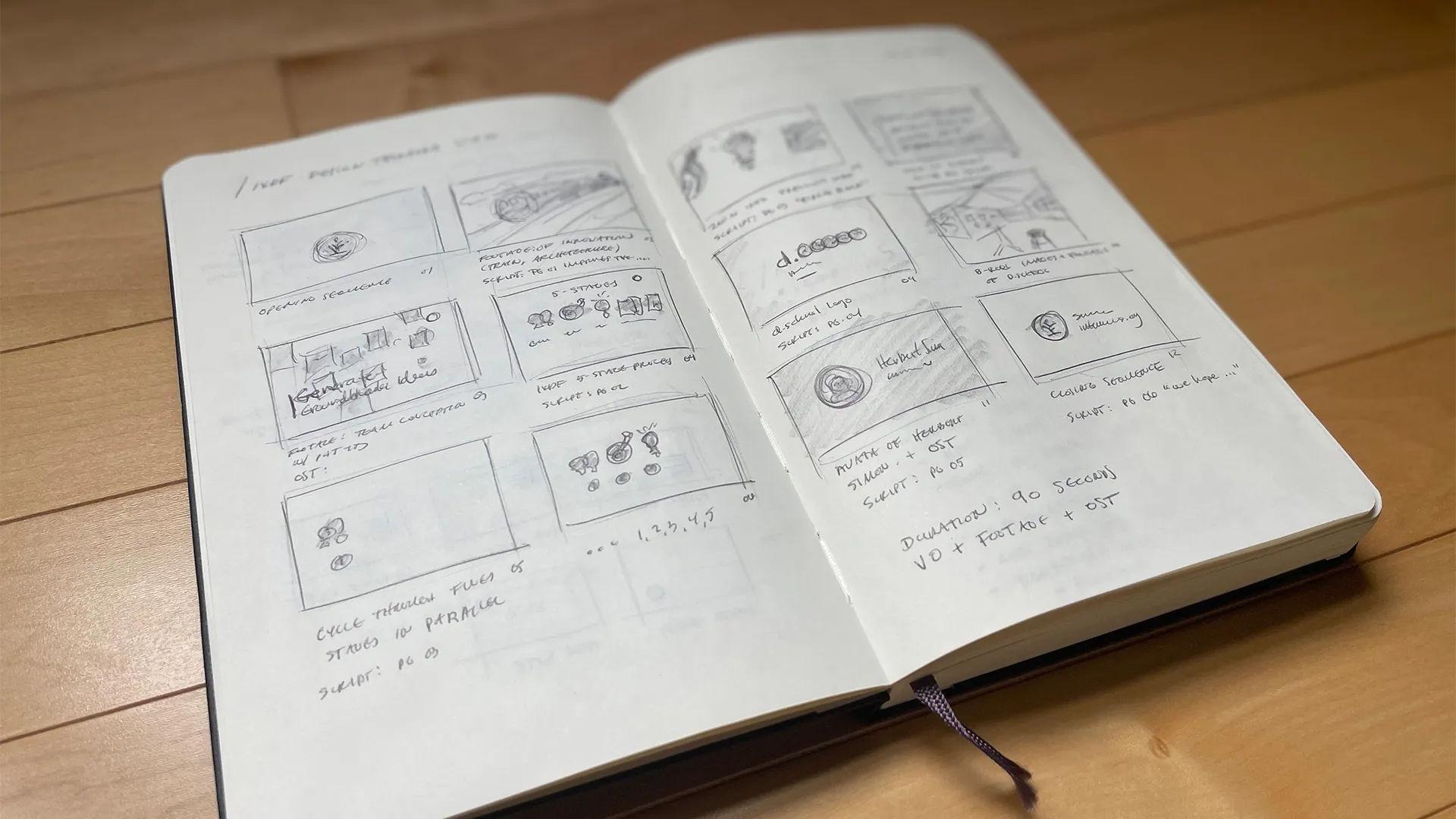
Storyboards

​​​These are visual representations, like comic strips, that outline users’ actions and the context in which they perform these. Designers create these to gain insight into what users do and such vital factors as the users’ environment and scenario.​​ 

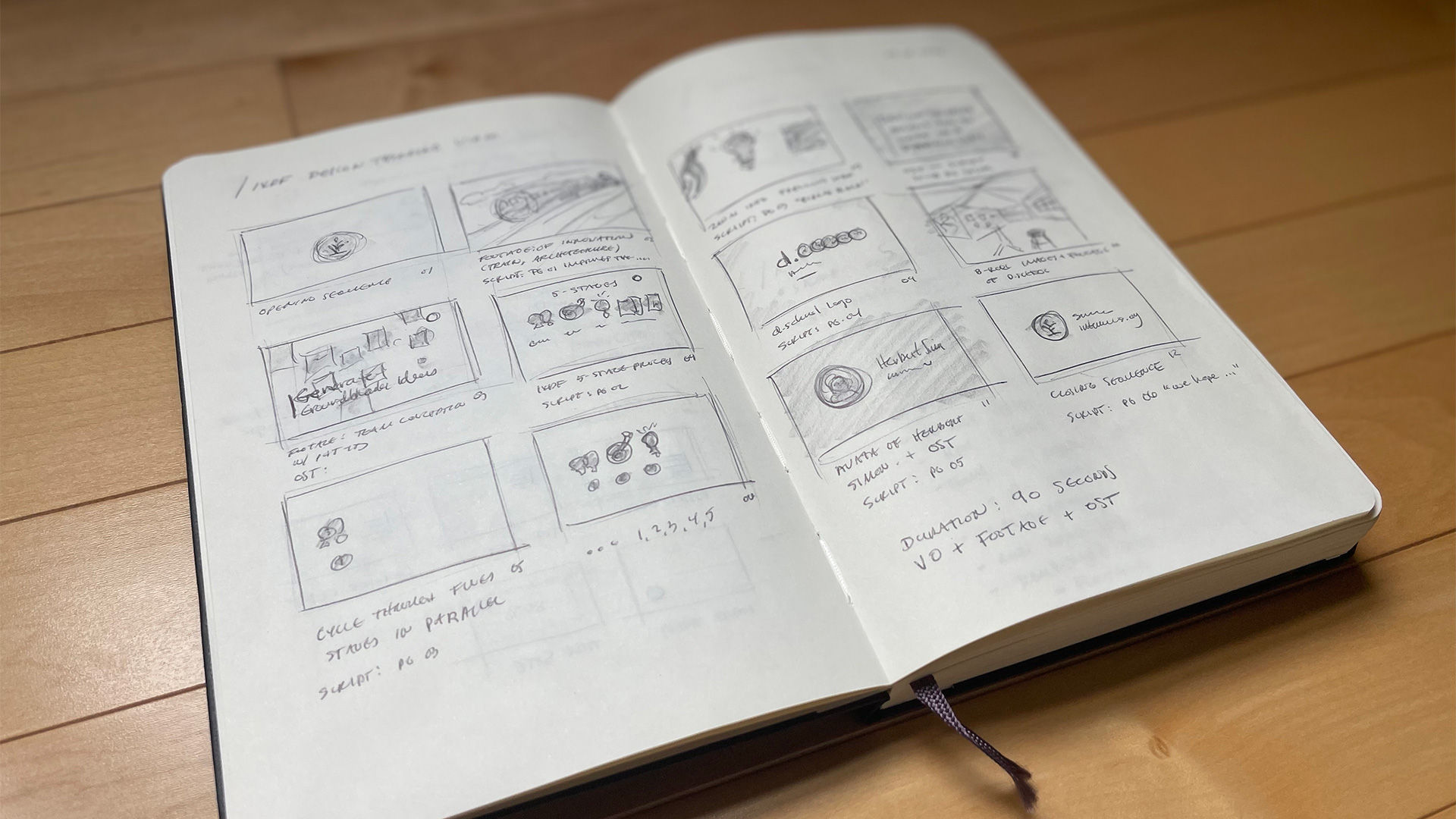
Image of an open book depicting a storyboard.

© Interaction Design Foundation, CC BY-SA 4.0

Customer Journey Maps

These are diagrams representing the steps users take to meet a particular goal. These maps reveal all the different touchpoints and the users’ emotional state throughout their journey with the product. Stakeholders from across different teams collaboratively build this map and set the steps along a timeline so they can understand differences in the users’ contexts. They will also be able to notice any evolving factors such as changing motivations and arising problems. These maps help designers spot areas where a potential product or service might address problems users experience on the way to their goals. 

Competitive Analytics

Unless a proposed solution is a truly generative design (i.e., completely innovative as a market pioneer), a brand will have competitors. A competitive analysis is a critical step in the UX design process. Designers identify and evaluate competitors' strategies to determine their strengths and weaknesses relative to their own (proposed) product or service. When a design team does an analysis that’s thorough, they can get valuable insights into what’s going on in the market. What’s more, they can understand customer needs—and spot and define chances for what to innovate. This deliverable is something that helps set clear design goals. Plus, it establishes a good design direction—one that differentiates a product from its competitors' products. 

Features and Content Requirements

This is the branch of deliverables that revolve around a potential solution’s features and requirements. 

Brainstorming

Here, designers generate ideas on how to move forward from the user research phase. Volume is vital so that a design team has as many ideas as possible to choose from. These many angles can include bad ideas. Teams might use sticky notes, paper cards or digital whiteboards to document the ideas during brainstorming. The deliverable might be a photograph on the wall, or a document summarizing the ideas. 

Image of a board full of sticky notes.

© Interaction Design Foundation, CC BY-SA 4.0

Content Strategy

A design team ensures that they produce, edit and archive content at the right time and for the right audience. Such deliverables include marketing communication. While designers may not be directly responsible for content strategy, they should ideally work closely with personnel who are. 

Information Architecture and Interaction Design

These areas of deliverables are where designers structure and organize content and data to present how information appears. They produce these to show design team members and stakeholders how the information will display, how to navigate, and more. These deliverables include:  

Sitemaps

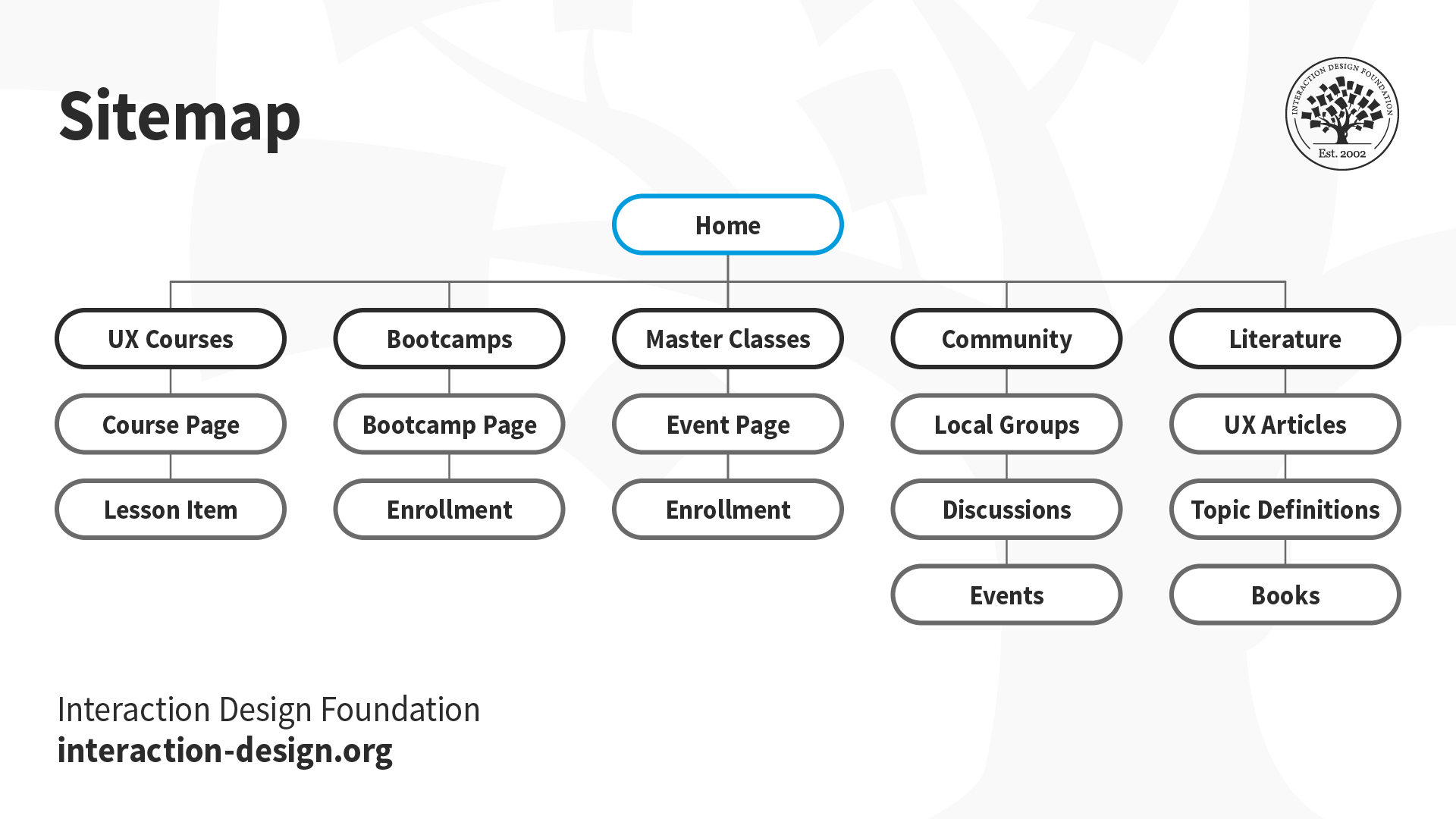
Sitemaps give a really high-level view of the site's content and hierarchy. Designers create these to show navigation structure. For example, a mobile app project’s sitemap can have logical sections showing how users move from one part of a design to another.  

Image of a site map.

© Interaction Design Foundation, CC BY-SA 4.0

Taxonomies

Taxonomies categorize and label data to improve findability and usability. These deliverables are crucial items—in terms of how they work towards creating a user interface that’s both coherent and intuitive.  

User Flow Diagrams

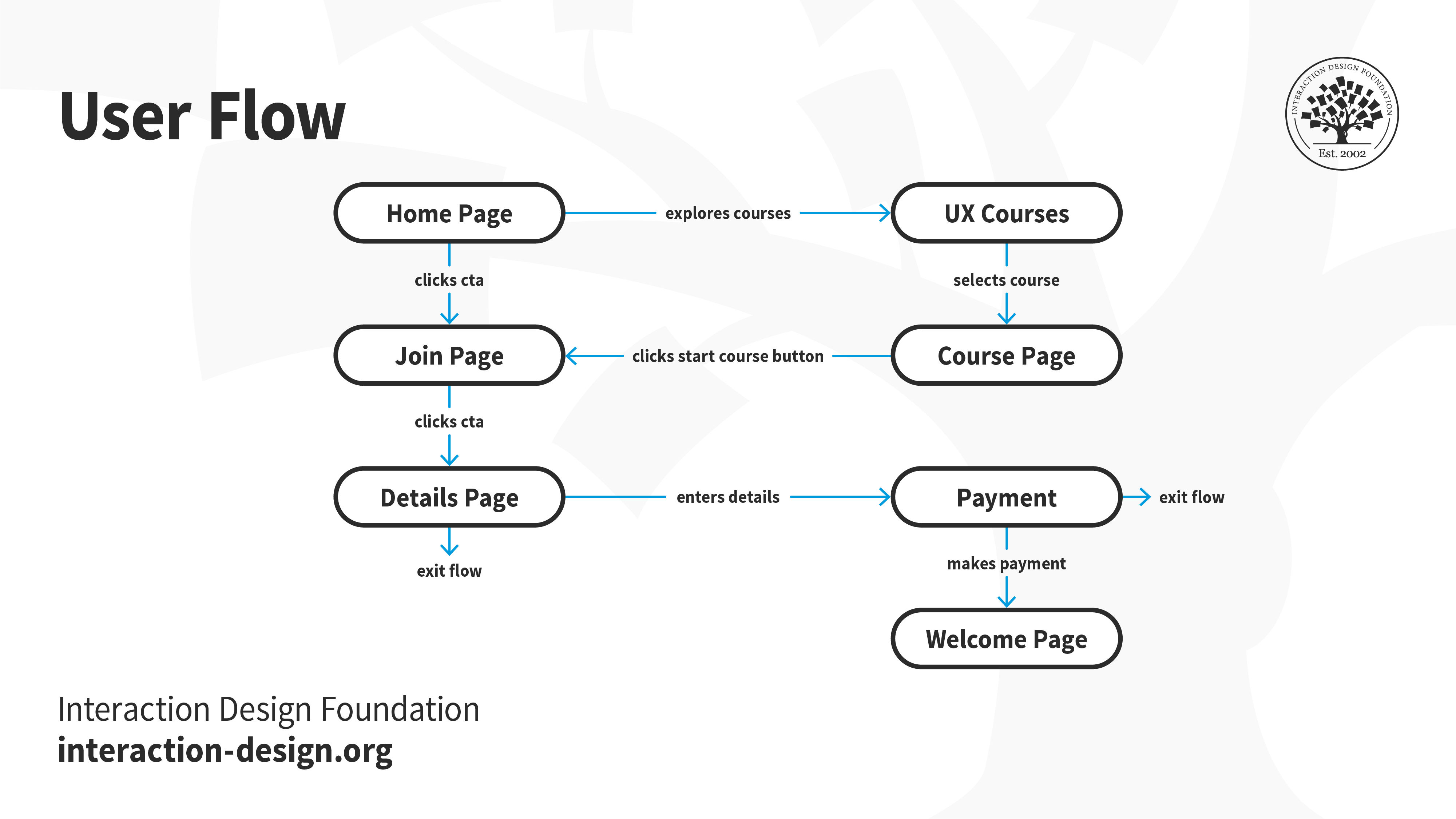
These are basic charts that outline which steps users must take with a design team’s proposed solution to meet a goal. They can evaluate—and swiftly—how efficient a process is to achieve user goals. They can also help identify how to execute good ideas found during brainstorming.
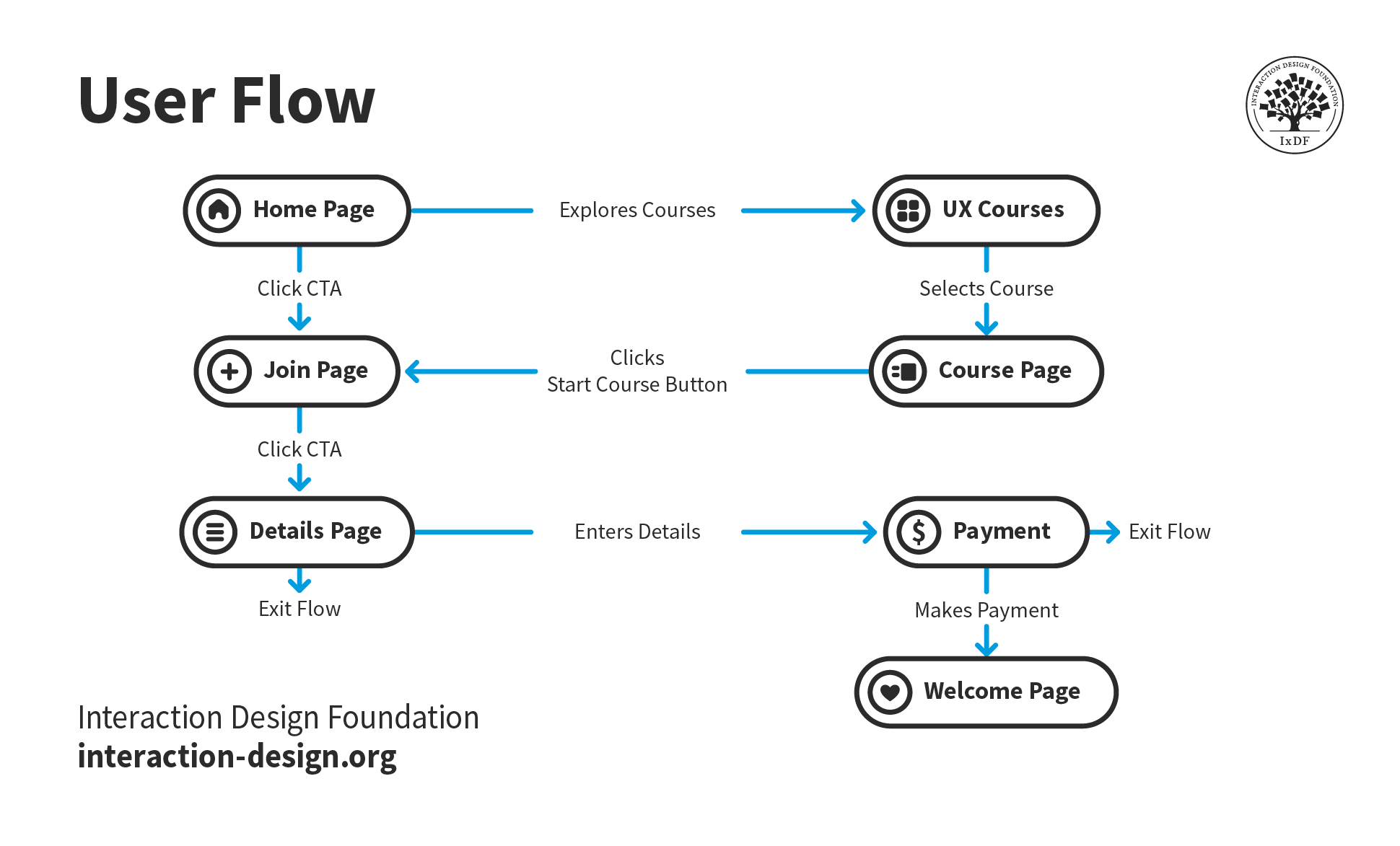
Image of a user flow (diagram).

© Interaction Design Foundation, CC BY-SA 4.0

A subtle difference to note is between these and task flows. Task flows tend to be more linear and focus on an individual task to be completed. As a result, they don’t usually factor in the complexity of the user, such as decision points. 

Interface Design

These deliverables are the first user interface (UI) “goods” designers create to represent proposed solutions for their design project. They include: 

Wireframes

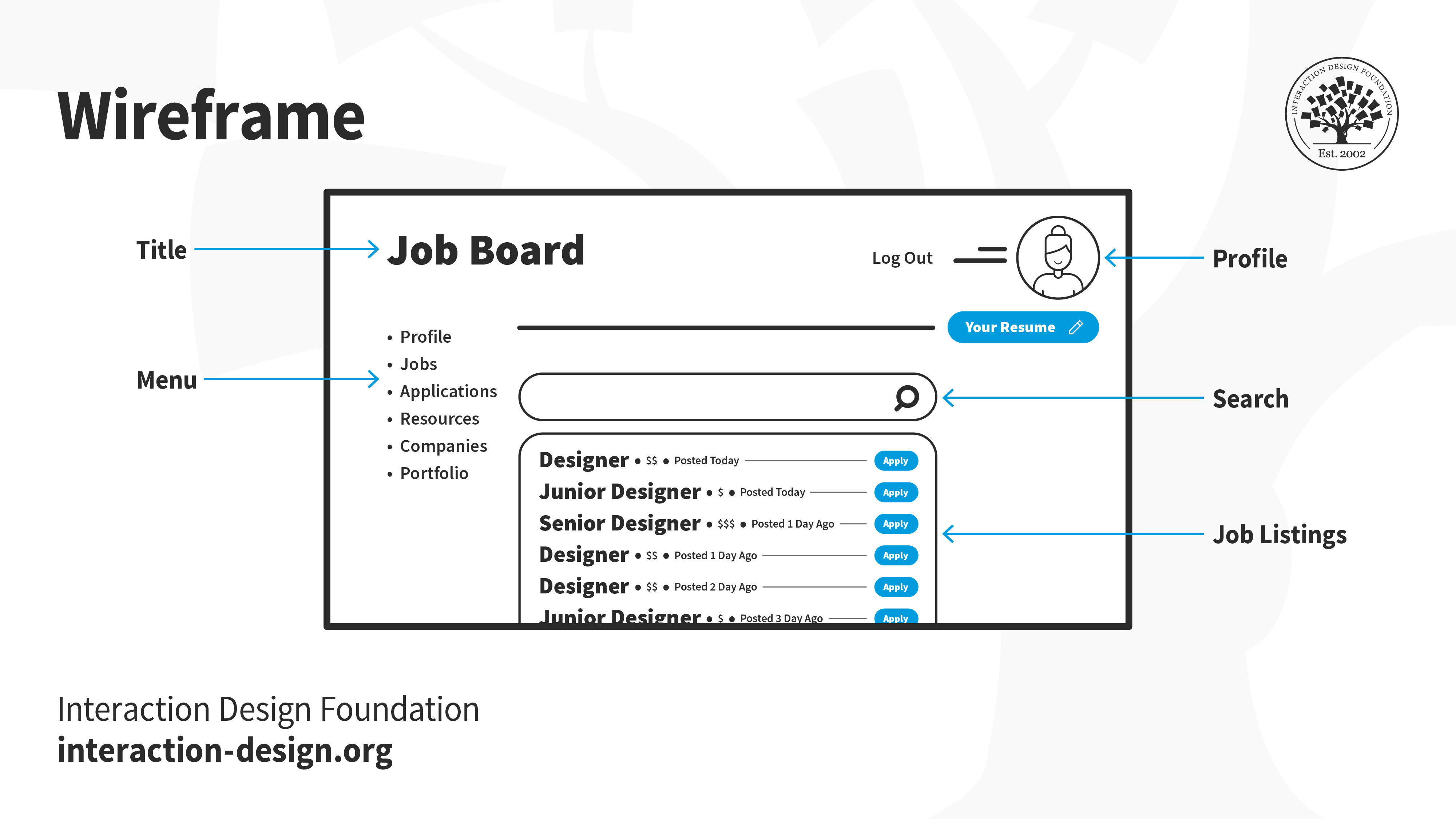
These are typically the first UI-oriented deliverables in a design process. Designers create wireframes typically to show early drafts of proposed solutions or ideas. It is a skill to craft lean layouts for stakeholders and team members to see whether an idea is worth pursuing. Wireframes are therefore usually grayscale and primitive, with designers building from user flows, sitemaps and such.  

Image of a wireframe showing a job board.

© Interaction Design Foundation, CC BY-SA 4.0

Prototypes

These deliverables range from low-fidelity sketches to high-fidelity interactive prototypes, simulating the final product for testing and validation.  

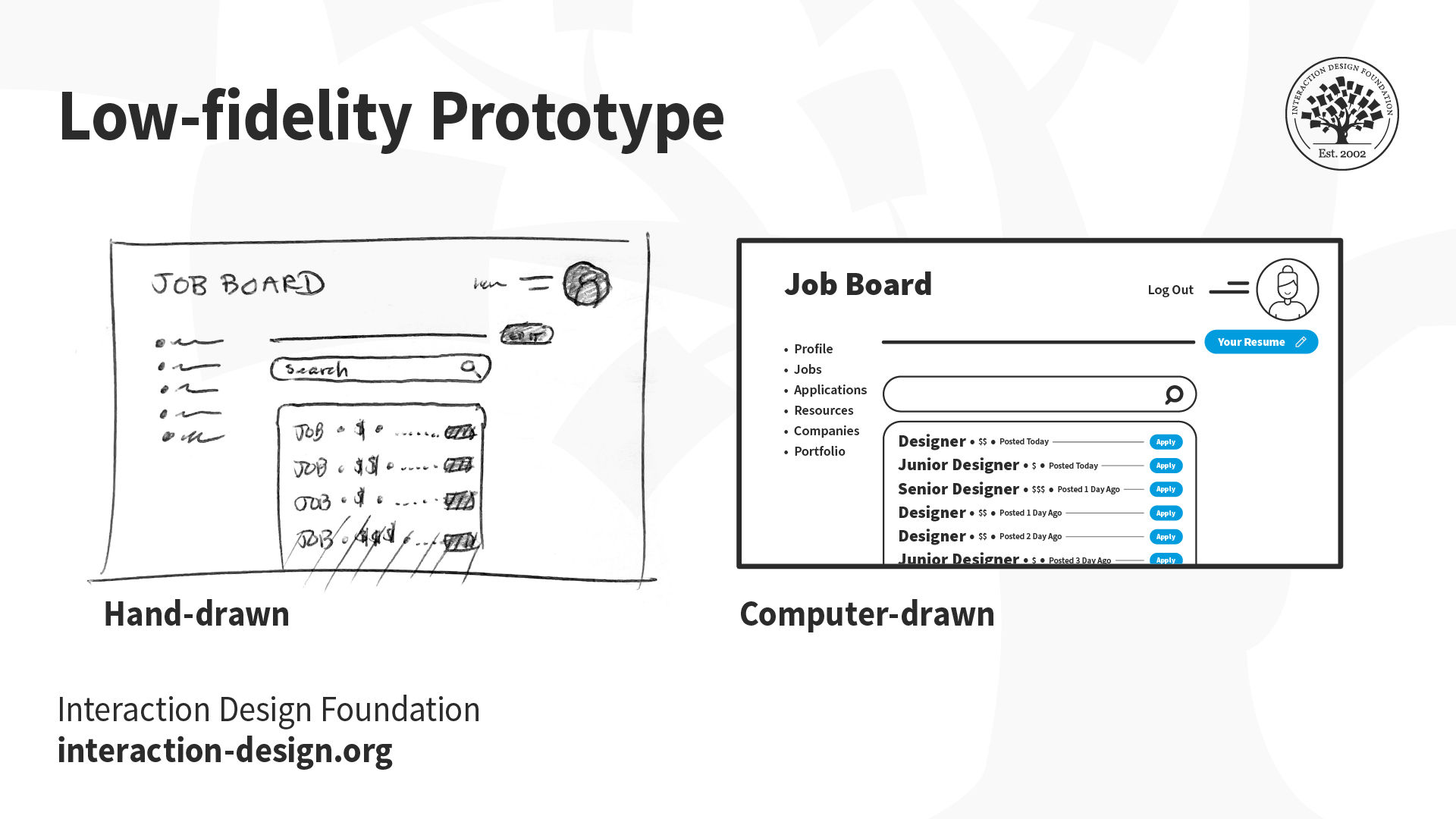
Low-fidelity prototypes are cost-efficient deliverables such as cut-outs. They can help work out—early on—what might or mightn’t work in a design.  
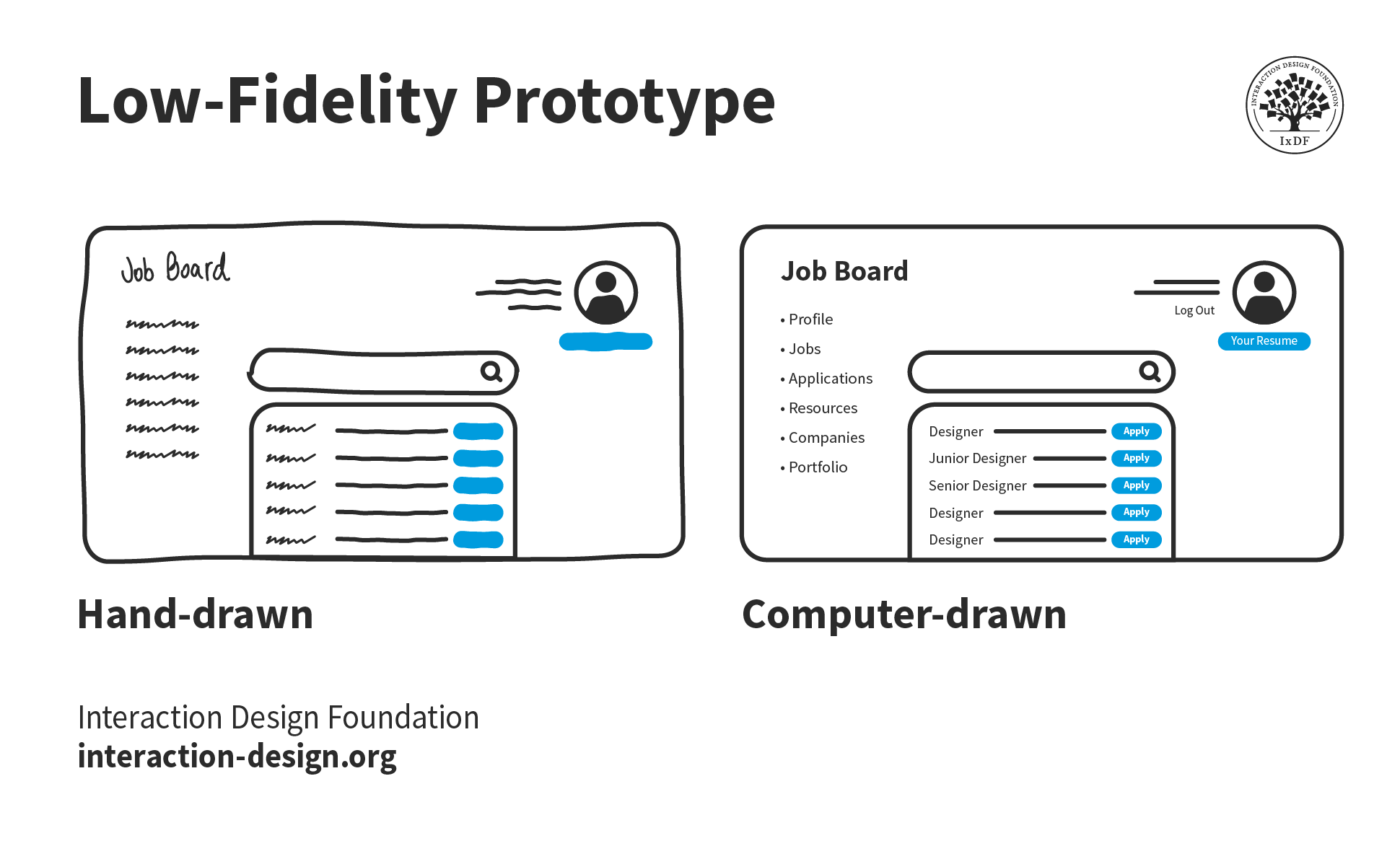
Image of two low-fidelity prototypes in hand-drawn and computer-drawn versions.

© Interaction Design Foundation, CC BY-SA 4.0

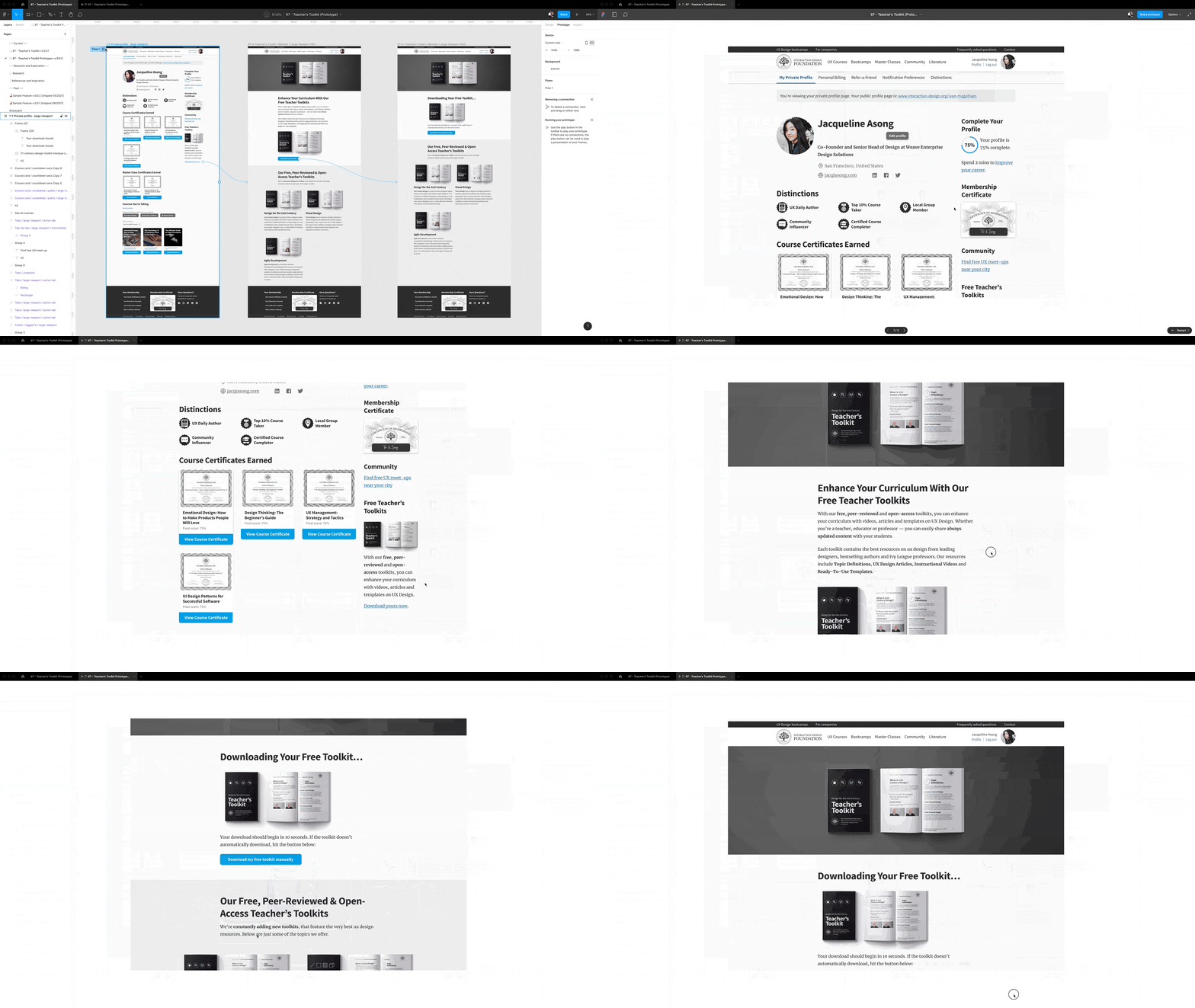
High-fidelity prototypes are more detailed and interactive—and they allow for comprehensive usability testing and feedback. A realistic representation of the final product is what they deliver—and that’s something that lets the design team find and fix any issues before the development stage comes into play. This makes sure that the final product isn’t just visually appealing but that it’s user-friendly and efficient, too. 
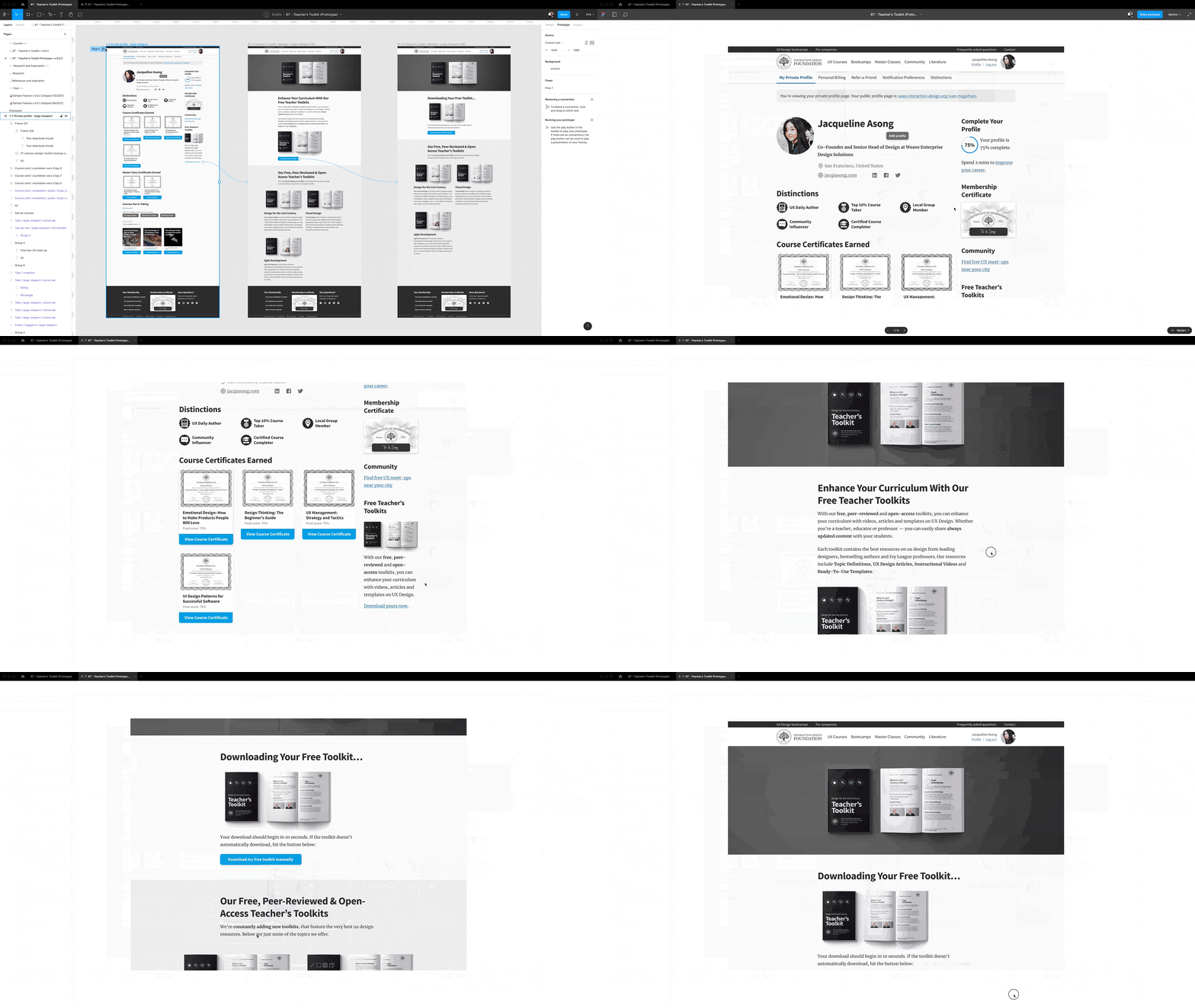
Gif image showing a high-fidelity prototype.

© Interaction Design Foundation, CC BY-SA 4.0

Information Design

Designers use information design deliverables to guide their users and help them achieve their goals. Text as well as audio-visual elements can represent this information. 

UX Writing / Microcopy

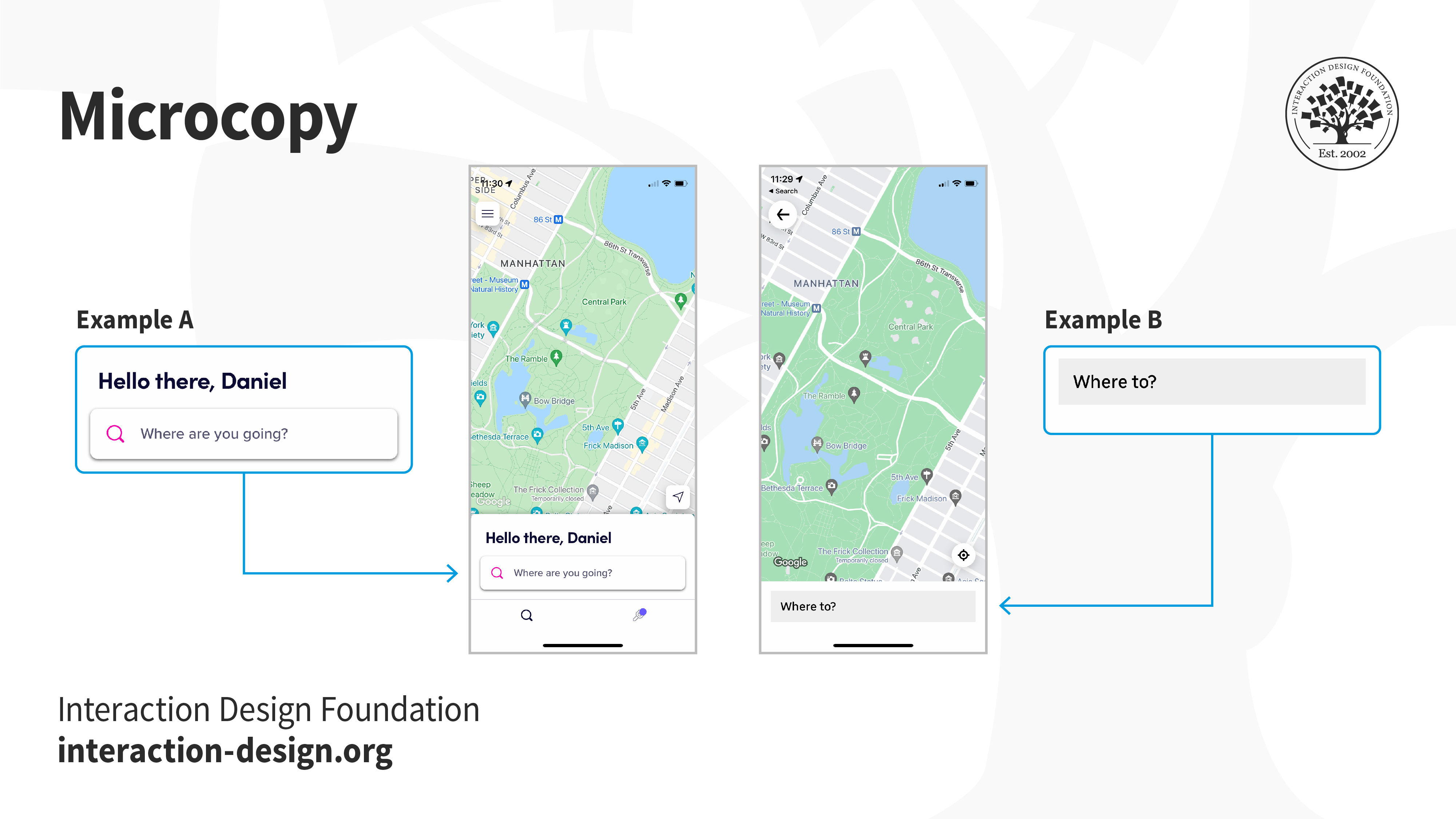
UX writing is a vital part of the conversation between digital products and their users. Microcopy is all the text—including headings, button labels, navigation menu items and error messages. These serve as vital cues for users to enjoy positive user experiences. 
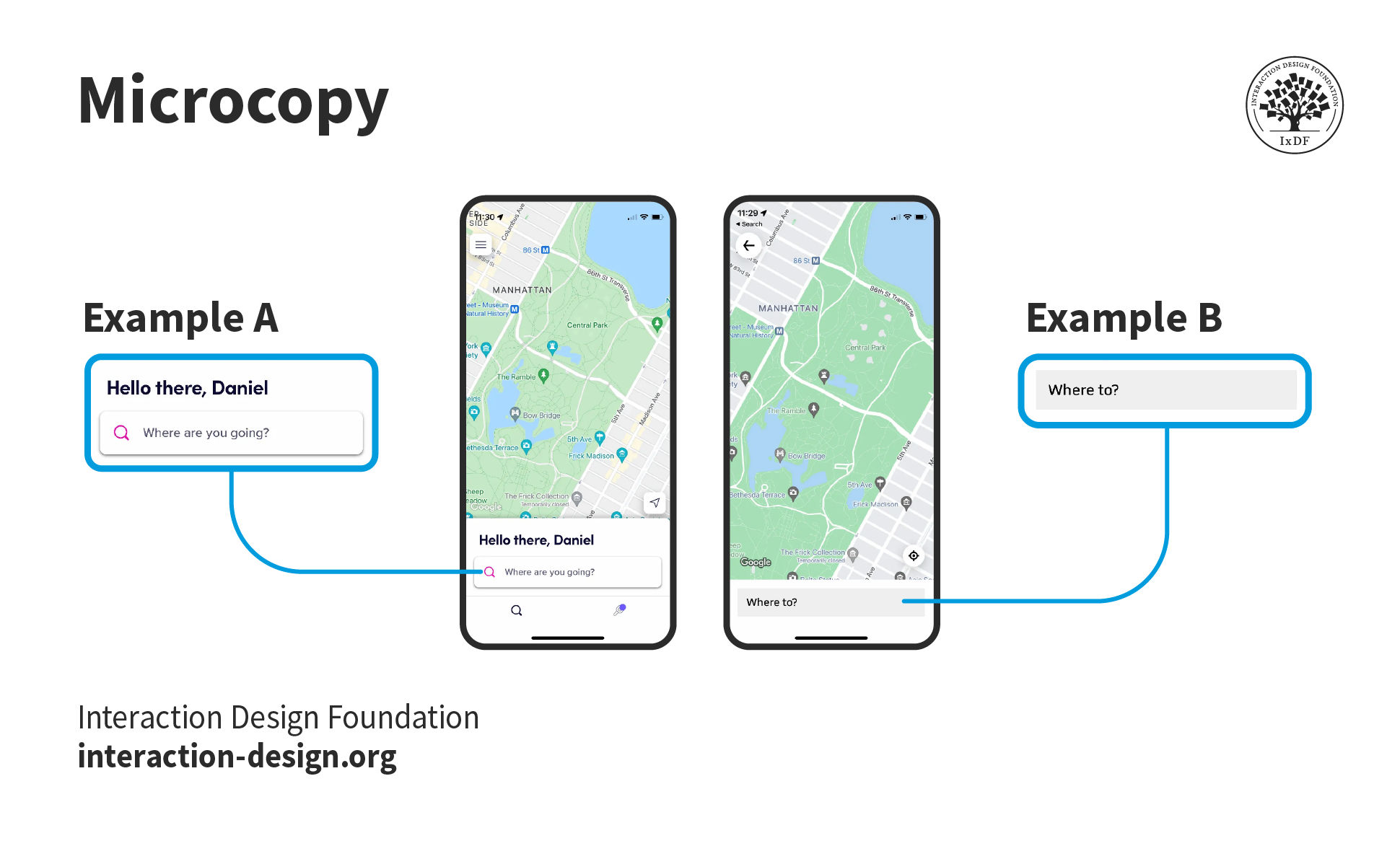
Image showing microcopy.

© Interaction Design Foundation, CC BY-SA 4.0

Visual Design

These deliverables—like pixel-perfect mockups and design systems—represent the final visual design of the product. They also include elements such as color palettes, typography and iconography. Visual design deliverables don’t just represent the brand’s identity and aesthetic in the product, but augment its functionality and usability as well. They make sure that there’s consistency in the visual elements across different platforms and devices—and so give the overall user experience a boost. 

Mockups

Designers make these refined images to mimic how a real product (e.g., an app) will look. They’re purely visual representations—and they’ve got no actual code behind them. 
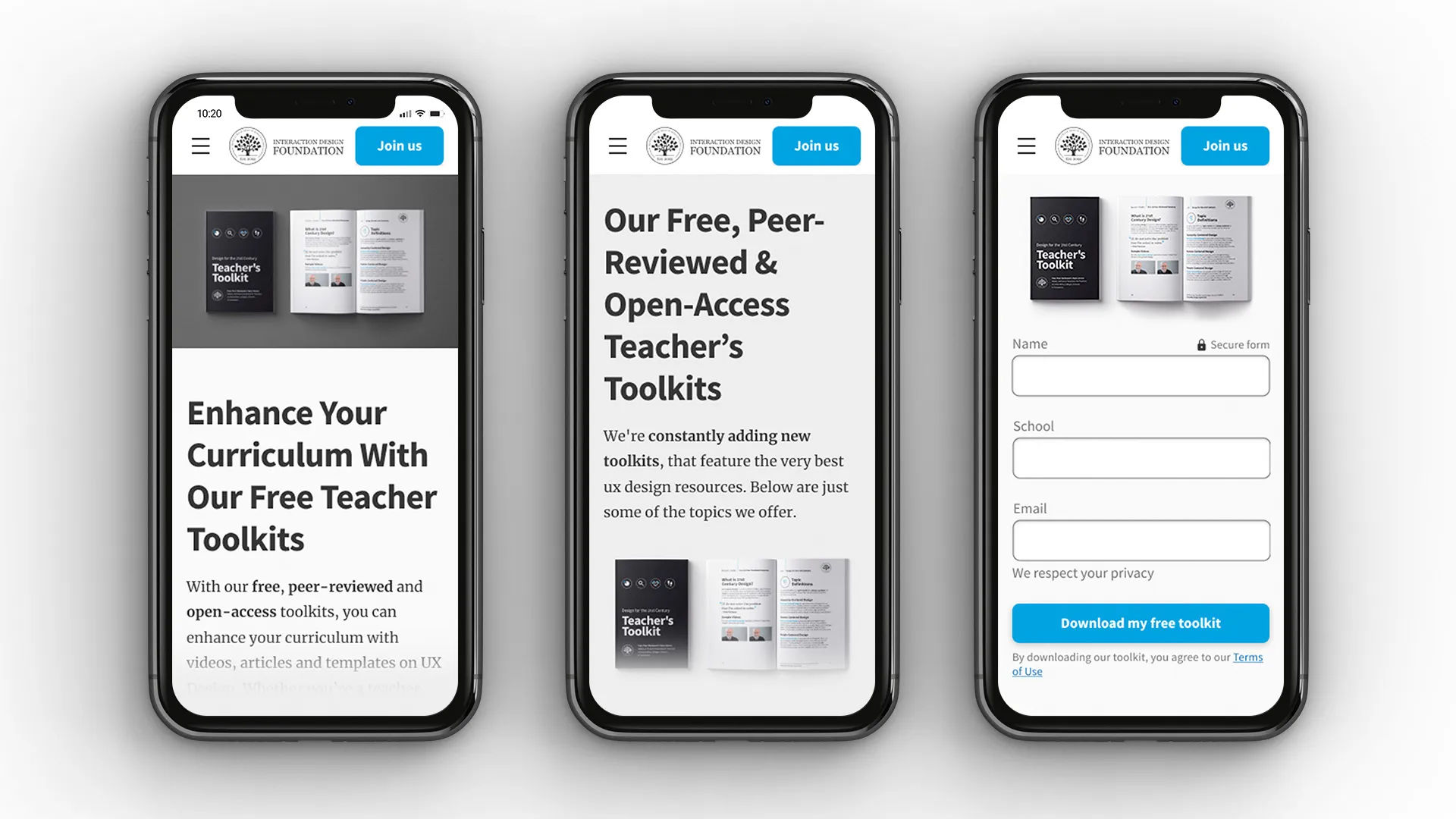
Image showing mockups.

© Interaction Design Foundation, CC BY-SA 4.0

Design Systems

Design systems are invaluable items that provide a library of reusable components and guidelines. For design teams, they're especially important because they help them keep consistency going in the design process and keep things efficient, too. They serve as a single source of truth—and help make sure that all team members are on the same page, and lower the risk of design inconsistencies as well. What’s more, they streamline the design process by eliminating the need to recreate elements—a bonus that saves time and resources. 

Evaluation Deliverables

This is where designers examine their peers’ work—to make sure they’re serving their users and brand best​​​​.

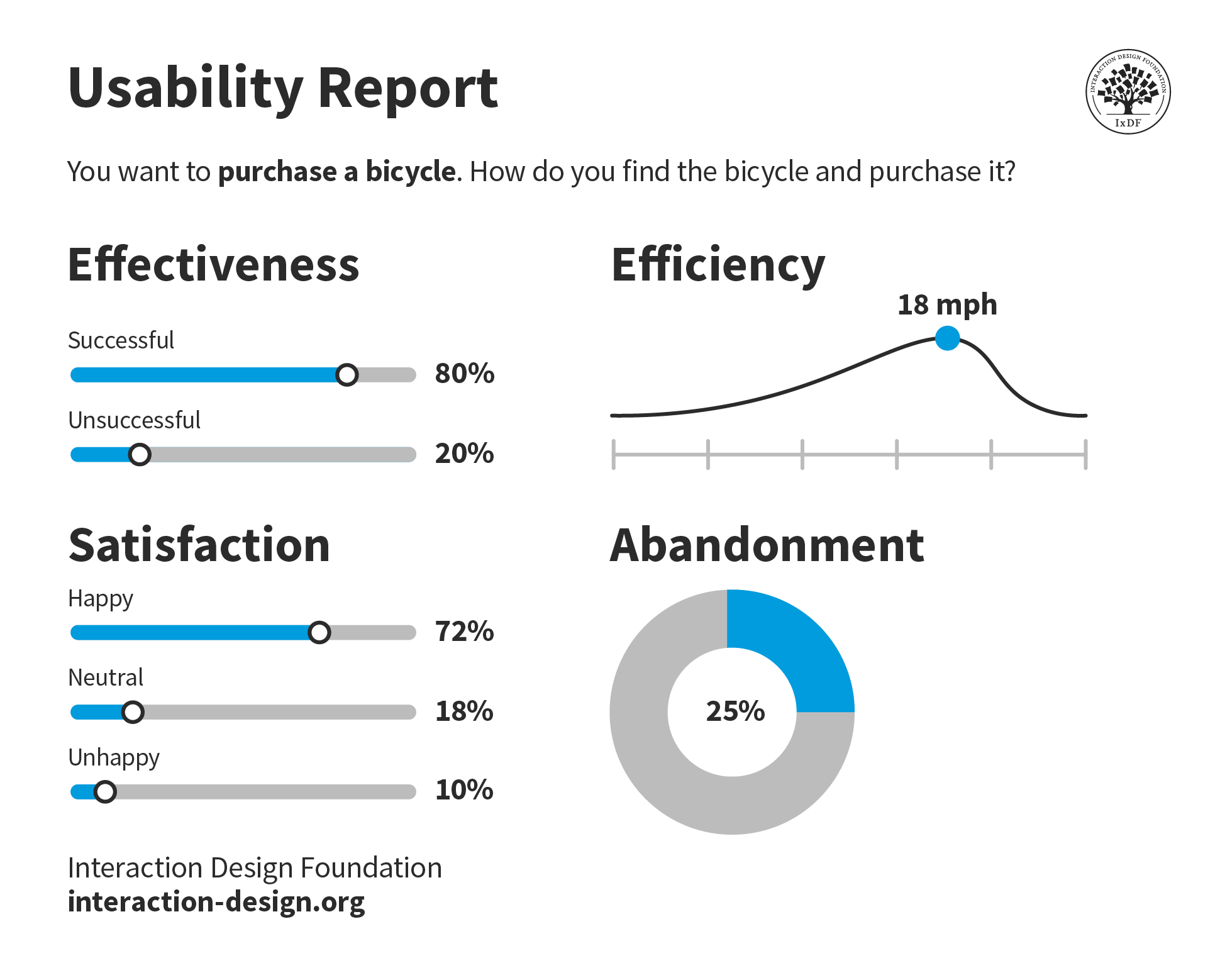
Usability Testing

These deliverables—namely usability test reports—provide insights into the product’s usability and user satisfaction. They’re especially valuable for product design or service design as they give a direct measure of how well the design meets user needs and expectations. They offer a principally qualitative assessment of the product’s performance. What’s more, they identify areas where the design excels and where it falls short. This feedback is vital—and designers can refine the design, make necessary adjustments and make sure the final product is something that’s both functional and enjoyable for the user. 

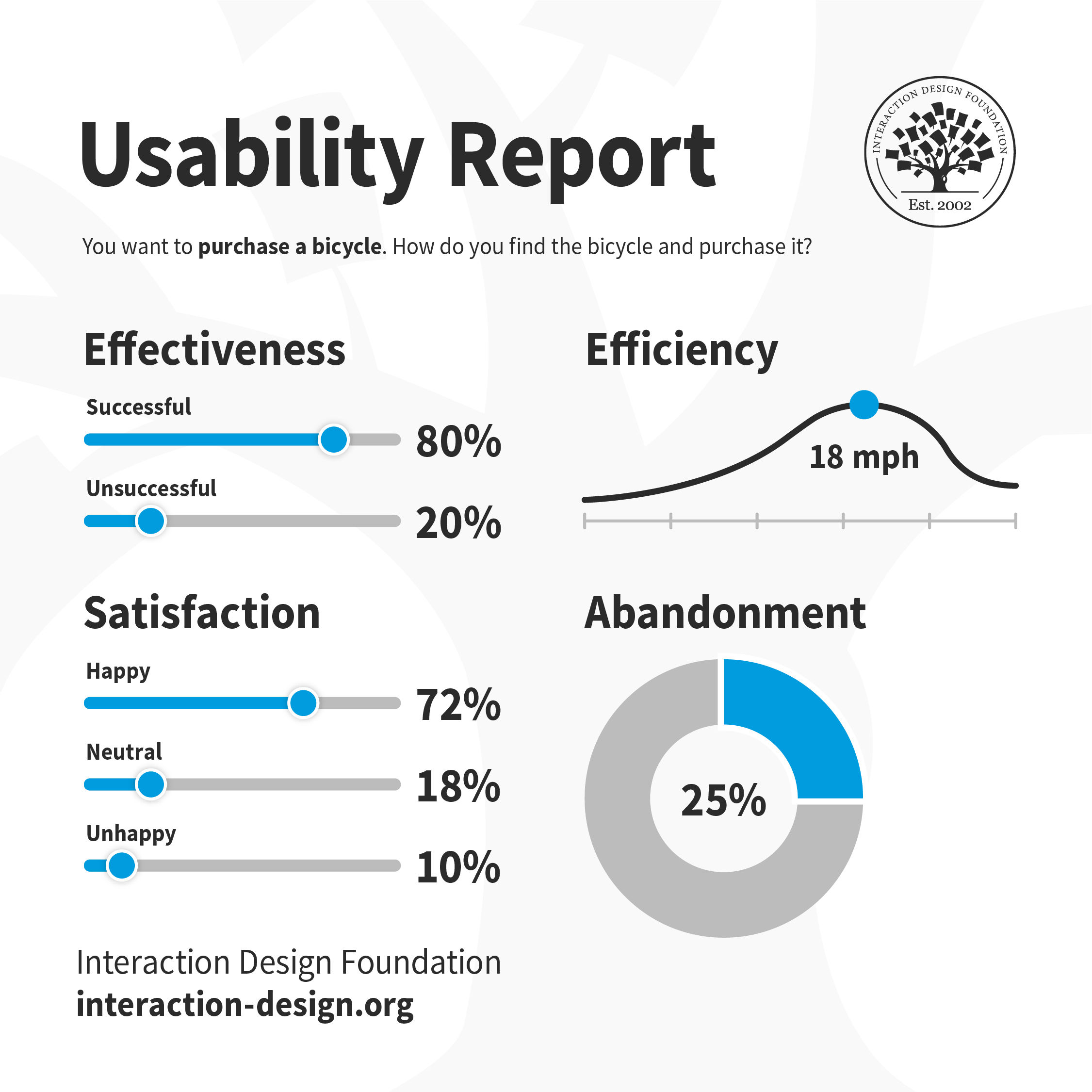
Of the many ways they can evaluate a design, designers summarize their findings in a usability report. Depending on the roles of the team members who read it, designers will include more or less technical detail. Nevertheless, a well-structured usability report typically contains a background summary, methodology, test results, and findings and recommendations​.​​

Image showing a usability report.

© Interaction Design Foundation, CC BY-SA 4.0

Analytics Data

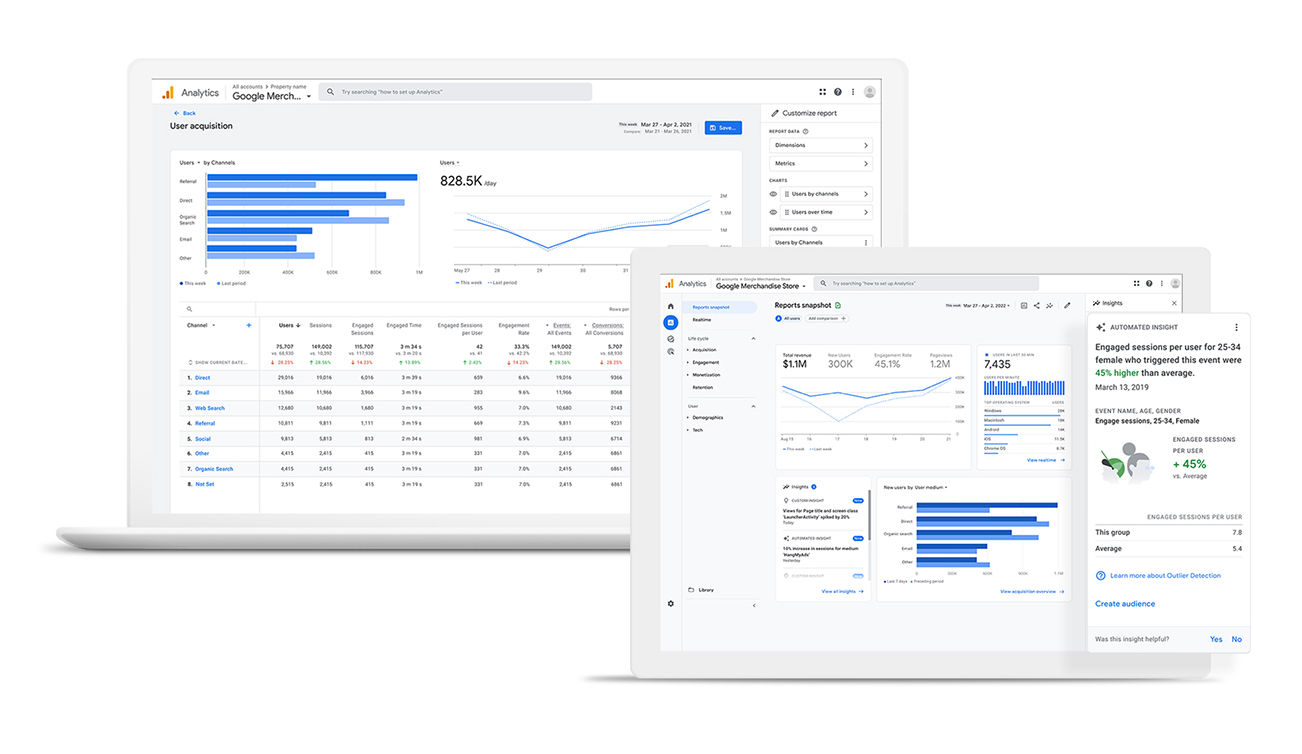
After a product release, the brand can present data collected from website traffic, user interactions, and other measurable events to help identify trends, patterns, and areas for improvement. Designers can use the data from an analytics report to find helpful insights to improve usability. For example, they might find an app’s users aren’t completing a call to action (CTA). They might use this insight and investigate further—perhaps through a usability test—to determine that users don’t notice that CTA available. Designers need to structure these reports so likely explanations and recommendations complement the facts they expose and interpret.  
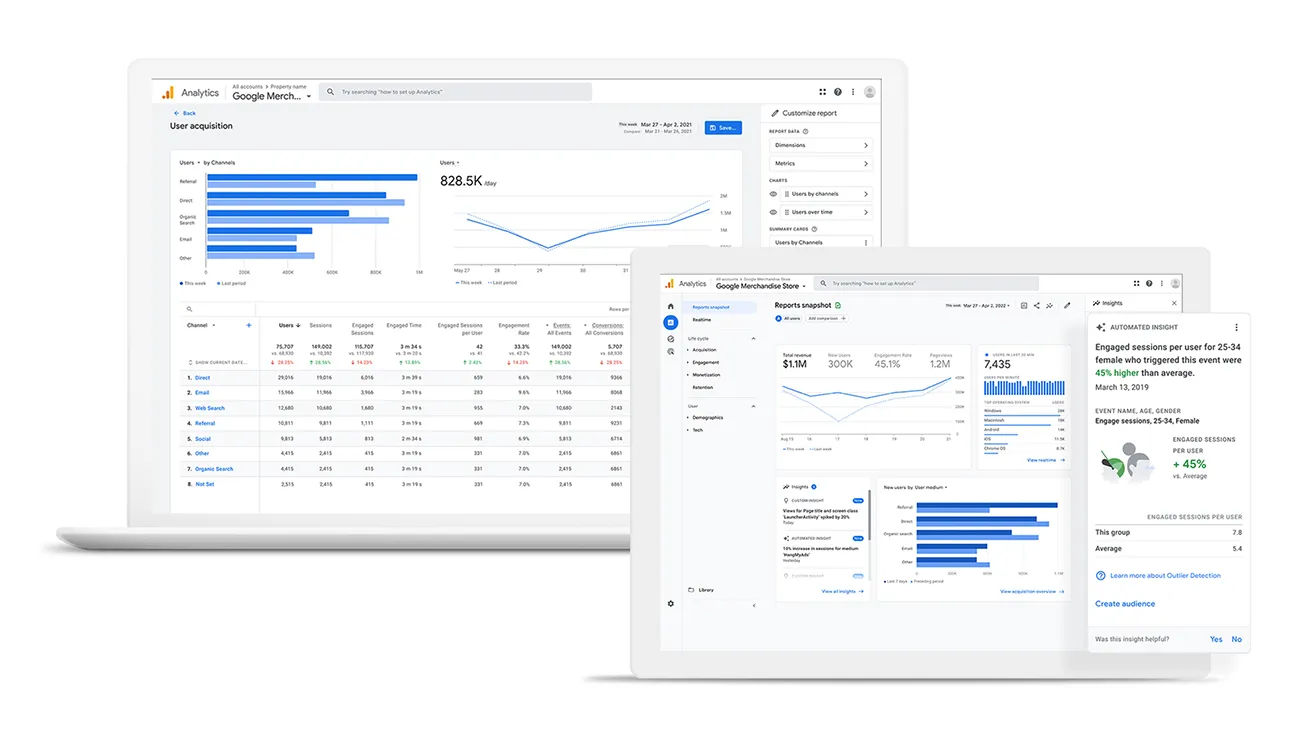
Image showing analytics reports.

This analytics report reveals that engaged sessions per user for a certain category of female (users) who triggered an event were 45% higher than the average.

© Google, Fair use

Navigating UX Deliverables in Different Design Styles: Waterfall and Agile

The creation and use of UX deliverables can vary greatly depending on the design style that a team adopts. In a Waterfall process, team members finish the design phase before they hand over their work to the ​developers ​to work on the project. There, UX deliverables often ​include​ detailed documentation—and could include in-depth user research reports, extensive wireframes and high-fidelity prototypes. 

​​On the other hand, in an Agile design process, stages often overlap—and involve iteration. There, UX deliverables tend to be leaner and more flexible. This could include quick user personas, low-fidelity sketches, and interactive prototypes that team members can quickly test and iterate upon.​

​​​​Laura Klein, UX designer and author of Build Better Products and UX Design for Lean Startups, explains the iterative nature of Agile teams. 

Transcript
   

Best Practices to Create and Progress with UX Deliverables

It takes a series of collaborative activities among the UX team and stakeholders to make the best deliverables. A simplified process is to: 

1. Identify the Needs

Designers start by identifying the needs of the project and the stakeholders. They determine what information they need to inform their design decisions, and what their stakeholders need to understand and approve those decisions.  

2. Choose the Deliverables

Based on these needs, designers choose the most appropriate deliverables. Every project is unique—and not all deliverables are necessary for every project. For example, designers in a design thinking process might choose deliverables like empathy maps, user personas and prototypes. These tools can help them empathize with their users, ideate solutions and test their assumptions. However, ​for some projects, the team might favor a ​more data-driven approac​​h, and they might prefer other deliverables to guide their design decisions. For example, they might choose user flow diagrams, data visualizations or A/B test results. 

3. Create the Deliverables

Designers use their UX skills and tools to create the deliverables. They could conduct user research, create wireframes or craft prototypes, for example. In the case of user research, ​they​ have a variety of quantitative research and qualitative research methods to choose from​. ​​F​or example, ​they can use interviews ​and usability testing as qualitative methods, and A/B tests and surveys as quantitative methods.​  ​  

For wireframing, they can use pencil sketches or digital tools like Sketch, Figma, or Adobe XD to create a visual guide that represents the skeletal framework of their product. When they craft prototypes, they can choose low-fidelity prototypes for initial testing or high-fidelity prototypes for more detailed and interactive testing later. 

4. Present and Discuss

Designers present the deliverables to stakeholders and discuss their findings and decisions. It’s an opportunity for feedback and iteration. Design itself is communication, so it’s important to make deliverables that clearly show findings or intentions. Stakeholders can give their insights and perspectives. The team can then work these into the next iteration of the deliverables. This iterative process is something that makes sure that the final product is ultimately not just user-centric but that it aligns with the business objectives and stakeholder expectations, too. 

5. Agree and Handover

Once all parties agree on the design decisions, it’s time to hand over the deliverables. This is a pivotal time. Design team members therefore must be clear on who is responsible for continuing with which deliverable and what the time frame is for the next stage. Sprints mark this in an Agile process. 

Here, Hype4 co-founder Szymon Adamiak discusses the importance of communication and handovers as part of a good design process. 

Transcript
 

The Importance of User Testing in Revising and Refining UX Deliverables

Remember, the role that user testing plays in revising and refining UX deliverables is a truly vital one. It gives direct feedback on the design from the end-users—and it lets designers spot and address issues well. For instance, usability testing can reveal navigation issues in a wireframe. Meanwhile, A/B testing can help optimize a prototype’s interface. And when they incorporate user testing into the design process, designers can make sure that their deliverables aren’t just user-centric but user-validated, too.  

It’s impossible to overstate how important testing is—especially when it comes to deliverables. UX deliverables are the tangible proof of the design process. They showcase the thought, effort and expertise that go into creating a user-centric design. They serve as a roadmap—and so guide the design team towards the final product. Meanwhile, they make sure that the team keeps user needs and business objectives top of mind. Without thorough testing and iterative refining, these deliverables will almost certainly not accurately reflect user needs or project goals. They’ll represent wasted resources from a team with squandered talent. 

CEO of Experience Dynamics, Frank Spillers explains why​ ​​​usability testing is so important. 

Transcript
 

Points of Concern with UX Deliverables

Design teams have to take care not to design the wrong thing. Likewise, they’ve also got to pay close attention to the effectiveness and accuracy of the UX deliverables they work on. Many things can go wrong if a team has overlooked certain points or a product manager has misinterpreted the user research data. For example, if a team doesn’t accurately interpret user feedback, they might end up designing an unwanted feature—one that actually hinders the product functionality. Similarly, if the product manager doesn’t clearly communicate business objectives, the design team might focus on the wrong aspects of the product. So, it’s essential for teams to make sure that clear communication and accurate interpretation of data are realities whenever they’re working with UX deliverables. 

Another risk is that clients can sometimes assume that a mockup means a design is close to its release date. Designers can prevent this if they clearly state what such deliverables indicate regarding the stage of the design process.  

Among other potential pitfalls is that teams often create prototypes in high-fidelity in later stages of design. When prototypes are in high-fidelity, design teams already invest a lot of time and effort and may be unwilling to make changes or accept feedback.  Changes will become more expensive to implement in any case. 

It’s also vital to keep storytelling in sight throughout the process. Storytelling is a particularly powerful driving force in UX deliverables. It really empowers designers to visualize and communicate the user’s journey through the product. This makes sure of a human-centered, user-centric design effort. 

Finally, the size of the UX team will be a deciding factor in who does what. For example, larger teams may have specialist information architects. In smaller teams, one or two designers might need to assume many roles, including the information architect, interaction designer, UX writer and visual designer.  

Overall, it takes careful planning, research and effective communication to produce the best deliverables. Prominent brands—such as Airbnb and Google—invest in and produce fine deliverables to further their products. No matter how large or small an organization or client is, UX design teams have got to remember to always align deliverables with business goals and user needs—at every stage. It’s also important for them to leverage a variety of deliverables—so they make sure they create products that truly resonate with their users, time and time again.  

Questions About UX Deliverables?
We've Got Answers!

What is a UX specification document?

A UX specification document—also known as a UX spec—is a detailed outline that designers and developers use to understand the user experience of a product or service. It includes information on layout, interactions, visual design and user flow. It makes sure of consistency and clarity in the design process and a high level of user-centered design in design projects and final products. 

The creation of a UX specification document involves several steps. Designers need to define user needs, map out user journeys and detail the user interface elements. This document is something that becomes a crucial reference for both the design and development teams. It helps them make really sure that they think about every aspect of the user experience and implement it consistently. 

For instance, in an e-commerce app or website, a UX spec might detail how users navigate from the homepage to completing a purchase. It would include information about button styles, interaction patterns like swiping or scrolling—and the layout of product pages. 

Actionable insights for creating an effective UX specification document include: 

  • Start with user needs: Understand and document the key needs of target users. 

  • Detail user journeys: Map out how users will navigate through a product. 

  • Specify interaction design: Clearly define how users will interact with each element. 

  • Include visual design elements: Provide details on colors, typography, and iconography. 

  • Iterate and collaborate: Continuously refine the document in collaboration with the design team. 

How is technology impacting the creation of UX deliverables?

Technology is significantly impacting how design teams create UX deliverables in several ways: 

  • Enhanced collaboration: Tools like Figma and InVision make it easy for design team members, development team members and other stakeholders to collaborate in real time. It’s something that permits seamless design iterations and feedback. 

  • Rapid prototyping: Advanced software lets designers create high-fidelity prototypes, and quickly—ones that are interactive and close to the final product. This reduces the time and resources spent on revisions. 

  • Accessibility and inclusivity: Automated tools help make sure that designs meet accessibility standards—something that makes it easier for a wider audience to use planned digital products such as websites or apps. 

  • Data-driven design: Technologies like AI and analytics tools shed insights into user behavior—which enables data-driven decision-making in the design process. 

  • Virtual and augmented reality: VR and AR technologies are creating new dimensions in UX design—and they permit the creation of immersive experiences and testing in simulated environments. 

  • Automated testing: Tools that automate usability testing can quickly collect user feedback. This benefit in the testing process is something that helps team members to improve UX deliverables faster. 

  • Cloud storage and access: Cloud-based platforms make sure that deliverables are easily accessible and stored securely. From user personas and test results to many other elements of UX research, they’re cost-effective ways to facilitate remote work and version control. 

Overall, technology is making the creation of UX deliverables more efficient, collaborative, and user-focused. What’s more, technology, particularly AI (artificial intelligence) is helping design teams collaborate more effectively, as Product designer Ioana Teleanu explains in this video: 

Transcript
 

Overall, advances in technology are leading to better products and user experiences. These include many aspects of visual design, interactive design and ways to find how a user interacts with a product and so influence design decisions. 

Learn how to Design with and for Artificial Intelligence with this masterclass from UX professor, designer, executive and early innovator in HCI, Dan Rosenberg. 

What are the best practices for creating effective UX deliverables?

To make really effective UX deliverables, designers stick to best practices that make sure they’re useful, clear and actionable. Here are key practices to follow: 

  • Understand the audience: Tailor deliverables to the needs and understanding of the stakeholders. What’s valuable for a developer might differ from what a marketer requires. Understand users in the sense that you know what team members in your product design team need. 

  • Focus on clarity: Make sure that deliverables are clear and concise. Don’t overload them with unnecessary details that can hide key insights. 

  • Incorporate user feedback: Continuously integrate user feedback into the deliverables. This makes sure that the designs remain user-centered around a high level of UX research. 

  • Make them accessible and collaborative: Use tools that allow for easy sharing and collaboration—which encourages feedback and iterative improvements to information architecture, other aspects of visual design, and more. 

  • Align with business goals: Get UX deliverables to line up with the broader business objectives. They should address user needs while they contribute to the overall business strategy. If a brand’s business goals are focused well, they’ll account for great customer satisfaction, a solid competitive advantage and numerous other aspects of a winning product design. 

  • Iterate based on testing: Use usability testing results to refine and improve the deliverables. An iterative approach is key to effective UX design and to delight real users who can achieve their goals with well-designed digital products. 
  • Document decisions and changes: Keep a clear record of design decisions and changes—it’ll help keep the clarity and rationale throughout the design process. 

  • Visuals over text: Wherever it’s possible, use visuals to get ideas across. Diagrams, sketches and wireframes are often more effective than text-heavy documents—which can be time-consuming pain points. 

  • Stay up-to-date with UX Trends: Keep abreast of the latest UX trends and tools—that’s something that can bring new perspectives and methods for creating effective deliverables. 

  • User-Centricity: UX professionals should always prioritize the user’s experience and needs in every deliverable they create. User testing will confirm how user-centric a deliverable is, so stay ahead of the game in real time. 

See our piece 5 Stages in the Design Thinking Process for helpful insights into making the best UX deliverables. 

What is the role of UX deliverables in cross-functional teams?

It’s a crucial role that they play. They act as a bridge that connects various aspects of product development—and they’re important since they: 

  • Facilitate communication: UX deliverables provide a common language for different team members, so collaboration among team members—such as developers, marketers and product managers—becomes easier in problem solving and more. Deliverables help to clearly convey design ideas and user experience strategies to product teams, team leaders, market research personnel, and others involved. 

  • Align goals: Deliverables make sure that all team members are on the same page with the user’s needs and the product’s objectives. That alignment’s critical for the cohesive development of products or services in a UX design process towards their targeted audiences. 

  • Guide development: Deliverables like wireframes, prototypes and user flows offer tangible guides for developers. They make sure that the final product stands in line with the envisioned design—be it for a brand-new user interface or an existing product. 

  • Inform decision-making: Insights from user personas and usability reports help design teams and others who are involved in product development processes make informed decisions across various departments. And these can include items like marketing strategies and development priorities. 

  • Enhance collaboration: As they provide clear and visual representations of the product, UX deliverables make collaboration among product designers and other team members better. This collaborative team mindset is something that allows for efficient and effective product development—and it’s the backbone of the Agile approach. 

  • Permit iterative improvement: High-quality deliverables let teams iteratively improve the product; that’s because they provide a long-term basis for feedback and user testing. And that’s crucial for agile development processes. 

Overall, UX deliverables are instrumental in ensuring that cross-functional teams work synergistically in real time towards creating a product that is not only technically sound but also provides a great user experience.  

Watch our masterclass Design for Agile: Common Mistakes and How to Avoid Them by Laura Klein for insights into dynamics of cross-functional teams and more.  

What metrics are used to assess the success of UX deliverables?

There are several key ones: 

  • Usability Metrics: 

  • Task Success Rate: Measures whether users can complete specified tasks successfully. 

  • Error Rate: Counts the number of errors made by users while interacting with the product. 

  • Time on Task: Tracks how long it takes for users to complete a task. 

  • User Satisfaction Metrics: 

  • Net Promoter Score (NPS): Assesses user likelihood to recommend the product. 

  • Customer Satisfaction Score (CSAT): Gauges user satisfaction with the product or a specific feature. 

  • User Experience Questionnaires: Collect qualitative feedback on the user’s experience. 

  • Engagement Metrics: 

  • Daily/Monthly Active Users (DAU/MAU): Measures user engagement over time. 

  • Session Duration: Monitors the length of user interactions with the product. 

  • Conversion Metrics: 

  • Conversion Rate: Tracks the percentage of users completing a desired action. 

  • Drop-off Rate: Identifies at what point users are leaving or abandoning tasks. 

  • Retention Metrics: 

  • Churn Rate: Measures the rate at which users stop using the product. 

  • Retention Rate: Tracks how many users continue to use the product over time. 

  • Business Impact Metrics: 

  • Return on Investment (ROI): Assesses the financial return on UX initiatives. 

  • Customer Lifetime Value (CLV): Estimates the total value a customer brings during their relationship with the product. 

Each metric gives insights into different aspects of user experience and product performance—and helps professionals make data-driven decisions to improve their UX deliverables. 

See our piece The ROI of UX – Some Basic Metrics for further information on metrics regarding deliverables and more. 

Emerging trends in UX deliverables reflect the evolving landscape of technology, user expectations, and design methodologies. Here are some of the key trends: 

  • User-centered data visualization: As data gets more and more integral to decision-making, UX professionals are focusing on making user-friendly data visualizations—which involves making complex data easily understandable and actionable for users. 

  • AI and machine learning integration: Incorporating AI and machine learning algorithms into UX design is on the rise.  

  • Accessibility and inclusive design: This involves sticking to WCAG guidelines and designing for a diverse range of users. 

  • Voice user interface (VUI): Designing for voice interactions is becoming increasingly important. This involves understanding natural language processing and conversational UI design. 

  • Augmented reality (AR) and virtual reality (VR). 

  • Microinteractions: Focus on microinteractions, small design elements that enhance the user experience, is increasing.  

  • Motion design and animation: Using subtle animations and motion design can make interfaces more intuitive and delightful.  

  • Ethical design and privacy: With growing concerns about privacy and data security, UX designers are now more involved in creating transparent and ethical designs that protect user data. 

  • Collaborative and remote design tools: Tools such as Figma and InVision are popular for their collaborative features. 

  • Design systems and style guides: Creating comprehensive design systems and style guides helps maintain consistency and efficiency in UX design across large teams and multiple projects. 

What are some highly regarded books about UX deliverables?

Here are some popular good books about UX deliverables: 

Steve Krug's book gives practical web usability advice focused on eliminating unnecessary thinking for users. Its simple principles like avoiding jargon help designers improve sites. 

Jenifer Tidwell catalogs proven interface design solutions as patterns. This provides UI designers a toolbox of best practices to draw from. 

This book by Jeff Gothelf and Josh Seiden outlines the Lean UX methodology which focuses on rapid experimentation and iterative design to quickly learn about users. It has influenced many designers to focus on creating testable prototypes early and learning from real user feedback. 

Jesse James Garrett outlines a framework for breaking down and improving web site UX into five planes of user experience. This provides an organized process for developing sites. 

Kim Goodwin's book provides practical guidance on user research, information architecture, interaction design and visual design. It advocates designing holistically for user goals. 

What are common pitfalls to avoid in creating UX deliverables?

Common pitfalls that UX designers need to avoid when they create UX deliverables include: 

  • Lack of clarity: Don’t create deliverables that are ambiguous or too complex. Make sure that they’re straightforward and easy to understand for all stakeholders. 

  • Overloading with information: While thoroughness is important, don’t overload deliverables with excessive details. It can obscure key insights about real users, pain points, and more. Focus on the most relevant information. 

  • Ignoring the audience: Design deliverables with the audience in mind. What's useful for a developer might differ from what a marketer needs. Keep a high level of empathy in mind. 

  • Neglecting user feedback: It’s a critical mistake to disregard user feedback whenever you or other team members are creating UX deliverables. Bring user insights in to make the deliverables more user-centered. 

  • Failing to align with business goals: Make sure that UX deliverables are in line with the broader business goals and objectives. They shouldn’t just address user needs but contribute to achieving business outcomes, too. 

  • Not iterating based on testing: UX design is an iterative process—and to not update deliverables based on usability testing results is something that can lead to designs that do not effectively solve user problems. 

  • Poor documentation: Inadequate documentation can make it hard for team members to understand the rationale behind design decisions. Comprehensive documentation is essential for teams to meet user needs and business goals and objectives. 

To steer clear of these pitfalls, focus on creating clear, concise and relevant deliverables that are in line both with user needs and with business goals. Regularly update them based on user feedback and testing results. 

For extensive insights into and best practices of UX research, take our course: 

Transcript
 

What is the role of UX deliverables in user testing?

Deliverables make for a more comprehensive understanding of the user experience. This is something that makes user testing more effective and insightful—and here’s a breakdown of which deliverables feature where: 

  1. Planning tests: Deliverables like user personas and user journeys let testers understand the target users' needs, preferences and behavior patterns. This understanding guides teams to create testing scenarios that are relevanat for potential users. 

  2. Conducting tests: Prototypes, wireframes and user flows are critical during testing. They let real users interact with a product's design and functionality. This makes for a hands-on experience of the user interface and user flow. 

  3. Analyzing test results: Usability reports and user feedback are integral in analyzing the results of user tests. They provide insights into user behavior, preferences and areas of difficulty. These are vital for refining the design. 

  4. Iterative improvement: Based on the analysis, designers can make informed decisions to iterate and improve the product. This iterative process—which UX deliverables guide—makes sure that the final product runs closely in line with user needs and expectations. 

Overall, UX deliverables aren’t just documentation. They’re active elements in the user testing process. What’s more, they really guide the design towards a user-centered product where design team members minimize pain points for real users. 

What are the most common types of UX deliverables?

The most common types of UX deliverables are: 

  • User Personas: Fictional characters which designers create to represent different target user types. 

Transcript
 

  • Wireframes: Schematic blueprints, usually missing stylistic elements, that represent the skeletal framework of digital products. 

  • Prototypes: Interactive demos of a website or app. They can range from low-fidelity sketches to high-fidelity, fully functional demos. 

Transcript
 

  • User Journeys: Visual or textual representations of the user’s interactions and user behavior with a product. They show the sequence of steps the user takes to accomplish a goal. 

Transcript
 

  • User Flows: Diagrams that display the complete path a user takes when using a product in real life. 

  • Site Maps: Diagrams that illustrate the structure and hierarchy of a website. 

  • Usability Reports: Documents containing findings from usability tests.  

Each deliverable has a specific purpose. For example, user personas help team members to understand the target audience of their interactive design. Meanwhile, wireframes give a clear outline of a website or app’s layout and functionality. Prototypes allow for early testing and feedback that designers can apply to potential customers and—ultimately—to real users. User journeys and user flows visualize the user’s experience and interactions. Site maps organize and clarify content structure—while usability reports highlight areas for improvement. 

When designers create these deliverables, they should focus on clarity and effectiveness. It's crucial to make sure that these documents get the intended design and user experience across clearly to stakeholders. Consider taking our User Experience: The Beginner’s Guide course for a firm foundation on deliverables and much more. 

How do UX deliverables differ from other design deliverables?

UX deliverables specifically cater to user experience aspects but do not differ from other design deliverables in many ways.​ ​Designers must understand user needs, behaviors, and the overall journey within a UX context, and namely they: 

  • Focus on making deliverables that are specific to UX design such as user flows, sitemaps, information architecture (IA) and microcopy. 

  • Can include such deliverables for digital products when refining products post-release, something that physical product designers cannot do. 

  • Also can focus on the area of service design. UX designers examine the holistic end-to-end experience, where other design disciplines are far more specialized or narrow. 

  • Interactive Prototypes: UX designers frequently use interactive prototypes to test and refine user interactions. This is less common in other design and development areas. For creating products or services, especially high-quality digital products for a target audience, team members make prototypes to test how potential users might experience versions of a final product.  

What are highly cited scientific pieces of research about UX deliverables?

Here are some highly cited pieces of research on UX deliverables: 

This publication by Karen Smiley, Pankesh Patel and Jeff Harding—presented at the 2016 IEEE/ACM International Workshop on Continuous Software Evolution and Delivery (CSED)—addresses the critical challenge of bridging the gaps between technical experts and the development of software solutions. The authors discuss the importance of collaboration between technical experts and software developers—emphasizing the need for a mutual understanding and communication to ensure that the software solutions developed aren’t just technically sound but align with the specific requirements and expectations of the technical domain, too.  


This study, presented at the 2011 International Conference on User Science and Engineering (i-USEr), focuses on the development of mobile game-based learning (mGBL) applications. It addresses the need for specialized methodologies in creating educational games for mobile environments.  

Earn a Gift Earn a Gift, Answer a Short Quiz!

1
2
3
4
1
2
3
4
Question 1
Question 2
Question 3
Get Your Gift
Interaction Design Foundation logo

Question 1

What is the primary purpose of UX deliverables?

1 point towards your gift

  • To document and communicate design decisions and progress to stakeholders
  • To provide a detailed design plan and timeline for the project across all teams
  • To showcase the technical skills of the developers on the team
Interaction Design Foundation logo

Question 2

Which is an example of a UX research deliverable?

1 point towards your gift

  • Personas
  • High-fidelity prototypes
  • Open-source code
Interaction Design Foundation logo

Question 3

Why are wireframes important in the UX design process?

1 point towards your gift

  • They add basic visual details to the final product.
  • They are not technically important to the design process.
  • They provide a basic layout of the structure and functionality of a design.

Learn More About UX Deliverables

Make learning as easy as watching Netflix: Learn more about UX Deliverables by taking the online IxDF Course Design Thinking: The Ultimate Guide.

Why? Because design skills make you valuable. In any job. Any industry.

In This Course, You'll

  • Get excited when you discover that you don't need to start from scratch to use the secret recipes that empower companies like Apple and Google to shape the future. You just need a structure and proven methods to optimize what you already do. As AI becomes part of your day-to-day workflows, your ability to guide it with timeless human-centered skills such as strategic thinking, creativity, and empathy for real users is what turns AI into your superpower and delivers meaningful results.

  • Build on your existing creativity, problem-solving, and people skills to learn the powerful 5-stage method called Design Thinking. It's one of the key drivers behind Apple and Google's continuous innovation and provides a clear, structured way to solve real-world problems. You've already got the instincts, so it's easy to learn the method. 

  • Make yourself invaluable with hands-on skills in Design Thinking. Design Thinking can help you break into User Experience Design, product design, and tech. It's widely applicable, impactful, and fun! Use your skills to improve customer support processes, create new products, and even tackle big challenges like climate change. This human-centered approach is a key driver of business success because it guides you to systematically understand and address what your users really need and want. That's why Design Thinking skills can help you increase sales, keep customers loyal, and turn them into powerful advocates for your company.

  • Gain confidence and credibility as you effortlessly apply methods from all five stages of the Design Thinking process. You'll be guided to build empathy and gather insights into people's habits through user interviews. 

  • Use our downloadable templates to create affinity diagrams, empathy maps, and actionable "How Might We" questions. Develop solutions as you apply ideation and innovation methods. Create a paper prototype early and fast, then test and optimize your prototype to ensure that your users love it. More love, more impact, greater salary potential. 

  • Apply your new skills in an optional project where you'll design and test a user-centered experience that's perfect for your portfolio and career growth. Master Design Thinking to amplify your uniquely human strengths like empathy, intuition, and creativity, and confidently stay in demand as AI reshapes how teams work.

It's Easy to Fast-Track Your Career with the World's Best Experts

Master complex skills effortlessly with proven best practices and toolkits directly from the world's top design experts. Meet your experts for this course:

  • Don Norman: Father of User Experience (UX) Design, author of the legendary book “The Design of Everyday Things,” and co-founder of the Nielsen Norman Group.

  • Alan Dix: Author of the bestselling book “Human-Computer Interaction” and Director of the Computational Foundry at Swansea University.

  • Mike Rohde: Experience and Interface Designer, author of the bestselling “The Sketchnote Handbook.”

Get an Industry-Recognized IxDF Course Certificate

Increase your credibility, salary potential and job opportunities by showing credible evidence of your skills.

IxDF Course Certificates set the industry gold standard. Add them to your LinkedIn profile, resumé, and job applications.

Course Certificate Example

Be in distinguished company, alongside industry leaders who train their teams with the IxDF and trust IxDF Course Certificates.

Our clients: IBM, HP, Adobe, GE, Accenture, Allianz, Phillips, Deezer, Capgemin, Mcafee, SAP, Telenor, Cigna, British Parliament, State of New York

All Free IxDF Articles on UX Deliverables

Read full article
14 UX Deliverables: What will I be making as a UX designer? - Article hero image
Interaction Design Foundation logo

14 UX Deliverables: What will I be making as a UX designer?

What does a UX designer actually produce? Here, we will explore the concept of UX deliverables, a term that describes the outputs of a UX design process during its various stages. The deliverables produced by UX designers vary according to their role in the design team and also depending on the meth

Social shares
1.2k
Published
Read Article
Read full article
How to Create Research-Backed User Personas: The  UX Designer's 2025 Guide - Article hero image
Interaction Design Foundation logo

How to Create Research-Backed User Personas: The UX Designer's 2025 Guide

Great design starts with great understanding—if you know the real problems people have, you can build solutions that they love. So, how do you communicate who these people are, their needs, and the challenges they face? You can’t empathize with a 100-page research report. But you can empathize with

Social shares
566
Published
Read Article

14 UX Deliverables: What will I be making as a UX designer?

14 UX Deliverables: What will I be making as a UX designer?

What does a UX designer actually produce? Here, we will explore the concept of UX deliverables, a term that describes the outputs of a UX design process during its various stages. The deliverables produced by UX designers vary according to their role in the design team and also depending on the methods and tools used by each role. We will provide an overview here of some of the most common types of deliverables.

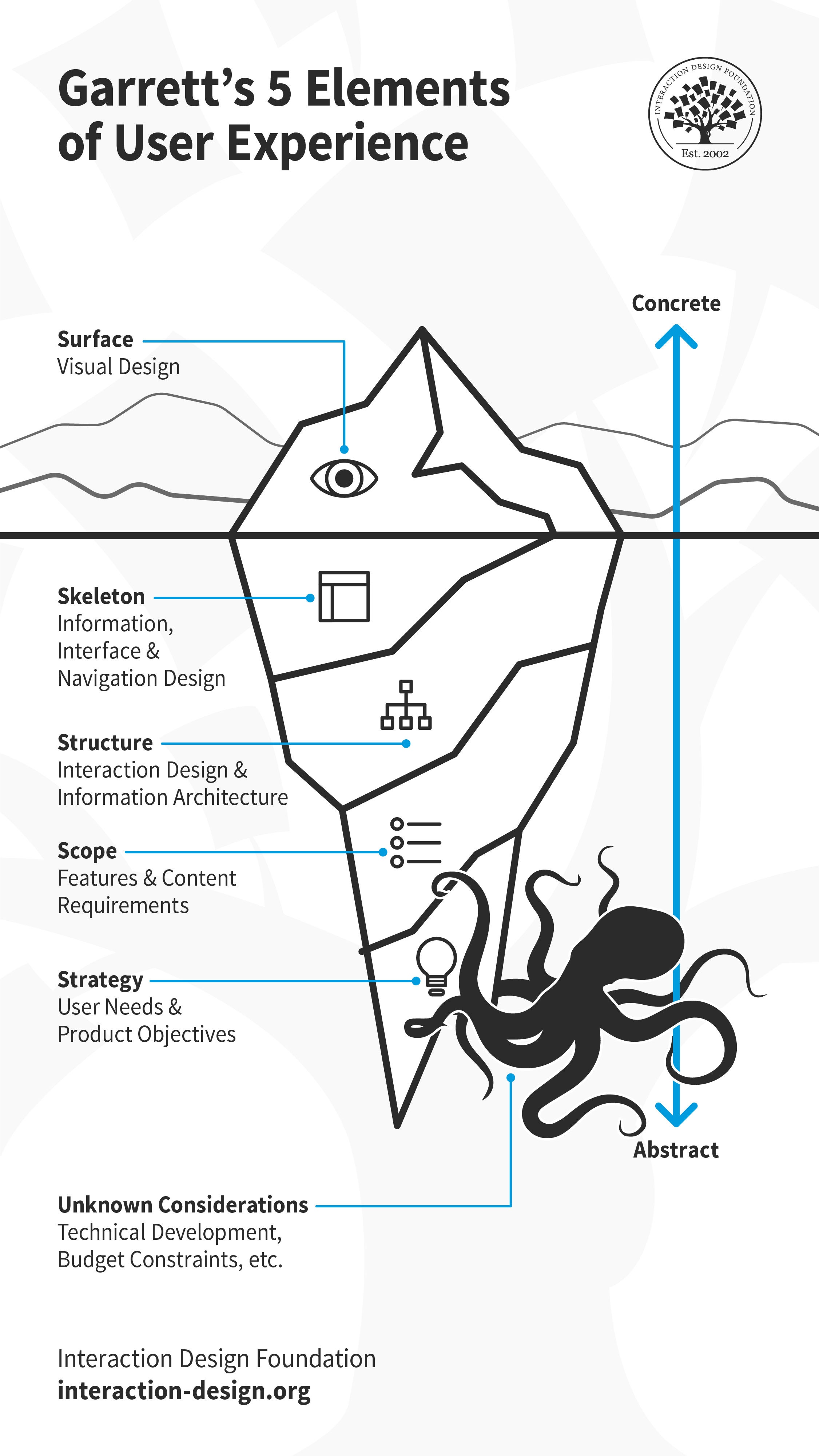
When you join a UX team, you might find yourself on unfamiliar grounds. Every team has its preferred (or defined) tools, methods and processes. While there is no single, gold-standard UX design process, most teams’ process follows closely with Jesse James Garrett’s 5 elements of user experience. Building up from the most abstract, Strategy, to the most concrete, Surface, each element has a few associated activities. Let’s look at each of these closely, and a few common deliverables associated with them.

Jesse James Garrett's five elements of user experience design depicted as an iceberg, with all but the surface element submerged underwater.

Much like an iceberg, visual design is only the surface of user experience. Underneath, there is so much more including skeleton, structure, scope and strategy. These layers are by no means standalone, and influence each other. Decisions taken at one plane can cascade up or down the layers. There will likely be other considerations that emerge later, which might impact the experience. For example, if the team encounters technical challenges or budgetary constraints during development, they might have to revisit some design decisions.

© Interaction Design Foundation, CC BY-SA 3.0

Tip: Detach Yourself from Your Deliverables

As a UX designer, you will find yourself working on different types of projects, each demanding a unique approach. While you must familiarize yourself with as many tools and methods as possible, in practice, you will likely use only some of them regularly, and others for exceptional cases. No matter which design activity you conduct, remember to detach yourself from the deliverables.

Design is a fluid activity, and you must mentally prepare yourself to adapt to changes — internal, external, known and unknown. For example, you will often find yourself revising your designs after a usability test. This could be at the surface, skeleton or even strategy level. Sometimes your research might reveal new insights that prompt you to reconsider the product’s core value (strategy). Perhaps the technical team runs into a roadblock that makes it difficult to implement your solution (scope). In all these, and many other cases, you (and your team) will need to adapt your design decisions.

As designers — as humans — we tend to get attached to our work and find it hard to change course. The beauty of (and indeed the toughest challenge in) design is to be open to iteration. Always remember, iteration is a crucial part of a UX designer's work, and you will rarely ever create a “final” deliverable in the first attempt. 

User Needs and Product Objectives

“If I had an hour to solve a problem I'd spend 55 minutes thinking about the problem and five minutes thinking about solutions.”

— Albert Einstein

Albert Einstein's words are true for any new project that you begin, and especially so for UX design. When you join a UX team, you might work on a new product, building it from the ground up. Or, you might join at a time when the product is already built and launched and the team is looking to enhance it incrementally. No matter which stage or shape the product or service is in, you will need to dig in and understand the product objectives and user needs before you begin your work. By building (and reading) personas, storyboards and customer journey maps, you can get a better understanding about why you are designing, and for whom.

1. Personas

Illustration depicting a user persona.

© Interaction Design Foundation, CC BY-SA 3.0

A persona is a fictional character which the designers build as a sort of user stereotype. It represents the typical users, their goals, motivations, frustrations and skills. Other information such as demographics and education backgrounds complete the persona. Depending on the scope of the projects, designers will generate a number of different personas to capture as wide a part of the audience as possible. Generating personas helps designers empathize with the users and demonstrate a thorough understanding of who they are and what they want to achieve.

Example of a user persona. Demographics, skills, goals and frustrations are represented visually or in text.

© Interaction Design Foundation, CC BY-SA 3.0

2. Storyboards

Illustration depicting storyboards.

© Interaction Design Foundation, CC BY-SA 3.0

A storyboard is an idea borrowed from the movie industry. It essentially consists of a comic strip, outlining the user’s actions and circumstances under which these are performed. The power of this idea is that it doesn’t only demonstrate what the user does, but it also reveals the environment, which might be affecting how or why the user does something.

Sketchbook containing hand-drawn storyboards

A storyboard helps visualize the users’ actions and also the environment in which they take place. While mostly used for empathizing with the users, storyboards can also be used to help illustrate alternatives in interaction design.

© Interaction Design Foundation, CC BY-SA 3.0

3. Customer Journey Maps

Illustration depicting a customer journey map.

© Interaction Design Foundation, CC BY-SA 3.0

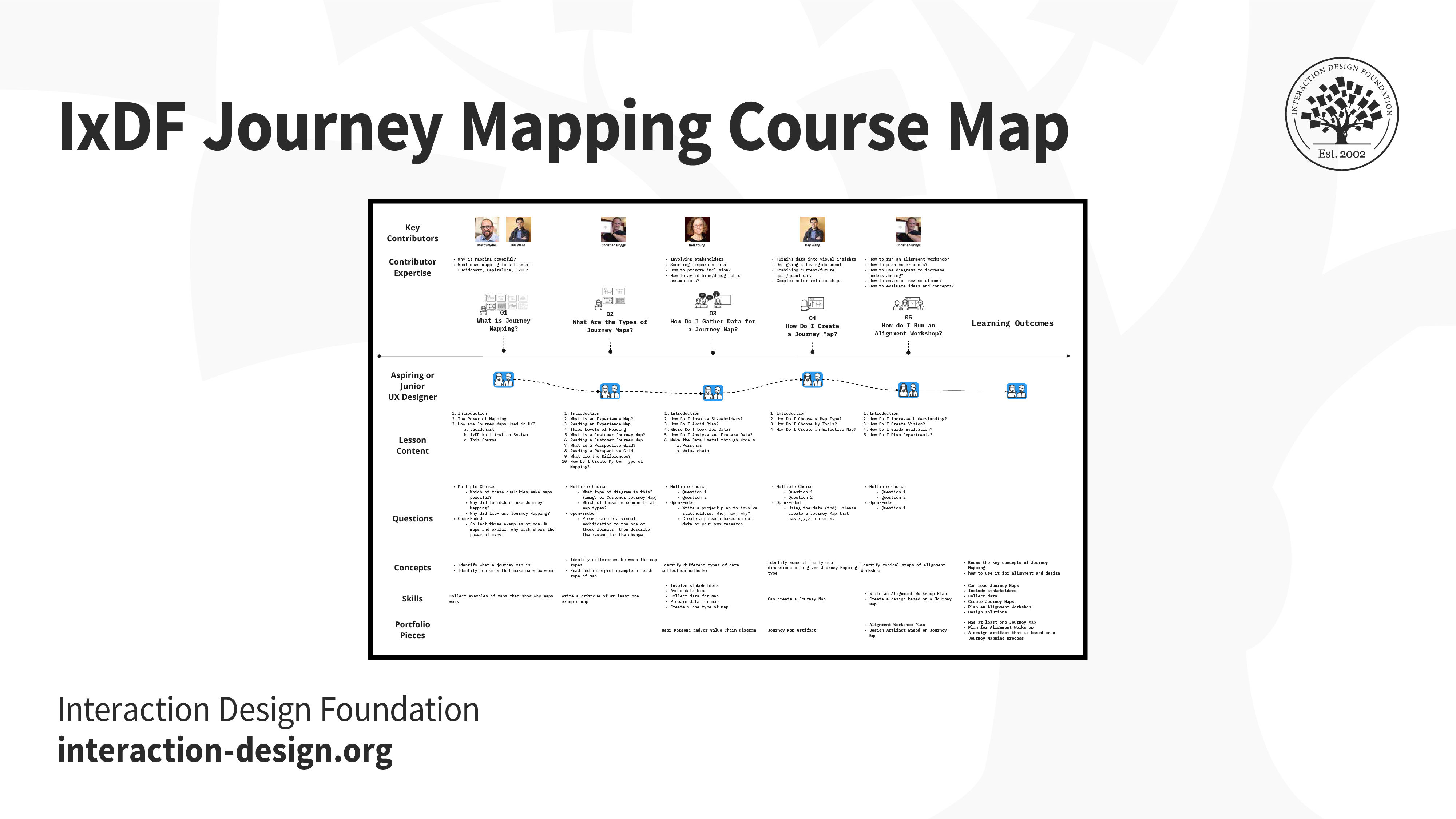
A customer journey map is a diagram that represents the steps (i.e., the process) taken by a user to meet a specific goal. By laying the process out along a timeline, designers can understand the changes in the user’s context, and their motivations, problems and needs along the way. By identifying the major stumbling blocks for users, the designers can better relate to their problems and begin to see where a product or service might fit along the way to help the user.

Birds-eye view of the IxDF Journey Mapping Course.

Customer journey map of a student's course experience.

© Interaction Design Foundation, CC BY-SA 3.0

Features and Content Requirements

As a new UX designer, you might be asked to design certain features or work around pre-defined requirements. As a more experienced designer, depending on the team you join, and your role, you might be involved in conversations about what those features and requirements might be. In each of these cases, you will likely participate in brainstorming sessions: to generate ideas for new features, or for implementing those features. 

4. Brainstorming

Illustration depicting brainstorming.

© Interaction Design Foundation, CC BY-SA 3.0

Brainstorming is a process whereby a team of designers generates ideas about how to address the issues and opportunities identified in the user research phase. The concept here hinges on the generation of as many ideas as possible (even if they are completely wild) so that the designers can later sift through these and reduce them to the ideas that seem most promising. A central point is that the team members are free to explore all angles and realms; indeed, the best solutions can sometimes sprout from the craziest-sounding notions.

Groups of sticky notes against a window pane

Sticky notes are incredibly useful in brainstorming sessions. Designers write down all of their ideas — one idea per sticky note. Sticky notes enable the team to move ideas around, grouping ideas into themes in real time while discussing them. Having all the ideas sorted and visually laid out in one space makes it much easier for the team to narrow down, and ultimately pick the best idea to develop further.

© Interaction Design Foundation, CC BY-SA 3.0

5. Content Strategy

Illustration depicting content strategy.

© Interaction Design Foundation, CC BY-SA 3.0

“Content strategy plans for the creation, publication, and governance of useful, usable content. Content strategy plans for valuable, findable, meaningful content.”

— Kristina Halvorson, author of Content Strategy for the Web

Content strategy is the practice and process of ensuring that content is written, published, edited, repurposed and archived at the right time, and for the appropriate audience.

Content strategy is extremely important if you’re working on a product that is content-heavy, such as an online magazine. It is also relevant for non-publication-oriented products. In a fiercely competitive market, digital marketers often rely on content to increase traffic (that’s marketing-speak for potential users). Your users will likely see marketing communication and content before interacting with your product, thus setting expectations. As a UX designer, you may not be directly involved in creating a content strategy, but you must work closely with the person (or team) who works on it, to ensure the communication matches your design.

Information Architecture and Interaction Design

The information architecture is analogous to the blueprint of a house. Larger UX teams might have specialist information architects and interaction designers, while in smaller teams, UX designers will likely perform these roles.

Designers often use different types of flowcharts to visualize the information and interactions, such as sitemaps and user flows.

6. Sitemaps

Illustration depicting a sitemap.

© Interaction Design Foundation, CC BY-SA 3.0

You might have come across sitemaps while browsing different sites. Like physical maps, they help you find your way through a website. UX designers often create similar sitemaps to show the hierarchy and navigation structure of a website or an application. Such maps are often produced for mobile apps as well. They show how the content will be organized into logical “screens” or sections, and how the user may transition from one section of your service to another.

An example sitemap which shows how content on a website is organized and how a user can navigate each section.

© Interaction Design Foundation, CC BY-SA 3.0

7. User Flows

Illustration depicting a user flow.

© Interaction Design Foundation, CC BY-SA 3.0

A user flow (also known as a task flow) diagram is a simple chart outlining the steps that a user has to take with your product or service in order to meet a goal. In contrast to the customer journey map, the user flow diagram considers only what happens with your product (that is to say, ignoring all external factors). These diagrams can help designers quickly evaluate the efficiency of the process needed to achieve a user goal and can help pinpoint the “how” (i.e., execution) of the great ideas identified through brainstorming.

An example user flow showing the user’s actions within an application.

© Interaction Design Foundation, CC BY-SA 3.0

Interface Design

8. Wireframes

Illustration depicting wireframes.

© Interaction Design Foundation, CC BY-SA 3.0

Just as a sculptor creates a wireframe before slapping on clay to craft a statue, an interface designer too creates a wireframe before adding in the details. Wireframes are the first interface-related deliverables in the UX design process and are just a step away from the surface layer and visual design. They are the first tangible elements of the proposed ideas or solutions.

An example wireframe which brings together structure, navigation, information architecture, layout details, and more. Designers rely on hand-drawn sketches, sitemaps and user flows to create a wireframe. They can be an intermediary step between sketches and prototypes.

© Interaction Design Foundation, CC BY-SA 3.0

Good wireframing is the skill of creating lean layouts so your team and stakeholders can quickly determine if concepts are worth developing. They are typically grayscale and do not include visual or branding elements. 

9. Prototypes

Illustration depicting a low-fidelity prototype.

© Interaction Design Foundation, CC BY-SA 3.0

A prototype is a simulation of the product or solution you want to build. It is an early version of a product or feature with which people can interact. Prototypes allow you to bring your idea closer to life before investing time and energy in building the real thing. You can test your idea with real people to identify friction points and iterate on your design — without having to write a single line of code. Common types of prototypes include low-fidelity and high-fidelity.

Low-fidelity prototypes

A low-fidelity prototype omits any visual design details and serves as a rough guide to allow designers to get a feel of how and where they should place content. Low-fidelity prototypes can start as hand-drawn sketches (which are great, because they are fast and cheap to produce, so you can easily throw them away if you change your mind) and later refined as computer-drawn wireframes, which are more faithful to the presentation of information on a real screen, but still lacking visual design details.

Examples of hand-drawn (left) and computer-drawn (right) low-fidelity prototypes.

© Interaction Design Foundation, CC BY-SA 3.0

High-fidelity prototypes

A high-fidelity prototype is a step up from a low-fidelity prototype. They are often called pixel-perfect prototypes because they try to show all the visual and typographic design details of a product, as it would be shown on a real screen. They take into consideration physical screen dimensions and are produced in a size that corresponds to the physical device’s size. Although these require a lot more time to produce compared with low-fidelity prototypes, they are often the type of illustration that you would want to show to a customer or stakeholder.

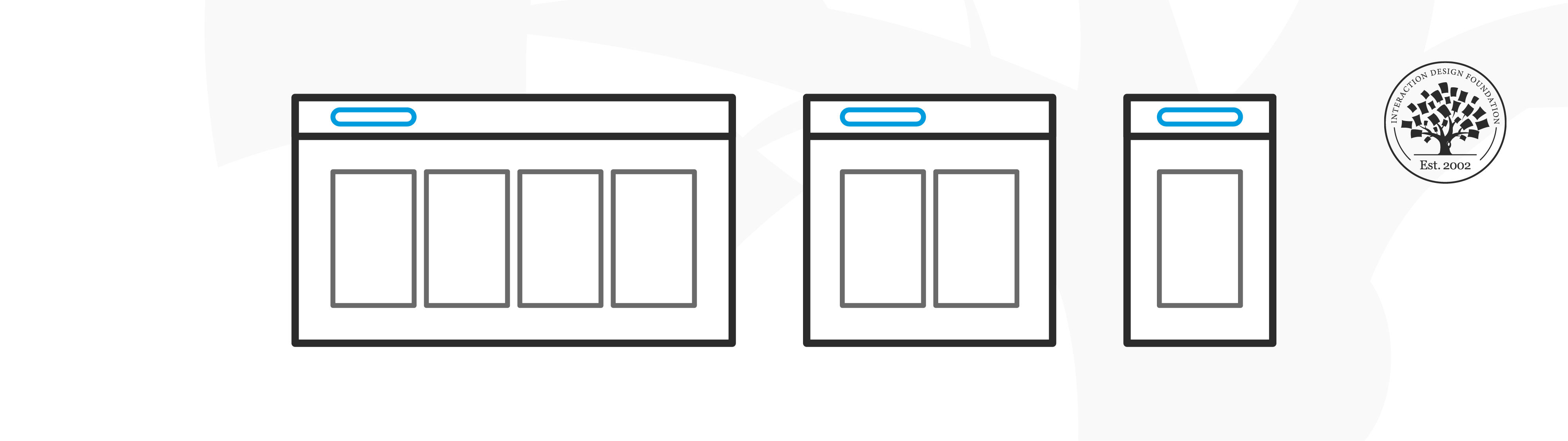
An example of a design and high-fidelity prototype for desktop.

© Interaction Design Foundation, CC BY-SA 3.0

Information Design

The information that you present on an interface plays a significant role in guiding the user and helping them accomplish their goals. Information can refer to text, as well as audio-visual elements, such as animated gifs, explainer videos and voice-overs.

10. UX Writing / Microcopy

Illustration depicting information design.

© Interaction Design Foundation, CC BY-SA 3.0

UX writing is the practice of choosing the words people see when they interact with software, an app, or a website. This specialized writing is about designing the conversation between a digital product and the person using it. From the heading text on each screen and button labels to the navigation menu items and error messages, all the text on the interface of an application falls under the term microcopy or UX writing.

Whenever you use an app or a website, you encounter microcopy. It may not have been done by a UX writer, but those word cues are important for a positive user experience. True to its name, when the microcopy is doing its job well, you don’t even notice it — just like good UX!

Rideshare apps Lyft (example A) and Uber (example B) allow users to choose their destination to book a ride. In this case, the user is greeted with a message — microcopy — on the primary page. Notice the difference between the messages on both applications. As a user, which one would you prefer?

© Lyft and Uber, Fair Use

In large software companies and digital agencies, you might have help from dedicated UX writers. UX writing is sometimes bundled into the work of content strategists. In most cases, however, UX writing is part of a UX designer’s role.

Visual Design

Illustration depicting visual design elements.

© Interaction Design Foundation, CC BY-SA 3.0

“Problems with visual design can turn users off so quickly that they never discover all the smart choices you made with navigation or interaction design.”

— Jesse James Garrett, UX Designer & Co-founder of Adaptive Path

Users form their first impressions typically in 50 milliseconds. The surface of the product (often the visual design) is one of the first elements that users of your product or service will see. It is, however, often the last detail added to a product. This is because the visuals (and sounds) depend on all the decisions taken beneath the surface. Any changes to the layout, navigation, copy, etc. have a cascading effect on the surface layer.

11. Mockups

Illustration depicting a mockup.

© Interaction Design Foundation, CC BY-SA 3.0

Even though mockups look like screenshots from a completed, real app, they are little more than images. Unfortunately, many clients seem to believe that at this stage, you must be really close to actually finishing the whole project, so be careful to make it abundantly clear that these are little more than good-looking visuals with no code behind them!

Mockups are fully polished visual designs sometimes rendered in realistic devices that include branding, colors, images and typography.

© Interaction Design Foundation, CC BY-SA 3.0

12. Design Systems

Illustration depicting a design system.

© Interaction Design Foundation, CC BY-SA 3.0

A design system is a library of reusable components and guidelines that people within a company can combine into interfaces and interactions. What goes into a design system and how it is implemented can vary quite a bit from company to company, depending on the size and maturity of the design practice and the needs of the product team.

At their core, design systems provide consistent styling and interaction guidelines for teams. A robust design system makes the process of assembling interfaces much faster, as designers do not need to create elements from scratch.

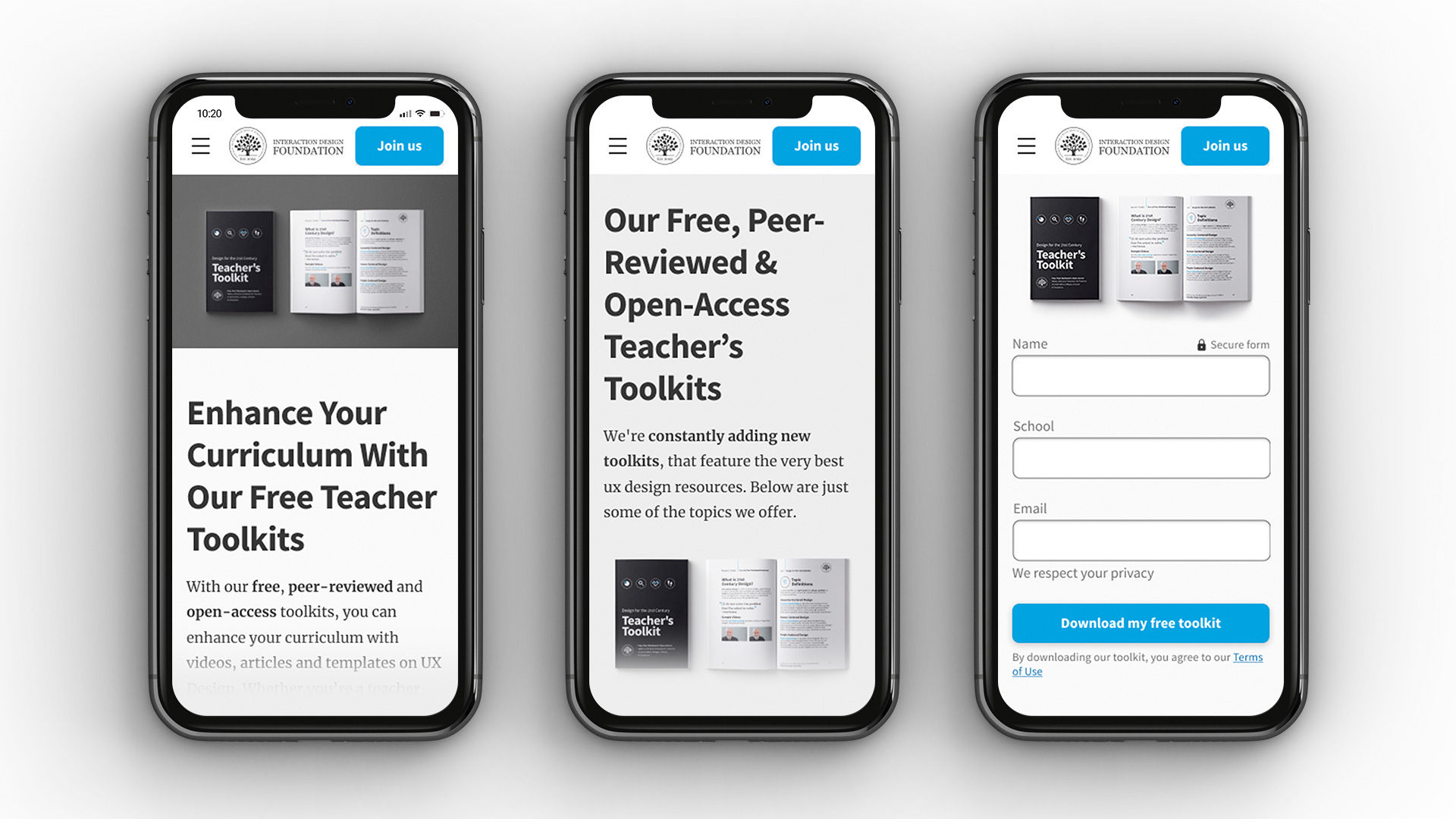
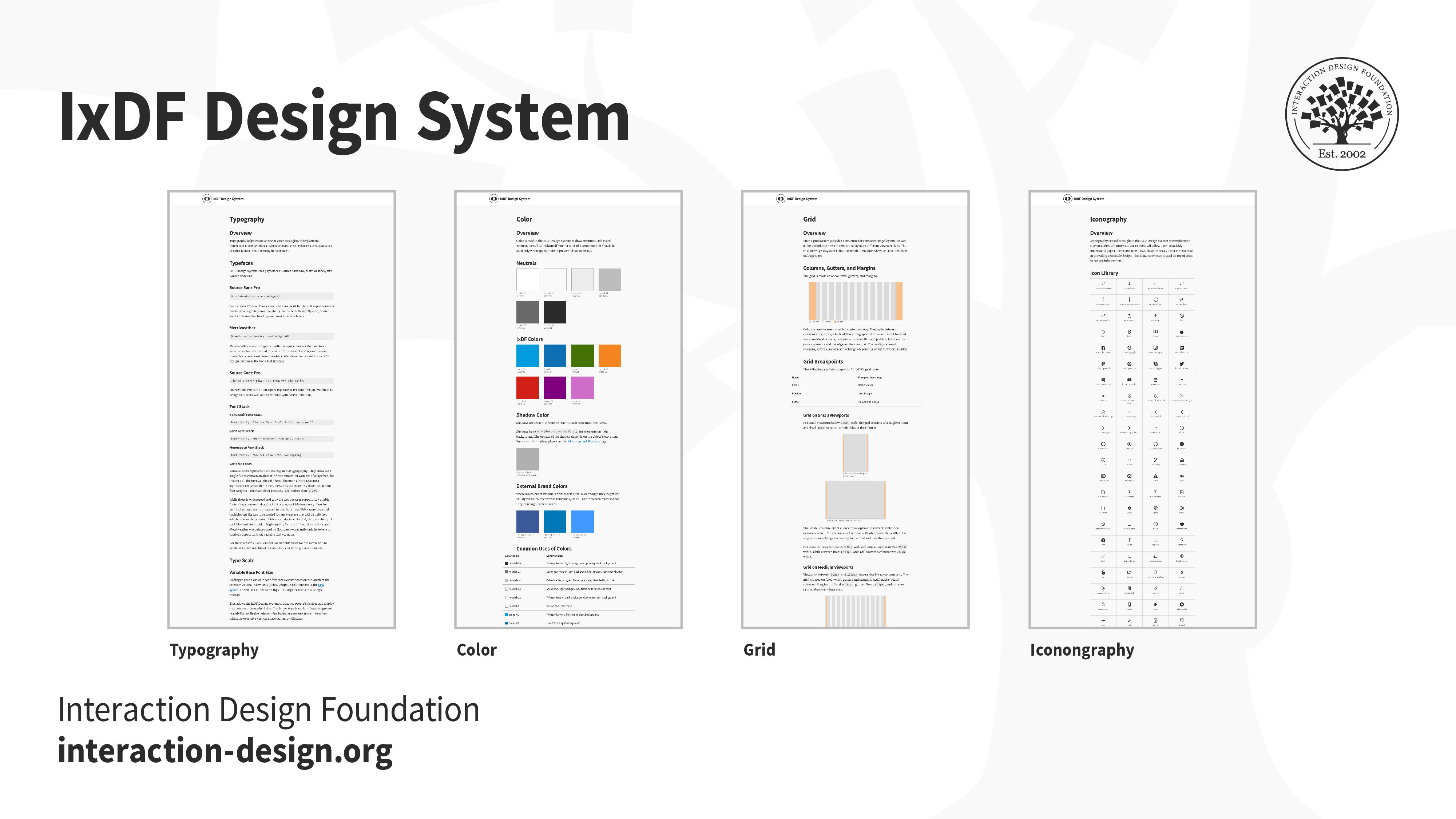
The IxDF Design System allows our team to build consistent, principle-based designs that solve our users’ needs. With a library of components and guidelines, the design system allows for closer and clearer collaboration between designers and developers.

© Interaction Design Foundation, CC BY-SA 3.0

Ideally, the different elements of a design system are actually pieces of code that developers can drop into interfaces in order to build a feature quicker or prototype faster. Other times, they’re simply design elements in a prototyping tool that designers can reuse.

Evaluation Deliverables

Being a UX designer doesn’t mean that you only work on new design-related deliverables! You must also evaluate your (and your peers’) work to ensure it meets the users’ and the organization’s objectives. Not only should you evaluate your work, but you also should look closely at what your competition is doing. This will help you learn and improve your designs.

13. Usability Reports

Illustration depicting a pie chart.

© Interaction Design Foundation, CC BY-SA 3.0

Once you have a design that is implemented (even if only as an interactive prototype), you can begin to run some evaluations of this design with real users. Evaluation can take many shapes and forms. You can have some users try out your design and then interview them, or work with them in a focus group: This is an example of qualitative evaluation. You could bring users into a lab and ask them to accomplish specific tasks with your prototype, while you measure things such as the number of errors, number of clicks, or time taken to complete the task. In the lab, you can use special equipment, such as eye-tracking cameras, to see where your users’ attention is spent while navigating a particular design. You could also ask them to perform the same task using prototypes that offer alternative design implementations, so you can compare them and see which design is better (known as A/B testing).

There are many ways to evaluate a design. No matter what you end up doing for evaluation, you will have to summarize your findings into a usability report. A complete usability report typically contains the following sections:

  • Background Summary: what you tested, where and when, the tools and equipment that you used and who was involved in the research

  • Methodology: how you went about the evaluation, what tasks you asked the users to perform, what data was collected, what scenarios were used, who the participants were and their demographics

  • Test Results: an analysis of all the data collected, including illustrations such as bar charts and textual descriptions of the findings, and user comments that might be particularly illustrative or enlightening. Depending on whom you are communicating the report to, this section may contain some more technical details, such as the type of statistical analyses used.

  • Findings and Recommendations: what do you recommend, based on the data that you collected and your findings? What worked well, what didn’t and why? State what should be done next to improve the design or move forward with the process.

Remember that a usability report might be directed towards a number of other roles in your project. Managers will probably just need an executive summary and a statement of how the findings impact the overall project timeline. Other designers will be more interested in how you carried out your evaluation and would like all the details. Developers are probably only interested in your findings and recommendations. Ensure that your report is structured and worded appropriately for its audience.

An example of a usability report compiled in summary form. The full details have been intentionally left out to focus on the outcomes. This type of infographic form is perfect for key stakeholders who don’t have time to review the full details of the report.

© Interaction Design Foundation, CC BY-SA 3.0

14. Analytics Report

Illustration depicting a bar graph.

© Interaction Design Foundation, CC BY-SA 3.0

When a designed product has been released and has been running for a while, your company might make some usage analytics data available to you. Looking into this data may offer great insights into how to improve usability, particularly if this data contains users’ transitions and behaviors in your product.

For example, you might find that many users in an e-commerce website are not registering to complete a purchase. Does it mean that the registration process is not easy enough? Does it mean that they don’t see there is such an option? An analytics report contains the insights from this data and highlights areas where the design might be improved. While it is tempting to just put in the nice visuals and charts produced automatically by products such as Google Analytics, the UX designer’s job is not just to lay down the facts but also to interpret them. So, your report must contain the data, but also plausible explanations and recommendations on what to do. It’s also a useful record so that you can see the impact that design changes might have had on your website, after you have identified issues and attempted to address them.

Screenshots of Google analytics dashboards.

An analytics report is more than just data and visuals. It should contain your own explanations for the observed emergent user behaviors and recommendations on where a design could be improved.

© Google, Fair Use

The Take Away

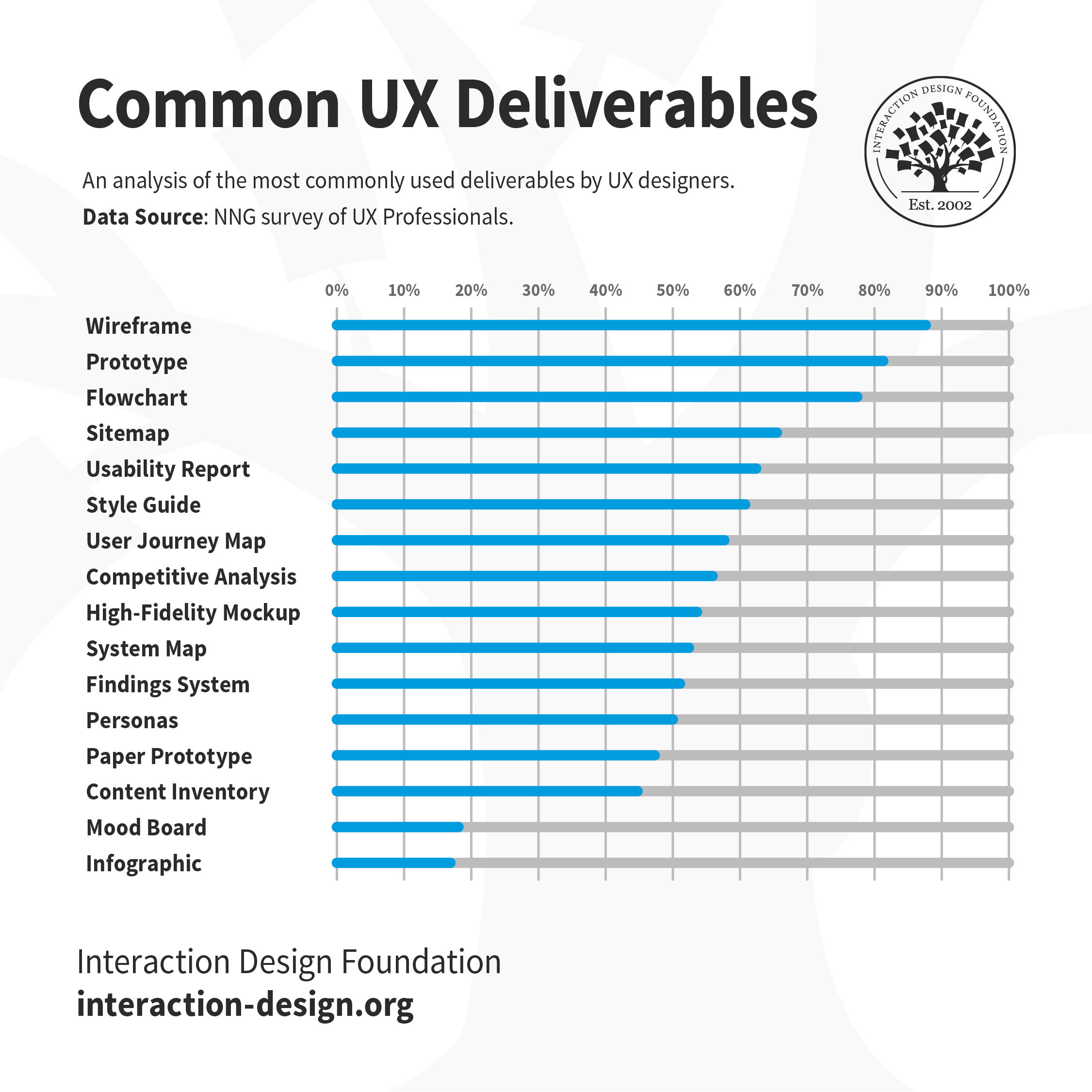
In a 2015 article for the Norman Nielsen Group, UX specialist Page Laubheimer analyzed the types of UX deliverables that UX designers most frequently reported as being asked to create as part of their role. Wireframes and prototypes were reported to be most commonly produced, followed by flowcharts, sitemaps, and usability/analytics reports.

An analysis of the most commonly produced UX deliverables, according to the Norman Nielsen Group. This shows the frequency with which UX professionals are asked to produce and share a specific deliverable. Deliverables with a lower frequency of demand are still produced, but are typically not shared as much with others.

© Interaction Design Foundation CC BY-NC-SA 3.0

These are what we consider to be “classic” UX deliverables, but one important point to keep in mind is that while these deliverables are produced and shared with others, many other types of deliverables will be produced but never shared (hence ranking lower in this study). In order to produce a wireframe, should a designer not have a complete understanding of the users and their needs? Often, management, clients and other team members are interested only in the type of deliverable that helps them advance their tasks, as well. Given this, the types of the deliverables you produce might need to be “tuned” to whom you are going to share them with, too.

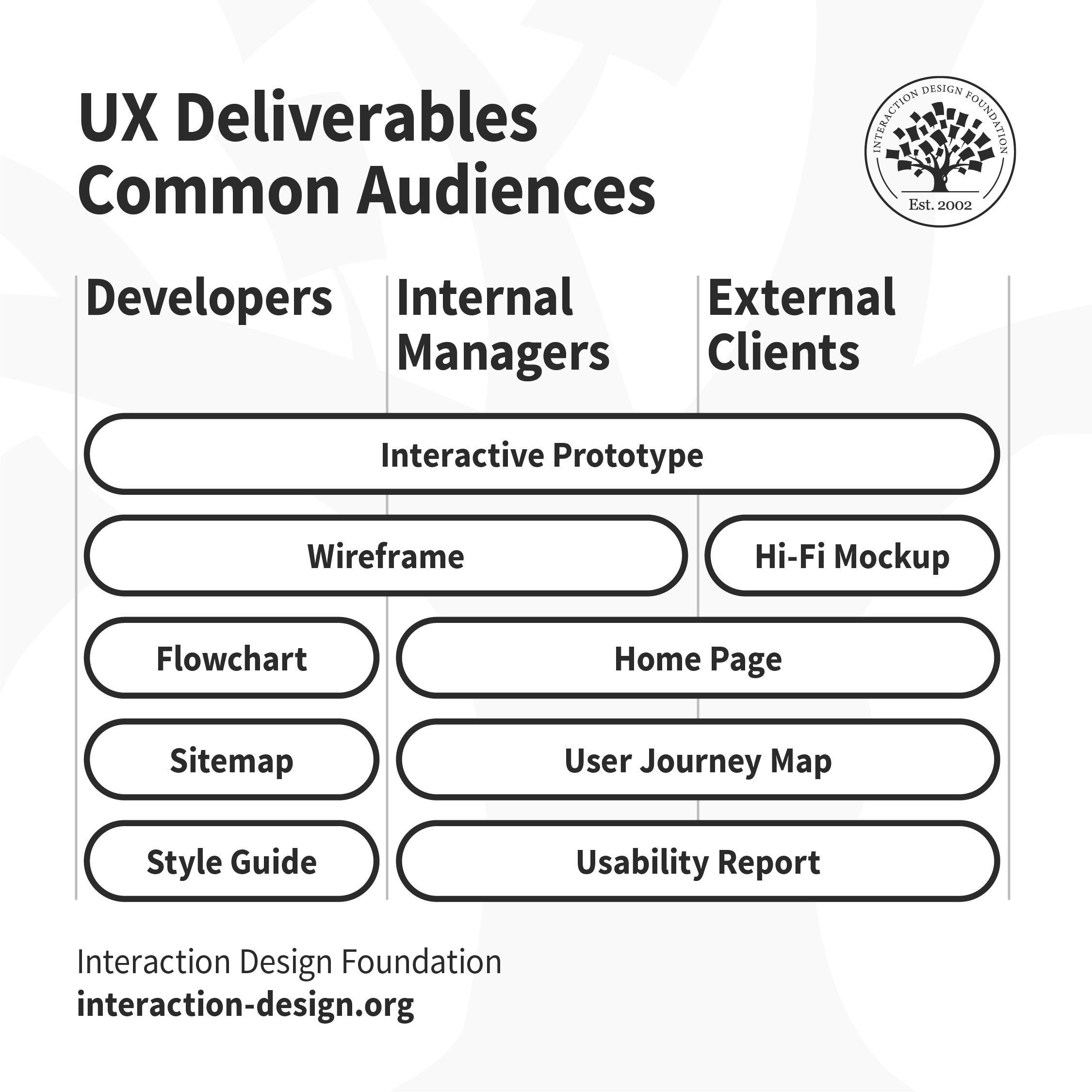
Flowcharts, sitemaps and style guides are shared with developers. Home page, user journey maps and usability reports are shared with internal managers and external clients. Wireframes are shared with developers and internal managers. Hi-fi mockups are shared with external clients. Interactive prototypes are shared with all stakeholders.

This chart shows the types of deliverables most frequently shared with other members of the development team and external clients. The interactive prototype is the one deliverable that everyone wants to see!

© Interaction Design Foundation CC BY-NC-SA 3.0

In your role as a UX designer, you will produce a wide variety of deliverables for different stages of the UX design process. Which deliverable you produce depends upon your team, the project, timelines and stakeholders. At the beginning of your UX career, you must learn and practice as many tools and methodologies as possible, and become familiar with all the types of UX deliverables out there. As you gain experience and work on different types of projects, you will get better at choosing the appropriate tools and tailor your UX design process (and deliverables) to suit the project.

References and Where to Learn More

Learn more about brainstorming and other idea-generation methods in the course Design Thinking: The Ultimate Guide

Image

© Interaction Design Foundation, CC BY-SA 4.0

Feel Stuck?
Want Better Job Options?

AI is replacing jobs everywhere, yet design jobs are booming with a projected 45% job growth. With design skills, you can create products and services people love. More love means more impact and greater salary potential.

At IxDF, we help you from your first course to your next job, all in one place.

See How Design Skills Turn Into Job Options
Privacy Settings
By using this site, you accept our Cookie Policy and Terms of Use.
Customize
Accept all

Be the One Who Inspires

People remember who shares great ideas.

Share on:

Academic Credibility — On Autopilot

Don't waste time googling citation formats. Just copy, paste and look legit in seconds.