Human-Robot Interaction

Your constantly-updated definition of Human-Robot Interaction and collection of videos and articles.
Be a conversation starter: Share this page and inspire others!

197 Shares

What is Human-Robot Interaction?

Human-robot interaction (HRI) is the field that studies and designs how people and robots communicate, collaborate, and live together. It involves creating robots that can detect, interpret, and model human actions, signals, and intentions well enough to interact effectively, respond in ways that are consistent with their programmed goals and the user’s context, within the limits of their sensing and decision-making, and operate safely in human environments. In HRI as a UX (user experience) designer, you shape how machines behave around people, how they signal intention, interpret human behavior, and build trust, so robots enhance human activities without friction or danger.

In this video, William Hudson, User Experience Strategist and Founder of Syntagm Ltd., explains how the Fourth Industrial Revolution creates a deeply connected technological world that sets the stage for advanced human-robot interaction.

Transcript

Is a Robot what You Think It Is?

A robot is a programmable machine that’s capable of carrying out physical tasks or actions automatically, often with some degree of autonomy. Robots can sense their environment, process information, and respond through movement or behavior, either pre-programmed or adaptive. They may look mechanical, humanoid, or entirely utilitarian, but their core function is to perform work, which can be physical, cognitive, or interactive, without needing constant human control. To qualify as a robot, a system must include both a computational (digital) component and a physical or embodied component that acts in the real world. One notable example is Boston Dynamics’ Spot, a four-legged robot used for inspections, construction sites, public-safety applications, and much more. Another is sure to be a household name, too: a Roomba robot vacuum cleaner.

Robots have thrived in the popular imagination ever since Czech writer Karel Čapek coined the term in a 1920 science fiction play. The Czech word “robota” means forced labor or drudgery. In 1954, George Devol invented the first programmable robot, called “Unimate, and patented it as a “Programmed Article Transfer” machine. Designed for industrial tasks, Unimate could move parts and tools. Early robots soon emerged in the automotive, electronics, and aerospace industries, to automate repetitive or dangerous tasks, increase precision and efficiency, and reduce labor costs in manufacturing.

Advances in robotics by the 2020s have taken things to higher levels. Modern robots exist to support humans, not just to replace labor, but to enhance safety, accessibility, efficiency, and even quality of life, too. Their purpose is increasingly shaped by ethical, human-centered design goals as much as by technological capability. As a robot designer, or designer of robots, you’ll be responsible for ensuring that robots help rather than harm. And when you design robots that serve users and improve their lives, you can realize the envisionment of what robotics is all about. In an era of the Internet of Things and of calm computing, it’s an age when the number of computer-controlled devices in people’s homes and on their persons has risen such that technology really is all around so many users. Rather fittingly, it’s also a perfect time for considerate and effective HRI UX design to help improve countless lives everywhere.

In this video, Alan Dix, Author of the bestselling book “Human-Computer Interaction” and Director of the Computational Foundry at Swansea University, helps you recognize how everyday devices contain numerous embedded computers, giving you insight into the complex, technology-rich contexts that robots must navigate safely and supportively.

Transcript

How to Design for Human-Robot Interaction, Steps & Best Practices

To create effective and humane human-robot interaction, you’ll need a structured, user-centered, and safety-aware process. Here are key steps and design practices.

1. Understand the Human Context, Goals, and Environment

Start by defining who’ll interact with the robot, under what conditions, and for what purpose. Ask yourself:

  • Who are the users: Their abilities, needs, comfort levels, and expectations?

  • Where will the interaction happen: Home, workplace, hospital, public space?

  • What tasks or functions should the robot fulfill: Assistance, collaboration, caregiving, entertainment, mobility, or monitoring?

When you understand the users’ context and goals, you’ll be better able to choose appropriate interaction styles. For instance, a robot in a hospital must prioritize safety and clarity; a companion robot for elders must respect emotional comfort and social cues. HRI is inherently interdisciplinary, including robotics, design, psychology, and ethics: all of these matter and need to come together if you’re going to create robots that truly help people.

In this video, Alan Dix demonstrates how attending to users’ bodies, surrounding actors, environmental conditions, and past events helps you design interactions that truly fit people’s needs, reinforcing why HRI must look beyond the robot’s interface to the full human context.

Transcript

2. Choose Suitable Interaction Modalities (Speech, Gesture, Sensors, Physical Feedback)

Robots can communicate using many channels beyond traditional screens, so use modalities that match human expectations and their environment:

  • Speech or natural language for intuitive commands or conversation.

  • Gesture, posture, or movement detection: humans signal intent with body language; robots can sometimes recognize and interpret these cues using vision and sensor systems, although accuracy depends on the environment, training data, and task.

  • Sensors, vision, proximity, force/tactile feedback to detect human presence, motion, or physical interaction.

  • Haptic or tactile feedback to give users physical sense of robot intent or actions.

By combining multiple channels (multimodal interaction), you increase flexibility and make interaction more natural and accessible between user and robot.

In this video, Alan Dix shows you how different forms of haptic and tactile feedback can shape interaction, highlighting when touch-based modalities succeed or fail.

Copyright
Transcript

3. Ensure Clarity, Predictability, and Transparency in Robot Behavior

People need to understand what the robot intends to do and when and why it will do it; otherwise, interaction will feel unpredictable or unsafe. That’s a perfectly natural concern. People are “hard-wired” to suddenly become afraid in the face of uncertainty, and while a robot may not be a bear or tiger, a human mind in self-preservation mode can quickly conjure fears of a merciless machine advancing and not listening to their pleas for reason. To address that, design the robot to:

  • Signal its status and intentions clearly, such as with lights, sounds, or movement cues, before acting.

  • Behave in predictable ways: avoid sudden, surprising motions.

  • Provide consistent feedback when actions succeed or fail; let users know what’s happening.

Design guidelines for HRI emphasize “understandability” and “predictability” as being foundational to safe, effective interaction. Another design concern you’ll need to consider alongside that is how the users’ culture can influence how they might take to a robot’s design and behavior.

In this video, Alan Dix shows you how cultural differences shape how people interpret interface cues, reminding you that clear and predictable behavior depends on designs that make sense across cultures.

Copyright
Transcript

4. Balance Autonomy and Human Control: Design for Shared Agency

Robots often operate with some level of autonomy, but giving robots full control may make humans feel disempowered or unsafe. Not only for HRI designers, it’s also a massive concern that’s become stamped into the popular imagination, given how it’s a subject that drives science fiction books and movies set in future dystopian settings. So, instead, aim for shared control or collaborative autonomy:

  • Define clear roles: When the human leads, when the robot leads, and how control shifts.

  • Let humans override robot decisions easily or intervene when needed.

  • Adapt automation level to context, so there’s high autonomy when it’s safe and beneficial, and human-in-the-loop whenever uncertainty or risk exists.

This approach, sometimes called “adaptive collaborative control,” treats human and robot as partners, not master and tool. It calls for you to keep a firm grasp of empathy for users as you build foundations on which robots interacting with humans can stand, succeed, and help rather than fall, fail, and hurt.

Discover helpful insights about the essential nature of designer-user empathy as this video shows you how empathetic design helps systems support user goals clearly and calmly: a principle that also guides how humans and robots should share control.

Transcript

5. Design for Learning, Adaptation, and Personalized Behavior

Robots should adapt to human behavior, preferences, and their environment over time, which involves:

  • Using sensors and machine learning to detect patterns, user habits, and environmental changes.

  • Allowing the robot to learn and refine behavior: for example, adjusting assistance based on user comfort or past interactions.

  • Permitting personalization, where users should be able to set preferences, boundaries, or levels of assistance.

A human-centered evaluation, which combines qualitative (user comfort, acceptance) and quantitative (task performance, safety) metrics, helps you iterate design for better alignment with human needs.

Explore the possibilities as this video explains how machine learning enables systems to learn from data and improve over time: a foundation for robots that adapt to users and environments.

Transcript

6. Test in Realistic, Human-Inhabited Environments, and Iterate Continuously

Since human-robot interaction involves unpredictable real-world factors, with people, spaces, noise, movement, and social norms, you’ll have to test prototypes outside the lab, in realistic settings. So:

  • Use observational studies with real users to discover pain points, misunderstandings, or safety risks.

  • Evaluate usability, comfort, trust, safety, and acceptability over time; long-term use reveals issues lab tests might miss.

  • Involve interdisciplinary feedback, with designers, engineers, psychologists, and end users, to refine both robot behavior and interaction model.

Remember, at the core of this process is the idea that you’ll ensure robots fit real human life, not just ideal scenarios. That’s one reason designing with personas, research-based representations of real users, is essential.

In this video, William Hudson, shows you why persona stories, grounded in real user research, lead to designs that fit actual human needs rather than idealized assumptions.

Transcript

Why Human-Robot Interaction Matters

Designing good HRI unlocks major benefits and transforms robots from mere tools into cooperative, helpful agents that enhance human life and capabilities. More specifically, the benefits of human-robot interaction design done well include:

Robots Extend Human Ability, Safety, and Productivity

With thoughtful and effective HRI design, robots can assist with tasks that are repetitive, dangerous, physically demanding, or require high precision. For example, in industries, robots and humans can work side by side and share tasks safely in collaborative settings. And in healthcare, elder care, rehabilitation, or caregiving, robots can support mobility, daily tasks, or social interaction and enhance the quality of life and independence for many.

Interaction Feels Natural and Intuitive: Reduces Friction and Learning Curve

Robots designed with strong human-centered HRI principles are more likely to feel intuitive and comfortable to users, reducing (but not eliminating) feelings of awkwardness or alienness. With speech, gesture, or natural feedback, people can engage without steep learning curves. That ease of use fosters acceptance, trust, and more widespread adoption.

This natural interaction lowers barriers for diverse user groups, including people unfamiliar with robotics, elderly users, or individuals with limited mobility. Accessible design can meet HRI design in the form of robots that help users with disabilities, and also any user who can register their requests and commands through a variety of ways.

Pick up powerful points to design with, as this video explains how accessibility principles ensure that interactions are usable and intuitive for people with diverse abilities.

Transcript

Enables Collaborative Autonomy and Flexible Partnerships

HRI allows a shift away from rigid, pre-programmed robots toward dynamic partners that adjust to human rhythm, habits, and context. That collaborative autonomy, where robot adapts to user behavior and environment, opens possibilities for more fluid, efficient human-robot teams across many domains: manufacturing, home, services, and public spaces.

Supports Social, Emotional, and Inclusive Applications

Beyond pure functionality, human-robot interaction can address social and emotional needs. Robots that can recognize certain social and emotional signals (like facial expressions, tone of voice, or proximity) and respond with socially appropriate behaviors in well-defined contexts can serve in roles such as companionship, therapy, or customer service. They can help bridge accessibility gaps for people with disabilities, or support mental-health and social needs. Many people may feel emotional or psychological benefits from helpful robots once trust is established, though reactions will vary widely by person, culture, and context.

Overall, human-robot interaction encompasses a fascinating and increasingly relevant set of design challenges. It compels you to think beyond screens, buttons, or classical “interfaces.” It asks you to imagine robots not as tools but as partners: embodied, adaptive, empathetic agents that understand humans, act safely, and integrate naturally into daily life. And it promises to become even more exciting and opportunity-filled as some long-imagined robotic capabilities become practical, while many others remain speculative or long-term research goals.

Regarding how users and designers think about safety, autonomy, and trust in human-robot interaction, the core challenges are as much human as they are technical. And when you design HRI thoughtfully, with respect for human context, safety, dignity, emotion, and trust, you’ll help build a future where robots extend our capabilities, support our well-being, and collaborate with us in meaningful, human-centered ways. Excellence in HRI demands humility, care, and responsibility and the need to design for transparency, control, ethics, and real human lives.

Above all, in a world where humans and robots live and exist, it’s the humans who’ll need the primary focus. That’s why HRI UX design will always demand designers to look beyond the “nuts and bolts” of HRI design and keep a clear view of why people, with all their quirks and “irregularities,” choose to share a world with robots, who must cater to those human traits with all the insight and care designers can program into them. Their duty of care to the humans they serve becomes your duty of care to get the design right, long before it steps out into the world and does things your brand will be accountable for.

Questions About Human-Robot Interaction?
We've Got Answers!

How is HRI different from human-computer interaction (HCI)?

HRI, or human-robot interaction, focuses on how people interact with robots, machines that act in the physical world, while HCI studies interactions with digital systems like apps or websites. Robots have bodies, autonomy, and the ability to sense and act in real space, which introduces new design challenges like movement, spatial awareness, and social cues.

HCI primarily involves screen-based interfaces, but HRI must account for embodiment, timing, and trust in shared environments. For example, a robot vacuum’s path planning must feel safe and predictable, unlike a static UI (user interface) where motion isn’t a factor. As a designer in HRI, you’ll also need to consider emotions, expectations, and the human-like behavior that people often project onto robots, even if the robot isn't truly intelligent.

Harvest some essential insights about Human-Computer Interaction (HCI) to improve your design understanding.

Why is HRI important in UX and product design?

HRI is crucial as robots increasingly enter homes, hospitals, factories, and public spaces. Good UX design in this domain ensures robots feel trustworthy, understandable, and helpful, not intimidating or confusing. As machines become more autonomous, poor design can cause miscommunication, accidents, or emotional discomfort.

As a designer, you must shape how users understand robot intent, respond to its actions, and feel about ongoing interaction. For instance, a healthcare robot assisting elderly patients must balance authority with empathy, requiring thoughtful design of voice, gestures, and pace. When you understand HRI well, you’ll be in a position where you can lead innovation in service robotics, assistive tech, and collaborative automation, making interactions more humane, ethical, and inclusive, especially in high-stakes, real-world environments.

Speaking of hospitals, harvest some helpful insights about a vital dimension of user experience design, from our article Healthcare UX—Design that Saves Lives.

What are the key goals of designing for HRI?

The main goals of HRI design include safety, clarity, trust, efficiency, and emotional comfort. Robots should act in ways humans can easily predict, interpret, and respond to.

So, you should aim to foster smooth, natural interaction, especially when robots share physical spaces with humans. Clear communication of intent is critical: for example, a delivery robot should signal when it’s turning or stopping. Emotional goals matter, too: robots often evoke human-like expectations, so their behaviors should match social norms without overpromising intelligence. Whether it’s through touch, voice, gestures, or spatial navigation, ensure users feel confident, respected, and safe during every interaction.

Access important insights to design with a better understanding of Artificial Intelligence (AI) with our article AI Challenges and How You Can Overcome Them: How to Design for Trust.

What are the core design principles in human-robot interaction?

Core HRI design principles include predictability, legibility, transparency, feedback, and safety.

Predictability ensures users understand what the robot will do next, while legibility helps users interpret the robot’s current behavior, through motion, posture, or signals. Transparency builds trust by revealing decision-making or status in human-friendly ways. Robots must offer clear feedback so users know when commands are received or tasks are complete. Safety covers both physical safety and psychological comfort; robots should avoid abrupt motions, maintain appropriate distance, and respond calmly.

These principles must work together to support collaboration, reduce ambiguity, and meet user expectations. A well-designed HRI experience feels intuitive, respectful, and aligned with how people naturally communicate and act.

Explore how heuristics, including regarding feedback, can help guide you to design for better experiences.

How do I design robot behaviors that feel natural to humans?

Begin by studying human social behavior: movement, timing, gaze, and personal space. Use motion that’s smooth, purposeful, and paced to human expectations. Robots should avoid sudden gestures and make eye contact where appropriate.

Consider proxemics: people feel comfortable when robots respect physical boundaries. Also, mimic familiar social cues, like nodding or pausing before speaking, to make robots seem more relatable.

Behavior must match function: don’t make simple robots act overly expressive if they lack real intelligence. Consistency matters, too. Users trust robots more when their behavior is stable and easy to interpret. Another vital point is to test in real environments, as it’ll reveal what feels natural or unsettling, and help refine motion, posture, and response timing for realism and empathy.

Discover important points about a vital force connecting users with your product and brand, in our article Trust: Building the Bridge to Our Users.

How can I use UX research methods to study human-robot interactions?

You can adapt UX research methods like user observation, contextual inquiry, and usability testing for HRI. Observe how people interact with robots in real environments to understand expectations, emotional responses, and pain points.

Use think-aloud protocols to capture user reasoning. Run Wizard of Oz studies, where a human secretly controls the robot, to prototype interactions before full autonomy gets developed.

Surveys and interviews reveal user trust, perceived intelligence, or discomfort. Video analysis helps review nuanced behaviors. Consider longitudinal studies, too, since users’ trust and habits evolve over time. Combining qualitative and quantitative data gives insight into behavior, safety perception, and emotional engagement, critical for designing robots users accept and enjoy.

Find a firm foundation in user research to help boost your success in designing for human-robot interactions.

What types of interfaces do people use to interact with robots?

People interact with robots through a wide range of interfaces: voice commands, touchscreens, physical buttons, mobile apps, and increasingly through gestures or gaze. Multimodal interfaces, where multiple input types are used, are common and improve accessibility and flexibility. For instance, a user might start a task with voice and confirm it on a screen.

Robots may also use visual signals (lights, displays), sound cues (beeps, speech), or motion (body orientation, arm gestures) to communicate status or intent. The choice depends on context: industrial robots may rely on buttons and displays, while home assistants often use voice and lights. Good HRI design ensures interfaces match user expectations and task requirements and minimize confusion or overload.

Pick up some helpful design insights from our article How to manage the users’ expectations when designing smart products.

Can HRI improve accessibility for people with disabilities?

Yes, HRI offers powerful ways to enhance accessibility. Robots can assist with tasks like mobility, object retrieval, communication, or monitoring, especially for people with physical or cognitive disabilities.

Voice control and gesture-based input help users with limited mobility. Social robots can support therapy or provide companionship. For example, robots like PARO help reduce anxiety in dementia care, while robotic arms aid people with quadriplegia.

HRI allows for adaptive interfaces, too, where the robot tailors interaction style to user preferences or limitations. However, it’s essential to prioritize inclusive design, testing with real users, offering multimodal inputs, and ensuring robustness to different abilities. Done right, HRI can increase independence, dignity, and quality of life, and beautifully bring life-improving experiences home to many individuals.

Venture into Voice User Interfaces (VUIs) for a wealth of helpful insights to design with.

How can designers create intuitive multimodal interactions (voice, touch, gesture) in HRI?

Combine inputs like voice, touch, and gesture based on context and user needs. Each mode should support the others: voice for commands, touch for control, gestures for spatial or emotional cues. Prioritize clarity: users must know when a robot is listening or responding.

Use visual or audio feedback to confirm actions. Avoid conflicting signals: synchronize modes to prevent overload. Design fallback options in case one mode fails. Consider user preferences, accessibility, and cultural norms, as gestures can vary widely. And test combinations in real settings to assess intuitiveness. When well-integrated, multimodal HRI allows for more natural, efficient, and inclusive interactions, especially in noisy, hands-busy, or multi-user environments.

For helpful insights into intuitive design, check out our article How to Create an Intuitive Design.

What’s the role of emotion in HRI? Should robots show emotions

Emotion plays a key role in human-robot interaction, whether it’s genuine or perceived. Humans often anthropomorphize robots, expecting social cues like friendliness, empathy, or frustration. Robots don’t truly feel emotions, but expressive behavior, like tone of voice, facial expressions, or posture, can make interactions feel smoother and more engaging. For example, a robot that apologizes or hesitates when making a mistake appears more relatable.

However, be careful to avoid deceptive emotional cues that suggest intelligence or empathy the robot lacks. Ethical HRI balances emotional expression with transparency. Emotionally expressive robots can aid in healthcare, education, or therapy, building trust and motivation. Nevertheless, expression must match the robot’s capabilities and be honest, respectful, and context-aware.

Pick up timeless nuggets of wisdom to help your design efforts in our article The Key Principles of Contextual Design.

What are the biggest design challenges in human-robot interaction?

Key challenges include managing user expectations, designing intuitive motion, and balancing autonomy with control. People often overestimate robot intelligence, leading to confusion or disappointment. You’ll need to bridge the gap between perceived and actual capabilities.

Ensuring smooth, readable motion that feels natural is difficult, especially in unpredictable environments. Multimodal input adds complexity, especially when sensors or recognition systems fail. Ensuring accessibility, privacy, and ethical use raises further challenges.

Plus, you’ll need to address long-term trust: how does the relationship evolve over time? Testing in real-world settings is critical but resource-intensive. Successful HRI design requires interdisciplinary knowledge where you blend UX, psychology, robotics, and ethics to create safe, meaningful human-machine collaboration.

Find out how much of what users bring to their experiences hinges on their mental models of how things should be regarding the item they’re interacting with.

What are some recent or highly cited articles about Human-Robot Interaction?

Safavi, F., Olikkal, P., Pei, D., Kamal, S., Meyerson, H., Penumalee, V., & Vinjamuri, R. (2024). Emerging frontiers in human–robot interaction. Journal of Intelligent & Robotic Systems, 110, Article 45.

This peer-reviewed review article explores three emerging themes in human–robot interaction (HRI): (1) human–robot collaboration modeled after human–human teamwork; (2) the integration of brain–computer interfaces (BCIs) to interpret brain signals for robotic control and communication; and (3) emotionally intelligent robotic systems that can sense and respond to human affect using cues like facial expression and gaze. The authors review techniques such as learning from demonstration, EEG-based control schemes, and affect recognition through multimodal signals. The article is significant for its systematic framing of these areas as central to the future of HRI and for highlighting the convergence of robotics with neuroscience and emotion AI.

Su, H., Wen, Q., Chen, J., Yang, C., Sandoval, J., & Laribi, M. A. (2023). Recent advancements in multimodal human–robot interaction. Frontiers in Neurorobotics, 17, Article 1084000.

This review article provides a comprehensive survey of multimodal human–robot interaction (HRI), where robots engage with humans through multiple simultaneous communication channels, such as speech, vision, touch, gesture, eye movement, and even bio-signals like EEG and ECG. The authors categorize input and output modalities and explore their applications in real-world interaction scenarios. They emphasize that multimodal HRI promotes more intuitive, natural, and robust robot behavior, especially in assistive and service robotics. The paper stands out for bridging HRI with cognitive science, affective computing, and Internet of Things (IoT) technologies. It’s a key contribution for defining trends and technical challenges in the design of responsive, socially integrated robotic systems.

Gunkel, D. J. (2018). The Machine Question: Critical Perspectives on AI, Robots, and Ethics. The MIT Press.

David J. Gunkel’s The Machine Question tackles the provocative ethical issue of whether intelligent machines, including robots and AI systems, deserve moral consideration. This philosophical inquiry challenges traditional frameworks of moral agency and patiency by examining the conceptual foundations of ethics through the lens of machine autonomy and consciousness. Drawing from philosophy, law, and cognitive science, Gunkel critically interrogates whether machines can be considered entities worthy of rights or responsibilities. The book has become a foundational reference in robot ethics and HRI, shaping discourse around responsibility, agency, and the future of human-machine coexistence.

Bartneck, C., Belpaeme, T., Eyssel, F., Kanda, T., Keijsers, M., & Šabanović, S. (2020). Human-Robot Interaction: An Introduction (2nd ed.). Cambridge University Press.

This is the leading introductory textbook on human–robot interaction (HRI), written by globally recognized experts from Europe, the US, and Japan. The book presents a well-rounded and multidisciplinary overview of HRI, covering technical systems, social and psychological theories, design practices, and evaluation methods. Now in its second edition, it reflects the most current advancements in HRI including ethical considerations, emotion modeling, and human-centered design. Suitable for students and professionals, it has been widely adopted in academic courses and is frequently cited in research. It remains one of the most comprehensive and accessible resources in the field.

Vinjamuri, R. (Ed.). (2024). Discovering the Frontiers of Human-Robot Interaction: Insights and Innovations in Collaboration, Communication, and Control. Springer.

Edited by Ramana Vinjamuri, this book presents cutting-edge research and emerging perspectives in HRI. It explores recent innovations in collaboration, brain-computer interfacing, emotional intelligence, trust, and robot teamwork. With contributions from leading international researchers, the volume captures the interdisciplinary breadth of current HRI research. It emphasizes real-world applications in healthcare, wearable robotics, and autonomous systems while also addressing foundational methodological and ethical issues. The book is valuable for researchers, engineers, and advanced students looking to stay on the frontier of HRI innovation. Its topical focus makes it especially relevant as robotics enter homes, industries, and public spaces.

Earn a Gift Earn a Gift, Answer a Short Quiz!

1
2
3
4
1
2
3
4
Question 1
Question 2
Question 3
Get Your Gift
Interaction Design Foundation logo

Question 1

What is Human‑Robot Interaction (HRI) primarily about?

1 point towards your gift

  • The study of how robots replace all human labor
  • Designing and understanding interactions between humans and robotic systems
  • Programming robots to work autonomously without any human input
Interaction Design Foundation logo

Question 2

A key challenge in HRI design compared to traditional human‑computer interaction (HCI) is:

1 point towards your gift

  • Robots require no user research because they behave predictably
  • Robots have a physical presence and must interact safely and meaningfully in the real world
  • Robots are simpler than software and users interact with them the same way they do with websites
Interaction Design Foundation logo

Question 3

Well‑designed HRI aims to ensure that humans and robots can:

1 point towards your gift

  • Work together effectively and safely to achieve shared goals
  • Replace human roles entirely in all environments
  • Operate independently with no communication between human and robot

Learn More About Human-Robot Interaction

Make learning as easy as watching Netflix: Learn more about Human-Robot Interaction by taking the online IxDF Course AI for Designers.

Why? Because design skills make you valuable. In any job. Any industry.

In This Course, You'll

  • Get excited about how quickly you can create meaningful results when you turn AI into your new superpower and combine it with timeless human-centered design skills. As an AI-powered designer, you’ll increase your efficiency and salary potential, and as a human-centered leader, you'll create ethical AI-powered products people love. When these abilities come together, you’ll solve real-world problems faster and make the world a better place. Studies show that AI-driven productivity accelerates growth and helps busy professionals like you achieve in months what once took decades. Now's the time to master the powerful combination that keeps you in demand.

  • Make yourself invaluable when you use AI to accelerate repetitive tasks while applying your irreplaceable human strengths like empathy, critical thinking, and ethical decision-making to guide every solution toward what users truly need. Leaders seek professionals with AI fluency because the people who thrive combine AI efficiency with deep human insight that machines can't replicate. You'll learn to automate and streamline repetitive tasks, make data-driven decisions, and optimize your workflow for innovation and cost savings. No matter your background, you'll easily master AI for Designers. With clear guidance and real-world examples, you'll apply your skills immediately.

  • Gain confidence and credibility as you master the art of text prompts for design. You'll learn how to deal with bias in AI and how to use AI tools to create intuitive user experiences that drive business success. You can fast-track your portfolio of AI-enhanced case studies with step-by-step guidance, practical tips for real-life projects, and downloadable templates. This course gives you the hands-on knowledge to guide AI with timeless human-centered design skills, and that's how you stay in demand in any industry!

It's Easy to Fast-Track Your Career with the World's Best Experts

Master complex skills effortlessly with proven best practices and toolkits directly from the world's top design experts. Meet your experts for this course:

  • Ioana Teleanu: Founder of UX Goodies and former Lead Product Designer (AI) at Miro.

  • Rafael Hernandez: Lead Product Designer at T. Rowe Price.

  • Jarvis Moore: Senior Design Lead, Design Systems at Microsoft.

  • Niwal Sheikh: Product Design Lead at Netflix.

  • Vitaly Friedman: Senior UX Consultant for the European Parliament, and Creative Lead, Smashing Magazine.

  • Pablo Stanley: Designer and CEO of Musho and Lummi.

Get an Industry-Recognized IxDF Course Certificate

Increase your credibility, salary potential and job opportunities by showing credible evidence of your skills.

IxDF Course Certificates set the industry gold standard. Add them to your LinkedIn profile, resumé, and job applications.

Course Certificate Example

Be in distinguished company, alongside industry leaders who train their teams with the IxDF and trust IxDF Course Certificates.

Our clients: IBM, HP, Adobe, GE, Accenture, Allianz, Phillips, Deezer, Capgemin, Mcafee, SAP, Telenor, Cigna, British Parliament, State of New York

All Free IxDF Articles on Human-Robot Interaction

Read full article
No-UI: How to Build Transparent Interaction - Article hero image
Interaction Design Foundation logo

No-UI: How to Build Transparent Interaction

Here, we will explore and teach you about the incredible user experience opportunities which you can take advantage of when designing for interaction beyond the classical Graphical User Interface (GUI). Non-visual User Interaction (no-UI) is pioneered by the ground-breaking work of researchers who h

Social shares
875
Published
Read Article

No-UI: How to Build Transparent Interaction

No-UI: How to Build Transparent Interaction

Here, we will explore and teach you about the incredible user experience opportunities which you can take advantage of when designing for interaction beyond the classical Graphical User Interface (GUI). Non-visual User Interaction (no-UI) is pioneered by the ground-breaking work of researchers who have realized that, in today’s world, we are surrounded by computers and applications that constantly require our attention: smartphones, tablets, laptops and smart-TVs competing for brief moments of our time to notify us about an event or to request our action. Staying abreast of developments will turbo-charge your skill set, so you can access users in more ingenious ways.

The bulk of these attention requests and actions take place through interaction with Graphical User Interfaces, peppered with a short audio or vibration cue here and there. However, rich user experiences are not only dependent on good visual design: they can take advantage of the context awareness, sensors and multimodal output capabilities of modern computing devices. So as to take advantage of non-visual interaction options, we need to design these carefully, considering the modern advances in software and hardware sensing, paired with Artificial Intelligence (AI), which continue to transform the way we interact with our computing devices. We’re gradually moving away from designing GUIs, which require the user’s full attention, and moving towards designing calmer, less obtrusive interaction, bringing human-computer interaction without graphics to the core of the User Experience: Welcome to the world of no UIs.

In a world where we are surrounded by information and digital events, Mark Weiser, a visionary former researcher at Xerox PARC and widely considered the father of Ubiquitous Computing, believed that technology should empower the user in a calm and unobtrusive manner, by operating in the periphery of the user’s attention.

“The result of calm technology is to put us at home, in a familiar place. When our periphery is functioning well we are tuned into what is happening around us, and so also to what is going to happen, and what has just happened. This is a key property of information visualization techniques, like the cone tree, that are filled with detail yet engage our pre-attentive periphery so we are never surprised.”
– Mark Weiser & John Seely Brown, Xerox PARC

A Definition by Example

For many decades, Graphical User Interfaces (GUIs) have dominated the way we interact with computers, and continue to be the primary way of interacting with our computing devices even though they are continuously evolving into radically different forms and becoming wildly more ubiquitous. Advances such as multi-touch, gestural input and capacitative screens have moved interaction far beyond early examples of the ‘90s, especially in mobile, although many of the interaction design elements remain the same (e.g., icon-driven interfaces, long, short and double taps, etc.).

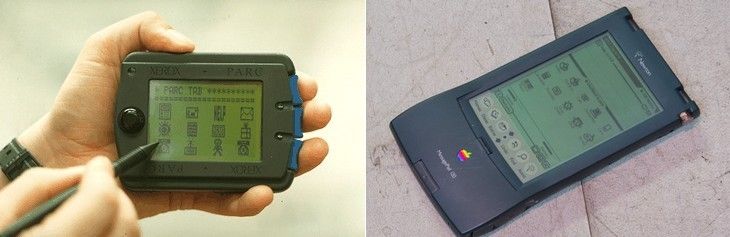
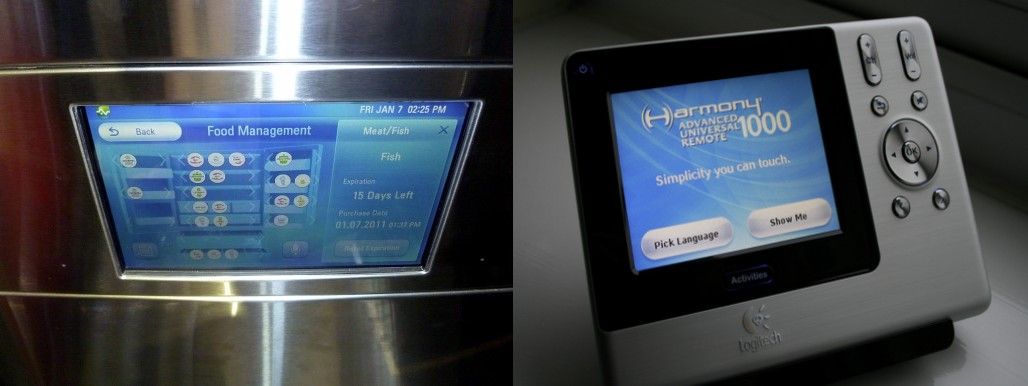
The very first GUI-driven ubiquitous computing devices by Xerox PARC (the PARCPad) and Apple (Newton), and GUIs in everyday modern devices, were the smart fridge and smart remote control, seen here. Visually, not much has changed!

The primary goal of GUIs was to present information in such a way so as to be easily understandable and accessible to users, as well as to provide the visual controls and direct manipulation mechanisms through which a user could interact with this information and instruct the computer to carry out tasks. We are so accustomed to using GUIs that perhaps we take for granted the underlying principle by which GUIs are developed: It’s the computer’s job to present the data, interpret the user’s instructions and process the data. However it’s still our job as humans to understand the information, invent sequences of commands through which it can be transformed or processed, and—finally—make sense of the end results of computation by matching these with their intended goals or the surrounding environment.

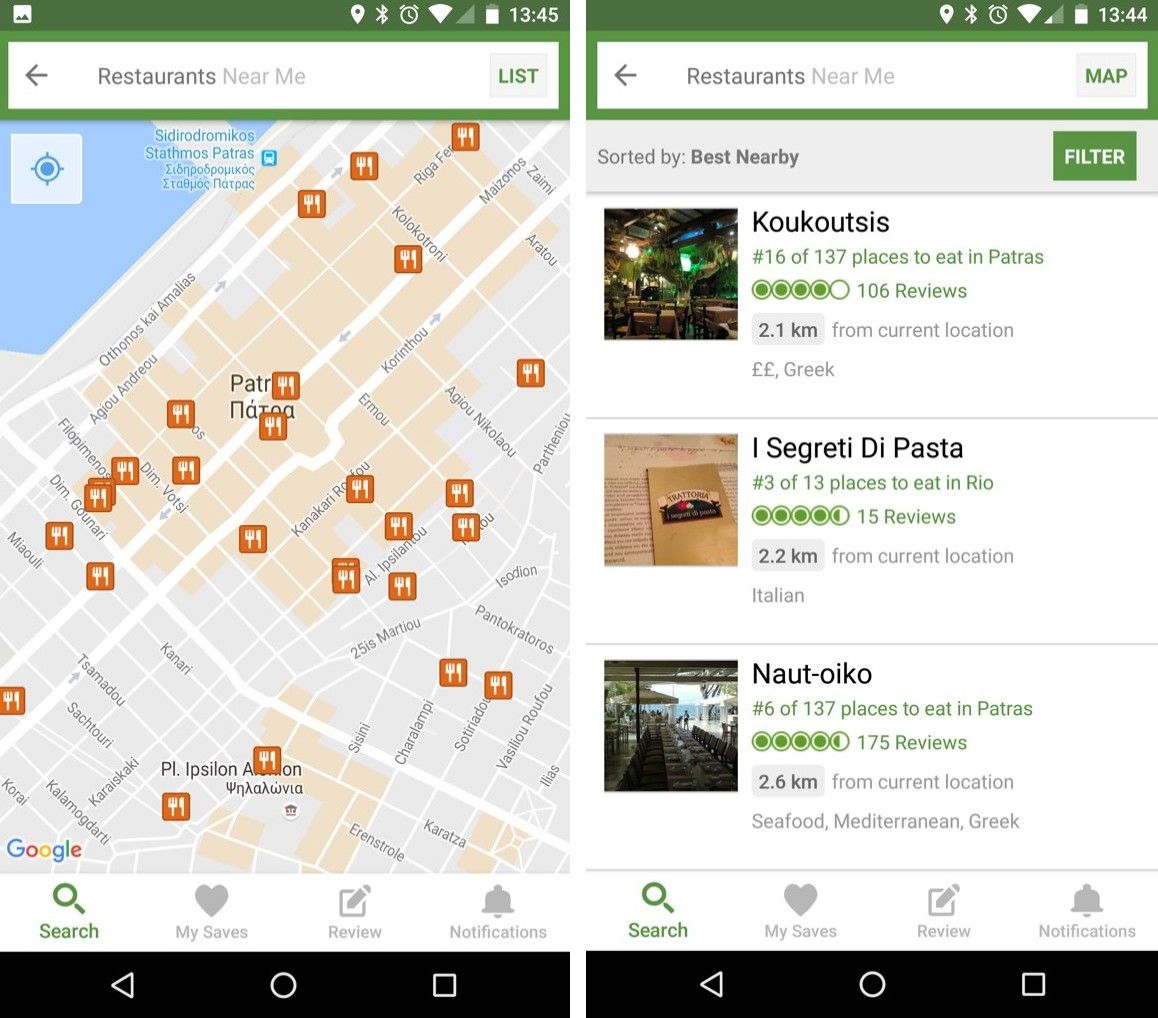
Let’s take an everyday scenario to illustrate this. Imagine you are on holiday in a new place and want to find a good restaurant to eat in whilst walking down the main street of the city you’re visiting. You bring up the TripAdvisor app on your mobile. You provide it with your location (or allow it to be discovered by GPS) and instruct the app that you are looking for restaurants. The app presents a list of results matching your criteria, together with some basic information about each result (e.g., their name, type, rating and distance from you). By scrolling through the list, you are able to find a restaurant that sounds good (e.g., “La Pasteria” might appeal to a lover of Italian food), isn’t too far to get to (this might depend on how much you like it and are willing or are able to walk) and which has a decent rating (#1 out of 20 is very good, but #50 out of 500 is still also pretty good if it’s not too far and is Italian).

A good GUI design will help you achieve your goals by facilitating (and minimizing) the entering of text and commands provided by you and by laying out the results in a way which you can easily understand on seeing them. However, the hard part—i.e., deciding which one is ultimately a good candidate—is a processing task performed exclusively by you. Only you know your individual preferences, mood, and abilities as a human, and also, to perhaps a lesser extent, those of your companions. Ever noticed how much time it usually takes to make such a choice (especially if it’s not only yourself who will be going – and if you’re all hungry)?

Are you hungry? How much time do you need to spend using an app to find a restaurant that sounds good? And how much more time will you spend if you get there and the restaurant is not what you expected?

Now imagine the same scenario without using a mobile app – instead, you’re walking down that street with a friend who lives in that city. As you walk along, dozens of options arise, but your friend will only initiate a conversation when you’re passing near a place she thinks you may like. So, she might proactively tell you the names of two or three restaurants only, but her advice is based on many more factors: places she has been to herself and has found to be good, experience from providing advice to other guests in the past and from taking their feedback, knowledge of how easy a restaurant is to get to, how busy it might get at the current time, how suited it might be for couples or large groups, etc. Effectively, your local friend has made a large number of observations and assumptions about you, added her own experience and knowledge and has narrowed the results down to just a few, thus doing the hard work for you. She has provided you with a “no-UI” experience: proactively initiating conversation about your goals, limiting interaction to a few natural questions and responses, factoring in a large number of observations and assumptions and presenting you with the results of hard and intensive computation. Now, the question is—can we replicate this experience when we design our applications and services? What technologies do we need so as to accomplish such a task?

The no-UI experience: curated knowledge at our periphery.

Three No-UI Interaction Building Blocks

You will have noticed from the previous example that no-UI interaction is heavily based on three basic building blocks:

  • Observations: the local friend has factored in a number of facts about yourself: whether you are dining alone or with a partner, your age and fitness level, the time of day and the distance of the hotel to other restaurants. These are facts that our mobile devices can “sense”. As a designer, you can leverage information provided via hardware sensors, data repositories internal or external to a device, or user profiling: for example, companionship via Bluetooth, location via GPS/networks and venue locations via databases, age and fitness via apps (e.g., Google Fit), time of the day via the clock. Don’t ask the user for information unless you can’t get it otherwise!

  • External knowledge: your friend also knows a lot of things: many tourists have given her feedback about some of the places she recommended, how much you might like a place depending on whether you are dining with a partner or group, how busy a place is likely to be, the quality of their food against their prices, her knowledge of the area and how complicated a route to a venue is, etc. As a designer, keep abreast of technological developments and be aware of techniques for extracting knowledge from external sources—e.g., semantically and emotionally analyzing comments and tips left at venues, knowing the daily spread of check-ins at venues, knowing the profiles of users who have visited a venue, etc. Various APIs from services such as FourSquare or Google+ are able to give us such knowledge, and there are ways of organizing it in a meaningful manner (e.g., ontologies).

  • Intelligence: Based on her observations and external knowledge, your friend has made a number of assumptions about you. Matching the observation to knowledge requires intelligence (and some creative thinking). This is the hardest part indeed – while the capture and organization of observation and knowledge is relatively easy, it needs prioritizing: for example, it’s no good recommending lunch at the most popular restaurant—which also happens to be very close to your location—if it’s closed at lunchtime. At other times, seemingly unimportant information might become crucial – it’s your partner’s birthday and her favourite food is Chinese; so, on that particular day—and only then—this becomes the number one criterion. Notice here that the criterion is not even about the user as an individual: We live in a world of complex relations with other humans and social rules, and capturing that context is not always easy, even for us as a species.

The critical element binding everything together here is intelligence. Without this step, a no-UI application is impossible. Intelligence determines not only what result you as a designer should present to the user, but also how you should present it.

“[…] deep learning [is], a process where the computer is taught to understand and solve a problem by itself, rather than having engineers code the solution. Deep learning is a complete game changer. It allowed AI to reach new heights previously thought to be decades away. Nowadays, computers can hear, see, read and understand humans better than ever before. This is opening a world of opportunities for AI-powered apps, toward which entrepreneurs are rushing.”
– Tony Aube, lead designer at OSMO

In the beginning of this, we spoke about moving away from the GUI – this means progressively attempting to interact with our users via multimodal interfaces. Sounds, speech synthesis, vibrations and even text, as in the case of chatbots, are ways with which we can convey information in varying degrees of granularity. You should not assume that you know how best to deliver multimodal interaction just because you are accustomed to the beeps and buzzes from the apps you use every day. Instead, multimodal interactions are things you must carefully design with the app’s purpose in mind and by accounting for the user’s abilities and context. For instance, in our previous example on tourism, an intense vibration on your phone might mean you’ve walked past the restaurant you wanted to visit, so you should turn back. Shaking the phone or pressing a hardware volume button while it’s vibrating might signal the device to give spoken instructions (e.g., “It’s behind you and to the right.”). Are these interaction examples good or bad? This is something you have to find out for yourself, through experimentation and human-centred design.

We also need a level of intelligence in order to interpret users’ physical and gestural interactions with the device (e.g., did the user shake the device with an intention to stop the current guidance, or was it an inadvertent action?). Additionally, we need intelligence to be able to determine an optimal way of presenting information (e.g., show a visual message instead of synthetic speech—if the user is in a very noisy environment). Also, finally, once we get the interaction during real-world use right (or wrong!), we should feed the outcomes back into our interaction models, helping the computer learn from the process of being used. This is the true meaning of intelligence – to be able to sense the world around us and learn from our interactions with it.

If it’s so Hard, Why Even Bother?

Humans have evolved primarily in using their vision to perceive and understand the world around them (whether physical or digital). So, GUIs are not going to disappear anytime soon, particularly when the use case calls for significant amounts of information to be presented to the user. In the world of ubiquitous computing, the need for information is constant; even so, we should not forget that much of the information required by users is succinct: a recommendation for a good restaurant, somebody’s phone number, the weather forecast for this afternoon, for instance. Snippets of information like these can require complex systems to generate them; however, this complexity should not mean that the means to obtain it must also be complex. The balance of interaction needed to obtain a bit of information versus the amount of information should be—at the very least—neutral and optimally leaning towards less interaction, while at the same time driving information towards our periphery and not the centre of our attention. Mark Weiser (1997) called this concept “Calm Computing”. Uwe Hansmann et al. (2003) and Stefan Poslad (2009), authors of two key texts on Ubiquitous Computing, both insist: Human Computer Interaction must be “transparent” or “hidden”. Minimizing interaction through no-UI techniques prevents the danger of the user experience being more about the device or app, rather than navigating the complexities of everyday life.

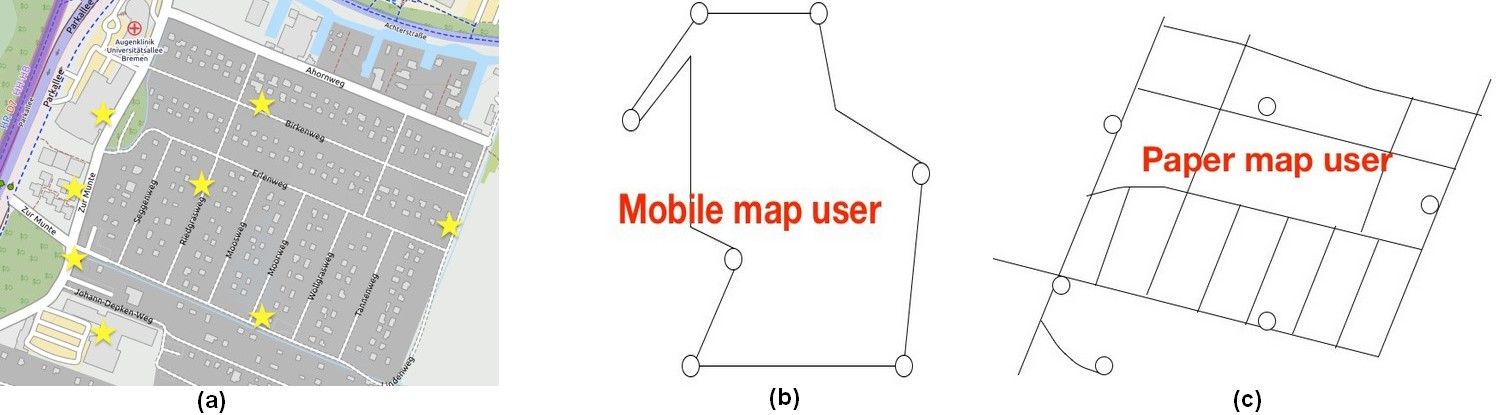
For example, researchers Antonio Krüger et al. (2004) at Saarland University and Katharine Willis et al. (2009) at Weimar University show that constant interaction with mobile maps results in a number of cognitive difficulties for users, such as a diminished ability to build detailed mental models of their surroundings, a failure to notice important landmarks and a detraction from the pleasure of the experience of visiting a new place

These are the dangers of UI-interaction in mobile maps, as shown by Katharine Willis et al. (2008). Learning an area and its landmarks (a) using a mobile map (b), vs. using a paper map (c): Mobile users tend to focus on the routes between landmarks, while using a paper map gives a better understanding of the whole area.

Examples of No-UI Interaction

For the reasons stated above, considerable research has gone into reducing the interaction to multimodal, no-UI methods on mobile devices, but there are also some examples of commercially available services which have been gaining popularity since 2015. An example of the latter is chatbots, which attempt to provide a virtual assistant type of experience (though, arguably, a text interface is still a GUI). AI-driven chatbots became a trend in 2016 with the emergence of new companies such as Pana (formerly Native, a travel booking agency) and the integration of bots in existing services, such as Facebook’s messenger (using Facebook’s own engine or third-party AI engines such as ChatFuel). Other companies have jumped on the bandwagon, too, for their own services—e.g., in 2016, FourSquare introduced a conversational bot that would replace its traditional search interface and provide recommendations by responding to users’ questions. The FourSquare app also proactively issues notifications based on your location, time of day and profile (e.g., “Are you near Trafalgar Square? You might like to try John’s Coffee for coffee.”).

FourSquare’s proactive notifications provide information relevant to the user’s location, without the user needing to interact with the mobile application.

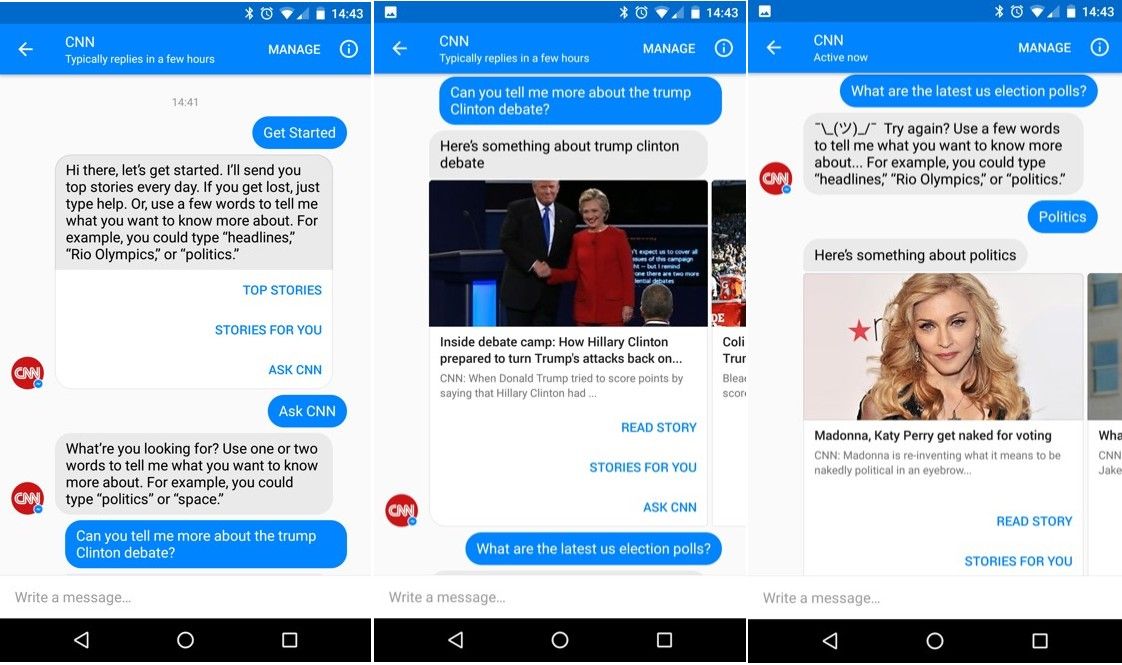
Above is an example of interaction with the CNN chatbot via Facebook Messenger. Although it’s still a UI-based interaction method, the interface resembles (but isn’t truly) natural language, without traditional widgets, menus and options. Notice how ambiguity is handled in the third picture!

Other interesting no-UI examples are found in research. Steven Strachan et al., at the Hamilton Institute, demonstrated a concept in 2005 where navigation instructions were provided to users listening to music on their headphones—by altering the volume of music (lower means further away) and its direction using 3D audio to indicate the target bearing.

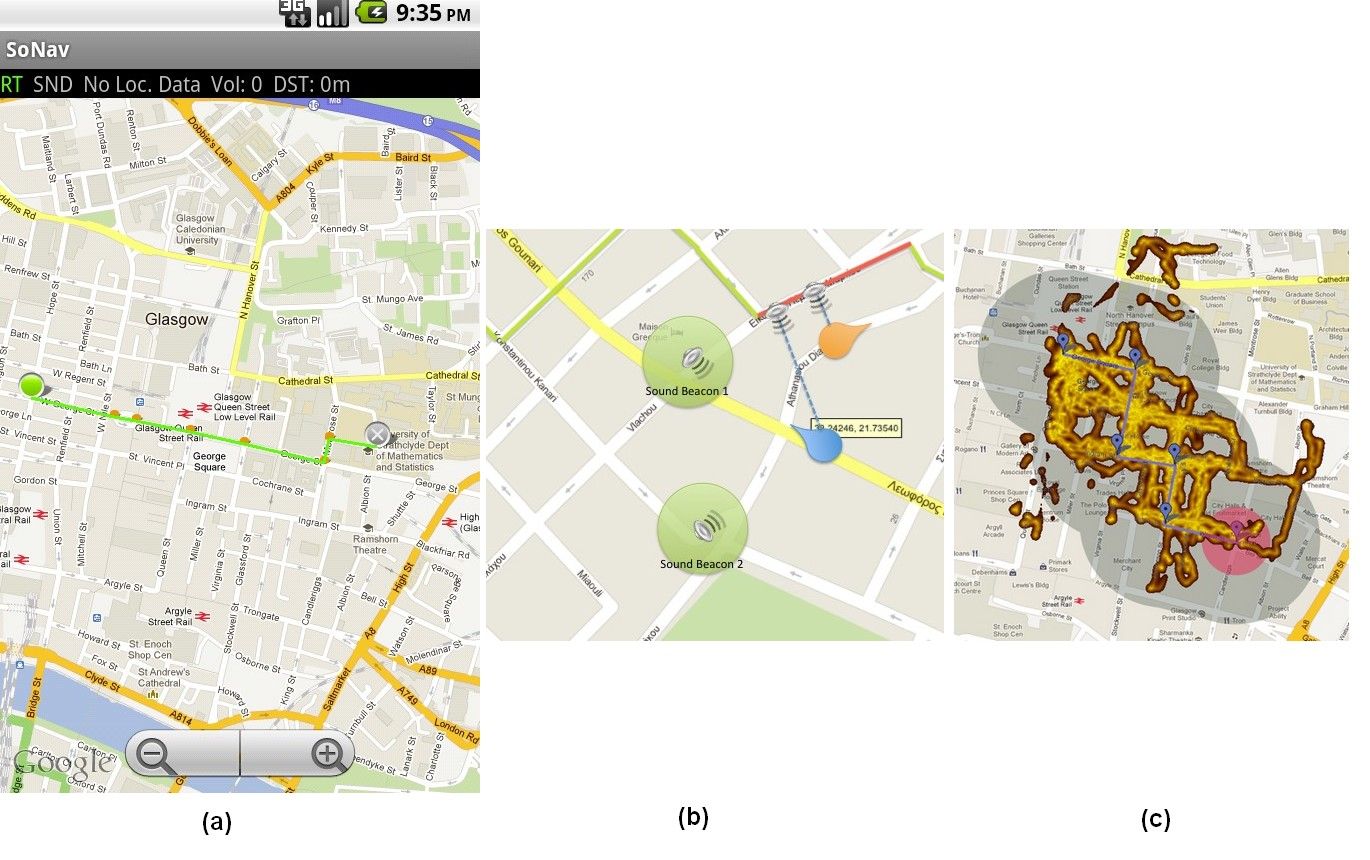
In another research study related to non-visual navigation, Andreas Komninos and some colleagues at Glasgow Caledonian University (Komninos et al. 2012) used 3D audio to provide a constant audio stream of a person’s footsteps (in contrast to music, this example uses audio that is natural to the urban environment) – the direction of the sound indicates the bearing to the nearest segment of the calculated route to the target, and its volume shows how far away from that segment a user is.

The SoNav prototype for navigation via 3D audio was created by Andreas Komninos et al. in 2012: The user simply selects a start and end point, while a route is automatically computed (a) – this is the only visual interaction element. From there on, the user hears a continuous sound from the direction of the nearest route segment, or audio beacons positioned at important landmarks (b). In an experiment, users started from the top left of the map and explored almost all of the area (GPS trace heatmap) covered by the route’s audio signal (grey-shaded area) to reach the target audio beacon (red-shaded area), each user taking a different route and freely exploring the city (c).

David McGookin and Stephen Brewster (2012), from the University of Glasgow, also demonstrated a 3D-audio based system, using the sound of flowing water and the splashes of stones being thrown in it, to show how heavily users have been tweeting in an urban area (thus indicating the social “pulse” of the area). The water stream’s sound volume shows the temporal density of tweets, while individual stone splashes are rendered in 3D‑audio and show the actual tweets being made near the user’s location (which fit a number of criteria). Other modalities such as haptic feedback, which are advanced vibration patterns and waveforms to convey information to a user, feature in this—allowing users to monitor the “state” of their device without looking at it. For example, Fabian Hemmert (2008), a researcher at Deutsche Telekom, developed a system where a constant vibration presents the number of missed calls or incoming messages to the user—the vibration is almost imperceptible at first, but it rises in intensity and frequency as more “events” accumulate on the device. As a designer, you have to think twice before applying haptic feedback as the user may not be interested in being disturbed by constant vibrations. It may be fine if a person has one app which is using rising intensity and frequency of vibration as feedback for missed calls. On the other hand, try to imagine a user who has five apps which are all using vibration as feedback for each time, for example, a new email message, “breaking news” or a new online message come through. Would you be interested in using those apps yourself?

More exotic ideas include the use of thermal interfaces for mobile devices: Graham Wilson et al. (2012), at the University of Glasgow, have shown how the use of heat-transmitting pads on a device can do the job of showing users the source (work or personal) and the importance of incoming messages.

In all the above examples, the no-UI approach is incomplete. Conversational bots have access to external knowledge and also use rather sophisticated AI (mostly to interpret your questions) but do not make direct observations about the user, using device sensors. It’s also the user who initiates the interaction, instead of the app taking a proactive approach. Users are also still faced with the burdensome task of providing information about their goals and desired tasks. In the research examples, sensors have the role of obtaining information about the user and also obtaining external knowledge, but the use of AI is rather limited. In our research examples, the use of a GUI is also part of the experience, as users need this in order to input some basic information (e.g., their navigation target) or to initiate the service, thus implicitly stating a current goal. Nevertheless, in these examples, we see how the no-UI approach works well in allowing users to shift their attention easily to monitoring the state or progress of an ongoing task, without really needing to interact with the GUI physically (as you would, for example, when using a simple map application, where you might occasionally bring the device out from your pocket so as to see where you are).

The Take Away

An effective no-UI approach is heavily based on the concept of context awareness, which includes the user’s goals and preferences, knowledge of the surrounding environment, social rules and device abilities for knowing how and when to deliver information in an non-visual way to users. The level of context awareness required for a complete no-UI service is difficult to obtain, but the examples above show where no-UI approaches are likely to work best: Allow the user to monitor the progress of ongoing tasks or get updates on important information as it emerges.

The key advantage of no-UI design here is that it eliminates the need for constant visual interaction with the device. You take the device from your pocket, causing it to exit stand-by mode, unlocking itself, and bringing the desired application to the foreground or expanding notifications for you so you can assess all the information displayed and make a decision.

In a world where we are surrounded by information and digital events, Mark Weiser foresaw the necessity for calm technology. As a designer, your task remains to harness and influence the developments in technology, deploying its capabilities with one thing in mind: to allow the user to keep calm and carry on (with the tasks at hand)!

References & Where to Learn More

Weiser, M., & Brown, J. S. (1997). “The coming age of calm technology”. In Beyond calculation (pp. 75-85). Springer New York.

Hansmann, U., Merk, L., Nicklous, M. S., & Stober, T. (2003). Pervasive computing: The mobile world. Springer Science & Business Media.

Krüger, A., Aslan, I., & Zimmer, H. (2004). “The effects of mobile pedestrian navigation systems on the concurrent acquisition of route and survey knowledge”. In International Conference on Mobile Human-Computer Interaction (pp. 446-450). Springer Berlin Heidelberg.

Strachan, S., Eslambolchilar, P., Murray-Smith, R., Hughes, S., & O'Modhrain, S. (2005, September). “GpsTunes: controlling navigation via audio feedback”. In Proceedings of the 7th international conference on Human computer interaction with mobile devices & services (pp. 275-278). ACM.

Hemmert, F. (2008). “Ambient Life: Permanent Tactile Life-like Actuation as a Status Display in Mobile Phones”. In Adjunct Proc. of the 21st annual ACM symposium on User Interface Software and Technology (UIST) Monterey, California, USA.

Poslad, S. (2009). Ubiquitous computing: smart devices, environments and interactions. John Wiley & Sons.

Willis, K. S., Hölscher, C., Wilbertz, G., & Li, C. (2009). “A comparison of spatial knowledge acquisition with maps and mobile maps”. Computers, Environment and Urban Systems, 33(2), 100-110.

McGookin, D., & Brewster, S. (2012, May). “PULSE: the design and evaluation of an auditory display to provide a social vibe”. In Proceedings of the SIGCHI Conference on Human Factors in Computing Systems (pp. 1263-1272). ACM.

Komninos, A., Barrie, P., Stefanis, V., & Plessas, A. (2012, September). “Urban exploration using audio scents”. In Proceedings of the 14th international conference on Human-computer interaction with mobile devices and services (pp. 349-358). ACM.

Wilson, G., Brewster, S., Halvey, M., & Hughes, S. (2012, September). “Thermal icons: evaluating structured thermal feedback for mobile interaction”. In Proceedings of the 14th international conference on Human-computer interaction with mobile devices and services (pp. 309-312). ACM.

Pana, the virtual chatbot travel agent: https://pana.com/

Seth Rosenberg, How to build bots for Messenger, 2016: https://developers.facebook.com/blog/post/2016/04/12/bots-for-messenger/

ChatFuel, an AI engine for ChatBots: https://chatfuel.com/

Vindu Goel, With New App, Foursquare Strives to Be ‘Magic’ in Your Pocket, 2013: http://bits.blogs.nytimes.com/2013/08/29/with-new-app-foursquare-strives-to-be-magic-in-your-pocket/?_r=1

Images

Copyright holder: Roy Want, Copyright terms and license: Fair use.

Copyright terms and license: Public Domain.

Copyright holder: David Berkowitz, Copyright terms and license: CC-BY-2.0.

Copyright holder: © William Hook Copyright terms and license: CC-BY-SA-2.0.

Copyright holder: The Author, Copyright terms and license: CC-BY-2.0

Copyright Holder: Kaique Rocha, Copyright terms and licence: CC0 (http://pexels.com)

Copyright holder: The Author, Copyright terms and license: CC-BY-2.0

Copyright holder: The Author and OpenStreetMap. Copyright terms and license: CC BY-NC 2.0

Copyright holder: The Author. Copyright terms and license: CC BY-NC 2.0

Copyright holder: The Author. Copyright terms and license: CC BY-NC 2.0

Copyright holder: The Author. Copyright terms and license: CC BY-NC 2.0

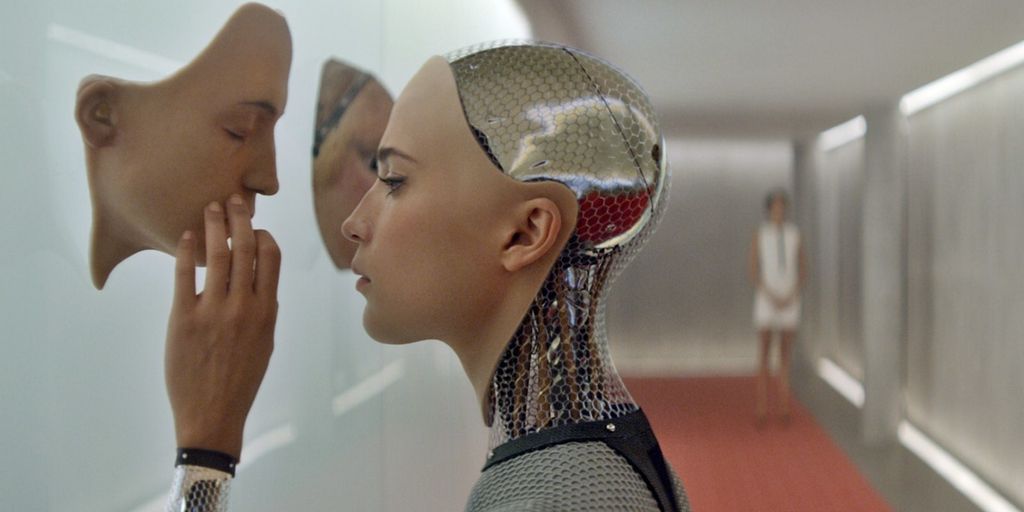
Hero Image: Copyright holder: DNA Films, Ex Machina (2015). Copyright terms and license: All rights reserved.

Feel Stuck?
Want Better Job Options?

AI is replacing jobs everywhere, yet design jobs are booming with a projected 45% job growth. With design skills, you can create products and services people love. More love means more impact and greater salary potential.

At IxDF, we help you from your first course to your next job, all in one place.

See How Design Skills Turn Into Job Options
Privacy Settings
By using this site, you accept our Cookie Policy and Terms of Use.
Customize
Accept all

Be the One Who Inspires

People remember who shares great ideas.

Share on:

Academic Credibility — On Autopilot

Don't waste time googling citation formats. Just copy, paste and look legit in seconds.