The Law of Closure

Your constantly-updated definition of the Law of Closure and collection of videos and articles.
Be a conversation starter: Share this page and inspire others!

197 Shares

What is the Law of Closure?

The law of closure is a visual perception law—or Gestalt principle—that describes how humans have a natural inclination to perceive incomplete or fragmented visual elements as a complete object. The brain typically fills in the gaps in an image where there are missing parts to perceive a unified and coherent form.

Transcript

The Law of Closure — The Mind Fills in the Blanks

The Gestalt law or principle of closure is a recognized fundamental concept in the fields of design and visual perception. It comes from the 1920s’ German Gestalt school of psychology. The Gestalt psychologists explored how humans perceive and interpret visual stimuli and simplify complex images in certain ways. Gestalt is a German word that means “shape.” More precisely—in this context—it refers to an organized whole that is more than the sum of its parts.   

The principle of closure is a grouping law of visual perception. According to the Gestalt psychologists, humans tend to perceive patterns using five main categories. These are the principle of proximity, the principle of similarity, the principle of continuity, the principle of closure and the principle of connectedness (or uniform connectedness). 
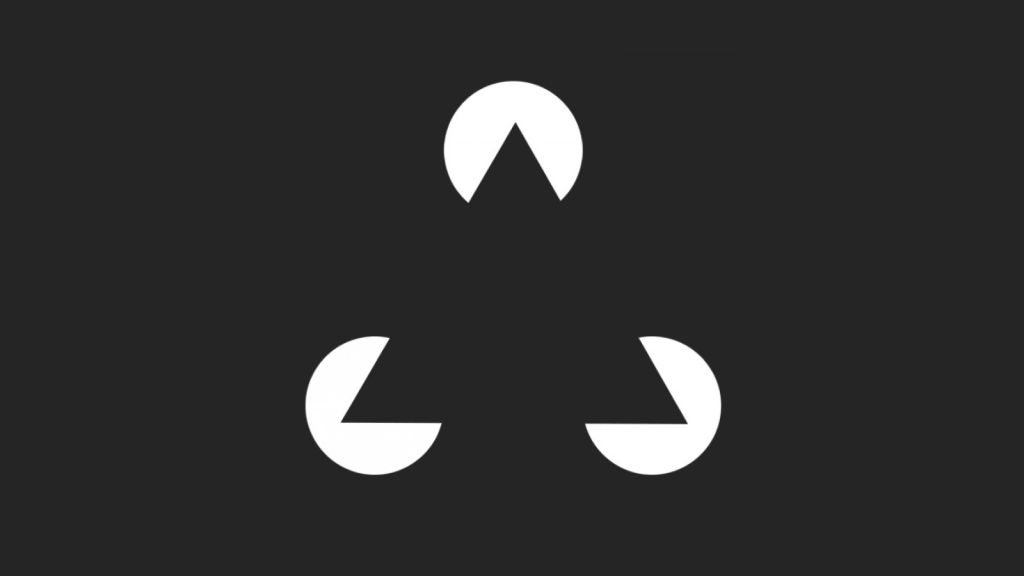
Image of a dark triangle over light circles.

The principle of closure at work—a dark triangle, even if the viewer sees three “Pac Man”-like heads “talking” to one another

© Craig Barber, Fair Use

How Does The Law of Closure Work in Design?

Closure holds great importance in various design disciplines—including graphic design, user experience (UX) design and user interface (UI) design. When designers understand and apply this principle, they can create powerful visual designs—ones that are more engaging, memorable and effective in getting information across to users. 

One of the key reasons why the principle of closure is important in design is the mind’s ability to simplify complex visuals fast and make a meaningful whole from individual elements. As with other principles like the law of continuity, this is a handy technique from the days of survival in the wild. Early humans had little time to perceive objects that were potentially hazardous, namely moving ones.  

The principle of closure is something that turns up in various aspects of modern, everyday human life—and these range from how people recognize shapes and objects, to how they interpret symbols and logos. When designers use incomplete or fragmented elements, they can guide the viewer's eye. With that, they can encourage these users to mentally fill in those parts that are missing. This technique helps cut down on visual clutter; plus, it allows for a more streamlined and cohesive design. 

What’s more, a good application of the principle of closure helps the user be more able to recognize and interpret the visual information in front of them quickly. The process is automatic—that’s because the mind strives to recognize the intended form or object, anyway. This cognitive process is something that users experience naturally—to comprehend and navigate through visuals more efficiently. A better user experience results. 

The law of closure doesn’t just improve visual communication and the overall user experience—it adds depth and interest to designs, too. When they leverage the viewer's active participation in completing the missing parts—and do it well—designers can create visuals that are both visually intriguing and evoke curiosity. This engagement can help capture the viewer's attention and leave a lasting impression with a brand. 
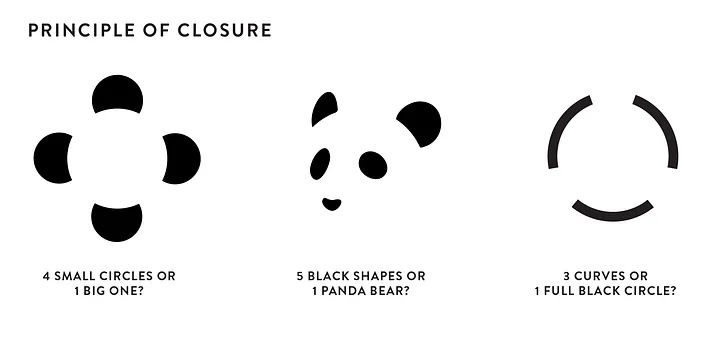
Three example images showing the law of closure.

Closure “permits” viewers to question things as well as see them.

© Eva Shicker, Fair Use

Getting Closure on Closure – The Evidence for It

The principle of closure has been the subject of extensive study through empirical research and observations. Numerous studies have shown that users and viewers do indeed respond to closure in visual stimuli. The German psychologists Max Wertheimer, Wolfgang Köhler and Kurt Koffka provided early evidence of how humans perceive and respond to closure through experiments involving such stimuli.  

In more recent studies, neuroscientists have used brain imaging techniques, such as functional magnetic resonance imaging (fMRI). They’ve done this to look closely at the neural processes that are associated with closure perception. These studies have shown that when individuals encounter incomplete or fragmented visual stimuli, specific areas of the brain that are responsible for recognizing and completing patterns become active. This neural activity suggests that the brain automatically fills in the missing parts so the person can make out a complete object from an incomplete form. 

Another point is that user testing and user feedback in design projects have consistently shown that closure plays a large role in how users perceive and understand visuals. Designs that effectively use closure principles tend to bring positive responses from users—responses that include increased engagement, improved comprehension and enhanced memorability.  
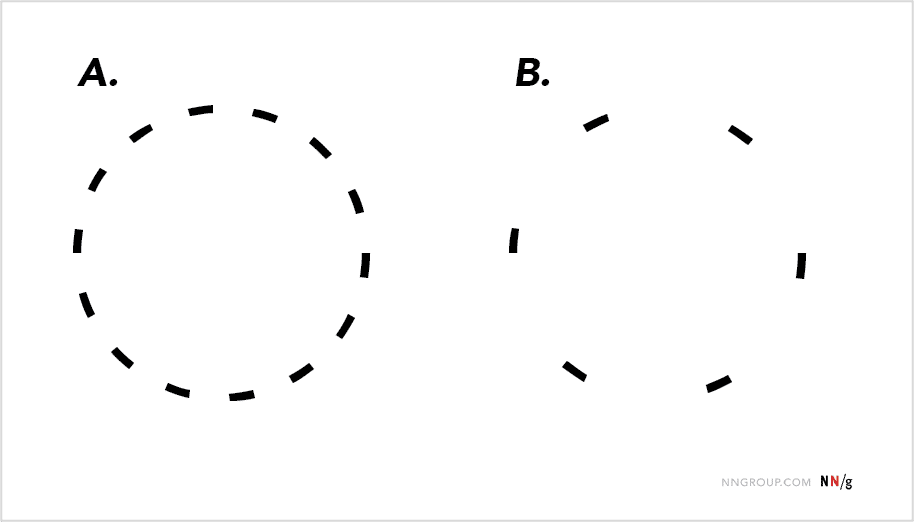
Image of two different broken-line-edged circles.

Although the viewer can still tell B is a circle, A is more obviously one with closure.

© Alita Joyce, Fair Use

Benefits of Using the Law of Closure in UX Design

When designers apply closure well, they can make effective use of users’ tendency to fill in the blanks in images. Closure helps to: 

1. Simplify Complex Information

Closure boosts the user's ability to understand and navigate through the interface—a phenomenon that leads to a more intuitive and efficient user experience. 

2. Enhance Visual Engagement

Closure adds depth and interest to designs—and makes them visually engaging. Since it’s about getting the viewer actively involved in completing missing parts, closure can capture attention and make a memorable impression. 

3. Facilitate Pattern Recognition

Closure helps when it comes to pattern recognition—letting users quickly spot and make sense of visual elements. Users—from mentally completing missing parts—can recognize forms or objects that are familiar to them. This fact enables efficient information processing and decision-making. 

Image showing the PBS logo.

The viewer can fill in the missing information at a glance, such as the two other heads.

© PBS, Fair Use

How and When to Apply the Law of Closure

UI and UX designers can apply the law or principle of closure when they use the key technique of utilizing incomplete or fragmented visual elements. They intentionally incorporate these in their design work to encourage the viewer's participation in completing the missing parts. Main uses of closure include: 

Logo Design

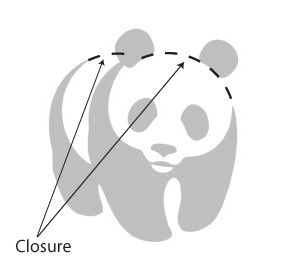
Designers frequently use the law of closure in logo design. With this principle, they can create logos that are simple yet intriguing—logos that feature simple or abstract shapes which come into view easily for the user. For instance, they make logos that use negative space to suggest that there’s a shape or object that isn't explicitly drawn. This doesn’t just make the design more engaging; it helps in brand recall, too. For example, the World Wildlife Fund’s panda logo—with its iconic form—is an embodiment of the law of closure. 
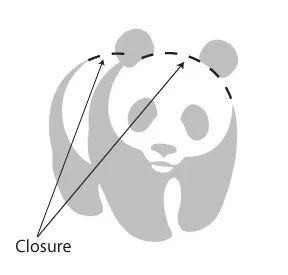
Image showing a panda logo with law of closure.

The World Wildlife Fund’s iconic panda logo is an example of closure in the wild—as outlined here.

© Tangient LL. Fair Use

Interface Icons

Icons are an integral part of any interface—and they serve as visual cues for various actions or functions. Whenever they use the law of closure, designers can make icons that are minimalist yet effective—ones that users can easily recognize and understand. 
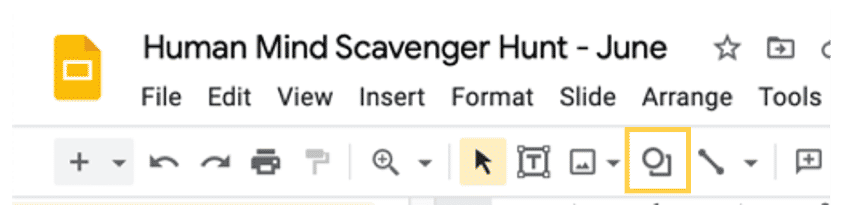
Image of icons in a Google Slides piece.

On this Google Slides’ piece, the shape icon of a circle appears over what the human eye sees as a square.

© Alita Joyce, Fair Use

Signaling Additional Content

Designers also leverage the law of closure to indicate the presence of additional content and encourage interaction. For example, showing only parts of an item in a carousel tells users that more items lie past the visible area. Even if users can't guess the exact details of the partly displayed item, the fact that it’s incomplete suggests they can find more. Intrigued, they will feel prompted to interact with the digital product. 
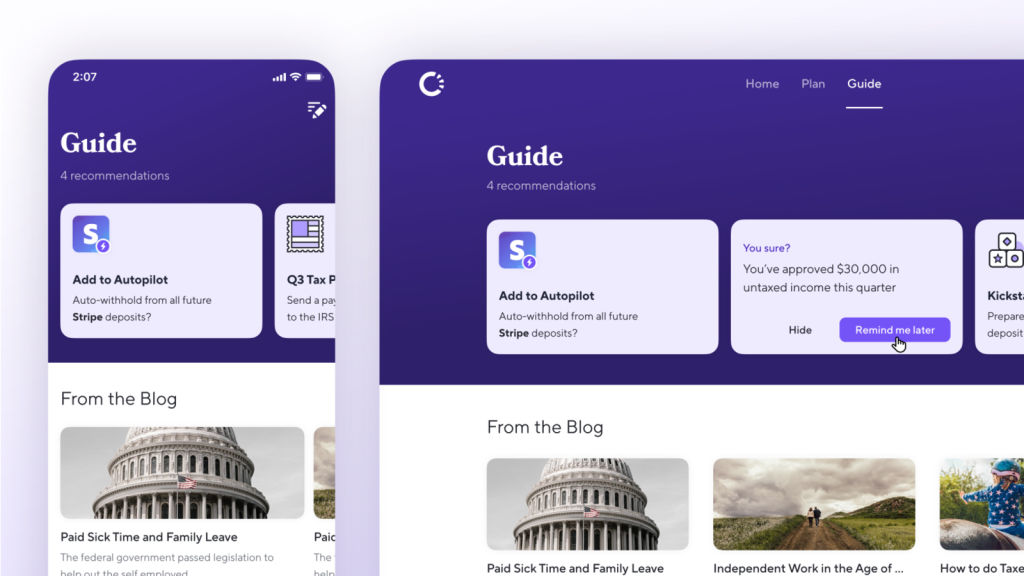
Image showing screen carousels in use.

Carousels utilize the principle of closure here.

© Craig Barber, Fair Use

Best Practices to Apply the Law of Closure

It takes thoughtful consideration to apply closure to user interfaces. Design elements and their arrangement need to become meaningful instantaneously.  

Some best practices and tips on how to effectively apply the principle of closure to UI design include the following:   

1. Simplify Visual Elements

Designers do this to lessen unneeded complexity. Don’t clutter the interface with excessive details—this can keep users from perceiving closure. Instead, focus on using clean lines, minimalistic shapes and forms that are easy for users to recognize. 

2. Use Negative Space Strategically

Negative space—also called white space—plays a crucial role in closure perception. So, use negative space in a strategic way to create implied shapes or forms. Carefully arrange and balance the empty areas around visual elements to help users mentally complete the missing parts and so they perceive a coherent whole. 

Illustration of black spikes on a white ball effect.

Closure and space – important parts in a design strategy to help users find their way, right away.

© Travis Jones, Fair Use

3. Maintain Consistency in Design

Consistency in design is a vital thing for closure perception, so establish consistent visual patterns—like using similar shapes, colors or styles for related elements. Consistency helps viewers mentally group these elements together and then perceive them as a unified entity. 

4. Leverage Other Gestalt Principles

Other Gestalt principles—like proximity, similarity and common fate—can enhance how users perceive closure. So, use these principles to organize visual elements in a way that encourages viewers to mentally group them and perceive them as being a cohesive whole. 

5. Consider Context and User Expectations

Think about the users’ context: what are they typically doing? Where are they? How many steps must they take to complete a goal? Designers need to know the user journey regarding how users encounter the design. An understanding of the user scenario is vital for designers to grasp—and understand well—and work with the expectations of the target users. So, design elements should fall into line with the users' mental models and expectations; that will make it easier for them to complete the missing parts. A design that’s too abstract or that diverges a great deal from user expectations may keep them from being able to perceive closure. 

6. Design Minimalist Icons

Do this to give users an easy advantage and help them on their way. The less “busy” an icon looks, the better—and closure is a smart and economical tool to hint at function. 

7. Use Closure to Indicate The Presence of Additional Content

Do this to encourage interaction—for example—in a carousel or below the fold in the screen. It’s especially vital to signal to users this way if important options aren’t readily visible on the screen that loads for them.  

8. Test and Iterate

Conduct user testing and collect the feedback to assess how effective the users’ perception of closure is in your UI design. Iterate and refine the design based on user insights to ensure a seamless and intuitive user experience. User feedback will provide valuable insights into how users perceive and interact with the design, and visual closure—like other Gestalt principles—is a fundamental area to trial. 
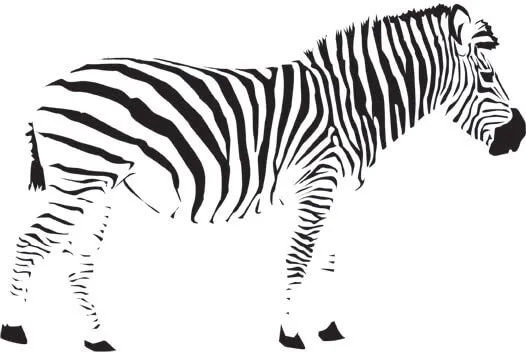
Illustration of a zebra embodying the closure law.

Users will be the ones to determine how successful a design is in the wild.

© Eduard Volianskyi, Fair Use

What Else do Designers Need to Know about The Law of Closure?

There are important factors to bear in mind when it comes to designing with the principle of closure—and here are some of them: 

1. Cognitive Load

Think about what sort of cognitive load closure perception may put on users. Closure can simplify visuals, indeed, but it may also call for some mental effort from users to complete the missing parts. Designers should strike a balance between closure and cognitive load—a crucial thing to help make sure of a seamless user experience. 

2. Ambiguity and Misinterpretation

Consider the contextual relevance of closure in a design—closure mightn’t be applicable or effective in all contexts. So, assess whether closure is in line with the goals, content and target users of a UX design project. It should enhance the user experience and not create confusion or ambiguity. Inconsistent or incorrect interpretations will work against the design message. Ensure that users mentally complete missing parts in the same way, to make the same meaning. 

3. Accessibility

Make sure that closure doesn’t hinder accessibility for users with visual impairments or cognitive challenges. As with color, shape and other factors, design elements should be perceivable and understandable without relying heavily on closure perception. Give users alternative ways to understand and interact with the interface for a more inclusive experience. 

4. Balance

If designers add too many details in an image intended to trigger the closure response, it will defeat the purpose. An image needs to cue users to do the “automatic” work of completing the picture mentally, not feed them the whole story directly. Meanwhile, providing too little information will make it difficult for users to fill in the gaps. That sort of hesitation can lead to confusion and frustration. So, when it comes to segmenting content or page elements, consider just how much of that element will be on screen. What’s more, look at whether it's enough to communicate value and function. 

5. Below-the-Fold and Mobile UI Concerns

Also be careful with the fold, especially on smaller screens. A tangent issue of closure is that users might assume a screen is complete because their minds have filled in the blanks prematurely. So, be sure that the users feel prompted to move or scroll down for more essential information or calls-to-action.  
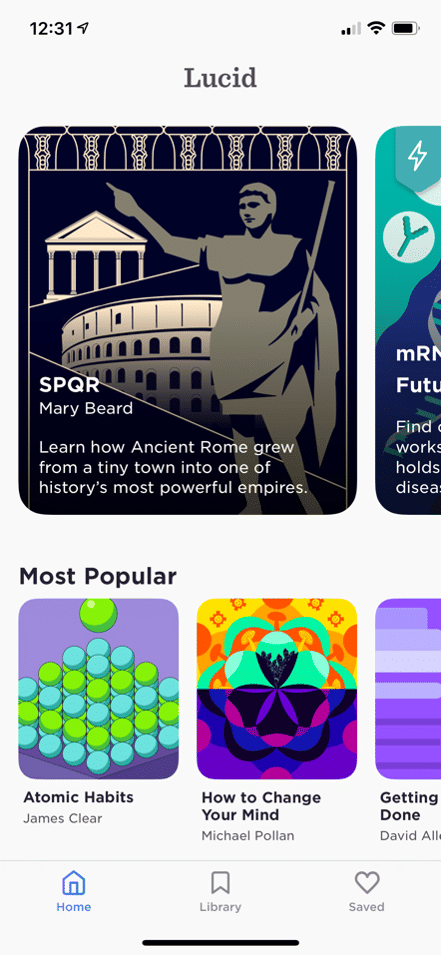
Image of a screen with elements featuring closure.

The segmented objects of Lucid appeared beyond the screen—to tell users they could swipe horizontally to discover more content.

© Alita Joyce, Fair Use

6. Test and Test Again

Testing is the only way to make sure that users can get the full picture. For example, can they understand what an icon represents right away? Designers may need to simplify the visual complexity of icons. User testing will show if users can decipher elements quickly, as well as how their perceptions may diverge if any elements need tweaking. 

Overall, the law or principle of closure is a common and handy resource in a designer’s toolbox and a tried-and-tested design decision to include. Still, it can be difficult to apply to great effect at first. While designers shouldn’t underestimate its potential, neither should they underestimate the thought and strategy that are needed to leverage it best.  

As with visual hierarchy and color theory, principles like the Gestalt law of closure are essential to master in user interface design. Designers who understand the power of such tools can use them to create visually compelling and cohesive designs that resonate with their target audience, optimize user experience and drive engagement further with their design work. 

Logo of Carrefour.

Good use of closure can help brands signal an iconic look simply and effectively as household names.

© Carrefour, Fair Use

Questions About Law of Closure?
We've Got Answers!

How does cultural background influence the perception of designs based on the Gestalt law of closure?

Cultural background has a large bearing on how users perceive designs. For instance, in some cultures, symbolism and abstraction are prominent features in art and design. So, viewers might be more used to recognizing and appreciating works that showcase the law of closure at work. Then again, some cultures put an emphasis on clarity and explicitness—and viewers there might find designs based on this law less intuitive or appealing. 

The interpretation of shapes and patterns, the symbolism that users attach to certain visual elements and the context in which these people encounter a design are things that can vary depending on cultural background. So, designers must understand these nuances to make sure their work gets the intended messages across effectively whatever the culture. It’s vital to appreciate cultural diversity and how cultures around the world may differ in perceiving what they see from how users in the United States perceive things, for example.  

Take our course The Ultimate Guide to Visual Perception and Design for more in-depth insights. 

How does the Gestalt law of closure impact the accessibility of a design for users with different abilities?

The Gestalt law of closure can play a great part when it comes to boosting the accessibility of a design for users with varying abilities. Designers can use it to help make interfaces that are more inclusive—and they can also make ones that are easier to navigate, especially for users with visual or cognitive impairments. 

Visual accessibility: For users with low vision, designs that feature the law of closure can be easier for them to interpret. As they suggest shapes and forms— without explicitly defining every detail—these designs reduce the amount of visual clutter. This makes it easier for those users who may struggle with complex visuals to make sense of the content and interact with it. 

Cognitive accessibility: The law of closure also aids in cognitive accessibility. People with cognitive disabilities may find it easier to understand and remember information that’s presented in a simplified, cohesive form.  

Universal design: Incorporate the law of closure well and it can help make sure that products are usable for—and accessible to—people with a wide range of abilities. This doesn’t just benefit users with disabilities. It provides a better user experience for all users from how it makes information more digestible and interfaces more intuitive, too. 

Designers should, though, be mindful of relying too much on this principle. That’s because excessive use of closure can lead to ambiguity. This is what makes it crucial to strike a balance between simplicity and clarity. Designers should test designs with a diverse user group and think about the range of abilities and assistive technology that are involved.  

Take our Accessibility: How to Design For All course for more in-depth insights into accessibility and design.  

What challenges can designers face when they apply the Gestalt law of closure in complex or data-heavy interfaces?

When they apply the Gestalt law of closure in complex or data-heavy interfaces, designers may face several challenges: 

  • Balancing simplicity and clarity: Designers must make sure that while elements are simplified, the essential details do remain clear and understandable. 

  • Cognitive overload: In data-heavy interfaces, there's a risk of cognitive overload from overusing the law of closure. So, designers need to be sure that users can easily perceive and understand the intended patterns or shapes—comfortably.  

  • Diverse user interpretations: Different users may perceive incomplete elements differently. That’s something that can be due to their cultural background, experiences and cognitive abilities. So, it’s important to create designs that communicate effectively across a diverse user base—whatever the target audience or abilities involved. 

  • Testing and validation: It takes rigorous user testing to make sure that the law of closure actually does contribute positively to the user experience. Designers need to validate their designs with real users. 

  • Maintaining consistency: This is vital to apply the law of closure across various elements of the interface. If designers use closure inconsistently, what can result is confusion and a disjointed user experience. 

Take our Conducting Usability Testing course to help make more user-friendly visual designs and play an important role in helping users interact with high-quality product designs. 

In what ways can the Gestalt law of closure enhance navigation and information architecture in UX design?

The law of closure can do this through how it promotes a more intuitive and user-friendly interface. Here are some ways: 

  • Simplify complex information: When they use the law of closure—and use it well—designers can present complex information in a more simplified way. Users fill in the missing parts—and naturally. So, designers can avoid over-cluttering the interface with excessive details. This simplification makes it easier for users to navigate through the information and make sense of the underlying structure in user interface design. 

  • Create intuitive navigation elements: Designers can use the closure principle to create navigation elements that are more intuitive. For example, icons or buttons may not need to be fully detailed if users can easily perceive their function and form through closure. This can lead to a cleaner design and a more intuitive user experience on a digital product. 

  • Streamline user flows: The closure law can help with the streamlining of user flows by how it reduces visual noise and focuses users' attention on getting tasks completed. Well-designed paths using this principle can lead users naturally from one step to the next—so enhancing the overall usability of the system. 

Take our Gestalt Psychology and Web Design: The Ultimate Guide course for more in-depth insights. 

Can the Gestalt law of closure influence the choice of colors and contrasts in UI design?

Yes, the law of closure can have a large influence on how designers pick colors and contrasts in UI design. This principle interacts with color and contrast in such a way that it can affect how users perceive and interpret visual elements. It does this in these ways: 

Enhancing element visibility: From using contrasting colors, designers can emphasize those parts of an element that are crucial for the law of closure to take effect.  

Creating depth and focus: Designers can use color gradients and contrasting colors in such a way that they make a sense of depth.  

Improving comprehension: Proper use of colors and contrasts can improve the user's ability to understand shapes or patterns that are complete.  

Affecting emotional response: For example, if designers use warm, contrasting colors for incomplete shapes, it can make the interface feel more inviting and engaging. 

Guiding user interaction: The strategic use of colors and contrasts can guide user interaction with elements that utilize the closure principle. A well-designed, color-contrasted incomplete element can attract the user's attention and indicate where to take action. 

In this video, Joann and Arielle Eckstut, leading color consultants and authors, give six tips to help designers choose colors:

Transcript

How is the Gestalt law of closure useful in emerging UX/UI trends such as voice UI or augmented reality?

Designers can use the law of closure in innovative applications in emerging UX/UI trends like Voice User Interfaces (VUIs) and Augmented Reality (AR). They can enhance the user experience by leveraging users' perceptual tendencies. Here are important application areas: 

  • Voice User Interfaces (VUIs): 

Contextual completion: In VUIs, the law of closure helps to create a more natural interaction. Users often provide incomplete commands or information, and designers engineer systems to fill in the gaps contextually, anticipating user needs or next steps. This is much like how the human brain uses closure to complete patterns. 

Feedback loops: Visual indicators or sounds in VUIs often hint at the system's status or next steps. These cues, although not complete representations, allow users to perceive the system's state or the completion of a task. Doing so, they apply the principle of closure to user-system interaction.  

  • Augmented Reality (AR): 

Visual layering: AR interfaces use the law of closure by overlaying digital information on the real world. Users naturally fill in the gaps between digital and physical elements. This creates a cohesive experience where incomplete digital elements seem part of the physical space. 

Interactive storytelling: AR features the closure principle in storytelling—where users' actions or movements complete the narrative. The story unfolds based on user interaction. What’s more, the brain's tendency to fill in gaps makes for a seamless and immersive experience. 

Another thing is that designers can harness artificial intelligence (AI) as well as a range of tools and skills related to visual elements and design principles in UI design for AR and voice commands for VUIs to optimize experiences for a wide range of users. Meanwhile, they should consider important issues such as accessibility to help make their designs even more user friendly as well as innovative.  

Watch as CEO of Experience Dynamics, Frank Spillers explains what AR is and involves: 

Transcript
 

What are some highly cited scientific pieces of research about the Gestalt law of closure?
  1. Chang, D., Dooley, L., & Tuovinen, J. E. (2002). Gestalt Theory in Visual Screen Design — A New Look at an old subject. In Selected Papers from the 7th World Conference on Computers in Education (WCCE’01), Copenhagen, Computers in Education 2001: Australian Topics, Volume 8 (pp. 5–12). Melbourne: Australian Computer Society.  

This publication revisits the application of Gestalt theory in educational visual screen design. It critically examines the common yet narrow application of Gestalt laws in design literature and identifies eleven relevant laws for enhancing visual screen design in educational contexts. The study applies these principles to redesign an instructional multimedia application, 'WoundCare', and presents an evaluation of the new designs based on user feedback, highlighting the positive impact of these principles on learning and design aesthetics. 

  1. Li, Y., & Fu, K. (2022). Research on Minimalism in Interface Design Based on Gestalt Psychology. In Proceedings of the 2022 International Conference on Science Education and Art Appreciation (SEAA 2022). Atlantis Press.  

This publication explores the application of Gestalt psychology in minimalist interface design, particularly analyzing interfaces from Apple and Huawei. It discusses how Gestalt principles aid in structuring information in a user-friendly manner and enhance user experience by simplifying visual elements and aligning them with human visual perception principles. The study underscores the synergy between Gestalt principles and minimalist design, proposing advantages for user comprehension and interface aesthetics. 

What are some highly regarded books about the Gestalt law of closure?

Malone, E. (2023). A Guide to Gestalt Principles for UX Designers: A mini visual design guide to help user experience designers leverage gestalt principles for better designs. 8 paw press. 

This book offers a concise exploration of Gestalt principles in UX design. Erin Malone provides a practical guide, applying these principles to digital interfaces with a focus on mobile and web examples. The book delves into visual hierarchy, animation, and microinteractions—with the aim being to help readers improve design skills. It also includes downloadable templates for design documentation—which make it a hands-on resource for UX designers. 

Earn a Gift Earn a Gift, Answer a Short Quiz!

1
2
3
4
1
2
3
4
Question 1
Question 2
Question 3
Get Your Gift
Interaction Design Foundation logo

Question 1

What does the Law of Closure describe?

1 point towards your gift

  • How people group similar elements together
  • How people perceive incomplete elements as complete forms
  • How people see elements close to each other as a group
Interaction Design Foundation logo

Question 2

How can the Law of Closure improve user experience in design?

1 point towards your gift

  • It decreases visual clutter and improves understanding.
  • It makes websites load faster.
  • It uses many different colors and forms.
Interaction Design Foundation logo

Question 3

How does the Law of Closure add visual interest to designs?

1 point towards your gift

  • It engages viewers to fill in gaps mentally.
  • It provides complete images.
  • It uses bright colors only.

Learn More About the Law of Closure

Make learning as easy as watching Netflix: Learn more about Law of Closure by taking the online IxDF Course Gestalt Psychology and Web Design: The Ultimate Guide.

Why? Because design skills make you valuable. In any job. Any industry.

In This Course, You'll

  • Get excited when you discover how top brands use Gestalt psychology to make websites and apps intuitive, visually appealing, and user-friendly. Gestalt principles help you create clear layouts and a strong visual hierarchy, so your users never feel confused or overwhelmed. You already use some of these principles instinctively, for example, when you group similar tasks on your to-do list, so mastering Gestalt psychology for web design is easier than you think. You'll get methods to increase engagement and conversions by optimizing CTA placement. The result? More immediate impact: less confusion, more engagement, higher conversions, and happier customers. That leads to higher company profits, better career opportunities, and greater job satisfaction.

  • Make yourself invaluable when you organize visual elements to guide behavior and drive desired outcomes. Whether you're streamlining the layout of a patient portal or designing a retail website that converts, the science behind human perception dramatically improves outcomes across industries. When you apply Gestalt psychology in web design, you're not just creating something visually appealing, you're designing experiences that feel right, reduce overload, and build lasting brand loyalty. This pays off significantly, as studies show that, on average, every dollar invested in UX design brings 100 dollars in return. As AI accelerates how fast you can create and iterate, you stay in demand when you can direct it with deep understanding of human perception. These timeless human-centered design principles transform AI from a tool into your new superpower, helping you design for how people's minds actually work.

  • Gain confidence and credibility as you follow step-by-step guidance to apply real-world Gestalt techniques. It's easier than you think, regardless of your background! You'll get comfortable with Gestalt principles as we walk through case studies and practical examples you can immediately use. When you use principles like the law of proximity, similarity, and closure, you'll guide people's eyes, simplify complex ideas, and ensure your message is clear. With this psychology-driven framework, you'll confidently tackle complex design challenges and create experiences that people love, trust, and recommend.

Get an Industry-Recognized IxDF Course Certificate

Increase your credibility, salary potential and job opportunities by showing credible evidence of your skills.

IxDF Course Certificates set the industry gold standard. Add them to your LinkedIn profile, resumé, and job applications.

Course Certificate Example

Be in distinguished company, alongside industry leaders who train their teams with the IxDF and trust IxDF Course Certificates.

Our clients: IBM, HP, Adobe, GE, Accenture, Allianz, Phillips, Deezer, Capgemin, Mcafee, SAP, Telenor, Cigna, British Parliament, State of New York

All Free IxDF Articles on the Law of Closure

Read full article
The Laws of Figure/Ground, Prägnanz, Closure, and Common Fate - Gestalt Principles (Part 3) - Article hero image
Interaction Design Foundation logo

The Laws of Figure/Ground, Prägnanz, Closure, and Common Fate - Gestalt Principles (Part 3)

We’re now going to take a look at some more Gestalt principles, building on what we’ve learned in the first two articles. This third piece is particularly useful because having a good grasp of Figure/Ground, Prägnanz, Closure, and Common Fate will enhance your ability to design with more thoughtfuln

Social shares
1.1k
Published
Read Article

The Laws of Figure/Ground, Prägnanz, Closure, and Common Fate - Gestalt Principles (Part 3)

The Laws of Figure/Ground, Prägnanz, Closure, and Common Fate - Gestalt Principles (Part 3)

We’re now going to take a look at some more Gestalt principles, building on what we’ve learned in the first two articles. This third piece is particularly useful because having a good grasp of Figure/Ground, Prägnanz, Closure, and Common Fate will enhance your ability to design with more thoughtfulness, confident that you’re making the best use of some basic human tendencies to access your design and its impact.

“The eye tends to build a relationship between elements, it fills in the gaps, and identifies hidden motion in the design.” Figure/Ground, Prägnanz, Closure, and Common Fate are Gestalt Principles that help the eye build these relationships:

  • The Figure/Ground law examines how the eye can separate shapes in a design from the background of that design.

  • The Prägnanz law shows how our eyes can simplify complex shapes into simple shapes.

  • The law of Closure refers to our tendency to complete an incomplete shape in order to rationalize the whole.

  • The law of Common Fate observes that when objects point in the same direction, we see them as a related group.

This article is the third in the Gestalt series. Please refer to the previous two to learn about the Laws of Similarity, Proximity, Uniform Connectedness, and Continuation.

So, for example, text on a page makes use of this law. The figure is the text itself and the ground the paper on which the text sits. The law of Figure/Ground states that we can distinguish an object (the figure of the rule) from background (the ground). This rule shows that when we look at a design, we perceive the figure from the ground distinctly.

There are two main factors that affect the way we perceive the figure and the ground in any given design:

  • The size of the figure when compared to the background. For example, header text is normally published in a larger font than body text. In this instance, the header is the figure and the body the ground. The header stands out more to the eye than the main body of text.

  • The contrast between the figure and the ground. This is why most printed pages will use black ink on a white background. The figure (the text) is at maximum contrast with the ground (the page). Contrast provides a distinct barrier between the two. This is why the readability of content can be impaired when there is little contrast between the text and the page – it becomes more difficult for us to distinguish the figure from the ground. Have you ever wondered why you never find red text on a blue or gray screen? Contrast is the reason.

Author/Copyright holder: Klaus-Dieter Keller. Copyright terms and licence: Public Domain.

The relationships between figure and ground can be classified into three categories:

Stable – In the case of a stable figure, the figure will be clearly identifiable from the background, and one element clearly dominates the overall layout.

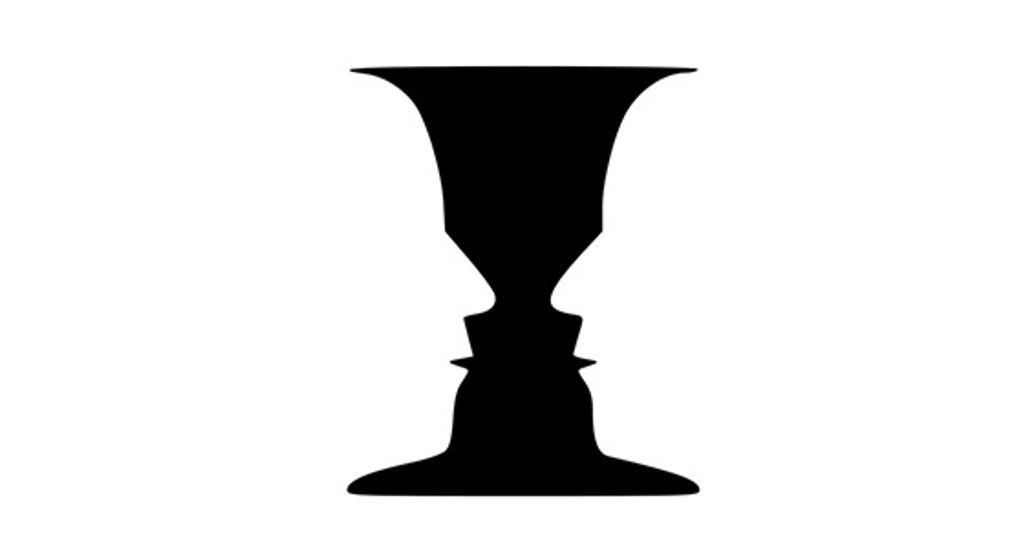
Reversible –In this case, the figure and background have near-equal density. This enables the eye to flip the figure with the background (hence “reversible”). This can be used to create visual illusions in both web design and art. However, at any point in time, a reversible design will have a clear figure and a clear ground.

A classic illustration of this is the image of a Rubin vase (have a look at the image above). This tends to be a black vase that is set centrally over a square white background. The symmetrical vase has a large, trumpet-funnel top that takes up nearly the full width of the background’s top and tapers down into a narrow middle. Down the middle, it has five contours and four projections before it flares out again to cover most of the width of the bottom.

You’ve probably seen such a vase and know what’s coming next. Yes, that’s right! The vase has “made” two white faces facing each other, not through it but set against what our eyes now perceive as being black space behind them. It’s a neat trick!

Ambiguous – In an ambiguous design, there is little distinction between the ground and the figure. At any point, a single element might be both figure and ground at the same time. You can make your design ambiguous by blurring the boundaries between your ground and figure.

It sounds difficult, but it’s a fascinating realm to explore, and there are many famous examples of ambiguous design. M.C. Escher – a Dutch graphic artist - was a master at this. His designs tapped ambiguity to the maximum and, thanks to that, we have wonderful pictures of people climbing steps in buildings: some are going up; some are going down, but at impossible angles. Escher used ambiguity to make waterfalls flow around more buildings in an impossible way – the water initially flows downward, falling in places, follows a seemingly logical course, and then, mysteriously, flows up again. Ambiguous designs are yours for the taking of your inspiration, whether you want to insert hidden writing, faces in profile that are also a single, different face, or faces made of fruity parts.

Designing with the Figure/Ground in Mind

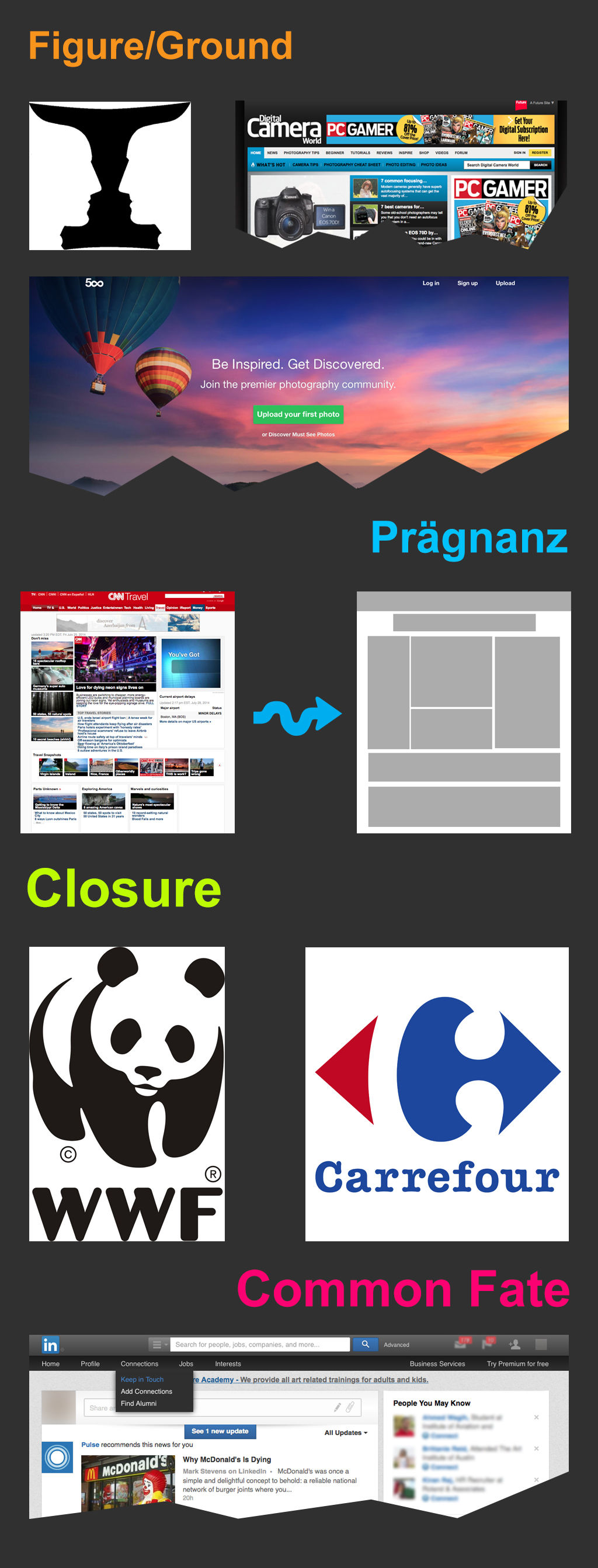
In the image at the start of this article, the Digital Camera World website menu uses the Figure/Ground principle to differentiate between two menus (see the top sections of the image). The use of drop shadow and color creates the illusion of the (lower) blue menu being on a top layer, while the white menu remains part of the background.

You can also see figure/ground at work on the 500px.com website’s homepage (as shown above). The background is a large and dominant image – people in the hot air balloon rides enjoying the majestic sunset sky - but the content is clearly identifiable, thanks to the use of both space and contrast with the background. This stops the background from overwhelming the content and distracting or confusing a visitor, who is probably joining in with the people to take in the sunset view. Cleverly “bulls-eyed” in the sky and tapering up next to the hot air balloons is the text – the all-important message.

The Law of Prägnanz (or Simplicity)

Prägnanz is a German word that means “good figure” or “pithiness” (literally defined as, “brief, forceful and meaningful in expression”). The human eye likes to find simplicity and order in complex shapes – it prevents us from being overwhelmed by information overload.

Author/Copyright holder: Clint. Copyright terms and licence: CC BY 2.0

When we see convoluted shapes in a design, the eye simplifies these by transforming them into a single, unified shape (by removing extraneous detail from these shapes).

Designing with the Law of Prägnanz in Mind – We can use the law of Prägnanz to help when wireframing a website. Our eyes assemble the content blocks into a single page.

This law goes by the other name of “The Law of Good Gestalt”, and for good reason. We humans like to make quick sense of things that would otherwise be upsettingly disordered. We dislike flux and need to find meaning quickly. Luckily, we don’t even have to think about doing this – our eyes have already got there!

When redesigning a site, you can apply Prägnanz law to wireframe the new concept and place it alongside the current version of a page. The eye can swiftly pick out any variances, and the user can quickly provide feedback on changes made – without the need for content. That’s all there is to it.

The Law of Closure

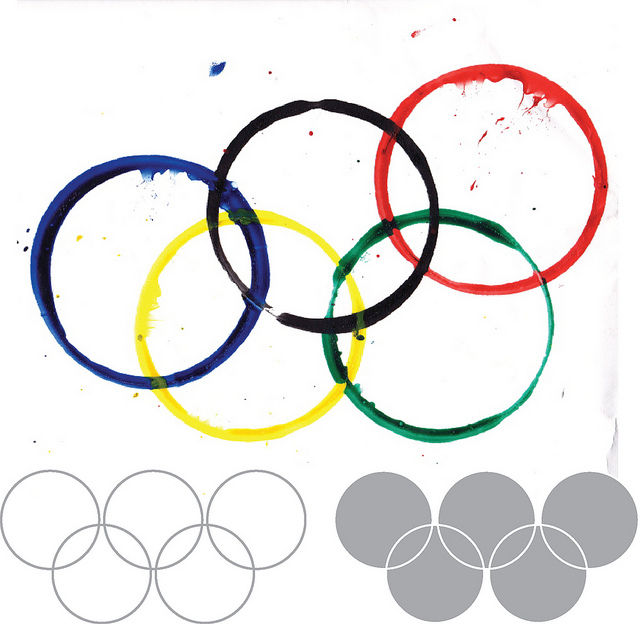
The Gestalt principle or law of Closure explains how we perceive incomplete shapes (Palmer & Rock, 1994). When there is missing information in an image, the eye ignores the missing information and fills in the gaps with lines, color or patterns from the surrounding area to complete the image. In reality, there are no borders or lines between this area (the background) outside the image we’re completing and the bits of background that we have determined are now part of the image. The eye tells us otherwise.

Author/Copyright holder: Tangient LL. Copyright terms and licence: CC BY-SA 3.0

Designing with the Law of Closure in Mind – We can use the Law of Closure to achieve visual effects such as the use in the World Wildlife Fund logo (pictured at the top of this article). The panda is incomplete (there are no lines around the white areas), but our eyes perceive a whole panda despite this. It takes some effort to overcome and notice the otherwise random black shapes and spots that appear on every piece of white background we can eventually make ourselves see.

The Law of Common Fate

The law of Common Fate says that we perceive shapes as lines moving along the smoothest path. For example, we look at grouped elements and see them as moving in a similar direction.

Author/Copyright holder: Alastair Rae. Copyright terms and licence: CC BY-SA 2.0

Let’s see this in action. If you’ve got a piece of paper handy, draw seven or eight circles in a line beside each other. Above two of them, put a little arrowhead. Now, notice that these two circles are different from the others, but in the same way. The others are staying put, but the “arrowheaded” circles are going somewhere (the same direction); they share a common fate.

Note: The elements do not have to be moving (though they can be), but they must suggest motion for this law to work in your designs.

Designing with the Law of Common Fate in Mind - The law of Common Fate plays an important role in design, for example, with nested menus and content. Take the example of LinkedIn (as shown in the image up there at the start). LinkedIn have used the law of common fate to build a relationship between sub-menus. When you move over a menu item, the sub-menu item moves in the same direction as the last. This creates a link between sub-menus in the minds of the users.

The Take Away

The principles of perceptual organization defined by Gestalt Psychology provide us with valuable knowledge so we can design effective, efficient, and visually pleasing displays. Throughout three articles, we have reviewed the most relevant for you as a designer:

And, in this article, you have learned about the laws of Figure/Ground, Prägnanz, Closure, and Common Fate. As we have seen, we have many exciting ways to reach our users with designs. Are you ready to apply them?

Where to Learn More

We can’t help but to invite you, once again, to enroll in our Gestalt Psychology Course! Check its description here.

Besides learning about the Gestalt principles and how they relate to design, you will also take away some of the best resources currently available and a consolidated list of recommended reading materials, videos, and useful links to relieve you of the task of trawling the internet, searching for that vital piece of information.

In addition to this, we have a course on Visual Perception and Design
which is particularly relevant to this law.

Feel Stuck?
Want Better Job Options?

AI is replacing jobs everywhere, yet design jobs are booming with a projected 45% job growth. With design skills, you can create products and services people love. More love means more impact and greater salary potential.

At IxDF, we help you from your first course to your next job, all in one place.

See How Design Skills Turn Into Job Options
Privacy Settings
By using this site, you accept our Cookie Policy and Terms of Use.
Customize
Accept all

Be the One Who Inspires

People remember who shares great ideas.

Share on:

Academic Credibility — On Autopilot

Don't waste time googling citation formats. Just copy, paste and look legit in seconds.