The Law of Similarity

Your constantly-updated definition of the Law of Similarity and collection of videos and articles.
Be a conversation starter: Share this page and inspire others!

98 Shares

What is the Law of Similarity?

The law of similarity is a Gestalt psychology principle that refers to how our brains organize and perceive visual information. It states that ​people perceive elements that share similar visual characteristics​ (e.g., color, size, shape) ​to be related​. This law is vital in web design—it helps designers create interfaces that users can easily navigate and understand. 

Transcript

There’s Something Familiar about Items Being Similar

The Gestalt similarity principle is a fundamental concept in both psychology and design. It comes from ideas about how the human brain naturally organizes information—and states that the mind perceives similar elements as part of a unified whole. Meanwhile, viewers typically view different-looking items as being separate from one another.​     ​ 

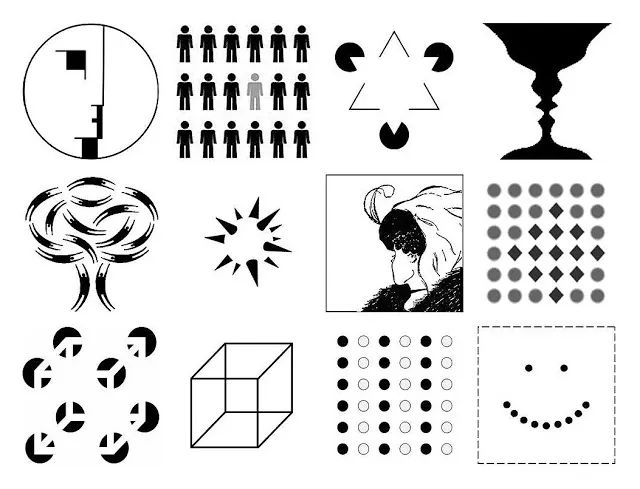
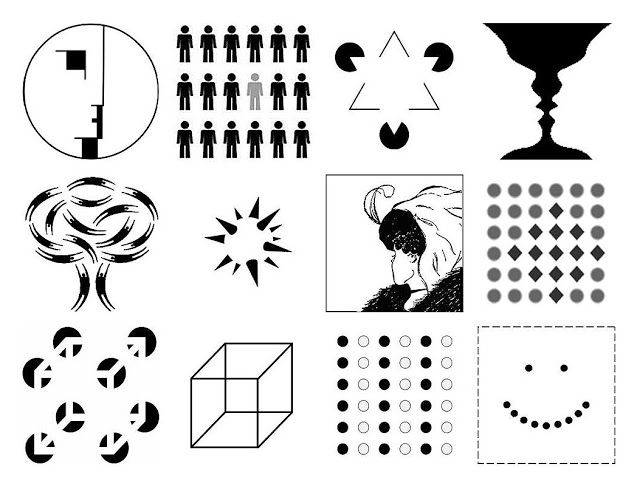
Illustration showing the Gestalt laws.

The Gestalt Laws encompass many aspects of how humans perceive images.

© Author/Copyright holder: Impronta. Copyright terms and licence: CC BY-SA 3.0

The Gestalt school of psychology emerged in the 1920s. It consisted of psychologists Max Wertheimer, Kurt Koffka and Wolfgang Köhler in Germany. The Gestalt approach developed theories that would become well-known to graphic designers. Visual perception theories such as the law of prägnanz (a German word for “good figure”), figure-ground and closed region soon became important graphic design principles. These guide designers on how to use lines or curves, shapes, focal points and backgrounds to powerful effect. 

According to the Gestalt school of thought, humans typically perceive patterns using five main categories—summed up in the principle of proximity, principle of continuity, principle of closure, principle of connectedness (or uniform connectedness) and principle of similarity. Similarity is a simple principle that involves an innately human tendency. When people perceive a collection of objects, the brain automatically groups together those that have similar visual characteristics. These include the properties of shape, size, color, texture and orientation. This grouping helps people make sense of the visual information they encounter in the real world. It’s what allows people to perceive patterns, relationships and structures. 
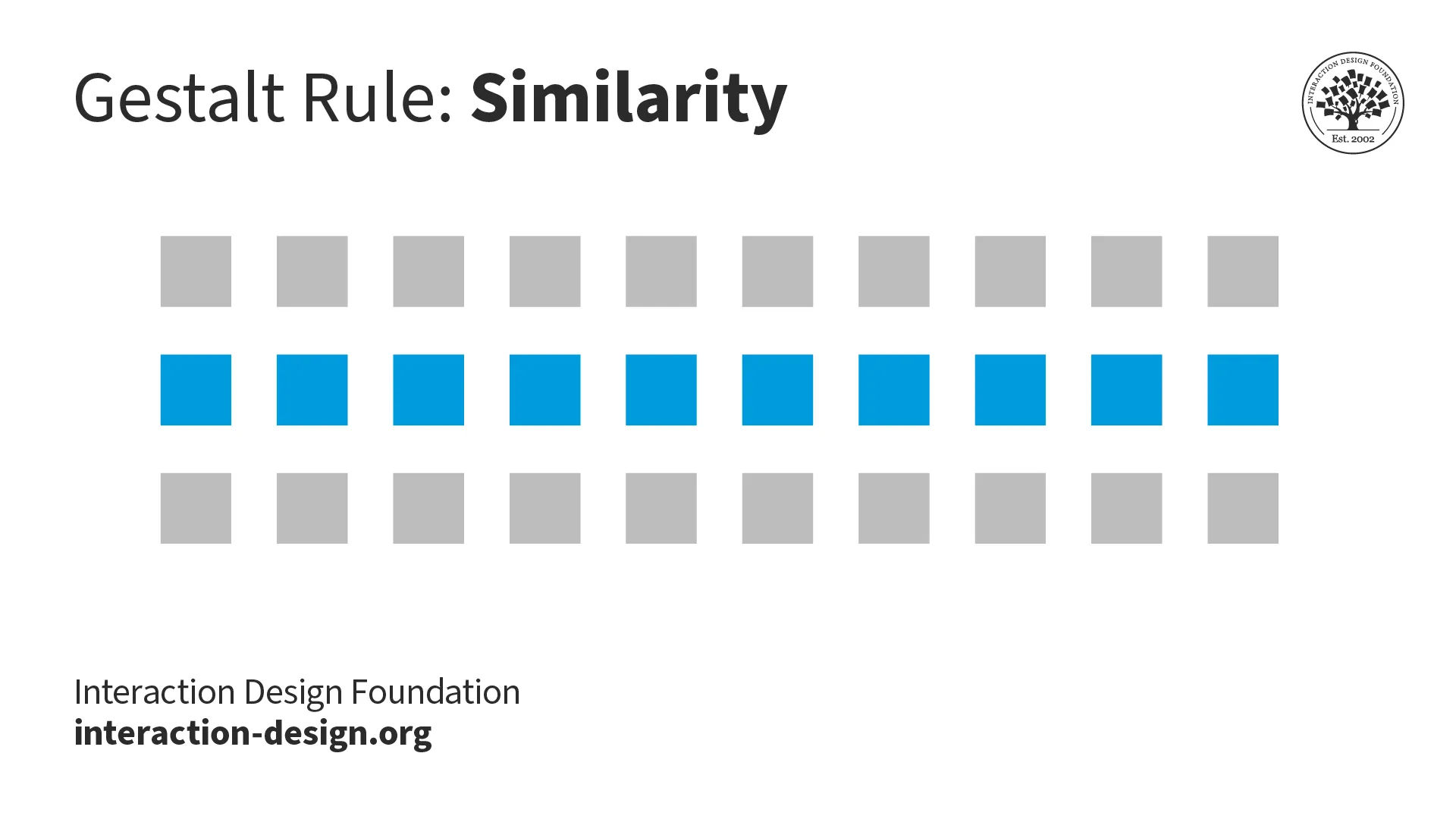
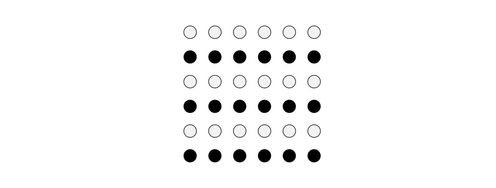
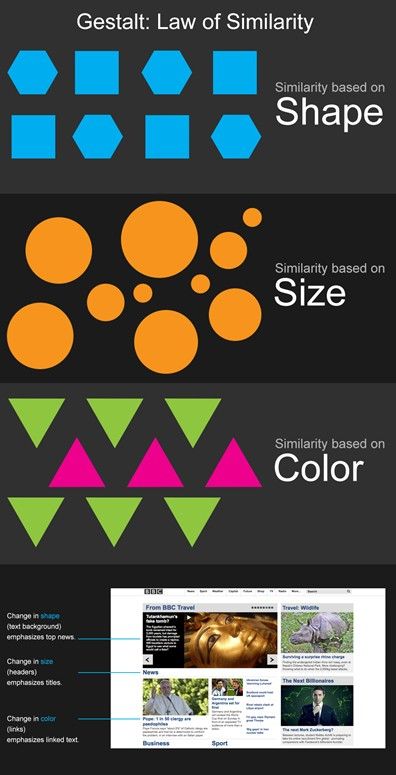
Illustration showing the Law of Similarity

The law of similarity helps the mind associate groups of items with alike properties, including color and shape.

© Interaction Design Foundation, CC BY-SA 4.0

Why is the Gestalt Law of Similarity Vital in Design?

Similarity is crucial in design because it helps designers create visually cohesive and organized designs. It’s a vital ingredient in design works that are easy for users both to understand and to navigate. Here are the main reasons behind the success of similarity as a well-leveraged Gestalt principle: 

Visual Coherence 

When they group similar elements together, designers can create a good sense of visual coherence in their designs. Elements that share visual similarities—such as color or shape—let users easily identify relationships between them. So, users can perceive them as belonging to the same category or group. 

Organized Information 

The principle of similarity lets designers organize information in such a way that it’s visually intuitive and easy for users to understand. As they use similar visual characteristics for related elements, designers can guide users' attention. They can help users quickly understand the structure and hierarchy of the information presented. 
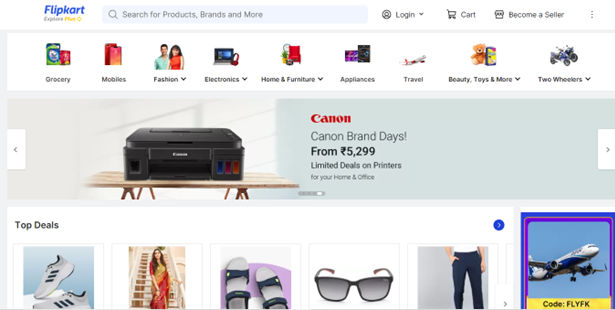
Image showing a Flipkart web page.

Flipkart’s website – divided neatly into categories and leveraging similarity so users can find top deals easily.

© Flipkart, Fair Use

Ease of Navigation 

Similarity in design can also enhance the user's navigation experience. Designers provide consistent visual cues and group related elements together. That way—they can give their users clear visual cues. These guide the users through the user interface (UI) and also help them find the information or functionality they’re after. 

User Engagement 

When elements in a design have shared visual similarities, users will be more likely to engage with the content or interact with the interface. The principle of similarity can make a design more visually appealing and aesthetically pleasing, which, in turn, can raise the levels of user engagement and satisfaction.

In this video, Frank Spillers, Service Designer, and Founder and CEO of Experience Dynamics, explains how Google’s Material Design uses visual consistency, contrast, and clear affordances to create interfaces that are both beautiful and functional. These insights can help you boost user engagement through visual clarity and cohesion.

Transcript

How Do Users Respond to the Law of Similarity?

Numerous studies and experiments have provided evidence that users respond to the Gestalt principle of similarity. Here are some key findings: 

1.  Visual attention: Studies have repeatedly demonstrated that users are more likely to direct their visual attention to elements that share visual similarities. ​​For example, if a group of buttons that perform similar functions on a website has similar colors or shapes, users are more likely to notice and interact with them—as opposed to all the buttons being the same color.  

2.  Visual hierarchy: When they use the principle of similarity—and do it well—designers can establish a visual hierarchy that guides users' attention. This helps them navigate through the interface. Research has shown that users are more likely to focus on elements that stand out thanks to their similarity to other elements that are in the design. 

3. Recognition and recall: The principle of similarity can help with users' recognition and their recall of information. When elements share visual similarities, users are more likely to recognize patterns. They can also remember information and make connections between related elements. 
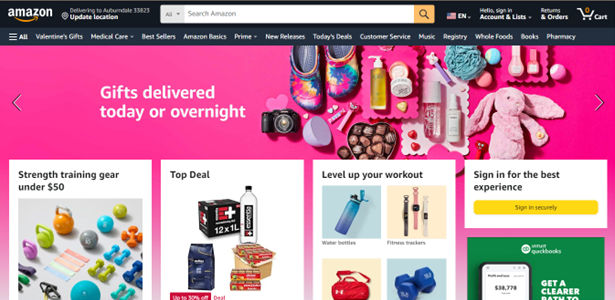
Image of Amazon.com home page.

These iconic orange and gold buttons draw attention to some chief calls-to-action on Amazon.com’s home page.

© Amazon, Fair Use

How to Apply the Law of Similarity in Design

Designers apply the law or principle of similarity to make better designs in various ways. Here are some common techniques and strategies: 

Make Visual Consistency 

UI and UX designers ensure that elements that serve similar functions or belong to the same category share visual characteristics. These characteristics can include color, shape or typography. This consistency is something that helps users understand how different elements are related to one other. It also makes for easier navigation and comprehension. 

  • Icons: Good iconography is a vital part of UI design. When they use similar shapes, styles or color schemes for related icons, designers facilitate users' understanding and improve the usability of the interface with icons that are consistent and recognizable. 

  • Typography:  is another area where designers apply the principle of similarity. By using consistent typefaces, font sizes or font styles for related elements, designers make a design that’s both cohesive and visually appealing. This consistency helps users recognize and associate different pieces of information, too.  

Establish Groups and Categorization

When they use consistent visual cues, designers can indicate the grouping or categorization of different elements. This helps users quickly identify and understand relationships between elements and find the information they are looking for. Designers use: 

  • ​​​​Color: ​​W​ith similar colors for related elements, designers can create a visual hierarchy that guides users through the interface. For example, a website that uses blue buttons for primary actions could use green buttons for secondary actions. This helps users quickly understand the function of each button. Moreover, it quickly helps to show them how to interact with the interface. 
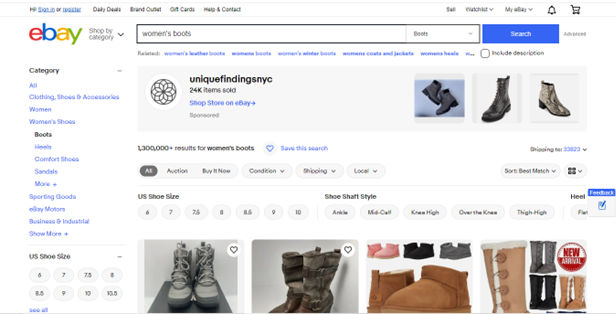
Image of eBay web page.

eBay offers similar buttons in the form of shoe size, etc., while the Search function stays clearly highlighted above.

© eBay, Fair Use

  • ​Shape: ​​With similar shapes for related elements, designers can create a visual pattern that users can easily recognize. For example, a website that uses circular icons for social media links could use square icons for the contact information. This similarity is something that helps users quickly understand the function of each element and how to interact with the interface. ​​ 

  • ​​​Size​​​: ​With similar sizes for related elements, designers can create a visual pattern that guides users through the interface. For example, a website that uses large images for primary content could use smaller images for secondary content—and that helps users quickly understand the importance of each element, plus how to interact with the interface.
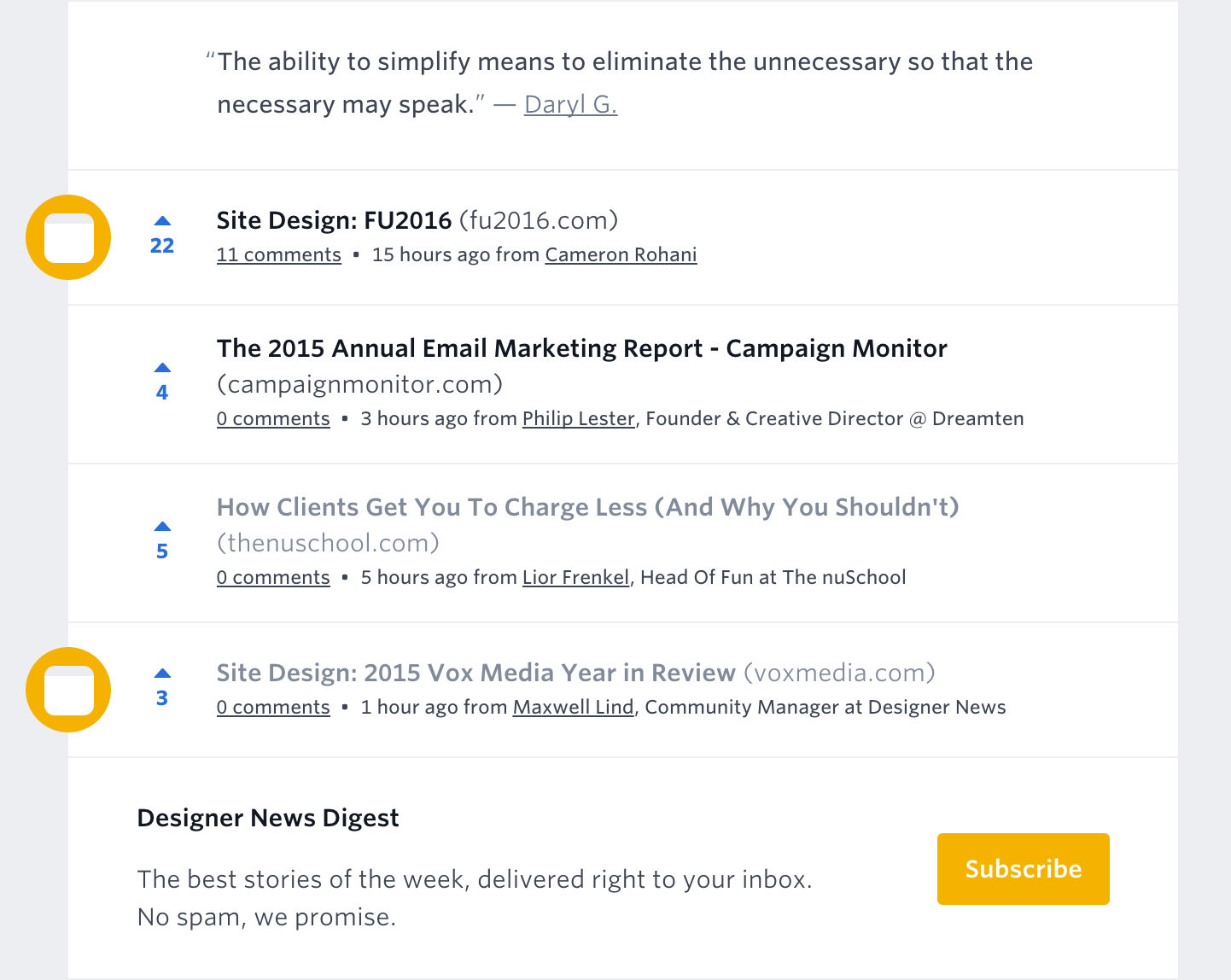
Image showing a list of posts on a screen.

The circular icon indicates these two Site Design posts are related.

© John Moore Williams, Fair Use

Highlight Important Elements 

Designers can use the principle of similarity to highlight elements that are important or calls to action. When they make elements that share visual similarities stand out, they create a clear hierarchy. And by making key elements visually distinct from others through color, size or shape, designers draw users' attention. They can also guide their focus to the most critical parts of the interface. 
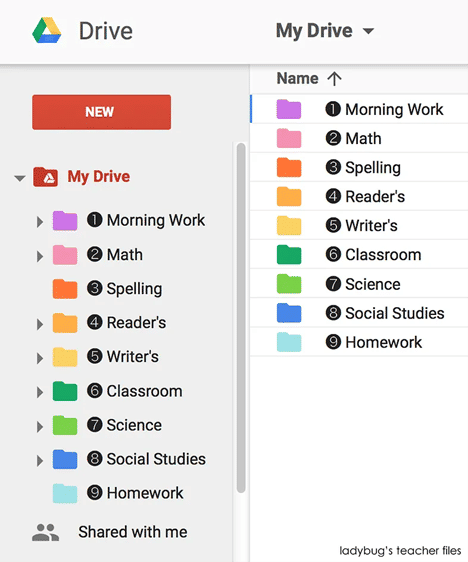
Image showing a Google Drive screen, containing files.

Google Drive leverages the principle of similarity through the use of consistent typography, icons and colors.

© Ladybug’s teacher files, Fair Use

Best Practices and Tips to Apply the Law of Similarity to User Interfaces

It takes careful consideration and attention to design UIs that make the most of the law of similarity. Here are some ways to leverage it to help create user interfaces that are visually cohesive and intuitive to use, and provide an enhanced user experience

Use Consistent Visual Characteristics 

Ensure that elements that belong to the same category or serve similar functions share consistent visual characteristics. Use similar colors, shapes, sizes or typography to establish visual relationships and help users understand more easily. Plus, use a style and color palette that are consistent across the entire interface. 

Use Contrast Effectively 

Use contrast strategically to highlight important elements or create visual hierarchy. By making key elements visually distinct through color, size or shape—designers draw users' attention and guide them through the interface, too.  

Consider the Negative Space

Also known as white space, it’s a vital part of visual design. It gives a web page or app screen needed breathing space. What’s more, it helps “frame” sections for users to spot individual elements more easily.

Avoid Overusing Similarity

While similarity is essential for grouping related elements, avoid overusing it to prevent visual clutter or confusion. Strike a balance between similarity and diversity to make a design that’s both visually appealing and engaging.
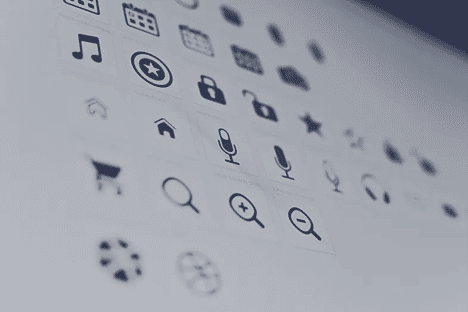
Image showing a page of icons.

This selection shows a creative variety of icons leveraging similarity with a balance of diversity.

© Harpal Singh, Fair Use

Consider Cultural and Contextual Factors 

Be mindful of cultural and contextual factors with the principle of similarity. Colors, shapes or symbols may carry different meanings or associations in different cultures or contexts. So, it’s vital to make sure that design choices are in line with the intended audience and context. 

Test and Iterate 

Test designs with users to see how effective the applied similarity principles are. Do usability tests and collect user feedback to find areas for improvement and refine the design iteratively. 

Stay Updated with Design Trends 

Designers should stay updated with the latest design trends and practices so they can make sure their grasp of similarity principles remains both relevant and effective. Embrace new techniques and approaches that are in line with users’ evolving needs and expectations. Another thing is to keep up with the success of new design languages that offer specific layouts, and more. 
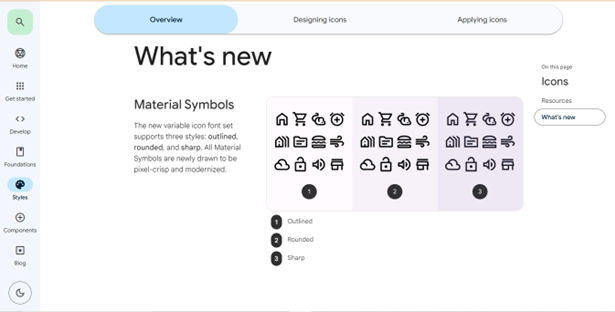
Image showing the Overview screen of Material Design.

Google's design language—Material Design—relies heavily on the principle of similarity. Elements such as buttons, cards and icons share visual characteristics that are consistent. This is something that enables users to—quickly—recognize and interact with familiar patterns.

© Google, Fair Use

Potential Pitfalls with the Law of Similarity in UX design

To create interfaces that are visually coherent, intuitive to use and have an enhanced overall user experience, it’s important to be wary of several issues, including: 

  • Visual hierarchy based on similarity alone: Be cautious not to rely just on similarity. Think about other Gestalt principles—such as proximity and closure—to create a comprehensive hierarchy that supports users’ understanding of things. 

Watch this video to discover many of the visual design elements that influence visual hierarchy.

Transcript

  • Lack of differentiation: Over-reliance on similarity may lead to a lack of differentiation between elements. It’s something that can make it challenging for users to distinguish between different categories or types of content. 

  • Potential for confusion: If designers don’t apply similarity thoughtfully, it can lead to confusion or misinterpretation. Make sure that the similarities used are relevant and meaningful to the users and don’t create ambiguity. What’s more, too many different colors, shapes and sizes could be confusing for users. So, strike a balance between similarity and differentiation to keep things clear—and keep users on the right track, too. 

  • Limited flexibility: If designers keep strictly to the principle of similarity, it may limit design flexibility. Designers need to find a balance between consistency and uniqueness to create visually appealing and engaging interfaces that stand out. 
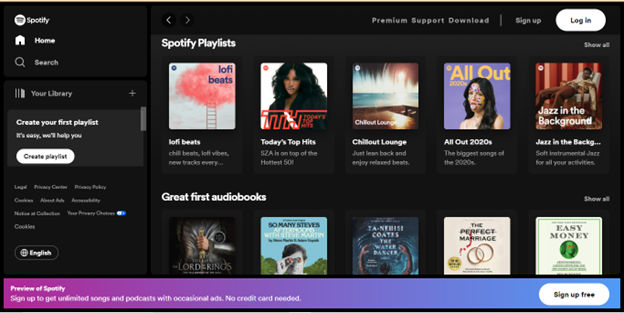
Image showing Spotify's home page.

Spotify's user interface employs the principle of similarity to group content and create visual hierarchy. For example, playlists are visually distinguishable from individual songs thanks to consistent visual cues, such as color and typography.

© Spotify, Fair Use

Overall, the law of similarity is a crucial principle of Gestalt theory in web (and app) design. Good use of it helps create interfaces that are visually appealing and easy to understand. By using similar colors, shapes, or sizes to group related elements, designers can create a visual hierarchy that guides users through the interface. 

However, it’s essential to strike a balance between similarity and differentiation—to prevent confusion or lack of distinction. Designers need to consider the context, cultural factors and user needs. When designers do it well, they can use similarity to help build interfaces that are both beautiful and functional. That goes a long way to creating designs that resonate with users and provide a seamless user experience. 

Questions About Law of Similarity?
We've Got Answers!

Do cultural differences affect the perception of the law of similarity?

Cultural differences indeed affect how users perceive designs. Different cultures have varying visual and cognitive processing styles—and these can influence how individuals perceive similarity in design elements. 

For example, Western cultures typically use an analytical style of processing. These cultures tend to focus on individual design elements. In this context, similarity helps to clearly distinguish and categorize elements. Many East Asian cultures—though—use a more holistic processing style. This means the overall context and relationship between elements receive more importance. So, the principle of similarity can still apply. However, the way users from different cultures interpret a design can differ. So can the degree of emphasis they place on it. 

Also, cultural symbolism can impact the perception of similarity in various parts of the world. Colors, shapes and patterns may carry different meanings and associations in different cultures. For example, the color red signifies good fortune in China—but can represent danger or warning in Western countries. So, designers must consider these cultural connotations to use similarity in a global context.  

How should designers balance similarity with contrast?

To effectively do this, designers should: 

Create a clear hierarchy: Use similarity to group related items—and so make the design cohesive. Then, use contrast to draw attention to the most important elements—like highlighting key headings or calls to action. Contrasting colors and other elements is something that helps users navigate the content easily. 

This video shows you how principles like scale, white space, alignment, and proximity help you structure information so key elements stand out first and the experience feels more intuitive and engaging.

Transcript

Ensure the best readability: High contrast between text and backgrounds is an essential thing for readability, but overdoing it can be counterproductive. So, aim for a balanced contrast—one that enhances the readability factor and doesn’t overwhelm users. Use subtle color variations—it’s something that can differentiate sections without causing visual strain. 

Generate visual interest: While similarity is great for cohesiveness, too much of it leads to a dull design. So, introduce contrast with varying colors, sizes or shapes. These can make essential elements stand out. This strategy keeps the design dynamic and engaging—without sacrificing unity. 

Meet user expectations: Users come with preconceived notions based on their own past experiences. Help meet these expectations through familiar design patterns (similarity) and innovate judiciously (contrast) to enhance the user experience.

Also, two vital points to bear in mind with contrast (and color) are accessibility and designing for other cultures

How can the Gestalt law of similarity aid in creating an effective user interface for accessibility?

For example, in a user interface, designers can use consistent colors, shapes, or styles for buttons that perform similar actions. This approach really helps visually impaired users. It streamlines the overall user experience as it provides a clear navigation path. Similarly, by grouping related information or controls based on appearance, designers help users with cognitive disabilities to process and understand content more effectively. 

When they apply the law of similarity, designers can also help to comply with accessibility guidelines like the Web Content Accessibility Guidelines (WCAG). These guidelines focus on making designs perceivable, operable, understandable—and robust. When designers create visually connected elements, they ensure that users with diverse abilities can interact effectively with the interface. Simplified layouts are a part of that. 

Transcript
 

Can designers use the law of similarity in animation and motion design?

Yes, they can strategically apply the principle of similarity in animation and motion design to make engaging and cohesive design work, as it can: 

Create visual cohesion: Use similar visual elements such as color, shape or size in animations to indicate they’re part of the same group or concept—and make it easier for viewers to follow and understand the narrative. 

Guide user attention: Similar elements can guide the viewer's attention through a sequence. From animating similar elements in a way that’s consistent, designers can subtly direct the viewer's focus to the most important parts of the animation. 

Enhance user experience: When similar elements move in a unified way, it creates a pleasing aesthetic—one that enhances the overall user experience. This consistency in motion can also reinforce branding and style guidelines. 

Establish rhythm and flow: Elements with similar characteristics moving in a harmonious pattern can create a sense of flow—and so make the animation more engaging and easier to digest. 

Facilitate learning and comprehension: In educational animations, grouping similar concepts or ideas using visual similarity helps learners to make connections between related concepts easily. 

Support storytelling: In storytelling through motion design, using similar visual elements for related ideas or themes is something that helps to reinforce the narrative. It makes it easier for the audience to connect the dots and understand the story being told. 

Consider the other Gestalt principles as well for animation and motion design. 

What are some highly regarded books about the Gestalt law of similarity?

Malone, E. (2023). A Guide to Gestalt Principles for UX Designers: A mini visual design guide to help user experience designers leverage gestalt principles for better designs. 8 paw press. 

This book offers a concise exploration of Gestalt principles in UX design. Erin Malone provides a practical guide, applying these principles to digital interfaces with a focus on mobile and web examples. The book delves into visual hierarchy, animation, and microinteractions, aiming to help readers improve design skills. It also includes downloadable templates for design documentation, making it a hands-on resource for UX designers. 

How can I apply the Gestalt law of similarity in mobile app design?

Similarity is immensely useful in mobile UI design. For instance, in a mobile app, designers can use similar colors and shapes for all navigation buttons. This consistency lets users quickly identify these buttons as related functions. Similarly, a consistent font style for all headings helps users recognize them as related pieces of information. The law of similarity is particularly effective in creating a clean, organized interface that is easy to navigate. It reduces cognitive load and helps with information processing.

An excellent example of this principle in action is in social media apps. There, similar visual elements appear as posts, comments and notifications. These enable users to intuitively understand and navigate the app.

For more on the fineries of designing for mobile, watch CEO of Experience Dynamics Frank Spillers explain:

Transcript

What is the difference between the Gestalt law of similarity and the law of proximity?

The law of similarity asserts that people perceive objects that resemble each other as part of a group or pattern. With similarity, designers give elements similar visual characteristics—like color, shape or size—to indicate their relatedness or similar functionality. For instance, in user interfaces, designers often apply the same color to all interactive buttons, to signal their clickability. 

In contrast, the law of proximity states that users perceive objects that are near each other as a cohesive group. With proximity, designers cluster related items—and so boost the interface’s organization and navigability. A common application is to place all navigation buttons in a website's header close together. This distinguishes them from the main content. Proximity is indeed important in establishing hierarchy. 

These two laws are vital parts of the Gestalt principles, which are important to know – the whole is more than the sum of the parts. 

What are the best practices for combining the Gestalt law of similarity with other design principles?

Here are some key practices: 

Combine with the law of proximity: to visually group similar elements and apply the law of proximity to place related groups close together. This approach helps users quickly discern relationships and functions within the design. 

Establish good visual hierarchy: With size and contrast, make larger, more contrasting elements more prominent. And apply similar visual styles to elements that are equally important so you maintain balance and intuition in the interface.

This video explains how principles like size, contrast, spacing, and alignment work together to guide the viewer’s eye and create interfaces that feel clear, intuitive, and engaging to use.

Transcript

Apply color theory: Select consistent color schemes for similar elements—to set the mood and guide user interactions. 

Incorporate in layout design: Organize similar elements in patterns or grids for a structured, navigable interface. 

What are some highly cited scientific publications about the Gestalt law of similarity?

The article "Computational Layout Perception using Gestalt Laws" by Koch and Oulasvirta (2016) presents preliminary findings on the computational perception of interactive layouts. The authors aim to algorithmically estimate how users perceive a layout, with potential applications in automated usability evaluation and computer-generated interfaces. The study explores the use of Gestalt laws as parsing heuristics to resolve conflicts among competing interpretations of a layout—resulting in a hierarchical grouping of main elements. The authors report promising results, with an implementation of four Gestalt laws enabling hierarchical grouping that presents favorable outcomes in 90% of realistic test cases. 

The article "Using the Gestalt Principles of Visual Aesthetics in Designing E-Learning Graphical User Interface" by Ofosu-Asare, Essel, and Gyebi (2018) explores the application of visual aesthetics and instructional design strategies in creating e-learning content. The study emphasizes the significance of aesthetics in influencing student feelings, attitudes and learning outcomes in online education. It discusses the impact of aesthetics on user experience and motivation in e-learning platforms, highlighting the need for quality content and user-friendly technology. The research methodology involves qualitative methods and purposive sampling to examine the effects of aesthetic visual environments on student satisfaction and motivation. The study provides practical guidelines for higher education and instructional designers to enhance the online learning environment through the application of expert standards and aesthetic considerations. 

Earn a Gift Earn a Gift, Answer a Short Quiz!

1
2
3
4
1
2
3
4
Question 1
Question 2
Question 3
Get Your Gift
Interaction Design Foundation logo

Question 1

What does the Law of Similarity state?

1 point towards your gift

  • We perceive elements close to each other as related.
  • We perceive elements that look similar as part of the same group.
  • We should group elements that are different in size together.
Interaction Design Foundation logo

Question 2

How does the Law of Similarity improve user experience in web design?

1 point towards your gift

  • It helps users identify related items easily.
  • It lowers the need for navigation menus.
  • It makes websites load faster.
Interaction Design Foundation logo

Question 3

Why is visual coherence important in design?

1 point towards your gift

  • It helps users understand relationships between elements.
  • It makes the design more colorful and, therefore, more interesting to look at.
  • It reduces the amount of text needed.

Learn More About the Law of Similarity

Make learning as easy as watching Netflix: Learn more about Law of Similarity by taking the online IxDF Course Gestalt Psychology and Web Design: The Ultimate Guide.

Why? Because design skills make you valuable. In any job. Any industry.

In This Course, You'll

  • Get excited when you discover how top brands use Gestalt psychology to make websites and apps intuitive, visually appealing, and user-friendly. Gestalt principles help you create clear layouts and a strong visual hierarchy, so your users never feel confused or overwhelmed. You already use some of these principles instinctively, for example, when you group similar tasks on your to-do list, so mastering Gestalt psychology for web design is easier than you think. You'll get methods to increase engagement and conversions by optimizing CTA placement. The result? More immediate impact: less confusion, more engagement, higher conversions, and happier customers. That leads to higher company profits, better career opportunities, and greater job satisfaction.

  • Make yourself invaluable when you organize visual elements to guide behavior and drive desired outcomes. Whether you're streamlining the layout of a patient portal or designing a retail website that converts, the science behind human perception dramatically improves outcomes across industries. When you apply Gestalt psychology in web design, you're not just creating something visually appealing, you're designing experiences that feel right, reduce overload, and build lasting brand loyalty. This pays off significantly, as studies show that, on average, every dollar invested in UX design brings 100 dollars in return. As AI accelerates how fast you can create and iterate, you stay in demand when you can direct it with deep understanding of human perception. These timeless human-centered design principles transform AI from a tool into your new superpower, helping you design for how people's minds actually work.

  • Gain confidence and credibility as you follow step-by-step guidance to apply real-world Gestalt techniques. It's easier than you think, regardless of your background! You'll get comfortable with Gestalt principles as we walk through case studies and practical examples you can immediately use. When you use principles like the law of proximity, similarity, and closure, you'll guide people's eyes, simplify complex ideas, and ensure your message is clear. With this psychology-driven framework, you'll confidently tackle complex design challenges and create experiences that people love, trust, and recommend.

Get an Industry-Recognized IxDF Course Certificate

Increase your credibility, salary potential and job opportunities by showing credible evidence of your skills.

IxDF Course Certificates set the industry gold standard. Add them to your LinkedIn profile, resumé, and job applications.

Course Certificate Example

Be in distinguished company, alongside industry leaders who train their teams with the IxDF and trust IxDF Course Certificates.

Our clients: IBM, HP, Adobe, GE, Accenture, Allianz, Phillips, Deezer, Capgemin, Mcafee, SAP, Telenor, Cigna, British Parliament, State of New York

All Free IxDF Articles on the Law of Similarity

Read full article
The Law of Similarity - Gestalt Principles (Part 1) - Article hero image
Interaction Design Foundation logo

The Law of Similarity - Gestalt Principles (Part 1)

Gestalt is a German word that carries much importance, especially for us as designers. Let’s have a close look at its principles so that we can see how much information this little word encompasses!The central principle to the Gestalt theory was neatly summarized by the Gestalt psychologist Kurt Kof

Social shares
1.2k
Published
Read Article

The Law of Similarity - Gestalt Principles (Part 1)

The Law of Similarity - Gestalt Principles (Part 1)

Gestalt is a German word that carries much importance, especially for us as designers. Let’s have a close look at its principles so that we can see how much information this little word encompasses!

The central principle to the Gestalt theory was neatly summarized by the Gestalt psychologist Kurt Koffka: "The whole is other than the sum of the parts." The human eye and brain perceive a unified shape in a different way to the way they perceive the individual parts of those shapes. This global whole is a separate entity that is not necessarily formed by the sum of its parts.

When we fully understand Gestalt design principles, we can utilize them to create more interesting and engaging visual experiences for website and app users. You can take advantage of these laws to design more thoughtfully and effectively, knowing exactly how your work can impact your users.

What Are Gestalt Principles?

Author/Copyright holder: Impronta. Copyright terms and licence: CC BY-SA 3.0

Gestalt principles or laws are rules that describe how the human eye perceives visual elements. These principles aim to show how complex scenes can be reduced to more simple shapes. They also aim to explain how the eyes perceive the shapes as a single, united form rather than the separate simpler elements involved.

“Gestalt” refers to “shape” or “form” in German; the principles – originally developed by Max Wertheimer (1880-1943), an Austro-Hungarian-born psychologist. – were improved later by Wolfgang Köhler (1929), Kurt Koffka (1935), and Wolfgang Metzger (1936).

Researchers have integrated all of these theories to show how people unconsciously connect and link design elements.

This article covers one of the Gestalt Principles (the Law of Similarity). The rest of the principles will be covered in upcoming articles:

  • Similarity (also known as Invariance): The human eye tends to build a relationship between similar elements within a design. Similarity can be achieved using basic elements such as shapes, colors, and size.

  • Continuation: The human eye follows the paths, lines, and curves of a design, and prefers to see a continuous flow of visual elements rather than separated objects.

  • Closure (also known as Reification): The human eye prefers to see complete shapes. If the visual elements are not complete, the user can perceive a complete shape by filling in missing visual information.

  • Proximity (also known as Emergence): Simple shapes arranged together can create a more complex image.

  • Figure/Ground (also known as Multi-stability): The human eye isolates shapes from backgrounds.

  • Symmetry and order: The design should be balanced and complete; otherwise, the user will spend time and effort trying to perceive an overall picture.

The Law of Similarity

The human eye tends to perceive similar elements in a design as a complete picture, shape, or group, even if those elements are separated. The brain seems to craft a link between elements of a similar nature. Then, we perceive them in a relationship with each other, separating them from other elements in a design. Human eyes are good at filling in “gaps” or connecting “dots”. It happens naturally.

Similarity is influenced by the shape, size and color of the elements. When you mix objects with high degrees of similarity to each other with a group of dissimilar objects, the brain then devotes time and energy to creating a link between them so that it can try to understand their relationship with each other.

Let’s try a quick experiment to check this out. If you’ve got a pencil and paper handy, draw about ten, rough circles on a page (spreading them across the page), leaving enough space between them to fit shapes of a similar size. Now, anywhere in those gaps, draw five or six triangles. Don't worry about geometric perfection: it doesn't matter in this simple illustration. Then, put about three dots anywhere between these shapes. Look away and stand back for a moment. Now, return to your sketch.

Do you notice anything? Your eye takes you right to the dots, doesn’t it? This is because the dots are points, while the shapes are made up of lines.

Designing with Similarity in Mind

In web and interactive design, the similarity law can be used to contribute to building connections between linked elements. This relationship may be either physical or conceptual. You can make the most of this natural human inclination by helping your user’s eye to discern parts of your design you want to accentuate.

Using this linkage might improve the user experience as follows:

Links

Links and navigation systems are essential to allow users to view website content and navigate between different pages.

While links are embedded inside the content, they must certainly be presented uniformly to allow users to identify linked text.

Thus, text links should be differentiated by color and usually shape as well. No matter how you do it, the important thing is that links should be clearly identifiable as such. Make them stand out. Many users will typically consider a link to be any text that is blue and underlined.

The use of the principle of similarity in menus and navigation helps users see the relationship between each group of navigation links. They will then perceive similar navigation items as being related or having a similar place in the site’s data hierarchy.

Content

We can also use color, font size and type, highlighting, etc. to distinguish between and mark the types of content before a user reads them.

For example, quotes that appear in boxes, in a slightly bigger font, with an italic emphasis, are easily recognizable as such. The law of similarity carries our recognition of this standard from one website to another. Each site may use a variant on this theme, but, overall, the pattern is incredibly similar.

Breaking the law of similarity can also help draw a user’s attention to a specific piece of content – such as a call to action. That’s right; we can make use of both sides of the line or border the law makes. The user’s eye is a remarkably easy tool to manipulate; you just need to figure out what parts of your design you want to bring out or tie together.

Headers

Website headers play another essential role in organizing and building well-structured content for search engine crawling and for the reader.

We normally place headers above content in a different font, color, size, etc. from the body of the content. They assist the reader in finding the relevant points in content and help control the overall flow of the work. They’re great milestones and using them wisely (which isn’t hard) will keep your users on your page.

Remember that a user’s eye will activate the brain to work to interpret your design in a certain way. Nothing is more tiring than a solid block of text on a page, with no discernable features to draw the reader’s eye. If you’re near an old literary classic, why not open it and look at a spread of pages?

For example, let’s try Victor Hugo’s immortal Les Misérables on for size. Flicking forward six pages finally brought me to a new chapter heading, which my eye instantly noticed and read. None of the other text had stood out for me before I saw that.

The Take Away

Gestalt psychology is a theory of the mind which has been applied to a number of different aspects of human thought, action and perception. In particular, Gestalt theorists and researchers attempt to understand visual perception in terms of the way the underlying processes are organized to help us make sense of the world.

The organization of these cognitive processes is important to our understanding of how we interpret the constant stream of visual information entering our eyes into a cohesive, meaningful and usable representation of the world. Over the last twenty years, interaction designers and other professionals involved in the development of products for human users have adopted the work of Gestalt psychologists.

Realizing the potential for applying Gestalt thinking helps us create (literally!) eye-catching works. Suddenly, we have new insights and ways of approaching problems and challenges. This is a gift – we can tailor our work according to the ”engineering” of the human eye and brain.

Starting with the Law of Similarity, we find that we can make use of the following to draw a user’s attention and let his or her brain do the rest:

  • Links

  • Content

  • Headers

These three short articles will provide you with a first approach to these laws. However, if you want to cement in your own mind the many ways you can organize visual information and improve your designs for all users, we suggest that you take the course explained below!

Where to Learn More

Interested in delving into the Gestalt principles? Check our “Gestalt Psychology and Web Design: The Ultimate Guide” course.

References:

Hero Image: Author/Copyright holder: Eumedemito. Copyright terms and licence: Public Domain.

Feel Stuck?
Want Better Job Options?

AI is replacing jobs everywhere, yet design jobs are booming with a projected 45% job growth. With design skills, you can create products and services people love. More love means more impact and greater salary potential.

At IxDF, we help you from your first course to your next job, all in one place.

See How Design Skills Turn Into Job Options
Privacy Settings
By using this site, you accept our Cookie Policy and Terms of Use.
Customize
Accept all

Be the One Who Inspires

People remember who shares great ideas.

Share on:

Academic Credibility — On Autopilot

Don't waste time googling citation formats. Just copy, paste and look legit in seconds.