The Law of Prägnanz

Your constantly-updated definition of the Law of Prägnanz and collection of videos and articles.
Be a conversation starter: Share this page and inspire others!

98 Shares

What is the Law of Prägnanz?

The law of Pragnanz—or principle of simplicity—is a fundamental Gestalt psychology law concerning how humans process visual information. It states that people usually perceive complex things as simplified forms to easily recognize and understand what they see. Designers cater to this tendency to see things as the sum of simple parts in digital products. 

Transcript
 

Why Is There a Law of Prägnanz?

"Prägnanz" is a German word that spans the concepts of salience, conciseness, and orderliness. It translates to “good figure” or “pithiness.” It also goes by the names “the law of good Gestalt” and “the law of simplicity.” It’s key among the Gestalt principles of grouping and a vital part of graphic design, visual design, user experience (UX) design and—particularly—user interface (UI) design. The Gestalt principles of grouping describe how humans perceive visual elements and simplify complex images. This is a crucial factor when you as a designer create products. From your work on websites to mobile apps, the design elements you include need to “grab” users from the get-go. Pragnanz is—therefore—a fundamental part of each product or service you produce.   

According to Gestalt psychologists, people’s minds innately tend to perceive patterns using five main categories—proximity, similarity, continuity, closure, and connectedness. The law of Pragnanz is closely related to these categories and serves as a guiding principle for visual perception. Whenever viewers—or users—see complex or highly intricate shapes in a design, their eyes simplify these. They do this by taking out the excess detail from the shapes to make a single, unified whole. This is a quick and automatic process—that’s because the human mind dislikes chaos and strives for order. Users don’t even have to think about what they’re doing or force the process. It just happens. For example, in the image below, the mind makes sense of the design to see black and white arms and hands in a figure-ground format where the background and foreground work together. 

Image of arms in 2 colors.

The law of Pragnanz here involves clever interplay between the figure and ground.

© Stephen Ziggy Tashi, Fair Use

The concept of Prägnanz was the brainchild of Max Wertheimer, a German psychologist. Wertheimer was one of the founders of 1920s’ Gestalt psychology, along with fellow psychologists Wolfgang Köhler and Kurt Koffka. The law of Prägnanz—with the umlaut, as it’s spelled in German—is one of the centermost principles of Gestalt psychology. In Wertheimer's 1923 paper on Gestalt theory, he discussed the idea of Prägnanz as being a fundamental principle of human perception. The exact definition and interpretation of Prägnanz, though, have evolved over time. That’s led to different understandings and descriptions of the concept as it relates to various fields. These fields include graphic design and product design—and they involve great attention to detail for UX and UI designers. 

Despite these different definitions, the Gestalt school of thought proposes fundamental laws about how a person perceives objects—whatever medium is involved. The effects of some lines or curves are central to this school of psychology; and so is the point that an image is much more than the sum of its parts. What’s more, the mind’s lightning-fast perceptions of images mean that the Gestalt laws are timeless. So, the law of Pragnanz is a powerful truth in design—a vital frame of reference, a handy real-world “barometer” for aligning users’ expectations with a brand’s business goals, and a kind of tool that a design includes. This is also true of the principle of similarity, principle of proximity and principle of closure—as are the principle of uniform connectedness, principle of continuity, principle of closed region, and more. 
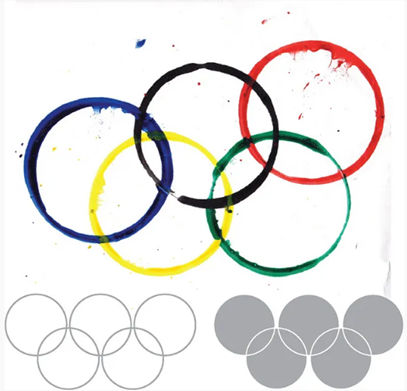
Image of rings in different colors.

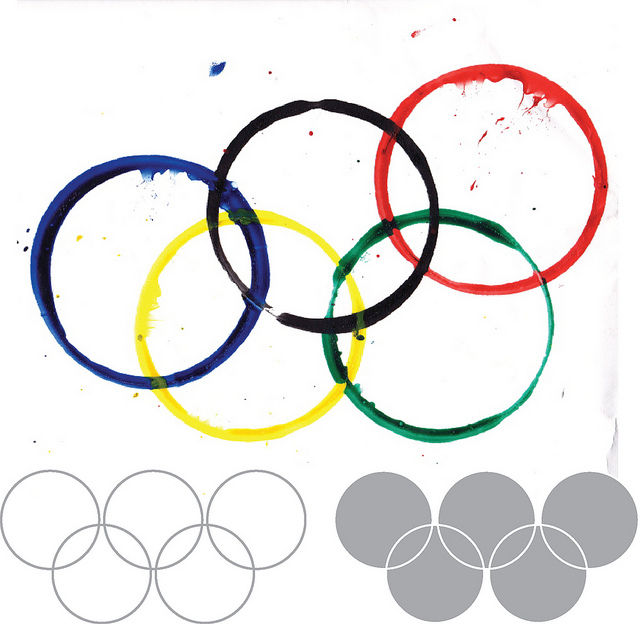
Simple shapes, arranged well, conjure powerful imagery.

Author/Copyright holder: Clint. Copyright terms and licence: CC BY 2.0

How to Interpret the Law of Pragnanz

There may be varying interpretations of the law or principle of Pragnanz—but it’s generally understood as the law of Simplicity. The human mind has got a natural preference for order and organization over chaos. So, when people face visual stimuli, they tend to simplify complex shapes and forms into more recognizable and understandable patterns. This way of simplifying what they see lets them process information more easily and efficiently. That fact is extremely helpful when users come across a graphical user interface (GUI) for a product or service. 

In UX design and UI design, the law of Pragnanz has a particularly special place. It suggests that simplicity and clarity are key elements in creating effective visual communications with strong visual hierarchy, use of spacing—or white space or negative space—and more. When designers present information clearly and concisely, they can make how their users retain information better—and so the design can engage more with its target audience. The law of Pragnanz is a reminder that designs should prioritize simplicity and steer well clear of unnecessary complexity.  

“People ignore designs that ignore people.” 

Frank Chimero, Author of “The Shape of Design” 

How to Apply the Law of Pragnanz in UX Design

Designers play a crucial role when they create interfaces that are intuitive, user-friendly, and visually appealing. The law of Pragnanz has strong implications for UX design. It acts as a guide for designers to make interfaces that are line with users at the level of how they tend to perceive things—naturally. When designers understand the law of Pragnanz—and use it well—they can fine-tune the individual elements and information architecture of digital products. From that, they can make interfaces that are easy to navigate, visually pleasing—and memorable. Here are the main points to keep in mind: 

1. Go for Simplicity and Clarity in Interface Design

One of the key principles that comes from the law of Pragnanz is how important simplicity and clarity are in interface design. Users tend to arrive on a design with clear intentions as to what they want to do—so, they should be able to quickly and easily understand the UI’s purpose and functionality. So: 

Use clear and concise visual elements—like simple shapes, minimal text and intuitive icons. Users usually have an easier time appreciating shapes that are less demanding when it comes to putting in—or not putting in—cognitive effort. For example, the circles of the Olympic Games are far more accessible to human eyes than abstract shapes would be. When a designer reduces visual clutter and complexity, they can make interfaces that are both visually appealing and easy for users to understand. 
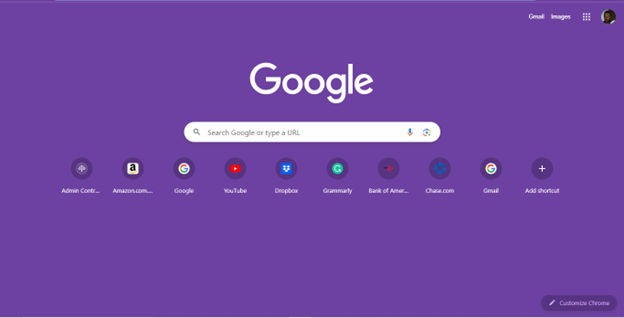
Google homepage screenshot.

Google's search interface showcases the law of Pragnanz at work in UX design. The simplicity and clarity of the search bar involves its minimalistic design and prominent placement. Users can focus on the main task of entering their search queries. Note, the use of negative space and minimal distractions helps users understand and engage with the interface—and quickly.

© Google, Fair use

2. Prioritize Hierarchy and Visual Organization

Another aspect of the law of Pragnanz that designers can use to great effect is to optimize the hierarchy and visual organization. Users should be able to easily distinguish and prioritize different elements on the interface. So: 

Use visual cues—like size, color and placement—to guide users’ attention. For example, highlight important information from using larger fonts or contrasting colors; present less important details in a more subdued way. For a website, be sure to avoid overcrowded navigation with too many menu items, complex dropdown menus and the like. Designers who establish a clear hierarchy can help users navigate the interface more effectively. 

Screenshot of Spotify homepage.

Spotify’s simple, highly organized UI lets users easily navigate the interface with bold headings and well-structured sections. Another thing is that the symmetry in the album covers and tiles helps keep users engaged.

© Spotify, Fair use

3. Make Sure that Consistency and Familiarity Feature

The law of Pragnanz also puts emphasis on how important consistency and familiarity are. Users are more likely to understand and engage with interfaces that conform to established design patterns and conventions. So: 

Use familiar icons, menu structures and interaction patterns to fashion interfaces that feel intuitive and natural to users. Consistency in visual elements—such as color schemes and typography—is something that can also contribute to a cohesive and visually pleasing interface. Most importantly, don’t confuse users or make them pause to think about the design. Instead, let them take to it naturally and enjoy that all-important seamless experience. 

Screenshot of IKEA homepage.

IKEA’s clean and familiar layout enables users to find and view products easily.

© IKEA, Fair use

Further Examples of the Law of Pragnanz in UX Design

Some other examples from well-known brands that further illustrate how to apply the law—or principle—of Pragnanz in UX design best include these: 

Apple 

Apple is renowned for its minimalist and user-friendly interfaces. The design of their products—such as the iPhone and MacBook—follows the principles of simplicity and clarity. Clean lines, intuitive gestures and straightforward icons let users easily navigate and interact with the interfaces. Because Apple follows the law of Pragnanz, it means their products are visually appealing and user-friendly. 
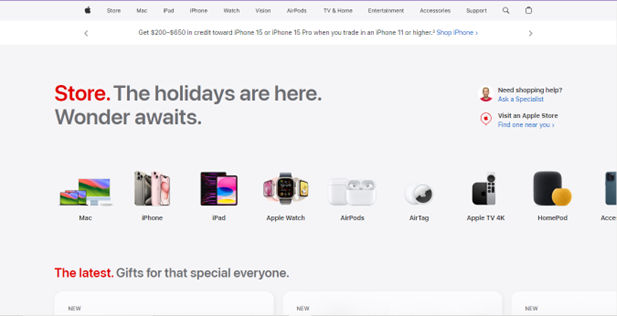
Screenshot of Apple homepage.

It's easy to follow what’s going on on Apple’s clean and intuitive website.

© Apple, Fair use

Dropbox

Popular cloud storage service Dropbox demonstrates how important hierarchy and visual organization are when it comes to UX design. The interface shows—most effectively—the hierarchy of folders and files. It achieves this through the use of clear visual cues—such as folder icons and file thumbnails. Users can easily navigate through their files and locate specific items, thanks to the consistent and intuitive visual organization. 

A screenshot of a user's Dropbox page.

The Dropbox interface is simple and uncluttered, making it easy to use.

© Dropbox, Fair Use

Remember, the law of Pragnanz can go a long way in helping create UIs that are both effective and user-friendly. After all, Pragnanz is one of the centermost Gestalt laws. So, it’s wise to use it to make design works that align with users' natural perceptual tendencies and confirm the results with usability testing. Ultimately, it will result in more successful—and more satisfying—user experiences overall. 

Questions About Law of Prägnanz?
We've Got Answers!

What is an example of the law of Pragnanz?

The Google search interface is famously minimalist. A single search box on a clean, white background is about simplicity and focuses the user's attention on the primary action—entering a search query. The absence of unnecessary elements is in line with the law of Pragnanz. 

Is the law of Pragnanz applicable to mobile design?

Yes, the law of Prägnanz is. This principle of Gestalt psychology—which emphasizes the human tendency to perceive complex images in the simplest form possible—does play a crucial role for you to make mobile interfaces that are both effective and user-friendly. 

In mobile app design, the law of Prägnanz guides designers on the way to making interfaces that are clear, uncluttered and easy to navigate. That’s vital because mobile screens are smaller, and users often interact with them on the go. Here's how you can apply the law of Prägnanz in mobile app design: 

Simplicity: Mobile apps should feature simple, intuitive designs—and excess elements or overly complex layouts can really confuse users. Apps with straightforward designs are much more likely to be user-friendly ones. 

Visual hierarchy: When you organize elements according to how important they are, you guide users' attention to key areas. This lines up with the law of Prägnanz—since users more easily understand and navigate simpler structures. 

Iconography: Use clear and recognizable icons to simplify navigation and functionality. Icons should be self-explanatory—and so reduce the need for additional text. 

Navigation: Simplified navigation menus—often represented with widely recognized symbols (like the hamburger menu for a navigation drawer)—stick to the law of Prägnanz. Users understand these symbols quickly, something that makes navigation effortless. 

Use of white space: Adequate spacing between elements keeps overcrowding from happening. This doesn’t just make the app more visually appealing—it makes it easier to use, too, as users can quickly identify and select the options they need. 

For an insightful look into how Gestalt principles—including the law of Prägnanz—impact design, watch this video: 

Transcript
 

The video provides an in-depth understanding of how Gestalt principles like the Law of Prägnanz influence design, particularly in creating more intuitive and user-friendly interfaces. 

What are the limitations of the law of Pragnanz in complex designs?

The law of Prägnanz—a vital factor in Gestalt psychology and design—suggests that people perceive complex images in the simplest form possible. Even so, there are limitations if you apply this law to complex designs: 

Over-simplification: In an effort to stick to the law of Prägnanz, designers might make complex concepts too simple. That will lead to loss of essential information or functionality—and this is especially problematic in designs that call for detailed information or intricate functionalities. 

User experience trade-offs: While simplicity helps in terms of immediate comprehension, it can sometimes compromise depth and richness of user experience. In complex applications—like advanced software tools or detailed data visualizations—oversimplification can make a product much less effective. 

Diverse user needs: Different users have varying levels of expertise and expectations. A design that appears simple and intuitive to one group might well be too basic—or lacking in depth—for more advanced users. It can be a real challenge to balance simplicity with the needs of a diverse user base. 

Cultural and contextual differences: The perception of simplicity can vary greatly across different cultures and contexts. What people see as clear and straightforward in one culture might come across to people from another culture as something that’s confusing or overly abstract. 

Innovation and creativity constraints: A strict adherence to simplicity can—sometimes—stifle creativity and innovation in design. In certain cases, complexity is necessary to bring out a unique or groundbreaking idea. 

Can you give examples of the law of Pragnanz in everyday products?

For instance, in logo design, companies often use simple, memorable shapes. Apple's logo is a great example. Its clear, minimalistic apple shape with a bite taken out is instantly recognizable—and easier for the brain to process than a more detailed or complex design. 

In web and app design, the law of Prägnanz is one thing that designers use to make user interfaces that are intuitive. They design icons to be simple and representational—like a house for “home” or a magnifying glass for “search.” These simple shapes are what users quickly and easily understand—and this improves navigation and usability. 

In physical product design, this law is visible in the simplicity and intuitiveness of everyday items. For example, the design of a door handle is often simple—and it signals how to operate it (push down, turn, etc.) without the need for any instructions. This intuitive design runs in line with our tendency to seek the simplest solution in a visual scenario in front of us. 

What is the difference between the law of Pragnanz and simplicity in design?

The law of Prägnanz and simplicity in design are indeed closely related concepts—still, they do have distinct differences. 

The law of Prägnanz—a principle from Gestalt psychology—states that people will perceive and interpret complex images in the simplest form possible. This law is rooted in our cognitive tendency to organize our visual perception into simple structures. It's not just about creating simple designs—but about how humans naturally interpret visual elements in their most basic, orderly, and symmetrical form, too. 

Simplicity in design—on the other hand—refers to the deliberate choice to create products, interfaces or visuals that are clear, uncomplicated and easy to understand for users. To work simplicity into a design, you remove unnecessary elements and focus on essential features to improve usability and user experience. The aim of simplicity is to make designs more accessible, efficient and aesthetically pleasing—by lightening the cognitive load on the user. 

In essence, the law of Prägnanz explains a psychological tendency in perception. Meanwhile, simplicity in design is a practical approach in the creation of products and visuals. Designers often apply the law of Prägnanz to achieve simplicity in design—and they make sure that their creations aren’t only aesthetically minimal but also that they run in line with the way users naturally perceive and process information. 

How do color and contrast play into the principle of Prägnanz?

Color and contrast are integral parts when it comes to the principle of Prägnanz in design. They have a great bearing on how users perceive and understand designs. The principle of Prägnanz—a key Gestalt psychology concept—states that people will perceive and interpret complex images in the simplest form possible. This principle plays a crucial role in how you as a designer use color and contrast to make designs that are clear, effective and aesthetically pleasing. 

Use of color: Colors can help you organize and differentiate elements in a design. You can use color to create focus, guide users' attention and carry specific moods or messages to users. When you choose colors that contrast well, you can make essential elements really stand out—and so ensure that users can easily understand your design at a glance. 

Contrast in design: Contrast isn’t just about color; it includes differences in size, shape and texture as well. High contrast levels between elements help you create visual hierarchies and guide the user's attention to the most important parts of the design. It makes the content more legible—plus, it helps users quickly “get” the design's layout and structure and understand it well. 

Is the Principle of Prägnanz relevant in designing for accessibility?

Yes, it is. This principle—also called the law of simplicity—states that people perceive and interpret ambiguous or complex shapes in the simplest form possible. This concept is fundamental in accessibility design. That’s because it makes sure that design elements are clear, straightforward and easy to understand for all users, including those with disabilities. 

In terms of accessibility, when you apply the principle of Prägnanz, it means that you create designs that aren’t only aesthetically pleasing but also functional and straightforward to navigate. For instance, a well-designed website following this principle would have a clear structure, use simple shapes and minimize visual clutter. This approach helps users with cognitive disabilities or those who use screen readers to better understand and navigate the content in front of them. 

Here are some actionable insights: 

Use clear, simple layouts to raise the levels of usability for users with cognitive impairments. 

Use high-contrast color schemes to aid users with visual impairments. 

Be sure that interactive elements are easily identifiable and accessible to users with motor impairments. 

Put in clear, concise text and alternative text descriptions for images—this will benefit users who rely on screen readers. 

A real-world example of the principle or law of Prägnanz in accessibility is the use of icons with simple, recognizable shapes in user interfaces. These icons facilitate quicker comprehension—and so lighten the cognitive load for users with learning disabilities. 

What are some highly cited academic papers about the law of Pragnanz?

Here are some highly cited academic papers about the law of Pragnanz: 

  1. Wagemans, J., Feldman, J., Gepshtein, S., Kimchi, R., Pomerantz, J. R., van der Helm, P. A., & van Leeuwen, C. (2012). A century of Gestalt psychology in visual perception: II. Conceptual and theoretical foundations. Psychological bulletin, 138(6), 1218.  

Provides an extensive, modern analysis of conceptual foundations of Gestalt psychology—evaluating core principles like pragnanz that underlie visual perception and cognition. 

2. Prägnanz in visual perception | Psychonomic Bulletin & Review - SpringerLink. (2023).  

This article provides insights into the law of Prägnanz, offering a comprehensive exploration of its multifaceted nature and how important it is in visual perception. It discusses the historical context and the essential role of the law of Prägnanz in guiding research on psychophysical organization—which makes it a valuable resource for understanding the complexities of this Gestalt principle. The article reviews Gestalt psychology’s answers to questions related to the Prägnanz concept, and promotes a renewed understanding of its central role in visual perception and beyond. It also discusses the four main uses of the Prägnanz concept in more detail, emphasizing its importance in revealing the principles that govern spontaneous self-organization in phenomenal experience, including visual perception. 

Here are some popular books on the law of Prägnanz: 

  1. Max Wertheimer and Gestalt Theory by Michael Wertheimer. This book delves into the intricate story of Max Wertheimer and Gestalt theory, offering valuable insights into the historical and theoretical aspects of Gestalt psychology, including the law of Prägnanz. It provides a comprehensive exploration of the contributions of key figures in the development of Gestalt theory, making it a valuable resource for understanding the historical context and theoretical underpinnings of the law of Prägnanz. 

  2. Gestalt Psychology: A Survey of Facts and Principles by George W. Hartmann. This comprehensive book explores the theory and principles of Gestalt psychology, including the law of Prägnanz. It provides a detailed examination of Gestalt principles, making it a valuable resource for understanding the foundational concepts of Gestalt psychology. 

Earn a Gift Earn a Gift, Answer a Short Quiz!

1
2
3
4
1
2
3
4
Question 1
Question 2
Question 3
Get Your Gift
Interaction Design Foundation logo

Question 1

What is the main purpose of the law of Prägnanz in design?

1 point towards your gift

  • To create complex visual elements
  • To emphasize individual details over the whole
  • To simplify complex shapes into simple, recognizable patterns
Interaction Design Foundation logo

Question 2

How does the law of Prägnanz benefit user interface (UI) design?

1 point towards your gift

  • It adds more decorative elements.
  • It reduces visual clutter and enhancing clarity.
  • It uses complex and abstract shapes.
Interaction Design Foundation logo

Question 3

Why do humans naturally follow the law of Prägnanz when we view complex images?

1 point towards your gift

  • We appreciate detailed artwork.
  • We simplify and organize information for easier understanding.
  • We focus on individual elements separately.

Learn More About the Law of Prägnanz

Make learning as easy as watching Netflix: Learn more about Law of Prägnanz by taking the online IxDF Course Gestalt Psychology and Web Design: The Ultimate Guide.

Why? Because design skills make you valuable. In any job. Any industry.

In This Course, You'll

  • Get excited when you discover how top brands use Gestalt psychology to make websites and apps intuitive, visually appealing, and user-friendly. Gestalt principles help you create clear layouts and a strong visual hierarchy, so your users never feel confused or overwhelmed. You already use some of these principles instinctively, for example, when you group similar tasks on your to-do list, so mastering Gestalt psychology for web design is easier than you think. You'll get methods to increase engagement and conversions by optimizing CTA placement. The result? More immediate impact: less confusion, more engagement, higher conversions, and happier customers. That leads to higher company profits, better career opportunities, and greater job satisfaction.

  • Make yourself invaluable when you organize visual elements to guide behavior and drive desired outcomes. Whether you're streamlining the layout of a patient portal or designing a retail website that converts, the science behind human perception dramatically improves outcomes across industries. When you apply Gestalt psychology in web design, you're not just creating something visually appealing, you're designing experiences that feel right, reduce overload, and build lasting brand loyalty. This pays off significantly, as studies show that, on average, every dollar invested in UX design brings 100 dollars in return. As AI accelerates how fast you can create and iterate, you stay in demand when you can direct it with deep understanding of human perception. These timeless human-centered design principles transform AI from a tool into your new superpower, helping you design for how people's minds actually work.

  • Gain confidence and credibility as you follow step-by-step guidance to apply real-world Gestalt techniques. It's easier than you think, regardless of your background! You'll get comfortable with Gestalt principles as we walk through case studies and practical examples you can immediately use. When you use principles like the law of proximity, similarity, and closure, you'll guide people's eyes, simplify complex ideas, and ensure your message is clear. With this psychology-driven framework, you'll confidently tackle complex design challenges and create experiences that people love, trust, and recommend.

Get an Industry-Recognized IxDF Course Certificate

Increase your credibility, salary potential and job opportunities by showing credible evidence of your skills.

IxDF Course Certificates set the industry gold standard. Add them to your LinkedIn profile, resumé, and job applications.

Course Certificate Example

Be in distinguished company, alongside industry leaders who train their teams with the IxDF and trust IxDF Course Certificates.

Our clients: IBM, HP, Adobe, GE, Accenture, Allianz, Phillips, Deezer, Capgemin, Mcafee, SAP, Telenor, Cigna, British Parliament, State of New York

All Free IxDF Articles on the Law of Prägnanz

Read full article
The Laws of Figure/Ground, Prägnanz, Closure, and Common Fate - Gestalt Principles (Part 3) - Article hero image
Interaction Design Foundation logo

The Laws of Figure/Ground, Prägnanz, Closure, and Common Fate - Gestalt Principles (Part 3)

We’re now going to take a look at some more Gestalt principles, building on what we’ve learned in the first two articles. This third piece is particularly useful because having a good grasp of Figure/Ground, Prägnanz, Closure, and Common Fate will enhance your ability to design with more thoughtfuln

Social shares
1.1k
Published
Read Article

The Laws of Figure/Ground, Prägnanz, Closure, and Common Fate - Gestalt Principles (Part 3)

The Laws of Figure/Ground, Prägnanz, Closure, and Common Fate - Gestalt Principles (Part 3)

We’re now going to take a look at some more Gestalt principles, building on what we’ve learned in the first two articles. This third piece is particularly useful because having a good grasp of Figure/Ground, Prägnanz, Closure, and Common Fate will enhance your ability to design with more thoughtfulness, confident that you’re making the best use of some basic human tendencies to access your design and its impact.

“The eye tends to build a relationship between elements, it fills in the gaps, and identifies hidden motion in the design.” Figure/Ground, Prägnanz, Closure, and Common Fate are Gestalt Principles that help the eye build these relationships:

  • The Figure/Ground law examines how the eye can separate shapes in a design from the background of that design.

  • The Prägnanz law shows how our eyes can simplify complex shapes into simple shapes.

  • The law of Closure refers to our tendency to complete an incomplete shape in order to rationalize the whole.

  • The law of Common Fate observes that when objects point in the same direction, we see them as a related group.

This article is the third in the Gestalt series. Please refer to the previous two to learn about the Laws of Similarity, Proximity, Uniform Connectedness, and Continuation.

So, for example, text on a page makes use of this law. The figure is the text itself and the ground the paper on which the text sits. The law of Figure/Ground states that we can distinguish an object (the figure of the rule) from background (the ground). This rule shows that when we look at a design, we perceive the figure from the ground distinctly.

There are two main factors that affect the way we perceive the figure and the ground in any given design:

  • The size of the figure when compared to the background. For example, header text is normally published in a larger font than body text. In this instance, the header is the figure and the body the ground. The header stands out more to the eye than the main body of text.

  • The contrast between the figure and the ground. This is why most printed pages will use black ink on a white background. The figure (the text) is at maximum contrast with the ground (the page). Contrast provides a distinct barrier between the two. This is why the readability of content can be impaired when there is little contrast between the text and the page – it becomes more difficult for us to distinguish the figure from the ground. Have you ever wondered why you never find red text on a blue or gray screen? Contrast is the reason.

Author/Copyright holder: Klaus-Dieter Keller. Copyright terms and licence: Public Domain.

The relationships between figure and ground can be classified into three categories:

Stable – In the case of a stable figure, the figure will be clearly identifiable from the background, and one element clearly dominates the overall layout.

Reversible –In this case, the figure and background have near-equal density. This enables the eye to flip the figure with the background (hence “reversible”). This can be used to create visual illusions in both web design and art. However, at any point in time, a reversible design will have a clear figure and a clear ground.

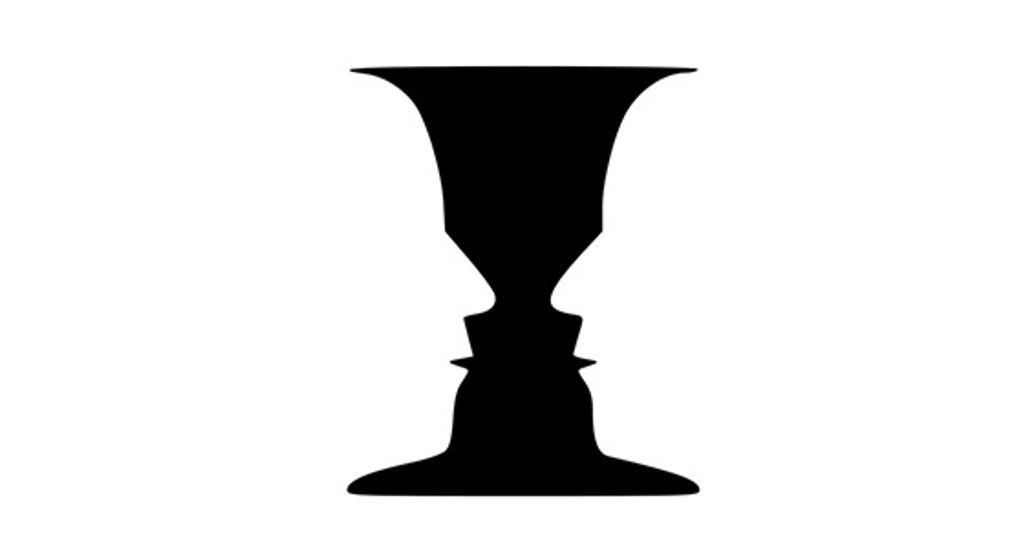
A classic illustration of this is the image of a Rubin vase (have a look at the image above). This tends to be a black vase that is set centrally over a square white background. The symmetrical vase has a large, trumpet-funnel top that takes up nearly the full width of the background’s top and tapers down into a narrow middle. Down the middle, it has five contours and four projections before it flares out again to cover most of the width of the bottom.

You’ve probably seen such a vase and know what’s coming next. Yes, that’s right! The vase has “made” two white faces facing each other, not through it but set against what our eyes now perceive as being black space behind them. It’s a neat trick!

Ambiguous – In an ambiguous design, there is little distinction between the ground and the figure. At any point, a single element might be both figure and ground at the same time. You can make your design ambiguous by blurring the boundaries between your ground and figure.

It sounds difficult, but it’s a fascinating realm to explore, and there are many famous examples of ambiguous design. M.C. Escher – a Dutch graphic artist - was a master at this. His designs tapped ambiguity to the maximum and, thanks to that, we have wonderful pictures of people climbing steps in buildings: some are going up; some are going down, but at impossible angles. Escher used ambiguity to make waterfalls flow around more buildings in an impossible way – the water initially flows downward, falling in places, follows a seemingly logical course, and then, mysteriously, flows up again. Ambiguous designs are yours for the taking of your inspiration, whether you want to insert hidden writing, faces in profile that are also a single, different face, or faces made of fruity parts.

Designing with the Figure/Ground in Mind

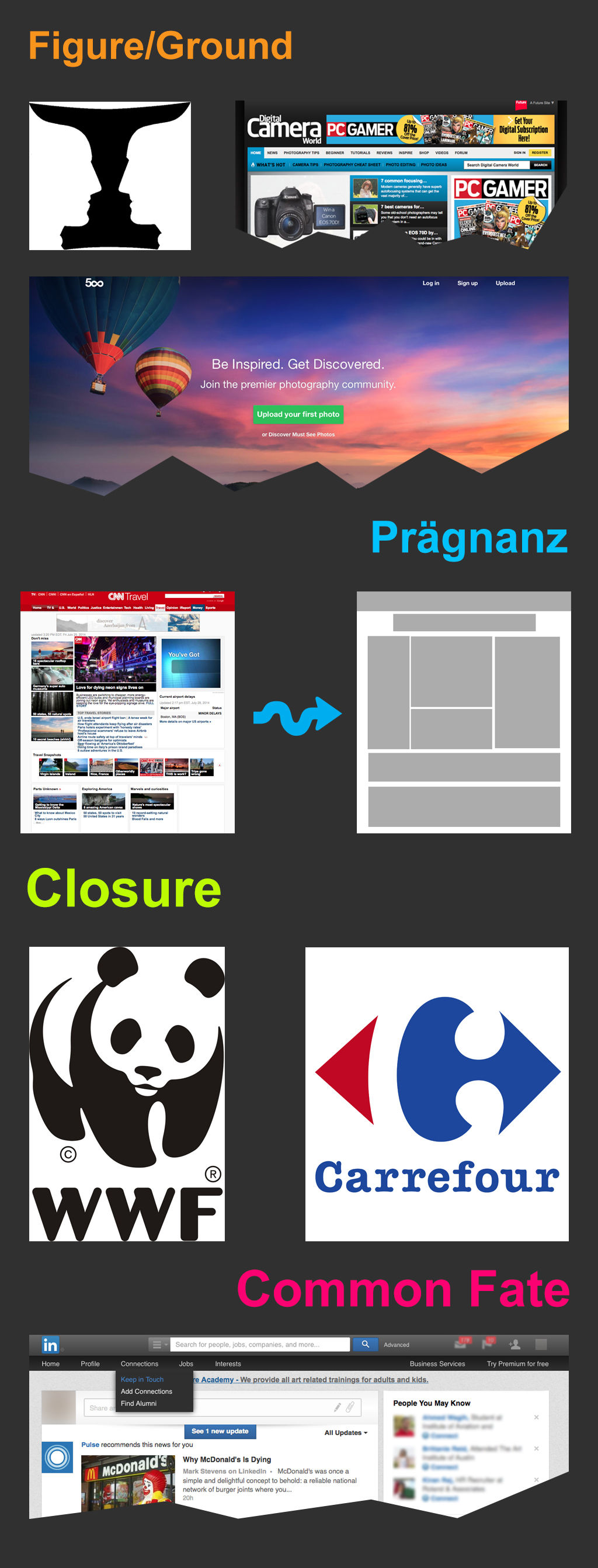
In the image at the start of this article, the Digital Camera World website menu uses the Figure/Ground principle to differentiate between two menus (see the top sections of the image). The use of drop shadow and color creates the illusion of the (lower) blue menu being on a top layer, while the white menu remains part of the background.

You can also see figure/ground at work on the 500px.com website’s homepage (as shown above). The background is a large and dominant image – people in the hot air balloon rides enjoying the majestic sunset sky - but the content is clearly identifiable, thanks to the use of both space and contrast with the background. This stops the background from overwhelming the content and distracting or confusing a visitor, who is probably joining in with the people to take in the sunset view. Cleverly “bulls-eyed” in the sky and tapering up next to the hot air balloons is the text – the all-important message.

The Law of Prägnanz (or Simplicity)

Prägnanz is a German word that means “good figure” or “pithiness” (literally defined as, “brief, forceful and meaningful in expression”). The human eye likes to find simplicity and order in complex shapes – it prevents us from being overwhelmed by information overload.

Author/Copyright holder: Clint. Copyright terms and licence: CC BY 2.0

When we see convoluted shapes in a design, the eye simplifies these by transforming them into a single, unified shape (by removing extraneous detail from these shapes).

Designing with the Law of Prägnanz in Mind – We can use the law of Prägnanz to help when wireframing a website. Our eyes assemble the content blocks into a single page.

This law goes by the other name of “The Law of Good Gestalt”, and for good reason. We humans like to make quick sense of things that would otherwise be upsettingly disordered. We dislike flux and need to find meaning quickly. Luckily, we don’t even have to think about doing this – our eyes have already got there!

When redesigning a site, you can apply Prägnanz law to wireframe the new concept and place it alongside the current version of a page. The eye can swiftly pick out any variances, and the user can quickly provide feedback on changes made – without the need for content. That’s all there is to it.

The Law of Closure

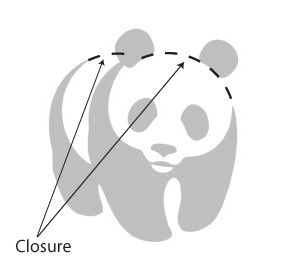
The Gestalt principle or law of Closure explains how we perceive incomplete shapes (Palmer & Rock, 1994). When there is missing information in an image, the eye ignores the missing information and fills in the gaps with lines, color or patterns from the surrounding area to complete the image. In reality, there are no borders or lines between this area (the background) outside the image we’re completing and the bits of background that we have determined are now part of the image. The eye tells us otherwise.

Author/Copyright holder: Tangient LL. Copyright terms and licence: CC BY-SA 3.0

Designing with the Law of Closure in Mind – We can use the Law of Closure to achieve visual effects such as the use in the World Wildlife Fund logo (pictured at the top of this article). The panda is incomplete (there are no lines around the white areas), but our eyes perceive a whole panda despite this. It takes some effort to overcome and notice the otherwise random black shapes and spots that appear on every piece of white background we can eventually make ourselves see.

The Law of Common Fate

The law of Common Fate says that we perceive shapes as lines moving along the smoothest path. For example, we look at grouped elements and see them as moving in a similar direction.

Author/Copyright holder: Alastair Rae. Copyright terms and licence: CC BY-SA 2.0

Let’s see this in action. If you’ve got a piece of paper handy, draw seven or eight circles in a line beside each other. Above two of them, put a little arrowhead. Now, notice that these two circles are different from the others, but in the same way. The others are staying put, but the “arrowheaded” circles are going somewhere (the same direction); they share a common fate.

Note: The elements do not have to be moving (though they can be), but they must suggest motion for this law to work in your designs.

Designing with the Law of Common Fate in Mind - The law of Common Fate plays an important role in design, for example, with nested menus and content. Take the example of LinkedIn (as shown in the image up there at the start). LinkedIn have used the law of common fate to build a relationship between sub-menus. When you move over a menu item, the sub-menu item moves in the same direction as the last. This creates a link between sub-menus in the minds of the users.

The Take Away

The principles of perceptual organization defined by Gestalt Psychology provide us with valuable knowledge so we can design effective, efficient, and visually pleasing displays. Throughout three articles, we have reviewed the most relevant for you as a designer:

And, in this article, you have learned about the laws of Figure/Ground, Prägnanz, Closure, and Common Fate. As we have seen, we have many exciting ways to reach our users with designs. Are you ready to apply them?

Where to Learn More

We can’t help but to invite you, once again, to enroll in our Gestalt Psychology Course! Check its description here.

Besides learning about the Gestalt principles and how they relate to design, you will also take away some of the best resources currently available and a consolidated list of recommended reading materials, videos, and useful links to relieve you of the task of trawling the internet, searching for that vital piece of information.

In addition to this, we have a course on Visual Perception and Design
which is particularly relevant to this law.

Feel Stuck?
Want Better Job Options?

AI is replacing jobs everywhere, yet design jobs are booming with a projected 45% job growth. With design skills, you can create products and services people love. More love means more impact and greater salary potential.

At IxDF, we help you from your first course to your next job, all in one place.

See How Design Skills Turn Into Job Options
Privacy Settings
By using this site, you accept our Cookie Policy and Terms of Use.
Customize
Accept all

Be the One Who Inspires

People remember who shares great ideas.

Share on:

Academic Credibility — On Autopilot

Don't waste time googling citation formats. Just copy, paste and look legit in seconds.