The Law of Uniform Connectedness

Your constantly-updated definition of the Law of Uniform Connectedness and collection of videos and articles.
Be a conversation starter: Share this page and inspire others!

98 Shares

What is the Law of Uniform Connectedness?

The law of uniform connectedness is a fundamental Gestalt principle. It states that people see visually connected elements or ones with common characteristics to belong to the same group or unit. Humans perceive elements that share visual cues as being more related than elements without them. Designers use this law to create a sense of cohesion, organization and hierarchy. 

In this video, Author, Designer and Educator, Mia Cinelli explains the importance of Gestalt principles in visual design and introduces a few of them.  

Transcript
  

How to Connect to the Law of Uniform Connectedness

The Gestalt principles—otherwise known as Gestalt laws—suggest how people perceive visual objects and visual elements. These elements include lines or curves, and focal points. They are vital ingredients for visual designers to cue viewers and users so that they can see items in certain ways.  

The Gestalt school of psychology consisted of psychologists Max Wertheimer, Kurt Koffka and Wolfgang Köhler in Germany in the 1920s. The Gestalt approach was to develop visual perception theories, such as the law of prägnanz (or good figure), figure-ground and closed region. The centermost idea in Gestalt psychology is that an image is more than the sum of its parts, and people tend to group individual elements into meaningful patterns.  

Uniform connectedness refers to the visual connection that designers make between elements through attributes such as color, lines, frames or other means. This Gestalt principle is all about the tendency that humans have to organize and make sense of visual information by grouping related elements like this. The Gestalt school of thought states that people tend to perceive patterns with five main laws or principles. These five are the principle of proximity, principle of similarity, principle of continuity, principle of closure, and principle of uniform connectedness.   
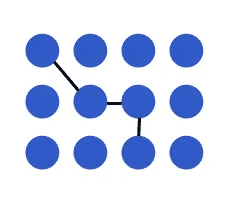
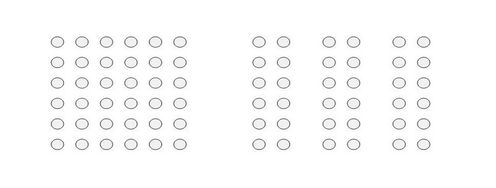
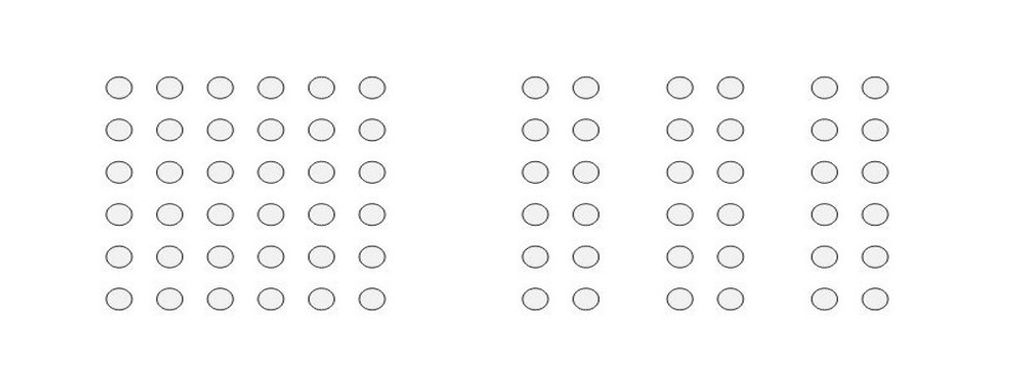
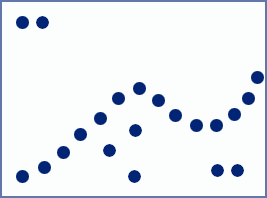
Illustration showing the law of uniform connectedness in dots.

Four of these dots are connected—an instant association the mind makes.

© Kathryncodonnell, Fair Use

In the principle of uniform connectedness, when elements are visually linked or connected, human brains automatically group them together. The mind does this even if the design elements in view are not physically touching or spatially close. This grouping helps people make sense of complex visuals by organizing information into meaningful units. It’s an innately essential human skill and a powerful design tool. 

Since its “discovery,” the principle of uniform connectedness has long been a staple in graphic design. For example, logo design is a prime opportunity to apply uniform connectedness principles to create a unified and memorable brand identity.  

What is the Connection between Uniform Connectedness and Digital Design?

Design principles play a crucial role in creating visually appealing and user-friendly interface designs. The law of uniform connectedness—sometimes called unified connectedness ​​is a fundamental design tool in user experience (UX) design and particularly user interface (UI) design. Overall, it plays on the fact that the human brain naturally seeks patterns and connections in the information it receives. Designers of digital products can use it to create visually cohesive and organized interfaces that are intuitive for users to navigate.  

Uniform connectedness performs several important ​functions​​ in UX and UI design. These happen in the various ways designs include the principle, according to: 

1. Visual Connections and Grouping​

When interactive designers group related elements together and separate unrelated elements, they can establish a clear visual hierarchy. This can guide users' attention and make it easier for them to understand relationships between different elements. 

Designers can create visual connections between related elements by utilizing consistent visual cues. These include color, line styles, shapes and patterns. Designers use the principle to maintain consistency in typography, iconography, button styles and other visual elements throughout the design. 

Designers apply these visual cues consistently across the design to establish a clear visual language and facilitate the grouping of related elements. For example, in a messaging app, it’s good to use consistent iconography and color schemes for different types of messages (such as text, images or voice notes). This is a factor that helps users quickly distinguish between different types of messages and understand their content. 

Another example is in an e-commerce website, designers can connect product listings visually by using a common color scheme or background. This helps users perceive the products as belonging to the same category or group. That makes it easier for them to browse and compare options. 

Screenshot from Amazon.com showing selection of screws.

The choice of screws is immense, and organized well here.

© Amazon, Fair Use

​​2. Boundary and Enclosure

When designers create boundaries or enclosures around related elements, they can further reinforce the perception of a group. When they enclose elements within a common frame, box or background, designers can visually connect them and signal their relationship to the users of a product or service. 

For instance, in a task management app, designers can group tasks that belong to the same project together—they enclose them within a colored box or use a distinct background color. When they do this, it helps users quickly identify the tasks that are associated with a specific project and understand their overall progress. 
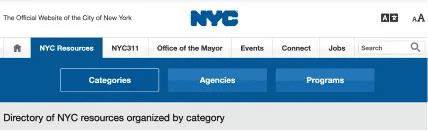
Screenshot from the Official Website of the City of New York.

This tabbed navigation shows the selected tab connected to its pertinent content. It is distinct from the other tabs, which are closed off.

© NYC.gov, Fair Use

​​3. Visual Contrast and Emphasis​

When designers create the right visual contrast and emphasize specific elements, they can highlight the importance of these and draw users' attention. This is especially important to isolate important interactive elements on a web page, such as calls-to-action. When designers make visually connected elements stand out from the rest, they can reinforce their relationship and how important these are within the design. 

For example, in a navigation menu, if a designer uses a different color or style for the currently active page or section, it helps users understand their current location within that website or app. This convenience is something that puts efficiency and ease of use forward as important factors. When elements are visually connected, users can spot the relationships these have—quickly. This reduces cognitive load and enables users to make informed decisions or take desired actions more efficiently. 
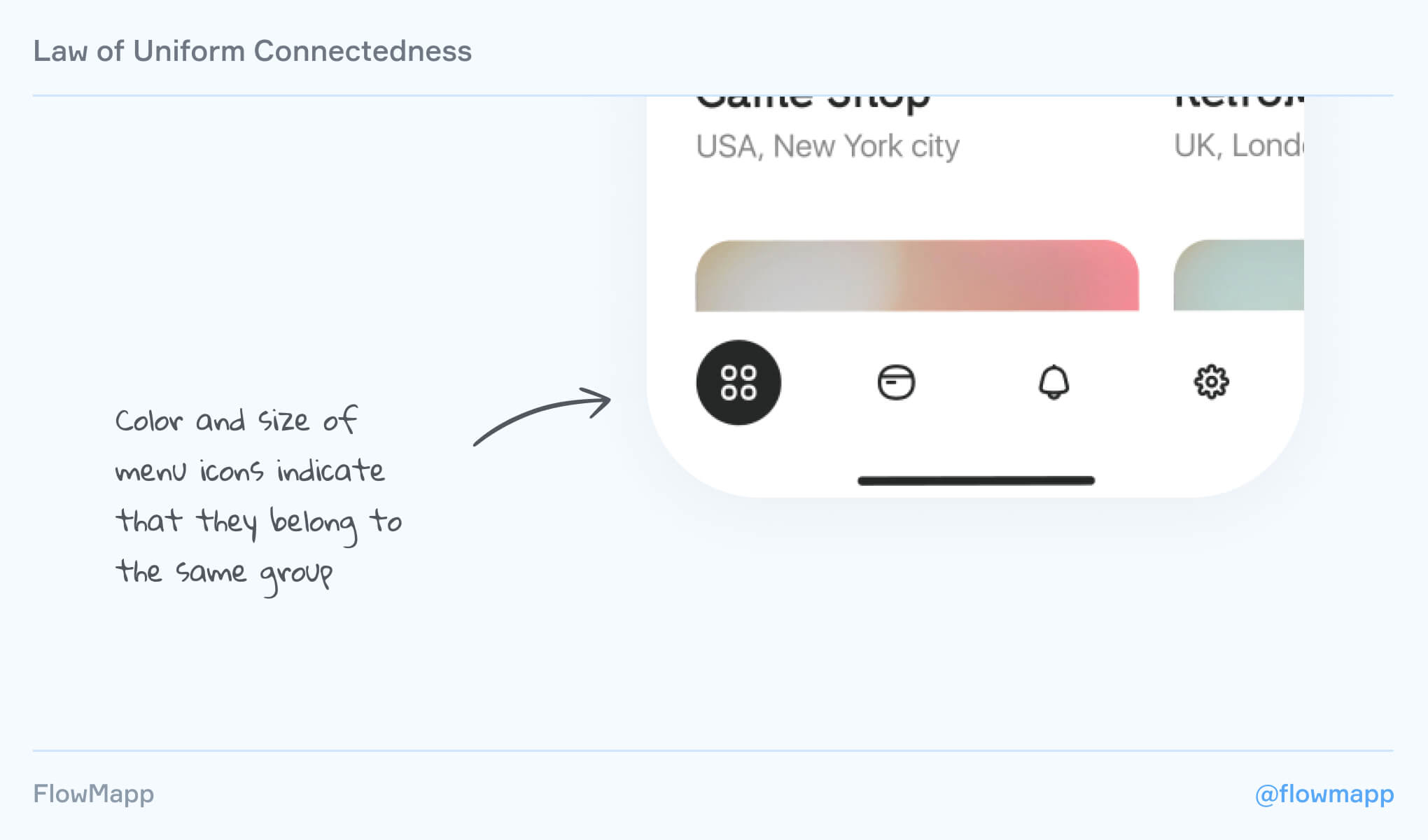
Image illustrating how the law of uniform connectedness works.

Leverage size and color in icons to show they’re connected.

© FlowMapp, Fair Use

​​4. Overall Aesthetics​

The law of uniform connectedness also contributes to the overall aesthetics and visual appeal of a design. As designers work to leverage visual connections between elements, they can create a real sense of harmony and balance. This sense can give a boost to the overall user experience of a product design. It can make the design more engaging and memorable—even if it’s not necessarily the most useful design. This phenomenon is called the aesthetic usability effect. 
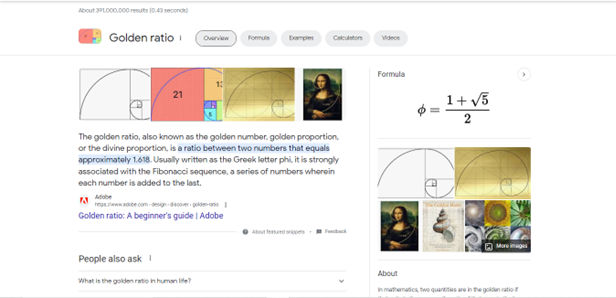
Screenshot of Google search results showing uniform connectedness at work.

Google’s search results shows the Law of Uniform Connectedness at work. Borders enclose particular items like featured snippets, helping establish a visual connection with the content while also separating it by prioritizing it more.

© Google, Fair Use

Examples of the Law of Uniform Connectedness in UX Design

To further illustrate the law of uniform connectedness, ​here are some ​other major real-world examples​​: 

1. ​​Google's Material Design​

Google's Material Design follows the principle of uniform connectedness. It features consistent visual cues and styling throughout its design system. As it uses common color schemes, typography and iconography, Google creates a cohesive and visually connected user interface across its products. This is something that makes it easier for users to navigate and interact with different apps and services. 
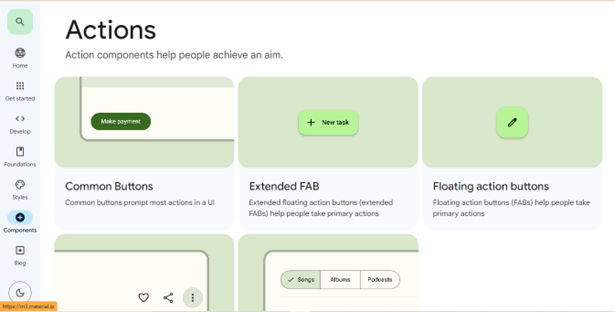
Image showing Google's Material Design's Actions screen.

Google’s Material Design features a compelling way to communicate with users in design.

© Google, Fair Use

​​2. Airbnb's Search Results​

Airbnb's search results page demonstrates the law of uniform connectedness—in its grouping of similar listings together. As it uses consistent visual cues—such as color, typography and layout—Airbnb creates a clear visual hierarchy. It lets users browse and compare listings effectively. Users can easily spot the price, location, as well as other key details of each listing. This is a factor that can make their decision-making process a good deal more efficient. 
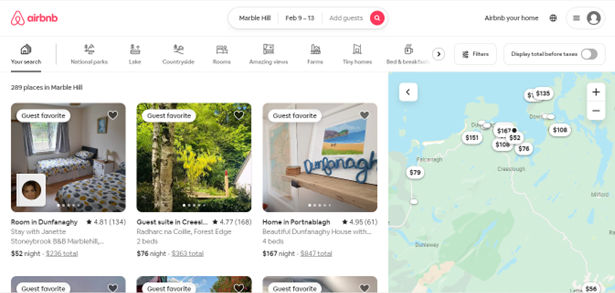
Screenshot from Airbnb web page.

Airbnb helps users browse and compare listings effectively through consistent use of visual cues.

© Airbnb, Fair Use

How to Apply the Law of Uniform Connectedness: Tips and Best Practices

To effectively apply the law of uniform connectedness in UX design, consider the following best practices and tips:​ 

1. Conduct User Research​

It’s vital to know the target audience, including their needs, pain points and other aspects that have a bearing on the problem and a potential solution. Designers should get to know a wide range of attributes and use tools such as user personas, user flows and customer journey maps to make the best of the UI and UX design work they’ll produce. Questions to ask include these: What are the user interactions like for each task they must take towards completing their goal? Only through envisioning and accounting for these considerations can designers iterate towards truly user-centered designs. 

Watch this video to understand user research’s bearing on how an interface can communicate best with a target audience. 

Transcript
  

2. Group Related Elements​

Visually connect elements through color, lines or other visual cues to create a sense of unity and coherence within the interface. This helps users perceive related information as a single entity—and then users will find it easier to process and understand. 

For example, in a task management application, designers can group tasks with similar due dates by using the same color. Or they can place them within a visually connected container. This visually communicates their relationship and helps users quickly identify and manage tasks based on their due dates. 
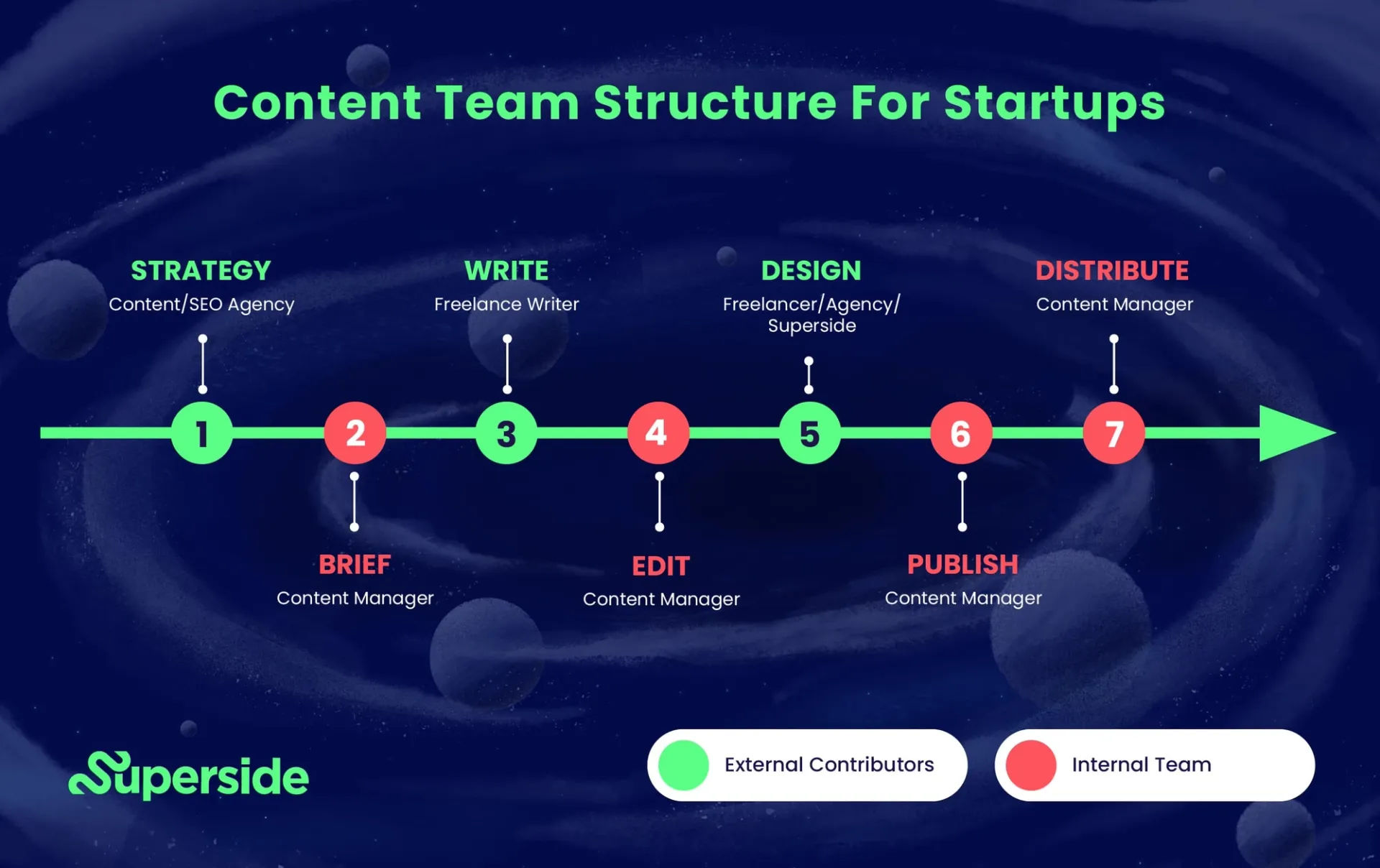
Image showing a work process on a screen.

Superside’s application of uniform connectedness clearly shows the process and connects the tasks between two distinct groups.

© Superside, Fair Use

​​3. Maintain Consistency​

Use consistent visual cues—like color, typography and iconography—throughout the design to establish a clear visual language and bring about the perception of connectedness. It’s vital to use consistent visual cues throughout the interface—such as color, shape, size, line weight and spacing. 

4. Create Strong Visual Hierarchy​

When designers apply visual connections to specific elements, they give their users a handy tool—they guide users' attention and emphasize important information. 

For instance, in a pricing page, a designer can use uniform connectedness as a way to highlight pricing tiers that are different. As they visually connect the pricing tier name, features and pricing details, they can make a clear hierarchy. ​This​ will draw users' attention to the information that’s most relevant. 
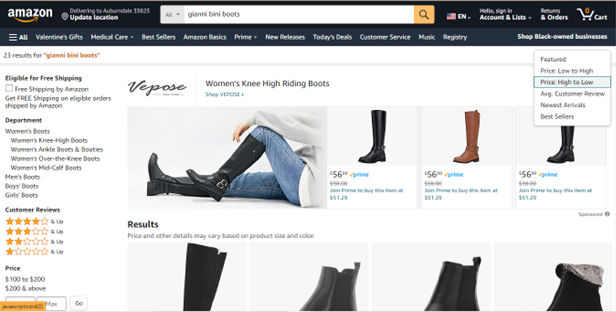
Screenshot from Amazon.com showing selection of women's fashion boots.

Amazon employs a clear hierarchy for helping users choose according to pricing order, featured items and more.

© Amazon, Fair Use

5. ​​Enhance Navigation and Wayfinding​

When designers visually connect navigation elements, such as links or buttons, they can create a seamless and intuitive navigation experience. 

For example, in a website navigation menu, a designer can use consistent visual cues like color or underline to connect each item’s active and hover states. This helps users understand their current location within the website—plus, easily navigate to different sections. 
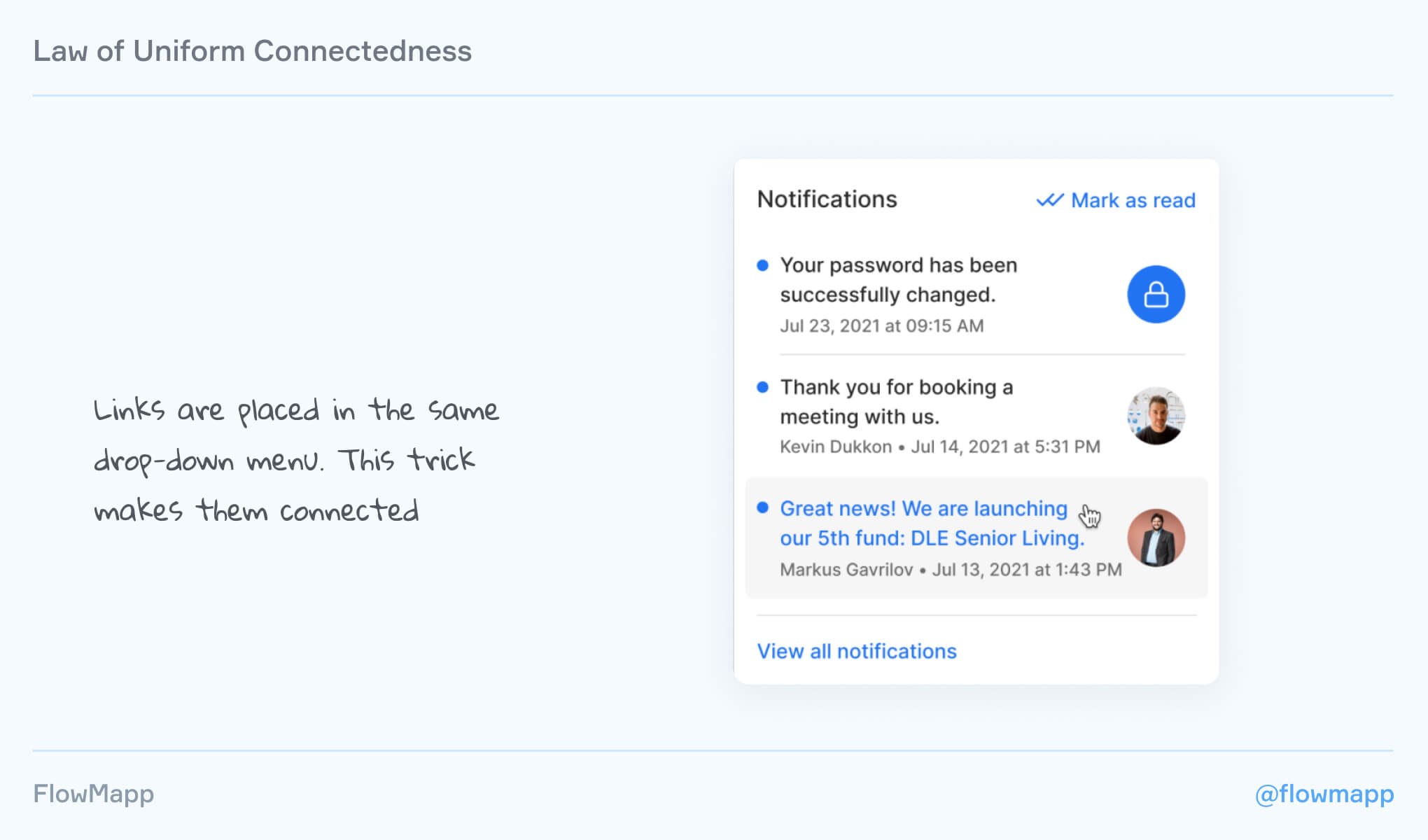
Image illustrating how uniform connectedness with links.

Use links in, for example, a dropdown to give users their notifications with great convenience.

© Fintory, Fair Use

6. Maximize Responsive Design​

When designing for different screen sizes and devices, it’s important to think about the effect that changes in scale may have on the visual connections. So, be sure that the connections remain clear and meaningful across various devices and orientations. 

7. Remember Accessibility​

It’s important to make sure that the visual connections and cues in the design are accessible to all users—that includes those with visual impairments. Use proper color contrast and provide alternative text for visual elements. Accessibility is a great—and in many cases, mandatory—consideration. 

8. Collaborate with Developers​

Work closely with developers to ensure that the visual connections and cues get implemented consistently across different devices and platforms. 

9. Use Other Design Principles​

For example, leverage the Gestalt law of proximity and negative space or white space to improve the information architecture and layout in general. 
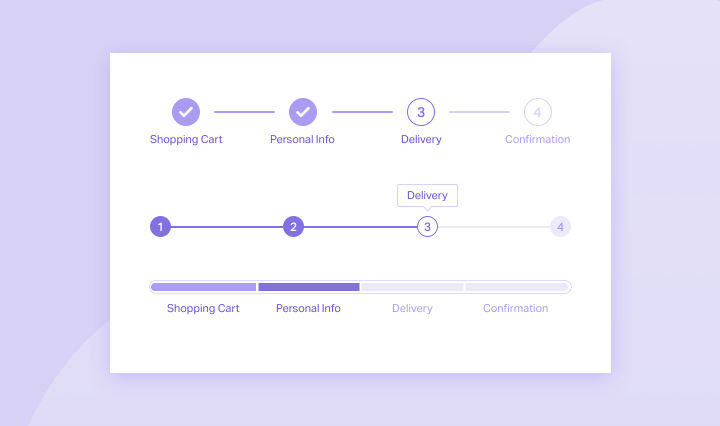
Image showing uniform connectedness at work in a progress stepper.

Uniform connectedness works with the white space around it in this progress stepper for an onboarding or checkout flow.

© Dean Issacharoff, Fair Use

​​10. Test and Iterate​

Conduct user testing and gather feedback to evaluate the effectiveness of the visual connections in the design. Iterate and refine the design based on user insights to enhance the user experience. Usability testing is the engine that will power the needed changes with vital user insights as fuel for ideas. 

​Law of Uniform Connectedness​: Risks​ in Design

While the law of uniform connectedness can greatly enhance the user experience, designers should also be aware of potential risks and considerations, and should not: 

  1. ​​Over-rely on Visual Connections: ​If designers rely​​​ too heavily on visual connections​,​ without considering other design principles and user needs, it can result in a visually overwhelming or confusing design. Balance visual connections with other design considerations to create a holistic and user-centered experience. 

  1. ​​Disregard​ Cultural and Contextual Factors: Visual connections may vary across cultures and contexts. Indeed, what users may perceive as being connected in one culture mightn’t be the case for users in another culture. That’s why it’s vital to consider the target audience's cultural background and contextual factors first before using this Gestalt law. 

Overall, the law of uniform connectedness is an asset and can enhance the user experience of a digital product or service. As with the other Gestalt laws or principles, it takes careful consideration and application to leverage well and in a way that will cause users to engage more with a design, naturally. 

Questions About Law of Uniform Connectedness?
We've Got Answers!

How can the Gestalt Law of Uniform Connectedness contribute to accessibility in design?

The Gestalt law of uniform connectedness plays a crucial role to enhance accessibility in design by guiding users through visual design elements that they perceive as connected and part of the same group. This principle simplifies user interfaces by visually linking related elements, such as buttons or navigation links. That makes it easier for all users, especially those with some visual or cognitive impairments, to navigate and understand content.  

Designers use consistent visual cues like color, lines or shapes to group related items and to reduce cognitive load and improve the usability of digital environments. As they focus on visual connectedness, designers ensure that they present information in a way that is intuitive and accessible. That’s key to making digital content more inclusive for a diverse range of users. This approach doesn’t just follow accessibility guidelines; it aligns with inclusive design principles, too—so making technology accessible and usable for everyone. 

Understand the wide range of implications for accessible design in this video: 

Transcript
 

What are common mistakes when applying the Gestalt law of uniform connectedness in design?

To make designs easier to understand, designers need to avoid some common mistakes with the uniform connectedness principle—and here are five simple guidelines: 

  • Keep it simple: Designers shouldn’t clutter their designs. Using visual design connections like lines or colors can show which elements are related, but it's important not to overdo it​​. 

  • Be consistent: Designers must use the same visual cues throughout their designs. This consistency helps people easily navigate the design and understand what to expect​​. 

  • Use other rules too: Incorporate other design principles alongside the law of uniform connectedness to give a design more of a boost. Strategies like grouping similar items or effectively using empty space can make content that much clearer​​​​. 

  • Highlight what's most important: Designers should use visual cues to give a real emphasis to the main parts of their design. This approach directs users to the important information or actions first​​. 

  • Consider user expectations: Designs should match what people are used to seeing. By meeting these expectations, it makes the design more usable and enjoyable.

What are the best practices for using the Gestalt law of uniform connectedness in mobile app design?

Here are some best practices for designers and design teams: 

  • Apply effective visual grouping: Designers should group similar functions together using visual elements—like colors, lines, frames or shapes. This helps users see these elements as being part of a single unit, something that simplifies navigation and interaction within the app​​​​. 

  • Create clear connections: It’s good to use tangible references—such as lines or arrows from one element to another—since it can also create a visual connection. This method can guide users through a sequence of actions, or it can draw their attention to related elements​​. 

  • Go for context and emphasis: Use uniform connectedness to give context or to add emphasis to the relationship between items. For example, it’s good to surround related options with a border, since it can indicate that they share a common function or importance—which makes it easier for users to make decisions​​. 

  • Separate and prioritize: Similar to Google’s search results—where borders around specific items like videos and featured snippets visually connect content and give it priority—app designers can use borders or backgrounds to highlight important features or content. This visual separation is something that can help users focus on key information or actions​​. 

Remember, the goal is to use visual connections to make the app more navigable and the information more digestible. From grouping elements that function together and clearly indicating their relationships, you can make a more coherent and user-friendly mobile app.  

Take our Mobile UI Design course for a fuller understanding of how to design for mobile devices and make good design decisions for smaller screens. 

What role does the Gestalt law of uniform connectedness play in typography?

The Gestalt law of uniform connectedness is one of the principles that helps make a coherent feel and boosts the readability of text. 

For example, designers can apply this principle when they use consistent styling for headings, subheadings and body text—to make a visual connection between related content. This doesn’t just help in guiding the reader's attention effectively; it’s helpful for making the text more accessible and easier to navigate, too. Designers can also apply uniform connectedness as they work to organize different sections of content—and that includes sidebars or navigation menus. Designers visually distinguish them from the main content area when they use color, lines or shapes in a consistent way. 

What’s more, typography involves arranging type in a way that makes text legible, readable and appealing when it shows up for users. The Gestalt principle of uniform connectedness helps with this as it makes sure that the design of text elements follows a cohesive pattern. Plus, it makes the overall appearance of the text harmonious and integrated. This principle can greatly affect how users process and perceive information. It can potentially influence the reader's understanding and interpretation of the content. 

Watch author, educator and designer Mia Cinelli explain how a Gestalt principle applies to typography: 

Transcript
 

How does the Gestalt law of uniform connectedness interact with the law of continuity in design?

In design, two principles called the Gestalt laws of uniform connectedness and continuation help make things clear and easy to use. Uniform connectedness tells users that when design parts are connected visually, like with lines or shapes, they see them as one group. This helps designers show which parts of a design are related, making it quicker for users to understand how things fit together​​​​. 

Continuation, however, is about how people's eyes like to follow paths or lines that connect different parts of a design. This makes looking at a design feel smooth and guides people through it in a way that makes sense​​. 

If ​designers​ use these rules together, ​they​ can make designs that not only look good but are also simple to get around. They might group buttons that do similar things, showing they're connected​, which​​ guide users on what to do next. This approach not only makes it clear how things are related but also helps people move through a design easily, making for a better experience​​​​​​. 

Take our Gestalt Psychology and Web Design: The Ultimate Guide course to see how Gestalt laws help in creating user experiences that shine in the final product. 

Are there any tools or software that can help apply the law of uniform connectedness in design projects?

There are tools and software that can make it easier to use the law of uniform connectedness in design projects—here are some of them: 

  • Adobe Photoshop, Illustrator, and Sketch: These let designers play with colors, shapes, and patterns to make design elements look like they're part of the same group. 

  • Adobe XD, Figma, and Axure RP: Perfect for web and app design, these tools help keep designs consistent, making everything from buttons to menus feel connected. 

  • InVision and Marvel App: These are great for showing off designs with interactive prototypes that follow the law of uniform connectedness, making it clear how everything works together. 

With these tools, designers can make sure designs feel unified—which makes them easier for users to understand and enjoy. 

​​​Watch this Master Class to consider tools in the UX realm: How to Build Your UX Toolbox with Susan Weinschenk and Guthrie Weinschenk

How should designers consider cultural context when applying the law of uniform connectedness in UI/UX design?

Designers must pay careful attention to cultural context when they apply the law of uniform connectedness in UI design. Here's how to consider cultural context:  

  • Understand cultural symbols and colors: Different cultures interpret symbols and colors in various ways. A color or shape may well suggest connectivity and harmony in one culture, but in another it might have negative connotations. Designers should research and understand these cultural nuances so they can be sure their designs get the intended message across universally or are adapted appropriately for specific cultural contexts.  

  • Consider cultural preferences for layout and design: Cultural context influences how users interact with and perceive information on a screen. For instance, the direction in which users read text—left-to-right, right-to-left, or top-to-bottom—can have a large effect on how elements should be connected visually to maintain a logical flow. Designers should work considerations about cultural preferences into the design process, so they can make sure they achieve connectedness in a way that feels intuitive to the target audience.  

  • Adapt to local user behaviors and expectations: User behaviors and expectations can vary widely across cultures—and they can have an influence on how elements should appear grouped or connected in a UI/UX design. What users consider intuitive or obvious in one culture mightn’t be so in another. So, it’s vital to conduct user research within the target culture. It can give up insights into how to apply the principle of uniform connectedness effectively. 

 Watch our video on how to design with cultural considerations in mind: 

Copyright
Transcript
 

How does the law of uniform connectedness influence the design of mobile navigation patterns?

The law of uniform connectedness has a great impact on the design of mobile navigation patterns—as it guides users through the visual grouping of related items, and makes navigation both intuitive and efficient. Here's how it plays out in mobile UI/UX design: 

Visual grouping of navigation elements: Designers use this law to visually group navigation elements—such as buttons or links—namely by placing them close together or by using consistent styling. This visual connection helps users understand that these elements do serve a similar function—and so making it easier to navigate through the app. 

Hierarchy and organization: When they apply uniform styles to elements within the same hierarchy level, designers can clarify the structure of their app's navigation. For example, designers might highlight primary navigation options through the use of a distinct color or shape. Meanwhile, they might group secondary options together using a different style. When they do this, it helps users understand the navigation pattern at a glance. 

Consistent navigation bars and menus: Uniform connectedness can help design consistent navigation bars and menus across different screens within a mobile app. This consistency helps users quickly learn the navigation pattern. That’s a factor that can reduce cognitive load and give the overall user experience a boost. 

Enhanced user flow: From visually connecting related navigation elements, designers can guide their users through a desired action or path. That’s a factor that can enhance the flow of interaction within the app. This approach can lead to increased levels of engagement and a smoother user experience overall. 

Watch this video to learn more about UI design patterns: 

Transcript
 

What are some highly regarded books about the Gestalt law of common fate?
  1. Malone, E. (2023). A Guide to Gestalt Principles for UX Designers: A mini visual design guide to help user experience designers leverage gestalt principles for better designs. 8 paw press. 

This book offers a concise exploration of Gestalt principles in UX design. Erin Malone provides a practical guide—and these principles to digital interfaces with a focus on mobile and web examples. The book delves into visual hierarchy, animation, and microinteractions. It aims to help readers improve design skills. It includes downloadable templates for design documentation, too. This makes it a hands-on resource for UX designers.  

  1. Johnson, J. (2020). Designing with the Mind in Mind: Simple Guide to Understanding User Interface Design Guidelines 3rd Edition. Morgan Kaufmann. 

Designing with the Mind in Mind by Jeff Johnson offers user interface (UI) designers a solid foundation in cognitive psychology—something that’s essential for them to understand the rationale behind UI design guidelines. Initially grounded in cognitive psychology, early HCI principles aimed to optimize problem-solving, memory, and language in interfaces. However, as the field has diversified, practitioners often come from varied backgrounds—not all deeply versed in cognitive psychology. This book empowers designers with the science behind design rules, facilitating educated choices amid project constraints and enhancing the ability to justify design decisions. It includes Gestalt laws. The updated edition expands on topics such as persuasion, cognitive economics, emotional design, trust, habit formation, and speech interfaces, making it a vital resource for contemporary UI design. 

Earn a Gift Earn a Gift, Answer a Short Quiz!

1
2
3
4
1
2
3
4
Question 1
Question 2
Question 3
Get Your Gift
Interaction Design Foundation logo

Question 1

What does the Law of Uniform Connectedness primarily suggest in visual design?

1 point towards your gift

  • Elements that appear similar should be grouped separately.
  • People perceive elements that are visually connected as more related.
  • Web designers should not use colors to connect different elements.
Interaction Design Foundation logo

Question 2

How can the Law of Uniform Connectedness improve user interface design?

1 point towards your gift

  • It can decrease the ease of navigation.
  • It can simplify the information architecture.
  • It can use contrasting designs to connect elements.
Interaction Design Foundation logo

Question 3

In which scenario is the Law of Uniform Connectedness especially effective?

1 point towards your gift

  • When designers create a coherent and easy-to-use menu.
  • When designers prioritize text over visuals.
  • When developers create a complex algorithm.

Learn More About the Law of Uniform Connectedness

Make learning as easy as watching Netflix: Learn more about Law of Uniform Connectedness by taking the online IxDF Course Gestalt Psychology and Web Design: The Ultimate Guide.

Why? Because design skills make you valuable. In any job. Any industry.

In This Course, You'll

  • Get excited when you discover how top brands use Gestalt psychology to make websites and apps intuitive, visually appealing, and user-friendly. Gestalt principles help you create clear layouts and a strong visual hierarchy, so your users never feel confused or overwhelmed. You already use some of these principles instinctively, for example, when you group similar tasks on your to-do list, so mastering Gestalt psychology for web design is easier than you think. You'll get methods to increase engagement and conversions by optimizing CTA placement. The result? More immediate impact: less confusion, more engagement, higher conversions, and happier customers. That leads to higher company profits, better career opportunities, and greater job satisfaction.

  • Make yourself invaluable when you organize visual elements to guide behavior and drive desired outcomes. Whether you're streamlining the layout of a patient portal or designing a retail website that converts, the science behind human perception dramatically improves outcomes across industries. When you apply Gestalt psychology in web design, you're not just creating something visually appealing, you're designing experiences that feel right, reduce overload, and build lasting brand loyalty. This pays off significantly, as studies show that, on average, every dollar invested in UX design brings 100 dollars in return. As AI accelerates how fast you can create and iterate, you stay in demand when you can direct it with deep understanding of human perception. These timeless human-centered design principles transform AI from a tool into your new superpower, helping you design for how people's minds actually work.

  • Gain confidence and credibility as you follow step-by-step guidance to apply real-world Gestalt techniques. It's easier than you think, regardless of your background! You'll get comfortable with Gestalt principles as we walk through case studies and practical examples you can immediately use. When you use principles like the law of proximity, similarity, and closure, you'll guide people's eyes, simplify complex ideas, and ensure your message is clear. With this psychology-driven framework, you'll confidently tackle complex design challenges and create experiences that people love, trust, and recommend.

Get an Industry-Recognized IxDF Course Certificate

Increase your credibility, salary potential and job opportunities by showing credible evidence of your skills.

IxDF Course Certificates set the industry gold standard. Add them to your LinkedIn profile, resumé, and job applications.

Course Certificate Example

Be in distinguished company, alongside industry leaders who train their teams with the IxDF and trust IxDF Course Certificates.

Our clients: IBM, HP, Adobe, GE, Accenture, Allianz, Phillips, Deezer, Capgemin, Mcafee, SAP, Telenor, Cigna, British Parliament, State of New York

All Free IxDF Articles on the Law of Uniform Connectedness

Read full article
Laws of Proximity, Uniform Connectedness, and Continuation – Gestalt Principles (Part 2) - Article hero image
Interaction Design Foundation logo

Laws of Proximity, Uniform Connectedness, and Continuation – Gestalt Principles (Part 2)

In this, the second part of our examining Gestalt principles, we’ll look at another Law – the Law of Proximity. This one is especially useful as it deals with how our eyes and brains draw connections with design images. Of course, connecting is also important to us – that’s what we want to make happ

Social shares
1.1k
Published
Read Article

Laws of Proximity, Uniform Connectedness, and Continuation – Gestalt Principles (Part 2)

Laws of Proximity, Uniform Connectedness, and Continuation – Gestalt Principles (Part 2)

In this, the second part of our examining Gestalt principles, we’ll look at another Law – the Law of Proximity. This one is especially useful as it deals with how our eyes and brains draw connections with design images. Of course, connecting is also important to us – that’s what we want to make happen between our users and our designs!

“The eye tends to build a relationship between elements of the same design,” is a crucial saying to keep in mind. Our brains build connections between disparate design elements based on laws of visual perception. These are influenced by the way in which elements in a design are laid out. The laws that apply are those of proximity, uniform connectedness, and continuation.

This article is a follow-up to the first Gestalt principles article, in which we introduced and discussed the Law of Similarity. There will be a third article to cover the Laws of Figure/Ground, Prägnanz, Closure, and Common Fate. For now, let’s stay near proximity, which (literally!) means closeness in space, time, or relationship.

What Is the Law of Proximity?

The law of proximity describes how the human eye perceives connections between visual elements. Elements that are close to each other are perceived to be related when compared with elements that are separate from each other.

The law of proximity allows us to use whitespace, for example, to build perceived relationships between different elements.

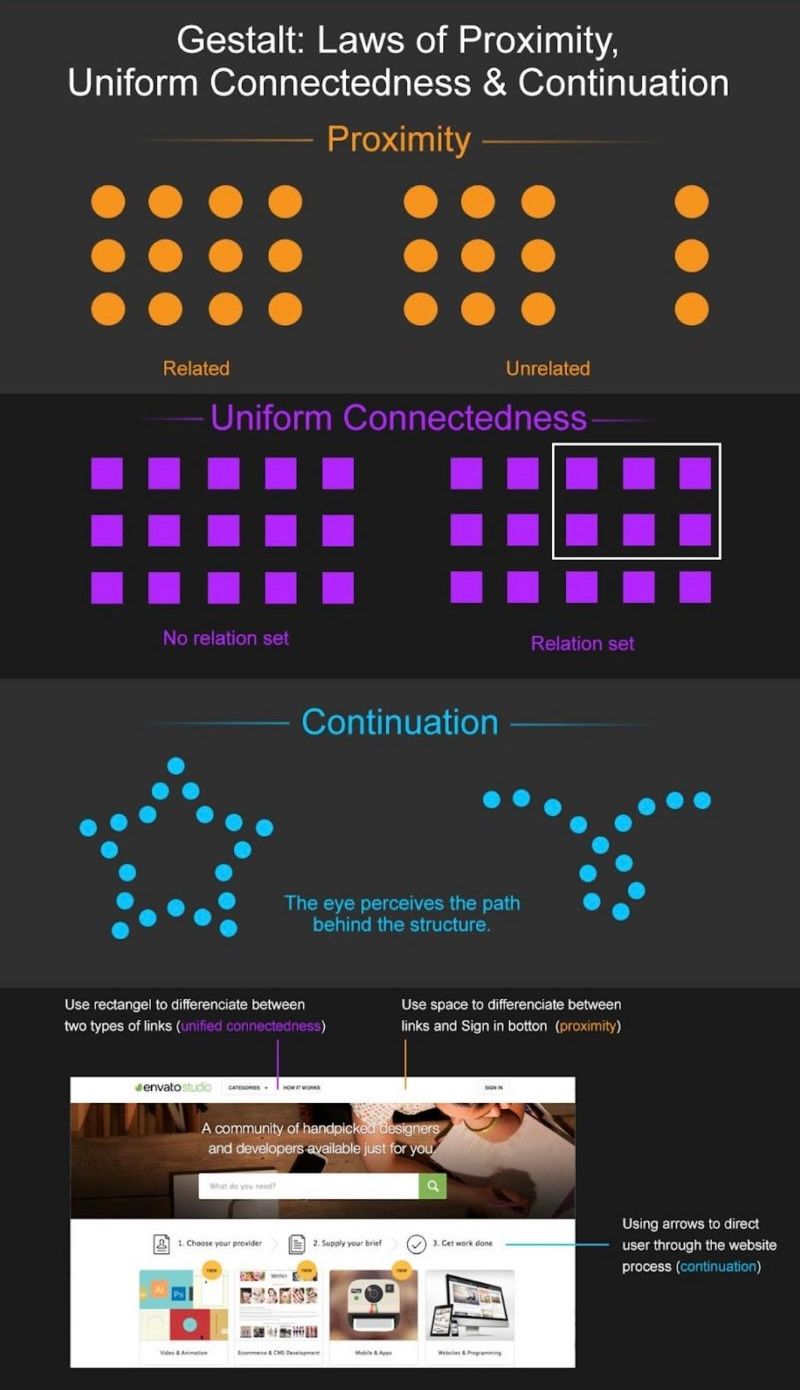
An infographic explaining Gelstalt's laws of proximity, uniform connectedness and continuation

In written material, the law of proximity enables us to make sense of text as a whole. This is also true for paragraph spacing and for more disparate elements of text on a web page. The spacing between blocks of text tells us how likely they are to be related to each other. Pick up any book near you and flick through it. Unless it’s a telephone directory, you’ll notice how the author has (hopefully!) made sensible use of paragraphs to keep text about similar ideas, points, or threads of arguments together. The rule is this: if you change the subject, you’ll need to start a new paragraph.

The law of proximity is very useful for allowing people to group ideas, concepts, etc. – it’s ideal for us to be able to recognize different clusters of items at a glance. However, as designers, we need to be careful about employing the law in our designs. Why? If you group too many items too closely, you’re going to end up with a noisy, crowded layout. The proximity of each item will become so indistinct that your design will lose meaning.

Let’s try a little experiment. If you’ve got a pencil and paper handy, try this: draw 8-10 circles (at scribble speed – there’s no need to spend time on neatness and geometric perfection!), anywhere on the page, using up about a quarter of the total space, but keep them together.

Now, let’s add the same number of triangles, just a little way away from the circles (so that the distance between the two groups is about 3-4 times the distance between each circle). Again, leave room so that there’s still half a page that is blank. Okay, let’s put in some squares now – about the same number in the same amount of space, keeping them close to each other.

For our grand finale, let’s insert some rectangles, maybe 4-5, increasing the size a bit so they’re noticeably different from the squares.... All done? Good job! Now, turn away for a moment and then look back at your page.

Do you see how, although the four groups are sorted or clustered together, the design as a whole is a very busy affair? We can see that looking at this is actually something like work! Making our users work is not what we want.

What Is the Law of Unified Connectedness?

The law of unified connectedness states that elements that are connected to each other using colors, lines, frames, or other shapes are perceived as a single unit when compared with other elements that are not linked in the same manner.

This grouping effect works even when it contradicts other Gestalt principles, such as proximity and similarity. “How can it contradict laws?” you might ask. Well, remember that we’re dealing with the unique combination of the human eye and brain. Without getting into the subject of magic, illusions or tricks (because we don’t want to get off topic), we can see that the human tendency to link or group elements, or focus on like items in a sea of dissimilar objects, is a powerful trait.

Let’s try a quick experiment. If you have another blank page, please take it and try this little sketch. It will take a matter of seconds.

Draw six, rough circles, like the six dots on a pair of dice. Now, draw a line from the top-left corner dot to its comrade dots at its right and below it. For the bottom-right corner dot, connect it to the dot above it and also the bottom left dot. Look away for a moment; then, check out your sketch. You now have two groups of three, linked dots.

Implementing this connectedness in your designs is easy; there are many ways to indicate grouping within a design. Some common examples include:

  • Connecting related links or buttons by adding them to the same drop-down menu.

  • Using the same bullet shapes, colors, or numbering system (such as Roman numerals, Arabic numbers, etc.) on list items to group them with each other.

  • Displaying functions of a similar nature, such as login, sign up, and forgotten password, so that they are related, inside a frame or colored rectangle.

What Is the Law of Continuation?

The law of continuation asserts that the human eye follows lines, curves, or a sequence of shapes in order to determine a relationship between design elements.

The continuation can carry through both positive and negative spaces in designs. Positive space is the space in a design that is made up of the subject – the image we insert. Negative space is the rest of the space around and in between that object’s edges. When we view a design layout, our eyes tend to draw a line that connects different elements.

Have you still got your page? Good! Let’s turn it over and do another quick sketch. First, find three different colors of pencil or pen or highlighter. This will help us understand continuation, and you may probably recognize it right away as something that has struck you several times before.

Using one pen, let’s draw a vertical, broken line – as straight as you can, no ruler needed. Now, let’s take a different color of pen and put a broken wavy line horizontally across it. Then, taking our third color of pen and keeping our eye on the point where they intersect, let’s put a third line, broken (or dotted), across it.

Look away for a moment; then, look back at your sketch. Do you see how, for all three lines, you follow them as they run through the point where they meet? What you don’t see are six segments (three smaller lines of two colors) meeting in the middle. We can immediately see that the items lying on any of these lines are connected. If we were to add something else at the end of one line, we’d notice that this last item would be disconnected or perhaps even sitting outside the overall design.

You don’t have to draw such lines in your design – they may be metaphorical (visually and/or in writing). For example, you could fashion a line through the shape of the content or graphical elements. Or, you could deliver it through numbering steps in a process. Thus, a payment process might use numbered steps to show continuation, or it might use a flow chart with arrows drawn, linking each step. Alternatively, you could use a “funnel” shape to show progress towards the end of the process.

Remember that the human eye is accustomed to marking out pathways and following them. Thankfully, there are traffic laws to keep us right on the road, but our eyes and brains tend to like following lines and routes. That frees people to “go with the flow”, and frees up designers to make use of this nature. That’s also good for keeping our users on track, because we don’t want them straying from what we’d like them to see in our designs.

The Take Away

With your designs, you’re looking to deliver both the most aesthetically appealing and easy-to-use interactive product. The laws of proximity, uniform connectedness, and continuation are tools to improve the usability and interaction from the user’s perspective. While this isn’t necessarily magic, remember that optical illusions exploit some guaranteed human eye-to-brain traits, which is the beauty of understanding Gestalt principles, too.

You can organize related content for clarity using the laws of proximity and continuation. You can also use the unified connectedness law to show a stronger correlation between actions and content. Keeping these in mind, ask yourself which elements of your design you want to group for the user.

Let’s quickly summarize the Gestalt principles we have seen so far:

  • Similarity (also known as Invariance): The human eye tends to build a relationship between similar elements within a design. Similarity can be achieved using basic elements such as shapes, colors, and size.

  • Continuation: The human eye follows the paths, lines, and curves of a design, and prefers to see a continuous flow of visual elements rather than separated objects.

  • Proximity (also known as Emergence): Simple shapes arranged together can create a more complex image.

  • Uniform Connectedness: This Law deals with a “grouping effect”: we perceive elements as connected to each other thanks to colors, lines, frames, or other shapes.

Where to Learn More

Eager to learn even more from Gestalt Psychology? Take our course, “Gestalt Psychology and Web Design: The Ultimate Guide”!

This course will help you to:

  • Understand how the Gestalt laws influence User Experience.

  • Be able to adopt a Gestalt-driven approach to product and web design.

  • Be able to analyze existing product and web designs according to the Gestalt principles of perceptual organization.

  • Have the knowledge necessary to design products and websites that support the quirks, biases and defining features of visual perception.

  • Be equipped with the knowledge necessary to design displays that support visual perception and improve the user experience associated with your websites.

  • Have a deep understanding of human visual perception.

  • Appreciate how the human mind influences what we see and when.

  • Be equipped with an understanding of the Gestalt view of visual perception and the principles of perceptual organization.

References:

Hero Image: Author/Copyright holder: Eumedemito. Copyright terms and licence: Public Domain.

Feel Stuck?
Want Better Job Options?

AI is replacing jobs everywhere, yet design jobs are booming with a projected 45% job growth. With design skills, you can create products and services people love. More love means more impact and greater salary potential.

At IxDF, we help you from your first course to your next job, all in one place.

See How Design Skills Turn Into Job Options
Privacy Settings
By using this site, you accept our Cookie Policy and Terms of Use.
Customize
Accept all

Be the One Who Inspires

People remember who shares great ideas.

Share on:

Academic Credibility — On Autopilot

Don't waste time googling citation formats. Just copy, paste and look legit in seconds.